LUIS is an NLU system that my teams and I have used extensively and is a perfect learning tool to apply the important concepts of intent classification and entity extraction. You can access the system by going to https://luis.ai . Once you log in using a Microsoft account, you will be shown a page describing how to build a LUIS app. This is a good introduction to the different tasks we will be accomplishing in this chapter. Once you are done, click the Create LUIS app button near the bottom. You will be taken to a page with your LUIS applications. Click the Create new app button and enter a name; a LUIS app will be created for you where you can create a new model and train, test, and publish it for use via an API when ready.
In this chapter, we will create a LUIS app that lets us power a Calendar Concierge Bot. The Calendar Concierge Bot will be able to add, edit, and delete appointments; summarize our calendar; and find availability in a day. This task will take us on a tour of the various LUIS features. By the end of the chapter, we will have developed a LUIS app that not only can be used to create a useful bot but can constantly evolve and perform better.
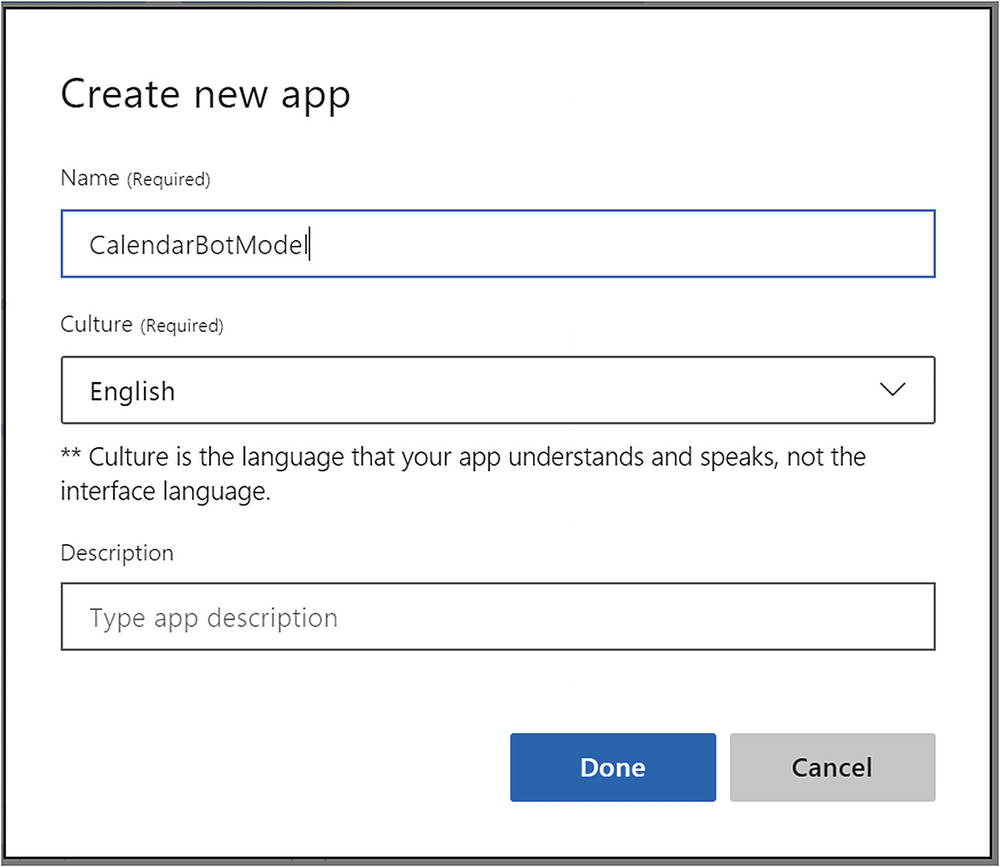
Creating a new LUIS app
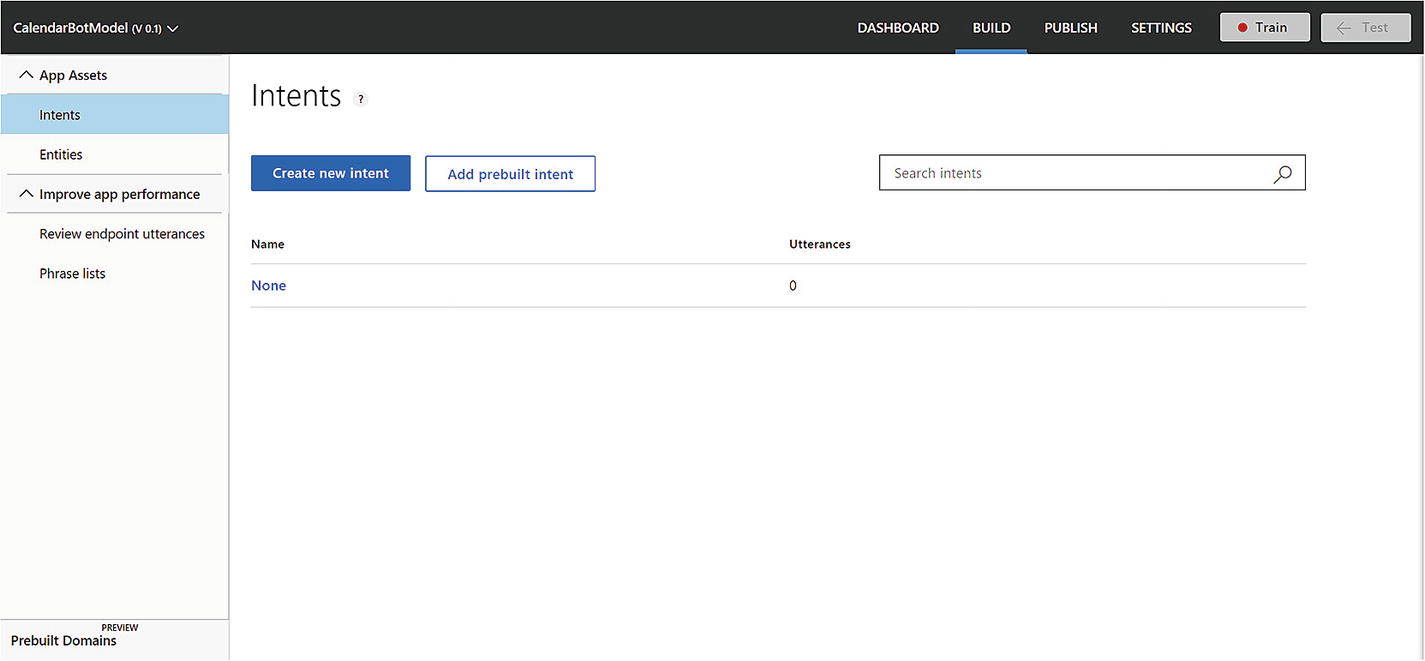
LUIS Build section
Note that as of the time of this writing, a LUIS application is limited to 500 intents, 30 entities, and 50 list entities. When LUIS was first released, the limits were closer to 10 intents and 10 entities. The latest up-to-date numbers can always be found here online.1
On the top of the page, you will see your app name, the active version, and links to the Dashboard, Build, Publish, and Settings sections of LUIS. We can also easily train and test the model right from within the interface. We will explore each of these LUIS sections as we build our calendar concierge app.
Classifying Intents
AddCalendarEntry
RemoveCalendarEntry
EditCalendarEntry
ShowCalendarSummary
CheckAvailability
We left off within the Build section. In the left pane, we have selected the Intents item. There is one intent in the system: None. This intent is resolved whenever the user’s input does not match any of the other intents. We could use this in our bot to tell the user that they are trying to ask questions outside of the bot’s area of expertise and remind them what the bot is capable of.
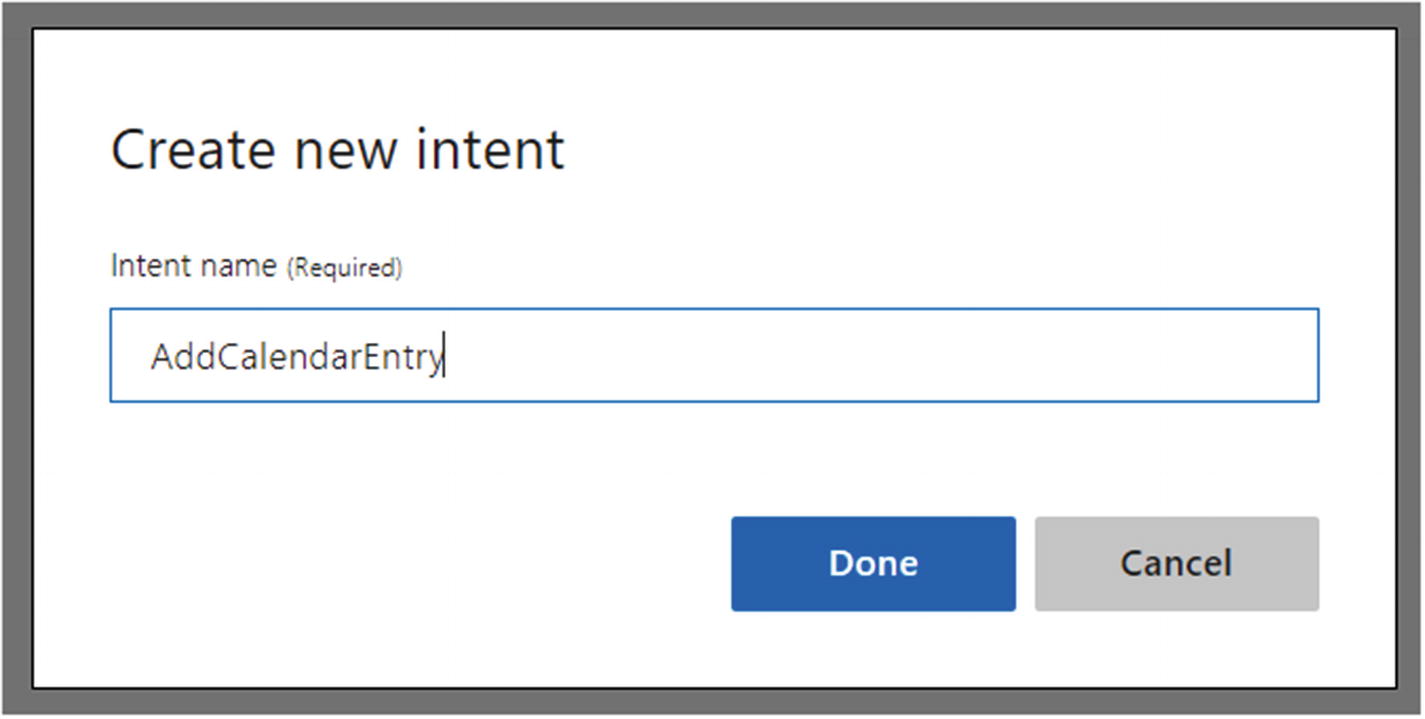
Adding new LUIS intent
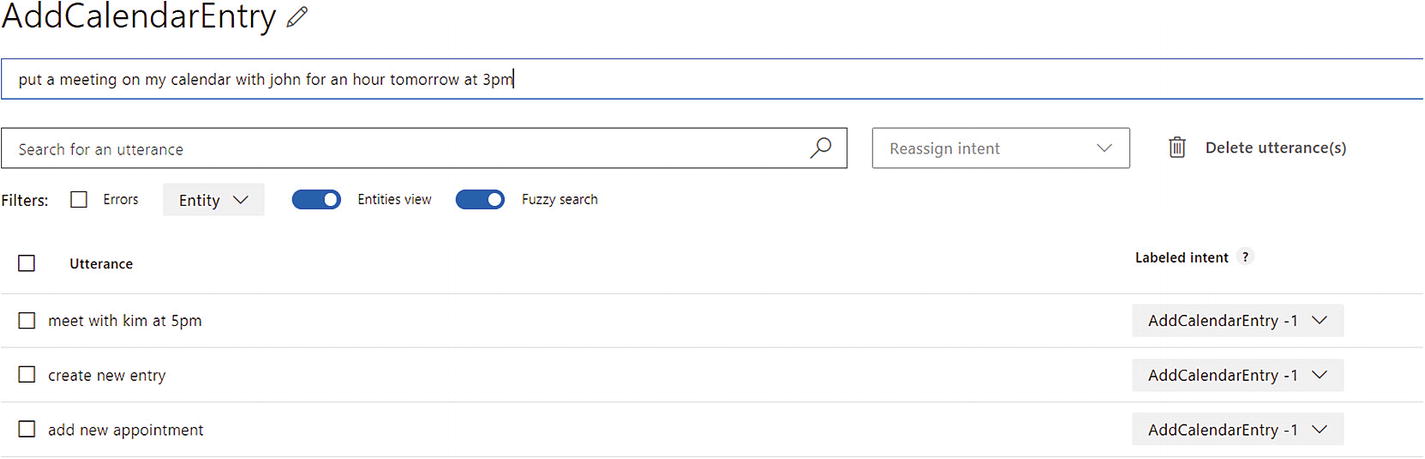
Adding utterances for AddCalendarEntry intent
Note that the user interface allows us to search for utterances, delete utterances, reassign intents to utterances, and display the data in a few different formats. Feel free to explore this functionality as you go along.
Before we add the rest of the intents, let’s see if we can train and test the application so far. Note that the Train button in the top right has a red indicator; this means the app has changes that have not yet been trained. Go ahead and click the Train button. Your request will be sent to the LUIS servers, and your app will be queued for training. You may notice a message that comes up informs you that LUIS is training your app and “0/2 completed.” The 2 is the number of classifier models that your application currently contains. One is for the None intent, and one is for AddCalendarEntry. When training is done, the Train button indicator will turn green to indicate that the app is up-to-date.
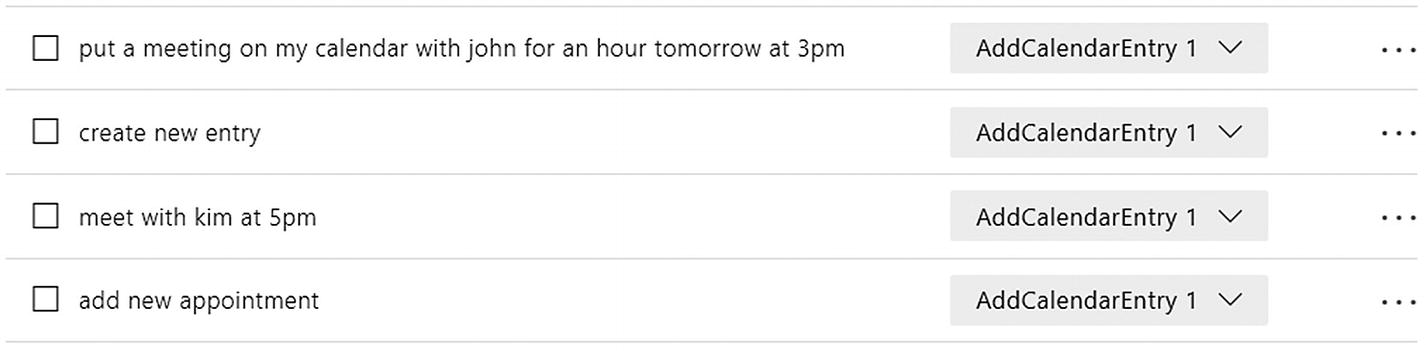
Highest-scoring intents (also called predicted intents) for AddCalendarEntry intent

Utterance score for each intent in our app
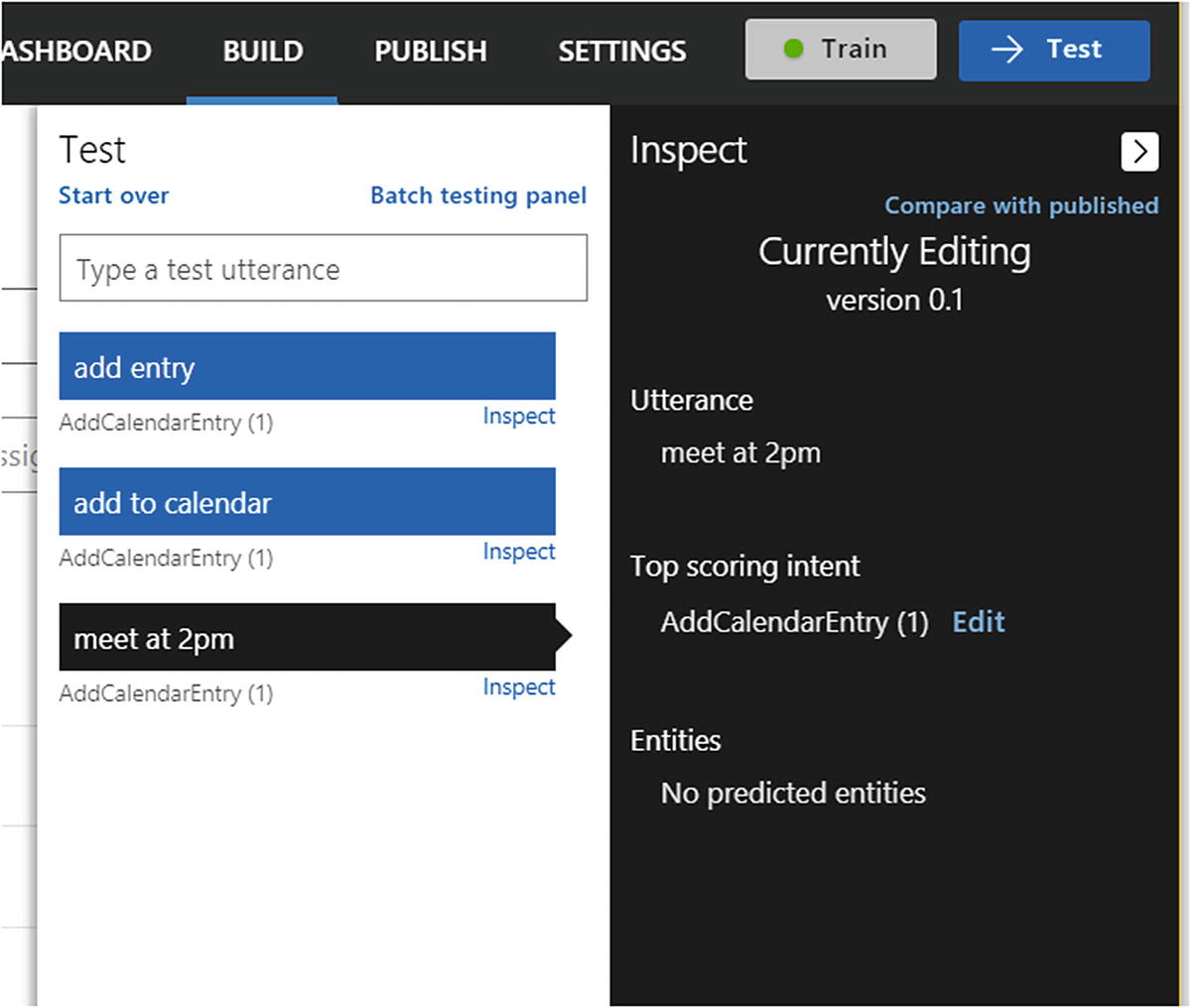
Interactively testing our model
The way LUIS functions is that it runs each input through all the models that were trained in the Training phase for our app. For each model, we receive a resulting score between 0 to 1 inclusive. The top-scoring intent is displayed prominently. Note that a score does not correspond to a probability. A score is dependent on the algorithm that is being used and usually represents some measure of the distance between the input to an intent’s ideal form. If LUIS scores an input with similar scores for more than one intent, we probably have some additional training to do.
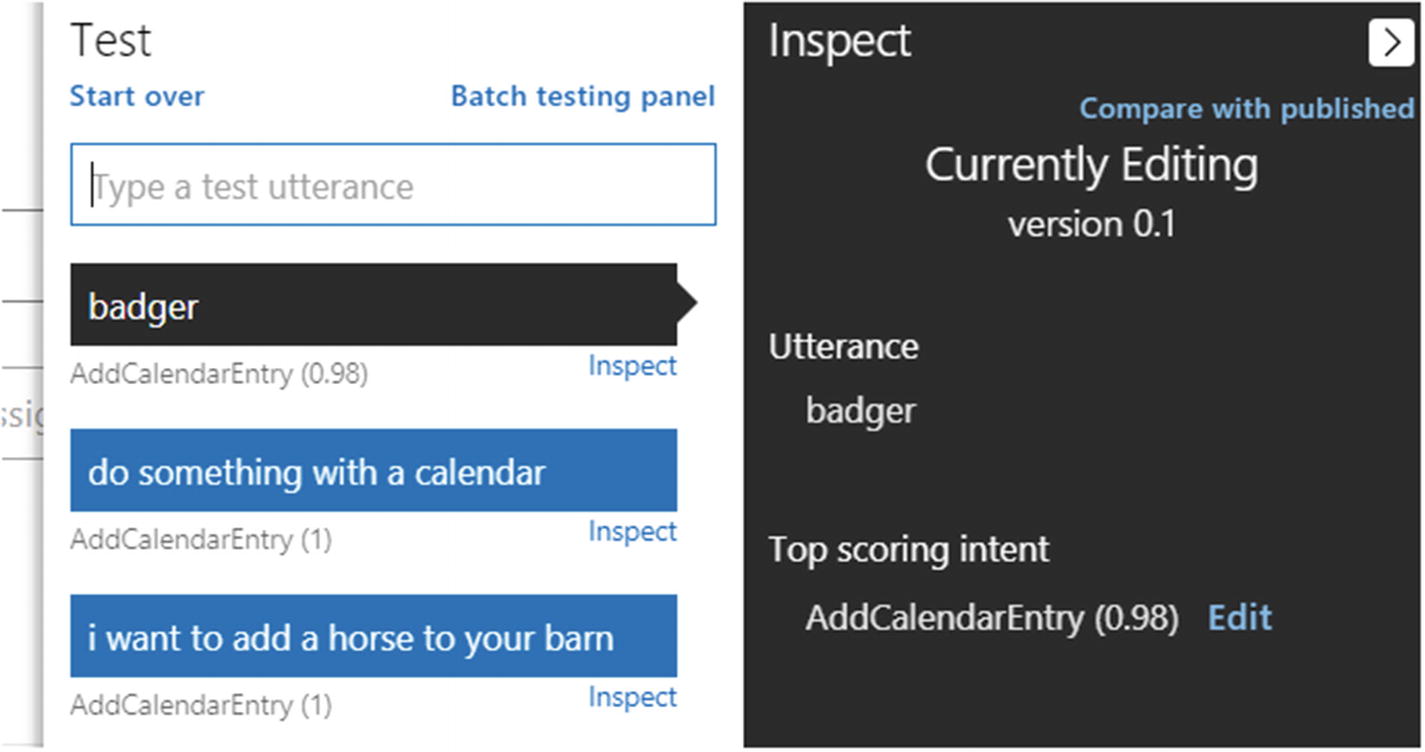
Testing wacky and ridiculous inputs

We have made some progress!
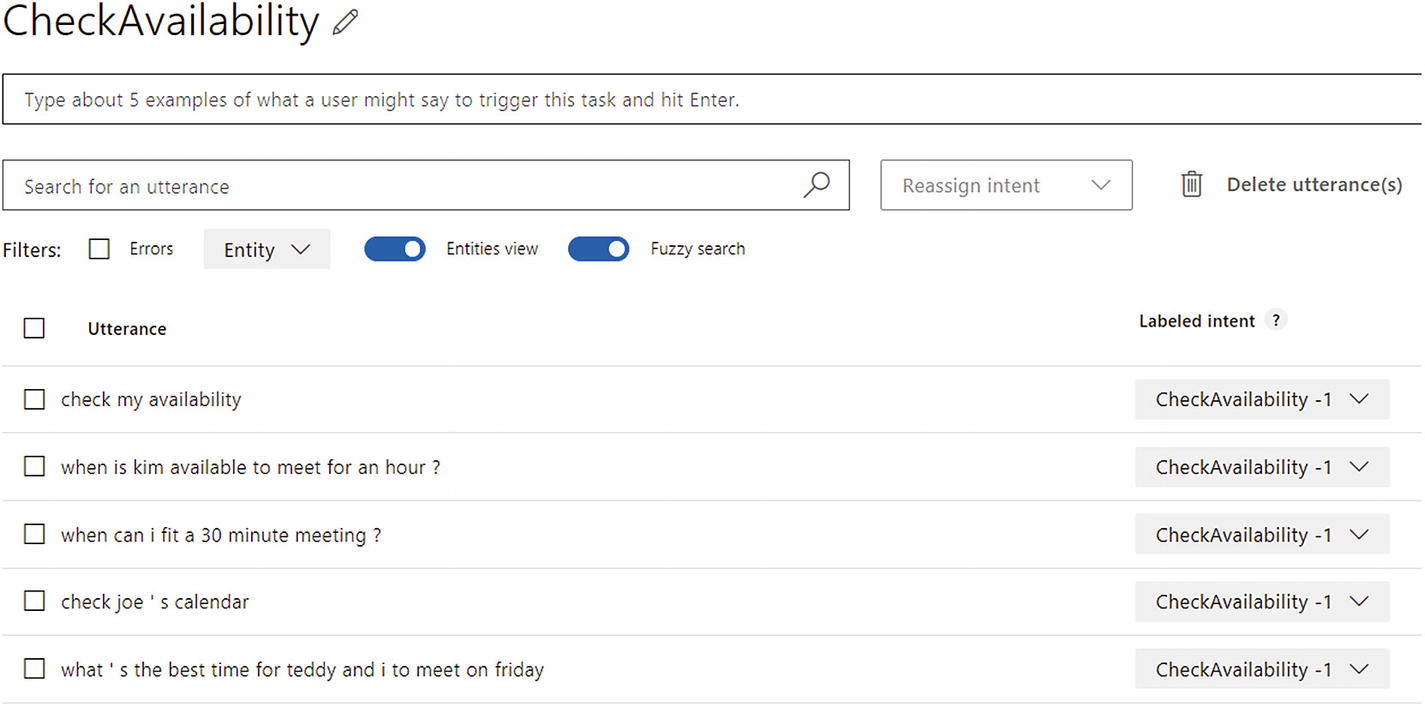
CheckAvailability intent sample utterances
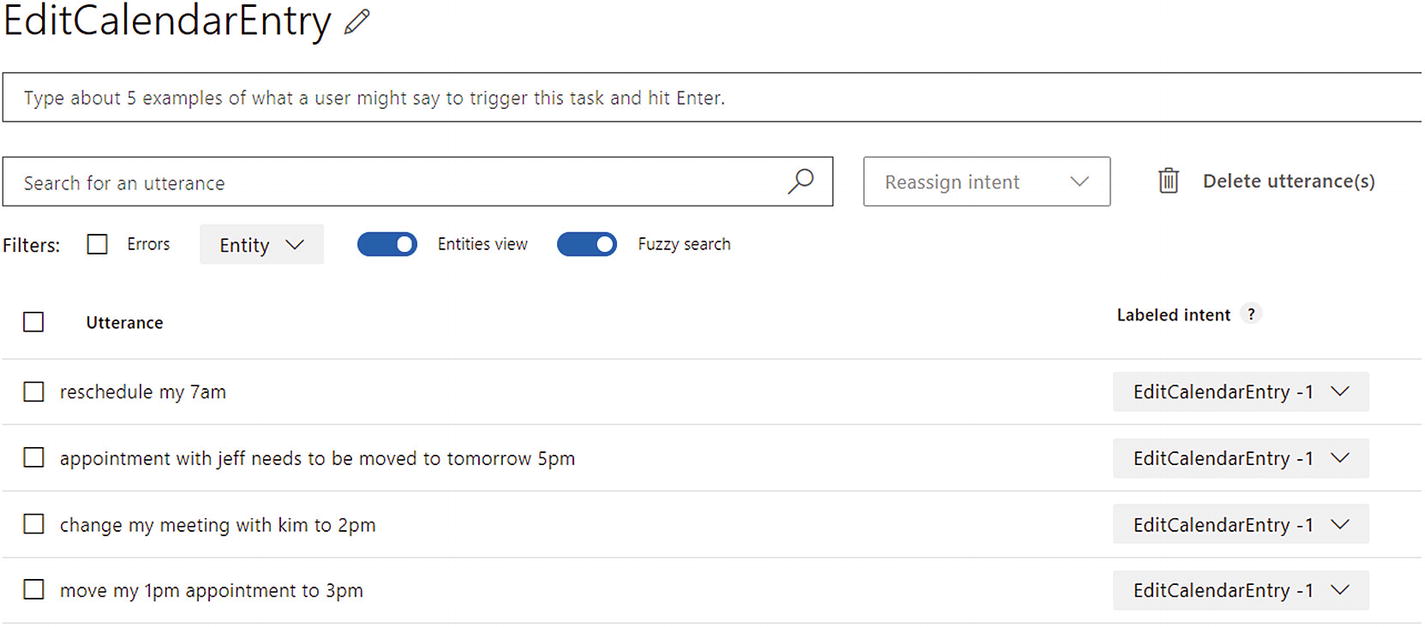
EditCalendarEntry intent sample utterances
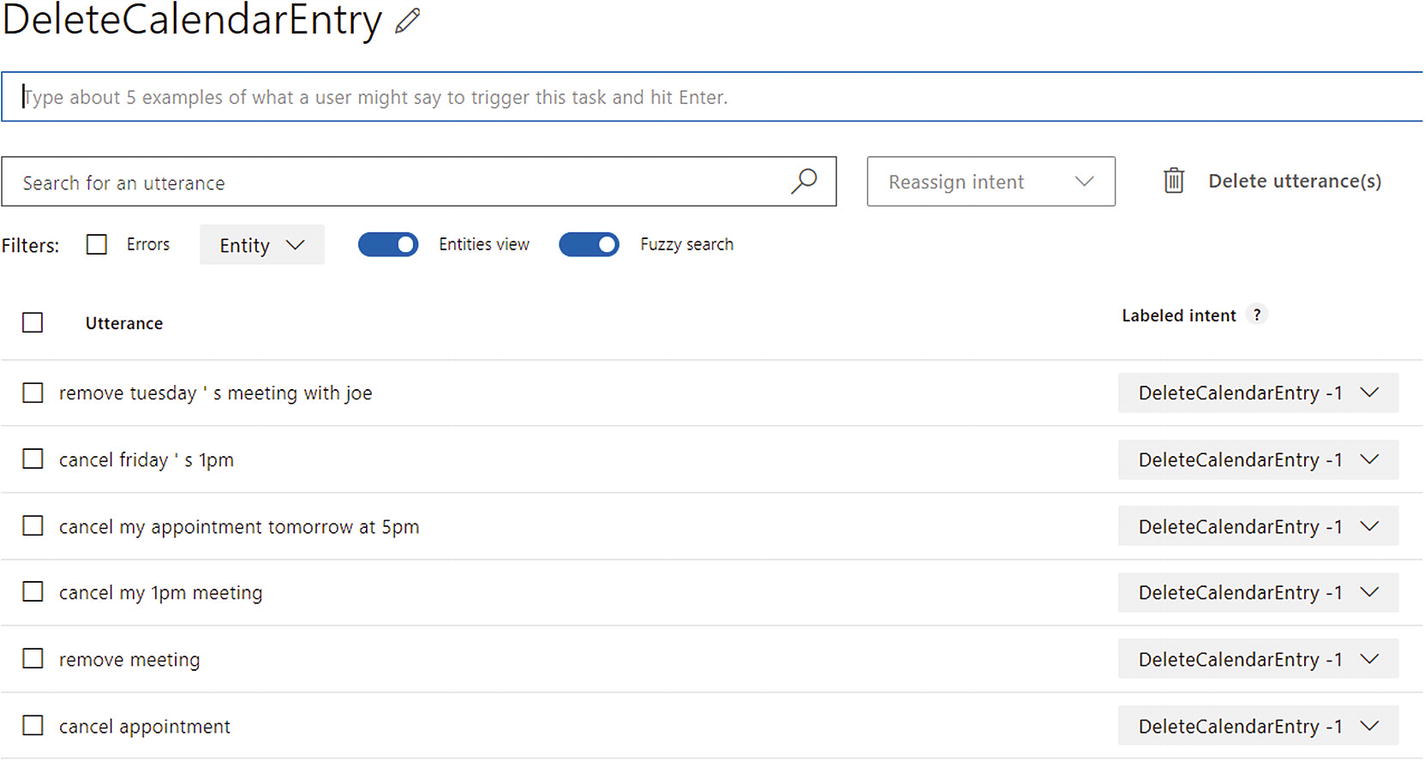
DeleteCalendarEntry intent sample utterances
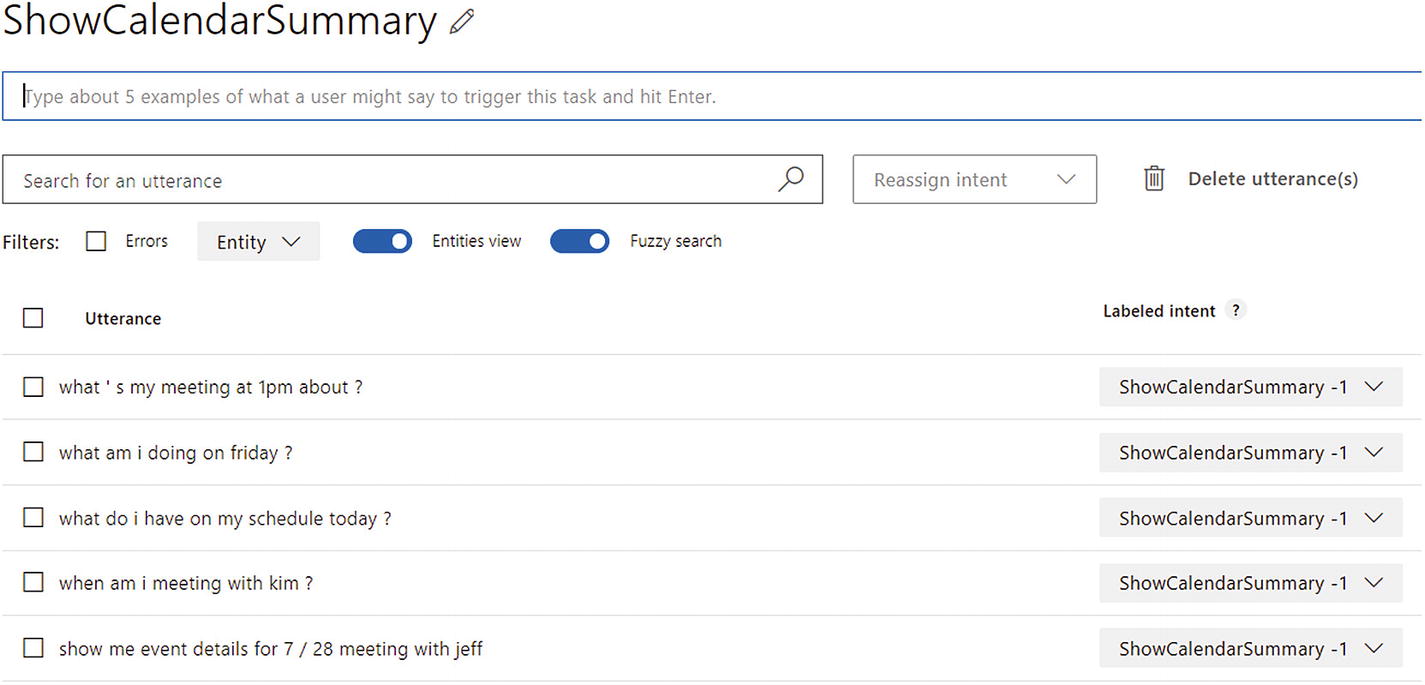
ShowCalendarSummary intent sample utterances
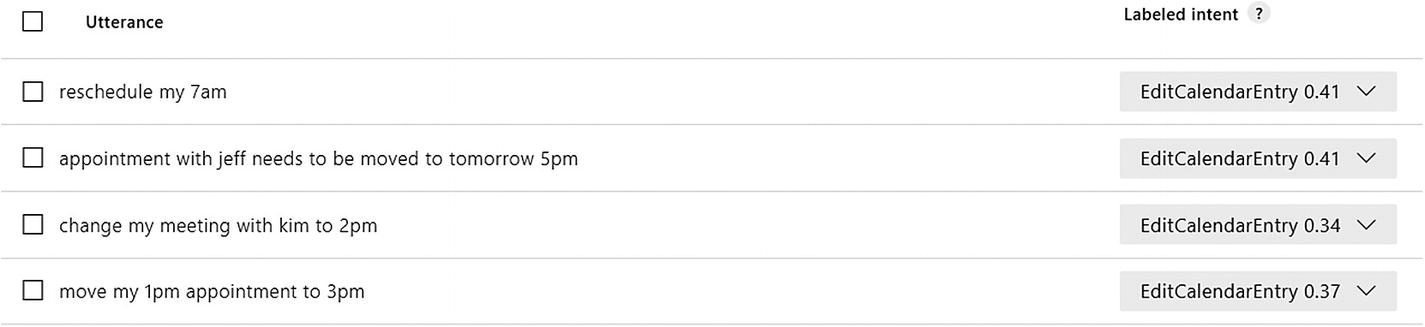
The scores are not looking great. This is an opportunity to further train.
Exercise 3-1
Training LUIS Intents
- Create the following intents and enter at least ten sample utterances for each:
AddCalendarEntry
RemoveCalendarEntry
EditCalendarEntry
ShowCalendarSummary
CheckAvailability
Add some more training to the None intent. Focus on inputs that either make no sense or make no sense in this application, such as “I like coffee.” It makes sense but not for this application.
Train the LUIS app and observe the predicated scores for each utterance by visiting the intent page. Use the interactive test tab as well.
What are the scores? Are they higher than 0.80? Lower? Keep adding sample utterances to each intent to raise the score. Be sure to train the app every so often and reload the intent utterances to see the updated scores. How many utterances does it take to make you confident in your app?
Once you are done with these exercise, you will have built up the experience of training and testing LUIS intents.
Publishing Your Application
Obviously, we are not yet done developing our app. There are quite a few things missing and many details of LUIS we have not yet explored. We haven’t seen any real user data yet either. But, we can develop both the LUIS app and the consuming application in parallel. The process of taking our trained app and making it accessible via HTTP is referred to as publishing our app.
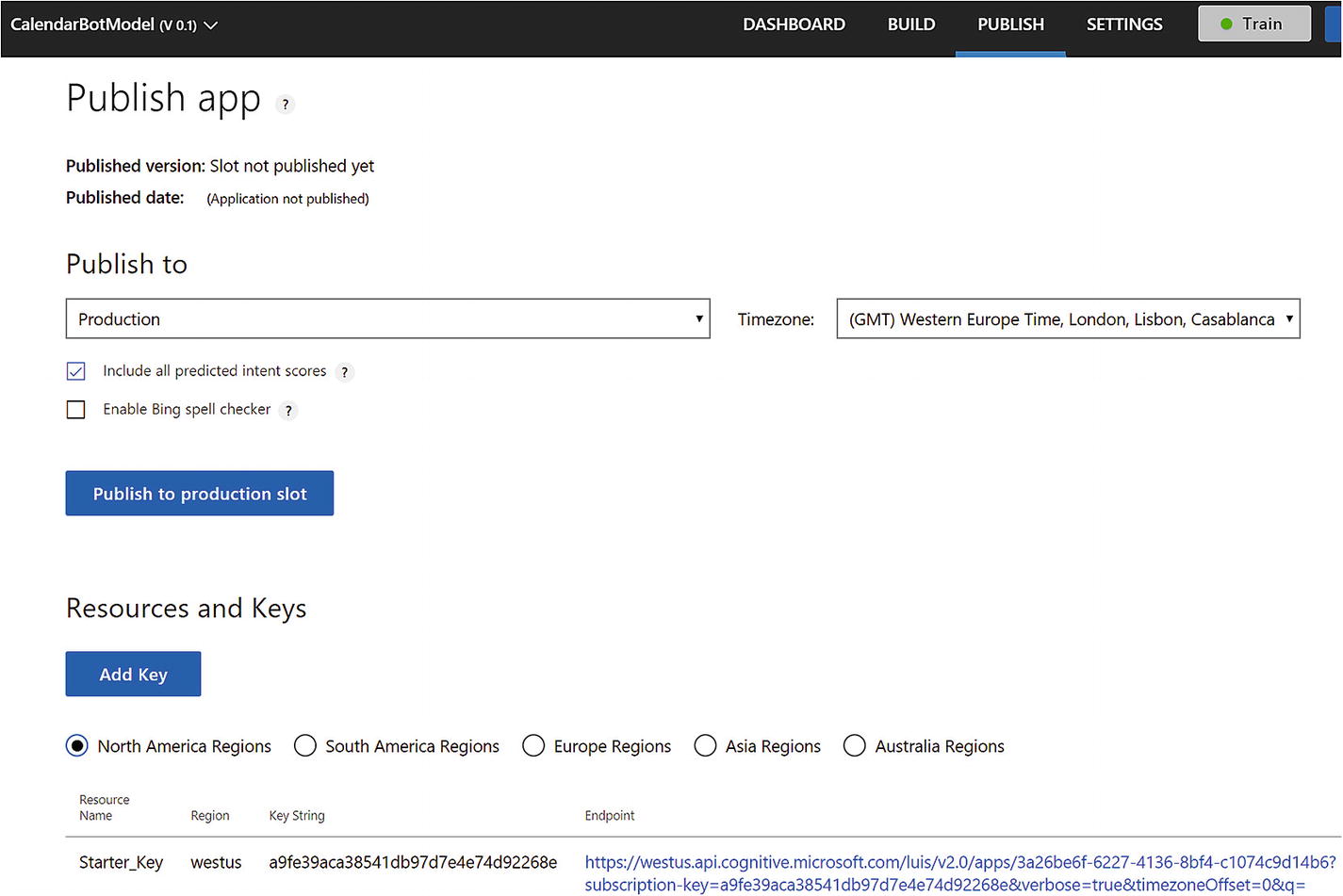
LUIS Publish page
We will go ahead and select the Staging slot from the “Publish to” drop-down. Once it’s published, we can access the app via an HTTP endpoint.
Before we test the resulting endpoint using cURL, a command line tool to transfer data over HTTP (among many other protocols), you may have noticed that below the publish settings there is an Add Key button and a set of keys for several deployment regions. When accessing a LUIS app, we must provide a key, which is how LUIS can bill us for API usage. LUIS is deployed to several regions; a key must be associated with a region. Keys are created using Microsoft’s Azure Portal. Azure is Microsoft’s cloud services umbrella. We will utilize it to register and deploy a bot in Chapter 5. To associate a key with an app, we must use the Add Key button. Lucky for us, LUIS provides a free starter key to use against apps published in the Staging slot.
Once we publish to the Staging slot, a few things happened. We now have information about the app version and the last time it was published. The URL under Starter_Key is now functional. We may enable verbose results (something we will examine momentarily) or Bing spell check integration (which we will discuss later in this chapter) via URL query parameters. Let’s take a closer look at the URL.
The first line of the URL is the service endpoint for the Azure Cognitive Services in the West US region and, specifically, our LUIS app. These are the query parameters that follow:
The subscription key, in this case the Starter Key. This key can also be passed via the Ocp-Apim-Subscription-Key header.
A flag indicating whether to use the Staging or Production slot. Not including this parameter assumes the Production slot.
Verbose flag indicating whether to return all the intents and their scores or return only the top-scoring intent.
Time zone offset to assist in temporal tagging datetime resolution, a topic we will dive into when exploring the built-in Datetime entity.
q to indicate the user’s query.
We can play with the API by making requests and seeing the responses by using curl. At its core, curl is a command-line tool to transfer data over a variety of protocols. We are going to use it to transfer data over HTTPS. You can find more information at https://curl.haxx.se/ . The command we can utilize is as follows. Note that we pass the subscription key as an HTTP header.
This query results in the following JSON. It gives us the score for each intent in our LUIS app.
You may be thinking, whoa, we just learned that we can have up to 500 intents, so the size of this response would be ridiculous. You would be quite correct thinking this (though gzip would certainly help here)! Setting the verbose query parameter to false results in a significantly more compact JSON listing.
Once we are ready to deploy into production, we would publish our LUIS app into the Production slot and remove the staging parameter from the URL request. The easiest way to accomplish this would be to simply have your development and test configuration files point at the Staging slot URL and the production configuration to point at the Production slot URL.
You are of course welcome to utilize any other HTTP tool you are comfortable with. In addition, Microsoft provides an easy-to-use console to test the LUIS API within the API documentation found online.2
Exercise 3-2
Publishing a LUIS App
Publish the LUIS app into the Staging slot as per the steps in the previous section.
Use curl to get the JSON for predicted intents from the LUIS API for utterances you have entered as sample utterances and other utterances you can think of.
Make sure the curl command uses your application ID and starter key.
The process of publishing an application into a slot is straightforward. Getting used to testing the HTTP endpoint using curl is important as you will commonly need to access the API to examine the results from LUIS.
Extracting Entities
So far, we have developed a simple intent-based LUIS application. But other than it being able to tell our bot a user’s intent, we can’t really do much with it. It is one thing for LUIS to give us information about the fact that the user wants to add a calendar entry, but it better to be able to tell us for what date and time, where, for how long, and with who. We could develop a bot that asks the user for all these details in a linear sequence whenever it sees an AddCalendarEntry. However, this is tedious and neglects the fact that users may very well present the bot with an utterance like this:
It would be a bad user experience to ask the user to reenter all this data. The bot should immediately know what the datetime value of “tomorrow at 6pm” is and that “Huck” is someone who should be added to the invite.
Let’s start with the basics. How do we make sure that “tomorrow at 6pm.” “a week from now,” and “next month” are machine readable? This is where entity recognition comes in. Lucky for us, LUIS comes equipped with many built-in entities that we can add to our application. By doing so, the datetime extraction will “just work.”
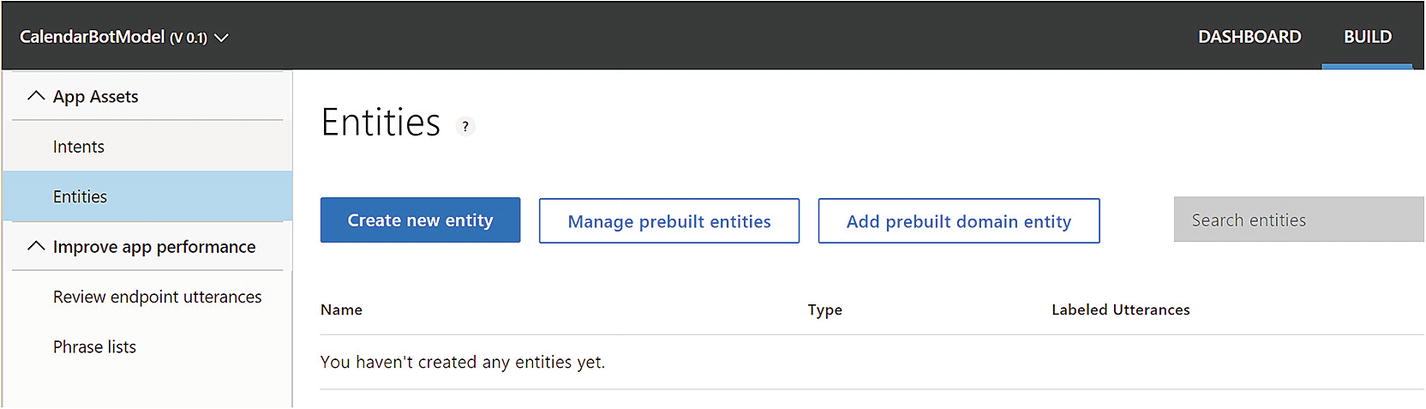
Empty Entities page
A prebuilt entity is a pretrained definition that can be recognized in utterances. The entity is automatically tagged in the input, and we cannot change how the prebuilt entities are recognized. There is a good amount of logic in them that we can utilize in our applications, and it is best to understand what Microsoft has built before building our own entities.
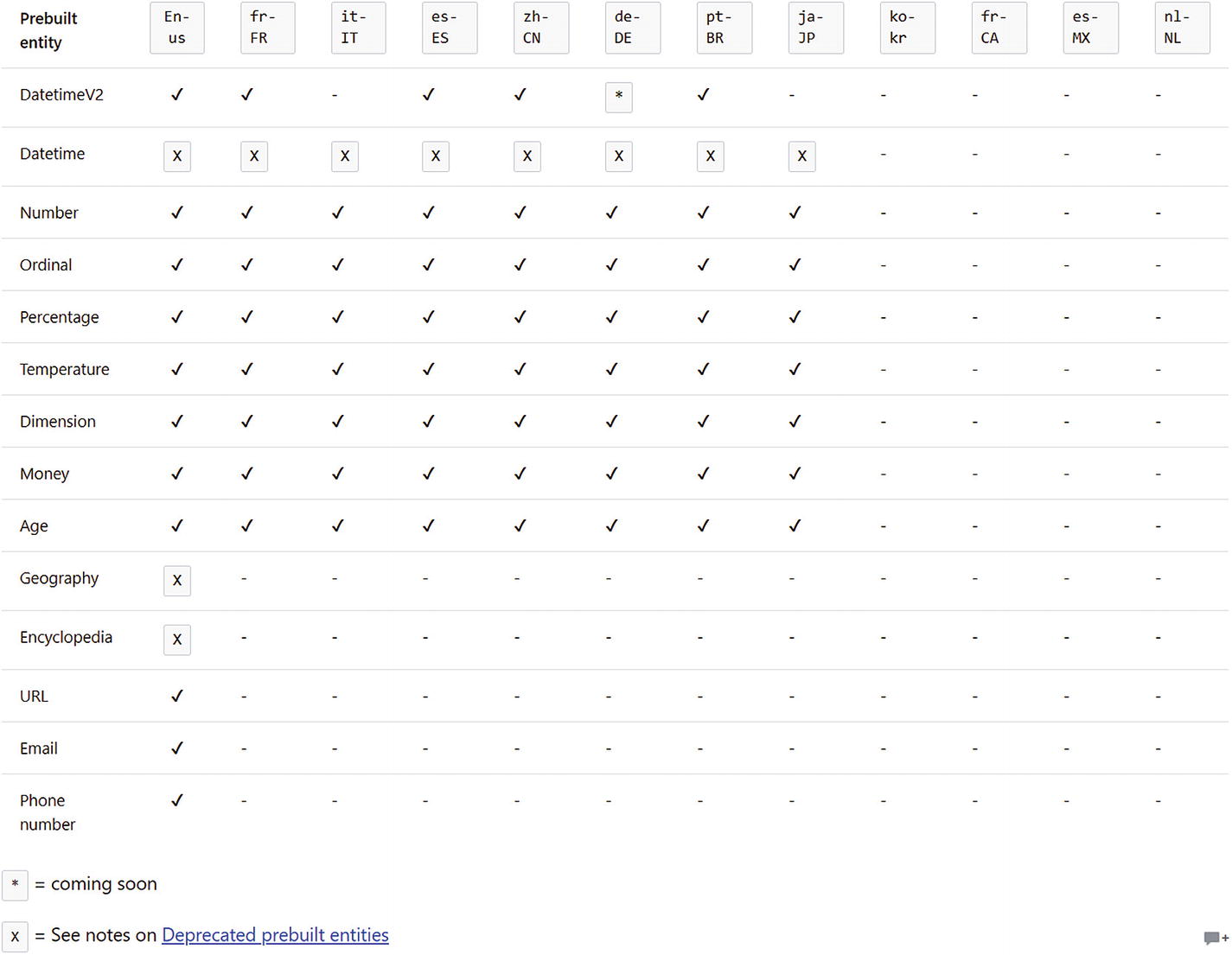
LUIS built-in entity support across different cultures
Some of these entities include what is called value resolution. Value resolution is the process of taking the text input and converting it into a value that can be interpreted by a computer. For example, “one hundred thousand” should resolve to 100000, and “next May 10th” should resolve to 05/10/2019 and so forth.
You may have noticed the JSON result from LUIS included an empty array called entities. This is the placeholder for all entities recognized in the user’s input. A LUIS app can recognize any number of entities in an input. The format of each entity will be as follows:
The resolution objects may include extra attributes, depending on which entity type was detected. Let’s look at the different prebuilt entity types, what they allow us to do, and what the LUIS API result looks like.
Age, Dimension, Money, and Temperature
The age entity allows us to detect age expressions such as “five months old,” “100 years,” and “2 days old.” The result object includes the value in number format and a unit argument, such as Day, Month, or Year.
Any length , weight, volume, and area measure can be detected using the Dimension entity . Inputs can vary from “10 miles” to “1 centimeter” to “50 square meters.” Like the Age entity, the result resolution will include a value and a unit.
The currency entity can help us detect currencies in use input. The resolution, yet again, includes a unit and value attribute.
The temperature entity helps us detect temperatures and includes a unit and value attribute in the resolution .
DatetimeV2
DatetimeV2 is a powerful hierarchical entity that replaces the previous, you guessed it, datetime entity. A hierarchical entity defines categories and its members; it makes sense to use when certain entities are similar and closely related yet have different meanings. The datetimeV2 entity also attempts to resolve the datetime in machine-readable formats like TIMEX (which stands for “time expression”; TIMEX3 is part of TimeML) and the following formats: yyyy:MM:dd, HH:mm:ss, and yyyy:MM:dd HH:mm:ss (for date, time, and datetime, respectively). A basic example is illustrated below.
The DatetimeV2 entity can detect various subtypes aside from the datetime subtype in the previous example. The following is a listing with sample responses.
This shows builtin.datetimeV2.date with phrases such as “yesterday,” “next Monday,” and “August 23, 2015”:
This shows builtin.datetimeV2.time with phrases such as “1pm,” “5:43am,” “8:00,” or “half past eight in the morning”:
This shows builtin.datetimeV2.daterange with phrases such as “next week,” “last year,” or “feb 1 until feb 20th”:
This shows building.datetimeV2.timerange with phrases such as “1 to 5p” and “1 to 5pm”:
This shows builtin.datetimeV2.datetimerange with phrases such as “tomorrow morning” or “last night”:
This shows builtin.datetimeV2.duration with phrases such as “for an hour,” “20 minutes,” or “all day.” The value is resolved in second units.
The builtin.datetimeV2.set type represents a set of dates and is detected by including phrases like “daily,” “monthly,” “every week,” or “every Thursday.” The resolution for this type is different in that there is no single value to represent a set. The timex resolution will be resolved in either of two ways. First, the timex string will follow the pattern P[n][u], where [n] is a number and [u] is the date unit like D for day, M for month, W for week, and Y for year. The meaning is “every [n] [u] units.” P4W means every four weeks, and P2Y means every other year. The second timex resolution is a date pattern with Xs representing any value. For example, XXXX-10 means every October, and XXXX-WXX-6 means every Saturday of any week in the year.
If there is ambiguity in the dates and/or times, LUIS will return multiple resolutions demonstrating the options. For example, ambiguity in dates means that if it is July 20 today and we enter an utterance of “July 21,” the system will return July 21 of this and last year. Likewise, if your query does not specify a.m. or p.m., LUIS will return both times. You can see both cases here:
The Datetime V2 entity is powerful and really showcases some of the great LUIS NLU features.
E-mails, Phone Numbers, and URLs
These three types are all text-based. LUIS can identify when one of them exists in the user input. It is convenient to have this be done by LUIS as opposed to having to implement regular expression logic in our systems. We demonstrate the three types here:
Number, Percentage, and Ordinal
LUIS can extract and resolve numbers and percentages for us as well. User input can be in either numerical or textual format. It even handles inputs like “thirty-eight and a half.”
The Ordinal entity allows us to identity ordinal numbers either in textual or numeric form.
Entity Training
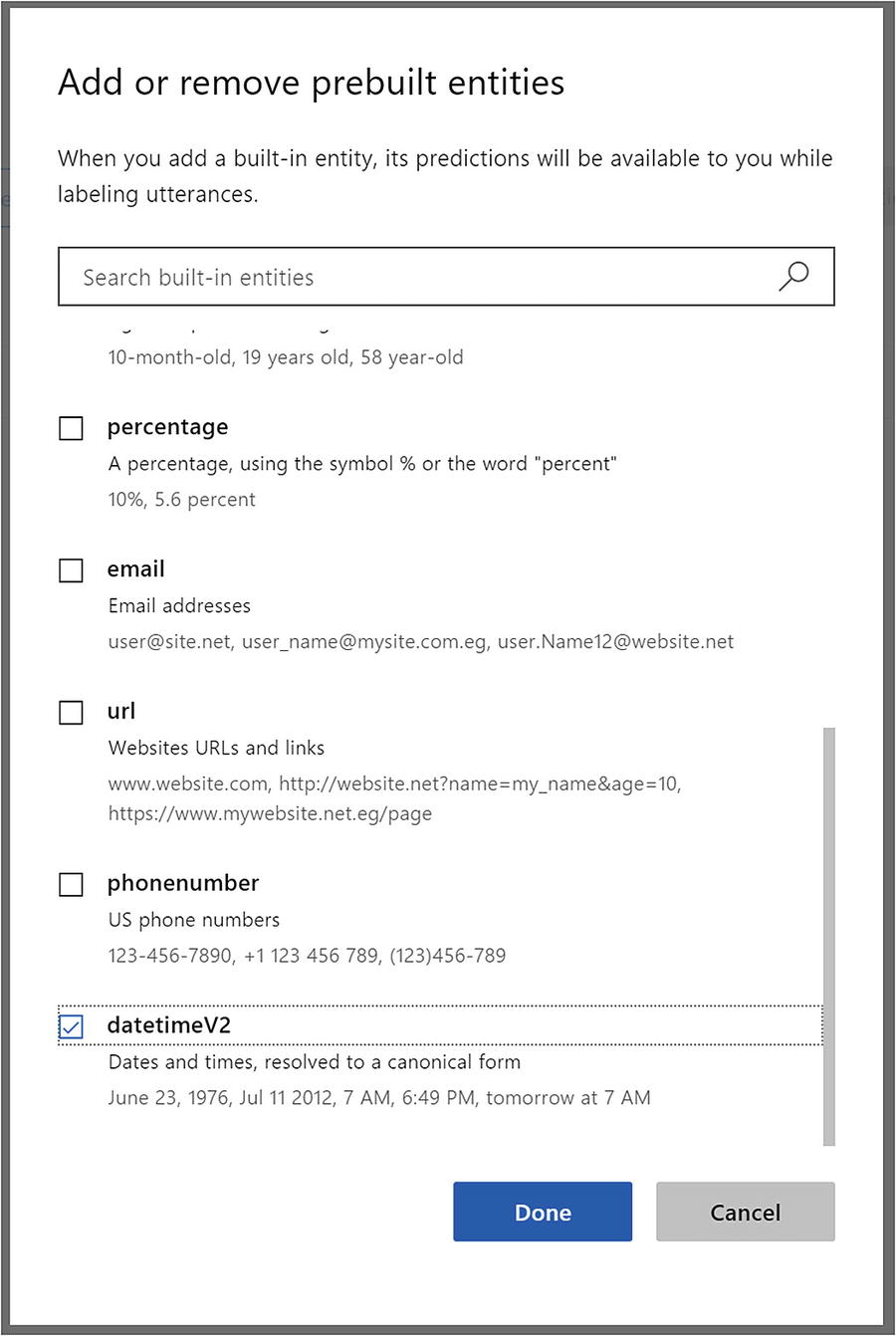
Adding the datetimeV2 entity to the model
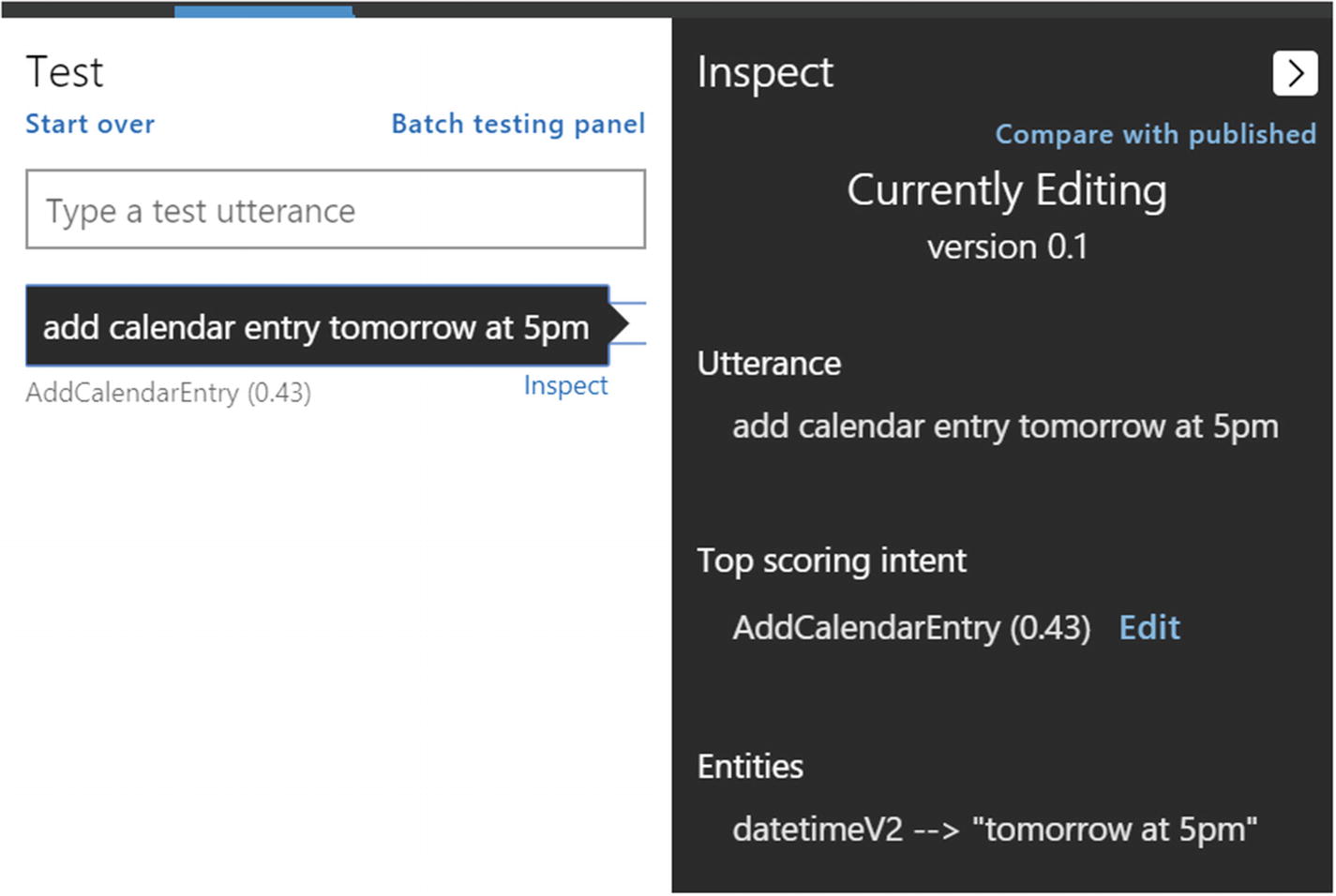
The datetimeV2 entity is alive!
That was easy. We publish the application to the Staging slot one more time. Using curl to run the same query, we receive the following JSON:
Perfect. We can now utilize datetime entities in any of our intents. This is going to be relevant for us in all our application’s intents, not just the AddCalendarEntry . In addition, we will go ahead and add the e-mail prebuilt entity, retrain, and publish to the Staging slot again. Now we can try an utterance like “meet with szymon.rozga@gmail.com at 5p tomorrow” to get the kind of result we have come to expect.
Exercise 3-3
Adding Datetime and E-mail Entity Support
Add the email and datetimev2 prebuilt entities into your application. Train your app.
Go into your AddCalendarEntry intent and try to add several utterances with a datetime and e-mail expression in them. Note that LUIS highlights those entities for you.
Publish the LUIS app into the Staging slot.
Use curl to examine the resulting JSON.
Prebuilt entities are incredibly easy to use. As a further exercise, add some other prebuilt entities into your model to learn how they work and how they are picked up in different types of inputs. If you want to prevent LUIS from recognizing them, just remove them from your application’s entities.
Custom Entities
Prebuilt entities can do a lot for our models without any extra training. It would be surprising if everything that we need could be provided by the existing prebuilt entities. In our example of a calendar app, calendar entries, by definition, include a few more attributes that we would be interested in.
For starters, we usually want to give meetings a subject (not only “Meet with Bob”) and a location. Both would be arbitrary strings for meetings subjects and locations. How do we accomplish that?
LUIS gives us the ability to train custom entities to detect such concepts and extract their values from the users’ inputs. This is where the power of the entity extraction algorithms really comes in; we show LUIS samples of when words should be identified as entities and when they should be ignored. The NLP algorithms consider context. For instance, given multiple samples of utterances, we can teach LUIS and ensure it doesn’t confuse Starbucks with Starbuck, the character from Moby Dick.
There are four different types of custom entities that we can utilize in LUIS: simple, composite, hierarchical, and list. Let’s examine each one.
Simple Entities
A simple custom entity is an entity such as a calendar entry subject or the prebuilt e-mail, phone number, and URL entities. One segment of the user input can be identified as an entity of said type based on its position in the utterance and the context of the words around it. LUIS makes it easy to create and train these types of entities. Let’s create the calendar subject entity.
Let’s say we want to be clear when we are telling the calendar bot about a subject name for the entry. Let’s say that we want to accept inputs like “meet with Kim about mortgage application at 5pm.” In this example, the subject will be “mortgage application.” Let’s get this in place.
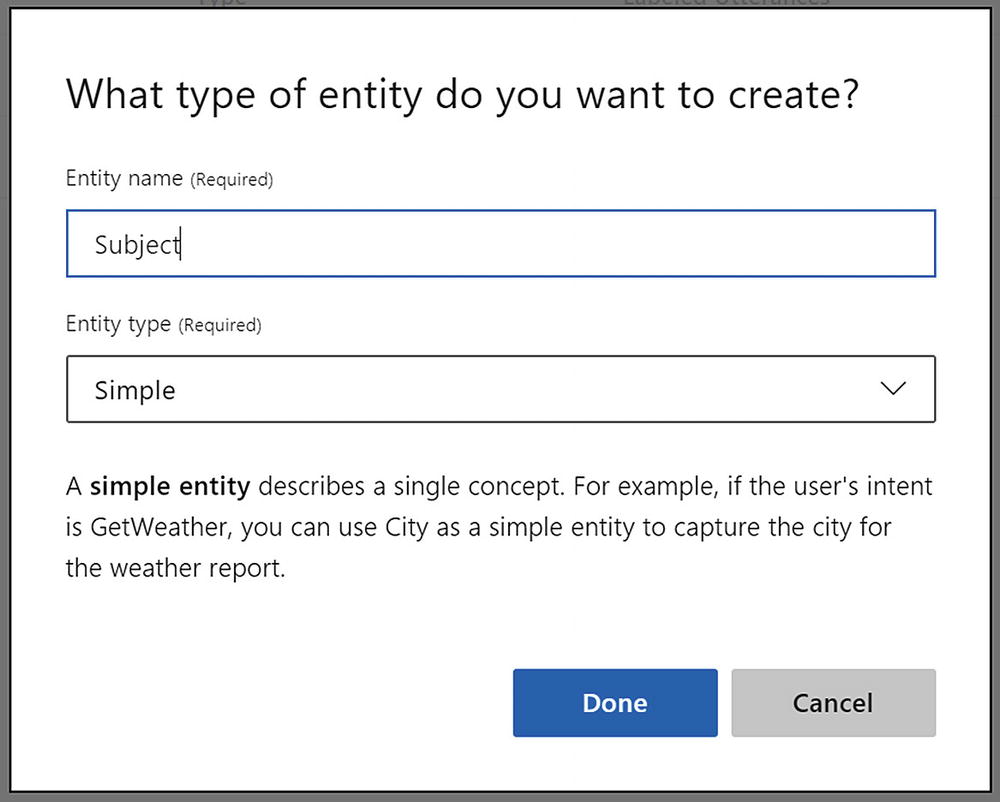
Creating a new simple entity

Adding utterance. LUIS does not yet know about subjects.

Entity highlighted and assigned

Adding more utterances with subjects. None of them was identified after training LUIS with one sample.
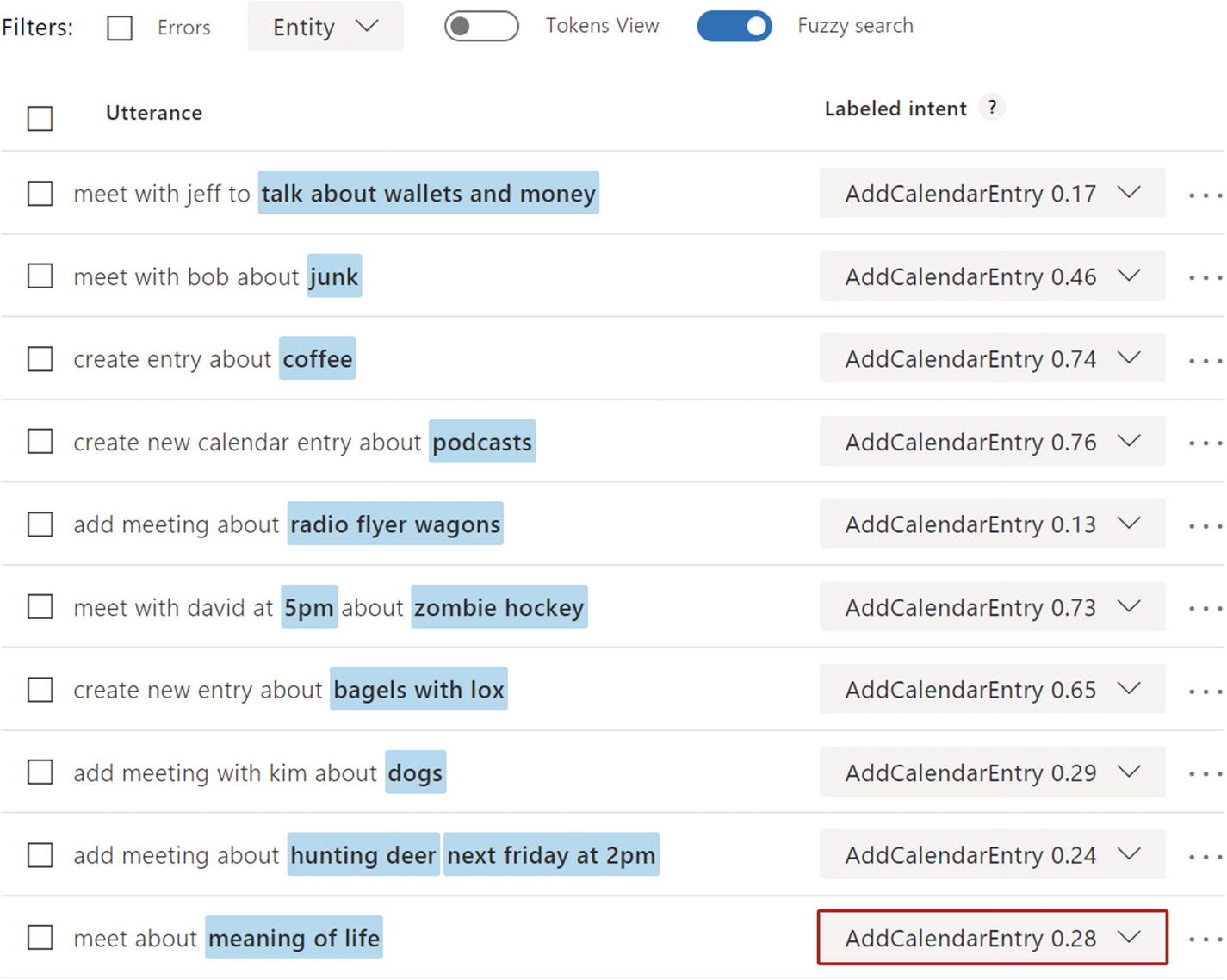
Training LUIS with many different flavors of subject utterances. Note that we change the toggle to the right of the Entity drop-down to Tokens View. This allows us to see which tokens are being identified as entities.
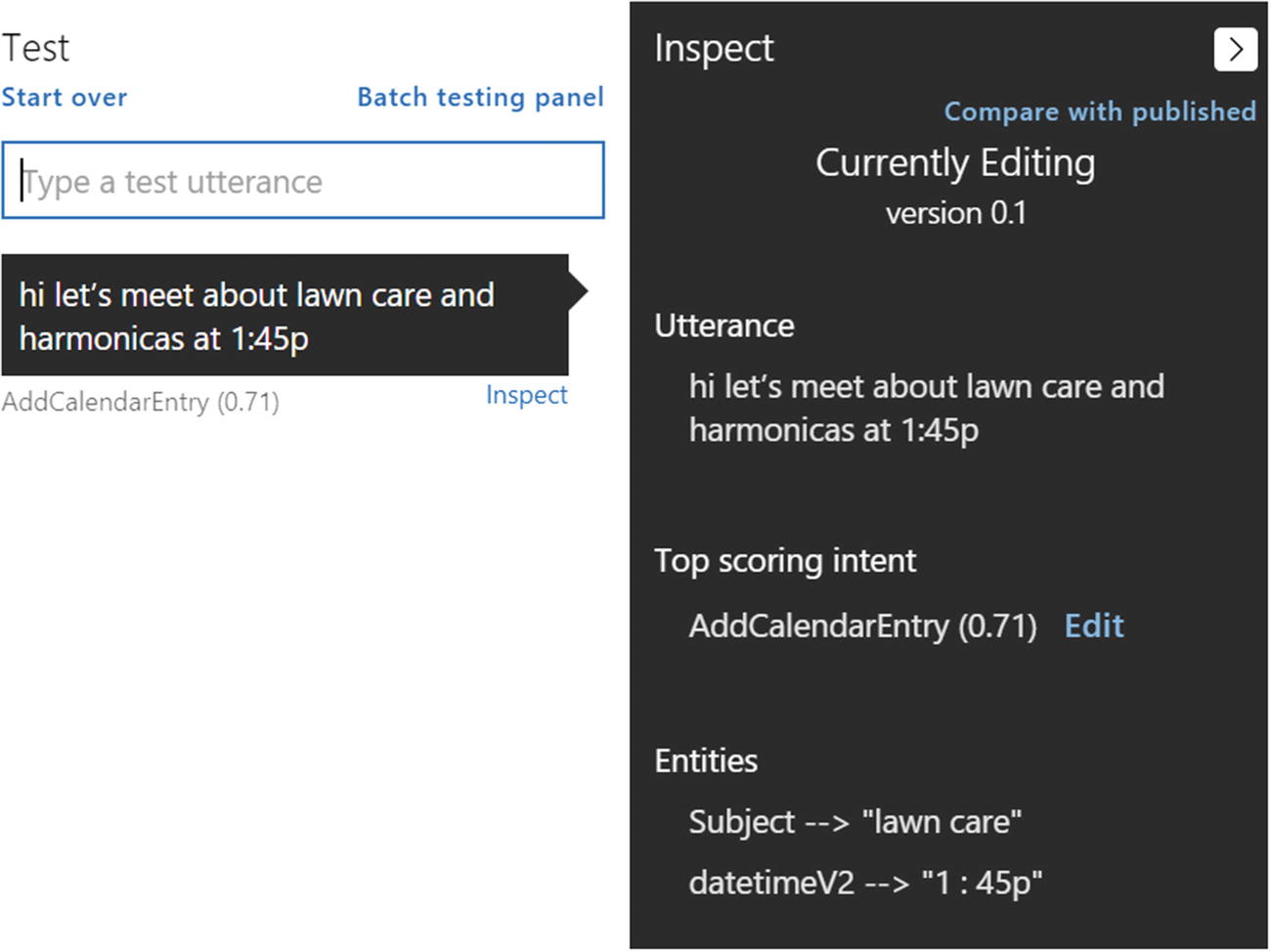
Our model is now identifying the subject in some test cases. Great!
We now have a good grasp of the calendar subject entity even though there are probably many cases that won’t yet work. And truth be told, you won’t be able to capture all the different types of ways users will ask things until you have a good testing phase. That’s how LUIS app development goes. It is worth looking at the resulting JSON when this application is published.
Note that the time entity is being identified as expected. The Subject entity comes back with the relevant entity value. It also comes back with a score. The score in this case is again a similar measure to intent scores; it’s a measure of distance from the ideal entity. Unlike intents, LUIS will not return all your entities and their scores. LUIS will return only simple and hierarchical entities with scores above a threshold. For built-in entities, this score is hidden.
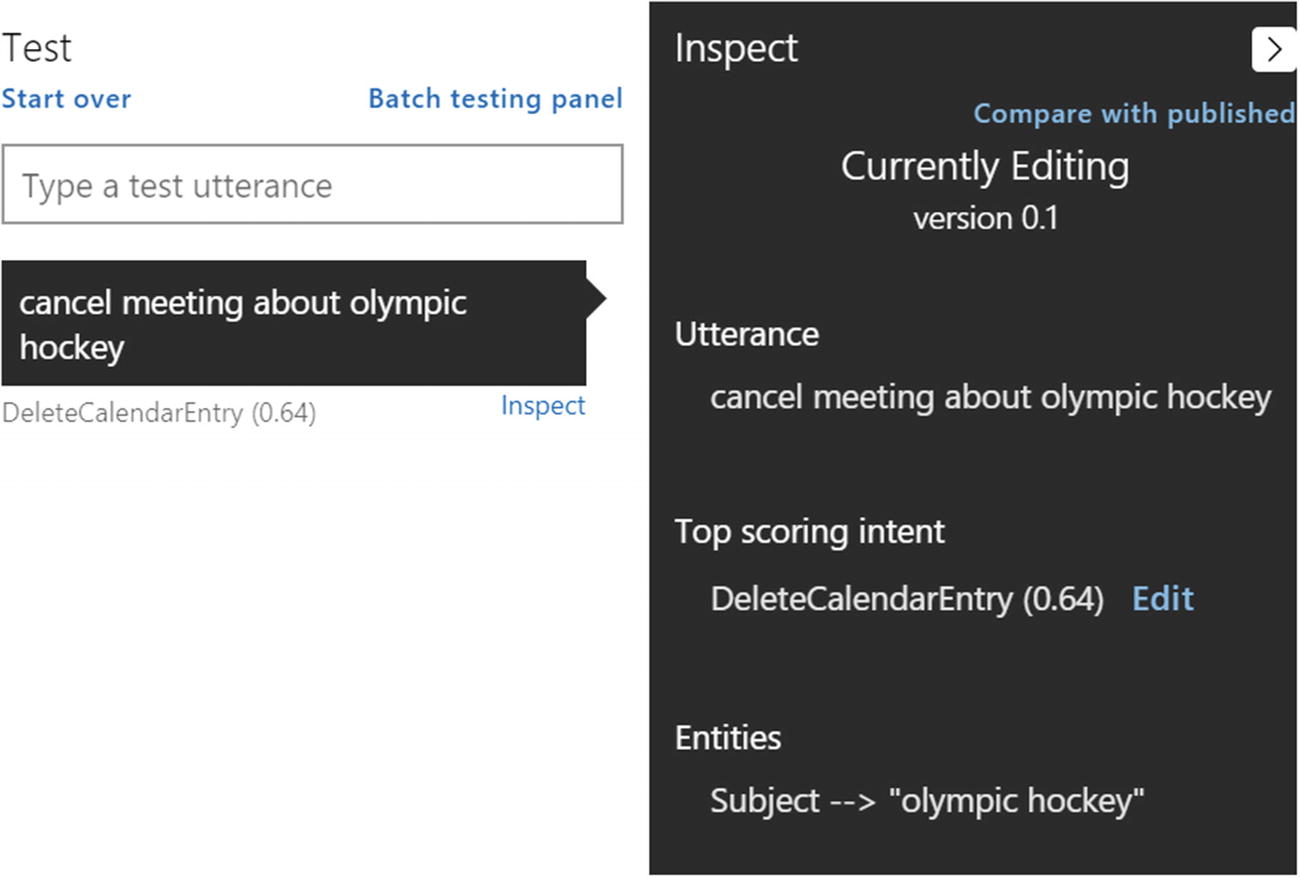
Entity training within one intent can carry over to other intents
Another observation is the lower score in terms of identifying the DeleteCalendarEntry intent. We’ve added many more utterances to the AddCalendarEntry intent, but DeleteCalendarEntry and EditCalendarEntry have much fewer examples. Take some time to improve that. Add some alternate phrasings and examples with our new Subject entity before we continue.
Exercise 3-4
Training the Subject Entity and Strengthening Our LUIS App
Add a Subject entity, as per the directions in the previous section.
Add utterances into your intents to support the Subject entity. Train and test often to see your progress.
Aim for at least 25 to 30 samples for LUIS to start. Make sure to convey multiple instances of different ways of expressing ideas.
Ensure all your intents are getting your attention. Make sure every intent has 15 to 20 samples. Include entities in each intent.
Train and publish the LUIS app into the Staging slot.
Use curl to examine the resulting JSON.
Training custom entities, especially ones that are a bit vague in terms of positioning and context, can be challenging, but after some practice, you will start seeing patterns in LUIS’s ability to extract them. Note things that need to be explicitly trained: number of words in the subject, subjects with the word and, subjects followed by datetime, and so forth. You may have noticed the explicit mention of number of samples. These are just starting points. An NLU system like LUIS gets better the more sample data it has. Do not overlook this point. If LUIS is not behaving the way you expect it, chances are it is not a LUIS performance problem but rather that your application needs more training.
The second entity we planned to add was the Location entity . Let’s create a new simple custom entity and call it Location. Like the Subject entity, the location is going to be a free text entity, so we’re going to need to train LUIS with many samples.
We’re going to take a stab at this by adding utterances into the AddCalendarEntry intent again. We need to add utterances in these forms:
You get it. You should also add datetime instances into these utterances. Training the location is going to be trickier as we are teaching LUIS to distinguish between a location and subject, two concepts that simply need a lot of data for LUIS to begin distinguishing since these are two free-text entities. In the end, I ended up adding more than 30 utterances that contained either just a location or a location combined with other entities. After that amount of training, we get decent performance. I can type “meet for dinner at the diner tomorrow at 8pm” and get the following JSON result:
We suggest you take some time to strengthen the entities even further. It would be a good experience to really gain an appreciation for the complexities and ambiguities in natural language and in training an NLU system like LUIS.
Exercise 3-5
Training the Location Entity
Add a Subject entity, as per the directions in the previous section.
Add utterances into your AddCalendarEntry to support the Location entity. Train and test often to see your progress.
Aim to start with 35 to 40 samples for LUIS, probably more. As your intents support more entities, you may have to provide more samples to LUIS to properly distinguish. As you add utterances, constantly train and test to see how LUIS is learning. Make sure to use many variations and examples.
Publish the LUIS app into the Staging slot.
Use curl to examine the resulting JSON.
This exercise should have been a good experience in strengthening entity resolution when a single utterance contains many entities.
Composite Entities
Congratulations. The work we have done so far is a significant portion of what LUIS can accomplish. Using the intent classification and simple entity extraction techniques described, we can go off and work on our calendar application. Although we went over simple entities, we quickly ran into some complex NLU scenarios. Without a tool like LUIS, doing this kind of language recognition would be incredibly tedious and challenging.
There is another interesting scenario that comes up in natural language. Our model currently supports a user saying a phrase like this:
What if the user wanted to add multiple calendar entries? What if the user wants to say something like the following utterance?
There’s isn’t anything not allowing a user to say that right now. If we’ve trained our app enough, it will certainly handle this input, and it will identify two Subject instances, two Location instances, and two datetime instances, as shown here:
And yet, parsing this using code would be quite challenging. How do we tell which entities should be grouped together? Which location goes with which subject? You should be able to use the startIndex property to figure it out I suppose, but that’s not always as obvious.
Lucky for us, LUIS can group the entities into what are called composite entities . Rather than the messy result shown previously, LUIS will tell us which entities are part of which composite entity. This makes it way easier for us to know that there were two separate AddCalendar requests, one for 11 a.m. coffee at Culture and another one for a code review in the office at noon.
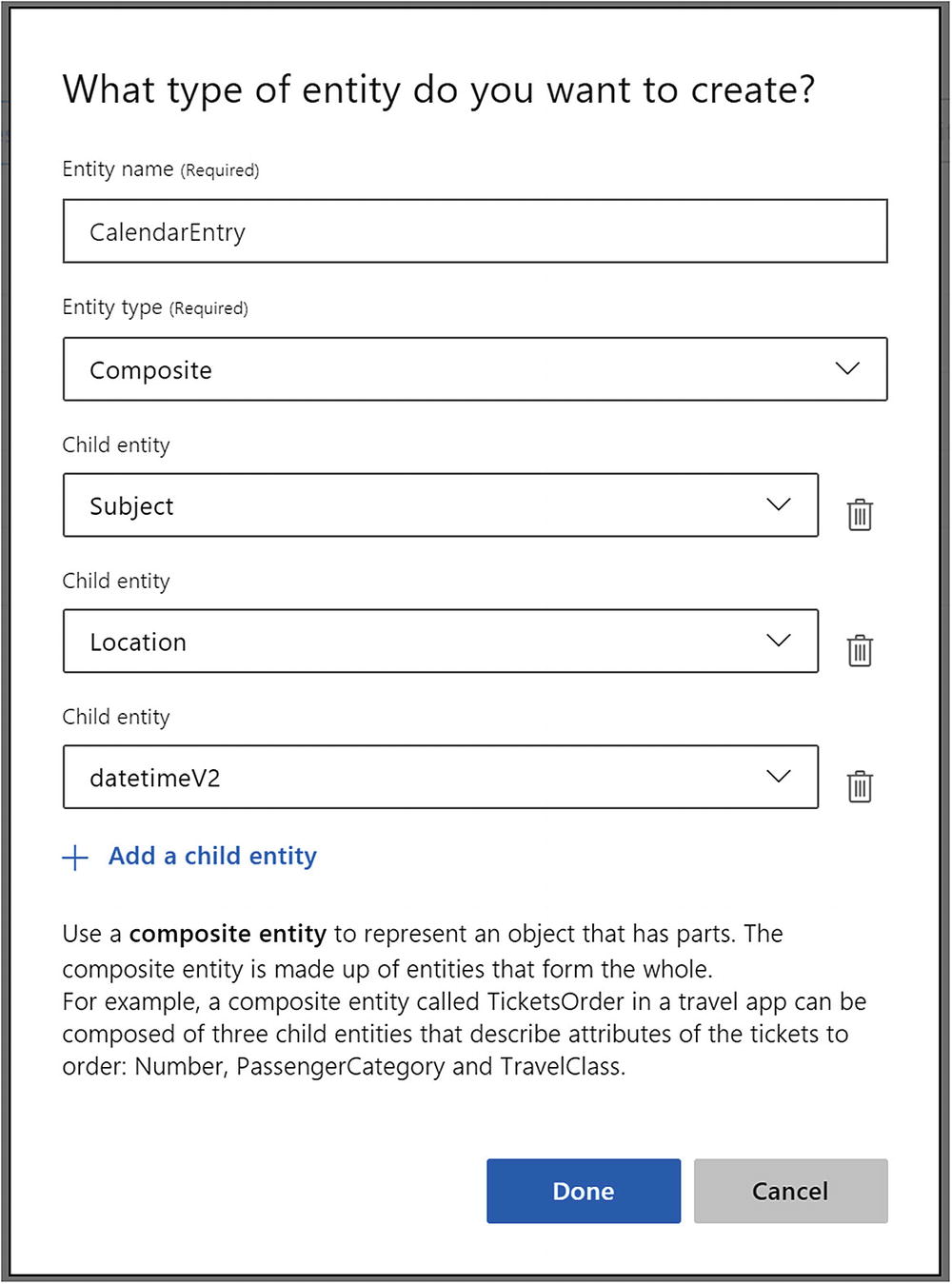
Creating a new composite entity

A “proper” CalendarEntry with a datetime, subject, and location. This is a perfect candidate to wrap in a composite entity.

Clicking the Location entity will allow us to wrap parts of the utterance in a composite entity

Once the beginning of the composite entity is selected, it is a matter of showing LUIS where it ends

LUIS now has an example of how to wrap a composite entity
We should do the same for any other utterance we can find that includes the three entities. Once we train and publish the app, LUIS should start extracting this composite entity. We only show the relevant API section here:
Exercise 3-6
Composite Entities
Create a composite entity called CalendarEntry, composed of datetimeV2, Subject, and Location entities.
Train every utterance that has these three entities to recognize the composite entity.
Train additional examples with multiple instances of the CalendarEntry composite entity . Remember, it takes time, dedication, and persistence to get it right.
Publish the LUIS app into the Staging slot.
Use curl to examine the resulting JSON.
Composite entities are a great feature to group entities into logical data objects. Composite entities allow us to encapsulate more complex expressions.
Hierarchical Entities
A hierarchical entity allows us to define a category of entities and its children. You can think of hierarchical entities as defining a parent/subtype relationship between entities. We have run into this type before. Do you recall the Datetimev2 entity? It had seven subtypes such as daterange, set, and time.
LUIS allows us to easily create our own subtypes. Say we wanted to add support in our model to specify the calendar entry visibility as public or private. We could add support for utterances like this:
The words private or invisible here indicate the visibility field of the calendar. Why would we create a hierarchical entity as opposed to a simple entity? Can’t we just look at the value of a Visibility property and determine whether it should be a private meeting or not? Yes and no. If the user sticks to those two words, yes. But remember, natural language is ambiguous and vague. Phrasings change. The user can say invisible, private, privately, hidden. It’s the same with public. If we make assumptions about a closed set of options in our code, then we would have to change our code any time a new option shows up. The reason a hierarchical entity should be used as opposed to a simple one is that the statistical models of where in context the hierarchical entity appears is shared by the subtypes. Once that is identified, the step of identifying the child entity is essentially a classification problem. Making the entity hierarchical makes for better LUIS performance versus two simple entities. Not to mention, it’s more efficient to have LUIS classify the meaning of an entity in the context of our application rather than writing code to do so.
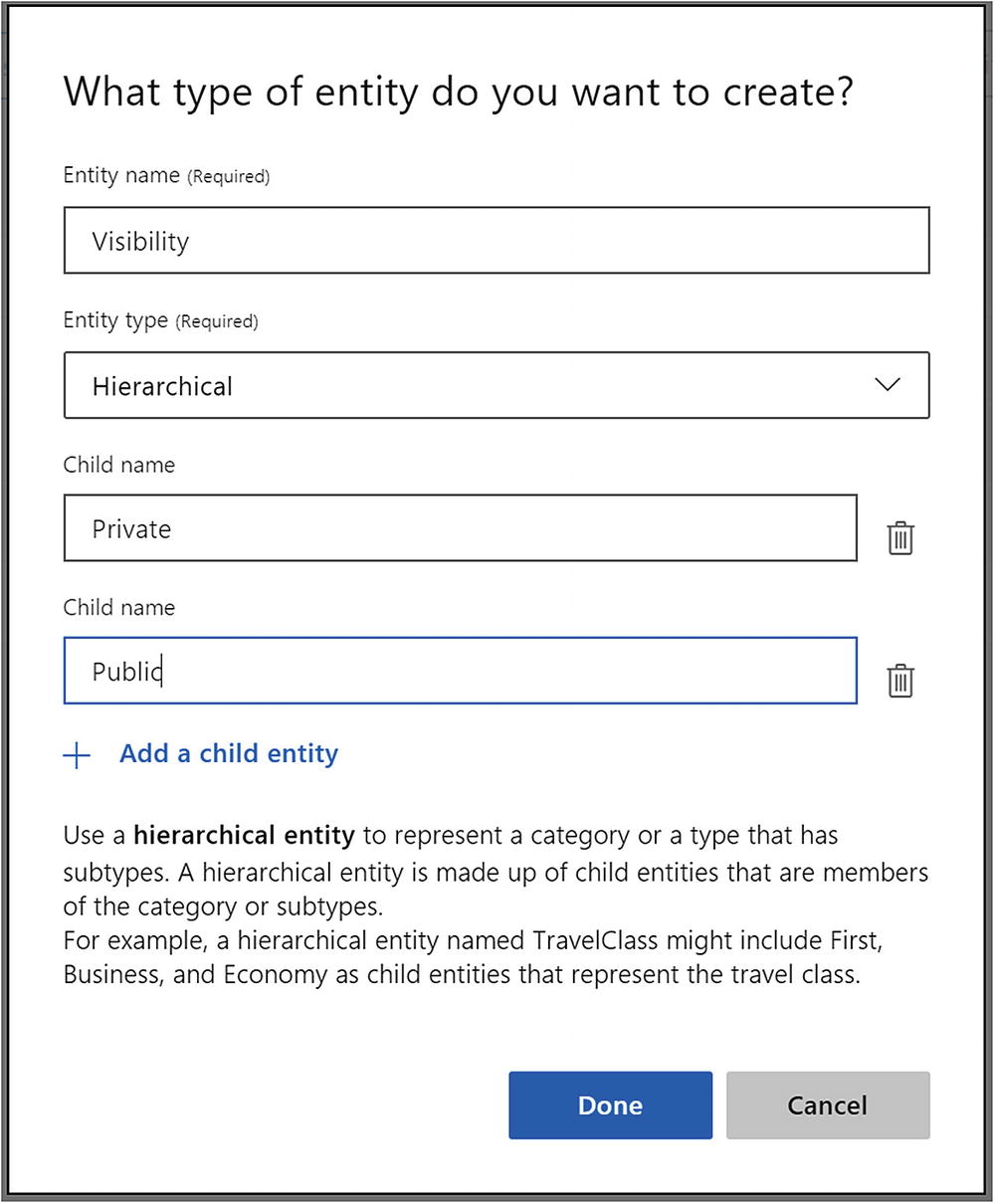
Creating a new hierarchical entity
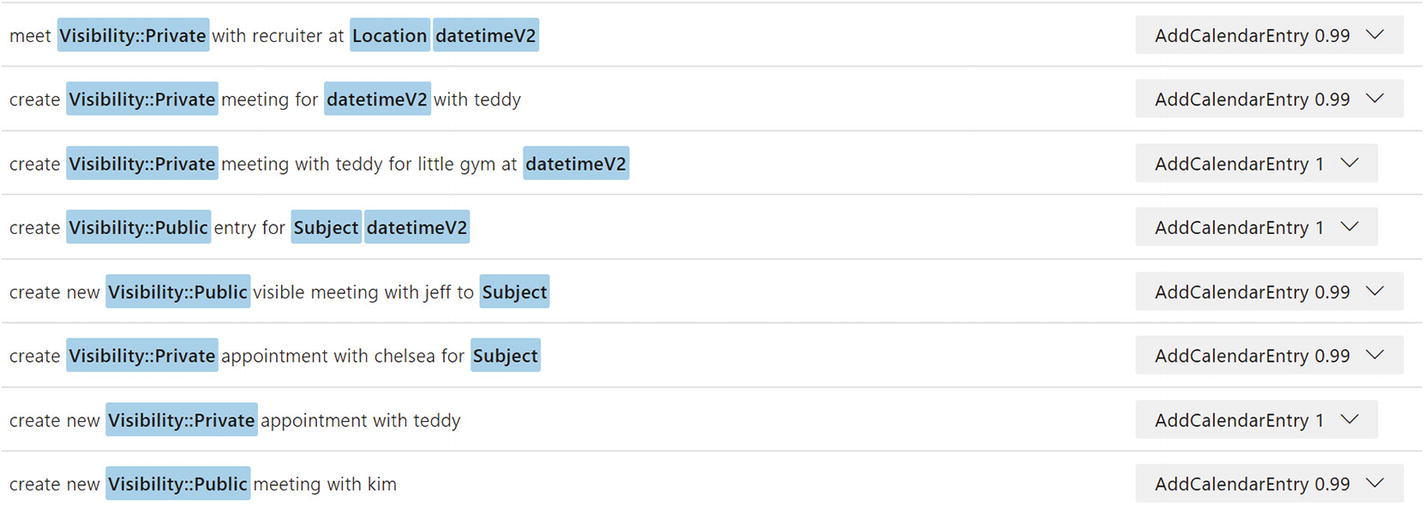
Sample Visibility hierarchical entity utterances
Once we train and publish , we can view the resulting JSON via curl, as shown here:
List Entities
So far, the prebuilt, simple, composite, and hierarchical entities were all extracted from user input via machine learning techniques . Every time we added one of these entities and trained LUIS , you may have noticed the number of models being trained increased. Recall that a LUIS application is composed of one model per intent/entity. By now, we should be at ten models. Each of these is rebuilt any time we train our app.
List entities exist outside this machine learning world. A list entity is simply a collection of terms and synonyms for those terms. For example, if we want to identify cities, we can add an entry for New York that has the synonyms NY, The Big Apple, The City That Never Sleeps, Gotham, New Amsterdam, etc. LUIS will resolve any of these alternate names into New York.
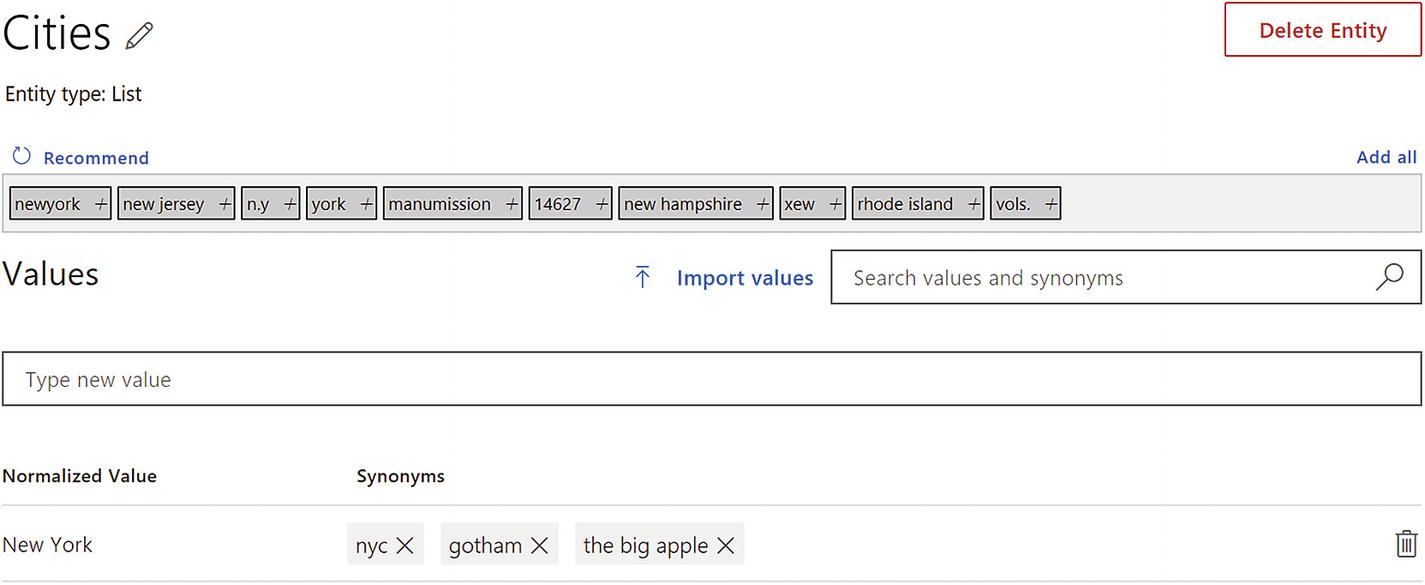
LUIS List entity user interface
Since list entities are not learned by LUIS, new values are not recognized based on context. If LUIS sees “Gotham,” it identifies it as New York. If it sees “Gohtam,” it does not. It is literally a lookup list.
When using the API, LUIS will highlight the term that matches a list entity type and will return the canonical name in the resolution values. This allows your consuming application to ignore all the possible synonyms for a term and execute logic based on the canonical names. List entities are powerful for situations where you know the set of possible values for terms ahead of time.
Regular Expressions Entities
LUIS allows us to create regular expression entities. These, like the list entities, are not based on context, but rather on a strict regular expression. For example, if we expected a knowledge base id to always be presented using the syntax KB143230, where the text KB is followed by 6 digits, we could create an entity with the regular expression kb[0-9]{6,6}. Once trained, the entity will always be identified if any user utterance segment matches this expression.
Prebuilt Domains
I hope you have gained an appreciation for some of the challenges of building NLU models . Machine learning tools allow us to get computers to start learning, but we need to be sure we are training them with a lot of good data. It takes years of day-to-day interactions for humans to be immersed in a language to be able to truly understand it. Yet, we assume that AI means that a computer will be able to pick up the concepts with ten samples. When it doesn’t, sometimes we think to ourselves, “Oh, come on, you should know this by now!”
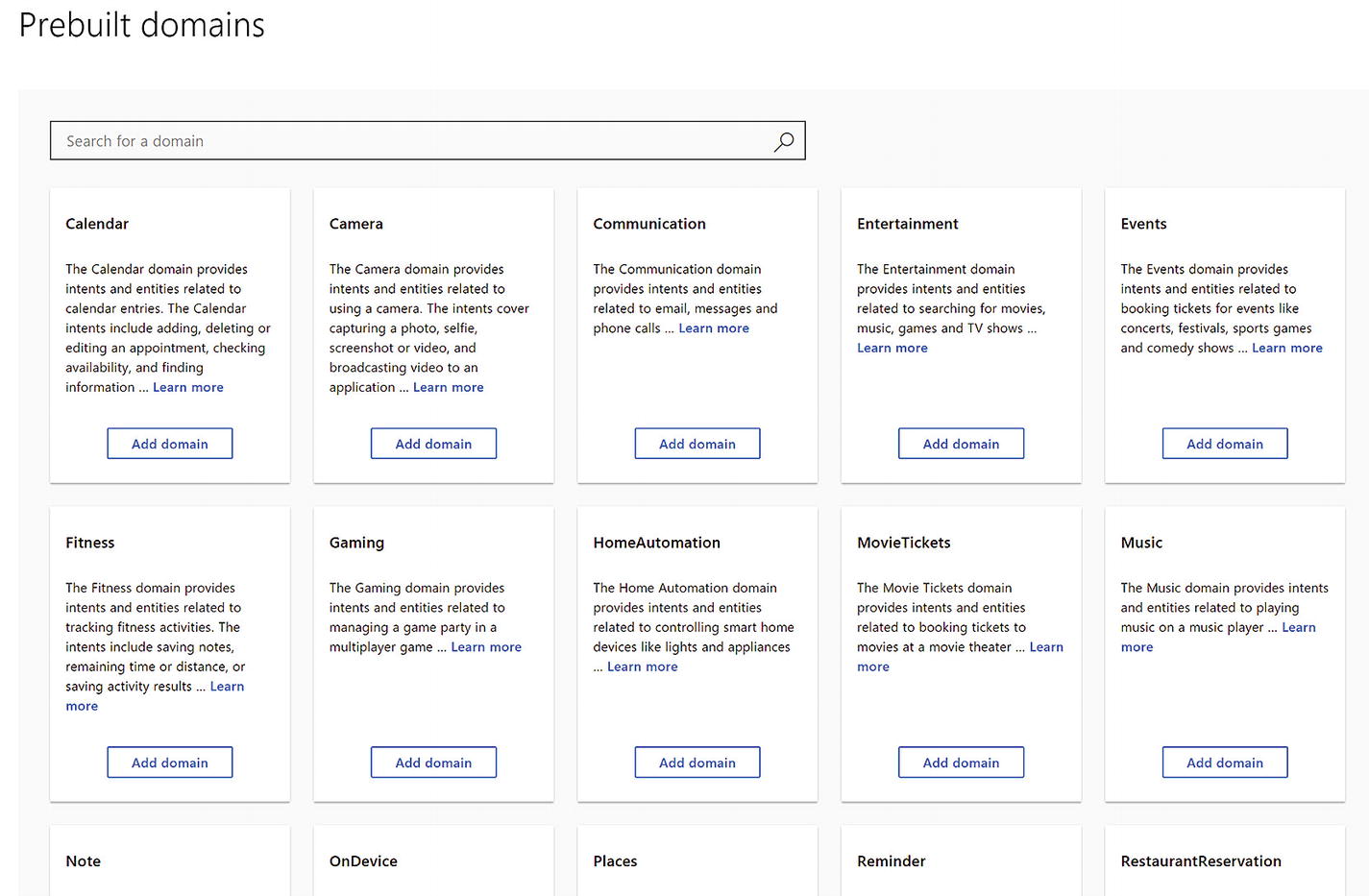
Prebuilt domains
We can find prebuilt domains in LUIS by navigating into the Build section and clicking the Prebuilt Domains link in the bottom left. At the time of this writing, this feature is still in Preview mode. That is the reason it is so isolated and why it is dynamic and may change by the time you read this. LUIS includes a variety of domains from Camera to Home Automation to Gaming to Music and even Calendar, which is similar to the app we have been working on in this chapter. In fact, we will do just that in Exercise 3-7. The “Learn more” text links to a page that describes in detail what intents and entities each domain pulls in and which domains are supported by which cultures.4
When we add a domain to your application, LUIS will add all the domain’s intents and entities into our application, and they will count toward the application’s maximums. At that point, we able to modify the intents and entities as we see fit. Sometimes you may want to get rid of certain intents or add new ones to complement the prebuilt ones. Other times we may need to train the system with more samples. We suggest the prebuilt domains are treated as starting points. Our goal is to extend them and build great experiences on top of them.
A Historical Point
LUIS has changed a lot over the years. Even over the course of writing this book, the system changed user interfaces and feature sets. LUIS used to have a Cortana app that anyone could tap into by utilizing a known app ID and using their subscription key. The Cortana app had many of the prebuilt intents and entities defined, but it was a closed system. You were not able to customize it or strengthen it to your liking in any way. Since then, Microsoft has gotten rid of this feature in favor of the prebuilt domains. However, the idea of openly sharing your model with others so they can call it using their own subscription key remains available and accessible via the Settings page.
Exercise 3-7
Utilizing Prebuilt Domains
Create a new LUIS application.
Navigate into the prebuilt domains section and add the Calendar domain.
Train the application.
Use the interactive testing user interface to examine the application’s performance. How good is it at detecting intents and entities? How does it compare to the application we created both in terms of design and performance?
Prebuilt domains can be useful to get started with a domain, but LUIS requires diligent training to have a truly well-performing model.
Phrase Lists
So far, we have been exploring different techniques to create great models. We have the tools we need to make sure we can create a good conversational experience for our users. There are cases when we train LUIS that the model performance is not as good as we would like. Entities may not be getting recognized as well as we would like them to. Maybe we are building a LUIS app that deals specifically with internal terms that aren’t exactly part of the culture your application is using. Maybe we haven’t had a chance to train LUIS entities with every known possible value for an entity and list entities don’t cut it because we want our entities to remain flexible.
One way to improve LUIS performance under these circumstances is to use phrase lists. Phrase lists are hints, rather than strict rules, that LUIS uses when training our app. They are not a silver bullet but can be very effective. A phrase list allows us to present to LUIS a category of words or phrases that are related to each other. This grouping is a hint to LUIS to treat the words in the category in a similar way. In the case of an entity value not being recognized properly, we could enter all the known possible values as a phrase list and mark the list as exchangeable, which indicates to LUIS that in the context of an entity, these values can be treated in the same way. If we are trying to improve LUIS’s vocabulary with words it may not be familiar with, the phrase list would not be marked as nonexchangeable.
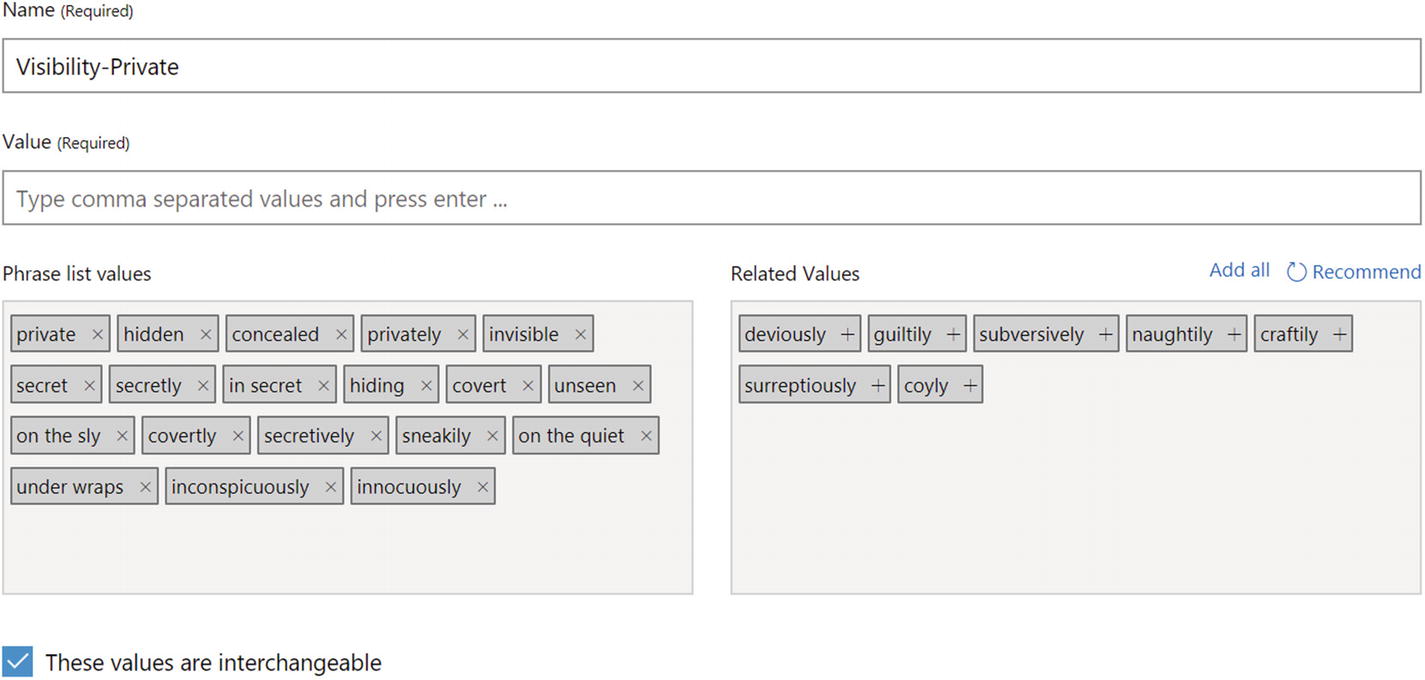
I may have gone overboard a bit. I blame the Related Values function.
A phrase list requires a name and some values. We enter the values one by one in the Value field. As we press Enter, it adds them to the Phrase list values field. The Related Values field contains synonyms automatically loaded by LUIS. We then select the checkbox to tell LUIS that the values are interchangeable.
Before training, let’s try a few variations of the private meeting utterances without the phrase list enabled. If you try utterances like “Meet in private,” “Meet in secret,” or “Create a hidden meeting,” LUIS does not recognize the entity. However, if we train the app with the phrase list, LUIS has no problem identifying the entity in those samples and many others.5
Exercise 3-8
Training Features
Add the Visibility hierarchical entity to your LUIS app.
Add your own phrase list to improve the private visibility entity performance.
Publish the LUIS app into the Staging slot.
Use curl to examine the resulting JSON.
How does setting the phrase list as not interchangeable affect its performance?
Phrase lists are powerful features to help our app get better at identifying different entities.
Exercise 3-9
Adding an Invitee Entity
Add a new custom entity called Invitee.
Go over every sample utterance so far and identify the invitee entity in the utterances.
If it needs additional training, add more samples. Ensure to include samples where Invitee is the only entity or is one of many entities in an utterance.
For bonus points, add the Invitee entity to the CalendarEntry composite entity.
Train and make sure all intents and entities are still performing well.
Publish the LUIS app into the Staging slot.
Use curl to examine the resulting JSON.
If you have completed this exercise successfully, congratulations! You are getting darn good at using LUIS.
Active Learning
We’ve spent weeks training a model , we’ve gone through a round of testing, we’ve deployed the application into production, and we’ve switched our bot on. Now what? How do we know if the model is performing the best it can? How do we know whether some user has thrown unexpected input at the our application that breaks our bot and results in a bad user experience? Bug reports are one way for sure, but we would depend on getting that feedback. What if we could find out about these problems as soon as they occur? We can do so by taking advantage of LUIS’s active learning abilities.
Recall that supervised learning is machine learning from labeled data, and unsupervised learning is machine learning from unlabeled data. Semisupervised learning lives somewhere in between. Active learning is a type of semisupervised learning in which the learner asks the supervisor to label new data samples. Based on the inputs that LUIS is seeing, it can ask you, the LUIS app trainer, for your assistance labeling data that is coming from your users. This improves model performance and over time makes our application more intelligent by using real user input as sample data.
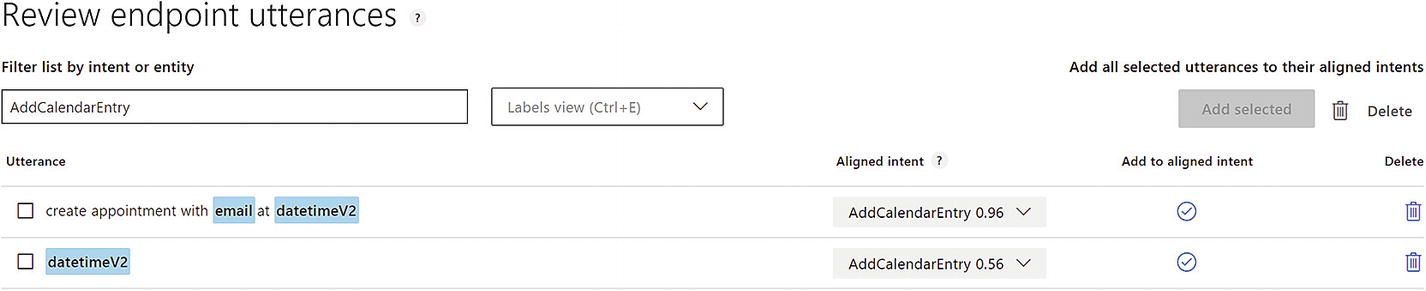
The active learning interface
The interface allows us to review past utterances and their top-scoring intent, referred to as the aligned intent . As trainers, we can add the utterance to the alignment intent, reassign to a different intent, or altogether get rid of the utterance. We can also zero in on specific intents or entities if we know there are problems with any of them.
Before adding the utterance to the aligned intent, we need to confirm that the utterance is correctly labeled and any entities are being correctly identified. We suggest that using this interface to improve LUIS application is a common practice for any team .
Dashboard Overview
Now that we have trained our application and utilized it for testing, it is well worth highlighting the data that the dashboard provides. The dashboard allows us to get a good glance at the overall app status, its usage, and the amount of data we have trained it with.
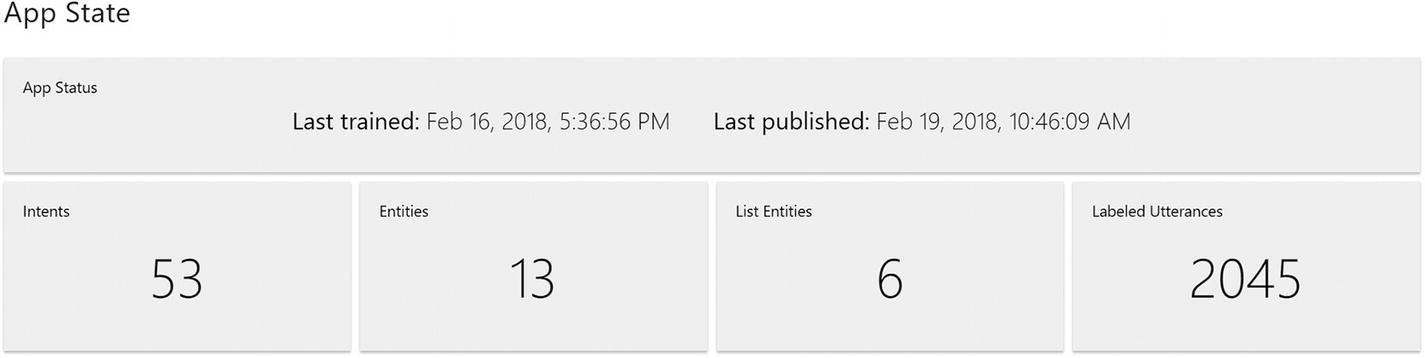
Application status
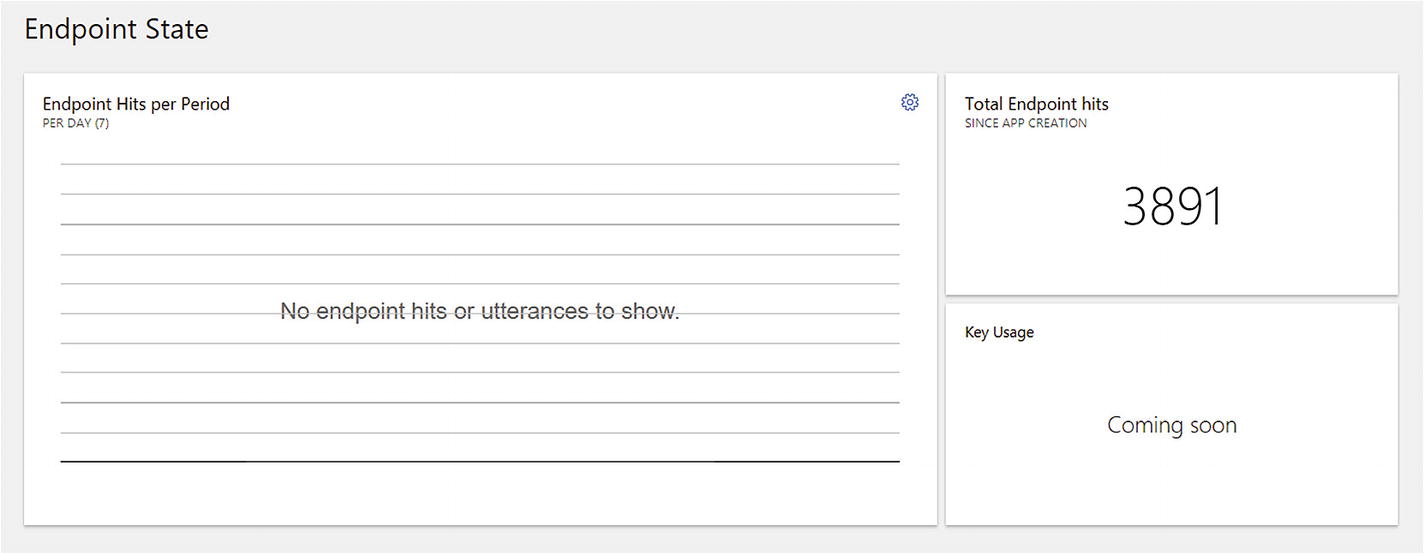
API endpoint usage summary
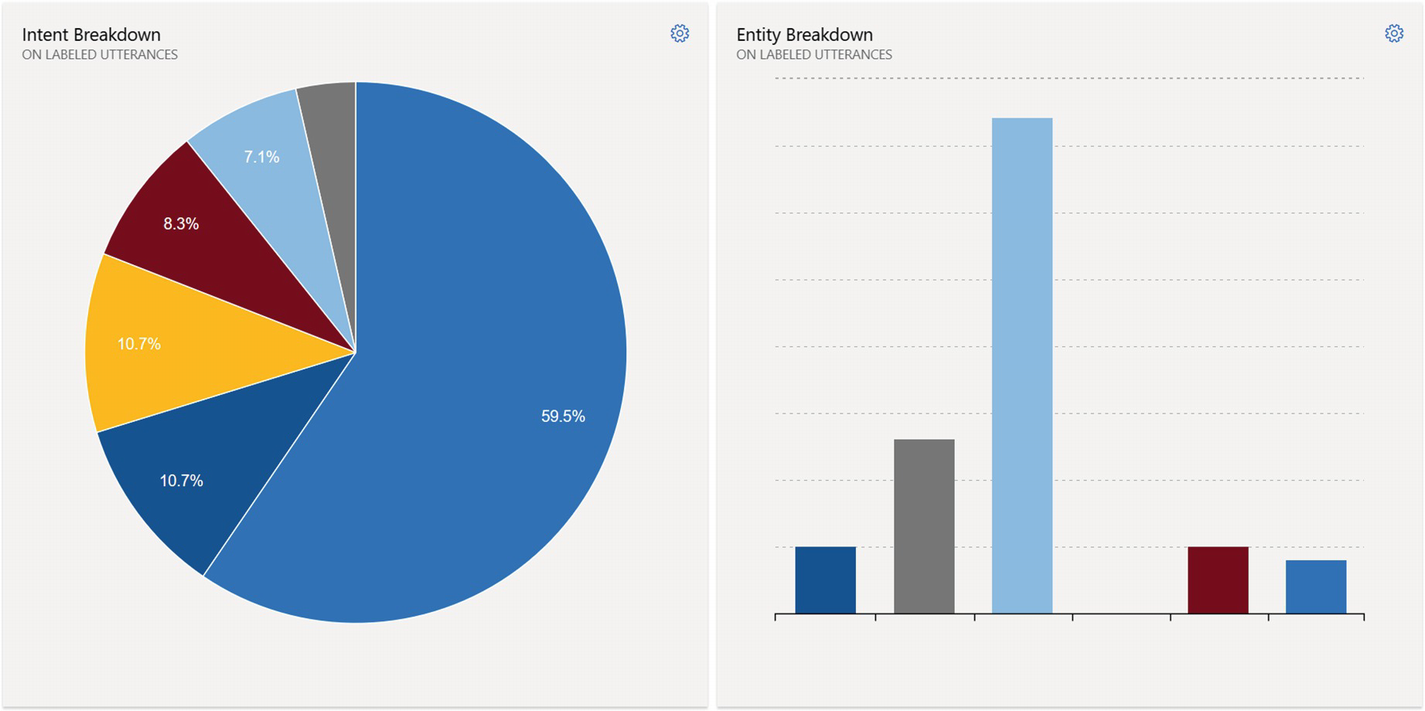
Statistics around intent/entity utterance counts and distributions. Clicking an intent navigates to that intent’s utterances page.
Managing and Versioning Your Application
Everything we have done so far is part of the common workflow of adding samples, training, and publishing a LUIS application. During the development phase, this workflow is repeated over and over again. Once your application is in production, you should be careful about what you do to your app. The process of adding a new intent or entity can have unforeseen effects on the rest of the application, and it is best that editing an existing application is done in isolation so it can be tested properly.
We have experience with the concepts of the staging and production deployment slots. This certainly helps; we know that we can test changes without publishing to our production endpoints. A common rule is to have the Staging slot host the dev/test version of the application and the Production slot host the production version. Whenever a new application is ready for production, we move it from the Staging slot to the Production slot. But what if we make a mistake in our models? What if we need to roll the Production slot back? That is where versions come in.
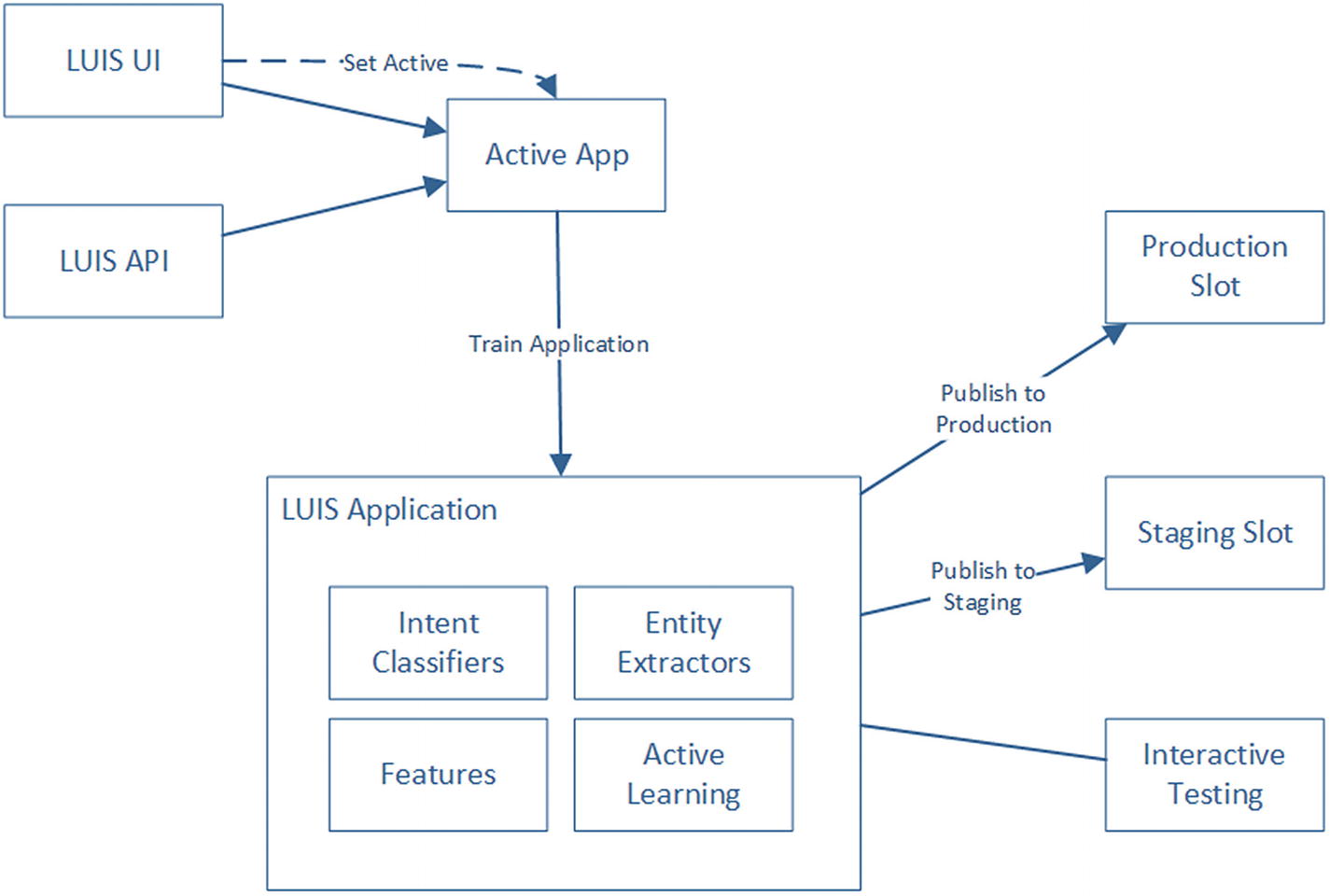
The LUIS development, training, testing, and publishing workflow
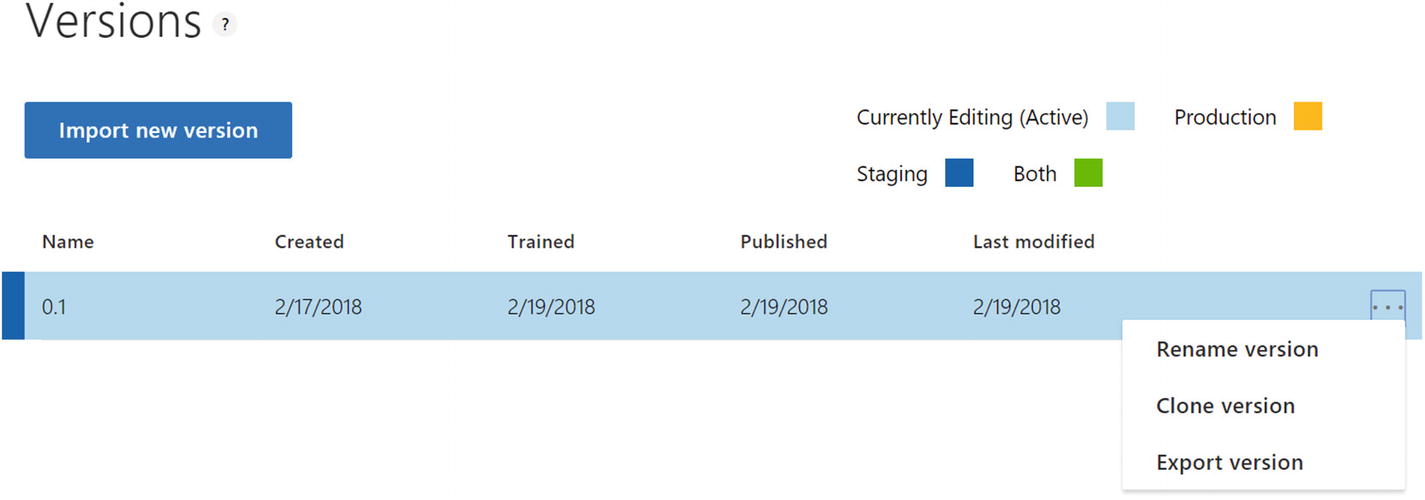
The versioning functionality on the Settings page
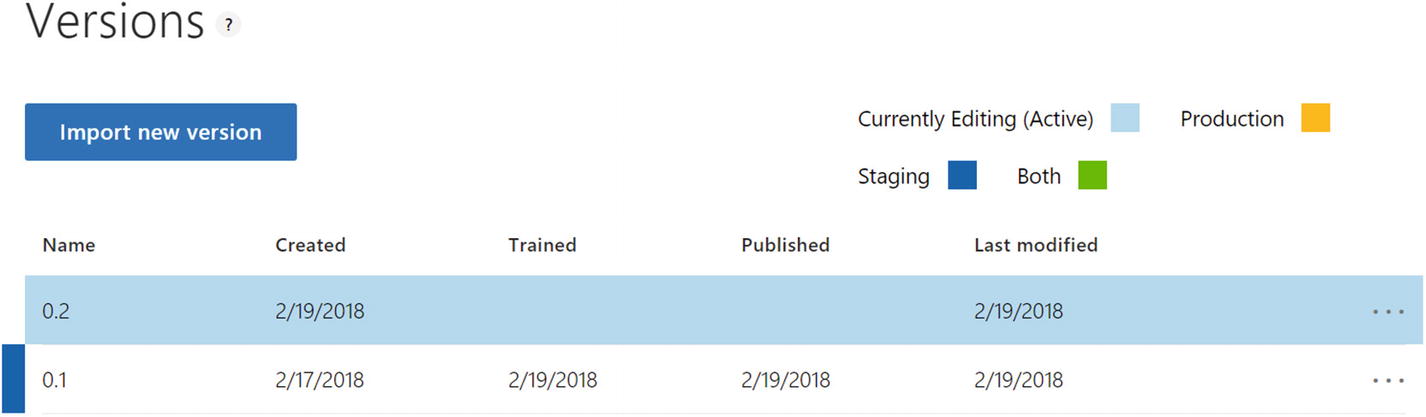
Version 0.1 was cloned into 0.2
Note that after closing 0.1, it remains in the Staging slot, but 0.2 becomes the Active version. LUIS also doesn’t allow for easy branching. If multiple users want to make changes to a single version, they cannot create a new version and then merge their changes using the user interface. One way to accomplish this would be to download the LUIS App JSON by clicking the Export Version button in Figure 3-42, utilizing a source control tool like Git to branch and merge, and finally, using the “Import new version” button to upload a new version from a JSON file.
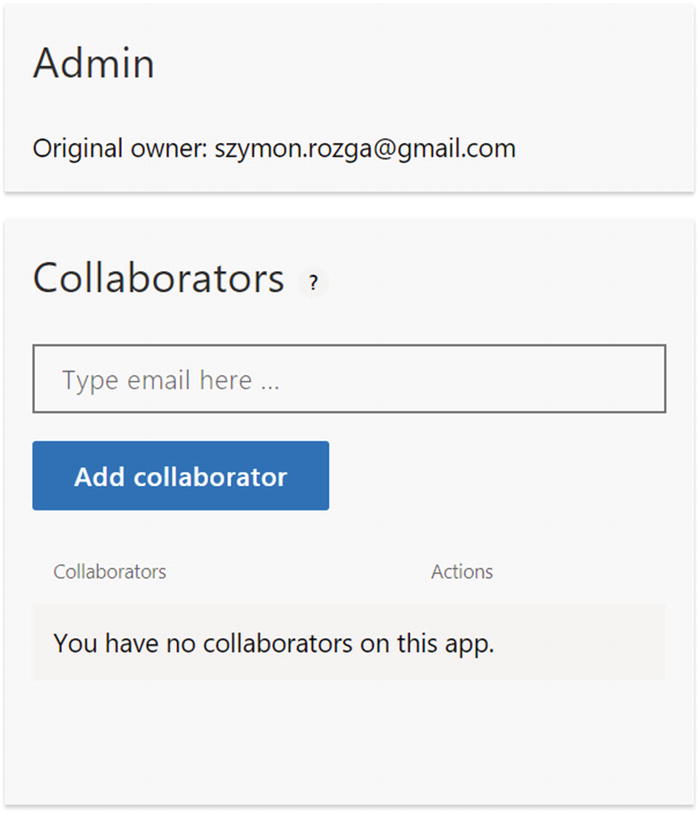
Adding collaborators to your LUIS application
Integrating with Spell Checking
One advanced feature in LUIS is the ability to integrate with a spell checker to automatically fix misspellings in user input. User input is, by its very nature, messy. Misspellings are immensely common. Combine that with the common usage of messaging apps, and you have a recipe for consistent misspelled input.
The spell checker integration runs the user query through Bing’s Spell Checker service, gets a possibly altered query with misspellings fixed, and runs that altered query through LUIS. This feature is invoked by including the query parameters spellCheck and bing-spell-check-subscription-key. You can get a subscription key from the Azure Portal, which we will introduce in Chapter 5. We will also utilize the Spell Check API more directly in Chapter 10.
This functionality can be helpful, and we would typically recommend it with a caveat. If our entities contain domain-specific values or product names that are not strictly part of the English language, we may get an altered query in which LUIS is unable to detect an entity. For example, it may break up one word into multiple words when such behavior is unwanted. Or, if our application is expecting financial tickers, it may just change them. For example, VEA, a Vanguard ETF , is changed to VA. In the United States, that’s a common reference to the state of Virginia. The loss of meaning is quite significant; I advise caution in using this feature.
The effect of the spell check on the LUIS API result is easy to spot. The result now includes a field called alteredQuery. This is the text passed into the LUIS models. A sample curl request and response JSON is presented here:
Import/Export Application
Any application built in LUIS can be exported into a JSON file and imported back into LUIS . The JSON file format is exactly what we would expect. There are elements that define which custom intents, custom entities, and prebuilt entities the application uses. There are additional elements to capture phrase lists. And, not surprisingly, there is a rather large segment describing all the sample utterances, their intent label, and the start and end index of any entities in the utterance. We can export the application by clicking Export App in the My Apps section of LUIS or Export Version in the Settings page, as per Figure 3-41.
Although the format of the exported application is specific to LUIS, it is easy to imagine how we could write code to interpret the data by other applications. From a governance perspective, it is good practice to export our applications and store the JSON in source control because the action of publishing an action is irreversible. This should not be an issue if our teams follow a strategy in which a publish into the Production slot implies the creation of a new application version, but mistakes do happen.
One of the most common questions we receive in our work with LUIS is “why we can’t import an application into an existing application?” The reason is that this would be tantamount to a smart merge, especially where there are overlapping utterances with different intents or same name intents with completely different application connotations. Since every application has different semantics, this merge would be a nontrivial task. We suggest either utilizing Git to manage and merge application JSON code or creating custom code to merge using the LUIS Authoring API.
Using the LUIS Authoring API
Apps: Add, manage, remove, and publish applications.
Examples: Upload a set of sample utterances into a specific version of your application.
Features: Add, manage, or remove phrase or pattern features in a specific version of your application.
Models: Add, manage or remove custom intent classifiers and entity extractors; add/remove prebuilt entities; add/remove prebuilt domain intents and entities.
Permissions: Add, manage, and remove users in your application.
Train: Queue application version for training and get the training status.
User: Manage LUIS subscription keys and external keys in LUIS application.
Versions: Add and remove versions; associate keys to versions; export, import, clone versions
The API is very rich and allows for training, custom active learning, and enables CI/CD type scenarios. The API Reference Docs6 are a great place to learn about the API.
Troubleshooting Your Models
One of the most common problems is training the model without publishing it. Make sure that if you are testing the application using the Staging slot, that you publish it into the Staging slot. If you are calling your application’s production slot, make sure the app is published. And ensure that you pass the staging flag as needed in your calls to the API.
If intents are getting misclassified, provide more intent examples to the intents that are having problems. If problems persist, spend some time analyzing the intents themselves. Are they really two separate intents? Or is it really one intent and we need a custom entity to tell the difference? Also, make sure to train the None intent with some inputs that are truly irrelevant to your application. Test data is great for this purpose.
- If the application is having difficulty recognizing entities, consider the type of entity you are creating. There are entities that are usually a one-word modifier in the same place in an intent, like our Visibility entity. On the other hand, there are subtler entities that can be anywhere in the utterance usually prefixed and suffixed by some words. The former won’t need as many sample utterances as the latter one. In general, entity recognition issues can be fixed by doing the following:
Adding more utterance samples both in terms of different variations and multiple samples of the same variation.
It is worth asking whether the entity should perhaps be a list entity. A good rule of thumb is, is this entity a lookup list? Or does the application need flexibility in how it identifies this type of entity?
Consider using phrase lists to show LUIS what an entity may look like.
Is LUIS getting confused between two entities? Are the entities similar with a slight variation based on context? If so, this may be a candidate for a hierarchical entity.
Utilize composite entities if your users are trying to communicate higher-level concepts composed of multiple entities.
Building LUIS applications can be more of an art than science. You will sometimes spend a lot of time teaching LUIS the difference between some entities or where in a sentence an entity can appear. Be patient. Be thorough. And always think of the problem in statistical terms; the system needs to see enough samples to truly start understanding what’s happening. As people, we can take our intelligence and language understanding for granted. In relative terms, it is quite amazing how quickly we can train a system like LUIS. Remember this as you work with LUIS or any other NLU system.
Conclusion
That was quite a lot of information! Congratulations, we are now equipped to start building our own NLU models using a tool like LUIS. To recap, we went through the exercise of creating an application by utilizing prebuilt entities, custom intents, and custom entities. We explored the power of the various prebuilt entities and dabbled a bit in the prebuilt domains that LUIS provides. We spent time training and testing our application, before publishing it into different types of slots and testing the API endpoints using curl. We optimized our application using phrase features and further improved it by using LUIS’s active learning abilities. We explored versioning, collaborating, integrated spell check, exporting and importing of applications, using the authoring API, and common troubleshooting techniques in our LUIS applications.
I must reiterate that the concepts and techniques you just learned are all applicable to other NLU platforms. The process of training intents and entities and optimizing models is a powerful skill to have in your toolkit, whether for bots, voice assistants, or any other natural language interface. We are now ready to start thinking about how we build a bot. As we do, we’ll keep checking back into this LUIS application as it gets consumed by our bot.