Now that we are equipped with the necessary skills to develop great conversational experiences for our customers, it is clear you will create the next killer bot. It will integrate with a bunch of APIs and accomplish things unheard of in the industry to date. I’m not a great sales guy, but you get it. You are excited about your idea, and you are even more excited to bring it to market. The bot is deployed, and, to everyone’s disappointment, it is not gaining traction. Users do not engage with it. Suddenly, you realize you do not have a good understanding of what users are doing and when they abandon the conversation with your chat bot. What we need is analytics!
All chat bots constantly generate data. Every interaction between a user and a bot, every time the NLU platform resolves a user’s intent, every time the user curses at the bot, and every time the bot has no idea what users are asking it to do are critical points in the conversation that lend insight into users’ behaviors and, more importantly, into how to improve the conversational experience.
What are the ways in which we can capture all this data? What kinds of questions are we trying to answer? How do we get to this data? This chapter aims to answer some of these questions and provide an introduction to integrating a Bot Framework chat bot with an analytics platform.
Common Data Questions
It is worth examining what insights we should be looking to gain from user interactions with our chat bot. We are certainly interested in how long our users converse with the bot. We are also interested in what topics users are messaging about. Surely, we are interested in the raw input, but we can probably get better insights if we knew the exact intent that was resolved. We also want to know what percentage of user input our bot knew how to handle versus, perhaps, what it should know how to handle.
In general, chat bot analytics platforms all gather and report similar data. On top of generic analytics functions, many can perform channel-specific analytics on the bot. For example, Dashbot, one of the platforms we will look at in the next section, can gather specific analytics data from Slack and Facebook Messenger among others. On Slack, we can see statistics such as how many Slack channels have installed our bot. Not surprisingly, analytics tools should allow us to ask for channel-specific data. In the general case, the questions we will be asking are not novel: web analytics platforms answer a lot of similar questions. For chat bots we look at several categories of analytics next.
Generic Data
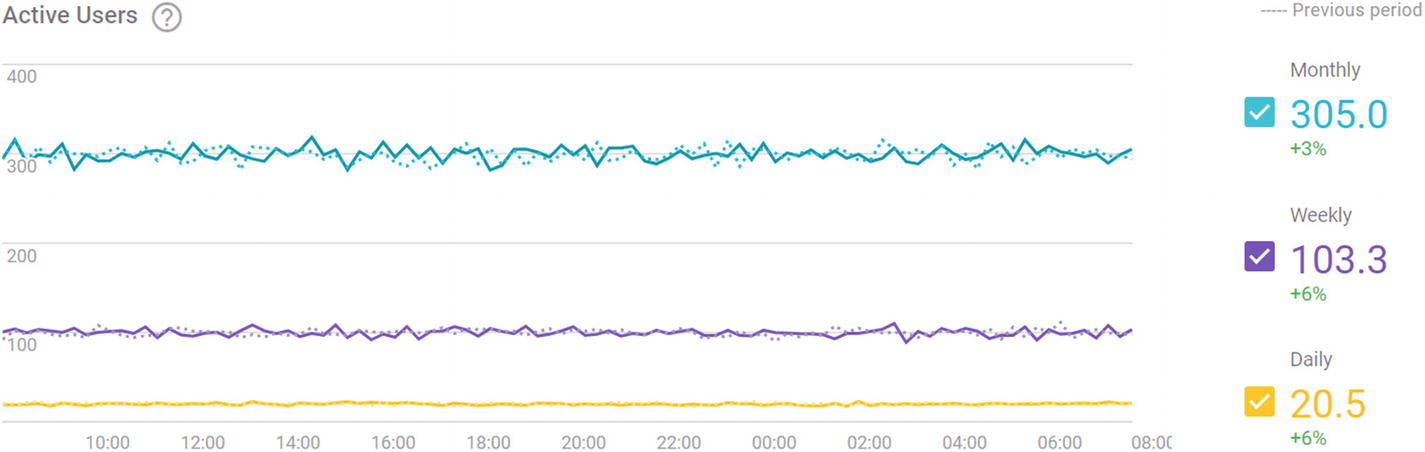
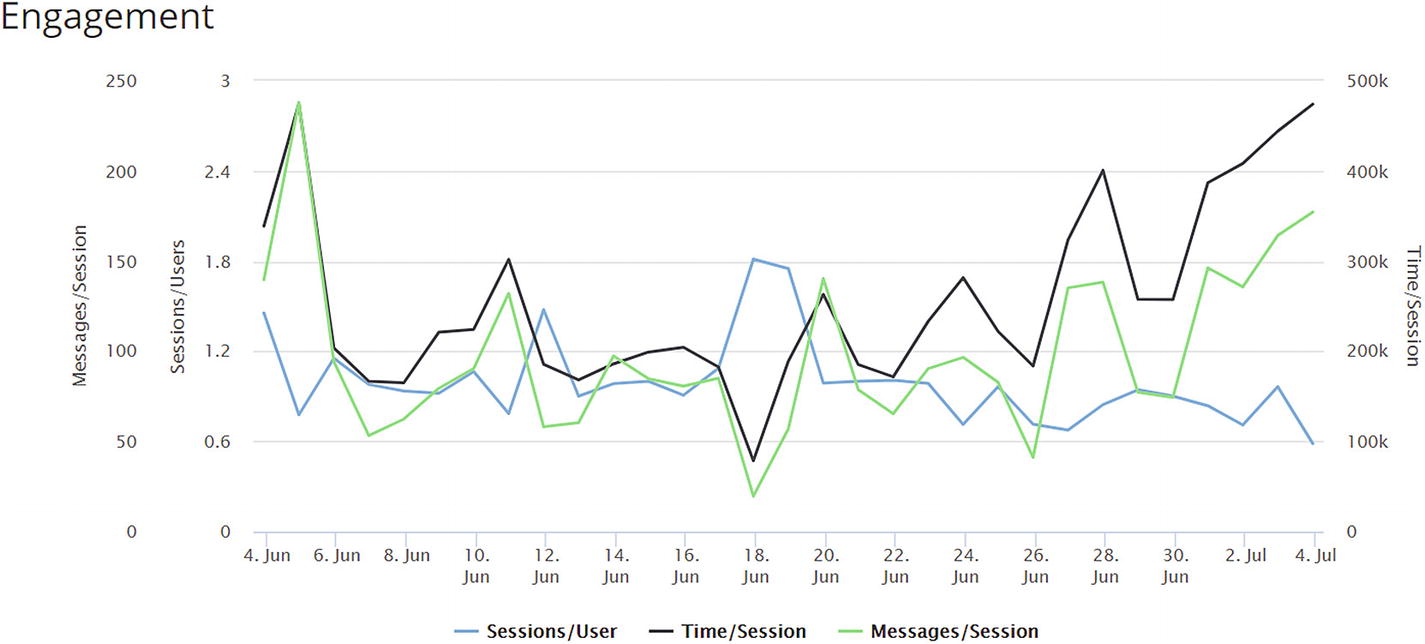
Generic data is raw, numerical data such as number of messages, number of user sessions, number of messages exchanged per session, session duration, number of sessions per user, and so on. This data should be displayed in a chart plotted against time and, ideally, aggregated by any time bucket. This data allows us to see some simple trends such as when users typically interact with the bot, how many times, and for how long. If you have a million users, congratulations! But if they interact with your bot for only two messages ever, that is not success. Figure 13-1 illustrates a simple active users chart provided by Google’s Chatbase. Figure 13-2 is an example of a user engagement chart by Dashbot.
Figure 13-1
Chatbase’s active users chart
Figure 13-2
Dashbot’s engagement chart
Demographics
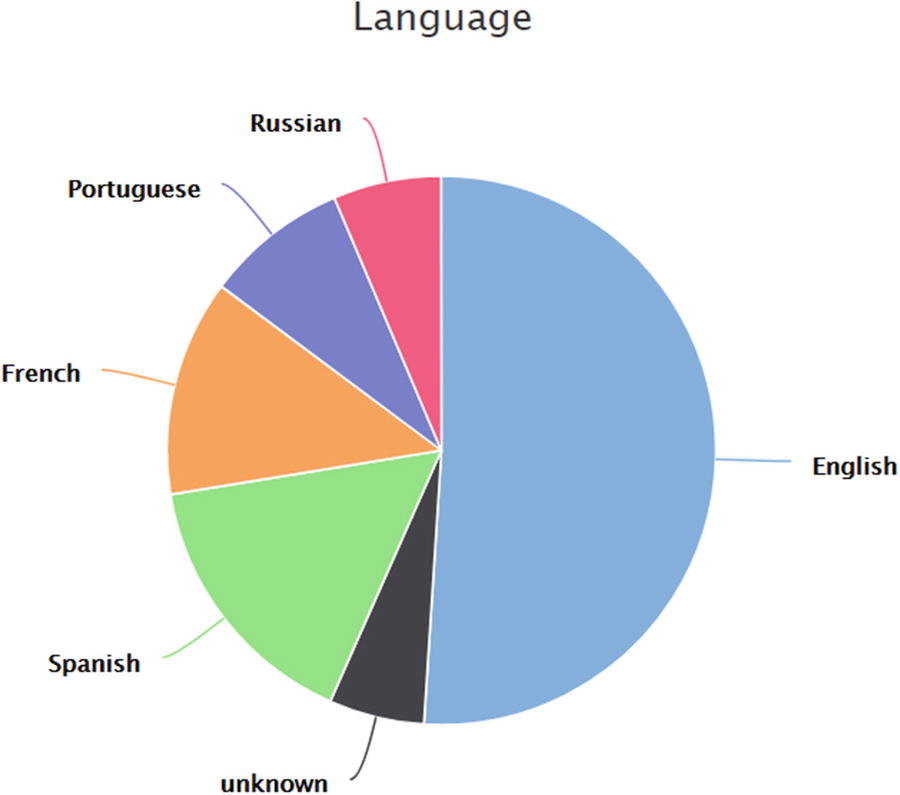
This category comprises data such as location, gender, age, and language. This data is not available for all channels. Figure 13-3 is an example of user language distribution from Dashbot.
Figure 13-3
This chat bot should definitely support multiple languages
Sentiment
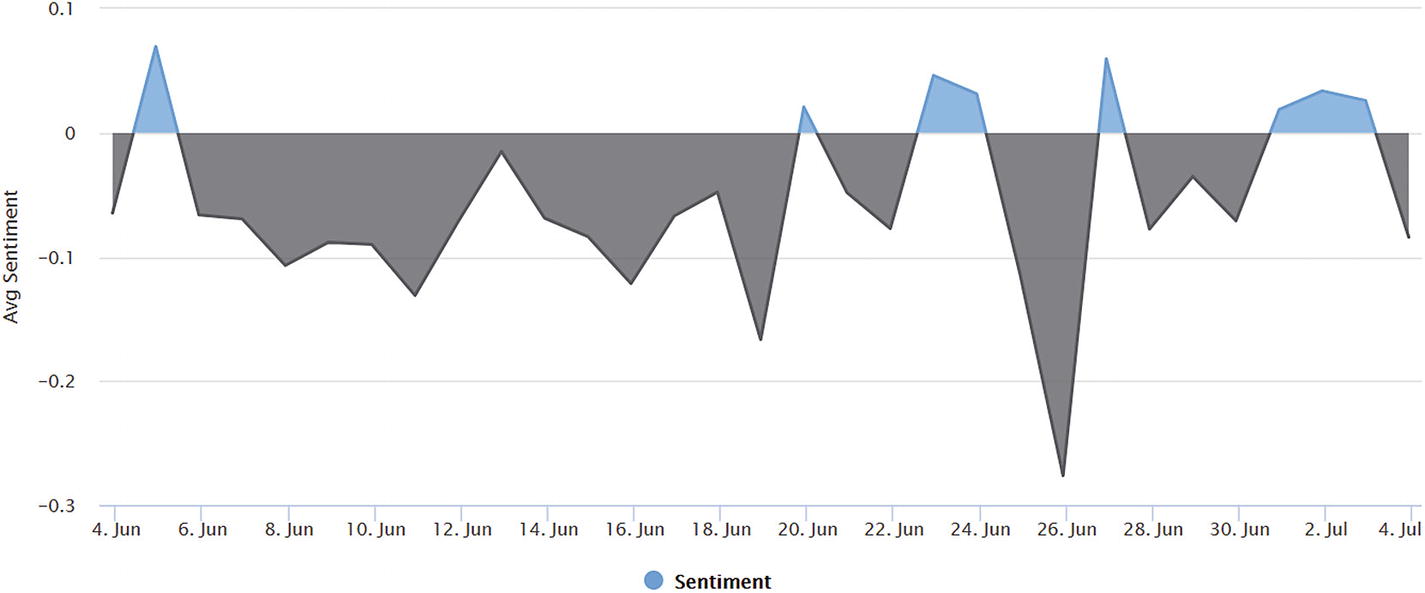
Now we are getting into some interesting territory. Ideally, we would like to examine average conversation sentiment correlated with other measures such as session duration and intent. For example, does one piece of functionality really frustrate users? Does the user get more frustrated with the bot over time? This might indicate a need for aggressive transfer to a human live chat, if supported. Does sentiment correlate with something beyond our control like time of day? Figure 13-4 is an example of Dashbot’s overall sentiment visualization.
Figure 13-4
Overall sentiment tracking. June 26 was not a good day.
User Retention
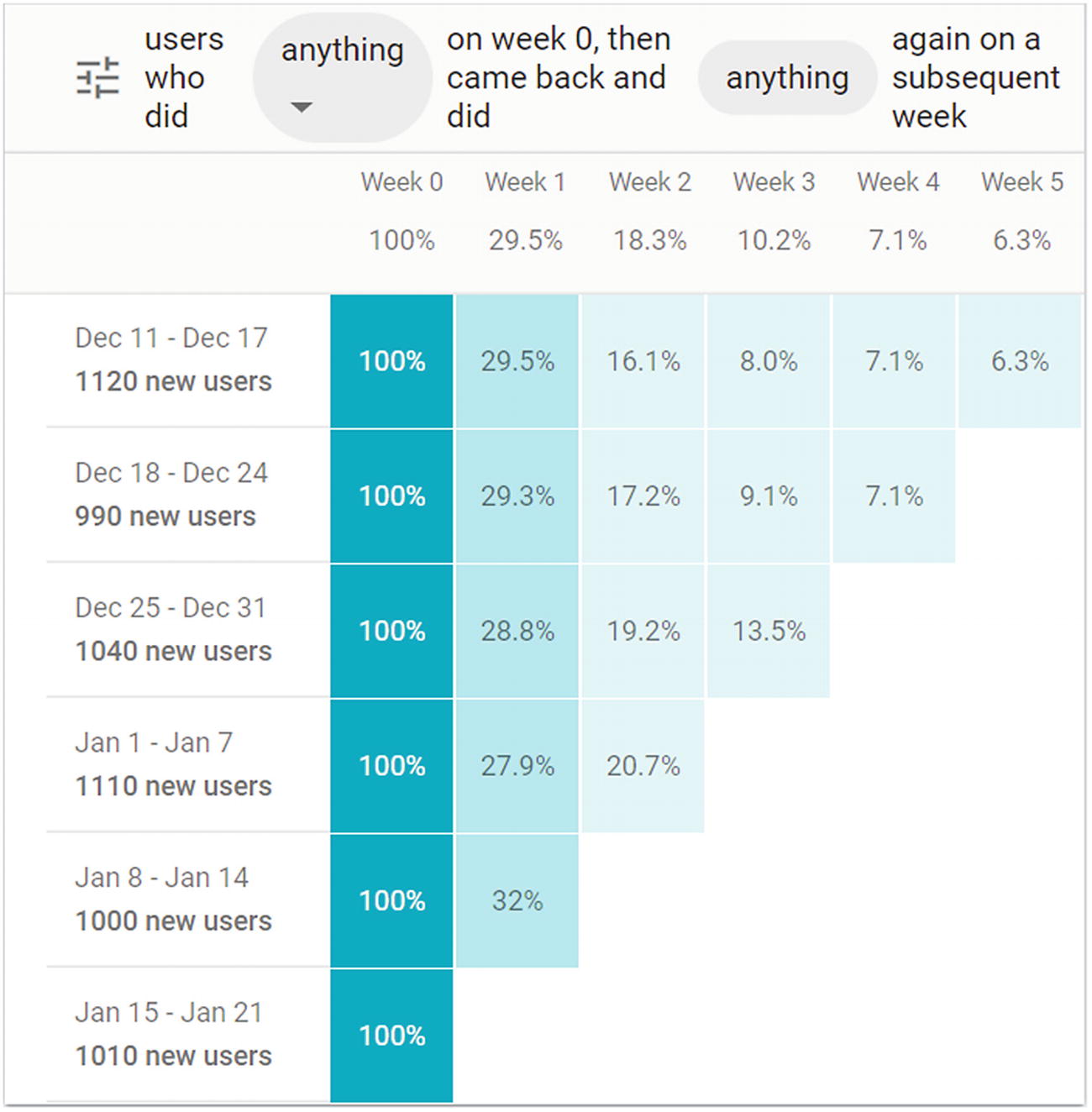
As a chat bot developer or product owner, one of the most interesting bits of data is how often users come back to the experience. We want our conversational experience to be “sticky.” The analytics platforms will typically include some visualization showing how many users return to the chat bot week after week. Of course, a good analytics tool will also let us explore the retention metrics based on the manner in which the users initially interacted with the chat bot. Google’s Chatbase is a platform that does just that (Figure 13-5). By default, we see what percentage of users come back to the bot a week after interacting with it in any way whatsoever. We can break this down to consider intent as part of the equation, leading us to correlate intents with retention. This can be a good metric to understand which pieces of functionality may be driving user retention and which areas need work.
Figure 13-5
User retention table
User Session Flows
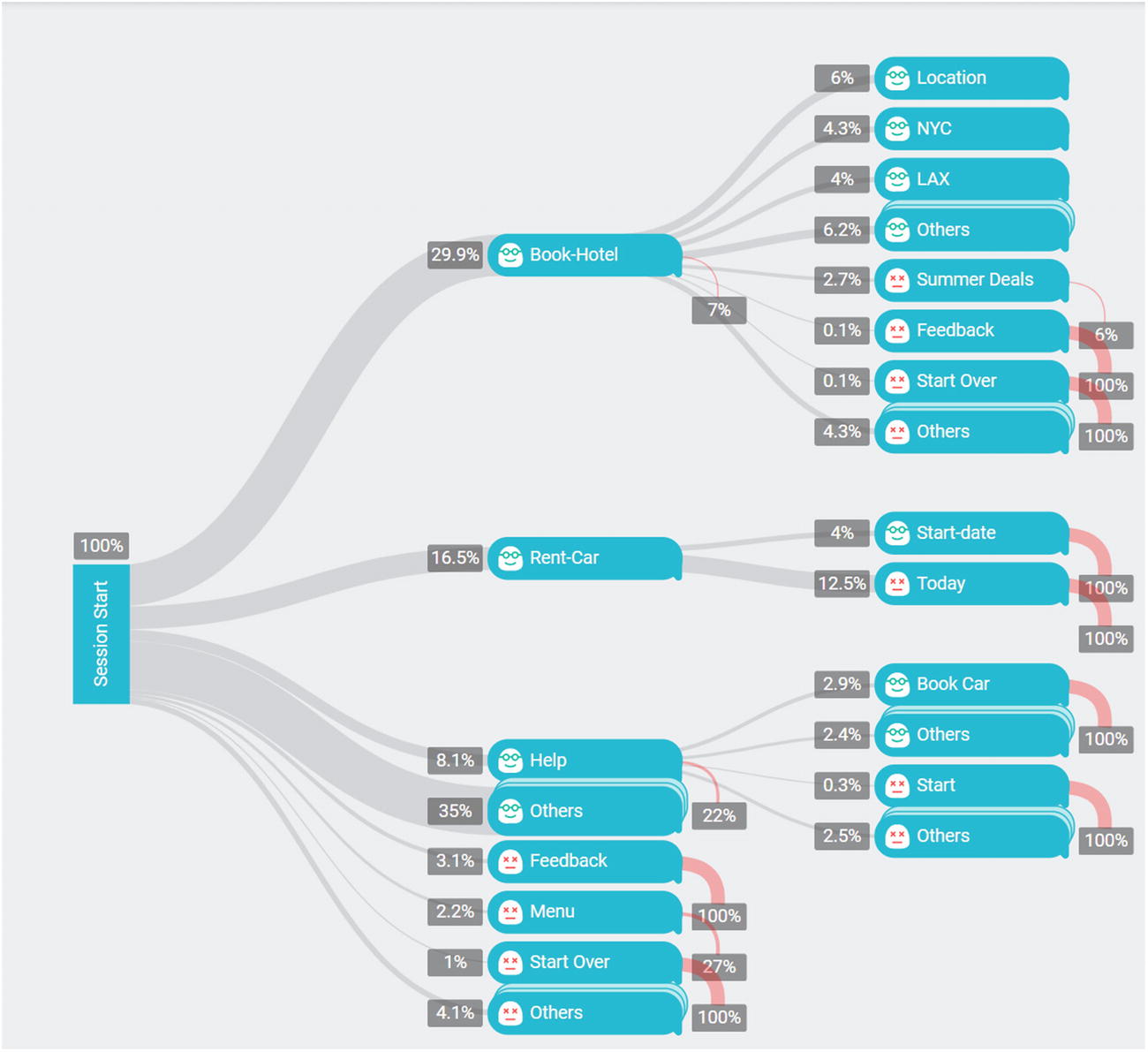
There are many ways of visualizing user behavior, but user flows are among the most common approaches. Typically, the analytics platform will show the most common actions that users took upon session start and what percentage of users took this action. Next, for every action, it will show every subsequent action that users took, including the percentage of users who did so and the drop-off rate. That is, we gain an understanding of how many users kept interacting with the bot and through which actions versus how many users simply stopped talking to the bot altogether. Again, this kind of visualization is common in the web analytics space, and it is natural to use it with chat bots. Figure 13-6 shows an example from Chatbase. One of the insights we may gain from this visualization is that the team might consider supporting rental car customers that specify they want the car today as opposed to requiring them to enter the date. Note that the path to Rent-Car Today indicates the Today intent is not supported.
Figure 13-6
A sample Chatbase session flow diagram
Analytics Platforms
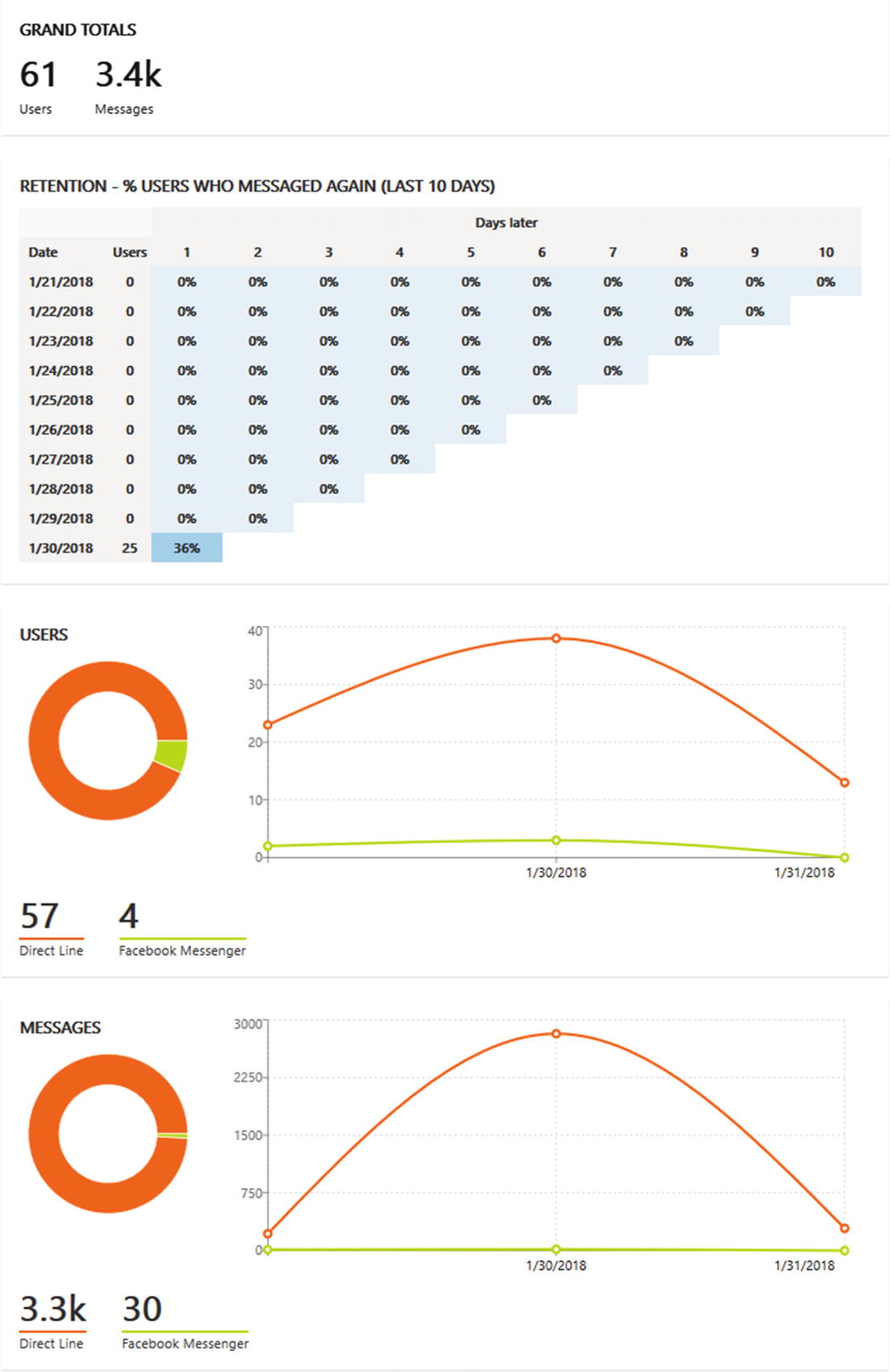
There are several chat bot analytics platforms. First, most chat bot development platforms and some channels have some sort of analytics dashboards. For example, Microsoft’s Bot Framework includes an analytics dashboard (Figure 13-7) that provides the total number of messages and users, a basic retention table, number of users per channel over time, and number of messages per channel over time.
Figure 13-7
Azure Bot Service analytics dashboard
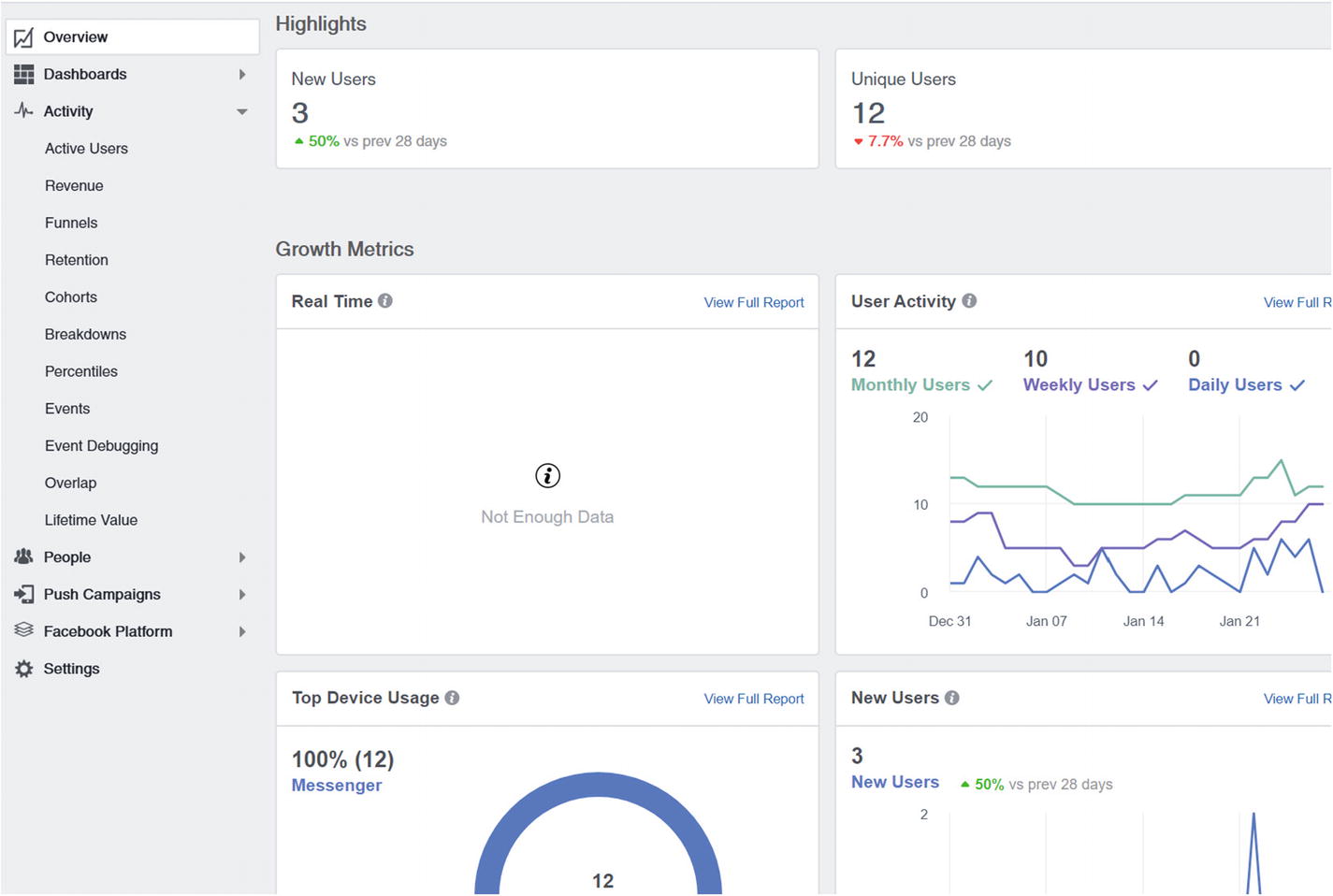
Facebook provides Facebook Analytics (Figure 13-8), a platform-wide analytics dashboard that includes detailed Facebook bot data. Amazon provides an Alexa Skill dashboard. The problem is that the Bot Service analytics are somewhat lacking in their depth and usability, and the Facebook and Alexa dashboards each support only one channel.
Figure 13-8
Facebook Analytics for bots
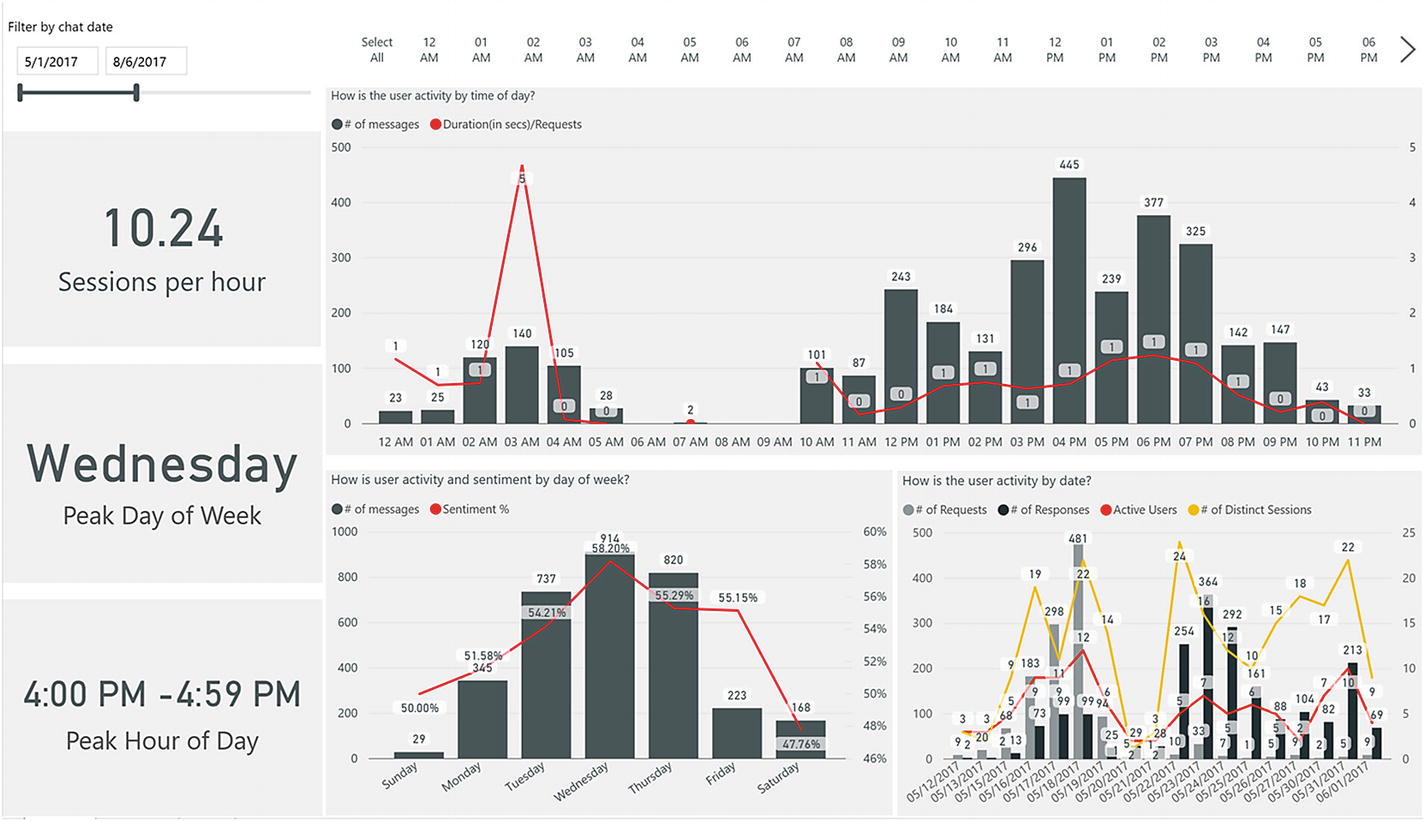
Many customers have existing investments in analytics platforms spanning multiple product lines. For example, one analytics system may own all the data gathered from web properties, mobile apps, and multiple chat bot. In such an environment, the data and user behavior can be correlated across the different platforms. If there is a way to identify a user on a mobile device and correlate that to a user on the chat bot (perhaps via an account linking process), then we can gain a much broader understanding of that user’s behavior across the platforms and cater to their needs accordingly. Typically, this would involve an enterprise data storage solution, either on premises or in the cloud, with custom visualizations built using something like Microsoft’s Power BI (Figure 13-9) or Tableau.
Figure 13-9
A sample Power BI dashboard
There are also flexible third-party chat bot analytics solutions that provide APIs and SDKs that we can integrate with our bot. We mentioned two that we will work with in the rest of the chapter: Dashbot (https://dashbot.io) and Google’s Chatbase (https://chatbase.com). There are other options such as Botanalytics (https://botanalytics.co/) and BotMetrics (https://www.getbotmetrics.com/). Many of these vendors also support analytics for voice interfaces such as Alexa, Cortana, and Google Home. We encourage you to do your own research to understand the options and make the best choice based on their requirements.
Integrating with Dashbot and Chatbase
We have chosen these two platforms to show two styles of analytics integration and the kinds of reports they provide. We will look at Dashbot’s out-of-the-box Node Bot Builder support, which leverages Bot middleware to install incoming and outgoing message handlers to send analytics data to Dashbot. (Recall that we used the concept of bot middleware before in the context of multilanguage support in Chapter 10.) That is a great start. Google’s Chatbase, in contrast, is a bit more focused on ensuring a richer story around the analytics data. Specifically, when reporting data to an analytics system, it may be useful not only to send the user’s input but also to determine whether the input resolved to an intent, whether the input was handled, and whether the input was a command or simply feedback to a bot question. This additional metadata, something that simple integration via middleware will be pressed to capture, can yield incredibly rich analytics. Getting it done right requires effort to make each dialog analytics-aware. Let’s look at a couple of samples that illustrate the two approaches.
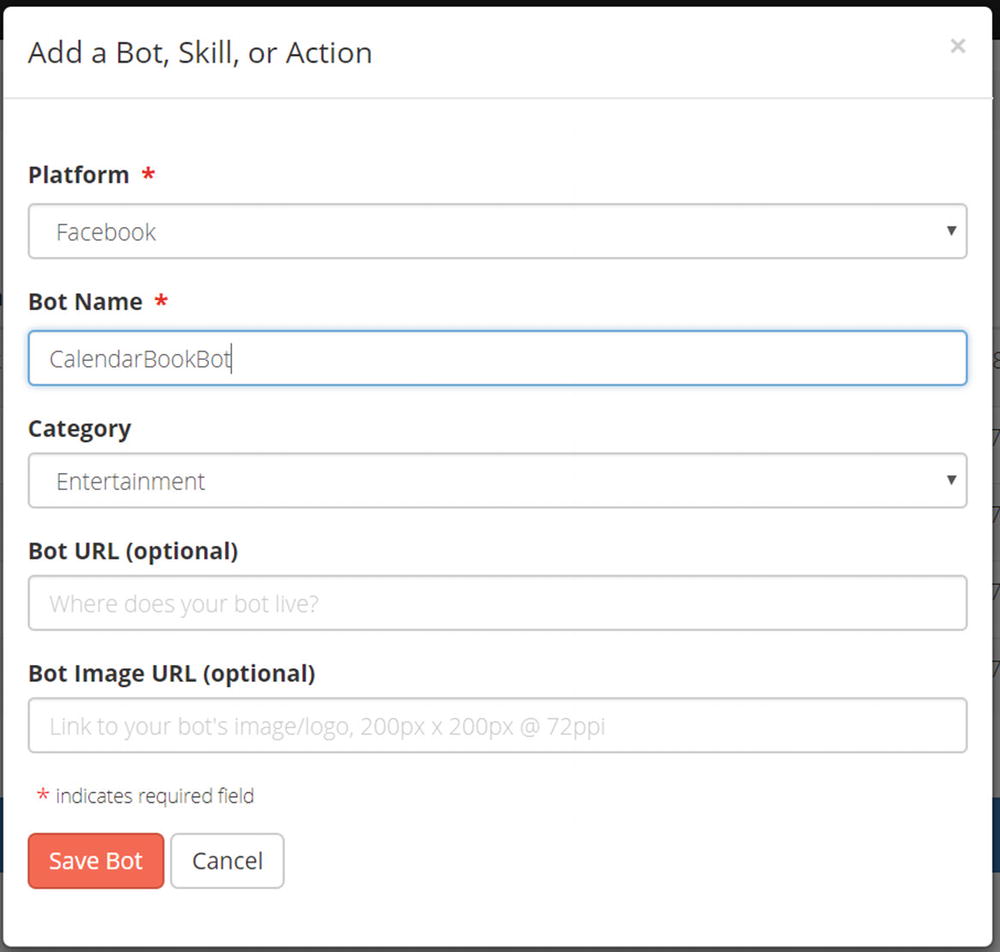
Let’s start with Dashbot. First, we sign up for a free account by going to https://dashbot.io/. Once logged in, we will be taken to an empty bots list. Click the Add a Bot, Skill, or Action button (Dashbot supports Alexa skills and Google actions, could you tell?). The interface will ask us for the platform or channel we are targeting (Figure 13-10). This is Dashbot’s way of providing analytics optimizations and opportunities for further data integration based on the channel.
Figure 13-10
Creating a new Dashbot entry
Once created, Dashbot will show us the bot’s analytics API key. Let’s connect our chat bot to this Dashbot entry. First, install the Node.js package.
npm install dashbot –-save
Lastly, we add the following code to our app.js file after we create a bot:
There are several things happening here. First, we are specifying the Dashbot API keys. In Dashbot, each platform can get its own distinct dashboard, or you can create multiplatform dashboards. If the bot supported additional channels and we had additional API keys for those channels, we would set them in the dashbotApiMap. Next, we import the Dashbot middleware for the Bot Framework and add it to the bot by using bot.use. As we do so, we are also providing the Facebook page access token. This isn’t required, but it provides Dashbot with the ability to fetch additional data from Facebook and integrate it into the dashboards.
And, that’s it! The code for Dashbot’s Bot Framework middleware is very concise. We present it here for reference:
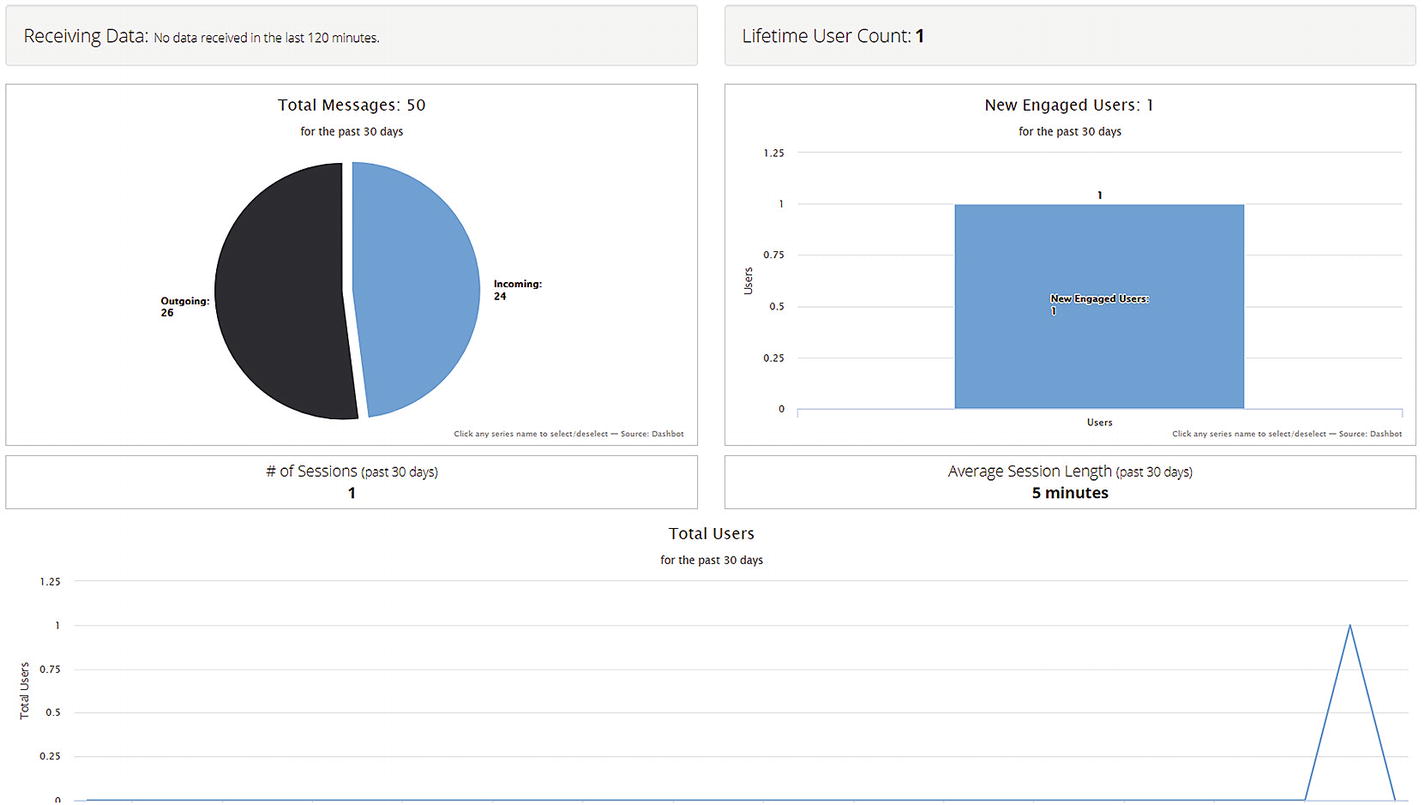
After speaking to our bot for a couple of minutes, we produced the data in Figure 13-11.
Figure 13-11
One conversation’s worth of data
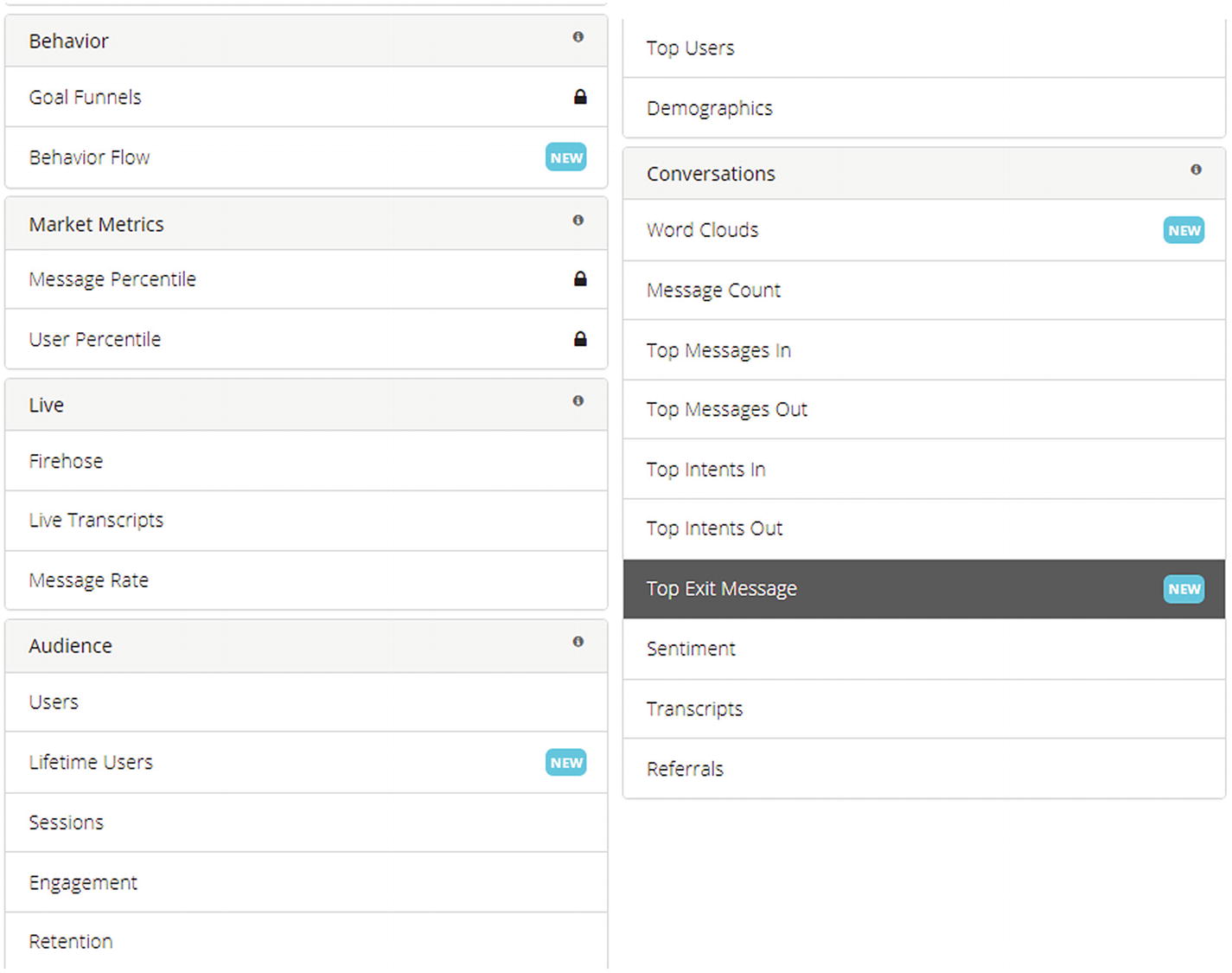
That was easy. There are many other data points we can look at on Dashbot. Figure 13-12 shows a listing of the possibilities and includes details about users, retention, demographics, top messages and intents, and even raw conversation transcriptions. Naturally, things like intent data are not populated. Per our earlier point, if we wanted to support that, our dialogs would have to incorporate analytics reporting functions.
Figure 13-12
Different analytics provided by Dashbot
Google’s Chatbase API does not contain prebuilt Bot Framework middleware integration; however, building this out ourselves is not too challenging. We could take Dashbot’s code as a starting point. In fact, we do so but only for outgoing messages. The incoming message data will be sent from within the individual dialogs.
To begin, we create a new bot on https://chatbase.com, via the Add Your Bot button. We will need to enter a name, country, industry, and business case. As a result, we will get an API key from Chatbase. We first install the Node.js package.
npm install @google/chatbase –-save
We then write a few helper methods to build Chatbase messages and the middleware send handler. We can place this in its own Node.js module. In the following build method, we ask the caller for the message text, user ID, dialog arguments (from which we can try extracting the intent), and handled flag. Chatbase allows us to report whether a certain input was handled or not. For example, if there is unrecognized input from users, we would want to report it as such.
require('dotenv-extended').load();
const chatbase = require('@google/chatbase')
.setApiKey(process.env.CHATBASE_KEY) // Your Chatbase API Key
.setAsTypeUser()
.setVersion('1.0')
.setPlatform('SAMPLE'); // The platform you are interacting with the user over
exports.chatbase = chatbase;
chatbase.build = function (text, user_id, args, handled) {
All that is left to do in our app.js is to install the Bot Builder middleware.
const chatbase = require('./chatbase');
bot.use(chatbase.middleware); // install the sender middleware
Next, we need to add the analytics call wherever in our dialogs it is needed. For example, in the summarize dialog, we can use this call to report a successful entry into the dialog.
This code has been integrated into the calendar bot we have been working on throughout the book. The branch chapter-13 in the repo has been integrated with the previous code.
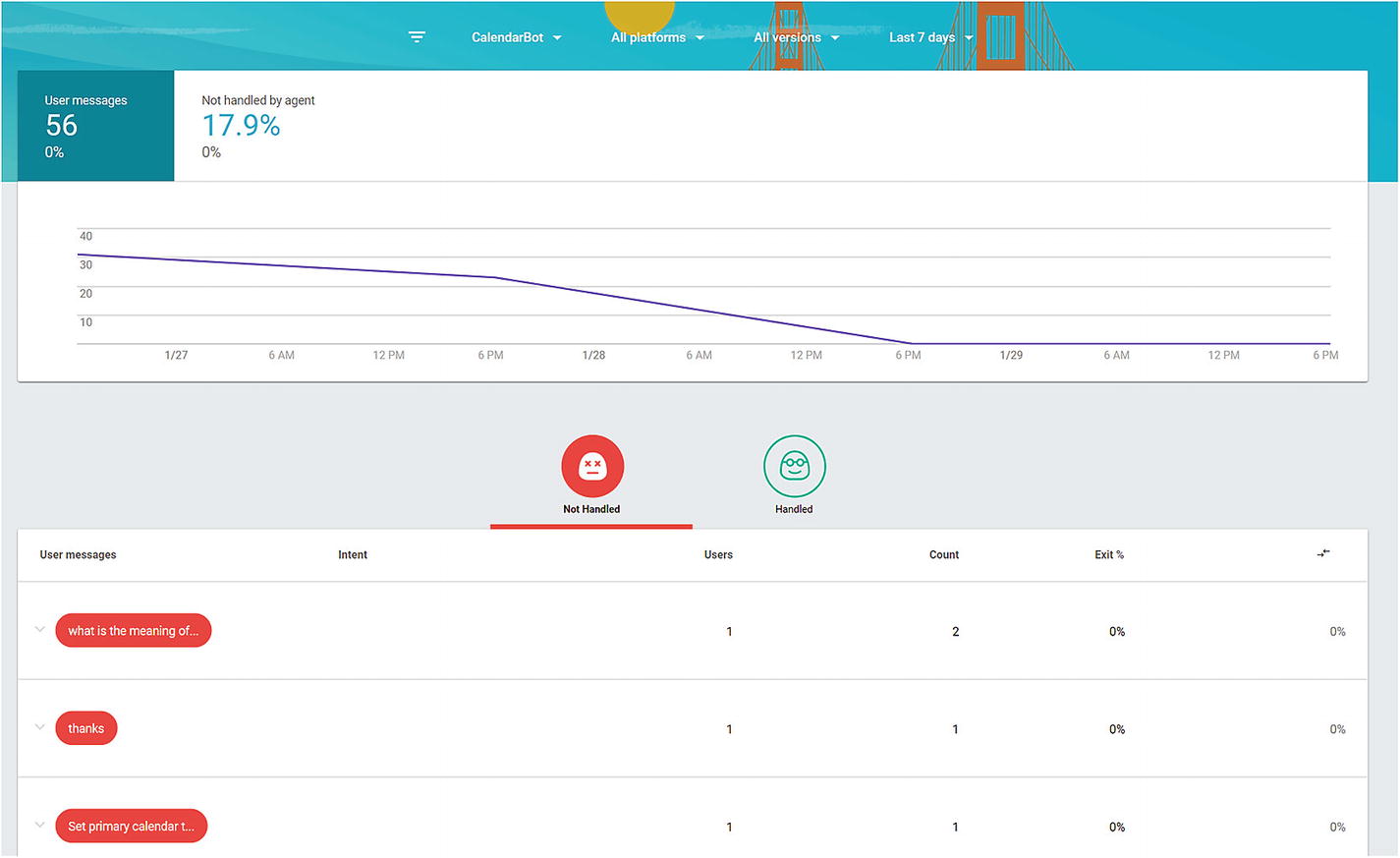
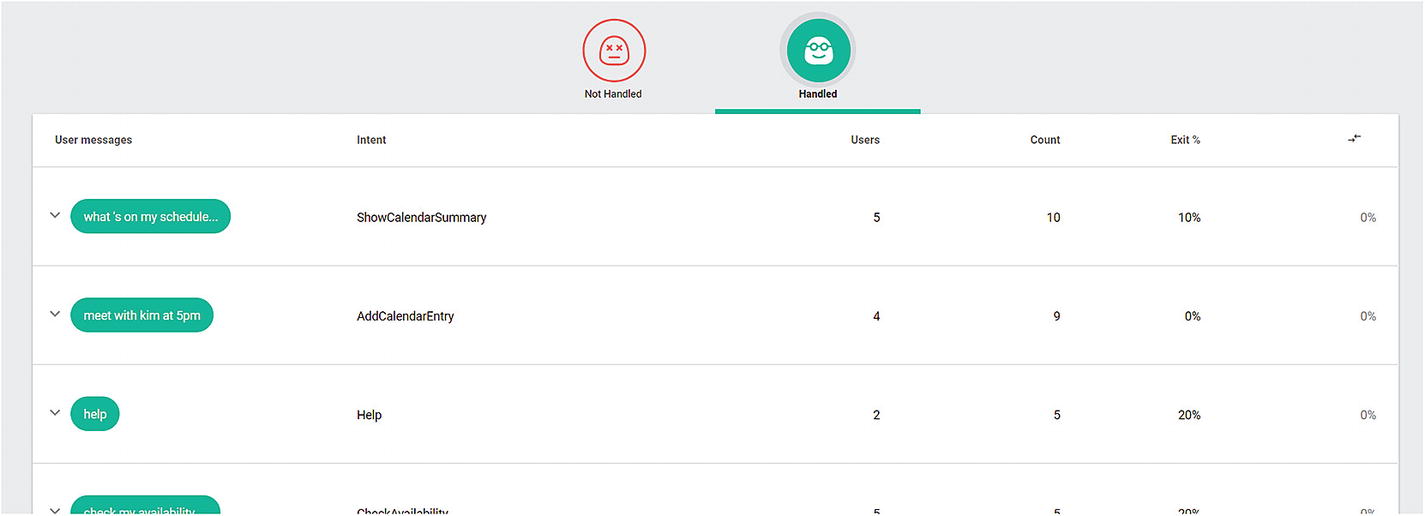
Figure 13-13 is a sample dashboard of data gathered using this approach. We are particularly interested in the messages that were not handled by the chat bot. We did ask the calendar bot for the meaning of life, something we would not expect to get a satisfactory answer to. The unhandled utterance data certainly is important information for us to consider. Figure 13-14 displays the handled inputs.
Figure 13-13
A dashboard consisting of one conversation with the bot
Figure 13-14
The handled messages for the same conversation
Again, the previous data is scarce, but as your chat bot gains usage, the picture will become clearer and much more valuable.
Conclusion
This chapter only scratched the surface of how to properly instrument a chat bot for analytics collection. The different analytics platforms are not yet as rich as the mature web analytics platforms, but they are making good progress. Our focus as a chat bot developer is to become familiar with the systems and be able to integrate them in our code so that the right data is flowing into the analytics dashboards. Then, our team can make informed decisions on what chat bot functionality should be improved, what new features might be added, and which features may not be resonating with your users. Chat bots are still a new space; customers are going to react in all kinds of ways to a conversational interface, especially if deployed to customers who are not tech savvy or who are not enamored in messaging with a computer. Understanding those challenges and improving the conversational experience based on analytics is essential to ensuring successful adoption over the years to come. Analytics will play a lead role in that evolution.