In the section on overloading in the previous chapter, you may have noticed that some of the overloaded functions consisted of exactly the same code. The only difference is the types that appear in the parameter list. It seems an unnecessary overhead to have to write the same code over and over, and indeed it is. In such situations, you can write the code just once, as a function template. The Standard Library, for instance, makes heavy use of this feature to ensure that its functions work optimally with any type, including your own custom types, which of course it cannot know about in advance. This chapter introduces the basics of defining your own function templates that work with any type you desire.
How to define parameterized function templates that generate a family of related functions
That parameters to function templates are mostly, but not always, types
That template arguments are mostly deduced by the compiler and how to specify them explicitly when necessary
How to specialize and overload function templates if the generic function definition provided by the template isn’t suited for certain types
Why return type deduction is really powerful in combination with templates
What the decltype keyword does
Function Templates
A function template itself it is not a definition of a function; it is a blueprint or a recipe for defining an entire family of functions . A function template is a parametric function definition, where a particular function instance is created by one or more parameter values. The compiler uses a function template to generate a function definition when necessary. If it is never necessary, no code results from the template. A function definition that is generated from a template is an instance or an instantiation of the template. The parameters of a function template are usually data types, where an instance can be generated for a parameter value of type int, for example, and another with a parameter value of type string. But parameters are not necessarily types. They can be other things such as a dimension, for example. Let’s consider a specific example.
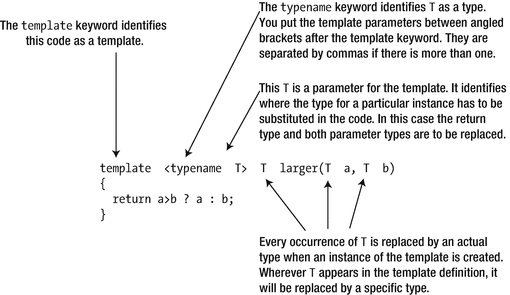
A simple function template
The function template starts with the template keyword to identify it as such. This is followed by a pair of angled brackets that contains a list of one or more template parameters. In this case, there’s only one, the parameter T. T is commonly used as a name for a parameter because most parameters are types, but you can use whatever name you like for a parameter; names such as my_type or Comparable are equally valid. Especially if there are multiple parameters, using more descriptive names may be recommended.
The typename keyword identifies that T is a type. T is hence called a template type parameter. You can also use the keyword class here, but we prefer typename because the type argument can be a fundamental type as well, not just a class type.
The rest of the definition is similar to a normal function except that the parameter name T is sprinkled around. The compiler creates an instance of the template by replacing T throughout the definition with a specific type. The type assigned to a type parameter T during instantiation is called a template type argument.
You can position the template in a source file in the same way as a normal function definition; you can also specify a prototype for a function template. In this case, it would be as follows:
Either the prototype or the definition of the template must appear in the source file before any statement that results in an instance of the template.
Creating Instances of a Function Template
The compiler creates instances of the template from any statement that uses the larger() function. Here’s an example:
You just use the function in the normal way. You don’t need to specify a value for the template parameter T. The compiler deduces the type that is to replace T from the arguments in the larger() function call. This mechanism is referred to as template argument deduction. The arguments to larger() are literals of type double, so this call causes the compiler to search for an existing definition of larger() with double parameters. If it doesn’t find one, the compiler creates this version of larger() from the template by substituting double for T in the template definition.
The resulting function definition accepts arguments of type double and returns a double value. With double plugged into the template in place of T, the template instance will effectively be as follows:
The compiler makes sure to generate each template instance only once. If a subsequent function call requires the same instance, then it calls the instance that exists. Your program only ever includes a single copy of the definition of each instance, even if the same instance is generated in different source files. Now that you are familiar with the concepts, let’s road test a function template:
This produces the following output:
The compiler creates a definition of larger() that accepts arguments of type double as a result of the first statement in main(). The same instance will be called in the next statement. The third statement requires a version of larger() that accepts an argument of type int, so a new template instance is created. The last statement results in yet another template instance being created that has parameters of type std::string and returns a value of type std::string.
Template Type Parameters
The name of a template type parameter can be used anywhere in the template’s function signature, return type, and body. It is a placeholder for a type and can thus be put in any context you would normally put the concrete type. That is, suppose T is a template parameter name; then you can use T to construct derived types such as T&, const T&, T*, and T[][3]. Or you can use T as an argument to a class template, as for instance in std::vector<T>.
Our larger() function template, for instance, currently instantiates functions that accept their arguments by value:
As witnessed by Ex9_01, this template can be instantiated with class types such as std::string as well. In the previous chapter, you learned that passing objects by value results in gratuitous copies of these objects, which is something you should avoid if possible. The standard mechanism for this, of course, is to pass the arguments by reference instead. We would therefore be better off redefining our template as follows:
Note
The algorithm header of the Standard Library defines a std::max() function template that is completely analogous. It takes two arguments by reference-to-const and returns a reference-to-const that refers to the largest of the two function arguments. The same header also defines the std::min() template, which of course instantiates functions that determine the smallest of two values.
While our latest definition of the larger() template is definitely superior, in the remainder of this chapter we’ll mostly keep using the version that passes the arguments by value. This makes it easier to explain a few additional aspects of function templates.
Explicit Template Arguments
If you add the following statement to main() in Ex9_01.cpp, it will not compile:
The arguments to larger() are of different types, whereas the parameters for larger() in the template are of the same type. The compiler cannot create a template instance that has different parameter types. Obviously, one argument could be converted to the type of the other, but you have to code this explicitly; the compiler won’t do it. You could define the template to allow the parameters for larger() to be different types, but this adds a complication that we’ll discuss later in this chapter: which of the two do you use for the return type? For now, let’s focus on how you can specify the argument for a template parameter explicitly when you call the function. This allows you to control which version of the function is used. The compiler no longer deduces the type to replace T; it accepts what you specify.
You can resolve the problem of using different arguments types with larger() with an explicit instantiation of the template:
You put the explicit type argument for the function template between angled brackets after the function name. This generates an instance with T as type double. When you use explicit template arguments, the compiler has complete faith that you know what you are doing. It will insert an implicit type conversion for the first argument to type double. It will provide implicit conversions, even when this may not be what you want. Here’s an example:
You are telling the compiler to use a template instance with T as type int. This necessitates an implicit conversion of the second argument to int. The result of this conversion is the value 19, which may not be what you really want in this case. If you’re lucky, your compiler will warn you about such dangerous conversions, though not all compilers will.
Function Template Specialization
Suppose that you extended Ex9_01.cpp to call larger() with arguments that are pointers:
The compiler instantiates the template with the parameter as type int*. The prototype of this instance is as follows:
The return value is an address, and you have to dereference it to output the value. However, the result may very well be 10, which is incorrect. This is because the comparison is between addresses passed as arguments, not the values at those addresses. The compiler is free to rearrange the memory locations of local variables, so the actual outcome may vary across compilers, but given that the small_int variable comes second, it is certainly not unthinkable that its address would be larger. This illustrates how easy it is to create hidden errors using templates. You need to be particularly careful when using pointer types as template arguments.
Note
If for your compiler the output of the previous snippet is not 10, you can try to rearrange the order in which big_int and small_int are declared. Surely the comparison of two integer values should not depend on their declaration order?
You can define a specialization of the template to accommodate a template argument that is a pointer type. For a specific parameter value or set of values in the case of a template with multiple parameters, a template specialization defines a behavior that is different from the standard template. The definition of a template specialization must come after a declaration or definition of the original template. If you put a specialization first, then the program won’t compile. The specialization must also appear before its first use.
The definition of a specialization starts with the template keyword, but the parameter is omitted, so the angled brackets following the keyword are empty. You must still define the type of argument for the specialization, and you place this between angled brackets immediately following the template function name. The definition for a specialization of larger() for type int* is as follows:
The only change to the body of the function is to dereference the arguments a and b so that you compare values rather than addresses. To use this in Ex9_01.cpp, the specialization would need to be placed after the prototype for the template and before main().
Function Templates and Overloading
You can overload a function template by defining other functions with the same name. Thus, you can define “overrides” for specific cases, which will always be used by the compiler in preference to a template instance. As always, each overloaded function must have a unique signature.
Let’s reconsider the previous situation in which you need to overload the larger() function to take pointer arguments. Instead of using a template specialization for larger(), you could define an overloaded function. The following overloaded function prototype would do it:
In place of the specialization definition, you’d use this function definition:
It’s also possible to overload an existing template with another template. For example, you could define a template that overloads the larger() template in Ex9_01.cpp to find the largest value contained in an array:
The parameter list differentiates functions produced from this template from instances of the original template. You could define another template overload for vectors:
Note
Our latest two overloads of larger<>() work correctly only if there is at least one element in the input data. Bad things are bound to happen if they are called with an empty array or vector<>—do you see why? As an optional exercise, can you perhaps come up with a way to reformulate these functions such that they can cope with empty inputs as well? We do stress, though, that this is an optional exercise.
In fact, and this is a bit more subtle, you could even overload the original template with another template specifically for pointer types:
Note that this is not a specialization of the original template but instead a second, distinct template that will be instantiated only for pointer types. You do not need to know the details of exactly why and how this works. It suffices to know that if the compiler encounters a call larger(x,y) where x and y are pointers to values of the same type, it will instantiate an instance of this second function template; otherwise, it will still use an appropriate instance from our previous template.
You could extend Ex9_01.cpp to demonstrate this. Add the previous templates to the end of the source file and these prototypes at the beginning:
Naturally, you'll also need an #include directive for the vector header. The code in main() can be changed to the following:
The complete example is in the code download as Ex9_02.cpp. This generates instances of all three overloaded templates. If you compile and execute it, the output will be as follows:
Function Templates with Multiple Parameters
You’ve been using function templates with a single parameter, but there can be several parameters. Recall from earlier that we had some trouble compiling the following:
The compiler failed to deduce the template type argument because the two function arguments have a different type: int and double, respectively. We solved this before by explicitly specifying the type. But perhaps you were wondering why we could not simply create a larger() template for which the function arguments are allowed to be different? This could then look something like this:
Allowing different types for each function argument is easy enough and can often be a good idea to keep your templates as generic as possible. However, in cases such as this, you run into trouble when specifying the return type. That is, in the previous pseudocode, what should we put instead of the three question marks? T1? T2? Neither is correct in general because both could lead to undesired conversions.
A first possible solution is to add an extra template type argument to provide a way of controlling the return type. Here’s an example:
The compiler, however, cannot deduce this return type, TReturn . Template argument deduction works on the basis of the arguments passed in the function’s argument list alone. You must therefore always specify the TReturn template argument yourself. The compiler can deduce the type for the arguments, though, so you can get away with specifying just the return type. In general, if you specify fewer template arguments than the number of template parameters, the compiler will deduce the others. The following three lines are therefore equivalent:
Clearly, the sequence of parameters in the template definition is important here. If you had the return type as the second parameter, you’d always have to specify both parameters in a call. If you specify only one parameter, it would be interpreted as the argument type, leaving the return type undefined. Because we specified the return type as size_t, in all three cases, the results of these function calls will all be 2. The compiler creates a function that accepts arguments of type double and int and then converts its result to a value of type size_t.
While we did illustrate how multiple parameters can be defined and what that means for template argument deduction, you may have noticed that we still haven’t found a satisfactory solution that would allow us to write the following:
We’ll resolve this once and for all in the next section.
Return Type Deduction for Templates
In the previous chapter, you learned about automatic return type deduction for functions. For regular functions, the use of return type deduction was somewhat limited. While it may save you some typing, it does come with the risk of making your code less obvious to read. After all, the reader needs to make the same deduction as the compiler.
In the context of function templates, however, return type deduction can be a godsend. The return type of a template function with one or more type parameters may depend on the types used to instantiate the template. We have seen this already with the following example:
There is no easy way you can specify which type should be returned here. But there is an easy way to have the compiler deduce it for you after instantiating the template:
With this definition, the following statements will compile just fine, without the need to explicitly specify any type argument:
With our original definition of larger() in Ex9_01, which had only one type parameter, both of these instantiations would’ve been ambiguous and thus would’ve failed to compile. A working program using the two-parameter version is found in Ex9_03.cpp.
decltype() and Trailing Return Types
Function return type deduction was only introduced recently—in C++14 to be exact. Before, template writers had to resort to other means when a function template’s return type is that of an expression that depends on one or more template type arguments. In our running example, the larger() template, this expression is the expression a > b ? a : b. So, without return type deduction, how could you derive a type from an expression, and how could you use this in a function template specification?
The decltype keyword provides the solution, at least in part. decltype(expression) produces the type of the result of evaluating expression. You could use this to rewrite the larger() template as follows:
The return type is now specified to be the type of the value produced by the expression in the function body. This template definition expresses what you want, but it won’t compile. The compiler processes the template from left to right. So, when the return type specification is processed, the compiler does not know the types of a and b. To overcome this, the trailing return type syntax was introduced that permits the return type specification to appear after the parameter list, like this:
As you can see, putting the auto keyword before the function name does not always say to the compiler that the return type needs to be deduced. Instead, it may also indicate that the return type specification will come at the end of the function header. You write this trailing return type following the arrow, ->, after the parameter list.
In the context of templates, the decltype() specifier is not only useful in trailing return types, where its use has mostly been superseded by return type deduction. Suppose you need a template function to generate the sum of the products of corresponding elements in two vectors of the same size. Then you can define the template like this (using the std::min() template defined in <algorithm>):
Without decltype() , you would have a hard time specifying a proper type for the sum variable, especially if you also want to support empty vectors. Note that decltype() never actually evaluates the expression it is applied to. The expression is only a hypothetical, used by the compiler to obtain a type at compile time. It is therefore safe to use the previous template also with empty vectors.
You can take this function for a spin with the test program we wrote in Ex9_04.cpp.
decltype(auto) and decltype() vs. auto
In the previous section, you encountered the following example of the trailing return type syntax:
Partially because repeating expressions from the function body like that inside a trailing decltype() is rather tedious, C++14 introduced the decltype(auto) syntax:
Using this syntax, the compiler will again deduce the type from the return statements in the function body. The previous declaration is thus completely equivalent to the one with the trailing return type earlier.
Return type deduction using either a trailing decltype() or decltype(auto), however, is not equivalent to return type deduction using auto. In essence, the difference is that unlike auto, decltype() and decltype(auto) will deduce to reference types and preserve const specifiers. You may recall from the previous chapter that auto always deduces to a value type. This means that auto return type deduction may at times introduce unwanted copies of values when returning from a template function. The exact differences are a bit too advanced, though, for this book to warrant a more extensive discussion.
Default Values for Template Parameters
You can specify default values for function template parameters. For example, you could specify double as the default return type in the prototype for the template introduced earlier like this:
If you don’t specify any template parameter values, the return type will be double. Note that we only use this example to introduce default values for template parameters, not because it is necessarily a good idea to define larger() like this! The reason this is not such a great idea is that this default, double, is not always what you want. The larger() function resulting from the following statement, for instance, accepts arguments of type int and returns the result as type double:
The main point we want to convey with this example, though, is that you can specify default values for template arguments at the beginning of the template argument list. You’ll recall that for function parameters it was only possible to define default values at the end of the list. You have quite some more flexibility when specifying default values for template parameters. In our first example, TReturn is the first in the list. But you can also specify default values for parameters in the middle of the list or at the end. Here is yet another larger() template to illustrate the latter:
In this example, we use the TArg as the default value for the TReturn template parameter. Using a template parameter name in the default value of other parameters is possible only if that name, TArg in our example, appears earlier in the parameter list. This example again mostly serves to illustrate what is possible and less as something that is necessarily a good idea. If the default value for TReturn does not suit you and you have to specify another type explicitly, you would have to specify all other arguments as well. Nevertheless, it is common practice to specify default values for template parameters at the end of the list. The Standard Library uses this extensively, often also for nontype template parameters. Nontype template parameters are discussed next.
Nontype Template Parameters
All the template parameters you have seen so far have been types. Function templates can also have nontype parameters that require nontype arguments.
An integral type, such as int or long
An enumeration type
A pointer or reference to an object type
A pointer or a reference to a function
A pointer to a class member
You haven’t met these last two. The former is introduced in Chapter 18; the latter is a more advanced feature we won’t discuss in this book. The application of nontype template parameters to all these types is beyond the scope of this book as well. We’ll only consider a few elementary examples with integral type parameters, just to show how it works.
The compiler needs to be able to evaluate the arguments corresponding to nontype parameters at compile time. For integral type parameters, for instance, this mostly means they will be either integral literals or integral compile-time constants.
Suppose you need a function to perform range checking on a value. You could define a template to handle a variety of types:
This template has a type parameter, T, and two nontype parameters, lower and upper, that are both of type int. The compiler can’t deduce all of the template parameters from the use of the function. The following function call won’t compile:
Compilation fails because upper and lower are unspecified. To use this template, you must specify the template parameter values. The correct way to use this is as follows:
It would be better to put the nontype template parameters before the template type parameter as follows:
If you define your template like that, the compiler is capable of deducing the type argument:
Even better, however, would be to use function parameters for the limits in this case. Function parameters give you the flexibility of being able to pass values that are calculated at runtime, whereas here you must supply the limits at compile time.
Templates for Functions with Fixed-Size Array Arguments
In the previous chapter, in the section on passing arrays by reference, we defined the following function:
Clearly, it would be great if you could create a function that would work for any array size, not just for arrays of exactly 10 values. A template with nontype template arguments allows you to do this as shown next. For good measure, we’ll generalize it even further such that it works for arrays of any numerical type as well, so not just for arrays of double:
Template argument deduction is even powerful enough to deduce the nontype template argument N from the type of the arguments passed to such a template. We can confirm this using a little test program:
This example outputs the following:
There are five calls to average() inside main(), one of which is commented out. The first is the most basic case and proves that the compiler can correctly deduce that T needs to be substituted in the template instance with double, and N with 2. The second shows that this even works if you did not explicitly specify the dimension of the array in the type. The compiler still knows that the size of moreDoubles is 4. The third call is commented out because it would not compile. Even though arrays and pointers are mostly equivalent, the compiler has no way of deducing the array size from a pointer. The fourth call shows that you can even call average() by directly passing the brace-enclosed list as an argument. For the fourth call, the compiler does not have to create another template instance. It will reuse the one generated for the second call. The fifth and final call illustrates that if T is deduced to be int, the result will be of type int as well—and hence the outcome of an integer division.
While, at least in theory, such templates could lead to quite some code bloat if used with arrays of many different sizes, it is still relatively common to define overloads of functions based on such templates. The Standard Library, for instance, regularly uses this technique.
Summary
A function template is a parameterized recipe used by the compiler to generate overloaded functions.
The parameters in a function template can be type parameters or nontype parameters. The compiler creates an instance of a function template for each function call that corresponds to a unique set of template parameter arguments.
A function template can be overloaded with other functions or function templates.
Both auto and decltype(auto) can be used to let the compiler deduce the return type of a function. This is particularly powerful in the context of templates because their return type may depend on the value of one or more template type arguments.
Exercises
Exercise 9-1. In C++17, the Standard Library algorithm header gained the handy std::clamp() function template. The expression clamp(a,b,c) is used to clamp the value a to a given closed interval [b,c]. That is, if a is less than b, the result of the expression will be b; and if a is greater than c, the result will be c; otherwise, if a lies within the interval [b,c], clamp() simply returns a. Write your own my_clamp() function template and try it with a little test program.
Exercise 9-2. Alter the last lines of Ex9_01’s main() function as follows:
const auto a_string = "A", z_string = "Z";std::cout << "Larger of " << a_string << " and " << z_string<< " is " << larger(a_string, z_string) << std::endl;If you now run the program, you may very well get the following output (if not, try rearranging the order in which a_string and z_string are declared):
Larger of 1.5 and 2.5 is 2.5Larger of 3.5 and 4.5 is 4.5Larger of 17011983 and 10 is 17011983Larger of A and Z is AWhat’s that? "A" is larger than "Z"? Can you explain exactly what went wrong? Can you fix it?
Hint: To compare two character arrays, you could perhaps first convert them to another string representation.
Exercise 9-3. Write a function template plus() that takes two arguments of potentially different types and returns a value equal to the sum of both arguments. Next, make sure that plus() can be used as well to add the values pointed to by two given pointers.
Extra: Can you now make it so that you can also concatenate two string literals using plus()? Warning: This may not be as easy as you think!
Exercise 9-4. Write your own version of the std::size() family of functions called my_size() that work not only for fixed-size arrays but also for std::vector<> and std::array<> objects. You are not allowed to use the sizeof() operator.
Exercise 9-5. Can you think of a way to verify that the compiler generates only one instance of a function template for any given argument type? Do so for the larger() function in Ex9_01.cpp.
Exercise 9-6. In the previous chapter, you studied a quicksort algorithm that worked for pointers-to-strings. Generalize the implementation of Ex8_18.cpp so that it works for vectors of any type (any type for which the < operator exists, that is). Write a main() function that uses this to sort some vectors with different element types and outputs both the unsorted and unsorted element lists. Naturally, you should do this by also creating a function template that streams vectors with arbitrary element types to std::cout.