In this chapter, you’ll learn how to add support for operators such as add and subtract to your classes so that they can be applied to objects. This will make the types that you define behave more like fundamental data types and offer a more natural way to express some of the operations between objects. You’ve already seen how classes can have member functions that operate on the member variables of an object. Operator overloading enables you to write member functions that enable the basic operators to be applied to class objects.
What operator overloading is
Which operators you can implement for your own data types
How to implement member functions that overload operators
How and when to implement operator functions as ordinary functions
How to implement comparison and arithmetic operators for a class
How overloading the << operator allows objects of your own type to be streamed out to, for instance, std::cout
How to overload unary operators, including the increment and decrement operators
How to overload the array subscript operator (informally known as the square brackets operator, []) if your class represents a collection of values
How to define type conversions as operator functions
What copy assignment is and how to implement your own assignment operator
Implementing Operators for a Class
The Box class in the previous chapter could be applied in an application that is primarily concerned with the volume of a box. For such an application, you obviously need the ability to compare box volumes so that you can determine the relative sizes of the boxes. In Ex11_14, there was this code:
Wouldn’t it be nice if you could write the following instead?
Using the greater-than operator is much clearer and easier to understand than the original. You might also like to add the volumes of two Box objects with an expression such as Box1 + Box2 or multiply Box as 10*box1 to obtain a new Box object that has the capacity to hold ten box1 boxes. We’ll explain how you can do all this and more by implementing functions that overload the basic operators for objects of a class type.
Operator Overloading
Operator overloading enables you to apply standard operators such as +, –, *, <, and many more, to objects of your own class types. In fact, you have used several such overloaded operators already with objects of Standard Library types, probably without realizing that these were implemented as overloaded functions. For instance, you have compared std::string objects using operators such as < and ==, concatenated strings using +, and sent them to the std::cout output stream using the overloaded << operator. This underlines the beauty of operator overloading. If applied properly, it leads to very natural, elegant code—the kind of code that you intuitively would want to write and can read without a moment’s thought.
To define an operator for objects of your own type, all you need to do is write a function that implements the desired behavior. For the most part, operator function definitions are the same as any other function definition you have written so far. The main difference lies in the function name. The name of a function that overloads a given operator is composed of the operator keyword followed by the operator that you are overloading. The best way to understand how operator overloading works is to step through an example. In the next section, we’ll start by explaining how you implement the less-than operator, <, for the Box class.
Implementing an Overloaded Operator
A binary operator that is implemented as a class member has one parameter. We’ll explain in a moment why there is only one. Here’s the member function to overload the < operator in the Box class definition :
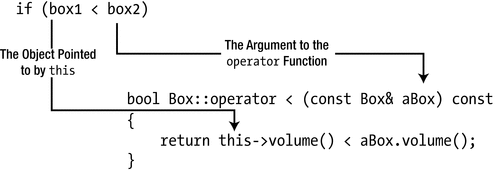
Because you’re implementing a comparison, the return type is bool . The operator<() function will be called as a result of comparing two Box objects using <. The function will be called as a member of the object that is the left operand, and the argument will be the right operand, so this will point to the left operand. Because the function doesn’t change either operand, the parameter and the function are specified as const. To see how this works, consider the following statement:
The if expression will result in the operator function being called. The expression is equivalent to the function call box1.operator<(box2). If you were so inclined, you could write it like this in the if statement:
This shows you that an overloaded binary operator is indeed, for the most part, just a function with two special properties: it has a special name, and the function may be called by writing the operator in between its two operands.
Overloading the less-than operator
The reference function parameter avoids unnecessary copying of the argument. The return expression calls the volume() member to calculate the volume of the object pointed to by this and compares that with the volume of aBox using the basic < operator. Thus, true is returned if the object pointed to by this has a smaller volume than the object passed as the argument—and false otherwise.
Note
We used the this pointer in Figure 12-1 just to show the association with the first operand. It isn’t necessary to use this explicitly here.
Let’s see if this works in an example. Here’s how Box.h looks:
All member functions are defined inside the class, so Box.cpp is not needed. Defining trivial operator functions inside their class definition can be a good idea. It ensures they are inline, which should maximize efficiency. Still, you could implement the function in a separate Box.cpp file. In that case, the function definition would have to look like the one shown in Figure 12-1. That is, the Box:: qualifier must immediately precede the operator keyword.
Here is a little program to exercise the less-than operator for Boxes:
This produces the following output:
The main() function first creates a vector initialized with four Box objects. You arbitrarily assume that the first array element is the smallest and use it to initialize smallBox, which will involve the copy constructor, of course. The range-based for loop compares each element of boxes with smallBox, and a smaller element is stored in smallBox in an assignment statement. When the loop ends, smallBox contains the Box object with the smallest volume. If you want to track calls of the operator<() function, add an output statement to it.
Notice that the smallBox = box; statement shows that the assignment operator works with Box objects. This is because the compiler supplies a default version of operator=() in the class that copies the values of the members of the right operand to the members of the left operand, just like it did for the copy constructor. This is not always satisfactory, and you’ll see later in this chapter how you can define your own version of the assignment operator.
Nonmember Operator Functions
In the previous section, you learned that an operator overload can be defined as a member function. Most operators can be implemented as a regular, nonmember function as well. For instance, because the volume() function is a public member of the Box class, you could easily implement operator<() as an ordinary function as well. The definition would then be as follows:
The operator<() function is specified as inline because you want it to be compiled as such if possible. With the operator defined in this way, the previous example would work in the same way. Of course, you must not declare this version of the operator function as const; const only applies to functions that are members of a class. Because this is specified as inline, you would put the definition in Box.h. This ensures that it’s available to any source file that uses the Box class.
Even if an operator function needs access to private members of the class, it’s still possible to implement it as an ordinary function by declaring it as a friend of the class. Generally, though, if a function must access private members of a class, it is best to define it as a class member whenever possible.
Tip
Always define nonmember operators in the same namespace as the class of the objects they operate on. Because our Box class is part of the global namespace, the previous operator<() should be as well.
Implementing Full Support for an Operator
Implementing an operator such as < for a class creates expectations. You can write expressions like box1 < box2, but what about box1 < 25.0 or 10.0 < box2? The current operator<() won’t handle either of these. When you implement overloaded operators for a class, you need to consider the likely range of circumstances in which the operator might be used.
Caution
In Chapter 8 we advised you to add the keyword explicit to most single-parameter constructors, remember? We explained that without this keyword the compiler uses such constructors for implicit conversions, which may lead to surprising results—and thus bugs. Suppose, for instance, that you did again define a nonexplicit single-parameter constructor for Box like so:
Then expressions such as box1 < 25.0 or 10.0 < box2 would already compile because the compiler would be injecting implicit conversions from double to Box. (That is, they would compile provide you defined operator<() as a nonmember function, but we’ll return to this distinction later in this chapter.) However, box1 < 25.0 would then again not be comparing the volume of box1 with 25.0, but instead with the volume of a cubic Box with dimensions 25 × 25 × 25, or 15,625. Clearly, this Box constructor really does need to be explicit, just like we concluded before! Since you cannot rely on implicit conversions here to facilitate comparisons between Box objects and numbers, you’ll have to put in some extra work to support such expressions.
You can easily support these possibilities for comparing Box objects by adding overloads for operator<(). We’ll first add a function for < where the first operand is a Box object and the second operand is of type double. We’ll define it as an inline function with the definition outside the class in this instance, just to show how it’s done. You need to add the following member specification to the public section of Box class definition:
The Box object that is the left operand will be accessed in the function via the implicit pointer this, and the right operand is value. Implementing this is as easy as the first operator function; there’s just one statement in the function body:
This definition can follow the class definition in Box.h. An inline function should not be defined in a .cpp file because the definition of an inline function must appear in every source file that uses it. If you put the definition of an inline member in a separate source file, it will be in a separate translation unit, and you will get linker errors.
Dealing with an expression such as 10.0 < box2 isn’t harder; it’s just different. A member operator function always provides the this pointer as the left operand. In this case, the left operand is type double, so you can’t implement the operator as a member function. That leaves you with two choices: to implement it as an ordinary operator function or to implement it as a friend function. Because you don’t need to access private members of the class, you can implement it as an ordinary function:
This is an inline function , so you can put it in Box.h. You now have three overloaded versions of the < operator for Box objects to support all three less-than comparison possibilities. Let’s see that in action. We’ll assume you have modified Box.h as described.
Here’s a program that uses the new comparison operator functions for Box objects:
You should get this output:
The show() function that is defined preceding main() outputs the details of the Box object that is passed as an argument. This is just a helper function for use in main(). The output shows that the overloaded operators are working. Again, if you want to see when they are called, put an output statement in each definition. Of course, you don’t need separate functions to compare Box objects with integers. When this occurs, the compiler will insert an implicit cast to type double before calling one of the existing functions.
Implementing All Comparison Operators in a Class
We have implemented < for the Box class, but there’s still ==, <=, >, >=, and !=. Of course, we could plow on and define all the others in the class. There would be nothing wrong with that. But there is an alternative: we could get some help from the Standard Library. The utility header defines templates in the rel_ops namespace that define the operators <=, >, >=, and != for any type T in terms of T’s less-than and equality operators (< and ==). So, all you have to do is define < and ==, and the templates from the utility header will be used by the compiler to generate the other comparison operators when required.
Suppose, for the sake of argument, that the single defining characteristic of a Box is its volume. Then defining a corresponding test for the equality of Box objects is easy enough:
If you add this definition for operator==() to the Box class from Ex12_02, you can use it to try some of the templates in the rel_ops namespace with the following program:
The output from this program is as follows:
There’s a different version of the show() helper function; it now outputs a statement about two Box objects. You can see that main() makes use of the >, !=, >=, and <= operators with Box objects. All these are created from the templates that are defined in the utility header. The output shows that the three operators are working.
Notice the using statement before main(). This is necessary because the templates for comparison functions are defined in the std::rel_ops namespace, named from relational operators . Without this using statement, the compiler would not be able to match the operator function names it deduces, such as operator>(), with the names of the templates. The using statement is in effect from the point at which it appears to the end of the source file. You could also put the using statement in the body of main(), in which case its effect would be restricted to main().
As it stands, our alternative to explicitly defining all operators has one downside: it hinges on the users of the Box class knowing about the utility header, its various helper templates, and how to use them. It would be much better if after including Box.h, you could simply use the >, !=, <=, and >= operators out of the box (pun intended), without the need for additional #include and using statements. The obvious solution, of course, is to put both the #include directive for the utility header and the using statement for the std::rel_ops namespace into the Box.h header file itself.
Note
Adding using statements to a header file is generally considered bad practice. The consequence of doing so is that names become available without qualification throughout every source file that includes this header file. In general, this can have undesirable effects. Remember, these names were normally put in a namespace for a good reason: to avoid name clashes with other functions. Adding a using namespace std::rel_ops statement seems like a safe enough exception to this guideline, though. This namespace only contains the templates for the four comparison operators, nothing more, and if any of these operators would already be defined specifically for some type, the compiler would always call the existing function rather than create a new instance from the std::rel_ops templates.
Operators That Can Be Overloaded
Operators That Can Be Overloaded
Operators | Symbols | Nonmember |
|---|---|---|
Binary arithmetic operators | + - * / % | Yes |
Unary arithmetic operators | + - | Yes |
Bitwise operators | ∼ & | ^ << >> | Yes |
Logical operators | ! && || | Yes |
Assignment operator | = | No |
Compound assignment operators | += -= *= /= %= &= |= ^= <<= >>= | Yes |
Increment/decrement operators | ++ -- | Yes |
Comparison operators | == != < > <= >= | Yes |
Array subscript operator | [ ] | No |
Function call operator | ( ) | No |
Conversion-to-type-T operator | T | No |
Address-of and dereferencing operators | & * -> ->* | Yes |
Comma operator | , | Yes |
Allocation and deallocation operators | new new[] delete delete[] | Only |
User-defined literal operator | ""_ | Only |
Most operators can be overloaded either as a class member function or as a nonmember function outside of a class. These operators are marked with Yes in the third column of Table 12-1. Some can be implemented only as a member function, though (marked with No), whereas others can be implemented only as nonmember functions (marked with Only).
In this chapter, you will learn when and how to overload nearly all of these operators, all except the bottom four categories in the table . The address-of and dereferencing operators are mostly used to implement pointer-like types such as the std::unique_ptr<> and std::shared_ptr<> smart pointer templates you encountered earlier. In part because the Standard Library already offers excellent support for such types, you will not often have to overload these operators yourself. The other three categories of operators that we won’t be discussing are overloaded even less frequently.
Restrictions and Key Guideline
You cannot invent new operators such as ?, ===, or <>.
You cannot change the number of operands, associativity, or precedence of the existing operators, nor can you alter the order in which the operands to an operator are evaluated.1
As a rule, you cannot override built-in operators, and the signature of an overloaded operator will involve at least one class type. We will discuss the term overriding in more detail in the next chapter, but in this case it means you cannot modify the way existing operators operate on fundamental types or array types. In other words, you cannot, for instance, make integer addition perform multiplication. While it would be great fun to see what would happen, we’re sure you’ll agree that this is a fair restriction.
These restrictions notwithstanding, you have quite some freedom when it comes to operator overloading. But it’s not because you can overload an operator that it necessarily follows that you should. When in doubt, always remember the following key guideline :
Tip
The main purpose of operator overloading is to increase both the ease of writing and the readability of code that uses your class and to decrease the likelihood of defects. The fact that overloaded operators make for more compact code should always come second. Compact yet incomprehensible or even misleading code is no good to anyone. Making sure your code is both easy to write and easy to understand is what matters. One consequence is that you should, at all costs, avoid overloaded operators that do not behave as expected from their built-in counterparts.
Obviously, it’s a good idea to make your version of a standard operator reasonably consistent with its normal usage, or at least intuitive in its meaning and operation. It wouldn’t be sensible to produce an overloaded + operator for a class that performed the equivalent of a multiplication. But it can be more subtle than that. Reconsider, if you will, the equality operator we defined earlier for Box objects:
While this might have seemed sensible at the time, this unconventional definition could easily lead to confusion. Suppose, for example, that we create these two Box objects:
Would you then consider these two boxes “equal”? Most likely the answer is that you don’t. After all, they have significantly different dimensions. If you order a box with dimensions 1 × 2 × 3, you would not be pleased if you receive one with dimensions 1 × 1 × 6. Nevertheless, with our definition of operator==(), the expression oneBox == otherBox would evaluate to true. This could easily lead to misunderstandings and therefore bugs.
The way most programmers would expect an equality operator for Box to be defined is like this:
This new definition of equality has one slight disadvantage. You then can no longer use the std::rel_ops operator templates for <= and >=, as it would be more natural if these operators still compare volumes. You’ll have to define these operator functions explicitly yourself. Of course, which definition you use will depend on your application and how you expect Boxes to be used. But in this case, we believe it is best to stick with our second, more intuitive definition of operator==(). The reason is that it probably leads to the least number of surprises. When programmers see ==, they think “is equal to,” not “has same volume as.” If need be, you can always introduce a member function hasSameVolumeAs() to check for equal volumes. Yes, hasSameVolumeAs() involves more typing than ==, but it does ensure your code remains readable and predictable—and that is far more important! A modified version of Ex12_03 based on these ideas is available as Ex12_03A.
Most of the remainder of this chapter is about teaching you similar conventions regarding operator overloading. Deviating from these conventions should be done only if you have a good reason.
Caution
One concrete consequence of our key guideline for operators is that you should never overload the logical operators && or ||. If you want logical operators for objects of your class, overloading & and | instead is generally preferable.
The reason is that overloaded && and || will never behave quite like their built-in counterparts. Recall from Chapter 4 that if the left operand of the built-in && operator evaluates to false, its right operand does not get evaluated. Similarly, for the built-in || operator, the right-side operand is never evaluated if the left-side operand evaluates to true. You can never obtain this so-called short-circuit evaluation with overloaded operators.2 As we will see shortly, an overloaded operator is essentially equivalent to a regular function. This implies that all operands to an overloaded operator are always evaluated concretely. Like with any other function, all arguments are always evaluated before entering the function’s body . For overloaded && and || operators, this means that both the left and right operands will always be evaluated. Because users of any && and || operator will always expect the familiar short-circuit evaluation, overloading them would thus easily lead to some subtle bugs. When overloading & and | instead, you make it clear not to expect short-circuit evaluation.
Operator Function Idioms
The remainder of this chapter is all about introducing commonly accepted patterns and best practices regarding the when and how of operator overloading. There are only a few real restrictions for operator functions. But with great flexibility comes great responsibility. We will teach you when and how to overload various operators and the various conventions C++ programmers typically follow in this context. If you adhere to these conventions, your classes and their operators will behave predictably, which will make them easy to use and thus reduce the risk of bugs.
All the binary operators that can be overloaded always have operator functions of the form that you’ve seen in the previous section. When an operator, Op, is overloaded and the left operand is an object of the class for which Op is being overloaded, the member function defining the overload is of the following form:
In principle, you are entirely free to choose Return_ Type or to create overloads for any number of parameter Types. It is also entirely up to you to choose whether you declare the member function as const. Other than the number of parameters, the language imposes nearly no constraints on the signature or return types of operator functions. For most operators, though, there are certain accepted conventions, which you should as much as possible try to respect. These conventions are nearly always motivated by the way the default built-in operators behave. For comparison operators such as <, >=, and !=, for instance, ReturnType is typically bool (although you could use int). And because these operators normally do not modify their operands, they usually are defined as const members that accept their argument either by value or by const reference—but never by non-const reference. Besides convention and common sense, however, there is nothing stopping you from returning a string from operator<() or from creating a != operator that doubles a Box’s volume when used, or even one that causes a typhoon halfway around the world. You’ll learn more about the various conventions throughout the remainder of this chapter.
You can implement most binary operators as nonmember functions as well, using this form:
Class_ Type is the class for which you are overloading the operator. Type can be any type, including Class_Type. As can be read from Table 12-1, the only binary operator for which this is not allowed is the assignment operator, operator=().
If the left operand for a binary operator is of class Type, and Type is not the class for which the operator function is being defined, then the function must be implemented as a global operator function of this form:
We’ll give you some further guidelines for choosing between the member and nonmember forms of operator functions later in this chapter.
You have no flexibility in the number of parameters for operator functions—either as class members or as global functions. You must use the number of parameters specified for the particular operator. Unary operators defined as member functions don’t usually require a parameter. The post-increment and post-decrement operators are exceptions, as you’ll see. The general form of a unary operator function for the operation Op as a member of the Class_Type class is as follows:
Naturally, unary operators defined as global functions have a single parameter that is the operand. The prototype for a global operator function for a unary operator Op is as follows:
We won’t go through examples of overloading every operator, as most of them are similar to the ones you’ve seen. However, we will explain the details of operators that have particular idiosyncrasies when you overload them. We’ll start with by far the most common family of overloads for the << operator, because it will quickly prove useful in later examples.
Overloading the << Operator for Output Streams
Up until now we have been defining specific functions to output Boxes to std::cout. In this chapter, for instance, we have defined several functions called show() , which were then used in statements such as this:
or this:
Now we know how to overload operators; however, we could make the output statements for Box objects feel more natural by overloading the << operator for output streams . This would then allow us to simply write this:
and this:
But, how to overload this << operator? Before we go there, let’s first revise exactly how the second statement works. As a first step, let’s add parentheses to clarify the associativity of the << operator:
The innermost << expression will be evaluated first. So, the following is equivalent:
Naturally, the only way this could ever work is if something, the result of the innermost expression, is again a reference to a stream. To clarify things further, we can also use function-call notation for operator<<() as follows:
Using a few more similar rewrite steps, we can easily spell out every step the compiler takes to evaluate the entire statement:
While this is quite verbose, it makes clear the point we wanted to make. This particular overload of operator<<() takes two arguments: a reference to a stream object (left operand) and the actual value to output (right operand). It then returns a fresh reference to a stream that can be passed along to the next call of operator<<() in the chain. This is an example of what we called method chaining in Chapter 11.
Once you understand this, deciphering the function definition that overloads this operator for Box objects should be straightforward:
The first parameter identifies the left operand as an ostream object, and the second specifies the right operand as a Box object. The standard output stream, cout, is of type std::ostream, as are other output streams that you’ll meet later in the book. We can, of course, not add the operator function to the definition of std::ostream, so we have to define it as an ordinary function. Because the dimensions of a Box object are publically available, we do not have to use a friend declaration. The value that is returned is, and always should be, a reference to the same stream object as referred to by the operator’s left operand.
To test this operator, you can add its definition to the Box.h header of Ex12_03A. In the main() function of Ex12_03A then, you can replace expressions such as show(theBox, " is greater than ", box) with equivalent expressions that use the << operator:
You’ll find the resulting program in Ex12_04.
Note
The << and >> operators of the stream classes of the Standard Library are prime examples of the fact that overloaded operators do not always have to be equivalent to their built-in counterparts—recall that the built-in << and >> operators perform bitwise shifts of integers! Another nice example is the convention to use the + and += operators to concatenate strings, something you have already used repeatedly with std::string objects. The fact that until now you may not have given it much thought yet on how and why such expressions work just proves that, if used judiciously, overloaded operators can lead to very natural coding.
Overloading the Arithmetic Operators
We’ll explain how you overload the arithmetic operators by looking at how you might overload the addition operator for the Box class. This is an interesting example because addition is a binary operation that involves creating and returning a new object. The new object will be the sum (whatever you define that to mean) of the two Box objects that are its operands.
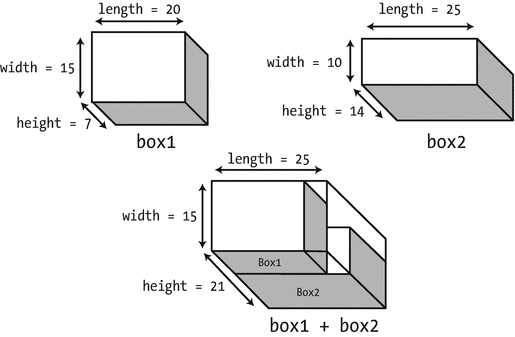
What might the sum of two Box objects mean? There are several possibilities we could consider, but because the primary purpose of a box is to hold something, its volumetric capacity is of primary interest, so we might reasonably presume that the sum of two boxes was a new box that could hold both. Using this assumption, we’ll define the sum of two Box objects to be a Box object that’s large enough to contain the two original boxes stacked on top of each other. This is consistent with the notion that the class might be used for packaging because adding several Box objects together results in a Box object that can contain all of them.
You can implement the addition operator in a simple way, as follows. The length member of the new object will be the larger of the length members of the objects being summed, and a width member will be determined in a similar way. If the height member is the sum of the height members of the operands, the resultant Box object can contain the two Box objects. By modifying the constructor, we’ll arrange that the length member of an object is always greater than or equal to the width member.
Figure 12-2 illustrates the Box object that will be produced by adding two Box objects. Because the result of this addition is a new Box object, the function implementing addition must return a Box object. If the function that overloads the + operator is to be a member function, then the declaration of the function in the Box class definition can be as follows:
The object that results from adding two Box objects
The aBox parameter is const because the function won’t modify the argument, which is the right operand. It’s a const reference to avoid unnecessary copying of the right operand. The function itself is specified as const because it doesn’t alter the left operand. The definition of the member function in Box.h will be as follows:
As is conventional for an arithmetic operator, a local Box object is created, and a copy of it is returned to the calling program. Of course, as this is a new object, returning it by reference must never be done. The box’s dimensions are computed using std::max() , which simply returns the maximum of two given arguments. It is instantiated from a function template in the algorithm header. This template works for any argument type that supports operator<(). Of course, an analogous std::min() function template to compute the minimum of two expressions exists as well.
We can see how the addition operator works in an example. For brevity, we’ll start from the Box class from Ex12_03 again:
The first important difference is the first constructor, which uses std::min() and max() to ensure a Box’s length is always larger than its width. The second is the addition of the declaration of operator+(). The inline definition of this member function shown earlier in this section goes in Box.h as well, immediately following the declaration of the Box class.
Here’s the code to try it:
We got the following output:
You should get a different result each time you run the program. Just to emphasize what we have said previously, the rand() function is OK when you don’t care about the quality of the random number sequence, but when you need something better, use the pseudorandom number generation facilities provided by the random Standard Library header.
The main() function generates a vector of 20 Box objects that have arbitrary dimensions from 1.0 to 99.0. The nested for loops then test all possible pairs of Box objects to find the pair that combines to the minimum volume. The if statement in the inner loop uses the operator+() member to produce a Box object that is the sum of the current pair of objects. The operator<() member is then used to compare this resultant Box object with the value of minVolume. The output shows that everything works at it should. We suggest you instrument the operator functions and the Box constructors just to see when and how often they are called.
Of course, you can use the overloaded addition operator in more complex expressions to sum Box objects. For example, you could write this:
This calls the operator+() member twice to create a Box object that is the sum of the three, and this is passed to the copy constructor for the Box class to create box4. The result is a Box object box4 that can contain the other three Box objects stacked on top of each other.
Implementing One Operator in Terms of Another
One thing always leads to another. If you implement the addition operator for a class, you inevitably create the expectation that the += operator will work too. If you are going to implement both, it’s worth noting that you can implement + in terms of += very economically.
First, we’ll define += for the Box class. Because assignment is involved, convention dictates that the operator function returns a reference:
This is straightforward. You simply modify the left operand, which is *this, by adding the right operand according to the definition of addition for Box objects . You can now implement operator+() using operator+=(), so the definition of operator+() simplifies to the following:
The first line of the function body calls the copy constructor to create a copy of the left operand to use in the addition. The operator+=() function is then called to add the right operand object, aBox, to the new Box object. This object is then returned.
If you feel comfortable doing so, you could also compress this function body into a one-liner:
The convention to return a reference-to-this from compound assignment operators is motivated by the fact that it enables statements such as this, that is, statements that use the result of an assignment expression in a bigger expression. To facilitate this, most operators that modify their left operand by convention return either a reference-to-this or, if implemented as a nonmember function, a reference to the first argument. You already saw this in action for the << stream operator, and you will encounter it again when we discuss the overloading of increment and decrement operators.
Ex12_06 contains a Box.h header that started from that of Ex12_05, but with the addition operators implemented as described in this section. With this new definition of Box, you can easily modify the main() function of Ex12_05 as well to try the new += operator. In Ex12_06.cpp, for instance, we did this as follows:
Tip
Always implement the op () operator in terms of op= (), not the other way around. In principle, it would be equally easy to implement operator+=() in terms of operator+() as follows:
We’ll explain later this chapter why the assignment in this function’s body works. For now, just notice that if you are implementing operator+=() this way, a new temporary object is created on the right side of the assignment. That is, the assignment statement is essentially equivalent to this:
This may not give optimal performance. An operator+=() should simply modify the left operand (this), without first creating a new object. If you are lucky, especially in this simple case, the compiler will optimize this temporary object away after inlining. But why take the risk?
Member vs. Nonmember Functions
Both Ex12_05 and Ex12_06 define operator+() as a member function of the Box class. You can, however, just as easily implement this addition operation as a nonmember function. Here’s the prototype of such a function:
Because the dimensions of a Box object are accessible through public member functions, no friend declarations are required. But even if the values of the member variables were inaccessible, you could still just define the operator as a friend function, and that begs the question, which of these options is best? A member function? A nonmember function? Or a friend function?
Of all your options, a friend function is generally seen as the least desirable. While there is not always a viable alternative, friend declarations undermine data hiding and should therefore be avoided when possible.
The choice between a member function and a nonfriend nonmember function, however, is not always as clear-cut. Operator functions are fundamental to class capability, so we mostly prefer to implement them as class members. This makes the operations integral to the type, which puts this right at the core of encapsulation. Your default option therefore should probably be to define operator overloads as member functions. But there are at least two cases where you should implement them as nonmember functions instead.
First, there are circumstances where you have no choice but to implement them as nonmember functions, even if this means you have to resort to friend functions. These include overloads of binary operators for which the first argument is either a fundamental type or a type different from the class you are currently writing. We have already seen examples of both categories:
Note
Once one of the overloads of an operator needs to be a nonmember function, you might decide to turn all other overloads of that same operator into nonmember functions as well for consistency. You might consider this, for instance, for the operator<() of the Box class. Even though only the first overload of the following list really needs to be nonmember, turning one or both of the other operator overloads into nonmember functions as well allows you to nicely group these declarations together in the header file:
A second reason you might sometimes prefer nonmember functions over member functions is when implicit conversions are desired for a binary operator’s left operand. We’ll discuss this case in its own little subsection next.
Operator Functions and Implicit Conversions
As noted earlier in this and previous chapters, allowing implicit conversions from double to Box is not a good idea. Because such conversions would lead to unpleasant results, the corresponding single-argument constructor for Box should really be explicit. But this is not the case for all single-argument constructors. The Integer class you worked on earlier during the exercises of Chapter 11, for instance, provides a good example. At its essence, this class looked like this:
For this class, there is no harm in allowing implicit conversions . The main reason is that Integer objects are much closer to ints than Boxes are to doubles. Other examples of harmless (and convenient!) implicit conversions you already know about are those from string literals to std::string objects or T values to std::optional<T> objects.
For classes that allow implicit conversions, the general guideline for overloading operators as member functions typically changes. Consider the Integer class. Naturally, you’d like binary arithmetic operators such as operator+() for Integer objects. And, of course, you’d like them to work also for additions of the form Integer + int and int + Integer. Obviously, you could still define three operator functions like we did for the + operator of Box—two member functions and one nonmember one. But there is an easier option. All you need to do is define one single nonmember operator function as follows:
Put this function together with our simple class definition of Integer in a file Integer.h. Add similar functions for -, *, /, and %. Because int values implicitly convert to Integer objects, these five operator functions then suffice to make the following test program work. Without relying on implicit conversions, you would’ve needed no less than 15 function definitions to cover all possibilities!
The reason you need to use nonmember functions to allow implicit conversions for either operand is that the compiler never performs conversions for the left operand of member functions. That is, if you’d define operator/() as a member function, an expression such as 4 / j would no longer compile.
Tip
Operator overloads mostly should be implemented as member functions. Only use nonmember functions if a member function cannot be used or if implicit conversions are desired for the first operand.
Caution
The operator templates from the std::rel_ops namespace do not allow for implicit conversions . This means you always have to define all six comparison operators yourself if you want comparisons between operands of different types. With some careful copying and pasting, this shouldn’t be all that much work, though.
Overloading Unary Operators
So far, we have only seen examples of overloading binary operators. There are quite some unary operators as well. For the sake of illustration, assume a common operation with boxes is to “rotate” them in the sense that their width and length are swapped. If this operation is indeed frequently used, you could be tempted to introduce an operator for it. Because rotation involves only a single Box—no additional operand is required—you’d have to pick one of the available unary operators. Viable candidates are +, -, ∼, !, &, and *. From these, operator∼() seems like a good pick. Just like binary operators, unary operators can be defined either as a member function or as a regular function. Starting again from the Box class from Ex12_04, the former possibility would look like this:
As convention dictates, operator∼() returns a new object, just like we saw for the binary arithmetic operators that do not modify their left operand. Defining the Box “rotation” operator as a nonmember function should come easy by now as well:
With either of these operator overloads in place, you could write code like the following:
You can find this example in Ex12_08. If you run that program, you’ll get this result:
Note
Arguably, this operator overload violates our key guideline from earlier in this chapter. While it clearly leads to very compact code, it does not necessarily make for natural, readable code. Without looking at the class definition it is doubtful that any of your fellow programmers would ever guess what the expression ∼someBox is doing. So, unless the notation ∼someBox is commonplace in the world of packaging and boxes, you may be better off defining a regular function here instead, such as rotate() or GetRotatedBox().
Overloading the Increment and Decrement Operators
The ++ and -- operators present a new problem for the functions that implement them for a class because they behave differently depending on whether they prefix the operand. You need two functions for each operator: one to be called in the prefix case and the other for the postfix case. The postfix form of the operator function for either operator is distinguished from the prefix form by the presence of a dummy parameter of type int. This parameter only serves to distinguish the two cases and is not otherwise used. The declarations for the functions to overload ++ for an arbitrary class, MyClass , will be as follows:
The return type for the prefix form normally needs to be a reference to the current object, *this, after the increment operation has been applied to it. Here’s how an implementation of the prefix form for the Box class might look:
This just increments each of the dimensions by 1 and then returns the current object.
For the postfix form of the operator, you should create a copy of the original object before you modify it; then return the copy of the original after the increment operation has been performed on the object. Here’s how that might be implemented for the Box class:
In fact, the previous body could be used to implement any postfix increment operator in terms of its prefix counterpart. While optional, the return value for the postfix operator is sometimes declared const to prevent expressions such as theObject++++ from compiling. Such expressions are inelegant, confusing, and inconsistent with the normal behavior of the operator. If you don’t declare the return type as const, such usage is possible.
The Ex12_09 example, part of the online download, contains a small test program that adds the prefix and postfix increment and decrement operators to the Box class of Ex12_04 and then takes them for a little test-drive in the following main() function:
The output of this test program is as follows:
Note
The value returned by the postfix form of an increment or decrement operator should always be a copy of the original object , before it was incremented or decremented; the value returned by the prefix form should always be a reference to the current (and thus incremented or decremented) object. The reason is that this is precisely how the corresponding built-in operators behave with fundamental types.
Overloading the Subscript Operator
The subscript operator , [], provides very interesting possibilities for certain kinds of classes. Clearly, this operator is aimed primarily at selecting one of a number of objects that you can interpret as an array, but where the objects could be contained in any one of a number of different containers. You can overload the subscript operator to access the elements of a sparse array (where many of the elements are empty), an associative array, or even a linked list. The data might even be stored in a file, and you could use the subscript operator to hide the complications of file input and output operations.
The Truckload class from Ex11_15 in Chapter 11 is an example of a class that could support the subscript operator. A Truckload object contains an ordered set of objects, so the subscript operator could provide a means of accessing these objects through an index value. An index of 0 would return the first object in the list, an index of 1 would return the second, and so on. The inner workings of the subscript operator would take care of iterating through the list to find the object required.
The operator[]() function for the Truckload class needs to accept an index value as an argument that is a position in the list and to return the pointer to the Box object at that position. The declaration for the member function in the TruckLoad class is as follows:
You could implement the function like this:
The for loop traverses the list, incrementing the count on each iteration. When the value of count is the same as index, the loop has reached the Package object at position index, so the smart pointer to the Box object in that Package object is returned. If the entire list is traversed without count reaching the value of index, then index must be out of range, so nullptr is returned. Let’s see how this pans out in practice by trying another example.
This example will use any Box class that includes the operator<<(), which makes outputting Boxes to std::cout easier. We can remove the listBoxes() member of Truckload as well and add an overload for the << operator for outputting Truckload objects to a stream, analogous to that of the Box class. If you use the Truckload class you created for Exercise 11-6, which contains the nested Iterator class, you can implement this operator function without the need for a friend declaration. The definition for it is as follows:
You can use this to replace the listBoxes() member function of the old Truckload class. The code is similar to that for listBoxes() except that now only public functions are used instead of directly working with the Packages in the list. The function makes use of the operator<<() function of the Box class. Outputting a Truckload object will now be very simple—you just use << to write it to cout.
If you add both the array subscript operator and the stream output operators to the Truckload class, you can use the following program to exercise these new operators:
When we ran this example, it produced the following output :
The main() function now uses the subscript operator to access pointers to Box objects from the Truckload object. You can see from the output that the subscript operator works, and the result of finding and deleting the largest Box object is correct. Output of Truckload and Box objects to the standard output stream now works the same as for fundamental types.
Caution
In the case of Truckload objects, the subscript operator masks a particularly inefficient process. Because it’s easy to forget that each use of the subscript operator involves traversing at least part of the list from the beginning, you should think twice before adding this operator in production code. Especially if the Truckload object contains a large number of pointers to Box objects, using this operator too often could be catastrophic for performance. It is because of this that the authors of the Standard Library decided not to give their linked-list class templates, std::list<> and std::forward_list<>, any subscript operators either. Overloading the subscript operator is best reserved for those cases where it can be backed by an efficient element retrieval mechanism.
To solve this performance problem of the Truckload array subscript operator, you should either omit it or replace the linked list of Truckload::Packages with a std::vector<SharedBox>. The only reason we used a linked list in the first place was for educational purposes. In real life, you should probably never use linked lists. A std::vector<> is almost always the better choice. We’ll postpone implementing this version of Truckload until the exercises of Chapter 19 because you haven’t actually seen yet how to remove elements from a vector.
Modifying the Result of an Overloaded Subscript Operator
You’ll encounter circumstances in which you might want to overload the subscript operator and use the object it returns, for instance, on the left of an assignment or call a function on it. With your present implementation of operator[]() in the Truckload class, a program compiles but won’t work correctly if you write either of these statements:
This will compile and execute, but it won’t affect the items in the list. What you want is that the first pointer in the list is replaced by the second and that the third is reset to null, but this doesn’t happen. The problem is the return value from operator[](). The function returns a temporary copy of a smart pointer object that points to the same Box object as the original pointer in the list but is a different pointer. Each time you use load[0] on the left of an assignment, you get a different copy of the first pointer in the list. Both statements operate but are just changing copies of the pointers in the list, which are copies that won’t be around for very long.
This is why the subscript operator normally returns a reference to the actual values inside a data structure and not copies of these values. Doing this for the Truckload class, however, poses one significant challenge. You can no longer return nullptr from operator[]() in the Truckload class because you cannot return a reference to nullptr. Obviously, you must never return a reference to a local object in this situation either. You need to devise another way to deal with an invalid index. The simplest solution is to return a SharedBox object that doesn’t point to anything and is permanently stored somewhere in global memory.
You could define a SharedBox object as a static member of the Truckload class by adding the following declaration to the private section of the class:
As you saw in Chapter 11, you initialize static class members outside the class. The following statement in Truckload.cpp will do it:
Now we can change the definition of the subscript operator to this:
It now returns a reference to the pointer , and the member function is no longer const. Here’s an extension of Ex12_10 to try the subscript operator on the left of an assignment. We have simply extended main() from Ex12_10 to show that iterating through the elements in a Truckload list still works:
The first part of the output is similar to the previous example, after which the output is as follows:
The first block of new output shows that the first two elements point to the same Box object, so the assignment worked as expected. The second block results from assigning a new value to the second element in the Truckload object; the new value is a pointer to the Box object produced by summing the third and fourth Box objects. The output shows that the second element points to a new object that is the sum of the next two. Just to make it clear what is happening, the statement that does this is equivalent to the following:
That’s much clearer, isn’t it?
Caution
The workaround used in this section to deal with invalid indexes to a subscript operator—returning a reference to a special “null object”—has one critical flaw. Perhaps you can already guess what this is? Hint: if supplied with an invalid index, the operator[]() function returns a non-const reference to nullBox. Exactly. The fact that this reference is non-const implies that there is nothing preventing the caller from modifying nullBox. In general, allowing the user to modify the objects that are accessed through the operator is exactly what we set out to do. But for the special nullBox object, this exposes a grave risk. It allows a careless caller to assign a non-null value to the nullBox pointer, which would essentially cripple the subscript operator! The following illustrates how things could go wrong:
As this example shows, one accidental assignment to a nonexistent 11th element causes unexpected and undesirable behavior. The Truckload now appears to have a box with dimensions {6, 6, 6} at index 100. (Note that this will even break the subscript operator for all Truckload objects at once. Because nullBox is a static member of Truckload, it is shared between all objects of this class.)
Because of this dangerous loophole, you should never use the technique we used here in real programs. In Chapter 15 you will learn about a more appropriate mechanism for dealing with invalid function arguments: exceptions. Exceptions will allow you to return from a function without having to invent a return value.
Function Objects
A function object is an object of a class that overloads the function call operator, which is (). A function object is also called a functor . The operator function in a class looks like a misprint. It is operator()(). A function object can be passed as an argument to a function, so it provides yet another way to pass functions around. The Standard Library uses function objects quite extensively, particularly in the functional header. We’ll show you how function objects work with an example.
Suppose we define a Volume class like this:
We can use a Volume object to calculate a volume:
The volume object represents a function, one that can be called using its function call operator. The value in the braced initializer for room is the result of calling operator()() for the volume object, so the expression is equivalent to volume.operator()(16, 12, 8.5). Of course, you can define more than one overload of the operator()() function in a class:
Now a Volume object can return the volume of a Box object:
Surely, this example is not enough to convince you of the usefulness of function objects. In Chapter 18, though, we’ll show you why representing callable functions as objects is a powerful concept indeed. In later chapters, you’ll use functors extensively in combination with, for instance, Standard Library algorithms.
Note
Unlike most operators, function call operators must be overloaded as member functions. They cannot be defined as regular functions. The function call operator is also the only operator that can have as many parameters as you want and that can have default arguments.
Overloading Type Conversions
You can define an operator function as a class member to convert from the class type to another type. The type you’re converting to can be a fundamental type or a class type. Operator functions that are conversions for objects of an arbitrary class, MyClass , are of this form:
Type is the destination type for the conversion. Note that no return type is specified because the target type is always implicit in the function name, so here the function must return a Type object.
As an example, you might want to define a conversion from type Box to type double. For application reasons, you could decide that the result of this conversion would be the volume of the Box object . You could define this as follows:
The operator function would be called if you wrote this:
This causes an implicit conversion to be inserted by the compiler. You could call the operator function explicitly with this statement:
You can prevent implicit calls of a conversion operator function by specifying it as explicit in the class. In the Box class you could, and probably should, write this:
Now the compiler will not use this member for implicit conversions to type double.
Note
Unlike most operators, conversion operators must be overloaded as member functions. They cannot be defined as regular functions.
Potential Ambiguities with Conversions
When you implement conversion operators for a class, it is possible to create ambiguities that will cause compiler errors. You have seen that a constructor can also effectively implement a conversion—a conversion from type Type1 to type Type2 can be implemented by including a constructor in class Type2 with this declaration:
This can conflict with this conversion operator in the Type1 class:
The compiler will not be able to decide which constructor or conversion operator function to use when an implicit conversion is required. To remove the ambiguity, declare either or both members as explicit.
Overloading the Assignment Operator
You have already encountered several instances where one object of a nonfundamental type is seemingly overwritten by another using an assignment operator, like so:
But how exactly does this work? And how do you support this for your own classes?
You know that the compiler (sometimes) supplies default constructors, copy constructors, and destructors. This is not all the compiler provides, though. Similar to a default copy constructor, a compiler also generates a default copy assignment operator . For Box, this operator has the following prototype:
Like a default copy constructor, the default copy assignment operator simply copies all the member variables of a class one by one (in the order they are declared in the class definition). You can override this default behavior by supplying a user-defined assignment operator, as we’ll discuss next.
Implementing the Copy Assignment Operator
The default assignment operator copies the members of the object to the right of an assignment to those of the object of the same type on the left. For a Box, this default behavior is just fine. But this is not the case for all classes. Consider a simple Message class that, for whatever reason, stores the text of its message in a std::string that is allocated in the free store. You then already know to implement a destructor that explicitly reclaims that memory. A definition for such a class might look like this:
You call its (default) assignment operator when you write the following:
This snippet will compile and run. But now think about what the default assignment operator of the Message class does exactly during this last statement. It copies the pText member from the beware Message into that of the message object. This member is just a raw pointer variable, though, so after the assignment we have two different Message objects whose pText pointer refers to the same memory location. Once both Messages go out of scope, the destructors of both objects will therefore apply delete on the same location! It’s impossible to tell what the result of this second delete—which will be the one inside the destructor of message—will be. In general, it is undefined what will happen. One likely outcome, though, is a program crash.
So, clearly, the default assignment operator will not do for classes such as Message, that is, classes that themselves manage dynamically allocated memory. You thus have no other option but to redefine the assignment operator for Message.
Note
The assignment operator cannot be defined as a regular function. It is the only binary operator that must always be overloaded as a class member function.
An assignment operator should return a reference, so in the Message class it would look like this:
The parameter should be a reference-to-const and the return type a reference-to-non-const. As the code for the assignment operator will just transfer data from the members of the right operand to the members of the left operand, you may wonder why it has to return a reference—or indeed, why it needs to return anything. Consider how the assignment operator is applied in practice. With normal usage you can write this:
These are three objects of the same type, so this statement makes message1 and message2 copies of message3. Because the assignment operator is right associative, this is equivalent to the following:
The result of executing the rightmost assignment is evidently the right operand for the leftmost assignment, so you definitely need to return something. In terms of operator=(), this statement is equivalent to the following:
You have seen this several times before. This is called method chaining! Whatever you return from operator=() can end up as the argument to another operator=() call. The parameter for operator=() is a reference to an object, so the operator function must return the left operand, which is the object that is pointed to by this. Further, to avoid unnecessary copying of the object that is returned, the return type must be a reference.
One option for duplicating the right operand is to simply leverage the assignment operator of std::string as follows:
While this is probably the more recommended approach, this variant does not teach you anything about the perils of overloading an assignment operator . It just relies on the fact that the implementors of the Standard Library knew how to implement a correct assignment operator—which they most probably did. So, suppose, for argument’s sake, that you decided to call the copy constructor of std::string instead. Then this would be a reasonable first go at such an assignment operator:
The this pointer contains the address of the left argument, so returning *this returns the object. The function looks OK, and it appears to work most of the time, but there is one serious problem with it. Suppose someone writes this:
The likelihood of someone writing this explicitly is very low, but self-assignment could occur indirectly. The result of this statement is that you first apply delete on the pText pointer of message1, after which you dereference that same pointer in an attempt to copy it. Remember, inside the operator=() function, message and *this both refer to the same object: message1! It is, in other words, as if you were executing this:
Because the pText member you are dereferencing now points to reclaimed free store memory, it is not unlikely that this results in a fatal error. Swapping the first lines in the operator=() function body won’t help either by the way. Suppose you did that; then the assignment operator would first copy the string pointed to by pText into itself, only to immediately delete this newly made copy! Let’s inline that as well to make this variation clearer:
Of course you’d again never write this, but this is effectively what would happen during the assignment operator after swapping its first two lines. Not only would this variant leak memory—delete was never applied on the original pText!—you’d also end up with a Message object whose pText points to memory that has already been reclaimed. So, yet again, your program would almost certainly crash at some point later.
The correct solution is to check for identical left and right operands:
Now if this contains the address of the argument object, the function does nothing and just returns the same object . Therefore:
Tip
Every user-defined copy assignment operator should start by checking for self-assignment. Forgetting to do so may lead to fatal errors when accidentally assigning an object itself.
If you put this in the Message class definition, the following code will show it working:
The output will demonstrate that everything works as it should and that the program does not crash!
Note
You’ll encounter a more realistic example of a user-defined copy assignment operator in Chapter 16, where you’ll work on a bigger example of a vector-like class that manages an array of dynamically allocated memory. Based on that example, we’ll also introduce the standard technique for implementing a correct, safe assignment operator: the so-called copy-and-swap idiom. Essentially, this C++ programming pattern dictates to always reformulate the copy assignment operator in terms of the copy constructor and a swap() function.
Copy Assignment vs. Copy Construction
The copy assignment operator is called under different circumstances than the copy constructor. The following snippet illustrates this:
On the third line, you assign a new value to a previously contructed object. This means that the assignment operator is used. On the last line, however, you construct an entirely new object as a copy of another. This is thus done using the copy constructor. If you do not use the uniform initialization syntax, the difference is not always that obvious. It is also legal to rewrite the last line as follows:
Programmers sometimes wrongly assume that this form is equivalent to a copy assignment to an implicitly default-constructed Message object. But that’s not what happens. Even though this statement contains an equal sign, the compiler will still use the copy contructor here, not an assignment. Assignment operators come into play only when assigning to existing objects that were already constructed earlier.
Notice that, of course, the default copy constructor for the Message class will cause the same problem as the default copy assignment operator. That is, applying this default copy constructor results in a second object with the same pText pointer. Any class that has problems with the default assignment operator will also have problems with the copy constructor, and vice versa. If you need to implement one, you also need to implement the other. Ex12_12A contains an augmented version of Ex12_12 where a correct copy constructor was added.
In Chapter 17, we’ll return in more detail to the discussion of when and how you must override default-generated members. For now just remember this guideline:
Tip
If a class manages members that are pointers to free store memory, you must never use the copy constructor and assignment operator as is; and if it has members that are raw pointers, you must always define a destructor .
Assigning Different Types
You’re not limited to overloading the assignment operator just to copy an object of the same type. You can have several overloaded versions of the assignment operator for a class. Additional versions can have a parameter type that is different from the class type, so they are effectively conversions. In fact, you have even already seen objects being assigned values of a different type:
Having reached the end of this chapter on operator overloading, we are positive that you can figure out how to implement such assignment operators on your own. Just remember, by convention any assignment operator should return a reference to *this!
Summary
In this chapter, you learned how to add functions to make objects of your own data types work with the basic operators. What you need to implement in a particular class is up to you. You need to decide the nature and scope of the facilities each class should provide. Always keep in mind that you are defining a data type—a coherent entity—and that the class needs to reflect its nature and characteristics. You should also make sure that your implementation of an overloaded operator doesn’t conflict with what the operator does in its standard form.
The important points from in this chapter include the following:
You can overload any number of operators within a class to provide class-specific behavior. You should do so only to make code easier to read and write.
Overloaded operators should mimic their built-in counterparts as much as possible. Popular exceptions to this rule are the << and >> operators for Standard Library streams and the + operator to concatenate strings.
Operator functions can be defined as members of a class or as global operator functions. You should use member functions whenever possible. You should resort to global operator functions only if there is no other way or if implicit conversions are desirable for the first operand.
For a unary operator defined as a class member function, the operand is the class object. For a unary operator defined as a global operator function, the operand is the function parameter.
For a binary operator function declared as a member of a class, the left operand is the class object, and the right operand is the function parameter. For a binary operator defined by a global operator function, the first parameter specifies the left operand, and the second parameter specifies the right operand.
Functions that implement the overloading of the += operator can be used in the implementation of the + function. This is true for all op= operators.
To overload the increment or the decrement operator, you need two functions that provide the prefix and postfix form of the operator. The function to implement a postfix operator has an extra parameter of type int that serves only to distinguish the function from the prefix version.
To support customized type conversions, you have the choice between conversion operators or a combination of conversion constructors and assignment operators.
Exercises
Exercise 12-1. Define an operator function in the Box class from Ex12_05 that allows a Box object to be post-multiplied by an unsigned integer, n, to produce a new object that has a height that is n times the original object. Demonstrate that your operator function works as it should.
Exercise 12-2. Define an operator function that will allow a Box object to be premultiplied by an unsigned integer n to produce the same result as the operator in Exercise 12-1. Demonstrate that this operator works.
Exercise 12-3. Take another look at your solution of Exercise 12-2. If it’s anything like our model solution, it contains two binary arithmetic operators: one to add two Boxes and one overloaded operator to multiply Boxes by numbers. Remember that we said that one thing always leads to another in the world of operator overloading? While subtracting Boxes does not work well, surely if you have operators to multiply with an integer, you’d also want operators to divide by one? Furthermore, each binary arithmetic operator op () creates the expectation of a corresponding compound assignment operator op =(). Make sure to implement all requested operators using the canonical patterns!
Exercise 12-4. Create the necessary operators that allow Box objects to be used in if statements such as these:
if (my_box) ...if (!my_other_box) ...A Box is equivalent to true if it has a nonzero volume; if its volume is zero, a Box should evaluate to false. Create a small test program that shows your operators work as requested.
Exercise 12-5. Implement a class Rational that represents a rational number. A rational number can be expressed as the quotient or fraction n / d of two integer numbers, an integral numerator n, and a nonzero, positive integral denominator d. Do not worry about enforcing that the denominator is nonzero, though. That’s not the point of the exercise. Definitely create an operator that allows a rational number to be streamed to std::cout. Beyond that, you are free to choose how many and which operators you add. You could create operators to support multiplication, addition, subtraction, division, and comparison of two Rational numbers and of Rational numbers and integers. You could create operators to negate, increment, or decrement Rational numbers. And what about converting to a float or a double? There really is a huge amount of operators you could define for Rationals. The Rational class in our model solution supports well over 20 different operators, many overloaded for multiple types. Perhaps you come up with even more rational (as in: sensible) operators for your Rational class? Do not forget to create a program to test that your operators actually work.
Exercise 12-6. Take another look at the Truckload class from Ex12_11. Isn’t there an operator missing? The class has two raw pointers called pHead and pTail. What will the default assignment operator do with these two raw pointers? Clearly, it will not do what you want, so the Truckload class is in dire need of a custom assignment operator. Add the assignment operator to the Truckload class, and modify the main() function to exercise your freshly written assignment operator.