You learned about templates that the compiler uses to create functions in Chapter 9; this chapter is about templates the compiler can use to create classes. Class templates are a powerful mechanism for generating new class types automatically. A significant portion of the C++ Standard Library is built entirely on the ability to define templates. Both function and class templates are used extensively throughout the Library to provide versatile, generic utilities, algorithms, and data structures.
With this chapter, we are nearing the end of our series of chapters on defining your own classes. Besides introducing the basics of class templates, we will therefore also include a few slightly off-topic sections with somewhat more advanced reasonings on coding style. With these sidebars we intend to incite you to reason about aspects of your code that go beyond mere functional correctness. We will advocate that writing code should become more than just making sure it computes the correct values. Your code should be easy to read and maintain, it should be robust against unexpected conditions and exceptions, and so on. Of course, we will give you a few standard techniques to help you accomplish these fundamental nonfunctional requirements.
What a class template is and how it is defined
What an instance of a class template is and how it is created
How to define templates for member functions of a class template outside the class template definition
How type parameters differ from nontype parameters
How static members of a class template are initialized
What a partial specialization of a class template is and how it is defined
How a class can be nested inside a class template
Why it pays to invest in high-quality code that is not just correct but also easy to maintain and robust against failure
How to use the idiom we call “const-and-back-again” to avoid duplicate member function definitions
What the “copy-and-swap” idiom is and how to use it to write exception-safe code
Understanding Class Templates
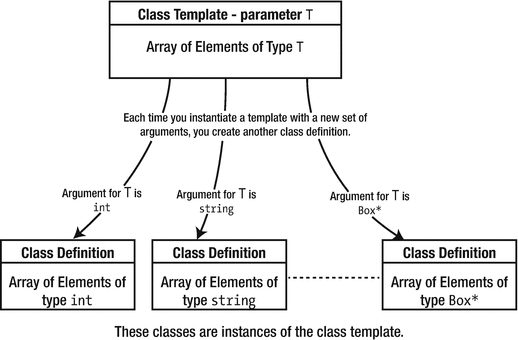
Class templates are based on the same idea as function templates. A class template is a parameterized type ; it’s a recipe for creating a family of class types using one or more parameters. When you define a variable that has a type specified by a class template, the compiler uses the template to create a definition of a class using the template arguments that you use in the type specification. The argument for each parameter is typically (but not always) a type. You can use a class template to generate any number of different classes. It’s important to keep in mind that a class template is not a class but just a recipe for creating classes because this is the reason for many of the constraints on how you define class templates.
Instantiating a template
Each class that the compiler generates from a template is called an instance of the template. When you define a variable using a template type for the first time, you create an instance of the template; variables of the same type defined subsequently will use the first instance created. You can also cause instances of a class template to be created without defining a variable. The compiler does not process a class template in a source file in any way if the template is not used to generate a class.
There are many applications for class templates, but they are perhaps most commonly used to define container classes . These are classes that can contain sets of objects of a given type, organized in a particular way. In a container class, the organization of the data is independent of the type of objects stored. Of course, you already have experience instantiating and using std::vector<> and std::array<> class templates that define containers where the data is organized sequentially. In this chapter, you will learn how to define your own class templates.
Defining Class Templates
Class template definitions tend to look more complicated than they really are, largely because of the notation used to define them and the parameters sprinkled around the statements in their definitions. Class template definitions are similar to those of ordinary classes, but like so many things, the devil is in the details. A class template is prefixed by the template keyword followed by the parameters for the template between angled brackets. The template class definition consists of the class keyword followed by the class template name, with the body of the definition between braces. Just like a regular class, the whole definition ends with a semicolon. The general form of a class template looks like this:
ClassName is the name of this template. You write the code for the body of the template just as you’d write the body of an ordinary class, except that some of the member declarations and definitions will be in terms of the template parameters that appear between the angled brackets.
Template Parameters
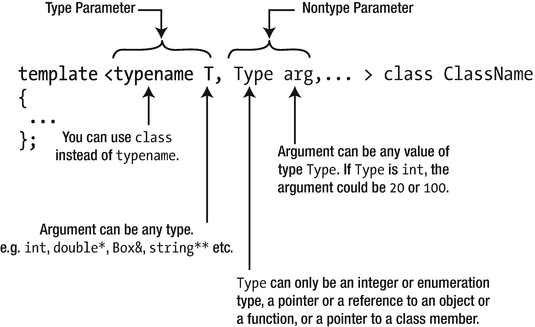
A template parameter list can contain any number of parameters that can be of two kinds—type parameters and nontype parameters. The argument corresponding to a type parameter is always a type, such as int, std::string, or Box*. The argument for a nontype parameter can be a literal of an integral type such as 200, an integral constant expression, a pointer or reference to an object, or a pointer to a function or a pointer that is null. Type parameters are much more commonly used than nontype parameters, so we’ll explain these first and defer discussion of nontype parameters until later in this chapter.
Note
There’s a third possibility for class template parameters. A parameter can also be a template where the argument must be an instance of a class template. A detailed discussion of this possibility is a little too advanced for this book.
Class template parameters
T is often used as a type parameter name (or T1, T2, and so on, when there are several type parameters) because it’s concise, but you can use whatever name you want. It is often recommended, especially if there are multiple type parameters, to use more descriptive names. Conventionally, type parameter names start with a capital letter to distinguish them from regular variable names, but this is not required.
A Simple Class Template
Let’s take an example of a class template for arrays that will do bounds checking on index values to make sure that they are legal. The Standard Library provides a comprehensive implementation of an array template, but building a limited array template is an effective basis from which you can learn how templates work. You already have a clear idea of how arrays work, so you can concentrate on the template specifics.
This template just has a single type parameter, so in outline, its definition will be as follows:
The Array template has just one type parameter, T. You can tell that it’s a type parameter because it’s preceded by the keyword typename. Whatever is “plugged in” for the parameter when you instantiate the template—int, double*, string, or whatever—determines the type of the elements stored in an object of the resultant class. As this obviously does not necessarily have to be a class type, we have used the keyword typename rather than class.
The definition in the body of the template will be much the same as a class definition, with member variables and functions that are specified as public, protected, or private , and it will typically have constructors and a destructor. You can use T to define member variables or to specify the parameters or return types for member functions, either by itself or in types such as T* or T&&. You can use the template name with its parameter list—Array<T>, in this case—as a type name when specifying member variables and functions.
The very least we need by way of a class interface is a constructor , a copy constructor (because the space for the array will need to be allocated dynamically), an assignment operator (because the compiler will supply an unsuitable version if there isn’t one defined), an overloaded subscript operator, and finally a destructor. With this in mind, the initial definition of the template looks like this:
The body of the template looks much like a regular class definition, except for the type parameter T, in various places. For example, it has a member variable, elements, which is of type pointer to T (equivalent to array of T). When the template is instantiated to produce a specific class definition, T is replaced by the actual type used to instantiate the template. If you create an instance of the template for type double, elements will be of type double* or array of double. The operations that the template needs to perform on objects of type T will obviously place requirements on the definition of type T when T is a class type.
The first constructor is declared as explicit to prevent its use for implicit conversions. The subscript operator has been overloaded on const. The non-const version of the subscript operator applies to non-const array objects and can return a non-const reference to an array element. Thus, this version can appear on the left of an assignment. The const version is called for const objects and returns a const reference to an element; obviously this can’t appear on the left of an assignment.
The assignment operator function parameter is of type const Array<T>&. This type is const reference to Array<T>. When a class is synthesized from the template—with T as type double, for example—this is a const reference to the class name for that particular class, which would be const Array<double>, in this case. More generally, the class name for a specific instance of a template is formed from the template name followed by the actual type argument between angled brackets. The template name followed by the list of parameter names between angled brackets is called the template ID.
It’s not essential to use the full template ID within a template definition. Within the body of the Array template, Array by itself will be taken to mean Array<T>, and Array& will be interpreted as Array<T>&, so we can simplify the class template definition:
Caution
You must use the template ID to identify the template outside the body of the template. This will apply to member functions of a class template that are defined outside the template.
It’s desirable that the number of elements in an Array<T> object can be determined, so the getSize() member provides this. The assignment operator allows one Array<T> object to be assigned to another, which is something you can’t do with ordinary arrays. If you wanted to inhibit this capability, you should declare the operator=() function with =delete in the declaration to prevent the compiler from supplying the default (as shown in Chapter 12). The getSize() member is implemented within the class template, so it’s inline by default, and no external definition is necessary.
Defining Member Functions of a Class Template
If you include the definitions for the member functions of a class template within its body, they are implicitly inline in any instance of the template, just like in an ordinary class. However, you’ll want to define members outside of the template body from time to time, especially if they involve a lot of code. The syntax for doing this is a little different from what applies for a normal class.
The clue to understanding the syntax is to realize that external definitions for member functions of a class template are themselves templates. This is true even if a member function has no dependence on the type parameter T, so getSize() would need a template definition if it was not defined inside the class template. The parameter list for the template that defines a member function must be identical to that of the class template.
All the member function definitions that you’ll write in this section are templates that are inextricably bound to the class template. They are not function definitions; they’re templates to be used by the compiler when the code for one of the member functions of the class template needs to be generated, so they need to be available in any source file that uses the template. For this reason, you almost always put all the definitions of the member functions for a class template in the header file that contains the class template itself.
Let’s start by defining the constructors for the Array template.
Constructor Templates
When you’re defining a constructor outside a class template definition, its name must be qualified by the class template name in a similar way to a member function of an ordinary class. However, this isn’t a function definition; it’s a template for a function definition, so that has to be expressed as well. Here’s the definition of the constructor:
The first line identifies this as a template and also specifies the template parameter as T. Splitting the template function declaration into two lines, as we’ve done here, is only for illustrative purposes and isn’t necessary if the whole construct fits on one line. The template parameter is essential in the qualification of the constructor name because it ties the function definition to the class template. Note that you don’t use the typename keyword in the qualifier for the member name; it’s only used in the template parameter list. Also, you don’t need a parameter list after the constructor name; you need it only in the parameter ID that precedes it. When the constructor is instantiated for an instance of the class template—for type double, for example—the type name replaces T in the constructor qualifier, so the qualified constructor name for the class Array<double> is instantiated as Array<double>::Array().
In the constructor, you must allocate memory in the free store for an elements array that contains size elements of type T. If T is a class type, a public default constructor must exist in the class T; otherwise, the instance of this constructor won’t compile.
The copy constructor has to create an array for the object being created that’s the same size as that of its argument and then copy the latter’s member variables to the former. Here’s the code to do that:
This assumes that the assignment operator works for type T. This demonstrates how important it is to always define the assignment operator for classes that allocate memory dynamically. If the class T doesn’t define it, the default copy assignment operator for T is used, with undesirable side effects if creating a T object involves allocating memory dynamically. Without seeing the code for the template before you use it, you may not realize the dependency on the assignment operator.
The Destructor Template
In many cases a default destructor will be OK in a class generated from a template, but this is not the case here. The destructor must release the memory for the elements array, so its definition will be as follows:
We are releasing memory allocated for an array, so we must use the delete[] form of the operator. Failing to define this template would result in all classes generated from the template having major memory leaks.
Subscript Operator Templates
The operator[]() function is quite straightforward, but we must ensure illegal index values can’t be used. For an index value that is out of range, we can throw an exception:
We could define an exception class to use here, but it’s easier to borrow the out_of_range class type that’s already defined in the stdexcept header. This is thrown if you index a string, vector<>, or array<> object with an out-of-range index value, for example, so the usage here is consistent with that. An exception of type out_of_range is thrown if the value of index is not between 0 and size-1. An index can already not be less than zero because it is of type size_t, which is an unsigned integer type, so all we need to check for is that the given index is not too large. The argument that is passed to the out_of_range constructor is a message that includes the erroneous index value to make tracking down the source of the problem a little easier.
In a first, natural implementation, the const version of the subscript operator function would be almost identical to the non-const version:
However, introducing such duplicate definitions for the const and non-const overloads of a member function is considered bad practice. It is a particular instance of what is typically referred to as code duplication . Because avoiding code duplication is key in making sure your code remains maintainable, we’ll contemplate this a bit more before we continue with class templates.
Code Duplication
Writing the same or similar code more than once is rarely a good idea. Not only is it a waste of time, such so-called duplicated code is undesirable for a number of reasons—most notably because it undermines the maintainability of your code base. Requirements evolve, new insights are gained, and bugs are discovered. So, more often than not, your code will need to be adjusted several times after it is written. So if you have duplicated code snippets, this means you have to remember to always adjust all individual copies of the same code. Believe us when we say that this is a maintenance nightmare! The principle of avoiding code duplication is also sometimes called the Don’t Repeat Yourself (DRY) principle .
Even if the duplicated code is just a few lines it is often already worthwhile rethinking it. Consider, for instance, the duplicated operator[]() member definitions we wrote for the Array<> template. Now imagine that at some point later you want to change the type of exception thrown or change the message passed to the exception. Then you would have to change it in two places. Not only is this tedious, but it would be really easy to forget either one of these duplicates. This unfortunately occurs a lot in practice; changes or bug fixes to duplicated code are made in only some of the duplicates, while other duplicates live on containing the original, now-incorrect version. If you only have each piece of logic in one single place in your code base, this cannot happen!
The good news is that you already know most of the tools you need to battle code duplication. Functions are reusable blocks of computations and algorithms, templates instantiate functions or classes for any number of types, a base class encapsulates all that is common to its derived classes, and so on. All these mechanisms were created precisely to make sure you do not have to repeat yourself!
The traditional approach to eliminate the code duplication between the const and non-const overloads of a member function is to implement the non-const version in terms of its const twin. While this sounds simple enough in principle, the resulting code may, nay will, seem daunting at first. Prepare yourself. For our operator[]() member, for instance, the classical implementation of this idiom looks as follows:
Ouch! We warned you that it would get scary, didn’t we? The good news is that C++17 has introduced a little helper function, std::as_const(), that makes this code already a bit more bearable:
That’s quite a bit shorter and more readable already. Still, since this is your first encounter with the idiom, let’s first rewrite that still nonobvious return statement into some smaller steps. That will help us explain what is going on:
Because this template generates non-const member functions, the this pointer has a pointer-to-non-const type . So in our case, dereferencing the this pointer gives us a reference of type Array<T>&. The first thing we need to do is add const to this type. As of C++17, this can be done using the std::as_const() function defined in the <utility> header of the Standard Library. Given a value of type T&, this function template evaluates to a value of type const T&. (If your implementation does not contain this C++17 utility yet, you need to use an equivalent static_cast<const T&> as shown earlier.)
Next, we simply call the same function again, with the same set of arguments—an operator function with a single size_t argument index in our case. The only difference is that this time we call the overloaded function on the reference-to-const variable, which means that the const overload of the function—operator[](size_t) const—gets called. If we hadn’t first added const to the type of *this, we’d simply be calling the same function again, which would trigger infinite recursion.
Because we now call the function on a const object, it also means that it typically returns a const reference. If it didn’t, it would break const correctness. What we need, however, is a reference to a non-const element. In a final step, we must therefore strip away the constness of the result before returning it from the function. And, as you know, the only way to remove const is by using a const_cast<>.
Paraphrasing J. R. R. Tolkien, we propose to call this idiom “const-and-back-again .” You first go from non-const to const (using std::as_const) and then back again to non-const (using a const_cast<>). Note that this idiom is one of the few cases where it is actually recommended to use a const_cast<>. In general, casting away constness is considered bad practice. But eliminating code duplication using the const-and-back-again idiom is a widely accepted exception to this rule:
Tip
Use the const-and-back-again idiom to avoid code duplication between the const and non-const overloads of a member function . In general, it works by implementing the non-const overload of a member in terms of its const counterpart using the following pattern:
The Assignment Operator Template
There’s more than one possibility for how the assignment operator works . The operands must be of the same Array<T> type with the same T, but this does not prevent the size members from having different values. You could implement the assignment operator so that the left operand retains the same value for its elements member whenever possible. That is, if the right operand has fewer elements than the left operand, you could just copy sufficient elements from the right operand to fill parts of the array for the left operand. You could then either leave the excess elements at their original values or set them to the value produced by the default T constructor.
To keep it simple, however, we’ll just make the left operand allocate a new elements array always, even if the previous array would be large enough already to fit a copy of the elements of the right operand. To implement this, the assignment operator function must release any memory allocated in the destination object and then do what the copy constructor did. To make sure the assignment operator does not delete[] its own memory, it must first check that the objects are not identical. Here’s the definition:
Remember, checking to make sure that the left operand is not identical to the right is essential; otherwise, you’d free the memory for the elements member of the object pointed to by this and then attempt to copy it to itself when it no longer exists! Every assignment operator of this form must start with such a safety check. When the operands are different, you release any free store memory owned by the left operand before creating a copy of the right operand.
Exception Safety
The assignment operator for our Array<> class template will work perfectly in the nominal case. But what if something goes wrong? What if an error occurs during its execution and an exception is thrown? Can you perhaps locate the two places in the function’s code where this might happen? Try to do so before reading on.
The two potential sources of exceptions inside our function’s body are annotated in the following code snippet:
The first is operator new[]. In the previous chapter, you learned that it throws a std::bad_alloc exception if free store memory cannot be allocated for some reason. While unlikely, especially on today’s computers, this can certainly happen. Perhaps rhs is a very large array that doesn’t fit twice in the available memory.
Note Free store memory allocation is a rare occurrence these days because physical memory is large and because virtual memory is very large. So, checking for or considering bad_alloc is omitted in most code. Nevertheless, given that in this case we are implementing a class template whose sole responsibility is managing an array of elements, properly handling memory allocation failures does seem appropriate here.
The second potential source of exceptions is the elements[i] = rhs.elements[i] assignment expression. Since the Array<T> template can be used with any type T, it might just be instantiated for a type T whose assignment operator throws an exception if the assignment fails. One likely candidate already is again a std::bad_alloc. As witnessed by our own assignment operator, an assignment often involves memory allocation. But in general this could be any exception type. It all depends on the definition of the assignment operator of the type T.
Tip As a rule, you should assume that any function or operator you call might throw an exception and consequently consider how your code should behave if and when this occurs. The only exceptions to this rule are functions annotated with the noexcept keyword and most destructors, as these are generally implicitly noexcept.
Once you have identified all potential sources of exceptions, you must analyze what would happen if exceptions are in fact thrown there. It would again be good practice for you to do so now, before reading on. Ask yourself, what exactly would happen to the Array<> object if an exception occurs in either of these two locations?
If the new[] operator in our example fails to allocate new memory, the elements pointer of the Array<> object becomes what is known as a dangling pointer —a pointer to memory that has been reclaimed. The reason is that right before the failing new[], delete[] was already applied on elements. This means that even if the caller catches the bad_alloc exception, the Array<> object has become unusable. Worse, actually, its destructor is almost certainly going to cause a fatal crash because it’ll again apply delete[] on the now-dangling elements pointer.
Note that assigning nullptr to elements after the delete[] like we recommended earlier would in this case only be a small patch on the wound. As none of the other Array<> member functions—for instance, operator[]—checks for nullptr, it would again only be a matter of time before a fatal crash occurs.
If one of the individual assignments performed inside the for loop fails, we are only slightly better off. Supposing the culprit exception is eventually caught, you are left with an Array<> object where only the first some elements have been assigned a correct new value, while the rest is still default-constructed. And there is no way of knowing how many have succeeded.
When you call a member function that modifies an object’s state, you typically want one of two things to happen. Ideally, of course, the function fully succeeds and brings the object into its desired new state. As soon as any error prevents a complete success, however, what you really do not want is to be left with an object in some unpredictable halfway state. Leaving a function’s work half-finished mostly means that the object becomes unusable. Once anything goes wrong, you instead prefer the object to remain or revert to its initial state. For our assignment operator, this means that if the assignment fails to allocate and assign all elements, the end result should be that the Array<> object still points to the same elements array as it did prior to the assignment attempt.
Like we said in Chapter 15, writing code that is correct might be only half of the work. Making sure that it behaves reliably and robustly when faced with unexpected errors can be at least as hard. Of course, proper error handling always starts from a cautious attitude. That is, always be on the lookout for possible sources of errors, and make sure you understand what the consequences would be of such errors. Luckily, once you have located and analyzed the problem areas—and you’ll get better at spotting these over time—there exist standard techniques to make your code behave correctly after an error. Let’s see how this might be done for our example.
The programming pattern that can be used to guarantee the desired all-or-nothing behavior for our assignment operator is called the copy-and-swap idiom . The idea is simple. If you have to modify the state of one or more objects and any of the steps required for this modification may throw, then you should follow this simple recipe:
- 1.
Create a copy of the objects.
- 2.
Modify this copy instead of the original objects. The latter still remain untouched!
- 3.
If all modifications succeed, replace—or swap—the originals with the copies.
However, if anything goes wrong either during the copy or any of the modification steps, simply abandon the copied, half-modified objects and let the entire operation fail. The original objects then remain as they were.
While this idiom can be applied to virtually any code, it is often used within a member function. For an assignment operator, the application of this idiom often looks like this:
The main thing to note is that we have rewritten the assignment in terms of the copy constructor. The self-assignment test is now no longer strictly required, but there is no harm in adding it either. Still, if you omit it, you can rewrite the copy assignment operator to make it even shorter:
Copy construction now occurs when the operator’s right side is passed to the function by value.
In a way, this is actually a degenerate instance of the copy-and-swap idiom . In general, the state of the copied object may need any number of modifications between the copy and the swap stages of the idiom. Of course, these modifications are then always applied to the copy, never directly to the original object (*this, in our case). If either the copy step itself or any of the additional modification steps that may follow throw an exception, the stack-allocated copy object is automatically reclaimed, and the original object (*this) remains unchanged.
Once you are done with updating copy, you swap its member variables with those of the original object. The copy-and-swap idiom hinges on the assumption that this final step, the swapping, can be done without any risk for exceptions. That is, it must not be possible that an exception occurs with some members already swapped and others not. Luckily, implementing a noexcept swap function is almost always trivial.
By convention, the function to swap the contents of two objects is called swap() and is implemented as a nonmember function in the same namespace as the class whose objects it is swapping. (We know, in our Array<> template that it is a member function as well. Be patient, though, we’re getting to that!) The Standard Library <utility> header also offers the std::swap<>() function template that can be used to swap values or objects of any copyable data type. For now, you can think of this template as if it was implemented like this:1
Applying this template to Array<> objects would not be particularly efficient. All the elements of the objects being swapped would be copied several times. Besides, we could never use it to swap *this and copy in our copy assignment operator—do you see why?2 We’ll therefore create our own, more effective swap() function for Array<> objects. Similar specializations of std::swap<>() exist for many Standard Library types.
Because the member variables of Array<> are private, one option is to define swap() as a friend function . Here, we’ll take a slightly different approach, one that is also followed by standard container templates such as std::vector<>. The idea is to first add an extra member function swap() to Array<> as follows:
You then use that to implement the conventional nonmember swap() function:
You can find the full source code of the improved Array<> template in Ex16_01A.
Tip
Implement the assignment operator in terms of the copy constructor and a noexcept swap() function. This basic instance of the copy-and-swap idiom will ensure the desired all-or-nothing behavior for your assignment operators. While swap() can be added as a member function, convention dictates that making objects swappable involves defining a nonmember swap() function . Following this convention also ensures that the swap() function gets used by various algorithms of the Standard Library.
The copy-and-swap idiom can be used to make any nontrivial state modification exception safe, either inside other member functions or simply in the middle of any code. It comes in many variations, but the idea is always the same. First copy the object you want to change, then perform any number (zero or more) of risky steps onto that copy, and only once they all succeed commit the changes by swapping the state of the copy and the actual target object.
Instantiating a Class Template
The compiler instantiates a class template as a result of a definition of an object that has a type produced by the template. Here’s an example:
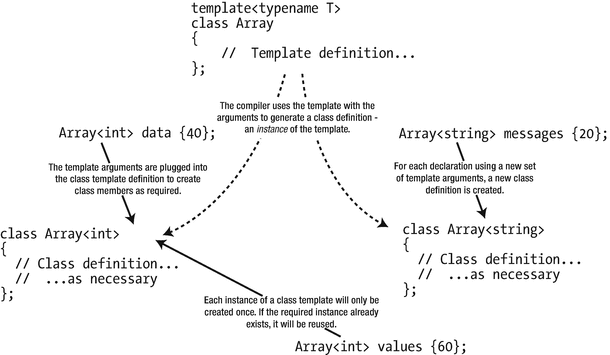
When this statement is compiled, two things happen. The definition for the Array<int> class is created so that the type is identified, and the constructor definition is generated because it must be called to create the object. This is, all that the compiler needs to create the data object, so this is the only code that it provides from the templates at this point.
The class definition that’ll be included in the program is generated by substituting int in place of T in the template, but there’s one subtlety. The compiler compiles only the member functions that your program uses, so you do not necessarily get the entire class that would be produced by a simple substitution for the template parameter. On the basis of just the definition for the object, data, it is equivalent to the following:
You can see that the only member functions are the constructor and destructor. The compiler won’t create instances of anything that isn’t required to create or destruct the object, and it won’t include parts of the template that aren’t needed in the program. This implies that there can be coding errors in a class template, and a program that uses the template may still compile, link, and run successfully. If the errors are in parts of the template that aren’t required by the program, they won’t be detected by the compiler because they are not included in the code that is compiled. Obviously, you are almost certain to have other statements in a program besides the declaration of an object that use other member functions—for instance, you’ll always need the destructor to destroy the object—so the ultimate version of the class in the program will include more than that shown in the preceding code. The point is that what is finally in the class generated from the template will be precisely those parts that are actually used in the program, which is not necessarily the complete template.
Caution
Of course, this implies that you must take care when testing your own class templates to ensure that all the member functions are generated and tested. You also need to consider what the template does across a range of types, so you need to test a template with pointers and references as the template type argument.
The instantiation of a class template from a definition is referred to as an implicit instantiation of the template because it arises as a by-product of declaring an object. This terminology is also to distinguish it from an explicit instantiation of a template , which we’ll get to shortly and which behaves a little differently.
As we said, the declaration of data also causes the constructor, Array<int>::Array(), to be called, so the compiler uses the function template that defines the constructor to create a definition for the constructor for the class:
Each time you define a variable using a class template with a different type argument, a new class is defined and included in the program. Because creating the class object requires a constructor to be called, the definition of the appropriate class constructor is also generated. Of course, creating objects of a type that you’ve created previously doesn’t necessitate any new template instances. The compiler uses any previously created template instances as required.
Implicit instantiation of a class template
Note that a class template is only implicitly instantiated when an object of the specific template type needs to be created. Declaring a pointer to an object type won’t cause an instance of the template to be created. Here’s an example:
This defines pObject as type pointer to type Array<string>. No object of type Array<string> is created as a result of this statement, so no template instance is created. Contrast this with the following statement:
This time the compiler does create an instance of the class template. This defines an Array<std::string*> object, so each element of pMessages can store a pointer to a std::string object. An instance of the template defining the constructor is also generated.
It’s high time we tried out the Array template in a working example. You can put the class template and the templates defining the member functions of the template all together in a header file Array.h:
To use the class template, you just need a program that’ll declare some arrays using the template and try them. The example will create an Array of Box objects; you can use this definition for the Box class :
We’ll use some out-of-range index values in the example, just to show that it works:
This example will produce the following output :
The main() function creates an object of type Array<double> that implicitly creates an instance of the class template with a type argument of double. The number of elements in the array is specified by the argument to the constructor, numValues. The compiler will also create an instance of the template for the constructor definition.
Next, the elements of the values object are initialized with values from 1 to numValues in a first for loop. The expression values[i] results in an instance of the subscript operator function being created. This instance is called implicitly by this expression as values.operator[](i). Because values is not const, the non-const version of the operator function is called. If you used the const-and-back-again idiom, this will in turn call the const overload of the operator.
A second for loop in the try block then outputs the sums of successive pairs of elements, starting at the end of the array. The code in this loop also calls the subscript operator function, but because the instance of the function template has already been created, no new instance is generated. Clearly, the expression values[i-1] has an illegal index value when i is 0, so this causes an exception to be thrown by the operator[]() function. The catch block catches this and outputs a message to the standard error stream. The what() function for the out_of_range exception returns a null-terminated string that corresponds to the string object passed to the constructor when the exception object was created. You can see from the output that the exception was thrown by the overloaded subscript operator function and that the index value is very large. The value of the index suggests that it originated by decrementing an unsigned zero value. When the exception is thrown by the subscript operator function, control is passed immediately to the handler, so the illegal element reference is not used, and nothing is stored at the location indicated by the illegal index. Of course, the loop also ends immediately at this point.
The next try block defines an object that can store Box objects. This time, the compiler generates an instance of the class template, Array<Box>, which stores an array of Box objects because the template has not been instantiated for Box objects previously. The statement also calls the constructor to create the boxes object, so an instance of the function template for the constructor is created. The constructor for the Array<Box> class calls the default constructor for the Box class when the elements member is created in the free store. Of course, all the Box objects in the elements array have the default dimensions of 1 × 1 × 1.
The volume of each Box object in boxes is output in a for loop. The expression boxes[i] calls the overloaded subscript operator, so again the compiler uses an instance of the template to produce a definition of this function. When i has the value nBoxes, the subscript operator function throws an exception because an index value of nBoxes is beyond the end of the elements array. The catch block following the try block catches the exception. Because the try block is exited, all locally declared objects will be destroyed, including the boxes object.
Class Template Argument Deduction
You’ll recall from Chapter 9 that for function templates, more often than not, the compiler automatically deduces all function template arguments from the types of the arguments passed to the function instance. You saw function template argument deduction in action in Ex9_01:
You did not have to explicitly specify the template argument using larger<double>(1.5, 2.5). The compiler conveniently deduces that the type argument T of the function template larger<> needs to be double for you.
For a long time, no type deduction existed for class template arguments. These arguments always had to be specified explicitly. Of course, sometimes there is no other choice. Consider the variable definition you encountered in Ex16_01:
Obviously, the compiler cannot possibly deduce the template argument double from this variable definition. All it has is a size_t argument passed to the constructor. So, it’s only fair that you have to specify the template argument double in such cases.
Consider, however, the following variable definition that uses the initializer list constructor of our Array<> template:
Clearly, an intelligent compiler could deduce the template argument here simply by looking at the type of the constructor argument . Starting with C++17, compilers should be capable of doing exactly that. In other words, as of C++17, you are allowed to simply write the following:
Class template deduction will save you some typing when constructing values of either your own types or any number of Standard Library types such as std::pair, std::tuple, std::vector, and so on. Detailing the precise built-in deduction rules or explaining how to override them with so-called user-defined deduction guides would lead us too far for this basic introduction. The good news is that mostly the built-in rules work just fine.
Note
Class template argument deduction is deliberately not enabled for the popular smart pointer types std::unique_ptr<> and shared_ptr<>. That is, you cannot write the following:
The motivation is that in general the compiler cannot deduce whether a value of type Box* points to either a single Box or an array of Boxes. As you’ll recall, pointers and arrays are closely related and can mostly be used interchangeably. When constructed with a Box*, the compiler therefore has no way of knowing whether to deduce either unique_ptr<Box> or unique_ptr<Box[]>. To initialize smart pointer variables, the recommended approach thus remains the use of std::make_unique<>() and std::make_shared<>(). Here’s an example:
Nontype Class Template Parameters
A nontype parameter looks like a function parameter —a type name followed by the name of the parameter. Therefore, the argument for a nontype parameter is a value of the given type. However, you can’t use just any type for a nontype parameter in a class template. Nontype parameters are intended to be used to define values that might be useful in specifying a container, such as array dimensions or other size specification, or possibly as upper and lower limits for index values.
A nontype parameter can only be an integral type, such as size_t or long; an enumeration type; a pointer or a reference to an object, such as string* or Box&; a pointer or a reference to a function; or a pointer to a member of a class. You can conclude from this that a nontype parameter can’t be a floating-point type or any class type, so types double, Box, and std::string are not allowed, and neither is std::string**. Remember that the primary rationale for nontype parameters is to allow sizes and range limits for containers to be specified. Of course, the argument corresponding to a nontype parameter can be an object of a class type, as long as the parameter type is a reference.
A nontype parameter is written just like a function parameter , with a type name followed by a parameter name. Here’s an example:
This template has a type parameter, T, and a nontype parameter, size. The definition is expressed in terms of these two parameters and the template name. If you need it, the type name of a type parameter can also be the type for a nontype parameter:
This template has a nontype parameter, value, of type T. The parameter T must appear before its use in the parameter list, so value couldn’t precede the type parameter T here. Note that using the same symbol with the type and nontype parameters implicitly restricts the possible arguments for the type parameter to the types permitted for a nontype argument.
To illustrate how you could use nontype parameters, suppose you defined the class template for arrays as follows:
You could now use the nontype parameter, value, to initialize each element of the array in the constructor:
This is not a very intelligent approach to initializing the members of the array . This places a serious constraint on the types that are legal for T. Because T is used as the type for a nontype parameter, it is subject to the constraints on nontype parameter types. As you know, a nontype parameter can only be an integral type, a pointer, or a reference, so you can’t create Array objects to store double values or Box objects, so the usefulness of this template is somewhat restricted.
To provide a more credible example, we’ll add a nontype parameter to the Array template to allow flexibility in indexing the array:
This adds a nontype parameter, startIndex, of type int. The idea is that you can specify that you want to use index values that vary over a given range. For example, if you dislike that array indexes in C++ start at 0 and not at 1, you should instantiate Array<> classes for which startIndex equals 1. You could even create Array<> objects that allows index values from -10 to +10. You would then specify the array with the nontype parameter value as –10 and the argument to the constructor as 21 because the array would need 21 elements. Index values can now be negative, so the parameter for the subscript operator functions has been changed to type int. Notice that the size of the array will still always be a positive number, so the type of the size member can remain size_t—this will become important later.
Because the class template now has two parameters, the templates defining the member functions of the class template must have the same two parameters. This is necessary even if some of the functions aren’t going to use the nontype parameters. The parameters are part of the identification for the class template, so to match the template, they must have the same parameter list. Let’s complete the set of function templates that you need for this version of the Array class.
Templates for Member Functions with Nontype Parameters
Because you’ve added a nontype parameter to the class template definition, the code for the templates for all member functions needs to be changed. The template for the constructor is as follows:
The template ID is now Array<T, startIndex>, so this is used to qualify the constructor name. This is the only change from the original definition apart from adding the new template parameter to the template.
For the copy constructor , the changes to the template are similar:
Of course, the external indexing of the array doesn’t affect how you access the array internally; it’s still indexed from zero here.
The destructor only needs the extra template parameter :
The template definition for the const subscript operator function now becomes as follows:
More significant changes have been made here. The index parameter is of type int to allow negative values. The validity checks on the index value now verify that it’s between the limits determined by the nontype template parameter and the number of elements in the array. Index values can only be from startIndex to startIndex+size-1. Because size_t is an unsigned integer type, you must explicitly cast it to int; if you don’t, the other values in the expression will be implicitly converted to size_t, which will produce a wrong result if startIndex is negative. The choice of message for the exception and the expression selecting it has also been changed.
Finally, you need to alter the template for the non-const version of the subscript operator and the assignment operator functions, but only the template parameter list and the template ID that qualifies these operator names need to be modified. The type of the index parameter for the non-const operator[] also has to be int instead of size_t because the indices for this version of the Array can be negative.
Notice that if we hadn’t used the const-and-back-again idiom for operator[](), we would again have had to duplicate the implementation of the operator overload function.
There are restrictions on how you use a nontype parameter within a template. In particular, you must not modify the value of a parameter within the template definition. Consequently, a nontype parameter cannot be used on the left of an assignment or have the increment or decrement operator applied to it. In other words, it’s treated as a constant. All parameters in a class template must always be specified to create an instance unless there are default values for them. We'll discuss the use of default argument values for class template parameters later in the chapter.
You must always keep in mind that nontype parameter arguments in a class template are part of the type of an instance of the template. Every unique combination of template arguments produces another class type. As we indicated earlier, the usefulness of the Array<T,int> template is very restricted compared to the original. You can’t assign an array of ten values of a given type to another array of ten values of the same type if the starting indexes for the arrays are different—the arrays will be of different types. Later in this chapter we’ll discuss a much more effective version of the Array template where the start index is passed as an extra constructor parameter. You should always think twice about using nontype parameters in a class template to be sure that they’re really necessary. Often you’ll be able to use an alternative approach that will provide a more flexible template and more efficient code.
In spite of these shortcomings of the Array template with a nontype parameter, let’s see it in action in a working example. You just need to assemble the definitions for the member function templates into a header file together with the Array template definition with the nontype parameter. The following example will exercise the new features using Box. h from Ex16_01:
This displays the following output :
The entire body of main() is enclosed in a try block that catches any uncaught exceptions that have std::exception as a base class. The nested try block starts by defining constants that specify the range of index values and the size of the array. The size and start variables are used to create an instance of the Array template to store 21 values of type double . The second template argument corresponds to the nontype parameter and specifies the lower limit for the index values of the array. The size of the array is specified by the constructor argument.
The for loop that follows assigns values to the elements of the values object. The loop index, i, runs from the lower limit start, which will be –10, up to and including the upper limit end, which will be +10. Within the loop the values of the array elements are set to run from 1 to 21.
Next the sums of pairs of successive elements are output starting at the last array element and counting down. The lines variable is used to output the sums five to a line. As in the earlier example, sloppy control of the index value results in the expression values[i–1] causing an out_of_range exception to be thrown. The handler for the nested try block catches it and displays the message you see in the output.
The statement that creates an array to store Box objects is in the outer try block that is the body of main(). The type for boxes is Array<Box,start-5>, which demonstrates that expressions are acceptable as argument values for nontype parameters in a template instantiation. The type of such an expression must either match the type of the parameter, or at least be convertible to the appropriate type by means of an implicit conversion. You need to take care if such an expression includes the > character. Here’s an example:
The intent of the expression for the second argument that uses the conditional operator is to supply a value of at least 5, but as it stands, this won’t compile. The > in the expression is paired with the opening angled bracket and closes the parameter list. Parentheses are necessary to make the statement valid:
Parentheses are also likely to be necessary for expressions for nontype parameters that involve the arrow operator (->) or the shift right operator (>>).
The next for loop throws another exception , this time because the index exceeds the upper limit. The exception is caught by the catch block for the body of main(). The parameter is a reference to the base class, and the output shows that the exception is identified as type std::out_of_range, thus demonstrating there is no object slicing occurring with a reference parameter. There’s a significant difference between the ways the two exceptions were caught. Catching the exception in a catch block for the body of main() means that the program ends at this point. The previous exception was caught in the catch block for the nested try block, so it was possible to allow program execution to continue.
Code Readability
It’s time for another sidebar on code quality . For Ex16_02, we used the following implementation of operator[]() for our Array<> class template:
While there is nothing functionally wrong with this code, chances are fairly high that you had to think at least twice to convince yourself that the conditions in the if statements were in fact correct, in particular that of the second one. If so, you may find the following version easier to understand:
By first computing actualIndex, we have greatly simplified the logic in both if conditions. All that remains is comparing actualIndex with the actual bounds of the elements array. In other words, all that remains is to check that actualIndex lies in the half-open interval [0, size), which is something any C++ programmer is much more accustomed to than working with a startIndex. It follows that it now becomes much more apparent that the conditions are correct.
The second if condition now uses >=, so we do not need to subtract 1 from size anymore. This also removes the need for a static_cast.
While, admittedly, this may not yet have been the most convincing example, the lesson we want to convey here is that professional coding is about much more than simply writing correct code. Writing readable, understandable code is at least as important. In fact, doing so already goes a long way toward avoiding bugs and keeping your code base maintainable.
Tip
Once you have written a piece of code, small or big, you should get into the habit of taking a step back and placing yourself in the shoes of a person who has to read and understand your code later. This could be a colleague tasked with fixing a bug or making a small change, or it could be you in a year or two (trust us, more than likely, you will not remember writing it anymore!). Ask yourself, can I not rewrite the code to make it more readable? Easier to understand? Should I not clarify things by adding some more code comments? At first, you may find this difficult and time-consuming or even fail to see the point. But believe us, after a while, this will become a second nature, and at some point you will find yourself mostly writing high-quality code already from the start.
Arguments for Nontype Parameters
An argument for a nontype parameter that is not a reference or a pointer must be a compile-time constant expression. This means you can’t use an expression containing a non-const integer variable as an argument, which is a slight disadvantage, but the compiler will validate the argument, which is a compensating plus. For example, the following statements won’t compile:
The compiler will generate a message to the effect that the second argument here is invalid. Here are correct versions of these two statements:
Now that start has been declared as const, the compiler can rely on its value, and both template arguments are now legal . The compiler applies standard conversions to arguments when they are necessary to match the parameter type. For example, if you had a nontype parameter declared as type const size_t, the compiler converts an integer literal such as 10 to the required argument type.
Nontype Template Arguments vs. Constructor Arguments
Besides the fact that template arguments have to be compile-time constants, there are some other serious disadvantages to the definition of Array<> we have been using throughout this section:
A consequence of adding the startIndex template parameter is that different values for the argument generate different template instances. This means that an array of double values indexed from 0 will be a different type from an array of double values indexed from 1. If you use both in a program, two independent class definitions will be created from the template, each with whatever member functions you use. This has at least two undesirable consequences. First, you’ll get a lot more compiled code in your program than you might have anticipated (a condition known as code bloat); second (and far worse), you won’t be able to intermix elements of the two types in an expression. The following code would not compile, for instance:
Note
In principle, you could resort to advanced techniques such as adding member function templates to our Array<> class template to facilitate intermixing related instantiations of the Array<> template. These are templates for member functions that add extra template parameters—such as a different start index—on top of the two existing template parameters of the class. Explaining this in detail would lead us a bit too far for an introductory level book, though, especially since in this case a much simpler solution exists.
It would be much better to provide flexibility for the range of index values by adding a parameter to the constructor rather than using a non-type template parameter. Here’s how that would look:
The extra member , start, stores the starting index for the array specified by the second constructor argument. The default value for the startIndex parameter is 0, so normal indexing is obtained by default. Of course, you would have to update the copy constructor and the swap() method to take this extra member into account.
Default Values for Template Parameters
You can supply default argument values for both type and nontype parameters in a class template. This works in a similar way to default values for function parameters. If a given parameter has a default value, then all subsequent parameters in the list must also have default values specified. If you omit an argument for a template parameter that has a default value specified, the default is used, just like with default parameter values in a function. Similarly, when you omit the argument for a given parameter in the list, all subsequent arguments must also be omitted.
The default values for class template parameters are written in the same way as defaults for function parameters—following an = after the parameter name. You could supply defaults for both the parameters in the version of the Array template with a nontype parameter. Here’s an example:
You don’t need to specify the default values in the templates for the member functions; the compiler will use the argument values used to instantiate the class template .
You could omit all the template arguments to declare an array of elements of type int indexed from 0.
The legal index values run from 0 to 100, as determined by the default value for the nontype template parameter and the argument to the constructor. You must still supply the angled brackets, even though no arguments are necessary. The other possibilities open to you are to omit the second argument or to supply them all, as shown here:
If a class template has default values for any of its parameters, they only need to be specified in the first declaration of the template in a source file, which usually will be the definition of the class template.
Explicit Template Instantiation
So far in this chapter, instances of a class template have been created implicitly as a result of defining a variable of a template type. You can also explicitly instantiate a class template without defining an object of the template type. The effect of an explicit instantiation of a template is that the compiler creates the instance determined by the parameter values that you specify .
You have already seen how to explicitly instantiate function templates in Chapter 9. To instantiate a class template, just use the template keyword followed by the template class name and the template arguments between angled brackets. This statement explicitly creates an instance of the Array template:
This creates an instance of the template that stores values of type double, indexed from 1. Explicitly instantiating a class template generates the class type definition, and it instantiates all of the member functions of the class from their templates. This happens regardless of whether you call the member functions, so the executable may contain code that is never used.
Tip
You can use explicit instantiation to quickly test whether a new class template and all its members instantiates for one or multiple types. It saves you the trouble of writing code that calls all the member functions!
Class Template Specialization
You’ll encounter many situations where a class template definition won’t be satisfactory for every conceivable argument type. For example, you can compare string objects by using overloaded comparison operators, but you can’t do this with null-terminated strings. If a class template compares objects using the comparison operators, it will work for type string but not for type char*. To compare objects of type char*, you need to use the comparison functions that are declared in the cstring header. One option to deal with situations like this is to define a class template specialization, which provides a class definition that is specific to a given set of arguments for the template parameters.
Defining a Class Template Specialization
A class template specialization is a class definition, not a class template. Instead of using the template to generate the class from the template for a particular type, char* say, the compiler uses the specialization you define for that type instead. Thus, a class template specialization provides a way to predefine instances of a class template to be used by the compiler for specific sets of argument for the template parameters.
Suppose it was necessary to create a specialization of the first version of the Array<> template for type const char*. Perhaps because you’d like to initialize the elements of the array with pointers to the empty string ("") rather than null pointers. You’d write the specialization of the class template definition as follows:
This definition of the specialization of the Array template for type const char* must be preceded by the original template definition or by a declaration for the original template. Because all the parameters are specified, it is called a complete specialization of the template, which is why the set of angle brackets following the template keyword is empty. The compiler will always use a class definition when it is available, so there’s no need for the compiler to consider instantiating the template for type const char*.
It may be that just one or two member functions of a class template need to have code specific to a particular type. If the member functions are defined by separate templates outside the class template, rather than within the body of the class template, you can just provide specializations for the function templates that need to be different.
Partial Template Specialization
If you were specializing the version of the template with two parameters, you may only want to specify the type parameter for the specialization, leaving the nontype parameter open. You could do this with a partial specialization of the Array<> template that you could define like this:
This specialization of the original template is also a template. The parameter list following the template keyword must contain the parameters that need to be specified for an instance of this template specialization—just one in this case. The first parameter is omitted because it is now fixed. The angled brackets following the template name specify how the parameters in the original template definition are specialized. The list here must have the same number of parameters as appear in the original, unspecialized template. The first parameter for this specialization is const char*. The other parameter is specified as the corresponding parameter name in this template.
Apart from the special considerations you might need to give to a template instance produced by using const char* for a type parameter, it may well be that pointers in general are a specialized subset that need to be treated differently from objects and references. For example, to compare objects when a template is instantiated using a pointer type, pointers must be dereferenced; otherwise, you are just comparing addresses, not the objects or values stored at those addresses.
For this situation, you can define another partial specialization of the template. The parameter is not completely fixed in this case, but it must fit within a particular pattern that you specify in the list following the template name. For example, a partial specialization of the Array template for pointers would look like this:
The first parameter is still T, but the T* between angle brackets following the template name indicates that this definition is to be used for instances where T is specified as a pointer type. The other two parameters are still completely variable, so this specialization will apply to any instance where the first template argument is a pointer.
Choosing Between Multiple Partial Specializations
Suppose both the partial specializations of the Array template that we just discussed were defined—the one for type const char* and the one for any pointer type. How can you be sure that the version for type const char* is selected by the compiler when this is appropriate for any particular instantiation? For example, consider this declaration:
Clearly, this only fits with the specialization for pointers in general, but both partial specializations fit the declaration if you write this:
In this case, the compiler determines that the const char* partial specialization is a better fit because it is more specialized than the alternative. The partially specialized template for const char* is determined to be more specialized than the specialization for pointers in general because although anything that selects the const char* specialization—which happens to be just const char*—also selects the T* specialization, the reverse is not the case.
One specialization is more specialized than another when every argument that matches the given specialization matches the other, but the reverse is not true. Thus, you can consider a set of specializations for a template to be ordered from most specialized to least specialized. When several template specializations may fit a given declaration, the compiler will select and apply the most specialized specialization from them.
Using static_assert() in a Class Template
You can use static_assert() to cause the compiler to output a message and fail compilation when a type argument in a class template is not appropriate. static_assert() by default has two arguments; when the first argument is false, the compiler outputs the message specified by the second argument. If the second argument is omitted, a default message will be generated by the compiler.
Template | Result |
|---|---|
is_default_constructible_v<T> | Is only true if type T is default constructible, which means for a class type that the class has a no-arg constructor |
is_copy_constructible_v<T> | Is true if type T is copy constructible, which means for a class type that the class has a copy constructor |
is_assignable_v<T> | Is true if type T is assignable, which means for a class type that it has an assignment operator function |
is_pointer_v<T> | Is true if type T is a pointer type and false otherwise |
is_null_pointer_v<T> | Is true only if type T is of type std::nullptr_t |
is_class_v<T> | Is true only if type T is a class type |
It’s easy to get confused about what is happening with these templates. Keep in mind that these templates are relevant at compile time. An example should make it clear how you use these. Let’s amend Ex16_01 to show this in operation. First, comment out the line in the Box class definition in Box.h that generates the default constructor:
Next, add an #include directive for the type_traits header to Array.h and add one statement following the opening brace in the body of the Array template :
You can now recompile the example, which will fail, of course. The first argument to static_assert() is the is_default_constructible_v<T> value for the current type argument for T. When T is type Box, this value will be false, triggering the message you’ll see in the output from your compiler, and the compilation will fail. Removing the commenting out of the Box default constructor will allow the compilation to succeed. The complete example is in the code download as Ex16_03.
Note
If the Box class does not have a default constructor, the example will fail to compile regardless of whether the static_assert() is added inside the Array<> template. After all, the instantiated code attempts to use a default constructor that is not defined. However, C++ compilers are notorious for producing intricate diagnostic messages when the compilation of a template instantiation fails. It will be instructive to try this yourself, so please comment out both the Box() default constructor and the static_assert() and then recompile. If the user of your class is likely to use unsupported template arguments, it is considered common courtesy to employ static_assert() declarations to improve compilation diagnostics. Note that the static_assert() declarations also double as code documentation, conveying usage intent to the person reading the code .
Friends of Class Templates
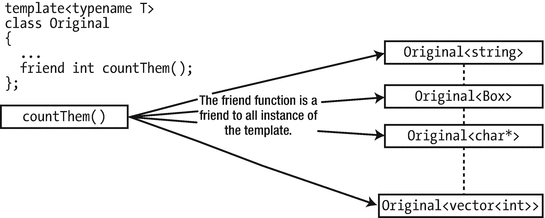
A friend function of a class template
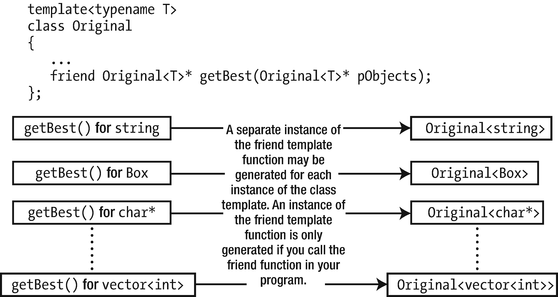
A function template that is a friend of a class template
Although each class template instance in Figure 16-5 could potentially have a unique friend template instance, this is not necessarily the case. If the class template has some parameters that aren’t parameters of the friend template, then a single instance of the friend template may service several instances of the class template.
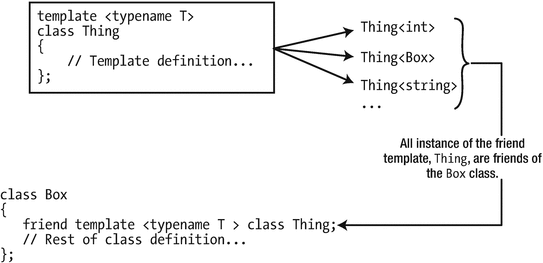
A class template that is a friend of a class
The declaration in the Box class is a template for a friend declaration, and this effectively generates a friend declaration for each class generated from the Thing template. If there are no instances of the Thing template, then the Box class has no friends.
Class Templates with Nested Classes
A class can contain another class nested inside its definition. A class template definition can also contain a nested class or even a nested class template. A nested class template is independently parameterized, so inside another class template it creates a two-dimensional ability to generate classes. Dealing with templates inside templates is outside the scope of this book, but we'll introduce aspects of a class template with a nested class.
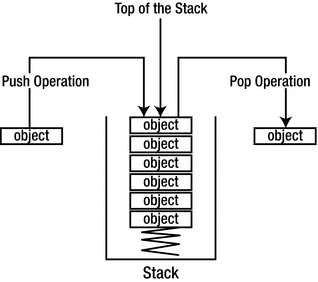
The concept of a stack
The parameter for a Stack template is a type parameter that specifies the type of objects in the stack, so the initial template definition will be as follows:
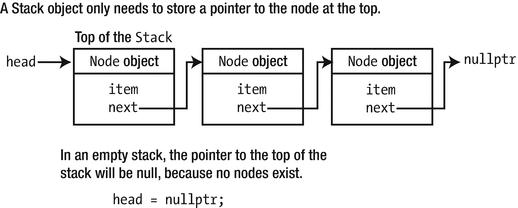
A stack as a linked list
When you create an empty stack, the pointer to the head of the list is nullptr, so you can use the fact that it doesn’t contain any Node objects as an indicator that the stack is empty. Of course, only the Stack object needs access to the Node objects that are in the stack. The Node objects are just internal objects used to encapsulate the objects that are stored in the stack, so there’s no need for anyone outside the Stack class to know that type Node exists.
A nested class that defines nodes in the list is required in each instance of the Stack template, and because a node must hold an object of type T, the Stack template parameter type, you can define it as a nested class in terms of T. We can add this to the initial outline of the Stack template:
The Node class is declared as private, so we can afford to make all its members public so that they’re directly accessible from member functions of the Stack template. A Node object stores an object of T by value. The constructor is used when an object is pushed onto the stack. The parameter to the constructor is a const reference to an object of type T, and a copy of this object is stored in the item member of the new Node object . The rest of the Stack class template to support the linked list of Node objects shown in Figure 16-8 is as follows:
As we explained earlier, a Stack<> object only needs to “remember” the top node so it has only one member variable, head, of type Node*. There’s a default constructor, a copy constructor, a destructor, and a copy assignment operator function. The destructor and copy members are essential here because nodes will be created dynamically using new and their addresses stored in raw pointers. The push() and pop() members will transfer objects to and from the stack, the isEmpty() function will return true if the Stack<> object is empty, and the swap() function will be used to implement the copy-and-swap idiom for the assignment operator. We’ll discuss the definitions of all member function templates for the Stack<> type in the next subsection.
Function Templates for Stack Members
We’ll start with the constructors. The default constructor is defaulted within the class template, so the compiler shall generate one for you if and when needed. The copy constructor must replicate a Stack<T> object, which can be done by walking through the nodes and copying them one by one as follows:
This copies the stack represented by the stack input argument to the current Stack object, which is assumed to be empty (the head member variable starts out initialized to nullptr). It does this by replicating the head of the argument object, then walking through the sequence of Node objects, copying them one by one. The process ends when the Node object with a null next member has been copied.
The isEmpty() function simply checks whether the head member points to an actual Node or is nullptr:
The swap() function is implemented as follows:
The assignment operator then uses this swap() function to implement the familiar copy-and-swap idiom (see Chapter 15):
The template for the push() operation is fairly easy as well:
The Node object encapsulating item is created by passing the reference to the Node constructor. The next member of the new node needs to point to the node that was previously at the top. The new Node object then becomes the top of the stack, so its address is stored in head.
The pop() operation is slightly more involved, though. The first question you need to answer is, what should happen if pop() is invoked on an empty stack? Because the function returns a T object by value, you can’t easily signal an error through the return value. One obvious solution is to throw an exception in this case, so let’s do that.
- 1.
Return the T item stored in the current head.
- 2.
Make head point to the next Node in the linked list.
- 3.
Delete the old head Node that is no longer required now.
It takes some figuring out in which order these actions should be performed. If you’re not careful, you may even run into crashes. Here is a working solution, though:
Key is that you mustn’t delete the old head without first extracting all information from it that you still need—in this case both its next pointer (which is to become the new head) and its T item (the value that you have to return from the pop() function). Once you realize this, the rest writes itself.
In the destructor you face a similar problem (remember this for later!). Clearly, it needs to release all dynamically allocated Node objects belonging to the current Stack object. From the pop() template, you know not to delete any Nodes without first copying what you still need from it:
Without the temporary pointer next to hold the address stored in head->next, you couldn’t move head along anymore to the next Node in the list. At the end of the while loop, all Node objects belonging to the current Stack object will have been deleted and head will be nullptr.
That’s all the templates you need to define the stack . If you gather all the templates into a header file, Stack.h, you can try it with the following code:
Here’s an example of the output:
You first define an array of five objects that are strings, initialized with the words shown. Then you define an empty Stack object that can store string objects. The for loop then pushes the array elements onto the stack. The first word from the array will be at the bottom of the wordStack stack and the last word at the top. You create a copy of wordStack as newStack to exercise the copy constructor.
In the next while loop, you display the words in newStack in reverse order by popping them off the stack and outputting them in a while loop. The loop continues until isEmpty() returns false. Using the isEmpty() function member is a safe way of getting the complete contents of a stack. newStack is empty by the end of the loop, but you still have the original in wordStack.
The next while loop retrieves the words from wordStack and pops them onto newStack. The pop and push operations are combined in a single statement, where the object returned by pop() for wordStack is the argument for push() for newStack(). At the end of this loop, wordStack is empty, and newStack contains the words in their original sequence—with the first word at the top of the stack. You then output the words by popping them off newStack, so at the end of this loop, both stacks are empty.
The next part of main() reads a line of text into a string object using the getline() function and then creates a stack to store characters:
This creates a new instance of the Stack template, Stack<const char>, and a new instance of the constructor for this type of stack. At this point, the program contains two classes from the Stack template each with a nested Node class.
You peel off the characters from text and push them onto the new stack in a for loop. The length() function of the text object is used to determine when the loop ends. Finally, the input string is output in reverse by popping the characters off the stack. You can see from the output that our input was not even slightly palindromic, but you could try, “Ned, I am a maiden” or even “Are we not drawn onward, we few, drawn onward to new era.”
A Better Stack?
In this chapter we have already illustrated a few times that you should not necessarily be satisfied with your code just because it is correct. We have advised you to shun code duplication, to be on the lookout for code that throws exceptions, and to always strive for readable code. With this in mind, let’s review the Stack<> class template we wrote in this section and see whether we can improve it. More specifically, let’s review the implementation of the destructor. Is there anything there that strikes you as suboptimal there?
We already noted the similarities between the destructor and pop() earlier, didn’t we? That is, both had to set aside a temporary next pointer, delete the head, and then move the head along to the next node. This is code duplication as well! You can eliminate this using the following, alternative implementation of the destructor template that leverages the existing isEmpty() and pop() functions instead of directly manipulating the pointers itself:
Because this is trivially readable and therefore far less prone to errors, you should definitely prefer this new version. In case you are worried about performance, today’s optimizing compilers will likely generate the same code for both versions—after inlining the isEmpty() and pop() function calls, it becomes trivial for a compiler to rework the code to exactly what we wrote in the original version. You can find this implementation in Ex16_04A.
We understand that initially it will not always be easy to improve your code like this. And, at first, doing so may seem to take up a lot of your time. Unfortunately, we also cannot give you a fixed set of rules that dictate when code is good, bad, or good enough. But with sufficient practice, you will see that this will come more and more naturally. In the long run, applying the principles you learn about here will improve your productivity as a programmer substantially. You will find yourself consistently producing elegant, readable code, which will therefore contain less bugs and which will be easier to maintain and adapt as well.
Computer programming is an art, […] because it requires skill and ingenuity, and especially because it produces objects of beauty. A programmer who subconsciously views himself as an artist will enjoy what he does and will do it better.
Disambiguating Dependent Names
When referring to nested types, you regularly run into one of the more annoying idiosyncrasies of the C++ programming language. To introduce it, we’ll use this minimal example of a nested class:
Given a class template definition of this form, anyone with basic knowledge of class templates naturally attempts to define the template for its getNested() member function as follows:
Unfortunately, though, this function definition is not valid in C++ and will not compile. You could give it a try for yourself by attempting to compile Ex16_05.cpp. The compiler error you see will most likely contain the term dependent. The name of a member of a class template is said to be dependent on the template parameters of the class template. In the expression Outer<T>::Nested, the name of the nested type Nested is thus dependent on the type parameter T. When a compiler encounters a dependent name such as the one in our example, the C++ standard says it should assume it is the name of a static member variable. Your compiler will therefore interpret Outer<T>::Nested as the name of some nonexistent variable Nested and not as a type. To fix the problem, you have to explicitly tell the compiler that Outer<T>::Nested is the name of a type by putting the typename keyword in front of it:
This requirement is not limited to the return type of member function templates. In the following nonmember function template, for instance, you also have to add typename to indicate to the compiler that Outer<MyTemplateParam>::Nested is the name of a type (although auto would be far easier here, of course):
There is no need for adding typename if the template argument to Outer<> is a known type—only if Nested depends on another template type parameter. In other words, if you would use Outer<int>::Nested somewhere, there is no need to prepend it with typename. The compiler will then instantiate the Outer<> template for the concrete type int and deduce that Nested is a type.
It’s also not required if the dependent name is part of the current template instantiation. That is, the following alternative definition of getNested() will compile, even though Outer<T>::Nested in the function body is not preceded with typename:
Confused? That’s perfectly understandable. Most C++ developers struggle with this. We’d much prefer it if we didn’t even have to explain this, but fact is that at some point you’ll run into this quirk of the C++ language. As a rule of thumb, it is easiest to remember that whenever you’re allowed to simply write Nested, you won’t have to disambiguate the dependent name Outer<T>::Nested either. For our latest code snippet, you’ll remember from before that you’re also allowed to simply write Nested in the template function body:
As the compiler clearly knows all about Nested in this context, there’s no need for a typename disambiguator either. We’ve also told you before that for the return type the Outer<T>:: specifier is required. Our rule of thumb therefore says that the typename specifier is required there as well.
Summary
If you understand how class templates are defined and used, you’ll find it easy to understand and apply the capabilities of the Standard Library. The ability to define class templates is also a powerful augmentation of the basic language facilities for defining classes. The essential points we’ve discussed in this chapter include the following:
A class template defines a family of class types.
An instance of a class template is a class definition that is generated by the compiler from the template using a set of template arguments that you specify in your code.
An implicit instantiation of a class template arises out of a definition for an object of a class template type.
An explicit instantiation of a class template defines a class for a given set of arguments for the template parameters.
An argument corresponding to a type parameter in a class template can be a fundamental type, a class type, a pointer type, or a reference type.
The type of a nontype parameter can be an integral or enumeration type, a pointer type, or a reference type.
A partial specialization of a class template defines a new template that is to be used for a specific, restricted subset of the arguments for the original template.
A complete specialization of a class template defines a new type for a specific, complete set of parameter arguments for the original template.
A friend of a class template can be a function, a class, a function template, or a class template.
An ordinary class can declare a class template or a function template as a friend.
Exercises
Exercise 16-1. The Array<> template of Ex16_01A is in many ways similar to std::vector<>. One obvious shortcoming is that the size of an Array<T> needs to be fixed at construction time. Let’s remedy that and add a push_back() member function that adds a single element of type T after all existing elements (even if those were default-constructed). In reality, this is not quite how std::vector<> works, but to keep things simple, your version of push_back() could first allocate a new, larger array that holds size + 1 elements and then copy all existing elements as well as the new element into that new array. Also, add a default constructor to create an empty Array<>. Write a small program to exercise the new functionality.
Extra: It shouldn’t be hard to make push_back() have an all-or-nothing behavior. That is, if any operation during push_back() should go wrong and throw an exception, make sure that no memory is leaked and the original Array<> is left as is, discarding the new element. So, identify the potential sources of exceptions and then make sure the function is robust. One option is to use one of the programming idioms you learned about in this chapter.
Note: If you think you can use some more exercise with try/catch blocks (slightly off-topic), perhaps you can attempt an all-or-nothing implementation of push_back() as well using raw C-style arrays. Even though this approach is not really recommended, it might be instructive to implement it at least once (if only to see the difference with other approaches).
Exercise 16-2. Define a template for classes that represent pairs of values of possibly different types. The values can be accessed using public first and second member variables. (While usually we’d advise against public member variables, we turn a blind eye in this exercise because the standard std::pair<> template also uses these same public members.) A pair of an int and a std::string can then be created and used as follows:
auto my_pair = Pair<int, std::string>(122, "abc");++my_pair.first;std::cout << "my_pair equals (" << my_pair.first<< ", " << my_pair.second << ')' << std::endl;Also, define a default constructor, as well as the primary comparison operators == and <. Both operators are defined in terms of the same operators of the template’s type arguments. The less-than operator < should implement a so-called lexicographical comparison. That is, pairs should be ordered using the same logic as used when sorting two-letter words, except that now the words do not consist of two letters but two different values. Suppose you have the following three pairs:
auto pair1 = Pair<int, std::string>( 0, "def");auto pair2 = Pair<int, std::string>(123, "abc");auto pair3 = Pair<int, std::string>(123, "def");Then the expressions pair1 < pair2 and pair2 < pair3 should both evaluate to true. The first because 0 < 123; the second because "abc" < "def". The second values of the Pairs are looked at only if the first ones compare equal using ==.
Create a small program to make sure your Pair class works as required. You could, for instance, use the snippets we’ve provided in this exercise assignment.
Exercise 16-3. Create a << operator template to stream the Pairs of Exercise 16-2 to an output stream. Adjust the test program as well to make use of this operator.
Exercise 16-4. Define a template for one-dimensional sparse arrays that will store objects of any type so that only the elements stored in the array occupy memory. The potential number of elements that can be stored by an instance of the template should be virtually unlimited. The template might be used to define a sparse array containing pointers to elements of type double with the following statement:
SparseArray<double> values;Define the subscript operator for the template so that element values can be retrieved and set just like in a normal array. If an element doesn’t exist at an index position, the subscript operator should add a default-constructed object to the sparse array at the given index and return a reference to this newly added object. Because this subscript operator modifies the object, there cannot really be a const overload of this operator. Similar to various Standard Library containers, you should therefore define an at(size_t) member function as well, overloaded on const, that instead of adding a default-constructed value throws an appropriate exception if no value exists for the given index. Because it would still be nice to know in advance whether an element exists at a given index, also add an element_exists_at() member to check for this.
There are many ways to represent a sparse array, some more efficient than others. But since this is not the essence of the exercise, we propose you keep things simple. Don’t worry about performance yet; you’ll learn about more efficient data structures and algorithms offered by the Standard Library in later chapters—including even container types that are nearly equivalent to your SparseArray<>, namely, std::map<> and std::unordered_map<>. For now, we therefore propose you simply represent the sparse array as an unsorted vector<> of index–value pairs. For the individual pairs, you can use the Pair<> class template defined in the previous exercise (or the similar std::pair<> from the <utility> header, of course, should you prefer).
Take the SparseArray template for a spin with a main() function that stores 20 random element values of type int at random index positions within the range 32 to 212 in a sparse array with an index range from 0 to 499 and output the values of element that exist along with their index positions.
Exercise 16-5. Define a template for a linked list type that allows the list to be traversed in both directions, meaning backward from the end of the list as well as forward from the beginning. Naturally, you should use the iterator design pattern you learned about in Chapter 11 for this (see also Exercises 11-6 and 11-7). To keep things simple, elements stored in the list cannot be modified while traversing the list. Elements can be added using push_front() and push_back() to use member names analogous to those of Standard Library containers. Also add functions clear(), empty(), and size() that do the same as those of standard containers (see Chapter 5). Apply the template in a program that stores individual words from some arbitrary prose or poetry as std::string objects in a linked list and then displays them five to a line in sequence and in reverse order.
Exercise 16-6. Use the linked list and sparse array templates to produce a program that stores words from a prose or poetry sample in a sparse array of up to 26 linked lists, where each list contains words that have the same initial letter. Output the words, starting each group with a given initial letter on a new line.