
This chapter is about handling textual data much more effectively and safely than the mechanism provided by a C-style string stored in an array of char elements:
How to create variables of type string
What operations are available with objects of type string and how you use them
How to chain together various bits and pieces to form one single string
How you can search a string for a specific character or a substring
How you can modify an existing string
How to convert a string such as "3.1415" into the corresponding number
How to use streams and stream manipulators for advanced string formatting
How you can work with strings containing Unicode characters
What a raw string literal is
A Better Class of String
You’ve seen how you can use an array of elements of type char to store a null-terminated (C-style) string. The cstring header provides a wide range of functions for working with C-style strings including capabilities for joining strings, searching a string, and comparing strings. All these operations depend on the null character being present to mark the end of a string. If it is missing or gets overwritten, many of these functions will march happily through memory beyond the end of a string until a null character is found at some point or some catastrophe stops the process. Even if your process survives, it often results in memory being arbitrarily overwritten. And once that happens, all bets are off! Using C-style strings is therefore inherently unsafe and represents a serious security risk. Fortunately, there’s a better alternative.
The string header of the C++ Standard Library defines the std::string type, which is much easier to use than a null-terminated string. The string type is defined by a class (or to be more precise, a class template), so it isn’t one of the fundamental types. Type string is a compound type, which is a type that’s a composite of several data items that are ultimately defined in terms of fundamental types of data. Next to the characters that make up the string it represents, a string object contains other data as well, such as number of characters in the string. Because the string type is defined in the string header, you must include this header when you’re using string objects. The string type name is defined within the std namespace, so you’d need a using declaration to use the type name in its unqualified form. We’ll start by explaining how you create string objects.
Defining string Objects
An object of type string contains a sequence of characters of type char, which can be empty. This statement defines a variable of type string that contains an empty string:
This statement defines a string object that you refer to using the name empty. In this case, empty contains a string that has no characters and so it has zero length.
You can initialize a string object with a string literal when you define it:
proverb is a string object that contains a copy of the string literal shown in the initializer. Internally, the character array encapsulated by a string object is always terminated by a null character as well. This is done to assure compatibility with the numerous existing functions that expect C-style strings.
Note
You can convert a std::string object to a C-style string using two similar methods. The first is by calling its c_str() member function (short for C-string):
This conversion results in a C-string of type const char*. Because it’s const, this pointer cannot be used to modify the characters of the string, only to access them. Your second option is the string’s data() function, which starting from C++17 evaluates to a non-const char* pointer1 (prior to C++17, data() resulted in a const char* pointer as well):
You should convert to C-style strings only when calling legacy C-style functions. In your own code, we of course recommend you consistently use std::string objects because these are far safer and more convenient than plain char arrays.
All std::string functions, though, are defined in such a way that you normally never need to worry about the terminating null character anymore. For instance, you can obtain the length of the string for a string object using its length() function, which takes no arguments. This length never includes the string termination character:
This statement calls the length() function for the proverb object and outputs the value it returns to cout. The record of the string length is guaranteed to be maintained by the object itself. That is, to find out the length of the encapsulated string, the string object does not have to traverse the entire string looking for the terminating null character. When you append one or more characters, the length is increased automatically by the appropriate amount and decreased if you remove characters.
There are some other possibilities for initializing a string object. You can use an initial sequence from a string literal, for instance:
The second initializer in the list specifies the length of the sequence from the first initializer to be used to initialize the part_literal object.
You can’t initialize a string object with a single character between single quotes—you must use a string literal between double quotes, even when it’s just one character. However, you can initialize a string with any number of instances of a given character. You can define and initialize a sleepy time string object like this:
The string object, sleeping, will contain "zzzzzz". The string length will be 6. If you want to define a string object that’s more suited to a light sleeper, you could write this:
This initializes light_sleeper with the string literal "z".
Caution
To initialize a string with repeated character values, you must not use curly braces like this:
This curly braces syntax does compile but for sure won’t do what you expect. In our example, the literal 6 would be interpreted as the code for a letter character, meaning sleeping would be initialized to some obscure two-letter word instead of the intended "zzzzzz". If you recall, you encountered an analogous quirk of C++’s near-uniform initialization syntax already before with std::vector<> in the previous chapter.
A further option is to use an existing string object to provide the initial value. Given that you’ve defined proverb previously, you can define another object based on that:
The sentence object will be initialized with the string literal that proverb contains, so it too will contain "Many a mickle makes a muckle." and have a length of 29.
You can reference characters within a string object using an index value starting from 0, just like an array. You can use a pair of index values to identify part of an existing string and use that to initialize a new string object. Here’s an example:
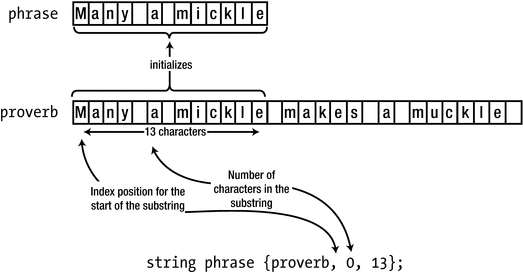
Creating a new string from part of an existing string
The first element in the braced initializer is the source of the initializing string. The second is the index of the character in proverb that begins the initializing substring, and the third initializer in the list is the number of characters in the substring. Thus, phrase will contain "Many a mickle".
Caution
The third entry in the {proverb, 0, 13} initializer, 13, is the length of the substring, not an index, indicating the last (or one past the last) character of the substring. So, to extract, for instance, the substring "mickle", you should use the initializer {proverb, 7, 6} and not {proverb, 7, 13}. This is a common source of confusion and bugs, especially for beginning C++ developers who have past experience in languages such as JavaScript or Java where substrings are commonly designated using start and end indices.
To show which substring is created, you can insert the phrase object in the output stream, cout:
Thus, you can output string objects just like C-style strings. Extraction from cin is also supported for string objects:
This reads characters up to the first whitespace character, which ends the input process. Whatever was read is stored in the string object, name. You cannot enter text with embedded spaces with this process. Of course, reading entire phrases complete with spaces is possible as well, just not with >>. We’ll explain how you do this later.
No initializer (or empty braces, {}):
std::string empty; // The string ""An initializer containing a string literal:
std::string proverb{ "Many a mickle makes a muckle." }; // The given literalAn initializer containing an existing string object:
std::string sentence{ proverb }; // Duplicates proverbAn initializer containing a string literal followed by the length of the sequence in the literal to be used to initialize the string object:
std::string part_literal{ "Least said soonest mended.", 5 }; // "Least"An initializer containing a repeat count followed by the character literal that is to be repeated in the string that initializes the string object (mind the round parentheses!):
std::string open_wide(5, 'a'); // "aaaaa"An initializer containing an existing string object, an index specifying the start of the substring, and the length of the substring:
std::string phrase{proverb, 5, 8}; // "a mickle"
Operations with String Objects
Many operations with string objects are supported. Perhaps the simplest is assignment. You can assign a string literal or another string object to a string object. Here’s an example:
The third statement assigns the value of adjective, which is "hornswoggling", to word, so "rubbish" is replaced. The last statement assigns the literal "twotiming" to adjective, so the original value "hornswoggling" is replaced. Thus, after executing these statements, word will contain "hornswoggling", and adjective will contain "twotiming".
Concatenating Strings
You can join strings using the addition operator; the technical term for this is concatenation. You can concatenate the objects defined earlier like this:
After executing this statement, the description object will contain the string "twotiming hornswoggling whippersnapper". You can see that you can concatenate string literals with string objects using the + operator. This is because the + operator has been redefined to have a special meaning with string objects. When one operand is a string object and the other operand is either another string object or a string literal, the result of the + operation is a new string object containing the two strings joined together.
Note that you can’t concatenate two string literals using the + operator. One of the two operands of the + operator must always be an object of type string. The following statement, for example, won’t compile:
The problem is that the compiler will try to evaluate the initializer value as follows:
Naturally, you can write the first two string literals as a single string literal: {" whippersnapper " + word}.
You can omit the + between the two literals: {" whippersnapper" " " + word}. Two or more string literals in sequence will be concatenated into a single literal by the compiler.
You can introduce parentheses: {"whippersnapper" + (" " + word)}. The expression between parentheses that joins " " with word is then evaluated first to produce a string object, which can subsequently be joined to the first literal using the + operator.
You can turn one or both of the literals into a std::string object using the familiar initialization syntax: {std::string{" whippersnapper"} + " " + word}.
You can turn one or both of the literals into a std::string object by adding the suffix s to the literal, such as in {" whippersnapper"s + " " + word}. For this to work, you first have to add a using namespace std::string_literals; directive. You can add this directive either at the beginning of your source file or locally inside your function. Once this directive is in scope, appending the letter s to a string literal turns it into a std::string object, much like, for instance, adding u to an integer literal creates an unsigned integer.
That’s enough theory for the moment. It’s time for a bit of practice. This program reads your first and second names from the keyboard:
Here’s some sample output:
After defining two empty string objects, first and second, the program prompts for input of a first name and then a second name. The input operations will read anything up to the first whitespace character. So, if your name consists of multiple parts, say Van Weert, this program won’t let you enter it. If you do enter, for instance, Van Weert for the second name, the >> operator will only extract the Van part from the stream. You’ll learn how you can read a string that includes whitespace later in this chapter.
After getting the names, you create another string object that is initialized with a string literal. The sentence object is concatenated with the string object that results from the right operand of the += assignment operator:
The right operand concatenates first with the literal " ", then second is appended to that result, and finally the literal "." is appended to that to produce the final result that is concatenated with the left operand of the += operator. This statement demonstrates that the += operator also works with objects of type string in a similar way to the basic types. The statement is equivalent to this statement:
Finally, the program uses the stream insertion operator to output the contents of sentence and the length of the string it contains.
Tip
The append() function of a std::string object is an alternative for the += operator. Using this, you could write the previous example as follows:
In its basic form, append() is not all that interesting—unless you enjoy typing, that is, or if the + key on your keyboard is broken. But of course there’s more to it than that. The append() function is more flexible than += because it allows, for instance, the concatenation of substrings, or repeated characters:
Concatenating Strings and Characters
Next to two string objects, or a string object and a string literal, you can also concatenate a string object and a single character. The string concatenation in Ex7_01, for example, could also be expressed as follows (see also Ex7_01A.cpp):
Another option, just to illustrate the possibilities, is to use the following two statements:
What you cannot do, though, as before, is concatenate two individual characters. One of the operands to the + operand should always be a string object.
To observe an additional pitfall of adding characters together, you could replace the concatenation in Ex7_01 with this variant:
Surprisingly, perhaps, this code does compile. But a possible session might then go as follows:
Of particular interest is the third line in this session; notice the comma and space characters between McCavity and Phil have somehow mysteriously fused into a single capital letter L. The reason this happens is that the compiler does not concatenate two characters; instead, it adds the character codes for the two characters together. Nearly all compilers use ASCII codes for the basic Latin characters (ASCII encoding was explained in Chapter 1). The ASCII code for ',' is 44, and that of the ' ' character is 32. Their sum, 32 + 44, therefore equals 76, which happens to be the ASCII code for the capital letter 'L'.
Notice that this example would’ve worked fine if you had written it as follows:
The reason, analogous to before, is that the compiler would evaluate this statement from left to right, as if the following parentheses were present:
With this statement, one of the two concatenation operands is thus always a std::string. Confusing? Perhaps a bit. The general rule with std::string concatenation is easy enough, though: concatenation is evaluated left to right and will work correctly only as long as one of the operands of the concatenation operator, +, is a std::string object.
Note
Up to this point, we have always used literals to initialize or concatenate with string objects—either string literals or character literals. Everywhere we used string literals, you can of course also use any other form of C-style string: char[] arrays, char* variables, or any expression that evaluates to either of these types. Similarly, all expressions involving character literals will work just as well with any expression that results in a value of type char.
Concatenating Strings and Numbers
An important limitation in C++ is that you can only concatenate std::string objects with either strings or characters. Concatenation with most other types, such as a double, will generally fail to compile:
Worse, such concatenations might even compile, even though they’ll of course never produce the desired result. Any given number will again be treated as a character code, like in the following example (the ASCII code for the letter 'E' is 69):
This limitation might frustrate you at first, especially if you’re used to working with strings in, for instance, Java or C#. In those languages, the compiler implicitly converts values of any type to strings. Not so in C++: in C++, you have to explicitly convert these values to strings yourself. There are several ways you might accomplish this. For values of fundamental numeric types, the easiest by far is to use the std::to_string() family of functions, defined in the string header:
Accessing Characters in a String
You refer to a particular character in a string by using an index value between square brackets, just as you do with a character array. The first character in a string object has the index value 0. You could refer to the third character in sentence, for example, as sentence[2]. You can use such an expression on the left of the assignment operator, so you can replace individual characters as well as access them. The following loop changes all the characters in sentence to uppercase:
This loop applies the toupper() function to each character in the string in turn and stores the result in the same position in the string. The index value for the first character is 0, and the index value for the last character is one less than the length of the string, so the loop continues as long as i < sentence.length() is true.
A string object is a range, so you could also do this with a range-based for loop:
Specifying ch as a reference type allows the character in the string to be modified within the loop. This loop and the previous loop require the cctype header to be included to compile.
You can exercise this array-style access method in a version of Ex5_11.cpp that determined the number of vowels and consonants in a string. The new version will use a string object. It will also demonstrate that you can use the getline() function to read a line of text that includes spaces:
Here’s an example of the output:
The text object contains an empty string initially. You read a line from the keyboard into text using the getline() function. This version of getline() is declared in the string header; the versions of getline() that you have used previously were declared in the iostream header. This version reads characters from the stream specified by the first argument, cin in this case, until a newline character is read, and the result is stored in the string object specified by the second argument, which is text in this case. This time you don’t need to worry about how many characters are in the input. The string object will automatically accommodate however many characters are entered, and the length will be recorded in the object.
You can change the delimiter that signals the end of the input by a using a version of getline() with a third argument that specifies the new delimiter for the end of the input:
This reads characters until a '#' character is read. Because newline doesn’t signal the end of input in this case, you can enter as many lines of input as you like, and they’ll all be combined into a single string. Any newline characters that were entered will be present in the string.
You count the vowels and consonants in much the same way as in Ex5_11.cpp, using a for loop. Naturally, you could also use a range-based for loop instead:
This code, available in Ex7_02A.cpp, is simpler and easier to understand than the original. The major advantage of using a string object in this example compared to Ex5_11.cpp, though, remains the fact that you don’t need to worry about the length of the string that is entered.
Accessing Substrings
You can extract a substring from a string object using its substr() function. The function requires two arguments. The first is the index position where the substring starts, and the second is the number of characters in the substring. The function returns the substring as a string object. Here’s an example:
This extracts the six-character substring from phrase that starts at index position 4, so word1 will contain "higher" after the second statement executes. If the length you specify for the substring overruns the end of the string object, then the substr() function just returns an object containing the characters up to the end of the string. The following statement demonstrates this behavior:
Of course, there aren’t 100 characters in phrase, let alone in a substring. In this case, the result will be that word2 will contain the substring from index position 4 to the end, which is "higher the fewer.". You could obtain the same result by omitting the length argument and just supplying the first argument that specifies the index of the first character of the substring:
This version of substr() also returns the substring from index position 4 to the end. If you omit both arguments to substr(), the whole of phrase will be selected as the substring.
If you specify a starting index for a substring that is outside the valid range for the string object, an exception of type std::out_of_range will be thrown, and your program will terminate abnormally—unless you’ve implemented some code to handle the exception. You don’t know how to do that yet, but we’ll discuss exceptions and how to handle them in Chapter 15.
Caution
As before, substrings are always specified using their begin index and length, not using their begin and end indexes. Keep this in mind, especially when migrating from languages such as JavaScript or Java!
Comparing Strings
In example Ex7_02 you used an index to access individual characters in a string object for comparison purposes. When you access a character using an index, the result is of type char, so you can use the comparison operators to compare individual characters. You can also compare entire string objects using any of the comparison operators. These are the comparison operators you can use:
You can use these to compare two objects of type string or to compare a string object with a string literal or C-style string. The operands are compared character by character until either a pair of corresponding characters contains different characters or the end of either or both operands is reached. When a pair of characters differs, numerical comparison of the character codes determines which of the strings has the lesser value. If no differing character pairs are found and the strings are of different lengths, the shorter string is “less than” the longer string. Two strings are equal if they contain the same number of characters and all corresponding character codes are equal. Because you’re comparing character codes, the comparisons are obviously going to be case sensitive.
The technical term for this string comparison algorithm is lexicographical comparison , which is just a fancy way of saying that strings are ordered in the same manner as they are in a dictionary.
You could compare two string objects using this if statement:
Executing these statements will result in the following output:
This shows that the old saying must be true. The preceding code looks like a good candidate for using the conditional operator. You can produce a similar result with the following statement:
Let’s compare strings in a working example. This program reads any number of names and sorts them into ascending sequence:
Here’s some sample output:
The names are stored in a vector of string elements. As you know, using a vector<> container means that an unlimited number of names can be accommodated. The container also acquires memory as necessary to store the string objects and deletes it when the vector is destroyed. The container will also keep track of how many there are, so there’s no need to count them independently.
Note
The fact that std::strings can be stored in containers is yet another major advantage string objects offer over regular C-style strings; plain char arrays cannot be stored into containers.
Sorting is implemented using the same bubble sort algorithm that you have seen applied to numerical values before, in Ex5_09. Because you need to compare successive elements in the vector and swap them when necessary, the for loop iterates over the index values for vector elements; a range-based for loop is not suitable here. The names[i].swap(names[i-1]) statement in the for loop swaps the contents of two string objects; it has, in other words, the same effect as the following sequence of assignments:
At the end of the program, the sorted names are output in a range-based for loop. You can do this because a vector<> container represents a range. To align the names vertically using the setw() manipulator, you need to know the maximum name length, which is found by the range-based for loop that precedes the output loop.
Tip
Most Standard Library types offer a swap() function. Besides std::string, this includes all container types (such as std::vector<> and std::array<>), std::optional<>, all smart pointer types, and many more. The std namespace also defines a nonmember function template that can be used to the same effect:
The advantage of this nonmember template function is that it works for fundamental types such as int or double as well. You could try this in Ex5_09 (you may have to include the utility header first, though, as this is where the basic std::swap() function template is defined).
The compare( ) Function
The compare() function for a string object can compare the object, as always, with either another string object, a string literal, or a C-style string. Here’s an example of an expression that calls compare() for a string object, word, to compare it with a string literal:
word is compared with the argument to compare(). The function returns the result of the comparison as a value of type int. This will be a positive integer if word is greater than "and", zero if word is equal to "and", and a negative integer if word is less than "and".
Caution
A common mistake is to write an if statement of the form if (word.compare("and")), assuming this condition will evaluate to true if word and "and" equal. But the result, of course, is precisely the opposite. For equal operands, compare() returns zero. And zero, as always, converts to the Boolean value false. To compare for equality, you should use the == operator instead.
In the previous example, you could have used the compare() function in place of using the comparison operator:
This is less clear than the original code, but you get an idea of how the compare() function can be used. The > operator is better in this instance, but there are circumstances where compare() has the advantage. The function tells you in a single step the relationship between two objects. If > results in false, you still don’t know whether the operands are equal, whereas with compare() you do.
The function has another advantage. You can compare a substring of a string object with the argument:
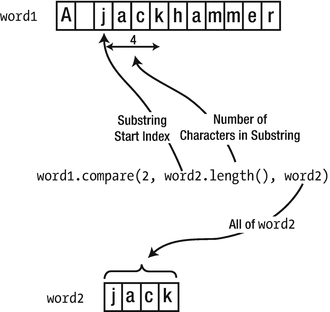
Using compare() with a substring
The first argument to compare() is the index position of the first character in a substring of word1 that is to be compared with word2. The second argument is the number of characters in the substring, which is sensibly specified as the length of the third argument, word2. Obviously, if the substring length you specify is not the same as the length of the third argument, the substring and the third argument are unequal by definition.
You could use the compare function to search for a substring. Here’s an example:
This loop finds word at index positions 12 and 29 in text. The upper limit for the loop variable allows the last word.length() characters in text to be compared with word. This is not the most efficient implementation of the search. When word is found, it would be more efficient to arrange that the next substring of text that is checked is word.length() characters further along, but only if there is still word.length() characters before the end of text. However, there are easier ways to search a string object, as you’ll see very soon.
You can compare a substring of one string with a substring of another using the compare() function. This involves passing five arguments to compare()! Here’s an example:
The two additional arguments are the index position of the substring in phrase and its length. The substring of text is compared with the substring of text.
And we’re not done yet! The compare() function can also compare a substring of a string object with a null-terminated string.
The output from this will be the same as the previous code; "pick" is found at index positions 12 and 29.
Still another option is to select the first n characters from a null-terminated string by specifying the number of characters. The if statement in the loop could be as follows:
The fourth argument to compare() specifies the number of characters from "picket" that are to be used in the comparison.
Note
You have seen that the compare() function works quite happily with different numbers of arguments of various types. The same was true for the append() function we briefly mentioned earlier. What you have here are several different functions with the same name. These are called overloaded functions, and you’ll learn how and why you create them in the next chapter.
Comparisons Using substr()
Of course, if you have trouble remembering the sequence of arguments to the more complicated versions of the compare() function, you can use the substr() function to extract the substring of a string object. You can then use the result with the comparison operators in many cases. For instance, to check whether two substrings are equal, you could write a test as follows:
Unlike the equivalent operation using the compare() function from earlier, this new code is readily understood. Sure, it will be slightly less efficient (because of the creation of the temporary substring objects), but code clarity and readability are far more important here than marginal performance improvements. In fact, this is an important guideline to live by. You should always prefer correct and maintainable code over error-prone, obfuscated code, even if the latter may be a few percent faster. You should only ever complicate matters if benchmarking shows a significant performance increase is feasible.
Searching Strings
Beyond compare(), you have many other alternatives for searching within a string object. They all involve functions that return an index. We’ll start with the simplest sort of search. A string object has a find() function that finds the index of a substring within it. You can also use it to find the index of a given character. The substring you are searching for can be another string object or a string literal. Here’s a small example showing these options:
In each output statement, sentence is searched from the beginning by calling its find() function. The function returns the index of the first character of the first occurrence of whatever is being sought. In the last statement, 'x' is not found in the string, so the value std::string::npos is returned. This is a constant that is defined in the string header. It represents an illegal character position in a string and is used to signal a failure in a search.
On our computer, our little program thus produces these four numbers:
As you can tell from this output, std::string::npos is defined to be a very large number. More specifically, it is the largest value that can be represented by the type size_t. For 64-bit platforms, this value equals 264-1, a number in the order of 1019—a one followed by 19 zeros. It is therefore fairly unlikely that you’ll be working with strings that are long enough for npos to represent a valid index. To give you an idea, last we counted, you could fit all characters of the English edition of Wikipedia in a string of a mere 27 billion characters—still about 680 million times less than npos.
Of course, you can use npos to check for a search failure with a statement such as this:
Caution
The std::string::npos constant does not evaluate to false—it evaluates to true. The only numeric value that evaluates to false is zero, and zero is a perfectly valid index value. As a consequence, you should take care not to write code such as this:
While it may read like something sensible, what this if statement actually does makes little sense at all. It prints "Character not found" when the character 'x' is found at index 0, that is, for all sentences starting with 'x'.
Searching Within Substrings
Another variation on the find() function allows you to search part of a string starting from a specified position. For example, with sentence defined as before, you could write this:
Each statement searches sentence from the index specified by the second argument, to the end of the string. The first statement finds the first occurrence of "an" in the string. The second statement finds the second occurrence because the search starts from index position 3.
You could search for a string object by specifying it as the first argument to find(). Here’s an example:
A string index is of type size_t, so position that stores values returned by find() is of that type. The loop index, i, defines the starting position for a find() operation, so this is also of type size_t. The last occurrence of word in sentence has to start at least word.length() positions back from the end of sentence, so the maximum value of i in the loop is sentence.length() - word.length(). There’s no loop expression for incrementing i because this is done in the loop body.
If find() returns npos, then word wasn’t found, so the loop ends by executing the break statement. Otherwise, count is incremented, and i is set to one position beyond where word was found, ready for the next iteration. You might think you should set i to be i + word.length(), but this wouldn’t allow overlapping occurrences to be found, such as if you were searching for "ana" in the string "ananas".
You can also search a string object for a substring of a C-style string or a string literal. In this case, the first argument to find() is the null-terminated string, the second is the index position at which you want to start searching, and the third is the number of characters of the null-terminated string that you want to take as the string you’re looking for. Here’s an example:
This searches for the first two characters of "akat" (that is, "ak") in sentence, starting from position 1. The following searches would both fail and return npos:
The first search fails because "aka" isn’t in sentence. The second is looking for "ak", which is in sentence, but it fails because it doesn’t occur after position 10.
Here is a program that searches a string object for a given substring and determines how many times the substring occurs:
Here’s some sample output:
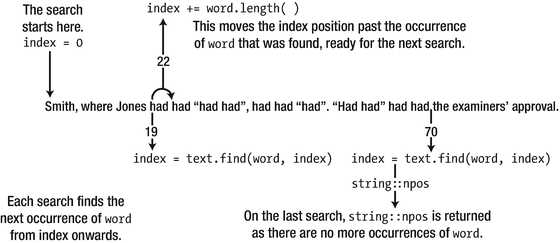
Searching a string
Searching for Any of a Set of Characters
Suppose you have a string—a paragraph of prose, perhaps—that you want to break up into individual words. You need to find where the separators are, and those could be any of a number of different characters such as spaces, commas, periods, colons, and so on. A function that can find any of a given set of characters in a string would help. This is exactly what the find_first_of() function for a string object does:
The set of characters sought are defined by a string object that you pass as the argument to the find_first_of() function. The first character in text that’s in separators is a comma, so the last statement will output 5. You can also specify the set of separators as a null-terminated string. If you want to find the first vowel in text, for example, you could write this:
The first vowel in text is 'i', at index position 2.
You can search backwards from the end of a string object to find the last occurrence of a character from a given set by using the find_last_of() function. For example, to find the last vowel in text, you could write this:
The last vowel in text is the second 'a' in approval, at index 92.
You can specify an extra argument to find_first_of() and find_last_of() that specifies the index where the search process is to begin. If the first argument is a null-terminated string, there’s an optional third argument that specifies how many characters from the set are to be included.
A further option is to find a character that’s not in a given set. The find_first_not_of() and find_last_not_of() functions do this. To find the position of the first character in text that isn’t a vowel, you could write this:
The first character that isn’t a vowel is clearly the first, at index 0.
Let’s try some of these functions in a working example. This program extracts the words from a string. This combines the use of find_first_of() and find_first_not_of(). Here’s the code:
Here’s some sample output:
The string variable, text, will contain a string read from the keyboard. The string is read from cin by the getline() function with an asterisk specified as the termination character, which allows multiple lines to be entered. The separators variable defines the set of word delimiters. It’s defined as const because these should not be modified. The interesting part of this example is the analysis of the string.
You record the index of the first character of the first word in start. As long as this is a valid index, which is a value other than npos, you know that start will contain the index of the first character of the first word. The while loop finds the end of the current word, extracts the word as a substring, and stores it in the words vector. It also records the result of searching for the index of the first character of the next word in start. The loop continues until a first character is not found, in which case start will contain npos to terminate the loop.
It’s possible that the last search in the while loop will fail, leaving end with the value npos. This can occur if text ends with a letter or anything other than one of the specified separators. To deal with this, you check the value of end in the if statement, and if the search did fail, you set end to the length of text. This will be one character beyond the end of the string (because indexes start at 0, not 1) because end should correspond to the position after the last character in a word.
Searching a String Backward
The find() function searches forward through a string, either from the beginning or from a given index. The rfind() function, named from reverse find, searches a string in reverse. rfind() comes in the same range of varieties as find(). You can search a whole string object for a substring that you can define as another string object or as a null-terminated string. You can also search for a character. Here’s an example:
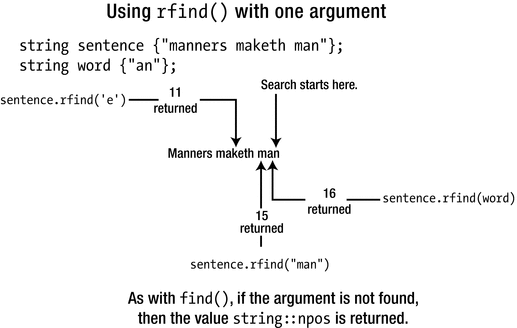
Searching backward through a string
Searching with word as the argument finds the last occurrence of "an" in the string. The rfind() function returns the index position of the first character in the substring sought.
If the substring isn’t present, npos will again be returned. For example, the following statement will result in this:
sentence doesn’t contain the substring "miners", so npos will be returned and displayed by this statement. The other two searches illustrated in Figure 7-4 are similar to the first. They both search backward from the end of the string looking for the first occurrence of the argument.
Just as with find(), you can supply an extra argument to rfind() to specify the starting index for the backward search, and you can add a third argument when the first argument is a C-style string. The third argument specifies the number of characters from the C-style string that are to be taken as the substring for which you’re searching.
Modifying a String
When you’ve searched a string and found what you’re looking for, you may well want to change the string in some way. You’ve already seen how you can use an index between square brackets to select a single character in a string object. You can also insert a string into a string object at a given index or replace a substring. Unsurprisingly, to insert a string, you use a function called insert(), and to replace a substring in a string, you use a function called replace(). We’ll explain inserting a string first.
Inserting a String
Perhaps the simplest sort of insertion involves inserting a string object before a given position in another string object. Here’s an example of how you do this:
Figure 7-5 illustrates what happens. The words string is inserted immediately before the character at index 14 in phrase. After the operation, phrase will contain the string "We can insert a string into a string.".
You can also insert a null-terminated string into a string object. For example, you could achieve the same result as the previous operation with this statement:
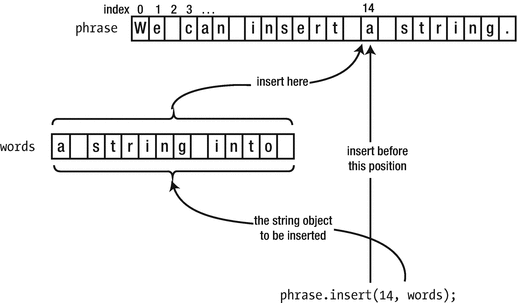
Inserting a string into another string
The next level of sophistication is the insertion of a substring of a string object into another string object. You need to supply two extra arguments to insert(): one specifies the index of the first character in the substring to be inserted, and the other specifies the number of characters in the substring. Here’s an example:
This inserts the five-character substring that starts at position 8 in words, into phrase, preceding index position 13. Given that phrase and words contain the strings as earlier, this inserts " into" into "We can insert a string." so that phrase becomes "We can insert into a string.".
There is a similar facility for inserting a number of characters from a null-terminated string into a string object. The following statement produces the same result as the previous one:
This inserts the first five characters of " into something" into phrase preceding the character at index 13.
There’s even a version of insert() that inserts a sequence of identical characters:
This inserts seven asterisks in phrase immediately before the character at index 16. phrase will then contain the uninformative sentence "We can insert a *******string.".
Replacing a Substring
You can replace any substring of a string object with a different string—even if the inserted string and the substring to be replaced have different lengths. We’ll return to an old favorite and define text like this:
You can replace "Jones" with a less common name with this statement:
The first argument is the index in text of the first character of the substring to be replaced, and the second is the length of the substring. Thus, this replaces the five characters of text that start at index 13 with "Gruntfuttock". If you now output text, it would be as follows:
A more realistic application of this is to search for the substring to be replaced first. Here’s an example:
This finds the position of the first character of "Jones" in text and uses it to initialize start. The character following the last character of "Jones" is found next by searching for a delimiter from separators using the find_first_of() function. These index positions are used in the replace() operation.
The replacement string can be a string object or a null-terminated string. In the former case, you can specify a start index and a length to select a substring as the replacement string. For example, the previous replace operation could have been this:
These statements have the same effect as the previous use of replace() because the replacement string starts at position 5 of name (which is the 'G') and contains 12 characters.
If the first argument is a null-terminated string, you can specify the number of characters that are the replacement string. Here’s an example:
This time, the string to be substituted consists of the first 12 characters of "Gruntfuttock, Amos", so the effect is the same as the previous replace operation.
A further possibility is to specify the replacement string as multiples of a given character. For example, you could replace "Jones" by three asterisks with this statement:
This assumes that start and end are determined as before. The result is that text will contain the following:
Let’s try the replace operation in an example. This program replaces all occurrences of a given word in a string with another word:
Here’s a sample of the output:
The string that is to have words replaced is read into text by getline(). Any number of lines can be entered and terminated by an asterisk. The word to be replaced and its replacement are read using the extraction operator and therefore cannot contain whitespace. The program ends immediately if the word to be replaced and its replacement are the same.
The index position of the first occurrence of word is used to initialize start. This is used in the while loop that finds and replaces successive occurrences of word. After each replacement, the index for the next occurrence of word in text is stored in start, ready for the next iteration. When there are no further occurrences of word in text, start will contain npos, which ends the loop. The modified string in text is then output.
Removing Characters from a String
You could always remove a substring from a string object using the replace() function: you just specify the replacement as an empty string. But there’s also a specific function for this purpose, erase(). You specify the substring to be erased by the index position of the first character and the length. For example, you could erase the first six characters from text like this:
You would more typically use erase() to remove a specific substring that you had previously searched for, so a more usual example might be as follows:
This searches for word in text and, after confirming that it exists, removes it using erase(). The number of characters in the substring to be removed is obtained by calling the length() function for word.
The erase() function can also be used with either one or no arguments; here’s an example:
After this last statement executes, text will be an empty string. Another function that removes all characters from a string object is clear():
Caution
Yet another common mistake is to call erase(i) with a single argument i in an attempt to remove a single character at the given index i. The effect of this call, however, is quite different. It removes all characters starting from the one at index i all the way until the end of the string! To remove a single character at index i, you should use erase(i,1) instead.
std::string vs. std::vector<char>
A string has a push_back() function to insert a new character at the end of the string (right before the termination character). It’s not used that often, though, as std::string objects support the more convenient += syntax to append characters.
A string has an at() function that, unlike the [] operator, performs bounds checking for the given index.
A string has a size() function, which is an alias for length(). The latter was added because it’s more common to talk about the “length of a string” than the “size of a string.”
A string offers front() and back() convenience functions to access its first and last characters (not counting the null termination character).
A string supports a range of assign() functions to reinitialize it. These functions accept argument combinations similar to those you can use between the braced initializers when first initializing a string. So, s.assign(3, 'X'), for instance, reinitializes s to "XXX", and s.assign("Reinitialize", 2, 4) overwrites the contents of the string object s with "init".
If this chapter has made one thing clear, though, then it’s that a std::string is so much more than a simple std::vector<char>. On top of the functions provided by a vector<char>, it offers a wide range of additional, useful functions for common string manipulations such as concatenation, substring access, string searches and replacements, and so on. And of course, a std::string is aware of the null character that terminates its char array and knows to take this into account in members such as size(), back(), and push_back().
Converting Strings into Numbers
Earlier this chapter you learned that you can use std::to_string() to convert numbers into strings. But what about the other direction: how do you convert strings such as "123" and "3.1415" into the numbers? There are several ways to accomplish this in C++, but it’s again the string header itself that provides you with the easiest option. Its std::stoi() function, short for “string to int,” converts a given string to an int:
The string header similarly offers stol(), stoll(), stoul(), stoull(), stof(), stod(), and stold(), all within the std namespace, to convert a string into a value of, respectively, type long, long long, unsigned long, unsigned long long, float, double, and long double.
String Streams
Suppose that you’re handed an array of floating-point values and that you’re tasked with composing a single string that contains the textual representation of all these numbers with a precision of four digits, five per line, and right-aligned in columns that are seven characters wide. Sure, this is possible with std::string using an intricate series of concatenations, interleaved with some calls to std::to_string() and substr(). But that approach would be particularly tedious and error-prone. If only you had been asked to stream these numbers to std::cout—now that would have been a walk in the park! All that you’d need then is a couple of stream manipulators from the iomanip header.
The good news is that the Standard Library offers a different type of streams that, rather than outputting characters directly to the computer screen, gathers them all into a string object. At any time, you can then retrieve this string for further processing. This stream type is aptly named std::stringstream and is defined by the sstream header. You use it in the same manner as std::cout, as this example shows:
A possible session might go as follows:
The program gathers a series of floating-point numbers from the user and pushes them into a vector. Next, it streams all these values into a stringstream object ss through its << operator. Working with string streams is exactly like working with std::cout. You simply replace std::cout with a variable of type std::stringstream, ss in Ex7_08. Beyond that, all you need to know is the stream’s str() function. Using that function you obtain a std::string object containing all the characters the stream has accumulated up to that point.
Note that not only can you use a std::stringstream object to write numbers to a string, you can use it to read values from a given input string as well. Naturally, you do so using its >> operator, and of course this works in the same manner as the corresponding operator of std::cin. You’ll get to try this in one of the exercises for this chapter.
Streams are a testament to the power of abstraction. Given a stream, it does not matter whether this stream interacts with a computer screen, a string object, or even a file or network socket. You can interact with all these stream targets and sources using the same interface. In Chapters 11 and beyond, we’ll show you that abstraction is one of the hallmarks of object-oriented programming.
Strings of International Characters
You’ll remember from Chapter 1 that, internationally, many more characters are in use than the 128 that are defined by the standard ASCII character set. French and Spanish, for instance, often use accented letters such as ê, á, or ñ. Languages such as Russian, Arabic, Malaysian, or Japanese of course use characters that are even completely different from those defined by the ASCII standard. The 256 different characters you could potentially represent with a single 8-bit char are not nearly enough to represent all these possible characters. The Chinese script alone consists of many tens of thousands of characters!
You can define std::wstring objects that contain strings of characters of type wchar_t—the wide-character type that is built into your C++ implementation.
You can define std::u16string objects that store strings of 16-bit Unicode characters, which are of type char16_t.
You can define std::u32string objects that contain strings of 32-bit Unicode characters, which are of type char32_t.
The string header defines all these types.
Note
All four string types defined by the string header are actually just type aliases for particular instantiations of the same class template, namely, std::basic_string<CharType>. std::string, for instance, is an alias for std::basic_string<char>, and std::wstring is shorthand for std::basic_string<wchar_t>. This explains why all string types offer the exact same set of functions. You’ll understand better how exactly this works after learning all about creating your own class templates in Chapter 16.
Strings of wchar_t Characters
The std::wstring type that is defined in the string header stores strings of characters of type wchar_t. You use objects of type wstring in essentially the same way as objects of type string. You could define a wide string object with this statement:
You write string literals containing characters of type wchar_t between double quotes, but with L prefixed to distinguish them from string literals containing char characters. Thus, you can define and initialize a wstring variable like this:
The L preceding the opening double quote specifies that the literal consists of characters of type wchar_t. Without it, you would have a char string literal, and the statement would not compile.
To output wide strings, you use the wcout stream. Here’s an example:
Nearly all functions we’ve discussed in the context of string objects apply equally well for wstring objects, so we won’t wade through them again. Other functionalities—such as the to_wstring() function and the wstringstream class—just take an extra w in their name but are otherwise entirely equivalent. Just remember to specify the L prefix with string and character literals when you are working with wstring objects and you’ll be fine!
One problem with type wstring is that the character encoding that applies with type wchar_t is implementation defined, so it can vary from one compiler to another. Native APIs of the Windows operating system generally expect strings encoded using UTF-16, so when compiling for Windows, wchar_t strings will normally consist of 2-byte UTF-16 encoded characters as well. Most other implementations, however, use 4-byte UTF-32 encoded wchar_t characters. If you need to support portable multinational character sets, you may therefore be better off using either types u16string or u32string that are described in the next section.
Objects That Contain Unicode Strings
The string header defines two further types that store strings of Unicode characters. Objects of type std::u16string store strings of characters of type char16_t, and objects of type std::u32string store strings of characters of type char32_t. They are intended to contain character sequences that are encoded using UTF-16 and UTF-32, respectively. Like wstring objects, you must use a literal of the appropriate type to initialize a u16string or u32string object. Here’s an example:
These statements demonstrate that you prefix a string literal containing char16_t characters with u and a literal containing char32_t characters with U. Objects of the u16string and u32string types have the same set of functions as the string type.
In theory, you can use the std::string type you have explored in detail in this chapter to store strings of UTF-8 characters. You define a UTF-8 string by prefixing a regular string literal with u8, such as u8"This is a UTF-8 string.". However, the string type stores characters as type char and knows nothing about Unicode encodings. The UTF-8 encoding uses from 1 to 4 bytes to encode each character, and the functions that operate on string objects will not recognize this. This means, for instance, that the length() function will return the wrong length if the string includes any characters that require two or three bytes to represent them, as this code snippet illustrates:
Tip
At the time of writing, in our experience, support for manipulating Unicode strings in the Standard Library is limited and even more so in some of its implementations. For one, there is no std::u16cout or std::u32stringstream, nor does the Standard regular expression library support u16strings or u32strings. In C++17, moreover, most functionality that the Standard Library offers to convert between the various Unicode encodings has been deprecated. If producing and manipulating portable Unicode-encoded text is important for your application, you would therefore be much better off using a third-party library (viable candidates include the powerful ICU library or the Boost.Locale library, which is built on top of ICU).
Raw String Literals
Regular string literals, as you know, must not contain line breaks or tab characters. To include such special characters, they have to be escaped—line breaks and tab then become \n and \t, respectively. The double quote character must also be escaped to \", for obvious reasons. Because of these escape sequences, the backslash character itself needs to be escaped to \\ as well.
At times, however, you’ll find yourself having to define string literals that contain some or even many of these special characters. Having to continuously escape these characters then is not only tedious but also renders these literals unreadable. Here are some examples:
The latter is an example of a regular expression—a string that defines a process for searching and transforming text. Essentially a regular expression defines patterns that are to be matched in a string, and patterns that are found can be replaced or reordered. C++ supports regular expressions via the regex header, though a discussion of this falls outside the scope of this book. The main point here is that regular expression strings often contain backslash characters. Having to use the escape sequence for each backslash character can make a regular expression particularly difficult to specify correctly and very hard to read.
The raw string literal was introduced to solve these problems. A raw string literal can include any character, including backslashes, tabs, double quotes, and newlines, so no escape sequences are necessary. A raw string literal includes an R in the prefix, and on top of that the character sequence of the literal is surrounded by round parentheses. The basic form of a raw string literal is thus R"(...)". The parentheses themselves are not part of the literal. Any of the types of literal you have seen can be specified as raw literals by adding the same prefix as before—L, u, U, or u8—prior to the R. Using raw string literals, our earlier examples thus become as follows:
Within a raw string literal, no escaping is required. This means you can simply copy and paste, for instance, a Windows path sequence into them or even an entire play of Shakespeare complete with quote characters and line breaks. In the latter case, you should take care about leading whitespace and all line breaks, as these will be included into the string literal as well, together with all other characters between the surrounding "( )" delimiters.
Notice that not even double quotes need or even can be escaped, which begs the question: what if your string literal itself somewhere contains the sequence )"? That is, what if it contains a ) character followed by a "? Here’s such a problematic literal:
The compiler will object to this string literal because the raw literal appears to be terminated somewhere halfway already, right after (a - b. But if escaping is not an option—any backslash characters would simply be copied into the raw literal as is—how else can you make it clear to the compiler that the string literal should include this first )" sequence, as well as the next one after (c - d? The answer is that the delimiters that mark the start and end of a raw string literal are flexible. You can use any delimiter of the form "char_sequence( to mark the beginning of the literal, as long as you mark the end with a matching sequence, )char_sequence". Here’s an example:
This is now a valid raw string literal that contains char32_t characters. You can basically choose any char_sequence you want, as long as you use the same sequence at both ends:
The only other limitations are that char_sequence must not be longer than 16 characters and may not contain any parentheses, spaces, control characters, or backslash characters.
Summary
In this chapter, you learned how you can use the string type that’s defined in the Standard Library. The string type is much easier and safer to use than C-style strings, so it should be your first choice when you need to process character strings.
The std::string type stores a character string.
Like std::vector<char>, it is a dynamic array—meaning it will allocate more memory when necessary.
Internally, the terminating null character is still present in the array managed by a std::string object, but only for compatibility with legacy and/or C functions. As a user of std::string, you normally do not need to know that it even exists. All string functionality transparently deals with this legacy character for you.
You can store string objects in an array or, better still, in a sequence container such as a vector.
You can access and modify individual characters in a string object using an index between square brackets. Index values for characters in a string object start at 0.
You can use the + operator to concatenate a string object with a string literal, a character, or another string object.
If you want to concatenate a value of one of the fundamental numeric types, such as for instance an int or a double, you must first convert these numbers into a string. Your easiest—though least flexible—option for this is the std::to_string() function template defined in the string header.
Objects of type string have functions to search, modify, and extract substrings.
The string header offers functions such as std::stoi() and std::stod() to convert strings to values of numeric types such as int and double.
A more powerful option to write numbers to a string, or conversely to read them from a string, is std::stringstream. You can use string streams in exactly the same manner as you would std::cout and std::cin.
Objects of type wstring contain strings of characters of type wchar_t.
Objects of type u16string contain strings of characters of type char16_t.
Objects of type u32string contain strings of characters of type char32_t.
Exercises
Exercise 7-1. Write a program that reads and stores the first names of any number of students, along with their grades. Calculate and output the average grade and output the names and grades of all the students in a table with the name and grade for three students on each line.
Exercise 7-2. Write a program that reads text entered over an arbitrary number of lines. Find and record each unique word that appears in the text and record the number of occurrences of each word. Output the words and their occurrence counts. Words and counts should align in columns. The words should align to the left; the counts to the right. There should be three words per row in your table.
Exercise 7-3. Write a program that reads a text string of arbitrary length from the keyboard and prompts for entry of a word that is to be found in the string. The program should find and replace all occurrences of this word, regardless of case, by as many asterisks as there are characters in the word. It should then output the new string. Only whole words are to be replaced. For example, if the string is "Our house is at your disposal." and the word that is to be found is "our", then the resultant string should be as follows: "*** house is at your disposal." and not "*** house is at y*** disposal.".
Exercise 7-4. Write a program that prompts for the input of two words and determines whether one is an anagram of the other. An anagram of a word is formed by rearranging its letters, using each of the original letters precisely once. For instance, listen and silent are anagrams of one another, but listens and silent are not.
Exercise 7-5. Generalize the program of Exercise 7-4 such that it ignores spaces when deciding whether two strings are anagrams. With this generalized definition, funeral and real fun are considered anagrams, as are eleven plus two and twelve plus one, along with desperation and a rope ends it.
Exercise 7-6. Write a program that reads a text string of arbitrary length from the keyboard followed by a string containing one or more letters. Output a list of all the whole words in the text that begin with any of the letters, uppercase or lowercase.
Exercise 7-7. Create a program that reads an arbitrarily long sequence of integer numbers typed by the user into a single string object. The numbers of this sequence are to be separated by spaces and terminated by a # character. In other words, the user does not have to press Enter between two consecutive numbers. Next, use a string stream to extract all numbers from the string one by one, add these numbers together, and output their sum.
Before you get started, you’ll need a bit more information on how to use string streams for input. First, you construct a std::stringstream object that contains the same character sequence as a given std::string object my_string as follows:
std::stringstream ss{ my_string };Alternatively, you can assign the contents of a given string to an existing string stream:
ss.str(my_string);Second, unlike std::cin, there’s a limit to the number of values you can extract from a string stream. For this exercise, you can check whether there are more numbers left to extract by converting the stream to a Boolean. As long as a stream is capable of producing more values, it will convert to true. Once the stream is depleted, it will convert to false. In other words, you should simply use your string input stream variable ss in a loop of the following form:
while (ss) { /* Extract next number from the stream */ }Exercise 7-8. Repeat Exercise 7-7, only this time the user inputs the numbers one by one, each time followed by an enter. The input should be gathered as a sequence of distinct strings—for the sake of the exercise still not directly as integers—which are then concatenated to a single string. The input is still terminated by a # character. Also, this time, you’re not allowed to use a string stream anymore to extract the numbers from the resulting string.