The concepts of pointers and references have similarities, which is why we have put them together in a single chapter. Pointers are important because they provide the foundation for allocating memory dynamically. Pointers can also make your programs more effective and efficient in other ways. Both references and pointers are fundamental to object-oriented programming.
What pointers are and how they are defined
How to obtain the address of a variable
How to create memory for new variables while your program is executing
How to release memory that you’ve allocated dynamically
The many hazards of raw dynamic memory allocation and what the much safer alternatives are that you have at your disposal
The difference between raw pointers and smart pointers
How to create and use smart pointers
What a reference is and how it differs from a pointer
How you can use a reference in a range-based for loop
What Is a Pointer?
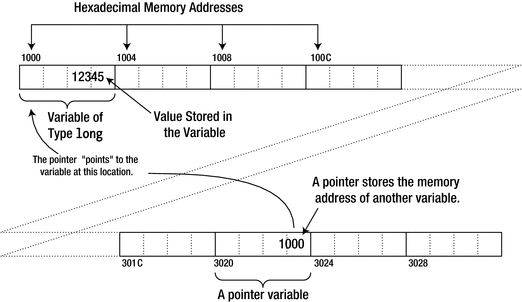
What a pointer is
As you know, an integer has a different representation from a floating-point value, and the number of bytes occupied by an item of data depends on what it is. So, to use a data item stored at the address contained in a pointer, you need to know the type of the data. If a pointer were nothing more than the address of some arbitrary data, it would not be all that interesting. Without knowing the type of data, a pointer is not of much use. Each pointer therefore points to a particular type of data item at that address. This will become clearer when we get down to specifics, so let’s look at how to define a pointer. The definition of a pointer is similar to that of an ordinary variable except that the type name has an asterisk following it to indicate that it’s a pointer and not a variable of that type. Here’s how you define a pointer called pnumber that can store the address of a variable of type long:
The type of pnumber is “pointer to long,” which is written as long*. This pointer can only store an address of a variable of type long. An attempt to store the address of a variable that is other than type long will not compile. Because the initializer is empty, the statement initializes pnumber with the pointer equivalent of zero, which is a special address that doesn’t point to anything. This special pointer value is written as nullptr, and you could specify this explicitly as the initial value:
You are not obliged to initialize a pointer when you define it, but it’s reckless not to. Uninitialized pointers are more dangerous than ordinary variables that aren’t initialized. Therefore:
Tip
As a rule, you should always initialize a pointer when you define it. If you cannot give it its intended value yet, initialize the pointer to nullptr.
It’s relatively common to use variable names beginning with p for pointers, although this convention has fallen out of favor lately. Those adhering to what is called Hungarian notation—a somewhat dated naming scheme for variables—argue that it makes it easier to see which variables in a program are pointers, which in turn can make the code easier to follow. We will occasionally use this notation in this book, especially in more artificial examples where we mix pointers with regular variables. But in general, to be honest, we do not believe that adding type-specific prefixes such as p to variable names adds much value at all. In real code, it is almost always clear from the context whether something is a pointer or not.
In the examples earlier, we wrote the pointer type with the asterisk next to the type name, but this isn’t the only way to write it. You can position the asterisk adjacent to the variable name, like this:
This defines precisely the same variable as before. The compiler accepts either notation. The former is perhaps more common because it expresses the type, “pointer to long,” more clearly.
However, there is potential for confusion if you mix definitions of ordinary variables and pointers in the same statement. Try to guess what this statement does:
This defines two variables: one called pnumber of type “pointer to long,” which is initialized with nullptr, and one called number of type long—not pointer to long!—which is initialized with 0L. The fact that number isn’t simply a second variable of type long* no doubt surprises you. The fact that you’re surprised is no surprise at all; the notation that juxtaposes the asterisk and the type name makes it less than clear what the type of the second variable will be to say the least. It’s a little clearer already if you define the two variables in this form:
This is a bit less confusing because the asterisk is now more clearly associated with the variable pnumber. Still, the only good solution really is to avoid the problem in the first place. It’s much better to always define pointers and ordinary variables in separate statements:
Now there’s no possibility of confusion, and there’s the added advantage that you can append comments to explain how the variables are used.
Note that if you did want number to be a second pointer, you could write the following:
You can define pointers to any type, including types that you define. Here are definitions for pointer variables of a couple of other types:
No matter the type or size of the data a pointer refers to, though, the size of the pointer variable itself will always be the same. To be precise, all pointer variables for a given platform will have the same size. The size of pointer variables depends only on the amount of addressable memory of your target platform. To find out what that size is for you, you can run this little program:
On our test system, the result is as follows:
For nearly all platforms today, the size of pointer variables will be either 4 or 8 bytes (for 32- and 64-bit computer architectures, respectively—terms you’ve no doubt heard about before). In principle, you may encounter other values as well, such as if you target more specialized embedded systems.
The Address-Of Operator
The address-of operator , &, is a unary operator that obtains the address of a variable. You could define a variable, number, and a pointer, pnumber, initialized with the address of number with these statements:
&number produces the address of number, so pnumber has this address as its initial value. pnumber can store the address of any variable of type long, so you can write the following assignment:
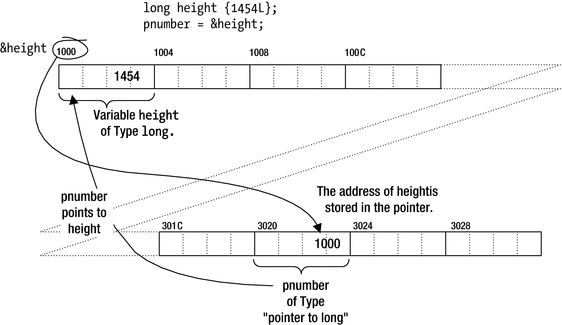
Storing an address in a pointer
The & operator can be applied to a variable of any type, but you can only store the address in a pointer of the appropriate type. If you want to store the address of a double variable, for example, the pointer must have been declared as type double*, which is “pointer to double.”
Naturally, you could have the compiler deduce the type for you as well by using the auto keyword:
We recommend you use auto* here instead to make it clear from the declaration that it concerns a pointer. Using auto*, you define a variable of a compiler-deduced pointer type:
A variable declared with auto* can be initialized only with a pointer value. Initializing it with a value of any other type will result in a compiler error.
Taking the address of a variable and storing it in a pointer is all very well, but the really interesting thing is how you can use it. Accessing the data in the memory location to which the pointer points is fundamental, and you do this using the indirection operator.
The Indirection Operator
Applying the indirection operator, *, to a pointer accesses the contents of the memory location to which it points. The name indirection operator stems from the fact that the data is accessed “indirectly.” The indirection operator is often called the dereference operator as well, and the process of accessing the data in the memory location pointed to by a pointer is termed dereferencing the pointer. To access the data at the address contained in the pointer pnumber, you use the expression *pnumber. Let’s see how dereferencing works in practice with an example. The example is designed to show various ways of using pointers. The way it works will be fairly pointless but far from pointerless:
Here’s some sample output:
We’re sure you realize that this arbitrary interchange between using a pointer and using the original variable is not the right way to code this calculation. However, the example does demonstrate that using a dereferenced pointer is the same as using the variable to which it points. You can use a dereferenced pointer in an expression in the same way as the original variable, as the expression for the initial value of price shows.
It may seem confusing that you have several different uses for the same symbol, *. It’s the multiplication operator and the indirection operator, and it’s also used in the declaration of a pointer. The compiler is able to distinguish the meaning of * by the context. The expression *pcount * *punit_price may look slightly confusing, but the compiler has no problem determining that it’s the product of two dereferenced pointers. There’s no other meaningful interpretation of this expression. If there was, it wouldn’t compile. You could always add parentheses to make the code easier to read, though: (*pcount) * (*punit_price).
Why Use Pointers ?
Later in this chapter you’ll learn how to allocate memory for new variables dynamically—that is, during program execution. This allows a program to adjust its use of memory depending on the input. You can create new variables while your program is executing, as and when you need them. When you allocate new memory, the memory is identified by its address, so you need a pointer to record it.
You can also use pointer notation to operate on data stored in an array. This is completely equivalent to the regular array notation, so you can pick the notation that is best suited for the occasion. Mostly, as the name suggests, array notation is more convenient when it comes to manipulating arrays, but pointer notation has its merits as well.
When you define your own functions in Chapter 8, you’ll see that pointers are used extensively to enable a function to access large blocks of data that are defined outside the function.
Pointers are fundamental to enabling polymorphism to work. Polymorphism is perhaps the most important capability provided by the object-oriented approach to programming. You’ll learn about polymorphism in Chapter 14.
Note
The last two items in this list apply equally well to references—a language construct of C++ that is similar to pointers in many ways. References are discussed near the end of this chapter.
Pointers to Type char
A variable of type “pointer to char ” has the interesting property that it can be initialized with a string literal. For example, you can declare and initialize such a pointer with this statement:
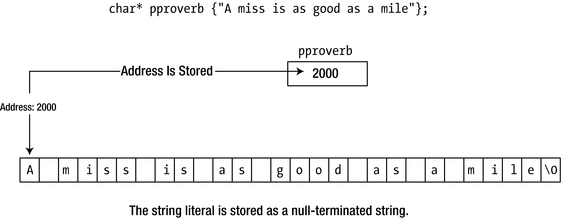
Initializing a pointer of type char*
Unfortunately, all is not quite as it seems. A string literal is a C-style char array that you’re not supposed to change. You’ll recall from earlier that the const specifier is used for the type of variables that cannot or must not be changed. So, in other words, the type of the characters in a string literal is const. But this is not reflected in the type of our pointer! The statement nevertheless doesn’t create a modifiable copy of the string literal; it merely stores the address of the first character. This means that if you attempt to modify the string, there will be trouble. Look at this statement, which tries to change the first character of the string to 'X':
Some compilers won’t complain because they see nothing wrong. The pointer, pproverb, wasn’t declared as const, so the compiler is happy. With other compilers, you get a warning that there is a deprecated conversion from type const char* to type char*. In some environments, you’ll get an error when you run the program, resulting in a program crash. In other environments, the statement does nothing, which presumably is not what was required or expected either. The reason for this is that the string literal is still a constant, and you’re not allowed to change it.
You might wonder, with good reason, why the compiler allowed you to assign a pointer-to-const value to a pointer-to-non-const type in the first place, particularly when it causes these problems. The reason is that string literals only became constants with the release of the first C++ standard, and there’s a great deal of legacy code that relies on the “incorrect” assignment. Its use is deprecated, and the correct approach is to declare the pointer like this:
This defines pproverb to be of type const char*. Because it is a pointer-to-const type, the type is now consistent with that of the string literal. Any assignment to the literal’s characters through this pointer will now be stopped by the compiler as well. There’s plenty more to say about using const with pointers, so we’ll come back to this later in this chapter. For now, let’s see how using variables of type const char* operates in an example. This is a version of the “lucky stars” example, Ex5_11.cpp, using pointers instead of an array:
The output will be the same as Ex5_11.cpp.
Obviously the original array version is far more elegant, but let’s look past that. In this reworked version, the array has been replaced by eight pointers, pstar1 to pstar8, each initialized with a string literal. There’s an additional pointer, pstr, initialized with the phrase to use at the start of a normal output line. Because these pointers contain addresses of string literals, they are specified as const.
A switch statement is easier to use than an if statement to select the appropriate output message. Incorrect values entered are taken care of by the default option of the switch.
Outputting a string pointed to by a pointer couldn’t be easier. You just use the pointer name. Clearly, the insertion operator << for cout treats pointers differently, depending on their type. In Ex6_02.cpp, you had this statement:
If pcount wasn’t dereferenced here, the address contained in pcount would be output. Thus, a pointer to a numeric type must be dereferenced to output the value to which it points, whereas applying the insertion operator to a pointer to type char that is not dereferenced presumes that the pointer contains the address of a null-terminated string. If you output a dereferenced pointer to type char, the single character at that address will be written to cout. Here’s an example:
Arrays of Pointers
So, what have you gained in Ex6_03.cpp? Well, using pointers has eliminated the waste of memory that occurred with the array in Ex5_11.cpp because each string now occupies just the number of bytes necessary. However, the program is a little long-winded now. If you were thinking “Surely, there must be a better way,” then you’d be right; you could use an array of pointers:
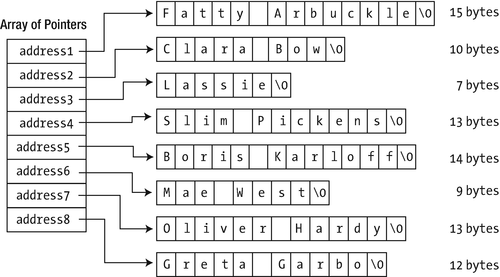
An array of pointers
With the char array of Ex5_11, each row had to have at least the length of the longest string, which resulted in quite some wasted bytes. Figure 6-4 clearly shows that by allocating all strings separately in the free store this is no longer an issue in Ex6_04. Granted, you do need some extra memory to store the addresses of the strings, typically 4 or 8 bytes per string pointer. And since in our example the difference in string lengths is not that great yet, we might not actually have gained much yet (on the contrary even). In general, however, the cost of an extra pointer is often negligible compared to the memory required for the strings themselves. And even for our test program this is not entirely unthinkable. Suppose, for instance, that we’d ask you to add the following name as a ninth option: “Rodolfo Alfonso Raffaello Pierre Filibert Guglielmi di Valentina d’Antonguolla” (an iconic star of the silent movie era)!
Saving space isn’t the only advantage that you get by using pointers. In many circumstances, you can save time too. For example, think of what happens if you want to swap "Greta Garbo" with "Mae West" in the array. You’d need to do this to sort the strings into alphabetical order, for example. With the pointer array, you just reorder the pointers—the strings can stay right where they are. With a char array, a great deal of copying would be necessary. Interchanging the string would require the string "Greta Garbo" to be copied to a temporary location, after which you would copy "Mae West" in its place. Then you would need to copy "Greta Garbo" to its new position. All of this would require significantly more execution time than interchanging two pointers. The code using an array of pointers is similar to that using a char array. The number of array elements that is used to check that the selection entered is valid is calculated in the same way.
Note
In our pursuit of highlighting some of the advantages of pointer arrays, we may have been somewhat overly positive about the use of const char*[] arrays. This approach works nicely as long as you know the exact number of strings at compile time and provided all of them are defined by literals. In real applications, however, you’re much more likely to gather a variable number of strings, either from user input or from files. Working with plain character arrays then rapidly becomes cumbersome and very unsafe. In the next chapter, you’ll learn about a more high-level string type, std::string, which is much safer to use than plain char* arrays and certainly much better suited for more advanced applications. For one, std::string objects are designed to be fully compatible with standard containers, allowing among other things for fully dynamic and perfectly safe std::vector<std::string> containers!
Constant Pointers and Pointers to Constants
In your latest “lucky stars” program, Ex6_04.cpp, you made sure that the compiler would pick up any attempts to modify the strings pointed to by elements of the pstars array by declaring the array using the const keyword:
Here you are specifying that the char elements pointed to by the elements of the pstar array are constant. The compiler inhibits any direct attempt to change these, so an assignment statement such as this would be flagged as an error by the compiler, thus preventing a nasty problem at runtime:
However, you could still legally write the next statement, which would copy the address stored in the element on the right of the assignment operator to the element on the left:
Those lucky individuals due to be awarded Ms. West would now get Mr. Hardy, because both pointers now point to the same name. Of course, this hasn’t changed the object pointed to by the sixth array element—it has only changed the address stored in it, so the const specification hasn’t been contravened.
You really ought to be able to inhibit this kind of change as well, because some people may reckon that good old Ollie may not have quite the same sex appeal as Mae, and of course you can. Look at this statement:
The extra const keyword following the element type specification defines the elements as constant, so now the pointers and the strings they point to are defined as constant. Nothing about this array can be changed.
Perhaps we made it a bit too complicated starting you out with an array of pointers. Because it’s important that you understand the different options, let’s go over things once more using a basic nonarray variable, pointing to just one celebrity. We’ll consider this definition:
This defines an array that contains const char elements. This means the compiler will, for instance, not let you rename Lassie to Lossie:
The definition of my_favorite_star, however, does not prevent you from changing your mind about which star you prefer. This is because the my_favorite_star variable itself is not const. In other words, you’re free to overwrite the pointer value stored in my_favorite_star, as long as you overwrite it with a pointer that refers to const char elements:
If you want to disallow such assignments, you have to add a second const to protect the content of the my_favorite_star variable:
A pointer to a constant: You can’t modify what’s pointed to, but you can set the pointer to point to something else:
const char* pstring {"Some text that cannot be changed"};Of course, this also applies to pointers to other types. Here’s an example:
const int value {20};const int* pvalue {&value};Here value is a constant and can’t be changed, and pvalue is a pointer to a constant, so you can use it to store the address of value. You couldn’t store the address of value in a pointer to non-const int (because that would imply that you can modify a constant through a pointer), but you could assign the address of a non-const variable to pvalue. In the latter case, you would be making it illegal to modify the variable through the pointer. In general, it’s always possible to strengthen const-ness, but weakening it isn’t permitted.
A constant pointer: The address stored in the pointer can’t be changed. A constant pointer can only ever point to the address that it’s initialized with. However, the contents of that address aren’t constant and can be changed. Suppose you define an integer variable data and a constant pointer pdata:
int data {20};int* const pdata {&data};pdata is const, so it can only ever point to data. Any attempt to make it point to another variable will result in an error message from the compiler. The value stored in data isn’t const, though, so you can change it:
*pdata = 25; // Allowed, as pdata points to a non-const intAgain, if data was declared as const, you could not initialize pdata with &data. pdata can only point to a non-const variable of type int.
A constant pointer to a constant: Here, both the address stored in the pointer and the item pointed to are constant, so neither can be changed. Taking a numerical example, you can define a variable value like this:
const float value {3.1415f};value is a constant, so you can’t change it. You can still initialize a pointer with the address of value, though:
const float* const pvalue {&value};pvalue is a constant pointer to a constant. You can’t change what it points to, and you can’t change what is stored at that address.
Tip
In some rare cases, the need for even more complex types arises, such as pointers to pointers. A practical tip then is that you can read all type names right to left. While doing so, you read every asterisk as “pointer to.” Consider this variant—an equally legal one, by the way—of our latest variable declaration:
Reading right to left then reveals that pvalue is indeed a const pointer to const floats. This trick always works (even when references enter the arena later in this chapter). You can give it a try with the other definitions in this section. The only additional complication is that the first const is typically written prior to the element type.
So when reading types right to left, you often still have to swap around this const with the element type. It shouldn’t be hard to remember, though. After all, “const pointer to float const” just doesn’t have the same ring to it!
Pointers and Arrays
There is a close connection between pointers and array names. Indeed, there are many situations in which you can use an array name as though it were a pointer. An array name by itself mostly behaves like a pointer when it’s used in an output statement, for instance. That is, if you try to output an array by just using its name, you’ll just get the hexadecimal address of the array—unless it’s a char array, of course, for which all standard output streams assume it concerns a C-style string. Because an array name can be interpreted as an address, you can use one to initialize a pointer as well:
This will store the address of the values array in the pointer pvalue. Although an array name represents an address, it is not a pointer. You can modify the address stored in a pointer, whereas the address that an array name represents is fixed.
Pointer Arithmetic
You can perform arithmetic operations on a pointer to alter the address it contains. You’re limited to addition and subtraction for modifying the address contained in a pointer, but you can also compare pointers to produce a logical result. You can add an integer (or an expression that evaluates to an integer) to a pointer, and the result is an address. You can subtract an integer from a pointer, and that also results in an address. You can subtract one pointer from another, and the result is an integer, not an address. No other arithmetic operations on pointers are legal.
Arithmetic with pointers works in a special way. Suppose you add 1 to a pointer with a statement such as this:
This apparently increments the pointer by 1. Exactly how you increment the pointer by 1 doesn’t matter. You could use an assignment or the += operator to obtain the same effect so that the result would be exactly the same with this statement:
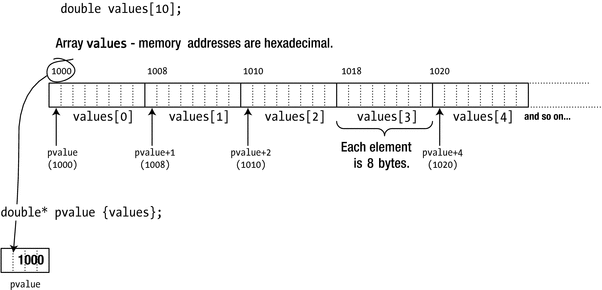
Incrementing a pointer
As Figure 6-5 shows, pvalue starts out with the address of the first array element. Adding 1 to pvalue increments the address it contains by 8, so the result is the address of the next array element. It follows that incrementing the pointer by 2 moves the pointer two elements along. Of course, pvalue need not necessarily point to the beginning of the values array. You could store the address of the third element of the array in the pointer with this statement:
Now the expression pvalue + 1 would evaluate to the address of values[3], the fourth element of the values array, so you could make the pointer point to this element with this statement:
In general, the expression pvalues + n, in which n can be any expression resulting in an integer, will add n * sizeof(double) to the address in pvalue because pvalue is of type “pointer to double.”
The same logic applies to subtracting an integer from a pointer. If pvalue contains the address of values[2], the expression pvalue - 2 evaluates to the address of the first array element, values[0]. In other words, incrementing or decrementing a pointer works in terms of the type of the object pointed to. Incrementing a pointer to long by 1 changes its contents to the next long address and so increments the address by sizeof(long) bytes. Decrementing it by 1 decrements the address by sizeof(long).
Of course, you can dereference a pointer on which you have performed arithmetic. (There wouldn’t be much point to it, otherwise!) For example, consider this statement:
Assuming pvalue is still pointing to values[3], this statement is equivalent to the following:
Remember that an expression such as pvalue + 1 doesn’t change the address in pvalue. It’s just an expression that evaluates to a result that is of the same type as pvalue. On the other hand, the expressions ++pvalue and pvalue += n do change pvalue.
When you dereference the address resulting from an expression that increments or decrements a pointer, parentheses around the expression are essential because the precedence of the indirection operator is higher than that of the arithmetic operators, + and -. The expression *pvalue + 1 adds 1 to the value stored at the address contained in pvalue, so it’s equivalent to executing values[3] + 1. The result of *pvalue + 1 is a numerical value, not an address; its use in the previous assignment statement would cause the compiler to generate an error message.
Of course, when you store a value using a pointer that contains an invalid address, such as an address outside the limits of the array to which it relates, you’ll attempt to overwrite the memory located at that address. This generally leads to disaster, with your program failing one way or another. It may not be obvious that the cause of the problem is the misuse of a pointer.
The Difference Between Pointers
Subtracting one pointer from another is meaningful only when they are of the same type and point to elements in the same array. Suppose you have a one-dimensional array, numbers, of type long defined as follows:
Suppose you define and initialize two pointers like this:
You can calculate the difference between these two pointers like so:
The difference variable will be set to the integer value 5 because the difference between two pointers is again measured in terms of elements, not in terms of bytes. Only one question remains, though: what will the type of difference be? Clearly, it should be a signed integer type to accommodate for statements such as the following:
As you know, the size of pointer variables such as pnum1 and pnum2 is platform specific—it’s typically either 4 or 8 bytes. This, of course, implies that the number of bytes required to store pointer offsets cannot possibly be the same on all platforms either. The C++ language therefore prescribes that subtracting two pointers results in a value of type std::ptrdiff_t, a platform-specific type alias for one of the signed integer types defined by the cstddef header. So:
Depending on your target platform, std::ptrdiff_t is typically an alias for either int, long, or long long.
Comparing Pointers
You can safely compare pointers of the same type using the familiar ==, !=, <, >, <=, and >= operators. The outcome of these comparisons will of course be compatible with your intuitions about pointer and integer arithmetic. Using the same variables as before, the expression pnum2 < pnum1 will thus evaluate to true, as pnum2 - pnum1 < 0 as well (pnum2 - pnum1 equals -5). In other words, the further the pointer points in the array or the higher the index of the element it points to, the larger the pointer is.
Using Pointer Notation with an Array Name
You can use an array name as though it was a pointer for addressing the array elements. Suppose you define this array:
You can refer to the element data[3] using pointer notation as *(data + 3). This notation can be applied generally so that corresponding to the elements data[0], data[1], data[2], …, you can write *data, *(data + 1), *(data + 2), and so on. The array name by itself refers to the address of the beginning of the array, so an expression such as data+2 produces the address of the element two elements along from the first.
You can use pointer notation with an array name in the same way as you use an index between square brackets—in expressions or on the left of an assignment. You could set the values of the data array to even integers with this loop:
The expression *(data + i) refers to successive elements of the array: *(data + 0), which is the same as *data, corresponds to data[0], *(data + 1) refers to data[1], and so on. The loop will set the values of the array elements to 2, 4, 6, 8, and 10. You could sum the elements of the array like this:
Let’s try some of this in a practical context that has a little more meat. This example calculates prime numbers (a prime number is an integer that is divisible only by 1 and itself). Here’s the code:
The output is as follows:
The constant max defines the number of primes to be produced. The primes array that stores the results has a first prime defined to start off the process. The variable count records how many primes have been found, so it’s initialized to 1.
The trial variable holds the next candidate to be tested. It starts out at 3 because it’s incremented in the loop that follows. The bool variable isprime is a flag that indicates when the current value in trial is prime.
All the work is done in two loops: the outer while loop picks the next candidate to be checked and adds the candidate to the primes array if it’s prime, and the inner loop checks the current candidate to see whether it’s prime. The outer loop continues until the primes array is full.
The algorithm in the loop that checks for a prime is simple. It’s based on the fact that any number that isn’t a prime must be divisible by a smaller number that is a prime. You find the primes in ascending order, so at any point primes contains all the prime numbers lower than the current candidate. If none of the values in primes is a divisor of the candidate, then the candidate must be prime. Once you realize this, writing the inner loop that checks whether trial is prime should be straightforward:
In each iteration, isprime is set to the value of the expression trial % *(primes + i) > 0. This finds the remainder after dividing trial by the number stored at the address primes + i. If the remainder is positive, the expression is true. The loop ends if i reaches count or whenever isprime is false. If any of the primes in the primes array divides into trial exactly, trial isn’t prime, so this ends the loop. If none of the primes divides into trial exactly, isprime will always be true, and the loop will be ended by i reaching count.
Note
Technically you only need to try dividing by primes that are less than or equal to the square root of the number in question, so the example isn’t as efficient as it might be.
After the inner loop ends, either because isprime was set to false or because the set of divisors in the primes array has been exhausted, whether or not the value in trial was prime is indicated by the value in isprime. This is tested in an if statement:
If isprime contains false, then one of the divisions was exact, so trial isn’t prime. If isprime is true, the assignment statement stores the value from trial in primes[count] and then increments count with the postfix increment operator. When max primes have been found, the outer while loop ends, and the primes are output 10 to a line with a field width of 10 characters as a result of these statements in a for loop.
Dynamic Memory Allocation
Most code you’ve written up to now allocates space for data at compile time. The most notable exceptions are the times when you used a std::vector<> container, which dynamically allocates all and any memory it needs to hold its elements. Apart from that, you’ve mostly specified all variables and arrays that you needed in the code up front, and that’s what will be allocated when the program starts, whether you needed the entire array or not. Working with a fixed set of variables in a program can be very restrictive, and it’s often wasteful.
Dynamic memory allocation is allocating the memory you need to store the data you’re working with at runtime, rather than having the amount of memory predefined when the program is compiled. You can change the amount of memory your program has dedicated to it as execution progresses. By definition , dynamically allocated variables can’t be defined at compile time, so they can’t be named in your source program. When you allocate memory dynamically, the space that is made available is identified by its address. The obvious and only place to store this address is in a pointer. With the power of pointers and the dynamic memory management tools in C++, writing this kind of flexibility into your programs is quick and easy. You can add memory to your application when it’s needed and then release the memory you have acquired when you are done with it. Thus, the amount of memory dedicated to an application can increase and decrease as execution progresses.
In Chapter 3, we introduced the three kinds of storage duration that variables can have—automatic, static, and dynamic—and we discussed how variables of the first two varieties are created. Variables for which memory is allocated at runtime always have dynamic storage duration.
The Stack and the Free Store
You know that an automatic variable is created when its definition is executed. The space for an automatic variable is allocated in a memory area called the stack. The stack has a fixed size that is determined by your compiler. There’s usually a compiler option that enables you to change the stack size, although this is rarely necessary. At the end of the block in which an automatic variable is defined, the memory allocated for the variable on the stack is released and is thus free to be reused. When you call a function, the arguments you pass to the function will be stored on the stack along with the address of the location to return to when execution of the function ends.
Memory that is not occupied by the operating system or other programs that are currently loaded is called the free store. 1 You can request that space be allocated within the free store at runtime for a new variable of any type. You do this using the new operator, which returns the address of the space allocated, and you store the address in a pointer. The new operator is complemented by the delete operator, which releases memory that you previously allocated with new. Both new and delete are keywords, so you must not use them for other purposes.
You can allocate space in the free store for variables in one part of a program and then release the space and return it to the free store in another part of the program when you no longer need it. The memory then becomes available for reuse by other dynamically allocated variables later in the same program or possibly other programs that are executing concurrently. This uses memory very efficiently and allows programs to handle much larger problems involving considerably more data than might otherwise be possible.
When you allocate space for a variable using new, you create the variable in the free store. The variable remains reserved for you until the memory it occupies is released by the delete operator. Until the moment you release it using delete, the block of memory allocated for your variable can no longer be used by subsequent calls of new. Note that the memory continues to be reserved regardless of whether you still record its address. If you don’t use delete to release the memory, it will be released automatically when program execution ends.
Using the new and delete Operators
Suppose you need space for a variable of type double. You can define a pointer of type double* and then request that the memory is allocated at execution time. Here’s one way to do this:
This is a good moment to recall that all pointers should be initialized. Using memory dynamically typically involves having a lot of pointers floating around, and it’s important that they do not contain spurious values. You should always ensure that a pointer contains nullptr if it doesn’t contain a legal address.
The new operator in the second line of the code returns the address of the memory in the free store allocated to a double variable, and this is stored in pvalue. You can use this pointer to reference the variable in the free store using the indirection operator, as you’ve seen. Here’s an example:
Of course, under extreme circumstances it may not be possible to allocate the memory. The free store could be completely allocated at the time of the request. More aptly, it could be that no area of the free store is available that is large enough to accommodate the space you have requested. This isn’t likely with the space required to hold a single double value, but it might just happen when you’re dealing with large entities such as arrays or complicated class objects. This is something that you may need to consider later, but for now you’ll assume that you always get the memory you request. When it does happen, the new operator throws something called an exception, which by default will end the program. We’ll come back to this topic in Chapter 17 when we discuss exceptions.
You can initialize a variable that you create in the free store. Let’s reconsider the previous example: the double variable allocated by new, with its address stored in pvalue. The memory slot for the double variable itself (typically 8 bytes large) still holds whatever bits were there before. As always, an uninitialized variable contains garbage. You could have initialized its value to, for instance, 3.14, though, as it was created by using this statement:
You can also create and initialize the variable in the free store and use its address to initialize the pointer when you create it:
This creates the pointer pvalue, allocates space for a double variable in the free store, initializes the variable in the free store with 3.14, and initializes pvalue with the address of the variable.
It should come as no surprise anymore by now that the following initializes the double variable pointed to by pvalue to zero (0.0):
Note the difference with this, though:
When you no longer need a dynamically allocated variable, you free the memory that it occupies using the delete operator:
This ensures that the memory can be used subsequently by another variable. If you don’t use delete and you store a different address in pvalue, it will be impossible to free up the original memory because access to the address will have been lost. The memory will be retained for use by your program until the program ends. Of course, you can’t use it because you no longer have the address. Note that the delete operator frees the memory but does not change the pointer. After the previous statement has executed, pvalue still contains the address of the memory that was allocated, but the memory is now free and may be allocated immediately to something else. A pointer that contains such a spurious address is sometimes called a dangling pointer. Dereferencing a dangling pointer is a sweet recipe for disaster, so you should get in the habit of always resetting a pointer when you release the memory to which it points, like this:
Now pvalue doesn’t point to anything. The pointer cannot be used to access the memory that was released. Using a pointer that contains nullptr to store or retrieve data will terminate the program immediately, which is better than the program staggering on in an unpredictable manner with data that is invalid.
Tip
It is perfectly safe to apply delete on a pointer variable that holds the value nullptr. The statement then has no effect at all. Using if tests such as the following is therefore not necessary:
Dynamic Allocation of Arrays
Allocating memory for an array at runtime is equally straightforward. This, for instance, allocates space for an array of 100 values of type double and stores its address in data.
As always, the memory of this array contains uninitialized garbage values. Naturally, you can initialize the dynamic array’s elements just like you would with a regular array:
Unlike with regular arrays, however, you cannot have the compiler deduce the array’s dimensions. The following definition is therefore not valid in C++:
To remove the array from the free store when you are done with it, you use an operator similar to the delete operator, yet this time the delete has to be followed with []:
The square brackets are important because they indicate that you’re deleting an array. When removing arrays from the free store, you must include the square brackets, or the results will be unpredictable. Note that you don’t specify any dimensions, simply []. In principle you can add whitespace between delete and [] as well, should you prefer to do so:
Of course, it’s again good practice to reset the pointer now that it no longer points to memory that you own:
Let’s see how dynamic memory allocation works in practice. Like Ex6_05, this program calculates primes. The key difference is that this time the number of primes is not hard-coded into the program. Instead, the number of primes to compute, and hence the number of elements to allocate, is entered by the user at runtime.
The output is essentially the same as the previous program, so we won’t reproduce it here. Overall, the program is similar but not the same as the previous version. After reading the number of primes required from the keyboard and storing it in max, you allocate an array of that size in the free store using the new operator. The address that’s returned by new is stored in the pointer, primes. This will be the address of the first element of an array of max elements of type unsigned (int).
Unlike Ex06_05, all statements and expressions involving the primes array in this program use the array notation. But only because this is easier; you could equally well use and write them using pointer notation: *primes = 2, *(primes + i), *(primes + count++) = trial, and so on.
Before allocating the primes array and inserting the first prime, 2, we verify that the user did not enter the number zero. Without this safety measure, the program would otherwise write the value 2 into a memory location beyond the bounds of the allocated array, which would have undefined and potentially catastrophic results.
Notice also that the determination of whether a candidate is prime is improved compared to Ex6_05.cpp. Dividing the candidate in trial by existing primes ceases when primes up to the square root of the candidate have been tried, so finding a prime will be faster. The sqrt() function from the cmath header does this.
When the required number of primes has been output, you remove the array from the free store using the delete[] operator, not forgetting to include the square brackets to indicate that it’s an array you’re deleting. The next statement resets the pointer. It’s not essential here, but it’s good to get into the habit of always resetting a pointer after freeing the memory to which it points; it could be that you add code to the program at a later date.
Of course, if you use a vector<> container that you learned about in Chapter 5 to store the primes, you can forget about memory allocation for elements and deleting it when you are done; it’s all taken care of by the container. In practice, you should therefore nearly always use std::vector<> to manage dynamic memory for you. In fact, the examples and exercises on dynamic memory allocation in this book should probably be one of the last occasions at which you should still manage dynamic memory directly. But we’re getting ahead of ourselves: we’ll return to the risks, downsides, and alternatives to low-level dynamic memory allocation at length later in this chapter!
Multidimensional Arrays
In the previous chapter, you learned how to create arrays of multiple static dimensions. The example we used was this 3 × 4 multidimensional array to hold the weights of the carrots you grow in your garden:
Of course, as an avid gardener in heart and soul, you plant carrots each year but not always in the same quantity or the same configuration of three rows and four columns. As recompiling from source for each new sowing season is such a drag, let’s see how we can allocate a multidimensional array in a dynamic manner. A natural attempt then would be to write this:
Alas! Multidimensional arrays with multiple dynamic dimensions are not supported by standard C++, at least not as a built-in language feature. The furthest you can get with built-in C++ types are arrays where the value of the first dimension is dynamic. If you are happy always planting your carrots in columns of four, C++ does allow you to write this:
The required syntax is plain dreadful, though—the parentheses around *carrots are mandatory—so much so that most programmers won’t be familiar with this. But at least it’s possible. The good news also is that ever since C++11, you can of course avoid this syntax altogether using the auto keyword as well:
With a bit of effort, it’s actually not too hard to emulate a fully dynamic two-dimensional array using regular one-dimensional dynamic arrays either. After all, what is a two-dimensional array if not an array of rows? For our gardening example, one way would be to write this as follows:
The carrots array is a dynamic array of double* pointers, each in turn containing the address of an array of double values. The latter arrays, representing the rows of the multidimensional array, are allocated in the free store as well, one by one, by the first for loop. Once you’re done with the array, you must deallocate its rows again, one by one, using a second loop, before disposing of the carrots array itself.
Given the amount of boilerplate code required to set up such a multidimensional array and again to tear it down, it’s highly recommended to encapsulate such functionality in a reusable class. We’ll leave that to you as an exercise, after learning all about creating your own class types in upcoming chapters.
Tip
The naïve technique we presented here to represent dynamic multidimensional arrays is not the most efficient one. It allocates all rows separately in the free store, meaning they are likely not contiguous in memory anymore. Programs tend to run much, much faster when operating on contiguous memory. That’s why classes that encapsulate multidimensional arrays generally allocate only a single array of rows * columns elements and then map array accesses at row i and column j to a single index using the formula i * columns + j.
Member Selection Through a Pointer
A pointer can store the address of an object of a class type, such as a vector<T> container. Objects usually have member functions that operate on the object—you saw that the vector<T> container has an at() function for accessing elements and a push_back() function for adding an element, for example. Suppose pdata is a pointer to a vector<> container. This container could be allocated in the free store with a statement such as this:
But it might just as well be the address of a local object, obtained using the address-of operator.
In both cases, the compiler deduces the type of pdata to be vector<int>*, which is a “pointer to a vector of int elements.” For what follows, it does not matter whether the vector<> is created in the free store or on the stack as a local object. To add an element, you call the push_back() function for the vector<int> object, and you have seen how you use a period between the variable representing the vector and the member function name. To access the vector object using the pointer, you could use the dereference operator, so the statement to add an element looks like this:
The parentheses around *pdata are essential for the statement to compile because the . operator is of higher precedence than the * operator. This clumsy-looking expression would occur very frequently when you are working with objects, which is why C++ provides an operator that combines dereferencing a pointer to an object and then selecting a member of the object. You can write the previous statement like this:
The -> operator is formed by a minus sign and a greater-than character and is referred to as the arrow operator or indirect member selection operator . The arrow is much more expressive of what is happening here. You’ll be using this operator extensively later in the book.
Hazards of Dynamic Memory Allocation
There are many kinds of serious problems that you can run into when you allocate memory dynamically using new. In this section, we name the most common ones. Unfortunately, these hazards are all too real, as any developer who has worked with new and delete will corroborate. As a C++ developer, a significant portion of the more serious bugs you deal with often boil down to mismanagement of dynamic memory.
In this section, we will thus paint you a seemingly very bleak picture, filled with all kinds of hazards of dynamic memory. But don’t despair. We will show you the way out of this treacherous minefield soon enough! Right after this section we will list the proven idioms and utilities that actually make it easy for you to avoid most if not all of these problems. In fact, you already know about one such utility: the std::vector<> container. This container is almost always the better choice over allocating dynamic memory directly using new[]. Other facilities of the Standard Library to better manage dynamic memory are discussed in upcoming sections. But first let’s dwell on all these lovely risks, hazards, pitfalls, and other perils alike associated with dynamic memory.
Dangling Pointers and Multiple Deallocations
A dangling pointer, as you know, is a pointer variable that still contains the address to free store memory that has already been deallocated by either delete or delete[]. Dereferencing a dangling pointer makes you read from or, often worse, write to memory that might already be allocated to and used by other parts of your program, resulting in all kinds of unpredictable and unexpected results. Multiple deallocations , which occur when you deallocate an already deallocated (and hence dangling) pointer for a second time using either delete or delete[], is another recipe for disaster.
We taught you one basic strategy already to guard yourself against dangling pointers, that is, to always reset a pointer to nullptr after the memory it points to is released. In more complex programs, however, different parts of the code often collaborate by accessing the same memory—an object or an array of objects—all through distinct copies of the same pointer. In such cases our simple strategy rapidly falls short. Which part of the code is going to call delete/delete[]? And when? That is, how do you be sure no other part of the code is still using the same dynamically allocated memory?
Allocation/Deallocation Mismatch
A dynamically allocated array, allocated using new[], is captured in a regular pointer variable. But so is a single allocated value that is allocated using new:
After this, the compiler has no way to distinguish between the two, especially once such a pointer gets passed around different parts of the program. This means that the following two statements will compile without error (and in many cases even without a warning):
What’ll happen if you mismatch your allocation and deallocation operators depends entirely on the implementation associated with your compiler. But it won’t be anything good.
Caution
Every new must be paired with a single delete; every new[] must be paired with a single delete[]. Any other sequence of events leads to either undefined behavior or memory leaks (discussed next).
Memory Leaks
A memory leak occurs when you allocate memory using new or new[] and fail to release it. If you lose the address of free store memory you have allocated, by overwriting the address in the pointer you were using to access it, for instance, you have a memory leak. This often occurs in a loop, and it’s easier to create this kind of problem than you might think. The effect is that your program gradually consumes more and more of the free store, with the program potentially slowing more and more down, or even failing at the point when all of the free store has been allocated.
When it comes to scope, pointers are just like any other variable. The lifetime of a pointer extends from the point at which you define it in a block to the closing brace of the block. After that it no longer exists, so the address it contained is no longer accessible. If a pointer containing the address of a block of memory in the free store goes out of scope, then it’s no longer possible to delete the memory.
It’s still relatively easy to see where you’ve simply forgotten to use delete to free memory when use of the memory ceases at a point close to where you allocated it, but you’d be surprised how often programmers make mistakes like this, especially if, for instance, return statements creep in between the allocation and deallocation of your variable. And, naturally, memory leaks are even more difficult to spot in complex programs, where memory may be allocated in one part of a program and should be released in a completely separate part.
One basic strategy for avoiding memory leaks is to immediately add the delete operation at an appropriate place each time you use the new operator. But this strategy is by no means fail-safe. We cannot stress this enough: humans, even C++ programmers, are fallible creatures. So, whenever you manipulate dynamic memory directly, you will, sooner or later, introduce memory leaks. Even if it works at the time of writing, all too often bugs find their way into the program as it evolves further. return statements are added, conditional tests change, exceptions are thrown (see Chapter 15), and so on. And all of a sudden there are scenarios where your memory is no longer freed correctly!
Fragmentation of the Free Store
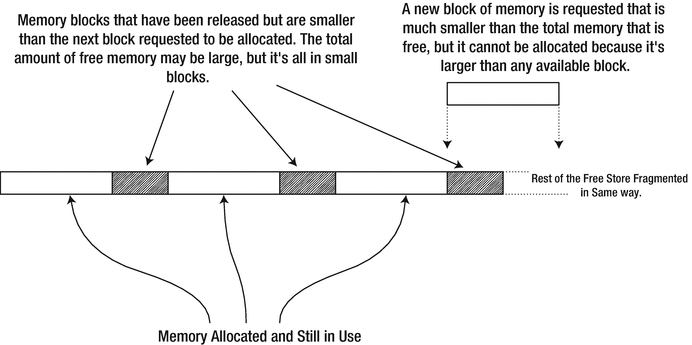
Fragmentation of the free store
We mention this problem here mostly for completeness because it arises relatively infrequently these days. Virtual memory provides a large memory address space even on quite modest computers. And the algorithms behind new/delete are clever and designed to counteract such phenomena as much as possible. It’s only in rare cases that you need to worry about fragmentation anymore. For instance, for the most performance-critical parts of your code, operating on fragmented memory may seriously degrade performance. The way to avoid fragmentation of the free store then is not to allocate many small blocks of memory. Allocate larger blocks and manage the use of the memory yourself. But this is an advanced topic, well outside the scope of this book.
Golden Rule of Dynamic Memory Allocation
After spending more than half a dozen pages learning how to use the new and delete operators, our golden rule of dynamic memory allocation may come as a bit of a surprise. It’s nevertheless one of the single most valuable pieces of advice we give you in this book:
Tip
Never use the operators new, new[], delete, and delete[] directly in day-to-day coding. These operators have no place in modern C++ code. Always use either the std::vector<> container (to replace dynamic arrays) or a smart pointer (to dynamically allocate objects and manage their lifetimes). These high-level alternatives are much, much safer than the low-level memory management primitives and will help you tremendously by instantly eradicating all dangling pointers, multiple deallocations, allocation/deallocation mismatches, and memory leaks from your programs.
The std::vector<> container you already know from the previous chapter, and smart pointers are explained in the next section. The main reason we still teach you about the low-level dynamic memory allocation primitives is not because we’d invite you to use them (often or at all) but because you will surely still encounter them in existing code. This also, unfortunately, implies that you will be tasked with fixing bugs caused by their use (bonus tip: a good first step then would be to rewrite this code using better, more modern memory management utilities; more often than not, the underlying problem then reveals itself). In your own code, you should normally avoid manipulating dynamic memory directly.
Raw Pointers and Smart Pointers
All the pointer types we have discussed up to now are part of the C++ language. These are referred to as raw pointers because variables of these types contain nothing more than an address. A raw pointer can store the address of an automatic variable or a variable allocated in the free store. A smart pointer is an object that mimics a raw pointer in that it contains an address, and you can use it in the same way in many respects. Smart pointers are normally used only to store the address of memory allocated in the free store. A smart pointer does much more than a raw pointer, though. By far the most notable feature of a smart pointer is that you don’t have to worry about using the delete or delete[] operator to free the memory. It will be released automatically when it is no longer needed. This means that multiple deallocations, allocation/deallocation mismatches, and memory leaks will no longer be possible. If you consistently use smart pointers, dangling pointers will be a thing of the past as well.
Smart pointers are particularly useful for managing class objects that you create dynamically, so smart pointers will be of greater relevance from Chapter 11 on. You can also store them in an array<T,N> or vector<T> container, which is again very useful when you are working with objects of a class type.
A unique_ptr<T> object behaves as a pointer to type T and is “unique” in the sense that there can be only one single unique_ptr<> object containing the same address. In other words, there can never be two or more unique_ptr<T> objects pointing to the same memory address at the same time. A unique_ptr<> object is said to own what it points to exclusively. This uniqueness is enforced by the fact that the compiler will never allow you to copy a unique_ptr<>.2
A shared_ptr<T> object also behaves as a pointer to type T, but in contrast with unique_ptr<T> there can be any number of shared_ptr<T> objects that contain—or, share—the same address. Thus, shared_ptr<> objects allow shared ownership of an object in the free store. At any given moment, the number of shared_ptr<> objects that contain a given address in time is known by the runtime. This is called reference counting. The reference count for a shared_ptr<> containing a given free store address is incremented each time a new shared_ptr<> object is created containing that address, and it’s decremented when a shared_ptr<> containing the address is destroyed or assigned to point to a different address. When there are no shared_ptr<> objects containing a given address, the reference count will have dropped to zero, and the memory for the object at that address will be released automatically. All shared_ptr<> objects that point to the same address have access to the count of how many there are. You’ll understand how this is possible when you learn about classes in Chapter 11.
A weak_ptr<T> is linked to a shared_ptr<T> and contains the same address. Creating a weak_ptr<> does not increment the reference count associated to the linked shared_ptr<> object, though, so a weak_ptr<> does not prevent the object pointed to from being destroyed. Its memory will still be released when the last shared_ptr<> referencing it is destroyed or reassigned to point to a different address, even when associated weak_ptr<> objects still exist. If this happens, the weak_ptr<> will nevertheless not contain a dangling pointer, at least not one that you could inadvertently access. The reason is that you cannot access the address encapsulated by a weak_ptr<T> directly. Instead, the compiler will force you to first create a shared_ptr<T> out of it that refers to the same address. If the memory address for the weak_ptr<> is still valid, forcing to create a shared_ptr<> first makes sure that the reference count is again incremented and that the pointer can be used safely again. If the memory is released already, however, this operation will result in a shared_ptr<> containing nullptr.
One use for having weak_ptr<> objects is to avoid so-called reference cycles with shared_ptr<> objects. Conceptually, a reference cycle is where a shared_ptr<> inside an object x points to some other object y that contains a shared_ptr<>, which points back to x. With this situation, neither x nor y can be destroyed. In practice, this may occur in ways that are more complicated. weak_ptr<> smart pointers allow you to break such reference cycles. Another use for weak pointers is the implementation of object caches.
However, as you no doubt already started to sense, weak pointers are used only in more advanced use cases. As they are used only sporadically, we’ll not discuss them any further here. The other two smart pointer types, however, you should use literally all the time, so let’s dig a bit deeper into them.
Using unique_ptr<T> Pointers
A unique_ptr<T> object stores an address uniquely, so the value to which it points is owned exclusively by the unique_ptr<T> smart pointer. When the unique_ptr<T> is destroyed, so is the value to which it points. Like all smart pointers, a unique_ptr<> is most useful when working with dynamically allocated objects. Objects then should not be shared by multiple parts of the program or where the lifetime of the dynamic object is naturally tied to that of a single other object in your program. One common use for a unique_ptr<> is to hold something called a polymorphic pointer , which in essence is a pointer to a dynamically allocated object that can be of any number of related class types. To cut a long story short, you’ll only fully appreciate this smart pointer type after learning all about class objects and polymorphism in Chapters 11 through 15.
For now, our examples will simply use dynamically allocated values of fundamental types, which do not really excel in usefulness. What should become obvious already, though, is why these smart pointers are that much safer to use than the low-level allocation and deallocation primitives; that is, they make it impossible for you to forget or mismatch deallocation!
In the (not so) old days, you had to create and initialize a unique_ptr<T> object like this:
This creates pdata containing the address of a double variable in the free store that is initialized with 999.0. While this syntax remains valid, the recommended way to create a unique_ptr<> today is by means of the std::make_unique<>() function template (introduced by C++14). To define pdata, you should therefore normally use the following:
The arguments to std::make_unique<T>(…) are exactly those values that would otherwise appear in the braced initializer of a dynamic allocation of the form new T{…}. In our example, that’s the single double literal 999.0. To save you some typing, you’ll probably want to combine this syntax with the use of the auto keyword:
That way, you only have to type the type of the dynamic variable, double, once.
Tip
To create a std::unique_ptr<T> object that points to a newly allocated T value, always use the std::make_unique<T>() function. Not only is this shorter (provided you use the auto keyword in the variable definition), this function is safer as well against some more subtle memory leaks.
You can dereference pdata just like an ordinary pointer, and you can use the result in the same way:
The big difference is that you no longer have to worry about deleting the double variable from the free store.
You can access the address that a smart pointer contains by calling its get() function. Here’s an example:
This outputs the value of the address contained in pdata as a hexadecimal value. All smart pointers have a get() function that will return the address that the pointer contains. You should only ever access the raw pointer inside a smart pointer to pass it to functions that use this pointer only briefly, never to functions or objects that would make and hang on to a copy of this pointer. It’s not recommended to store raw pointers that point to the same object as a smart pointer because this may lead to dangling pointers again, as well as all kinds of related problems.
You can create a unique pointer that points to an array as well. The older syntax to do this looks as follows:
As before, we recommend you always use std::make_unique<T[]>() instead:
Either way, pvalues points to the array of n elements of type double in the free store. Like a raw pointer, you can use array notation with the smart pointer to access the elements of the array it points to:
This sets the array elements to values from 1 to n. The compiler will insert an implicit conversion to type double for the result of the expression on the right of the assignment. You can output the values of the elements in a similar way:
This just outputs the values ten on each line. Thus, you can use a unique_ptr<T[]> variable that contains the address of an array just like an array name.
Tip
It is mostly recommended to use a vector<T> container instead of a unique_ptr<T[]> because this container type is far more powerful and flexible than the smart pointer. We refer to the end of the previous chapter for a discussion of the various advantages of using vectors.
You can reset the pointer contained in a unique_ptr<>, or any type of smart pointer for that matter, by calling its reset() function:
pvalues still exists, but it no longer points to anything. This is a unique_ptr<double> object, so because there can be no other unique pointer containing the address of the array, the memory for the array will be released as a result. Naturally, you can check whether a smart pointer contains nullptr by explicitly comparing it to nullptr, but a smart pointer also conveniently converts to a Boolean value in the same manner as a raw pointer (that is, it converts to false if and only if it contains nullptr):
You create a smart pointer that contains nullptr either by using empty braces, {}, or simply by omitting the braces:
Creating empty smart pointers would be of little use, were it not that you can always change the value a smart pointer points to. You can do this again using reset():
Calling reset() without arguments is thus equivalent to calling reset(nullptr). When calling reset() on a unique_ptr<T> object, either with or without arguments, any memory that was previously owned by that smart pointer will be deallocated. So, with the second statement in the previous snippet, the memory containing the integer value 123 gets deallocated, after which the smart pointer takes ownership of the memory slot holding the number 42.
Next to get() and reset(), a unique_ptr<> object also has a member function called release(). This function is essentially used to turn the smart pointer back into a dumb raw pointer.
Take care, though; when calling release(), it becomes your responsibility again to apply delete or delete[]. You should therefore use this function only when absolutely necessary, typically when handing over dynamically allocated memory to legacy code. If you do this, always make absolutely sure that this legacy code effectively releases the memory—if not, get() is what you should be calling instead!
Caution
Never call release() without capturing the raw pointer that comes out. That is, never write a statement of the following form:
Why? Because this introduces a whopping memory leak, of course! You release (with release()) the smart pointer from the responsibility of deallocating the memory, but since you neglect to capture the raw pointer, there’s no way you or anyone else can still apply delete or delete[] to it anymore. While this may seem obvious now, you’d be surprised how often release() is mistakenly called when instead a reset() statement of the following form was intended:
The confusion no doubt stems from the facts that the release() and reset() functions have alliterative names and both functions put the pointer’s address to nullptr. These similarities notwithstanding, there’s of course one rather critical difference: reset() deallocates any memory previously owned by the unique_ptr<>, whereas release() does not. In general, release() is a function you should use only sporadically and with great care not to introduce leaks.
Using shared_ptr<T> Pointers
You can define a shared_ptr<T> object in a similar way to a unique_ptr<T> object:
You can also dereference it to access what it points to or to change the value stored at the address:
Creating a shared_ptr<T> object involves a more complicated process than creating a unique_ptr<T>, not least because of the need to maintain a reference count. The definition of pdata involves one memory allocation for the double variable and another allocation relating to the smart pointer object. Allocating memory in the free store is expensive on time. You can make the process more efficient by using the make_shared<T>() function that is defined in the memory header to create a smart pointer of type shared_ptr<T>:
The type of variable to be created in the free store is specified between the angled brackets. This statement allocates memory for the double variable and allocates memory for the smart pointer in a single step, so it’s faster. The argument between the parentheses following the function name is used to initialize the double variable it creates. In general, there can be any number of arguments to the make_shared() function, with the actual number depending on the type of object being created. When you are using make_shared() to create objects in the free store, there will often be two or more arguments separated by commas. The auto keyword causes the type for pdata to be deduced automatically from the object returned by make_shared<T>(), so it will be shared_ptr<double>.
You can initialize a shared_ptr<T> with another when you define it:
pdata2 points to the same variable as pdata. You can also assign one shared_ptr<T> to another:
Of course, copying pdata increases the reference count. Both pointers have to be reset or destroyed for the memory occupied by the double variable to be released.
While we may not have explicitly mentioned it in the previous subsection, neither of these operations would be possible with unique_ptr<> objects. The compiler would never allow you to create two unique_ptr<> objects pointing to the same memory location.3 With good reason, if it were allowed, both would end up deallocating the same memory, with potentially catastrophic results.
Another option, of course, is to store the address of an array<T> or vector<T> container object that you create in the free store. Here’s a working example:
Here’s how the output looks with arbitrary input values:
This program reads an arbitrary number of temperature values recorded during a day, for an arbitrary number of days. The accumulation of temperature records is stored in the records vector, which has elements of type shared_ptr<vector<double>>. Thus, each element is a smart pointer to a vector of type vector<double>.
The containers for the temperatures for any number of days are created in the outer while loop. The temperature records for a day are stored in a vector container that is created in the free store by this statement:
The day_records pointer type is determined by the pointer type returned by the make_shared<>() function. The function allocates memory for the vector<double> object in the free store along with the shared_ptr<vector<double>> smart pointer that is initialized with its address and returned. Thus, day_records is type shared_ptr<vector<double>>, which is a smart pointer to a vector<double> object. This pointer is added to the records container.
The vector pointed to by day_records is populated with data that is read in the inner while loop. Each value is stored using the push_back() function for the current vector pointed to by day_records. The function is called using the indirect member selection operator. This loop continues until 1000 is entered, which is an unlikely value for a temperature during the day, so there can be no mistaking it for a real value. When all the data for the current day has been entered, the inner while loop ends, and there’s a prompt asking whether another day’s temperatures are to be entered. If the answer is affirmative, the outer loop continues and creates another vector in the free store. When the outer loop ends, the records vector will contain smart pointers to vectors containing each day’s temperatures.
The next loop is a range-based for loop that iterates over the elements in the records vector. The inner range-based for loop iterates over the temperature values in the vector that the current records’ element points to. This inner loop outputs the data for the day and accumulates the total of the temperatures values. This allows the average temperature for the current day to be calculated when the inner loop ends. In spite of having a fairly complicated data organization with a vector of smart pointers to vectors in the free store, accessing the data and processing the data are easy tasks using range-based for loops.
The example illustrates how using containers and smart pointers can be a powerful and flexible combination. This program deals with any number of sets of input, with each set containing any number of values. Free store memory is managed by the smart pointers, so there is no need to worry about using the delete operator or the possibility of memory leaks. The records vector could also have been created in the free store too, but we’ll leave that as an exercise for you to try.
Note
We’ve used shared pointers in Ex6_07 mainly for the sake of creating a first example. Normally, you’d simply use a vector of type std::vector<std::vector<double>> instead. The need for shared pointers only really arises when multiple parts of the same program truly share the same object. Realistic uses of shared pointers hence generally involve objects, as well as more lines of code than is feasible to show in a book.
Understanding References
A reference is similar to a pointer in many respects, which is why we’re introducing it here. You’ll only get a real appreciation of the value of references, though, once you learn how to define functions in Chapter 8. References become even more important in the context of object-oriented programming later.
A reference is a name that you can use as an alias for another variable. Obviously, it must be like a pointer insofar as it refers to something else in memory, but there are a few crucial differences. Unlike a pointer, you cannot declare a reference and not initialize it. Because a reference is an alias, the variable for which it is an alias must be provided when the reference is initialized. Also, a reference cannot be modified to be an alias for something else. Once a reference is initialized as an alias for some variable, it keeps referring to that same variable for the remainder of its lifetime.
Defining References
Suppose you defined this variable:
You can define a reference as an alias for data like this variable:
The ampersand following the type name indicates that the variable being defined, rdata, is a reference to a variable of type double. The variable that it represents is specified in the braced initializer. Thus, rdata is of type “reference to double.” You can use the reference as an alternative to the original variable name. Here’s an example:
This increments data by 2.5. None of the dereferencing that you need with a pointer is necessary—you just use the name of the reference as though it is a variable. A reference always acts as a true alias, otherwise indistinguishable from the original variable. If you take the address of a reference, for instance, the result will even be a pointer to the original variable. In the following snippet, the addresses stored in pdata1 and pdata2 will thus be identical:
Let’s ram home the difference between a reference and a pointer by contrasting the reference rdata in the previous code with the pointer pdata defined in this statement:
This defines a pointer, pdata, and initializes it with the address of data. This allows you to increment data like this:
You must dereference the pointer to access the variable to which it points. With a reference, there is no need for dereferencing; it just doesn’t apply. In some ways, a reference is like a pointer that has already been dereferenced, although it also can’t be changed to reference something else. Make no mistake, though; given our rdata reference variable from before, the following snippet does compile:
Key is that this last statement does not make rdata refer to the other_data variable. The rdata reference variable is defined to be an alias for data and will forever be an alias for data. A reference is and always remains the complete equivalent of the variable to which it refers. In other words, the second statement acts exactly as if you wrote this:
A pointer is different. With our pointer pdata, for instance, we can do the following:
A reference variable is thus much like a const pointer variable:
Take care: we didn’t say a pointer-to-const variable but a const pointer variable. That is, the const needs to come after the asterisk. Reference-to-const variables exist as well. You define such a reference variable by using the const keyword:
Such a reference is similar to a pointer-to-const variable—a const pointer-to-const variable to be exact—in the sense that it is an alias through which one cannot modify the original variable. The following statement, for instance, will therefore not compile:
In Chapter 8 you’ll see that reference-to-const variables play a particularly important role when defining functions that operate on arguments of nonfundamental object types.
Using a Reference Variable in a Range-Based for Loop
You know that you can use a range-based for loop to iterate over all the elements in an array:
The variable t is initialized to the value of the current array element on each iteration, starting with the first. The t variable does not access that element itself. It is just a local copy with the same value as the element. You therefore also cannot use t to modify the value of an element. However, you can change the array elements if you use a reference:
The loop variable, t, is now of type double&, so it is an alias for each array element. The loop variable is redefined on each iteration and initialized with the current element, so the reference is never changed after being initialized. This loop changes the values in the temperatures array from Fahrenheit to Celsius. You can use the alias t in any context in which you’d be able to use the original variable or array element. Another way to write the previous loop, for instance, is this:
Using a reference in a range-based for loop is efficient when you are working with collections of objects. Copying objects can be expensive on time, so avoiding copying by using a reference type makes your code more efficient.
When you use a reference type for the variable in a range-based for loop and you don’t need to modify the values, you can use a reference-to-const type for the loop variable:
You still get the benefits of using a reference type to make the loop as efficient as possible (no copies of the elements are being made!), and at the same time you prevent the array elements from being inadvertently changed by this loop.
Summary
You explored some important concepts in this chapter. You will undoubtedly make extensive use of pointers and particularly smart pointers in real-world C++ programs, and you’ll see a lot more of them throughout the rest of the book:
A pointer is a variable that contains an address. A basic pointer is referred to as a raw pointer.
You obtain the address of a variable using the address-of operator, &.
To refer to the value pointed to by a pointer, you use the indirection operator, *. This is also called the dereference operator.
You access a member of an object through a pointer or smart pointer using the indirect member selection operator, ->.
You can add integer values to or subtract integer values from the address stored in a raw pointer. The effect is as though the pointer refers to an array, and the pointer is altered by the number of array elements specified by the integer value. You cannot perform arithmetic with a smart pointer.
The new and new[] operators allocate a block of memory in the free store—holding a single variable and an array, respectively—and return the address of the memory allocated.
You use the delete or delete[] operator to release a block of memory that you’ve allocated previously using either the new or, respectively, the new[] operator. You don’t need to use these operators when the address of free store memory is stored in a smart pointer.
Low-level dynamic memory manipulation is synonymous for a wide range of serious hazards such as dangling pointers, multiple deallocations, deallocation mismatches, memory leaks, and so on. Our golden rule is therefore this: never use the low-level new/new[] and delete/delete[] operators directly. Containers (and std::vector<> in particular) and smart pointers are nearly always the smarter choice!
A smart pointer is an object that can be used like a raw pointer. A smart pointer, by default, is used only to store free store memory addresses.
There are two commonly used varieties of smart pointers. There can only ever be one type unique_ptr<T> pointer in existence that points to a given object of type T, but there can be multiple shared_ptr<T> objects containing the address of a given object of type T. The object will then be destroyed when there are no shared_ptr<T> objects containing its address.
A reference is an alias for a variable that represents a permanent storage location.
You can use a reference type for the loop variable in a range-based for loop to allow the values of the elements in the range to be modified.
Exercises
Exercise 6-1. Write a program that declares and initializes an array with the first 50 odd (as in not even) numbers. Output the numbers from the array ten to a line using pointer notation and then output them in reverse order, also using pointer notation.
Exercise 6-2. Revisit the previous exercise, but instead of accessing the array values using the loop counter, this time you should employ pointer increments (using the ++ operator) to traverse the array when outputting it for the first time. After that, use pointer decrements (using --) to traverse the array again in the reverse direction.
Exercise 6-3. Write a program that reads an array size from the keyboard and dynamically allocates an array of that size to hold floating-point values. Using pointer notation, initialize all the elements of the array so that the value of the element at index position n is 1 / (n + 1)2. Calculate the sum of the elements using array notation, multiply the sum by 6, and output the square root of that result.
Exercise 6-4. Repeat the calculation in Exercise 6-3 but using a vector<> container allocated in the free store. Test the program with more than 100,000 elements. Do you notice anything interesting about the result?
Exercise 6-5. Revisit Exercise 6-3, but this time use a smart pointer to store the array, that is, if you haven’t already done so from the start. A good student should’ve known not to use the low-level memory allocation primitives….
Exercise 6-6. Revisit Exercise 6-4 and replace any raw pointers with smart pointers there as well.