
In this chapter, we’ll introduce one of the most fundamental tools in the C++ programmer’s toolbox: classes. We’ll also present some ideas that are implicit in object-oriented programming and show how they are applied.
What the basic principles in objected-oriented programming are
How you define a new data type as a class and how you can create and use objects of a class type
What the different building blocks of a class are—member variables, member functions, class constructors, and destructors—and how to define them
What a default constructor is and how you can supply your own version
What a copy constructor is and how to create a custom implementation
The difference between private and public members
What the pointer this is and how and when you use it
What a friend function is and what privileges a friend class has
What const functions in a class are and how they are used
What a class destructor is and when you should define it
What a nested class is and how to use it
Classes and Object-Oriented Programming
You define a new data type by defining a class, but before we get into the language, syntax, and programming techniques of classes, we’ll explain how your existing knowledge relates to the concept of object-oriented programming . The essence of object-oriented programming (commonly abbreviated to OOP) is that you write programs in terms of objects in the domain of the problem you are trying to solve, so part of the program development process involves designing a set of types to suit the problem context. If you’re writing a program to keep track of your bank account, you’ll probably need to have data types such as Account and Transaction. For a program to analyze baseball scores, you may have types such as Player and Team.
Almost everything you have seen up to now has been procedural programming , which involves programming a solution in terms of fundamental data types . The variables of the fundamental types don’t allow you to model real-world objects (or even imaginary objects) very well, though. It’s not possible to model a baseball player realistically in terms of just an int or double value, or any other fundamental data type. You need several values of a variety of types for any meaningful representation of a baseball player.
Classes provide a solution. A class type can be a composite of variables of other types—of fundamental types or of other class types. A class can also have functions as an integral part of its definition. You could define a class type called Box that contains three variables of type double that store a length, a width, and a height to represent boxes. You could then define variables of type Box, just as you define variables of fundamental types. Similarly, you could define arrays of Box elements, just as you would with fundamental types. Each of these variables or array elements would be called an object or instance of the same Box class. You could create and manipulate as many Box objects as you need in a program, and each of them would contain their own length, width, and height dimensions.
This goes quite a long way toward making programming in terms of real-world objects possible. Obviously, you can apply this idea of a class to represent a baseball player or a bank account or anything else. You can use classes to model whatever kinds of objects you want and write your programs around them. So, that’s object-oriented programming all wrapped up then, right?
Well, not quite. A class as we’ve defined it up to now is a big step forward, but there’s more to it than that. As well as the notion of user-defined types, object-oriented programming incorporates some additional important ideas (famously encapsulation and data hiding, inheritance, and polymorphism). We’ll give you a rough, intuitive idea of what these additional OOP concepts mean right now. This will provide a reference frame for the detailed programming you’ll be getting into in this and the next three chapters.
Encapsulation
In general, the definition of an object of a given type requires a combination of a specific number of different properties—the properties that make the object what it is. An object contains a precise set of data values that describe the object in sufficient detail for your needs. For a box, it could be just the three dimensions of length, width, and height. For an aircraft carrier, it is likely to be much more. An object can also contain a set of functions that operate on it—functions that use or change the properties, for example, or provide further characteristics of an object such as the volume of a box. The functions in a class define the set of operations that can be applied to an object of the class type, in other words, what you can do with it or to it. Every object of a given class incorporates the same combination of things, specifically, the set of data values as member variables of the class that characterize an object and the set of operations as member functions of the class. This packaging of data values and functions within an object is referred to as encapsulation .1
Figure 11-1 illustrates this with the example of an object that represents a loan account with a bank. Every LoanAccount object has its properties defined by the same set of member variables; in this case, one holds the outstanding balance, and the other holds the interest rate. Each object also contains a set of member functions that define operations on the object. The object shown in Figure 11-1 has three member functions: one to calculate interest and add it to the balance and two for managing credit and debit accounting entries. The properties and operations are all encapsulated in every object of the type LoanAccount. Of course, this choice of what makes up a LoanAccount object is arbitrary. You might define it quite differently for your purposes, but however you define the LoanAccount type, all the properties and operations that you specify are encapsulated within every object of the type.
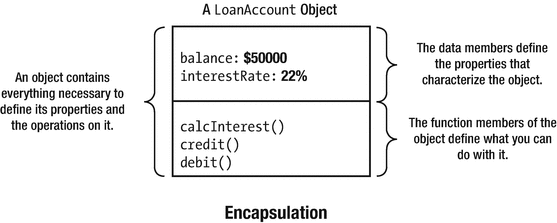
An example of encapsulation
Data Hiding
Of course, the bank wouldn’t want the balance for a loan account (or the interest rate for that matter) changed arbitrarily from outside an object. Permitting this would be a recipe for chaos. Ideally, the member variables of a LoanAccount object are protected from direct outside interference and are only modifiable in a controlled way. The ability to make the data values for an object generally inaccessible is called data hiding or information hiding .
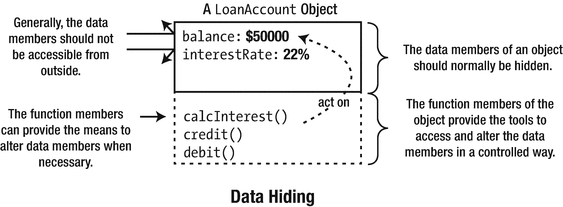
An example of data hiding
Data hiding is important because it is necessary if you are to maintain the integrity of an object. If an object is supposed to represent a duck, it should not have four legs; the way to enforce this is to make the leg count inaccessible, in other words, to “hide” the data. Of course, an object may have data values that can legitimately vary, but even then you often want to control the range; after all, a duck doesn’t usually weigh 300 pounds, and its weight is definitely rarely zero or negative. Hiding the data belonging to an object prevents it from being accessed directly, but you can provide access through functions that are members of the object, either to alter a data value in a controlled way or simply to obtain its value. Such functions can check that the change they’re being asked to make is legal and within prescribed limits where necessary.
You can think of the member variables as representing the state of the object, and the member functions that manipulate them as representing the object’s interface to the outside world. Using the class then involves programming using the functions declared as the interface. A program using the class interface is dependent only on the function names, parameter types, and return types specified for the interface. The internal mechanics of these functions don’t affect the rest of the program that is creating and using objects of the class. That means it’s important to get the class interface right at the design stage. You can subsequently change the implementation to your heart’s content without necessitating any changes to programs that use the class.
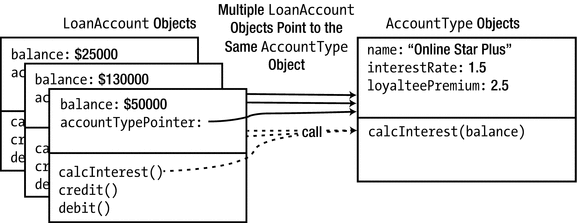
Reworking the representation of the internal state of objects while preserving their interface
LoanAccount objects now no longer store their interest rate themselves but instead point to an AccountType, which stores all necessary member variables for calculating an account’s interest. The calcInterest() member function of LoanAccount therefore calls upon the associated AccountType to do the actual calculation; for this, all the latter needs from an account is its current balance. This more object-oriented design allows you to easily modify the interest rates of all LoanAccounts pointing to the same AccountType all at once or to change the type of an account without re-creating it.
The main point we want to make with this example is that even though both the internal representation (the interestRate member) and the workings (the calcInterest() member) of a LoanAccount have changed drastically, its interface to the outside world remained constant. As far as the rest of the program is concerned, it therefore appears as if nothing has changed at all. Such an overhaul of a LoanAccount’s representation and logic would’ve been much harder if code from outside of its class definition would’ve been accessing the old, now-removed interestRate member variable of LoanAccounts directly. We would then have had to rework all code using LoanAccount objects as well. Thanks to data hiding, external code can only access member variables through well-defined interface functions. So, all we had to do is to redefine these member functions; we didn’t have to worry about the rest of the program.
Notice moreover that because external code could obtain the annual interest only through the calcInterest() interface function, it was trivial for us to introduce an extra “loyalty premium” and use this during interest calculations. This again would’ve been near impossible if external code would’ve been reading the old interestRate member directly to calculate interests themselves.
Data hiding facilitates maintaining the integrity of an object. It allows you to make sure that an object’s internal state—the combination of all its member variables—remains valid at all times.
Data hiding, combined with a well-thought-out interface, allows you to rework both an object’s internal representation (that is, its state) and the implementation of its member functions (that is, its behavior) without having to rework the rest of the program as well. In object-oriented speak we say that data hiding reduces the coupling between a class and the code that uses it. Interface stability is, of course, even more critical if you are developing a software library that is used by external customers.
A third motivation for accessing member variables only through interface functions is that it allows you to inject some extra code into these functions. Such code could add an entry to a log file marking the access or change, could make sure the data can be accessed safely by multiple callers at the same time (we’ll briefly discuss C++’s concurrency facilities near the end of the book), or could notify other objects that some state has been modified (these other objects could then, for instance, update the user interface of your application, say to reflect updates to a LoanAccount’s balance), and so on. None of this would be possible if you allow external code to access member variables directly.
A fourth and final motivation for not allowing direct access to data variables is that it complicates debugging. Most development environments support the concept of breakpoints. Breakpoints are user-specified points during debugging runs of the code where the execution becomes paused, allowing you to inspect the state of your objects. While some environments have more advanced functionality to put breakpoints if a particular member variable changes, putting breakpoints on function calls or specific lines of code inside functions is much easier.
In this section, we created an extra AccountType class to facilitate working with different types of accounts. This is by no means the only way to model these real-world concepts into classes and objects. In the next section we’ll present a powerful alternative called inheritance. Which design you should use will depend on the exact needs of your concrete application.
Inheritance
Inheritance is the ability to define one type in terms of another. For example, suppose you have defined a BankAccount type that contains members that deal with the broad issues of bank accounts. Inheritance allows you to create the LoanAccount type as a specialized kind of BankAccount. You could define a LoanAccount as being like a BankAccount, but with a few extra properties and functions of its own. The LoanAccount type inherits all the members of BankAccount, which is referred to as its base class. In this case, you’d say that LoanAccount is derived from BankAccount.
Each LoanAccount object contains all the members that a BankAccount object does, but it has the option of defining new members of its own or of redefining the functions it inherits so that they are more meaningful in its context. Redefining a base class’s function in a derived class is called overriding ; the latter function is said to override the former. This last ability is very powerful, as you’ll see.
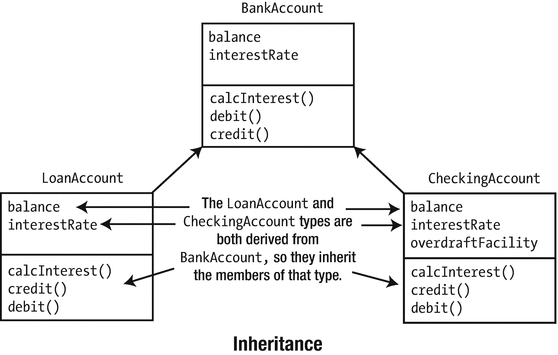
An example of inheritance
Both of the LoanAccount and CheckingAccount types are defined so that they are derived from the type BankAccount. They inherit the member variables and member functions of BankAccount, but they are free to define new characteristics that are specific to their own type.
In this example, CheckingAccount has added a member variable called overdraftFacility that is unique to itself, and both the derived classes can override any of the member functions that they inherit from the base class. It’s likely they would override calcInterest(), for example, because calculating and dealing with the interest for a checking account involves something rather different than doing it for a loan account.
Polymorphism
Polymorphism means the ability to assume different forms at different times. Polymorphism in C++ always involves calling a member function of an object using either a pointer or a reference. Such function calls can have different effects at different times—sort of Jekyll and Hyde function calls. The mechanism works only for objects of types that are derived from a common base type, such as the BankAccount type. Polymorphism means that objects belonging to a “family” of inheritance-related classes can be passed around and operated on using base class pointers and references.
The LoanAccount and CheckingAccount objects can both be passed around using a pointer or reference to BankAccount. The pointer or reference can be used to call the inherited member functions of whatever object it refers to. The idea and implications of this will be easier to appreciate if we look at a specific case.
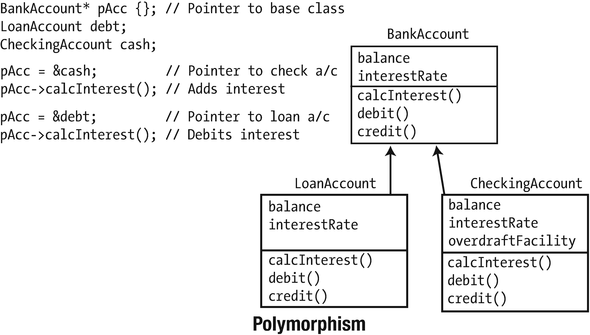
An example of polymorphism
The beauty of polymorphism is that the function called by pAcc->calcInterest() varies depending on what pAcc points to. If it points to a LoanAccount object, then the calcInterest() function for that object is called, and interest is debited from the account. If it points to a CheckingAccount object, the result is different because the calcInterest() function for that object is called, and interest is credited to the account. The particular function that is called through the pointer is decided at runtime. That is, it is decided not when the program is compiled but when it executes. Thus, the same function call can do different things depending on what kind of object the pointer points to. Figure 11-5 shows just two different types, but in general, you can get polymorphic behavior with as many different types derived from a common base class as your application requires. You need quite a bit of C++ language know-how to accomplish what we’ve described, and that’s exactly what you’ll be exploring in the rest of this chapter and throughout the next three chapters.
Terminology
A class is a user-defined data type.
The variables and functions defined within a class are members of the class. The variables are member variables, and the functions are member functions. Member functions are also often referred to as methods; member variables are called either data members or fields .
Variables of a class type store objects. Objects are sometimes called instances of the class. Defining an instance of a class is referred to as instantiation .
Object-oriented programming is a programming style based on the idea of defining your own data types as classes. It involves the ideas of encapsulation, data hiding, class inheritance, and polymorphism.
When you get into the detail of object-oriented programming, it may seem a little complicated in places. Getting back to the basics can often help make things clearer, so use this list to always keep in mind what objects are really about. Object-oriented programming is about writing programs in terms of the objects that are specific to the domain of your problem. All the facilities around classes are there to make this as comprehensive and flexible as possible.
Defining a Class
A class is a user-defined type. The definition of a type uses the class keyword. The basic organization of a class definition looks like this:
The name of this class type is ClassName. It’s a common convention to use the uppercase name for user-defined classes to distinguish class types from variable names. We’ll adopt this convention in the examples. The members of the class are all specified between the braces. For now we will include the definitions of all member functions inside the class definition, but later in this chapter we’ll see that they can be defined outside the class definition as well. Note that the semicolon after the closing brace for the class definition must be present.
All the members of a class are private by default, which means they cannot be accessed from outside the class. This is obviously not acceptable for the member functions that form the interface. You use the public keyword followed by a colon to make all subsequent members accessible from outside the class. Members specified after the private keyword are not accessible from outside the class. public and private are access specifiers for the class members. There’s another access specifier, protected, that you’ll meet later. Here’s how an outline class looks with access specifiers :
public and private precede a sequence of members that are or are not accessible outside the class. The specification of public or private applies to all members that follow until there is a different specification. You could omit the first private specification here and get the default status of private, but it’s better to make it explicit. Members in a private section of a class can be accessed only from functions that are members of the same class. Member variables or functions that need to be accessed by a function that is not a member of the class must be specified as public. A member function can reference any other member of the same class, regardless of the access specification, by just using its name. To make all this generality clearer, let’s start with an example of defining a class to represent a box:
length, width, and height are member variables of the Box class and are all of type double. They are also private and therefore cannot be accessed from outside the class. Only the public volume() member function can refer to these private members. In general, you can repeat any of the access specifiers in a class definition as many times as you want. This enables you to place member variables and member functions in separate groups within the class definition, each with their own access specifier. It can be easier to see the internal structure of a class definition if you arrange to group the member variables and the member functions separately, according to their access specifiers.
Each of the member variables is initialized to 1.0 because a zero dimension for a box would not make much sense. You don’t have to initialize member variables in this way—there are other ways of setting their values, as you’ll see in the next section. If their values are not set by some mechanism, though, they will contain junk values.
Every Box object will have its own set of member variables . This is obvious really; if they didn’t have their own member variables, all objects would be identical. You can create a variable of type Box like this:
The myBox variable refers to a Box object with the default member variable values. You could call the volume() member for the object to calculate the volume:
Of course, the volume will be 1 because the initial values for the three dimensions are 1.0. The fact that the member variables of the Box class are private means that we have no way to set these members. You could specify the member variables as public, in which case you can set them explicitly from outside the class, like this:
We said earlier that it’s bad practice to make member variables public. To set the values of private member variables when an object is created, you must add a public member function of a special kind to the class, called a constructor. Objects of a class type can only be created using a constructor.
Note
C++ also includes the ability to define a structure to define a type. The structure originated in C. Structures and classes are nearly completely equivalent. You define a structure in the same way as a class, only using the struct keyword instead of the class keyword. The main difference between the two is that in contrast to members of a class, the members of a structure are public by default. If you always state your access specifiers explicitly like we recommended, however, this difference becomes moot. Structures are still used frequently in C++ programs to define types that represent simple aggregates of several variables of different types—the margin sizes and dimensions of a printed page, for example. Such structures then typically don’t have many member functions; they’re mostly used to aggregate some publically accessible member variables. We won’t discuss structures as a separate topic because aside from the default access specification and the use of the struct keyword, you define and use a structure in the same way as a class.
Constructors
A class constructor is a special kind of function in a class that differs in a few significant respects from an ordinary member function. A constructor is called whenever a new instance of the class is defined. It provides the opportunity to initialize the new object as it is created and to ensure that member variables contain valid values. A class constructor always has the same name as the class. Box(), for example, is a constructor for the Box class. A constructor does not return a value and therefore has no return type. It is an error to specify a return type for a constructor.
Default Constructors
Hang on a moment! We created a Box object in the previous section and calculated its volume. How could that have happened? There was no constructor defined. Well, there’s no such thing as a class without constructors. If you don’t define a constructor for a class, the compiler will supply a default default constructor . And no, the two “defaults” is no typo. We’ll get back to this shortly. Thanks to this default default constructor, the Box class effectively behaves as if defined as follows:
A default constructor is a constructor that can be called without arguments. If you do not define any constructor for a class—so no default constructor or any other constructor—the compiler generates a default constructor for you. That’s why it’s called a default default constructor; it is a default constructor that is generated by default. A compiler-generated default constructor has no parameters, and its sole purpose is to allow an object to be created. It does nothing else, so the member variables will have their default values. If no initial value is specified for a member variable of either a pointer (int*, const Box* …) or fundamental type (double, int, bool …), it will contain an arbitrary junk value. Note that as soon as you do define any constructor, even a nondefault one with parameters, the default default constructor is no longer supplied. There are circumstances in which you need a constructor with no parameters in addition to a constructor that you define that has parameters. In this case, you must ensure that there is a definition for the no-arg constructor in the class.
Defining a Class Constructor
Let’s extend the Box class from the previous example to incorporate a constructor and then check that it works:
This produces the following output:
The constructor for the Box class has three parameters of type double, corresponding to the initial values for the length, width, and height members of an object. No return type is allowed, and the name of the constructor must be the same as the class name, Box. The first statement in the constructor body outputs a message to show when it’s called. You wouldn’t do this in production programs, but it’s helpful when you’re testing a program and to understand what’s happening and when. We’ll use it regularly to trace what is happening in the examples. The rest of the code in the body of the constructor assigns the arguments to the corresponding member variables. You could include checks that look for valid, non-negative arguments that are the dimensions of a box. In the context of a real application, you’d probably want to do this, but here you only need to learn how a constructor works, so we’ll keep it simple for now.
The firstBox object is created with this statement:
The initial values for the member variables, length, width, and height, appear in the braced initializer and are passed as arguments to the constructor. Because there are three values in the list, the compiler looks for a Box constructor with three parameters. When the constructor is called, it displays the message that appears as the first line of output, so you know that the constructor that you have added to the class is called.
We said earlier that once you define a constructor, the compiler won’t supply a default constructor anymore, at least not by default. That means this statement will no longer compile:
This object would have the default dimensions. If you want to allow Box objects to be defined like this, you must add a definition for a constructor without arguments. We will do so in the next section.
Using the default Keyword
As soon as you add a constructor, any constructor, the compiler no longer implicitly defines a default default constructor . If you then still want your objects to be default-constructible, it is up to you to ensure that the class has a default constructor. Your first option, of course, is to define one yourself. For the Box class of Ex11_01.cpp, for instance, all you’d have to do is add the following constructor definition somewhere in the public section of the class:
Because the member variables of a Box are already given a valid value, 1.0, during their initialization, there is nothing left for you to do in the body of the default constructor.
Instead of defining a default constructor with an empty function body, you can also use the default keyword. This keyword can be used to instruct the compiler to generate a default default constructor, even if there are other user-defined constructors present. For Box, this looks as follows:
Both the equals sign and the semicolon are required. A modified version of Ex11_01 with a defaulted constructor is available online in Ex11_01A.cpp.
While an explicit empty body definition and a defaulted constructor declaration are nearly equivalent, the use of the default keyword is preferred in modern C++ code:
Tip
If there is nothing to do in a default constructor’s body (or initializer list, as we’ll encounter this later), always prefer = default; over {}. Not only does this make it more apparent that it concerns a default default constructor, there are also a few subtle technical reasons outside the scope of this discussion that make the compiler-generated version the better choice.
Defining Functions and Constructors Outside the Class
We said earlier that the definition of a member function can be placed outside the class definition. This is also true for class constructors. This can all be done in a single file if you want, but it is far more common to put the class definition in a header file and the definitions of the member functions and constructors in a corresponding source file. We can define the Box class in a header file like this:
The definitions for the volume() member and the constructor then go in a .cpp file. The name of each member function and constructor in the source must be qualified with the class name so the compiler knows to which class they belong:
If Box.h was not included into Box. cpp , the compiler would not know that Box is a class, so the code would not compile. Notice that a constructor that is defaulted using the default keyword in the class definition must not have a definition in the source file.
Separating the definitions of classes from the definitions of their members makes the code easier to manage. For a large class with lots of member functions and constructors, it would be very cumbersome if all the function definitions appeared within the class. More important, any source file that creates objects of type Box just needs to include the header file Box.h. A programmer using this class doesn’t need access to the source code definitions of the member functions, only to the class definition in the header file. As long as the class definition remains fixed, you’re free to change the implementations of the member functions without affecting the operation of programs that use the class.
The previous example would look like this with the Box class split into .h and .cpp files:
This is the same version of main() as in the previous example. The only difference is the #include directive for the Box.h header file that contains the definition of the Box class.
Note
Defining a member function outside a class is actually not quite the same as placing the definition inside the class. One subtle difference is that function definitions within a class definition are implicitly inline. (This doesn’t necessarily mean they will be implemented as inline functions, though—the compiler still decides that, as we discussed in Chapter 8.)
Default Constructor Parameter Values
When we discussed “ordinary” functions, you saw that you can specify default values for the parameters in the function prototype. You can do this for class member functions, including constructors. Default parameter values for constructors and member functions always go inside the class, not in an external constructor or function definition. We can change the class definition in the previous example to the following:
If you make this change to the previous example, what happens? You get an error message from the compiler, of course! The message basically says that you have multiple default constructors defined. The reason for the confusion is the constructor with three parameters allows all three arguments to be omitted, which is indistinguishable from a call to the no-arg constructor. A constructor for which all parameters have a default value still counts as a default constructor. The obvious solution is to get rid of the defaulted constructor that accepts no parameters in this instance. If you do so, everything compiles and executes OK.
Using a Member Initializer List
So far, you’ve set values for member variables in the body of a constructor using explicit assignment. You can use an alternative and more efficient technique that uses a member initializer list. We’ll illustrate this with an alternative version of the Box class constructor :
The values of the member variables are specified as initializing values in the initialization list that is part of the constructor header. length is initialized with lv, for example. The initialization list is separated from the parameter list by a colon (:), and each initializer is separated from the next by a comma (,). If you substitute this version of the constructor in the previous example, you’ll see that it works just as well.
This is more than just a different notation, though. When you initialize a member variable using an assignment statement in the body of the constructor, the member variable is first created (using a constructor call if it is an instance of a class) after which the assignment is carried out as a separate operation. When you use an initialization list, the initial value is used to initialize the member variable as it is created. This can be a much more efficient process, particularly if the member variable is a class instance. This technique for initializing parameters in a constructor is important for another reason. As you’ll see, it is the only way of setting values for certain types of member variables.
There is one small caveat to watch out for. The order in which the member variables are initialized is determined by the order in which they are declared in the class definition—so not as you may expect by the order in which they appear in the member initializer list. This only matters, of course, if the member variables are initialized using expressions for which the order of evaluation matters. Plausible examples would be where a member variable is initialized either by using the value of another one or by calling a member function that relies on other member variables being initialized already. Relying on this evaluation order in production code can be dangerous. Even if everything is working correctly today, next year someone may change the declaration order and inadvertently break the correctness of one of the class’s constructors!
Tip
As a rule, prefer to initialize all member variables in the constructor’s member initializer list. This is generally more efficient. To avoid any confusion, you ideally put the member variables in the initializer list in the same order as they are declared in the class definition. You should initialize member variables in the body of the constructor only if either more complex logic is required or the order in which they are initialized is important.
Using the explicit Keyword
A problem with class constructors with a single parameter is that the compiler can use such a constructor as an implicit conversion from the type of the parameter to the class type. This can produce undesirable results in some circumstances. Let’s consider a particular situation. Suppose that you define a class that defines boxes that are cubes for which all three sides have the same length :
You can define the constructor in Cube.cpp as follows:
The definition of the function that calculates the volume will be as follows:
One Cube object is greater than another if its volume is the greater of the two. The hasLargerVolumeThan() member can thus be defined as follows:
The constructor requires only one argument of type double. Clearly, the compiler could use the constructor to convert a double value to a Cube object , but under what circumstances is that likely to happen? The class defines a volume() function and a function to compare the current object with another Cube object passed as an argument, which returns true if the current object has the greater volume. You might use the Cube class in the following way:
Here’s the output:
The output shows that the volume of box1 is definitely not less than 50, but the last line of output indicates the opposite. The code presumes that hasLargerVolumeThan() compares the volume of the current object with 50.0. In reality, the function compares two Cube objects. The compiler knows that the argument to the hasLargerVolumeThan() function should be a Cube object, but it compiles this quite happily because a constructor is available that converts the argument 50.0 to a Cube object. The code the compiler produces is equivalent to the following:
The function is not comparing the volume of the box1 object with 50.0, but with 125000.0, which is the volume of a Cube object with a side of length 50.0! The result is very different from what was expected.
Happily, you can prevent this nightmare from happening by declaring the constructor as explicit:
With this definition for Cube, Ex11_02.cpp will not compile. The compiler never uses a constructor declared as explicit for an implicit conversion; it can be used only explicitly in the program. By using the explicit keyword with constructors that have a single parameter, you prevent implicit conversions from the parameter type to the class type. The hasLargerVolumeThan() member only accepts a Cube object as an argument, so calling it with an argument of type double does not compile.
Tip
Implicit conversions may lead to confusing code; most of the time it becomes far more obvious why code compiles and what it does if you use explicit conversions. By default, you should therefore declare all single-argument constructors as explicit (note that this includes constructors with multiple parameters where at least all but the first have default values); omit explicit only if implicit type conversions are truly desirable.
Delegating Constructors
A class can have several constructors that provide different ways of creating an object. The code for one constructor can call another of the same class in the initialization list. This can avoid repeating the same code in several constructors. Here’s a simple illustration of this using the Box class:
Notice that we have restored the initial values for the member variables and removed the default values for the constructor parameters. This is because the compiler would not be able to distinguish between a call of the constructor with a single parameter and a call of the constructor with three parameters with the last two arguments omitted. This removes the capability for creating an object with no arguments, and the compiler will not supply the default, so we have added the definition of the no-arg constructor to the class.
The implementation of the first constructor can be as follows:
The second constructor creates a Box object with all sides equal, and we can implement it like this:
This constructor just calls the previous constructor in the initialization list. The side argument is used as all three values in the argument list for the previous constructor. This is called a delegating constructor because it delegates the construction work to the other constructor. Delegating constructors help to shorten and simplify constructor code and can make the class definition easier to understand. Here’s an example that exercises this:
The complete code is in the download. The output is as follows:
You can see from the output that creating the first object just calls constructor 1. Creating the second object calls constructor 1 followed by constructor 2. This also shows that execution of the initialization list for a constructor occurs before the code in the body of the constructor. The volumes are as you would expect.
You should only call a constructor for the same class in the initialization list for a constructor. Calling a constructor of the same class in the body of a delegating constructor is not the same. Further, you must not initialize member variables in the initialization list of a delegating constructor. The code will not compile if you do. You can set values for member variables in the body of a delegating constructor, but in that case you should consider whether the constructor should really be implemented as a delegating constructor.
The Copy Constructor
Suppose you add the following statement to main() in Ex11_03.cpp:
The output shows that box3 does indeed have the dimensions of box2, but there’s no constructor defined with a parameter of type Box, so how was box3 created? The answer is that the compiler supplied a default copy constructor, which is a constructor that creates an object by copying an existing object. The default copy constructor copies the values of the member variables of the object that is the argument to the new object.
The default behavior is fine in the case of Box objects , but it can cause problems when one or more member variables are pointers. Just copying a pointer does not duplicate what it points to, which means that when an object is created by the copy constructor, it is interlinked with the original object. Both objects will contain a member pointing to the same thing. A simple example is if an object contains a pointer to a string. A duplicate object will have a member pointing to the same string, so if the string is changed for one object, it will be changed for the other. This is not usually what you want. In this case, you must define a copy constructor. We return to the questions of whether, when, and why to define a copy constructor in Chapter 17. For now, we’ll just focus on the how.
Implementing the Copy Constructor
The copy constructor must accept an argument of the same class type and create a duplicate in an appropriate manner. This poses an immediate problem that you must overcome; you can see it clearly if you try to define the copy constructor for the Box class like this:
Each member variable of the new object is initialized with the value of the object that is the argument. No code is needed in the body of the copy constructor in this instance. This looks OK, but consider what happens when the constructor is called. The argument is passed by value, but because the argument is a Box object, the compiler arranges to call the copy constructor for the Box class to make a copy of the argument. Of course, the argument to this call of the copy constructor is passed by value, so another call to the copy constructor is required, and so on. In short, you’ve created a situation where an unlimited number of recursive calls to the copy constructor will occur. Your compiler won’t allow this code to compile.
To avoid the problem the parameter for the copy constructor must be a reference. More specifically, it should be a reference-to-const parameter. For the Box class, this looks like this:
Now that the argument is no longer passed by value, recursive calls of the copy constructor are avoided. The compiler initializes the parameter box with the object that is passed to it. The parameter should be reference-to-const because a copy constructor is only in the business of creating duplicates; it should not modify the original. A reference-to-const parameter allows const and non-const objects to be copied. If the parameter was a reference-to-non-const, the constructor would not accept a const object as the argument, thus disallowing copying of const objects. You can conclude from this that the parameter type for a copy constructor is always a reference to a const object of the same class type. In other words, the form of the copy constructor is the same for any class:
Of course, the copy constructor may also have an initialization list and may even delegate to other, non-copy constructors as well. Here’s an example:
Accessing Private Class Members
Inhibiting all external access to the values of private member variables of a class is rather extreme. It’s a good idea to protect them from unauthorized modification, but if you don’t know what the dimensions of a particular Box object are, you have no way to find out. Surely it doesn’t need to be that secret, right?
It doesn’t, and you don’t need to expose the member variables by using the public keyword. You can provide access to the values of private member variables by adding member functions to return their values. To provide access to the dimensions of a Box object from outside the class, you just need to add these three functions to the class definition:
The values of the member variables are fully accessible, but they can’t be changed from outside the class, so the integrity of the class is preserved without the secrecy. Functions of this kind often have their definitions within the class because they are short, and this makes them inline by default. Consequently, the overhead involved in accessing the value of a member variable is minimal. Functions that retrieve the values of member variables are often referred to as accessor functions.
Using these accessor functions is simple:
You can use this approach for any class. You just write an accessor function for each member variable that you want to make available to the outside world.
There will be situations in which you do want to allow member variables to be changed from outside the class. If you supply a member function to do this rather than exposing the member variable directly, you have the opportunity to perform integrity checks on the value. For example, you could add functions to allow the dimensions of a Box object to be changed as well:
The if statement in each set function ensures that you only accept new values that are positive. If a new value is supplied for a member variable that is zero or negative, it will be ignored. Member functions that allow member variables to be modified are sometimes called mutators . Using these simple mutators is equally straightforward:
You can find a complete test program that puts everything together inside Ex11_04.
Note
By popular convention, the member function to access a member variable called myMember is mostly called getMyMember(), and the function to update a variable setMyMember(). Because of this, such member functions are commonly referred to simply as getters and setters, respectively. One popular exception to this naming convention is that accessors for members of type bool are often named isMyMember(). That is, the getter for a Boolean member variable valid is usually called isValid() instead of getValid(). And no, this does not mean we’re now calling them issers; these Boolean accessors are still just called getters.
The this Pointer
The volume() function in the Box class was implemented in terms of the unqualified class member names. Every object of type Box contains these members, so there must be a way for the function to refer to the members of the particular object for which it has been called. In other words, when the code in volume() accesses the length member, there has to be a way for length to refer to the member of the object for which the function is called, and not some other object.
When a class member function executes, it automatically contains a hidden pointer with the name this, which contains the address of the object for which the function was called. For example, suppose you write this statement:
The this pointer in the volume() function contains the address of myBox. When you call the function for a different Box object, this will contain the address of that object. This means that when the member variable length is accessed in the volume() function during execution, it is actually referring to this->length, which is the fully specified reference to the object member that is being used. The compiler takes care of adding the this pointer name to the member names in the function. In other words, the compiler implements the function as follows:
You could write the function explicitly using the pointer this if you wanted, but it isn’t necessary. However, there are situations where you do need to use this explicitly, such as when you need to return the address of the current object.
Note
You’ll learn about static member functions of a class later in this chapter. These do not contain a this pointer.
Returning this from a Function
If the return type for a member function is a pointer to the class type, you can return this. You can then use the pointer returned by one member function to call another. Let’s consider an example of where this would be useful.
Suppose you alter the mutator functions of the Box class from Ex11_04 to, after setting the length, width, and height of a box, return a copy of the this pointer:
You can implement these in Box.cpp as follows:
Now you can modify all the dimensions of a Box object in a single statement:
Because the mutator functions return the this pointer, you can use the value returned by one function to call the next. Thus, the pointer returned by setLength() is used to call setWidth(), which returns a pointer you can use to call setHeight(). Isn’t that nice?
Instead of a pointer, you can of course return a reference as well. The setLength() function, for instance, would then become defined as follows:
If you do the same for setWidth() and setHeight(), you obtain the Box class of Ex11_05. The sample program in Ex11_05.cpp then shows that returning references to *this allows you to chain member function calls together as follows:
This pattern is called method chaining. If the goal is to facilitate statements that employ method chaining, it is commonly done using references. You will encounter several conventional examples of this pattern in the next chapter when we discuss operator overloading.
const Objects and const Member Functions
A const variable is a variable whose value cannot be altered. You know this already. Naturally, you can also define const variables of class types. These variables are then called const objects. None of the member variables that constitute the state of a const object can be altered. In other words, any member variable of a const object is itself a const variable and thus immutable.
Suppose for a moment that the length, width, and height member variables of our favorite Box class are public. Then the following would still not compile:
Reading a member variable from the const object myBox is allowed, but any attempt to assign a value to one or to otherwise modify such a member variable will result in a compiler error.
From Chapter 8, you’ll recall that this principle extends to pointer-to-const and reference-to-const variables as well:
In the previous snippet, myBox object itself is a non-const, mutable Box object. Nevertheless, if you store its address in a variable of type pointer-to-const-Box, you can no longer modify the state of myBox using that pointer. The same would hold if you replace the pointer with a reference-to-const.
You’ll also recall that this plays a critical role when objects are either passed to, or returned from, a function, either by reference or using a pointer. Let printBox() be a function with the following signature:
Then printBox() cannot modify the state of the Box object it is passed as an argument, even if that original Box object will be non-const.
In the examples in the remainder of this section, we’ll mostly be using const objects. Always remember, though, that the same restrictions apply when accessing an object through a pointer-to-const or a reference-to-const as when accessing a const object directly.
const Member Functions
To see how member functions behave for const objects, let’s go back to the Box class of Ex11_04. In this version of the class, the member variables of a Box object are properly hidden and can be manipulated only through public getter and setter member functions. Suppose now that you change the code in the main() function of Ex11_04 so that myBox is const:
Now the example will no longer compile! Of course, the fact that the compiler refuses to compile the last three lines in the previous code fragment is exactly what you want. After all, you should not be able to alter the state of a const object . We said earlier already the compiler prevents direct assignments to member variables—supposing you have access—so why should it allow indirect assignments inside member functions? The Box object would not be much of an immutable constant if you were allowed to call these setters, now would it?
Unfortunately, however, the getter functions cannot be called on a const object either simply because there’s the risk that they could change the object. In our example, this means that the compiler will not only refuse to compile the last three lines but also the statement before that. Similarly, any attempt to call the volume() member function on a const myBox would result in a compilation error:
Even though you know that volume() doesn’t alter the object, the compiler does not. All it has available when compiling this volume() expression is the function’s prototype in the Box.h header file. And even if it does know the function’s definition from inside the class definition—as with our three getters earlier—the compiler makes no attempt to deduce whether a function modifies the object’s state. All the compiler uses in this setting is the function’s signature.
So, with our current definition of the Box class, const Box objects are rather useless. You cannot call any of its member functions, not even the ones that clearly do not modify any state! To solve this, you’ll have to improve the definition of the Box class. You need a way to tell the compiler which member functions are allowed to be called on const objects. The solutions are so-called const member functions.
First, you need to specify all functions that don’t modify an object as const in the class definition:
Next, you must change the function definition in Box.cpp accordingly:
With these changes, all the calls we expect to work for a const myBox object will effectively work. Of course, calling a setter on it remains impossible. A complete example can be downloaded as Ex11_06.
Tip
For const objects you can only call const member functions. You should therefore specify all member functions that don’t change the object for which they are called as const.
const Correctness
For const objects you can only call const member functions. The idea is that const objects must be totally immutable, so the compiler will only allow you to call member functions that do not, and never will, modify them. Of course, this only truly makes sense if const member functions effectively cannot modify an object’s state. Suppose you were allowed to write the following:
These three functions clearly modify the state of a Box. So if they were allowed to be declared const like this, you’d again be able to call these setters on const Box objects. This means you would again be able to modify the value of supposedly immutable objects. This would defeat the purpose of const objects. Luckily, the compiler enforces that you can never (inadvertently) modify a const object from inside a const member function. Any attempt to modify an object’s member variable from within a const member functions will result in a compiler error.
Specifying a member function as const effectively makes the this pointer const for that function. The type of the this pointer inside our three setters from before, for instance, would be const Box*, which is pointer to a const Box. And you cannot assign to member variables through a pointer-to-const. Similarly, this implies you cannot call any non-const member functions from within a const member function (because you cannot call non-const member functions on either a pointer-to-const or a reference-to-const). Calling setLength() from within a const volume() member would therefore not be allowed:
Calling const member functions , on the other hand, is allowed:
Since these three getter function are const as well, calling them from within the volume() function is no problem. The compiler knows they will not modify the object either.
The combination of these compiler-enforced restrictions is called const correctness—it prevents const objects from being mutated. We’ll see one final aspect of this at the end of the next subsection.
Overloading on const
Declaring whether a member function is const is part of the function’s signature. This implies that you can overload a non-const member function with a const version. This can be useful and is often done for functions that return a pointer or a reference to (part of) the internal data that is encapsulated by an object. Suppose that instead of the traditional getters and setters for a Box’s member variables, we create functions of this form:
Note that we added underscores to the names of the member variable to avoid them clashing with the names of the member functions. These member functions could now be used as follows:
In a way, these functions are an attempt at a hybrid between a getter and a setter. It’s a failed attempt thus far, because you can currently no longer access the dimensions of a const Box :
You could solve this by overloading the member functions with versions specific for const objects. In general, these extra overloads would have the following form:
Because double is a fundamental type, however, one will often return them by value in these overloads rather than by reference:
Either way, this enables the overloaded length(), width(), and height() functions to be called on const objects as well. Which of the two overloads of each function get used depends on the const-ness of the object upon which the member is called. You could confirm this by adding output statements to both overloads. You can find a little program that does exactly this under Ex11_07.
Note that while it is certainly done at times, in this particular case we do not really recommend using functions of this form to replace the more conventional getter and setters shown earlier. One reason is that statements of the following form are unconventional and hence harder to read or write:
Also, and more important, by adding public member functions that return references to private member variables, you basically forsake most of the advantages of data hiding mentioned earlier in this chapter. You can no longer perform integrity checks on the values assigned to the member variables (such as checking whether all Box dimensions remain positive), change the internal representation of an object, and so on. In other words, it’s almost as bad as simply making the variables public!
There are certainly other circumstances, though, where overloading on const is recommended. You will encounter several examples later, such as when overloading the array access operator in the next chapter.
Note
To preserve const correctness, the following variation of a Box’s getters does not compile:
Because these are const member functions, their implicit this pointers are of type const-pointer-to-Box (const Box*), which in turn makes the Box member variable names references-to-const within the scope of these member function definitions. From a const member function, you can thus never return a reference or a pointer to non-const parts of an object’s states. And this is a good thing. Otherwise, such members would provide a backdoor to modify a const object—an object that in other words should be immutable.
Casting Away const
Very rarely circumstances can arise where a function is dealing with a const object, either passed as an argument or as the object pointed to by this, and it is necessary to make it non-const. The const_cast<>() operator enables you to do this. The const_cast<>() operator is mostly used in one of the following two forms:
For the first form, the type of expression must be either const Type*; or Type*; for the second, it can be either const Type*, const Type&, Type, or Type&.
Caution
The use of const_cast is nearly always frowned upon because it can be used to misuse objects. You should never use this operator to undermine the const-ness of an object. If an object is const, it normally means that you are not expected to modify it. And making unexpected changes is a perfect recipe for bugs. The only situations in which you should use const_cast are those where you are sure the const nature of the object won’t be violated as a result, such as because someone else forgot to add a const in a function declaration, even though you are positive the function doesn’t modify the object . Another example is when you implement the idiom we branded const-and-back-again, which you’ll learn about in Chapter 16.
Using the mutable Keyword
Ordinarily the member variables of a const object cannot be modified. Sometimes you want to allow particular class members to be modifiable even for a const object. You can do this by specifying such members as mutable. In Ex11_08, for example, we started again from Ex11_06 and added an extra, mutable member variable to the declaration of Box in Box.h as follows:
The mutable keyword indicates that the count member can be changed, even when the object is const. In Box.cpp, we can thus modify the count member in some debugging/logging code inside the newly created printVolume() member function, even though it is declared to be const:
If count would not have been explicitly declared to be mutable, modifying it from within the const printVolume() function would’ve been disallowed by the compiler. Any member function, both const and non-const, can always make changes to member variables specified as mutable.
Note that you should only need mutable member variables in rare cases. Usually, if you need to modify an object from within a const function, it probably shouldn’t have been const. Typical uses of mutable member variables include debugging or logging, caching, and thread synchronization members. The latter two are more advanced, so we won’t be giving any examples of these here.
Friends
Under normal circumstances, you’ll hide the member variables of your classes by declaring them as private. You may well have private member functions of the class too. In spite of this, it is sometimes useful to treat selected functions that are not members of the class as “honorary members” and allow them to access non-public members of a class object. That is, you do not want the world to access the internal state of your objects, just a select few related functions. Such functions are called friends of the class. A friend can access any of the members of a class object, however, regardless of their access specification. Therefore:
Caution
Friend declarations risk undermining one of the cornerstones of object-oriented programming: data hiding. They should therefore be used only when absolutely necessary, and this need does not arise that often. You’ll meet one circumstance where it is needed in the next chapter when you learn about operator overloading. Nevertheless, only most classes should not need any friends at all. While that may sound somewhat sad and lonely, the following humorous definition of the C++ programming language should forever remind you why, in C++, one should choose his friends very wisely indeed: “C++: where your friends can access your private parts.”
That being said, we will consider two ways a class can declare what its friends are; either an individual function can be specified as a friend of a class or a whole class can be specified as a friend of another class. In the latter case, all the member functions of the friend class have the same access privileges as a normal member of the class. We’ll consider individual functions as friends first.
The Friend Functions of a Class
To make a function a friend of a class, you must declare it as such within the class definition using the friend keyword . It’s the class that determines its friends; there’s no way to make a function a friend of a class from outside the class definition. A friend function can be a global function, or it can be a member of another class. By definition a function can’t be a friend of the class of which it is a member, so access specifiers don’t apply to the friends of a class.
The need for friend functions in practice is limited. They are useful in situations where a function needs access to the internals of two different kinds of objects ; making the function a friend of both classes makes that possible. We will demonstrate how they work in simpler contexts that don’t necessarily reflect a situation where they are required. Suppose that you want to implement a friend function in the Box class to compute the surface area of a Box object. To make the function a friend, you must declare it as such within the Box class definition. Here’s a version that does that:
Box.cpp will contain the definition of the constructor and volume() member. There is nothing in this source file that you haven’t already seen several times before. Here is the code to try the friend function:
Here’s the expected output :
You declare the surfaceArea() function as a friend of the Box class by writing the function prototype within the Box class definition preceded by the friend keyword. The function doesn’t alter the Box object that is passed as the argument, so it’s sensible to use a const reference parameter specification. It’s also a good idea to be consistent when placing the friend declaration within the definition of the class. You can see that we’ve chosen to position this declaration at the end of all the public members of the class. The rationale for this is that the function is part of the class interface because it has full access to all class members.
surfaceArea() is a global function, and its definition follows that of main(). You could put it in Box.cpp because it is related to the Box class, but placing it in the main file helps indicate that it’s a global function.
Notice that you access the member variables of the object within the definition of surfaceArea() by using the Box object that is passed to the function as a parameter. A friend function is not a class member, so the member variables can’t be referenced by their names alone. They each have to be qualified by an object name in the same way as they would be in an ordinary function that accesses public members of a class. A friend function is the same as an ordinary function, except that it can access all the members of a class without restriction.
The main() function creates one Box object by specifying its dimensions; one object with no dimensions specified (so the defaults will apply), and one dynamically allocated Box object. The latter shows that you can create a smart pointer to a Box object allocated in the free store in the way that you have seen with std::string objects. From the output you can see that everything works as expected with all three objects.
Although this example demonstrates how you write a friend function, it is not very realistic. You could have used accessor member functions to return the values of the member variables. Then surfaceArea() wouldn’t need to be a friend function. Perhaps the best option would have been to make surfaceArea() a public member function of the class so that the capability for computing the surface area of a box becomes part of the class interface. A friend function should always be a last resort.
Friend Classes
You can declare a whole class to be a friend of another class. All the member functions of a friend class have unrestricted access to all the members of the class of which it has been declared a friend.
For example, suppose you have defined a Carton class and want to allow the member functions of the Carton class to have access to the members of the Box class. Including a statement in the Box class definition that declares Carton to be a friend will enable this:
Friendship is not a reciprocal arrangement. Functions in the Carton class can access all the members of the Box class, but functions in the Box class have no access to the private members of the Carton class. Friendship among classes is not transitive either; just because class A is a friend of class B and class B is a friend of class C, it doesn’t follow that class A is a friend of class C.
A typical use for a friend class is where the functioning of one class is highly intertwined with that of another. A linked list basically involves two class types: a List class that maintains a list of objects (usually called nodes) and a Node class that defines what a node is. The List class needs to stitch the Node objects together by setting a pointer in each Node object so that it points to the next Node object. Making the List class a friend of the class that defines a node would enable members of the List class to access the members of the Node class directly. Later in this chapter we’ll discuss nested classes, a viable alternative for friend classes in such cases.
Arrays of Class Objects
You can create an array of objects of a class type in the same way as you create an array of elements of any other type. Each array element has to be created by a constructor, and for each element that does not have an initial value specified, the compiler arranges for the no-arg constructor to be called. You can see this happening with an example. The Box class definition in Box.h is as follows:
The contents of Box.cpp are as follows:
Finally, the Ex11_10.cpp source file that defines the program’s main() function will contain the following:
The output is as follows:
The interesting bit is the last seven lines, which results from the creation of the array of Box objects. The initial values for the first three array elements are existing objects, so the compiler calls the copy constructor to duplicate box1, box2, and box3. The fourth element is initialized with an object that is created in the braced initializer for the array by the constructor 2, which calls constructor 1 in its initialization list. The last two array elements have no initial values specified, so the compiler calls the default constructor to create them.
The Size of a Class Object
You obtain the size of a class object by using the sizeof operator in the same way you have previously with fundamental data types. You can apply the operator to a particular object or to the class type. The size of a class object is generally the sum of the sizes of the member variables of the class, although it may turn out to be greater than this. This isn’t something that should bother you, but it’s nice to know why.
On most computers, for performance reasons, two-byte variables must be placed at an address that is a multiple of two, four-byte variables must be placed at an address that is a multiple of four, and so on. This is called boundary alignment . A consequence of this is that sometimes the compiler must leave gaps between the memory for one value and the next. If, on such a machine, you have three variables that occupy two bytes, followed by a variable that requires four bytes, a gap of two bytes may be left in order to place the fourth variable on the correct boundary. In this case, the total space required by all four is greater than the sum of the individual sizes.
Static Members of a Class
You can declare members of a class as static. Static member variables of a class are used to provide class-wide storage of data that is independent of any particular object of the class type but is accessible by any of them. They record properties of the class as a whole, rather than of individual objects. You can use static member variables to store constants that are specific to a class, or you could store information about the objects of a class in general, such as how many there are in existence.
A static member function is independent of any individual class object but can be invoked by any class object if necessary. It can also be invoked from outside the class if it is a public member. A common use of static member functions is to operate on static member variables, regardless of whether any objects of the class have been defined. In general:
Tip
If a member function does not access any nonstatic member variables, it may be a good candidate for being declared as a static member function.
Static Member Variables
Static member variables of a class are associated with the class as a whole, not with any particular object of the class. When you declare a member variable of a class as static, the static member variable is defined only once and will exist even if no class objects have been created. Each static member variable is accessible in any object of the class and is shared among however many objects there are. An object gets its own independent copies of the ordinary member variables, but only one instance of each static member variable exists, regardless of how many class objects have been defined.
One use for a static member variable is to count how many objects of a class exist. You could add a static member variable to the Box class by adding the following statement to your class definition:
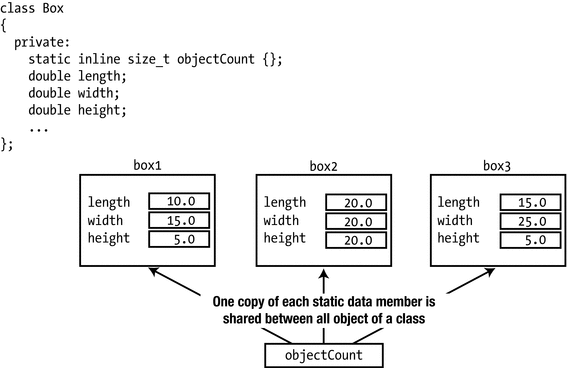
Static class members are shared between objects.
The static objectCount member is private, so you can’t access objectCount from outside the Box class. Naturally, static members can be either public or protected as well.
The objectCount variable is furthermore specified to be inline to allow its variable definition to be #included in multiple translation units without violating the one definition rule (ODR) . This is analogous to what we explained in the previous chapter for variables at namespace or global scope.
Note
Inline variables have been supported only since C++17. Before C++17, your only option was to declare objectCount as follows (this syntax, of course, remains valid today as well):
Doing so, however, creates somewhat of a problem. How do you initialize a noninline static member variable? You don’t want to initialize it in a constructor because you want to initialize it only once, not each time a constructor is called; and anyway, it exists even if no objects exist (and therefore no constructors have been called). And without inline variables, you cannot initialize the variable in the header either, as that would lead to violations of the ODR. The answer is to initialize each noninline static member outside the class with a statement such as this:
This defines objectCount; the line in the class definition only declares that it is a noninline static member of the class—a member that is to be defined elsewhere. Note that the static keyword must not be included in such an out-of-class definition. You do have to qualify the member name with the class name, Box , though, so that the compiler understands that you are referring to a static member of the class. Otherwise, you’d simply be creating a global variable that has nothing to do with the class. Because such a statement defines the class static member, it must not occur more than once in a program; otherwise you’d again be breaking the ODR . The logical place to put it would thus be the Box.cpp file. Even though the static member objectCount variable is specified as private, you could still initialize it in this fashion.
Clearly, inline variables are far more convenient, as they can be initialized in the header file without a separate definition in the source file.
Let’s add the static inline objectCount member variable and the object counting capability to Ex11_10. You need two extra statements in the class definition: one to define the new static member variable and another to declare a function that will retrieve its value.
The getObjectCount() function has been declared as const because it doesn’t modify any of the member variables of the class, and you might want to call it for const or non-const objects.
The constructors in the Box.cpp file need to increment objectCount (except for the constructor that delegates to another Box constructor, of course; otherwise, the count would be incremented twice):
These constructor definitions now update the count when an object is created. You can modify the version of main() from Ex11_10 to output the object count :
This program will produce the same output as before, only this time it will be terminated by the following line:
This code shows that, indeed, only one copy of the static member objectCount exists, and all the constructors are updating it. The getObjectCount() function is called for the box1 object, but you could use any object including any of the array elements to get the same result. Of course, you’re only counting the number of objects that get created. The count that is output corresponds to the number of objects created here. In general, you have no way to know when objects are destroyed yet, so the count won’t necessarily reflect the number of objects that are around at any point. You’ll find out later in this chapter how to account for objects that get destroyed.
Note that the size of a Box object will be unchanged by the addition of objectCount to the class definition. This is because static member variables are not part of any object; they belong to the class. Furthermore, because static member variables are not part of a class object, a const member function can modify non-const static member variables without violating the const nature of the function.
Accessing Static Member Variables
Suppose that in a reckless moment, you declared objectCount as a public class member. You then no longer need the getObjectCount() function to access it. To output the number of objects in main() , just write this:
There’s more. We claimed that a static member variable exists even if no objects have been created. This means that you should be able to get the count before you create the first Box object, but how do you refer to the member variable? The answer is that you use the class name, Box, as a qualifier:
Try it out by modifying the previous example; you’ll see that it works as described. You can always use the class name to access a public static member of a class. It doesn’t matter whether any objects exist. In fact, it is recommended to always use the latter syntax to access static members precisely because this makes it instantly clear when reading the code that it concerns a static member.
Static Constants
Static member variables are often used to define constants . This makes sense. Clearly there’s no point in defining constants as non-static member variables because then an exact copy of this constant would be made for every single object. If you define constants as static members, there is only one single instance of that constant that is shared between all objects.
Prior to C++17, the rules that governed when you could or could not initialize a constant static member variable directly inside a class definition were somewhat complicated (it depended on the type of the variable). Some static constants could be defined in-class, whereas others needed a definition in the corresponding source file. The introduction of inline variables in C++17, however, has made life considerably easier:
Tip
You typically define all member variables that are both static and const as inline as well. This allows you to initialize them directly inside the class definition, irrespective of their type.
If you, for whatever reason, do prefer to define them in the source file instead, though (using the syntax we showed you earlier), you have to omit the inline keyword.
Some examples are shown in this definition of a class of cylindrical boxes, which is the latest novelty in the boxing world:
This class defines four inline static constants: maxRadius, maxHeight, defaultMaterial, and PI. Note that, unlike regular member variables, there is no harm in making constants public. In fact, it is quite common to define public constants containing, for instance, boundary values of function parameters (such as maxRadius and maxHeight) or suggested default values (defaultMaterial). Using these, code outside the class can create a narrow, very high CylindricalBox out of its default material as follows:
Inside the body of a member function of the CylindricalBox class, there is no need to qualify the class’s static constant members with the class name:
This function definition uses PI without prepending CylindricalBox::. You’ll find a small test program that exercises this CylindricalBox class in Ex11_12.
Note
The three keywords static, inline, and const may appear in any order you like. For the definition of CylindricalBox we used the same sequence static inline const four times (consistency is always a good idea!), but all five other permutations would’ve been valid as well. All three keywords must appear before the variable’s type name, though.
Static Member Variables of the Class Type
A static member variable is not part of a class object, so it can be of the same type as the class. The Box class can contain a static member variable of type Box, for example. This might seem a little strange at first, but it can be useful. We’ll use the Box class to illustrate just how. Suppose you need a standard “reference” box for some purpose; you might want to relate Box objects in various ways to a standard box, for example. Of course, you could define a standard Box object outside the class, but if you are going to use it within member functions of the class, it creates an external dependency that it would be better to lose. Suppose we only need it for internal use; then you’d declare this constant as follows:
refBox is const because it is a standard Box object that should not be changed. However, you must still define and initialize it outside the class. You could put a statement in Box.cpp to define refBox:
This calls the Box class constructor to create refBox. Because static member variables of a class are created before any objects are created, at least one Box object will always exist. Any of the static or nonstatic member functions can access refBox. It isn’t accessible from outside the class because it is a private member. A class constant is one situation where you might want to make the member variable public if it has a useful role outside the class. As long as it is declared as const, it can’t be modified.
Note
The constexpr keyword cannot be used to declare a Box static constant inside the definition of the Box class itself, simply because at that moment the compiler has not yet seen the complete definition of Box. Furthermore, even inside other class declarations static constexpr Box members would not yet work, at least not until you declare the constructors of Box as constexpr as well. Discussing this further, however, is outside the scope of this book .
Static Member Functions
A static member function is independent of any class object. A public static member function can be called even if no class objects have been created. Declaring a static function in a class is easy. You simply use the static keyword as you did with objectCount. You could have declared the getObjectCount() function as static in the previous example. You call a static member function using the class name as a qualifier. Here’s how you could call the static getObjectCount() function :
Of course, if you have created class objects, you can call a static member function through an object of the class in the same way as you call any other member function. Here’s an example:
While the latter is certainly valid syntax, it is not recommended. The reason is that it needlessly obfuscates the fact that it concerns a static member function.
A static member function has no access to the object for which it is called. For a static member function to access an object of the class, it would need to be passed as an argument to the function. Referencing members of a class object from within a static function must then be done using qualified names (as you would with an ordinary global function accessing a public member variable).
A static member function is a full member of the class in terms of access privileges, though. If an object of the same class is passed as an argument to a static member function, it can access private as well as public members of the object. It wouldn’t make sense to do so, but just to illustrate the point, you could include a definition of a static function in the Box class, as shown here:
Even though you are passing the Box object as an argument, the private member variables can be accessed. Of course, it would make more sense to do this with an ordinary member function.
Caution
Static member functions can’t be const. Because a static member function isn’t associated with any class object, it has no this pointer, so const-ness doesn’t apply.
Destructors
If the delete operator is applied to it or at the end of a block in which a class object is created, the object is destroyed, just like a variable of a fundamental type. When an object is destroyed, a special member of the class called a destructor is executed to deal with any cleanup that may be necessary. A class can have only one destructor. If you don’t define one, the compiler provides a default version of the destructor that does nothing. The definition of the default constructor looks like this:
The name of the destructor for a class is always the class name prefixed with a tilde, ∼. The destructor cannot have parameters or a return type. The default destructor in the Box class is as follows:
Of course, if the definition is placed outside the class, the name of the destructor would be prefixed with the class name:
If the body of your destructor is to be empty, however, you are again better off using the default keyword:
The destructor for a class is always called automatically when an object is destroyed. The circumstances where you need to call a destructor explicitly are so rare you can ignore the possibility. Calling a destructor when it is not necessary can cause problems.
You only need to define a class destructor when something needs to be done when an object is destroyed. A class that deals with physical resources such as a file or a network connection that needs to be closed is one example, and of course, if memory is allocated by a constructor using new, the destructor is the place to release the memory. In Chapter 17 we’ll argue that defining a destructor should in fact be reserved for only a small minority of your classes—those specifically designated to manage a given resource. This notwithstanding, the Box class in Ex11_11 would surely definitely benefit from a destructor implementation as well, namely, one that decrements objectCount:
The destructor has been added to decrement objectCount , and getObjectCount() is now a static member function. The implementation of the Box destructor can be added to the Box.cpp file from Ex11_11 as follows. It outputs a message when it is called so you can see when this occurs:
The following code will check the destructor operation out:
The output from this example is as follows:
This example shows when constructors and the destructor are called and how many objects exist at various points during execution . The first line of output shows there are no Box objects at the outset. objectCount clearly exists without any objects because we retrieve its value using the static getObjectCount() member. box1 and box2 are created in the way you saw in the previous example, and the output shows that there are indeed two objects in existence. The for loop created a new object on each iteration, and the output shows that the new object is destroyed at the end of the current iteration, after its volume has been output. After the loop ends, there are just the original two objects in existence. The last object is created by calling the make_unique<Box>() function template, which is defined in the memory header. This calls the Box constructor that has three parameters to create the object in the free store. Just to show that you can, getObjectCount() is called using the smart pointer, pBox. You can see the output from the three destructor calls that occur when main() ends and that destroy the remaining three Box objects.
You now know that the compiler will add a default constructor, a default copy constructor, and a destructor to each class when you don’t define these. There are other members that the compiler can add to a class, and you’ll learn about them in Chapters 12 and 17.
Using Pointers as Class Members
Real-life programs generally consist of large collections of collaborating objects, linked together using pointers, smart pointers, and references. All these networks of objects need to be created, linked together, and in the end destroyed again. For the latter, making sure all objects are deleted in a timely manner, smart pointers help tremendously:
A std::unique_ptr<> makes sure that you can never accidentally forget to delete an object allocated from the free store.
A std::shared_ptr<> is invaluable if multiple objects point to and use the same object—either intermittently or even concurrently—and it is not a priori clear when they will all be done using it. In other words, it is not a priori clear which object should be responsible to delete the shared object because there may always be other objects around that still need it.
Tip
In modern C++ you should normally never need the delete keyword anymore. A dynamically allocated object should always be managed by a smart pointer instead. This principle is called Resource Acquisition Is Initialization —RAII for short. Memory is a resource, and to acquire it you should initialize a smart pointer. We’ll return to the RAII principle in Chapter 15 where we’ll have even more compelling reasons to use it!
Note that you should use std::make_unique<>() and std::make_shared<>() as much as possible as well instead of the new and new[] operators.
Detailing the object-oriented design principles and techniques required to set up and manage larger programs consisting of many classes and objects would lead us too far here. In this section, we’ll walk you through a first somewhat larger example and while doing so point out some of the basic considerations you need to make—for instance when choosing between the different pointer types or the impact of const correctness on the design of your classes. Concretely, we’ll define a class with a member variable that is a pointer and use instances of the class to create a linked list of objects.
The Truckload Example
We’ll define a class that represents a collection of any number of Box objects. The contents of the header file for the Box class definition will be as follows:
We have omitted the accessor member functions because they are not required here, but we have added a listBox() member to output a Box object. In this case, a Box object represents a unit of a product to be delivered, and a collection of Box objects represents a truckload of boxes, so we’ll call the class Truckload; the collection of Box objects will be a linked list. A linked list can be as long or as short as you need it to be, and you can add objects anywhere in the list. The class will allow a Truckload object to be created from a single Box object or from a vector of Box objects. It will provide for adding and deleting a Box object and for listing all the Box objects in the Truckload.
A Box object has no built-in facility for linking it with another Box object. Changing the definition of the Box class to incorporate this capability would be inconsistent with the idea of a box—boxes aren’t like that. One way to collect Box objects into a list is to define another type of object, which we’ll call Package. A Package object will have two members: a pointer to a Box object and a pointer to another Package object. The latter will allow us to create a chain of Package objects.
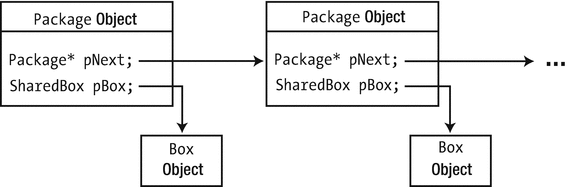
Linked Package objects
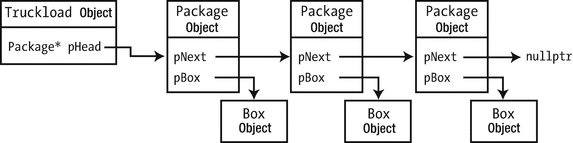
A Truckload object managing a linked list of three Package objects
Figure 11-8 shows a Truckload object that manages a list of Package objects; each Package object contains a Box object and a pointer to the next Package object. The Truckload object only needs to keep track of the first Package object in the list; the pHead member contains its address. By following the pNext pointer links, you can find any of the objects in the list. In this elementary implementation, the list can only be traversed from the start. A more sophisticated implementation could provide each Package object with a pointer to the previous object in the list, which would allow the list to be traversed backward as well as forward. Let’s put the ideas into code.
Note
You don’t need to create your own classes for linked lists. Very flexible versions are already defined in the list and forward_list standard library headers. Moreover, as we’ll discuss in Chapter 19, in most cases you are better off using a std::vector<> instead. Defining your own class for a linked list is very educational, though.
Defining the Package Class
Based on the preceding discussion, the Package class can be defined in Package.h like this:
To make the rest of the code a bit less cluttered, we first define the type alias SharedBox as shorthand for std::shared_ptr<Box>. The SharedBox member of the Package class will store the address of a Box object. Every Package object refers to exactly one Box object.
By using shared_ptr<> pointers for all Box objects, we made sure that, at least in theory, we can share these same Boxes with the rest of the program without having to worry about their lifetime—that is, without having to worry which class should delete the Box objects and when. As a consequence, the same Box object could, hypothetically, be shared between a Truckload, a truck’s destination manifest, the online shipment tracking system for customers, and so on. If these Boxes are only referred to by the Truckload class, a shared_ptr<> wouldn’t be the most appropriate smart pointer. A std::unique_ptr<> would then be more appropriate. But let’s say that in this case our Truckload classes are to become part of a larger program entirely built around these Boxes and that this justifies the use of std::shared_ptr<>.
The pNext member variable of a Package will point to the next Package object in the list. The pNext member for the last Package object in a list will contain nullptr. The constructor allows a Package object to be created that contains the address of the Box argument. The pNext member will be nullptr by default, but it can be set to point to a Package object by calling the setNext() member. The setNext() function updates pNext to the next Package in the list. To add a new Package object to the end of the list, you pass its address to the setNext() function for the last Package object in a list.
Packages themselves are not intended to be shared with the rest of the program. Their sole purpose is to form a chain in one Truckload’s linked list. A shared_ptr<> is therefore not a good match for the pNext member variable. Normally, you should consider using a unique_ptr<> pointer for this member. The reason is that, in essence, every Package is always pointed to by exactly one object, either by the previous Package in the list or, for the head of the list, by the Truckload itself. And if the Truckload is destroyed, so should all its Packages be. However, in the spirit of the current chapter, and in particular its previous section, we decided to use a raw pointer here instead and thus to grab this opportunity to show you some examples of nondefault destructors.
If a Package object is deleted, its destructor deletes the next Package in the list as well. This in turn will delete the next one, and so on. So, to delete its linked list of Packages, all a Truckload has to do is delete the first Package object in the list, which is the head; the rest of the Packages in the list will then be deleted, one by one, by the destructors of the Packages.
Note
For the last Package in the list, pNext will be nullptr. Nevertheless, you don’t need to test for nullptr in the destructor before applying delete. That is, you don’t need to write the destructor like this:
You’ll often encounter such overly cautious tests in production code. But they are completely redundant. The delete operator is defined to simply do nothing when passed a nullptr. Also noteworthy is that, in this destructor, there is little value in setting pNext to nullptr after the deletion. We told you earlier that, in general, it is considered good practice to reset a pointer to null after deleting the value it points to. This is done to avoid any further use or secondary deletes. But since the pNext member can no longer be accessed once the destructor is done executing—the corresponding Package object no longer exists!—there is little point in doing it here.
Defining the Truckload Class
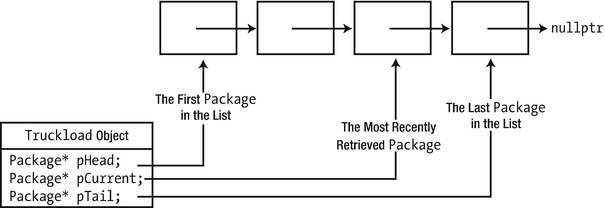
Information needed in a Truckload object to manage the list
Consider how retrieving Box objects from a Truckload object could work. This inevitably involves stepping through the list so the starting point is the first object in the list. You could define a getFirstBox() member function in the Truckload class to retrieve the pointer to the first Box object and record the address of the Package object that contained it in pCurrent. You can then implement a getNextBox() member function that will retrieve the pointer to the Box object from the next Package object in the list and then update pCurrent to reflect that. Another essential capability is the ability to add a Box to the list and remove a Box from the list, so you’ll need member functions to do that; addBox() and removeBox() would be suitable names for these. A member function to list all the Box objects in the list will also be handy.
Here’s a definition for the Truckload class based on these ideas:
The member variables are private because they don’t need to be accessible outside the class. The getFirstBox() and getNextBox() members provide the mechanism for retrieving Box objects. Each of these needs to modify the pCurrent pointer, so they cannot be const. The addBox() and removeBox() functions also change the list so they cannot be const either.
There are four constructors. The default constructor defines an object containing an empty list. You can also create an object from a single pointer to a Box object, from a vector of pointers, or as a copy of another Truckload. The destructor of the class makes sure the linked list it encapsulates is properly cleaned up. As described earlier, deleting the first Package will trigger all other Packages in the list to be deleted as well.
The constructor that accepts a vector of pointers to Box objects, the copy constructor, and the other member functions of the class require external definitions, which we’ll put in a Truckload.cpp file so they will not be inline. You could define them as inline and include the definitions in Truckload.h.
Traversing the Boxes Contained in a Truckload
Before we look at how the linked list is constructed, we’ll look at the member functions that traverse the list . We start with the const member function listBoxes() that outputs the contents of the Truckload object, which could be implemented like this:
The loop steps through the Package objects in the linked list, starting from pHead, until a nullptr is reached. For each Package, it outputs the Box object that it contains by calling listBox() on the corresponding SharedBox. Box objects are output five on a line. The last statement of the function outputs a newline when the last line contains output for less than five Box objects.
If you want, you could also write this while loop as an equivalent for loop:
Both loops are completely equivalent, so you’re free to use either pattern to traverse linked lists. Arguably, the for loop is somewhat nicer because there is a clearer distinction between the initialization and advancement code of the package pointer (nicely grouped in front of the body, between the round brackets of the for (...) statement) and the core logic of the listing algorithm (the loop’s body, which now is no longer cluttered by any list traversal code).
To allow code outside the Truckload class to traverse the SharedBoxes stored in a Truckload in a similar fashion, the class offers the getFirstBox() and getNextBox() member functions. Before we discuss their implementation, it’s better to give you an idea already how these functions are intended to be used. The pattern used to traverse the Boxes in a Truckload by external code will look similar to that of the listBoxes() member function (of course, an equivalent while loop could be used as well):
The getFirstBox() and getNextBox() functions operate using the pCurrent member variable of Truckload, a pointer that must at all times point to the Package whose Box was last returned by either function. Such an assertion is known as a class invariant —a property of the member variables of a class that must hold at all times. Before returning, all member functions should therefore make sure that all class invariants hold again. Conversely, they can trust that the invariants hold at the start of their execution. Other invariants for the Truckload class include that pHead points to the first Package in the list and pTail to the last one (see also Figure 11-9). With these invariants in mind, implementing getFirstBox() and getNextBox() is actually not that hard:
The getFirstBox() function is a piece of cake—just two statements. We know that the address of the first Package object in the list is stored in pHead. Calling the getBox() function for this Package object obtains the address of its Box object, which is the desired result for getFirstBox(). Only if the list is empty will pHead be nullptr. For an empty Truckload, getFirstBox() should return a nulled SharedBox as well. Before returning, getFirstBox() also stores the address of the first Package object in pCurrent. This is done because the class invariants state that pCurrent must always refer to the last Package whose Box was retrieved.
If at the start of getNextBox() the pCurrent pointer is nullptr, then the first in the list (if any) is obtained and returned by calling getFirstBox(). Otherwise, the getNextBox() function accesses the Package object that follows the one whose Box was returned last by calling pCurrent->getNext(). If this Package* is nullptr, the end of the list has been reached, and nullptr is returned. Otherwise, the Box of the current Package is returned. Of course, getNextBox() also correctly updates pCurrent to respect its class invariant.
Adding and Removing Boxes
We’ll start with the easiest of the remaining members: the vector<>-based constructor definition. This creates a list of Package objects from a vector of smart pointers to Box objects:
The parameter is a reference to avoid copying the argument. The vector elements are of type SharedBox, which is an alias for std::shared_ptr<Box>. The loop iterates through the vector elements passing each one to the addBox() member of the Truckload class, which will create and add a Package object on each call.
The copy constructor simply iterates over all packages in the source Truckload and calls addBox() for each box to add it to the newly constructed Truckload:
Both of these constructors are made easy because all the heavy lifting is delegated to addBox(). The definition of this member will be as follows:
The function creates a new Package object from the pBox pointer in the free store and stores its address in a local pointer, pPackage. For an empty list, both pHead and pTail will be null. If pTail is non-null, then the list is not empty, and the new object is added to the end of the list by storing its address in the pNext member of the last Package that is pointed to by pTail. If the list is empty, the new Package is the head of the list. In either case, the new Package object is at the end of the list, so pTail is updated to reflect this.
The most complicated of all Truckload member functions is removeBox(). This function also has to traverse the list, looking for the Box to remove. The initial outline of the function is therefore as follows:
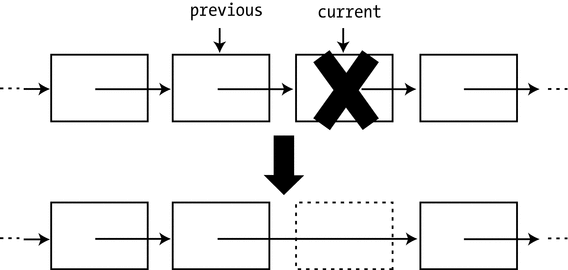
Removing a package from the linked list
The figure clearly shows that in order to remove a Package somewhere in the middle of the linked list, we need to update the pNext pointer of the previous Package in the list. In Figure 11-10 this is the Package pointed to by previous. This is not yet possible with our initial outline of the function. The current pointer has moved past the Package that needs to be updated, and there is no way to go back.
The standard solution is to keep track of both a previous and a current pointer while traversing the linked list, with previous at all times pointing to the Package that precedes the one pointed to by current. The previous pointer is sometimes called a trailing pointer because it always trails one Package behind the traversal pointer, current. The full function definition looks as follows:
Once you know about the trailing pointer technique, putting it all together is not that hard anymore. As always, you have to provide a special case for removing the head of the list, but that’s not too hard. One more thing to watch out for is that the Package that you take out has to be deleted. Before doing that, though, it is important to set its pNext pointer to null first. Otherwise, the destructor of the Package would start deleting the entire list of Packages that used to follow the deleted Package, starting with its pNext.
Putting It All Together
You should put the class definition in Truckload.h and collect all function definitions in Truckload.cpp. With these in place, you can try the Truckload class using the following code :
Here’s some sample output from this program:
The main() function first creates an empty Truckload object, then adds Box objects in the for loop, and makes a copy of this Truckload object. It then finds the largest Box object in the list and deletes it. The output demonstrates that all these operations are working correctly. Just to show it works, main() creates a Truckload object from a vector of pointers to Box objects. It then finds the smallest Box object and outputs it. Clearly, the capability to list the contents of a Truckload object is also working well. Note that the SharedBox type alias can be used in main() because it is defined in Package.h and therefore available in this source file.
Nested Classes
It’s sometimes desirable to limit the accessibility of a class. The Package class was designed to be used specifically within the TruckLoad class. It would make sense to ensure that Package objects can only be created by member functions of the TruckLoad class. What you need is a mechanism where Package objects are private to Truckload class members and not available to the rest of the world. You can do this by using a nested class .
A nested class is a class that has its definition inside another class definition. The name of the nested class is within the scope of the enclosing class and is subject to the member access specification in the enclosing class. We could put the definition of the Package class inside the definition of the TruckLoad class, like this:
The Package type is now local to the scope of the TruckLoad class definition. Because the definition of the Package class is in the private section of the TruckLoad class, Package objects cannot be created or used from outside the TruckLoad class . Because the Package class is entirely private to the TruckLoad class, there’s also no harm in making all its members public. Hence, they’re directly accessible to member functions of a TruckLoad object. The getBox() and getNext() members of the original Package class are no longer needed. All of the Package members are directly accessible from Truckload objects but inaccessible outside the class.
The definitions of the member functions of the TruckLoad class need to be changed to access the member variables of the Package class directly. This is trivial. Just replace all occurrences of getBox(), getNext(), and setNext() in Truckload.cpp with code that directly accesses the corresponding member variable. The resulting Truckload class definition with Package as a nested class will work with the Ex11_14.cpp source file. A working example is available in the code download as Ex11_15.
Note
Nesting the Package class inside the TruckLoad class simply defines the Package type in the context of the TruckLoad class. Objects of type TruckLoad aren’t affected in any way—they’ll have the same members as before.
Member functions of a nested class can directly reference static members of the enclosing class, as well as any other types or enumerators defined in the enclosing class. Other members of the enclosing class can be accessed from the nested class in the normal ways: via a class object or a pointer or a reference to a class object. When accessing members of the outer class, the member functions of a nested class have the same access privileges as member functions of the outer class; that is, member functions of a nested class are allowed to access the private members of objects of the outer class.
Nested Classes with Public Access
Of course, you could put the Package class definition in the public section of the TruckLoad class. This would mean that the Package class definition was part of the public interface so it would be possible to create Package objects externally. Because the Package class name is within the scope of the TruckLoad class, you can’t use it by itself. You must qualify the Package class name with the name of the class in which it is nested. Here’s an example:
Of course, making the Package type public in the example would defeat the rationale for making it a nested class in the first place! Of course, there can be other circumstances where a public nested class makes sense. We’ll see one such example in the next subsection.
A Better Mechanism for Traversing a Truckload: Iterators
The getFirstBox() and getNextBox() members allowed you to traverse all Boxes stored in a Truckload. It is not unheard of to add analogous members to a class—we have encountered it on at least two occasions in real code—but this pattern has some serious flaws. Perhaps you can already think of one?
Suppose you find—rightfully so—that the main() function of Ex11_14 is too long and crowded and you decide to split off some of its functionality in reusable functions. A good first candidate would then be a helper function to find the largest Box in a Truckload. A natural way to write this is as follows:
Unfortunately, however, this function does not compile! Can you see why not? The root cause of the problem is that both getFirstBox() and getNextBox() have to update the pCurrent member inside truckload. This implies that they both must be non-const member functions, which in turn implies that neither of these functions can be called on truckload, which is a reference-to-const argument. Nevertheless, using a reference-to-const parameter is the normal thing to do here. Nobody would or should expect that searching for the largest Box requires a Truckload to be modified. As it stands, however, it is impossible to traverse the content of a const Truckload, which renders const Truckload objects nearly useless. Proper const Truckload& references would be extremely useful, though. In principle, they should allow you to pass a Truckload to code that you’d like to traverse the Boxes contained in it but that at the same time should not be allowed to call either AddBox() or RemoveBox().
Note
You could try to work around the problem by making the pCurrent member variable of the Truckload class mutable. That would then allow you to turn both getFirstBox() and getNextBox() into const members. While this may be interesting for you as a bonus exercise, this solution still suffers some drawbacks in general. First, you’d run into problems with nested loops over the same collection. Second, even though concurrency is out of the scope of this discussion, you can probably imagine that using the mutable approach would never allow for concurrent traversals by multiple threads of execution either. In both cases, one pCurrent pointer would be required per traversal—not one per Truckload object.
The correct solution to this problem is the so-called iterator pattern . The principle is easy enough. Instead of storing the pCurrent pointer inside the Truckload object itself, you move it to another object specifically designed and created to aid with traversing the Truckload. Such an object is then called an iterator.
Note
Later in this book, you’ll learn that the containers and algorithms of the Standard Library make extensive use of iterators. While Standard Library iterators have a slightly different interface than the Iterator class we are about to define for Truckload, the underlying principle is the same: iterators allow external code to traverse the content of a container without having to know about the data structure’s internals.
Let’s see what that could look like for us. We’ll start from the Truckload class of Ex11_15—the version where Package is already a nested class—and add a second nested class called Iterator:
The pCurrent, getFirstBox(), and getNextBox() members have been moved from the Truckload into its nested Iterator class . Both functions are implemented in the same manner as before, except that now they no longer update a pCurrent member variable of the Truckload itself. Instead, they operate using the pCurrent member of an Iterator object specifically created to traverse this Truckload by getIterator(). As multiple Iterators can exist at the same time for a single Truckload, each with their own pCurrent pointer, both nested and concurrent traversals of the same Truckload become possible. Moreover, and more importantly, creating an iterator does not modify the Truckload, so getIterator() can be a const member function. This allows us to properly implement the findLargestBox() function from earlier with a reference-to-const-Truckload parameter:
We’ll leave the completion of this example to you as an exercise (see Exercise 11-6). Before we conclude the chapter, though, let’s first take a closer look at the access rights within the definition of Truckload and its nested classes. Iterator is a nested class of Truckload, so it has the same access privileges as Truckload member functions. This is fortunate because otherwise it couldn’t have used the nested Package class, which is declared to be for private use only within the Truckload class. Naturally, Iterator itself must be a public nested class; otherwise, code outside of the class would not be able to use it. Notice that we did decide to make the primary constructor of the Iterator class private, however, because external code cannot (it never has access to any Package objects) and should not create Iterators that way. Only the getIterator() function will be creating Iterators with this constructor. For it to access this private constructor, however, we need a friend declaration. Even though you can access private members of the outer class from within a nested class, the same does not hold in the other direction. That is, an outer class has no special privileges when it comes to accessing the members of an inner class. It is treated like any other external code. Without the friend declaration, the getIterator() function would therefore not have been allowed to access the private constructor of the nested Iterator class.
Note
Even though external code cannot create a new Iterator using our private constructor, it does remain possible to create a new Iterator object as a copy of an existing one. The default copy constructor generated by the compiler remains public.
Summary
A class provides a way to define your own data types. Classes can represent whatever types of objects your particular problem requires.
A class can contain member variables and member functions. The member functions of a class always have free access to the member variables of the same class.
Objects of a class are created and initialized using member functions called constructors. A constructor is called automatically when an object declaration is encountered. Constructors can be overloaded to provide different ways of initializing an object.
A copy constructor is a constructor for an object that is initialized with an existing object of the same class. The compiler generates a default copy constructor for a class if you don’t define one.
Members of a class can be specified as public, in which case they are freely accessible from any function in a program. Alternatively, they can be specified as private, in which case they may be accessed only by member functions, friend functions of the class, or members of nested classes.
Member variables of a class can be static. Only one instance of each static member variable of a class exists, no matter how many objects of the class are created.
Although static member variables of a class are accessible in a member function of an object, they aren’t part of the object and don’t contribute to its size.
Every non-static member function contains the pointer this, which points to the current object for which the function is called.
static member functions can be called even if no objects of the class have been created. A static member function of a class doesn’t contain the pointer this.
const member functions can’t modify the member variables of a class object unless the member variables have been declared as mutable.
Using references to class objects as arguments to function calls can avoid substantial overheads in passing complex objects to a function.
A destructor is a member function that is called for a class object when it is destroyed. If you don’t define a class destructor, the compiler supplies a default destructor.
A nested class is a class that is defined inside another class definition.
Exercises
The following exercises enable you to try what you’ve learned in this chapter.
Exercise 11-1. Create a class called Integer that has a single, private member variable of type int. Provide a class constructor that outputs a message when an object is created. Define member functions to get and set the member variable and to output its value. Write a test program to create and manipulate at least three Integer objects and verify that you can’t assign a value directly to the member variable. Exercise all the class member functions by getting, setting, and outputting the value of the member variable of each object. Make sure to create at least one const Integer object and verify which operations you can and cannot apply on it.
Exercise 11-2. Modify the Integer class in the previous exercise so that an Integer object can be created without an argument. The member value should then be initialized to zero. Can you think of two ways to do this? Also, implement a copy constructor that prints a message when called.
Next, add a member function that compares the current object with an Integer object passed as an argument. The function should return –1 if the current object is less than the argument, 0 if the objects are equal, and +1 if the current object is greater than the argument. Try two versions of the Integer class, one where the compare() function argument is passed by value and the other where it is passed by reference. What do you see output from the constructors when the function is called? Make sure you understand why this is so. You can’t have both functions present in the class as overloaded functions. Why not?
Exercise 11-3. Implement member functions add(), subtract(), and multiply() for the Integer class that will add, subtract, and multiply the current object by the value represented by the argument of type Integer. Demonstrate the operation of these functions in your class with a version of main() that creates several Integer objects encapsulating integer values and then uses these to calculate the value of 4×53+6×52+7×5+8. Implement the functions so that the calculation and the output of the result can be performed in a single statement.
Exercise 11-4. Change your solution for Exercise 11-2 so that it implements the compare() function as a friend of the Integer class. Afterward, ask yourself whether it was really necessary for this function to be a friend.
Exercise 11-5. Implement a static function printCount() for the Integer class that you created earlier in Exercise 11-2 that outputs the number of Integers in existence. Modify the main() function such that it tests that this number correctly goes up and down when needed.
Exercise 11-6. Finish the nested Truckload::Iterator class that we started at the end of the chapter. Starting from Ex11_15, add the Iterator class to its definition as listed earlier, and implement its member functions. Use the Iterator class to implement the findLargestBox() function as outlined earlier (perhaps you can do it without looking at the solution?), and rework the main() function of Ex11_15 to make use of this. Do the same with an analogous findSmallestBox() function.
Exercise 11-7. Modify the Package class in the solution of Exercise 11-6 so that it contains an additional pointer to the previous object in the list. This makes it a so-called doubly linked list—naturally, the data structure we were using before is called a singly linked list. Modify the Package, Truckload, and Iterator classes to make use of this, including providing the ability to iterate through Box objects in the list in reverse order and to list the objects in a Truckload object in reverse sequence. Devise a main() program to demonstrate the new capabilities.
Exercise 11-8. A scrutinous analysis of the main() function of Ex11_14 (and thus also that of Ex11_15 and the solutions of the previous two exercises) reveals the following performance flaw: to remove the largest Box, we perform two linear traversals of the linked list. First we look for the largest Box, and then we look inside removeBox() to look for the Package to unlink. Devise a solution based on the Iterator class of Exercise 11-7 to avoid this second search.
Hint: The solution hinges on a member function with the following signature: