Memory is a core part of the model of computation used in C. It stores all types of variables as well as functions. This chapter will study the C memory model and related language features closely.
11.1 Pointers Revisited
B. Kernighan and D. Ritchie on pointers
“Pointers have been lumped with the goto statement as a marvelous way to create impossible-to-understand programs. This is certainly true when they are used carelessly, and it is easy to create pointers that point somewhere unexpected. With discipline, however, pointers can also be used to achieve clarity and simplicity.” [18]
11.1.1 Why Do We Need Pointers?
As the C language has a von Neumann model of computations, the program execution is essentially a sequence of data manipulation commands. The data resides in addressable memory, and the addressability of data is the propriety that allows for a more refined and effective data manipulation. Many higher-level languages lack this property because direct address manipulations are forbidden.
However, that advantage comes at a price: it becomes easier to produce subtle and usually irrecoverable errors in the code.
The necessity of storing and manipulating addresses is why we need pointers. Performing a typical case study for Listing 11-1, we observe, that in terms of the abstract C machine:
a - is the name of data cells of abstract machine, containing the number 4 of type int.
p_a - is the name of data cells of abstract machine, which contain the address of a variable of type int.
p_a stores the address of a.
*p_a is the same as a;
&a equals p_a, but these two entities are not the same. While p_a is the name for some consecutive data cells, &a is the contents of p_a, a bit string representing an address.
Listing 11-1. pointers_ex.c
int a = 4;int* p_a = &a;*p_a = 10; /* a = 10*/
Note
You can only apply & once, because for any x the expression &x will already not be an lvalue .
11.1.2 Pointer Arithmetic
Following are the only actions you can perform on pointers:
Add or subtract integers (also negatives);
So, we have pointers, and they contain addresses. For a computer, there is no difference between an address of an integer and an address of a string. In assembly language, as we have seen, all addresses are of the same type. Why do we need to keep the type information about what the pointer points to? What is the difference between int* and char*?
The size of the element we are pointing at matters. By adding or subtracting an integer value X from the pointer of type T *, we, in fact, change it by X * sizeof( T ). Let’s see an example shown in Listing 11-2.
Listing 11-2. ptr_change_ex.c
int a = 42; /* Assume this integer's address is 1000 */int* p_a = &a;p_a += 42; /* 1000 + 42 * sizeof( int ) */p_a = p_a + 1; /* 1168 + 1 * sizeof( int ) */p_a --; /* 1172 - 1 * sizeof( int ) */Take its own address. If the pointer is a variable, it is located somewhere in memory too. So, it has an address on its own! Use the & operator to take it.
Dereference, which is a basic operation that we have also seen. We are taking a data entry from memory starting at the address, stored in the given pointer. The * operator does it. Listing 11-3 shows an example.
Listing 11-3. deref_ex.c
int catsAreCool = 0;int* ptr = &catsAreCool;*ptr = 1; /* catsAreCool = 1 */Compare (with <, >, == and alike).
We can compare two pointers. The result is only defined if they both point to the same memory block (e.g., at different elements of the same array). Otherwise the result is random, undefined by the language standard.
Subtract another pointer.
If and only if we have two pointers, which are certainly pointing at the contiguous memory block, then by subtracting a smaller valued one from a greater valued one we get the amount of elements between them. For pointers x and y, we are talking about a range of elements from *x inclusive to *y exclusive (so x − x = 0).
Starting from C99, the type of the expression ptr2 - ptr1 is a special type ptrdiff_t. It is a signed type of the same size as size_t.
Note, that the result is different from the amount of bytes between *x and *y! The naively calculated difference would be the amount of bytes, while the result of subtraction is the amount of bytes divided by an element size. Listing 11-4 shows an example.
Listing 11-4. ptr_diff_calc.c
int arr[128];int* ptr1 = &arr[50]; /* `array` address + 50 int sizes */int* ptr2 = &arr[90]; /* `array` address + 90 int sizes */ptrdiff_t d = ptr2 - ptr1; /* exactly 40 */
In all other cases (subtracting greater pointer from lesser one, subtracting pointers pointing into different areas, etc.) the result can be absolutely random.
Addition, multiplication, and division of two pointers are syntactically incorrect; thus, they trigger an immediate compilation error.
11.1.3 The void* Type
Apart from regular pointer types, a type void* exists, which is kind of special. It forgets all information about the entity it points to, apart from its address. The pointer arithmetic is forbidden for void* pointers, because the size of the entity we are pointing at is unknown and thus cannot be added or subtracted.
Before you can work with such a pointer, you should cast it to another type explicitly. Alternatively, C allows you to assign this pointer to any other pointer (and assign to void* a pointer of any type) without any warnings. In other words, while assigning short* to long is a clear error, assignments treats void* as equal to any pointer type.
Listing 11-5 shows an example.
Listing 11-5. void_ptr_ex.c
void* a = (void*)4;short* b = (short*) a;b ++; /* correct, b = 6 */b = a; /* correct */a = b; /* correct */
11.1.4 NULL
C defines a special preprocessor constant NULL equal to 0. It means a pointer “pointing to nowhere,” an invalid pointer. By writing this value to a pointer, we can be sure that it is not yet initialized to a valid address. Otherwise, we would not be able to distinguish initialized pointers.
In most architectures people reserve a special value for invalid pointers, assuming no program will actually hold a useful value by this address.
As we already know, 0 in pointer context does not always mean a binary number with all bits cleared. Pointer-0 can be equal to 0, but this is not enforced by standard. The history knows architectures where the null-pointer was chosen in a rather exotic way . For example, some Prime 50 series computers used segment 07777, offset 0 for the null pointer; some Honeywell-Bull mainframes use the bit pattern 06000 for a kind of null pointers.
Listing 11-6 shows the correct ways to check whether the pointer is NULL or not.
Listing 11-6. null_check.c
if( x ) { ... }if( NULL != x ) { ... }if( 0 != x ) { ... }if( x != NULL ) { ... }if( x != 0 ) { ... }
11.1.5 A Word on ptrdiff_t
Take a look at the example shown in Listing 11-7. Can you spot a bug?
Listing 11-7. ptrdiff_bug.c
int* max;int* cur;int f( unsigned int e ){if ( max - cur > e )return 1;elsereturn 0;}
What happens if cur > max ? It implies, that the difference between cur and max is negative. Its type is ptrdiff_t. Comparing it with a value of type unsigned int is an interesting case to study.
ptrdiff_t has as many bits as the address on the target architecture. Let’s study two cases:
32-bit system, where sizeof( unsigned int ) == 4 and sizeof( ptrdiff_t ) == 4. In this case, the types in our comparison will pass through these conversions.
int < unsigned int(unsigned int)int < unsigned intThe compiler will issue a warning, because the cast from int to unsigned int is not always preserving values. You cannot freely map values in range −231 . . . 231 − 1 to the range 0 . . . 232 − 1.
For example, in case the left-hand side was equal to -1, after the conversion to unsigned int type it will become the maximal value representable in unsigned int type (232 − 1). Apparently, the result of this comparison will be almost always equal to 0, which is wrong, because -1 is smaller than any unsigned integer.
64-bit system , where sizeof( unsigned int ) == 4 and sizeof( ptrdiff_t ) == 8. In this situation, ptrdiff_t will be probably aliased to the signed long.
signed long < unsigned intlong < (signed long)unsigned intHere the right-hand side is going to be cast. This cast preserves information, so the compiler will issue no warning.
As you see, the behavior of this code depends on target architecture, which is a big no. To avoid it, ptrdiff_t should always go in par with size_t, because only then their sizes are guaranteed to be the same.
11.1.6 Function Pointers
The von Neumann model of computations implies that the code and data reside in the same addressable memory. So, functions have addresses on their own. We can take the starting addresses of functions, pass them to other functions, call functions by pointers, store them in variables or arrays, etc. Why, however, would we do all that? It allows us for better abstractions. We can write a function that launches another function and measures its working time, or transforms an array by applying the function to all its elements. This technique allows the code to be reused on a whole new level.
The function pointer stores information about the function type just as the data pointers do. The function type includes the argument types and the return value type. A syntax that mimics the function declaration is used to declare a function pointer:
<return_value_type> (*name) (arg1, arg2, ...);Listing 11-8 shows an example.
Listing 11-8. fun_ptr_example.c
double doubler (int a) { return a * 2.5; }...double (*fptr)( int );double a;fptr = &doubler;a = fptr(10); /* a = 25.0 */
We have described the pointer fptr of type “a pointer to a function, that accepts int and returns double.” Then we assigned the doubler function address to it and performed a call by this pointer with an argument 10, storing the returned value in the variable a.
typedef works, and is sometimes a great help. The previous example can be rewritten as shown in Listing 11-9.
Listing 11-9. fun_ptr_example_typedef.c
double doubler (int a) { return a * 2.5; }typedef double (megapointer_type)( int );...double a;megapointer_type* variable = &doubler;a = variable(10); /* a = 25.0 */
Now by means of typedef we have created a function type that cannot be instantiated directly. However, we can create variables of the said pointer type. We cannot create variables of the function types directly, so we add an asterisk.
First-class objects in programming languages are the entities that can be passed as a parameter, returned from functions, or assigned to a variable.
As we see, functions are not first-class objects in C. Sometimes they are called “second-class objects” because the pointers to them are first-class objects.
11.2 Memory Model
The memory of the C abstract machine, while being uniform, has several regions. Pragmatically, each such region is mapped to a different memory region, consisting of consecutive pages.
Figure 11-1 shows this model.
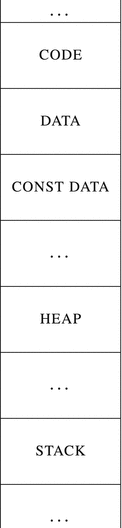
Figure 11-1. C memory model
The regions that almost every C program has are
Code, which holds machine instructions.
Data, which stores regular global variables.
Constant data, which stores all immutable data, such as string literals and global variables, marked const. The operating system is usually protecting the corresponding pages through the virtual memory mechanism, by allowing or not allowing the reads/writes.
Heap, which stores dynamically allocated data (by means of malloc, as we will show in section 11.2.1).
Stack, which stores all local variables, return addresses, and other utility information. If the program is executed in multiple threads, each one gets its own stack.
11.2.1 Memory Allocation
Before you can use memory cells , you have to allocate memory. There are three types of memory allocation in C.
Automatic memory allocation occurs when we are entering a routine. When we enter the function, a part of the stack is dedicated to its local variables. When we leave the function, all information about these variables is lost. The lifetime of this data is limited by the lifetime of a function instance. Once the function terminates, the memory becomes unavailable.
In assembly level, we have already done it in the very first assignment. The functions that performed integer printing allocated a buffer on the stack to store the resulting string. It was achieved by simply decreasing rsp by the buffer size.
Note Never return pointers to local variables from functions! They point to the data that no longer exists.
Static memory allocation happens during compilation in the data or constant data region. These variables exist until the program terminates. By default, the variables are initialized with zeros, and thus end up in .bss section. The constant data is allocated in .rodata ; the mutable data is allocated in .data .
Dynamic memory allocation is needed when we do not know the size of the memory we need to allocate until some external events happen. This type of allocation relies on an implementation in the standard C library. It means that when the C standard library is not available (e.g., bare metal programming), this type of memory allocation is also unavailable.
This type of memory allocation uses the heap.
A part of the standard library keeps track of the reserved and available memory addresses. This part’s interface consists of the following functions, whose prototypes are located in malloc.h header file.
void* malloc(size_t size) allocates size bytes in heap and returns an address of the first one. Returns NULL if it fails.
This memory is not initialized and thus holds random values.
void* calloc(size_t size, size_t count) allocates size * count bytes in heap and initializes them to zero. Returns the address of the first one or NULL if it fails.
void free(void* p) frees memory, allocated in heap.
void* realloc(void* ptr, size_t newsize) changes the size of a memory block starting at ptr to newsize bytes. The added memory will not be initialized. The contents are copied into the new block, and the old block is freed. Returns a pointer to the new memory block or NULL on failure.
When we no longer need a memory block we have to free it, otherwise it will stay in a “reserved” state forever, never to be reused. This situation is called memory leak. When you are using a heavy piece of software, which contains bugs related to memory management, its memory footprint can grow significantly over time without the program actually needing that much memory.
Usually, the operating system provides the program with a number of pages in advance. These pages are used until the program needs more dynamic memory to allocate. When it happens, the malloc call can internally trigger a system call (such as mmap) to request more pages.
As the void* pointer type can be assigned to any pointer type, the following code will issue no warning (see Listing 11-10) when compiling it as a C code.
Listing 11-10. malloc_no_cast.c
#include <malloc.h>...int* a = malloc(200);a[4] = 2;
However, in C++, a popular language that was originally derived from C (and which tries to maintain backward compatibility), the void* pointer should be explicitly cast to the type of the pointer you are assigning it to. Listing 11-11 shows the difference.
Listing 11-11. malloc_cast_explicit.c
int* arr = (int*)malloc( sizeof(int) * 42 );Why some programmers recommend omitting the cast
The older C standards had an “implicit int” rule about function declarations. Lacking a valid function declaration, its first usage was considered a declaration. If a name that has not been previously declared occurs in an expression and is followed by a left parenthesis, it declares a function name. This function is also assumed to return an int value. The compiler can even create a stub function returning 0 for it (if it does not find an implementation).
In case you do not include a valid header file, containing a malloc declaration, this line will trigger an error, because a pointer is assigned an integer value, returned by malloc:
int* x = malloc( 40 );However, the explicit cast will hide this error, because in C we can cast whatever we want to whatever type we want.
int* x = (int*)malloc( 40 );The modern versions of the C standard (starting at C99) drop this rule and the declarations become mandatory, so this reasoning becomes invalid.
A benefit in explicit casting is a better compatibility with C++.
11.3 Arrays and Pointers
Arrays in C are particular, because any bunch of values residing consecutively in memory can be thought of as an array.
An abstract machine considers that the array name is the address of the first element, thus, a pointer value!
The i-th element of an array can be obtained by one of the following equivalent constructions:
a[i] = 2;*(a+i) = 2
The address of the i-th element can be obtained by one of these following constructions:
&a[i];a+i;
As we see, every operation with pointers can be rewritten using the array syntax! And it even goes further. In fact, the braces syntax a[i] gets immediately translated into a + i, which is the same thing as i+a. Because of this, exotic constructions such as 4[a] are also possible (because 4+a is legitimate).
Arrays can be initialized with zeros using the following syntax:
int a[10] = {0};Arrays have a fixed size. However, there are two notable exceptions to this rule, which are valid in C99 and newer versions.
Stack allocated arrays can be of a size determined in runtime. These are called variable length arrays. It is evident that these cannot be marked static because the latter implies allocation in .data section.
Starting from C99, you can add a flexible array member as the last member of a structure, as shown in Listing 11-12.
Listing 11-12. flex_array_def.c
struct char_array {size_t length; char data[];};In this case, the sizeof operator, applied to a structure instance, will return the structure size without the array. The array will refer to the memory immediately following the structure instance. So, in the example given in Listing 11-12, sizeof(struct char_array) == sizeof(size_t). Assuming it’s equal to 8, data[0] refers to the 8-th byte (counting from 0) from the structure instance starting address.
Listing 11-13 shows an example.
Listing 11-13. flex_array.c
#include <string.h>#include <malloc.h>struct int_array {size_t size;int array[];};struct int_array* array_create( size_t size ) {struct int_array* array = malloc(sizeof( *array )+ sizeof( int ) * size );array-> size = size;memset( array->array, 0, size );return array;}
11.3.1 Syntax Details
C allows us to define several variables in a row.
int a,b = 4, c;To declare several pointers, however, you have to add an asterisk before every pointer.
Listing 11-14 shows an example: a and b are pointers, but the type of c is int.
Listing 11-14. ptr_mult_decl.c
int* a, *b, c;This rule can be worked around by creating a type alias for int* using typedef, hiding an asterisk.
Defining multiple variables in a row is a generally discouraged practice as in most cases it makes the code harder to read.
It is possible to create rather complex type definitions by mixing function pointers , arrays, pointers, etc. You can use the following algorithm to decipher them:
Find an identifier, and start from it.
Go to the right until the first closing parenthesis. Find its pair on the left. Interpret an expression between these parentheses.
Go “up” one level, relative to the expression we have parsed during the previous step. Find outer parentheses and repeat step 2.
We will illustrate this algorithm in an example shown in Listing 11-15. Table 11-1 describes the parsing process.
Table 11-1. Parsing Complex Definition
Expression | Interpretation |
|---|---|
fp | First identifier. |
(*fp) | Is a pointer. |
(* (*fp) (int)) | A function accepting int and returning a pointer… |
int* (* (*fp) (int)) [10] | … to an array of ten pointers to int |
Listing 11-15. complex_decl_1.c
int* (* (*fp) (int) ) [10];As you see, the process of deciphering complex declarations is not a breeze. It can be made simpler by using typedefs for parts of the declarations.
11.4 String Literals
Any sequence of char elements ended by a null-terminator can be viewed as a string in C. Here, however, we want to speak about the immediately encoded strings, so, string literals. Most string literals are stored in .rodata if they are big enough.
Listing 11-16 shows an example of a string literal.
Listing 11-16. str_lit_example.c
char* str = "when the music is over, turn out the lights";str is just a pointer to the string’s first character.
According to the language standard, string literals (or pointers to strings created in such a way) cannot be changed.1 Listing 11-17 shows an example.
Listing 11-17. string_literal_mut.c
char* str = "hello world abcdefghijkl";/* the following line produces a runtime error */str[15] = '\'';
In C++, the string literals have the type char const* by default, which reflects their immutable nature. Consider using variables of type char const* whenever you can when the strings you are dealing with are not intended to be mutated.
The constructions shown in Listing 11-18, are also correct, albeit you are most probably never going to use the second one.
Listing 11-18. str_lit_ptr_ex.c
char will_be_o = "hello, world!"[4]; /* is 'o' */char const* tail = "abcde"+3 ; /* is "de", skipping 3 symbols */
When manipulating strings, there are several common scenarios based on where the string is allocated.
We can create a string among global variables. It will be mutable, and under no circumstances will it be doubled in constant data region. Listing 11-19 shows an example.
Listing 11-19. str_glob.c
char str[] = "something_global";void f (void) { ... }In other words, it is just a global array initialized in place with character codes.
We can create a string in a stack, in a local variable. Listing 11-20 shows an example.
Listing 11-20. str_loc.c
void func(void) {char str[] = "something_local";}The string "something_local" itself, however, should be kept somewhere because the local variables are initialized every time the function is launched, and we have to know the values with which they should be initialized.
In case of relatively short strings, the compiler will try to inline them into the instructions stream. Apparently, for smaller strings, it is wiser to just split them into 8-byte chunks and perform mov instructions with each chunk as an immediate operand.
The long strings, however, are better kept in .rodata . The statement, shown in Listing 11-20, will allocate enough bytes in stack and then perform a copy from read-only data to this local stack buffer.
We can allocate a string dynamically via malloc. The header file string.h contains some very useful functions such as memcpy, used to perform fast copying.
Listing 11-21 shows an example.
Listing 11-21. str_malloc.c
#include <malloc.h>#include <string.h>int main( int argc, char** argv ){char* str = (char*)malloc( 25 );strcpy( str, "wow, such a nice string!" );free( str );}
Question 210
Why did we allocate 25 bytes for a 24-character string?
Question 211
Read man for the functions: memcpy, memset, strcpy.
11.4.1 String Interning
“String interning ” is a term more accustomed to Java or C# programmers. However, in reality, a similar thing is happening in C (but only in compile time). The compiler tries to avoid duplicating strings in the read-only data region. It means that usually the equal addresses will be assigned to all three variables in the code shown in Listing 11-22.
Listing 11-22. str_intern.c
char* best_guitar_solo = "Firth of fifth";char* good_genesis_song = "Firth of fifth";char* best_1973_live = "Firth of fifth";
String interning would be impossible if string literals were not protected from rewriting. Otherwise, by changing such strings in one place of a program we are introducing an unpredictable change in data used in another place, as both share the same copy of string.
11.5 Data Models
We have spoken about the sizes of different integer types. The language standard is enforcing a set of rules like “the size of long is no less than the size of short” or “the size of signed short should be such that it could contain values in range −216 . . . 216 – 1.” The last rule, however, does not provide us with a fixed size, because short could have been 8 bytes wide and still satisfy this constraint. So, these requirements are far from setting the exact sizes in stone. In order to systematize different sets of sizes, the conventions called data model were created. Each of them defines sizes for basic types. Figure 11-2 shows some remarkable data models that could be of interest to us.
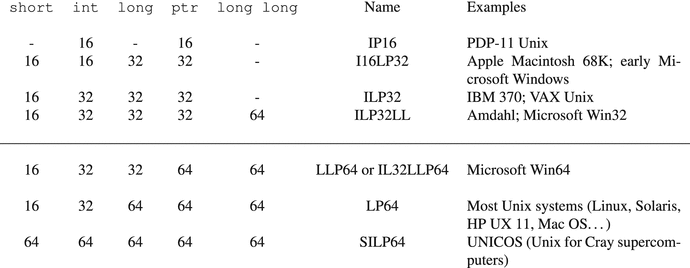
Figure 11-2. Data models
As we have chosen the GNU/Linux 64-bit system for studying purposes, it our data model is LP64. When you develop for 64-bit Windows system, the size of long will differ.
Everyone wants to write portable code that can be reused across different platforms, and fortunately there is a standard-conforming way to never run into data model changes.
Before C99, it was a common practice to make a set of type aliases of form int32 or uint64 and use them exclusively across the program in lieu of ever-changing ints or longs. Should the target architecture change, the type aliases were easy to fix. However, it created a chaos because everyone created their own set of types.
C99 introduced platform independent types. To use them, you should just include a header stdint.h. It gives access to the different integer types of fixed size. Each of them has a form:
u, if the type is unsigned;
int;
Size in bits: 8, 16, 32 or 64; and
_t.
For example, uint8_t, int64_t, int16_t.
The printf function (and similar format input/output) functions have been given a similar treatment by introducing special macros to select the correct format specifiers. These are defined in the file inttypes.h.
In the common cases, you want to read or write integer numbers or pointers. Then the macro name will be formed as follows:
PRI for output (printf, fprintf etc.) or SCN for input (scanf, fscanf etc.).
Format specifier:
d for decimal formatting.
x for hexadecimal formatting.
o for octal formatting.
u for unsigned int formatting.
i for integer formatting.
Additional information includes one of the following:
N for N bit integers.
PTR for pointers.
MAX for maximum supported bit size.
FAST is implementation defined.
We have to use the fact that several string literals, delimited by spaces, are concatenated automatically. The macro will produce a string containing a correct format specifier, which will be concatenated with whatever is around it.
Listing 11-23 shows an example.
Listing 11-23. inttypes.c
#include <inttypes.h>#include <stdio.h>void f( void ) {int64_t i64 = -10;uint64_t u64 = 100;printf( "Signed 64-bit integer: %" PRIi64 "\n", i64 );printf( "Unsigned 64-bit integer: %" PRIu64 "\n", u64 );}
Refer to section 7.8.1 of [7] for a full list of such macros.
11.6 Data Streams
The C standard library provides us with a way to work with files in a platform-independent way. It abstracts files as data streams, from which we can read and to which we can write.
We have seen how the files are handled in Linux on the system calls level: the open system call opens a file and returns its descriptor , an integer number, the write and read system calls are used to perform writing and reading, respectively, and the close system call ensures that the file is properly closed. As the C language was created in par with the Unix operating system, they bear the same approach to file interactions. The library counterparts of these functions are called fopen, fwrite, fread, and fclose. On Unix-like systems, they act like an adapter for system calls, providing similar functionality, except that they also work on other platform in the same way. The main differences are as follows:
In place of file descriptors , we use a special type FILE, which stores all information about a certain stream. Its implementation is hidden and you should never change its internal state manually. So, instead of working with numeric file descriptors (which is platform-dependent), we use FILE as a black box.
The FILE instance is allocated in heap internally by the C library itself, so at anytime we will work with a pointer to it, not with the instance itself directly.
While file operations in Unix are more or less uniform, there are two types of data streams in C.
Binary streams consist of raw bytes that are handled “as is.”
Text streams include symbols grouped into lines; each line is ended by an end-of-line character (implementation dependent).
Text streams are limited in a number of ways on some systems.
The line length might be limited.
They might only be able to work with printing characters, newlines, spaces, and tabs.
Spaces before the newline may disappear.
On some operating systems, text and binary streams use different file formats, and thus to work with a text file in a way compatible between all its programs, the use of text streams is mandatory.
While GNU C library , usually associated with GCC, makes no difference between binary and text streams, on other platforms this is not the case, so distinguishing these is crucial.
For example, I have seen a situation in which reading a large block from a picture file on Windows (the compiler was MSVC) ended prematurely because the picture was obviously binary, while the associated stream was created in text mode.
The standard library provides machinery to create and work with streams. Some functions it defines should only be used on text streams (like fscanf). The relevant header file is called stdio.h.
Let’s analyze the example shown in Listing 11-24.
Listing 11-24. file_example.c
int smth[]={1,2,3,4,5};FILE* f = fopen( "hello.img", "rwb" );fread( smth, sizeof(int), 1, f);/* This line is optional. By means of `fseek` function we can navigate the file */fseek( f, 0, SEEK_SET );fwrite(smth, 5 * sizeof( int ), 1, f);fclose( f );
The instance of FILE is created via a call to fopen function. The latter accepts the path to file and a set of flags, squashed into a string.
The important flags of fopen are listed here.
b - open file in a binary mode. That is what makes a real distinction between text and binary streams. By default, files are opened in text mode.
w - open a stream with a possibility to write into it.
r - open a stream with a possibility to read from it.
+ - if you write simply w, the file will be overwritten. When + is present, the writes will append data to the end of file.
If the file does not exist , it will be created.
The file hello.img is opened in binary mode for both reading and writing. The file contents will be overwritten.
After being created, the FILE holds a kind of a pointer to a position inside the file, a cursor of sorts. Reads and writes move this cursor further.
The fseek function is used to move cursor without performing reads or writes. It allows moving cursor relatively to either its current position or the file start.
fwrite and fread functions are used to write and read data from the opened FILE instance.
Taking fread, for example, it accepts the memory buffer to read from. The two integer parameters are the size of an individual block and the amount of blocks read. The returning value is the amount of blocks successfully read from the file. Every block’s read is atomic: either it is completely read, or not read at all. In this example, the block size equals sizeof(int), and the amount of blocks is one.
The fwrite usage is symmetrical.
fclose should be called when the work with file is complete.
There exist a special constant EOF. When it is returned by a function that works with a file, it means that the end of file is reached.
Another constant BUFSIZ stores the buffer size that works best in the current environment for input and output operations.
Streams can use buffering. It means that they have an internal buffer that proxies all reads and writes. It allows for rarer system calls (which are expensive performance-wise due to context switching). Sometimes when the buffer is full the writing will actually trigger a write system call. A buffer can be manually flushed using fflush command. Any delayed writes will be executed and the buffer will be reset.
When the program starts, three FILE* instances are created and attached to the streams with descriptors 0, 1, and 2. They can be referred to as stdin, stdout, and stderr. All three are usually using a buffer, but the stderr is automatically flushing the buffer after every writing. It is necessary to not delay or lose error messages.
Note
Again, descriptors are integers, FILE instances are not. The int fileno( FILE* stream ) function is used to get the underlying descriptor for the file stream.
Question 212
Read man for functions: fread, fread, fwrite, fprintf, fscanf, fopen, fclose, fflush.
Question 213
Do research and find out what will happen if the fflush function is applied to a bidirectional stream (opened for both reading and writing) when the last action on the stream before it was reading.
11.7 Assignment: Higher-Order Functions and Lists
11.7.1 Common Higher-Order Functions
In this assignment, we are going to implement several higher-order functions on linked lists, which should be familiar to those used to functional programming paradigm.
These functions are known under the names foreach, map, map_mut, and foldl.
foreach accepts a pointer to the list start and a function (which returns void and accepts an int). It launches the function on each element of the list.
map accepts a function f and a list. It returns a new list containing the results of the f applied to all elements of the source list. The source list is not affected.
For example, f (x) = x + 1 will map the list (1, 2, 3) into (2, 3, 4).
map_mut does the same but changes the source list.
foldl is a bit more complicated. It accepts:
The accumulator starting value.
A function f (x, a).
A list of elements.
It returns a value of the same type as the accumulator, computed in the following way:
We launch f on accumulator and the first element of the list. The result is the new accumulator value a′.
We launch f on a′ and the second element in list. The result is again the new accumulator value a′′.
We repeat the process until the list is consumed. In the end the final accumulator value is the final result.
For example, let’s take f (x, a) = x * a. By launching foldl with the accumulator value 1 and this function we will compute the product of all elements in the list.
iterate accepts the initial value s, list length n, and function f. It then generates a list of length n as follows:
![$$ \left[ s, f\;(s), f\;\left( f\;(s)\right), f\;\left( f\;\left( f\;(s)\right)\right)\dots \right] $$](A418868_1_En_11_Chapter_Equa.gif)
The functions described above are called higher-order functions, because they do accept other functions as arguments. Another example of such a function is the array sorting function qsort.
void qsort( void *base,size_t nmemb,size_t size,int (*compar)(const void *, const void *));
It accepts the array starting address base, elements count nmemb, size of individual elements size, and the comparator function compar. This function is the decision maker which tells which one of the given elements should be closer to the beginning of the array.
Question 214
Read man qsort.
11.7.2 Assignment
The input contains an arbitrary number of integers.
Save these integers in a linked list.
Transfer all functions written in previous assignment into separate .h and c files. Do not forget to put an include guard!
Implement foreach; using it, output the initial list to stdout twice: the first time, separate elements with spaces, the second time output each element on the new line.
Implement map; using it, output the squares and the cubes of the numbers from list.
Implement foldl; using it, output the sum and the minimal and maximal element in the list.
Implement map_mut; using it, output the modules of the input numbers.
Implement iterate; using it, create and output the list of the powers of two (first 10 values: 1, 2, 4, 8, …).
Implement a function bool save(struct list* lst, const char* filename);, which will write all elements of the list into a text file filename. It should return true in case the write is successful, false otherwise.
Implement a function bool load(struct list** lst, const char* filename);, which will read all integers from a text file filename and write the saved list into *lst. It should return true in case the write is successful, false otherwise.
Save the list into a text file and load it back using the two functions above. Verify that the save and load are correct.
Implement a function bool serialize(struct list* lst, const char* filename);, which will write all elements of the list into a binary file filename. It should return true in case the write is successful, false otherwise.
Implement a function bool deserialize(struct list** lst, const char* filename);, which will read all integers from a binary file filename and write the saved list into *lst. It should return true in case the write is successful, false otherwise.
Serialize the list into a binary file and load it back using two functions above. Verify that the serialization and deserialization are correct.
Free all allocated memory.
You will have to learn to use
Function pointers.
limits.h and constants from it. For example, in order to find the minimal element in an array, you have to use foldl with the maximal possible int value as an accumulator and a function that returns a minimum of two elements.
The static keyword for functions that you only want to use in one module.
You are guaranteed, that
Input stream contains only integer numbers separated by whitespace characters.
All numbers from input can be contained as int.
It is probably wise to write a separate function to read a list from FILE.
The solution takes about 150 lines of code, not counting the functions, defined in the previous assignment.
Question 215
In languages such as C#, code like the following is possible:
var count = 0;mylist.Foreach( x => count += 1 );
Here we launch an anonymous function (i.e., a function which has no name, but whose address can be manipulated, for example, passed to other function) for each element of a list. The function is written as x => count += 1 and is the equivalent of
void no_name( int x ) { count += 1; }The interesting thing about it is that this function is aware of some of the local variables of the caller and thus can modify them.
Can you rewrite the function forall so that it accepts a pointer to a “context” of sorts, which can hold an arbitrary number of variables addresses and then pass the context to the function called for each element?
11.8 Summary
In this chapter we have studied the memory model. We have gotten a better understanding of the type dimensions and the data models, studied pointer arithmetic, and learned to decipher complex type declarations. Additionally, we have seen how to use the standard library functions to perform the input and output. We have practiced it by implementing several higher-order functions and doing a little file input and output.
We will further deepen our understanding of memory layout in the next chapter, where we will elaborate the difference between three “facets” of a language (syntax, semantics, and pragmatics), study the notions of undefined and unspecified behavior, and show why the data alignment is important.
Question 216
What arithmetic operations can you perform with pointers, and on what conditions?
Question 217
What is the purpose of void*?
Question 218
What is the purpose of NULL?
Question 219
What is the difference between 0 in pointer context and 0 as an integer value?
Question 220
What is ptrdiff_t and how is it used?
Question 221
What is the difference between size_t and ptrdiff_t?
Question 222
What are first-class objects?
Question 223
Are functions first-class objects in C?
Question 224
What data regions does the C abstract machine contain?
Question 225
Is the constant data region usually write-protected by hardware?
Question 226
What is the connection between pointers and arrays?
Question 227
What is the dynamic memory allocation?
Question 228
What is the sizeof operator? When is it computed?
Question 229
When are the string literals stored in .rodata ?
Question 230
What is string interning?
Question 231
Which data model are we using?
Question 232
Which header contains platform-independent types?
Question 233
How do we concatenate string literals in compile time?
Question 234
What is the data stream?
Question 235
Is there a difference between a data stream and a descriptor?
Question 236
How do we get the descriptor from stream?
Question 237
Are there any streams opened when the program starts?
Question 238
What is the difference between binary and text streams?
Question 239
How do we open a binary stream? A text stream?
Footnotes
1 To be precise, the result of such an operation is not well defined.