In this chapter we are going to study how to better split your code into multiple files and which relevant language features exist. Having a single file with a mess of functions and type definitions is far from convenient for large projects. Most programs are split into multiple modules. We are going to study which benefits it brings and how each module looks before linkage.
10.1 Declarations and Definitions
The C compilers historically were written as single-pass programs . It means that they should have traversed the file once and translated it right away. However, it does mean a lot to us. When a function is called, and it is not yet defined, the compiler will reject such a program because it does not know what this name stands for. While we are aware of our intention of calling a function in this place, for it, this is just an undefined identifier, and due to the single-pass translation, the compiler can’t look ahead and try to find the definition.
In simple cases of linear dependency we can just define all functions before they are used. However, there are cases of circular dependencies, when this schema is not working, namely, the mutual recursive definitions, be they structures or functions.
In the case of functions, there are two functions calling each other. Apparently, in whatever order we define them, we cannot define both of them before the call to it is seen by the compiler. Listing 10-1 shows an example.
Listing 10-1. fun_mutual_recursive_bad.c
void f(void) {g(); /* What is `g`, asks mr. Compiler? */}void g(void) {f();}
In case of structures, we are talking about two structural types. Each of them has a field of pointer type, pointing to an instance of the other structure. Listing 10-2 shows an example.
Listing 10-2. struct_mutual_recursive_bad.c
struct a {struct b* foo;};struct b {struct a* bar;};
The solution is in using split declarations and definitions. When a declaration precedes the definition, it is called forward declaration .
10.1.1 Function Declarations
For functions , the declaration looks like bodyless definition, ended by a semicolon. Listing 10-3 shows an example.
Listing 10-3. fun_decl_def.c
/* This is declaration */void f( int x );/* This is definition */void f( int x ) {puts( "Hello!" );}
Such declarations are sometimes called function prototypes. Every time you are using a function whose body is not yet defined OR is defined in another file, you should write its prototype first.
In function prototype the argument names can be omitted, as shown in Listing 10-4.
Listing 10-4. fun_proto_omit_arguments.c
int square( int x );/* same as */int square( int );
To sum up, two scenarios are considered correct for functions.
Function is defined first, then called (see Listing 10-5).
Listing 10-5. fun_sc_1.c
int square( int x ) { return x * x; }...int z = square(5);Prototype first, then call, then the function is defined (see Listing 10-6).
Listing 10-6. fun_sc_2.c
int square( int x );...int z = square(5);...int square( int x ) { return x * x; }
Listing 10-7 shows a typical error situation, where the function body is declared after the call, but no declaration precedes the call.
Listing 10-7. fun_sc_3.c
int z = square( 5 );...int square( int x ) { return x * x; }
10.1.2 Structure Declarations
It is quite common to define a recursive data structure such as linked list . Each element stores a value and a link to the next element. The last element stores NULL instead of a valid pointer to mark the end of list. Listing 10-8 shows the linked list definition.
Listing 10-8. list_definition.c
struct list {int value;struct list* next;};
However, in case of two mutually recursive structures, you have to add a forward declaration for at least one of them. Listing 10-9 shows an example.
Listing 10-9. mutually_recursive_structures.c
struct b; /* forward declaration */struct a {int value;struct b* next;};/* no need to forward declare struct a because it is already defined */struct b {struct a* other;};
If there is no definition of a tagged type but only a declaration, it is called an incomplete type. In this case we can work freely with pointers to it, but we can never create a variable of such type, dereference it, or work with arrays of such type. The functions must not return an instance of such type, but, similarly, they can return a pointer. Listing 10-10 shows an example.
Listing 10-10. incomplete_type_example.c
struct llist_t;struct llist_t* f() { ... } /* ok */struct llist_t g(); /* ok */struct llist_t g() { ... } /* bad */
These types have a very specific use case which we will elaborate in Chapter 13.
10.2 Accessing Code from Other Files
10.2.1 Functions from Other Files
It is, of course, possible to call functions or reference global variables from other files. To perform a call, you have to add the called function’s prototype to the current file. For example, you have two files: square.c, which contains a function square, and main_square.c, which contains the main function. Listing 10-11 and Listing 10-12 show these files.
Listing 10-11. square.c
int square( int x ) { return x * x; }Listing 10-12. main_square.c
#include <stdio.h>int square( int x );int main(void) {printf( "%d\n", square( 5 ) );return 0;}
Each code file is a separate module and thus is compiled independently, just as in assembly. A .c file is translated into an object file. As for our educational purposes we stick with ELF (Executable and Linkable Format) files; let’s crack the resulting object files open and see what’s inside. Refer to Listing 10-13 to see the symbol table inside the main_square.o object file, and to Listing 10-14 for the file square.o. Refer to section 5.3.2 for the symbol table format explanation.
Listing 10-13. main_square
> gcc -c -std=c89 -pedantic -Wall main_square.c> objdump -t main_square.omain.o: file format elf64-x86-64SYMBOL TABLE:0000000000000000 l df *ABS* 0000000000000000 main.c0000000000000000 l d .text 0000000000000000 .text0000000000000000 l d .data 0000000000000000 .data0000000000000000 l d .bss 0000000000000000 .bss0000000000000000 l d .note.GNU-stack0000000000000000 .note.GNU-stack0000000000000000 l d .eh_frame0000000000000000 .eh_frame0000000000000000 l d .comment0000000000000000 .comment0000000000000000 g F .text 000000000000001c main0000000000000000 *UND* 0000000000000000 square
Listing 10-14. square
> gcc -c -std=c89 -pedantic -Wall square.c> objdump -t square.osquare.o: file format elf64-x86-64SYMBOL TABLE:0000000000000000 l df *ABS* 0000000000000000 square.c0000000000000000 l d .text 0000000000000000 .text0000000000000000 l d .data 0000000000000000 .data0000000000000000 l d .bss 0000000000000000 .bss0000000000000000 l d .note.GNU-stack0000000000000000 .note.GNU-stack0000000000000000 l d .eh_frame0000000000000000 .eh_frame0000000000000000 l d .comment0000000000000000 .comment0000000000000000 g F .text 0000000000000010 square
As you see, all functions (namely, square and main) have become global symbols, as the letter g in the second column suggests, despite not being marked in some special way. It means that all functions are like labels marked with global keyword in assembly—in other words, visible to other modules.
The function prototype for square, located in main_square.c, is attributed to an undefined section.
0000000000000000 *UND* 0000000000000000 squareGCC is providing you an access to the whole compiler toolchain, which means that it is not only translating files but calling linker with appropriate arguments. It also links files against standard C library.
After linking, the symbol table becomes more populated due to standard library and utility symbols, such as .gnu.version.
Question 188
Compile the file main by using gcc -o main main_square.o square.o line. Study its object table using objdump -t main. What can you tell about functions main and square?
10.2.2 Data in Other Files
If there is a global variable defined in other .c file that we want to address, it should be declared, preferably, but not necessarily, with extern keyword. You should not initialize extern variables; otherwise, compiler issues a warning.
Listing 10-15 and Listing 10-16 show the first example of a global variable usage from another file.
Listing 10-15. square_ext.c
extern int z;int square( int x ) { return x * x + z; }
Listing 10-16. main_ext.c
int z = 0;int square( int x );int main(void) {printf( "%d\n", square( 5 ) );return 0;}
The C standard marks the keyword extern as optional. We recommend that you never omit extern keyword so that you might easily distinguish in which file exactly you want to create a variable.
However, in case you do omit extern keyword, how does the compiler distinguish between variable definition and declaration, when no initializing is provided? It is especially interesting given that the files are compiled separately.
In order to study this question, we are going to take a look at the symbol tables for object files using the nm utility.
We write down files main.c and other.c, and then we compile them into .o files by using -c flag and then link them. Listing 10-17 shows the command sequence.
Listing 10-17. glob_build
> gcc -c -std=c89 -pedantic -Wall -o main.o main.c> gcc -c -std=c89 -pedantic -Wall -o other.o other.c> gcc -o main main.o other.o
There is one global variable called x. It is not assigned with a value in main.c, but it is initialized in other.c.
Using nm we can quickly view the symbol table, as shown in Listing 10-18. We have shortened the table for the main executable file on purpose to avoid cluttering the listing with service symbols.
Listing 10-18. glob_nm
> nm main.o0000000000000000 T mainU printf0000000000000004 C x> nm other.o0000000000000000 D x> nm main0000000000400526 T mainU printf@@GLIBC_2.2.50000000000601038 D x
As we see, in main.o the symbol x, corresponding to the variable int x, is marked with the flag C (global common), while in the other object file main.o it is marked D (global data). There can be as many similar global common symbols as you like, and in the resulting executable file they will all be squashed into one.
However, you cannot have multiple declarations of the same symbol in the same source file; you are limited to a maximum of one declaration and one definition.
10.2.3 Header Files
So, we know how to split the code into multiple files now. Every file that uses an external definition should have its declaration written before the actual usage. However, when the amount of files grows, maintaining consistency becomes hard. A common practice is to use header files in order to ease maintenance.
Let’s say there are two files: main_printer.c and printer.c. Listings 10-19 and 10-20 show them.
Listing 10-19. main_printer.c
void print_one(void);void print_two(void);int main(void) {print_one();print_two();return 0;}
Listing 10-20. printer.c
#include <stdio.h>void print_one(void) {puts( "One" );}void print_two(void) {puts( "Two" );}
Here is the real-world scenario. In order to use a function from the file printer.c in some file other.c, you have to write down prototypes of the functions defined in printer.c somewhere in the beginning of other.c. To use them in the third file, you will have to write their prototypes in the third file too. So, why do it by hand when we can create a separate file that will only contain functions and global variables declarations, but not definitions, and then include it with the help of a preprocessor?
We are going to modify this example by introducing a new header file printer.h, containing all declarations from printer.c. Listing 10-21 shows the header file.
Listing 10-21. printer.h
void print_one( void );void print_two( void );
Now, every time you want to use functions defined in printer.c you just have to put the following line in the beginning of current code file:
#include "printer.h"The preprocessor will replace this line with the contents of printer.h. Listing 10-22 shows the new main file.
Listing 10-22. main_printer_new.c
#include "printer.h"int main(void) {print_one();print_two();return 0;}
Note
The header files are not compiled themselves. The compiler only sees them as parts of .c files.
This mechanism, which looks similar to the modules or libraries importing from such languages as Java or C#, is by its nature very different. So, telling that the line #include "some.h" means “importing a library called some” is very wrong. Including a text file is not importing a library! Static libraries, as we know, are essentially the same object files as the ones produced by compiling .c files. So, the picture for an exemplary file f.c looks as follows:
Compilation of f.c starts.
The preprocessor encounters the #include directives and includes corresponding .h files “as is.”
Each .h file contains function prototypes, which will become entries in the symbol table after the code translation.
For each such import-like entry, the linker will search through all object files in its input for a defined symbol (in section .data , .bss , or .text ). In one place, it will find such a symbol and link the import-like entry with it.
This symbol might be found in the C standard library.
But wait, are we giving to the linker the standard library as input? We are going to discuss it in the next section.
10.3 Standard Library
We have already used the headers, corresponding to parts of the standard library, such as stdio.h. They contain not the standard functions themselves but their prototypes. You don’t have to believe it, because you can check it for yourself.
In order to do it, create a file p.c which contains only one line: #include <stdio.h>. Then launch GCC on it, providing -E flag to stop after preprocessing and output the results into stdout. Use grep utility to search for printf occurrence, and you will find its prototype, as shown in Listing 10-23.
Listing 10-23. printf_check_header
> cat p.c#include <stdio.h>> gcc -E -pedantic -ansi p.c | grep " printf"extern int printf (const char *__restrict__format, ...);
We won’t speak about the restrict keyword yet, so let’s pretend it is not here. The file stdio.h, included in our test file p.c, obviously contains the function prototype of printf (pay attention to the semicolon at the end of the line!), which has no body. Three dots in place of the last argument mean an arbitrary arguments count. This feature will be discussed in Chapter 14. The same experiment can be conducted for any function that you gain access to by including stdio.h.
GCC is a universal interface of sort: you can use it to compile single files separately without linkage (-c flag), you can perform the whole compilation cycle including linkage on several files, but you can also call the linker indirectly by providing GCC with .o files as input:
gcc -o executable_file obj1.o obj2.o ...When performing linkage, GCC does not just call ld blindly. It also provides it with the correct version of the C library, or libraries. Additional libraries can be specified with help of the -l flag.
In the most common scenario, C library consists of two parts:
Static part (usually called crt0 – C RunTime, zero stands for “the very beginning”) contains _start routine, which performs initialization of the standard utility structures, required by this specific library implementation. Then it calls the main function. In Intel 64, the command-line arguments are passed onto the stack. It means that _start should copy argc and argv from the stack to rdi and rsi in order to respect the function calling convention.
If you link a single file and check its symbol table before and after linkage, you will see quite a lot of new symbols, which originate in crt0, for example, a familiar _start, which is the real entry point.
Dynamic part, which contains the functions and global variables themselves. As these are used by a vast majority of running applications, it is wise not to copy it but to share between them for the sake of an overall smaller memory consumption and better locality. We are going to prove its existence by using the ldd utility on a compiled sample file main_ldd.c, shown in Listing 10-24. It will help us to locate the standard C library. Listing 10-25 shows the ldd output.
Listing 10-24. main_ldd.c
#include <stdio.h>int main( void ){printf("Hello World!\n");return 0;}Listing 10-25. ldd_locating_libc
> gcc main.c -o main> ldd mainlinux-vdso.so.1 (0x00007fff4e7fc000)libc.so.6 => /lib/x86_64-linux-gnu/libc.so.6 (0x00007f2b7f6bf000)/lib64/ld-linux-x86-64.so.2 (0x00007f2b7fa76000)
This file is linked against three dynamic libraries.
The ld-linux is the dynamic library loader itself, which is searching and loading all dynamic libraries, required by the executable.
vdso, which stands for “virtual dynamic shared object,” is a small utility library used by the C standard library to speed up the communication with the kernel in some situations.
Finally, libc itself, contains the executable code for standard functions.
Then, as the standard library is just another ELF file, we will launch readelf to print its symbol table and see the printf entry for ourselves. Listing 10-26 shows the result. The first entry is indeed the printf we are using; the tag after @@ marks the symbol version and is used to provide different versions of the same function. The old software, which uses older function versions, will continue using them, while the new software may switch to a better written, more recent variant without breaking compatibility.
Listing 10-26. printf_lib_entry
> readelf -s /lib/x86_64-linux-gnu/libc.so.6 | grep " printf"596: 0000000000050d50 161 FUNC GLOBAL DEFAULT 12printf@@GLIBC_2.2.51482: 0000000000050ca0 31 FUNC GLOBAL DEFAULT 12printf_size_info@@GLIBC_2.2.51890: 0000000000050480 2070 FUNC GLOBAL DEFAULT 12printf_size@@GLIBC_2.2.5
Question 189
Try to find the same symbols using nm utility instead of readelf.
10.4 Preprocessor
Apart from defining global constants with #define, the preprocessor is also used as a workaround to solve a multiple inclusion problem. First, we are going to briefly review the relevant preprocessor features.
The #define directive is used in the following typical forms:
#define FLAG means that the preprocessor symbol FLAG is defined, but its value is an empty string (or, you could say it has no value). This symbol is mostly useless in substitutions, but we can check whether a definition exists at all and include some code based on it.
#define MY_CONST 42 is a familiar way to define global constants. Every time MY_CONST occurs in the program text, it is substituted with 42.
#define MAX(a, b) ((a)>(b))?(a):(b) is a macrosubstitution with parameters.
A line int x = MAX(4+3, 9) will be then replaced with: int x = ((4+3)>(9))?(4+3):(9).
Macro parameters in parentheses
Note that all parameters in a macro body should be surrounded by parentheses. It ensures that the complex expressions, given to the macro as parameters, are parsed correctly. Imagine a simple macro SQ.
#define SQ(x) x*xA line int z = SQ(4+3) will be then replaced with
int z = 4 + 3 * 4 + 3which, due to multiplication having a higher priority than addition, will be parsed as 4 + (3*4) + 3, which is not quite an expression we intended to form.
If you want additional preprocessor symbols to be defined, you can also provide them when launching GCC with the -D key. For example, instead of writing #define SYM VALUE, you can launch gcc -DSYM=VALUE, or just gcc -DSYM for a simple #define SYM.
Finally, we need a macro conditional: #ifdef. This directive allows us to either include or exclude some text fragment from the preprocessed file, based on whether a symbol is defined or not.
You can include the lines between #ifdef SYMBOL and #endif if the SYMBOL is defined, as shown in Listing 10-27.
Listing 10-27. ifdef_ex.c
#ifdef SYMBOL/*code*/#endif
You can include the lines between #ifdef SYMBOL and #endif if the SYMBOL is defined, OR ELSE include other code, as shown in Listing 10-28.
Listing 10-28. ifdef_else_ex.c
#ifdef SYMBOL/*code*/#else/*other code*/#endif
You can also state that some code will only be included if a certain symbol is not defined, as shown in Listing 10-29.
Listing 10-29. ifndef_ex.c
#ifndef MYFLAG/*code*/#else/*other code*/#endif
10.4.1 Include Guard
One file can contain a maximum of one declaration and one definition for any given symbol . While you will not write duplicate declarations, you will most probably use header files, which might include other header files, and so on. Knowing which declarations will be present in the current file is not easy: you have to navigate through each header file, and each header file that they include, and so on.
For example, there are three files: a.h, b.h, and main.c, shown in Listing 10-30.
Listing 10-30. inc_guard_motivation.c
/* a.h */void a(void);/* b.h */#include "a.h"void b(void);/* main.c */#include "a.h"#include "b.h"
What will the preprocessed main.c file look like? We are going to launch gcc -E main.c. Listing 10-31 shows the result.
Listing 10-31. multiple_inner_includes.c
# 1 "main.c"# 1 "<built-in>"# 1 "<command-line>"# 1 "/usr/include/stdc-predef.h" 1 3 4# 1 "<command-line>" 2# 1 "main.c"# 1 "a.h" 1void a(void);# 2 "main.c" 2# 1 "b.h" 1# 1 "a.h" 1void a(void);# 2 "b.h" 2void b(void);# 2 "main.c" 2
Now main.c contains a duplicate function declaration void a(void), which results in a compilation error. The first declaration comes from the a.h file directly; the second one comes from file b.h which includes a.h on its own.
There are two common techniques to prevent that.
Using a directive #pragma once in the header start. This is a non-standard way of forbidding the multiple inclusion of a header file. Many compilers support it, but because it is not a part of the C standard, its usage is discouraged.
Using so-called Include guards .
Listing 10-32 shows an include guard for some file file.h.
Listing 10-32. file.h
#ifndef _FILE_H_#define _FILE_H_void a(void);#endif
The text between directives #ifndef _FILE_H_ and #endif will only be included if the symbol X is not defined. As we see, the very first line in this text is: #define _FILE_H_. It means that the next time all this text will be included as a result of #include directive execution; the same #ifndef _FILE_H_ directive will prevent the file contents from being included for the second time.
Usually, people name such preprocessor symbols based on the file name, one such convention was shown and consists of
Capitalizing file name.
Replacing dots with underscores.
Prepending and appending one or more underscores.
We crafted a typical include file for you to observe its structure. Listing 10-33 shows this example.
Listing 10-33. pair.h
#ifndef _PAIR_H_#define _PAIR_H_#include <stdio.h>struct pair {int x;int y;};void pair_apply( struct pair* pair, void (*f)(struct pair) );void pair_tofile( struct pair* pair, FILE* file );#endif
The include guard is the first thing we observe in this file. Then come other includes. Why do you need to include files in header files? Sometimes, your functions or structures rely on external types, defined elsewhere. In this example , the function pair_tofile accepts an argument of type FILE*, which is defined in the stdio.h standard header file (or in one of the headers it includes on its own). The type definition comes after that, and then the function prototypes.
10.4.2 Why Is Preprocessor Evil?
Extensive preprocessor usage is considered bad for a number of reasons:
It often makes code smaller, but also much less readable.
It introduces unnecessary abstractions.
In most cases it makes debugging harder.
Macros often confuse IDEs (integrated development environments) and their autocompletion engines, as well as different static analyzers. Do not be snobbish about these because in larger projects they are of a great help.
The preprocessor knows nothing about language structure, so every preprocessor structure in isolation can be an invalid language statement. For example, a macro #define OR else { can become a part of a valid statement after all substitutions, but it is not a valid statement alone. When macros mix and the statement limits are not well defined, understanding such code is hard.
Some tasks can be close to impossible to solve because of the preprocessor. It limits the amount of intelligence that can be put into the programming environment or static analysis tools. Let’s explore several pitfalls :
How clever should the static code analyzer be to understand what foo returns (see Listing 10-34)?
Listing 10-34. ifdef_pitfall_sig.c
#ifdef SOMEFLAGint foo() {#elsevoid foo() {#endif/* ... */}You have to find all occurrences of the min macro, which is defined as
#define min(x,y) ((x) < (y) ? (x) : (y)).As you have seen in the previous example, to parse the program you have to first perform preprocessing passes, otherwise the tool might not even understand the functions boundaries. Once you perform preprocessing, all min macros are substituted and thus become untraceable and indistinguishable from such lines as
int z = ((10) < (y) ? (5) : (3)).Static analysis (and even your own program understanding) will suffer because of macro usage. Syntactically, macro instantiations with parameters are indistinguishable from function calls. However, while function arguments are evaluated before a function call is performed, macro arguments are substituted and then the resulting lines of code are executed.
For example, take the same macro #define min(x,y) ((x) < (y) ? (x) : (y)). The instantiation with arguments a and b-- will look like: ((a) < (b--) ? (a) : (b--)). As you see, if a >= b, then the variable b will be decremented twice. If min was a function, b-- would have been executed only once.
10.5 Example: Sum of a Dynamic Array
10.5.1 Sneak Peek into Dynamic Memory Allocation
In order to complete the next assignment, you have to learn to use the malloc and free functions . We will discuss them in greater detail later, but for now, we will do a quick introduction.
The local variables as well as the global ones allow you to allocate a fixed amount of bytes. However, when the allocated memory size depends on input, you can either allocate as much memory as you think will suffice in all cases or use malloc function, which allocates as much memory as you ask it to.
void* malloc(size_t sz) returns the start of an allocated memory buffer of size sz (in bytes) or NULL in case of failure. This buffer holds random values on start. As it returns void*, this pointer can be assigned to a pointer of any other type.
All these allocated regions of memory should be freed when they are no longer used by calling free on them.
In order to use these two functions , you have to include malloc.h. Listing 10-35 shows a minimal example of malloc and free usage.
Listing 10-35. simple_malloc.c
#include <malloc.h>int main( void ) {int* array;/* malloc returns the allocated memory starting address* Notice that its argument is the byte size, elements count multiplied* by element size */array = malloc( 10 * sizeof( int ));/* actions on array are performed here */free( array ); /* now the related memory region is deallocated */return 0;}
10.5.2 Example
Listing 10-36 shows the example. It contains three functions of interest:
array_read to read an array from stdin. The memory allocation happens here.
Notice the usage of scanf function to read from stdin. Do not forget that it accepts not the variable values but their addresses, so it could perform an actual writing into them.
array_print to print a given array to stdout.
array_sum to sum all elements in an array.
Notice that the array allocated somewhere using malloc persists until the moment free is called on its starting address. Freeing an already freed array is an error.
Listing 10-36. sum_malloc.c
#include <stdio.h>#include <malloc.h>int* array_read( size_t* out_count ) {int* array;size_t i;size_t cnt;scanf( "%zu", &cnt );array = malloc( cnt * sizeof( int ) );for( i = 0; i < cnt; i++ )scanf( "%d", & array[i] );*out_count = cnt;return array;}void array_print( int const* array, size_t count ) {size_t i;for( i = 0; i < count; i++ )printf( "%d ", array[i] );puts("");}int array_sum( int const* array, size_t count ) {size_t i;int sum = 0;for( i = 0; i < count; i++ )sum = sum + array[i];return sum;}int main( void ) {int* array;size_t count;array = array_read( &count );array_print( array, count );printf( "Sum is: %d\n", array_sum( array, count ) );free( array );return 0;}
10.6 Assignment: Linked List
10.6.1 Assignment
The program accepts an arbitrary number of integers through stdin. What you have to do is
Save them all in a linked list in reverse order.
Write a function to compute the sum of elements in a linked list.
Use this function to compute the sum of elements in the saved list.
Write a function to output the n-th element of the list. If the list is too short, signal about it.
Free the memory allocated for the linked list.
You need to learn to use
Structural types to encode the linked list itself.
The EOF constant. Read the section “Return value” of the man scanf.
You can be sure that
The input does not contain anything but integers separated by whitespaces.
All input numbers can be contained into int variables.
Following is the recommended list of functions to implement:
list_create – accepts a number, returns a pointer to the new linked list node.
list_add_front – accepts a number and a pointer to a pointer to the linked list. Prepends the new node with a number to the list.
For example: a list (1,2,3), a number 5, and the new list is (5,1,2,3).
list_add_back, adds an element to the end of the list. The signature is the same as list_add_front.
list_get gets an element by index, or returns 0 if the index is outside the list bounds.
list_free frees the memory allocated to all elements of list.
list_length accepts a list and computes its length.
list_node_at accepts a list and an index, returns a pointer to struct list, corresponding to the node at this index. If the index is too big, returns NULL.
list_sum accepts a list , returns the sum of elements.
These are some additional requirements:
All pieces of logic that are used more than once (or those which can be conceptually isolated) should be abstracted into functions and reused.
The exception to the previous requirement is when the performance drop is becoming crucial because code reusage is changing the algorithm in a radically ineffective way. For example, you can use the function list_at to get the n-th element of a list in a loop to calculate the sum of all elements. However, the former needs to pass through the whole list to get to the element. As you increase n, you will pass the same elements again and again.
In fact, for a list of length N, we can calculate the number of times elements will be addressed to compute a sum.
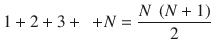
We start with a sum equal to 0. Then we add the first element, for that we need to address it alone (1). Then we add the second element, addressing the first and the second (2). Then we add the third element, addressing the first, the second, and the third as we look through the list from its beginning. In the end what we get is something like O(N 2) for those familiar with the O-notation. Essentially it means that by increasing the list size by 1, the time to sum such a list will have N added to it.
In such case it is indeed wiser to just pass through the list, adding a current element to the accumulator.
Writing small functions is very good most of the time.
Consider writing separate functions to: add an element to the front, add to the back, create a new linked list node.
Do not forget to extensively use const, especially in functions accepting pointers as arguments!
10.7 The Static Keyword
In C, the keyword static has several meanings depending on context.
Applying static to global variables or functions we make them available only in the current module (.c file).
To illustrate it, we are going to compile a simple program shown in Listing 10-37, and launch nm to look into the symbol table. Remember, that nm marks global symbols with capital letters.
Listing 10-37. static_example.c
int global_int;static int module_int;static int module_function() {static int static_local_var;int local_var;return 0;}int main( int argc, char** argv ) {return 0;}What we see is that all symbol names are marked global except for those marked static in C. In assembly level it means that most labels are marked global, and to prevent it we have to be explicit and use the static keyword.
> gcc -c --ansi --pedantic -o static_example.o static_example.c> nm static_example.o0000000000000004 C global_int000000000000000b T main0000000000000000 t module_function0000000000000000 b module_int0000000000000004 b static_local_var.1464By applying static to the local variable we make it global-like, but no other function can access it directly. In other words, it persists between function calls after being initialized once. Next time the same function is called the value of a local static variable will be the same as when this function terminated last time.
Listing 10-38 shows an example.
Listing 10-38. static_loc_var_example.c
int demo (void){static int a = 42;printf("%d\n", a++);}...demo(); //outputs 42demo(); //outputs 43demo(); //outputs 44
10.8 Linkage
The concept of linkage is defined in the C standard and systematizes what we have studied in this chapter so far. According to it, “an identifier declared in different scopes or in the same scope more than once can be made to refer to the same object or function by a process called linkage” [7].
So, each identifier (variable or a function name) has an attribute called linkage. There are three types of linkage:
No linkage, which corresponds to local (to a block ) variables.
External linkage, which makes an identifier available to all modules that might want to touch it. This is the case for global variables and any functions.
All instances of a particular name with external linkage refer to the same object in the program.
All objects with external linkage must have one and only one definition. However, the number of declarations in different files is not limited.
Internal linkage, which restricts the visibility of the identifier to the .c file where it was defined.
It’s easy for us to map the kinds of language entities we know to the linkage types:
Regular functions and global variables—external linkage.
Static functions and global variables—internal linkage.
Local variables (static or not)—internal linkage.
While being important to grasp in order to read the standard freely, this concept is rarely encountered in everyday programming activities.
10.9 Summary
In this chapter we learned how to split code into separate files. We have reviewed the concepts of header files and studied include guards and learned to isolate functions and variables inside a file. We have also seen what the symbol tables look like for the basic C programs and the effects the keyword static produces on object files. We have completed an assignment and implemented linked lists (one of the most fundamental data structures). In the next chapter we are going to study the memory from the C perspective in greater details.
Question 190
What is the difference between a declaration and a definition?
Question 191
What is a forward declaration?
Question 192
When are function declarations needed?
Question 193
When are structure declarations needed?
Question 194
How can the functions defined in other files be called?
Question 195
What effect does a function declaration make on the symbol table?
Question 196
How do we access data defined in other files?
Question 197
What is the concept of header files? What are they typically used for?
Question 198
Which parts does the standard C library consist of?
Question 199
How does the program accept command-line arguments?
Question 200
Write a program in assembly that will display all command-line arguments, each on a separate line.
Question 201
How can we use the functions from the standard C library?
Question 202
Describe the machinery that allows the programmer to use external functions by including relevant headers.
Question 203
Read about ld-linux.
Question 204
What are the main directives of the C preprocessor?
Question 205
What is the include guard used for and how do we write it?
Question 206
What is the effect of static global variables and functions on the symbol table?
Question 207
What are static local variables?
Question 208
Where are static local variables created?
Question 209
What is linkage? Which types of linkage exist?