
Now, let's look at what can happen if you have web content files that are set with the wrong SELinux type. First, we'll install, enable, and start the Apache web server on our CentOS virtual machines. (Note that including the --now option allows us to enable and start a daemon all in one single step.) We have the following code:
sudo yum install httpd
sudo systemctl enable --now httpd
If you haven't done so already, you'll want to configure the firewall to allow access to the web server:
[donnie@localhost ~]$ sudo firewall-cmd --permanent --add-service=http
success
[donnie@localhost ~]$ sudo firewall-cmd --reload
success
[donnie@localhost ~]$
When we look at the SELinux information for the Apache processes, we'll see this:
[donnie@localhost ~]$ ps ax -Z | grep httpd
system_u:system_r:httpd_t:s0     3689 ?        Ss     0:00 /usr/sbin/httpd -DFOREGROUND
system_u:system_r:httpd_t:s0     3690 ?        S      0:00 /usr/sbin/httpd -DFOREGROUND
system_u:system_r:httpd_t:s0     3691 ?        S      0:00 /usr/sbin/httpd -DFOREGROUND
system_u:system_r:httpd_t:s0     3692 ?        S      0:00 /usr/sbin/httpd -DFOREGROUND
system_u:system_r:httpd_t:s0     3693 ?        S      0:00 /usr/sbin/httpd -DFOREGROUND
system_u:system_r:httpd_t:s0     3694 ?        S      0:00 /usr/sbin/httpd -DFOREGROUND
unconfined_u:unconfined_r:unconfined_t:s0-s0:c0.c1023 3705 pts/0 R+   0:00 grep --color=auto httpd
[donnie@localhost ~]$
As I said before, we're not interested in the user or the role. However, we are interested in the type, which in this case is httpd_t.
On Red Hat-type systems, we would normally place web content files in the /var/www/html directory. Let's look at the SELinux context for that html directory:
[donnie@localhost www]$ pwd
/var/www
[donnie@localhost www]$ ls -Zd html/
drwxr-xr-x. root root system_u:object_r:httpd_sys_content_t:s0 html/
[donnie@localhost www]$
The type is httpd_sys_content, so it stands to reason that the httpd daemon should be able to access this directory. It's currently empty, so let's cd into it and create a simple index file:
[donnie@localhost www]$ cd html
[donnie@localhost html]$ pwd
/var/www/html
[donnie@localhost html]$ sudo vim index.html
I'll put this into the file, as follows:
<html>
<head>
<title>
Test of SELinux
</title>
</head>
<body>
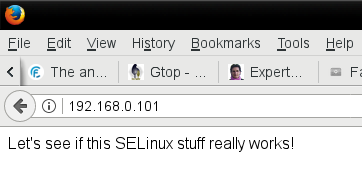
Let's see if this SELinux stuff really works!
</body>
</html>
Okay, as I said, it's simple, as my HTML hand-coding skills aren't what they used to be. But still, it serves our present purposes.
Looking at the SELinux context, we see that the file has the same type as the html directory:
[donnie@localhost html]$ ls -Z
-rw-r--r--. root root unconfined_u:object_r:httpd_sys_content_t:s0 index.html
[donnie@localhost html]$
I can now navigate to this page from the web browser of my trusty OpenSUSE workstation:
Now though, let's see what happens if I decide to create content files in my own home directory and then move them to the html directory. First, let's see what the SELinux context is for my new file:
[donnie@localhost ~]$ pwd
/home/donnie
[donnie@localhost ~]$ ls -Z index.html
-rw-rw-r--. donnie donnie unconfined_u:object_r:user_home_t:s0 index.html
[donnie@localhost ~]$
The context type is now user_home_t, which is a sure-fire indicator that I created this in my home directory. I'll now move the file to the html directory, overwriting the old file:
[donnie@localhost ~]$ sudo mv index.html /var/www/html/
[sudo] password for donnie:

[donnie@localhost ~]$ cd /var/www/html

[donnie@localhost html]$ ls -Z
-rw-rw-r--. donnie donnie unconfined_u:object_r:user_home_t:s0 index.html
[donnie@localhost html]$
Even though I moved the file over to the /var/www/html directory, the SELinux type is still associated with users' home directories. Now, I'll go to the browser of my host machine to refresh the page:
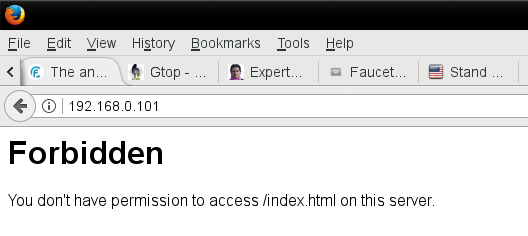
So, I have a slight bit of a problem. The type that's assigned to my file doesn't match with the type of the httpd daemon processes, so SELinux doesn't allow the httpd processes to access the file.