The information in this section describes external symbols by version numbers and names thereof, and is used by the loader in order to ensure that the kernel and the LKM are using symbols of the same version, so there would not be any surprises. You may try to build a module without this section and it may even be loaded, but it is not suggested to do so. The loader refuses to load modules with invalid symbol versions, thus telling us that this information is not just for fun, but is used in order to prevent failures.
At the time, I could not find reliable information on where to obtain version numbers for certain symbols, but it may be a good workaround, which is definitely sufficient for our small LKM, to simply search for symbol names prepended with the 8-byte version value (4 bytes on 32-bit systems), as shown in the following screenshot:
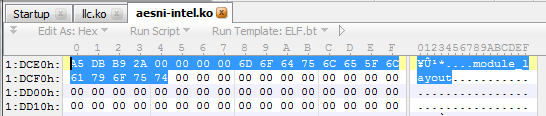
We only need two external symbols for our LKM, which are module_layout and printk. As you see in the preceding screenshot, the version of the module_layout symbol is 0x2AB9DBA5. Taking the same approach for obtaining the version of the printk symbol, we get (so it is on my system, but it may differ on yours) 0x27E1A049.
These entries are stored as an array of structures, where each structure contains two fields:
- version number: This is the 8-byte version identifier (4 bytes on 32-bit systems)
- symbol name: This is the variable length string (up to 56 bytes) representing the name of the symbol
Since we are talking about fixed-size fields here, it is natural to define a structure; however, since we do not want to name each and every structure for each and every symbol, we will use a macro:
macro __version ver, name
{
   local .version, .name
   .version  dq  ver
   .name     db  name, 0
   .name_len = $ - .name
             rb  56 - .name_len
}
Having defined the __version macro, we are ready to conveniently implement the __versions section:
section '__versions'
   __version  0x2AB9DBA5, 'module_layout'
   __version  0x27E1A049, 'printk'
That is it. Save the file and let's try to compile it and load.