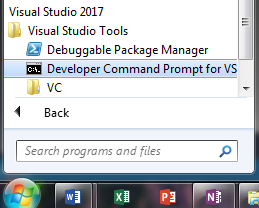
Compiling this source file will produce the obj_win.obj file, which we will link to kernel32.lib and crypto_w32.obj. But where do we find the kernel32.lib file? This task may not be such a simple one sometimes, although not a difficult one. All system libraries may be found at c:\Program Files\Microsoft SDKs\Windows\vX.X\Lib, where vX.X stands for the version (there will, most likely, be more than one). For 64-bit Windows, the directory would be c:\Program Files (x86)\Microsoft SDKs\Windows\vX.X\Lib. So, let's copy the crypto_w32.obj file to our working directory and try to link it. Open the Developer Command Prompt for VS 2017 command window, as shown in the following screenshot, and navigate to your working directory:
Type the following command:
link /entry:start /subsystem:console obj_win.obj "c:\Program Files\Microsoft SDKs\Windows\v7.0A\Lib\kernel32.lib" crypto_w32.obj
Once you press enter, if all went well, the Microsoft (R) Incremental Linker logo message will appear in the console followed by a new prompt, and the obj_win.exe file will be generated. Try to run it and you should get this output:
Hello from object file!
Encrypted
Decrypted
Hello from object file!
Voila! We have just used external functionality in our Assembly code.