
As we saw in the preceding chapter, when looking at the Node and NodeType entity types, entity type definitions belong inside the Entity folder of our module's namespace. In there, we will create a class called Product, which will have an annotation at the top to tell Drupal this is a content entity type. This is the most important part in defining a new entity type:
namespace Drupal\products\Entity;

use Drupal\Core\Entity\ContentEntityBase;
use Drupal\Core\Entity\EntityChangedTrait;
use Drupal\Core\Entity\EntityTypeInterface;
use Drupal\Core\Field\BaseFieldDefinition;

/**
 * Defines the Product entity.
 *
 * @ContentEntityType(
 *   id = "product",
 *   label = @Translation("Product"),
 *   handlers = {
 *     "view_builder" = "Drupal\Core\Entity\EntityViewBuilder",
 *     "list_builder" = "Drupal\products\ProductListBuilder",
 *
 *     "form" = {
 *       "default" = "Drupal\products\Form\ProductForm",
 *       "add" = "Drupal\products\Form\ProductForm",
 *       "edit" = "Drupal\products\Form\ProductForm",
 *       "delete" = "Drupal\Core\Entity\ContentEntityDeleteForm",
 *     },
 *    "route_provider" = {
 *      "html" = "Drupal\Core\Entity\Routing\AdminHtmlRouteProvider"
 *    }
 *   },
 *   base_table = "product",
 *   admin_permission = "administer site configuration",
 *   entity_keys = {
 *     "id" = "id",
 *     "label" = "name",
 *     "uuid" = "uuid",
 *   },
 *   links = {
 *     "canonical" = "/admin/structure/product/{product}",
 *     "add-form" = "/admin/structure/product/add",
 *     "edit-form" = "/admin/structure/product/{product}/edit",
 *     "delete-form" = "/admin/structure/product/{product}/delete",
 *     "collection" = "/admin/structure/product",
 *   }
 * )
 */
class Product extends ContentEntityBase implements ProductInterface {}
In the preceding code block, I omitted the actual contents of the class to first focus on the annotation and some other aspects. We will see the rest of it shortly. However, the entire working code can be found in the accompanying repository.
If you remember from the preceding chapter, we have the ContentEntityType annotation with the entity type plugin definition. Our example is relatively barebones compared to Node, for example, because I wanted to keep things simple. It has no bundles and is not revisionable, nor translatable. Also, for some of its handlers, we fall back to Entity API defaults.
The entity type ID and label are immediately visible, so no need to explain that; however, we can instead skip to the handlers section.
For the view builder handler, we choose to default to the basic EntityViewBuilder because there is nothing our products especially need for being rendered. Many times, this will be enough, but you can also extend this class and create your own.
For the list builder, although still keeping things simple, we needed our own implementation in order to take care of things such as the list headers. We will see this class soon. The form handler to create and edit products is our own implementation found inside the Form namespace of our module, and we will see it soon to get a better understanding. We rely on Drupal 8 to help us out with the delete form, though.
Finally, for the route provider, we used the default AdminHtmlRouteProvider, which takes care of all the routes necessary for an entity type to be managed in the admin UI. This means that we no longer need to do anything for routing the links referenced in the links section of the annotation. Speaking of links, it makes sense to place them under the admin/structure section of our administration for our example, but you can choose another place if you want.
The database table our products will be stored in is products, and the permission needed for users to manage them is administer site configuration. I have purposefully omitted creating permissions specific to this entity type because we will cover this topic in a chapter dedicated to access.
Finally, we also have some basic entity keys to map to the respective fields.
Our Product class extends the ContentEntityBase class to inherit all the necessary stuff from the API and implements our very own ProductInterface, which will contain all the methods used to access relevant field values. Let's create that one real quick in the same Entity folder:
namespace Drupal\products\Entity;

use Drupal\Core\Entity\ContentEntityInterface;
use Drupal\Core\Entity\EntityChangedInterface;

/**
 * Represents a Product entity.
 */
interface ProductInterface extends ContentEntityInterface, EntityChangedInterface {

  /**
   * Gets the Product name.
   *
   * @return string
   */
  public function getName();

  /**
   * Sets the Product name.
   *
   * @param string $name
   *
   * @return \Drupal\products\Entity\ProductInterface
   *   The called Product entity.
   */
  public function setName($name);

  /**
   * Gets the Product number.
   *
   * @return int
   */
  public function getProductNumber();

  /**
   * Sets the Product number.
   *
   * @param int $number
   *
   * @return \Drupal\products\Entity\ProductInterface
   *   The called Product entity.
   */
  public function setProductNumber($number);

  /**
   * Gets the Product remote ID.
   *
   * @return string
   */
  public function getRemoteId();

  /**
   * Sets the Product remote ID.
   *
   * @param string $id
   *
   * @return \Drupal\products\Entity\ProductInterface
   *   The called Product entity.
   */
  public function setRemoteId($id);

  /**
   * Gets the Product source.
   *
   * @return string
   */
  public function getSource();

  /**
   * Sets the Product source.
   *
   * @param string $source
   *
   * @return \Drupal\products\Entity\ProductInterface
   *   The called Product entity.
   */
  public function setSource($source);

  /**
   * Gets the Product creation timestamp.
   *
   * @return int
   */
  public function getCreatedTime();

  /**
   * Sets the Product creation timestamp.
   *
   * @param int $timestamp
   *
   * @return \Drupal\products\Entity\ProductInterface
   *   The called Product entity.
   */
  public function setCreatedTime($timestamp);
}
As you can see, we are extending the obligatory ContentEntityInterface but also the EntityChangedInterface, which provides some handy methods to manage the last changed date of the entities. Those method implementations will be added to our Product class via the EntityChangedTrait:
use EntityChangedTrait;
The methods on the ProductInterface are relatively self-explanatory. We will have a product name, number, remote ID, and source field, so it's nice to have getters and setters for those. If you remember, the Entity API provides the get() and set() methods using which we can consistently access and store field values across all entity types. However, I find that using an interface with well-defined methods makes code much clearer, not to mention that IDE autocompletion is a great time-saver. We also have a getter and setter for the created date field, which is a typical field content entities have.
Now, we can take a look at the baseFieldDefinitions() method of our Product entity type and see how we actually defined these fields:
public static function baseFieldDefinitions(EntityTypeInterface $entity_type) {
    $fields = parent::baseFieldDefinitions($entity_type);

    $fields['name'] = BaseFieldDefinition::create('string')
      ->setLabel(t('Name'))
      ->setDescription(t('The name of the Product.'))
      ->setSettings([
        'max_length' => 255,
        'text_processing' => 0,
      ])
      ->setDefaultValue('')
      ->setDisplayOptions('view', [
        'label' => 'hidden',
        'type' => 'string',
        'weight' => -4,
      ])
      ->setDisplayOptions('form', [
        'type' => 'string_textfield',
        'weight' => -4,
      ])
      ->setDisplayConfigurable('form', TRUE)
      ->setDisplayConfigurable('view', TRUE);

    $fields['number'] = BaseFieldDefinition::create('integer')
      ->setLabel(t('Number'))
      ->setDescription(t('The Product number.'))
      ->setSettings([
        'min' => 1,
        'max' => 10000
      ])
      ->setDefaultValue(NULL)
      ->setDisplayOptions('view', [
        'label' => 'above',
        'type' => 'number_unformatted',
        'weight' => -4,
      ])
      ->setDisplayOptions('form', [
        'type' => 'number',
        'weight' => -4,
      ])
      ->setDisplayConfigurable('form', TRUE)
      ->setDisplayConfigurable('view', TRUE);

    $fields['remote_id'] = BaseFieldDefinition::create('string')
      ->setLabel(t('Remote ID'))
      ->setDescription(t('The remote ID of the Product.'))
      ->setSettings([
        'max_length' => 255,
        'text_processing' => 0,
      ])
      ->setDefaultValue('');

    $fields['source'] = BaseFieldDefinition::create('string')
      ->setLabel(t('Source'))
      ->setDescription(t('The source of the Product.'))
      ->setSettings([
        'max_length' => 255,
        'text_processing' => 0,
      ])
      ->setDefaultValue('');

    $fields['created'] = BaseFieldDefinition::create('created')
      ->setLabel(t('Created'))
      ->setDescription(t('The time that the entity was created.'));

    $fields['changed'] = BaseFieldDefinition::create('changed')
      ->setLabel(t('Changed'))
      ->setDescription(t('The time that the entity was last edited.'));

    return $fields;
  }
First and foremost, we will need to inherit the base fields of the parent class. This includes things such as the ID and UUID fields.
Second, we define our own fields, starting with the product name field, which is of the string type. This string type is nothing more than a FieldType plugin I mentioned in the preceding chapter. If you remember, this plugin extends a TypedData class itself. Apart from the obvious label and description, it has some settings, most notably a maximum length for the value, which is 255 characters. The view and form display options reference FieldFormatter and FieldWidget plugins, respectively, which together with the FieldType make up a field. Lastly, with the setDisplayConfigurable(), we state that some of the options on this field should be configurable through the UI. For example, we can change the label in the UI.
Then, we have the number field that is of the integer type and for this example is restricted to a number between 1 and 10,000. This restriction setting turns into a constraint under the hood. The rest of the options are similar to the name field.
Next, we have the remote_id string field, but it doesn't have any widget or display settings because we don't necessarily want to display or edit this value. It is mostly for internal use to keep track of the product ID of the remote source it came from. Similarly, the source string field is also not displayed or configurable because we want to use it to store the source of the product, where it has been imported from and also to keep track programmatically.
Finally, the created and changed fields are special fields that store the timestamps for when the entity is created and modified. Not much more than that is needed to do because these fields automatically set the current timestamps as necessary as the field values.
By now, we can also see the rest of the class contents, which is mostly made up of the methods required by the ProductInterface:
 use EntityChangedTrait;

  /**
   * {@inheritdoc}
   */
  public function getName() {
    return $this->get('name')->value;
  }

  /**
   * {@inheritdoc}
   */
  public function setName($name) {
    $this->set('name', $name);
    return $this;
  }

  /**
   * {@inheritdoc}
   */
  public function getProductNumber() {
    return $this->get('number')->value;
  }

  /**
   * {@inheritdoc}
   */
  public function setProductNumber($number) {
    $this->set('number', $number);
    return $this;
  }

  /**
   * {@inheritdoc}
   */
  public function getRemoteId() {
    return $this->get('remote_id')->value;
  }

  /**
   * {@inheritdoc}
   */
  public function setRemoteId($id) {
    $this->set('remote_id', $id);
    return $this;
  }

  /**
   * {@inheritdoc}
   */
  public function getSource() {
    return $this->get('source')->value;
  }

  /**
   * {@inheritdoc}
   */
  public function setSource($source) {
    $this->set('source', $source);
    return $this;
  }

  /**
   * {@inheritdoc}
   */
  public function getCreatedTime() {
    return $this->get('created')->value;
  }

  /**
   * {@inheritdoc}
   */
  public function setCreatedTime($timestamp) {
    $this->set('created', $timestamp);
    return $this;
  }
As promised, we are making use of the EntityChangedTrait to handle the changed field and implement simple getters and setters for the values found in the fields we defined as base fields. If you remember the TypedData section, the way we access a value (since the cardinality is always 1 for these fields) is by running the following command:
$this->get('field_name')->value
Let's now move through the Entity type plugin annotation and create the handlers we've been referencing there. Also, we can start with the list builder, which we can place at the root of our namespace:
namespace Drupal\products;

use Drupal\Core\Entity\EntityInterface;
use Drupal\Core\Entity\EntityListBuilder;
use Drupal\Core\Link;
use Drupal\Core\;Url;

/**
 * EntityListBuilderInterface implementation responsible for the Product entities.
 */
class ProductListBuilder extends EntityListBuilder {

  /**
   * {@inheritdoc}
   */
  public function buildHeader() {
    $header['id'] = $this->t('Product ID');
    $header['name'] = $this->t('Name');
    return $header + parent::buildHeader();
  }

  /**
   * {@inheritdoc}
   */
  public function buildRow(EntityInterface $entity) {
    /* @var $entity \Drupal\products\Entity\Product */
    $row['id'] = $entity->id();
    $row['name'] = Link::fromTextAndUrl(
      $entity->label(),
      new Url(
        'entity.product.canonical', [
          'product' => $entity->id(),
        ]
      )
    );
    return $row + parent::buildRow($entity);
  }

}
The purpose of this handler is to build the administration page that lists the available entities. On this page, we will then have some info about the entities and operation links to edit and delete and whatever else we might need. For our products, we will simply extend from the default EntityListBuilder class, but override the buildHeader() and builderRow() methods to add some information specific to our products. The names of these methods are self-explanatory, but one thing to keep in mind is that keys from the $header array we return need to match the keys from the $row array we return. Also, of course, the arrays need to have the same number of records so that the table header matches the individual rows. If you look inside EntityListBuilder, you note some other handy methods you might want to override, such as the one that builds the query and the one that loads the entities. For us, this is enough.
Our Products list builder will have, for now, only two columns--the ID and the name. For the latter, each row will be actually a link to the Product canonical URL (the main URL for this entity in Drupal). The construct for this route is in the entity.[entity_type].canonical format. Other useful entity links can be built by replacing the word canonical with the keys from the links definition of the Entity type plugin annotation. Finally, you remember, from Chapter 2, Creating Your First Module, how to build links with the Link class, right?
That is pretty much it for the list builder, and we can move on to the form handler. Since creating and editing an entity share so much in terms of what we need in the form, we use the same ProductForm for both those operations. Let's create that form class now:
namespace Drupal\products\Form;

use Drupal\Core\Entity\ContentEntityForm;
use Drupal\Core\Form\FormStateInterface;

/**
 * Form for creating/editing Product entities.
 */
class ProductForm extends ContentEntityForm {

  /**
   * {@inheritdoc}
   */
  public function buildForm(array $form, FormStateInterface $form_state) {
    /* @var $entity \Drupal\products\Entity\Product */
    $form = parent::buildForm($form, $form_state);
    return $form;
  }

  /**
   * {@inheritdoc}
   */
  public function save(array $form, FormStateInterface $form_state) {
    $entity = &$this->entity;

    $status = parent::save($form, $form_state);

    switch ($status) {
      case SAVED_NEW:
        drupal_set_message($this->t('Created the %label Product.', [
          '%label' => $entity->label(),
        ]));
        break;

      default:
        drupal_set_message($this->t('Saved the %label Product.', [
          '%label' => $entity->label(),
        ]));
    }
    $form_state->setRedirect('entity.product.canonical', ['product' => $entity->id()]);
  }

}
We extend ContentEntityForm, which is a specialized form class for content entities. It itself extends EntityForm, which then subclasses the FormBase we’ve already encountered in Chapter 2, Creating Your First Module. However, the former two give us a lot of functionalities needed to manage our entities without writing much code ourselves.
First, inside the buildForm() method, we will do nothing--not a thing. We might if we wanted to, but the parent classes are smart enough to read our Product entity and prepare all the necessary form elements with the right widgets (FieldWidget plugins) to build our form. Second, we skip the submit and validate handlers because there is nothing we need to do in them for our products. The only thing we actually want to do is override the save() method in order to write a message to the user informing them that the product has either been created or updated. This we can deduce because the EntityInterface::save() method returns a specific constant to denote the type of saving that happened. Lastly, we also want to redirect to the canonical URL of the product entity. This we do with a very handy method on the FormStateInterface by which we can specify a route (and any necessary parameters), and it will make sure that when the form is submitted, the user will be redirected to that route. Neat, isn't it?
As I mentioned, for the delete operation, we just use the ContentEntityDeleteForm, which does all we need--it presents a confirmation form where we submit and trigger the delete. This is a typical flow for deleting resources in Drupal. As we will see a bit later, for configuration entities, there will be some methods we will need to write ourselves for this same process to happen.
All our handlers are done now, and our product entity type is operational. However, in order to be able to work with it, let's create some links in the admin menu for being able to easily manage them. First, create the products.links.menu.yml file:
# Product entity menu items
entity.product.collection:
  title: 'Product list'
  route_name: entity.product.collection
  description: 'List Product entities'
  parent: system.admin_structure
  weight: 100
This defines a menu link under the Structure link for the product list (the page built with our list builder handler).
Next, let's create some local tasks (tabs) so that we get handy links on the product page to edit and delete the product entity. So, inside the products.links.task.yml file:
# Product entity task items
entity.product.canonical:
  route_name: entity.product.canonical
  base_route: entity.product.canonical
  title: 'View'

entity.product.edit_form:
  route_name: entity.product.edit_form
  base_route: entity.product.canonical
  title: 'Edit'

entity.product.delete_form:
  route_name:  entity.product.delete_form
  base_route:  entity.product.canonical
  title: Delete
  weight: 10
You remember this from Chapter 5, Menus and Menu Links, don't you? The base route is always the canonical route for the entity, which essentially groups the tabs together. Then, the routes we use for the other two tasks are the edit_form and delete_form links of the entity type. You can refer to the links section of the Entity type plugin annotation to understand where these come from. The reason we don't need to specify any parameters here (since those routes do require a product ID) is because the base route has that parameter already in the URL. So, the tasks will use that one.
Finally, we also want an action link to create a new product entity, which will be on the product list page. So, inside the products.links.action.yml file:
entity.product.add_form:
  route_name: entity.product.add_form
  title: 'Add Product'
  appears_on:
    - entity.product.collection
Again, none of this should be new, as we covered it in detail in Chapter 5, Menus and Menu Links.
We are finally done. If the products module was enabled on your site before writing all the entity code, you will need to run the drush entity-updates command in order for all the necessary tables to be created in the database. Otherwise, installing the module will do that automatically. However, keep the first point in mind for when you add new content entity types and fields or even change existing fields on an entity type. The underlying storage might need to be changed to accommodate your modifications. Moreover, another thing to keep in mind is that changing fields that already have data in them will not be okay with Drupal and will prevent you from making those changes. So, you might need to delete existing entities.
Now that we've done that, we can go to admin/structure/product and take a look at our (empty) product entity list:
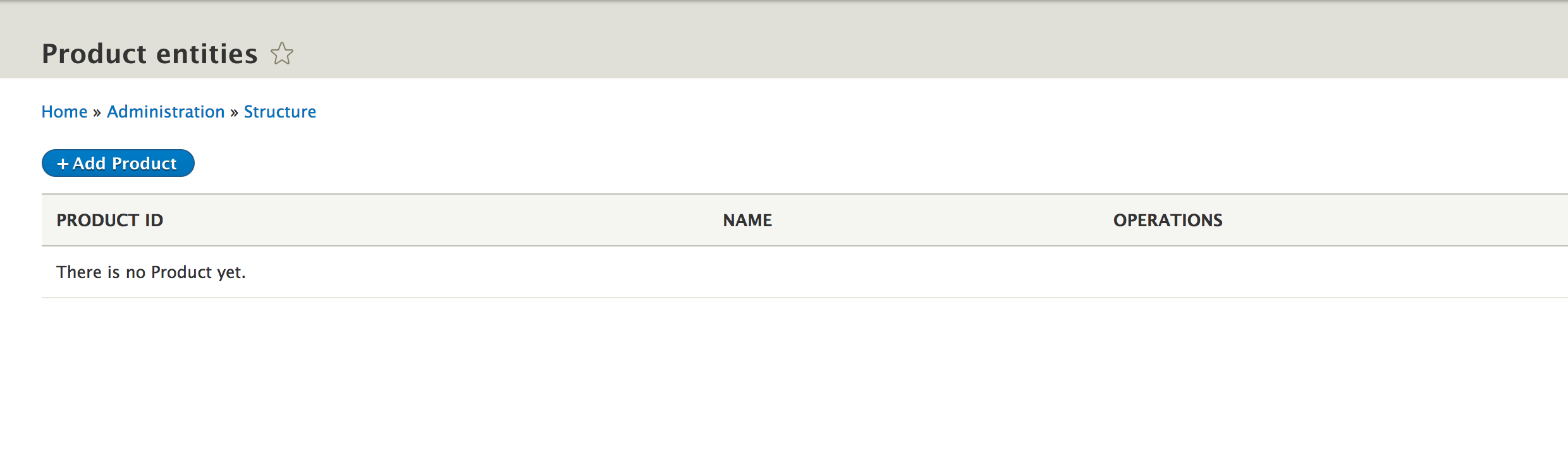
We can now create new products, edit them, and finally delete them. Remember, due to our field configuration, the manual product creation/edit does not permit the remote_id and source fields to be managed. For our purpose, we want those to be only programmatically available since any manual products will be considered as not needing that data. For example, if we want to make the source field show up as a form widget, all we have to do is change its base field definition to this:
$fields['source'] = BaseFieldDefinition::create('string')
  ->setLabel(t('Source'))
  ->setDescription(t('The source of the Product.'))
  ->setSettings([
    'max_length' => 255,
    'text_processing' => 0,
  ])
  ->setDefaultValue('')
  ->setDisplayOptions('form', [
    'type' => 'string_textfield',
    'weight' => -4,
  ]);
Also, we need to clear the cache. This will make the form element for the source field show up, but the value will still not be displayed on the canonical page of the entity because we have not set any view display options. In other words, we have not chosen a formatter.
However, in any case, our product entity is ready to store data, and all the TypedData APIs we practiced in the preceding chapter with the Node entity type will work just as well with this one. So, we can now turn to writing our importer logic to get some remote products into our website.