
We have written a neat little piece of functionality. There are still improvements that we can, and will make but those are for later chapters when we cover other topics that we will need to learn about. Now, however, let's take a step back to our content entity type and extend our products a bit by enabling bundles. We want to have more than one type of product that can be imported, bundled, which will be an option to choose when creating an Importer configuration. However, first, let's make the Product entity type "bundlelable".
We start by adjusting our Product entity plugin annotation:
/**
 * Defines the Product entity.
 *
 * @ContentEntityType(
 *   ...
 *   label = @Translation("Product"),
 *   bundle_label = @Translation("Product type"),
 *   handlers = {
 *   ...
 *   entity_keys = {
 *     ...
 *     "bundle" = "type",
 *   },
 *   ...
 *   bundle_entity_type = "product_type",
 *   field_ui_base_route = "entity.product_type.edit_form"
 * )
 */
We add a bundle_label for our bundle, an entity key for it that will map to the type field, the bundle_entity_type that will act as a bundle for the products, and a field_ui_base_route. This latter option is something we could have added before but was not necessary. Now, we can (and should) add it because we need a route where we can configure our Product entities from the point of view of managing UI fields and the bundles. We'll see these a bit later on.
Moreover, we also need to change something about the links. First, we will need to alter the add-form link:
"add-form" = "/admin/structure/product/add/{product_type}",
This will now take a product type in the URL to know which bundle we are creating. If you remember from the preceding chapter when we were creating entities programmatically, the bundle is a required value from the beginning if the entity type has bundles.
Then, we add a new link, as follows:
"add-page" = "/admin/structure/product/add",
This will go to the initial add-form path, but will list options of available bundles to select for creating a new Product. Clicking on one of those will take us to the add-form link.
Since we made these changes, we will also need to make a quick alteration to the product entity action link to use the add-page instead of add-form route:
entity.product.add_page:
  route_name: entity.product.add_page
  title: 'Add Product'
  appears_on:
    - entity.product.collection
This is required because on the product entity list page (collection URL) we don't have a product type in context, so we cannot build a path to add-form, nor would it be logical to do so as we don't know what type of product the user wants to create. As a quick bonus, if there is only one bundle, Drupal will redirect them to the add-form link of that particular bundle.
The good thing is that since we specified an entity key for the bundle, we don't have to define the field that will reference the bundle configuration entity. It will be done for us by the parent ContentEntityType::baseFieldDefinitions(). So, what is left to do is to create the ProductType configuration entity type that will serve as product bundles. We already know more or less how this works. Inside our Entity namespace we start our class like so:
namespace Drupal\products\Entity;

use Drupal\Core\Config\Entity\ConfigEntityBundleBase;

/**
 * Product type configuration entity type.
 *
 * @ConfigEntityType(
 *   id = "product_type",
 *   label = @Translation("Product type"),
 *   handlers = {
 *     "list_builder" = "Drupal\products\ProductTypeListBuilder",
 *     "form" = {
 *       "add" = "Drupal\products\Form\ProductTypeForm",
 *       "edit" = "Drupal\products\Form\ProductTypeForm",
 *       "delete" = "Drupal\products\Form\ProductTypeDeleteForm"
 *     },
 *     "route_provider" = {
 *       "html" = "Drupal\Core\Entity\Routing\AdminHtmlRouteProvider",
 *     },
 *   },
 *   config_prefix = "product_type",
 *   admin_permission = "administer site configuration",
 *   bundle_of = "product",
 *   entity_keys = {
 *     "id" = "id",
 *     "label" = "label",
 *     "uuid" = "uuid"
 *   },
 *   links = {
 *     "canonical" = "/admin/structure/product_type/{product_type}",
 *     "add-form" = "/admin/structure/product_type/add",
 *     "edit-form" = "/admin/structure/product_type/{product_type}/edit",
 *     "delete-form" = "/admin/structure/product_type/{product_type}/delete",
 *     "collection" = "/admin/structure/product_type"
 *   }
 * )
 */
class ProductType extends ConfigEntityBundleBase implements ProductTypeInterface  {

  /**
   * The Product type ID.
   *
   * @var string
   */
  protected $id;

  /**
   * The Product type label.
   *
   * @var string
   */
  protected $label;
}
Much of this is exactly the same as when we created the Importer configuration entity type. The only difference is that we have the bundle_of key in the annotation, which denotes the content entity type this serves as a bundle for. Also, we don't really need any other fields. Because of that, the ProductTypeInterface can look as simple as this:
namespace Drupal\products\Entity;

use Drupal\Core\Config\Entity\ConfigEntityInterface;

/**
 * Product bundle interface.
 */
interface ProductTypeInterface extends ConfigEntityInterface {}
Let's quickly take a look at the individual handlers, which will seem very familiar by now as well. The list builder looks almost the same as for the Importer:
namespace Drupal\products;

use Drupal\Core\Config\Entity\ConfigEntityListBuilder;
use Drupal\Core\Entity\EntityInterface;

/**
 * List builder for ProductType entities.
 */
class ProductTypeListBuilder extends ConfigEntityListBuilder {

  /**
   * {@inheritdoc}
   */
  public function buildHeader() {
    $header['label'] = $this->t('Product type');
    $header['id'] = $this->t('Machine name');
    return $header + parent::buildHeader();
  }

  /**
   * {@inheritdoc}
   */
  public function buildRow(EntityInterface $entity) {
    $row['label'] = $entity->label();
    $row['id'] = $entity->id();
    return $row + parent::buildRow($entity);
  }
}
The create/edit form handler also looks very similar, albeit much simpler due to not having many fields on the configuration entity type:
namespace Drupal\products\Form;

use Drupal\Core\Entity\EntityForm;
use Drupal\Core\Form\FormStateInterface;
use Drupal\products\Entity\ProductTypeInterface;

/**
 * Form handler for creating/editing ProductType entities
 */
class ProductTypeForm extends EntityForm {

  /**
   * {@inheritdoc}
   */
  public function form(array $form, FormStateInterface $form_state) {
    $form = parent::form($form, $form_state);

    /** @var ProductTypeInterface $product_type */
    $product_type = $this->entity;
    $form['label'] = [
      '#type' => 'textfield',
      '#title' => $this->t('Label'),
      '#maxlength' => 255,
      '#default_value' => $product_type->label(),
      '#description' => $this->t('Label for the Product type.'),
      '#required' => TRUE,
    ];

    $form['id'] = [
      '#type' => 'machine_name',
      '#default_value' => $product_type->id(),
      '#machine_name' => [
        'exists' => '\Drupal\products\Entity\ProductType::load',
      ],
      '#disabled' => !$product_type->isNew(),
    ];

    return $form;
  }

  /**
   * {@inheritdoc}
   */
  public function save(array $form, FormStateInterface $form_state) {
    $product_type = $this->entity;
    $status = $product_type->save();

    switch ($status) {
      case SAVED_NEW:
        drupal_set_message($this->t('Created the %label Product type.', [
          '%label' => $product_type->label(),
        ]));
        break;

      default:
        drupal_set_message($this->t('Saved the %label Product type.', [
          '%label' => $product_type->label(),
        ]));
    }
    $form_state->setRedirectUrl($product_type->toUrl('collection'));
  }

}
Speaking of fields, we mustn't forget about the configuration schema:
products.product_type.*:
  type: config_entity
  label: 'Product type config'
  mapping:
    id:
      type: string
      label: 'ID'
    label:
      type: label
      label: 'Label'
    uuid:
      type: string
Lastly, we should remember the form handler for deleting product types:
namespace Drupal\products\Form;

use Drupal\Core\Entity\EntityConfirmFormBase;
use Drupal\Core\Form\FormStateInterface;
use Drupal\Core\Url;

/**
 * Form handler for deleting ProductType entities.
 */
class ProductTypeDeleteForm extends EntityConfirmFormBase {

  /**
   * {@inheritdoc}
   */
  public function getQuestion() {
    return $this->t('Are you sure you want to delete %name?', ['%name' => $this->entity->label()]);
  }

  /**
   * {@inheritdoc}
   */
  public function getCancelUrl() {
    return new Url('entity.product_type.collection');
  }

  /**
   * {@inheritdoc}
   */
  public function getConfirmText() {
    return $this->t('Delete');
  }

  /**
   * {@inheritdoc}
   */
  public function submitForm(array &$form, FormStateInterface $form_state) {
    $this->entity->delete();

    drupal_set_message($this->t('Deleted @entity product type.', ['@entity' => $this->entity->label()]));

    $form_state->setRedirectUrl($this->getCancelUrl());
  }

}
You should already be familiar with what we're doing here.
Now, we are done. We can clear the caches and run the drush entity-updates command because Drupal needs to create the type field on the product entities. Once that is done, we can go the UI and see our changes.
We now have a Product type entity listing where we can create Product bundles. Moreover, we also have some extra operations since this entity type is used as a bundle--we can manage fields and displays (both for viewing and for the forms) for each individual bundle:
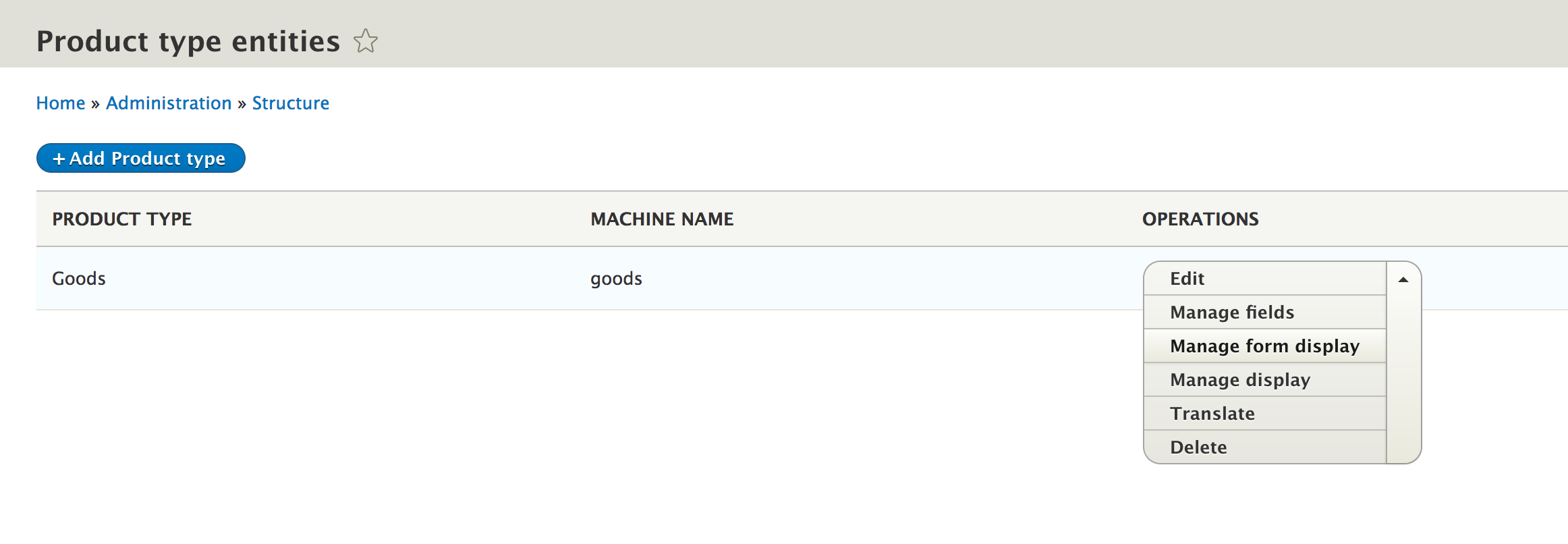
Managing fields and displays would have been possible before creating the bundle, had we provided the field_ui_base_route to the Product entity type and created a menu link for it.
Now we can add fields to our individual bundles and can distinguish between our product types--for example, we can have a bundle for goods and one for services. We can well imagine that the two types might require a different set of fields and/or they are being pulled from different external resources. So, let's just update our importing logic to allow the selection of a bundle because now it is actually mandatory to specify one when we attempt to create a Product.
We start by adding a new field to the Importer entity type, first, for the interface change:
 /**
   * Returns the Product type that needs to be created.
   *
   * @return string
   */
  public function getBundle();
Then, we will take a look at the implementation in the class:
 /**
   * The product bundle.
   *
   * @var string
   */
  protected $bundle;
...
  /**
   * {@inheritdoc}
   */
  public function getBundle() {
    return $this->bundle;
  }
Next, we must include the new field in the configuration schema:
...
bundle:
  type: string
  label: The product bundle
The last thing we will need to do on the Importer entity type is add the form element for choosing a bundle:
$form['bundle'] = [
  '#type' => 'entity_autocomplete',
  '#target_type' => 'product_type',
  '#title' => $this->t('Product type'),
  '#default_value' => $importer->getBundle() ? $this->entityTypeManager->getStorage('product_type')->load($importer->getBundle()) : NULL,
  '#description' => $this->t('The type of products that need to be created.'),
];
Here, we use an entity_autocomplete form element that gives us the possibility to use an autocomplete text field to look up an existing entity and select one of the found ones. The ID of the selected entity will then be submitted in the form as the value. This field definition requires choosing a #target_type, which is the entity type we want to autocomplete. One thing to note is that even if the submitted value is only the ID (in our case, a string as expected and which is what we also want to store), the #default_value requires the full entity object itself (or an array of entity objects). This is because the field shows more information about the referenced entity than just the ID.
In order to load the referenced entity for the default value, we will need to inject the EntityTypeManger. You should already know how to do this injection, so I'm not gonna show it here again. We simply tack on the dependency to the ImporterManager, which is already being injected.
That should be it for the Importer entity type alterations. The one last thing we need to do is handle the bundle inside the JsonImporter plugin we wrote. However, this is as simple as adding the type value when creating the product entity:
if (!$existing) {
  $values = [
    'remote_id' => $data->id,
    'source' => $config->getSource(),
    'type' => $config->getBundle(),
  ];
  /** @var ProductInterface $product */
  $product = $this->entityTypeManager->getStorage('product')->create($values);
...
Here we are. Running the import code will now create products of the bundle specified in the Importer configuration.