In this chapter and the next one, we will start to write some real PASM code to implement the compression. In this chapter, I will talk mainly about passing parameters to the PASM cog. In the next chapter, I will complete the compression and decompression code.
8.1 Passing Parameters to PASM
To reproduce the Spin code from steim_spin in PASM
, we need to have a way to pass the addresses of sampsBuf and other arrays to the PASM cog. In Spin that was simple. @sampsBuf was the address, and it could be passed to the COMPRESS method, where the values could be accessed with long[psampsBuf][j].
There are two main ways to pass information back and forth. Let’s begin with the (in my opinion) simpler way, which is passing information
in the cognew command.
We’ll set up these files: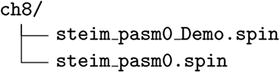
8.2 Setting Up steim_pasm0
Create two new files
: steim_pasm0_Demo.spin (Listing 8-1) and steim_pasm0.spin (Listing 8-2). Most of what is shown here is similar to what is in the pure-Spin version, but the compression will be done in PASM instead. First, we set up the ..._Demo.spin file, which is the entry point.
1 {* -*- Spin -*- *}
2 {* steim_pasm0_Demo .spin *}
3
4 CON ' Clock mode settings
5 _CLKMODE = XTAL1 + PLL16X
6 _XINFREQ = 6 _250_000
7
8 ' system freq as a constant
9 FULL_SPEED = (( _clkmode - xtal1) >> 6) * _xinfreq
10 ONE_MS = FULL_SPEED / 1_000 ' ticks in 1ms
11 ONE_US = FULL_SPEED / 1 _000_000 ' ticks in 1us
12
13 CON ' Pin map
14
15 DEBUG_TX_TO = 30
16 DEBUG_RX_FROM = 31
17
18 CON ' UART ports
19 DEBUG = 0
20 DEBUG_BAUD = 115200
21
22 UART_SIZE = 100
23 CR = 13
24 LF = 10
25 SPACE = 32
26 TAB = 9
27 COLON = 58
28 COMMA = 44
29
30 OBJ
31 '1 COG for 3 serial ports
32 UARTS : "FullDuplexSerial4portPlus_0v3"
33 NUM : "Numbers" 'Object for writing numbers to debug
34 COMPR : "steim_pasm0"
35
36 CON
37 NSAMPS_MAX = 128
38
39 VAR
40 long nsamps, ncompr
41 long sampsBuf[NSAMPS_MAX]
42 long comprCodeBuf[NSAMPS_MAX >> 4]
43
44 byte mainCogId, serialCogId, comprCogId
45 byte packBuf[NSAMPS_MAX << 2]
46
47 PUB MAIN
48
49 ' main cog
50 mainCogId := cogid
51
52 ' uart cog
53 LAUNCH_SERIAL_COG
54 PAUSE_MS(500)
55
56 UARTS.STR(DEBUG, string(CR, " Compression ", CR, LF))
57 UARTS.STR(DEBUG, string(" mainCogId : "))
58 UARTS.DEC(DEBUG, mainCogId)
59 UARTS.PUTC(DEBUG, CR)
60 UARTS.PUTC(DEBUG, LF)
61
62 ' compression cog
63 COMPR.INIT(NSAMPS_MAX)
64 comprCogId := COMPR.START
65
66 UARTS.STR(DEBUG, string(" comprCogId : "))
67 UARTS.DEC(DEBUG, comprCogId)
68 UARTS.PUTC(DEBUG, CR)
69 UARTS.PUTC(DEBUG, LF)
70
71 nsamps := 1
72 ncompr := COMPR.COMPRESS (@sampsBuf, nsamps, @packBuf, @comprCodeBuf)
73
74 UARTS.STR(DEBUG, string(" ncompr : "))
75 UARTS.DEC(DEBUG, ncompr)
76 UARTS.PUTC(DEBUG, CR)
77 UARTS.PUTC(DEBUG, LF)
78 repeat
79 PAUSE_MS(1000)
80
81 PRI LAUNCH_SERIAL_COG
82 " method that sets up the serial ports
83 NUM.INIT
84 UARTS.INIT
85 UARTS.ADDPORT (DEBUG, DEBUG_RX_FROM, DEBUG_TX_TO, -1, -1, 0, %000000, DEBUG_BAUD) 'Add DEBUG port
86 UARTS.START
87 serialCogId := UARTS.GETCOGID 'Start the, ports
88 PAUSE_MS(300)
89
90 PRI PAUSE_MS(mS)
91 waitcnt(clkfreq /1000 * mS + cnt)
92
93 ' Program ends here
Listing 8-1
steim_pasm0_Demo: Spin Side of the First Iteration of the PASM Compression
- Line 34: Import the file steim_pasm0.spin as object COMPR.
- Lines 63–64: Initialize and start the compression cog. As you will see, the COMPR.START function (a Spin function) launches a new PASM cog.
- Lines 71–72: Call the Spin method COMPR.COMPRESS (a Spin function), which signals the PASM cog to compress the samples in sampsBuf.
We will start by implementing the simplest possible compression code in Spin and PASM code in steim_pasm0. It includes passing nsamps to the PASM cog and reading ncompr back. As I said earlier, the PASM code has to monitor the hub memory and react to a change. Here we use nsamps as the trigger. If the value is greater than zero, then perform a compression, and at the end of the compression, set ncompr to a nonzero value. That, in turn, will be the signal to the Spin code that the PASM cog has completed its work. In this first example, that work is simple: you don’t have to do anything! The compressor will simply set ncompr to a nonzero value and return to monitoring nsamps.
1 CON
2 CODE08 = %01
3 CODE16 = %10
4 CODE24 = %11
5
6 VAR
7 byte ccogid
8 long mymax
9
10 long myns, myncompr
11
12 PUB INIT(nsmax)
13 mymax := nsmax
14 ccogid := -1
15
16 PUB START
17 STOP
18 ' myns <> 0 controls when the compression is started
19 myns := 0
20 ccogid := cognew (@STEIM, @myns)
21 return ccogid
22
23 PUB STOP
24 if ccogid <> -1
25 cogstop (ccogid)
26
27 PUB COMPRESS(psampsBuf, ns, ppackBuf, pcomprCodeBuf) : ncompr
28 " Inputs : psampsBuf - address of long array of samples (max len, mymax)
29 "' ns - number of samples to compress
30 " ppackBuf - address of byte array of packed data
31 " pcomprCodeBuf - address of long array of compression, codes
32 " Output : ncompr - number of bytes in packBuf
33 "
34 " Modified : packBuf and comprCodeBuf are changed
35
36 myns := 0
37 myncompr := 0
38
39 ' this will start the compression
40 myns := ns
41
42 ' when ncompr is non -zero, the compression is complete
43 repeat until myncompr > 0
44 return myncompr
45
46 PUB DECOMPRESS(psampsBuf, ns, ppackBuf, ncompr, pcomprCodesBuf) : ndecomp
47 return 0
48
49 DAT 'steim
50 "
51 "
52
53 STEIM org 0
54 ' copy the param addresses
55 mov _cnsPtr, par
56 mov _cncomprPtr, par
57
58 add _cncomprPtr, #4
59
60 : mainLoop
61 ' the signal for starting the compression is when ns <> 0
62 rdlong _cns, _cnsPtr wz
63 if_z jmp #:mainLoop
64
65 ' signal completion
66 mov _cncompr, #3
67 wrlong _cncompr, _cncomprPtr
68
69 ' wait for another compression request
70 jmp #:mainLoop
71
72 ' const
73 _ccode24 long CODE24
74 _ccode16 long CODE16
75 _ccode08 long CODE08
76
77 _cnsPtr res 1
78 _cncomprPtr res 1
79
80 _cns res 1
81 _cncompr res 1
82
83 r0 res 1
84
85 FIT 496
Listing 8-2
First Version of steim_pasm0.spin Showing the Spin Methods and the Beginning of the PASM Code
- Line 10: The variables myns and myncompr are declared one after the other, so they will be stored in hub memory one after the other. This property of storage is used in the PASM cog to find these variables. In other words, be careful about rearranging variable declaration order!
- Lines 16–21: We start the compression cog with cognew (after stopping any already running cog). The command cognew(@STEIM, @myns) says to copy the code in the DAT section (lines 49–85) into a new cog and to launch that cog. In addition, the address of the variable myns (a hub address) is also passed to the cog.
- Lines 27–44: Here the actual compression will take place. When myns is set to a nonzero number, the compression cog will notice that and will then begin the compression. When the cog has completed the compression, it will set myncompr, the length of the packed buffer packBuf, to a positive number.
- Lines 46–47: The decompression routine does nothing for now.
- Lines 53–58: This is the heart of the parameter passing to the cog. The address of myns (a hub address) is copied to _cnsPtr (a cog address), and the address of myncompr is copied to _cncomprPtr. You’ll learn much more about this in the next chapter.
- Lines 60–63: Here the cog sits in a loop, continually copying the value of myns from its hub location (earlier, we copied @myns to _cnsPtr) to _cns. It checks whether myns is nonzero (which is the wz effect that you’ll learn more about later); if it is still zero, it jumps back up to :mainLoop.
- Lines 66–70: The program arrives here if myns is nonzero, at which point we set myncompr to 3. This is done by setting _cncompr to 3 and then copying that value to hub memory. Then the program jumps back around to :mainLoop and repeats.
- Lines 73–83: Reserve space for some cog variables (I like to prepend the variable names with c to indicate they are local to the cog). I also have some temporary register variables (here r0).
OK, let’s break this code down.
The CON section defines the codes for the compression. For example, if a difference value δ
j
can be stored in 1 byte, then we write CODE08 in the comprCodeBuf (at the location corresponding to the j-th sample).
Pay particular attention to the VAR section where we have two long variables
one right after the other.
long myns, myncompr
This means they are stored in consecutive locations in hub memory.
Next we have the INIT, START, and STOP methods. The START method has the following command:
ccogid := cognew(@STEIM, @myns)
This starts a new cog and returns the cog number if successful (or -1 if eight cogs are already running). To reiterate, the Propeller has eight independent processors or cogs. When you first run steim_pasm0_Demo, one cog starts up and runs all the code in MAIN. When MAIN calls COMPR.START, which runs cognew, a new cog is launched. The contents of this cog are the PASM instructions in the DAT section labeled STEIM (starting at line 53 and continuing to the FIT instruction at line 85). From this point forward, the STEIM cog is entirely independent (if you are coming from the C world, this is a fork and exec...). The only way for the MAIN cog and the STEIM cog to interact is for one of them to change variables in hub memory...and for the other cog to react to that change.
This means that each cog has to periodically check the same location in hub memory
and has to include logic to decide that something must be done. Let’s look at the parameter passing in more detail.
8.3 Passing Parameters in the cognew Command
The cognew command
takes two arguments: the PASM cog to launch (@STEIM) and the address of a variable to share (here @myns).
ccogid := cognew (@STEIM, @myns)
When Spin encounters the command cognew, it does two things: it copies the PASM code into cog memory, and it places the value of the second argument to cognew (@myns—the memory location where the value myns lives) into the location PAR in cog memory. (PAR is always 0x1F0.) The STEIM cog can now get @myns from PAR, and using the rdlong and wrlong commands, it can read and change myns. The main cog (and other cogs) can also read and change myns, so there will need to be some protocol for making sure they don’t collide. (In other words, if the steim cog reads myns and then writes a new value there some time later, we can’t allow the main cog to mess with it during that time.)
An Analogy to PAR
Consider a train station—one of those lovely, high-ceiling Central European train stations
filled with spies, intrigue, and good coffee. There is a room off to the side with rows of lockers (or at least back in the innocent days of my youth there were...). Each locker has a number. In this train station, there are only a few people: an elegant young woman with the odd name of Ms. Main Cog (main for short) and an older gentleman named Mr. Joe Steim (steim for short). They want to communicate, but they don’t know what the other looks like.
When main wants to give steim a message, the only way she can do so is to place the message
in a locker. steim can then open the locker and read and modify the message. main can come back some time later and re-open the locker and read what steim did. There is still a problem, though. main needs to tell steim which locker to open. This is where the information desk comes in (every train station has one, with some wonderfully patient, friendly, and knowledgeable folks). Before steim arrives (with the cognew command), main chooses a locker where she is going to leave messages and tells the lady at the information desk the locker number. When steim arrives, he goes to the information desk and asks “Did main leave a locker number for me?” Voilà. Both main and steim can now communicate.
The expression @myns is the address (the “locker number”) of the variable myns. When passed to cognew, cognew places this address in a location known to everybody, called PAR (the “information desk” of my analogy).
8.3.1 Using PAR
The Spin code
has this:
cognew(@STEIM, @myns)
The PASM cog has the statements shown in Listing 8-3.
1 mov _cnsPtr, par
2 ...
3 _cnsPtr res 1
Listing 8-3
PASM Fragment for Passing Parameters Using par
The mov_cnsPtr, par instruction copies the address stored in PAR (this is the “information desk” of my example) into the cog memory location _cnsPtr. The PASM cog also needs to reserve some space for that number, which it does with the _cnsPtr res 1 statement.
8.3.2 Using PAR Some More
In the Spin code
, the variables myns and myncompr are declared thusly:
VAR
long myns, myncompr
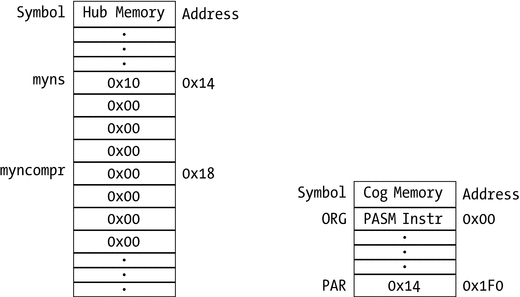
Therefore, we know that these two variables occupy successive memory in the hub. So, for example, if myns is at memory location 0x14, then myncompr will be at 0x18 (they are 4 bytes apart because they are longs). In Figure 8-1, the memory layout for the Hub and cog are shown.
When cognew(@STEIM, @myns) is called, the Propeller places the number 0x14 (the address of myns) into memory location PAR. We use our knowledge about the layout of hub memory
to now find out how to access myncompr.
mov _cnsPtr, par
mov _cncomprPtr, par
add _cncomprPtr, #4
...
_cnsPtr res 1
_cncomprPtr res 1
The instruction mov _cnsPtr, par copies 0x14 into _cnsPtr. The instruction mov _cncomprPtr, par also copies 0x14 into _cncomprtPtr..., but the next instruction, add _cncomprPtr, #4, adds 4 to that value with the result of _cncomprPtr = 0x18
 , which is just what we want.
Figure 8-1
The layout of Hub memory (left) and cog memory (right) showing how parameters are passing using the par register
8.3.3 Using the Addresses
Now that we have those addresses
for myns and myncompr, we can access the actual values.
rdlong _cns, _cnsPtr wz
...
mov _cncompr, #3
wrlong _cncompr, _cncomprPtr
There are only two sets of instructions to access hub memory: rdlong and wrlong (and their sisters rdbyte/wrbyte and rdword/wrword). The following instruction does two things:
rdlong _cns, _cnsPtr wz
It copies whatever is in the hub memory location that is pointed to by _cnsPtr into _cns. (Again, _cnsPtr contains the number 0x14; the rdlong instruction copies the long value that is stored at location 0x14 into the variable _cns.)
The second thing going on in that instruction is the wz effect. Every PASM instruction can have, as a side effect, the ability to change the flags Z and C. You have to read the manual to find out when and how Z and C are affected.
In the case
of rdlong _cns, _cnsPtr wz, the Z flag is set to 1 (one) if the read operation results in a zero being written to _cns. If the read operation results in a nonzero value in _cns, then Z is set to 0 (zero). Read that paragraph a few times (and if it is unclear, drop us a line with suggestions!).
Now both cogs can do what they want with the variable myns.
8.3.4 Starting the Compression
The PASM
cog continues after the instructions shown earlier and would continue to the end of cog memory except that we have some
branching instructions
.
:mainLoop
rdlong _cns, _cnsPtr wz
if_z jmp #:mainLoop
The expression :mainLoop is a label. It is a location that we can jump to. And we use that in this instruction:
if_z jmp #:mainLoop
The rdlong instruction sets Z according to whether _cns ends up being zero (in other words, whether myns in hub memory is zero or not). As long as myns is zero, then _cns will be zero, and therefore Z=1. The instruction if_z jmp #:mainLoop says that if Z==1, then jump to :mainLoop. If Z≠1, then continue to the next instruction. The reason for setting Z is so that we can make branching decisions
based on whether myns is zero or not. As I said, the steim and main cogs are independent, and the way main asks steim to start a compression is by setting myns to the number of samples to compress (a nonzero value
).
Once Ms. Main has asked Mr. Steim to start work (with the cognew command), he will periodically check the locker number 0x14 (named _cnsPtr in the PASM cog and myns in the main cog). If the note in there has the number zero on it, he will go back to cafe and get another espresso. If it has a nonzero number, then he knows he has work to do.
8.4 Passing Parameters: Method 2
The second way to pass parameters is to write a hub address to a cog variable before it is launched.
In the previous sections, we used the special memory location PAR to pass the address of a variable to the PASM cog.
To go back to Ms. Main and Mr. Steim passing messages in the train station, main launches steim with the cognew command. You can think of that action as if Mr. Steim were handed a book with 512 pages. He reads the instruction on page 0 and does as instructed; he moves on to page 1, and so on. Well, before you hand him the book, go to, for example, page 0x100 (oddly enough, both Ms. Main and Mr. Steim think in hex!) and write down the number of a locker that you want to share with him. Now both of you know the locker (and you don’t have to get the information desk involved).
To review, the cognew command
copies instructions, variables, reserved space, and special registers to a new cog (512 longs worth, of which the user has access to 496), as shown in Listing 8-4.
1 PUB START
2 ...
3 ccogid:= cognew(@STEIM, @myns)
4 ...
5
6 DAT 'pasm cog
7 STEIM ORG 0
8
9 ... instructions
10 rdlong _cns, _cnsPtr wz
11
12 ... variables
13 _ccode24 long CODE24
14
15 ... reserved space
16 _cnsPtr res 1
17
18 FIT 496
19 ... system registers (PAR, CNT, etc)
Listing 8-4
PASM Fragment Showing Cog Memory Layout
For the cog to access a hub array
such as logBuf, we will do the following:
- 1.We will define a new array in Spin called logBuf. (This is like deciding on a locker number.)
- 2.We will define a new variable in the PASM code called _clogBufPtr . (This is the “page number” 0x100 in the book of instructions that Mr. Steim is given.)
- 3.Before the cog is launched, we will place the address of logBuf into _clogBufPtr. (We write down the locker number on the correct page.)
We are, in effect, dynamically writing the PASM code, as shown in Listing 8-5.
1 CON
2 LOGLEN = 256
3
4 VAR
5 logBuf[LOGLEN]
6
7 PUB START
8 _clogBufPtr := @logBuf
9 ccogid := cognew(@STEIM, @myns)
10 ...
11
12 DAT 'pasm cog
13 STEIM ORG 0
14
15 ... instructions
16 rdlong _cns, _cnsPtr wz
17
18 ... variables
19 _ccode24 long CODE24
20
21 _clogBufPtr long 0
22
23 ... reserved space
24 _cnsPtr res 1
25
26 FIT 496
27 ... system registers (PAR, CNT, etc)
Listing 8-5
PASM Fragment Showing Memory Layout for Passing Array Address in a Register
The instruction in the Spin code
just before the cognew command
, _clogBufPtr := @logBuf, is like writing down a locker number in the book.
The layout of memory in Hub and cog are shown in Figure 8-2.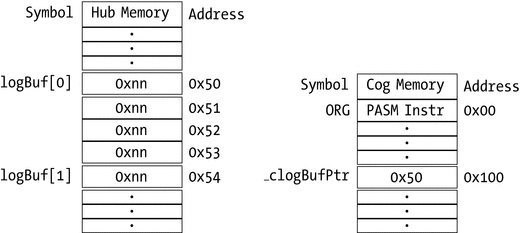
Figure 8-2
The layout of memory in Hub and cog when we are passing parameters using an address written to a variable (method 2 of parameter-passing)
Now both the Spin cog and the PASM cog can read and write from logBuf. The Spin cog can access logBuf[j] directly, and the PASM cog can access it using the rdlong/wrlong instructions to address _clogBufPtr. I will use this array
in Chapter 11.
Naming Variables
The naming of variables
should follow a pattern. Use a prefix for variables local to the cog followed by a short name for the variable (e.g., cns). Those variables that are addresses of variable (“locker numbers”) should have Ptr appended (cnsPtr). I use c as a prefix for variables within the scope of the cog. This reduces the possibility of inadvertently using the wrong variable.
8.5 Summary
In this chapter, we looked at two different ways of passing data into and out of cogs. The first method is to place the address of a variable into the PAR register when a new cog is launched. The PASM cog can now read and write to that location (and to subsequent locations, if they also have variables of interest).
The second way is to store the address of a variable in a location that both the Spin and PASM code know about. This is done before the PASM cog is launched. There is no need to involve PAR in this case. See Listing 8-6 for a template for these two ways of passing parameters.
In Figure 8-3 we show an actual Information Desk at the old Penn Station in New York (sadly torn down in the 1960s).
1 VAR
2 'variable1 and variable2 are stored in successive locations
3 long variable1, variable2
4 ' this variable will be passed to the cog by storing
5 ' it 's value in a PASM variable BEFORE launch
6 long variable3
7
8 PUB MAIN
9 ' 1. cognew command will store the address of variable1
10 ' in PAR and then launch MYCOG in a new cog
11 ' 2. before we launch MYCOG, we place the address of variable3
12 ' into _cvariable3Ptr, which will be available to the cog
13 _cvariable3Ptr := @variable3
14 cognew(@MYCOG, @variable1)
15
16 DAT
17 MYCOG org 0
18 mov _cvar1Ptr, par ' when mycog is launched, ' par contains the
19 ' address of variable1
20 mov _cvar2Ptr, par ' the next long location ' contains the address
21 add _cvar2Ptr, #4 ' of variable2
22
23 rdlong _cvar1, _cvar1Ptr ' the actual value of variable1
24 ' is obtained by a rdlong
25 rdlong _cvar2, _cvar2Ptr
26
27 rdlong _cvar3, _cvariable3Ptr ' _cvar3Ptr is populated with the address
28 ' variable3 BEFORE launch, so no need for par
29
30 _cvariable3Ptr long 0 ' variable where the address of variable3
31 ' will be written BEFORE launch of cog
32 _cvar1Ptr res 1 ' space for the ptrs and vars that are
33 _cvar2Ptr res 1 ' passed thru par
34 _cvar1 res 1
35 _cvar2 res 1
36 _cvar3 res 1
Listing 8-6
A template for passing parameters from Spin to PASM cogs
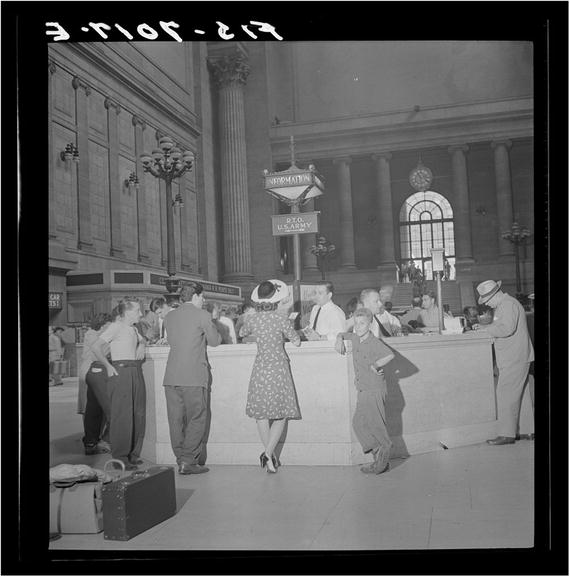
Figure 8-3
Information desk at the old Pennsylvania Station in New York.
https://commons.wikimedia.org/wiki/File:Information_booth_at_the_Pennsylvania_railroad_station8d21848v.jpg
.
