Now that we are all up to speed on Spin, let’s plunge into PASM. Here I introduce the form and structure of PASM cogs and the details of PASM instructions.
In addition, I spend some time talking about how to pass information from the main cog (generally the driver program in Spin) to the PASM cogs. In this chapter and the next one, we will need to pass all the same variables (nsamps, sampsBuf, etc.) to the PASM cog as we did in the Spin version.
Remember, the cogs are almost completely independent of each other. To communicate between two of them, they have to agree on a location in hub memory where the shared information is kept. In addition, each cog has to continually check that location in case the other one has changed it.
Passing parameters between Spin programs
is easy.
...
PUB MAIN
retval := MYFUN(x, y, @z)
PUB MYFUN(funx, funy, funzPtr) : funret
...
funret := ...
return funret
We simply place a list of the variables in the call (MYFUN(x, y, @z)), and those variables are available in the function body. Similarly, the function can return a number (funret), which is available in the main program.
It is more complicated in PASM because the PASM code is running in a separate cog that has its own memory. Spin code affects hub memory, and Spin instructions have implicit access that space. PASM code running in a separate cog has to explicitly access hub memory. That dance is what we will focus on for the rest of the book.
There is one more subtle difference between Spin and PASM: Spin functions
(MYFUN) spring into existence when they are called, and they proceed from the beginning to the end and then disappear. A PASM cog is generally started once, and then it persists forever. You have to explicitly ask it to do something and have it idle otherwise.
Once launched, a PASM cog runs independently. The only way to pass parameters back and forth to the cog is to change a variable in hub memory and to have the cog read and react to that change.
6.1 Instructions in PASM
Cog memory
consists of a series of longs (up to 496 of them). Some of those longs are instructions, and some are space reserved for variables. Instructions are executed in order starting at the first one (the one marked with ORG 0). You can request that instead of executing the next instruction, the Propeller should jump to a different part of cog memory. The Propeller will do so and then continue to execute instructions starting there.
There are more than 100 instructions in PASM, but many of them are close cousins, so don’t be intimidated by the PASM manual. For example, there are five variants of add, four versions of sum, and so on. What all the instructions have in common is that they do one simple thing to a memory location in cog memory
(sometimes referred to as a register). They may also affect the special flags Z and C. That’s it.
The form of
a PASM instruction is as follows:
<label> <if-clause> instr destination, <#>source <effect>
Here, the items in angle braces are optional. instr
is the PASM instruction; the destination and source numbers are 9-bit values that refer to a register address. If the source is preceded by the optional literal operator #
, then the source is that 9-bit value (rather than a register address). The label, if clause, and effect parts of the instruction are all optional.
Listing 6-1 shows a complete PASM program to toggle a pin
(this is from p. 239 of the Propeller manual, v1.2).
1 {{ AssemblyToggle.spin }}
2 CON
3 _clkmode = xtal1 + pll16x
4 _xinfreq = 5_000_000
5
6 PUB Main
7 { Launch cog to toggle P16 endlessly }
8 cognew (@Toggle, 0) 'Launch new cog
9
10 DAT
11 {Toggle P16}
12 org 0 'Begin at Cog RAM addr 0
13 Toggle mov dira, Pin 'Set Pin to output
14 mov Time, cnt 'Calculate delay time
15 add Time, #9 'Set minimum delay here
16 :loop Waitcnt Time, Delay 'Wait
17 xor outa, Pin 'Toggle Pin
18 jmp #:loop 'Loop endlessly
19
20 Pin long |< 16 'Pin number
21 Delay long 6_000_000 'Clock cycles to delay
22 Time res 1 'System Counter space
23 FIT 496
Listing 6-1
Toggle a Pin in PASM
- Lines 1–8: The Spin program in cog 0 that launches a new cog to do the work.
- Line 8: The Spin command to start a new cog using the code at the address @Toggle.
- Lines 10–23: The PASM code that does the work of toggling the pin.
- Line 13: This line has a label (Toggle), an instruction (mov), a destination register, and a source register (dira and Pin, respectively).
- Line 15: This line has a literal value (#9).
- Line 16: This line has a label and a process control instruction, waitcnt, that pauses the cog until the counter value in cnt reaches the value in the register Time. When the counter reaches the value in the register Time, the processor continues to the next expression. In addition, waitcnt Time, Delay will add Delay to Time and store that number in Time, so the next time the waitcnt instruction is executed, the processor will pause until time Time + Delay.
- Line 18: Another process control statement that changes the direction of execution. The instruction loops back to the instruction labeled :loop rather than stepping to the next instruction.
- Lines 20–21: Register holding data. The construct |< 16 sets pin 16 of the register Pin .
- Line 22: Register of reserved workspace. Its value is undefined.
The new cog is loaded with nine longs. The first six longs are instructions (mov, mov, add, waitcnt, xor, and jmp); the next three longs are the data and reserved space. Execution begins with the first instruction and steps along sequentially, until it encounters the jmp. This is a basic program but one that captures many features of PASM. We will look at effects and hub interactions soon.
6.1.1 The Add Instruction
One of the most common tasks for a computer is to do arithmetic. In Spin you can write the following:
x += y
z++
a := b + c
You can do the same in PASM. Here is the add instruction:
' PASM version of x += y
add _cX, _cY
This sums the two numbers in variables _cX and _cY and places the result back into _cX.
' PASM version of z++
add _cZ, #1
Here the instruction increments the number in _cZ by 1 and places the result back into _cZ:
' PASM version of a := b + c
mov _cA, _cB
add _cA, _cC
Here we encounter the big difference between Spin and PASM. In Spin, we simply said a := b + c. Under the hood, two things are going on: b and c are added
, and then the result is placed into a. In PASM, there is no “hood.” We have to do those two things explicitly!
The mov _cA, _cB instruction moves the contents of variable _cB into _cA. Then the add instruction adds _cC to _cA and places the result back into _cA (and because we had the foresight to place _cB into _cA first, the result is as we desire).
6.1.2 The mov Instruction
The mov instruction sets a variable to a value.
' PASM version of x := y
mov _cX, _cY
Here we copy the contents of variable _cY to the variable _cX.
' PASM version of x := 42
mov _cX, #42
Here we set _cX equal to 42. When you want to set _cX to a number, you have to tell PASM that by including the literal indicator (#). Without that, the instruction is mov _cX, 42 (don’t do this at home!), and the Propeller would try to move the contents of memory location 42 into _cX—not what you wanted.
' PASM version of x := 31415
'mov _cX, #31415 ' NOPE NOPE NOPE won't work
mov _cX, _cPiFour
Unfortunately, if you want to refer to numbers larger than 511 (in other words
, any number that won’t fit into 9 bits), you have to first store that number into a variable and then copy the contents of that variable to where you want it.
6.1.3 Variables
Variables are longs that are stored in cog memory along with the instructions (after all the instructions). You can initialize these variables to any number (any number that will fit in a long, of course).
_cPiFour long 31415
r0 res 1
r1 res 1
_cArr res 8
FIT 496
Here we declare a name for the variable (_cPiFour), followed by the size of the variable (long), followed by the value to which that variable is initialized (31415). Here you don’t need the literal indication (#), and you aren’t limited to 9 bits.
Finally, the line r0 res 1 reserves one long and places that address in r0. The form of this instruction is like this: the name of the variable (r0) followed by the res directive, followed by the number of longs to reserve. The expression _cArr res 8 reserves eight longs and places the address of the first long in the variable _cArr. Any variables you refer to in your PASM code must have an associated storage declaration (either a line like _cPiFour long 31415 or a reservation line like r0 res 1). The PASM compiler will complain if you don’t do this.1
The expression FIT 496 should always come at the end of the PASM program
. It validates that the previous instructions and memory allocations fit within the allowed 496 longs.
6.1.4 Effects
Most instructions can include effects. If you specify either wz or wc, the Z or C flags will be changed, respectively. So, for example, the mov instruction has the following effects (this is an excerpt from the manual page for mov):
mov Destination, <#>Value
...
- If the WZ effect is specified, the Z flag is set (1) if Value equals zero. If the WC effect is specified, the C flag is set to Values MSB. The result is written to Destination unless the NR effect is specified.
Here are some examples:
mov r0, #0 wz ' set Z=1
mov r0, #1 wz ' set Z=0
neg r0, #1 ' put -1 into r0
mov r1, r0 wc ' set C=1 (msb of r0 is 1)
mov r0, #42 wz,nr ' set Z=0 (wz), but don’t change r0 (nr)
The value of Z or C will persist until it is next changed by a wz or wc effect in an instruction. An important use of the effect is in branching and conditional expressions where an instruction is executed based on the value of these flags.
6.1.5 Literals
The mov instruction moves a value into a destination register. The source value either can be from another register or can be a literal value.
mov Destination, <#>Value
Literals are indicated by the pound sign (#) and are limited to 9 bits.
mov r0, r1 ' move contents of register r1 to register r0
mov r0, #0 ' set r0=0
mov r0, #42 ' set r0=42
'mov r0, #31415 ' ILLEGAL. Literals must be less than 512
6.1.6 Labels
There are 496 longs of cog memory available for use. Every instruction occupies one long. An instruction can include a label so that you can branch to that instruction.
...
mov r1, #0
mov r0, #8
:loop
add r1, #1
djnz r0, #:loop
_cPiFour long 31415
r0 res 1
r1 res 1
FIT 496
Here the label
:loop labels the add instruction so that the jump instruction (djnz r0, #:loop) will execute the add instruction eight times (djnz r0, #:loop means “decrement the register r0 and jump to label :loop if the result is nonzero”).2
6.1.7 Conditional Evaluation
In Spin the following is a common task:
' conditional evaluation
' if x is less than 100, set x to y.
if x < 100
x := y
x++
As you can imagine, there is quite a bit under the hood here that will need to be done explicitly in PASM. The general scheme is this: compare a variable with a number and either jump past a section of code or don’t jump past it based on the result of the comparison.
1 cmp _cX, #100 wc
2 if_nc jmp #:done
3 'PASM instructions to evaluate if x < 100
4 mov _cX, _cY
5 :done
6 add _cX, #1
- Line 1: Compare x to 100 and set the C flag if x < 100.
Here is the explanation for cmp from the manual:
- CMP (Compare Unsigned) compares the unsigned values of Value1 and Value2. The Z and C flags, if written, indicate the relative equal, and greater or lesser relationship between the two. If the WZ effect is specified, the Z flag is set (1) if Value1 equals Value2. If the WC effect is specified, the C flag is set (1) if Value1 is less than Value2.
We ask for the wc effect, so if x (Value1) is less than 100 (Value2), then the C flag will be set (C=1).
- Line 2: This is conditional expression that says that if the C flag is not set (if_nc), then execute the instruction that follows on that line (the jmp #:done). In our case, if x < 100, then the C flag will be set, and the jump will not be executed.
There are a host of if_xx conditional expressions
. They all have similar form (see p. 244 of the Propeller manual for a complete list).
- if_z instr: If the Z flag is set, execute the instruction.
- if_nz instr: If the Z flag is not set, execute the instruction.
- if_c instr: This is the same as the previous one, but for the C flag.
- if_nz_and_nc instr: If the Z flag is not set and the C flag is also not set, then execute the instruction...and every possible combination of Z, NZ, C, NC, AND, and OR. As you can imagine, this gives tremendous flexibility in deciding when to do something.
I used the cmp instruction to set the C flag. Remember, every instruction gives you the option to manipulate the Z and C flags, so you can set the groundwork for the various if_ instructions in many ways.
6.1.8 Branching
As I said earlier, the Propeller will execute instructions in order starting at the start of cog memory. It will proceed to the next instruction unless the order is interrupted by a jump instruction. There are two jump
instructions that we will use a lot.
- jmp #:label: Jump to an address labeled :label immediately.
- djnz r0, #:label: Decrement the variable r0 and jump to a label if the result is not zero.
These are used in conditional evaluation (as in the previous section) and in loops. In Spin, you would say this:
x := 0
repeat 8
x++
In PASM, you must set up a loop variable (here r0) and explicitly decrement and check its value. Repeat until its value is zero.
1 mov r0, #8
2 mov _cX, #0
3 :loop
4 add _cX, #1
5 djnz r0, #:loop
In line 5, the instruction is to “decrement r0 and jump to :loop if the result is not zero.” After eight iterations, r0 will be zero, and the loop is exited.
6.2 Reading the PASM Manual
PASM instructions are composed of (up to) four parts. For example, the instruction to move the contents of a 4-byte long from hub memory to cog memory is rdlong (the manual page for rdlong is shown in Figure 6-1).
rdlong _cns, _cnsPtr wz
The parts of the instruction are as follows:
- The action to be taken (rdlong).
- The destination address (_cns).
- The source address.
- The effect wz, which will affect the Z flag. There is also wc, which affects the C flag.
- The effect nr, which will prevent the instruction from actually occurring but only set the Z or C flag.
In the manual page, the important pieces of information are the succinct description of the instruction:
Instruction
Read long of main memory.
Here’s the summary:
RDLONG
Value
, <#>
Address
- Value (d-field) is the register to store the long value into.
- Address (s-field) is a register or a 9-bit literal whose value is the main memory address to read from.
Here is the detailed explanation, along with a description of the wz, wc, and nr effects:
RDLONG syncs to the hub. ...If the WZ effect is specified, the Z flag will be set (1) if the value read from main memory is zero.
Finally, the time taken to execute the instruction
will be stated. For most instructions, it is four clock cycles. Hub instructions take longer because of the need to sync with the other cogs.
RDLONG is a hub instruction. Hub instructions require 8 to 23 clock cycles to execute....
6.3 Categories of PASM Instruction and Registers
There are a large number of PASM instructions and registers, but they fall into a small number of categories, which I summarize here.
6.3.1 Copying
The instructions in this category are used to both copy values from one memory location to another, as well as to affect the Z and C flags. The instruction mov d, <#>s <wz> <wc> will move the source (either the contents of register s or the value #s) into register d. If the source value is zero and the wz effect is specified, then set the Z flag. If the wc effect is specified
, then the C flag is set to the source’s MSB (either 0 or 1).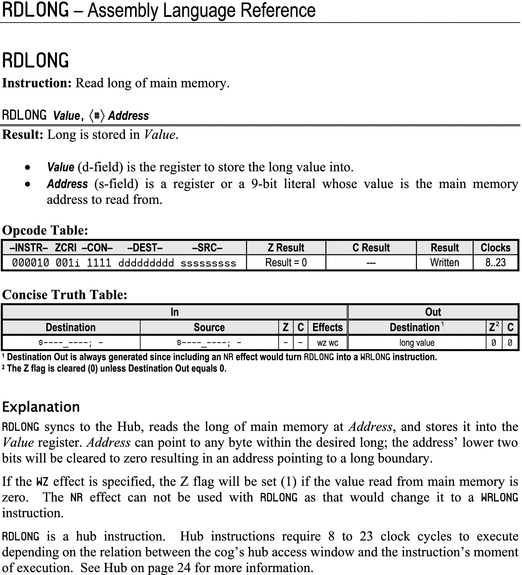
Figure 6-1
Manual page for rdlong
6.3.2 Arithmetic
There are a number of math instructions to take the absolute value, add or subtract two numbers, or negate a number. There are variants of each of these that do slightly different things based on the value of flags.
- The add instruction adds the unsigned values in the destination and source and places the result in the destination register. By contrast, adds treats the values as signed numbers. The instructions addx and addsx are extended additions that let you do multilong addition (for example, 64-bit addition; see the manual for details).
- There are a similar set of subtraction instructions (sub, subs, subabs, etc.)
- The neg instruction negates a number; negc does so if C=1; negnc does so if C=0; and negz and negnz negate based on the value of the Z flag.
6.3.3 Boolean, Comparison, and Bit-Shift Operators
These instructions operate bitwise.
- The Boolean instructions and, or, and xor perform the bitwise and, or, and exclusive or of the destination and the source, placing the result in the destination register. test performs an and but doesn’t store the result in the destination; this is usually done to affect the flags.
- The comparison operator cmp d, s compares the destination and the source (treating them as unsigned values). If the wz effect is specified, then Z=1 if d=s. If the wc effect is specified, then C=1 if d<s. There are other comparison instructions (cmps, cmpsub, cmpsx, etc.) that compare signed values or compare and subtract, and so on.
- The min and max operators store the greater or lesser of the source and destination in the destination register, respectively.
There are a number of bit-setting and shifting operators
.
- The mux... family of operators sets the destination register based on two things: the high bits in the source and the value of either C or Z. Thus, muxc d, #5 will set bits 2 and 0 (because #5 = b0101) of the destination register d to the value of the flag C. The other bits in d are unaffected. The other members of this family are muxnc, muxz, and muxnz.
The bit shifting operators
are as follows:
- Reverse: rev d, s reverses the lower 32 − s bits of d and stores the result in d. So, if s = 24, then reverse the lower 8 bits of d and clear the upper 24 bits. Store this result back into d.
- Rotate: rol d, s rotates the destination register (d) left by s bits, placing the MSBs rotated out of d into its LSBs. Similarly, ror will rotate right. By contrast, rcl d, s also rotates the register d left but fills the LSBs with the value of C. rcr does the same for rightward rotation.
- Shift: shl d, s shifts d left by s bits. The new LSBs are set to zero. Similarly, shr shifts right.
- Shift arithmetic: sar d, s shifts d right by s bits, extending the MSB. In other words, the value of MSB will be copied into all the shifted bit locations. Thus, sar d, #8 will set the upper 8 bits to either 1 or 0 depending on the original value of the MSB of d. The lower 24 bits of d are the result of the shift.
6.3.4 Process Control
Process control instructions will either pause the processor until a condition is met or alter the sequence of execution.
The waitcnt t, dt instruction will pause execution until the internal counter cnt is equal to the value in t. When the two are equal, the value of t will be set to t+dt, and the processor will step to the next instruction. Because cnt is a 32-bit register that rolls over, the pause from the waitcnt instruction will eventually end, but it could take up to 4 billion counts (about 53 seconds at 80MHz clock) if t happens to be less than the current value of cnt.
The reason that the time register t is incremented by dt is to allow for regular and deterministic delays in the program. With this mechanism, regardless of when you call waitcnt, the program will step every dt seconds.
The instruction waitpeq value, mask will pause execution until the values in the ina register referenced by the high bits in mask are equal to the bits in value. In other words, if, for example, mask=b0100 and value=b0100, then the processor will pause until pin 2 is high.3 Similarly, waitpne will wait until the mask bits in input register ina are not equal to those bits value.
The jmp and djnz instructions
alter the direction of execution. Normally, the next instruction is executed. At a jmp #:location, the next instruction to be executed will be the one labeled :location. The instruction djnz d, #:loop will decrement the number in d and will jump to :loop if d≠0. Otherwise, the instruction next in line will be executed. tjz and tjnz are similar, but they only test the value of d without decrementing it.
6.3.5 Hub Reads/Writes
The hub has more (but slower) memory than the cogs. You can read and write longs, words, or bytes from and to the hub.
The read instruction rdlong cogmem, hubmem will read a long from hub memory address hubmem and store that value in the cog location cogmem. The wrlong cogmem, hubmem instruction will write a long from cogmem to hubmem. Similarly, rdword, rdbyte, wrword, and wrbyte operate on words and bytes.
6.3.6 Locks
Locks (or semaphores) are a special utility to allow cogs to negotiate exclusive access to some resource. There are eight lock IDs (0–7) in the Propeller that can be checked out and released. After creating a lock with locknew lockID, which stores a lock ID number in lockID, you can request a lock with lockset and release the lock with lockclr.
The way locks work is that a cog has to first create a lock and get its ID. This ID has to be shared with the other cogs. Next, both cogs will request a lock. One (and only one) of the cogs will get it. (The one that asks for it first; because locking is a hub operation, the cogs ask for the lock one after the other in round-robin fashion, so there is no possibility of conflict.) The cog that gets the lock can then, for example, access a shared memory location. The other cogs don’t have the lock, so they will simply loop continuously requesting the lock until the cog with the lock releases it.
If a lock is set, then its value is 1; if it is available, then its value is 0.
lockset lockID wc sets the value of lockID to 1 and returns the previous value of the lock (in the C flag).
If nobody else had checked out the lock, then its value will be 0; the lockset will set the lock to 1 and set C=0 (because that is its previous value). If somebody else has the lock, then its value will be 1; lockset will set C=1.
A cog calls lockset and then checks the value of C. If C is 0, then that cog has the lock; if it is 1, then it doesn’t have the lock.
If a cog does have the lock, it must make sure to eventually call lockclr lockID.
6.3.7 Variables
In addition to the instructions (each of which takes up one long), you can declare and initialize variables or reserve blocks of space. Always put the res directives at the end of the code.
_cVarname long 31415 ' these declare and initialize the vars
_cVarAns long 42 ' variables are always longs in PASM
_cArry res 8 ' this reserves 8 longs
6.3.8 Special Registers
Each cog has 16 special registers, each of which is a long (4 bytes). Because a cog has 512 longs of memory, this leaves 496 longs for instructions and variables.
- cnt : The 32-bit system counter is incremented by 1 at every system clock. This register will roll over when it fills up (232 − 1 counts, or approximately 4 billion). With an 80MHz clock, that happens every 53 seconds. This is a read-only register.
- dira : This register sets the direction for the signals on the pins. The 32 bits of this register correspond to the 32 pins (P0 to P31). If a bit is a 1, then the corresponding pin is an output. All cogs have their own dira register. Thus, a pin is an output if any cog declares it so; it is an input if no cog declares it as an output.
- outa : If a pin is set as an output in the dira register, then this register can control its value. Setting a bit high (1) in outa will set the corresponding pin high. Any cog that has declared a pin as an output can control it. So, it is up to the programmer to avoid conflicts.
- ina : The value of each bit in this register reflects the state of the physical pin. If pin PN is high, then bit N of ina will be high. Again, this pin will be an input only if no cog has set it as an output.
- par : This register is populated by the cognew command when the cog is launched. The second argument to cognew is (generally) an address in hub memory, and that address is placed in par so that the cog can communicate with other cogs.
6.3.9 Counters
I don’t discuss the registers
ctra, phsa, and frqa
in this book, but together they provide a powerful and general-purpose counting capability. You can do a remarkable number of things with these registers, including pulse width measurements, counting the number of pulses, pulse-width modulation (PWM), frequency synthesis and measurement, and much more. See the app note at
https://www.parallax.com/downloads/an001-propeller-p8x23a-counters
for details.
6.4 The Structure of PASM Programs
These programs run from two files: a “driver” file called, for example, myprog_Demo.spin (Listing 6-2 shows the outline for such a file) and a worker file called myprog.spin (Listing 6-3). The driver file is pure Spin code, but the worker file is a combination of Spin and PASM code. The driver file will have overall control of the program, such as for opening the terminal and starting and stopping cogs. The worker file (or files) will be responsible for a single cog and will generally have a few Spin methods along with the PASM code. At a minimum, it will have the following:
- INIT: Set up the needed variables.
- START: Start a new cog and load the PASM code into it.
- STOP: Stop the cog.
In addition, the worker file will have a section of PASM code that will be loaded into a new cog by the START method.
Listing 6-2 shows the driver file myprog_Demo.spin
.
1 {*
2 * myprog_Demo.spin : do an important thing
3 *}
4
5 CON ' Clock mode settings
6 ...
7 CON ' Pin map
8 ...
9 CON ' UART ports
10 ...
11 OBJ
12 MYPROG : "myprog" ' load the worker file
13 VAR
14 ...
15
16 PUB MAIN
17 ...
18 ' initialize and start the worker
19 MYPROG.INIT
20 MYPROG.START
21 ...
22 ' stop the worker
23 MYPROG.STOP
Listing 6-2
Structure of Spin Driver File
- Line 12: Read the file myprog.spin and make it available as MYPROG.
- Line 19–23: Call functions INIT, START, and STOP in the library MYPROG.
Listing 6-3 shows the worker file myprog.spin
.
1 {*
2 * myprog.spin : spin and pasm worker code
3 *}
4 CON
5 ...
6 VAR
7 ' set up some local variables. At a minimum, keep track of the cog id
8 byte myprogcogid, mylocalvar
9
10 ' initialize vars, at a minimum set the cog id to -1 (indicating that no
11 ' cog is running this code)
12 PUB INIT
13 mylocalvar := 0
14 myprogcogid := -1
15
16 ' start a new cog (after stopping the old one)
17 ' save the cog id as well as returning it
18 PUB START
19 STOP
20 myprogcogid := cognew(@MYPROG, @mylocalvar)
21 return myprogcogid
22
23 ' stop the cog - after checking that it is running.
24 ' else do nothing
25 PUB STOP
26 if myprogcogid <> -1
27 cogstop(myprogcogid)
28
29 ' actual PASM code (loaded into new cog by the cognew command in START)
30 DAT ' myprog
31 MYPROG ORG 0
32 ' get the address of the variable to be passed here
33 mov _cmyvarPtr, par
34 ' get the value of that variable
35 rdlong _cmyvar, _cmyvarPtr
36 ...
37
38
39 ' reserve space for the address and value of the variables
40 _cmyvarPtr res 1
41 _cmyvar res 1
42
43 FIT 496
Listing 6-3
Structure of PASM Worker File
- Line 8: These variables are available inside this file to all the functions.
- Lines 12, 18, 25: A public function can be called from outside this file (for example, from the driver file, myprog_Demo.spin). A public function is written as PUB INIT, and a private function (one that can be called only from within this file) is written as PRI APRIVATEFUNCTION.
- Lines 12–14: The INIT function that initializes variables .
- Lines 18–121: The START function first stops the new cog (if it is running) and then starts it. The cognew command takes two arguments: the address of the PASM code and the address of a local variable, which is passed to the PASM cog. The function returns the number of the newly launched cog.
- Lines 30–43: The PASM code that is copied to a new cog and run.
- Line 30–31: The special operator DAT announces the start of the PASM code. The line MYPROG ORG 0 assigns a name (MYPROG) to that code and says that it starts at address 0 in the cog. (This is always the case in this book, though it doesn’t have to be; code could start anywhere within the 496 longs of the cog, but that is advanced voodoo!)
- Lines 33–41: These lines are the way parameters get passed to the code. You’ll learn more about that in the next sections.
- Line 43: This line always ends the PASM code.
6.5 Passing Parameters to PASM
A significant challenge in PASM programming is exchanging data between cogs and between Spin and PASM cogs. There are two main ways this is done.
- An address in hub memory is passed to a cog when it is launched. The instruction cognew(@PROG, @var) will place the address of var into the special register PAR when the PASM cog PROG is run.
- An address in hub memory is placed into cog memory before the cog is launched.
This is discussed at length in Sections 8.3 and 8.4.
6.6 Summary
PASM instructions have four parts: the instruction itself (mov, add,...), the destination, the source, and an optional effect (wc or wz) that sets the value of the C and Z flags.
To communicate between cogs, both cogs must have the address of a variable that they regularly check. That address is passed to a new cog on launch in the PAR register.
1 VAR
2 'variable1 and variable2 are stored in successive locations
3 long variable1, variable2
4
5 PUB MAIN
6 ' cognew command will store the address of variable1
7 ' in PAR and then launch MYCOG in a new cog
8 cognew(@MYCOG, @variable1)
9
10 DAT
11 MYCOG org 0
12 mov _cvar1Ptr, par ' when mycog is launched, ' par contains the
13 ' address of variable1
14 mov _cvar2Ptr, par ' the next long location contains the address
15 add _cvar2Ptr, #4 ' of variable2
16
17 rdlong _cvar1, _cvar1Ptr ' the actual value of variable1
18 ' is obtained by a rdlong
19 rdlong _cvar2, _cvar2Ptr
Footnotes
2
There are two types of labels: global and local. Local labels have a colon as the first character. There are rules about the use of local variables that allow you to reuse the name, but I prefer to always use unique local variable names. See p. 242 in the Propeller manual if you want to reuse local variable names.
3
This is how we generally use waitpeq, though we could have multiple pins in mask, and we could have both highs and lows in the values for those pins.