Table of Contents for
Responsive Web Design Toolkit
 Responsive Web Design Toolkit
Published by
Focal Press, 2015
Responsive Web Design Toolkit
Published by
Focal Press, 2015
- Cover
- Responsive Web Design Toolkit
- Responsive Web Design Toolkit
- Title
- Copyright
- Contents
- Dedication
- Assembling a Toolbox of Success
- Chapter 1: Responsive Web Design
- Chapter 2: Introducing the Engineering Process
- Chapter 3: Localhost, the Best Host
- Chapter 4: Apache Web Server
- Chapter 5: Connecting Devices to Your Computer
- Chapter 6: Virtual Hosts: Making Many Out of One
- Chapter 7: Get Together on GitHub
- Chapter 8: Google Chrome: Browsing a Page and Reading Its Code
- Chapter 9: Surviving CSS by Thriving With Sass
- Chapter 10: Google Analytics: Measuring Your UX With Analytics
- Chapter 11: Responsive Screen-Capture Project
- Chapter 12: Looking Around the Toolbox
- Appendix
- Index
Chapter 12
Looking Around the Toolbox
Hammering Responsive Web Design Into Shape
Choosing to pick up this book and go through it at whatever speed you did separates you from your competition. That drive to pursue quality makes you remarkable. This book is useless to someone who doesn’t have the desire to learn. It’s loaded with strategies and tactics, but only those with a passion for domain mastery will find ways to apply them for great use. Propel yourself forward with curiosity as you respond to the constant changes technology makes in the world. Always have the goal of creating wonderful things.
No matter where you are in your career, this book was created to help you stretch out in amazing ways. The main focus of this book was to help you hammer responsive web designs into shape by providing you a toolbox and the understanding of when and what to reach for. More than that, I want to show you how to build up and maintain your toolbox and expertise so that you can thrive into the future. To be successful, you need to hustle to keep up with the current trends, take time to learn new skills, and outwork the competition.
How to Connect With Me
Let me add value to you through our further conversation. Follow me on Twitter and allow me to continue updating you with future discoveries on industry best practice. Please send me feedback regarding this book and what you’ve found most useful about it. Definitely reach out to me with helpful suggestions on how I can improve it. Have requests for richer details on anything? Ping me on whatever you found in the book that you want to know more about. My Twitter handle is @KenTabor, and I invite you to connect with me there. You can also find me on LinkedIn just as easily.
Even as this book draws to a conclusion I’m going to keep writing. There’s always something new to share with you. Look for my continued exploration of tools, user experience, programming, and leadership at the website dedicated to this book.

Keep an eye on this website, because I’m updating it with fresh sample code and links to useful resources I find on the Internet. I’m totally driven to learn and solve interesting problems, and promise to report the results back to you. When I find several people are asking the same question I’ll take it as a clue to roll up a useful answer on the book’s website.
Other Resources Available to You
Reading this book and taking on the exercise of learning the lessons contained within it is a fantastic step in your continuing education. Pick up these tools over time and break them in, making them fit comfortably in your confident hand. Select them and strike challenges. Your creative toolbox is now enhanced with powerful additions. You’ve seen reasons to use them and guidance on when they aren’t as helpful.
Some have advanced applications that this book hasn’t approached. Some of the resources listed will help you learn further uses. When you’re ready to know more, keep an eye on these sites, looking for improvements.
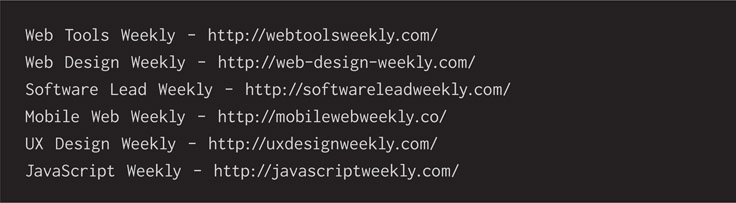
Newsletters are carefully curated guides made by editors with a particular outlook. I appreciate these tireless individuals sifting through the vast amounts of content published daily on blogs, corporate newsrooms, Twitter channels, and formal journals. I’ll gladly subscribe to a newsletter matching my point of view. I prefer ones published weekly. It’s a perfect schedule for me to seek out new stuff.
Community-based websites organizing members toward solving problems for each other are fantastic resources when CSS, HTML, and JavaScript get tricky. Most days, I think I couldn’t do my job if the Internet connection dropped for more than a few hours. Check out these sites for help when you’re getting confused on how to approach a problem.

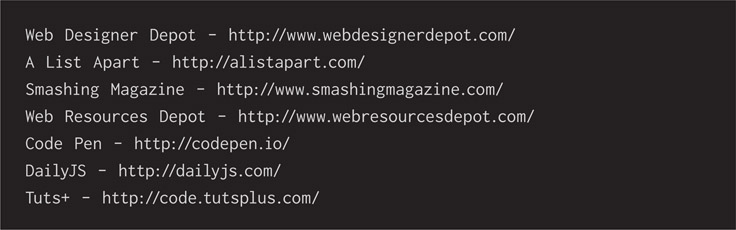
Think of visiting these sites when you don’t have questions. Browse around and volunteer an answer or insight when you see someone looking for help. Don’t think that you lack credibility and shouldn’t hit the reply button. Take the time to add your voice to the chorus. If all you have is a small insight, add it, because even a tiny boost will lead the group toward a complete answer.
Another way of learning is letting the open-source community update you. Who are the authors of your favorite frameworks, libraries, and plugins? Look up who started them and who are the most active maintainers today, and follow them on Twitter. Most of them can be found there. You’ll see they’re actively sending out public messages reviewing tools they’ve discovered and update notices to their own work. Here are some to get you started.
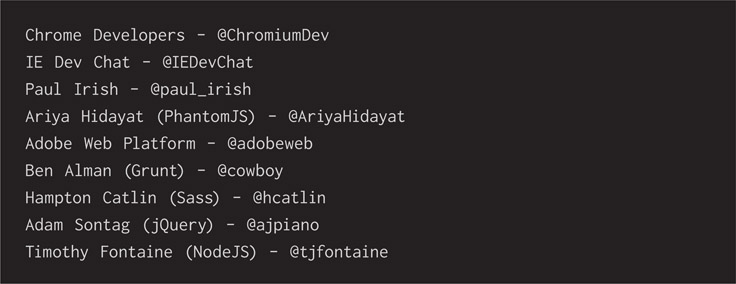
As you follow and get to know some creators, see who they’re following. They can lead you to know more voices contributing to your knowledge.
Benefits of a Loaded Toolbox
Master These Tools
This book mapped out a journey that we’ve taken together. Dozens of tools were uncovered throughout it. Many of them will be useful and valuable discoveries, improving your creative work. What should you do with them now? Become a complete master of them. Apply them to your jobs and push them to their limits. All of these tools are software, they’re virtual and exist only inside the computer, but so too they are present in our minds. Envisioning how and when to use these tools programs us to a certain extent. If that’s true, then mastering your tools means mastering yourself. Practicing this leads to true strength beyond any particular job, client, team, or season of life. Instinctively recognizing a problem’s pattern and understanding what type of tool to reach for is the modern-day muscle memory of a knowledge worker.
Teaching is a fantastic way to increase mastery of craft. Select any tool or technique that you’re passionate about and consider how you can share your knowledge of it. Write an article on a blog site, host a lunch-and-learn at work, present at a local professional meet-up, or speak at a conference. I find the total despair of failing hard in front of a group of people focuses me like no other motivator to produce results. It focuses me to learn my subject so well that I can stand up in front of an audience and confidently tell them everything I know. Once you become confident, bestow your knowledge on your community.
Don’t let imposter syndrome stop you from doing service like this. I’ve found that any competent person feels they don’t know enough about a specific subject. They’ll imagine that they’re not qualified enough to talk about it. That’s the dumbest thing a smart person believes. Imagining that everyone else knows more on a subject than you do is so disabling. Don’t fall for it. Have strength to volunteer your time delivering valuable insights to an audience. It’s worth it, and you’ll reap the positive rewards of serving others. I’ve never had the author of a tool in any of my talks. I’ve never had someone so experienced using a tool that they asked an impossible question, revealing an embarrassing gap in my understanding. They don’t show up to my talks. You know who shows up? People who want to learn. Go meet them and do a good job teaching them! You’ll never feel more pride than having an audience member say thank you after a talk. You’ll never be more grateful than when you connect with an audience member and learn something from them.
Combine These Tools
Physical tools are generally built to solve one problem well and a second problem passably. For example, a screwdriver is great for turning a screw into a wall but hardly good at smashing a nail halfway. Hammers are fantastic for driving a nail into the wall but only adequate as pry bars. Software tools are virtually real and simply exist as zeroes and ones inside the computer’s memory. That means they can be shaped and extended to our needs. Take advantage of that opportunity, because their creators often intend it to happen.
Explore ways of connecting tools, making their results go farther than they ever could solo. Solve more interesting problems, creating your own tool chain. Automation goes a long way toward helping you develop custom tools that run in order—especially command-line tools because they’re made for that sort of job. Automating routine tasks by making the computer do them is a big win for you because it saves time and the tedium of repetition. Repeating tasks makes human beings bored, but it’s something computers excel at.
Every modern operating system has built in ways of writing brief shell scripts that simulates the commands you would run by hand. Examples are changing directories, creating files, running utilities, executing tools, and issuing alerts on the results. These could be shell scripts, batch files, or another type depending on what your computer runs.
Cross-platform scripting tools exist. This is especially interesting when you’re in a large enterprise with lots of people and varied systems. For example, your engineering team might be running Windows, your design team OS X, and your operations team Linux. Scripting helpful tool chain processes in a language such as NodeJS, Ruby, or Python becomes interesting when we think of this mixed environment. Languages like these are higher level and offer you helpful support because they’re feature rich and have extensive libraries.
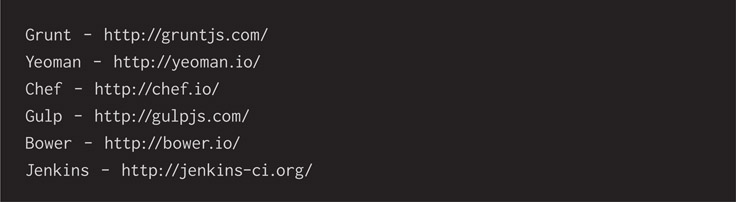
If writing automation scripts in a computer language or operating system shell feels intimidating or goes beyond your time limit, then check out some of the task runners that have popped up in the open-source community. They can offer a time-saving boost when you want to automate tasks. A few examples of these that have formed helpful communities are:
Replace These Tools
Technology has a shelf date—it expires. Not as horribly as a jug of milk does, but you know when tech just isn’t as tasty as it used to be. Real-world tools make it obvious when they need replacing. As soon as they chip, crack, and curl, we see it’s time to head down to the neighborhood hardware store and buy a new one. Software tools are less clear. We have a look at the files they turn out or how slowly they run or if they’re incompatible with the most valuable of our other tools.
You’ve seen that tools emerge from the creative minds of the open-source community with great frequency. It can be confusing knowing which ones to incorporate into your daily creative workflow. It’s confusing even knowing which ones to download and evaluate. From my perspective, changing tools is an effort, and I reserve specific time for looking into them. Instinct tells me when I’ve had a tool long enough that it might need replacement with the fresher alternative. I scan the community chatter on Twitter and look at conference presentations published online. When something is referred enough, I give it a look.
Generally I’ll take time to play with a new software tool at home on a hobby project. Then I bring it in to work, giving the team a demo. I’m seeing if my internal customers are intrigued enough to encourage further work with it or if anyone already knows a show-stopping fact about it—for example, it’s too expensive, intrusive, or incompatible. If I already like the tool enough I might engage in a little sales effort to convert my team, but I always listen first to understand their perspective.
Ultimately your deciding factors for picking up a new tool might be informed by asking a few simple questions:
- Does it solve a problem that you have?
- Has it attracted a dedicated and helpful community?
- Can it swap out relatively easily with a similar tool in your creative workflow?
- Will you and your team have time to try it for a week?
Giving a new tool a week is one of the most important things. Letting it have a proper chance to settle into your daily routine is how you’ll have the best idea of its value. Then you can decide if it’s a successful addition and if it will become a part of your creative toolbox.
When you decide the time is right to take on a new tool, then do so decisively. Don’t delay. Focus up the team to get behind the change and embrace it entirely. There’s rarely a good time to make a change, so you might as well get it done now and never look back. Avoid incurring so-called technical debt by avoiding making the tough decisions. The last complication you want is some people on a new tool and others on a legacy one. Ideally, everyone on the team will rapidly come up to speed and train one another on what they learn.
Staring Out the Window
Where do ideas come from? I think they mostly come from staring out the window. Sometimes they come from reading Twitter, but mostly it’s a matter of daydreaming. Once an idea pops into your head, give it time. Talking about it immediately might be a mistake. No one wants to hear “I don’t get it” after sharing a new idea with somebody. In truth, fresh ideas need time for polishing and thoughtful consideration of how they help. Any creative idea must transform from novel into valuable.
Check out the new tools coming from the open-source community. Challenge the personal bias that you already know how to get from point A to point B. Mindfully open yourself up to new ways of doing things to pop off the well-worn route in order to find new pathways. They can lead to whatever fashion of success you need. Work with your team to brainstorm new ideas using the improvisational comedy technique of “yes and…” Practice accepting and escalating ideas together until you’ve collectively discovered new ways of working.
Sometimes the office simply doesn’t provide the purely creative environment you need to learn new tech. Don’t let that hold you back from discovery. Personal hobby projects are fantastic experiments in which you can pull in new technology and apply it in any way you see fit. Hobby projects don’t have budgets or time limits or market pressures. Use them to take a test drive of some library or framework that you want to understand in real-world situations. If it doesn’t seem useful, no worries—just abandon it. No need to follow through on a hobby project when it shows no promise. Intriguing results are worth a show and tell with your teammates the next day. Run it through its paces and let everyone decide whether it’s fit for your purpose.
Have a Coffee, and Let’s Do Something Awesome Today
I relish drinking coffee. Yes, it was an acquired taste, and I didn’t totally get it the first few times I ordered it. Now there’s something about coffee that makes me think sharper, dream deeper, and take more positive action throughout the day. It’s something that I look forward to and keep near in my heart. Many of the concepts in this book may form questions and fill you with doubt at first. It’s a perfectly valid reaction, and please consider each for a while. Fully expect that many of these will become acquired tastes, and you’ll happily surprise yourself when they grow into daily use.
When you fully master the tools shown in this book, don’t stop there. Feeling expertise is a trap. Be innocent like a child and continue wondering about the world. Mindfully push forward and lean into the edges of what you understand. Combine the tools in unique ways as only software can do in the virtual reality of computers. Search out their communities and find new places they lead you. Don’t be shy telling people about what you’ve done. Show your teammates and local community what you’re doing and contribute a bit of value in their lives. Sharing what you know with others will make you feel good, and it might spark a connection with a new collaborator.
Just as there are seemingly limitless ways for me to enjoy coffee, I take pleasure in finding new tools to better build websites. Let’s enjoy what we have now, but promise to continue discovering more together. I’ll update you through the book’s website, www.HammeringResponsiveWebDesign.com, and I invite you to chat back to me through Twitter @KenTabor.
Let’s do something awesome today!