Table of Contents for
Reversing: Secrets of Reverse Engineering
 Reversing: Secrets of Reverse Engineering
Published by
John Wiley & Sons, 2005
Reversing: Secrets of Reverse Engineering
Published by
John Wiley & Sons, 2005
- Copyright
- Credits
- Foreword
- Acknowledgments
- Introduction
- I. Reversing 101
- 1. Foundations
- 2. Low-Level Software
- 3. Windows Fundamentals
- 4. Reversing Tools
- II. Applied Reversing
- 5. Beyond the Documentation
- 6. Deciphering File Formats
- 7. Auditing Program Binaries
- 8. Reversing Malware
- III. Cracking
- 9. Piracy and Copy Protection
- 10. Antireversing Techniques
- 11. Breaking Protections
- IV. Beyond Disassembly
- 12. Reversing .NET
- 13. Decompilation
- A. Deciphering Code Structures
- B. Understanding Compiled Arithmetic
- C. Deciphering Program Data
- D. Citations
Cracking is the "dark art" of defeating, bypassing, or eliminating any kind of copy protection scheme. In its original form, cracking is aimed at software copy protection schemes such as serial-number-based registrations, hardware keys (dongles), and so on. More recently, cracking has also been applied to digital rights management (DRM) technologies, which attempt to protect the flow of copyrighted materials such as movies, music recordings, and books. Unsurprisingly, cracking is closely related to reversing, because in order to defeat any kind of software-based protection mechanism crackers must first determine exactly how that protection mechanism works.
This chapter provides some live cracking examples. I'll be going over several programs and we'll attempt to crack them. I'll be demonstrating a wide variety of interesting cracking techniques, and the level of difficulty will increase as we go along.
Why should you learn and understand cracking? Well, certainly not for stealing software! I think the whole concept of copy protections and cracking is quite interesting, and I personally love the mind-game element of it. Also, if you're interested in protecting your own program from cracking, you must be able to crack programs yourself. This is an important point: Copy protection technologies developed by people who have never attempted cracking are never effective!
Actual cracking of real copy protection technologies is considered an illegal activity in most countries. Yes, this chapter essentially demonstrates cracking, but you won't be cracking real copy protections. That would not only be illegal, but also immoral. Instead, I will be demonstrating cracking techniques on special programs called crackmes. A crackme is a program whose sole purpose is to provide an intellectual challenge to crackers, and to teach cracking basics to "newbies". There are many hundreds of crackmes available online on several different reversing Web sites.
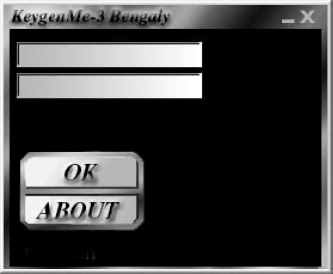
Let's take the first steps in practical cracking. I'll start with a very simple crackme called KeygenMe-3 by Bengaly.When you first run KeygenMe-3 you get a nice (albeit somewhat intimidating) screen asking for two values, with absolutely no information on what these two values are. Figure 11.1 shows the KeygenMe-3 dialog.
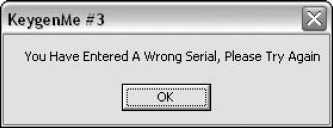
Typing random values into the two text boxes and clicking the "OK" button produces the message box in Figure 11.2. It takes a trained eye to notice that the message box is probably a "stock" Windows message box, probably generated by one of the standard Windows message box APIs. This is important because if this is indeed a conventional Windows message box, you could use a debugger to set a breakpoint on the message box APIs. From there, you could try to reach the code in the program that's telling you that you have a bad serial number. This is a fundamental cracking technique—find the part in the program that's telling you you're unauthorized to run it. Once you're there it becomes much easier to find the actual logic that determines whether you're authorized or not.
Note
Unfortunately for crackers, sophisticated protection schemes typically avoid such easy-to-find messages. For instance, it is possible for a developer to create a visually identical message box that doesn't use the built-in Windows message box facilities and that would therefore be far more difficult to track. In such case, you could let the program run until the message box was displayed and then attach a debugger to the process and examine the call stack for clues on where the program made the decision to display this particular message box.
Let's now find out how KeygenMe-3 displays its message box. As usual, you'll try to use OllyDbg as your reversing tool. Considering that this is supposed to be a relatively simple program to crack, Olly should be more than enough.
As soon as you open the program in OllyDbg, you go to the Executable Modules view to see which modules (DLLs) are statically linked to it. Figure 11.3 shows the Executable Modules view for KeygenMe-3.
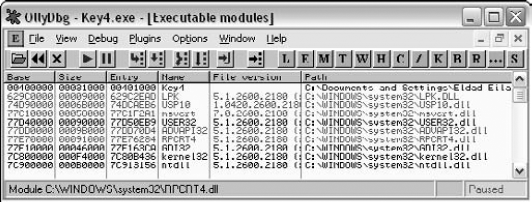
Figure 11.3. OllyDbg's Executable Modules window showing the modules loaded in the key4.exe program.
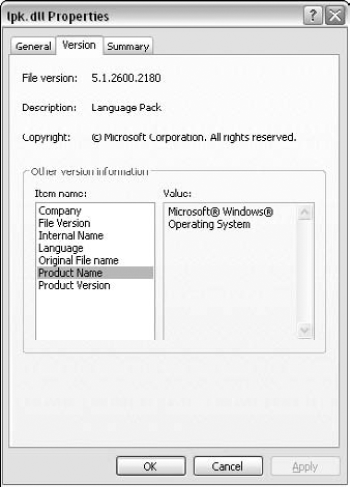
This view immediately tells you the Key4.exe is a "lone gunner," apparently with no extra DLLs other than the system DLLs. You know this because other than the Key4.exe module, the rest of the modules are all operating system components. This is easy to tell because they are all in the C:\WINDOWS\SYSTEM32 directory, and also because at some point you just learn to recognize the names of the popular operating system components. Of course, if you're not sure it's always possible to just look up a binary executable's properties in Windows and obtain some details on it such as who created it and the like. For example, if you're not sure what LPK.DLL is, just go to C:\WINDOWS\SYSTEM32 and look up its properties. In the Version tab you can see its version resource information, which gives you some basic details on the executable (assuming such details were put in place by the module's author). Figure 11.4 shows the Version tab for lpk. from Windows XP Service Pack 2, and it is quite clearly an operating system component.
You can proceed to examine which APIs are directly called by Key4.exe by clicking View Names on Key4.exe in the Executable Modules window. This brings you to the list of functions imported and exported from Key4.exe. This screen is shown in Figure 11.5.
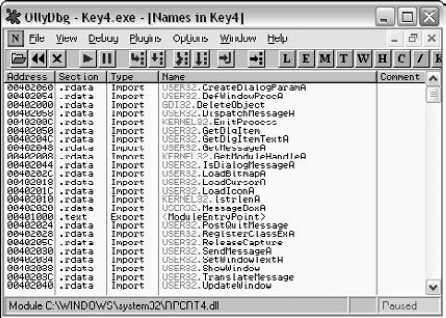
At the moment, you're interested in the Import entry titled USER32.MessageBoxA, because that could well be the call that generates the message box from Figure 11.2. OllyDbg lets you do several things with such an import entry, but my favorite feature, especially for a small program such as a crackme, is to just have Olly show all code references to the imported function. This provides an excellent way to find the call to the failure message box, and hopefully also to the success message box. You can select the MessageBoxA entry, click the right mouse button, and select Find References to get into the References to MessageBoxA dialog box. This dialog box is shown in Figure 11.6.
Here, you have all code references in Key4.exe to the MessageBoxA API. Notice that the last entry references the API with a JMP instruction instead of a CALL instruction. This is just the import entry for the API, and essentially all the other calls also go through this one. It is not relevant in the current discussion. You end up with four other calls that use the CALL instruction. Selecting any of the entries and pressing Enter shows you a disassembly of the code that calls the API. Here, you can also see which parameters were passed into the API, so you can quickly tell if you've found the right spot.
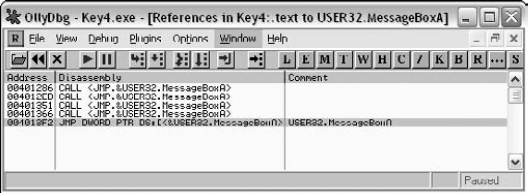
The first entry brings you to the About message box (from looking at the message text in OllyDbg). The second brings you to a parameter validation message box that says "Please Fill In 1 Char to Continue!!" The third entry brings you to what seems to be what you're looking for. Here's the code OllyDbg shows for the third MessageBoxA reference.
0040133F    CMP EAX,ESI
00401341    JNZ SHORT Key4.00401358
00401343    PUSH 0
00401345    PUSH Key4.0040348C               ; ASCII "KeygenMe #3"
0040134A    PUSH Key4.004034DD               ; Text = " Great, You are                                                                   ranked as Level-3 at
                                                Keygening now"
0040134F    PUSH 0                           ; hOwner = NULL
00401351    CALL <JMP.&USER32.MessageBoxA>   ; MessageBoxA
00401356    JMP SHORT Key4.0040136B
00401358    PUSH 0                           ; Style =
                                                MB_OK|MB_APPLMODAL
0040135A    PUSH Key4.0040348C               ; Title = "KeygenMe #3"
0040135F    PUSH Key4.004034AA               ; Text = " You Have
                                                Entered A Wrong Serial,
                                                Please Try Again"
00401364    PUSH 0                           ; hOwner = NULL
00401366    CALL <JMP.&USER32.MessageBoxA>   ; MessageBoxA
0040136B    JMP SHORT Key4.00401382
Well, it appears that you've landed in the right place! This is a classic if-else sequence that displays one of two message boxes. If EAX == ESI the program shows the "Great, You are ranked as Level-3 at Keygening now" message, and if not it displays the "You Have Entered A Wrong Serial, Please Try Again" message. One thing we immediately attempt is to just patch the program so that it always acts as though EAX == ESI, and see if that gets us our success message.
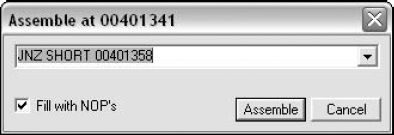
We do this by double clicking the JNZ instruction, which brings us to the Assemble dialog, which is shown in Figure 11.7.
The Assemble dialog allows you to modify code in the program by just typing the desired assembly language instructions. The Fill with NOPs option will add NOPs if the new instruction is shorter that the old one. This is an important point – working with machine code is not like a using word processor where you can insert and delete words and just shift all the materials that follow. Moving machine code, even by 1 byte, is a fairly complicated task because many references in assembly language are relative and moving code would invalidate such relative references. Olly doesn't even attempt that. If your instruction is shorter than the one it replaces Olly will add NOPs. If it's longer, the instruction that follows in the original code will be overwritten. In this case, you're not interested in ever getting to the error message at Key4.00401358, so you completely eliminate the jump from the program. You do this by typing NOP into the Assemble dialog box, with the Fill with NOPs option checked. This will make sure that Olly overwrites the entire instruction with NOPs.
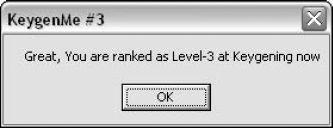
Having patched the program, you can run it and see what happens. It's important to keep in mind that the patch is only applied to the debugged program and that it's not written back into the original executable (yet). This means that the only way to try out the patched program at the moment is by running it inside the debugger. You do that by pressing F9. As usual, you get the usual KeygenMe-3 dialog box, and you can just type random values into the two text boxes and click "OK". Success! The program now shows the success dialog box, as shown in Figure 11.8.
This concludes your first patching lesson. The fact is that simple programs that use a single if statement to control the availability of program functionality are quite common, and this technique can be applied to many of them. The only thing that can get somewhat complicated is the process of finding these if statements. KeygenMe-3 is a really tiny program. Larger programs might not use the stock MessageBox API or might have hundreds of calls to it, which can complicate things a great deal.
One point to keep in mind is that so far you've only patched the program inside the debugger. This means that to enjoy your crack you must run the program in OllyDbg. At this point, you must permanently patch the program's binary executable in order for the crack to be permanent. You do this by right-clicking the code area in the CPU window and selecting Copy to Executable, and then All Modifications in the submenu. This should create a new window that contains a new executable with the patches that you've done. Now all you must do is right-click that window, select Save File, and give OllyDbg a name for the new patched executable. That's it! OllyDbg is really a nice tool for simple cracking and patching tasks. One common cracking scenario where patching becomes somewhat more complicated is when the program performs checksum verification on itself in order to make sure that it hasn't been modified. In such cases, more work is required in order to properly patch a program, but fear not: It's always possible.
You may or may have not noticed it, but KeygenMe-3's success message was "Great, You are ranked as Level-3 at Keygening now," it wasn't "Great, you are ranked as level 3 at patching now." Crackmes have rules too, and typically creators of crackmes define how they should be dealt with. Some are meant to be patched, and others are meant to be keygenned. Keygennning is the process of creating programs that mimic the key-generation algorithm within a protection technology and essentially provide an unlimited number of valid keys, for everyone to use.
You might wonder why such a program is necessary in the first place. Shouldn't pirates be able to just share a single program key among all of them? The answer is typically no. The thing is that in order to create better protections developers of protection technologies typically avoid using algorithms that depend purely on user input—instead they generate keys based on a combination of user input and computer-specific information. The typical approach is to request the user's full name and to combine that with the primary hard drive partition's volume serial number.[1] The volume serial number is a 32-bit random number assigned to a partition while it is being formatted. Using the partition serial number means that a product key will only be valid on the computer on which it was installed—users can't share product keys.
To overcome this problem software pirates use keygen programs that typically contain exact replicas of the serial number generation algorithms in the protected programs. The keygen takes some kind of an input such as the volume serial number and a username, and produces a product key that the user must type into the protected program in order to activate it. Another variation uses a challenge, where the protected program takes the volume serial number and the username and generates a challenge, which is just a long number. The user is then given that number and is supposed to call the software vendor and ask for a valid product key that will be generated based on the supplied number. In such cases, a keygen would simply convert the challenge to the product key.
As its name implies, KeygenMe-3 was meant to be keygenned, so by patching it you were essentially cheating. Let's rectify the situation by creating a keygen for KeygenMe-3.
Ripping algorithms from copy protection products is often an easy and effective method for creating keygen programs. The idea is quite simple: Locate the function or functions within the protected program that calculate a valid serial number, and port them into your keygen. The beauty of this approach is that you just don't need to really understand the algorithm; you simply need to locate it and find a way to call it from your own program.
The initial task you must perform is to locate the key-generation algorithm within the crackme. There are many ways to do this, but one the rarely fails is to look for the code that reads the contents of the two edit boxes into which you're typing the username and serial number. Assuming that KeygenMe-3's main screen is a dialog box (and this can easily be verified by looking for one of the dialog box creation APIs in the program's initialization code), it is likely that the program would use GetDlgItemText or that it would send the edit box a WM_GETTEXT message. Working under the assumption that it's GetDlgItemText you're after, you can go back to the Names window in OllyDbg and look for references to GetDlgItemTextA or GetDlgItemTextW. As expected, you will find that the program is calling GetDlgItemTextA, and in opening the Find References to Import window, you find two calls into the API (not counting the direct JMP, which is the import address table entry).
Example 11.1. Conversion algorithm for first input field in KeygenMe-3.
004012B1    PUSH 40                             ; Count = 40 (64.)
004012B3    PUSH Key4.0040303F                  ; Buffer = Key4.0040303F
004012B8    PUSH 6A                             ; ControlID = 6A (106.)
004012BA    PUSH DWORD PTR [EBP+8]              ; hWnd
004012BD    CALL <JMP.&USER32.GetDlgItemTextA>  ; GetDlgItemTextA
004012C2    CMP EAX,0
004012C5    JE SHORT Key4.004012DF
004012C7    PUSH 40                             ; Count = 40 (64.)
004012C9    PUSH Key4.0040313F                  ; Buffer = Key4.0040313F
004012CE    PUSH 6B                             ; ControlID = 6B (107.)
004012D0    PUSH DWORD PTR [EBP+8]              ; hWnd
004012D3    CALL <JMP.&USER32.GetDlgItemTextA>  ; GetDlgItemTextA
004012D8    CMP EAX,0
004012DB    JE SHORT Key4.004012DF
004012DD    JMP SHORT Key4.004012F6
004012DF    PUSH 0                              ; Style =
                                                   MB_OK|MB_APPLMODAL004012E1
    PUSH Key4.0040348C                          ; Title = "KeygenMe #3"
004012E6    PUSH Key4.00403000                  ; Text = "    Please
                                                   Fill In 1 Char to
                                                   Continue!!"
004012EB    PUSH 0                              ; hOwner = NULL
004012ED    CALL <JMP.&USER32.MessageBoxA>      ; MessageBoxA
004012F2    LEAVE
004012F3    RET 10
004012F6    PUSH Key4.0040303F                  ; String = "Eldad Eilam"
004012FB    CALL <JMP.&KERNEL32.lstrlenA>       ; lstrlenA
00401300    XOR ESI,ESI
00401302    XOR EBX,EBX
00401304    MOV ECX,EAX
00401306    MOV EAX,1
0040130B    MOV EBX,DWORD PTR [40303F]
00401311    MOVSX EDX,BYTE PTR [EAX+40351F]
00401318    SUB EBX,EDX
0040131A    IMUL EBX,EDX
0040131D    MOV ESI,EBX
0040131F    SUB EBX,EAX
00401321    ADD EBX,4353543
00401327    ADD ESI,EBX
00401329    XOR ESI,EDX
0040132B    MOV EAX,4
00401330    DEC ECX
00401331    JNZ SHORT Key4.0040130B
00401333    PUSH ESI
00401334    PUSH Key4.0040313F                  ; ASCII "12345"
00401339    CALL Key4.00401388
0040133E    POP ESI
0040133F    CMP EAX,ESI
Before attempting to rip the conversion algorithm from the preceding code, let's also take a look at the function at Key4.00401388, which is apparently a part of the algorithm.
Example 11.2. Conversion algorithm for second input field in KeygenMe-3.
00401388    PUSH EBP
00401389    MOV EBP,ESP
0040138B    PUSH DWORD PTR [EBP+8]                ; String
0040138E    CALL <JMP.&KERNEL32.lstrlenA>         ; lstrlenA
00401393    PUSH EBX
00401394    XOR EBX,EBX
00401396    MOV ECX,EAX
00401398    MOV ESI,DWORD PTR [EBP+8]
0040139B    PUSH ECX
0040139C    XOR EAX,EAX
0040139E    LODS BYTE PTR [ESI]
0040139F    SUB EAX,30
004013A2    DEC ECX
004013A3    JE SHORT Key4.004013AA
004013A5    IMUL EAX,EAX,0A
004013A8    LOOPD SHORT Key4.004013A5
004013AA    ADD EBX,EAX
004013AC    POP ECX
004013AD    LOOPD SHORT Key4.0040139B
004013AF    MOV EAX,EBX
004013B1    POP EBX
004013B2    LEAVE
004013B3    RET 4
From looking at the code, it is evident that there are two code areas that appear to contain the key-generation algorithm. The first is the Key4.0040130B section in Listing 11.1, and the second is the entire function from Listing 11.2. The part from Listing 11.2. The part from Listing 11.1 generates the value in ESI, and the function from Listing 11.1 generates the value in ESI, and the function from Listing 11.2 returns a value into EAX. The two values are compared and must be equal for the program to report success (this is the comparison that we patched earlier).
Let's start by determining the input data required by the snippet at Key4.0040130B. This code starts out with ECX containing the length of the first input string (the one from the top text box), with the address to that string (40303F), and with the unknown, hard-coded address 40351F. The first thing to notice is that the sequence doesn't actually go over each character in the string. Instead, it takes the first four characters and treats them as a single double-word. In order to move this code into your own keygen, you have to figure out what is stored in 40351F. First of all, you can see that the address is always added to EAX before it is referenced. In the initial iteration EAX equals 1, so the actual address that is accessed is 403520. In the following iterations EAX is set to 4, so you're now looking at 403524. From dumping 403520 in OllyDbg, you can see that this address contains the following data:
00403520 25 40 24 65 72 77 72 23 %@$erwr#
Notice that the line that accesses this address is only using a single byte, and not whole DWORDs, so in reality the program is only accessing the first (which is 0x25) and the fourth byte (which is 0x65).
In looking at the first algorithm from Listing 11.1, it is quite obvious that this is some kind of key-generation algorithm that converts a username into a 32-bit number (that ends up in ESI). What about the second algorithm from Listing 11.1, it is quite obvious that this is some kind of key-generation algorithm that converts a username into a 32-bit number (that ends up in ESI). What about the second algorithm from Listing 11.2? A quick observation shows that the code doesn't have any complex processing. All it does is go over each digit in the serial number, subtract it from 0x30 (which happens to be the digit '0' in ASCII), and repeatedly multiply the result by 10 until ECX gets to zero. This multiplication happens in an inner loop for each digit in the source string. The number of multiplications is determined by the digit's position in the source string.
Stepping through this code in the debugger will show what experienced reversers can detect by just looking at this function. It converts the string that was passed in the parameter to a binary DWORD. This is equivalent to the atoi function from the C runtime library, but it appears to be a private implementation (atoi is somewhat more complicated, and while OllyDbg is capable of identifying library functions if it is given a library to work with, it didn't seem to find anything in KeygenMe-3).
So, it seems that the first algorithm (from Listing 11.1) converts the username into a 32-bit DWORD using a special algorithm, and that the second algorithm simply converts digits from the lower text box. The lower text box should contain the number produced by the first algorithm. In light of this, it would seem that all you need to do is just rip the first algorithm into the keygen program and have it generate a serial number for us. Let's try that out.
Listing 11.3 shows the ported routine I created for the keygen program. It is essentially a C function (compiled using the Microsoft C/C++ compiler), with an inline assembler sequence that was copied from the OllyDbg disassembler. The instructions written in lowercase were all manually added, as was the name LoopStart.
Example 11.3. Ported conversion algorithm for first input field from KeygenMe-3.
ULONG ComputeSerial(LPSTR pszString)
{  DWORD dwLen = lstrlen(pszString);
   _asm
  {    mov ecx, [dwLen]
    mov edx, 0x25
    mov eax, 1
LoopStart:
    MOV EBX, DWORD PTR [pszString]
    mov ebx, dword ptr [ebx]
    //MOVSX EDX, BYTE PTR DS:[EAX+40351F]
SUB EBX, EDX
IMUL EBX, EDX
MOV ESI, EBX
SUB EBX, EAX
ADD EBX, 0x4353543
ADD ESI, EBX
XOR ESI, EDX
MOV EAX, 4
mov edx, 0x65
DEC ECX
JNZ LoopStart
mov eax, ESI
}
}I inserted this function into a tiny console mode application I created that takes the username as an input and shows ComputeSerial's return value in decimal. All it does is call ComputeSerial and display its return value in decimal. Here's the entry point for my keygen program.
int _tmain(int argc, _TCHAR* argv[])
{
 printf ("Welcome to the KeygenMe-3 keygen!\n");
 printf ("User name is: %s\n", argv[1]);
 printf ("Serial number is: %u\n", ComputeSerial(argv[1]));
 return 0;
}
It would appear that typing any name into the top text box (this should be the same name passed to ComputeSerial) and then typing ComputeSerial's return value into the second text box in KeygenMe-3 should satisfy the program. Let's try that out. You can pass "John Doe" as a parameter for our keygen, and record the generated serial number. Figure 11.9 shows the output screen from our keygen.
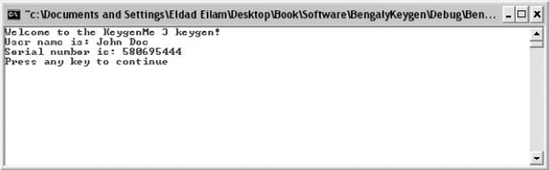
The resulting serial number appears to be 580695444. You can run KeygenMe-3 (the original, unpatched version), and type "John Doe" in the first edit box and "580695444" in the second box. Success again! KeygenMe-3 accepts the values as valid values. Congratulations, this concludes your second cracking lesson.
Having a decent grasp of basic protection concepts, it's time to get your hands dirty and attempt to crack your way through a more powerful protection. For this purpose, I have created a special crackme that you'll use here. This crackme is called Defender and was specifically created to demonstrate several powerful protection techniques that are similar to what you would find in real-world, commercial protection technologies. Be forewarned: If you've never confronted a serious protection technology before Defender, it might seem impossible to crack. It is not; all it takes is a lot of knowledge and a lot of patience.
Note
Defender is tightly integrated with the underlying operating system and was specifically designed to run on NT-based Windows systems. It runs on all currently available NT-based systems, including Windows XP, Windows Server 2003, Windows 2000, and Windows NT 4.0, but it will not run on non-NT-based systems such as Windows 98 or Windows Me.
Let's begin by just running Defender.EXE and checking to see what happens. Note that Defender is a console-mode application, so it should generally be run from a Command Prompt window. I created Defender as a console-mode application because it greatly simplified the program. It would have been possible to create an equally powerful protection in a regular GUI application, but that would have taken longer to write. One thing that's important to note is that a console mode application is not a DOS program! NT-based systems can run DOS programs using the NTVDM virtual machine, but that's not the case here. Console-mode applications such as Defender are regular 32-bit Windows programs that simply avoid the Windows GUI APIs (but have full access to the Win32 API), and communicate with the user using a simple text window.
You can run Defender.EXE from the Command Prompt window and receive the generic usage message. Figure 11.10 shows Defender's default usage message.
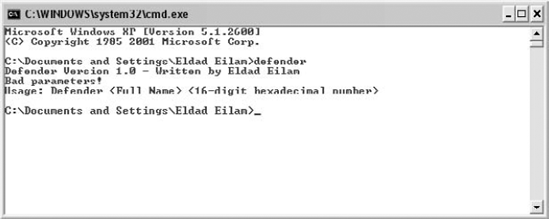
Defender takes a username and a 16-digit hexadecimal serial number. Just to see what happens, let's try feeding it some bogus values. Figure 11.11 shows how Defender respond to John Doe as a username and 1234567890ABCDEF as the serial number.
Well, no real drama here—Defender simply reports that we have a bad serial number. One good reason to always go through this step when cracking is so that you at least know what the failure message looks like. You should be able to find this message somewhere in the executable.
Let's load Defender.EXE into OllyDbg and take a first look at it. The first thing you should do is look at the Executable Modules window to see which DLLs are statically linked to Defender. Figure 11.12 shows the Executable Modules window for Defender.
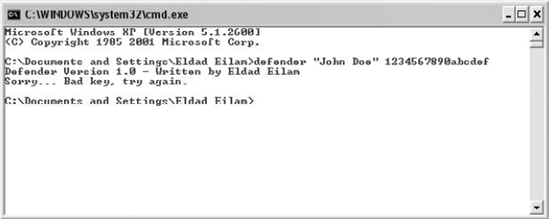
Figure 11.11. Defender.EXE launched with John Doe as the username and 1234567890ABCDEF as the serial number.
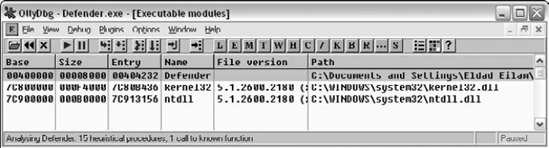
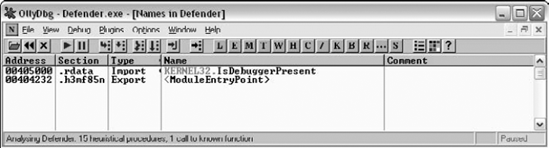
Very short list indeed—only NTDLL.DLL and KERNEL32.DLL. Remember that our GUI crackme, KeygenMe-3 had a much longer list, but then again Defender is a console-mode application. Let's proceed to the Names window to determine which APIs are called by Defender. Figure 11.13 shows the Names window for Defender.EXE.
Very strange indeed. It would seem that the only API called by Defender.EXE is IsDebuggerPresent from KERNEL32.DLL. It doesn't take much reasoning to figure out that this is unlikely to be true. The program must be able to somehow communicate with the operating system, beyond just calling IsDebuggerPresent. For example, how would the program print out messages to the console window without calling into the operating system? That's just not possible. Let's run the program through DUMPBIN and see what it has to say about Defender's imports. Listing 11.4 shows DUMPBIN's output when it is launched with the /IMPORTS option.
Example 11.4. Output from DUMPBIN when run on Defender.EXE with the /IMPORTS option.
Microsoft (R) COFF/PE Dumper Version 7.10.3077
Copyright (C) Microsoft Corporation. All rights reserved.


Dump of file defender.exe
File Type: EXECUTABLE IMAGE

  Section contains the following imports:

    KERNEL32.dll
                405000 Import Address Table
                405030 Import Name Table
                     0 time date stamp
                     0 Index of first forwarder reference

                  22F IsDebuggerPresent
  Summary

        1000 .data
        4000 .h3mf85n
        1000 .h477w81
        1000 .rdata
Not much news here. DUMPBIN is also claiming the Defender.EXE is only calling IsDebuggerPresent. One slightly interesting thing however is the Summary section, where DUMPBIN lists the module's sections. It would appear that Defender doesn't have a .text section (which is usually where the code is placed in PE executables). Instead it has two strange sections: .h3mf85n and .h477w81. This doesn't mean that the program doesn't have any code, it simply means that the code is most likely tucked in one of those oddly named sections.
At this point it would be wise to run DUMPBIN with the /HEADERS option to get a better idea of how Defender is built (see Listing 11.5).
Example 11.5. Output from DUMPBIN when run on Defender.EXE with the /HEADERS option.
Microsoft (R) COFF/PE Dumper Version 7.10.3077
Copyright (C) Microsoft Corporation. All rights reserved.


Dump of file defender.exe

PE signature found
File Type: EXECUTABLE IMAGE

FILE HEADER VALUES
             14C machine (x86)
4 number of sections
4129382F time date stamp Mon Aug 23 03:19:59 2004
0 file pointer to symbol table
0 number of symbols
E0 size of optional header
10F characteristics
Relocations stripped
Executable
Line numbers stripped
Symbols stripped
32 bit word machine
OPTIONAL HEADER VALUES
10B magic # (PE32)
7.10 linker version
3400 size of code
600 size of initialized data
0 size of uninitialized data
4232 entry point (00404232)
1000 base of code
5000 base of data
400000 image base (00400000 to 00407FFF)
1000 section alignment
200 file alignment
4.00 operating system version
0.00 image version
4.00 subsystem version
0 Win32 version
8000 size of image
400 size of headers
0 checksum
3 subsystem (Windows CUI)
400 DLL characteristics
No safe exception handler
100000 size of stack reserve
1000 size of stack commit
100000 size of heap reserve
1000 size of heap commit
0 loader flags
10 number of directories
5060 [ 35] RVA [size] of Export Directory
5008 [ 28] RVA [size] of Import Directory
0 [ 0] RVA [size] of Resource Directory
0 [ 0] RVA [size] of Exception Directory
0 [ 0] RVA [size] of Certificates Directory
0 [ 0] RVA [size] of Base Relocation Directory
0 [ 0] RVA [size] of Debug Directory
0 [ 0] RVA [size] of Architecture Directory
0 [ 0] RVA [size] of Global Pointer Directory0 [ 0] RVA [size] of Thread Storage Directory
0 [ 0] RVA [size] of Load Configuration Directory
0 [ 0] RVA [size] of Bound Import Directory
5000 [ 8] RVA [size] of Import Address Table Directory
0 [ 0] RVA [size] of Delay Import Directory
0 [ 0] RVA [size] of COM Descriptor Directory
0 [ 0] RVA [size] of Reserved Directory
SECTION HEADER #1
.h3mf85n name
3300 virtual size
1000 virtual address (00401000 to 004042FF)
3400 size of raw data
400 file pointer to raw data (00000400 to 000037FF)
0 file pointer to relocation table
0 file pointer to line numbers
0 number of relocations
0 number of line numbers
E0000020 flags
Code
Execute Read Write
SECTION HEADER #2
.rdata name
95 virtual size
5000 virtual address (00405000 to 00405094)
200 size of raw data
3800 file pointer to raw data (00003800 to 000039FF)
0 file pointer to relocation table
0 file pointer to line numbers
0 number of relocations
0 number of line numbers40000040 flags
Initialized Data
Read Only
SECTION HEADER #3
.data name
24 virtual size
6000 virtual address (00406000 to 00406023)
0 size of raw data
0 file pointer to raw data
0 file pointer to relocation table
0 file pointer to line numbers
0 number of relocations
0 number of line numbersC0000040 flags
Initialized DataRead Write
SECTION HEADER #4.
h477w81 name
8C virtual size
7000 virtual address (00407000 to 0040708B)
200 size of raw data
3A00 file pointer to raw data (00003A00 to 00003BFF)
0 file pointer to relocation table
0 file pointer to line numbers
0 number of relocations
0 number of line numbers
C0000040 flags
Initialized Data
Read Write
Summary
1000 .data
4000 .h3mf85n
1000 .h477w81
1000 .rdataThe /HEADERS options provides you with a lot more details on the program. For example, it is easy to see that section #1, .h3mf85n, is the code section. It is specified as Code, and the program's entry point resides in it (the entry point is at 404232 and .h3mf85n starts at 401000 and ends at 4042FF, so the entry point is clearly inside this section). The other oddly named section, .h477w81 appears to be a small data section, probably containing some variables. It's also worth mentioning that the subsystem flag equal 3. This identifies a Windows CUI (console user interface) program, and Windows will automatically create a console window for this program as soon as it is started.
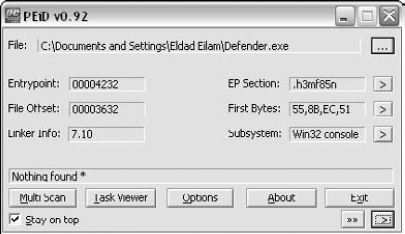
All of those oddly named sections indicate that the program is possible packed in some way. Packers have a way of creating special sections that contain the packed code or the unpacking code. It is a good idea to run the program in PEiD to see if it is packed with a known packer. PEiD is a program that can identify popular executable signatures and show whether an executable has been packed by one of the popular executable packers or copy protection products. PEiD can be downloaded from http://peid.has.it/Defender.EXE.
Unfortunately, PEiD reports "Nothing found," so you can safely assume that Defender is either not packed or that it is packed with an unknown packer. Let's proceed to start disassembling the program and figuring out where that "Sorry . . . Bad key, try again." message is coming from.
Because the program doesn't appear to directly call any APIs, there doesn't seem to be a specific API on which you could place a breakpoint to catch the place in the code where the program is printing this message. Thus you don't really have a choice but to try your luck by examining the program's entry point and trying to find some interesting code that might shed some light on this program. Let's load the program in IDA and run a full analysis on it. You can now take a quick look at the program's entry point.
Example 11.6. A disassembly of Defender's entry point function, generated by IDA.
.h3mf85n:00404232 start           proc near
.h3mf85n:00404232
.h3mf85n:00404232 var_8           = dword ptr −8
.h3mf85n:00404232 var_4           = dword ptr −4
.h3mf85n:00404232
.h3mf85n:00404232                 push    ebp.
h3mf85n:00404233                  mov     ebp, esp.
h3mf85n:00404235                  push    ecx
.h3mf85n:00404236                 push    ecx
.h3mf85n:00404237                 push    esi
.h3mf85n:00404238                 push    edi
.h3mf85n:00404239                 call    sub_402EA8
.h3mf85n:0040423E                 push    eax
.h3mf85n:0040423F                 call    loc_4033D1
.h3mf85n:00404244                 mov     eax, dword_406000
.h3mf85n:00404249                 pop     ecx
.h3mf85n:0040424A                 mov     ecx, eax
.h3mf85n:0040424C                 mov     eax, [eax]
.h3mf85n:0040424E                 mov     edi, 6DEF20h
.h3mf85n:00404253                 xor     esi, esi
.h3mf85n:00404255                 jmp     short loc_404260
.h3mf85n:00404257 ; -----------------------------------------
.h3mf85n:00404257 .h3mf85n:00404257 loc_404257: ; CODE XREF: start+30↓j .h3mf85n:00404257 cmp eax, edi .h3mf85n:00404259 jz short loc_404283 .h3mf85n:0040425B add ecx, 8 .h3mf85n:0040425E mov eax, [ecx] .h3mf85n:00404260 .h3mf85n:00404260 loc_404260: ; CODE XREF: start+23_j .h3mf85n:00404260 cmp eax, esi .h3mf85n:00404262 jnz short loc_404257 .h3mf85n:00404264 xor eax, eax .h3mf85n:00404266 .h3mf85n:00404266 loc_404266: ; CODE XREF: start+5A_j .h3mf85n:00404266 lea ecx, [ebp+var_8] .h3mf85n:00404269 push ecx .h3mf85n:0040426A push esi .h3mf85n:0040426B mov [ebp+var_8], esi .h3mf85n:0040426E mov [ebp+var_4], esi .h3mf85n:00404271 call eax .h3mf85n:00404273 call loc_404202 .h3mf85n:00404278 mov eax, dword_406000 .h3mf85n:0040427D mov ecx, eax .h3mf85n:0040427F mov eax, [eax] .h3mf85n:00404281 jmp short loc_404297 .h3mf85n:00404283 ; ---------------------------------------------------- .h3mf85n:00404283. h3mf85n:00404283 loc_404283: ; CODE XREF: start+27_j .h3mf85n:00404283 mov eax, [ecx+4] .h3mf85n:00404286 add eax, dword_40601C .h3mf85n:0040428C jmp short loc_404266 .h3mf85n:0040428E ; ---------------------------------------------------- .h3mf85n:0040428E.h3mf85n:0040428E loc_40428E: ; CODE XREF: start+67_j .h3mf85n:0040428E cmp eax, edi .h3mf85n:00404290 jz short loc_4042BA .h3mf85n:00404292 add ecx, 8 .h3mf85n:00404295 mov eax, [ecx] .h3mf85n:00404297 .h3mf85n:00404297 loc_404297: ; CODE XREF: start+4F_j .h3mf85n:00404297 cmp eax, esi .h3mf85n:00404299 jnz short loc_40428E .h3mf85n:0040429B xor eax, eax .h3mf85n:0040429D .h3mf85n:0040429D loc_40429D: ; CODE XREF: start+91_j .h3mf85n:0040429D lea ecx, [ebp+var_8] .h3mf85n:004042A0 push ecx .h3mf85n:004042A1 push esi .h3mf85n:004042A2 mov [ebp+var_8], esi
.h3mf85n:004042A5                 mov     [ebp+var_4], esi
.h3mf85n:004042A8                 call    eax
.h3mf85n:004042AA                 call    loc_401746
.h3mf85n:004042AF                 mov     eax, dword_406000
.h3mf85n:004042B4                 mov     ecx, eax
.h3mf85n:004042B6                 mov     eax, [eax]
.h3mf85n:004042B8                 jmp     short loc_4042CE
.h3mf85n:004042BA ; ----------------------------------------------------
.h3mf85n:004042BA
.h3mf85n:004042BA loc_4042BA:                   ; CODE XREF: start+5E_j
.h3mf85n:004042BA                 mov     eax, [ecx+4]
.h3mf85n:004042BD                 add     eax, dword_40601C
.h3mf85n:004042C3                 jmp     short loc_40429D
.h3mf85n:004042C5 ; ----------------------------------------------------
.h3mf85n:004042C5
.h3mf85n:004042C5 loc_4042C5:                   ; CODE XREF: start+9E_j
.h3mf85n:004042C5                 cmp     eax, edi
.h3mf85n:004042C7                 jz      short loc_4042F5
.h3mf85n:004042C9                 add     ecx, 8
.h3mf85n:004042CC                 mov     eax, [ecx]
.h3mf85n:004042CE
.h3mf85n:004042CE loc_4042CE:                   ; CODE XREF: start+86_j
.h3mf85n:004042CE                 cmp     eax, esi
.h3mf85n:004042D0                 jnz     short loc_4042C5
.h3mf85n:004042D2                 xor     ecx, ecx
.h3mf85n:004042D4
.h3mf85n:004042D4 loc_4042D4:                   ; CODE XREF: start+CC_j
.h3mf85n:004042D4                 lea     eax, [ebp+var_8]
.h3mf85n:004042D7                 push    eax
.h3mf85n:004042D8                 push    esi
.h3mf85n:004042D9                 mov     [ebp+var_8], esi
.h3mf85n:004042DC                 mov     [ebp+var_4], esi
.h3mf85n:004042DF                 call    ecx
.h3mf85n:004042E1                 call    loc_402082
.h3mf85n:004042E6                 call    ds:IsDebuggerPresent
.h3mf85n:004042EC                 xor     eax, eax
.h3mf85n:004042EE                 pop     edi
.h3mf85n:004042EF                 inc     eax
.h3mf85n:004042F0                 pop     esi
.h3mf85n:004042F1                 leave
.h3mf85n:004042F2                 retn    8
.h3mf85n:004042F5 ; ----------------------------------------------------
.h3mf85n:004042F5
.h3mf85n:004042F5 loc_4042F5:                   ; CODE XREF: start+95_j
.h3mf85n:004042F5                 mov     ecx, [ecx+4]
.h3mf85n:004042F8                 add     ecx, dword_40601C
.h3mf85n:004042FE                 jmp     short loc_4042D4
.h3mf85n:004042FE start           endp
Listing 11.6 shows Defender's entry point function. A quick scan of the fuction reveals one important property—the entry point is not a common runtime library initialization routine. Even if you've never seen a runtime library initialization routine before, you can be pretty sure that it doesn't end with a call to IsDebuggerPresent. While we're on that call, look at how EAX is being XORed against itself as soon as it returns—its return value is being ignored! A quick look in http://msdn.microsoft.com shows us that IsDebuggerPresent should return a Boolean specifying whether a debugger is present or not. XORing EAX right after this API returns means that the call is meaningless.
Anyway, let's go back to the top of Listing 11.6 and learn something about Defender, starting with a call to 402EA8. Let's take a look at what it does.
mf85n:00402EA8 sub_402EA8      proc near
.h3mf85n:00402EA8
.h3mf85n:00402EA8 var_4           = dword ptr −4
.h3mf85n:00402EA8
.h3mf85n:00402EA8                 push    ecx
.h3mf85n:00402EA9                 mov     eax, large fs:30h
.h3mf85n:00402EAF                 mov     [esp+4+var_4], eax
.h3mf85n:00402EB2                 mov     eax, [esp+4+var_4]
.h3mf85n:00402EB5                 mov     eax, [eax+0Ch]
.h3mf85n:00402EB8                 mov     eax, [eax+0Ch]
.h3mf85n:00402EBB                 mov     eax, [eax]
.h3mf85n:00402EBD                 mov     eax, [eax+18h]
.h3mf85n:00402EC0                 pop     ecx
.h3mf85n:00402EC1                 retn
.h3mf85n:00402EC1 sub_402EA8      endp
The preceding routine starts out with an interesting sequence that loads a value from fs:30h. Generally in NT-based operating systems the fs register is used for accessing thread local information. For any given thread, fs:0 points to the local TEB (Thread Environment Block) data structure, which contains a plethora of thread-private information required by the system during runtime. In this case, the function is accessing offset +30. Luckily, you have detailed symbolic information in Windows from which you can obtain information on what offset +30 is in the TEB. You can do that by loading symbols for NTDLL in WinDbg and using the DT command (for more information on WinDbg and the DT command go to the Microsoft Debugging Tools Web page at www.microsoft.com/whdc/devtools/debugging/default.mspx).
The structure listing for the TEB is quite long, so I'll just list the first part of it, up to offset +30, which is the one being accessed by the program.
+0x000 NtTib            : _NT_TIB
+0x01c EnvironmentPointer : Ptr32 Void
+0x020 ClientId         : _CLIENT_ID
+0x028 ActiveRpcHandle  : Ptr32 Void
+0x02c ThreadLocalStoragePointer : Ptr32 Void
+0x030 ProcessEnvironmentBlock : Ptr32 _PEB
.
.
It's obvious that the first line is accessing the Process Environment Block through the TEB. The PEB is the process-information data structure in Windows, just like the TEB is the thread information data structure. In address 00402EB5 the program is accessing offset +c in the PEB. Let's look at what's in there. Again, the full definition is quite long, so I'll just print the beginning of the definition.
+0x000 InheritedAddressSpace : UChar
+0x001 ReadImageFileExecOptions : UChar
+0x002 BeingDebugged    : UChar
+0x003 SpareBool        : UChar
+0x004 Mutant           : Ptr32 Void
+0x008 ImageBaseAddress : Ptr32 Void
+0x00c Ldr              : Ptr32 _PEB_LDR_DATA..
In this case, offset +c goes to the _PEB_LDR_DATA, which is the loader information. Let's take a look at this data structure and see what's inside.
+0x000 Length           : Uint4B
+0x004 Initialized      : UChar
+0x008 SsHandle         : Ptr32 Void
+0x00c InLoadOrderModuleList : _LIST_ENTRY
+0x014 InMemoryOrderModuleList : _LIST_ENTRY
+0x01c InInitializationOrderModuleList : _LIST_ENTRY
+0x024 EntryInProgress  : Ptr32 Void
This data structure appears to be used for managing the loaded executables within the current process. There are several module lists, each containing the currently loaded executable modules in a different order. The function is taking offset +c, which means that it's going after the InLoadOrderModuleList item. Let's take a look at the module data structure, LDR_DATA_TABLE_ENTRY, and try to understand what this function is looking for.
Note
The following definition for LDR_DATA_TABLE_ENTRY was produced using the DT command in WinDbg. Some Windows symbol files actually contain data structure definitions that can be dumped using that command. All you need to do is type DT ModuleName!* to get a list of all available names, and then type DT ModuleName!StructureName to get a nice listing of its members!
+0x000 InLoadOrderLinks : _LIST_ENTRY
+0x008 InMemoryOrderLinks : _LIST_ENTRY
+0x010 InInitializationOrderLinks : _LIST_ENTRY
+0x018 DllBase          : Ptr32 Void
+0x01c EntryPoint       : Ptr32 Void
+0x020 SizeOfImage      : Uint4B
+0x024 FullDllName      : _UNICODE_STRING
+0x02c BaseDllName      : _UNICODE_STRING
+0x034 Flags            : Uint4B
+0x038 LoadCount        : Uint2B
+0x03a TlsIndex         : Uint2B
+0x03c HashLinks        : _LIST_ENTRY
+0x03c SectionPointer   : Ptr32 Void
+0x040 CheckSum         : Uint4B
+0x044 TimeDateStamp    : Uint4B
+0x044 LoadedImports    : Ptr32 Void
+0x048 EntryPointActivationContext : Ptr32 _ACTIVATION_CONTEXT
+0x04c PatchInformation : Ptr32 Void
After getting a pointer to InLoadOrderModuleList the function appears to go after offset +0 in the first module. From looking at this structure, it would seem that offset +0 is part of the LIST_ENTRY data structure. Let's dump LIST_ENTRY and see what offset +0 means.
+0x000 Flink            : Ptr32 _LIST_ENTRY
+0x004 Blink            : Ptr32 _LIST_ENTRY
Offset +0 is Flink, which probably stands for "forward link". This means that the function is hard-coded to skip the first entry, regardless of what it is. This is quite unusual because with a linked list you would expect to see a loop—no loop, the function is just hard-coded to skip the first entry. After doing that, the function simply returns the value from offset +18 at the second entry. Offset +18 in _LDR_DATA_TABLE_ENTRY is DllBase. So, it would seem that all this function is doing is looking for the base of some DLL. At this point it would be wise to load Defender.EXE in WinDbg, just to take a look at the loader information and see what the second module is. For this, you use the !dlls command, which dumps a (relatively) user-friendly view of the loader data structures. The –l option makes the command dump modules in their load order, which is essentially the list you traversed by taking InLoadOrderModuleList from PEB_LDR_DATA.
0:000> !dlls -l

0x00241ee0: C:\Documents and Settings\Eldad Eilam\Defender.exe
      Base   0x00400000  EntryPoint  0x00404232  Size        0x00008000
      Flags  0x00005000  LoadCount   0x0000ffff  TlsIndex    0x00000000
             LDRP_LOAD_IN_PROGRESS
             LDRP_ENTRY_PROCESSED
0x00241f48: C:\WINDOWS\system32\ntdll.dll
Base 0x7c900000 EntryPoint 0x7c913156 Size 0x000b0000
Flags 0x00085004 LoadCount 0x0000ffff TlsIndex 0x00000000
LDRP_IMAGE_DLL
LDRP_LOAD_IN_PROGRESS
LDRP_ENTRY_PROCESSED
LDRP_PROCESS_ATTACH_CALLED
0x00242010: C:\WINDOWS\system32\kernel32.dll
Base 0x7c800000 EntryPoint 0x7c80b436 Size 0x000f4000
Flags 0x00085004 LoadCount 0x0000ffff TlsIndex 0x00000000
LDRP_IMAGE_DLL
LDRP_LOAD_IN_PROGRESS
LDRP_ENTRY_PROCESSED
LDRP_PROCESS_ATTACH_CALLEDSo, it would seem that the second module is NTDLL.DLL. The function at 00402EA8 simply obtains the address of NTDLL.DLL in memory. This makes a lot of sense because as I've said before, it would be utterly impossible for the program to communicate with the user without any kind of interface to the operating system. Obtaining the address of NTDLL.DLL is apparently the first step in creating such an interface.
If you go back to Listing 11.6, you see that the return value from 00402EA8 is passed right into 004033D1, which is the next function being called. Let's take a look at it.
Example 11.7. A disassembly of function 4033D1 from Defender, generated by IDA Pro.
loc_4033D1:
.h3mf85n:004033D1                 push    ebp
.h3mf85n:004033D2                 mov     ebp, esp
.h3mf85n:004033D4                 sub     esp, 22Ch
.h3mf85n:004033DA                 push    ebx
.h3mf85n:004033DB                 push    esi
.h3mf85n:004033DC                 push    edi
.h3mf85n:004033DD                 push    offset dword_4034DD
.h3mf85n:004033E2                 pop     eax
.h3mf85n:004033E3                 mov     [ebp-20h], eax
.h3mf85n:004033E6                 push    offset loc_4041FD
.h3mf85n:004033EB                 pop     eax
.h3mf85n:004033EC                 mov     [ebp-18h], eax
.h3mf85n:004033EF                 mov     eax, offset dword_4034E5
.h3mf85n:004033F4                 mov     ds:dword_4034D6, eax
.h3mf85n:004033FA                 mov     dword ptr [ebp-8], 1
.h3mf85n:00403401                 cmp     dword ptr [ebp-8], 0
.h3mf85n:00403405                 jz      short loc_40346D
.h3mf85n:00403407                 mov     eax, [ebp-18h]
.h3mf85n:0040340A                 sub     eax, [ebp-20h]
.h3mf85n:0040340D                 mov     [ebp-30h], eax
.h3mf85n:00403410 mov eax, [ebp-20h] .h3mf85n:00403413 mov [ebp-34h], eax .h3mf85n:00403416 and dword ptr [ebp-24h], 0 .h3mf85n:0040341A and dword ptr [ebp-28h], 0 .h3mf85n:0040341E loc_40341E: ; CODE XREF: .h3mf85n:00403469_j .h3mf85n:0040341E cmp dword ptr [ebp-30h], 3 .h3mf85n:00403422 jbe short loc_40346B .h3mf85n:00403424 mov eax, [ebp-34h] .h3mf85n:00403427 mov eax, [eax] .h3mf85n:00403429 mov [ebp-2Ch], eax .h3mf85n:0040342C mov eax, [ebp-34h] .h3mf85n:0040342F mov eax, [eax] .h3mf85n:00403431 xor eax, 2BCA6179h .h3mf85n:00403436 mov ecx, [ebp-34h] .h3mf85n:00403439 mov [ecx], eax .h3mf85n:0040343B mov eax, [ebp-34h] .h3mf85n:0040343E mov eax, [eax] .h3mf85n:00403440 xor eax, [ebp-28h] .h3mf85n:00403443 mov ecx, [ebp-34h] .h3mf85n:00403446 mov [ecx], eax .h3mf85n:00403448 mov eax, [ebp-2Ch] .h3mf85n:0040344B mov [ebp-28h], eax .h3mf85n:0040344E mov eax, [ebp-24h] .h3mf85n:00403451 xor eax, [ebp-2Ch] .h3mf85n:00403454 mov [ebp-24h], eax .h3mf85n:00403457 mov eax, [ebp-34h] .h3mf85n:0040345A add eax, 4 .h3mf85n:0040345D mov [ebp-34h], eax .h3mf85n:00403460 mov eax, [ebp-30h] .h3mf85n:00403463 sub eax, 4 .h3mf85n:00403466 mov [ebp-30h], eax .h3mf85n:00403469 jmp short loc_40341E .h3mf85n:0040346B ; ---------------------------------------------------- .h3mf85n:0040346B .h3mf85n:0040346B loc_40346B: ; CODE XREF: .h3mf85n:00403422_j .h3mf85n:0040346B jmp short near ptr unk_4034D5 .h3mf85n:0040346D ; ---------------------------------------------------- .h3mf85n:0040346D .h3mf85n:0040346D loc_40346D: ; CODE XREF: .h3mf85n:00403405_j .h3mf85n:0040346D mov eax, [ebp-18h] .h3mf85n:00403470 sub eax, [ebp-20h] .h3mf85n:00403473 mov [ebp-40h], eax .h3mf85n:00403476 mov eax, [ebp-20h] .h3mf85n:00403479 mov [ebp-44h], eax .h3mf85n:0040347C and dword ptr [ebp-38h], 0 .h3mf85n:00403480 and dword ptr [ebp-3Ch], 0 .h3mf85n:00403484 .h3mf85n:00403484 loc_403484: ; CODE XREF: .h3mf85n:004034CB_j .h3mf85n:00403484 cmp dword ptr [ebp-40h], 3
.h3mf85n:00403488                 jbe     short loc_4034CD
.h3mf85n:0040348A                 mov     eax, [ebp-44h]
.h3mf85n:0040348D                 mov     eax, [eax]
.h3mf85n:0040348F                 xor     eax, [ebp-3Ch]
.h3mf85n:00403492                 mov     ecx, [ebp-44h]
.h3mf85n:00403495                 mov     [ecx], eax
.h3mf85n:00403497                 mov     eax, [ebp-44h]
.h3mf85n:0040349A                 mov     eax, [eax]
.h3mf85n:0040349C                 xor     eax, 2BCA6179h
.h3mf85n:004034A1                 mov     ecx, [ebp-44h]
.h3mf85n:004034A4                 mov     [ecx], eax
.h3mf85n:004034A6                 mov     eax, [ebp-44h]
.h3mf85n:004034A9                 mov     eax, [eax]
.h3mf85n:004034AB                 mov     [ebp-3Ch], eax
.h3mf85n:004034AE                 mov     eax, [ebp-44h]
.h3mf85n:004034B1                 mov     ecx, [ebp-38h]
.h3mf85n:004034B4                 xor     ecx, [eax]
.h3mf85n:004034B6                 mov     [ebp-38h], ecx
.h3mf85n:004034B9                 mov     eax, [ebp-44h]
.h3mf85n:004034BC                 add     eax, 4
.h3mf85n:004034BF                 mov     [ebp-44h], eax
.h3mf85n:004034C2                 mov     eax, [ebp-40h]
.h3mf85n:004034C5                 sub     eax, 4
.h3mf85n:004034C8                 mov     [ebp-40h], eax
.h3mf85n:004034CB                 jmp     short loc_403484
.h3mf85n:004034CD ; ----------------------------------------------------
.h3mf85n:004034CD
.h3mf85n:004034CD loc_4034CD:     ; CODE XREF: .h3mf85n:00403488_j
.h3mf85n:004034CD                 mov     eax, [ebp-38h]
.h3mf85n:004034D0                 mov     dword_406008, eax
.h3mf85n:004034D0 ; ----------------------------------------------------
.h3mf85n:004034D5 db  68h         ; CODE XREF: .h3mf85n:loc_40346B_j
.h3mf85n:004034D6 dd 4034E5h      ; DATA XREF: .h3mf85n:004033F4_w
.h3mf85n:004034DA ; ----------------------------------------------------
.h3mf85n:004034DA                 pop     ebx
.h3mf85n:004034DB                 jmp     ebx
.h3mf85n:004034DB ; ----------------------------------------------------
.h3mf85n:004034DD dword_4034DD    dd 0DDF8286Bh, 2A7B348Ch
.h3mf85n:004034E5 dword_4034E5    dd 88B9107Eh, 0E6F8C142h, 7D7F2B8Bh,
                                0DF8902F1h, 0B1C8CBC5h
.
.
.
.h3mf85n:00403CE5                 dd 157CB335h
.h3mf85n:004041FD ; ----------------------------------------------------
.h3mf85n:004041FD
.h3mf85n:004041FD loc_4041FD:     ; DATA XREF: .h3mf85n:004033E6_o
.h3mf85n:004041FD                 pop     edi
.h3mf85n:004041FE                 pop     esi
.h3mf85n:004041FF pop ebx .h3mf85n:00404200 leave .h3mf85n:00404201 retn
This function starts out in what appears to be a familiar sequence, but at some point something very strange happens. Observe the code at address 004034DD, after the JMP EBX. It appears that IDA has determined that it is data, and not code. This data goes on and on until address 4041FD (I've eliminated most of the data from the listing just to preserve space). Why is there data in the middle of the function? This is a fairly common picture in copy protection code—routines are stored encrypted in the binaries and are decrypted in runtime. It is likely that this unrecognized data is just encrypted code that gets decrypted during runtime.
Let's perform a quick analysis of the initial, unencrypted code in the beginning of this function. One thing that's quickly evident is that the "readable" code area is roughly divided into two large sections, probably by an if statement. The conditional jump at 00403405 is where the program decides where to go, but notice that the CMP instruction at 00403401 is comparing [ebp-8] against 0 even though it is set to 1 one line before. You would usually see this kind of a sequence in a loop, where the variable is modified and then the code is executed again, in some kind of a loop. According to IDA, there are no such jumps in this function.
Since you have no reason to believe that the code at 40346D is ever executed (because the variable at [ebp-8] is hard-coded to 1), you can just focus on the first case for now. Briefly, you're looking at a loop that iterates through a chunk of data and XORs it with a constant (2BCA6179h). Going back to where the pointer is first initialized, you get to 004033E3, where [ebp-20h] is initialized to 4034DD through the stack. [ebp-20h] is later used as the initial address from where to start the XORing. If you look at the listing, you can see that 4034DD is an address in the middle of the function—right where the code stops and the data starts.
So, it appears that this code implements some kind of a decryption algorithm. The encrypted data is sitting right there in the middle of the function, at 4034DD. At this point, it is usually worthwhile to switch to a live view of the code in a debugger to see what comes out of that decryption process. For that you can run the program in OllyDbg and place a breakpoint right at the end of the decryption process, at 0040346B. When OllyDbg reaches this address, at first it looks as if the data at 4034DD is still unrecognized data, because Olly outputs something like this:
004034DD     12             DB 12
004034DE     49             DB 49
004034DF     32             DB 32
004034E0     F6             DB F6
004034E1     9E             DB 9E
004034E2     7D             DB 7D
However, you simply must tell Olly to reanalyze this memory to look for anything meaningful. You do this by pressing Ctrl+A. It is immediately obvious that something has changed. Instead of meaningless bytes you now have assembly language code. Scrolling down a few pages reveals that this is quite a bit of code—dozens of pages of code actually. This is really the body of the function you're investigating: 4033D1. The code in Listing 11.7 was just the decryption prologue. The full decrypted version of 4033D1 is quite long and would fill many pages, so instead I'll just go over the general structure of the function and what it does as a whole. I'll include key code sections that are worth investigating. It would be a good idea to have OllyDbg open and to let the function decrypt itself so that you can look at the code while reading this—there is quite a bit of interesting code in this function. One important thing to realize is that it wouldn't be practical or even useful to try to understand every line in this huge function. Instead, you must try to recognize key areas in the code and to understand their purpose.
The function starts out with some pointer manipulation on the NTDLL base address you acquired earlier. The function digs through NTDLL's PE header until it gets to its export directory (OllyDbg tells you this because when the function has the pointer to the export directory Olly will comment it as ntdll.$$VProc_ImageExportDirectory). The function then goes through each export and performs an interesting (and highly unusual) bit of arithmetic on each function name string. Let's look at the code that does this.
004035A4    MOV EAX,DWORD PTR [EBP-68]
004035A7    MOV ECX,DWORD PTR [EBP-68]
004035AA    DEC ECX
004035AB    MOV DWORD PTR [EBP-68],ECX
004035AE    TEST EAX,EAX
004035B0    JE SHORT Defender.004035D
0004035B2   MOV EAX,DWORD PTR [EBP-64]
004035B5    ADD EAX,DWORD PTR [EBP-68]
004035B8    MOVSX ESI,BYTE PTR [EAX]
004035BB    MOV EAX,DWORD PTR [EBP-68]
004035BE    CDQ
004035BF    PUSH 18
004035C1    POP ECX
004035C2    IDIV ECX
004035C4    MOV ECX,EDX
004035C6    SHL ESI,CL
004035C8    ADD ESI,DWORD PTR [EBP-6C]
004035CB    MOV DWORD PTR [EBP-6C],ESI
004035CE    JMP SHORT Defender.004035A4
It is easy to see in the debugger that [EBP-68] contains the current string's length (calculated earlier) and that [EBP-64] contains the address to the current string. It then enters a loop that takes each character in the string and shifts it left by the current index [EBP-68] modulo 24, and then adds the result into an accumulator at [EBP-6C]. This produces a 32-bit number that is like a checksum of the string. It is not clear at this point why this checksum is required. After all the characters are processed, the following code is executed:
004035D0    CMP DWORD PTR [EBP-6C],39DBA17A
004035D7    JNZ SHORT Defender.004035F1
If [EBP-6C] doesn't equal 39DBA17A the function proceeds to compute the same checksum on the next NTDLL export entry. If it is 39DBA17A the loop stops. This means that one of the entries is going to produce a checksum of 39DBA17A. You can put a breakpoint on the line that follows the JNZ in the code (at address 004035D9) and let the program run. This will show you which function the program is looking for. When you do that Olly breaks, and you can now go to [EBP-64] to see which name is currently loaded. It is NtAllocateVirtualMemory. So, it seems that the function is somehow interested in NtAllocateVirtualMemory, the Native API equivalent of VirtualAlloc, the documented Win32 API for allocating memory pages.
After computing the exact address of NtAllocateVirtualMemory (which is stored at [EBP-10]) the function proceeds to call the API. The following is the call sequence:
0040365F    RDTSC
00403661    AND EAX,7FFF0000
00403666    MOV DWORD PTR [EBP-C],EAX
00403669    PUSH 4
0040366B    PUSH 3000
00403670    LEA EAX,DWORD PTR [EBP-4]
00403673    PUSH EAX
00403674    PUSH 0
00403676    LEA EAX,DWORD PTR [EBP-C]
00403679    PUSH EAX
0040367A    PUSH −1
0040367C    CALL DWORD PTR [EBP-10]
Notice the RDTSC instruction at the beginning. This is an unusual instruction that you haven't encountered before. Referring to the Intel Instruction Set reference manuals [Intel2, Intel3] we learn that RDTSC performs a Read Time-Stamp Counter operation. The time-stamp counter is a very high-speed 64-bit counter, which is incremented by one on each clock cycle. This means that on a 3.4-GHz system this counter is incremented roughly 3.4 billion times per second. RDTSC loads the counter into EDX:EAX, where EDX receives the high-order 32 bits, and EAX receives the lower 32 bits. Defender takes the lower 32 bits from EAX and does a bitwise AND with 7FFF0000. It then takes the result and passes that (it actually passes a pointer to that value) as the second parameter in the NtAllocateVirtualMemory call.
Why would defender pass a part of the time-stamp counter as a parameter to NtAllocateVirtualMemory? Let's take a look at the prototype for NtAllocateVirtualMemory to determine what the system expects in the second parameter. This prototype was taken from http://undocumented.ntinternals.net, which is a good resource for undocumented Windows APIs. Of course, the authoritative source of information regarding the Native API is Gary Nebbett's book Windows NT/2000 Native API Reference [Nebbett].
NTSYSAPI
NTSTATUS
NTAPI
NtAllocateVirtualMemory(
  IN HANDLE               ProcessHandle,
  IN OUT PVOID            *BaseAddress,
  IN ULONG                ZeroBits,
  IN OUT PULONG           RegionSize,
  IN ULONG                AllocationType,
  IN ULONG                Protect );
It looks like the second parameter is a pointer to the base address. IN OUT specifies that the function reads the value stored in BaseAddr and then writes to it. The way this works is that the function attempts to allocate memory at the specified address and writes the actual address of the allocated block back into BaseAddress. So, Defender is passing the time-stamp counter as the proposed allocation address... This may seem strange, but it really isn't—all the program is doing is trying to allocate memory at a random address in memory. The time-stamp counter is a good way to achieve a certain level of randomness.
Another interesting aspect of this call is the fourth parameter, which is the requested block size. Defender is taking a value from [EBP-4] and using that as the block size. Going back in the code, you can find the following sequence, which appears to take part in producing the block size:
004035FE    MOV EAX,DWORD PTR [EBP+8]
00403601    MOV DWORD PTR [EBP-70],EAX
00403604    MOV EAX,DWORD PTR [EBP-70]
00403607    MOV ECX,DWORD PTR [EBP-70]
0040360A    ADD ECX,DWORD PTR [EAX+3C]
0040360D    MOV DWORD PTR [EBP-74],ECX
00403610    MOV EAX,DWORD PTR [EBP-74]
00403613    MOV EAX,DWORD PTR [EAX+1C]
00403616    MOV DWORD PTR [EBP-78],EAX
This sequence starts out with the NTDLL base address from [EBP+8] and proceeds to access the PE part of the header. It then stores the pointer to the PE header in [EBP-74] and accesses offset +1C from the PE header. Because the PE header is made up of several structures, it is slightly more difficult to figure out an individual offset within it. The DT command in WinDbg is a good solution to this problem.
0:000> dt _IMAGE_NT_HEADERS -b
   +0x000 Signature        : Uint4B
   +0x004 FileHeader       :
      +0x000 Machine          : Uint2B
      +0x002 NumberOfSections : Uint2B
      +0x004 TimeDateStamp    : Uint4B
      +0x008 PointerToSymbolTable : Uint4B
      +0x00c NumberOfSymbols  : Uint4B
      +0x010 SizeOfOptionalHeader : Uint2B
      +0x012 Characteristics  : Uint2B
   +0x018 OptionalHeader   :
      +0x000 Magic            : Uint2B
      +0x002 MajorLinkerVersion : UChar
      +0x003 MinorLinkerVersion : UChar
      +0x004 SizeOfCode       : Uint4B
      +0x008 SizeOfInitializedData : Uint4B
      +0x00c SizeOfUninitializedData : Uint4B
      +0x010 AddressOfEntryPoint : Uint4B
      +0x014 BaseOfCode       : Uint4B
      +0x018 BaseOfData       : Uint4B
             .
             .
Offset +1c is clearly a part of the OptionalHeader structure, and because OptionalHeader starts at offset +18 it is obvious that offset +1c is effectively offset +4 in OptionalHeader; Offset +4 is SizeOfCode. There is one other short sequence that appears to be related to the size calculations:
0040363D    MOV EAX,DWORD PTR [EBP-7C]
00403640    MOV EAX,DWORD PTR [EAX+18]
00403643    MOV DWORD PTR [EBP-88],EAX
In this case, Defender is taking the pointer at [EBP-7C] and reading offset +18 from it. If you look at the value that is read into EAX in 0040363D, you'll see that it points somewhere into NTDLL's header (the specific value is likely to change with each new update of the operating system). Taking a quick look at the NTDLL headers using DUMPBIN shows you that the address in EAX is the beginning of NTDLL's export directory. Going to the structure definition for IMAGE_EXPORT_DIRECTORY, you will find that offset +18 is the NumberOfFunctions member. Here's the final preparation of the block size:
00403649    MOV EAX,DWORD PTR [EBP-88]
0040364F    MOV ECX,DWORD PTR [EBP-78]
00403652    LEA EAX,DWORD PTR [ECX+EAX*8+8]
The total block size is calculated according to the following formula: BlockSize = NTDLLCodeSize + (TotalExports + 1) * 8. You're still not sure what Defender is doing here, but you know that it has something to do with NTDLL's code section and with its export directory.
The function proceeds into another iteration of the NTDLL export list, again computing that strange checksum for each function name. In this loop there are two interesting lines that write into the newly allocated memory block:
0040380F    MOV DWORD PTR DS:[ECX+EAX*8],EDX

00403840    MOV DWORD PTR DS:[EDX+ECX*8+4],EAX
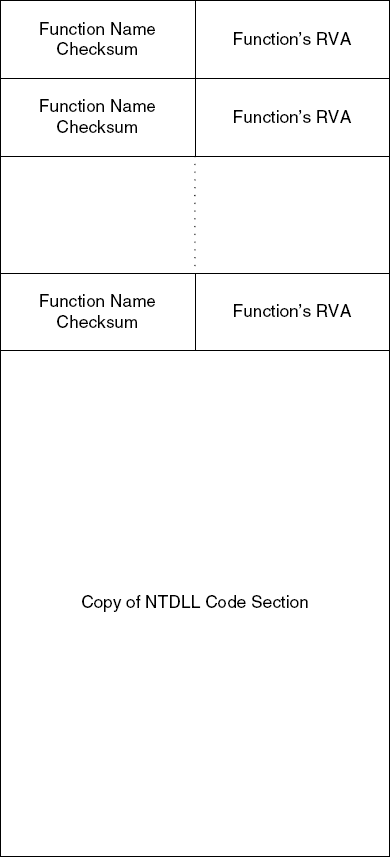
The preceding lines are executed for each exported function in NTDLL. They treat the allocated memory block as an array. The first writes the current function's checksum, and the second writes the exported function's RVA (Relative Virtual Address) into the same memory address plus 4. This indicates that the newly allocated memory block contains an array of data structures, each 8 bytes long. Offset +0 contains a function name's checksum, and offset +4 contains its RVA.
The following is the next code sequence that seems to be of interest:
004038FD    MOV EAX,DWORD PTR [EBP-C8]
00403903    MOV ESI,DWORD PTR [EBP+8]
00403906    ADD ESI,DWORD PTR [EAX+2C]
00403909    MOV EAX,DWORD PTR [EBP-D8]
0040390F    MOV EDX,DWORD PTR [EBP-C]
00403912    LEA EDI,DWORD PTR [EDX+EAX*8+8]
00403916    MOV EAX,ECX
00403918    SHR ECX,2
0040391B    REP MOVS DWORD PTR ES:[EDI],DWORD PTR [ESI]
0040391D    MOV ECX,EAX
0040391F    AND ECX,3
00403922    REP MOVS BYTE PTR ES:[EDI],BYTE PTR [ESI]
This sequence performs a memory copy, and is a commonly seen "sentence" in assembly language. The REP MOVS instruction repeatedly copies DWORDs from the address at ESI to the address at EDI until ECX is zero. For each DWORD that is copied ECX is decremented once, and ESI and EDI are both incremented by four (the sequence is copying 32 bits at a time). The second REP MOVS performs a byte-by-byte copying of the last 3 bytes if needed. This is needed only for blocks whose size isn't 32-bit-aligned.
Let's see what is being copied in this sequence. ESI is loaded with [EBP+8] which is NTDLL's base address, and is incremented by the value at [EAX+2C]. Going back a bit you can see that EAX contains that same PE header address you were looking at earlier. If you go back to the PE headers you dumped earlier from WinDbg, you can see that Offset +2c is BaseOfCode. EDI is loaded with an address within your newly allocated memory block, at the point right after the table you've just filed. Essentially, this sequence is copying all the code in NTDLL into this memory buffer.
So here's what you have so far. You have a memory block that is allocated in runtime, with a specific effort being made to put it at a random address. This code contains a table of checksums of the names of all exported functions from NTDLL alongside their RVAs. Right after this table (in the same block) you have a copy of the entire NTDLL code section. Figure 11.15 provides a graphic visualization of this interesting and highly unusual data structure.
Now, if I saw this kind of code in an average application I would probably think that I was witnessing the work of a mad scientist. In a serious copy protection this makes a lot of sense. This is a mechanism that allocates a memory block at a random virtual address and creates what is essentially an obfuscated interface into the operating system module. You'll soon see just how effective this interface is at interfering with reversing efforts (which one can only assume is the only reason for its existence).
The huge function proceeds into calling another function, at 4030E5. This function starts out with two interesting loops, one of which is:
00403108    CMP ESI,190BC2
0040310E    JE SHORT Defender.0040311E
00403110    ADD ECX,8
00403113    MOV ESI,DWORD PTR [ECX]
00403115    CMP ESI,EBX
00403117    JNZ SHORT Defender.00403108
This loop goes through the export table and compares each string checksum with 190BC2. It is fairly easy to see what is happening here. The code is looking for a specific API in NTDLL. Because it's not searching by strings but by this checksum you have no idea which API the code is looking for—the API's name is just not available. Here's what happens when the entry is found:
0040311E    MOV ECX,DWORD PTR [ECX+4]
00403121    ADD ECX,EDI
00403123    MOV DWORD PTR [EBP-C],ECX
The function is taking the +4 offset of the found entry (remember that offset +4 contains the function's RVA) and adding to that the address where NTDLL's code section was copied. Later in the function a call is made into the function at that address. No doubt this is a call into a copied version of an NTDLL API. Here's what you see at that address:
7D03F0F2    MOV EAX,35
7D03F0F7    MOV EDX,7FFE0300
7D03F0FC    CALL DWORD PTR [EDX]
7D03F0FE    RET 20
The code at 7FFE0300 to which this function calls is essentially a call to the NTDLL API KiFastSystemCall, which is just a generic interface for calling into the kernel. Notice that you have this function's name because even though Defender copied the entire code section, the code explicitly referenced this function by address. Here is the code for KiFastSystemCall—it's just two lines.
7C90EB8B    MOV EDX,ESP
7C90EB8D    SYSENTER
Effectively, all KiFastSystemCall does is invoke the SYSENTER instruction. The SYSENTER instruction performs a kernel-mode switch, which means that the program executes a system call. It should be noted that this would all be slightly different under Windows 2000 or older systems, because Microsoft has changed its system calling mechanism after Windows 2000 (in Windows 2000 and older system calls using an INT 2E instruction). Windows XP, Windows Server 2003, and certainly newer operating systems such as the system currently code-named Longhorn all employ the new system call mechanism. If you're debugging under an older OS and you're seeing something slightly different at this point, that's to be expected.
You're now running into somewhat of a problem. You obviously can't step into SYSENTER because you're using a user-mode debugger. This means that it would be very difficult to determine which system call the program is trying to make! You have several options.
Switch to a kernel debugger, if one is available, and step into the system call to find out what Defender is doing.
Go back to the checksum/RVA table from before and pick up the RVA for the current system call—this would hopefully be the same RVA as in the
NTDLL.DLLexport directory. You can then do a DUMPBIN on NTDLL and determine which API it is you're looking at.Find which system call this is by its order in the exports list. The checksum/RVA table has apparently maintained the same order for the exports as in the original NTDLL export directory. Knowing the index of the call being made, you could look at the NTDLL export directory and try to determine which system call this is.
In this case, I think it would be best to go for the kernel debugger option, and I will be using NuMega SoftICE because it is the easiest to install and doesn't require two computers. If you don't have a copy of SoftICE and are unable to install WinDbg due to hardware constraints, I'd recommend that you go through one of the other options I've suggested. It would probably be easiest to use the function's RVA. In any case, I'd recommend that you get set up with a kernel debugger if you're serious about reversing—certain reversing scenarios are just undoable without a kernel debugger.
In this case, stepping into SYSENTER in SoftICE bring you into the KiFastCallEntry in NTOSKRNL. This flows right into KiSystemService, which is the generic system call dispatcher in Windows—all system calls go through it. Quickly tracing over most of the function, you get to the CALL EBX instruction near the end. This CALL EBX is where control is transferred to the specific system service that was called. Here, stepping into the function reveals that the program has called NtAllocateVirtualMemory again! You can hit F12 several times to jump back up to user mode and run into the next call from Defender. This is another API call that goes through the bizarre copied NTDLL interface. This time Defender is calling NtCreateThread. You can ignore this new thread for now and keep on stepping through the same function. It immediately returns after creating the new thread.
The sequence that comes right after the call to the thread-creating function again iterates through the checksum table, but this time it's looking for checksum 006DEF20. Immediately afterward another function is called from the copied NTDLL. You can step into this one as well and will find that it's a call to NtDelayExecution. In case you're not familiar with it, NtDelayExecution is the native API equivalent of the Win32 API SleepEx. SleepEx simply relinquishes the CPU for the time period requested. In this case, NtDelayExecution is being called immediately after a thread has been created. It would appear that Defender wants to let the newly created thread start running immediately.
Immediately after NtDelayExecution returns, Defender calls into another (internal) function at 403A41. This address is interesting because this function starts approximately 30 bytes after the place from which it's called. Also, SoftICE isn't recognizing any valid instructions after the CALL instruction until the beginning of the function itself. It almost looks like Defender is skipping a little chunk of data that's sitting right in the middle of the function! Indeed, dumping 4039FA, the address that immediately follows the CALL instruction reveals the following:
004039FA K.E.R.N.E.L.3.2...D.L.L.
So, it looks like the Unicode string KERNEL32.DLL is sitting right in the middle of this function. Apparently all the CALL instruction is doing is just skipping over this string to make sure the processor doesn't try to "execute" it. The code after the string again searches through our table, looking for two values: 6DEF20 and 1974C. You may recall that 6DEF20 is the name checksum for NtDelayExecution. We're not sure which API is represented by 1974C—we'll soon find out.
The first call being made in this sequence is again to NtDelayExecution, but here you run into a little problem. When we hit F10 to step over the call to NtDelayExecution SoftICE just disappears! When you look at the Command Prompt window, you see that Defender has just exited and that it hasn't printed any of its messages. It looks like SoftICE's presence has somehow altered Defender's behavior.
Seeing how the program was calling into NtDelayExecution when it unexpectedly disappeared, you can only make one assumption. The thread that was created earlier must be doing something, and by relinquishing the CPU Defender is probably trying to get the other thread to run. It looks like you must shift your reversing efforts to this thread to see what it's trying to do.
Let's go back to the thread creation code in the initialization routine to find out what code is being executed by this thread. Before attempting this, you must learn a bit on how NtCreateThread works. Unlike CreateThread, the equivalent Win32 API, NtCreateThread is a rather low-level function. Instead of just taking an lpStartAddress parameter as CreateThread does, NtCreateThread takes a CONTEXT data structure that accurately defines the thread's state when it first starts running.
A CONTEXT data structure contains full-blown thread state information. This includes the contents of all CPU registers, including the instruction pointer. To tell a newly created thread what to do, Defender will need to initialize the CONTEXT data structure and set the EIP member to the thread's entry point. Other than the instruction pointer, Defender must also manually allocate a stack space for the thread and set the ESP register in the CONTEXT structure to point to the beginning of the newly created thread's stack space (this explains the NtAllocateVirtualMemory call that immediately preceded the call to NtCreateThread). This long sequence just gives you an idea on how much effort is saved by calling the Win32 CreateThread API.
In the case of this thread creation, you need to find the place in the code where Defender is setting the Eip member in the CONTEXT data structure. Taking a look at the prototype definition for NtCreateThread, you can see that the CONTEXT data structure is passed as the sixth parameter. The function is passing the address [EBP-310] as the sixth parameter, so one can only assume that this is the address where CONTEXT starts. From looking at the definition of CONTEXT in WinDbg, you can see that the Eip member is at offset +b8. So, you know that the thread routine should be copied into [EBP-258] (310 – b8 = 258). The following line seems to be what you're looking for:
MOV DWORD PTR SS:[EBP-258],Defender.00402EEF
Looking at the address 402EEF, you can see that it indeed contains code. This must be our thread routine. A quick glance shows that this function contains the exact same prologue as the previous function you studied in Listing 11.7, indicating that this function is also encrypted. Let's restart the program and place a breakpoint on this function (there is no need for a kernel-mode debugger for this part). The best position for your breakpoint is at 402FF4, right before the decrypter starts executing the decrypted code. Once you get there, you can take a look at the decrypted thread procedure code. It is quite interesting, so I've included it in its entirety (see Listing 11.8).
Example 11.8. Disassembly of the function at address 00402FFE in Defender.
00402FFE   XOR EAX,EAX
00403000   INC EAX
00403001   JE Defender.004030C7
00403007   RDTSC
00403009   MOV DWORD PTR SS:[EBP-8],EAX
0040300C   MOV DWORD PTR SS:[EBP-4],EDX
0040300F   MOV EAX,DWORD PTR DS:[406000]
00403014   MOV DWORD PTR SS:[EBP-50],EAX
00403017   MOV EAX,DWORD PTR SS:[EBP-50]
0040301A   CMP DWORD PTR DS:[EAX],0
0040301D   JE SHORT Defender.00403046
0040301F   MOV EAX,DWORD PTR SS:[EBP-50]
00403022   CMP DWORD PTR DS:[EAX],6DEF20
00403028   JNZ SHORT Defender.0040303B
0040302A   MOV EAX,DWORD PTR SS:[EBP-50]
0040302D   MOV ECX,DWORD PTR DS:[40601C]
00403033   ADD ECX,DWORD PTR DS:[EAX+4]
00403036   MOV DWORD PTR SS:[EBP-44],ECX
00403039   JMP SHORT Defender.0040304A
0040303B   MOV EAX,DWORD PTR SS:[EBP-50]
0040303E   ADD EAX,8
00403041   MOV DWORD PTR SS:[EBP-50],EAX
00403044   JMP SHORT Defender.00403017
00403046   AND DWORD PTR SS:[EBP-44],0
0040304A   AND DWORD PTR SS:[EBP-4C],0
0040304E   AND DWORD PTR SS:[EBP-48],0
00403052   LEA EAX,DWORD PTR SS:[EBP-4C]
00403055   PUSH EAX
00403056   PUSH 0
00403058   CALL DWORD PTR SS:[EBP-44]
0040305B   RDTSC
0040305D   MOV DWORD PTR SS:[EBP-18],EAX
00403060   MOV DWORD PTR SS:[EBP-14],EDX
00403063   MOV EAX,DWORD PTR SS:[EBP-18]
00403066   SUB EAX,DWORD PTR SS:[EBP-8]
00403069   MOV ECX,DWORD PTR SS:[EBP-14]
0040306C   SBB ECX,DWORD PTR SS:[EBP-4]
0040306F   MOV DWORD PTR SS:[EBP-60],EAX
00403072   MOV DWORD PTR SS:[EBP-5C],ECX
00403075   JNZ SHORT Defender.00403080
00403077   CMP DWORD PTR SS:[EBP-60],77359400
0040307E   JBE SHORT Defender.004030C2
00403080   MOV EAX,DWORD PTR DS:[406000]
00403085   MOV DWORD PTR SS:[EBP-58],EAX
00403088   MOV EAX,DWORD PTR SS:[EBP-58]
0040308B   CMP DWORD PTR DS:[EAX],0
0040308E   JE SHORT Defender.004030B7
00403090   MOV EAX,DWORD PTR SS:[EBP-58]
00403093   CMP DWORD PTR DS:[EAX],1BF08AE
00403099   JNZ SHORT Defender.004030AC
0040309B   MOV EAX,DWORD PTR SS:[EBP-58]
0040309E   MOV ECX,DWORD PTR DS:[40601C]
004030A4   ADD ECX,DWORD PTR DS:[EAX+4]
004030A7   MOV DWORD PTR SS:[EBP-54],ECX
004030AA   JMP SHORT Defender.004030BB
004030AC   MOV EAX,DWORD PTR SS:[EBP-58]
004030AF   ADD EAX,8
004030B2   MOV DWORD PTR SS:[EBP-58],EAX
004030B5   JMP SHORT Defender.00403088
004030B7   AND DWORD PTR SS:[EBP-54],0
004030BB   PUSH 0
004030BD   PUSH −1
004030BF   CALL DWORD PTR SS:[EBP-54]
004030C2   JMP Defender.00402FFE
This is an interesting function that appears to run an infinite loop (notice the JMP at 4030C2 to 402FFE, and how the code at 00403001 sets EAX to 1 and then checks if its zero). The function starts with an RDTSC and stores the time-stamp counter at [EBP-8]. You can then proceed to search through your good old copied NTDLL table, again for the highly popular 6DEF20—you already know that this is NtDelayExecution. The function calls NtDelayExecution with the second parameter pointing to 8 bytes that are all filled with zeros. This is important because the second parameter in NtDelayExecution is the delay interval (it's a 64-bit value). Setting it to zero means that all the function does is it relinquishes the CPU. The thread will continue running as soon as all the other threads have relinquished the CPU or have used up the CPU time allocated to them.
As soon as NtDelayExecution returns the function invokes RDTSC again. This time the output from RDTSC is stored in [EBP-18]. You can then enter a 64-bit subtraction sequence in 00403063. First, the low 32-bit words are subtracted from one another, and then the high 32-bit words are subtracted from one another using SBB (subtract with borrow). SBB subtracts the two integers and treats the carry flag (CF) as a borrow indicator in case the first subtraction generated a borrow. For more information on 64-bit arithmetic refer to the section on 64-bit arithmetic in Appendix B.
The result of the subtraction is compared to 77359400. If it is below, the function just loops back to the beginning. If not (or if the SBB instruction produces a nonzero result, indicating that the high part has changed), the function goes through another exported function search, this time looking for a function whose string checksum is 1BF08AE, and then calls this API. You're not sure which API this is at this point, but stepping over this code is very insightful. It turns out that when you step through this code the check almost always fails (whether this is true or not depends on how fast your CPU is and how quickly you step through the code). Once you get to that API call, stepping into it in SoftICE you see that the program is calling NtTerminateProcess.
At this point, you're starting to get a clear picture of what our thread is all about. It is essentially a timing monitor that is meant to detect whether the process is being "paused" and simply terminate it on the spot if it is. For this, Defender is utilizing the RDTSC instruction and is just checking for a reasonable number of ticks. If between the two invocations of RDTSC too much time has passed (in this case too much time means 77359400 clock ticks or 2 billion clock ticks in decimal), the process is terminated using a direct call to the kernel.
It is going to be effectively impossible to debug Defender while this thread is running, because the thread will terminate the process whenever it senses that a debugger has stalled the process. To continue with the cracking process, you must neutralize this thread. One way to do this is to just avoid calling the thread creation function, but a simpler way is to just patch the function in memory (after it is decoded) so that it never calls NtTerminateProcess. You do this by making two changes in the code. First, you replace the JNZ at 00403075 with NOPs (this check confirms that the result of the subtraction is 0 in the high-order word). Then you replace the JNZ at address 0040307E with a JMP, so that the final code looks like the following:
00403075   NOP
00403076   NOP
00403077   CMP DWORD PTR SS:[EBP-60],77359400
0040307E   JMP SHORT Defender.004030C2
This means that the function never calls NtTerminateProcess, regardless of the time that passes between the two invocations of RDTSC. Note that applying this patch to the executable so that you don't have to reapply it every time you launch the program is somewhat more difficult because this function is encrypted—you must either modify the encrypted data or eliminate the encryption altogether. Neither of these options is particularly easy, so for now you'll just reapply the patch in memory each time you launch the program.
You might remember that before taking this little detour to deal with that RDTSC thread you were looking at a KERNEL32.DLL string right in the middle of the code. Let's find out what is done with this string.
Immediately after the string appears in the code the program is retrieving pointers for two NTDLL functions, one with a checksum of 1974C, and another with the familiar 6DEF20 (the checksum for NtDelayExecution). The code first calls NtDelayExecution and then the other function. In stepping into the second function in SoftICE, you see a somewhat more confusing picture. This API isn't just another direct call down into the kernel, but instead it looks like this API is actually implemented in NTDLL, which means that it's now implemented inside your copied code. This makes it much more difficult to determine which API this is.
The approach you're going to take is one that I've already proposed earlier in this discussion as a way to determine which API is being called through the obfuscated interface. The idea is that when the checksum/RVA table was initialized, APIs were copied into the table in the order in which they were read from NTDLL's export directory. What you can do now is determine the entry number in the checksum/RVA table once an API is found using its checksum. This number should also be a valid index into NTDLL's export directory and will hopefully reveal exactly which API you're dealing with.
To do this, you must but a breakpoint right after Defender finds this API (remember, it's looking for 1973C in the table). Once your breakpoint hits you subtract the pointer to the beginning of the table from the pointer to the current entry, and divide the result by 8 (the size of each entry). This gives you the API's index in the table. You can now use DUMPBIN or a similar tool to dump NTDLL's export table and look for an API that has your index. In this case, the index you get is 0x3E (for example, when I was doing this the table started at 53830000 and the entry was at 538301F0, but you already know that these are randomly chosen addresses). A quick look at the export list for NTDLL.DLL from DUMPBIN provides you with your answer.
ordinal hint RVA      name
.
.
70      3E   000161CA LdrLoadDll
The API being called is LdrLoadDll, which is the native API equivalent of LoadLibrary. You already know which DLL is being loaded because you saw the string earlier: KERNEL32.DLL.
After KERNEL32.DLL is loaded, Defender goes through the familiar sequence of allocating a random address in memory and produces the same name checksum/RVA table from all the KERNEL32.DLL exports. After the copied module is ready for use the function makes one other call to NtDelayExecution for good luck and then you get to another funny jump that skips 30 bytes or so. Dumping the memory that immediately follows the CALL instruction as text reveals the following:
00404138  44 65 66 65 6E 64 65 72  Defender
00404140  20 56 65 72 73 69 6F 6E   Version
00404148  20 31 2E 30 20 2D 20 57   1.0 - W
00404150  72 69 74 74 65 6E 20 62  ritten b
00404158  79 20 45 6C 64 61 64 20  y Eldad
00404160  45 69 6C 61 6D           Eilam
Finally, you're looking at something familiar. This is Defender's welcome message, and Defender is obviously preparing to print it out. The CALL instruction skips the string and takes us to the following code.
00404167    PUSH DWORD PTR SS:[ESP]
0040416A    CALL Defender.004012DF
The code is taking the "return address" pushed by the CALL instruction and pushes it into the stack (even though it was already in the stack) and calls a function. You don't even have to look inside this function (which is undoubtedly full of indirect calls to copied KERNEL32.DLL code) to know that this function is going to be printing that welcome message that you just pushed into the stack. You just step over it and unsurprisingly Defender prints its welcome message.
Immediately afterward you have yet another call to 6DEF20—NtDelayExecution and that brings us to what seems to be the end of this function. OllyDbg shows us the following code:
004041E2   MOV EAX,Defender.004041FD
004041E7   MOV DWORD PTR DS:[4034D6],EAX
004041ED   MOV DWORD PTR SS:[EBP-8],0
004041F4   JMP Defender.00403401
004041F9   LODS DWORD PTR DS:[ESI]
004041FA   DEC EDI
004041FB   ADC AL,0F2
004041FD   POP EDI
004041FE   POP ESI
004041FF   POP EBX
00404200   LEAVE
00404201   RETN
If you look closely at the address that the JMP at 004041F4 is going to you'll notice that it's very far from where you are at the moment—right at the beginning of this function actually. To refresh your memory, here's the code at that location:
00403401   CMP DWORD PTR SS:[EBP-8],0
00403405   JE SHORT Defender.0040346D
You may or may not remember this, but the line immediately preceding 00403401 was setting [EBP-8] to 1, which seemed a bit funny considering it was immediately checked. Well, here's the answer—there is encrypted code at the end of the function that sets this variable to zero and jumps back to that same position. Since the conditional jump is taken this time, you land at 40346D, which is a sequence that appears to be very similar to the decryption sequence you studied in the beginning. Still, it is somewhat different, and observing its effect in the debugger reveals the obvious: it is reencrypting the code in this function.
There's no reason to get into the details of this logic, but there are several details that are worth mentioning. After the encryption sequence ends, the following code is executed:
004034D0   MOV DWORD PTR DS:[406008],EAX
004034D5   PUSH Defender.004041FD
004034DA   POP EBX
004034DB   JMP EBX
The first line saves the value in EAX into a global variable. EAX seems to contain some kind of a checksum of the encrypted code. Also, the PUSH, POP, JMP sequence is the exact same code that originally jumped into the decrypted code, only it has been modified to jump to the end of the function.
After the huge function you've just dissected returns, the entry point routine makes the traditional call into NtDelayExecution and calls into another internal function, at 404202. The following is a full listing for this function:
00404202   MOV EAX,DWORD PTR DS:[406004]
00404207   MOV ECX,EAX
00404209   MOV EAX,DWORD PTR DS:[EAX]
0040420B   JMP SHORT Defender.00404219
0040420D   CMP EAX,66B8EBBB
00404212   JE SHORT Defender.00404227
00404214   ADD ECX,8
00404217   MOV EAX,DWORD PTR DS:[ECX]
00404219   TEST EAX,EAX
0040421B   JNZ SHORT Defender.0040420D
0040421D   XOR ECX,ECX
0040421F   PUSH Defender.0040322E
00404224   CALL ECX
00404226   RETN
00404227   MOV ECX,DWORD PTR DS:[ECX+4]
0040422A   ADD ECX,DWORD PTR DS:[406014]
00404230   JMP SHORT Defender.0040421F
This function performs another one of the familiar copied export table searches, this time on the copied KERNEL32 memory block (whose pointer is stored at 406004). It then immediately calls the found function. You'll use the function index trick that you used before in order to determine which API is being called. For this you put a breakpoint on 404227 and observe the address loaded into ECX. You then subtract KERNEL32's copied base address (which is stored at 406004) from this address and divide the result by 8. This gives us the current API's index. You quickly run DUMPBIN /EXPORTS on KERNEL32.DLL and find the API name: SetUnhandledExceptionFilter. It looks like Defender is setting up 0040322E as its unhandled exception filter. Unhandled exception filters are routines that are called when a process generates an exception and no handlers are available to handle it. You'll worry about this exception filter and what it does later on.
Let's proceed to another call to NtDelayExecution, followed by a call to another internal function, 401746. This function starts with a very familiar sequence that appears to be another decryption sequence; this function is also encrypted. I won't go over the decryption sequence, but there's one detail I want to discuss. Before the code starts decrypting, the following two lines are executed:
00401785   MOV EAX,DWORD PTR DS:[406008]
0040178A   MOV DWORD PTR SS:[EBP-9C0],EAX
The reason I'm mentioning this is that the variable [EBP-9C0] is used a few lines later as the decryption key (the value against which the code is XORed to decrypt it). You probably don't remember this, but you've seen this global variable 406008 earlier. Remember when the first encrypted function was about to return, how it reencrypted itself? During encryption the code calculated a checksum of the encrypted data, and the resulting checksum was stored in a global variable at 406008. The reason I'm telling you all of this is that this is an unusual property in this code—the decryption key is calculated at runtime. One side effect this has is that any breakpoint installed on encrypted code that is not removed before the function is reencrypted would change this checksum, preventing the next function from properly decrypting! Defender is doing as its name implies: It's defending!
Let's proceed to investigate the newly decrypted function. It starts with two calls to the traditional NtDelayExecution. Then the function proceeds to call what appears to be NtOpenFile through the obfuscated interface, with the string "\??\C:" hard-coded right there in the middle of the code. After NtOpenFile the function calls NtQueryVolumeInformationFile with the FileFsVolumeInformation information level flag. It then reads offset +8 from the returned data structure and stores it in the local variable [406020]. Offset +8 in data structure FILE_FS_VOLUME_INFORMATION is VolumeSerialNumber (this information was also obtained at http://undocumented.ntinternals.net).
This is a fairly typical copy protection sequence, in a slightly different flavor. The primary partition's volume serial number is a good way to create computer-specific dependencies. It is a 32-bit number that's randomly assigned to a partition when it's being formatted. The value is retained until the partition is formatted. Utilizing this value in a serial-number-based copy protection means that serial numbers cannot be shared between users on different computers—each computer has a different serial number. One slightly unusual thing about this is that Defender is obtaining this value directly using the native API. This is typically done using the GetVolumeInformation Win32 API.
You've pretty much reached the end of the current function. Before returning it makes yet another call to NtDelayExecution, invokes RDTSC, loads the low-order word into EAX as the return value (to make for a garbage return value), and goes back to the beginning to reencrypt itself.
Back at the main entry point function, you find another call to NtDelayExecution which is followed by a call into what appears to be the final function call (other than that apparently useless call to IsDebuggerPresent) in the program entry point, 402082.
Naturally, 402082 is also encrypted, so you will set a breakpoint on 402198, which is right after the decryption code is done decrypting. You immediately start seeing familiar bits of code (if Olly is still showing you junk instead of code at this point, you can either try stepping into that code and see if automatically fixes itself or you can specifically tell Olly to treat these bytes as code by right-clicking the first line and selecting Analysis. During next analysis, treat selection as

The next call is to a SHELL32.DLL API. Again, a SHELL32 API would probably never make a direct call down into the kernel, so you're just stuck with some long function and you've no idea what it is. You have to use the function's index again to figure out which API Defender is calling. This time it turns out that it's CommandLineToArgvW. CommandLineToArgvW performs parsing on a command-line string and returns an array of strings, each containing a single parameter. Defender must call this function directly because it doesn't make use of a runtime library, which usually takes care of such things.
After the CommandLineToArgvW call, you reach an area in Defender that you've been trying to get to for a really long time: the parsing of the command-line arguments.
You start with simple code that verifies that the parameters are valid. The code checks the total number of arguments (sent back from CommandLineToArgvW) to make sure that it is three (Defender.EXE's name plus username and serial number). Then the third parameter is checked for a 16-character length. If it's not 16 characters, defender jumps to the same place as if there aren't three parameters. Afterward Defender calls an internal function, 401CA8 that verifies that the hexadecimal string only contains digits and letters (either lowercase or uppercase). The function returns a Boolean indicating whether the serial is a valid hexadecimal number. Again, if the return value is 0 the code jumps to the same position (40299C), which is apparently the "bad parameters" code sequence. The code proceeds to call another function (401CE3) that confirms that the username only contains letters (either lowercase or uppercase). After this you reach the following three lines:
00402994   TEST EAX,EAX
00402996   JNZ Defender.00402AC4
0040299C   CALL Defender.004029EC
When this code is executed EAX contains the returns value from the username verification sequence. If it is zero, the code jumps to the failure code, at 40299C, and if not it jumps to 402AC4, which is apparently the success code. One thing to notice is that 4029EC again uses the CALL instruction to skip a string right in the middle of the code. A quick look at the address right after the CALL instruction in OllyDbg's data view reveals the following:
004029A1  42 61 64 20 70 61 72 61  Bad para
004029A9  6D 65 74 65 72 73 21 0A  meters!.
004029B1  55 73 61 67 65 3A 20 44  Usage: D
004029B9  65 66 65 6E 64 65 72 20  efender
004029C1  3C 46 75 6C 6C 20 4E 61  <Full Na
004029C9  6D 65 3E 20 3C 31 36 2D  me> <16-
004029D1  64 69 67 69 74 20 68 65  digit he
004029D9  78 61 64 65 63 69 6D 61  xadecima
004029E1  6C 20 6E 75 6D 62 65 72  l number
004029E9  3E 0A 00                 >..
So, you've obviously reached the "bad parameters" message display code. There is no need to examine this code – you should just get into the "good parameters" code sequence and see what it does. Looks like you're close!
Jumping to 402AC4, you will see that it's not that simple. There's quite a bit of code still left to go. The code first performs some kind of numeric processing sequence on the username string. The sequence computes a modulo 48 on each character, and that modulo is used for performing a left shift on the character. One interesting detail about this left shift is that it is implemented in a dedicated, somewhat complicated function. Here's the listing for the shifting function:
00401681    CMP CL,40
00401684    JNB SHORT Defender.0040169B
00401686    CMP CL,20
00401689    JNB SHORT Defender.00401691
0040168B    SHLD EDX,EAX,CL
0040168E    SHL EAX,CL
00401690    RETN
00401691    MOV EDX,EAX
00401693    XOR EAX,EAX
00401695    AND CL,1F
00401698    SHL EDX,CL
0040169A    RETN
0040169B    XOR EAX,EAX
0040169D    XOR EDX,EDX
0040169F    RETN
This code appears to be a 64-bit left-shifting logic. CL contains the number of bits to shift, and EDX:EAX contains the number being shifted. In the case of a full-blown 64-bit left shift, the function uses the SHLD instruction. The SHLD instruction is not exactly a 64-bit shifting instruction, because it doesn't shift the bits in EAX; it only uses EAX as a "source" of bits to shift into EDX. That's why the function also needs to use a regular SHL on EAX in case it's shifting less than 32 bits to the left.
After the 64-bit left-shifting function returns, you get into the following code:
00402B1C    ADD EAX,DWORD PTR SS:[EBP-190]
00402B22    MOV ECX,DWORD PTR SS:[EBP-18C]
00402B28    ADC ECX,EDX
00402B2A    MOV DWORD PTR SS:[EBP-190],EAX
00402B30    MOV DWORD PTR SS:[EBP-18C],ECX
Figure 11.16 shows what this sequence does in mathematical notation. Essentially, Defender is preparing a 64-bit integer that uniquely represents the username string by taking each character and adding it at a unique bit position in the 64-bit integer.
The function proceeds to perform a similar, but slightly less complicated conversion on the serial number. Here, it just takes the 16 hexadecimal digits and directly converts them into a 64-bit integer. Once it has that integer it calls into 401EBC, pushing both 64-bit integers into the stack. At this point, you're hoping to find some kind of verification logic in 401EBC that you can easily understand. If so, you'll have cracked Defender!
Of course, 401EBC is also encrypted, but there's something different about this sequence. Instead of having a hard-coded decryption key for the XOR operation or read it from a global variable, this function is calling into another function (at 401D18) to obtain the key. Once 401D18 returns, the function stores its return value at [EBP-1C] where it is used during the decryption process.
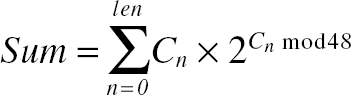
Let's step into this function at 401D18 to determine how it produces the decryption key. As soon as you enter this function, you realize that you have a bit of a problem: It is also encrypted. Of course, the question now is where does the decryption key for this function come from? There are two code sequences that appear to be relevant. When the function starts, it performs the following:
00401D1F    MOV EAX,DWORD PTR SS:[EBP+8]
00401D22    IMUL EAX,DWORD PTR DS:[406020]
00401D29    MOV DWORD PTR SS:[EBP-10],EAX
This sequence takes the low-order word of the name integer that was produced earlier and multiplies it with a global variable at [406020]. If you go back to the function that obtained the volume serial number, you will see that it was stored at [406020]. So, Defender is multiplying the low part of the name integer with the volume serial number, and storing the result in [EBP-10]. The next sequence that appears related is part of the decryption loop:
00401D7B    MOV EAX,DWORD PTR SS:[EBP+10]
00401D7E    MOV ECX,DWORD PTR SS:[EBP-10]
00401D81    SUB ECX,EAX00401D83    MOV EAX,DWORD PTR SS:[EBP-28]
00401D86    XOR ECX,DWORD PTR DS:[EAX]
This sequence subtracts the parameter at [EBP+10] from the result of the previous multiplication, and XORs that value against the encrypted function! Essentially Defender is doing Key = (NameInt * VolumeSerial) – LOWPART(SerialNumber). Smells like trouble! Let the decryption routine complete the decryption, and try to step into the decrypted code. Here's what the beginning of the decrypted code looks like (this is quite random—your milage may vary).
00401E32    PUSHFD
00401E33    AAS
00401E34    ADD BYTE PTR DS:[EDI],-22
00401E37    AND DH,BYTE PTR DS:[EAX+B84CCD0]
00401E3D    LODS BYTE PTR DS:[ESI]
00401E3E    INS DWORD PTR ES:[EDI],DX
It is quite easy to see that this is meaningless junk. It looks like the decryption failed. But still, it looks like Defender is going to try to execute this code! What happens now really depends on which debugger you're dealing with, but Defender doesn't just go away. Instead it prints its lovely "Sorry... Bad Key." message. It looks like the top-level exception handler installed earlier is the one generating this message. Defender is just crashing because of the bad code in the function you just studied, and the exception handler is printing the message.
It looks like you've run into a bit of a problem. You simply don't have the key that is needed in order to decrypt the "success" path in Defender. It looks like Defender is using the username and serial number information to generate this key, and the user must type the correct information in order to unlock the code. Of course, closely observing the code that computes the key used in the decryption reveals that there isn't just a single username/serial number pair that will unlock the code. The way this algorithm works there could probably be a valid serial number for any username typed. The only question is what should the difference be between the VolumeSerial * NameLowPart and the low part of the serial number? It is likely that once you find out that difference, you will have successfully cracked Defender, but how can you do that?
It looks like there is no quick way to get that decryption key. There's no evidence to suggest that this decryption key is available anywhere in Defender.EXE; it probably isn't. Because the difference you're looking for is only 32 bits long, there is one option that is available to you: brute-forcing. Brute-forcing means that you let the computer go through all possible keys until it finds one that properly decrypts the code. Because this is a 32-bit key there are only 4,294,967,296 possible options. To you this may sound like a whole lot, but it's a piece of cake for your PC.
To find that key, you're going to have to create a little brute-forcer program that takes the encrypted data from the program and tries to decrypt it using every key, from 0 to 4,294,967,296, until it gets back valid data from the decryption process. The question that arises is: What constitutes valid data? The answer is that there's no real way to know what is valid and what isn't. You could theoretically try to run each decrypted block and see if it works, but that's extremely complicated to implement, and it would be difficult to create a process that would actually perform this task reliably.
What you need is to find a "token"—a long-enough sequence that you know is going to be in the encrypted block. This will allow you to recognize when you've actually found the correct key. If the token is too generic, you will get thousands or even millions of hits, and you'll have no idea which is the correct key. In this particular function, you don't need an incredibly long token because it's a relatively short function. It's likely that 4 bytes will be enough if you can find 4 bytes that are definitely going to be a part of the decrypted code.
You could look for something that's likely to be in the code such as those repeated calls to NtDelayExecution, but there's one thing that might be a bit easier. Remember that funny variable in the first function that was set to one and then immediately checked for a zero value? You later found that the encrypted code contained code that sets it back to zero and jumps back to that address. If you go back to look at every encrypted function you've gone over, they all have this same mechanism. It appears to be a generic mechanism that reencrypts the function before it returns. The local variable is apparently required to tell the prologue code whether the function is currently being encrypted or decrypted. Here are those two lines from 401D18, the function you're trying to decrypt.
00401D49    MOV DWORD PTR SS:[EBP-4],1
00401D50    CMP DWORD PTR SS:[EBP-4],0
00401D54    JE SHORT Defender.00401DBF
As usual, a local variable is being set to 1, and then checked for a zero value. If I'm right about this, the decrypted code should contain an instruction just like the first one in the preceding sequence, except that the value being loaded is 0, not 1. Let's examine the code bytes for this instruction and determine exactly what you're looking for.
00401D49 C745 FC 01000000 MOV DWORD PTR SS:[EBP-4],1
Here's the OllyDbg output that includes the instruction's code bytes. It looks like this is a 7-byte sequence—should be more than enough to find the key. All you have to do is modify the 01 byte to 00, to create the following sequence:
C7 45 FC 00 00 00 00
The next step is to create a little program that contains a copy of the encrypted code (which you can rip directly from OllyDbg's data window) and decrypts the code using every possible key from 0 to FFFFFFFF. With each decrypted block the program must search for the token—that 7-byte sequence you just prepared. As soon as you find that sequence in a decrypted block, you know that you've found the correct decryption key. This is a pretty short block so it's unlikely that you'd find the token in the wrong decrypted block.
You start by determining the starting address and exact length of the encrypted block. Both addresses are loaded into local variables early in the decryption sequence:
00401D2C    PUSH Defender.00401E32
00401D31    POP EAX
00401D32    MOV DWORD PTR SS:[EBP-14],EAX
00401D35    PUSH Defender.00401EB6
00401D3A    POP EAX
00401D3B    MOV DWORD PTR SS:[EBP-C],EAX
In this sequence, the first value pushed into the stack is the starting address of the encrypted data and the second value pushed is the ending address. You go to Olly's dump window and dump data starting at 401E32. Now, you need to create a brute-forcer program and copy that decrypted data into it.
Before you actually write the program, you need to get a better understanding of the encryption algorithm used by Defender. A quick glance at a decryption sequence shows that it's not just XORing the key against each DWORD in the code. It's also XORing each 32-bit block with the previous unencrypted block. This is important because it means the decryption process must begin at the same position in the data where encryption started—otherwise the decryption process will generate corrupted data. We now have enough information to write our little decryption loop for the brute-forcer program.
for (DWORD dwCurrentBlock = 0;
dwCurrentBlock <= dwBlockCount;
dwCurrentBlock++)
{
dwDecryptedData[dwCurrentBlock] = dwEncryptedData[dwCurrentBlock] ^
 dwCurrentKey;
 dwDecryptedData[dwCurrentBlock] ^= dwPrevBlock;
 dwPrevBlock = dwEncryptedData[dwCurrentBlock];
}
This loop must be executed for each key! After decryption is completed you search for your token in the decrypted block. If you find it, you've apparently hit the correct key. If not, you increment your key by one and try to decrypt and search for the token again. Here's the token searching logic.
PBYTE pbCurrent = (PBYTE) memchr(dwDecryptedData, Sequence[0],
                               sizeof(dwEncryptedData));
while (pbCurrent)
{
  if (memcmp(pbCurrent, Sequence, sizeof(Sequence)) == 0)
  {
     printf ("Found our sequence! Key is 0x%08x.\n", dwCurrentKey);
    _exit(1);
  }  pbCurrent++;
  pbCurrent = (PBYTE) memchr(pbCurrent, Sequence[0],
   sizeof(dwEncryptedData) - (pbCurrent - (PBYTE) dwDecryptedData));
}
Realizing that all of this must be executed 4,294,967,296 times, you can start to see why this is going to take a little while to complete. Now, consider that this is merely a 32-bit key! A 64-bit key would have taken 4,294,967,296 _ 232 iterations to complete. At 4,294,967,296 iterations per-minute, it would still take about 8,000 years to go over all possible keys.
Now, all that's missing is the encrypted data and the token sequence. Here are the two arrays you're dealing with here:
DWORD dwEncryptedData[] = {
0x5AA37BEB,    0xD7321D42,    0x2618DDF9,    0x2F1794E3,
0x1DE51172,    0x8BDBD150,    0xBB2954C1,    0x678CB4E3,
0x5DD701F9,    0xE11679A6,    0x501CD9A0,    0x685251B9,
0xD6F355EE,    0xE401D07F,    0x10C218A5,    0x22593307,
0x10133778,    0x22594B07,    0x1E134B78,    0xC5093727,
0xB016083D,    0x8A4C8DAC,    0x1BB759E3,    0x550A5611,
0x140D1DF4,    0xE8CE15C5,    0x47326D27,    0xF3F1AD7D,
0x42FB734C,    0xF34DF691,    0xAB07368B,    0xE5B2080F,
0xCDC6C492,    0x5BF8458B,    0x8B55C3C9 };

unsigned char Sequence[] = {0xC7, 0x45, 0xFC, 0x00, 0x00, 0x00, 0x00 };
At this point you're ready to build this program and run it (preferably with all compiler optimizations enabled, to quicken the process as much as possible). After a few minutes, you get the following output.
Found our sequence! Key is 0xb14ac01a.
Very nice! It looks like you found what you were looking for. B14AC01A is our key. This means that the correct serial can be calculated using Serial=LOWPART(NameSerial) * VolumeSerial – B14AC01A. The question now is why is the serial 64 bits long? Is it possible that the upper 32 bits are unused?
Let's worry about that later. For now, you can create a little keygen program that will calculate a NameSerial and this algorithm and give you a (hopefully) valid serial number that you can feed into Defender. The algorithm is quite trivial. Converting a name string to a 64-bit number is done using the algorithm described in Figure 11.16. Here's a C implementation of that algorithm.
__int64  NameToInt64(LPWSTR pwszName)
{
  __int64 Result = 0;  int iPosition = 0;
  while (*pwszName)
  {
    Result += (__int64) *pwszName << (__int64) (*pwszName % 48);
    pwszName++;
    iPosition++;
  }

  return Result;
}
The return value from this function can be fed into the following code:
char name[256];
  char fsname[256];
  DWORD complength;
  DWORD VolumeSerialNumber;
  GetVolumeInformation("C:\\", name, sizeof(name), &VolumeSerialNumber,
&complength, 0, fsname, sizeof(fsname));
  printf ("Volume serial number is: 0x%08x\n", VolumeSerialNumber);
  printf ("Computing serial for name: %s\n", argv[1]);
  WCHAR wszName[256];
  mbstowcs(wszName, argv[1], 256);
  unsigned __int64 Name = NameToInt64(wszName);
  ULONG FirstNum = (ULONG) Name * VolumeSerialNumber;
  unsigned __int64 Result = FirstNum - (ULONG) 0xb14ac01a;

  printf ("Name number is: %08x%08x\n",
(ULONG) (Name >> 32), (ULONG) Name);
  printf ("Name * VolumeSerialNumber is: %08x\n", FirstNum);
  printf ("Serial number is: %08x%08x\n",
(ULONG) (Result >> 32), (ULONG) Result);
This is the code for the keygen program. When you run it with the name John Doe, you get the following output.
Volume serial number is: 0x6c69e863
Computing serial for name: John Doe
Name number is: 000000212ccaf4a0
Name * VolumeSerialNumber is: 15cd99e0
Serial number is: 000000006482d9c6
Naturally, you'll see different values because your volume serial number is different. The final number is what you have to feed into Defender. Let's see if it works! You type "John Doe" and 000000006482D9C6 (or whatever your serial number is) as the command-line parameters and launch Defender. No luck. You're still getting the "Sorry" message. Looks like you're going to have to step into that encrypted function and see what it does.
The encrypted function starts with a NtDelayExecution and proceeds to call the inverse twin of that 64-bit left-shifter function you ran into earlier. This one does the same thing only with right shifts (32 of them to be exact). Defender is doing something you've seen it do before: It's computing LOWPART(NameSerial) * VolumeSerial – HIGHPART(TypedSerial). It then does something that signals some more bad news: It returns the result from the preceding calculation to the caller.
This is bad news because, as you probably remember, this function's return value is used for decrypting the function that called it. It looks like the high part of the typed serial is also somehow taking part in the decryption process. You're going to have to brute-force the calling function as well—it's the only way to find this key.
In this function, the encrypted code starts at 401FED and ends at 40207F. In looking at the encryption/decryption local variable, you can see that it's at the same offset [EBP-4] as in the previous function. This is good because it means that you'll be looking for the same byte sequence:
unsigned char Sequence[] = {0xC7, 0x45, 0xFC, 0x00, 0x00, 0x00, 0x00 };Of course, the data is different because it's a different function, so you copy the new function's data over into the brute-forcer program and let it run. Sure enough, after about 10 minutes or so you get the answer:
Found our sequence! Key is 0x8ed105c2.
Let's immediately fix the keygen to correctly compute the high-order word of the serial number and try it out. Here's the corrected keygen code.
unsigned __int64 Name = NameToInt64(wszName);
ULONG FirstNum = (ULONG) Name * VolumeSerialNumber;
unsigned __int64 Result = FirstNum - (ULONG) 0xb14ac01a;
Result |= (unsigned __int64) (FirstNum - 0x8ed105c2) << 32;

printf ("Name number is: %08x%08x\n",
      (ULONG) (Name >> 32), (ULONG) Name);
printf ("Name * VolumeSerialNumber is: %08x\n", FirstNum);
printf ("Serial number is: %08x%08x\n",
      (ULONG) (Result >> 32), (ULONG) Result);
Running this corrected keygen with "John Doe" as the username, you get the following output:
Volume serial number is: 0x6c69e863
Computing serial for name: John Doe
Name number is: 000000212ccaf4a0
Name * VolumeSerialNumber is: 15cd99e0
Serial number is: 86fc941e6482d9c6
As expected, the low-order word of the serial number is identical, but you now have a full result, including the high-order word. You immediately try and run this data by Defender: Defender "John Doe" 86fc941e6482d9c6 (again, this number will vary depending on the volume serial number). Here's Defender's output:
Defender Version 1.0 - Written by Eldad Eilam
That is correct! Way to go!
Congratulations! You've just cracked Defender! This is quite impressive, considering that Defender is quite a complex protection technology, even compared to top-dollar commercial protection systems. If you don't fully understand every step of the process you just undertook, fear not. You should probably practice on reversing Defender a little bit and quickly go over this chapter again. You can take comfort in the fact that once you get to the point where you can easily crack Defender, you are a world-class cracker. Again, I urge you to only use this knowledge in good ways, not for stealing. Be a good cracker, not a greedy cracker.
Let's try and summarize the protection technologies you've encountered in Defender and attempt to evaluate their effectiveness. This can also be seen as a good "executive summary" of Defender for those who aren't in the mood for 50 pages of disassembled code.
First of all, it's important to understand that Defender is a relatively powerful protection compared to many commercial protection technologies, but it could definitely be improved. In fact, I intentionally limited its level of protection to make it practical to crack within the confines of this book. Were it not for these constraints, cracking would have taken a lot longer.
Like many copy protection and executable packing technologies, Defender stores most of its key code in an encrypted form. This is a good design because it at least prevents crackers from elegantly loading the program in a disassembler such as IDA Pro and easily analyzing the entire program. From a live-debugging perspective encryption is good because it prevents or makes it more difficult to set breakpoints on the code.
Of course, most protection schemes just encrypt the entire program using a single key that is readily available somewhere in the program. This makes it exceedingly easy to write an "unpacker" program that automatically decrypts the entire program and creates a new, decrypted version of the program.
The beauty of Defender's encryption approach is that it makes it much more difficult to create automatic unpackers because the decryption key for each encrypted code block is obtained at runtime.
Defender uses a fairly solid, yet simple encryption algorithm called Cipher Block Chaining (CBC) (see Applied Cryptography, Second Edition by Bruce Schneier [Schneier2]). The idea is to simply XOR each plaintext block with the previous, encrypted block, and then to XOR the result with the key. This algorithm is quite secure and should not be compared to a simple XOR algorithm, which is highly vulnerable. In a simple XOR algorithm, the key is fairly easily retrievable as soon as you determine its length. All you have to do is find bytes that you know are encrypted within your encrypted block and XOR them with the encrypted data. The result is the key (assuming that you have at least as many bytes as the length of the key).
Of course, as I've demonstrated, a CBC is vulnerable to brute-force attacks, but for this it would be enough to just increase the key length to 64-bits or above. The real problem in copy protection technologies is that eventually the key must be available to the program, and without special hardware it is impossible to hide the key from cracker's eyes.
Defender reencrypts each function before that function returns to the caller. This creates an (admittedly minor) inconvenience to crackers because they never get to the point where they have the entire program decrypted in memory (which is a perfect time to dump the entire decrypted program to a file and then conveniently reverse it from there).
One of the key protection features in Defender is its obfuscated interface with the operating system, which is actually quite unusual. The idea is to make it very difficult to identify calls from the program into the operating system, and almost impossible to set breakpoints on operating system APIs. This greatly complicates cracking because most crackers rely on operating system calls for finding important code areas in the target program (think of the MessageBoxA call you caught in our KeygenMe3 session).
The interface attempts to attach to the operating system without making a single direct API call. This is done by manually finding the first system component (NTDLL.DLL) using the TEB, and then manually searching through its export table for APIs.
Except for a single call that takes place during initialization, APIs are never called through the user-mode component. All user-mode OS components are copied to a random memory address when the program starts, and the OS is accessed through this copied code instead of using the original module. Any breakpoints placed on any user-mode API would never be hit. Needless to say, this has a significant memory consumption impact on the program and a certain performance impact (because the program must copy significant amounts of code every time it is started).
To make it very difficult to determine which API the program is trying to call APIs are searched using a checksum value computed from their names, instead of storing their actual names. Retrieving the API name from its checksum is not possible.
There are several weaknesses in this technique. First of all, the implementation in Defender maintained the APIs order from the export table, which simplified the process of determining which API was being called. Randomly reorganizing the table during initialization would prevent crackers from using this approach. Also, for some APIs, it is possible to just directly step into the kernel in a kernel debugger and find out which API is being called. There doesn't seem to be a simple way to work around this problem, but keep in mind that this is primarily true for native NTDLL APIs, and is less true for Win32 APIs.
One more thing—remember how you saw that Defender was statically linked to KERNEL32.DLL and had an import entry for IsDebuggerPresent? The call to that API was obviously irrelevant—it was actually in unreachable code. The reason I added that call was that older versions of Windows (Windows NT 4.0 and Windows 2000) just wouldn't let Defender load without it. It looks like Windows expects all programs to make at least one system call.
Defender includes what is, in my opinion, a fairly solid mechanism for making the process of live debugging on the protected application very difficult. The idea is to create a dedicated thread that constantly monitors the hardware time-stamp counter and kills the process if it looks like the process has been stopped in some way (as in by a debugger). It is important to directly access the counter using a low-level instruction such as RDTSC and not using some system API, so that crackers can't just hook or replace the function that obtains this value.
Combined with a good encryption on each key function a verification thread makes reversing the program a lot more annoying than it would have been otherwise. Keep in mind that without encryption this technique wouldn't be very effective because crackers can just load the program in a disassembler and read the code.
Why was it so easy for us to remove the time-stamp verification thread in our cracking session? As I've already mentioned, I've intentionally made Defender somewhat easier to break to make it feasible to crack in the confines of this chapter. The following are several modifications that would make a time-stamp verification thread far more difficult to remove (of course it would always remain possible to remove, but the question is how long it would take):
Adding periodical checksum calculations from the main thread that verify the verification thread. If there's a checksum mismatch, someone has patched the verification thread—terminate immediately.
Checksums must be stored within the code, rather than in some centralized location. The same goes for the actual checksum verifications—they must be inlined and not implemented in one single function. This would make it very difficult to eliminate the checks or modify the checksum.
Store a global handle to the verification thread. With each checksum verification ensure the thread is still running. If it's not, terminate the program immediately.
One thing that should be noted is that in its current implementation the verification thread is slightly dangerous. It is reliable enough for a cracking exercise, but not for anything beyond that. The relatively short period and the fact that it's running in normal priority means that it's possible that it will terminate the process unjustly, without a debugger.
In a commercial product environment the counter constant should probably be significantly higher and should probably be calculated in runtime based on the counter's update speed. In addition, the thread should be set to a higher priority in order to make sure higher priority threads don't prevent it from receiving CPU time and generate false positives.
Generating decryption keys in runtime is important because it means that the program could never be automatically unpacked. There are many ways to obtain keys in runtime, and Defender employs two methods.
Some of the individual functions in Defender are encrypted using interdependent keys, which are keys that are calculated in runtime from some other program data. In Defender's case I've calculated a checksum during the reencryption process and used that checksum as the decryption key for the next function. This means that any change (such as a patch or a breakpoint) to the encrypted function would prevent the next function (in the runtime execution order) from properly decrypting. It would probably be worthwhile to use a cryptographic hash algorithm for this purpose, in order to prevent attackers from modifying the code, and simply adding a couple of bytes that would keep the original checksum value. Such modification would not be possible with cryptographic hash algorithms—any change in the code would result in a new hash value.
The two most important functions in Defender are simply inaccessible unless you have a valid serial number. This is similar to dongle protection where the program code is encrypted using a key that is only available on the dongle. The idea is that a user without the dongle (or a valid serial in Defender's case) is simply not going to be able to crack the program. You were able to crack Defender only because I purposely used short 32-bit keys in the Chained Block Cipher. Were I to use longer, 64-bit or 128-bit keys, cracking wouldn't have been possible without a valid serial number.
Unfortunately, when you think about it, this is not really that impressive. Supposing that Defender were a commercial software product, yes, it would have taken a long time for the first cracker to crack it, but once the algorithm for computing the key was found, it would only take a single valid serial number to find out the key that was used for encrypting the important code chunks. It would then take hours until a keygen that includes the secret keys within it would be made available online. Remember: Secrecy is only a temporary state!
Finally, one thing that really contributes to the low readability of Defender's assembly language code is the fact that it was compiled with very heavy inlining. Inlining refers to the process of inserting function code into the body of the function that calls them. This means that instead of having one copy of the function that everyone can call, you will have a copy of the function inside the function that calls it. This is a standard C++ feature and only requires the inline keyword in the function's prototype.
Inlining significantly complicates reversing in general and cracking in particular because it's difficult to tell where you are in the target program—clearly defined function calls really make it easier for reversers. From a cracking standpoint, it is more difficult to patch an inlined function because you must find every instance of the code, instead of just patching the function and have all calls go to the patched version.
In this chapter, you uncovered the fascinating world of cracking and saw just closely related it is to reversing. Of course, cracking has no practical value other than the educational value of learning about copy protection technologies. Still, cracking is a serious reversing challenge, and many people find it very challenging and enjoyable. If you enjoyed the reversing sessions presented in this chapter, you might enjoy cracking some of the many crackmes available online. One recommended Web site that offers crackmes at a variety of different levels (and for a variety of platforms) is www.crackmes.de. Enjoy!
As a final reminder, I would like to reiterate the obvious: Cracking commercial copy protection mechanisms is considered illegal in most countries. Please honor the legal and moral right of software developers and other copyright owners to reap the fruit of their efforts!
[1] NT-based Windows systems, such as Windows Server 2003 and Windows XP, can also report the physical serial number of the hard drive using the IOCTL_DISK_GET_DRIVE_LAYOUT I/O request. This might be a better approach since it provides the disk's physical signature and unlike the volume serial number it is unaffected by a reformatting of the hard drive.