Table of Contents for
Reversing: Secrets of Reverse Engineering
 Reversing: Secrets of Reverse Engineering
Published by
John Wiley & Sons, 2005
Reversing: Secrets of Reverse Engineering
Published by
John Wiley & Sons, 2005
- Copyright
- Credits
- Foreword
- Acknowledgments
- Introduction
- I. Reversing 101
- 1. Foundations
- 2. Low-Level Software
- 3. Windows Fundamentals
- 4. Reversing Tools
- II. Applied Reversing
- 5. Beyond the Documentation
- 6. Deciphering File Formats
- 7. Auditing Program Binaries
- 8. Reversing Malware
- III. Cracking
- 9. Piracy and Copy Protection
- 10. Antireversing Techniques
- 11. Breaking Protections
- IV. Beyond Disassembly
- 12. Reversing .NET
- 13. Decompilation
- A. Deciphering Code Structures
- B. Understanding Compiled Arithmetic
- C. Deciphering Program Data
- D. Citations
Most of this book describes how to reverse engineer programs in order to get an insight into their internal workings. This chapter discusses a slightly different aspect of this craft: the general process of deciphering program data. This data can be an undocumented file format, a network protocol, and so on. The process of deciphering such data to the point where it is possible to actually use it for the creation of programs that can accept and produce compatible data is another branch of reverse engineering that is often referred to as data reverse engineering. This chapter demonstrates data reverse-engineering techniques and shows what can be done with them.
The most common reason for performing any kind of data reverse engineering is to achieve interoperability with a third party's software product. There are countless commercial products out there that use proprietary, undocumented data formats. These can be undocumented file formats or networking protocols that cannot be accessed by any program other than those written by the original owner of the format—no one else knows the details of the proprietary format. This is a major inconvenience to end users because they cannot easily share their files with people that use a competing program—only the products developed by the owner of the file format can access the proprietary file format.
This is where data reverse engineering comes into play. Using data reverse engineering techniques it is possible to obtain that missing information regarding a proprietary data format, and write code that reads or even generates data in the proprietary format. There are numerous real-world examples where this type of reverse engineering has been performed in order to achieve interoperability between the data formats of popular commercial products. Consider Microsoft Word for example. This program has an undocumented file format (the famous .doc format), so in order for third-party programs to be able to open or create .doc files (and there are actually quite a few programs that do that) someone had to reverse engineer the Microsoft Word file format. This is exactly the type of reverse engineering demonstrated in this chapter.
Cryptex is a little program I've written as a data reverse-engineering exercise. It is basically a command-line data encryption tool that can encrypt files using a password. In this chapter, you will be analyzing the Cryptex file format up to the point where you could theoretically write a program that reads or writes into such files. I will also take this opportunity to demonstrate how you can use reversing techniques to evaluate the level of security offered by these types of programs.
Cryptex manages archive files (with the extension .crx) that can contain multiple encrypted files, just like other file archiving formats such as Zip, and so on. Cryptex supports adding an unlimited number of files into a single archive. The size of each individual file and of the archive itself is unlimited.
Cryptex encrypts files using the 3DES encryption algorithm. 3DES is an enhanced version of the original (and extremely popular) DES algorithm, designed by IBM in 1976. The basic DES (Data Encryption Standard) algorithm uses a 56-bit key to encrypt data. Because modern computers can relatively easily find a 56-bit key using brute-force methods, the keys must be made longer. The 3DES algorithm simply uses three different 56-bit keys and encrypts the plaintext three times using the original DES algorithm, each time with a different key.
3DES (or triple-DES) effectively uses a 168-bit key (56 times 3). In Cryptex, this key is produced from a textual password supplied while running the program. The actual level of security obtained by using the program depends heavily on the passwords used. On one hand, if you encrypt files using a trivial password such as "12345" or your own name, you will gain very little security because it would be trivial to implement a dictionary-based brute-force attack and easily recover the decryption key. If, on the other hand, you use long and unpredictable passwords such as "j8&1`#:#mAkQ)d*" and keep those passwords safe, Cryptex would actually provide a fairly high level of security.
Before actually starting to reverse Cryptex, let's play with it a little bit so you can learn how it works. In general, it is important to develop a good understanding of a program and its user interface before attempting to reverse it. In a commercial product, you would be reading the user manual at this point.
Cryptex is a console-mode application, which means that it doesn't have any GUI—it is operated using command-line options, and it provides feedback through a console window. In order to properly launch Cryptex, you'll need to open a Command Prompt window and run Cryptex.exe within it. The best way to start is by simply running Cryptex.exe without any command-line options. Cryptex displays a welcome screen that also includes its "user's manual"—a quick reference for the supported commands and how they can be used. Listing 6.1 shows the Cryptex welcome and help screen.
Example 6.1. Cryptex.exe's welcome screen.
Cryptex 1.0 - Written by Eldad Eilam
Usage: Cryptex <Command> <Archive-Name> <Password> [FileName]

Supported Commands:
'a', 'e': Encrypts a file. Archive will be created if it doesn't
          already exist.
'x', 'o': Decrypts a file. File will be decrypted into the current
          directory.
'l'     : Lists all files in the specified archive.
'd', 'r': Deletes the specified file from the archive.

Password is an unlimited-length string that can contain any
combination of letters, numbers, and symbols. For maximum
security it is recommended that the password be made as long
as possible and that it be made up of a random sequence of
many different characters, digits, and symbols. Passwords are
case-sensitive. An archive's password is established while it
is created. It cannot be changed afterwards and must be specified
whenever that particular archive is accessed.

Examples:
Encrypting a file: "Cryptex a MyArchive s8Uj~ c:\ mydox\ myfile.doc"
Encrypting multiple files: "Cryptex a MyArchive s8Uj~ c:\ mydox\ *.doc"
Decrypting a file: "Cryptex x MyArchive s8Uj~ file.doc"
Listing the contents of an archive: "Cryptex l MyArchive s8Uj~"
Deleting a file from an archive: "Cryptex d MyArchive s8Uj~ myfile.doc"
Cryptex is quite straightforward to use, with only four supported commands. Files are encrypted using a user-supplied password, and the program supports deleting files from the archive and extracting files from it. It is also possible to add multiple files with one command using wildcards such as *.doc.
There are several reasons that could justify deciphering the file format of a program such as Cryptex. First of all, it is the only way to evaluate the level of security offered by the product. Let's say that an organization wants to use such a product for archiving and transmitting critical information. Should they rely on the author's guarantees regarding the product's security level? Perhaps the author has installed some kind of a back door that would allow him or her to easily decrypt any file created by the program? Perhaps the program is poorly written and employs some kind of a home-made, trivial encryption algorithm. Perhaps (and this is more common than you would think) the program incorrectly uses a strong, industry-standard encryption algorithm in a way that compromises the security of the encrypted files.
File formats are also frequently reversed for compatibility and interoperability purposes. For instance, consider the (very likely) possibility that Cryptex became popular to the point where other software vendors would be interested in adding Cryptex-compatibility to their programs. Unless the .crx Cryptex file format was published, the only way to accomplish this would be by reversing the file format. Finally, it is important to keep in mind that the data reverse-engineering journey we're about to embark on is not specifically tied to file formats; the process could be easily applied to networking protocols.
How does one begin to reverse a file format? In most cases, the answer is to create simple, tiny files that contain known, easy-to-spot values. In the case of Cryptex, this boils down to creating one or more small archives that contain a single file with easily recognizable contents.
This approach is very helpful, but it is not always going to be feasible. For example, with some file formats you might only have access to code that reads from the file, but not to the code that generates files using that format. This would greatly increase the complexity of the reversing process, because it would limit our options. In such cases, you would usually need to spend significant amounts of time studying the code that reads your file format. In most cases, a thorough analysis of such code would provide most of the answers.
Luckily, in this particular case Cryptex lets you create as many archives as you please, so you can freely experiment. The best idea at this point would be to take a simple text file containing something like a long sequence of a single character such as "*****************************" and to encode it into an archive file. Additionally, I would recommend trying out some long and repetitive password, to try and see if, God forbid, the password is somehow stored in the file. It also makes sense to quickly scan the file for the original name of the encrypted file, to see if Cryptex encrypts the actual file table, or just the actual file contents. Let's start out by creating a tiny file called asterisks.txt, and fill it with a long sequence of asterisks (I created a file about 1K long). Then proceed to creating a Cryptex archive that contains the asterisks.txt file. Let's use the string 6666666666 as the password.
Cryptex a Test1 6666666666 asterisks.txt
Cryptex provides the following feedback.
Cryptex 1.0 - Written by Eldad Eilam
Archive "Test1.crx" does not exist. Creating a new archive.
Adding file "asterisks.txt" to archive "Test1".
Encrypting "asterisks.txt" - 100.00 percent completed.
Interestingly, if you check the file size for Test1.crx, it is far larger than expected, at 8,248 bytes! It looks as if Cryptex archives have quite a bit of overhead—you'll soon see why that is. Before actually starting to look inside the file, let's ask Cryptex to show its contents, just to see how Cryptex views it. You can do this using the L command in Cryptex, which lists the files contained in the given archive. Note that Cryptex requires the archive's password on every command, including the list command.
Cryptex l Test1 6666666666
Cryptex produces the following output.
Cryptex 1.0 - Written by Eldad Eilam
Listing all files in archive "Test1".

   File Size    File Name
          3K    asterisks.txt
Total files listed: 1 Total size: 3K
There aren't a whole lot of surprises in this output, but there's one somewhat interesting point: the asterisks.txt file was originally 1K and is shown here as being 3K long. Why has the file expanded by 2K? Let's worry about that later. For now, let's try one more thing: it is going to be interesting to see how Cryptex responds when an incorrect password is supplied and whether it always requires a password, even for a mere file listing. Run Cryptex with the following command line:
Cryptex l Test1 6666666665
Unsurprisingly, Cryptex provides the following response:
Cryptex 1.0 - Written by Eldad Eilam
Listing all files in archive "Test1".
ERROR: Invalid password. Unable to process file.
So, Cryptex actually confirms the password before providing the list of files. This might seem like a futile exercise, considering that the documentation explicitly said that the password is always required. However, the exact text of the invalid-password message is useful because you can later look for the code that displays it in the program and try to determine how it establishes whether or not the password is correct.
For now, let's start looking inside the Cryptex archive files. For this purpose any hex dump tool would do just fine—there are quite a few free products online, but if you're willing to invest a little money in it, Hex Workshop is one of the more powerful data-reversing tools. Here are the first 64 bytes of the Test1.crx file just produced.
00000000 4372 5970 5465 5839 0100 0000 0100 0000 CrYpTeX9........
00000010 0000 0000 0200 0000 5F60 43BC 26F0 F7CA ........_'C.&...
00000020 6816 0D2B 99E7 FA61 BEB1 DA78 C0F6 4D89 h..+...a...x..M.
00000030 7CC7 82E8 01F5 3CB9 549D 2EC9 868F 1FFD |.....<.T.......
Like most file formats, .crx files start out with a signature, CrYpTeX9 in this case, followed by what looks like several data fields, and continuing into an apparently random byte sequence starting at address 0x18. If you look at the rest of the file, it all contains similarly unreadable junk. This indicates that the entire contents of the file have been encrypted, including the file table. As expected, none of the key strings such as the password, the asterisks.txt file name, or the actual asterisks can be found within this file. As further evidence that the file has been encrypted, we can use the Character Distribution feature in Hex Workshop to get an overview of the data within the file. Interestingly, we discover that the file contains seemingly random data, with an almost equal character distribution of about 0.4 percent for each of the 256 characters. It looks like the encryption algorithm applied by Cryptex has completely eliminated any obvious resemblance between the encrypted data and the password, file name, or file contents.
At this point, it becomes clear that you're going to have to dig into the program in order to truly decipher the .crx file format. This is exactly where conventional code reversing and data reversing come together: you must look inside the program in order to see how it manages its data. Granted, this program is an extreme example because the data is encrypted, but even with programs that don't intentionally hide the contents of their file formats, it is often very difficult to decipher a file format by merely observing the data.
The first step you must take in order to get an overview of Cryptex and how it works is to obtain a list of its imported functions. This can be done using any executable dumping tool such as those discussed in Chapter 4; I often choose Microsoft's DUMPBIN, which is a command-line tool. The import list is important because it will provide us with an overview of how Cryptex does some of the things that it does. For example, how does it read and write to the archive files? Does it use a section object, does it call into some kind of runtime library file I/O functions, or does it directly call into the Win32 file I/O APIs?
Establishing which system (and other) services the program utilizes is critical because in order to track Cryptex's I/O accesses (which is what you're going to have to do in order to find the logic that generates and deciphers .crx files) you're going to have to place breakpoints on these function calls. Listing 6.2 provides (abridged) DUMPBIN output that lists imports from Cryptex.exe.
Example 6.2. A list of all functions called from Cryptex.EXE, produced using DUMPBIN.
KERNEL32.dll

                  138 GetCurrentDirectoryA
                   D3 FindNextFileA
                  1B1 GetStdHandle
                  15C GetFileSizeEx
                  12F GetConsoleScreenBufferInfo
                  2E5 SetConsoleCursorPosition
                   2E CloseHandle
                   4D CreateFileA
                  303 SetEndOfFile
                  394 WriteFile
                  2A9 ReadFile
                  169 GetLastError
                   C9 FindFirstFileA
                  30E SetFilePointer
                  13B GetCurrentProcessId
                  13E GetCurrentThreadId
                  1C0 GetSystemTimeAsFileTime
                  1D5 GetTickCount
                  297 QueryPerformanceCounter
                  177 GetModuleHandleA
                   AF ExitProcess

    ADVAPI32.dll

                   8C CryptDestroyKey
                   A0 CryptReleaseContext
                   8A CryptDeriveKey
                   88 CryptCreateHash
                   9D CryptHashData
99 CryptGetHashParam
8B CryptDestroyHash
8F CryptEncrypt
89 CryptDecrypt
85 CryptAcquireContextA
MSVCR71.dll
CA _c_exit
FA _exit
4B _XcptFilter
CD _cexit
7C __p___initenv
C2 _amsg_exit
6E __getmainargs
13F _initterm
9F __setusermatherr
BB _adjust_fdiv
82 __p__commode
87 __p__fmode
9C __set_app_type
6B __dllonexit
1B8 _onexit
DB _controlfp
F1 _except_handler3
9B __security_error_handler
300 sprintf
305 strchr
2EC printf
297 exit
30F strncpy
1FE _stricmpLet's go through each of the modules in Listing 6.2 and examine what it's revealing about how Cryptex works. Keep in mind that not all of these entries are directly called by Cryptex. Most programs statically link with other libraries (such as runtime libraries), which make their own calls into the operating system or into other DLLs.
The entries in KERNEL32.dll are highly informative because they're telling us that Cryptex apparently uses direct calls into Win32 File I/O APIs such as CreateFile, ReadFile, WriteFile, and so on. The following section in Listing 6.2 is also informative and lists functions called from the ADVAPI32.dll module. A quick glance at the function names reveals a very important detail about Cryptex: It uses the Windows Crypto API (this is easy to spot with function names such as CryptEncrypt and CryptDecrypt).
The Windows Crypto API is a generic cryptographic library that provides support for installable cryptographic service providers (CSPs) and can be used for encrypting and decrypting data using a variety of cryptographic algorithms. Microsoft provides several CSPs that aren't built into Windows and support a wide range of symmetric and asymmetric cryptographic algorithms such as DES, RSA, and AES. The fact that Cryptex uses the Crypto API can be seen as good news, because it means that it is going to be quite trivial to determine which encryption algorithms the program employs and how it produces the encryption keys. This would have been more difficult if Cryptex were to use a built-in implementation of the encryption algorithm because you would have to reverse it to determine exactly which algorithm it is and whether it is properly implemented.
The next entry in Listing 6.2 is MSVCR71.DLL, which is the Visual C++ runtime library DLL. In this list, you can see the list of runtime library functions called by Cryptex. This doesn't really tell you much, except for the presence of the printf function, which is used for printing messages to the console window. The printf function is what you'd look at if you wanted to catch moments where Cryptex is printing certain messages to the console window.
One basic step that is relatively simple and is likely to reveal much about how Cryptex goes about its business is to find out how it knows whether or not the user has typed the correct password. This will also be a good indicator of whether or not Cryptex is secure (depending on whether the password or some version of it is actually stored in the archive).
The easiest way to go about checking Cryptex's password verification process is to create an archive (Test1.crx from earlier in this chapter would do just fine), and to start Cryptex in a debugger, feeding it with an incorrect password. You would then try to catch the place in the code where Cryptex notifies the user that a bad password has been supplied. This is easy to accomplish because you know from Listing 6.2 that Cryptex uses the printf runtime library function. It is very likely that you'll be able to catch a printf call that contains the "bad password" message, and trace back from that call to see how Cryptex made the decision to print that message.
Start by loading the program in any debugger, preferably a user-mode one such as WinDbg or OllyDbg (I personally picked OllyDbg), and placing a breakpoint on the printf function from MSVCR71.DLL. Notice that unlike the previous reversing session where you relied exclusively on dead listing, this time you have a real program to work with, so you can easily perform this reversing session from within a debugger.
Before actually launching the program you must also set the launch parameters so that Cryptex knows which archive you're trying to open. Keep in mind that you must type an incorrect password, so that Cryptex generates its incorrect password message. As for which command to have Cryptex perform, it would probably be best to just have Cryptex list the files in the archive, so that nothing is actually written into the archive (though Cryptex is unlikely to change anything when supplied with a bad password anyway). I personally used Cryptex l test1 6666666665, and placed a breakpoint on printf from the MSVCR71.DLL (using the Executable Modules window in OllyDbg and then listing its exports in the Names window).
Upon starting the program, three calls to printf were caught. The first contained the Cryptex 1.0 . . . message, the second contained the Listing all file . . . message, and the third contained what you were looking for: the ERROR: Invalid password . . . string. From here, all you must do is jump back to the caller and hopefully locate the logic that decides whether to accept or reject the password that was passed in. Once you hit that third printf, you can use Ctrl+F9 in Olly to go to the RET instruction that will take you directly into the function that made the call to printf. This function is given in Listing 6.3.
Example 6.3. Cryptex's header-verification function that reads the Cryptex archive header and checks the supplied password.
004011C0  PUSH ECX
004011C1  PUSH ESI
004011C2  MOV ESI,SS:[ESP+C]
004011C6  PUSH 0                          ; Origin = FILE_BEGIN
004011C8  PUSH 0                          ; pOffsetHi = NULL
004011CA  PUSH 0                          ; OffsetLo = 0
004011CC  PUSH ESI                        ; hFile
004011CD  CALL DS:[<&KERNEL32.SetFilePointer>]
004011D3  PUSH 0                          ; pOverlapped = NULL
004011D5  LEA EAX,SS:[ESP+8]
004011D9  PUSH EAX                        ; pBytesRead
004011DA  PUSH 28                         ; BytesToRead = 28 (40.)
004011DC  PUSH cryptex.00406058           ; Buffer = cryptex.00406058
004011E1  PUSH ESI                        ; hFile
004011E2  CALL DS:[<&KERNEL32.ReadFile>]  ; ReadFile
004011E8  TEST EAX,EAX
004011EA  JNZ SHORT cryptex.004011EF
004011EC  POP ESI
004011ED  POP ECX
004011EE  RETN
004011EF  CMP DWORD PTR DS:[406058],70597243
004011F9  JNZ SHORT cryptex.0040123C
004011FB  CMP DWORD PTR DS:[40605C],39586554
00401205  JNZ SHORT cryptex.0040123C
00401207  PUSH EDI
00401208  MOV ECX,4
0040120D  MOV EDI,cryptex.00405038
00401212  MOV ESI,cryptex.00406070
00401217  XOR EDX,EDX
00401219  REPE CMPS DWORD PTR ES:[EDI],DWORD PTR DS:[ESI]
0040121B  POP EDI
0040121C  JE SHORT cryptex.00401234
0040121E  PUSH cryptex.00403170           ; format = "ERROR: Invalid
                                            password. Unable to process
                                            file."
00401223  CALL DS:[<&MSVCR71.printf>]     ; printf
00401229  ADD ESP,4
0040122C  PUSH 1                          ; status = 1
0040122E  CALL DS:[<&MSVCR71.exit>]       ; exit
00401234  MOV EAX,1
00401239  POP ESI
0040123A  POP ECX
0040123B  RETN
0040123C  PUSH cryptex.0040313C           ; format = "ERROR: Invalid
                                       Cryptex9 signature in file
                                       header!"
00401241  CALL DS:[<&MSVCR71.printf>]     ; printf
00401247  ADD ESP,4
0040124A  PUSH 1                          ; status = 1
0040124C  CALL DS:[<&MSVCR71.exit>]       ; exit
It looks as if the function in Listing 6.3 performs some kind of header verification on the archive. It starts out by moving the file pointer to zero (using the SetFilePointer API), and proceeds to read the first 0x28 bytes from the archive file using the ReadFile API. The header data is read into a data structure that is stored at 00406058. It is quite easy to see that this address is essentially a global variable of some sort (as opposed to a heap or stack address), because it is very close to the code address itself. A quick look at the Executable Modules window shows us that the program's executable, Cryptex.exe was loaded into 00400000. This indicates that 00406058 is somewhere within the Cryptex.exe module, probably in the data section (you could verify this by checking the module's data section RVA using an executable dumping tool, but it is quite obvious).
The function proceeds to compare the first two DWORDs in the header with the hard-coded values 70597243 and 39586554. If the first two DWORDs don't match these constants, the function jumps to 0040123C and displays the message ERROR: Invalid Cryptex9 signature in file header!. A quick check shows that 70597243 is the hexadecimal value for the characters CrYp, and 39586554 for the characters TeX9. Cryptex is simply verifying the header and printing an error message if there is a mismatch.
The following code sequence is the one you're after (because it decides whether the function returns 1 or prints out the bad password message). This sequence compares two 16-byte sequences in memory and prints the error message if there is a mismatch. The first sequence starts at 00405038 and is another global variable whose contents are unknown at this point. The second data sequence starts at 00406070, which is a part of the header global variable you looked at before, that starts at 00406058. This is apparent because earlier ReadFile was reading 0x28 bytes into this address—00406070 is only 0x18 bytes past the beginning, so there are still 0x10 (or 16 in decimal) bytes left in this buffer.
The actual comparison is performed using the REPE CMPS instruction, which repeatedly compares a pair of DWORDs, one pointed at by EDI and the other by ESI, and increments both index registers after each iteration. The number of iterations depends on the value of ECX, and in this case is set to 4, which means that the instruction will compare four DWORDs (16 bytes) and will jump to 00401234 if the buffers are identical. If the buffers are not identical execution will flow into 0040121E, which is where we wound up.
The obvious question at this point is what are those buffers that Cryptex is comparing? Is it the actual passwords? A quick look in OllyDbg reveals the contents of both buffers. The following is the contents of the global variable at 00405038 with whom we are comparing the archive's header buffer:
00405038 1F 79 A0 18 0B 91 0D AC A2 0B 09 7B 8D B4 CF 0E
The buffer that originated in the archive's header contains the following:
00406070 5F 60 43 BC 26 F0 F7 CA 68 16 0D 2B 99 E7 FA 61
The two are obviously different, and are also clearly not the plaintext passwords. It looks like Cryptex is storing some kind of altered version of the password inside the file and is comparing that with what must be an altered version of the currently typed password (which must have been altered with the exact same algorithm in order for this to work). The interesting questions are how are passwords transformed, and is that transformation secure—would it be somehow possible to reconstruct the password using only that altered version? If so, you could extract the password from the archive header.
The easiest way to locate the algorithm that transforms the plaintext password into this 16-byte sequence is to place a memory breakpoint on the global variable that stores the currently typed password. This is the variable at 00405038 against which the header data was compared in Listing 6.3. In OllyDbg, a memory breakpoint can be set by opening the address (00405038) in the Dump window, right-clicking the address, and selecting Breakpoint

Restart the program, place a hardware breakpoint on 00405038, and let the program run (with the same set of command-line parameters). The debugger breaks somewhere inside RSAENH.DLL, the Microsoft Enhanced Cryptographic Provider. Why is the Microsoft Enhanced Cryptographic Provider writing into a global variable from Cryptex.exe? Probably because Cryptex.EXE had supplied the address of that global variable. Let's look at the stack and try to trace back and find the call made from Cryptex to the encryption engine. In tracing back through the stack in the Stack Window, you can see that we are currently running inside the CryptGetHashParam API, which was called from a function inside Cryptex. Listing 6.4 shows the code for this function.
Example 6.4. Function in Cryptex that calls into the cryptographic service provider—the 16-byte password-identifier value is written from within this function.
00402280  MOV ECX,DS:[405048]
00402286  SUB ESP,8
00402289  LEA EAX,SS:[ESP]
0040228C  PUSH EAX
0040228D  PUSH 0
0040228F  PUSH 0
00402291  PUSH 8003
00402296  PUSH ECX
00402297  CALL DS:[<&ADVAPI32.CryptCreateHash>]
0040229D  TEST EAX,EAX
0040229F  JE SHORT cryptex.004022C2
004022A1  MOV EDX,SS:[ESP+C]
004022A5  MOV EAX,SS:[ESP]
004022A8  PUSH 0
004022AA  PUSH 14
004022AC  PUSH EDX
004022AD  PUSH EAX
004022AE  CALL DS:[<&ADVAPI32.CryptHashData>]
004022B4  TEST EAX,EAX
004022B6  MOV ECX,SS:[ESP]
004022B9  JNZ SHORT cryptex.004022C8
004022BB  PUSH ECX
004022BC  CALL DS:[<&ADVAPI32.CryptDestroyHash>]
004022C2  XOR EAX,EAX
004022C4  ADD ESP,8
004022C7  RETN
004022C8  MOV EAX,SS:[ESP+10]
004022CC  PUSH ESI
004022CD  PUSH 0
004022CF  LEA EDX,SS:[ESP+C]
004022D3  PUSH EDX
004022D4  PUSH EAX
004022D5  PUSH 2
004022D7  PUSH ECX
004022D8  MOV DWORD PTR SS:[ESP+1C],10
004022E0  CALL DS:[<&ADVAPI32.CryptGetHashParam>]
004022E6  MOV EDX,SS:[ESP+4]
004022EA  PUSH EDX
004022EB  MOV ESI,EAX
004022ED  CALL DS:[<&ADVAPI32.CryptDestroyHash>]
004022F3  MOV EAX,ESI
004022F5  POP ESI
004022F6  ADD ESP,8
004022F9  RETN
Deciphering the code in Listing 6.4 is not going to be easy unless you do some reading and figure out what all of these hash APIs are about. For this purpose, you can easily go to http://msdn.microsoft.com and lookup the functions CryptCreateHash, CryptHashData, and so on. A hash is defined in MSDN as "A fixed-sized result obtained by applying a mathe-matical function (the hashing algorithm) to an arbitrary amount of data." The CryptCreateHash function "initiates the hashing of a stream of data," the CryptHashData function "adds data to a specified hash object," while the CryptGetHashParam "retrieves data that governs the operations of a hash object." With this (very basic) understanding, let's analyze the function in Listing 6.4 and try to determine what it does.
The code starts out by creating a hash object in the CryptCreateHash call. Notice the second parameter in this call; This is how the hashing algorithm is selected. In this case, the algorithm parameter is hard-coded to 0x8003. Finding out what 0x8003 stands for is probably easiest if you look for a popular hashing algorithm identifier such as CALG_MD2 and find it in the Crypto header file, WinCrypt.H. It turns out that these identifiers are made out of several identifiers, one specifying the algorithm class (ALG_CLASS_HASH), another specifying the algorithm type (ALG_TYPE_ANY), and finally one that specifies the exact algorithm type (ALG_SID_MD2). If you calculate what 0x8003 stands for, you can see that the actual algorithm is ALG_SID_MD5.
MD5 (MD stands for message-digest) is a highly popular cryptographic hashing algorithm that produces a long (128-bit) hash or checksum from a variable-length message. This hash can later be used to uniquely identify the specific message. Two basic properties of MD5 and other cryptographic hashes are that it is extremely unlikely that there would ever be two different messages that produce the same hash and that it is virtually impossible to create a message that will generate a predetermined hash value.
With this information, let's proceed to determine the nature of the data that Cryptex is hashing. This can be easily gathered by inspecting the call to CryptHashData. According to the MSDN, the second parameter passed to CryptHashData is the data being hashed. In Listing 6.4, Cryptex is passing EDX, which was earlier loaded from [ESP+C]. The third parameter is the buffer length, which is set to 0x14 (20 bytes). A quick look at the buffer pointer to by [ESP+C] shows the following.
0012F5E8  77 03 BE 9F EC CA 20 05 D0 D6 DF FB A2 CF 55 4B
0012F5F8  81 41 C0 FE
Nothing obvious here—this isn't text or anything, just more unrecognized data. The next thing Cryptex does is call CryptGetHashParam on the hash object, with the value 2 in the second parameter. A quick search through WinCrypt.H shows that the value 2 stands for HP_HASHVAL. This means that Cryptex is asking for the actual hash value (that's the MD5 result for those 20 bytes from 0012F5E8). The third parameter passed to CryptGetHashParam tells the function where to write the hash value. Guess what? It's being written into 00405038, the global variable that was used earlier for checking whether the password matches.
To summarize, Cryptex is apparently hashing unknown, nontextual data using the MD5 hashing algorithm, and is writing the result into a global variable. The contents of this global variable are later compared against a value stored in the Cryptex archive file. If it isn't identical, Cryptex reports an incorrect password. It is obvious that the data that is being hashed in the function from Listing 6.4 is clearly somehow related to the password that was typed. We just don't understand the connection. The unknown data that was hashed in this function was passed as a parameter from the calling function.
At this point you're probably a bit at a loss regarding the origin of the buffer, you just hashed in Listing 6.4. In such cases, it is usually best to simply trace back in the program until you find the origin of that buffer. In this case, the hashed buffer came from the calling function, at 00402300. This function is shown in Listing 6.5.
Example 6.5. The Cryptex key-generation function.
00402300  SUB ESP,24
00402303  MOV EAX,DS:[405020]
00402308  PUSH EDI
00402309  MOV EDI,SS:[ESP+2C]
0040230D  MOV SS:[ESP+24],EAX
00402311  LEA EAX,SS:[ESP+4]
00402315  PUSH EAX
00402316  PUSH 0
00402318  PUSH 0
0040231A  PUSH 8004
0040231F  PUSH EDI
00402320  CALL DS:[<&ADVAPI32.CryptCreateHash>]
00402326  TEST EAX,EAX
00402328  JE cryptex.004023CA
0040232E  MOV EDX,SS:[ESP+30]
00402332  MOV EAX,EDX
00402334  PUSH ESI
00402335  LEA ESI,DS:[EAX+1]
00402338  MOV CL,DS:[EAX]
0040233A  ADD EAX,1
0040233D  TEST CL,CL
0040233F  JNZ SHORT cryptex.00402338
00402341  MOV ECX,SS:[ESP+8]
00402345  PUSH 0
00402347  SUB EAX,ESI
00402349  PUSH EAX
0040234A  PUSH EDX
0040234B  PUSH ECX
0040234C  CALL DS:[<&ADVAPI32.CryptHashData>]
00402352  TEST EAX,EAX
00402354  POP ESI
00402355  JE SHORT cryptex.004023BF
00402357  XOR EAX,EAX
00402359  MOV SS:[ESP+11],EAX
0040235D  MOV SS:[ESP+15],EAX
00402361  MOV SS:[ESP+19],EAX
00402365  MOV SS:[ESP+1D],EAX
00402369  MOV SS:[ESP+21],AX
0040236E  LEA ECX,SS:[ESP+C]
00402372  LEA EDX,SS:[ESP+10]
00402376  MOV SS:[ESP+23],AL
0040237A  MOV BYTE PTR SS:[ESP+10],0
0040237F  MOV DWORD PTR SS:[ESP+C],14
00402387  PUSH EAX
00402388  MOV EAX,SS:[ESP+8]
0040238C  PUSH ECX
0040238D  PUSH EDX
0040238E  PUSH 2
00402390  PUSH EAX
00402391  CALL DS:[<&ADVAPI32.CryptGetHashParam>]
00402397  TEST EAX,EAX
00402399  JNZ SHORT cryptex.004023A9
0040239B  PUSH cryptex.00403504        ; format = "Unable to obtain MD5
                                          hash value for file."
004023A0  CALL DS:[<&MSVCR71.printf>]
004023A6  ADD ESP,4
004023A9  LEA ECX,SS:[ESP+10]
004023AD  PUSH cryptex.00405038
004023B2  PUSH ECX
004023B3  CALL cryptex.00402280
004023B8  ADD ESP,8
004023BB  TEST EAX,EAX
004023BD  JNZ SHORT cryptex.004023DA
004023BF  MOV EDX,SS:[ESP+4]
004023C3  PUSH EDX
004023C4  CALL DS:[<&ADVAPI32.CryptDestroyHash>]
004023CA  XOR EAX,EAX
004023CC  POP EDI
004023CD  MOV ECX,SS:[ESP+20]
004023D1  CALL cryptex.004027C9
004023D6  ADD ESP,24
004023D9  RETN
004023DA  MOV ECX,SS:[ESP+4]
004023DE  LEA EAX,SS:[ESP+8]
004023E2  PUSH EAX
004023E3  PUSH 0
004023E5  PUSH ECX
004023E6  PUSH 6603
004023EB  PUSH EDI
004023EC  MOV DWORD PTR SS:[ESP+1C],0
004023F4  CALL DS:[<&ADVAPI32.CryptDeriveKey>]
004023FA  MOV EDX,SS:[ESP+4]
004023FE  PUSH EDX
004023FF  CALL DS:[<&ADVAPI32.CryptDestroyHash>]
00402405  MOV ECX,SS:[ESP+24]
00402409  MOV EAX,SS:[ESP+8]
0040240D  POP EDI
0040240E  CALL cryptex.004027C9
00402413  ADD ESP,24
00402416  RETN
The function in Listing 6.5 is quite similar to the one in Listing 6.4. It starts out by creating a hash object and hashing some data. One difference is the initialization parameters for the hash object. The function in Listing 6.4 used the value 0x8003 as its algorithm ID, while this function uses 0x8004, which identifies the CALG_SHA algorithm. SHA is another hashing algorithm that has similar properties to MD5, with the difference that an SHA hash is 160 bits long, as opposed to MD5 hashes which are 128 bits long. You might notice that 160 bits are exactly 20 bytes, which is the length of data being hashed in Listing 6.4. Coincidence? You'll soon find out. . . .
The next sequence calls CryptHashData again, but not before some processing is performed on some data block. If you place a breakpoint on this function and restart the program, you can easily see which data it is that is being processed: It is the password text, which in this case equals 6666666665. Let's take a look at this processing sequence.
00402335  LEA ESI,DS:[EAX+1]
00402338 MOV CL,DS:[EAX]
0040233A ADD EAX,1
0040233D TEST CL,CL
0040233F  JNZ SHORT cryptex.00402338
This loop is really quite simple. It reads each character from the string and checks whether its zero. If it's not it loops on to the next character. When the loop is completed, EAX points to the string's terminating NULL character, and ESI points to the second character in the string. The following instruction produces the final result.
00402347 SUB EAX,ESI
Here the pointer to the second character is subtracted from the pointer to the NULL terminator. The result is effectively the length of the string, not including the NULL terminator (because ESI was holding the address to the second character, not the first). This sequence is essentially equivalent to the strlen C runtime library function. You might wonder why the program would implement its own strlen function instead of just calling the runtime library. The answer is that it probably is calling the runtime library, but the compiler is replacing the call with an intrinsic implementation. Some compilers support intrinsic implementations of popular functions, which basically means that the compiler replaces the function call with an actual implementation of the function that is placed inside the calling function. This improves performance because it avoids the overhead of performing a function call.
After measuring the length of the string, the function proceeds to hash the password string using CryptHashData and to extract the resulting hash using CryptGetHashParam. The resulting hash value is then passed on to 00402280, which is the function we investigated in Listing 6.4. This is curious because as we know the function in Listing 6.4 is going to hash that data again, this time using the MD5 algorithm. What is the point of rehashing the output of one hashing algorithm with another hashing algorithm? That is not clear at the moment.
After the MD5 function returns (and assuming it returns a nonzero value), the function proceeds to call an interesting API called CryptDeriveKey. According to Microsoft's documentation, CryptDeriveKey "generates cryptographic session keys derived from a base data value." The base data value is taken for a hash object, which, in this case, is a 160-bit SHA hash calculated from the plaintext password. As a part of the generation of the key object, the caller must also specify which encryption algorithm will be used (this is specified in the second parameter passed to CryptDeriveKey). As you can see in Listing 6.5, Cryptex is passing 0x6603. We return to WinCrypt.H and discover that 0x6603 stands for CALG_3DES. This makes sense and proves that Cryptex works as advertised: It encrypts data using the 3DES algorithm.
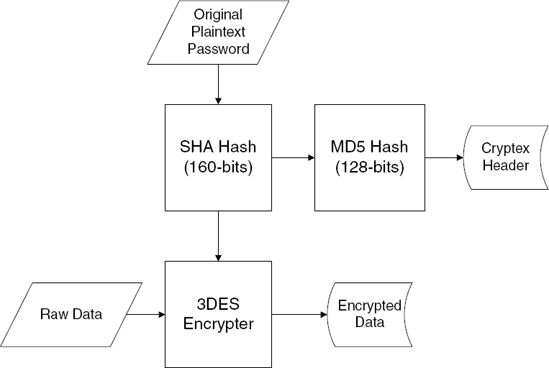
When we think about it a little bit, it becomes clear why Cryptex calculated that extra MD5 hash. Essentially, Cryptex is using the generated SHA hash as a key for encrypting and decrypting the data (3DES is a symmetric algorithm, which means that encryption and decryption are both performed using the same key). Additionally, Cryptex needs some kind of an easy way to detect whether the supplied password was correct or incorrect. For this, Cryptex calculates an additional hash (using the MD5 algorithm) from the SHA hash and stores the result in the file header. When an archive is opened, the supplied password is hashed twice (once using SHA and once using MD5), and the MD5 result is compared against the one stored in the archive header. If they match, the password is correct.
You may wonder why Cryptex isn't just storing the SHA result directly into the file header. Why go through the extra effort of calculating an additional hash value? The reason is that the SHA hash is directly used as the encryption key; storing it in the file header would make it incredibly easy to decrypt Cryptex archives. This might be a bit confusing considering that it is impossible to extract the original plaintext password from the SHA hash value, but it is just not needed. The hash value is all that would be needed in order to decrypt the data. Instead, Cryptex calculates an additional hash from the SHA value and stores that as the unique password identification. Figure 6.1 demonstrates this sequence.
Finally, if you're wondering why Cryptex isn't calculating the MD5 password-verification hash directly from the plaintext password but from the SHA hash value, it's probably because of the (admittedly remote) possibility that someone would be able to convert the MD5 hash value to an equivalent SHA hash value and effectively obtain the decryption key. This is virtually guaranteed to be mathematically impossible, but why risk it? It is certainly going to be impossible to obtain the original data (which is the SHA-generated decryption key) from the MD5 hash value stored in the header. Being overly paranoid is the advisable frame of mind when developing security-related technologies.
Now that you have a basic understanding of how Cryptex manages its passwords and encryption keys, you can move on to study the Cryptex directory layout. In a real-world program, this step would be somewhat less relevant for those interested in a security-level analysis for Cryptex, but it would be very important for anyone interested in reading or creating Cryptex-compatible archives. Since we're doing this as an exercise in data reverse engineering, the directory layout is exactly the kind of complex data structure you're looking to get your hands on.
In order to decipher the directory layout you'll need to find the location in the Cryptex code that reads the encrypted directory layout data, decrypts it, and proceeds to decipher it. This can be accomplished by simply placing a breakpoint on the ReadFile API and tracing forward in the program to see what it does with the data. Let's restart the program in OllyDbg (don't forget to correct the password in the command-line argument), place a breakpoint on ReadFile, and let the program run.
The first hit comes from an internal system call made by ADVAPI32.DLL. Releasing the debugger brings it back to ReadFile again, except that again, it was called internally from system code. You will very quickly realize that there are way too many calls to ReadFile for this approach to work; this API is used by the system heavily.
There are many alternative approaches you could take at this point, depending on the particular application. One option would be to try and restrict the ReadFile breakpoint to calls made on the archive file. You could do this by first placing a breakpoint on the API call that opens or creates the archive (this is probably going to be a call to the CreateFile API), obtain the archive handle from that call, and place a selective breakpoint on ReadFile that only breaks when the specific handle to the Cryptex archive is specified (such breakpoints are supported by most debuggers). This would really reduce the number of calls—you'd only see the relevant calls where Cryptex reads from the archive, and not hundreds of irrelevant system calls.
On the other hand, since Cryptex is really a fairly simple program, you could just let it run until it reached the key-generation function from Listing 6.5. At this point you could just step through the rest of the code until you reach interesting code areas that decipher the directory data structures. Keep in mind that in most real programs you'd have to come up with a better idea for where to place your breakpoint, because simply stepping through the program is going to be an unreasonably tedious task.
You can start by placing a breakpoint at the end of the key-generation function, on address 00402416. Once you reach that address, you can step back into the calling function and step through several irrelevant code sequences, including a call into a function that apparently performs the actual opening of the archive and ends up calling into 004011C0, which is the function analyzed in Listing 6.3. The next function call goes into 004019F0, and (based on a quick look at it) appears to be what we're looking for. Listing 6.6 lists the OllyDbg-generated disassembly for this function.
Example 6.6. Disassembly of function that lists all files within a Cryptex archive.
004019F0    SUB ESP,8
004019F3    PUSH EBX
004019F4    PUSH EBP
004019F5    PUSH ESI
004019F6    MOV ESI,SS:[ESP+18]
004019FA    XOR EBX,EBX
004019FC    PUSH EBX                    ; Origin => FILE_BEGIN
004019FD    PUSH EBX                     ; pOffsetHi => NULL
004019FE    PUSH EBX                    ; OffsetLo => 0
004019FF    PUSH ESI                    ; hFile
00401A00    CALL DS:[<&KEKNEL32.SetFilePointer>]
00401A06    PUSH EBX                    ; pOverlapped => NULL
00401A07    LEA EAX,SS:[ESP+14]
  ;
00401A0B    PUSH EAX                    ; pBytesRead
00401A0C    PUSH 28                     ; BytesToRead = 28 (40.)
00401A0E    PUSH cryptex.00406058       ; Buffer = cryptex.00406058
00401A13    PUSH ESI                    ; hFile
00401A14    CALL DS:[<&KERNEL32.ReadFile>
00401A1A    MOV ECX,SS:[ESP+1C]
00401A1E    MOV EDX,DS:[406064]
00401A24    PUSH ECX
00401A25    PUSH EDX
00401A26    PUSH ESI
00401A27    CALL cryptex.00401030
00401A2C    MOV EBP,DS:[<&MSVCR71.printf>
00401A32    MOV ESI,DS:[406064]
00401A38    PUSH cryptex.00403234        ; format = "   File Size   File Name"
00401A3D    MOV DWORD PTR SS:[ESP+1C],cryptex.00405050
00401A45    CALL EBP                    ; printf
00401A47    ADD ESP,10
00401A4A    TEST ESI,ESI
00401A4C    JE SHORT cryptex.00401ACD
00401A4E    PUSH EDI
00401A4F    MOV EDI,SS:[ESP+24]
00401A53    JMP SHORT cryptex.00401A60
00401A55    LEA ESP,SS:[ESP]
00401A5C    LEA ESP,SS:[ESP]
00401A60    MOV ESI,SS:[ESP+10]
00401A64    ADD ESI,8
00401A67    MOV DWORD PTR SS:[ESP+14],1A
00401A6F    NOP
00401A70    MOV EAX,DS:[ESI]
00401A72    TEST EAX,EAX
00401A74    JE SHORT cryptex.00401A9A
00401A76    MOV EDX,EAX
00401A78    SHL EDX,0A
00401A7B    SUB EDX,EAX
00401A7D    ADD EDX,EDX
00401A7F    LEA ECX,DS:[ESI+14]
00401A82    ADD EDX,EDX
00401A84    PUSH ECX
00401A85    SHR EDX,0A
00401A88    PUSH EDX
00401A89    PUSH cryptex.00403250         ; ASCII " %10dK    %s"
00401A8E    CALL EBP
00401A90    MOV EAX,DS:[ESI]
00401A92    ADD DS:[EDI],EAX
00401A94    ADD ESP,0C
00401A97    ADD EBX,1
00401A9A   ADD ESI,98
00401AA0    SUB DWORD PTR SS:[ESP+14],1
00401AA5    JNZ SHORT cryptex.00401A70
00401AA7    MOV ECX,SS:[ESP+10]
00401AAB    MOV ESI,DS:[ECX]
00401AAD    TEST ESI,ESI
00401AAF    JE SHORT cryptex.00401ACC
00401AB1    MOV EDX,SS:[ESP+20]
00401AB5    MOV EAX,SS:[ESP+1C]
00401AB9    PUSH EDX
00401ABA    PUSH ESI
00401ABB    PUSH EAX
00401ABC    CALL cryptex.00401030
00401AC1    ADD ESP,0C
00401AC4    TEST ESI,ESI
00401AC6    MOV SS:[ESP+10],EAX
00401ACA    JNZ SHORT cryptex.00401A60
00401ACC    POP EDI
00401ACD    POP ESI
00401ACE    POP EBP
00401ACF    MOV EAX,EBX
00401AD1    POP EBX
00401AD2    ADD ESP,8
00401AD5    RETN
This function starts out with a familiar sequence that reads the Cryptex header into memory. This is obvious because it is reading 0x28 bytes from offset 0 in the file. It then proceeds to call into a function at 00401030, which, upon stepping into it, looks quite important. Listing 6.7 provides a disassembly of the function at 00401030.
Example 6.7. A disassembly of Cryptex's cluster decryption function.
00401030    PUSH ECX
00401031    PUSH ESI
00401032    MOV ESI,SS:[ESP+C]
00401036    PUSH EDI
00401037    MOV EDI,SS:[ESP+14]
0040103B    MOV ECX,1008
00401040    LEA EAX,DS:[EDI-1]
00401043    MUL ECX
00401045    ADD EAX,28
00401048    ADC EDX,0
0040104B    PUSH 0                       ; Origin = FILE_BEGIN
0040104D    MOV SS:[ESP+18],EDX          ;
00401051    LEA EDX,SS:[ESP+18]          ;
00401055    PUSH EDX                     ; pOffsetHi
00401056    PUSH EAX                     ; OffsetLo
00401057    PUSH ESI                     ; hFile
00401058    CALL DS:[<&KERNEL32.SetFilePointer>]
0040105E    PUSH 0                       ; pOverlapped = NULL
00401060    LEA EAX,SS:[ESP+C]           ;
00401064    PUSH EAX                     ; pBytesRead
00401065    PUSH 1008                    ; BytesToRead = 1008 (4104.)
0040106A    PUSH cryptex.00405050        ; Buffer = cryptex.00405050
0040106F    PUSH ESI                     ; hFile
00401070    CALL DS:[<&KERNEL32.ReadFile>
00401076    TEST EAX,EAX
00401078    JE SHORT cryptex.004010CB
0040107A    MOV EAX,SS:[ESP+18]
0040107E    TEST EAX,EAX
00401080    MOV DWORD PTR SS:[ESP+14],1008
00401088    JE SHORT cryptex.004010C2
0040108A    LEA ECX,SS:[ESP+14]
0040108E    PUSH ECX
0040108F    PUSH cryptex.00405050
00401094    PUSH 0
00401096    PUSH 1
00401098    PUSH 0
0040109A    PUSH EAX
0040109B    CALL DS:[<&ADVAPI32.CryptDecrypt>]
004010A1    TEST EAX,EAX
004010A3    JNZ SHORT cryptex.004010C2
004010A5    CALL DS:[<&KERNEL32.GetLastError>]
004010AB    PUSH EDI                     ; <%d>
004010AC    PUSH cryptex.004030E8        ; format = "ERROR: Unable to decrypt block from cluster &%d."
004010B1    CALL DS:[<&MSVCR71.printf>]
004010B7    ADD ESP,8
004010BA    PUSH 1                       ; status = 1
004010BC    CALL DS:[<&MSVCR71.exit>]
004010C2    POP EDI
004010C3    MOV EAX,cryptex.00405050
004010C8    POP ESI
004010C9    POP ECX
004010CA    RETN
004010CB    POP EDI
004010CC    XOR EAX,EAX
004010CE    POP ESI
004010CF    POP ECX
004010D0    RETN
This function starts out by reading a fixed size (4,104-byte) chunk of data from the archive file. The interesting thing about this read operation is how the starting address is calculated. The function receives a parameter that is multiplied by 4,104, adds 0x28, and is then used as the file offset from where to start reading. This exposes an important detail about the internal organization of Cryptex files: they appear to be divided into data blocks that are 4,104 bytes long. Adding 0x28 to the file offset is simply a way to skip the file header. The second parameter that this function takes appears to be some kind of a block number that the function must read.
After the data is read into memory, the function proceeds to decrypt it using the CryptDecrypt function. As expected, the data-length parameter (which is the sixth parameter passed to this function) is again hard-coded to 4104. It is interesting to look at the error message that is printed if this function fails. It reveals that this function is attempting to read and decrypt a cluster, which is probably just a fancy name for what I classified as those fixed-sized data blocks. If CryptDecrypt is successful, the function simply returns to the caller while returning the address of the newly decrypted block.
Since you're working under the assumption that the block that was just read is the archive's file directory or some other part of its header, your next step is to take the decrypted block and attempt to study it and establish how it's structured. The following memory dump shows the contents of the decrypted block I obtained while trying to list the files in the Testi.crx archive created earlier.
00405050    00 00 00 00 02 00  00  00
00405058    01 00 00 00 52 EB   DD  0C   ...Rë_.
00405060    D4 CB 55 D9 A4 CD   El  C6  ÔËUÙÍáÆ
00405068    96 6C 9C 3C 61 73   74  65  -l<aste
00405070    72 69 73 6B 73 2E   74  78  risks.tx
00405078    74 00 00 00 00 00   00  00  t.......

As you can see, you're in the right place; the memory block contains the file name asterisks.txt, which you encrypted into this archive earlier. The question now is: What is in those 28 bytes that precede the file name? One thing to do right away is to try and view the data in a different way. In the preceding dump I used an ASCII view because I wanted to be able to see the file name string, but it might be easier to make out other fields by using a 32-bit view on this entry. The following are the first 28 bytes viewed as a sequence of 32-bit hexadecimal numbers:
00405050     00000000    00000002    00000001    0CDDEB52
00405060     D955CBD4    C6E1CDA4    3C9C6C96
With this view, you can immediately see a somewhat improved picture. The first three DWORDs are obviously some kind of 32-bit fields. The last four DWORDs are not as obvious, and seem to be some kind of a random 16-byte sequence. This is easy to tell because they do not contain text (you would have seen that in the previous dump), and they are not pointers or offsets into the file (the numbers are far too large, and some of them are not 32-bit aligned). This is a classic case where stepping into the code that deciphers this data should really simplify the process of deciphering the file format.
The code that actually reads the file table and displays the file list is shown in Listing 6.6 and is actually quite simple to analyze because the fields that it reads are both printed into the screen, so it's very easy to tell what they stand for. Let's go back to that code sequence and see what it's doing with this file entry.
00401A60    MOV ESI,SS:[ESP+10]
00401A64    ADD ESI,8
00401A67    MOV DWORD PTR SS:[ESP+14],1A
00401A6F    NOP
00401A70    MOV EAX,DS:[ESI]
00401A72    TEST EAX,EAX
00401A74    JE SHORT cryptex.00401A9A
00401A76    MOV EDX,EAX
00401A78    SHL EDX,OA
00401A7B    SUB EDX,EAX
00401A7D    ADD EDX,EDX
00401A7F    LEA ECX,DS:[ESI+14]
00401A82    ADD EDX,EDX
00401A84    PUSH ECX
00401A85    SHR EDX,OA
This sequence starts out by loading ESI with the newly decrypted block's starting address, adding 8 to that, and reading a 32-bit member at that address into EAX. If you go back to the previous memory dump, you'll see that the third DWORD contains 00000001. At this point, the code confirms that EAX is nonzero, and proceeds to perform an interesting series of arithmetic operations on it.
First, EDX is shifted left by OxA (10) bits, then the original value (from EAX) is subtracted from the result. At that point, the value of EDX is added to itself (which is the equivalent of multiplying it by two). This operation is performed again in 00401A82, and is followed by a right-shift of OxA (10) bits. Now let's go over these operations step by step and try to determine their purpose.
EDXis shifted left by 10, which is equivalent to edx = edx × 1,024.The original number at
EAXis subtracted fromEDX. This means that instead of 1,024, you have essentially performed edx = edx × 1,024 - edx, which is the equivalent of edx = edx × 1,023.edxis then added to itself, twice. This is equivalent of edx = edx × 4, which means that so far you've essentially calculated edx = edx × 4,092.Finally,
EDXis shifted back right by 10 bits, which is the equivalent of dividing by 1,024. The final formula is edx = edx × 4092 ÷ 1024.
You might be wondering why Cryptex didn't just use the MUL instruction to multiply EDX by 4,092 and then apply the DIV instruction to divide the result by 1,024. The answer is that such code would run far more slowly than the one we've just analyzed. MUL and DIV are both relatively slow instructions, whereas ADD, SUB, and the shifting instructions are much faster. It is important to note that this sequence reveals an interesting fact about Cryptex: It was most likely compiled using some kind of an optimize-for-fast-code switch, rather than with an optimize-for-small-code switch. That's because using the direct arithmetic instructions for division and multiplication would have produced smaller, yet slower, code. The compiler was clearly aiming at the generation of high-performance code, even at the cost of a somewhat larger executable.
The result of this little arithmetic sequence goes right into the printf call that prints the current file entry. This is quite illuminating because it tells you exactly what Cryptex was trying to calculate in the preceding arithmetic sequence: the file size. In fact, it is quite obvious that because the file size is printed in kilobytes, the final division by 1,024 simply converts the file size from bytes to kilobytes. The question now is, what was that original number and why was Cryptex multiplying it by 4,092? Well, it would seem that the file size is maintained by using some kind of fixed block size, which is probably somehow related to the cluster you saw earlier while decrypting the buffer. The problem is that the cluster you were dealing with earlier was 4,104 bytes long, and here you're dealing with clusters that are only 4,092 bytes long. The difference is not clear at this point.
The original number of clusters that you multiplied was taken from offset +8 in the current file entry structure, so you know that offset +8 contains the file size in clusters. This raises the question of where does Cryptex store the actual file size? It would not be possible to accurately recover encrypted files without creating them with the exact size they had originally. Therefore Cryptex must also maintain the accurate file size somewhere in the archive file.
Other than the file size, the printf call also takes the file name, which is easily obtained by taking the address of offset +14 from ESI. Keep in mind that ESI was incremented by 8 earlier, so this is actually offset +1C from the original data structure, which matches what you saw in our data dump, where the string started at offset +1C.
After printing the file name and size, the program loops back to print the next entry. To reach the next item, Cryptex increments ESI by 0x98 bytes (152 in decimal), which is clearly the length of each entry. This indicates that there is a fixed number of characters reserved for each file name. Since you know that the string starts at offset +14 in the structure, you can assume that there aren't any additional data entries after it in the structure, which would mean that the maximum length of a file name in Cryptex is 152 – 20, or 132 bytes.
Once this loop ends, an interesting thing takes place. The first member in the buffer you read and decrypted earlier is tested, and if it is nonzero, Cryptex calls the function at 00401030, the function from Listing 6.7 that reads and decrypts a data chunk that we analyzed earlier. The second parameter, which is used as a kind of cluster number (remember how the function multiplies that number by 4104?), is taken directly from that first member. Clearly the idea here is to read and decrypt another chunk of data and scan it for files. It looks likes the file list can span an arbitrary number clusters and is essentially implemented using a sort of cluster linked list. This brings up one question: Is the first cluster hard-coded to number one? Let's take a look at the code that made the initial call to read the first file-list cluster, from Listing 6.6.
00401A1E    MOV EDX,DS:[406064]
00401A24    PUSH ECX
00401A25    PUSH EDX
00401A26    PUSH ESI
00401A27    CALL cryptex.00401030
The first-cluster index is taken from a global variable with a familiar address. It turns out that 00406064 is a part of the Cryptex header loaded into 00406058 just a few lines earlier. So, it looks like offset +0C in the Cryptex header contains the index of the first cluster in the file table.
Going back to Listing 6.7, after 00401030 returns, ESI is tested for a nonzero value again (even though it has already been tested and its value couldn't have been changed), and if it is nonzero Cryptex loops back into the code that reads the file table. You now know that the first member in these file table clusters is the next cluster element that tells Cryptex which cluster contains the following file table entries, if any. Because the size of each file entry is fixed, there must also be a fixed number of entries in each cluster. Since a local variable at [ESP+14] is used for counting the remaining number of items in the current cluster, you easily find the instruction at 00401A67, which initializes this variable to OxlA (26 in decimal), so you know that each cluster can contain up to 26 file entries.
Finally, it is important to pay attention to three lines in Listing 6.6 that we've so far ignored.
00401A70  MOV EAX,DS:[ESI]
00401A72  TEST EAX,EAX
00401A74  JE SHORT cryptex.00401A9A
It appears that a file entry must have a nonzero value in its offset +8 in order for Cryptex to actually pay attention to the entry. As we've recently established, offset +8 contains the file size in clusters, so Cryptex is essentially checking for a nonzero file size. The fact that Cryptex supports skipping file entries indicates that it allows for holesin its file list, so when a file is deleted Cryptex simply marks its entry as deleted and doesn't have to start copying any entries. When deleted entries are encountered they are simply ignored, as you can see here.
This is exactly the type of thing you probably wouldn't see in a robust commercial security product. By not erasing these data blocks, Cryptex creates a slight security risk. Sure, the "deleted" clusters are probably still encrypted (they couldn't be in plain text because Cryptex isn't ever supposed to insert plaintext data into the archives!), but they might contain sensitive information. Suppose that you used Cryptex to send files to someone who had the password to your archive. Because deleted files might still be in the archive, you might actually be sending that person additional files you thought you had deleted!
So, what would you have to do in order to actually dump the file list in a Cryptex archive? It's actually not that complicated. The following steps must be taken in order to correctly dump the list of files inside a Cryptex archive:
Initialize the Crypto API and open the archive file.
Verify the 8-byte header signature.
Calculate an SHA hash out of the typed password, and calculate an MD5 hash out of that.
Verify that the calculated MD5 hash matches the stored MD5 hash from the Cryptex header (at offset +18).
Produce a 3DES key using the SHA hash object.
Read the first file list cluster (whose index is stored in offset +0C in the Cryptex header) in the same manner as it is read in Cryptex (reading 4,104 bytes and decrypting them using our 3DES key).
Loop through those 152-bytes long entries and dump each entry's name if its offset +8 (which is the file size in clusters) is nonzero.
Proceed to read and decrypt additional file-list clusters if they are present. List any entries within those clusters.
The actual code that implements the preceding sequence is relatively straightforward to implement. If you'd like to see what it looks like, it is available on this book's Web site at www.wiley.com/go/eeilam.
Cryptex would not be worth much without having the ability to decrypt and extract files from its encrypted archive files. This is done using the x command, which simply creates a file with the same name as the original that was encoded (minus the file's path) and decrypts the original data into it. Reversing the extraction process should provide you with a clearer view of the file list data layout and on how files are actually stored within archive files. The rather longish Listing 6.8 contains the Cryptex file extraction routine.
Example 6.8. A disassembly of Cryptex's file decryption and extraction routine.
00401BB0    SUB ESP,70
00401BB3    MOV EAX,DS:[405020]
00401BB8    PUSH EBX
00401BB9    PUSH EDI
00401BBA    MOV EDI,SS:[ESP+84]
00401BC1    PUSH 0
00401BC3    MOV SS:[ESP+78],EAX
00401BC7    MOV EAX,SS:[ESP+80]
00401BCE    PUSH 0
00401BD0    PUSH EAX
00401BD1    PUSH EDI
00401BD2    CALL cryptex.00401670
00401BD7    MOV EDX,DS:[405048]
00401BDD    ADD ESP,10
00401BE0    LEA ECX,SS:[ESP+14]
00401BE4    PUSH ECX
00401BE5    PUSH 0
00401BE7    PUSH 0
00401BE9    PUSH 8003
00401BEE    PUSH EDX
00401BEF    MOV EBX,EAX
00401BF1    CALL DS:[<&ADVAPI32.CryptCreateHash>]
00401BF7    TEST EAX,EAX
00401BF9    JNZ SHORT cryptex.00401C11
00401BFB    PUSH cryptex.00403284          ; /format = "Unable to verify the file's hash value!"
00401C00    CALL DS:[<&MSVCR71.printf>]
00401C06    ADD ESP,4
00401C09    PUSH 1                         ; /status = 1
00401C0B    CALL DS:[<&MSVCR71.exit>]
00401C11    PUSH EBP
00401C12    PUSH ESI
00401C13    PUSH 0                         ; /Origin = FILE_BEGIN
00401C15    PUSH 0                         ; |pOffsetHi = NULL
00401C17    PUSH 0                         ; |OffsetLo = 0
00401C19    PUSH EBX                       ; |hFile
00401C1A    CALL DS:[<&KERNEL32.SetFilePoimter>]
00401C20   PUSH 0                          ; /pOverlapped = NULL
00401C22    LEA EAX,SS:[ESP+24]            ; |
00401C26    PUSH EAX                       ; |pBytesRead
00401C27    PUSH 28                        ; |BytesToRead = 28 (40.)
00401C29    PUSH cryptex.00406058          ; |Buffer = cryptex.00406058
00401C2E    PUSH EBX                       ; |hFile
00401C2F    CALL DS:[<&KERNEL32.ReadFile>
00401C35    MOV ESI,SS:[ESP+88]
00401C3C    XOR ECX,ECX
00401C3E    PUSH EDI
00401C3F    MOV SS:[ESP+71],ECX
00401C43    LEA EDX,SS:[ESP+70]
00401C47    PUSH EDX
00401C48    MOV SS:[ESP+79],ECX
00401C4C    LEA EAX,SS:[ESP+18]
00401C50    PUSH EAX
00401C51    MOV SS:[ESP+81],ECX
00401C58    MOV SS:[ESP+85],CX
00401C60    PUSH ESI
00401C61    PUSH EBX
00401C62    MOV DWORD PTR SS:[ESP+24],0
00401C6A    MOV SS:[ESP+28],ESI
00401C6E    MOV BYTE PTR SS:[ESP+80],0
00401C76    MOV SS:[ESP+8F],CL
00401C7D    CALL cryptex.004017B0
00401C82    MOV EDI,SS:[ESP+24]
00401C86    PUSH 5C                        ; /c = 5C  ('\')
00401C88    PUSH ESI                       ; |s
00401C89    MOV SS:[ESP+34],ESI            ; |
00401C8D    MOV ESI,DS:[<&MSVCR71.strchr>]
00401C93    MOV EBP,EAX                    ; |
00401C95    CALL ESI                       ; \strchr
00401C97    ADD ESP,1C
00401C9A    TEST EAX,EAX
00401C9C    JE SHORT cryptex.00401CB3
00401C9E    MOV EDI,EDI
00401CA0    ADD EAX,1
00401CA3    PUSH 5C
00401CA5    PUSH EAX
00401CA6    MOV SS:[ESP+20],EAX
00401CAA    CALL ESI
00401CAC    ADD ESP,8
00401CAF    TEST EAX,EAX
00401CB1    JNZ SHORT cryptex.00401CA0
00401CB3    TEST EBP,EBP
00401CB5    JNZ SHORT cryptex.00401CD2
00401CB7    MOV ECX,SS:[ESP+18]
00401CBB    PUSH ECX                       ; /<%s>
00401CBC PUSH cryptex.004032B0
; |format = "File "%s" not found in archive."
00401CC1 CALL DS:[<&MSVCR71.printf>]
00401CC7 ADD ESP,8
00401CCA PUSH 1 ; /status = 1
00401CCC CALL DS:[<&MSVCR71.exit>]
00401CD2 MOV ESI,SS:[ESP+14]
00401CD6 PUSH 0 ; /hTemplateFile = NULL
00401CD8 PUSH 0 ; |Attributes = 0
00401CDA PUSH 2 ; |Mode = CREATE_ALWAYS
00401CDC PUSH 0 ; |pSecurity = NULL
00401CDE PUSH 0 ; |ShareMode = 0
00401CE0 PUSH COOOOOOO ; |Access = GENERIC_READ | GENERIC_WRITE
00401CE5 PUSH ESI ; |FileName
00401CE6 CALL DS:[<&KERNEL32.CreateFileA>]
00401CEC CMP EAX,-1
00401CEF MOV SS:[ESP+14],EAX
00401CF3 JNZ SHORT cryptex.00401D13
00401CF5 CALL DS:[<&KERNEL32.GetLastError>]
00401CFB PUSH EAX ; /<%d>
00401CFC PUSH ESI ; |<%s>
00401CFD PUSH cryptex.004032D4 ; |format = "ERROR: Unable to create file "%s" (Last Error=%d)."
00401D02 CALL DS:[<&MSVCR71.printf>]
00401D08 ADD ESP,OC
00401D0B PUSH 1 ; /status = 1
00401D0D CALL DS:[<&MSVCR71.exit>]
00401D13 MOV EDX,SS:[ESP+8C]
00401D1A PUSH EDX
00401D1B PUSH EBP
00401D1C PUSH EBX
00401D1D CALL cryptex.00401030
00401D22 TEST EDI,EDI
00401D24 MOV SS:[ESP+2C],EDI
00401D28 FILD DWORD PTR SS:[ESP+2C]
00401D2C JGE SHORT cryptex.00401D34
00401D2E FADD DWORD PTR DS:[403BA0]
00401D34 FDIVR QWORD PTR DS:[403B98]
00401D3A MOV EAX,SS:[ESP+24]
00401D3E XORPS XMM0,XMM0
00401D41 MOV EBP,DS:[<&MSVCR71.printf>
00401D47 PUSH EAX
00401D48 PUSH cryptex.00403308 ; ASCII "Extracting "%.35s" - "
00401D4D MOVSS SS:[ESP+24],XMM0
00401D53 FSTP DWORD PTR SS:[ESP+34]
00401D57 CALL EBP00401D59 ADD ESP,14 00401D5C TEST EDI,EDI 00401D5E JE cryptex.00401E39 00401D64 MOV ESI,DS:[<&KERNEL32.GetConsoleScreenBufferInfo>] 00401D6A LEA EBX,DS:[EBX] 00401D70 MOV EDX,DS:[40504C] 00401D76 LEA ECX,SS:[ESP+2C] 00401D7A PUSH ECX 00401D7B PUSH EDX 00401D7C CALL ESI 00401D7E FLD DWORD PTR SS:[ESP+10] 00401D82 SUB ESP,8 00401D85 FSTP QWORD PTR SS:[ESP] 00401D88 PUSH cryptex.00403320 ; ASCII "%2.2f percent completed." 00401D8D CALL EBP 00401D8F ADD ESP,0C 00401D92 CMP EDI,1 00401D95 MOV EAX,0FFC 00401D9A JA SHORT cryptex.00401DA1 00401D9C MOV EAX,DS:[405050] 00401DA1 PUSH 0 00401DA3 PUSH EAX 00401DA4 MOV EAX,SS:[ESP+24] 00401DA8 PUSH cryptex.00405054 00401DAD PUSH EAX 00401DAE CALL DS:[<&ADVAPI32.CryptHashData>] 00401DB4 TEST EAX,EAX 00401DB6 JE cryptex.00401EEE 00401DBC CMP EDI,1 00401DBF MOV EAX,0FFC 00401DC4 JA SHORT cryptex.00401DCB 00401DC6 MOV EAX,DS:[405050] 00401DCB MOV EDX,SS:[ESP+14] 00401DCF PUSH 0 ; /pOverlapped = NULL 00401DD1 LEA ECX,SS:[ESP+2C] ; | 00401DD5 PUSH ECX ; |pBytesWritten 00401DD6 PUSH EAX ; |nBytesToWrite 00401DD7 PUSH cryptex.00405054 ; |Buffer = cryptex.00405054 00401DDC PUSH EDX ; |hFile 00401DDD CALL DS:[<&KERNEL32.WriteFile>] 00401DE3 SUB EDI,1 00401DE6 JE SHORT cryptex.00401E00 00401DE8 MOV EAX,SS:[ESP+8C] 00401DEF MOV ECX,DS:[405050] 00401DF5 PUSH EAX 00401DF6 PUSH ECX 00401DF7 PUSH EBX
00401DF8    CALL cryptex.00401030
00401DFD    ADD ESP,OC
00401E00    MOV EAX,DS:[40504C]
00401E05    LEA EDX,SS:[ESP+44]
00401E09    PUSH EDX
00401E0A    PUSH EAX
00401E0B    CALL ESI
00401E0D    MOV ECX,SS:[ESP+30]
00401E11    MOV EDX,DS:[40504C]
00401E17    PUSH ECX                       ; /CursorPos
00401E18    PUSH EDX                       ; |hConsole => 00000007
00401E19    CALL DS:[<&KERNEL32.SetConsoleCursorPosition>]
00401E1F    TEST EDI,EDI
00401E21    MOVSS XMM0,SS:[ESP+10]
00401E27    ADDSS XMM0,SS:[ESP+20]
00401E2D    MOVSS SS:[ESP+10],XMM0
00401E33    JNZ cryptex.00401D70
00401E39    FLD QWORD PTR DS:[403B98]
00401E3F    SUB ESP,8
00401E42    FSTP QWORD PTR SS:[ESP]
00401E45    PUSH cryptex.00403368          ; ASCII "%2.2f percent completed."
00401E4A    CALL EBP
00401E4C    PUSH cryptex.00403384
00401E51    CALL EBP
00401E53    XOR EAX,EAX
00401E55    MOV SS:[ESP+6D],EAX
00401E59    MOV SS:[ESP+71],EAX
00401E5D    MOV SS:[ESP+75],EAX
00401E61    MOV SS:[ESP+79],AX
00401E66    ADD ESP,10
00401E69    LEA ECX,SS:[ESP+24]
00401E6D    LEA EDX,SS:[ESP+5C]
00401E71    MOV SS:[ESP+6B],AL
00401E75    MOV BYTE PTR SS:[ESP+5C],0
00401E7A    MOV DWORD PTR SS:[ESP+24],10
00401E82    PUSH EAX
00401E83    MOV EAX,SS:[ESP+20]
00401E87    PUSH ECX
00401E88    PUSH EDX
00401E89    PUSH 2
00401E8B    PUSH EAX
00401E8C    CALL DS:[<&ADVAPI32.CryptGetHashParam>]
00401E92    TEST EAX,EAX
00401E94    JNZ SHORT cryptex.00401EA0
00401E96    PUSH cryptex.00403388         ; ASCII "Unable to obtain MD5 hash value for file."
00401E9B    CALL EBP
00401E9D    ADD ESP,4
00401EA0    MOV ECX,4
00401EA5    LEA EDI,SS:[ESP+6C]
00401EA9    LEA ESI,SS:[ESP+5C]
00401EAD    XOR EDX,EDX
00401EAF    REPE CMPS DWORD PTR ES:[EDI],DWORD PTR DS:[ESI]
00401EB1    JE SHORT cryptex.00401EC2
00401EB3    MOV EAX,SS:[ESP+18]
00401EB7    PUSH EAX
00401EB8    PUSH cryptex.004033B4           ; ASCII "ERROR: File "%s" is
corrupted!"
00401EBD    CALL EBP
00401EBF    ADD ESP,8
00401EC2    MOV ECX,SS:[ESP+1C]
00401EC6    PUSH ECX
00401EC7    CALL DS:[<&ADVAPI32.CryptDestroyHash>]
00401ECD    MOV EDX,SS:[ESP+14]
00401ED1    MOV ESI,DS:[<&KERNEL32.CloseHandle>]
00401ED7    PUSH EDX                        ; /hObject
00401ED8    CALL ESI                        ; \CloseHandle
00401EDA    PUSH EBX                        ; /hObject
00401EDB    CALL ESI                        ; \CloseHandle
00401EDD    MOV ECX,SS:[ESP+7C]
00401EE1    POP ESI
00401EE2    POP EBP
00401EE3    POP EDI
00401EE4    POP EBX
00401EE5    CALL cryptex.004027C9
00401EEA    ADD ESP,70
00401EED    RETN
Let's begin with a quick summary of the most important operations performed by the function in Listing 6.8. The function starts by opening the archive file. This is done by calling a function at 00401670, which opens the archive and proceeds to call into the header and password verification function at 004011C0, which you analyzed in Listing 6.3. After 00401670 returns the function proceeds to create a hash object of the same type you saw earlier that was used for calculating the password hash. This time the algorithm type is 0x8003, which is ALG_SID_MD5. The purpose of this hash object is still unclear.
The code then proceeds to read the Cryptex header into the same global variable at 00406058 that you encountered earlier, and to search the file list for the relevant file entry.
The scanning of the file list is performed by calling a function at 004017B0, which goes through a familiar route of scanning the file list and comparing each name with the name of the file being extracted. Once the correct item is found the function retrieves several fields from the file entry. The following is the code that is executed in the file searching routine once a file entry is found.
00401881    MOV ECX,SS:[ESP+10]
00401885    LEA EAX,DS:[ESI+ESI*4]
00401888    ADD EAX,EAX
0040188A    ADD EAX,EAX
0040188C    SUB EAX,ESI
0040188E    MOV EDX,DS:[ECX+EAX*8+8]
00401892    LEA EAX,DS:[ECX+EAX*8]
00401895    MOV ECX,SS:[ESP+24]
00401899    MOV DS:[ECX],EDX
0040189B    MOV ECX,SS:[ESP+28]
0040189F    TEST ECX,ECX
004018A1    JE SHORT cryptex.004018BC
004018A3    LEA EDX,DS:[EAX+C]
004018A6    MOV ESI,DS:[EDX]
004018A8    MOV DS:[ECX],ESI
004018AA    MOV ESI,DS:[EDX+4]
004018AD    MOV DS:[ECX+4],ESI
004018B0    MOV ESI,DS:[EDX+8]
004018B3    MOV DS:[ECX+8],ESI
004018B6    MOV EDX,DS:[EDX+C]
004018B9    MOV DS:[ECX+C],EDX
004018BC    MOV EAX,DS:[EAX+4]
First of all, let's inspect what is obviously an optimized arithmetic sequence of some sort in the beginning of this sequence. It can be slightly confusing because of the use of the LEA instruction, but LEA doesn't have to deal with addresses. The LEA at 00401885 is essentially multiplying ESI by 5 and storing the result in EAX. If you go back to the beginning of this function, it is easy to see that ESI is essentially employed as a counter; it is initialized to zero and then incremented by one with each item that is traversed. However, once all file entries in the current cluster are scanned (remember there are OxlA entries), ESI is set to zero again. This implies that ESI is used as the index into the current file entry in the current cluster.
Let's return to the arithmetic sequence and try to figure out what it is doing. You've already established that the first LEA is multiplying ESI by 5. This is followed by two ADDs that effectively multiply ESI by itself. The bottom line is that ESI is being multiplied by 20 and is then subtracted by its original value. This is equivalent to multiplying ESI by 19. Lovely isn't it? The next line at 0040188E actually uses the outcome of this computation (which is now in EAX) as an index, but not before it multiplies it by 8. This line essentially takes ESI, which was an index to the current file entry, and multiplies it by 19 * 8 = 152. Sounds familiar doesn't it? You're right: 152 is the file entry length. By computing [ECX+EAX*8+8], Cryptex is obtaining the value of offset +8 at the current file entry.
We already know that offset +8 contains the file size in clusters, and this value is being sent back to the caller using a parameter that was passed in to receive this value. Cryptex needs the file size in order to extract the file. After loading the file size, Cryptex checks for what is apparently another output parameter that is supposed to receive additional output data from this function, this time at [ESP+28]. If it is nonzero, Cryptex copies the value from offset +C at the file entry into the pointer that was passed and proceeds to copy offset +10 into offset +4 in the pointer that was passed, and so on, until a total of four DWORDs, or 16 bytes are copied. As a reminder, those 16 bytes are the ones that looked like junk when you dumped the file list earlier. Before returning to the caller, the function loads offset +4 at the current file entry and sets that into EAX—it is returning it to the caller.
To summarize, this sequence scans the file list looking for a specific file name, and once that entry is found it returns three individual items to the caller. The file size in clusters, an unknown, seemingly random 16-byte sequence, and another unknown DWORD from offset +4 in the file entry. Let's proceed to see how this data is used by the file extraction routine.
After returning from 004017B0, Cryptex proceeds to scan the supplied file name for backslashes and loops until the last backslash is encountered. The actual scanning is performed using the C runtime library function strchr, which simply returns the address of the first instance of the character, if one is found. The address that points to the last backslash is stored in [ESP+20] ; this is essentially the "clean" version of the file name without any path information. One instruction that draws attention in this otherwise trivial sequence is the one at 00401C9E.
00401C9E MOV EDI,EDI
You might recall that we've already seen a similar instruction in the previous chapter. In that case, it was used as an infrastructure to allow people to trap system APIs in Windows. This case is not relevant here, so why would the compiler insert an instruction that does nothing into the middle of a function? The answer is simple. The address in which this instruction begins is unaligned, which means that it doesn't start on a 32-bit boundary. Executing unaligned instructions (or accessing unaligned memory addresses in general) takes longer for 32-bit processors. By placing this instruction before the loop starts the compiler ensured that the loop won't begin on an unaligned instruction. Also, notice that again the compiler could have used NOPs, but instead used this instruction which does nothing, yet accurately fills the 2-byte gap that was present.
After obtaining a backslash-free version of the file name, the function goes to create the new file that will contain the extracted data. After creating the file the function checks that 004017B0 actually found a file by testing EBP, which is where the function's return value was stored. If it is zero, Cryptex displays a file not found error message and quits. If EBP is nonzero, Cryptex calls the familiar 00401030, which reads and decrypts a sector, while using EBP (the return value from 004017B0) as the second parameter, which is treated as the cluster number to read and decrypt.
So, you now know that 004017B0 returns a cluster index, but you're not sure what this cluster index is. It doesn't take much guesswork to figure out that this is the cluster index of the file you're trying to extract, or at least the first cluster for the file you're trying to extract (most files are probably going to occupy more than one cluster). If you go back to our discussion of the file lookup function, you see that its return value came from offset +4 in the file entry (see instruction at 004018BC). The bottom line is that you now know that offset +4 in the file entry contains the index of the first data cluster.
If you look in the debugger, you will see that the third parameter is a pointer into which the data was decrypted, and that after the function returns this buffer contains the lovely asterisks! It is important to note that the asterisks are preceded by a 4-byte value: 0000046E. A quick conversion reveals that this number equals 1134, which is the exact file size of the original asterisks.txt file you encrypted earlier.
If you go back to the extraction sequence from Listing 6.8, you will find that after reading the first cluster you run into a code sequence that contains some highly unusual instructions. Even though these instructions are not particularly important to the extraction process (in fact, they are probably the least important part of the sequence), you should still take a close look at them just to make sure that you can properly decipher this type of code. Here is the sequence I am referring to:
00401D28    FILD DWORD PTR SS:[ESP+2C]
00401D2C    JGE SHORT cryptex.00401D34
00401D2E    FADD DWORD PTR DS:[403BA0]
00401D34    FDIVR QWORD PTR DS:[403B98]
00401D3A    MOV EAX,SS:[ESP+24]
00401D3E    XORPS XMMO,XMMO
00401D41    MOV EBP,DS:[<&MSVCR71.printf>]
00401D47    PUSH EAX
00401D48    PUSH cryptex.00403308        ;  ASCII "Extracting "%.35s" - "
00401D4D    MOVSS SS:[ESP+24],XMMO
00401D53    FSTP DWORD PTR SS:[ESP+34]
00401D57    CALL EBP
This sequence looks unusual because it contains quite a few instructions that you haven't encountered before. What are those instructions? A quick trip to the Intel IA-32 Instruction Set Reference document [Intel2], [Intel3] reveals that most of these instructions are floating-point arithmetic instructions. The sequence starts with an FILD instruction that simply loads a regular 32-bit integer from [ESP+2C] (which is where the file's total cluster count is stored), converts it into an 80-bit double extended-precision floating-point number and stores it in a special floating-point stack. The floating-point is a set of floating-point registers that store the values that are currently in use by the processor. It can be seen as a simple group of registers where the CPU manages their allocation.
The next floating-point instruction is an FADD, which is only executed if [ESP+2C] is a negative number. This FADD adds an immediate floating-point number stored at 00403BA0 to the value currently stored at the top of the floating-point stack. Notice that unlike the FILD instruction, which loads an integer into the floating-point stack, this FADD uses a floating-point number in memory, so simply dumping the value at 00403BAO as a 32-bit number shows its value as 4F800000. This is irrelevant since you must view this number is a 32-bit floating-point number, which is what FADD expects as an operand. When you instruct OllyDbg to treat this data as a 32-bit floating-point number, you come up with 4.294967e+09.
This number might seem like pure nonsense, but its not. A trained eye immediately recognizes that it is conspicuously similar to the value of 232: 4,294,967,296. It is in fact not similar, but identical to 232. The idea here is quite simple. Apparently FILD always treats the integers as signed, but the original program declared an unsigned integer that was to be converted into a floatingpoint form. To force the CPU to always treat these values as signed the compiler generated code that adds 232 to the variable if it has its most significant bit set. This would convert the signed negative number in the floating-point stack to the correct positive value that it should have been assigned in the first place.
After correcting the loaded number, Cryptex uses the FDIVR instruction to divide a constant from 00403B98 by the number from the top of the floatingpoint stack. This time the number is a 64-bit floating-point number (according to the Intel documentation), so you can ask OllyDbg to dump data starting at 00403B98 as 64-bit floating point. Olly displays 100.0000000000000, which means that Cryptex is dividing 100.0 by the total number of clusters.
The next instruction loads the file name address from [ESP+24] to EAX and proceeds to another unusual instruction called XORPS, which takes an unusual operand called XMMO. This is part of a completely separate instruction set called SSE2 that is supported by most currently available implementations of IA-32 processors. The SSE2 instruction set contains Single Instruction Multiple Data (SIMD) instructions that can operate on several groups of operands at the same time. This can create significant performance boosts for computationally intensive programs such as multimedia and content creation applications. XMMO is the first of 8 special, 128-bit registers names: XMMO through XMM7. These registers can only be accessed using SSE instructions, and their contents are usually made up of several smaller operands. In this particular case, the XORPS instruction XORs the entire contents of the first SSE register with the second SSE register. Because XORPS is XORing a value with itself, it is essentially setting the value of XMMO to zero.
The FSTP instruction that comes next stores the value from the top of the floating-point stack into [ESP+34]. As you can see from the DWORD PTR that precedes the address, the instruction treats the memory address as a 32-bit location, and will convert the value to a 32-bit floating-point representation. As a reminder, the value currently stored at the top of the floating-point stack is the result of the earlier division operation.
At this point, we enter into what is clearly a loop that continuously reads and decrypts additional clusters using 00401030, hashes that data using CryptHashData, and writes the block to the file that was opened earlier using the WriteFile API.
At this point, you can also easily see what all of this floating-point business was about. With each cluster that is decrypted Cryptex is printing an accurate floating-point number that shows the percentage of the file that has been written so far. By dividing 100.0 by the total number of clusters earlier, Cryptex simply determined a step size by which it will increment the current completed percentage after each written cluster.
One thing that is interesting is how Cryptex knows which cluster to read next. Because Cryptex supports deleting files from archives, files are not guaranteed to be stored sequentially within the archive. Because of this, Cryptex always reads the next cluster index from 00405050 and passes that to 00401030 when reading the next cluster. 00405050 is the beginning of the currently active cluster buffer. This indicates that, just like in the file list, the first DWORD in a cluster contains the next cluster index in the current chain. One interesting aspect of this design is revealed in the following lines.
00401DBC    CMP EDI,1
00401DBF    MOV EAX,OFFC
00401DC4    JA SHORT cryptex.00401DCB
00401DC6    MOV EAX,DS:[405050]
00401DCB    ...
At any given moment during this loop EDI contains the number of clusters left to go. When there is more than one cluster to go (EDI > 1), the number of bytes to be read (stored in EAX) is hard-coded to OxFFC (4092 bytes), which is probably just the maximum number of bytes in a cluster. When Cryptex writes the last cluster in the file, it takes the number of bytes to write from the first DWORD in the cluster—the very same spot where the next cluster index is usually stored. Get it? Because Cryptex knows that this is the last cluster, the location where the next cluster index is stored is unused, so Cryptex uses that location to store the actual number of bytes that were stored in the last cluster. This is how Cryptex works around the problem of not directly storing the actual file size but merely storing the number of clusters it uses.
After the final cluster is decrypted and written into the extracted file, Cryptex calls CryptGetHashParam to recover the MD5 hash value that was calculated out of the entire decrypted data. This is compared against that 16-bytes sequence that was returned from 004017B0 (recall that these 16-bytes were retrieved from the file's entry in the file table). If there's a mismatch Cryptex prints an error message saying the file is corrupted. Clearly the MD5 hash is used here as a conventional checksum; for every file that is encrypted an MD5 hash is calculated, and Cryptex verifies that the data hasn't been tampered with inside the archive.
At this point, we have developed a fairly solid understanding of the .crx file format. This section provides a brief overview of all the information gathered in this reversing session. You have deciphered the meaning of most of the .crx fields, at least the ones that matter if you were to write a program that views or dumps an archive. Figure 6.2 illustrates what you know about the Cryptex header.
The Cryptex header comprises a standard 8-byte signature that contains the string CrYpTeX9. The header contains a 16-byte MD5 checksum that is used for confirming the user-supplied password. Cryptex archives are encrypted using a Crypto-API implementation of the triple-DES algorithm. The triple-DES key is generated by hashing the user-supplied password using the SHA algorithm and treating the resulting 160-bit hash as the key. The same 160-bit key is hashed again using the MD5 algorithm and the resulting 16-byte hash is the one that ends up in the Cryptex header—it looks as if the only reason for its existence is so that Cryptex can verify that the typed password matches the one that was used when the archive was created.
You have learned that Cryptex archives are divided into fixed-sized clusters. Some clusters contain file list information while others contain actual file data. Information inside Cryptex archives is always managed on a cluster level; there are apparently no bigger or smaller chunks that are supported in the file format. All clusters are encrypted using the triple-DES algorithm with the key derived from the SHA hash; this applies to both file list clusters and actual file data clusters. The actual size of a single cluster is 4,104 bytes, yet the actual content is only 4,092 bytes. The first 4 bytes in a cluster generally contain the index of the next cluster (yet there are several exceptions), so that explains the 4,096 bytes. We have not been able to determine the reason for those extra 8 bytes that make up a cluster.
The next interesting element in the Cryptex archive is the file list data structure. A file list is made up of one or more clusters, and each cluster contains 26 file entries. Figure 6.3 illustrates what is known about a single file entry.
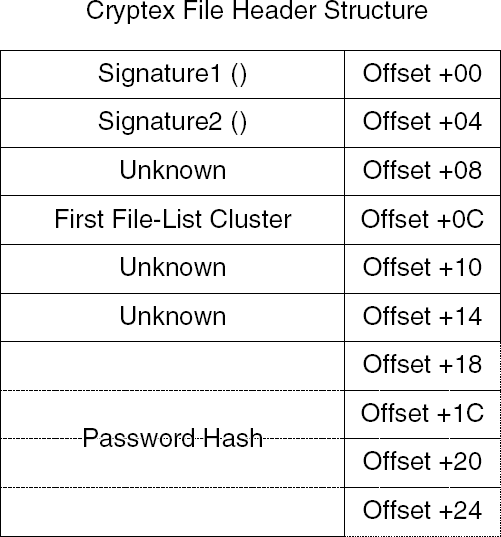
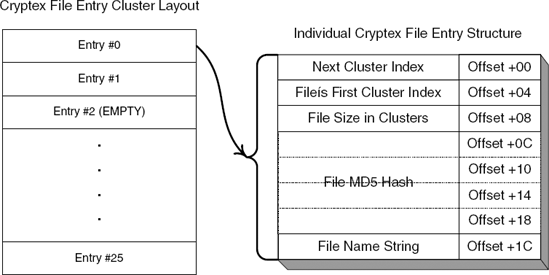
A Cryptex file list table supports holes, which are unused entries. The file size or first cluster index members are typically used as an indicator for whether or not an entry is currently in use or not. You can safely assume that when adding a new file entry Cryptex will just scan this list for an unused entry and place the file in it. File names have a maximum length of 128 bytes. This doesn't sound like much, but keep in mind that Cryptex strips away all path information from the file name before adding it to the list, so these 128 bytes are used exclusively for the file name. Each file entry contains an MD5 hash that is calculated from the contents of the entire plaintext of the file. This hash is recalculated during the decryption process and is checked against the one stored in the file list. It looks as if Cryptex will still write the decrypted file to disk during the extraction process—even if there is a mismatch in the MD5 hash. In such cases, Cryptex displays an error message.
Files are stored in cluster sequences that are linked using the "next cluster" member in offset +0 inside each cluster. The last cluster in each file chain contains the exact number of bytes that are actually in use within the current cluster. This allows Cryptex to accurately reconstruct the file size during the extraction process (because the file entry only contains the file size in clusters).
You might have noticed that even though you've just performed a remarkably thorough code analysis of Cryptex, there are still some details regarding its file format that have eluded you. This makes sense when you think about it; you have not nearly covered all the code in Cryptex, and some of the fields must only be accessed in one or two places. To completely and fully understand the entire file format, you might actually have to reverse every single line of code in the program. Cryptex is a tiny program, so this might actually be feasible, but in most cases it won't be.
So, what do you do with those missing details that you didn't catch during your intensive reversing session? One primitive, yet effective, approach is to simply let the program update the file and observe changes using a binary file-comparison program (Hex Workshop has this feature). One specific problem you might have with Cryptex is that files are encrypted. It is likely that a single-byte difference in the plaintext would completely alter the cipher text that is written into the file. One solution is to write a program that decrypts Cryptex archives so that you can more accurately study their layout. This way you would be easily able to compare two different versions of the same Cryptex archive and determine precisely what the changes are and what they expose about those unknown fields. This approach of observing the changes made to a file by the program that owns it is quite useful in data reverse engineering and when combined with clever code-level analysis can usually produce extremely accurate results.
In this chapter, you have learned how to use reversing techniques to dig into undocumented program data such as proprietary file formats or network protocols to reach a point at which you can write code that deciphers such data or even code that generates compatible data. Deciphering a file format is not as different from conventional code-level reversing as you might expect. As demonstrated in this chapter, code-level reversing can, in many cases, provide almost all the answers regarding a program's data format and how it is structured.
Granted, Cryptex maintains a relatively simple file format. In many real-world reversing scenarios you might run into file formats that employ a far more complex structure. Still, the basic approach is the same: By combining code-level reversing techniques with the process of observing the data modifications performed by the owning program while specific test cases are fed to it, you can get a pretty good grip on most file formats and other types of proprietary data.