
Now that we understand the mechanism behind the window.checkoutConfig object, let's put it to use by creating a small module that adds order notes functionality to the checkout. Our work is to be done as part of the Magelicious_OrderNotes module, with the final visual outcome, as follows:
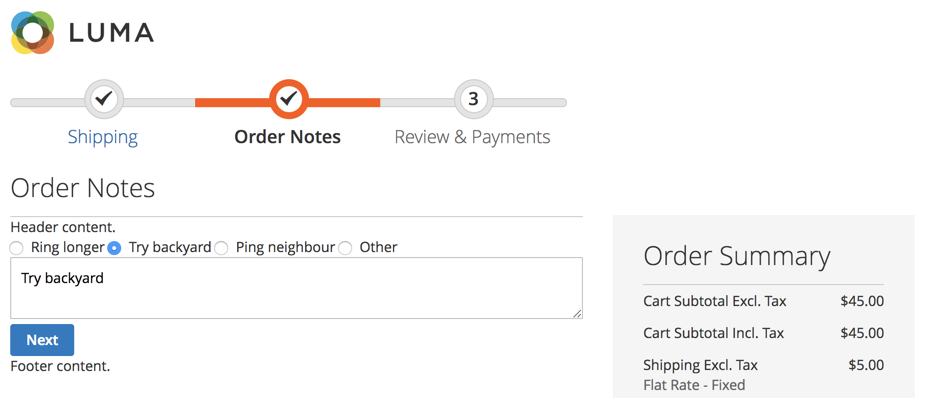
The idea behind the module is to provide a customer with an option of putting a note against their order. On top of that, we also provide a standard range of possible notes to choose from.
Assuming we have defined registration.php, composer.json, and etc/module.xml as basic module files, we can deal with the more specific details of our Magelicious_OrderNotes module.
We start by defining the <MODULE_DIR>/Setup/InstallSchema.php with content, as follows:
namespace Magelicious\OrderNotes\Setup;
class InstallSchema implements \Magento\Framework\Setup\InstallSchemaInterface
{
  public function install(
    \Magento\Framework\Setup\SchemaSetupInterface $setup,
    \Magento\Framework\Setup\ModuleContextInterface $context
  ) {
    $connection = $setup->getConnection();

    $connection->addColumn(
      $setup->getTable('quote'),
      'order_notes',
      [
        'type' => \Magento\Framework\DB\Ddl\Table::TYPE_TEXT,
        'nullable' => true,
        'comment' => 'Order Notes'
      ]
    );

    $connection->addColumn(
      $setup->getTable('sales_order'),
      'order_notes',
      [
        'type' => \Magento\Framework\DB\Ddl\Table::TYPE_TEXT,
        'nullable' => true,
        'comment' => 'Order Notes'
      ]
    );
  }
}
Our InstallSchema script creates the necessary order_notes column in both the quote and sales_order tables. This is where we will store the value of the customer's checkout note, if there is any.
We then define the <MODULE_DIR>/etc/frontend/routes.xml with content, as follows:
<config>
  <router id="standard">
    <route id="ordernotes" frontName="ordernotes">
      <module name="Magelicious_OrderNotes"/>
    </route>
  </router>
</config>
The route definition here ensures that Magento will recognize HTTP requests starting with ordernotes, and look for controller actions within our module.
We then define the <MODULE_DIR>/Controller/Index.php with content, as follows:
namespace Magelicious\OrderNotes\Controller;

abstract class Index extends \Magento\Framework\App\Action\Action
{
}
This is merely an empty base class, for our soon-to-follow controller action.
We then define the <MODULE_DIR>/Controller/Index/Process.php with content, as follows:
namespace Magelicious\OrderNotes\Controller\Index;

class Process extends \Magelicious\OrderNotes\Controller\Index
{
  protected $checkoutSession;
  protected $logger;

  public function __construct(
    \Magento\Framework\App\Action\Context $context,
    \Magento\Checkout\Model\Session $checkoutSession,
    \Psr\Log\LoggerInterface $logger
  )
  {
    $this->checkoutSession = $checkoutSession;
    $this->logger = $logger;
    parent::__construct($context);
  }

  public function execute()
  {
    // implement...
  }
}
This controller action should catch any HTTP ordernotes/index/process requests. We then extend the execute method, as follows:
public function execute()
{
  $result = [];
  try {
    if ($notes = $this->getRequest()->getParam('order_notes', null)) {
      $quote = $this->checkoutSession->getQuote();
      $quote->setOrderNotes($notes);
      $quote->save();
      $result[$quote->getId()];
    }
  } catch (\Exception $e) {
    $this->logger->critical($e);
    $result = [
      'error' => __('Something went wrong.'),
      'errorcode' => $e->getCode(),
    ];
  }
  $resultJson = $this->resultFactory->create(\Magento\Framework\Controller\ResultFactory::TYPE_JSON);
  $resultJson->setData($result);
  return $resultJson;
}
This is where we are storing the order notes on our quote object. Later on, we will pull this onto our sales order object. We further define the <MODULE_DIR>/etc/frontend/di.xml with content, as follows:
<config>
  <type name="Magento\Checkout\Model\CompositeConfigProvider">
    <arguments>
      <argument name="configProviders" xsi:type="array">
        <item name="order_notes_config_provider" xsi:type="object">
          Magelicious\OrderNotes\Model\ConfigProvider
        </item>
      </argument>
    </arguments>
  </type>
</config>
We are registering our configuration provider here. The order_notes_config_provider must be unique. We then define the <MODULE_DIR>/Model/ConfigProvider.php with content, as follows:
namespace Magelicious\OrderNotes\Model;
class ConfigProvider implements \Magento\Checkout\Model\ConfigProviderInterface
{
  public function getConfig()
  {
    return [
      'orderNotes' => [
        'title' => __('Order Notes'),
        'header' => __('Header content.'),
        'footer' => __('Footer content.'),
        'options' => [
          ['code' => 'ring', 'value' => __('Ring longer')],
          ['code' => 'backyard', 'value' => __('Try backyard')],
          ['code' => 'neighbour', 'value' => __('Ping neighbour')],
          ['code' => 'other', 'value' => __('Other')],
        ]
      ]
    ];
  }
}
This is the implementation of our order_notes_config_provider configuration provider. We can pretty much return any array structure we wish. The top-level orderNotes will be accessible later via JS components as window.checkoutConfig.orderNotes. We further define the <MODULE_DIR>/view/frontend/layout/checkout_index_index.xml with content, as follows:
<page>
  <body>
    <referenceBlock name="checkout.root">
      <arguments>
        <argument name="jsLayout" xsi:type="array">
          <item name="components" xsi:type="array">
            <item name="checkout" xsi:type="array">
              <item name="children" xsi:type="array">
                <item name="steps" xsi:type="array">
                  <item name="children" xsi:type="array">
                    <item name="order-notes" xsi:type="array">
                      <item name="component" xsi:type="string">
                        Magelicious_OrderNotes/js/view/order-notes
                      </item>
                      <item name="sortOrder" xsi:type="string">2</item>
                    <!-- closing tags -->
There is quite a nesting structure here. Our order notes component is being injected under the children component of the checkout's steps component.
We then define the <MODULE_DIR>/view/frontend/web/js/view/order-notes.js with content, as follows:
define([
  'ko',
  'uiComponent',
  'underscore',
  'Magento_Checkout/js/model/step-navigator',
  'jquery',
  'mage/translate',
  'mage/url'
], function (ko, Component, _, stepNavigator, $, $t, url) {
  'use strict';
  let checkoutConfigOrderNotes = window.checkoutConfig.orderNotes;
  return Component.extend({
    defaults: {
      template: 'Magelicious_OrderNotes/order/notes'
    },
    isVisible: ko.observable(true),
    initialize: function () {
      // TODO
    },
    navigate: function () {
      // TODO
    },
    navigateToNextStep: function () {
      // TODO
    }
  });
});
This is our uiComponent, powered by Knockout. The template configuration points to the physical location of the .html file that is used as a component's template. The navigate and navigateToNextStep are responsible for navigation between the checkout steps during checkout. Let's extend the initialize function further, as follows:
initialize: function () {
  this._super();
  stepNavigator.registerStep(
    'order_notes',
    null,
    $t('Order Notes'),
    this.isVisible,
    _.bind(this.navigate, this),
    15
  );
  return this;
}
We use the initialize method to register our order_notes step with the stepNavigator.
Let's extend the navigateToNextStep function further, as follows:
navigateToNextStep: function () {
  if ($(arguments[0]).is('form')) {
    $.ajax({
      type: 'POST',
      url: url.build('ordernotes/index/process'),
      data: $(arguments[0]).serialize(),
      showLoader: true,
      complete: function (response) {
        stepNavigator.next();
      }
    });
  }
}
We use the navigateToNextStep method to persist our data. The AJAX POST ordernotes/index/process action should grab the entire form and pass its data along.
Finally, let's add the helper methods for our .html template, as follows:
getTitle: function () {
  return checkoutConfigOrderNotes.title;
},
getHeader: function () {
  return checkoutConfigOrderNotes.header;
},
getFooter: function () {
  return checkoutConfigOrderNotes.footer;
},
getNotesOptions: function () {
  return checkoutConfigOrderNotes.options;
},
getCheckoutConfigOrderNotesTime: function () {
  return checkoutConfigOrderNotes.time;
},
setOrderNotes: function (valObj, event) {
  if (valObj.code == 'other') {
    $('[name="order_notes"]').val('');
  } else {
    $('[name="order_notes"]').val(valObj.value);
  }
  return true;
},
These are just some of the helper methods we will bind to within our .html template. They merely pull the data out from the window.checkoutConfig.orderNotes object.
We then define the <MODULE_DIR>/view/frontend/web/template/order/notes.html with content, as follows:
<li id="order_notes" data-bind="fadeVisible: isVisible">
    <div data-bind="text: getTitle()" data-role="title"></div>
    <div id="step-content" data-role="content">
        <div data-bind="text: getHeader()" data-role="header"></div>
        <!-- form -->
        <div data-bind="text: getFooter()" data-role="footer"></div>
    </div>
</li>
This is our component template, which gives it a visual structure. We expand it further by replacing the <!-- form --> with the following:
<form data-bind="submit: navigateToNextStep" novalidate="novalidate">
  <div data-bind="foreach: getNotesOptions()" class="field choice">
    <input type="radio" name="order[notes]" class="radio"
        data-bind="value: code, click: $parent.setOrderNotes"/>
    <label data-bind="attr: {'for': code}" class="label">
      <span data-bind="text: value"></span>
    </label>
  </div>
  <textarea name="order_notes"></textarea>
  <div class="actions-toolbar">
    <div class="primary">
      <button data-role="opc-continue" type="submit" class="button action continue primary">
        <span><!-- ko i18n: 'Next'--><!-- /ko --></span>
      </button>
    </div>
  </div>
</form>
The form itself is relatively simple, though it requires some knowledge of Knockout. Understanding the data binding is quite important. It allows us to bind not just text and the HTML values of HTML elements, but other attributes as well, such as the click.
We then define the <MODULE_DIR>/etc/webapi_rest/events.xml with content, as follows:
<config>
  <event name="sales_model_service_quote_submit_before">
    <observer name="orderNotesToOrder"
      instance="Magelicious\OrderNotes\Observer\SaveOrderNotesToOrder"
      shared="false"/>
  </event>
</config>
The sales_model_service_quote_submit_before event is chosen because it allows us to gain access to both quote and order objects easily at the right time in the order creation process.
We then define the <MODULE_DIR>/Observer/SaveOrderNotesToOrder.php with content, as follows:
namespace Magelicious\OrderNotes\Observer;

class SaveOrderNotesToOrder implements \Magento\Framework\Event\ObserverInterface
{
  public function execute(\Magento\Framework\Event\Observer $observer)
  {
    $event = $observer->getEvent();
    if ($notes = $event->getQuote()->getOrderNotes()) {
      $event->getOrder()
        ->setOrderNotes($notes)
        ->addStatusHistoryComment('Customer note: ' . $notes);
    }
    return $this;
  }
}
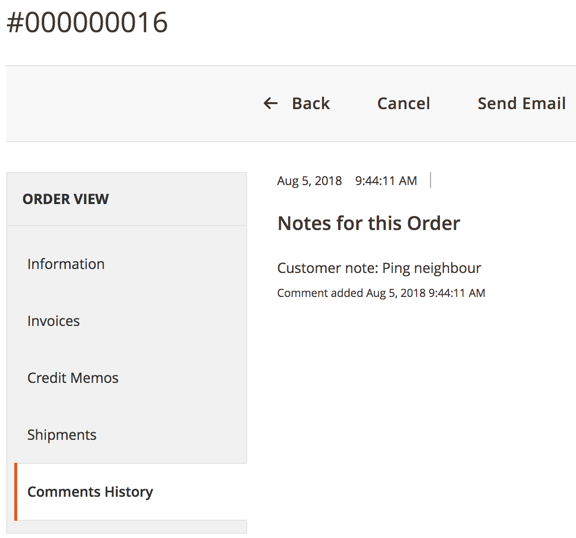
Here, we are grabbing the instance of an order object and setting the order notes to the value fetched from the order notes value of a previously stored quote. This makes the customer note appear under the Comments History tab of the Magento admin order View screen, as follows:
With this, we have finalized our little module. Even though the module's functionality is quite simple, the steps for getting it up and running were somewhat involved.