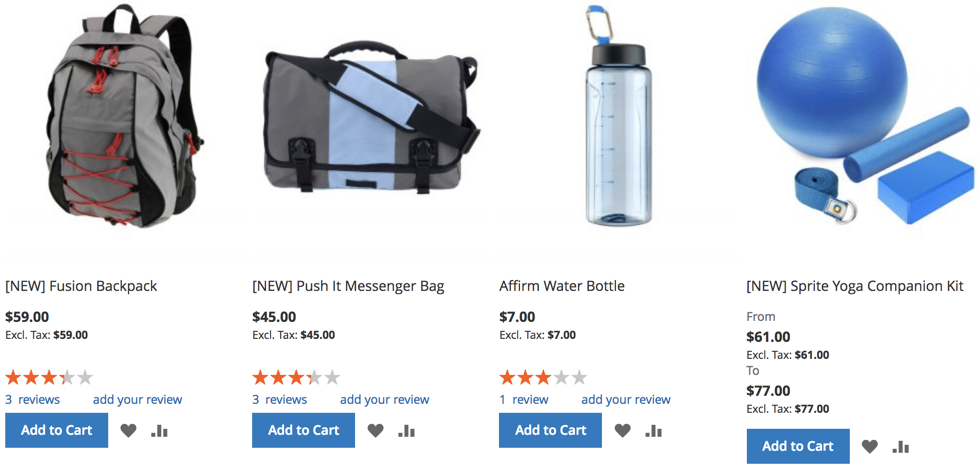
We have been asked to add a functionality that flags every new product shown on the storefront category view and product view pages with a [NEW] prefix in front of its name. New implies anything within the 5 days of the product's created_at value.
Luckily for us, we can easily control a product's name via an after plugin on a product's getName method. All it takes is to define an afterGetName plugin with a category view and product view pages constraint, further filtered by a created_at constraint.
To register the plugin, we start by creating the <MODULE_DIR>/etc/frontend/di.xml file with content, as follows:
<config>
  <type name="Magento\Catalog\Api\Data\ProductInterface">
    <plugin name="newProductFlag" type="Magelicious\Catalog\Plugin\NewProductFlag"/>
  </type>
</config>
We then create the <MODULE_DIR>/Plugin/NewProductFlag.php file with content, as follows:
namespace Magelicious\Catalog\Plugin;

class NewProductFlag
{
  protected $request;
  protected $localeDate;

  public function __construct(
    \Magento\Framework\App\RequestInterface $request,
    \Magento\Framework\Stdlib\DateTime\TimezoneInterface $localeDate
  )
  {
    $this->request = $request;
    $this->localeDate = $localeDate;
  }

  public function afterGetName(\Magento\Catalog\Api\Data\ProductInterface $subject, $result)
  {
    $pages = ['catalog_product_view', 'catalog_category_view'];

    if (in_array($this->request->getFullActionName(), $pages)) {
      $timezone = new \DateTimeZone($this->localeDate->getConfigTimezone());
      $now = new \DateTime('now', $timezone);
      $createdAt = \DateTime::createFromFormat('Y-m-d H:i:s', $subject->getCreatedAt(), $timezone);
      if ($now->diff($createdAt)->days < 5) {
        return __('[NEW] ') . $result;
      }
    }

    return $result;
  }
}
The afterGetName is our after plugin targeting the product's getName method. Using the request's getFullActionName method, we make sure our plugin is constrained to only catalog_product_view and catalog_category_view pages, or else the original product name is returned. The use of the proper timezone and diff method assures that we further filter down to only those products that we consider new. Clearing the cache at this point should allow our functionality to kick in.
The final result should look like this: