
Out of the box, Magento provides several shipping methods of its own. Unlike payment methods, which tend to be less diverse among different web shops, shipping methods are often an area of customization among merchants, which is why building a customized shipping extension is an essential skill for every Magento developer.
There are two types of shipping methods:
- online: These shipping methods base their shipping calculation on the shipping service they connect to. The Magento Open Source includes following modules that provide online shipping methods: Magento_Ups, Magento_Usps, Magento_Fedex, Magento_Dhl.
- offline: These shipping methods do their own shipping calculation, without connecting to an external service. The Magento Open Source includes a built-in Magento_OfflineShipping module, which provides Flat Rate, Table Rate, Free, and Store Pickup shipping methods.
Let's go ahead and create a Magento shipping extension Magelicious_RoyalTrek. The extension assumes an imaginary RoyalTrek carrier, with two offline shipping methods: RoyalTrek Standard and RoyalTrek 48h.
We will start off by defining <MAGELICIOUS_DIR>/RoyalTrek/registration.php as follows:
\Magento\Framework\Component\ComponentRegistrar::register(
    \Magento\Framework\Component\ComponentRegistrar::MODULE,
    'Magelicious_RoyalTrek',
    __DIR__
);
We can then define the <MAGELICIOUS_DIR>/RoyalTrek/etc/module.xml as follows:
<config>
    <module name="Magelicious_RoyalTrek" setup_version="1.0.0"/>
</config>
With these two files in place, Magento should already see our module, when enabled.
We can then go ahead and define the <MAGELICIOUS_DIR>/RoyalTrek/composer.json as follows:
{
  "name": "magelicious/module-royal-trek",
  "description": "The RoyalTrek shipping",
  "require": {
    "php": "7.0.2|7.0.4|~7.0.6|~7.1.0"
  },
  "type": "magento2-module",
  "version": "1.0.0",
  "license": [
    "OSL-3.0",
    "AFL-3.0"
  ],
  "autoload": {
    "files": [
      "registration.php"
    ],
    "psr-4": {
      "Magelicious\\RoyalTrek\\": ""
    }
  }
}
We can then define the <MAGELICIOUS_DIR>/RoyalTrek/etc/adminhtml/system.xml as follows:
<config>
  <system>
    <section id="carriers">
      <group id="royaltrek">
        <label>Royal Trek Shipping</label>
        <field id="active" type="select">
          <label>Enabled</label>
          <source_model>Magento\Config\Model\Config\Source\Yesno</source_model>
        </field>
        <field id="title" type="text">
          <label>Title</label>
        </field>
        <field id="sallowspecific" type="select">
          <label>Ship to Applicable Countries</label>
          <frontend_class>shipping-applicable-country</frontend_class>
          <source_model>Magento\Shipping\Model\Config\Source\Allspecificcountries</source_model>
        </field>
        <field id="specificcountry" type="multiselect">
          <label>Ship to Specific Countries</label>
          <can_be_empty>1</can_be_empty>
          <source_model>Magento\Directory\Model\Config\Source\Country</source_model>
        </field>
        <field id="showmethod" type="select"">
          <label>Show Method if Not Applicable</label>
          <source_model>Magento\Config\Model\Config\Source\Yesno</source_model>
        </field>
        <field id="specificerrmsg" type="textarea">
          <label>Displayed Error Message</label>
        </field>
        <field id="sort_order" type="text">
          <label>Sort Order</label>
          <validate>validate-number validate-zero-or-greater</validate>
        </field>
      </group>
      <!-- todo... -->
    </section>
  </system>
</config>
This sets the general configuration options for our shipping methods. The sallowspecific, specificcountry, showmethod, specificerrmsg and, sort_order are common configuration elements of each shipping method, as seen by examining the Magento\Shipping\Model\Carrier\AbstractCarrier class.
We can then extend the <MAGELICIOUS_DIR>/RoyalTrek/etc/adminhtml/system.xml with the following group:
<!-- The "RoyalTrek Standard" specific options -->
<group id="royaltrekstandard">
  <label><![CDATA[The "RoyalTrek Standard" shipping method]]></label>
  <fieldset_css>complex</fieldset_css>
  <field id="title" type="text">
    <label><![CDATA[Title]]></label>
  </field>
  <field id="shippingcost" type="text">
    <label><![CDATA[Shipping Cost]]></label>
    <validate>validate-number validate-zero-or-greater</validate>
  </field>
</group>
We are introducing an additional set of configuration options here, to be used with our RoyalTrek Standard method.
So, we then extend the <MAGELICIOUS_DIR>/RoyalTrek/etc/adminhtml/system.xml with the following group:
<!-- The "RoyalTrek 48h" specific options -->
<group id="royaltrek48hr">
  <label><![CDATA[The "RoyalTrek 48h" shipping method]]></label>
  <fieldset_css>complex</fieldset_css>
  <field id="title" type="text">
    <label><![CDATA[Title]]></label>
  </field>
  <field id="shippingcost" type="text">
    <label><![CDATA[Shipping Cost]]></label>
    <validate>validate-number validate-zero-or-greater</validate>
  </field>
</group>
We are introducing an additional set of configuration options here, to be used with our RoyalTrek 48h method.
We then define the <MAGELICIOUS_DIR>/RoyalTrek/etc/config.xml as follows:
<config>
  <default>
    <carriers>
      <royaltrek>
        <!-- DEFAULTS HERE -->
      </royaltrek>
    </carriers>
  </default>
</config>
The config > default > carriers > royaltrek nesting path matches the nesting path of the system.xml elements. We then replace the <!-- DEFAULTS HERE --> with following:
<active>1</active>
<title>Royal Trek Shipping</title>
<sallowspecific>0</sallowspecific>
<showmethod>0</showmethod>
<specificerrmsg>The Royal Trek shipping is not available.</specificerrmsg>
<sort_order>10</sort_order>
<model>Magelicious\RoyalTrek\Model\Carrier\RoyalTrek</model>
<royaltrekstandard>
    <title><![CDATA[RoyalTrek Standard]]></title>
    <shippingcost>4.99</shippingcost>
</royaltrekstandard>
<royaltrek48hr>
    <title><![CDATA[RoyalTrek 48h]]></title>
    <shippingcost>9.99</shippingcost>
</royaltrek48hr>
With this, we can set the default values for each of the configuration options made available via system.xml.
We then define the <MAGELICIOUS_DIR>/Model/Carrier/RoyalTrek.php as follows:
<?php

namespace Magelicious\RoyalTrek\Model\Carrier;

class RoyalTrek extends \Magento\Shipping\Model\Carrier\AbstractCarrier implements
  \Magento\Shipping\Model\Carrier\CarrierInterface {
  const CARRIER_CODE = 'royaltrek';

  const ROYAL_TREK_STANDARD = 'royaltrekstandard';
  const ROYAL_TREK_48HR = 'royaltrek48hr';

  protected $_code = self::CARRIER_CODE;
  protected $_isFixed = true;
  protected $_rateResultFactory;
  protected $_rateMethodFactory;

  public function __construct(
    \Magento\Framework\App\Config\ScopeConfigInterface $scopeConfig,
    \Magento\Quote\Model\Quote\Address\RateResult\ErrorFactory $rateErrorFactory,
    \Psr\Log\LoggerInterface $logger,
    \Magento\Shipping\Model\Rate\ResultFactory $rateResultFactory,
    \Magento\Quote\Model\Quote\Address\RateResult\MethodFactory $rateMethodFactory,
    array $data = []
  ) {
    $this->_rateResultFactory = $rateResultFactory;
    $this->_rateMethodFactory = $rateMethodFactory;
    parent::__construct($scopeConfig, $rateErrorFactory, $logger, $data);
  }

  public function collectRates(\Magento\Quote\Model\Quote\Address\RateRequest $request) {
    if (!$this->getConfigFlag('active')) {
      return false;
    }

    $result = $this->_rateResultFactory->create();
    // Todo...
    return $result;
  }

  public function getAllowedMethods() {
    return [
      self::ROYAL_TREK_STANDARD => $this->getConfigData(self::ROYAL_TREK_STANDARD . '/title'),
      self::ROYAL_TREK_48HR => $this->getConfigData(self::ROYAL_TREK_48HR . '/title'),
    ];
  }

  private function getMethodTitle($method) {
    return $this->getConfigData($method . '/title');
  }

  private function getMethodPrice($method) {
    return $this->getMethodCost($method);
  }

  private function getMethodCost($method) {
    return $this->getConfigData($method . '/shippingcost');
  }
}
The basic implementation of theMagelicious\RoyalTrek\Model\Carrier\RoyalTrek class is highly determined by the implementation of its underlying Magento\Shipping\Model\Carrier\AbstractCarrier parent class and Magento\Shipping\Model\Carrier\CarrierInterface interface. The bare minimum implies setting up the $_code value and implementing the collectRates method. The $_code value is an extremely important bit of information here. We need to make sure it is unique among all of the enabled shipping extensions. The collectRates method is where the actual shipping calculation implementation happens.
Let's go ahead and extend the <MAGELICIOUS_DIR>/Model/Carrier/RoyalTrek.php with the following:
$method = $this->_rateMethodFactory->create();
$method->setCarrier($this->_code);
$method->setCarrierTitle($this->getConfigData('title'));
$method->setMethod(self::ROYAL_TREK_STANDARD);
$method->setMethodTitle($this->getMethodTitle($method->getMethod()));
$method->setPrice($this->getMethodPrice($method->getMethod()));
$method->setCost($this->getMethodCost($method->getMethod()));
$method->setErrorMessage(__('The %1 method error message here.'));
$result->append($method);
Using the factory, we can create an instance of Magento\Quote\Model\Quote\Address\RateResult\Method. This is the individual shipping method that we wish to make available as a choice during checkout. We then set the required values for the carrier: method, price, cost, and possible error message. With our royaltrekstandard method properly set, we finally pass it on to the $result object.
Let's further extend the <MAGELICIOUS_DIR>/Model/Carrier/RoyalTrek.php with the following:
$method = $this->_rateMethodFactory->create();
$method->setCarrier($this->_code);
$method->setCarrierTitle($this->getConfigData('title'));
$method->setMethod(self::ROYAL_TREK_48HR);
$method->setMethodTitle($this->getMethodTitle($method->getMethod()));
$method->setPrice($this->getMethodPrice($method->getMethod()));
$method->setCost($this->getMethodCost($method->getMethod()));
$method->setErrorMessage(__('The %1 method error message here.'));
$result->append($method);
Much like with the previous example, here we should add our royaltrek48hr to the $result object.
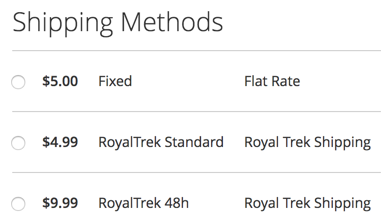
The end result should bring forth our two RoyalTrek shipping methods to the storefront checkout Shipping step, as follows:
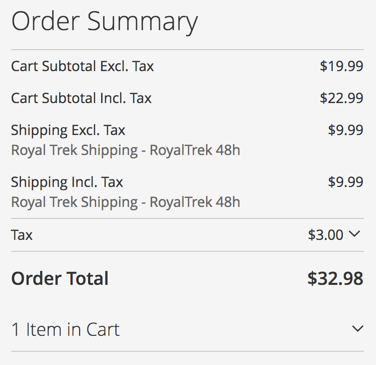
The Order Summary section of the Review & Payments step should also reflect on the method selected in the Shipping step, as follows:
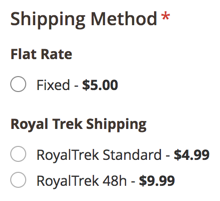
Likewise, the admin Create New Order screens should also show our RoyalTrek shipping methods as follows:
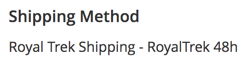
Finally, the successfully made order should reflect the RoyalTrek 48h shipping method selection in its new order email, and the customer's My Account area, as follows:
With our shipping methods confirmed as working, let's go ahead and look for a way of distributing it.