Table of Contents for
Intermediate C Programming
 Intermediate C Programming
Published by
CRC Press, 2015
Intermediate C Programming
Published by
CRC Press, 2015
- Front Cover
- Contents (1/2)
- Contents (2/2)
- List of Figures (1/2)
- List of Figures (2/2)
- List of Tables
- Foreword
- Preface
- Author, Reviewers, and Artist
- Rules in Software Development
- Source Code
- I. Computer Storage: Memory and File
- 1. Program Execution (1/2)
- 1. Program Execution (2/2)
- 2. Stack Memory (1/5)
- 2. Stack Memory (2/5)
- 2. Stack Memory (3/5)
- 2. Stack Memory (4/5)
- 2. Stack Memory (5/5)
- 3. Prevent, Detect, and Remove Bugs (1/2)
- 3. Prevent, Detect, and Remove Bugs (2/2)
- 4. Pointers (1/6)
- 4. Pointers (2/6)
- 4. Pointers (3/6)
- 4. Pointers (4/6)
- 4. Pointers (5/6)
- 4. Pointers (6/6)
- 5. Writing and Testing Programs (1/4)
- 5. Writing and Testing Programs (2/4)
- 5. Writing and Testing Programs (3/4)
- 5. Writing and Testing Programs (4/4)
- 6. Strings (1/3)
- 6. Strings (2/3)
- 6. Strings (3/3)
- 7. Programming Problems and Debugging (1/4)
- 7. Programming Problems and Debugging (2/4)
- 7. Programming Problems and Debugging (3/4)
- 7. Programming Problems and Debugging (4/4)
- 8. Heap Memory (1/3)
- 8. Heap Memory (2/3)
- 8. Heap Memory (3/3)
- 9. Programming Problems Using Heap Memory (1/4)
- 9. Programming Problems Using Heap Memory (2/4)
- 9. Programming Problems Using Heap Memory (3/4)
- 9. Programming Problems Using Heap Memory (4/4)
- 10. Reading and Writing Files (1/3)
- 10. Reading and Writing Files (2/3)
- 10. Reading and Writing Files (3/3)
- 11. Programming Problems Using File (1/2)
- 11. Programming Problems Using File (2/2)
- II. Recursion
- 12. Recursion (1/4)
- 12. Recursion (2/4)
- 12. Recursion (3/4)
- 12. Recursion (4/4)
- 13. Recursive C Functions (1/4)
- 13. Recursive C Functions (2/4)
- 13. Recursive C Functions (3/4)
- 13. Recursive C Functions (4/4)
- 14. Integer Partition (1/5)
- 14. Integer Partition (2/5)
- 14. Integer Partition (3/5)
- 14. Integer Partition (4/5)
- 14. Integer Partition (5/5)
- 15. Programming Problems Using Recursion (1/5)
- 15. Programming Problems Using Recursion (2/5)
- 15. Programming Problems Using Recursion (3/5)
- 15. Programming Problems Using Recursion (4/5)
- 15. Programming Problems Using Recursion (5/5)
- III. Structure
- 16. Programmer-Defined Data Types (1/6)
- 16. Programmer-Defined Data Types (2/6)
- 16. Programmer-Defined Data Types (3/6)
- 16. Programmer-Defined Data Types (4/6)
- 16. Programmer-Defined Data Types (5/6)
- 16. Programmer-Defined Data Types (6/6)
- 17. Programming Problems Using Structure (1/4)
- 17. Programming Problems Using Structure (2/4)
- 17. Programming Problems Using Structure (3/4)
- 17. Programming Problems Using Structure (4/4)
- 18. Linked Lists (1/3)
- 18. Linked Lists (2/3)
- 18. Linked Lists (3/3)
- 19. Programming Problems Using Linked List (1/2)
- 19. Programming Problems Using Linked List (2/2)
- 20. Binary Search Trees (1/4)
- 20. Binary Search Trees (2/4)
- 20. Binary Search Trees (3/4)
- 20. Binary Search Trees (4/4)
- 21. Parallel Programming Using Threads (1/5)
- 21. Parallel Programming Using Threads (2/5)
- 21. Parallel Programming Using Threads (3/5)
- 21. Parallel Programming Using Threads (4/5)
- 21. Parallel Programming Using Threads (5/5)
- IV. Applications
- 22. Finding the Exit of a Maze (1/5)
- 22. Finding the Exit of a Maze (2/5)
- 22. Finding the Exit of a Maze (3/5)
- 22. Finding the Exit of a Maze (4/5)
- 22. Finding the Exit of a Maze (5/5)
- 23. Image Processing (1/3)
- 23. Image Processing (2/3)
- 23. Image Processing (3/3)
- 24. Huffman Compression (1/10)
- 24. Huffman Compression (2/10)
- 24. Huffman Compression (3/10)
- 24. Huffman Compression (4/10)
- 24. Huffman Compression (5/10)
- 24. Huffman Compression (6/10)
- 24. Huffman Compression (7/10)
- 24. Huffman Compression (8/10)
- 24. Huffman Compression (9/10)
- 24. Huffman Compression (10/10)
- A. Linux
- B. Version Control
- C. Integrated Development Environments (IDE) (1/3)
- C. Integrated Development Environments (IDE) (2/3)
- C. Integrated Development Environments (IDE) (3/3)
Stack Memory 29
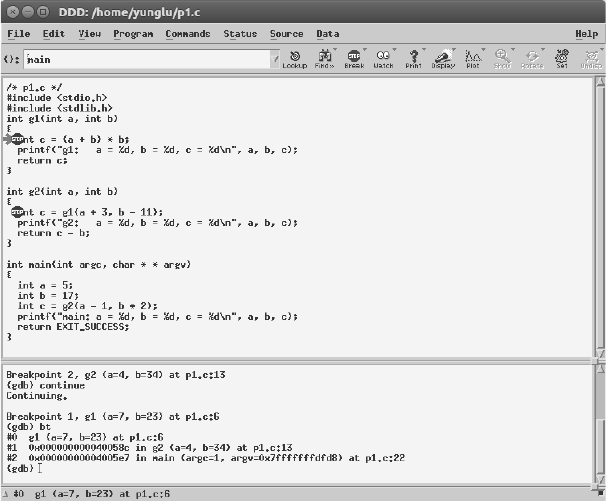
This command means “backtrace”. What do you see in the debugger?
(gdb) bt
#0 g1 (a=7, b=23) at p6.c:6
#1 0x0000000000400554 in g2 (a=4, b=34) at p6.c:13
#2 0x00000000004005b2 in main (argc=1, argv=0x7fffffffe4f8) at p1.c:22
The values of a and b are shown in the top frame. The beginning of each line shows the
frames (0, 1, and 2) of the call stack, corresponding to the functions g1, g2, and main. You
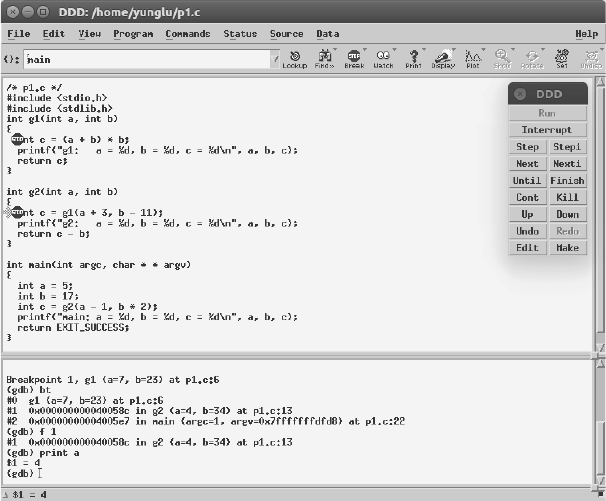
can use the f command to see different frames: for example, type
(gdb) f 1
to go to frame 1, i.e., the frame of function g2. The values of a and b can be displayed again.
What are their values? The digits after 0x are likely different on your computer; these are
the addresses. In g2’s frame, the values of a and b are different from the values in the top
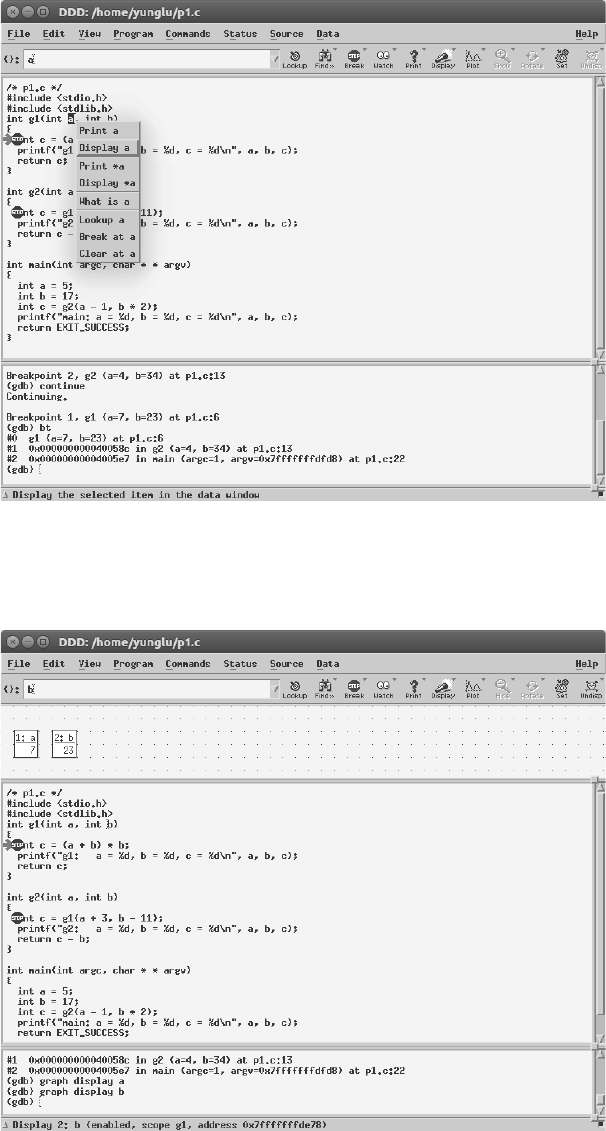
frame. Fig. 2.6 to Fig. 2.9 show some screenshots of DDD.
FIGURE 2.6: Enter the commands at the bottom of DDD.
30 Intermediate C Programming
FIGURE 2.7: Use the mouse to select a inside g1. Click the right mouse button and select
“Display a”. Do the same for b.
FIGURE 2.8: The values of a and b in function g1 are shown.
Stack Memory 31
FIGURE 2.9: Use the f command to see different frames.
This page intentionally left blankThis page intentionally left blank