Table of Contents for
Intermediate C Programming
 Intermediate C Programming
Published by
CRC Press, 2015
Intermediate C Programming
Published by
CRC Press, 2015
- Front Cover
- Contents (1/2)
- Contents (2/2)
- List of Figures (1/2)
- List of Figures (2/2)
- List of Tables
- Foreword
- Preface
- Author, Reviewers, and Artist
- Rules in Software Development
- Source Code
- I. Computer Storage: Memory and File
- 1. Program Execution (1/2)
- 1. Program Execution (2/2)
- 2. Stack Memory (1/5)
- 2. Stack Memory (2/5)
- 2. Stack Memory (3/5)
- 2. Stack Memory (4/5)
- 2. Stack Memory (5/5)
- 3. Prevent, Detect, and Remove Bugs (1/2)
- 3. Prevent, Detect, and Remove Bugs (2/2)
- 4. Pointers (1/6)
- 4. Pointers (2/6)
- 4. Pointers (3/6)
- 4. Pointers (4/6)
- 4. Pointers (5/6)
- 4. Pointers (6/6)
- 5. Writing and Testing Programs (1/4)
- 5. Writing and Testing Programs (2/4)
- 5. Writing and Testing Programs (3/4)
- 5. Writing and Testing Programs (4/4)
- 6. Strings (1/3)
- 6. Strings (2/3)
- 6. Strings (3/3)
- 7. Programming Problems and Debugging (1/4)
- 7. Programming Problems and Debugging (2/4)
- 7. Programming Problems and Debugging (3/4)
- 7. Programming Problems and Debugging (4/4)
- 8. Heap Memory (1/3)
- 8. Heap Memory (2/3)
- 8. Heap Memory (3/3)
- 9. Programming Problems Using Heap Memory (1/4)
- 9. Programming Problems Using Heap Memory (2/4)
- 9. Programming Problems Using Heap Memory (3/4)
- 9. Programming Problems Using Heap Memory (4/4)
- 10. Reading and Writing Files (1/3)
- 10. Reading and Writing Files (2/3)
- 10. Reading and Writing Files (3/3)
- 11. Programming Problems Using File (1/2)
- 11. Programming Problems Using File (2/2)
- II. Recursion
- 12. Recursion (1/4)
- 12. Recursion (2/4)
- 12. Recursion (3/4)
- 12. Recursion (4/4)
- 13. Recursive C Functions (1/4)
- 13. Recursive C Functions (2/4)
- 13. Recursive C Functions (3/4)
- 13. Recursive C Functions (4/4)
- 14. Integer Partition (1/5)
- 14. Integer Partition (2/5)
- 14. Integer Partition (3/5)
- 14. Integer Partition (4/5)
- 14. Integer Partition (5/5)
- 15. Programming Problems Using Recursion (1/5)
- 15. Programming Problems Using Recursion (2/5)
- 15. Programming Problems Using Recursion (3/5)
- 15. Programming Problems Using Recursion (4/5)
- 15. Programming Problems Using Recursion (5/5)
- III. Structure
- 16. Programmer-Defined Data Types (1/6)
- 16. Programmer-Defined Data Types (2/6)
- 16. Programmer-Defined Data Types (3/6)
- 16. Programmer-Defined Data Types (4/6)
- 16. Programmer-Defined Data Types (5/6)
- 16. Programmer-Defined Data Types (6/6)
- 17. Programming Problems Using Structure (1/4)
- 17. Programming Problems Using Structure (2/4)
- 17. Programming Problems Using Structure (3/4)
- 17. Programming Problems Using Structure (4/4)
- 18. Linked Lists (1/3)
- 18. Linked Lists (2/3)
- 18. Linked Lists (3/3)
- 19. Programming Problems Using Linked List (1/2)
- 19. Programming Problems Using Linked List (2/2)
- 20. Binary Search Trees (1/4)
- 20. Binary Search Trees (2/4)
- 20. Binary Search Trees (3/4)
- 20. Binary Search Trees (4/4)
- 21. Parallel Programming Using Threads (1/5)
- 21. Parallel Programming Using Threads (2/5)
- 21. Parallel Programming Using Threads (3/5)
- 21. Parallel Programming Using Threads (4/5)
- 21. Parallel Programming Using Threads (5/5)
- IV. Applications
- 22. Finding the Exit of a Maze (1/5)
- 22. Finding the Exit of a Maze (2/5)
- 22. Finding the Exit of a Maze (3/5)
- 22. Finding the Exit of a Maze (4/5)
- 22. Finding the Exit of a Maze (5/5)
- 23. Image Processing (1/3)
- 23. Image Processing (2/3)
- 23. Image Processing (3/3)
- 24. Huffman Compression (1/10)
- 24. Huffman Compression (2/10)
- 24. Huffman Compression (3/10)
- 24. Huffman Compression (4/10)
- 24. Huffman Compression (5/10)
- 24. Huffman Compression (6/10)
- 24. Huffman Compression (7/10)
- 24. Huffman Compression (8/10)
- 24. Huffman Compression (9/10)
- 24. Huffman Compression (10/10)
- A. Linux
- B. Version Control
- C. Integrated Development Environments (IDE) (1/3)
- C. Integrated Development Environments (IDE) (2/3)
- C. Integrated Development Environments (IDE) (3/3)

Chapter 23
Image Processing
23.1 Structure for Image . . . . . . . . . . . . . . . . . . . . . . . . . . . . . . . . . . . . . . . . . . . . . . . . . . . . . . . . . . . . 381
23.2 Processing Images . . . . . . . . . . . . . . . . . . . . . . . . . . . . . . . . . . . . . . . . . . . . . . . . . . . . . . . . . . . . . . 387
23.2.1 Image Pixels and Colors . . . . . . . . . . . . . . . . . . . . . . . . . . . . . . . . . . . . . . . . . . . . . . . 387
23.2.2 Processing Functions . . . . . . . . . . . . . . . . . . . . . . . . . . . . . . . . . . . . . . . . . . . . . . . . . . 388
23.2.3 Applying a Color Filter . . . . . . . . . . . . . . . . . . . . . . . . . . . . . . . . . . . . . . . . . . . . . . . . 389
23.2.4 Inverting the Image Colors . . . . . . . . . . . . . . . . . . . . . . . . . . . . . . . . . . . . . . . . . . . . 389
23.2.5 Edge Detection . . . . . . . . . . . . . . . . . . . . . . . . . . . . . . . . . . . . . . . . . . . . . . . . . . . . . . . . 390
23.2.6 Color Equalization . . . . . . . . . . . . . . . . . . . . . . . . . . . . . . . . . . . . . . . . . . . . . . . . . . . . . 391
The rapid growth of digital photography is one of the most important technological changes
in the past fifteen years. Cameras are now standard on mobile phones, tablets, and laptops.
There is also a proliferation of webcams and surveillance cameras. All of these digital images
call for clever applications to improve our lives. For example, social media websites use facial
recognition in order to make it easier to see photos of your friends. Future applications may
be able to determine what people are doing in images, or sequences of images.
This chapter introduces some basics of image processing. The main goal of this chapter
is to explain how to read and write images, as well as how to modify the colors in the
image pixels. For simplicity, this chapter considers only one image format: bitmap (BMP).
BMP files are not normally compressed and the pixels are independently stored. A more
commonly used format is called Joint Photographic Experts Group, also known as JPEG.
JPEG files are compressed using the discrete cosine transform (DCT). This compression
algorithm is beyond the scope of this book.
23.1 Structure for Image
An image includes many pixels. Each pixel is a dot in the image and it has one single
color. The colors of the pixels are called the “data” of the image. In addition to the colors,
an image has additional information about the image. For example, if it is a photograph,
the file may have the date when the photo was taken, the brand of the camera, etc. The
additional information is separate from the pixel colors, but describes something that may
be interesting about the pixels. This additional information is called “metadata”. When
taking a photograph with a digital camera, the camera records a wide range of metadata.
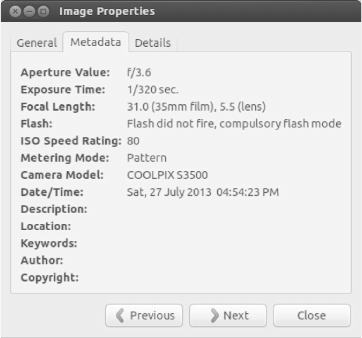
Fig. 23.1 shows the metadata of a photograph taken by a Nikon Coolpix S3500 camera. A
different camera model or a different brand may produce different types of metadata.
A bitmap image file has two parts. The first part is the metadata (also called header).
The second part is the data. The header has 54 bytes in length and the size of the data
depends on the number of pixels.
The header is defined as:
381
382 Intermediate C Programming
FIGURE 23.1: Example of metadata: the exposure time, the focal length, the time and
the date, etc.
// bmph eader . h1
#i f n d e f _BMPHE ADER_H_2
#d ef in e _BM P HEADER _H_3
#in clude < stdint .h >4
// tell compiler not to add space between the attribute s5
#pragma pack (1)6
// A BMP file has a header (54 bytes ) and data7
8
typedef s t ru ct9
{10
uint16_t type ; // Magic ide n tifier11
uint32_t size ; // File size in bytes12
uint16_t reserved1 ; // Not used13
uint16_t reserved2 ; // Not used14
uint32_t offset ; //15
uint32_t header_ size ; // Header size in bytes16
uint32_t width ; // Width of the image17
uint32_t height ; // Height of image18
uint16_t planes ; // Number of color planes19
uint16_t bits ; // Bits per pixel20
uint32_t compres sion ; // Compr e ssion type21
uint32_t imagesize ; // Image size in bytes22
uint32_t xresolu tion ; // Pixels per meter23
uint32_t yresolu tion ; // Pixels per meter24
uint32_t ncolours ; // Number of colors25
uint32_t impo rtantc olour s ; // Impor t ant colors26
27
} BMP _ Header ;28
#e ndif29
This header file introduces several new concepts. The sixth line tells the compiler not to add
any padding between the attributes of a structure. This ensures that the size of a header
Image Processing 383
object is precisely 54 bytes. Without this line, the compiler may align the attributes for
better performance.
Another new concept is including the file <stdint.h>. This file contains definitions of
integer types that are guaranteed to have the same sizes on different machines. The int
type on one machine may have a different size from the int type on another machine. When
reading a 54 byte head from disk, we need to use the same size for the header regardless
of the machine. These types defined in <stdint.h> all have int in them, followed by the
number of bits, and t. Thus, a 32-bit integer is int32 t. If the type is unsigned, then it is
prefixed with a u. An unsigned 16-bit integer is uint16 t.
In the bitmap header structure, some attributes are 16 bits and the others are 32 bits.
They are all unsigned, because none of the attributes can take on negative values. The
order of the attributes is important because the order must meet the bitmap specification.
Reordering the attributes will cause errors. The size of the header is calculated as follows:
Attribute Type Size (Bytes) Cumulative Size (Bytes)
type uint16 t 2 2
size uint32 t 4 6
reserved1 uint16 t 2 8
reserved2 uint16 t 2 10
offset uint32 t 4 14
header size uint32 t 4 18
width uint32 t 4 22
height uint32 t 4 26
planes uint16 t 2 28
bits uint16 t 2 30
compression uint32 t 4 34
imagesize uint32 t 4 38
xresolution uint32 t 4 42
yresolution uint32 t 4 46
ncolours uint32 t 4 50
importantcolours uint32 t 4 54
To read the image header from file, call fread as follows:
FILE * fptr = fopen ( filename , "r ");1
i f ( fptr == NULL )2
{3
return NULL ;4
}5
BMP_Hea d er header ;6
i f ( fread (& header , s i z e o f ( BM P_Header ) , 1, fptr ) != 1)7
{8
// error9
}10
The header has a “magic number” whose value must be 0X4D42. This is an easy way to
check whether or not the file is a valid BMP file. If the value is not 0X4D42, then it cannot
be a BMP file. Using the magic number is a quick, but imperfect, solution for determining
whether it is a BMP file. The size attribute in the header is the size of the entire file,
including the header. Each pixel has three color values: red, green, and blue. Each color
uses one byte. Thus, the value of bits is 24 bits per pixel. The images considered in this
chapter have only one image plane and compression is not used. The correct value for planes
should be 1; the correct value for compression should be 0.

384 Intermediate C Programming
We cannot store the image pixels in the header struct, because the header has a fixed
size. The header merely tells us how to read the rest of the file. To store the pixels in
memory, we need to use another type of structure. We will call this structure BMP Image,
as shown below.
// bmpimag e . h1
#i f n d e f _BMPIMAG E_H2
#d ef in e _BMP I MAGE_H3
#in clude " bmphea d er .h "4
typedef s t ru ct5
{6
BMP_Hea d er header ;7
unsigned int data_size ;8
unsigned int width ;9
unsigned int height ;10
unsigned int bytes _per_p ixel ;11
unsigned char * data ;12
} BMP_ I mage ;13
#e ndif14
A BMP Image includes the header, data size, width and height (duplicated from the
header), the number of bytes per pixel, and a pointer to the pixel data. The data size is
the size of the file after subtracting the size of the header, i.e., sizeof(BMP Header). Even
though sizeof(BMP Header) is 54, it is bad to write 54 directly. The size can be derived from
sizeof(BMP Header). Few people reading the code will know what 54 means, but every C
programmer will instantly understand sizeof(BMP Header). Therefore, you should not use
“54”. The number of bytes per pixel is the number of bits per pixel divided by 8. because
one byte is 8 bits. The following listing shows the header file and an implementation of
reading and saving image files.
// bmpfile .h1
#i f n d e f _BMPFILE _H_2
#d ef in e _BMP F ILE_H_3
#in clude " bmpimage .h "4
// open a BMP image given a filena m e5
// return a pointer to a BMP image if success6
// returns NULL if failure .7
BMP_Image * BMP_ o pen ( const char * fi l ename );8
// save a BMP image to the given a filename9
// return 0 if failure10
// return 1 if success11
int BMP_save ( const BMP_Image * image , const char * filen a me ) ;12
// release the memory of a BMP image st r ucture13
void BMP_des troy ( BMP_Im age * image );14
#e ndif15
// bmpfile .c1
#in clude < stdio .h >2
#in clude < stdlib .h >3
#in clude " bmpfile . h"4
// correct values for the header5
#d ef in e MAGI C _VALUE 0 X4D426
#d ef in e BIT S_PER_ PIXEL 247
Image Processing 385
#d ef in e NUM_PLAN E 18
#d ef in e COMP R ESSION 09
#d ef in e BIT S _PER_B YTE 810
11
// return 0 if the header is invalid12
// return 1 if the header is valid13
s t a t i c i n t chec kHeader ( B MP_Header * hdr )14
{15
i f (( hdr -> type ) != M AGIC_VAL UE )16
{17
return 0;18
}19
i f (( hdr -> bits ) != BITS_ P ER_PI X EL )20
{21
return 0;22
}23
i f (( hdr -> planes ) != NUM _ PLANE )24
{25
return 0;26
}27
i f (( hdr -> co mpression ) != C O MPRESSIO N )28
{29
return 0;30
}31
return 1;32
}33
// close opened file and release memory34
BMP_Image * cleanUp ( FILE * fptr , BM P _Image * img )35
{36
i f ( fptr != NULL )37
{38
fclose ( fptr ) ;39
}40
i f ( img != NULL )41
{42
i f ( img -> data != NULL )43
{44
free ( img -> data ) ;45
}46
free ( img );47
}48
return NULL ;49
}50
BMP_Image * BMP_ o pen ( const char * fi l ename )51
{52
FILE * fptr = NULL ;53
BMP_Image * img = NULL ;54
fptr = fopen ( filename , " r") ; // " rb " u nnecessa r y in Linux55
i f ( fptr == NULL )56
{57
return cleanUp ( fptr , img ) ;58