Table of Contents for
Intermediate C Programming
 Intermediate C Programming
Published by
CRC Press, 2015
Intermediate C Programming
Published by
CRC Press, 2015
- Front Cover
- Contents (1/2)
- Contents (2/2)
- List of Figures (1/2)
- List of Figures (2/2)
- List of Tables
- Foreword
- Preface
- Author, Reviewers, and Artist
- Rules in Software Development
- Source Code
- I. Computer Storage: Memory and File
- 1. Program Execution (1/2)
- 1. Program Execution (2/2)
- 2. Stack Memory (1/5)
- 2. Stack Memory (2/5)
- 2. Stack Memory (3/5)
- 2. Stack Memory (4/5)
- 2. Stack Memory (5/5)
- 3. Prevent, Detect, and Remove Bugs (1/2)
- 3. Prevent, Detect, and Remove Bugs (2/2)
- 4. Pointers (1/6)
- 4. Pointers (2/6)
- 4. Pointers (3/6)
- 4. Pointers (4/6)
- 4. Pointers (5/6)
- 4. Pointers (6/6)
- 5. Writing and Testing Programs (1/4)
- 5. Writing and Testing Programs (2/4)
- 5. Writing and Testing Programs (3/4)
- 5. Writing and Testing Programs (4/4)
- 6. Strings (1/3)
- 6. Strings (2/3)
- 6. Strings (3/3)
- 7. Programming Problems and Debugging (1/4)
- 7. Programming Problems and Debugging (2/4)
- 7. Programming Problems and Debugging (3/4)
- 7. Programming Problems and Debugging (4/4)
- 8. Heap Memory (1/3)
- 8. Heap Memory (2/3)
- 8. Heap Memory (3/3)
- 9. Programming Problems Using Heap Memory (1/4)
- 9. Programming Problems Using Heap Memory (2/4)
- 9. Programming Problems Using Heap Memory (3/4)
- 9. Programming Problems Using Heap Memory (4/4)
- 10. Reading and Writing Files (1/3)
- 10. Reading and Writing Files (2/3)
- 10. Reading and Writing Files (3/3)
- 11. Programming Problems Using File (1/2)
- 11. Programming Problems Using File (2/2)
- II. Recursion
- 12. Recursion (1/4)
- 12. Recursion (2/4)
- 12. Recursion (3/4)
- 12. Recursion (4/4)
- 13. Recursive C Functions (1/4)
- 13. Recursive C Functions (2/4)
- 13. Recursive C Functions (3/4)
- 13. Recursive C Functions (4/4)
- 14. Integer Partition (1/5)
- 14. Integer Partition (2/5)
- 14. Integer Partition (3/5)
- 14. Integer Partition (4/5)
- 14. Integer Partition (5/5)
- 15. Programming Problems Using Recursion (1/5)
- 15. Programming Problems Using Recursion (2/5)
- 15. Programming Problems Using Recursion (3/5)
- 15. Programming Problems Using Recursion (4/5)
- 15. Programming Problems Using Recursion (5/5)
- III. Structure
- 16. Programmer-Defined Data Types (1/6)
- 16. Programmer-Defined Data Types (2/6)
- 16. Programmer-Defined Data Types (3/6)
- 16. Programmer-Defined Data Types (4/6)
- 16. Programmer-Defined Data Types (5/6)
- 16. Programmer-Defined Data Types (6/6)
- 17. Programming Problems Using Structure (1/4)
- 17. Programming Problems Using Structure (2/4)
- 17. Programming Problems Using Structure (3/4)
- 17. Programming Problems Using Structure (4/4)
- 18. Linked Lists (1/3)
- 18. Linked Lists (2/3)
- 18. Linked Lists (3/3)
- 19. Programming Problems Using Linked List (1/2)
- 19. Programming Problems Using Linked List (2/2)
- 20. Binary Search Trees (1/4)
- 20. Binary Search Trees (2/4)
- 20. Binary Search Trees (3/4)
- 20. Binary Search Trees (4/4)
- 21. Parallel Programming Using Threads (1/5)
- 21. Parallel Programming Using Threads (2/5)
- 21. Parallel Programming Using Threads (3/5)
- 21. Parallel Programming Using Threads (4/5)
- 21. Parallel Programming Using Threads (5/5)
- IV. Applications
- 22. Finding the Exit of a Maze (1/5)
- 22. Finding the Exit of a Maze (2/5)
- 22. Finding the Exit of a Maze (3/5)
- 22. Finding the Exit of a Maze (4/5)
- 22. Finding the Exit of a Maze (5/5)
- 23. Image Processing (1/3)
- 23. Image Processing (2/3)
- 23. Image Processing (3/3)
- 24. Huffman Compression (1/10)
- 24. Huffman Compression (2/10)
- 24. Huffman Compression (3/10)
- 24. Huffman Compression (4/10)
- 24. Huffman Compression (5/10)
- 24. Huffman Compression (6/10)
- 24. Huffman Compression (7/10)
- 24. Huffman Compression (8/10)
- 24. Huffman Compression (9/10)
- 24. Huffman Compression (10/10)
- A. Linux
- B. Version Control
- C. Integrated Development Environments (IDE) (1/3)
- C. Integrated Development Environments (IDE) (2/3)
- C. Integrated Development Environments (IDE) (3/3)
456 Intermediate C Programming
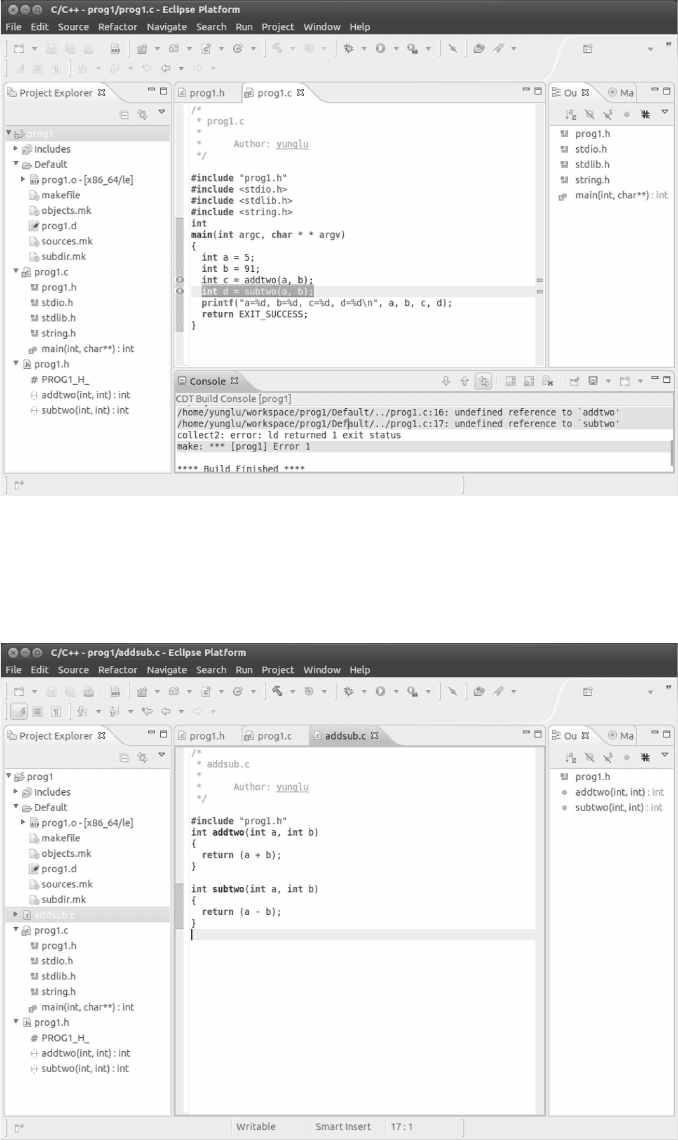
FIGURE C.9: When you click Project and select Build Project, Eclipse will say “undefined
reference to addtwo” and “undefined reference to subtwo”. This should be expected because
these functions have not been implemented. Eclipse’s error message is displayed in the
Console. Eclipse also highlights the two lines that have the errors.
FIGURE C.10: To solve the build problem, we add another source file called addsub.c
and in this file we define the two functions.
Integrated Development Environments (IDE) 457
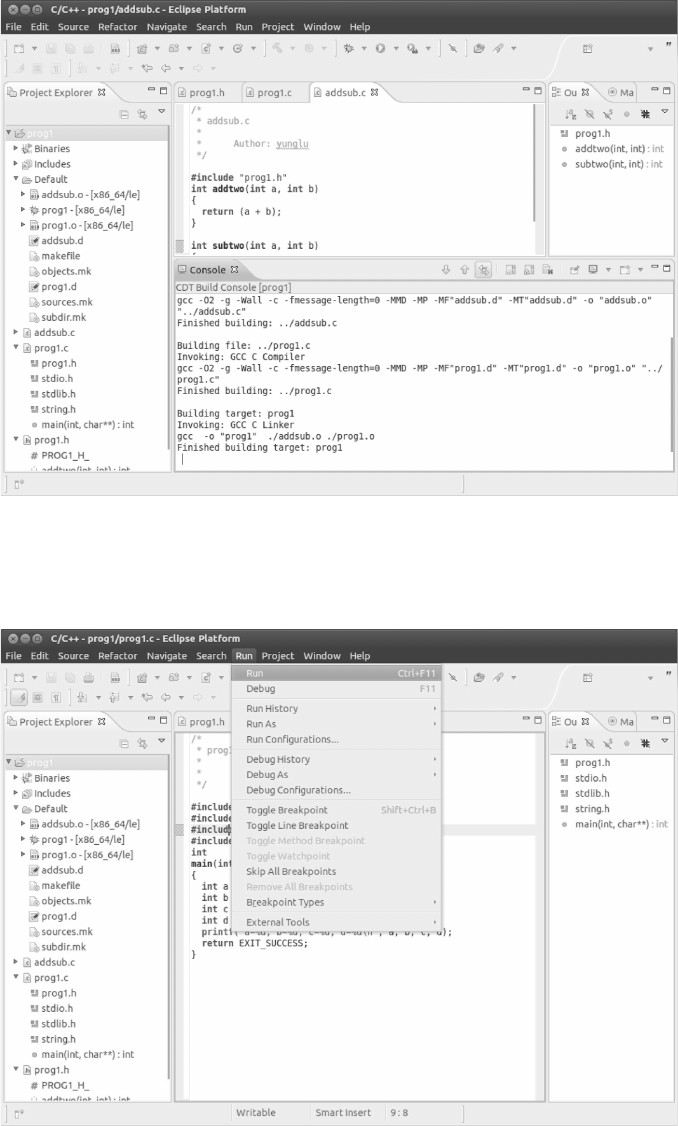
FIGURE C.11: When you build the project, Eclipse should say that the project is built
successfully. A valid Makefile is automatically generated by Eclipse.
FIGURE C.12: Running: Click Run in the menubar and then select Run.
458 Intermediate C Programming
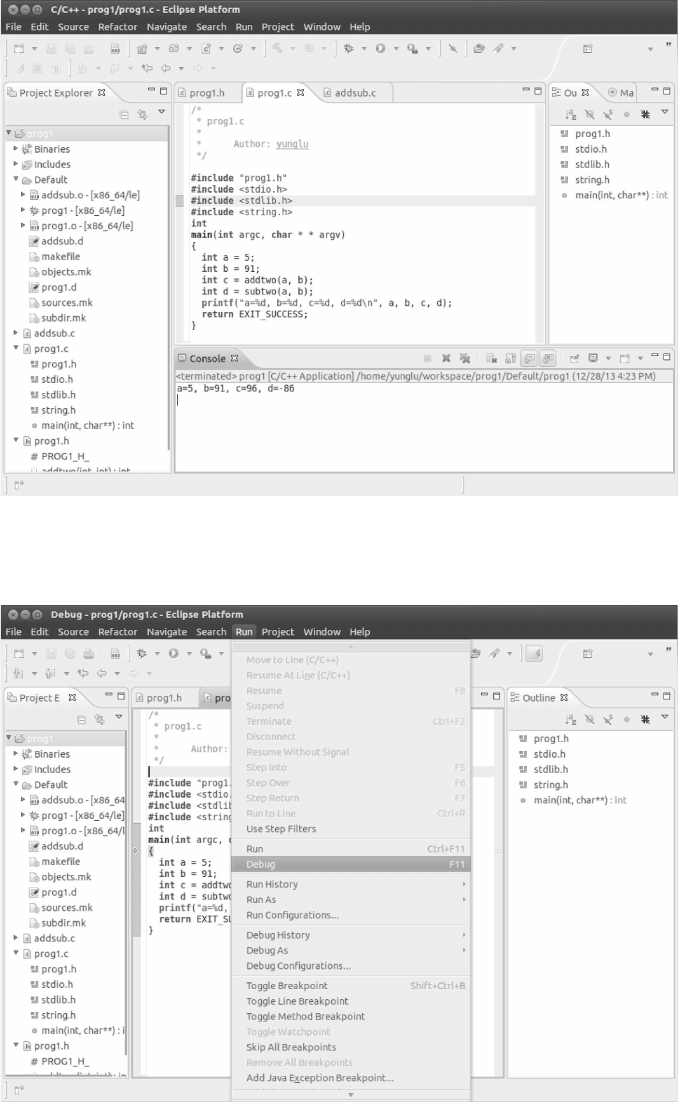
FIGURE C.13: The program’s output is shown in the Console.
FIGURE C.14: Eclipse uses gdb to debug programs, and also provides a convenient user
interface. To debug a program, click Run and select Debug.
Integrated Development Environments (IDE) 459
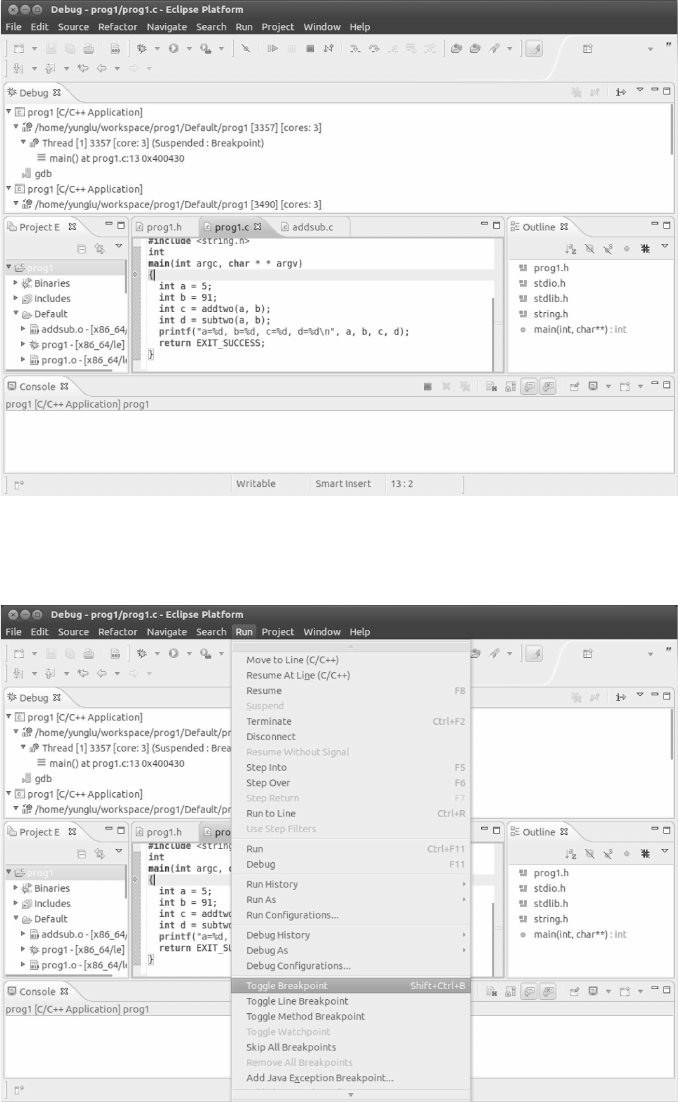
FIGURE C.15: Eclipse starts the program and stops at the first statement in main. This
is denoted by the arrow that is shown at line 13.
FIGURE C.16: Eclipse knows how to communicate with gdb, and provides a convenient
method for common debugging commands such as step over, step into, and toggle break-
point. Move the mouse cursor to line 18 in the source code, and toggle line breakpoint.
460 Intermediate C Programming
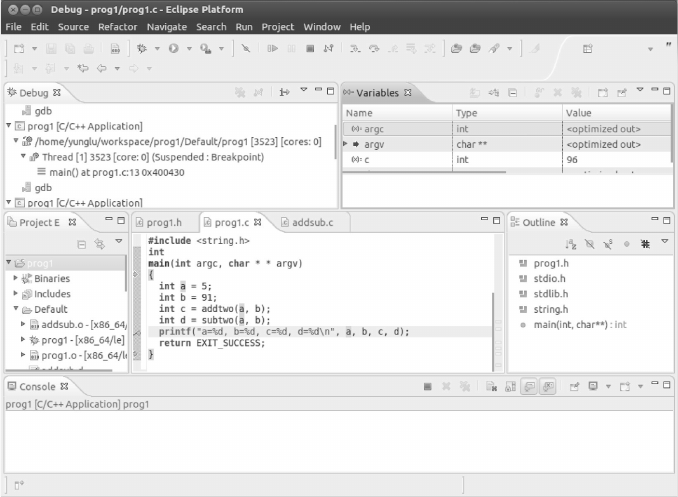
FIGURE C.17: Click Window, Show View, and Variables. Here you can see the values of
variables as the code executes. Note that the value of c is 96.