Table of Contents for
Intermediate C Programming
 Intermediate C Programming
Published by
CRC Press, 2015
Intermediate C Programming
Published by
CRC Press, 2015
- Front Cover
- Contents (1/2)
- Contents (2/2)
- List of Figures (1/2)
- List of Figures (2/2)
- List of Tables
- Foreword
- Preface
- Author, Reviewers, and Artist
- Rules in Software Development
- Source Code
- I. Computer Storage: Memory and File
- 1. Program Execution (1/2)
- 1. Program Execution (2/2)
- 2. Stack Memory (1/5)
- 2. Stack Memory (2/5)
- 2. Stack Memory (3/5)
- 2. Stack Memory (4/5)
- 2. Stack Memory (5/5)
- 3. Prevent, Detect, and Remove Bugs (1/2)
- 3. Prevent, Detect, and Remove Bugs (2/2)
- 4. Pointers (1/6)
- 4. Pointers (2/6)
- 4. Pointers (3/6)
- 4. Pointers (4/6)
- 4. Pointers (5/6)
- 4. Pointers (6/6)
- 5. Writing and Testing Programs (1/4)
- 5. Writing and Testing Programs (2/4)
- 5. Writing and Testing Programs (3/4)
- 5. Writing and Testing Programs (4/4)
- 6. Strings (1/3)
- 6. Strings (2/3)
- 6. Strings (3/3)
- 7. Programming Problems and Debugging (1/4)
- 7. Programming Problems and Debugging (2/4)
- 7. Programming Problems and Debugging (3/4)
- 7. Programming Problems and Debugging (4/4)
- 8. Heap Memory (1/3)
- 8. Heap Memory (2/3)
- 8. Heap Memory (3/3)
- 9. Programming Problems Using Heap Memory (1/4)
- 9. Programming Problems Using Heap Memory (2/4)
- 9. Programming Problems Using Heap Memory (3/4)
- 9. Programming Problems Using Heap Memory (4/4)
- 10. Reading and Writing Files (1/3)
- 10. Reading and Writing Files (2/3)
- 10. Reading and Writing Files (3/3)
- 11. Programming Problems Using File (1/2)
- 11. Programming Problems Using File (2/2)
- II. Recursion
- 12. Recursion (1/4)
- 12. Recursion (2/4)
- 12. Recursion (3/4)
- 12. Recursion (4/4)
- 13. Recursive C Functions (1/4)
- 13. Recursive C Functions (2/4)
- 13. Recursive C Functions (3/4)
- 13. Recursive C Functions (4/4)
- 14. Integer Partition (1/5)
- 14. Integer Partition (2/5)
- 14. Integer Partition (3/5)
- 14. Integer Partition (4/5)
- 14. Integer Partition (5/5)
- 15. Programming Problems Using Recursion (1/5)
- 15. Programming Problems Using Recursion (2/5)
- 15. Programming Problems Using Recursion (3/5)
- 15. Programming Problems Using Recursion (4/5)
- 15. Programming Problems Using Recursion (5/5)
- III. Structure
- 16. Programmer-Defined Data Types (1/6)
- 16. Programmer-Defined Data Types (2/6)
- 16. Programmer-Defined Data Types (3/6)
- 16. Programmer-Defined Data Types (4/6)
- 16. Programmer-Defined Data Types (5/6)
- 16. Programmer-Defined Data Types (6/6)
- 17. Programming Problems Using Structure (1/4)
- 17. Programming Problems Using Structure (2/4)
- 17. Programming Problems Using Structure (3/4)
- 17. Programming Problems Using Structure (4/4)
- 18. Linked Lists (1/3)
- 18. Linked Lists (2/3)
- 18. Linked Lists (3/3)
- 19. Programming Problems Using Linked List (1/2)
- 19. Programming Problems Using Linked List (2/2)
- 20. Binary Search Trees (1/4)
- 20. Binary Search Trees (2/4)
- 20. Binary Search Trees (3/4)
- 20. Binary Search Trees (4/4)
- 21. Parallel Programming Using Threads (1/5)
- 21. Parallel Programming Using Threads (2/5)
- 21. Parallel Programming Using Threads (3/5)
- 21. Parallel Programming Using Threads (4/5)
- 21. Parallel Programming Using Threads (5/5)
- IV. Applications
- 22. Finding the Exit of a Maze (1/5)
- 22. Finding the Exit of a Maze (2/5)
- 22. Finding the Exit of a Maze (3/5)
- 22. Finding the Exit of a Maze (4/5)
- 22. Finding the Exit of a Maze (5/5)
- 23. Image Processing (1/3)
- 23. Image Processing (2/3)
- 23. Image Processing (3/3)
- 24. Huffman Compression (1/10)
- 24. Huffman Compression (2/10)
- 24. Huffman Compression (3/10)
- 24. Huffman Compression (4/10)
- 24. Huffman Compression (5/10)
- 24. Huffman Compression (6/10)
- 24. Huffman Compression (7/10)
- 24. Huffman Compression (8/10)
- 24. Huffman Compression (9/10)
- 24. Huffman Compression (10/10)
- A. Linux
- B. Version Control
- C. Integrated Development Environments (IDE) (1/3)
- C. Integrated Development Environments (IDE) (2/3)
- C. Integrated Development Environments (IDE) (3/3)
Appendix C
Integrated Development Environments
(IDE)
C.1 Eclipse . . . . . . . . . . . . . . . . . . . . . . . . . . . . . . . . . . . . . . . . . . . . . . . . . . . . . . . . . . . . . . . . . . . . . . . . . . 451
C.2 Create and Build a Project . . . . . . . . . . . . . . . . . . . . . . . . . . . . . . . . . . . . . . . . . . . . . . . . . . . . 452
C.3 Debugging the Program . . . . . . . . . . . . . . . . . . . . . . . . . . . . . . . . . . . . . . . . . . . . . . . . . . . . . . . . 453
An Integrated Development Environment (IDE) is a program that integrates different pro-
gramming tools together into a unified user interface. In this chapter we illustrate the notion
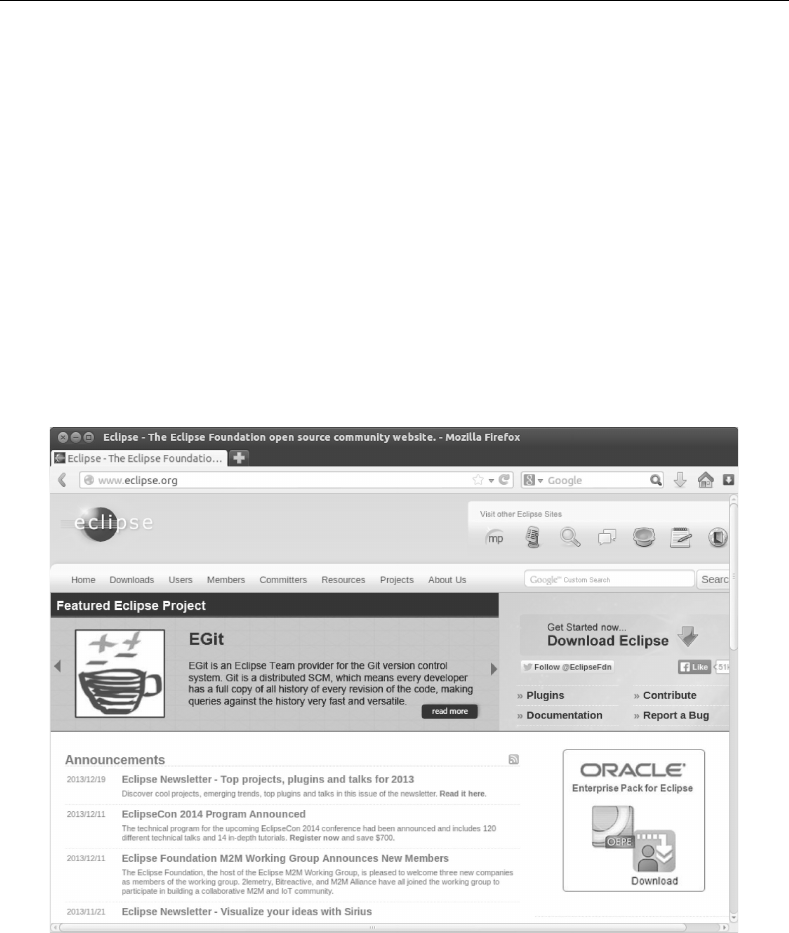
of an IDE with Eclipse. Fig. C.1 shows the web site. This chapter uses many screenshots to
visually explain various steps when using Eclipse.
FIGURE C.1: Eclipse (www.eclipse.org) is one of the most popular IDEs.
451
452 Intermediate C Programming
C.1 Eclipse
There are several ways to install Eclipse. One is to download Eclipse from the web site.
Another is to use Ubuntu’s Software Center. After starting Eclipse, it asks you for the loca-
tion of a “workspace”. This is a folder where you keep your Eclipse programming projects.
The default location is a directory called workspace. Eclipse has a plug-in architecture for
adding features. This is one reason (possibly the most important) why Eclipse is a popular
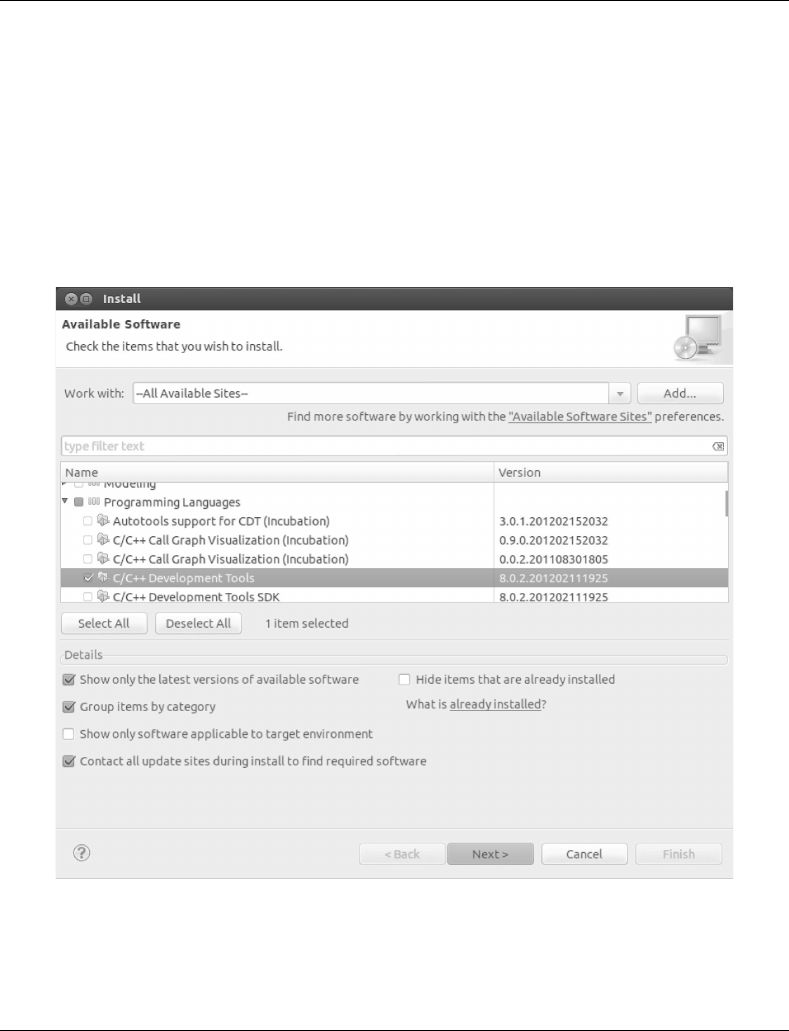
IDE. To install a plug-in, click Help at the menubar and select Install New Software. Select
Programming Languages and C/C++ Development Tools, as shown in Fig. C.2. Eclipse
does not support the C programming language until this plugin is installed.
FIGURE C.2: Select C/C++ Development Tools.
C.2 Create and Build a Project
To create a new programming project, first click File on the menubar, and select New
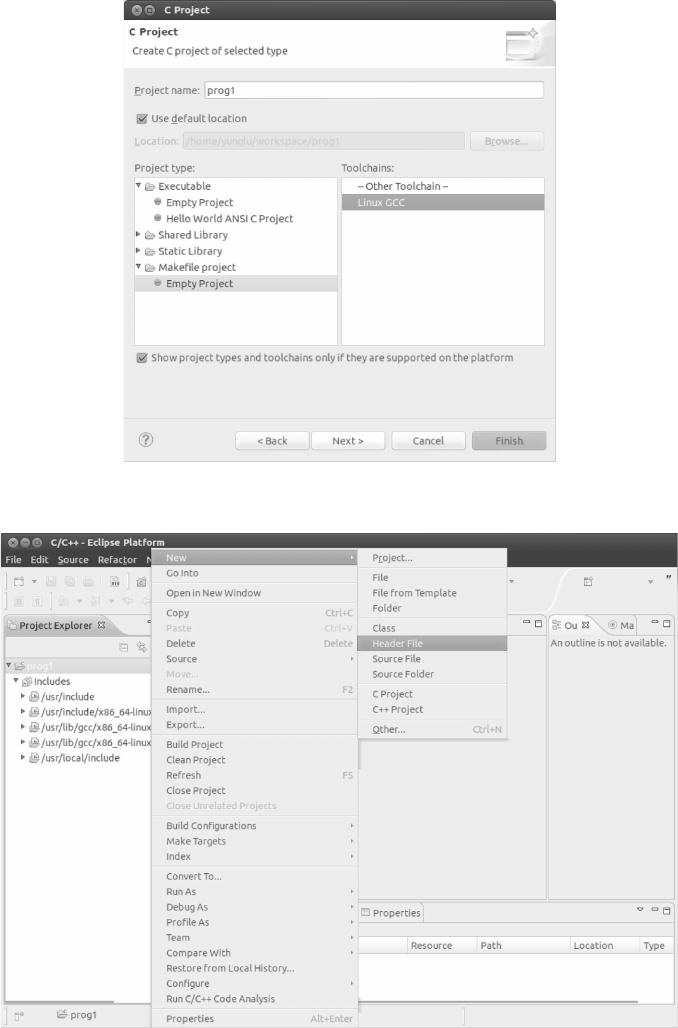
and then Project. Fig. C.3 to Fig. C.11 show the procedure of building a program in Eclipse.
Integrated Development Environments (IDE) 453
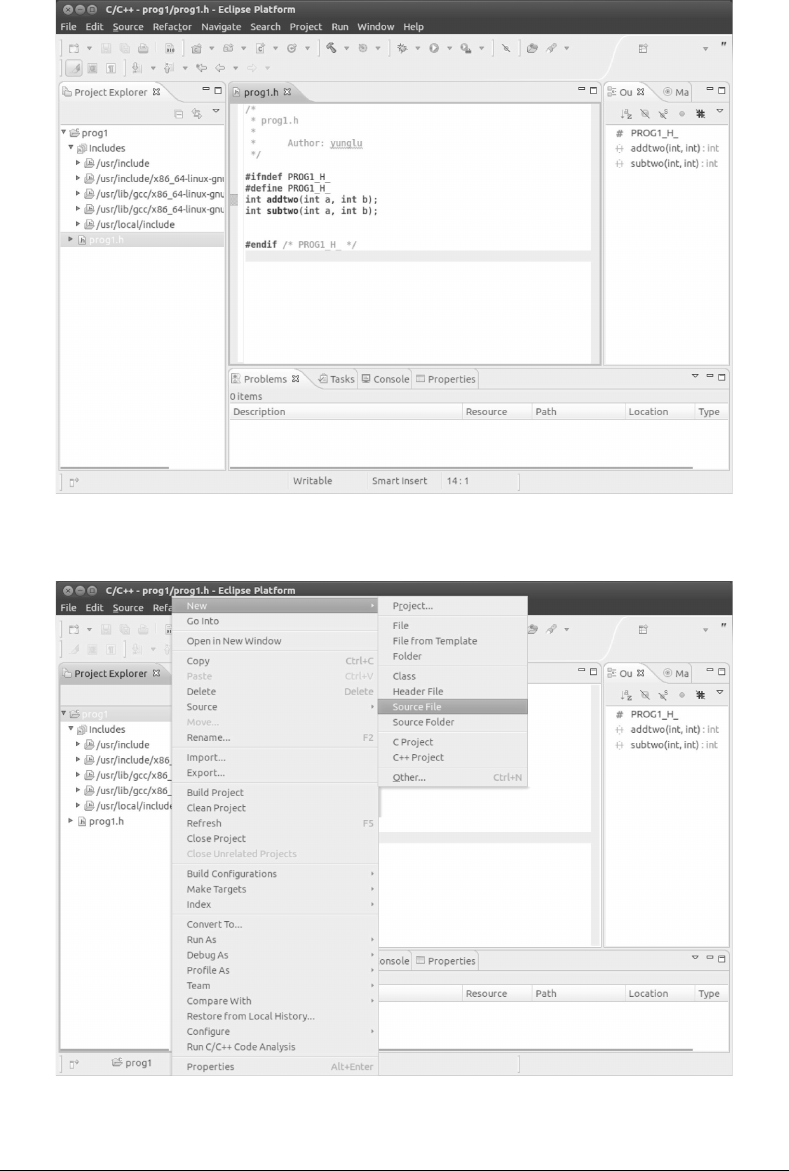
FIGURE C.3: Select Makefile Project and call the project “prog1”. Click Finish.
FIGURE C.4: Add a header file.
454 Intermediate C Programming
FIGURE C.5: Call the header file prog1.h. Eclipse automatically adds #ifndef, #define,
and #endif to the header file. Add two function declarations to the header file.
FIGURE C.6: Add a new source file.
C.3 Debugging the Program
Eclipse can simplify many steps in developing a C program. Fig. C.12 to Fig. C.17 show
how to run and debug a program.
Integrated Development Environments (IDE) 455
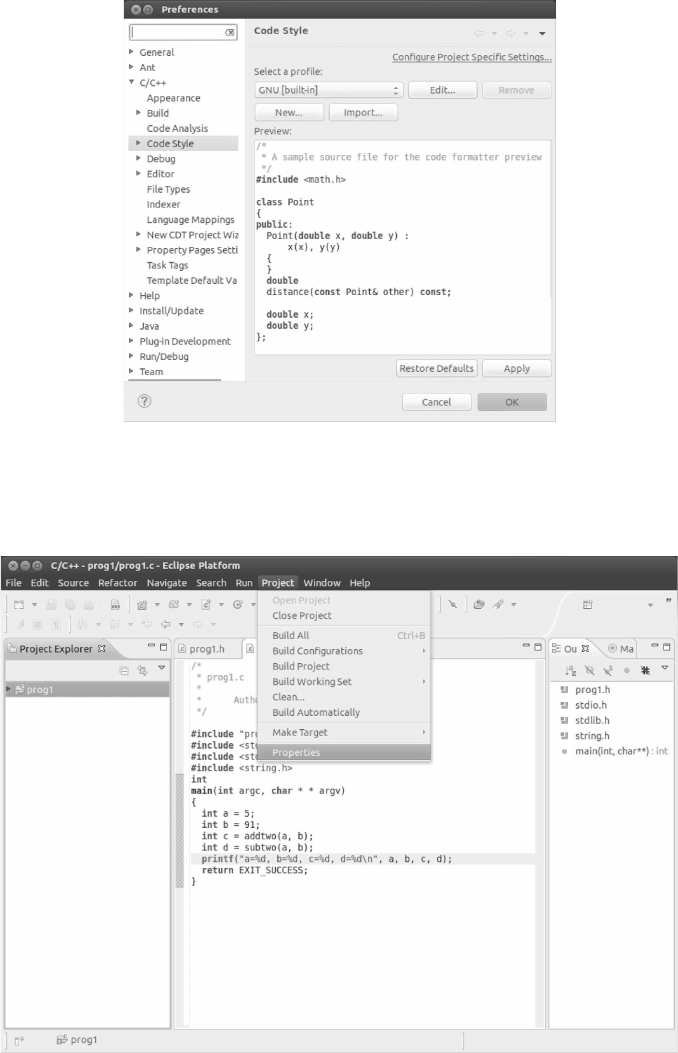
FIGURE C.7: You can customize the code formatting style by clicking Windows and
selecting Preferences. Choose a style you like. You can experiment with different styles and
decide which suits your preferences. This example uses the GNU style.
FIGURE C.8: Set the project’s property. Depending on your version of Eclipse and the
installed plug-ins, the build environment may already be set up correctly. Click Project (on
the menubar) and select Build Project. If Eclipse says “no rule to make target all”, then
you need to set the build environment. Select “Generate Makefiles automatically” and click
Apply.