Table of Contents for
JSON at Work
 JSON at Work
Published by
O'Reilly Media, Inc., 2017
JSON at Work
Published by
O'Reilly Media, Inc., 2017
- nav
- Cover
- JSON at Work
- JSON at Work
- Dedication
- Preface
- I. JSON Overview and Platforms
- 1. JSON Overview
- 2. JSON in JavaScript
- 3. JSON in Ruby on Rails
- 4. JSON in Java
- II. The JSON Ecosystem
- 5. JSON Schema
- 6. JSON Search
- 7. JSON Transform
- III. JSON in the Enterprise
- 8. JSON and Hypermedia
- 9. JSON and MongoDB
- 10. JSON Messaging with Kafka
- A. Installation Guides
- B. JSON Community
- Index
- About the Author
- Colophon
Chapter 6. JSON Search
JSON Search libraries and tools make it easier to search JSON documents and quickly access the fields that you’re looking for. JSON Search shines when you need to search through a large JSON document returned from a Web API.
In this chapter, we’ll cover the following:
-
Making your job easier with JSON Search
-
Using the major JSON Search libraries and tools
-
Writing Unit Tests that search the content of JSON documents returned by a Web API
In our examples, we’ll use several JSON Search technologies to search JSON data from a Web API deployed on your local machine. We’ll create Unit Tests to execute the searches and check results.
Why JSON Search?
Imagine that the result set from an API call has several hundred (or more) JSON Objects, and you want to use only a subset of the data (key/value pairs) or apply a search filter (based on your criteria). Without JSON Search, you would have to parse the JSON document and sift through a large data structure by writing custom code. This low-level approach is a tedious, code-intensive chore. You have better things to do with your time. The JSON Search libraries and tools shown in this chapter will reduce your work and make your job easier.
JSON Search Libraries and Tools
Many libraries (callable from an application) and command-line tools can search JSON documents. Here are the most common, widely used libraries, which we’ll explore later in this chapter:
-
JSONPath
-
JSON Pointer
-
jq
Honorable Mention
Many high-quality JSON Search libraries and command-line tools are available to search and filter JSON content, but we can’t cover all of them. Here are some others that are worth a look, but we can not discuss them further in this chapter for the sake of brevity:
- SpahQL
-
SpahQL is like jQuery for JSON Objects. The SpahQL library is available in a GitHub repository.
json-
A command-line tool available on GitHub, and on the npm repository. Even though we won’t use
json’s search capabilities in this chapter, we’ll still use it to pretty-print JSON documents. jsawk-
jsawkis a command-line tool that transforms a JSON document in addition to searching.
Even though we’re not covering these tools, one or more could also be right for your project. Compare
them with JSONPath, JSON Pointer, and jq to see which one works best for you.
What to Look For
Many libraries and tools are available, and it’s hard to choose which one(s) to use. Here are my criteria:
- Mindshare
-
Does it appear to be widely used? How many hits do you see when you do an internet search?
- Developer community
-
Is the code on GitHub? Is it well maintained?
- Platforms
-
Does it run on multiple platforms? Do multiple providers support the specification or library interfaces?
- Intuitive
-
Is it well-documented? How easy is it to install? How intuitive is the interface? How easy is it to use?
- Standards
-
Is the library associated with a standard (e.g., IETF, WC3, or Ecma)?
We’ll use these guidelines to evaluate each JSON Search product.
Test Data
We need more realistic test data and a larger, richer JSON document to search against, and the web has an abundant supply. For this chapter and the next, we’ll use an open data set available from a public API rather than the Speaker data from previous chapters. We’ll leverage the cities/weather data from the OpenWeatherMap API. See the full API documentation.
The chapter-6/data/cities-weather-orig.json file contains weather data from the OpenWeatherMap API for
cities within a rectangle by latitude/longitude (in this case, Southern California, United States). Note that
the weather data from OpenWeatherMap changes frequently, so the data I’ve captured for the book example
will not match the current data from the API. Let’s modify the weather data before we use it with
json-server. First, look at the data/cities-weather-orig.json file, and notice that the weather data is
stored in an Array called list. I’ve renamed it to cities for the sake of clarity and testability and
saved the changes in the data/cities-weather.json file. Additionally, I moved the cod, calctime, and
cnt fields (at the beginning of the document) into an Object. This second change was needed for compatibility
with json-server, which accepts only Objects or an Array of Objects. We’ll continue to leverage the
json-server Node.js module from earlier chapters to deploy the city weather data as a Web API. Example 6-1 shows the
modified weather data.
Example 6-1. data/cities-weather.json
{"other":{"cod":200,"calctime":0.006,"cnt":110},"cities":[...]}
Now, run json-server as follows:
json-server -p 5000 ./cities-weather.json
Visit http://localhost:5000/cities in your browser, and you should see the screen in Figure 6-1.
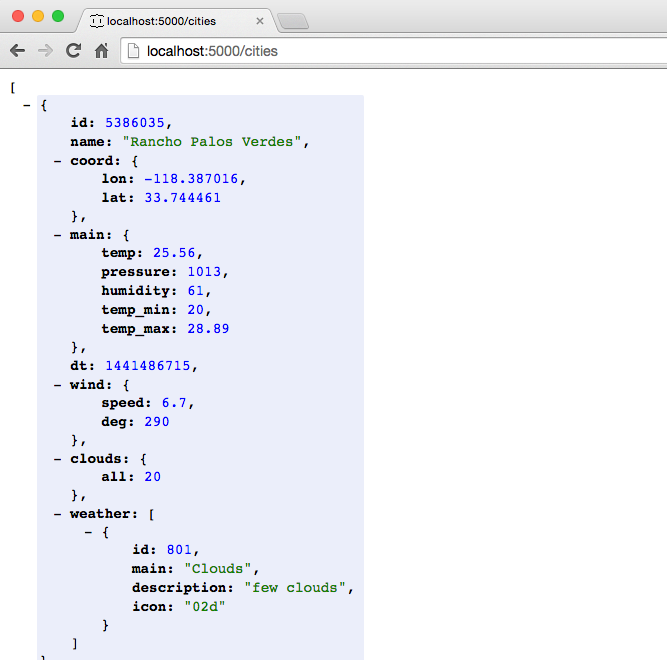
Figure 6-1. OpenWeather API data on json-server viewed from the browser
We now have test JSON data deployed as a Stub API, and we’ll use it for Unit Testing throughout this chapter.
Setting Up Unit Tests
All tests in this chapter will continue to leverage Mocha/Chai within a Node.js environment, just as you saw
in previous chapters. Before going further, be sure to set up your test environment. If you haven’t
installed Node.js yet, refer to Appendix A, and install Node.js (see “Install Node.js” and “Install npm Modules”). If you want to follow along with the Node.js project provided
in the code examples, cd to chapter-6/cities-weather-test and do the following to install all
dependencies for the project:
npm install
If you’d like to set up the Node.js project yourself, follow the instructions in the book’s GitHub repository.
Now that we’ve set up a testing environment, it’s time to start working with JSONPath and the other JSON Search libraries.
Comparing JSON Search Libraries and Tools
Now that we’ve covered the basics of JSON Search, we will compare the following libraries and tools:
-
JSONPath
-
JSON Pointer
-
jq
JSONPath
JSONPath was developed by Stefan Goessner in 2007 to search for and extract data from JSON documents. The original library was developed in JavaScript, but because of its popularity, most modern languages and platforms now support JSONPath.
JSONPath query syntax
JSONPath query syntax is based on XPath (which is used to search XML documents). Table 6-1 lists some JSONPath queries based on our cities example.
| JSONPath query | Description |
|---|---|
|
Get all elements in the cities Array. |
|
Get the number of elements in the cities Array. |
|
Get every other element in the cities array. See the description of |
|
Get the last element in the cities Array. |
|
Get all weather subelements. |
|
Get the first three elements in cities Array. |
|
Get the city name for first three elements in the cities Array. |
|
Get the cities where the temp > 84. |
|
Get the cities where the temp is between 84 and 85.5. |
|
Get the cities with cloudy weather. |
|
Get the cities with cloudy weather by using regex. |
These example queries use JSONPath keywords and symbols:
-
..returns all elements and subelements that have a particular name. -
[]with an index is an Array query, and the index is based on the JavaScriptslice()function. The Mozilla Developer Network (MDN) provides a full description. Here’s a brief overview of JSONPathslice():-
It provides the ability to select a portion of an Array.
-
The
beginparameter (as with JSslice()) is the beginning index, is zero-based, and defaults to zero if omitted. -
The
endparameter (as with JSslice()) is the end index (noninclusive), and defaults to the end of the Array if omitted. -
The
stepparameter (added by JSONPathslice()) represents the step, and defaults to 1. Astepvalue of 1 returns all Array elements specified by thebeginandendparameters; a value of 2 returns every other (or second) element, and so on.
-
-
[?(…)]enables a conditional search. The code inside the parentheses can be any valid JS expression, including conditionals (e.g.,==or>) and Regular Expressions.
JSONPath online tester
A couple of online JSONPath testers enable you to practice JSONPath queries before writing a single line of code. I like the tester provided by Kazuki Hamasaki. Just paste in the data/cities-weather.json document (from the Chapter 6 code examples) in the left text box, and enter a JSONPath query. The results appear in the text box on the righthand side of the page as shown in Figure 6-2.
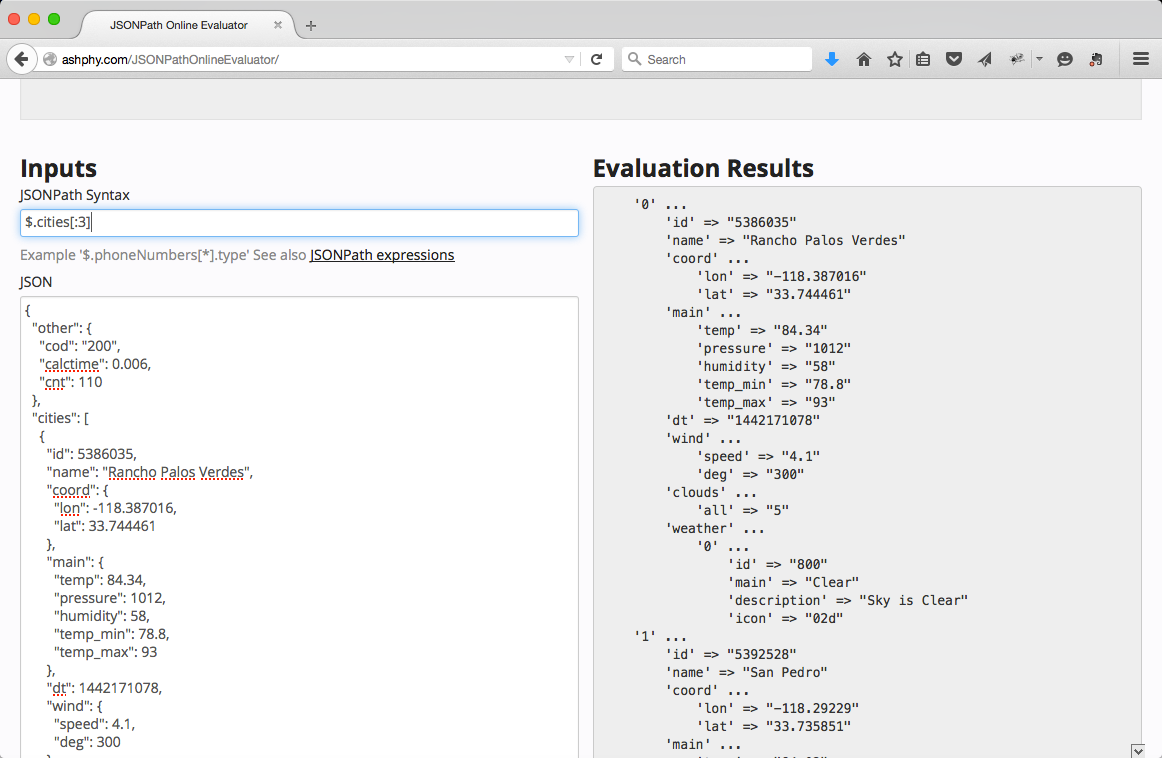
Figure 6-2. JSONPath Online Evaluator with OpenWeather API data
You’ll notice that only the data values are returned in the JSONPath results text box, and that the keys are not returned.
JSONPath Unit Test
The Unit Test in Example 6-2 exercises several of the example JSONPath queries that were shown earlier.
This code leverages the jsonpath Node.js module to search against the JSON data returned by the Cities
API that runs on your local machine. See https://github.com/dchester/jsonpath
for a detailed description of the jsonpath module.
Example 6-2. cities-weather-test/test/jsonpath-spec.js
'use strict';/* Attribution: Cities Weather data provided by OpenWeatherMap API([http://openweathermap.org]) under Creative Commons Share A LikeLicense (https://creativecommons.org/licenses/by-sa/4.0).Changes were made to the data to work with json-server.This does not imply an endorsement by the licensor.This code is distributed under Creative Commons Share A Like License.*/varexpect=require('chai').expect;varjp=require('jsonpath');varunirest=require('unirest');describe('cities-jsonpath',function(){varreq;beforeEach(function(){req=unirest.get('http://localhost:5000/cities').header('Accept','application/json');});it('should return a 200 response',function(done){req.end(function(res){expect(res.statusCode).to.eql(200);expect(res.headers['content-type']).to.eql('application/json; charset=utf-8');done();});});it('should return all cities',function(done){req.end(function(res){varcities=res.body;expect(cities.length).to.eql(110);done();});});it('should return every other city',function(done){req.end(function(res){varcities=res.body;varcitiesEveryOther=jp.query(cities,'$[0::2]');expect(citiesEveryOther[1].name).to.eql('Rosarito');expect(citiesEveryOther.length).to.eql(55);done();});});it('should return the last city',function(done){req.end(function(res){varcities=res.body;varlastCity=jp.query(cities,'$[(@.length-1)]');expect(lastCity[0].name).to.eql('Moreno Valley');done();});});it('should return the 1st 3 cities',function(done){req.end(function(res){varcities=res.body;varcitiesFirstThree=jp.query(cities,'$[:3]');varcitiesFirstThreeNames=jp.query(cities,'$[:3].name');expect(citiesFirstThree.length).to.eql(3);expect(citiesFirstThreeNames.length).to.eql(3);expect(citiesFirstThreeNames).to.eql(['Rancho Palos Verdes','San Pedro','Rosarito']);done();});});it('should return cities within a temperature range',function(done){req.end(function(res){varcities=res.body;varcitiesTempRange=jp.query(cities,'$[?(@.main.temp >= 84 && @.main.temp <= 85.5)]');for(vari=0;i<citiesTempRange.length;i++){expect(citiesTempRange[i].main.temp).to.be.at.least(84);expect(citiesTempRange[i].main.temp).to.be.at.most(85.5);}done();});});it('should return cities with cloudy weather',function(done){req.end(function(res){varcities=res.body;varcitiesWeatherCloudy=jp.query(cities,'$[?(@.weather[0].main == "Clouds")]');checkCitiesWeather(citiesWeatherCloudy);done();});});it('should return cities with cloudy weather using regex',function(done){req.end(function(res){varcities=res.body;varcitiesWeatherCloudyRegex=jp.query(cities,'$[?(@.weather[0].main.match(/Clo/))]');checkCitiesWeather(citiesWeatherCloudyRegex);done();});});functioncheckCitiesWeather(cities){for(vari=0;i<cities.length;i++){expect(cities[i].weather[0].main).to.eql('Clouds');}}});
Note the following in this example:
-
The test sets up the URI and
Acceptforunirestusing Mocha’sbeforeEach()method, so that setup occurs in only one place in the code. Mocha executesbeforeEach()before running each test (i.e.,it) within the context of thedescribe. -
Each test exercises one or more example JSONPath queries and uses
expect-style assertions. -
The calls to the
jsonpathmodule work as follows:-
jp.query()takes a JavaScript Object and a String-based JSONPath query as parameters, and synchronously returns the result set as a JavaScript Object.
-
-
Each JSONPath query omits the leading
.citiesbecausejson-servertakes the name of thecitiesArray (from the cities-weather.json file) and addscitiesto the URI:-
The URI address is http://localhost:5000/cities.
-
Use
$[:3]to get the first three cities, rather than$.cities[:3].
-
To run this test from the command line (in a second terminal session), do the following:
cd cities-weather-test

npm test
You should see the following results:
json-at-work => npm test

...

> mocha test

...

cities-jsonpath
  ✓ should return a 200 response
  ✓ should return all cities
  ✓ should return every other city
  ✓ should return the last city
  ✓ should return 1st 3 cities
  ✓ should return cities within a temperature range
  ✓ should return cities with cloudy weather
  ✓ should return cities with cloudy weather using regex

...
If you call console.log() with the cities variable in any of the preceding tests, you’ll see that the
jsonpath module returns a valid JSON document with key/value pairs.
JSONPath on other platforms
JSONPath is not limited to JavaScript and Node.js. Most major platforms have excellent support for JSONPath, including these:
There are other good JSONPath libraries are available, but please verify that they follow the syntax mentioned in Stefan Goessner’s article. Otherwise, it’s not really JSONPath. To borrow a phrase from The Princess Bride, “You keep using that word, but I do not think it means what you think it means.”
JSONPath scorecard
Table 6-2 provides a scorecard for JSONPath based on the evaluation criteria from the beginning of this chapter.
| Mindshare | Y |
|---|---|
Dev community |
Y |
Platforms |
JavaScript, Node.js, Java, Ruby on Rails |
Intuitive |
Y |
Standard |
N |
JSONPath provides a rich set of set of search features and works across most major platforms. The only downsides are that JSONPath is not a standard and lacks a CLI implementation, but don’t let that stop you from using it. JSONPath enjoys wide community usage and acceptance, and has an excellent online tester. JSONPath reduces the amount of code needed to search and access a JSON document, and gets the subset of data that you need.
JSON Pointer
JSON Pointer is a standard for accessing a single value within a JSON document. The JSON Pointer
specification provides further details.
JSON Pointer’s main purpose is to support the JSON Schema specification’s $ref functionality in locating
validation rules within a Schema (see Chapter 5).
JSON Pointer query syntax
For example, consider the following document:
{"cities":[{"id":5386035,"name":"Rancho Palos Verdes"},{"id":5392528,"name":"San Pedro"},{"id":5358705,"name":"Huntington Beach"}]}
Table 6-3 describes the preceding document’s common JSON Pointer query syntax:
| JSON Pointer query | Description |
|---|---|
|
Get all cities in the Array. |
|
Get the first city. |
|
Get the name of the second city. |
JSON Pointer query syntax is quite simple, and works as follows:
-
/is a path separator. -
Array indexing is zero-based.
You’ll notice that in the JSON Pointer specification, only the data values are returned when making a query, and that the keys are not returned.
JSON Pointer Unit Test
The Unit Test in Example 6-3 exercises some of the example JSON Pointer queries that were shown earlier.
This code leverages the json-pointer Node.js module to search against the cities API.
See https://github.com/manuelstofer/json-pointer
for a detailed description of the json-pointer module.
Example 6-3. cities-weather-test/test/json-pointer-spec.js
'use strict';/* Attribution: Cities Weather data provided by OpenWeatherMap API([http://openweathermap.org]) under Creative Commons Share A LikeLicense (https://creativecommons.org/licenses/by-sa/4.0).Changes were made to the data to work with json-server.This does not imply an endorsement by the licensor.This code is distributed under Creative Commons Share A Like License.*/varexpect=require('chai').expect;varpointer=require('json-pointer');varunirest=require('unirest');describe('cities-json-pointer',function(){varreq;beforeEach(function(){req=unirest.get('http://localhost:5000/cities').header('Accept','application/json');});it('should return a 200 response',function(done){req.end(function(res){expect(res.statusCode).to.eql(200);expect(res.headers['content-type']).to.eql('application/json; charset=utf-8');done();});});it('should return the 1st city',function(done){req.end(function(res){varcities=res.body;varfirstCity=null;firstCity=pointer.get(cities,'/0');expect(firstCity.name).to.eql('Rancho Palos Verdes');expect(firstCity.weather[0].main).to.eql('Clear');done();});});it('should return the name of the 2nd city',function(done){req.end(function(res){varcities=res.body;varsecondCityName=null;secondCityName=pointer.get(cities,'/1/name');expect(secondCityName).to.eql("San Pedro");done();});});});
Note the following in this example:
-
Each test runs an example JSON Pointer query and leverages
expect-style assertions. -
The calls to the
json-pointermodule work as follows:-
pointer.get()takes a JavaScript Object and a String-based JSON Pointer query as parameters, and synchronously returns the result set as a JavaScript Object.
-
-
Each JSON Pointer query omits the leading
.citiesbecausejson-servertakes the name of thecitiesArray (from the cities-weather.json file) and addscitiesto the URI:-
The URI address is http://localhost:5000/cities.
-
Use
/0to get the first city, rather than/cities/0.
-
To run this test from the command line, do the following:
cd cities-weather-test

npm test
You should see the following results:
json-at-work => npm test

...

> mocha test

...

cities-json-pointer
  ✓ should return a 200 response
  ✓ should return the 1st city
  ✓ should return the name of the 2nd city

...
If you invoke console.log() on the firstCity variable in the should return the 1st city test above,
you’ll see that the json-pointer module returns a valid JSON document with key/value pairs.
JSON Pointer on other platforms
In addition to Node.js, most major platforms have a JSON Pointer library:
-
Java—Jackson currently supports JSON Pointer, but JavaEE 8 will provide JSON Pointer support as part of JSR 374, Java API for JSON Processing 1.1.
Several tools claim to implement JSON Pointer, but they really don’t follow the JSON Pointer specification. When evaluating a JSON Pointer library or tool, be sure it follows RFC 6901. Again, if it doesn’t expressly mention RFC 6901, it’s not JSON Pointer.
JSON Pointer scorecard
Table 6-4 shows a scorecard for JSON Pointer based on our criteria.
| Mindshare | Y |
|---|---|
Dev community |
Y |
Platforms |
JavaScript, Node.js, Java, Ruby on Rails |
Intuitive |
Y |
Standard |
Y—RFC 6901 |
JSON Pointer provides a limited set of search capabilities. Each query returns only a single field from a
JSON document. JSON Pointer’s main purpose is to support JSON Schema’s $ref syntax.
jq
jq is a JSON Search tool that provides JSON command-line processing, including filtering and array
slicing. Per the jq GitHub repository,
jq is like sed for JSON. But jq is not limited to the command line; several good libraries enable you to use jq from your favorite Unit-Testing framework (“jq Unit Test” covers
this).
Integration with cURL
Many people in the UNIX community use cURL to make HTTP calls to Web APIs from the command line. cURL provides the ability to communicate over multiple protocols in addition to HTTP. To install cURL, please see “Install cURL” in Appendix A.
We’ll start by using cURL to make a GET request from the command against the Cities API as follows:
curl -X GET 'http://localhost:5000/cities'
Now that we’re able to get a JSON response from the Cities API, let’s pipe the content to jq
to filter the Cities API data from the command line. Here’s a simple example:
curl -X GET 'http://localhost:5000/cities' | jq .[0]
Run this command, and you should see the following:
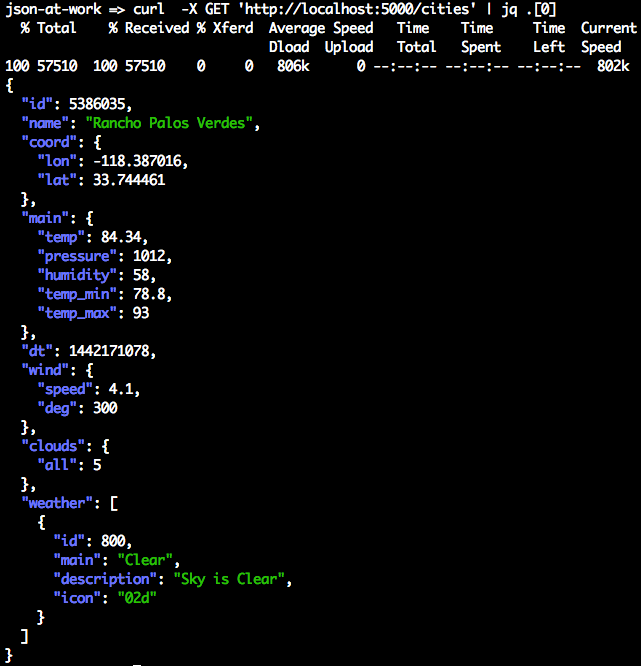
Note the following in this example:
-
cURL makes an HTTP
GETcall to the OpenWeatherMap API and pipes the JSON response to Standard Output. -
jqreads the JSON from Standard Input, selects the first city from the API, and outputs the JSON to Standard Output.
cURL is a valuable and powerful part of an API developer’s toolkit. cURL also provides the ability to
test an API with all the main HTTP verbs (GET, POST, PUT, and DELETE). We’ve just scratched
the surface with cURL; visit the main site to learn
more.
jq query syntax
Table 6-5 shows some basic jq queries.
jq query |
Description |
|---|---|
|
Get the first city. |
|
Get the last city. An index of -1 indicates the last element of an Array. |
|
Get the first three cities, where |
|
Get the first three cities. This is shorthand, and it omits the start index. |
|
Get all cities whose current temperature is >= 80 degrees Fahrenheit and whose min and max temperature ranges between 79 and 92 degrees Fahrenheit (inclusive). |
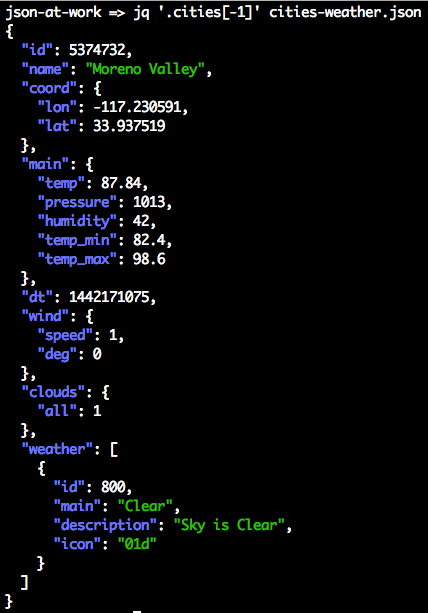
Here’s how to execute a jq query to get the last city at the command line:
cd chapter-6/data

jq '.cities[-1]' cities-weather.json
You should see the following:
Let’s go deeper with a more concrete example.
jq online tester—jqPlay
jqPlay is a web-based tester for jq, and provides
the ability to iteratively test jq queries against JSON data. To test jqPlay, do the following to get
a new Array of Objects that contain the id and name of the first three cities:
-
Visit https://jqplay.org and paste the contents of the chapter-6/data/cities-weather.json file into the
JSONtext area on the left. -
Paste the following
jqquery into theFiltertext box:[[].cities[0:3] | .[] | { id, name }]
You should see the screen in Figure 6-3.
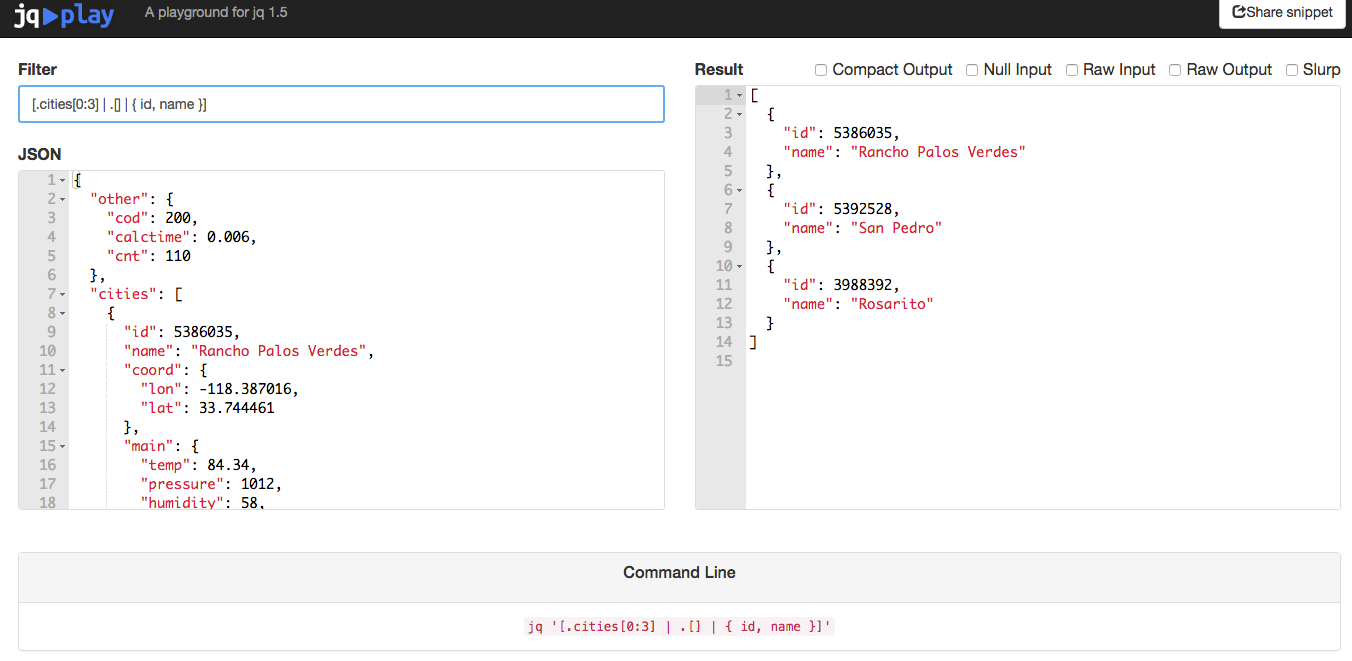
Figure 6-3. Search OpenWeather API data with jqPlay
Here’s a breakdown of the [.cities[0:3] | .[] | { id, name }] query:
-
.cities[0:3]selects the first three elements from the cities Array as a subarray. -
{ id, name }selects only theidandnamefields: -
The surrounding Array braces (
[and]) convert the result set to an Array.
Scroll to the bottom of the jqplay page, and you’ll see that it has a cheat sheet with links to more
examples and documentation, as shown in Figure 6-4.
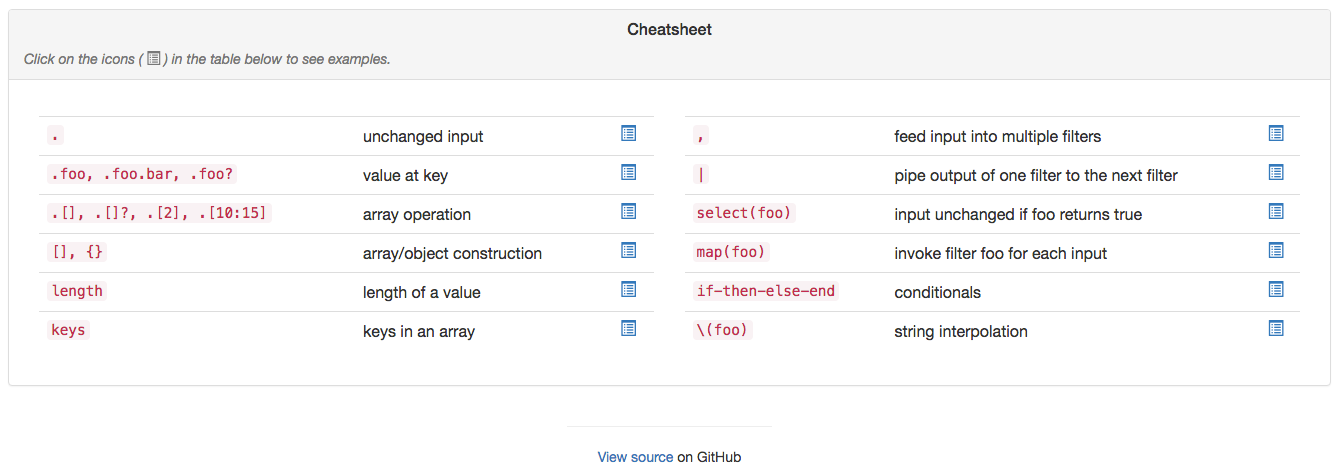
Figure 6-4. jq cheat sheet on jqPlay
jq-tutorial
In addition to an online tester, the Node.js community has contributed a nice jq tutorial, which is
available on the npm repository.
Install this tutorial as follows:
npm install -g jq-tutorial
Run jq-tutorial from the command line, and you should see this:
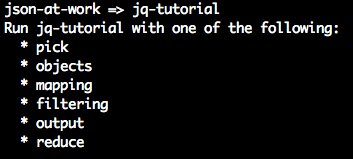
This shows all the available jq tutorials. Then, choose one of the tutorials like this:
jq-tutorial objects
This tutorial will show how to use objects with jq. Follow each learning path, and increase
your overall jq skill level.
jq Unit Test
The Unit Test in Example 6-4 exercises several of the example jq queries that were shown earlier. This code leverages the node-jq Node.js module
to search against the JSON data returned by the Cities API that runs on your local machine. See
the node-jq documentation on GitHub for a
detailed description.
Example 6-4. cities-weather-test/test/jq-spec.js
'use strict';/* Attribution: Cities Weather data provided by OpenWeatherMap API([http://openweathermap.org]) under Creative Commons Share A LikeLicense (https://creativecommons.org/licenses/by-sa/4.0).Changes were made to the data to work with json-server.This does not imply an endorsement by the licensor.This code is distributed under Creative Commons Share A Like License.*/varexpect=require('chai').expect;varjq=require('node-jq');varunirest=require('unirest');var_=require('underscore');describe('cities-jq',function(){varreq;beforeEach(function(){req=unirest.get('http://localhost:5000/cities').header('Accept','application/json');});it('should return a 200 response',function(done){req.end(function(res){expect(res.statusCode).to.eql(200);expect(res.headers['content-type']).to.eql('application/json; charset=utf-8');done();});});it('should return all cities',function(done){req.end(function(res){varcities=res.body;expect(cities.length).to.eql(110);done();});});it('should return the last city',function(done){req.end(function(res){varcities=res.body;jq.run('.[-1]',cities,{input:'json'}).then(function(lastCityJson){// Returns JSON String.varlastCity=JSON.parse(lastCityJson);expect(lastCity.name).to.eql('Moreno Valley');done();}).catch(function(error){console.error(error);done(error);});});});it('should return the 1st 3 cities',function(done){req.end(function(res){varcities=res.body;jq.run('.[:3]',cities,{input:'json'}).then(function(citiesFirstThreeJson){// Returns JSON String.varcitiesFirstThree=JSON.parse(citiesFirstThreeJson);varcitiesFirstThreeNames=getCityNamesOnly(citiesFirstThree);expect(citiesFirstThree.length).to.eql(3);expect(citiesFirstThreeNames.length).to.eql(3);expect(citiesFirstThreeNames).to.eql(['Rancho Palos Verdes','San Pedro','Rosarito']);done();}).catch(function(error){console.error(error);done(error);});});});functiongetCityNamesOnly(cities){return_.map(cities,function(city){returncity.name;});}it('should return cities within a temperature range',function(done){req.end(function(res){varcities=res.body;jq.run('[.[] | select (.main.temp >= 84 and .main.temp <= 85.5)]',cities,{input:'json'}).then(function(citiesTempRangeJson){// Returns JSON String.varcitiesTempRange=JSON.parse(citiesTempRangeJson);for(vari=0;i<citiesTempRange.length;i++){expect(citiesTempRange[i].main.temp).to.be.at.least(84);expect(citiesTempRange[i].main.temp).to.be.at.most(85.5);}done();}).catch(function(error){console.error(error);done(error);});});});it('should return cities with cloudy weather',function(done){req.end(function(res){varcities=res.body;jq.run('[.[] | select(.weather[0].main == "Clouds")]',cities,{input:'json'}).then(function(citiesWeatherCloudyJson){// Returns JSON String.varcitiesWeatherCloudy=JSON.parse(citiesWeatherCloudyJson);checkCitiesWeather(citiesWeatherCloudy);done();}).catch(function(error){console.error(error);done(error);});});});it('should return cities with cloudy weather using regex',function(done){req.end(function(res){varcities=res.body;jq.run('[.[] | select(.weather[0].main | test("^Clo"; "i"))]',cities,{input:'json'}).then(function(citiesWeatherCloudyJson){// Returns JSON String.varcitiesWeatherCloudy=JSON.parse(citiesWeatherCloudyJson);checkCitiesWeather(citiesWeatherCloudy);done();}).catch(function(error){console.error(error);done(error);});});});functioncheckCitiesWeather(cities){for(vari=0;i<cities.length;i++){expect(cities[i].weather[0].main).to.eql('Clouds');}}});
Note the following in this example:
-
The test sets up the URI and
Acceptforunirestusing Mocha’sbeforeEach()method, so that setup occurs in only one place in the code. Mocha executesbeforeEach()before running each test (i.e.,it) within the context of thedescribe. -
Each test exercises one or more example
jqqueries and usesexpect-style assertions. -
The calls to the
node-jqmodule work as follows.jq.run()does the following:-
Takes a String-based
jqquery as the first parameter. -
Uses an optional second parameter (an Object) that specifies the type of input:
-
{ input: 'json' }is a JavaScript Object. The Unit Tests use this option becauseunirestreturns Objects from the HTTP call to the Stub API provided byjson-server. -
{ input: 'file' }is a JSON file. This is the default if the caller doesn’t specify an input option. -
{ input: 'string' }is a JSON String.
-
-
Uses an ES6 JavaScript Promise to asynchronously return the result set as a JSON String. In this case, the Unit Tests all need to do the following:
-
Wrap their code within the
thenandcatchconstructs of the Promise. -
Use
JSON.parse()to parse the result into a corresponding JavaScript object structure.
-
-
Visit the MDN site to learn more about the new Promise syntax.
-
-
Each
jqquery omits the leading.citiesbecausejson-servertakes the name of thecitiesArray (from the cities-weather.json file) and addscitiesto the URI:-
The URI address is http://localhost:5000/cities.
-
Use
$[:3]to get the first three cities, rather than$.cities[:3].
-
To run this test from the command line (in a second terminal session), do the following:
cd cities-weather-test

npm test
You should see the following results:
json-at-work => npm test

...

> mocha test

...

  cities-jq
    ✓ should return a 200 response
    ✓ should return all cities
    ✓ should return the last city
    ✓ should return the 1st 3 cities
    ✓ should return cities within a temperature range
    ✓ should return cities with cloudy weather
    ✓ should return cities with cloudy weather using regex

...
If you call console.log() with the cities variable in any of these tests, you’ll see that the
node-jq module returns a valid JSON document with key/value pairs.
jq on other platforms
In addition to Node.js, other major platforms have a jq library:
- Ruby
-
The
ruby-jqgem is available at RubyGems.org, and you can also find it on GitHub. - Java
-
jackson-jqplugs into the Java Jackson library (from Chapter 4).
jq scorecard
Table 6-6 shows how jq stacks up against our evaluation criteria.
| Mindshare | Y |
|---|---|
Dev community |
Y |
Platforms |
CLI—Linux/macOS/Windows, Node.js, Java, Ruby on Rails |
Intuitive |
Y |
Standard |
N |
jq is excellent because it
-
Enjoys solid support in most languages.
-
Has excellent documentation.
-
Provides a rich set of search and filtering capabilities.
-
Can pipe query results to standard UNIX CLI tools (for example,
sort,grep, anduniq). -
Works great on the command line with the widely used cURL HTTP client.
-
Has a fantastic online tester.
jqPlayenables you to testjqqueries from a simple web interface. This rapid feedback enables you to iterate to a solution before writing any code. -
Has a useful interactive tutorial (see the “
jq-tutorial” section).
The only downside to jq is the initial learning curve. The sheer number of options along
with the query syntax can seem overwhelming at first, but the time you spend to learn jq is well worth it.
We’ve covered the basics of jq in this chapter. jq has excellent documentation, and you can find
more detailed information at the following websites:
JSON Search Library and Tool Evaluations—The Bottom Line
Based on the evaluation criteria and overall usability, I rank the JSON Search libraries in the following order:
-
jq -
JSONPath
-
JSON Pointer
Although JSON Pointer is a standard and it can search a JSON document, I rank JSONPath in second place over JSON Pointer for the following reasons:
-
JSONPath has a richer query syntax.
-
A JSONPath query returns multiple elements in a document.
But jq is my overwhelming favorite JSON Search tool because it
-
Works from the command line (JSONPath and JSON Pointer don’t provide this capability). If you work with JSON in automated DevOps environments, you need a tool that works from the command line.
-
Has an online tester, which makes development faster.
-
Has an interactive tutorial.
-
Provides a rich query language.
-
Has solid library support in most programming languages.
-
Enjoys a large mindshare in the JSON community.
I’ve successfully used jq to search through JSON responses from other Web APIs
(not from OpenWeatherMap) that contained over 2 million lines of data, and jq performed flawlessly
in a production environment. jq enjoys great mindshare in the JSON community—just do a web search on
“jq tutorial” and you’ll see several excellent tutorials that will help you go deeper.
What’s Next?
Now that we’ve shown how to efficiently search JSON documents, we’ll move on to transforming JSON in Chapter 7.