Raspberry Pi is a family of low-cost single-board computers originally designed for computer and electronics education. The combination of low cost, flexibility, and widespread operating systems support has made the Raspberry Pi family one of the leading computer platforms for hobbyists as well as educators. IT professionals are also taking a closer look at the Raspberry Pi as a platform for the Internet of Things (IoT), thanks to the introduction of a Windows 10 edition that supports the Raspberry Pi 3.
In this chapter, we’ll introduce you to the members of the family to help you find the best model for your needs.
Model Overview
Current models of the Raspberry Pi include the following:
Pi 1 Model A+
Pi 2 Model B
Pi 3 Model B
Pi Zero
These are shown in Figure 1-1, along with the older Pi 1 Model B.
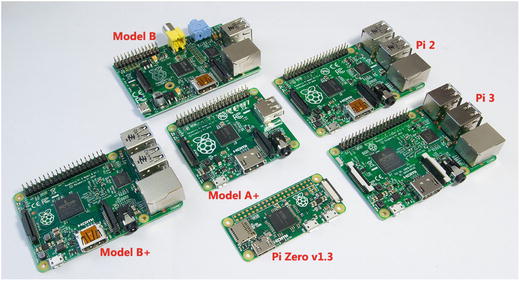
Figure 1-1. Raspberry Pi Model B, Model B+, Model A+, Pi 2, Pi 3, and Pi Zero
Common Features
All Pi models have these common features :
ARM architecture
Broadcom BCM28xx series SoC (System-on-a-Chip)
At least one USB 2.0 port
HDMI video output
SD-family memory card slot
GPIO (General-Purpose Input/Output ) connector
Beyond these common features, there are plenty of differences to keep in mind as you work to select the best model for your needs.
Note
GPIO pins have user-defined functions. The GPIO connector on Raspberry Pi includes pins for GPIO, power, ground, and other functions. See the pinouts in Chapter 9 for details.
Model A vs. Model B Boards
Raspberry Pi Model A boards have limited expandability, slower processors, and less RAM than comparable Model B boards. See the following sections for details.
Model A Family
Model A boards can be distinguished from later models by their lack of an Ethernet port and the inclusion of only one USB port. They use 32-bit single-core 700MHz processors.
Model A
The original Model A board (not shown) features a 26-pin GPIO bus, a single standard-size SD card slot, and both composite analog and HDMI digital video output.
Model A+
Model A boards have largely been replaced by Model A+ boards, which use the same 40-pin GPIO connector as Model B boards. The Model A+ board was the smallest Raspberry Pi board until the introduction of the Raspberry Pi Zero. The Model A+ board remains the smallest board to have a 40-pin GPIO connector, as the Pi Zero has open GPIO solder holes rather than a connector. Model A+ is pictured in Figures 1-2, 1-3, and 1-4.
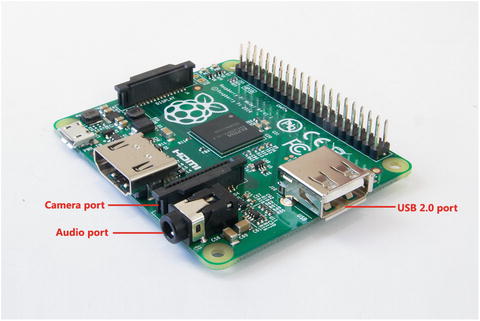
Figure 1-2. Raspberry Pi Model A+’s camera port, audio port, and USB port
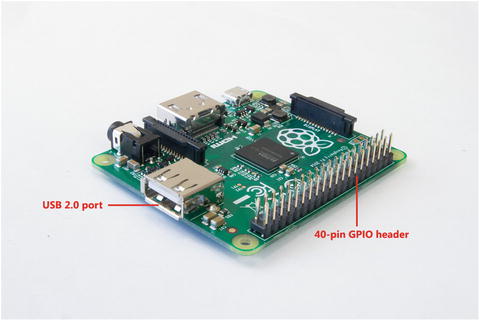
Figure 1-3. Raspberry Pi Model A+ USB port and 40-pin GPIO connector
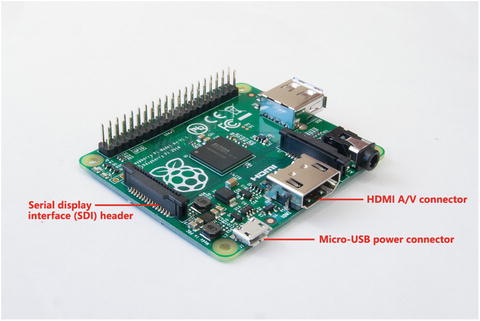
Figure 1-4. Raspberry Pi Model A+’s serial display interface (SDI), Micro-USB power connector, and HDMI video port. The microSD card slot is beneath the display connector .
Model B Family
The Model B family includes more expandability than the Model A family because it features more USB ports and an Ethernet port. Model B boards represent three generations of Raspberry Pi:
First generation (B, B+)
Second generation (Pi 2)
Third generation (Pi 3)
Model B (First Generation)
The original Model B board (see Figures 1-5 and 1-6) was the first Raspberry Pi board to include two USB 2.0 ports and a 10/100 Ethernet port. It also featured the same combination of HDMI A/V, audio, composite video ports, 26-pin GPIO connector, and full-size SD card slot as found on the Model A.
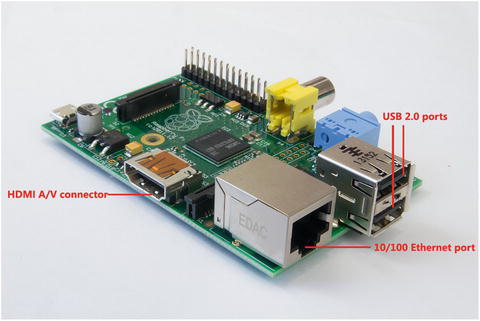
Figure 1-5. Raspberry Pi Model B’s HDMI port, Ethernet port, and dual USB 2.0 ports
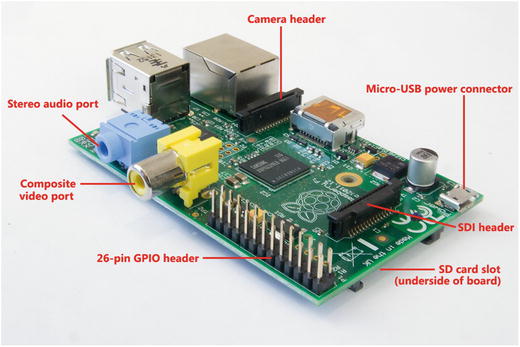
Figure 1-6. Raspberry Pi Model B’s stereo audio port, composite video port, 26-pin GPIO connector, serial display interface (SDI), and Micro-USB power connector. The SD card slot is beneath the display connector .
Model B+, Pi 2, and Pi 3
Currently, Model B computers are available as improved first-generation (B+), second-generation (Pi 2), or third-generation (Pi 3) models. These boards feature
40-pin GPIO connector
Four USB 2.0 ports
10/100 Ethernet port
microSD card slot
B+ boards use the same single-core 700MHz ARM processor used by Model A and A+ boards.
The original Pi 2 uses a 900MHz quad-core 32-bit processor. Pi 2 v1.2 also includes a 900MHz quad-core processor, but one which also supports 64-bit operating systems.
From the top, Pi 3 looks almost identical to Pi 2 v1.1 and Pi 2 v1.2, but includes Pi’s first 1.2GHz 64-bit processor. It’s easier to distinguish these boards from each other from the bottom. Figures 1-7 and 1-8 illustrate the top and bottom views of these boards .
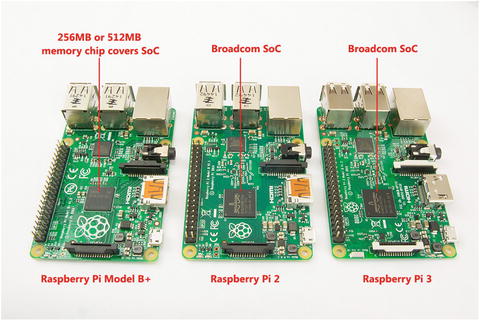
Figure 1-7. Top view of Raspberry Pi B+ (left), Pi 2 (center), and Pi 3 (right)
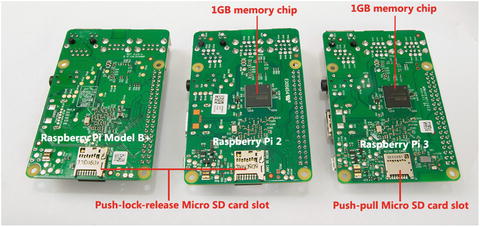
Figure 1-8. Bottom view of Raspberry Pi B+ (left), Pi 2 (center), and Pi 3 (right)
Figures 1-9 and 1-10 provide a closer look at the Pi 3. The features called out in these figures are also present on Pi Model B+ and Pi 2.
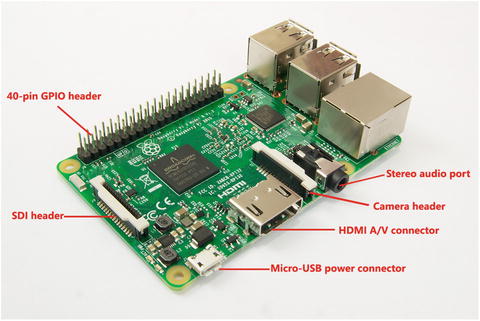
Figure 1-9. Raspberry Pi 3’s GPIO header, display header, Micro-USB power connector, HDMI audio/video port, camera header, and stereo audio port
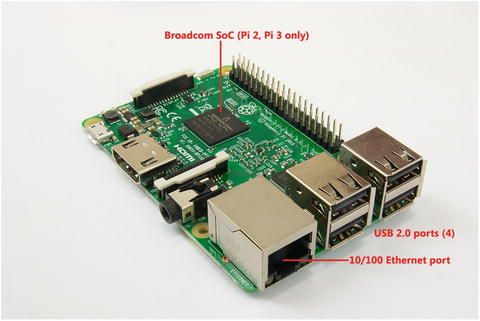
Figure 1-10. Raspberry Pi 3’s 10/100 Ethernet port and quartet of USB 2.0 ports
Zero
Pi Zero (Figures 1-11 and 1-12) is the smallest, thinnest, and least-expensive member of the Raspberry Pi family. It is so inexpensive ($5.00 US as this book goes to press) that some magazines devoted to Raspberry Pi sold special issues with a Pi Zero board attached to the front cover when Pi Zero was introduced.
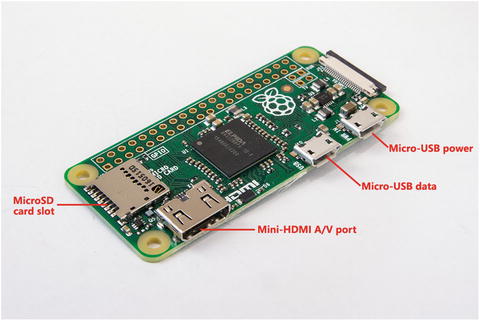
Figure 1-11. Raspberry Pi Zero’s top-mounted microSD slot, Mini-HDMI video port , and Micro-USB data and power ports
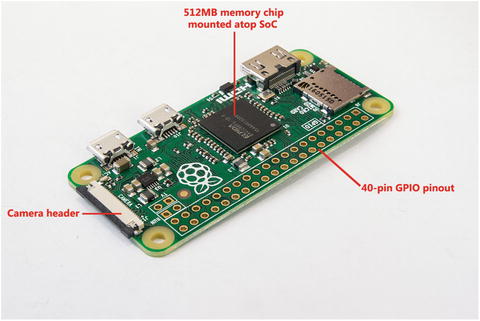
Figure 1-12. Raspberry Pi Zero’s camera port and 40-hole GPIO pinout
Like other recent Pi models, Pi Zero includes a microSD slot, but it is top-mounted, rather than bottom-mounted as with other Pi models. Pi Zero also includes a Mini-HDMI port, a Micro-USB (USB-on-the-Go) data port, and the same Micro-USB power port used by earlier Pi models.
Pi Zero has the same 40-pin GPIO pinout as Model B boards, but instead of a connector, the holes are open for temporary or soldered connections.
Pi Zero has no onboard network connections. All network connections must be made via the Micro-USB port.
v1.2 vs. v.1.3
Pi Zero was originally introduced without a camera connector. This version is known as v1.2. Version 1.3, the current version (shown in Figures 1-11 and 1-12), adds a camera connector to the opposite end of the board from the microSD card slot.
Pi Zero v1.3’s camera connector is electronically compatible with the cameras available for other Pi versions. However, it uses a different cable. Users can replace the original cable with a Pi Zero cable.
Pi Zero W
Pi Zero W is based on Pi Zero v1.3, but also includes the same wireless radio chip (Wi-Fi and Bluetooth) used on the Pi 3. It was introduced in early 2017 and has a US retail price of $10.00.
Note
To learn more about using the Raspberry Pi camera and connecting the camera to different Raspberry Pi models, see Chapter 7.
CPU and RAM
Although most Raspberry Pi Model B boards look very much alike, there are major differences in processor cores, processor speed, 32-bit vs. 64-bit support, RAM size, and RAM speed between all Raspberry Pi models.
System-on-a-Chip (SoC)
All Raspberry Pi models use SoC technology , which combines CPU, video, and other features normally found on separate chips into a single piece of silicon. On boards with 256MB or 512MB of RAM, the RAM chip is stacked above the SoC and the SoC and RAM are installed as a single subassembly. On boards with 1GB of RAM, the RAM chip is attached to the bottom of the board with connection to the SoC running through the board. This results in a sandwich with three layers as viewed from the top:
SoC
Raspberry Pi board
RAM
Users must replace their boards to obtain faster CPU or RAM performance. Fortunately, Raspberry Pi boards are inexpensive.
Raspberry Pi boards use Broadcom BCM28xx SoC chips with different processor cores and amounts of RAM onboard, depending upon the board or revision level.
CPU, RAM, and SoC Features
Raspberry Pi Model A (1, 1+) and Model B (1, 1+) use the 700MHz version of the ARM1176JZF-S CPU. Raspberry Pi Zero and Zero W use the 1GHz version. This is a single-core CPU that supports the ARMv6Z 32-bit architecture. These boards use the Broadcom BCM2835 SoC. The memory is mounted atop the SoC chip on these boards.
Raspberry Pi 2 has a big upgrade in performance with a 900MHz quad-core ARMv7 Cortex-A7 CPU incorporated into the Broadcom BCM2836 SoC.
Raspberry Pi 3 breaks the 1GHz barrier with a 64-bit ARMv8 Cortex-A53 CPU incorporated into the Broadcom BCM2837 SoC.
In Raspberry Pi 2 and Pi 3, the RAM is located on the bottom of the board, rather than connected on top of the SoC as with other models .
Note
For more information about the ARM1176JZF-S, see www.arm.com/products/processors/classic/arm11/arm1176.php . Learn more about the Cortex A7 processor at www.arm.com/products/processors/cortex-a/cortex-a7.php . Dig deeper into the Cortex A53 processor at www.arm.com/products/processors/cortex-a/cortex-a53-processor.php .
Table 1-1 outlines the CPU, RAM, and SoC used by Raspberry Pi boards.
Table 1-1. Raspberry Pi SoC, CPU, and RAM
Pi Model | SoC | CPU (Cores) | Speed | RAM |
|---|---|---|---|---|
A | BCM2835 | ARM1176JZF-S (1) | 700MHz | 256MB |
A+ | BCM2835 | ARM1176JZF-S (1) | 700MHz | 256MB/512MB* |
B | BCM2835 | ARM1176JZF-S (1) | 700MHz | 256MB/512MB* |
B+ | BCM2835 | ARM1176JZF-S (1) | 700MHz | 256MB/512MB* |
2 | BCM2836 | ARM Cortex-A7 (4) | 900MHz | 1GB |
2 v1.2 | BCM2836 | ARM Cortex-A53 (4) | 900MHz | 1GB |
3 | BCM2837 | ARM Cortex-A53 (4) | 1.2GHz | 1GB |
Zero 1.2, 1.3, and W | BCM2835 | ARM1176JZF-S (1) | 1GHz | 512MB |
Ports
The ports included in full-size Raspberry Pi models include
USB 2.0
HDMI v1.3
Audio out
10/100 Ethernet*
Micro-USB power port
*Not included in Raspberry Pi Model A or A+.
The ports included in Raspberry Pi Zero models include
Micro-USB 2.0 data port
Micro-USB power port
Mini-HDMI v1.3
Table 1-2 summarizes port types on the different Raspberry Pi models and versions.
Table 1-2. Raspberry Pi Port Types and Quantities
Pi Model | # of USB 2.0 | Ethernet | HDMI | Audio Out |
|---|---|---|---|---|
A | 1 | N/A | 1 | Yes |
A+ | 1 | N/A | 1 | Yes |
B | 2 | 10/100 (1) | 1 | Yes |
B+ | 4 | 10/100 (1) | 1 | Yes |
2 (v1.1, 1.2) | 4 | 10/100 (1) | 1 | Yes |
3 | 4 | 10/100 (1) | 1 | Yes |
Zero (v1.2, 1.3) | 1* | N/A | 1** | N/A |
Note
Raspberry Pi Model A and Model B have a separate composite video interface . Raspberry Pi Model A+, B+, 2, and 3 combine the composite video interface with the 3.5mm analog audio jack. Audio is the default usage. To switch from the default HDMI video output to composite video on these models, see Chapter 2.
Board-Level Connectors
Board-level connectors included in Raspberry Pi models include
Camera interface (CSI)
Display interface (DSI)
GPIO connector (all except Raspberry Pi Zero, Zero W) or GPIO pinout with open holes (Raspberry Pi Zero, Zero W)
SD card or microSD card
The CSI is used by the Raspberry Pi camera, available in 5MP or 8MP versions (see Chapter 7 for details).
The DSI is used by various display devices, including the PiFace (see Chapter 9 for details).
Original Model A and Model B Raspberry Pi models support SD or SDHC memory cards . Model B+, Pi 2, Pi 3, and Pi Zero support microSD or microSDHC memory cards. For SDXC cards, see the following Note.
Note
It is also possible to use 64GB SDXC or microSDXC memory cards with Raspberry Pi models by reformatting the card using the FAT32 file system (64GB and larger cards use the ExFAT/FAT64 file system by default). Linux and MacOS (OSX) can format SDXC cards using FAT32 by deleting the original partition and reformatting the card. With Windows, you can use SD Formatter and FAT32 Format to create a FAT32 partition that uses the entire card . For details, see Chapter 2.
Integrated Network Features
When networking is considered, Raspberry Pi boards can be divided into three categories:
Boards without integrated networking
Boards with integrated wired networking
Boards with integrated wireless networking
Raspberry Pi Model A, A+, and Zero do not include any onboard networking. A USB wireless adapter or a USB wired Ethernet adapter can be used with these boards. To use more than one USB device at the same time, a USB 2.0 hub must be used (Figures 1-13, 1-14).
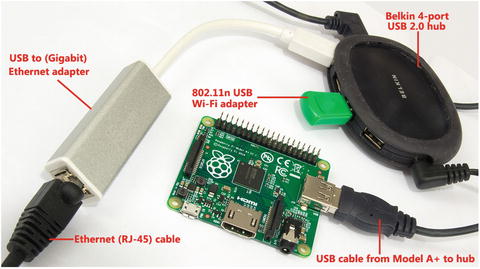
Figure 1-13. Raspberry Pi A+ is using a Belkin 4-port USB hub to connect to a USB Wi-Fi adapter and a USB Ethernet adapter
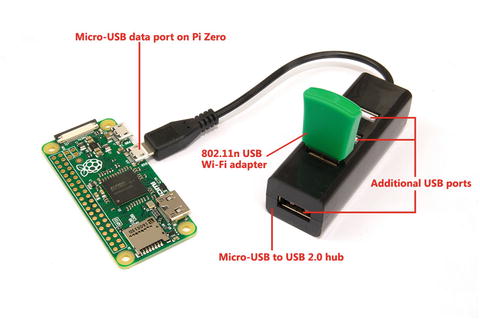
Figure 1-14. A Raspberry Pi Zero v1.3 is using a four-port Micro-USB hub to connect to a USB Wi-Fi adapter
Raspberry Pi B, B+, Pi 2, and Pi 3 all include a 10/100 Ethernet port (refer to Figures 1-5, 1-10).
Raspberry Pi 3 includes both wired (10/100 Ethernet) and wireless (802.11n and Bluetooth 4.1/LE) support. A close look at the Raspberry Pi 3 compared to a Raspberry Pi 2 reveals the tiny radio chip and antenna (Figure 1-15). The Pi Zero W uses the same radio chip and antenna as the Pi 3.
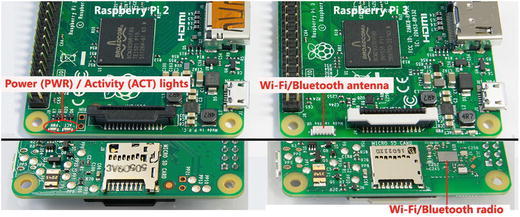
Figure 1-15. The Raspberry Pi 3’s underside contains the radio chip, and the top of the board has a surface-mounted antenna in place of the power and activity lights of the Raspberry Pi 2. On the Pi 3, the power and activity lights are located on the right edge of the board near the round case mounting hole.
Power Supplies
At a minimum, any full-size Raspberry Pi should use a 2.0A power supply . However, a 2.5A power supply is recommended for greater reliability, especially if the Pi’s SPI, camera interface, or GPIO pins will be used.
Summary
The Raspberry Pi 3 provides the most powerful combination of features of all Raspberry Pi models. As you will learn in detail in Chapter 2, it is one of two Raspberry Pi models suitable for use with Windows 10 IoT Core (the other being the Raspberry Pi 2).
If you need Linux compatibility, any of the Raspberry Pi boards will work, but the limited RAM in the original Model A, Model B, and early-production Model B+ make these boards better options for appliance (single-task) or command-line Linux releases. Look for 512MB or 1GB boards if you want to run a GUI.
In Chapter 2, you will learn about Linux and Windows versions made for Raspberry Pi. Choosing the right operating system to work with your Raspberry Pi is the next step in expanding it.