Table of Contents for
Linux Network Administrator's Guide, Second Edition
 Linux Network Administrator's Guide, Second Edition
Published by
O'Reilly Media, Inc., 2000
Linux Network Administrator's Guide, Second Edition
Published by
O'Reilly Media, Inc., 2000
- Cover
- Linux Network Administrator’s Guide, 2nd Edition
- Preface
- Sources of Information
- File System Standards
- Standard Linux Base
- About This Book
- The Official Printed Version
- Overview
- Conventions Used in This Book
- Submitting Changes
- Acknowledgments
- 1. Introduction to Networking
- TCP/IP Networks
- UUCP Networks
- Linux Networking
- Maintaining Your System
- 2. Issues of TCP/IP Networking
- IP Addresses
- Address Resolution
- IP Routing
- The Internet Control Message Protocol
- Resolving Host Names
- 3. Configuring the Networking Hardware
- A Tour of Linux Network Devices
- Ethernet Installation
- The PLIP Driver
- The PPP and SLIP Drivers
- Other Network Types
- 4. Configuring the Serial Hardware
- Introduction to Serial Devices
- Accessing Serial Devices
- Serial Hardware
- Using the Configuration Utilities
- Serial Devices and the login: Prompt
- 5. Configuring TCP/IP Networking
- Installing the Binaries
- Setting the Hostname
- Assigning IP Addresses
- Creating Subnets
- Writing hosts and networks Files
- Interface Configuration for IP
- All About ifconfig
- The netstat Command
- Checking the ARP Tables
- 6. Name Service and Resolver Configuration
- How DNS Works
- Running named
- 7. Serial Line IP
- SLIP Operation
- Dealing with Private IP Networks
- Using dip
- Running in Server Mode
- 8. The Point-to-Point Protocol
- Running pppd
- Using Options Files
- Using chat to Automate Dialing
- IP Configuration Options
- Link Control Options
- General Security Considerations
- Authentication with PPP
- Debugging Your PPP Setup
- More Advanced PPP Configurations
- 9. TCP/IP Firewall
- What Is a Firewall?
- What Is IP Filtering?
- Setting Up Linux for Firewalling
- Three Ways We Can Do Filtering
- Original IP Firewall (2.0 Kernels)
- IP Firewall Chains (2.2 Kernels)
- Netfilter and IP Tables (2.4 Kernels)
- TOS Bit Manipulation
- Testing a Firewall Configuration
- A Sample Firewall Configuration
- 10. IP Accounting
- Configuring IP Accounting
- Using IP Accounting Results
- Resetting the Counters
- Flushing the Ruleset
- Passive Collection of Accounting Data
- 11. IP Masquerade and Network Address Translation
- Configuring the Kernel for IP Masquerade
- Configuring IP Masquerade
- Handling Name Server Lookups
- More About Network Address Translation
- 12. Important Network Features
- The tcpd Access Control Facility
- The Services and Protocols Files
- Remote Procedure Call
- Configuring Remote Login and Execution
- 13. The Network Information System
- NIS Versus NIS+
- The Client Side of NIS
- Running an NIS Server
- NIS Server Security
- Setting Up an NIS Client with GNU libc
- Choosing the Right Maps
- Using the passwd and group Maps
- Using NIS with Shadow Support
- 14. The Network File System
- Mounting an NFS Volume
- The NFS Daemons
- The exports File
- Kernel-Based NFSv2 Server Support
- Kernel-Based NFSv3 Server Support
- 15. IPX and the NCP Filesystem
- IPX and Linux
- Configuring the Kernel for IPX and NCPFS
- Configuring IPX Interfaces
- Configuring an IPX Router
- Mounting a Remote NetWare Volume
- Exploring Some of the Other IPX Tools
- Printing to a NetWare Print Queue
- NetWare Server Emulation
- 16. Managing Taylor UUCP
- UUCP Configuration Files
- Controlling Access to UUCP Features
- Setting Up Your System for Dialing In
- UUCP Low-Level Protocols
- Troubleshooting
- Log Files and Debugging
- 17. Electronic Mail
- How Is Mail Delivered?
- Email Addresses
- How Does Mail Routing Work?
- Configuring elm
- 18. Sendmail
- Installing sendmail
- Overview of Configuration Files
- The sendmail.cf and sendmail.mc Files
- Generating the sendmail.cf File
- Interpreting and Writing Rewrite Rules
- Configuring sendmail Options
- Some Useful sendmail Configurations
- Testing Your Configuration
- Running sendmail
- Tips and Tricks
- 19. Getting Exim Up and Running
- If Your Mail Doesn’t Get Through
- Compiling Exim
- Mail Delivery Modes
- Miscellaneous config Options
- Message Routing and Delivery
- Protecting Against Mail Spam
- UUCP Setup
- 20. Netnews
- What Is Usenet, Anyway?
- How Does Usenet Handle News?
- 21. C News
- Installation
- The sys File
- The active File
- Article Batching
- Expiring News
- Miscellaneous Files
- Control Messages
- C News in an NFS Environment
- Maintenance Tools and Tasks
- 22. NNTP and the nntpd Daemon
- Installing the NNTP Server
- Restricting NNTP Access
- NNTP Authorization
- nntpd Interaction with C News
- 23. Internet News
- Newsreaders and INN
- Installing INN
- Configuring INN: the Basic Setup
- INN Configuration Files
- Running INN
- Managing INN: The ctlinnd Command
- 24. Newsreader Configuration
- trn Configuration
- nn Configuration
- A. Example Network: The Virtual Brewery
- B. Useful Cable Configurations
- A Serial NULL Modem Cable
- C. Linux Network Administrator’s Guide, Second Edition Copyright Information
- 1. Applicability and Definitions
- 2. Verbatim Copying
- 3. Copying in Quantity
- 4. Modifications
- 5. Combining Documents
- 6. Collections of Documents
- 7. Aggregation with Independent Works
- 8. Translation
- 9. Termination
- 10. Future Revisions of this License
- D. SAGE: The System Administrators Guild
- Index
- Colophon
The Internet News daemon (INN) is arguably the most popular Netnews server in use today. INN is extremely flexible and is suitable for all but the smallest news sites.[135]INN scales well and is suited to large news server configurations.
The INN server comprises a number of components, each with their own configuration files that we will discuss in turn. Configuration of INN can be a little involved, but we’ll describe each of the stages in this chapter and arm you with enough information to make sense of the INN manual pages and documentation and build configurations for just about any application.
INN’s core program is the innd daemon.
innd’s task is to handle all incoming articles,
storing them locally, and to pass them on to any outgoing newsfeeds if
required. It is started at boot time and runs continually as a background
process. Running as a daemon improves performance because it has to read
its status files only once when starting. Depending
on the volume of your news feed, certain files such as
history (which contain a list of all recently
processed articles) may range from a few megabytes to tens of megabytes.
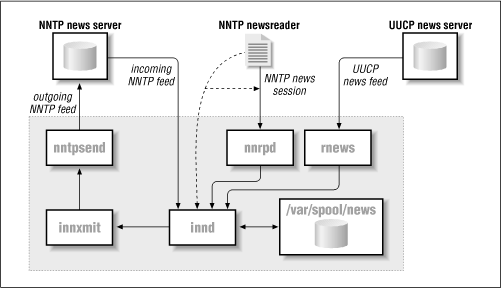
Another important feature of INN is that there is always only one instance of innd running at any time. This is also very beneficial to performance, because the daemon can process all articles without having to worry about synchronizing its internal states with other copies of innd rummaging around the news spool at the same time. However, this choice affects the overall design of the news system. Because it is so important that incoming news is processed as quickly as possible, it is unacceptable that the server be tied up with such mundane tasks as serving newsreaders accessing the news spool via NNTP, or decompressing newsbatches arriving via UUCP. Therefore, these tasks have been broken out of the main server and implemented in separate support programs. Figure 23.1 attempts to illustrate the relationships between innd, the other local tasks, and remote news servers and newsreaders.
Today, NNTP is the most common means of transporting news articles around, and innd doesn’t directly support anything else. This means that innd listens on a TCP socket (port 119) for connections and accepts news articles using the “ihave” protocol.
Articles arriving by transports other than NNTP are supported indirectly by having another process accept the articles and forward them to innd via NNTP. Newsbatches coming in over a UUCP link, for instance, are traditionally handled by the rnews program. INN’s rnews decompresses the batch if necessary, and breaks it up into individual articles; it then offers them to innd one by one.
Newsreaders can deliver news when a user posts an article. Since the handling of newsreaders deserves special attention, we will come back to this a little later.
When receiving an article, innd first looks up its
message ID in the history file. Duplicate
articles are dropped and the occurrences are optionally logged. The
same goes for articles that are too old or lack some required header
field, such as Subject:.[136] If innd finds
that the article is acceptable, it looks at the
Newsgroups: header line to find out what groups it
has been posted to. If one or more of these groups are found in the
active file, the article is filed to
disk. Otherwise, it is filed to the special group junk.
Individual articles are kept below /var/spool/news, also
called the news spool. Each newsgroup has a
separate directory, in which each article is stored in a separate file. The
file names are consecutive numbers, so that an article in
comp.risks may be filed
as comp/risks/217, for instance. When
innd finds that the directory it wants to store the
article in does not exist, it creates it automatically.
Apart from storing articles locally, you may also want to pass them on to
outgoing feeds. This is governed by the newsfeeds file
that lists all downstream sites along with the newsgroups that should be fed
to them.
Just like innd’s receiving end, the processing of outgoing news is handled by a single interface, too. Instead of doing all the transport-specific handling itself, innd relies on various backends to manage the transmission of articles to other news servers. Outgoing facilities are collectively dubbed channels. Depending on its purpose, a channel can have different attributes that determine exactly what information innd passes on to it.
For an outgoing NNTP feed, for instance, innd might fork the innxmit program at startup, and, for each article that should be sent across that feed, pass its message ID, size, and filename to innxmit’s standard input. For an outgoing UUCP feed, on the other hand, it might write the article’s size and file name to a special logfile, which is head by a different process at regular intervals in order to create batches and queue them to the UUCP subsystem.
Besides these two examples, there are other types of channels that are
not strictly outgoing feeds. These are used, for instance, when
archiving certain newsgroups, or when generating overview
information. Overview information is intended to help newsreaders
thread articles more efficiently. Old-style newsreaders had to scan
all articles separately in order to obtain the header information
required for threading. This would put an immense strain on the server
machine, especially when using NNTP; furthermore, it was very
slow.[137] The
overview mechanism alleviates this problem by prerecording all
relevant headers in a separate file (called
.overview) for each newsgroup. This information
can then be picked up by newsreaders either by reading it directly
from the spool directory, or by using the XOVER
command when connected via NNTP. INN has the innd
daemon feed all articles to the overchan command,
which is attached to the daemon through a channel. We’ll see how this
is done when we discuss configuring news feeds later.
[135] Very small news sites should consider a caching NNTP server program like leafnode, which is available at http://wpxx02.toxi.uni-wuerzburg.de/~krasel/leafnode.html.
[136] This is
indicated by the Date: header field; the limit is
usually two weeks.
[137] Threading 1,000 articles when talking to a loaded server could easily take around five minutes, which only the most dedicated Usenet addict would find acceptable.