Table of Contents for
Linux Network Administrator's Guide, Second Edition
 Linux Network Administrator's Guide, Second Edition
Published by
O'Reilly Media, Inc., 2000
Linux Network Administrator's Guide, Second Edition
Published by
O'Reilly Media, Inc., 2000
- Cover
- Linux Network Administrator’s Guide, 2nd Edition
- Preface
- Sources of Information
- File System Standards
- Standard Linux Base
- About This Book
- The Official Printed Version
- Overview
- Conventions Used in This Book
- Submitting Changes
- Acknowledgments
- 1. Introduction to Networking
- TCP/IP Networks
- UUCP Networks
- Linux Networking
- Maintaining Your System
- 2. Issues of TCP/IP Networking
- IP Addresses
- Address Resolution
- IP Routing
- The Internet Control Message Protocol
- Resolving Host Names
- 3. Configuring the Networking Hardware
- A Tour of Linux Network Devices
- Ethernet Installation
- The PLIP Driver
- The PPP and SLIP Drivers
- Other Network Types
- 4. Configuring the Serial Hardware
- Introduction to Serial Devices
- Accessing Serial Devices
- Serial Hardware
- Using the Configuration Utilities
- Serial Devices and the login: Prompt
- 5. Configuring TCP/IP Networking
- Installing the Binaries
- Setting the Hostname
- Assigning IP Addresses
- Creating Subnets
- Writing hosts and networks Files
- Interface Configuration for IP
- All About ifconfig
- The netstat Command
- Checking the ARP Tables
- 6. Name Service and Resolver Configuration
- How DNS Works
- Running named
- 7. Serial Line IP
- SLIP Operation
- Dealing with Private IP Networks
- Using dip
- Running in Server Mode
- 8. The Point-to-Point Protocol
- Running pppd
- Using Options Files
- Using chat to Automate Dialing
- IP Configuration Options
- Link Control Options
- General Security Considerations
- Authentication with PPP
- Debugging Your PPP Setup
- More Advanced PPP Configurations
- 9. TCP/IP Firewall
- What Is a Firewall?
- What Is IP Filtering?
- Setting Up Linux for Firewalling
- Three Ways We Can Do Filtering
- Original IP Firewall (2.0 Kernels)
- IP Firewall Chains (2.2 Kernels)
- Netfilter and IP Tables (2.4 Kernels)
- TOS Bit Manipulation
- Testing a Firewall Configuration
- A Sample Firewall Configuration
- 10. IP Accounting
- Configuring IP Accounting
- Using IP Accounting Results
- Resetting the Counters
- Flushing the Ruleset
- Passive Collection of Accounting Data
- 11. IP Masquerade and Network Address Translation
- Configuring the Kernel for IP Masquerade
- Configuring IP Masquerade
- Handling Name Server Lookups
- More About Network Address Translation
- 12. Important Network Features
- The tcpd Access Control Facility
- The Services and Protocols Files
- Remote Procedure Call
- Configuring Remote Login and Execution
- 13. The Network Information System
- NIS Versus NIS+
- The Client Side of NIS
- Running an NIS Server
- NIS Server Security
- Setting Up an NIS Client with GNU libc
- Choosing the Right Maps
- Using the passwd and group Maps
- Using NIS with Shadow Support
- 14. The Network File System
- Mounting an NFS Volume
- The NFS Daemons
- The exports File
- Kernel-Based NFSv2 Server Support
- Kernel-Based NFSv3 Server Support
- 15. IPX and the NCP Filesystem
- IPX and Linux
- Configuring the Kernel for IPX and NCPFS
- Configuring IPX Interfaces
- Configuring an IPX Router
- Mounting a Remote NetWare Volume
- Exploring Some of the Other IPX Tools
- Printing to a NetWare Print Queue
- NetWare Server Emulation
- 16. Managing Taylor UUCP
- UUCP Configuration Files
- Controlling Access to UUCP Features
- Setting Up Your System for Dialing In
- UUCP Low-Level Protocols
- Troubleshooting
- Log Files and Debugging
- 17. Electronic Mail
- How Is Mail Delivered?
- Email Addresses
- How Does Mail Routing Work?
- Configuring elm
- 18. Sendmail
- Installing sendmail
- Overview of Configuration Files
- The sendmail.cf and sendmail.mc Files
- Generating the sendmail.cf File
- Interpreting and Writing Rewrite Rules
- Configuring sendmail Options
- Some Useful sendmail Configurations
- Testing Your Configuration
- Running sendmail
- Tips and Tricks
- 19. Getting Exim Up and Running
- If Your Mail Doesn’t Get Through
- Compiling Exim
- Mail Delivery Modes
- Miscellaneous config Options
- Message Routing and Delivery
- Protecting Against Mail Spam
- UUCP Setup
- 20. Netnews
- What Is Usenet, Anyway?
- How Does Usenet Handle News?
- 21. C News
- Installation
- The sys File
- The active File
- Article Batching
- Expiring News
- Miscellaneous Files
- Control Messages
- C News in an NFS Environment
- Maintenance Tools and Tasks
- 22. NNTP and the nntpd Daemon
- Installing the NNTP Server
- Restricting NNTP Access
- NNTP Authorization
- nntpd Interaction with C News
- 23. Internet News
- Newsreaders and INN
- Installing INN
- Configuring INN: the Basic Setup
- INN Configuration Files
- Running INN
- Managing INN: The ctlinnd Command
- 24. Newsreader Configuration
- trn Configuration
- nn Configuration
- A. Example Network: The Virtual Brewery
- B. Useful Cable Configurations
- A Serial NULL Modem Cable
- C. Linux Network Administrator’s Guide, Second Edition Copyright Information
- 1. Applicability and Definitions
- 2. Verbatim Copying
- 3. Copying in Quantity
- 4. Modifications
- 5. Combining Documents
- 6. Collections of Documents
- 7. Aggregation with Independent Works
- 8. Translation
- 9. Termination
- 10. Future Revisions of this License
- D. SAGE: The System Administrators Guild
- Index
- Colophon
We’ve been talking quite a bit about network interfaces and general TCP/IP issues, but we haven’t really covered what happens when the “networking code” in the kernel accesses a piece of hardware. In order to describe this accurately, we have to talk a little about the concept of interfaces and drivers.
First, of course, there’s the hardware itself, for example an Ethernet, FDDI or Token Ring card: this is a slice of Epoxy cluttered with lots of tiny chips with strange numbers on them, sitting in a slot of your PC. This is what we generally call a physical device.
For you to use a network card, special functions have to be present in your Linux kernel that understand the particular way this device is accessed. The software that implements these functions is called a device driver. Linux has device drivers for many different types of network interface cards: ISA, PCI, MCA, EISA, Parallel port, PCMCIA, and more recently, USB.
But what do we mean when we say a driver “handles” a device? Let’s consider an Ethernet card. The driver has to be able to communicate with the peripheral’s on-card logic somehow: it has to send commands and data to the card, while the card should deliver any data received to the driver.
In IBM-style personal computers, this communication takes place through a
cluster of I/O addresses that are mapped to registers on the card and/or
through shared or direct memory transfers. All commands and data the kernel
sends to the card have to go to these addresses. I/O and memory addresses are
generally described by providing the starting or
base address. Typical base addresses for ISA bus Ethernet
cards are 0x280 or 0x300. PCI bus
network cards generally have their I/O address automatically assigned.
Usually you don’t have to worry about any hardware issues such as the base address because the kernel makes an attempt at boot time to detect a card’s location. This is called auto probing, which means that the kernel reads several memory or I/O locations and compares the data it reads there with what it would expect to see if a certain network card were installed at that location. However, there may be network cards it cannot detect automatically; this is sometimes the case with cheap network cards that are not-quite clones of standard cards from other manufacturers. Also, the kernel will normally attempt to detect only one network device when booting. If you’re using more than one card, you have to tell the kernel about the other cards explicitly.
Another parameter that you might have to tell the kernel about is the interrupt request line. Hardware components usually interrupt the kernel when they need to be taken care of—for example, when data has arrived or a special condition occurs. In an ISA bus PC, interrupts may occur on one of 15 interrupt channels numbered 0, 1, and 3 through 15. The interrupt number assigned to a hardware component is called its interrupt request number (IRQ).[17]
As described in Chapter 2, the kernel accesses a piece of network hardware through a software construct called an interface. Interfaces offer an abstract set of functions that are the same across all types of hardware, such as sending or receiving a datagram.
Interfaces are identified by means of
names. In many other Unix-like operating systems, the network
interface is implemented as a special device file in the
/dev/ directory. If you type the ls -las /dev/ command, you will see what these device files look
like. In the file permissions (second) column you will see that device
files begin with a letter rather than the hyphen seen for normal
files. This character indicates the device type. The most common
device types are b, which indicates the device is a
block device and handles whole blocks of data
with each read and write, and c, which indicates
the device is a character device and handles data
one character at a time. Where you would normally see the file length
in the ls output, you instead see two numbers,
called the major and minor device numbers. These numbers indicate the
actual device with which the device file is associated.
Each device driver registers a unique major number with the kernel.
Each instance of that device registers a unique
minor number for that major device. The tty
interfaces,/dev/tty*, are a character
mode device indicated by the "c“, and
each have a major number of 4, but
/dev/tty1 has a minor number of
1, and /dev/tty2 has a minor
number of 2. Device files are very useful for
many types of devices, but can be clumsy to use when trying to find an
unused device to open.
Linux interface names are defined internally in the kernel and are not
device files in the /dev directory. Some typical
device names are listed later in Section 3.2.” The assignment of interfaces to
devices usually depends on the order in which devices are
configured. For instance, the first Ethernet card installed will
become eth0, and the next will be
eth1. SLIP interfaces are handled differently
from others because they are assigned dynamically. Whenever a SLIP
connection is established, an interface is assigned to the serial
port.
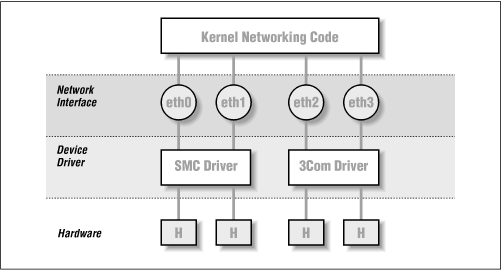
Figure 3.1 illustrates the relationship between the hardware, device drivers, and interfaces.
When booting, the kernel displays the devices it detects and the interfaces it installs. The following is an excerpt from typical boot messages:
 .
 .  This processor honors the WP bit even when in supervisor mode./
    Good.
Swansea University Computer Society NET3.035 for Linux 2.0
NET3: Unix domain sockets 0.13 for Linux NET3.035.
Swansea University Computer Society TCP/IP for NET3.034
IP Protocols: IGMP,ICMP, UDP, TCP
Swansea University Computer Society IPX 0.34 for NET3.035
IPX Portions Copyright (c) 1995 Caldera, Inc.
Serial driver version 4.13 with no serial options enabled
tty00 at 0x03f8 (irq = 4) is a 16550A
tty01 at 0x02f8 (irq = 3) is a 16550A
CSLIP: code copyright 1989 Regents of the University of California
PPP: Version 2.2.0 (dynamic channel allocation)
PPP Dynamic channel allocation code copyright 1995 Caldera, Inc.
PPP line discipline registered.
eth0: 3c509 at 0x300 tag 1, 10baseT port, address 00 a0 24 0e e4 e0,/
    IRQ 10.
3c509.c:1.12 6/4/97 becker@cesdis.gsfc.nasa.gov
Linux Version 2.0.32 (root@perf) (gcc Version 2.7.2.1)
#1 Tue Oct 21 15:30:44 EST 1997
 .
 .
This example shows that the kernel has been compiled with TCP/IP
enabled, and it includes drivers for SLIP, CSLIP, and PPP. The third
line from the bottom says that a 3C509 Ethernet card was detected and
installed as interface eth0. If you have some
other type of network card—perhaps a D-Link pocket adaptor, for
example—the kernel will usually print a line starting with its
device name—dl0 in the D-Link
example—followed by the type of card detected. If you have a
network card installed but don’t see any similar message, the kernel
is unable to detect your card properly. This situation will be
discussed later in the section “Ethernet Autoprobing.”
Most Linux distributions are supplied with boot disks that work for all common types of PC hardware. Generally, the supplied kernel is highly modularized and includes nearly every possible driver. This is a great idea for boot disks, but is probably not what you’d want for long-term use. There isn’t much point in having drivers cluttering up your disk that you will never use. Therefore, you will generally roll your own kernel and include only those drivers you actually need or want; that way you save a little disk space and reduce the time it takes to compile a new kernel.
In any case, when running a Linux system, you should be familiar with building a kernel. Think of it as a right of passage, an affirmation of the one thing that makes free software as powerful as it is—you have the source. It isn’t a case of, “I have to compile a kernel,” rather it’s a case of, “I can compile a kernel.” The basics of compiling a Linux kernel are explained in Matt Welsh’s book, Running Linux (O’Reilly). Therefore, we will discuss only configuration options that affect networking in this section.
One important point that does bear
repeating here is the way the kernel version numbering scheme
works. Linux kernels are numbered in the following format:
2.2.14. The first digit indicates the
major version number. This digit changes when
there are large and significant changes to the kernel design. For
example, the kernel changed from major 1 to 2 when the kernel obtained
support for machines other than Intel machines. The second number is
the minor version number. In many respects, this
number is the most important number to look at. The Linux development
community has adopted a standard at which even minor
version numbers indicate production, or
stable, kernels and odd
minor version numbers indicate development, or
unstable, kernels. The stable kernels are what
you should use on a machine that is important to you, as they have
been more thoroughly tested. The development kernels are what you
should use if you are interested in experimenting with the newest
features of Linux, but they may have problems that haven’t yet been
found and fixed. The third number is simply incremented for each
release of a minor version.[18]
When running make menuconfig, you are presented with
a text-based menu that offers lists of configuration questions, such as
whether you want kernel math emulation. One of these queries asks you
whether you want TCP/IP networking support. You must answer this with
y to get a kernel capable of networking.
After the general option section is complete, the configuration will
go on to ask whether you want to include support for various features,
such as SCSI drivers or sound cards. The prompt will indicate what
options are available. You can press ? to obtain a
description of what the option is actually offering. You’ll always
have the option of yes (y) to statically include the
component in the kernel, or no (n) to exclude the
component completely. You’ll also see the module (m)
option for those components that may be compiled as a run-time
loadable module. Modules need to be loaded before they can be used,
and are useful for drivers of components that you use infrequently.
The subsequent list of questions deal with networking support. The exact set of configuration options is in constant flux due to ongoing development. A typical list of options offered by most kernel versions around 2.0 and 2.1 looks like this:
*
* Network device support
*
Network device support (CONFIG_NETDEVICES) [Y/n/?]
You must answer this question with y if you want to
use any type of networking devices, whether
they are Ethernet, SLIP, PPP, or whatever. When you answer the
question with y, support for Ethernet-type devices
is enabled automatically. You must answer additional questions if
you want to enable support for other types of network drivers:
PLIP (parallel port) support (CONFIG_PLIP) [N/y/m/?] y
PPP (point-to-point) support (CONFIG_PPP) [N/y/m/?] y
*
* CCP compressors for PPP are only built as modules.
*
SLIP (serial line) support (CONFIG_SLIP) [N/y/m/?] m
 CSLIP compressed headers (CONFIG_SLIP_COMPRESSED) [N/y/?] (NEW) y
 Keepalive and linefill (CONFIG_SLIP_SMART) [N/y/?] (NEW) y
 Six bit SLIP encapsulation (CONFIG_SLIP_MODE_SLIP6) [N/y/?] (NEW) y
These questions concern the various link layer protocols that Linux supports. Both PPP and SLIP allow you to transport IP datagrams across serial lines. PPP is actually a suite of protocols used to send network traffic across serial lines. Some of the protocols that form PPP manage the way that you authenticate yourself to the dial-in server, while others manage the way certain protocols are carried across the link—PPP is not limited to carrying TCP/IP datagrams; it may also carry other protocol such as IPX.
If you answer y or m to SLIP
support, you will be prompted to answer the three questions that appear
below it. The compressed header option provides support for CSLIP, a
technique that compresses TCP/IP headers to as little as three bytes. Note
that this kernel option does not turn on CSLIP automatically; it merely
provides the necessary kernel functions for it. The Keepalive and linefill option causes the SLIP support to periodically generate
activity on the SLIP line to avoid it being dropped by an inactivity timer. The
Six bit SLIP encapsulation option allows you to run
SLIP over lines and circuits that are not capable of transmitting the
whole 8-bit data set cleanly. This is similar to the uuencoding or binhex
technique used to send binary files by electronic mail.
PLIP provides a way to send IP datagrams across a parallel port connection. It is mostly used to communicate with PCs running DOS. On typical PC hardware, PLIP can be faster than PPP or SLIP, but it requires much more CPU overhead to perform, so while the transfer rate might be good, other tasks on the machine may be slow.
The following questions address network cards from various vendors. As more drivers are being developed, you are likely to see questions added to this section. If you want to build a kernel you can use on a number of different machines, or if your machine has more than one type of network card installed, you can enable more than one driver:
 .
 .
Ethernet (10 or 100Mbit) (CONFIG_NET_ETHERNET) [Y/n/?]
3COM cards (CONFIG_NET_VENDOR_3COM) [Y/n/?]
3c501 support (CONFIG_EL1) [N/y/m/?]
3c503 support (CONFIG_EL2) [N/y/m/?]
3c509/3c579 support (CONFIG_EL3) [Y/m/n/?]
3c590/3c900 series (592/595/597/900/905) "Vortex/Boomerang" support/
    (CONFIG_VORTEX) [N/y/m/?]
AMD LANCE and PCnet (AT1500 and NE2100) support (CONFIG_LANCE) [N/y/?]
AMD PCInet32 (VLB and PCI) support (CONFIG_LANCE32) [N/y/?] (NEW)
Western Digital/SMC cards (CONFIG_NET_VENDOR_SMC) [N/y/?]
WD80*3 support (CONFIG_WD80x3) [N/y/m/?] (NEW)
SMC Ultra support (CONFIG_ULTRA) [N/y/m/?] (NEW)
SMC Ultra32 support (CONFIG_ULTRA32) [N/y/m/?] (NEW)
SMC 9194 support (CONFIG_SMC9194) [N/y/m/?] (NEW)
Other ISA cards (CONFIG_NET_ISA) [N/y/?]
Cabletron E21xx support (CONFIG_E2100) [N/y/m/?] (NEW)
DEPCA, DE10x, DE200, DE201, DE202, DE422 support (CONFIG_DEPCA) [N/y/m/?]/
    (NEW)
EtherWORKS 3 (DE203, DE204, DE205) support (CONFIG_EWRK3) [N/y/m/?] (NEW)
EtherExpress 16 support (CONFIG_EEXPRESS) [N/y/m/?] (NEW)
HP PCLAN+ (27247B and 27252A) support (CONFIG_HPLAN_PLUS) [N/y/m/?] (NEW)
HP PCLAN (27245 and other 27xxx series) support (CONFIG_HPLAN) [N/y/m/?]/
    (NEW)
HP 10/100VG PCLAN (ISA, EISA, PCI) support (CONFIG_HP100) [N/y/m/?] (NEW)
NE2000/NE1000 support (CONFIG_NE2000) [N/y/m/?] (NEW)
SK_G16 support (CONFIG_SK_G16) [N/y/?] (NEW)
EISA, VLB, PCI and on card controllers (CONFIG_NET_EISA) [N/y/?]
Apricot Xen-II on card ethernet (CONFIG_APRICOT) [N/y/m/?] (NEW)
Intel EtherExpress/Pro 100B support (CONFIG_EEXPRESS_PRO100B) [N/y/m/?]/
    (NEW)
DE425, DE434, DE435, DE450, DE500 support (CONFIG_DE4X5) [N/y/m/?] (NEW)
DECchip Tulip (dc21x4x) PCI support (CONFIG_DEC_ELCP) [N/y/m/?] (NEW)
Digi Intl. RightSwitch SE-X support (CONFIG_DGRS) [N/y/m/?] (NEW)
Pocket and portable adaptors (CONFIG_NET_POCKET) [N/y/?]
AT-LAN-TEC/RealTek pocket adaptor support (CONFIG_ATP) [N/y/?] (NEW)
D-Link DE600 pocket adaptor support (CONFIG_DE600) [N/y/m/?] (NEW)
D-Link DE620 pocket adaptor support (CONFIG_DE620) [N/y/m/?] (NEW)
Token Ring driver support (CONFIG_TR) [N/y/?]
IBM Tropic chipset based adaptor support (CONFIG_IBMTR) [N/y/m/?] (NEW)
FDDI driver support (CONFIG_FDDI) [N/y/?]
Digital DEFEA and DEFPA adapter support (CONFIG_DEFXX) [N/y/?] (NEW)
ARCnet support (CONFIG_ARCNET) [N/y/m/?]
  Enable arc0e (ARCnet "Ether-Encap" packet format) (CONFIG_ARCNET_ETH)/
      [N/y/?] (NEW)
  Enable arc0s (ARCnet RFC1051 packet format) (CONFIG_ARCNET_1051)/
      [N/y/?] (NEW)
 .
 .
Finally, in the file system section, the configuration script will ask you whether you want support for NFS, the networking file system. NFS lets you export file systems to several hosts, which makes the files appear as if they were on an ordinary hard disk attached to the host:
NFS file system support (CONFIG_NFS_FS) [y]
We describe NFS in detail in Chapter 14.
Linux 2.0.0 marked a significant change in Linux Networking. Many features were made a standard part of the Kernel, such as support for IPX. A number of options were also added and made configurable. Many of these options are used only in very special circumstances and we won’t cover them in detail. The Networking HOWTO probably addresses what is not covered here. We’ll list a number of useful options in this section, and explain when you’d want to use each one:
- Basics
To use TCP/IP networking, you must answer this question with
y. If you answer withn, however, you will still be able to compile the kernel with IPX support:
Networking options  --->
    [*] TCP/IP networking
- Gateways
You have to enable this option if your system acts as a gateway between two networks or between a LAN and a SLIP link, etc. It doesn’t hurt to enable this by default, but you may want to disable it to configure a host as a so-called firewall. Firewalls are hosts that are connected to two or more networks, but don’t route traffic between them. They’re commonly used to provide users with Internet access at minimal risk to the internal network. Users are allowed to log in to the firewall and use Internet services, but the company’s machines are protected from outside attacks because incoming connections can’t cross the firewall (firewalls are covered in detail in Chapter 9):
[*] IP: forwarding/gatewaying
- Virtual hosting
These options together allow to you configure more than one IP address onto an interface. This is sometimes useful if you want to do “virtual hosting,” through which a single machine can be configured to look and act as though it were actually many separate machines, each with its own network personality. We’ll talk more about IP aliasing in a moment:
    [*] Network aliasing
	<*> IP: aliasing support
- Accounting
This option enables you to collect data on the volume of IP traffic leaving and arriving at your machine (we cover this is detail in Chapter 10):
[*] IP: accounting
    --- (it is safe to leave these untouched)
    [*] IP: PC/TCP compatibility mode
- Diskless booting
This function enables Reverse Address Resolution Protocol (RARP). RARP is used by diskless clients and X terminals to request their IP address when booting. You should enable RARP if you plan to serve this sort of client. A small program called rarp, included with the standard networking utilities, is used to add entries to the kernel RARP table:
<*> IP: Reverse ARP
- MTU
When sending data over TCP, the kernel has to break up the stream into blocks of data to pass to IP. The size of the block is called the Maximum Transmission Unit, or MTU. For hosts that can be reached over a local network such as an Ethernet, it is typical to use an MTU as large as the maximum length of an Ethernet packet—1,500 bytes. When routing IP over a Wide Area Network like the Internet, it is preferable to use smaller-sized datagrams to ensure that they don’t need to be further broken down along the route through a process called IP fragmentation.[19] The kernel is able to automatically determine the smallest MTU of an IP route and to automatically configure a TCP connection to use it. This behavior is on by default. If you answer
yto this option this feature will be disabled.If you do want to use smaller packet sizes for data sent to specific hosts (because, for example, the data goes through a SLIP link), you can do so using the mss option of the route command, which is briefly discussed at the end of this chapter:
[ ] IP: Disable Path MTU Discovery (normally enabled)
- Security feature
The IP protocol supports a feature called Source Routing. Source routing allows you to specify the route a datagram should follow by coding the route into the datagram itself. This was once probably useful before routing protocols such as RIP and OSPF became commonplace. But today it’s considered a security threat because it can provide clever attackers with a way of circumventing certain types of firewall protection by bypassing the routing table of a router. You would normally want to filter out source routed datagrams, so this option is normally enabled:
[*] IP: Drop source routed frames
- Novell support
This option enables support for IPX, the transport protocol Novell Networking uses. Linux will function quite happily as an IPX router and this support is useful in environments where you have Novell fileservers. The NCP filesystem also requires IPX support enabled in your kernel; if you wish to attach to and mount your Novell filesystems you must have this option enabled (we’ll dicuss IPX and the NCP filesystem in Chapter 15):
<*> The IPX protocol
- Amateur radio
These three options select support for the three Amateur Radio protocols supported by Linux: AX.25, NetRom and Rose (we don’t describe them in this book, but they are covered in detail in the AX25 HOWTO):
    <*> Amateur Radio AX.25 Level 2
    <*> Amateur Radio NET/ROM
    <*> Amateur Radio X.25 PLP (Rose)
Linux supports another driver type: the dummy driver. The following question appears toward the start of the device-driver section:
<*> Dummy net driver support
The dummy driver doesn’t really do much, but it is quite useful on standalone or PPP/SLIP hosts. It is basically a masqueraded loopback interface. On hosts that offer PPP/SLIP but have no other network interface, you want to have an interface that bears your IP address all the time. This is discussed in a little more detail in Section 5.7.7. in Chapter 5. Note that today you can achieve the same result by using the IP alias feature and configuring your IP address as an alias on the loopback interface.
[17] IRQs 2 and 9 are the same because the IBM PC design has two cascaded interrupt processors with eight IRQs each; the secondary processor is connected to IRQ 2 of the primary one.
[18]
People should use development kernels and report bugs if they are
found; this is a very useful thing to do if you have a machine you can use
as a test machine. Instructions on how to report bugs are detailed in
/usr/src/linux/REPORTING-BUGS in the Linux kernel
source.
[19] Remember, the IP protocol can be carried over many different types of network, and not all network types will support packet sizes as large as Ethernet.