Table of Contents for
Linux Network Administrator's Guide, Second Edition
 Linux Network Administrator's Guide, Second Edition
Published by
O'Reilly Media, Inc., 2000
Linux Network Administrator's Guide, Second Edition
Published by
O'Reilly Media, Inc., 2000
- Cover
- Linux Network Administrator’s Guide, 2nd Edition
- Preface
- Sources of Information
- File System Standards
- Standard Linux Base
- About This Book
- The Official Printed Version
- Overview
- Conventions Used in This Book
- Submitting Changes
- Acknowledgments
- 1. Introduction to Networking
- TCP/IP Networks
- UUCP Networks
- Linux Networking
- Maintaining Your System
- 2. Issues of TCP/IP Networking
- IP Addresses
- Address Resolution
- IP Routing
- The Internet Control Message Protocol
- Resolving Host Names
- 3. Configuring the Networking Hardware
- A Tour of Linux Network Devices
- Ethernet Installation
- The PLIP Driver
- The PPP and SLIP Drivers
- Other Network Types
- 4. Configuring the Serial Hardware
- Introduction to Serial Devices
- Accessing Serial Devices
- Serial Hardware
- Using the Configuration Utilities
- Serial Devices and the login: Prompt
- 5. Configuring TCP/IP Networking
- Installing the Binaries
- Setting the Hostname
- Assigning IP Addresses
- Creating Subnets
- Writing hosts and networks Files
- Interface Configuration for IP
- All About ifconfig
- The netstat Command
- Checking the ARP Tables
- 6. Name Service and Resolver Configuration
- How DNS Works
- Running named
- 7. Serial Line IP
- SLIP Operation
- Dealing with Private IP Networks
- Using dip
- Running in Server Mode
- 8. The Point-to-Point Protocol
- Running pppd
- Using Options Files
- Using chat to Automate Dialing
- IP Configuration Options
- Link Control Options
- General Security Considerations
- Authentication with PPP
- Debugging Your PPP Setup
- More Advanced PPP Configurations
- 9. TCP/IP Firewall
- What Is a Firewall?
- What Is IP Filtering?
- Setting Up Linux for Firewalling
- Three Ways We Can Do Filtering
- Original IP Firewall (2.0 Kernels)
- IP Firewall Chains (2.2 Kernels)
- Netfilter and IP Tables (2.4 Kernels)
- TOS Bit Manipulation
- Testing a Firewall Configuration
- A Sample Firewall Configuration
- 10. IP Accounting
- Configuring IP Accounting
- Using IP Accounting Results
- Resetting the Counters
- Flushing the Ruleset
- Passive Collection of Accounting Data
- 11. IP Masquerade and Network Address Translation
- Configuring the Kernel for IP Masquerade
- Configuring IP Masquerade
- Handling Name Server Lookups
- More About Network Address Translation
- 12. Important Network Features
- The tcpd Access Control Facility
- The Services and Protocols Files
- Remote Procedure Call
- Configuring Remote Login and Execution
- 13. The Network Information System
- NIS Versus NIS+
- The Client Side of NIS
- Running an NIS Server
- NIS Server Security
- Setting Up an NIS Client with GNU libc
- Choosing the Right Maps
- Using the passwd and group Maps
- Using NIS with Shadow Support
- 14. The Network File System
- Mounting an NFS Volume
- The NFS Daemons
- The exports File
- Kernel-Based NFSv2 Server Support
- Kernel-Based NFSv3 Server Support
- 15. IPX and the NCP Filesystem
- IPX and Linux
- Configuring the Kernel for IPX and NCPFS
- Configuring IPX Interfaces
- Configuring an IPX Router
- Mounting a Remote NetWare Volume
- Exploring Some of the Other IPX Tools
- Printing to a NetWare Print Queue
- NetWare Server Emulation
- 16. Managing Taylor UUCP
- UUCP Configuration Files
- Controlling Access to UUCP Features
- Setting Up Your System for Dialing In
- UUCP Low-Level Protocols
- Troubleshooting
- Log Files and Debugging
- 17. Electronic Mail
- How Is Mail Delivered?
- Email Addresses
- How Does Mail Routing Work?
- Configuring elm
- 18. Sendmail
- Installing sendmail
- Overview of Configuration Files
- The sendmail.cf and sendmail.mc Files
- Generating the sendmail.cf File
- Interpreting and Writing Rewrite Rules
- Configuring sendmail Options
- Some Useful sendmail Configurations
- Testing Your Configuration
- Running sendmail
- Tips and Tricks
- 19. Getting Exim Up and Running
- If Your Mail Doesn’t Get Through
- Compiling Exim
- Mail Delivery Modes
- Miscellaneous config Options
- Message Routing and Delivery
- Protecting Against Mail Spam
- UUCP Setup
- 20. Netnews
- What Is Usenet, Anyway?
- How Does Usenet Handle News?
- 21. C News
- Installation
- The sys File
- The active File
- Article Batching
- Expiring News
- Miscellaneous Files
- Control Messages
- C News in an NFS Environment
- Maintenance Tools and Tasks
- 22. NNTP and the nntpd Daemon
- Installing the NNTP Server
- Restricting NNTP Access
- NNTP Authorization
- nntpd Interaction with C News
- 23. Internet News
- Newsreaders and INN
- Installing INN
- Configuring INN: the Basic Setup
- INN Configuration Files
- Running INN
- Managing INN: The ctlinnd Command
- 24. Newsreader Configuration
- trn Configuration
- nn Configuration
- A. Example Network: The Virtual Brewery
- B. Useful Cable Configurations
- A Serial NULL Modem Cable
- C. Linux Network Administrator’s Guide, Second Edition Copyright Information
- 1. Applicability and Definitions
- 2. Verbatim Copying
- 3. Copying in Quantity
- 4. Modifications
- 5. Combining Documents
- 6. Collections of Documents
- 7. Aggregation with Independent Works
- 8. Translation
- 9. Termination
- 10. Future Revisions of this License
- D. SAGE: The System Administrators Guild
- Index
- Colophon
While developing IP Firewall Chains, Paul Russell decided that IP firewalling should be less difficult; he soon set about the task of simplifying aspects of datagram processing in the kernel firewalling code and produced a filtering framework that was both much cleaner and much more flexible. He called this new framework netfilter.
Note
At the time of preparation of this book the netfilter design had not yet stabilized. We hope you’ll forgive any errors in the description of netfilter or its associated configuration tools that result from changes that occurred after preparation of this material. We considered the netfilter work important enough to justify the inclusion of this material, despite parts of it being speculative in nature. If you’re in any doubt, the relevant HOWTO documents will contain the most accurate and up-to-date information on the detailed issues associated with the netfilter configuration.
So what was wrong with IP chains? They vastly improved the efficiency and management of firewall rules. But the way they processed datagrams was still complex, especially in conjunction with firewall-related features like IP masquerade (discussed in Chapter 11) and other forms of address translation. Part of this complexity existed because IP masquerade and Network Address Translation were developed independently of the IP firewalling code and integrated later, rather than having been designed as a true part of the firewall code from the start. If a developer wanted to add yet more features in the datagram processing sequence, he would have had difficulty finding a place to insert the code and would have been forced to make changes in the kernel in order to do so.
Still, there were other problems. In particular, the “input” chain described input to the IP networking layer as a whole. The input chain affected both datagrams to be destined for this host and datagrams to be routed by this host. This was somewhat counterintuitive because it confused the function of the input chain with that of the forward chain, which applied only to datagrams to be forwarded, but which always followed the input chain. If you wanted to treat datagrams for this host differently from datagrams to be forwarded, it was necessary to build complex rules that excluded one or the other. The same problem applied to the output chain.
Inevitably some of this complexity spilled over into the system administrator’s job because it was reflected in the way that rulesets had to be designed. Moreover, any extensions to filtering required direct modifications to the kernel, because all filtering policies were implemented there and there was no way of providing a transparent interface into it. netfilter addresses both the complexity and the rigidity of older solutions by implementing a generic framework in the kernel that streamlines the way datagrams are processed and provides a capability to extend filtering policy without having to modify the kernel.
Let’s take a look at two of the key changes made. Figure 9.8 illustrates how datagrams are processed in the IP chains implementation, while Figure 9.9 illustrates how they are processed in the netfilter implementation. The key differences are the removal of the masquerading function from the core code and a change in the locations of the input and output chains. To accompany these changes, a new and extensible configuration tool called iptables was created.
In IP chains, the input chain applies to all datagrams received by the host, irrespective of whether they are destined for the local host or routed to some other host. In netfilter, the input chain applies only to datagrams destined for the local host, and the forward chain applies only to datagrams destined for another host. Similarly, in IP chains, the output chain applies to all datagrams leaving the local host, irrespective of whether the datagram is generated on the local host or routed from some other host. In netfilter, the output chain applies only to datagrams generated on this host and does not apply to datagrams being routed from another host. This change alone offers a huge simplification of many firewall configurations.
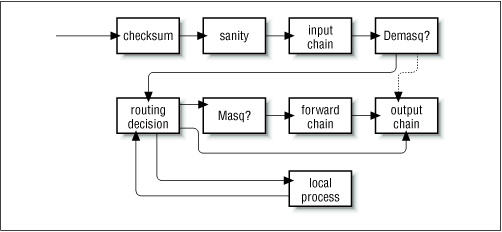
In Figure 9.8, the components labeled “demasq” and “masq” are separate kernel components responsible for the incoming and outgoing processing of masqueraded datagrams. These have been reimplemented as netfilter modules.
Consider the case of a configuration for which the default policy for each
of the input, forward, and output chains is
deny. In IP chains, six rules would
be needed to allow any session through a firewall host: two each in
the input, forward, and output chains (one would cover each forward
path and one would cover each return path). You can imagine how this
could easily become extremely complex and difficult to manage when you
want to mix sessions that could be routed and sessions that could
connect to the local host without being routed. IP chains allow
you to create chains that would simplify this task a little, but the
design isn’t obvious and requires a certain level of expertise.
In the netfilter implementation with iptables, this complexity disappears completely. For a service to be routed across the firewall host, but not terminate on the local host, only two rules are required: one each for the forward and the reverse directions in the forward chain. This is the obvious way to design firewalling rules, and will serve to simplify the design of firewall configurations immensely.
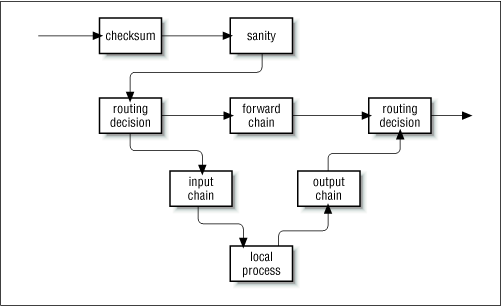
The PACKET-FILTERING-HOWTO offers a detailed list of the changes that have been made, so let’s focus on the more practical aspects here.
The remarkable flexibility of Linux netfilter is illustrated by its ability to emulate the ipfwadm and ipchains interfaces. Emulation makes transition to the new generation of firewall software a little easier.
The two netfilter kernel modules called
ipfwadm.o and ipchains.o
provide backward compatibility for ipfwadm and
ipchains. You may load only one of these modules at
a time, and use one only if the ip_tables.o
module is not loaded. When the appropriate module is loaded,
netfilter works exactly like the former
firewall implementation.
netfilter mimics the ipchains interface with the following commands:
rmmod ip_tables
modprobe ipchains
ipchains ...
The iptables utility is used to configure netfilter filtering rules. Its syntax borrows heavily from the ipchains command, but differs in one very significant respect: it is extensible. What this means is that its functionality can be extended without recompiling it. It manages this trick by using shared libraries. There are standard extensions and we’ll explore some of them in a moment.
Before you can use the iptables command, you must load the netfilter kernel module that provides support for it. The easiest way to do this is to use the modprobe command as follows:
modprobe ip_tables
The iptables command is used to configure both IP
filtering and Network Address Translation. To facilitate this, there are two
tables of rules called filter and
nat. The filter table is assumed if you do not
specify the -t option to override
it. Five built-in chains are also provided. The
INPUT and FORWARD chains are
available for the filter table, the
PREROUTING and POSTROUTING
chains are available for the nat table, and the
OUTPUT chain is available for both tables. In this
chapter we’ll discuss only the filter table. We’ll look
at the nat table in Chapter 11
The general syntax of most iptables commands is:
iptablescommandrule-specificationextensions
Now we’ll take a look at some options in detail, after which we’ll review some examples.
There are a number of ways we can manipulate rules and rulesets with the iptables command. Those relevant to IP firewalling are:
- -A chain
Append one or more rules to the end of the nominated chain. If a hostname is supplied as either a source or destination and it resolves to more than one IP address, a rule will be added for each address.
- -I chain rulenum
Insert one or more rules to the start of the nominated chain. Again, if a hostname is supplied in the rule specification, a rule will be added for each of the addresses to which it resolves.
- -D chain
Delete one or more rules from the specified chain matching the rule specification.
- -D chain rulenum
Delete the rule residing at position
rulenumin the specified chain. Rule positions start at 1 for the first rule in the chain.- -R chain rulenum
Replace the rule residing at position
rulenumin the specific chain with the supplied rule specification.- -C chain
Check the datagram described by the rule specification against the specific chain. This command will return a message describing how the chain processed the datagram. This is very useful for testing your firewall configuration and we will look at it in detail later.
- -L [chain]
List the rules of the specified chain, or for all chains if no chain is specified.
- -F [chain]
Flush the rules of the specified chain, or for all chains if no chain is specified.
- -Z [chain]
Zero the datagram and byte counters for all rules of the specified chain, or for all chains if no chain is specified.
- -N chain
Create a new chain with the specified name. A chain of the same name must not already exist. This is how user-defined chains are created.
- -X [chain]
Delete the specified user-defined chain, or all user-defined chains if no chain is specified. For this command to be successful, there must be no references to the specified chain from any other rules chain.
- -P chain policy
Set the default policy of the specified chain to the specified policy. Valid firewalling policies are
ACCEPT,DROP,QUEUE, andRETURN.ACCEPTallows the datagram to pass.DROPcauses the datagram to be discarded.QUEUEcauses the datagram to be passed to userspace for further processing. TheRETURNtarget causes the IP firewall code to return to the Firewall Chain that called the one containing this rule, and continue starting at the rule after the calling rule.
There are a number of iptables parameters that constitute a rule specification. Wherever a rule specification is required, each of these parameters must be supplied or their default will be assumed.
- -p [!]protocol
Specifies the protocol of the datagram that will match this rule. Valid protocol names are
tcp,udp,icmp, or a number, if you know the IP protocol number.[64] For example, you might use4to match theipipencapsulation protocol. If the!character is supplied, the rule is negated and the datagram will match any protocol other than the specified protocol. If this parameter isn’t supplied, it will default to match all protocols.- -s [!]address[/mask]
Specifies the source address of the datagram that will match this rule. The address may be supplied as a hostname, a network name, or an IP address. The optional
maskis the netmask to use and may be supplied either in the traditional form (e.g., /255.255.255.0) or in the modern form (e.g., /24).- -d [!]address[/mask]
Specifies the destination address and port of the datagram that will match this rule. The coding of this parameter is the same as that of the
-sparameter.- -j target
Specifies what action to take when this rule matches. You can think of this parameter as meaning “jump to.” Valid targets are
ACCEPT,DROP,QUEUE, andRETURN. We described the meanings of each of these previously in the “Commands” section. You may also specify the name of a user-defined chain where processing will continue. You may also supply the name of a target supplied by an extension. We’ll talk about extensions shortly. If this parameter is omitted, no action is taken on matching datagrams at all, other than to update the datagram and byte counters of this rule.- -i [!]interface-name
Specifies the interface on which the datagram was received. Again, the
!inverts the result of the match. If the interface name ends with "+" then any interface that begins with the supplied string will match. For example,-i ppp+would match any PPP network device and-i ! eth+would match all interfaces except ethernet devices.- -o [!]interface-name
Specifies the interface on which the datagram is to be transmitted. This argument has the same coding as the
-iargument.- [!] -f
Specifies that this rule applies only to the second and later fragments of a fragmented datagram, not to the first fragment.
The following iptables options are more general in nature. Some of them control rather esoteric features of the netfilter software.
- -v
causes iptables to be verbose in its output; it will supply more information.
- -n
causes iptables to display IP address and ports as numbers without attempting to resolve them to their corresponding names.
- -x
causes any numbers in the iptables output to be expanded to their exact values with no rounding.
- - -line-numbers
causes line numbers to be displayed when listing rulesets. The line number will correspond to the rule’s position within the chain.
We said earlier that the iptables utility is
extensible through optional shared library modules. There are some standard
extensions that provide some of the features ipchains
provided. To make use of an extension, you must specify its name through the
-m
name argument to
iptables. The following list shows the
-m and -p options that set up the extension’s
context, and the options provided by
that extension.
- - -sport [!] [port[:port]]
Specifies the port that the datagram source must be using to match this rule. Ports may be specified as a range by specifying the upper and lower limits of the range using the colon as a delimiter. For example,
20:25described all of the ports numbered 20 up to and including 25. Again, the!character may be used to negate the values.- - -dport [!] [port[:port]]
Specifies the port that the datagram destination must be using to match this rule. The argument is coded identically to the
- -sportoption.- - -tcp-flags [!] mask comp
Specifies that this rule should match when the TCP flags in the datagram match those specified by
maskandcomp.maskis a comma-separated list of flags that should be examined when making the test.compis a comma-separated list of flags that must be set for the rule to match. Valid flags are: SYN, ACK, FIN, RST, URG, PSH, ALL or NONE. This is an advanced option: refer to a good description of the TCP protocol, such as RFC-793, for a description of the meaning and implication of each of these flags. The!character negates the rule.- [!] - -syn
Specifies the rule to match only datagrams with the
SYNbit set and theACKandFINbits cleared. Datagrams with these options are used to open TCP connections, and this option can therefore be used to manage connection requests. This option is shorthand for:- -tcp-flags SYN,RST,ACK SYN
When you use the negation operator, the rule will match all datagrams that do not have both the
SYNandACKbits set.
- - -sport [!] [port[:port]]
Specifies the port that the datagram source must be using to match this rule. Ports may be specified as a range by specifying the upper and lower limits of the range using the colon as a delimiter. For example,
20:25describes all of the ports numbered 20 up to and including 25. Again, the!character may be used to negate the values.- - -dport [!] [port[:port]]
Specifies the port that the datagram destination must be using to match this rule. The argument is coded identically to the
- -sportoption.
- - -icmp-type [!] typename
Specifies the ICMP message type that this rule will match. The type may be specified by number or name. Some valid names are:
echo-request,echo-reply,source-quench,time-exceeded,destination-unreachable,network-unreachable,host-unreachable,protocol-unreachable, andport-unreachable.
To implement our naïve example using the netfilter,
you could simply load the ipchains.o module and pretend
it is the ipchains version. Instead, we’ll reimplement
it using iptables to illustrate how similar it is.
Yet again, let’s suppose that we have a network in our organization and that we are using a Linux-based firewall machine to allow our users to be able to access WWW servers on the Internet, but to allow no other traffic to be passed.
If our network has a 24-bit network mask (class C) and has an address of 172.16.1.0, then we’d use the following iptables rules:
#modprobe ip_tables#iptables -F FORWARD#iptables -P FORWARD DROP#iptables -A FORWARD -m tcp -p tcp -s 0/0 --sport 80 -d 172.16.1.0/24 /--syn -j DROP#iptables -A FORWARD -m tcp -p tcp -s 172.16.1.0/24 --sport /80 -d 0/0 -j ACCEPT#iptables -A FORWARD -m tcp -p tcp -d 172.16.1.0/24 --dport 80 -s 0/0 -j /ACCEPT
In this example the iptables commands are interpreted
exactly as the equivalent ipchains commands. The major
exception that the ip_tables.o
module must load. Note that iptables doesn’t support the
-b option, so we must supply a rule for each
direction.