Table of Contents for
Linux Network Administrator's Guide, Second Edition
 Linux Network Administrator's Guide, Second Edition
Published by
O'Reilly Media, Inc., 2000
Linux Network Administrator's Guide, Second Edition
Published by
O'Reilly Media, Inc., 2000
- Cover
- Linux Network Administrator’s Guide, 2nd Edition
- Preface
- Sources of Information
- File System Standards
- Standard Linux Base
- About This Book
- The Official Printed Version
- Overview
- Conventions Used in This Book
- Submitting Changes
- Acknowledgments
- 1. Introduction to Networking
- TCP/IP Networks
- UUCP Networks
- Linux Networking
- Maintaining Your System
- 2. Issues of TCP/IP Networking
- IP Addresses
- Address Resolution
- IP Routing
- The Internet Control Message Protocol
- Resolving Host Names
- 3. Configuring the Networking Hardware
- A Tour of Linux Network Devices
- Ethernet Installation
- The PLIP Driver
- The PPP and SLIP Drivers
- Other Network Types
- 4. Configuring the Serial Hardware
- Introduction to Serial Devices
- Accessing Serial Devices
- Serial Hardware
- Using the Configuration Utilities
- Serial Devices and the login: Prompt
- 5. Configuring TCP/IP Networking
- Installing the Binaries
- Setting the Hostname
- Assigning IP Addresses
- Creating Subnets
- Writing hosts and networks Files
- Interface Configuration for IP
- All About ifconfig
- The netstat Command
- Checking the ARP Tables
- 6. Name Service and Resolver Configuration
- How DNS Works
- Running named
- 7. Serial Line IP
- SLIP Operation
- Dealing with Private IP Networks
- Using dip
- Running in Server Mode
- 8. The Point-to-Point Protocol
- Running pppd
- Using Options Files
- Using chat to Automate Dialing
- IP Configuration Options
- Link Control Options
- General Security Considerations
- Authentication with PPP
- Debugging Your PPP Setup
- More Advanced PPP Configurations
- 9. TCP/IP Firewall
- What Is a Firewall?
- What Is IP Filtering?
- Setting Up Linux for Firewalling
- Three Ways We Can Do Filtering
- Original IP Firewall (2.0 Kernels)
- IP Firewall Chains (2.2 Kernels)
- Netfilter and IP Tables (2.4 Kernels)
- TOS Bit Manipulation
- Testing a Firewall Configuration
- A Sample Firewall Configuration
- 10. IP Accounting
- Configuring IP Accounting
- Using IP Accounting Results
- Resetting the Counters
- Flushing the Ruleset
- Passive Collection of Accounting Data
- 11. IP Masquerade and Network Address Translation
- Configuring the Kernel for IP Masquerade
- Configuring IP Masquerade
- Handling Name Server Lookups
- More About Network Address Translation
- 12. Important Network Features
- The tcpd Access Control Facility
- The Services and Protocols Files
- Remote Procedure Call
- Configuring Remote Login and Execution
- 13. The Network Information System
- NIS Versus NIS+
- The Client Side of NIS
- Running an NIS Server
- NIS Server Security
- Setting Up an NIS Client with GNU libc
- Choosing the Right Maps
- Using the passwd and group Maps
- Using NIS with Shadow Support
- 14. The Network File System
- Mounting an NFS Volume
- The NFS Daemons
- The exports File
- Kernel-Based NFSv2 Server Support
- Kernel-Based NFSv3 Server Support
- 15. IPX and the NCP Filesystem
- IPX and Linux
- Configuring the Kernel for IPX and NCPFS
- Configuring IPX Interfaces
- Configuring an IPX Router
- Mounting a Remote NetWare Volume
- Exploring Some of the Other IPX Tools
- Printing to a NetWare Print Queue
- NetWare Server Emulation
- 16. Managing Taylor UUCP
- UUCP Configuration Files
- Controlling Access to UUCP Features
- Setting Up Your System for Dialing In
- UUCP Low-Level Protocols
- Troubleshooting
- Log Files and Debugging
- 17. Electronic Mail
- How Is Mail Delivered?
- Email Addresses
- How Does Mail Routing Work?
- Configuring elm
- 18. Sendmail
- Installing sendmail
- Overview of Configuration Files
- The sendmail.cf and sendmail.mc Files
- Generating the sendmail.cf File
- Interpreting and Writing Rewrite Rules
- Configuring sendmail Options
- Some Useful sendmail Configurations
- Testing Your Configuration
- Running sendmail
- Tips and Tricks
- 19. Getting Exim Up and Running
- If Your Mail Doesn’t Get Through
- Compiling Exim
- Mail Delivery Modes
- Miscellaneous config Options
- Message Routing and Delivery
- Protecting Against Mail Spam
- UUCP Setup
- 20. Netnews
- What Is Usenet, Anyway?
- How Does Usenet Handle News?
- 21. C News
- Installation
- The sys File
- The active File
- Article Batching
- Expiring News
- Miscellaneous Files
- Control Messages
- C News in an NFS Environment
- Maintenance Tools and Tasks
- 22. NNTP and the nntpd Daemon
- Installing the NNTP Server
- Restricting NNTP Access
- NNTP Authorization
- nntpd Interaction with C News
- 23. Internet News
- Newsreaders and INN
- Installing INN
- Configuring INN: the Basic Setup
- INN Configuration Files
- Running INN
- Managing INN: The ctlinnd Command
- 24. Newsreader Configuration
- trn Configuration
- nn Configuration
- A. Example Network: The Virtual Brewery
- B. Useful Cable Configurations
- A Serial NULL Modem Cable
- C. Linux Network Administrator’s Guide, Second Edition Copyright Information
- 1. Applicability and Definitions
- 2. Verbatim Copying
- 3. Copying in Quantity
- 4. Modifications
- 5. Combining Documents
- 6. Collections of Documents
- 7. Aggregation with Independent Works
- 8. Translation
- 9. Termination
- 10. Future Revisions of this License
- D. SAGE: The System Administrators Guild
- Index
- Colophon
DNS organizes hostnames in a domain hierarchy. A domain is a collection of sites that are related in some sense—because they form a proper network (e.g., all machines on a campus, or all hosts on BITNET), because they all belong to a certain organization (e.g., the U.S. government), or because they’re simply geographically close. For instance, universities are commonly grouped in the edu domain, with each university or college using a separate subdomain, below which their hosts are subsumed. Groucho Marx University have the groucho.edu domain, while the LAN of the Mathematics department is assigned maths.groucho.edu. Hosts on the departmental network would have this domain name tacked onto their hostname, so erdos would be known as erdos.maths.groucho.edu. This is called the fully qualified domain name (FQDN), which uniquely identifies this host worldwide.
Figure 6.1 shows a section of the namespace. The entry at the root of this tree, which is denoted by a single dot, is quite appropriately called the root domain and encompasses all other domains. To indicate that a hostname is a fully qualified domain name, rather than a name relative to some (implicit) local domain, it is sometimes written with a trailing dot. This dot signifies that the name’s last component is the root domain.
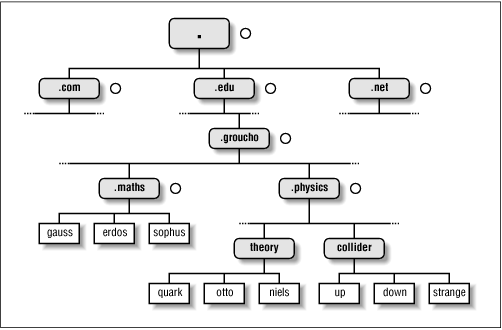
Depending on its location in the name hierarchy, a domain may be called top-level, second-level, or third-level. More levels of subdivision occur, but they are rare. This list details several top-level domains you may see frequently:
| Domain | Description |
|---|---|
| edu |
(Mostly U.S.) educational institutions like universities. |
| com |
Commercial organizations and companies. |
| org |
Non-commercial organizations. Private UUCP networks are often in this domain. |
| net |
Gateways and other administrative hosts on a network. |
| mil |
U.S. military institutions. |
| gov |
U.S. government institutions. |
| uucp |
Officially, all site names formerly used as UUCP names without domains have been moved to this domain. |
Historically, the first four of these were assigned to the U.S., but recent changes in policy have meant that these domains, named global Top Level Domains (gTLD), are now considered global in nature. Negotiations are currently underway to broaden the range of gTLDs, which may result in increased choice in the future.
Outside the U.S., each country generally uses a top-level domain of its own named after the two-letter country code defined in ISO-3166. Finland, for instance, uses the fi domain; fr is used by France, de by Germany, and au by Australia. Below this top-level domain, each country’s NIC is free to organize hostnames in whatever way they want. Australia has second-level domains similar to the international top-level domains, named com.au and edu.au. Other countries, like Germany, don’t use this extra level, but have slightly long names that refer directly to the organizations running a particular domain. It’s not uncommon to see hostnames like ftp://ftp.informatik.uni-erlangen.de. Chalk that up to German efficiency.
Of course, these national domains do not imply that a host below that domain is actually located in that country; it means only that the host has been registered with that country’s NIC. A Swedish manufacturer might have a branch in Australia and still have all its hosts registered with the se top-level domain.
Organizing the namespace in a hierarchy of domain names nicely solves the problem of name uniqueness; with DNS, a hostname has to be unique only within its domain to give it a name different from all other hosts worldwide. Furthermore, fully qualified names are easy to remember. Taken by themselves, these are already very good reasons to split up a large domain into several subdomains.
DNS does even more for you than this. It also allows you to delegate authority over a subdomain to its administrators. For example, the maintainers at the Groucho Computing Center might create a subdomain for each department; we already encountered the math and physics subdomains above. When they find the network at the Physics department too large and chaotic to manage from outside (after all, physicists are known to be an unruly bunch of people), they may simply pass control of the physics.groucho.edu domain to the administrators of this network. These administrators are free to use whatever hostnames they like and assign them IP addresses from their network in whatever fashion they desire, without outside interference.
To this end, the namespace is split up into zones, each rooted at a domain. Note the subtle difference between a zone and a domain: the domain groucho.edu encompasses all hosts at Groucho Marx University, while the zone groucho.edu includes only the hosts that are managed by the Computing Center directly; those at the Mathematics department, for example. The hosts at the Physics department belong to a different zone, namely physics.groucho.edu. In Figure 6.1, the start of a zone is marked by a small circle to the right of the domain name.
At first glance, all this domain and zone fuss seems to make name resolution an awfully complicated business. After all, if no central authority controls what names are assigned to which hosts, how is a humble application supposed to know?
Now comes the really ingenious part about DNS. If you want to find the IP address of erdos, DNS says, “Go ask the people who manage it, and they will tell you.”
In fact, DNS is a giant distributed database. It is implemented by so-called name servers that supply information on a given domain or set of domains. For each zone there are at least two, or at most a few, name servers that hold all authoritative information on hosts in that zone. To obtain the IP address of erdos, all you have to do is contact the name server for the groucho.edu zone, which will then return the desired data.
Easier said than done, you might think. So how do I know how to reach the name server at Groucho Marx University? In case your computer isn’t equipped with an address-resolving oracle, DNS provides for this, too. When your application wants to look up information on erdos, it contacts a local name server, which conducts a so-called iterative query for it. It starts off by sending a query to a name server for the root domain, asking for the address of erdos.maths.groucho.edu. The root name server recognizes that this name does not belong to its zone of authority, but rather to one below the edu domain. Thus, it tells you to contact an edu zone name server for more information and encloses a list of all edu name servers along with their addresses. Your local name server will then go on and query one of those, for instance, a.isi.edu. In a manner similar to the root name server, a.isi.edu knows that the groucho.edu people run a zone of their own, and points you to their servers. The local name server will then present its query for erdos to one of these, which will finally recognize the name as belonging to its zone, and return the corresponding IP address.
This looks like a lot of traffic being generated for looking up a
measly IP address, but it’s really only miniscule compared to the amount
of data that would have to be transferred if we were still stuck with
HOSTS.TXT. There’s still room for improvement with this
scheme, however.
To improve response time during future queries, the name server stores the information obtained in its local cache. So the next time anyone on your local network wants to look up the address of a host in the groucho.edu domain, your name server will go directly to the groucho.edu name server.[40]
Of course, the name server will not keep this information forever; it will discard it after some time. The expiration interval is called the time to live, or TTL. Each datum in the DNS database is assigned such a TTL by administrators of the responsible zone.
Name servers that hold all information on hosts within a zone are called authoritative for this zone, and sometimes are referred to as master name servers. Any query for a host within this zone will end up at one of these master name servers.
Master servers must be fairly well synchronized. Thus, the zone’s network administrator must make one the primary server, which loads its zone information from data files, and make the others secondary servers, which transfer the zone data from the primary server at regular intervals.
Having several name servers distributes workload; it also provides backup. When one name server machine fails in a benign way, like crashing or losing its network connection, all queries will fall back to the other servers. Of course, this scheme doesn’t protect you from server malfunctions that produce wrong replies to all DNS requests, such as from software bugs in the server program itself.
You can also run a name server that is not authoritative for any domain.[41] This is useful, as the name server will still be able to conduct DNS queries for the applications running on the local network and cache the information. Hence it is called a caching-only server.
We have seen that DNS not only deals with IP addresses of hosts, but also exchanges information on name servers. DNS databases may have, in fact, many different types of entries.
A single piece of information from the DNS database is called a resource record (RR). Each record has a type associated with it describing the sort of data it represents, and a class specifying the type of network it applies to. The latter accommodates the needs of different addressing schemes, like IP addresses (the IN class), Hesiod addresses (used by MIT’s Kerberos system), and a few more. The prototypical resource record type is the A record, which associates a fully qualified domain name with an IP address.
A host may be known by more than one name. For example you might have a server that provides both FTP and World Wide Web servers, which you give two names: ftp.machine.org and www.machine.org.However, one of these names must be identified as the official or canonical hostname, while the others are simply aliases referring to the official hostname. The difference is that the canonical hostname is the one with an associated A record, while the others only have a record of type CNAME that points to the canonical hostname.
We will not go through all record types here, but we will give you a brief example. Example 6.4 shows a part of the domain database that is loaded into the name servers for the physics.groucho.edu zone.
Example 6-4. An Excerpt from the named.hosts File for the Physics Department
; Authoritative Information on physics.groucho.edu.
@  IN  SOA niels.physics.groucho.edu. janet.niels.physics.groucho.edu. {
                  1999090200       ; serial no
                  360000           ; refresh
                  3600             ; retry
                  3600000          ; expire
                  3600             ; default ttl
                }
;
; Name servers
              IN    NS       niels
              IN    NS       gauss.maths.groucho.edu.
gauss.maths.groucho.edu. IN A 149.76.4.23
;
; Theoretical Physics (subnet 12)
niels         IN    A        149.76.12.1
              IN    A        149.76.1.12
name server    IN    CNAME    niels
otto          IN    A        149.76.12.2
quark         IN    A        149.76.12.4
down          IN    A        149.76.12.5
strange       IN    A        149.76.12.6
...
; Collider Lab. (subnet 14)
boson         IN    A        149.76.14.1
muon          IN    A        149.76.14.7
bogon         IN    A        149.76.14.12
...
Apart from the A and CNAME records, you can see a special record at the top of the file, stretching several lines. This is the SOA resource record signaling the Start of Authority, which holds general information on the zone the server is authoritative for. The SOA record comprises, for instance, the default time to live for all records.
Note that all names in the sample file that do not end with a dot
should be interpreted relative to the physics.groucho.edu domain. The special
name (@) used in the
SOA record refers to the domain name by itself.
We have seen earlier that the name servers for the groucho.edu domain somehow have to know about the physics zone so that they can point queries to their name servers. This is usually achieved by a pair of records: the NS record that gives the server’s FQDN, and an A record that associates an address with that name. Since these records are what holds the namespace together, they are frequently called glue records. They are the only instances of records in which a parent zone actually holds information on hosts in the subordinate zone. The glue records pointing to the name servers for physics.groucho.edu are shown in Example 6.5.
Example 6-5. An Excerpt from the named.hosts File for GMU
; Zone data for the groucho.edu zone.
 @  IN  SOA vax12.gcc.groucho.edu. joe.vax12.gcc.groucho.edu. {
                      1999070100       ; serial no
                      360000           ; refresh
                      3600             ; retry
                      3600000          ; expire
                      3600             ; default ttl
               }
 ....
 ;
 ; Glue records for the physics.groucho.edu zone
 physics        IN     NS        niels.physics.groucho.edu.
                IN     NS        gauss.maths.groucho.edu.
 niels.physics  IN     A         149.76.12.1
 gauss.maths    IN     A         149.76.4.23
 ...
Finding the IP address belonging to a host is certainly the most
common use for the Domain Name System, but sometimes you’ll want to
find the canonical hostname corresponding to an address. Finding this
hostname is called reverse mapping, and is used
by several network services to verify a client’s identity. When using
a single hosts file, reverse lookups simply
involve searching the file for a host that owns the IP address in
question. With DNS, an exhaustive search of the namespace is out of
the question. Instead, a special domain, in-addr.arpa, has been created that
contains the IP addresses of all hosts in a reversed dotted quad
notation. For instance, an IP address of 149.76.12.4 corresponds to the name
4.12.76.149.in-addr.arpa. The
resource-record type linking these names to their canonical hostnames
is PTR.
Creating a zone of authority usually means that its administrators have full control over how they assign addresses to names. Since they usually have one or more IP networks or subnets at their hands, there’s a one-to-many mapping between DNS zones and IP networks. The Physics department, for instance, comprises the subnets 149.76.8.0, 149.76.12.0, and 149.76.14.0.
Consequently, new zones in the in-addr.arpa domain have to be created along with the physics zone, and delegated to the network administrators at the department: 8.76.149.in-addr.arpa, 12.76.149.in-addr.arpa, and 14.76.149.in-addr.arpa. Otherwise, installing a new host at the Collider Lab would require them to contact their parent domain to have the new address entered into their in-addr.arpa zone file.
The zone database for subnet 12 is shown in Example 6.6. The corresponding glue records in the database of their parent zone are shown in Example 6.7.
Example 6-6. An Excerpt from the named.rev File for Subnet 12
; the 12.76.149.in-addr.arpa domain.
 @  IN  SOA  niels.physics.groucho.edu. janet.niels.physics.groucho.edu. {
                      1999090200 360000 3600 3600000 3600
            }
 2        IN     PTR       otto.physics.groucho.edu.
 4        IN     PTR       quark.physics.groucho.edu.
 5        IN     PTR       down.physics.groucho.edu.
 6        IN     PTR       strange.physics.groucho.edu.
Example 6-7. An Excerpt from the named.rev File for Network 149.76
; the 76.149.in-addr.arpa domain.
 @  IN  SOA vax12.gcc.groucho.edu. joe.vax12.gcc.groucho.edu. {
                      1999070100 360000 3600 3600000 3600
                  }
 ...
 ; subnet 4: Mathematics Dept.
 1.4        IN     PTR      sophus.maths.groucho.edu.
 17.4       IN     PTR      erdos.maths.groucho.edu.
 23.4       IN     PTR      gauss.maths.groucho.edu.
 ...
 ; subnet 12: Physics Dept, separate zone
 12         IN     NS       niels.physics.groucho.edu.
            IN     NS       gauss.maths.groucho.edu.
 niels.physics.groucho.edu. IN  A 149.76.12.1
 gauss.maths.groucho.edu. IN  A   149.76.4.23
 ...
in-addr.arpa system zones can only be created as supersets of IP networks. An even more severe restriction is that these networks’ netmasks have to be on byte boundaries. All subnets at Groucho Marx University have a netmask of 255.255.255.0, hence an in-addr.arpa zone could be created for each subnet. However, if the netmask were 255.255.255.128 instead, creating zones for the subnet 149.76.12.128 would be impossible, because there’s no way to tell DNS that the 12.76.149.in-addr.arpa domain has been split into two zones of authority, with hostnames ranging from 1 through 127, and 128 through 255, respectively.