Table of Contents for
TCP/IP Network Administration, 3rd Edition
 TCP/IP Network Administration, 3rd Edition
Published by
O'Reilly Media, Inc., 2002
TCP/IP Network Administration, 3rd Edition
Published by
O'Reilly Media, Inc., 2002
- Cover
- TCP/IP Network Administration, 3rd Edition
- Dedication
- Preface
- 1. Overview of TCP/IP
- 2. Delivering the Data
- 3. Network Services
- 4. Getting Started
- 5. Basic Configuration
- 6. Configuring the Interface
- 7. Configuring Routing
- 8. Configuring DNS
- 9. Local Network Services
- 10. sendmail
- 11. Configuring Apache
- 12. Network Security
- 13. Troubleshooting TCP/IP
- A. PPP Tools
- B. A gated Reference
- C. A named Reference
- D. A dhcpd Reference
- E. A sendmail Reference
- F. Solaris httpd.conf File
- G. RFC Excerpts
- Index
- Index
- Index
- Index
- Index
- Index
- Index
- Index
- Index
- Index
- Index
- Index
- Index
- Index
- Index
- Index
- Index
- Index
- Index
- Index
- Index
- Index
- Index
- Index
- Index
- Index
- Index
- About the Author
- Colophon
- Copyright
Users have a love-hate relationship with email: they love to use it, and hate when it doesn’t work. It’s the system administrator’s job to make sure it does work. That is the job we tackle in this chapter.
sendmail is not the only mail transport program; smail and qmail are also popular, but plain sendmail is the most widely used mail transport program. This entire chapter is devoted to sendmail, and an entire book can easily be devoted to the subject.[108] In part, this is because of email’s importance, but it is also because sendmail has a complex configuration.
Oddly enough, the complexity of sendmail springs in part from an attempt to reduce complexity by placing all email support in one program. At one time, a wide variety of programs and protocols were used for email. Multiple programs complicate configuration and support. Even today, a few distinct delivery schemes remain. SMTP sends email over TCP/IP networks; another program sends mail between users on the same system; still another sends mail between systems on UUCP networks. Each of these mail systems—SMTP, UUCP, and local mail—has its own delivery program and mail addressing scheme. All of this can cause confusion for mail users and for system administrators.
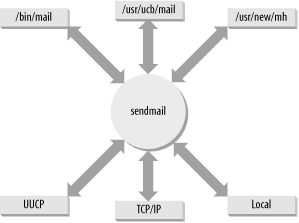
sendmail eliminates the confusion caused by multiple mail delivery programs. It does this by routing mail for the user to the proper delivery program based on the email address. It accepts mail from a user’s mail program, interprets the mail address, rewrites the address into the proper form for the delivery program, and routes the mail to the correct delivery program. sendmail insulates the end user from these details. If the mail is properly addressed, sendmail will see that it is properly passed on for delivery. Likewise, for incoming mail, sendmail interprets the address and either delivers the mail to a user’s mail program or forwards it to another system.
Figure 10-1 illustrates sendmail’s special role in routing mail between the various mail programs found on Unix systems.
In addition to routing mail between user programs and delivery programs, sendmail does the following:
Receives and delivers SMTP (Internet) mail
Provides systemwide mail aliases, which allow mailing lists
Configuring a system to perform all of these functions properly is a complex task. In this chapter we discuss each of these functions, look at how they are configured, and examine ways to simplify the task. First, we’ll see how sendmail is run to receive SMTP mail. Then we’ll see how mail aliases are used, and how sendmail is configured to route mail based on the mail’s address.
To receive SMTP mail from the network, run sendmail as a daemon during system startup. The sendmail daemon listens to TCP port 25 and processes incoming mail. In most cases, the code to start sendmail is already in one of your boot scripts. If it isn’t, add it. The following command starts sendmail as a daemon:
# /usr/lib/sendmail -bd -q15mThis command runs sendmail with two command-line options. The
-q option tells sendmail how often to
process the mail queue. In the sample code, the queue is processed every
15 minutes (-q15m), which is a good
setting to process the queue frequently. Don’t set this time too low. Processing the queue too often can
cause problems if the queue grows very large due to a delivery problem
such as a network outage. For the average desktop system, every hour
(-q1h) or half hour (-q30m) is an adequate setting.
The other option relates directly to receiving SMTP mail. The
-bd option tells sendmail to run as a
daemon and to listen to TCP port 25 for incoming mail. Use this option
if you want your system to accept incoming TCP/IP mail.
The command-line example is a simple one. Most system startup
scripts are more complex. These scripts generally do more than just
start sendmail. Solaris 8 uses the
/etc/init.d/sendmail script to run sendmail. First
the Solaris script checks for the existence of the mail queue directory.
If a mail queue directory doesn’t exist, it creates one. In the Solaris
8 script, the command-line options are set in script variables. The
variable MODE holds the -bd
option, and the variable QUEUEINTERVAL holds the queue processing interval. In the
Solaris 8 script, QUEUEINTERVAL defaults to 15m; change the value stored in the
QUEUEINTERVAL variable to change how often the queue is processed. Do
not change the value in the MODE variable unless you don’t want to
accept inbound mail. The value must be -bd for sendmail to run as a daemon and
collect inbound mail. If you want to add other options to the sendmail
command line that is run by the Solaris 8 script file, store those
options in the OPTIONS variable.
The Red Hat /etc/rc.d/init.d/sendmail
script is even more complex than the Solaris version. It accepts the
arguments start, stop, restart, condrestart, and status so that the script can be used to
effectively manage the sendmail daemon process. The start and stop arguments are self-explanatory. The
restart argument first stops the
sendmail process and then runs a new sendmail process. The condrestart argument is similar to restart except that it runs only if there is a
current sendmail process running. If the sendmail daemon is not running
when the script is run with the condrestart argument, the script does nothing.
The status argument returns the
status of the daemon, which is basically the process ID number if it is
running or a message saying that sendmail is stopped if sendmail is not
running.
When the Red Hat script is run with the start argument, it
begins by rebuilding all of the sendmail database files. It then starts
the sendmail daemon using the command-line options defined in the
/etc/sysconfig/sendmail file. Like the Solaris
script, the Red Hat script uses variables to set the value of the
command-line options, but the variables themselves are set indirectly by
values from /etc/sysconfig/sendmail file. The
/etc/sysconfig/sendmail file from a default Red Hat
configuration contains only two lines:
$ cat /etc/sysconfig/sendmail
DAEMON=yes
QUEUE=1h
If DAEMON is set to yes,
sendmail is run with the -bd option.
How often the queue is processed is determined by the value set for
QUEUE. In this example, the queue is processed every hour (1h). The additional code found in most startup
scripts is helpful, but it is not required to run sendmail as a daemon.
All you really need is the sendmail
command with the -bd option.
It is almost impossible to exaggerate the importance of mail aliases. Without them, a sendmail system could not act as a central mail server. Mail aliases provide for:
Alternate names (nicknames) for individual users
Forwarding of mail to other hosts
Mailing lists
sendmail mail aliases are defined in the aliases file.[109]
The basic format of entries in the aliases file is:
alias:recipient[,recipient,...]
alias is the name to which the mail is
addressed, and recipient is the name to which
the mail is delivered. recipient can be a
username, the name of another alias, or a full email address containing
both a username and a hostname. Including a hostname allows mail to be
forwarded to a remote host. Additionally, there can be multiple
recipients for a single alias. Mail addressed to that alias is delivered
to all of the recipients, thus creating a mailing list.
Aliases that define nicknames for individual users can be used to handle frequently misspelled names. You can also use aliases to deliver mail addressed to special names, such as postmaster or root, to the real users that do those jobs. Aliases can also be used to implement simplified mail addressing, especially when used in conjunction with MX records.[110]
This aliases file from crab shows all of these uses:
# special names
postmaster: clark
root: norman
# accept firstname.lastname@wrotethebook.com
rebecca.hunt: becky@rodent
jessie.mccafferty: jessie@jerboas
anthony.resnick: anthony@horseshoe
andy.wright: andy@ora
# a mailing list
admin: kathy, david@rodent, sara@horseshoe, becky@rodent, craig,
       anna@rodent, jane@rodent, christy@ora
owner-admin: admin-request
admin-request: craig
The first two aliases are special names. Using these aliases, mail addressed to postmaster is delivered to the local user clark, and mail addressed to root is delivered to norman.
The second set of aliases is in the form of firstname and lastname. The first alias in this group is rebecca.hunt. Mail addressed to rebecca.hunt is forwarded from crab and delivered to becky@rodent. Combine this alias with an MX record that names crab as the mail server for wrotethebook.com, and mail addressed to rebecca.hunt@wrotethebook.com is delivered to becky@rodent.wrotethebook.com. This type of addressing scheme allows each user to advertise a consistent mailing address that does not change just because the user’s account moves to another host. Additionally, if a remote user knows that this firstname.lastname addressing scheme is used at wrotethebook.com, the remote user can address mail to Rebecca Hunt as rebecca.hunt@wrotethebook.com without knowing her real email address.
The last two aliases are for a mailing list. The alias admin defines the list itself. If mail is sent to admin, a copy of the mail is sent to each of the recipients (kathy, david, sara, becky, craig, anna, jane, and christy). Note that the mailing list continues across multiple lines. A line that starts with a blank or a tab is a continuation line.
The owner-admin alias is a special form used
by sendmail. The format of this special alias is owner- listname where
listname is the name of a mailing list. The person
specified on this alias line is responsible for the list identified by
listname. If sendmail has problems delivering mail
to any of the recipients in the admin list, an
error message is sent to owner-admin. The
owner-admin alias points to
admin-request as the person responsible for
maintaining the mailing list admin. Aliases in the
form of listname -request are commonly used for administrative
requests, such as subscribing to a list, for manually maintained mailing
lists. Notice that we point an alias to another alias, which is
perfectly legal. The admin-request alias resolves
to craig.
sendmail does not use the aliases file
directly. The aliases file must first be processed
by the newaliases command. newaliases is
equivalent to sendmail with the
-bi option, which causes sendmail to
build the aliases database. newaliases creates the database files that are
used by sendmail when it is searching for aliases. Invoke newaliases after updating the
aliases file to make sure that sendmail is able to
use the new aliases.[111]
In addition to the mail forwarding provided by aliases, sendmail allows individual users to define their own forwarding. The user defines personal forwarding in the .forward file in her home directory. sendmail checks for this file after using the aliases file and before making final delivery to the user. If the .forward file exists, sendmail delivers the mail as directed by that file. For example, say that user kathy has a .forward file in her home directory that contains kathy@podunk.edu. The mail that sendmail would normally deliver to the local user kathy is forwarded to kathy’s account at podunk.edu.
Use the .forward file for temporary forwarding. Modifying aliases and rebuilding the database takes more effort than modifying a .forward file, particularly if the forwarding change will be short-lived. Additionally, the .forward file puts users in charge of their own mail forwarding.
Mail aliases and mail forwarding are handled by the aliases file and the .forward file. Everything else about the sendmail configuration is handled in the sendmail.cf file.
The sendmail configuration file is sendmail.cf.[112] It contains most of the sendmail configuration, including the information required to route mail between the user mail programs and the mail delivery programs. The sendmail.cf file has three main functions:
It defines the sendmail environment.
It rewrites addresses into the appropriate syntax for the receiving mailer.
It maps addresses into the instructions necessary to deliver the mail.
Several commands are necessary to perform all of these functions. Macro definitions and option commands define the environment. Rewrite rules rewrite email addresses. Mailer definitions define the instructions necessary to deliver the mail. The terse syntax of these commands makes most system administrators reluctant to read a sendmail.cf file, let alone write one! Fortunately, you can avoid writing your own sendmail.cf file, as we’ll see next.
There is never any good reason to write a sendmail.cf file from scratch. Sample configuration files are delivered with most systems’ software. Some system administrators use the sendmail.cf configuration file that comes with the system and make small modifications to it to handle site-specific configuration requirements. We cover this approach to sendmail configuration later in this chapter.
Most system administrators prefer to use the m4 source files to build a
sendmail.cf file. Building the configuration with
m4 is recommended by the sendmail
developers and is the easiest way to build and maintain a
configuration. Some systems, however, do not ship with the m4 source files, and even when m4 source files come with a system, they are
adequate only if used with the sendmail executable that comes with
that system. If you update sendmail, use the m4 source files that are compatible with the
updated version of sendmail. If you want to use m4 or the latest version of sendmail,
download the sendmail source code distribution from http://www.sendmail.org. See
Appendix E for an example of
installing the sendmail distribution.
The sendmail cf/cf directory contains several sample configuration files. Several of these are generic files preconfigured for different operating systems. The cf/cf directory in the sendmail.8.11.3 directory contains generic configurations for BSD, Solaris, SunOS, HP Unix, Ultrix, OSF1, and Next Step. The directory also contains a few prototype files designed to be easily modified and used for other operating systems. We will modify the tcpproto.mc file, which is for systems that have direct TCP/IP network connections and no direct UUCP connections, to run on our Linux system.
The prototype files that come with the sendmail tar are not “ready to run.” They must be
edited and then processed by the m4 macro processor to produce the actual
configuration files. For example, the
tcpproto.mc file contains the following macros:
divert(0)dnl
VERSIONID(`$Id: ch10.xml,v 1.9 2004/09/22 19:24:26 marti Exp $')
OSTYPE(`unknown')
FEATURE(`nouucp', `reject')
MAILER(`local')
MAILER(`smtp')
These macros are not sendmail commands; they are input for the
m4 macro processor. The few lines
shown above are the active lines in the
tcpproto.mc file. They are preceded by a
section of comments, not shown here, that is discarded by m4 because it follows a divert(-1) command, which diverts the
output to the “bit bucket.” This section of the file begins with a
divert(0) command, which means
these commands should be processed and that the results should be
directed to standard output.
The dnl command that appears at the end of the divert(0) line is used to prevent unwanted
lines from appearing in the output file. dnl deletes everything up to the next
newline. It affects the appearance, but not the function, of the
output file. dnl can appear at
the end of any macro command. It can also be used at the beginning
of a line. When it is, the line is treated as a comment.
The VERSIONID macro is used for version control. Usually the value passed in the macro call is a version number in RCS (Release Control System) or SCCS (Source Code Control System) format. This macro is optional, and we can just ignore it.
The OSTYPE macro defines operating system-specific
information for the configuration. The
cf/ostype directory contains almost 50
predefined operating system macro files. The OSTYPE macro is
required and the value passed in the OSTYPE macro call must match
the name of one of the files in the directory. Examples of values
are bsd4.4, solaris8, and linux.
The FEATURE macro defines optional features to be included
in the sendmail.cf file. The nouucp feature in the example shown says
that UUCP addresses are not used on this system. The argument
reject says that local addresses
that use the UUCP bang syntax (i.e., contain an ! in the local part) will be rejected.
Recall that in the previous section we identified
tcpproto.mc as the prototype file for systems
that have no UUCP connections. Another prototype file would have
different FEATURE values.
The prototype file ends with the mailer macros. These must be the last macros in the input file. The example shown above specifies the local mailer macro and the SMTP mailer macro.
The MAILER(local) macro includes the local mailer that delivers local mail between users of the system and the prog mailer that sends mail files to programs running on the system. All the generic macro configuration files include the MAILER(local) macro because the local and prog mailers provide essential local mail delivery services.
The MAILER(smtp) macro includes all of the mailers needed to send SMTP mail over a TCP/IP network. The mailers included in this set are:
- smtp
This mailer can handle traditional 7-bit ASCII SMTP mail. It is outmoded because most modern mail networks handle a variety of data types.
- esmtp
This mailer supports Extended SMTP (ESMTP). It understands the ESMTP protocol extensions and it can deal with the complex message bodies and enhanced data types of MIME mail. This is the default mailer used for SMTP mail.
- smtp8
This mailer sends 8-bit data to the remote server, even if the remote server does not indicate that it can support 8-bit data. Normally, a server that supports 8-bit data also supports ESMTP and thus can advertise its support for 8-bit data in the response to the EHLO command. (See Chapter 3 for a description of the SMTP protocol and the EHLO command.) It is possible, however, to have a connection to a remote server that can support 8-bit data but does not support ESMTP. In that rare circumstance, this mailer is available for use.
- dsmtp
This mailer allows the destination system to retrieve mail queued on the server. Normally, the source system sends mail to the destination in what might be called a “push” model, where the source pushes mail out to the destination. On demand, SMTP allows the destination to “pull” mail down from the mail server when it is ready to receive the mail. This mailer implements the ETRN command that permits on-demand delivery. (The ETRN protocol command is described in RFC 1985.)
- relay
This mailer is used when SMTP mail must be relayed through another mail server. Several different mail relay hosts can be defined.
Every server that is connected to or communicates with the Internet uses the MAILER(smtp) set of mailers, and most systems on isolated networks use these mailers because they use TCP/IP on their enterprise network. Despite the fact that the vast majority of sendmail systems require these mailers, installing them is not the default. To support SMTP mail, you must have the MAILER(smtp) macro in your configuration, which is why it is included in the prototype file.
In addition to these two important sets of mailers, there are nine other sets of mailers available with the MAILER command, all of which are covered in Appendix E. Most of them are of very little interest for an average configuration. The two sets of mailers included in the tcpproto.mc configuration are the only ones that most administrators ever use.
To create a sample sendmail.cf from the
tcpproto.mc prototype file, copy the prototype
file to a work file. Edit the work file to change the OSTYPE line
from unknown to the correct value
for your operating system, e.g., solaris8 or linux. In the example we use sed to change unknown to linux. We store the result in a file we
call linux.mc:
# sed 's/unknown/linux/' < tcpproto.mc > linux.mcThen enter the m4
command:
# m4 ../m4/cf.m4 linux.mc > sendmail.cfThe sendmail.cf file output by the
m4 command is in the correct
format to be read by the sendmail program. With the exception of how
UUCP addresses are handled, the output file produced above is
similar to the sample generic-linux.cf
configuration file delivered with the sendmail distribution.
OSTYPE is not the only thing in the macro file that can be modified to create a custom configuration. There are a large number of configuration options, all of which are explained in Appendix E. As an example we modify a few options to create a custom configuration that converts user@host email addresses originating from our computer into firstname.lastname@domain. To do this, we create two new configuration files: a macro file with specific values for the domain that we name wrotethebook.com.m4, and a modified macro control file, linux.mc, that calls the new wrotethebook.com.m4 file.
We create the new macro file wrotethebook.com.m4 and place it in the cf/domain directory. The new file contains the following:
$ cat domain/wrotethebook.com.m4
MASQUERADE_AS(wrotethebook.com)
FEATURE(masquerade_envelope)
FEATURE(genericstable)
These lines say that we want to hide the real hostname and
display the name wrotethebook.com in its place
in outbound email addresses. Also, we want to do this on “envelope”
addresses as well as message header addresses. The first two lines
handle the conversion of the host part of the outbound email
address. The last line says that we will use the generic address conversion database, which converts login usernames to any value
we wish to convert the user part of the outbound address. We must
build the database by creating a text file with the data we want and
processing that file through the makemap command that comes with
sendmail.
The format of the database can be very simple:
dan Dan.Scribner
tyler Tyler.McCafferty
pat Pat.Stover
willy Bill.Wright
craig Craig.Hunt
Each line in the file has two fields: the first field is the
key, which is the login name, and the second field is the user’s
real first and last names separated by a dot. Fields are separated
by spaces. Using this database, a query for dan will return the value Dan.Scribner. A small database such as
this one can be easily built by hand. On a system with a large
number of existing user accounts, you may want to automate this
process by extracting the user’s login name and first and last names
from the /etc/passwd file. The gcos field of the
/etc/passwd file often contains the user’s real
name.[113]
Once the data is in a text file, convert it to a database with
the makemap command. The makemap command is included in the sendmail distribution. The
syntax of the makemap command
is:
                  makemap
                  type name
makemap reads the standard
input and writes the database out to a file it creates using the
value provided by name as the filename.
The type field identifies the database
type. The most commonly supported database types for sendmail are
dbm, btree, and hash.[114] All of these types can be made with the makemap command.
Assume that the data shown above has been put in a file named realnames. The following command converts that file to a database:
# makemap hash genericstable < realnamesmakemap reads the text file
and produces a database file called
genericstable . The database maps login names to real names, e.g.,
the key willy returns the value
Bill.Wright.
Now that we have created the database, we create a new
sendmail configuration file to use it. All of the m4 macros related to using the database
are in the wrotethebook.com.m4 file. We need to
include that file in the configuration. To do that, add a DOMAIN(wrotethebook.com) line to the macro
control file (linux.mc) and then process the
linux.mc through m4. The following grep command shows what the macros in the
file look like after the change:
# grep '^[A-Z]' linux.mc
VERSIONID(`$Id: ch10.xml,v 1.9 2004/09/22 19:24:26 marti Exp $')
OSTYPE(`linux')
DOMAIN(`wrotethebook.com')
FEATURE(`nouucp', `reject')
MAILER(`local')
MAILER(`smtp')
# m4 ../m4/cf.m4 linux.mc > sendmail.cf
Use a prototype mc file as the starting
point of your configuration if you install sendmail from the
tar file. To use the latest
version of sendmail you must build a compatible
sendmail.cf file using the m4 macros. Don’t attempt to use an old
sendmail.cf file with a new version of
sendmail; you’ll just cause yourself grief. As you can see from the
sample above, m4 configuration
files are very short and can be constructed from only a few macros.
Use m4 to build a fresh
configuration every time you upgrade sendmail.
Conversely, you should not use a
sendmail.cf file created from the prototype
files found in the sendmail distribution with an old version of
sendmail. Features in these files require that you run a compatible
version of sendmail, which means it is necessary to recompile
sendmail to use the new configuration file.[115] This is not something every system administrator will
choose to do, because some systems don’t have the correct libraries;
others don’t even have a C compiler! If you choose not to recompile
sendmail, you can use the sample sendmail.cf
file provided with your system as a starting point. However, if you
have major changes planned for your configuration, it is probably
easier to recompile sendmail and build a new configuration with
m4 than it is to make major
changes directly to the sendmail.cf.
In the next part of this chapter, we use one of the sample
sendmail.cf files provided with
Linux. The specific file we start with is generic-linux.cf found in the cf/cf directory of the sendmail
distribution. All of the things we discuss in the remainder of the
chapter apply equally well to sendmail.cf files that are produced by
m4. The structure of a
sendmail.cf file, the commands that it
contains, and the tools used to debug it are universal.
Most sendmail.cf files have more or less the same structure because most are
built from the standard m4 macros.
Therefore, the files provided with your system probably are similar to
the ones used in our examples. Some systems use a different structure,
but the functions of the sections described here will be found
somewhere in most sendmail.cf files.
The Linux file, generic-linux.cf, is our example of sendmail.cf file structure. The section labels from the sample file are used here to provide an overview of the sendmail.cf structure. These sections will be described in greater detail when we modify a sample configuration. The sections are:
- Local Information
Defines the information that is specific to the individual host. In the generic-linux.cf file, Local Information defines the hostname, the names of any mail relay hosts, and the mail domain. It also contains the name that sendmail uses to identify itself when it returns error messages, the message that sendmail displays during an SMTP login, and the version number of the sendmail.cf file. (Increase the version number each time you modify the configuration.) This section is usually customized during configuration.
- Options
Defines the sendmail options. This section usually requires no modifications.
- Message Precedence
Defines the various message precedence values used by sendmail. This section is not modified.
- Trusted Users
Defines the users who are trusted to override the sender address when they are sending mail. This section is not modified. Adding users to this list is a potential security problem.
- Format of Headers
Defines the format of the headers that sendmail inserts into mail. This section is not modified.
- Rewriting Rules
Defines the rules used to rewrite mail addresses. Rewriting Rules contains the general rules called by sendmail or other rewrite rules. This section is not modified during the initial sendmail configuration. Rewrite rules are usually modified only to correct a problem or to add a new service.
- Mailer Definitions
Defines the instructions used by sendmail to invoke the mail delivery programs. The specific rewrite rules associated with each individual mailer are also defined in this section. The mailer definitions are usually not modified. However, the rewrite rules associated with the mailers are sometimes modified to correct a problem or to add a new service.
The section labels in the sample file delivered with your system may be different from these. However, the structure of your sample file is probably similar to the structure discussed above in these ways:
The information that is customized for each host is probably at the beginning of the file.
Similar types of commands (option commands, header commands, etc.) are usually grouped together.
The bulk of the file consists of rewrite rules.
The last part of the file probably contains mailer definitions intermixed with the rewrite rules that are associated with the individual mailers.
Look at the comments in your sendmail.cf file. Sometimes these comments provide valuable insight into the file structure and the things that are necessary to configure a system.
It’s important to realize how little of sendmail.cf needs to be modified for a typical system. If you pick the right sample file to work from, you may need to modify only a few lines in the first section. From this perspective, sendmail configuration appears to be a trivial task. So why are system administrators intimidated by it? It is largely because of the difficult syntax of the sendmail.cf configuration language.
Every time sendmail starts up, it reads sendmail.cf. For this reason, the syntax of the sendmail.cf commands is designed to be easy for sendmail to parse—not necessarily easy for humans to read. As a consequence, sendmail commands are very terse, even by Unix standards.
The configuration command is not separated from its variable or value by any spaces. This “run together” format makes the commands hard to read. Figure 10-2 illustrates the format of a command. In the figure, a define macro command assigns the value wrotethebook.com to the macro D.
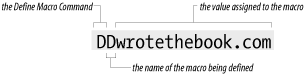
Starting with version 8 of sendmail, variable names are no longer
restricted to a single character. Long variable names, enclosed in
braces, are now acceptable. For example, the define macro shown in Figure 10-2 could be written:
D{Domain}wrotethebook.comLong variable names are easier to read and provide for more choices than the limited set provided by single character names. However, the old-fashioned, short variable names are still common. This terse syntax can be very hard to decipher, but it helps to remember that the first character on the line is always the command. From this single character you can determine what the command is and therefore its structure. Table 10-1 lists the sendmail.cf commands and their syntax.
Table 10-1. sendmail configuration commands
Command | Syntax | Function |
|---|---|---|
Version Level | Vlevel[/vendor] | Specify version level. |
Define Macro | Dxvalue | Set macro x to value. |
Define Class | Ccword1[ word2] ... | Set class c to word1 word2 .... |
Define Class | Fcfile | Load class c from file. |
Set Option | Ooption=value | Set option to value. |
Trusted Users | Tuser1[ user2 ...] | Trusted users are user1 user2 .... |
Set Precedence | Pname=number | Set name to precedence number. |
Define Mailer | Mname, {field=value} | Define mailer name. |
Define Header | H[?mflag?]name:format | Set header format. |
Set Ruleset | Sn | Start ruleset number n. |
Define Rule | Rlhs rhs comment | Rewrite lhs patterns to rhs format. |
Key File | Kname type [argument] | Define database name. |
The following sections describe each configuration command in more detail.
The version level command is an optional command not found in all
sendmail.cf files. You don’t add a V command to the sendmail.cf file or
change one if it is already there. The V command is inserted into the configuration
file when it is first built from m4
macros or by the vendor.
The level number on the V command line indicates the version level
of the configuration syntax. V1 is the oldest configuration syntax and
V9 is the version supported by sendmail 8.11.3. Every level in between
adds some feature extensions. The vendor
part of the V command identifies if
any vendor-specific syntax is supported. The default
vendor value for the sendmail distribution
is Berkeley.
The V command tells the
sendmail executable the level of syntax and commands required to
support this configuration. If the sendmail program cannot support the
requested commands and syntax, it displays the following error
message:
# /usr/lib/sendmail -Ctest.cf
Warning: .cf version level (9) exceeds sendmail version 8.9.3+Sun functionality (8):
Operation not permitted
This error message indicates that this sendmail program supports
level 8 configuration files with Sun syntax extensions.[116] The example was produced on a Solaris 8 system running
the sendmail program that came with the operating system. In the
example we attempted to read a configuration file that was created by
the m4 macros that came with
sendmail 8.11.3. The syntax and functions needed by the configuration
file are not available in the sendmail program. To use this
configuration file, we would have to compile a newer version of the
sendmail program. See Appendix E for
an example of compiling sendmail.
You will never change the values on a V command. You might, however, need to
customize some D commands.
The define macro command (D) defines a
macro and stores a value in it. Once the macro is defined, it is used
to provide the stored value to other sendmail.cf
commands and directly to sendmail itself. This allows sendmail
configurations to be shared by many systems simply by modifying a few
system-specific macros.
A macro name can be any single ASCII character or a word
enclosed in curly braces. Use long names for user-created macros.
sendmail’s own internal macros use most of the available letters and
special characters as names. Additionally, a large number of long
macro names are already defined. This does not mean that you won’t be
called upon to name a macro, but it does mean you will have to be
careful that your name doesn’t conflict with a name that has already
been used. Internal macros are sometimes defined in the
sendmail.cf file. Appendix E provides a complete list of
sendmail’s internal macros. Refer to that list when creating a
user-defined macro to avoid conflicting with an internal macro. To
retrieve the value stored in a macro, reference it as $ x, where
x is the macro name. Macros are expanded when the
sendmail.cf file is read. A special syntax,
$&
x, is used to expand macros when they are
referenced. The $&
x syntax is only used with certain internal
macros that change at runtime.
The code below defines the macros {our-host}, M, and Q. After this code
executes, ${our-host} returns
crab, $M
returns wrotethebook.com, and $Q returns
crab.wrotethebook.com. This sample code defines Q
as containing the value of {our-host} (which is ${our-host}), plus a literal dot, plus the
value of M ($M).
D{our-host}crab
DMwrotethebook.com
DQ${our-host}.$M
If you customize your sendmail.cf file, it will probably be necessary to modify some macro definitions. The macros that usually require modification define site-specific information, such as hostnames and domain names.
A macro definition can contain a conditional. Here’s a conditional:
DX$g$?x ($x)$.
The D is the define macro
command; X is the macro being
defined; and $g says to use the
value stored in macro g. But what
does $?x ($x)$. mean? The
construct $?x is a conditional.
It tests whether macro x has a
value set. If the macro has been set, the text following the
conditional is interpreted. The $. construct ends the conditional.
Given this, the assignment of macro X is interpreted as follows: X is assigned the value of g; and if x is set, X is also assigned a literal blank, a
literal left parenthesis, the value of x, and a literal right parenthesis.
So if g contains
chunt@wrotethebook.com and x contains Craig Hunt, X will
contain:
chunt@wrotethebook.com (Craig Hunt)
The conditional can be used with an “else” construct, which is
$|. The full syntax of the
conditional is:
$?x text1$|text2$.
This is interpreted as:
if (
$?)xis set;use
text1;else (
$|);use
text2;end if (
$.).
Two commands, C and F, define sendmail classes. A class
is similar to an array of values. Classes are used for anything
with multiple values that are handled in the same way, such as
multiple names for the local host or a list of uucp hostnames. Classes allow sendmail to
compare against a list of values instead of against a single value.
Special pattern matching symbols are used with classes. The $= symbol matches any value in a class, and
the $~ symbol matches any value not
in a class. (More on pattern matching later.)
Like macros, classes can have single-character names or long names enclosed in curly braces. User-created classes use long names that do not conflict with sendmail’s internal names. (See Appendix E for a complete list of the names that sendmail uses for its internal class values.) Class values can be defined on a single line, on multiple lines, or loaded from a file. For example, class w is used to define all of the hostnames by which the local host is known. To assign class w the values goober and pea, you can enter the values on a single line:
Cwgoober pea
Or you can enter the values on multiple lines:
Cwgoober
Cwpea
You can also use the F
command to load the class values from a file. The F command reads a file and stores the words
found there in a class variable. For example, to define class w and
assign it all of the strings found in
/etc/mail/local-host-names, use:[117]
Fw/etc/mail/local-host-names
You may need to modify a few class definitions when creating
your sendmail.cf file. Frequently information
relating to uucp, to alias
hostnames, and to special domains for mail routing is defined in class
statements. If your system has a uucp connection as well as a TCP/IP
connection, pay particular attention to the class definitions. But in
any case, check the class definitions carefully and make sure they
apply to your configuration.
Here we grep the Linux sample
configuration file for lines beginning with C or F:
% grep '^[CF]' generic-linux.cf
Cwlocalhost
Fw/etc/mail/local-host-names
CP.
CO @ % !
C..
C[[
FR-o /etc/mail/relay-domains
C{E}root
CPREDIRECT
This grep shows that
generic-linux.cf defines classes w, P, O, ., [,
R, and E. w contains the host’s alias hostnames. Notice that values
are stored in w with both a C
command and an F command. Unlike a
D command, which overwrites the
value stored in a macro, the commands that store values in class
arrays are additive. The C command
and the F command at the start of
this listing add values to class w. Another example of the additive
nature of C commands is class P. P
holds pseudo-domains used for mail routing. The first C command affecting class P stores a dot in
the array. The last command in the list adds REDIRECT to class
P.
Class O stores operators that cannot be part of a valid
username. The classes . (dot) and
[ are primarily of interest because
they show that variable names do not have to be alphabetic characters
and that sometimes arrays have only one value. E lists the usernames
that should always be associated with the local host’s fully qualified
domain name, even if simplified email addresses are being used for all
other users. (More on simplified addresses later.) Notice that even a
single character class name, in this case E, can be enclosed in curly
braces.
Remember that your system will be different. These same class names may be assigned other values on your system, and are only presented here as an example. Carefully read the comments in your sendmail.cf file for guidance as to how classes and macros are used in your configuration.
Many class names are reserved for internal sendmail use. All internal classes defined in sendmail version 8.11 are shown in Appendix E. Only class w, which defines all of the hostnames the system will accept as its own, is commonly modified by system administrators who directly configure the sendmail.cf file.
The option (O) command is used
to define the sendmail environment. Use the O command to set values appropriate for your
installation. The value assigned to an option is a string, an integer,
a Boolean, or a time interval, as appropriate for the individual
option. All options define values used directly by sendmail.
There are no user-created options. The meaning of each sendmail option is defined within sendmail itself. Appendix E lists the meaning and use of each option, and there are plenty of them.
A few sample options from the
generic-linux.cf file are shown below. The
AliasFile option defines the name of the sendmail
aliases file as
/etc/mail/aliases. If you want to put the
aliases file elsewhere, change this option. The
TempFileMode option defines the default file mode as
0600 for temporary files created by
sendmail in /var/spool/mqueue. The Timeout.queuereturn option sets the timeout interval for
undeliverable mail, here set to five days (5d). These options show the kind of general
configuration parameters set by the option command.
# location of alias file
O AliasFile=/etc/mail/aliases
# temporary file mode
O TempFileMode=0600
# default timeout interval
O Timeout.queuereturn=5d
The syntax of the option command shown in this example and in
Appendix E was introduced in
sendmail version 8.7.5. Prior to that, the option command used a
syntax more like the other sendmail commands. The old syntax is:
O
ovalue, where O is the command,
o is the single character option name, and
value is the value assigned to the option.
The options shown in the previous discussion, if written in the old
syntax, would be:
# location of alias file
OA/etc/aliases
# temporary file mode
OF0600
# default timeout interval OT5d
If your configuration uses the old option format, it is dangerously out of date and should be upgraded. See Appendix E for information on downloading, compiling, and installing the latest version of sendmail.
Most of the options defined in the sendmail.cf file that comes with your system don’t require modification. People change options settings because they want to change the sendmail environment, not because they have to. The options in your configuration file are almost certainly correct for your system.
The T command defines a
list of users who are trusted to override the sender
address using the mailer -f
flag.[118] Normally the trusted users are defined as
root, uucp, and
daemon. Trusted users can be specified as a list
of usernames on a single command line or on multiple command lines.
The users must be valid usernames from the
/etc/passwd file.
The most commonly defined trusted users are:
Troot
Tdaemon
Tuucp
Do not modify this list. Additional trusted users increase the possibility of security problems.
Precedence is one of the factors used by sendmail to assign priority to
messages entering its queue. The P
command defines the message precedence values available to sendmail
users. The higher the precedence number, the greater the precedence of
the message. The default precedence of a message is 0. Negative
precedence numbers indicate especially low-priority mail. Error
messages are not generated for mail with a negative precedence number,
making low priorities attractive for mass mailings. Some commonly used
precedence values are:
Pfirst-class=0
Pspecial-delivery=100
Plist=-30
Pbulk=-60
Pjunk=-100
To specify a desired precedence, add a Precedence header to your outbound message. Use the text name from
the P command in the Precedence
header to set the specific precedence of the message. Given the
precedence definitions shown above, a user who wanted to avoid
receiving error messages for a large mailing could select a message
precedence of -60 by including the following header line in the
mail:
Precedence: bulk
The five precedence values shown are probably more than you’ll ever need.
The H command defines the format of header lines that sendmail inserts
into messages. The format of the header command is the H command, optional header flags enclosed in
question marks, a header name, a colon, and a header template. The
header template is a combination of literals and macros that are
included in the header line. Macros in the header template are
expanded before the header is inserted in a message. The same
conditional syntax used in macro definitions can be used in header
templates, and it functions in exactly the same way: it allows you to
test whether a macro is set and to use another value if it is not
set.
The header template field can contain the $> name syntax
that is used in rewrite rules. When used in a header template, the
$>
name syntax allows you to call the ruleset
identified by name to process an incoming
header. This can be useful for filtering headers in order to reduce
spam email. We discuss rulesets, rewrite rules, the $> name
syntax, and how these things are used later in this chapter.
The header flags often arouse more questions than they merit. The function of the flags is very simple. The header flags control whether or not the header is inserted into mail bound for a specific mailer. If no flags are specified, the header is used for all mailers. If a flag is specified, the header is used only for a mailer that has the same flag set in the mailer’s definition. (Mailer flags are listed in Appendix E.) Header flags control only header insertion. If a header is received in the input, it is passed to the output regardless of the flag settings.
Some sample header definitions from the generic-linux.cf sample file are:
H?P?Return-Path: <$g>
HReceived: $?sfrom $s $.$?_($?s$|from $.$_)
H?D?Resent-Date: $a
H?D?Date: $a
H?F?Resent-From: $?x$x <$g>$|$g$.
H?F?From: $?x$x <$g>$|$g$.
H?x?Full-Name: $x
H?M?Resent-Message-Id: <$t.$i@$j>
H?M?Message-Id: <$t.$i@$j>
The headers provided in your system’s sendmail.cf are sufficient for most installations. It’s unlikely you’ll ever need to change them.
The M commands define the mail delivery programs used by sendmail. The
syntax of the command is:
Mname, {field=value}
name is an arbitrary name used
internally by sendmail to refer to this mailer. The name doesn’t
matter as long as it is used consistently within the
sendmail.cf file to refer to this mailer. For
example, the mailer used to deliver SMTP mail within the local domain
might be called smtp on one system and
ether on another system. The function of both
mailers is the same; only the names are different.
There are a few exceptions to this freedom of choice. The mailer that delivers local mail to users on the same machine must be called local, and a mailer named local must be defined in the sendmail.cf file. Three other special mailer names are:
- prog
Delivers mail to programs.
- *file*
Sends mail to files.
- *include*
Directs mail to
:include:lists.
Of these, only the prog mailer is defined in the sendmail.cf file. The other two are defined internally by sendmail.
Despite the fact that the mailer name can be anything you want,
it is usually the same on most systems because the mailers in the
sendmail.cf file are built by standard m4 macros. In the
linux.mc configuration created earlier, the
MAILER(local) macro created the prog and
local mailers, and the MAILER(smtp) macro created
the smtp, esmtp,
smtp8, dsmtp, and
relay mailers. Every system you work with will
probably have this same set of mailer names.
The mailer name is followed by a comma-separated list of field=value pairs that define the characteristics of the mailer. Table 10-2 shows the single-character field identifiers and the contents of the value field associated with each of them. Most mailers don’t require all of these fields.
Table 10-2. Mailer definition fields
Field | Meaning | Contents | Example |
|---|---|---|---|
P | Path | Path of the mailer | P=/bin/mail |
F | Flags | sendmail flags for this mailer | F=lsDFMe |
S | Sender | Rulesets for sender addresses | S=10 |
R | Recipient | Rulesets for recipient addresses | R=20 |
A | Argv | The mailer’s argument vector | A=sh -c $u |
E | Eol | End-of-line string for the mailer | E=\r\n |
M | Maxsize | Maximum message length | M=100000 |
L | Linelimit | Maximum line length | L=990 |
D | Directory | prog mailer’s execution directory | D=$z:/ |
U | Userid | User and group ID used to run mailer | U=uucp:wheel |
N | Nice | nice value used to run mailer | N=10 |
C | Charset | Content-type for 8-bit MIME characters | C=iso8859-1 |
T | Type | Type information for MIME errors | T=dns/rfc822/smtp |
The Path (P) fields contain either the path to the mail delivery
program or the literal string [IPC]. Mailer definitions that specify
P=[IPC] use sendmail to deliver
mail via SMTP.[119] The path to a mail delivery program varies from system
to system depending on where the systems store the programs. Make sure
you know where the programs are stored before you modify the Path
field. If you use a sendmail.cf file from another
computer, make sure that the mailer paths are valid for your system.
If you use m4 to build the
configuration, the path will be correct.
The Flags (F) field contains the sendmail flags used for this mailer. These are the mailer flags referenced earlier in this chapter under “Defining Mail Headers,” but mailer flags do more than just control header insertion. There are a large number of flags. Appendix E describes all of them and their functions.
The Sender (S) and the Recipient (R) fields identify the rulesets used to rewrite the sender and recipient addresses for this mailer. Each ruleset is identified by its number. We’ll discuss rulesets more later in this chapter, and we will refer to the S and R values when troubleshooting the sendmail configuration.
The Argv (A) field defines the argument vector passed to the mailer.
It contains, among other things, macro expansions that provide the
recipient username (which is $u),[120] the recipient hostname ($h), and the sender’s From address ($f). These macros are expanded before the
argument vector is passed to the mailer.
The End-of-line (E) field defines the characters used to mark the end of a line. A carriage return and a line feed (CRLF) is the default for SMTP mailers.
Maxsize (M) defines, in bytes, the longest message that this mailer will handle. This field is used most frequently in definitions of UUCP mailers.
Linelimit (L) defines, in bytes, the maximum length of a line that can be contained in a message handled by this mailer. This mailer field was introduced in sendmail V8. Previous versions of sendmail limited lines to 80 characters because this was the limit for SMTP mail before MIME mail was introduced.
The Directory (D) field specifies the working directory for the
prog mailer. More than one directory can be
specified for the directory field by separating the directory paths
with colons. The example in Table
10-2 tells prog to use the recipient’s
home directory, which is the value returned by the internal macro
$z. If that directory is not
available, it should use the root (/) directory.
The Userid (U) field is used to specify the default user and the
group ID used to execute the mailer. The example U=uucp:wheel says that the mailer should be
run under the user ID uucp and the group ID
wheel. If no value is specified for the Userid
field, the value defined by the DefaultUser option is used.
Use Nice (N) to change the nice value
for the execution of the mailer. This allows you to change the
scheduling priority of the mailer. This is rarely used. If you’re
interested, see the nice manpage
for appropriate values.
The last two fields are used only for MIME mail. Charset (C)
defines the character set used in the Content-type
header when an 8-bit message is converted to MIME. If Charset is not
defined, the value defined in the DefaultCharSet option is used. If
that option is not defined, unknown-8bit is used as the default
value.
The Type (T) field defines the type information used in MIME error messages. MIME-type information defines the mailer transfer agent type, the mail address type, and the error code type. The default is dns/rfc822/smtp.
The following mailer definitions are from generic-linux.cf:
Mlocal,   P=/usr/bin/procmail, F=lsDFMAw5:/|@qSPfhn9,
          S=EnvFromL/HdrFromL, R=EnvToL/HdrToL, T=DNS/RFC822/X-Unix,
          A=procmail -Y -a $h -d $u
Mprog,    P=/bin/sh, F=lsDFMoqeu9, S=EnvFromL/HdrFromL,
          R=EnvToL/HdrToL, D=$z:/, T=X-Unix/X-Unix/X-Unix,
          A=sh -c $u
Msmtp,    P=[IPC], F=mDFMuX, S=EnvFromSMTP/HdrFromSMTP, R=EnvToSMTP,
          E=\r\n, L=990, T=DNS/RFC822/SMTP, A=TCP $h
Mesmtp,   P=[IPC], F=mDFMuXa, S=EnvFromSMTP/HdrFromSMTP, R=EnvToSMTP,
          E=\r\n, L=990, T=DNS/RFC822/SMTP, A=TCP $h
Msmtp8,   P=[IPC], F=mDFMuX8, S=EnvFromSMTP/HdrFromSMTP, R=EnvToSMTP,
          E=\r\n, L=990, T=DNS/RFC822/SMTP, A=TCP $h
Mdsmtp,   P=[IPC], F=mDFMuXa%, S=EnvFromSMTP/HdrFromSMTP, R=EnvToSMTP,
          E=\r\n, L=990, T=DNS/RFC822/SMTP, A=TCP $h
Mrelay,   P=[IPC], F=mDFMuXa8, S=EnvFromSMTP/HdrFromSMTP, R=MasqSMTP,
          E=\r\n, L=2040, T=DNS/RFC822/SMTP,A=TCP $h
This example contains the following mailer definitions:
A definition for local mail delivery, always called local. This definition is required by sendmail.
A definition for delivering mail to programs, always called prog. This definition is found in most configurations.
A definition for TCP/IP mail delivery, here called smtp.
A definition for an Extended SMTP mailer, here called esmtp.
A definition for an SMTP mailer that handles unencoded 8-bit data, here called smtp8.
A definition for on-demand SMTP, here called dsmtp.
A definition for a mailer that relays TCP/IP mail through an external mail relay host, here called relay.
A close examination of the fields in one of these mailer entries, for example the entry for the smtp mailer, shows the following:
MsmtpA mailer, arbitrarily named smtp, is being defined.
P=[IPC]The path to the program used for this mailer is
[IPC], which means delivery of this mail is handled internally by sendmail.F=mDFMuXThe sendmail flags for this mailer say that this mailer can send to multiple recipients at once; that Date, From, and Message-Id headers are needed; that uppercase should be preserved in hostnames and usernames; and that lines beginning with a dot have an extra dot prepended. Refer to Appendix E for more details.
S =EnvFromSMTP/HdrFromSMTPThe sender address in the mail “envelope” is processed through ruleset
EnvFromSMTP, and the sender address in the message is processed through rulesetHdrFromSMTP. More on this later.R= EnvToSMTPAll recipient addresses are processed through ruleset
EnvToSMTP.E=\r\nLines are terminated with a carriage return and a line feed.
L=990This mailer will handle lines up to 990 bytes long.
T=DNS/RFC822/SMTPThe MIME-type information for this mailer says that DNS is used for hostnames, RFC 822 email addresses are used, and SMTP error codes are used.
A=TCP $hThe meaning of each option in an argument vector is exactly as defined on the manpage for the command; see the local mailer as an example. In the case of the smtp mailer, however, the argument refers to an internal sendmail process designed to deliver SMTP mail over a TCP connection. The macro
$his expanded to provide the recipient host ($h) address.
Despite this long discussion, don’t worry about mailer
definitions. The configuration file that is built by m4 for your operating system contains the
correct mailer definitions to run sendmail in a TCP/IP network
environment. You shouldn’t need to modify any mailer
definitions.
Rewrite rules are the heart of the sendmail.cf
file. Rulesets are groups of individual rewrite rules used to parse
email addresses from user mail programs and rewrite them into the form
required by the mail delivery programs. Each rewrite rule is defined by
an R command. The syntax of the
R command is:
Rpattern transformation commentThe fields in an R command are
separated by tab characters. The comment field is ignored by the system,
but good comments are vital if you want to have any hope of
understanding what’s going on. The pattern and transformation fields are
the heart of this command.
Rewrite rules match the input address against the pattern, and if a match is found, they rewrite the address in a new format using the rules defined in the transformation. A rewrite rule may process the same address several times because, after being rewritten, the address is again compared against the pattern. If it still matches, it is rewritten again. The cycle of pattern matching and rewriting continues until the address no longer matches the pattern.
The pattern is defined using macros, classes, literals, and special metasymbols. The macros, classes, and literals provide the values against which the input is compared, and the metasymbols define the rules used in matching the pattern. Table 10-3 shows the metasymbols used for pattern matching.
Table 10-3. Pattern matching metasymbols
Symbol | Meaning |
|---|---|
$@ | Match exactly zero tokens. |
$* | Match zero or more tokens. |
$+ | Match one or more tokens. |
$- | Match exactly one token. |
$=x | Match any token in class x. |
$~x | Match any token not in class x. |
$x | Match all tokens in macro x. |
$%x | Match any token in the NIS map named in macro x.[a] |
$!x | Match any token not in the NIS map named in macro x. |
$%y | Match any token in the NIS hosts.byname map. |
[a] This symbol is specific to Sun operating systems. | |
All of the metasymbols request a match for some number of tokens. A token is a string of characters in an email address delimited by an operator. The operators are the characters defined in the OperatorChars option. Operators are also counted as tokens when an address is parsed. For example:
becky@rodent.wrotethebook.com
This email address contains seven tokens: becky, @, rodent, ., wrotethebook, ., and com. This address would match the pattern:
$-@$+
The address matches the pattern because:
Many addresses, such as
hostmaster@apnic.net and
craigh@ora.com, match this pattern, but other
addresses do not. For example,
rebecca.hunt@wrotethebook.com does not match
because it has three tokens: rebecca, ., and hunt, before the @.
Therefore, it fails to meet the requirement of exactly one token
specified by the $- symbol. Using
the metasymbols, macros, and literals, patterns can be constructed to
match any type of email address.
When an address matches a pattern, the strings from the address
that match the metasymbols are assigned to indefinite tokens . The matching strings are called indefinite tokens
because they may contain more than one token value. The indefinite
tokens are identified numerically according to the relative position
in the pattern of the metasymbol that the string matched. In other
words, the indefinite token produced by the match of the first
metasymbol is called $1; the match of the second symbol is called $2;
the third is $3; and so on. When the address
becky@rodent.wrotethebook.com matched the pattern
$-@$+, two indefinite tokens were
created. The first is identified as $1 and contains the single token,
becky, that matched the $- symbol.
The second indefinite token is $2 and contains the five tokens—rodent,
., wrotethebook, ., and com—that matched the $+ symbol. The indefinite tokens created by
the pattern matching can then be referenced by name ($1, $2, etc.)
when rewriting the address.
A few of the symbols in Table 10-3 are used only in
special cases. The $@ symbol is
normally used by itself to test for an empty, or null, address. The
symbols that test against NIS maps can only be used on Sun systems
that run the sendmail program that Sun provides with the operating
system. We’ll see in the next section that systems running basic
sendmail can use NIS maps, but only for transformation—not for pattern
matching.
The transformation field, from the right-hand side of the rewrite rule, defines the format used for rewriting the address. It is defined with the same things used to define the pattern: literals, macros, and special metasymbols. Literals in the transformation are written into the new address exactly as shown. Macros are expanded and then written. The metasymbols perform special functions. The transformation metasymbols and their functions are shown in Table 10-4.
Table 10-4. Transformation metasymbols
Symbol | Meaning |
|---|---|
$n | Substitute indefinite token n. |
$[name$] | Substitute the canonical form of name. |
$map key$@argument $:default$) | Substitute a value from database map indexed by key. |
$>n | Call ruleset n. |
$@ | Terminate ruleset. |
$: | Terminate rewrite rule. |
The $ n symbol, where
n is a number, is used for the indefinite
token substitution discussed above. The indefinite token is expanded
and written to the “new” address. Indefinite token substitution is
essential for flexible address rewriting. Without it, values could not
be easily moved from the input address to the rewritten address. The
following example demonstrates this.
Addresses are always processed by several rewrite rules. No one rule tries to do everything. Assume the input address mccafferty@rodent has been through some preliminary processing and now is:
kathy.mccafferty<@rodent>
Assume the current rewrite rule is:
R$+<@$-> $1<@$2.$D> user@host -> user@host.domain
The address matches the pattern because it contains one or more
tokens before the literal <@,
exactly one token after the <@,
and then the literal >. The
pattern match produces two indefinite tokens that are used in the
transformation to rewrite the address.
The transformation contains the indefinite token $1, a literal
<@, indefinite token $2, a
literal dot (.), the macro D, and
the literal >. After the pattern
matching, $1 contains kathy.mccafferty and $2
contains rodent. Assume that the macro D was
defined elsewhere in the sendmail.cf file as
wrotethebook.com. In this case the input address
is rewritten as:
kathy.mccafferty<@rodent.wrotethebook.com>
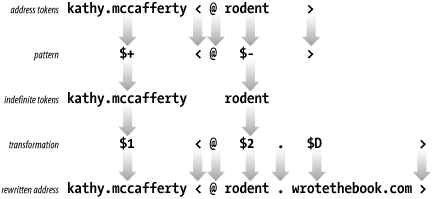
Figure 10-3 illustrates
this specific address rewrite. It shows the tokens derived from the
input address and how those tokens are matched against the pattern. It
also shows the indefinite tokens produced by the pattern matching and
how the indefinite tokens and other values from the transformation are
used to produce the rewritten address. After rewriting, the address is
again compared to the pattern. This time it fails to match the pattern
because it no longer contains exactly one token between the literal
<@ and the literal >. So, no further processing is done by
this rewrite rule and the address is passed to the next rule in line.
Rules in a ruleset are processed sequentially, though a few
metasymbols can be used to modify this flow.
The $> n symbol calls ruleset
n and passes the address defined by the
remainder of the transformation to ruleset
n for processing. For example:
$>9 $1 % $2
This transformation calls ruleset 9 ($>9), and passes the contents of $1, a
literal %, and the contents of $2 to ruleset 9 for processing. When
ruleset 9 finishes processing, it returns a rewritten address to the
calling rule. The returned email address is then compared again to the
pattern in the calling rule. If it still matches, ruleset 9 is called
again.
The recursion built into rewrite rules creates the possibility
for infinite loops. sendmail does its best to detect possible loops,
but you should take responsibility for writing rules that don’t loop.
The $@ and the $: symbols are used to control processing
and to prevent loops. If the transformation begins with the $@ symbol, the entire ruleset is terminated
and the remainder of the transformation is the value returned by the
ruleset. If the transformation begins with the $: symbol, the individual rule is executed
only once. Use $: to prevent
recursion and to prevent loops when calling other rulesets. Use
$@ to exit a ruleset at a specific
rule.
The $[ name $] symbol converts a host’s nickname or its
IP address to its canonical name by passing the value
name to the name server for resolution. For
example, using the wrotethebook.com name servers,
$[mouse$] returns
rodent.wrotethebook.com and $[[172.16.12.1]$] returns
crab.wrotethebook.com.
In the same way that a hostname or address is used to look up a
canonical name in the name server database, the $( map
key $) syntax
uses the key to retrieve information from the
database identified by map. This is a more
generalized database retrieval syntax than the one that returns
canonical hostnames, and it is more complex to use. Before we get into
the details of setting up and using databases from within sendmail,
let’s finish describing the rest of the syntax of rewrite
rules.
There is a special rewrite rule syntax that is used in ruleset 0. Ruleset 0 defines the triple (mailer, host, user) that specifies the mail delivery program, the recipient host, and the recipient user.
The special transformation syntax used to do this is:
$#mailer$@host$:user
An example of this syntax taken from the generic-linux.cf sample file is:
R$*<@$*>$* $#esmtp $@ $2 $: $1 < @ $2 > $3 user@host.domain
Assume the email address
david<@ora.wrotethebook.com> is processed
by this rule. The address matches the pattern $*<@$+>$* because:
The address has zero or more tokens (david) that match the first
$*symbol.The address has a literal <@.
The address has zero or more tokens (the five tokens in ora.wrotethebook.com) that match the requirement of the second
$*symbol.The address has a literal >.
The address has zero or more (in this case, zero) tokens that match the requirement of the last
$*symbol.
This pattern match produces two indefinite tokens. Indefinite token $1 contains david and $2 contains ora.wrotethebook.com. No other matches occurred, so $3 is null. These indefinite tokens are used to rewrite the address into the following triple:
$#smtp$@ora.wrotethebook.com$:david<@ora.wrotethebook.com>
The components of this triple are:
$#smtpsmtpis the internal name of the mailer that delivers the message.$@ora.wrotethebook.comora.wrotethebook.comis the recipient host.$:david<@ora.wrotethebook.com>david<@ora.wrotethebook.com>is the recipient user.
There are a few variations on the mailer triple syntax that are also used in the templates of some rules. Two of these variations use only the “mailer” component.
$#OKIndicates that the input address passed a security test. For example, the address is permitted to relay mail.
$#discardIndicates that the input address failed some security test and that the email message should be discarded.
Tip
Neither OK, discard, nor error (which is discussed in a second) is
declared in M commands like real
mailers. But the sendmail documentation refers to them as “mailers”
and so do we.
The $#OK and $#discard mailers are used in relay control
and security. The $#discard mailer
silently discards the mail and does not return an error message to the
sender. The $#error mailer also
handles undeliverable mail, but unlike $#discard, it returns an error message to
the sender. The template syntax used with the $#error mailer is more complex than the
syntax of either $#OK or $#discard. That syntax is shown here:
$#error $@dsn-code $:message
The mailer value must be $#error. The $: message field
contains the text of the error message that you wish to send. The
$@
dsn-code field is optional. If it is
provided, it appears before the message and
must contain a valid Delivery Status Notification (DSN) error code as defined
by RFC 1893, Mail System Status Codes.
DSN codes are composed of three dot-separated components:
-
class Provides a broad classification of the status. Three values are defined for class in the RFC:
2means success,4means temporary failure, and5means permanent failure.-
subject Classifies the error messages as relating to one of eight categories:
0(Undefined)The specific category cannot be determined.
1(Addressing)A problem was encountered with the address.
2(Mailbox)A problem was encountered with the delivery mailbox.
3(Mail system)The destination mail delivery system is having a problem.
4(Network)The network infrastructure is having a problem.
5(Protocol)A protocol problem was encountered.
6(Content)The message content caused a translation error.
7(Security)A security problem was reported.
-
detail Provides the details of the specific error. The detail value is meaningful only in context of the subject code. For example, x
.1.1means a bad destination user address and x.1.2means a bad destination host address, while x.2.1means the mailbox is disabled and x.2.2means the mailbox is full. There are far too many detail codes to list here. See RFC 1893 for a full list.
An error message written to use the DSN format might be:
R<@$+> $#error$@5.1.1$:"user address required"
This rule returns the DSN code 5.1.1 and the message "user address required" when the address
matches the pattern. The DSN code has a 5 in the class field, meaning it is a
permanent failure; a 1 in the
subject field, meaning it is an addressing failure; and a 1 in the detail field, meaning that, given
the subject value of 1, it is a bad user address.
Error codes and the error syntax are part of the advanced
configuration options used for relay control and security. These
values are generated by the m4
macro used to select these advanced features. These values are very
rarely placed in the sendmail.cf file by a system
administrator
directly.
External databases can be used to transform addresses in rewrite rules. The database is included in the transformation part of a rule by using the following syntax:
$(map key[$@argument...] [$:default] $)
map is the name assigned to the
database within the sendmail.cf file. The name
assigned to map is not limited by the
rules that govern macro names. Like mailer names, map names are used
only inside of the sendmail.cf file and can be
any name you choose. Select a simple descriptive name, such as
“users” or “mailboxes”. The map name is assigned with a K command. (More on the K command in a moment.)
key is the value used to index into
the database. The value returned from the database for this key is
used to rewrite the input address. If no value is returned, the
input address is not changed unless a
default value is provided.
An argument is an additional value
passed to the database procedure along with the key. Multiple
arguments can be used, but each argument must start with $@. The argument can be used by the
database procedure to modify the value it returns to sendmail. It is
referenced inside the database as % n, where
n is a digit that indicates the order in
which the argument appears in the rewrite rule—%1, %2, and so
on—when multiple arguments are used. (Argument %0 is the
key.)
An example will make the use of arguments clear. Assume the following input address:
tom.martin<@sugar>
Further, assume the following database with the internal sendmail name of “relays”:
oil     %1<@relay.fats.com>
sugar   %1<@relay.calories.com>
salt    %1<@server.sodium.org>
Finally, assume the following rewrite rule:
R$+<@$-> $(relays $2 $@ $1 $:$1<@$2> $)
The input address tom.martin<@sugar> matches the pattern because it has one or more tokens (tom.martin) before the literal <@ and exactly one token (sugar) after it. The pattern matching creates two indefinite tokens and passes them to the transformation. The transformation calls the database (relays) and passes it token $2 (sugar) as the key and token $1 (tom.martin) as the argument. If the key is not found in the database, the default ($1<@$2>) is used. In this case, the key is found in the database. The database program uses the key to retrieve “%1@relay.calories.com”, expands the %1 argument, and returns “tom.martin@relay.calories.com” to sendmail, which uses the returned value to replace the input address.
Before a database can be used within sendmail, it must be
defined. This is done with the K
command. The syntax of the K command is:
Kname type[arguments]
name is the name used to reference
this database within sendmail. In the example above, the
name is “relays”.
type is the class of database. The
type specified in the K command must match the database support
compiled into your sendmail. Most sendmail programs do not support
all database types, but a few basic types are widely supported.
Common types are hash, btree, and nis. There are many more, all of
which are described in Appendix
E.
arguments are optional. Generally,
the only argument is the path of the database file. Occasionally the
arguments include flags that are interpreted by the database
program. The full list of K
command flags that can be passed in the argument field is found in
Appendix E.
To define the “relays” database file used in the example above, we might enter the following command in the sendmail.cf file:
Krelays hash /etc/mail/relays
The name relays is simply a name you chose because it is descriptive. The database type hash is a type supported by your version of sendmail and was used by you when you built the database file. Finally, the argument /etc/mail/relays is the location of the database file you created.
Don’t worry if you’re confused about how to build and use database files within sendmail. We will revisit this topic later in the chapter and the examples will make the practical use of database files clear.
Rulesets are groups of associated rewrite rules that can be referenced by a
name or a number. The S command
marks the beginning of a ruleset and names it. In the S name command
syntax, name identifies the ruleset.
Optionally a number can also be assigned to the ruleset using the full
S
name=number syntax. In that case, the
ruleset can be referenced either by its name or its number. It is even
possible to identify a ruleset with a number instead of a name by
using the old S
number syntax. This form of the syntax is
primarily found in old configurations because old versions of sendmail
used numbers to identify rulesets.
Rulesets can be thought of as subroutines, or functions, designed to process email addresses. They are called from mailer definitions, from individual rewrite rules, or directly by sendmail. Six rulesets have special functions and are called directly by sendmail. These are:
Ruleset canonify (3) is the first ruleset applied to addresses. It converts an address to the canonical form: local-part@host.domain.
Ruleset parse (0) is applied to the addresses used to deliver the mail. Ruleset parse is applied after ruleset canonify, and only to the recipient addresses actually used for mail delivery. It resolves the address to the triple (
mailer,host, user) composed of the name of the mailer that will deliver the mail, the recipient hostname, and the recipient username.Ruleset sender (1) is applied to all sender addresses in the message.
Ruleset recipient (2) is applied to all recipient addresses in the message.
Ruleset final (4) is applied to all addresses in the message and is used to translate internal address formats into external address formats.
Ruleset localaddr (5) is applied to local addresses after sendmail processes the address against the aliases file. Ruleset 5 is applied only to local addresses that do not have an alias.
Figure 10-4 shows the flow of the message and addresses through these rulesets. The S and R symbols stand for additional rulesets. They have names just like all normal rulesets, but the names are not fixed as is the case with the rulesets described above. The S and R ruleset names are identified in the S and R fields of the mailer definition. Each mailer may specify its own S and R rulesets for mailer-specific cleanup of the sender and recipient addresses just before the message is delivered.
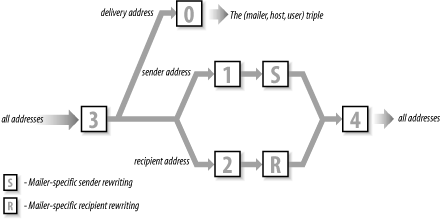
There are, of course, many more rulesets in most
sendmail.cf files. The other rulesets provide
additional address processing, and are called by existing rulesets
using the $>
n construct. (See Table 10-5 later in this
chapter.) The rulesets provided in any vendor’s
sendmail.cf file will be adequate for delivering
SMTP mail. It’s unlikely you’ll have to add to these rulesets, unless
you want to add new features to your mailer.
In this section we put into practice everything we discussed about sendmail configuration files—their structure and the commands used to build them. We’ll modify the configuration file, generic-linux.cf, for use on rodent.wrotethebook.com. We’ll modify this particular file because its configuration is closest to the configuration we need for rodent.wrotethebook.com. rodent is a Linux workstation on a TCP/IP Ethernet, and it uses SMTP mail and DNS.
The following sections are titled according to the sections of the file, and they describe the modifications we’ll make to the file, section by section. Remember that other sendmail.cf files will probably use different section titles, but the basic information provided in the configuration will be the same.
The first line in the local information section of the configuration
file defines class w.[121] Class w is the full set of hostnames for which this
system accepts mail. Use the C
command or the F command to add
hostnames to this set. sendmail initializes this class to the value in
macro w ($w), which is the hostname
of this computer. On many systems that is enough. However, sometimes a
sendmail server acts as a mailbox server that must accept and store
mail for clients that do not directly receive SMTP mail. The w class
needs to identify systems that expect this host to accept mail for
them. You’ll need to add a hostname to class w for every mailbox
client.
In our sample, we accept the Cw command as written, and let sendmail
define the value for w internally. This is the most common method for
desktop systems like rodent. On the system
crab, which is also known by the name
wtb-gw, we would add values to class w as
follows:
Cwlocalhost wtb-gw wtb-gw.wrotethebook.com
Now mail addressed to user@wtb-gw.wrotethebook.com would be accepted by crab and not rejected as being addressed to the wrong host.
Some mail servers might need to be configured to accept mail for
many different hostnames. In that case, you may want to load class w
from a file containing all the hostnames. You can do that with the
F command. The
generic-linux.cf file already has an F command, so we could just place the client
hostnames in the file
/etc/mail/local-host-names.
No modification is necessary for the j macro definition because,
on this system, sendmail obtains a fully qualified domain name for the
j macro from DNS. On most systems this is the case; on other systems
sendmail obtains the hostname without the domain extension. If j
doesn’t contain the full name, initialize j with the hostname
($w) and the domain name. In the
sample file, we would do this by “uncommenting” the Dj command and editing the domain string to
be wrotethebook.com. However, there is no need to
do this because j has the correct value.
To test if j is set to the correct value on your system, run sendmail with the
-bt option and the debug level set
to 0.4. In response to this, sendmail displays several lines of
information, including the value of j. In the example below, sendmail
displays the value rodent.wrotethebook.com for j.
If it displayed only rodent, we would edit
sendmail.cf to correct the value for j.
#sendmail -bt -d0.4Version 8.11.3 Compiled with: LOG MATCHGECOS MIME8TO7 NAMED_BIND NDBM NETINET NETUNIX NEWDB SCANF USERDB XDEBUG canonical name: rodent.wrotethebook.com UUCP nodename: rodent a.k.a.: rodent.wrotethebook.com a.k.a.: [172.16.12.2] ============ SYSTEM IDENTITY (after readcf) ============ (short domain name) $w = rodent (canonical domain name) $j = rodent.wrotethebook.com (subdomain name) $m = wrotethebook.com (node name) $k = rodent ======================================================== ADDRESS TEST MODE (ruleset 3 NOT automatically invoked) Enter <ruleset> <address> >^D
The next line in the local information section defines class P. In our sample configuration file, class P stores the names of two pseudo-domains. These pseudo-domain names are “.” and REDIRECT. The pseudo-domain dot (.) is used to identify canonical domain names. The REDIRECT pseudo-domain is used by the redirect feature described in Appendix E. Other pseudo-domains can be added to class P to address users who are not on the Internet with Internet-style email addresses. For example, we could add UUCP to class P so that mail can be addressed using the old UUCP “bang” syntax, e.g., ora!los!craig, or it can be addressed in a pseudo-Internet format, e.g., craig@los.ora.uucp. These mail routing domains simplify the address that the user enters and route the mail to the correct mail relay host. However, additional pseudo-domains are rarely needed because most mailers now support standard Internet-style addresses. The class P definition in generic-linux.cf does not require any modification.
The configuration file has macro definitions for several mail relays. None of these are assigned a value in our sample file. You only need a relay host if your system cannot deliver the mail because it lacks capability or connectivity. Unix systems do not lack capability, but a firewall might limit connectivity. Some sites use a mail relay so that only one system needs a full sendmail.cf configuration. The other hosts at the site simply forward their mail to the smart host for delivery. If this is the configuration policy of your site, enter the name of the mail relay as the “smart” relay. For example:
DSrelay.wrotethebook.com
We don’t enter anything in any of the relay settings on rodent. This desktop system will handle all its own mail. Hey, that’s why we run Unix!
The local information section in the sample file also includes five key file
definitions. Two of these K
commands define pseudo-databases, which are internal sendmail routines
used in rewrite rules as if they were true databases. The
arith database is an internal routine used to
perform certain arithmetic functions. The dequote
database is an internal sendmail routine used to remove quotes from
within email addresses. The other three K commands define real databases:
mailertable, virtuser, and
access. These are real databases, but the
database files exist only if you create them. The
mailertable database is used to send mail
addressed to a specific domain through a particular mailer to a
specific remote host. The virtuser database
routes mail for virtual mail domains, which are mail domains that have
no real existence beyond the sendmail server itself. The
access database provides access controls for mail
relaying and for spam control.
The version number doesn’t require modification—but it’s a good idea to keep track of the changes you make to your sendmail.cf file, and this is the place to do it. Each time you modify the configuration, change the version number by adding your own revision number. At the same time, enter a comment in the file describing the changes you made. Usually, this is the last change made to the files so the comments reflect all changes. For example, the original version number section in the generic-linux.cf file is:
######################
#   Version Number   #
######################
 DZ8.11.3
After we have finished all of our modifications, it will contain:
######################
#   Version Number   #
######################
#  R1.0 - modified for rodent by Craig
#       - cleaned up the comments in the local info section
#  R1.1 - modified macro M to use wrotethebook.com instead of the
#         hostname in outgoing mail
#  R2.0 - added rule a to SEnvFromSMTP & S HdrFromSMTP to rewrite
          the user in outgoing mail to firstname.lastname format
 DZ8.11.3R2.0
Finally, we need to understand the purpose of a few other classes and macros found in this section. The M macro is used to rewrite the sender host address. Define a value for M to hide the name of the local host in outbound mail. Classes E and M are both related to macro M. Class E defines the usernames for which the hostname is not rewritten even if the M macro is defined. For example, root@rodent.wrotethebook.com is not rewritten to root@wrotethebook.com even if M is defined as DMwrotethebook.com. Class M defines other hostnames, not just the local hostname, that should be rewritten to the value of macro M. This is used on mail servers that might need to rewrite sender addresses for their clients. For example:
# who I masquerade as (null for no masquerading) (see also $=M)
DMwrotethebook.com

# class M: domains that should be converted to $M CM24seven.wrotethebook.com brazil.
wrotethebook.com ora.wrotethebook.com
Given the macro M and class M definitions shown above, this host would rewrite mail from user@brazil.wrotethebook.com or user@24seven.wrotethebook.com to user@wrotethebook.com. rodent is not a server so we won’t use class M. But we will use macro M later in the configuration.
We’ve spent lots of time looking at the local information section because almost everything you will need to do to configure a system can be done here. We will quickly discuss the other section before getting into the really challenging task of working with rewrite rules.
The section “Options” defines the sendmail environment. For example, some of the options specify the file paths used by sendmail, as in these lines from the generic-linux.cf file:
# location of alias file
O AliasFile=/etc/mail/aliases
# location of help file
O HelpFile=/etc/mail/helpfile
# status file
O StatusFile=/etc/mail/statistics
# queue directory
O QueueDirectory=/var/spool/mqueue
If these paths are correct for your system, don’t modify them. On rodent we want to keep the files just where they are, which is generally the case when you use a sendmail.cf file that was designed for your operating system. In fact, you will probably not need to change any of the options if you use a configuration file designed for your operating system. If you’re really curious about sendmail options, see Appendix E.
The next few sections of the generic-linux.cf file define the messages’ precedences, the trusted users, and the headers. None of these sections is modified. Following these sections are the rewrite rules and the mailers. This material is the bulk of the file and the heart of the configuration. The sample configuration file is designed to allow SMTP mail delivery on a Linux system running DNS, so we assume no modifications are required. We want to test the configuration before copying it into sendmail.cf. We’ll save it in a temporary configuration file, test.cf, and use the troubleshooting features of sendmail to test it.
sendmail provides powerful tools for configuration testing and debugging. These test tools are invoked on the sendmail command line using some of the many sendmail command-line arguments. Appendix E lists all of the command-line arguments; Table 10-5 summarizes those that relate to testing and debugging.
Table 10-5. sendmail arguments for testing and debugging
Argument | Function |
|---|---|
-t | Send to everyone listed in To:, Cc:, and Bcc:. |
-bt | Run in test mode. |
-bv | Verify addresses; don’t collect or deliver mail. |
-bp | Print the mail queue. |
-Cfile | Use file as the configuration file. |
-dlevel | Set debugging level. |
-Ooption=value | Set option to the specified value. |
-e | Defines how errors are returned. |
-v | Run in verbose mode. |
Some command-line arguments are used to verify address processing
and to gain confidence in the new configuration. Once you think your
configuration will work, send mail to yourself at various sites—testing
is a great reason to have several email accounts at various free
services. Use the -C argument to read
the test configuration file and the -v argument to display the details of the mail
delivery. -v displays the complete
SMTP exchange between the two hosts.
By observing whether your mailer properly connects to the remote mailer and formats the addresses correctly, you’ll get a good idea of how the configuration is working. The following example is a test from rodent using the test.cf configuration file we just created:
rodent# sendmail -Ctest.cf -t -v
            To: craigh@ora.com
            From: craig
            Subject: Sendmail Test
            Ignore this test.
            ^D
craigh@ora.com... Connecting to ora.com. via esmtp...
220-ruby.ora.com ESMTP Sendmail 8.9.3+Sun/8.9.3; Wed, 23 May 2001
>>> EHLO rodent.wrotethebook.com
250-ruby.ora.com Hello craig@rodent.wrotethebook.com [172.16.12.2],
pleased to meet you
250-EXPN
250-VERB
250-8BITMIME
250-SIZE
250-DSN
250-ONEX
250-ETRN
250-XUSR
250 HELP
>>> MAIL From:<craig@rodent.wrotethebook.com> SIZE=64
250 <craig@rodent.wrotethebook.com>... Sender ok
>>> RCPT To:<craigh@ora.com>
250 <craigh@ora.com>... Recipient ok
>>> DATA
354 Enter mail, end with "." on a line by itself
>>> .
250 SAA27399 Message accepted for delivery
craigh@ora.com... Sent (SAA27399 Message accepted for delivery)
Closing connection to ora.com.
>>> QUIT
221 ruby.ora.com closing connection
We entered everything before the Ctrl-D (^D). Everything after the ^D was displayed by sendmail. Figure 10-5 highlights some of the important information in this display and notes the sendmail macros that relate to the highlighted material.
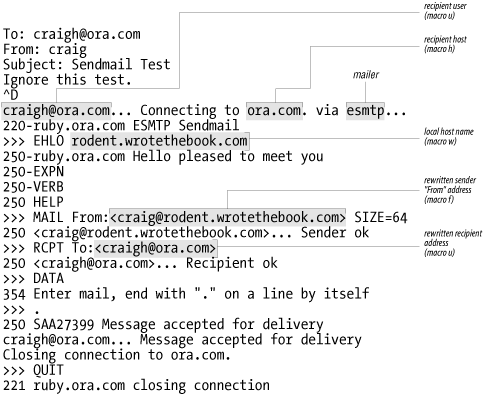
This test successfully transfers mail to a remote Internet site. The sendmail output shows that rodent sent the mail to ora.com via the smtp mail delivery program. The sendmail greeting shows that the remote host handling this SMTP connection is ruby.ora.com. Therefore, ruby must be the mail server for the ora.com domain; i.e., the MX record for ora.com points to ruby.ora.com.
The EHLO messages indicate that both rodent and ruby use Extended Simple Mail Transfer Protocol (ESMTP).
Everything worked just fine! We could quit right now and use this configuration. But like most computer people, we cannot stop ourselves from tinkering in order to make things “better.”
The From: address,
craig@rodent.wrotethebook.com, is clearly a valid
address but is not quite what we want. We want to have people address us
as firstname.lastname@domain -- not as
user@host.domain, which is exactly the
configuration we created earlier in this chapter with a few lines of
m4 code. We will create the same
configuration here to provide an example of how to use the various
troubleshooting tools that come with sendmail. However, if you really
want to make major sendmail configuration changes, you should use
m4 to build your
configuration.
Most changes to sendmail.cf are small and are made near the beginning of the file in the Local Information section. Looking closely at that section provides the clues we need to solve part of our configuration problem.
Without knowing what “masquerading” means, the comments for class E, class M, and macro M lead us to guess that the value set for macro M will be used to rewrite the hostname.[122]
In particular, the comment “names that should be exposed as from this host, even if we masquerade” led me to believe that masquerading hides the hostname. Based on this guess, we set a value for macro M as follows:
# who I masquerade as (null for no masquerading) (see also $=M) DMwrotethebook.com
Are we sure that setting a value for the M macro will hide the
hostname? No, but changing the value in test.cf and
running another test will do no harm. Running the test program with the
test configuration has no effect on the running sendmail daemon started
by the sendmail -bd -q1h
command in the boot script. Only an instantiation of sendmail with the
-Ctest.cf argument will use the
test.cf test configuration.
In the initial test, the From: address went into sendmail as
craig, and it came out as
craig@rodent.wrotethebook.com. Obviously it has
been rewritten. This time we test whether the change we made to the
macro M in the configuration files modifies the rewrite process by
directly testing the rewrite rulesets. First, we need to find out what
rules were used to rewrite this address. To get more information, we
run sendmail with the -bt
option.
When sendmail is invoked with the -bt option, it prompts for input using the
greater-than symbol (>). At the prompt, enter one of the test
commands shown in Table 10-6.
Table 10-6. sendmail testing commands
Command | Function |
|---|---|
ruleset[,ruleset...] address | Process address through ruleset(s). |
.Dmvalue | Assign value to macro m. |
.Ccvalue | Add value to class c. |
=Sruleset | Display the rules in ruleset. |
= | Display the mailer definitions. |
-dvalue | Set the debug flag to value. |
$m | Display the value of macro m. |
$=c | Display the contents of class c. |
/mxhost | Display the MX records for host. |
/parseaddress | Return the mailer/host/user triple for address. |
/try mailer address | Process address for mailer. |
/tryflags flags | Set the address processed by /parse or /try to H (Header), E (Envelope), S (Sender), or R (Recipient). |
/canonhostname | Canonify hostname. |
/mapmapname key | Display the value for key found in mapname. |
/quit | Exit address test mode. |
The most basic test is a ruleset name followed by an email address. The address is the test data, and the name is the ruleset to be tested. The address is easy to select; it is the one that was improperly rewritten. But how do you know which ruleset to specify?
Use Figure 10-4 to determine which rulesets to enter. The canonify ruleset is applied to all addresses. It is followed by different rulesets depending on whether the address is a delivery address, a sender address, or a recipient address. Furthermore, the rulesets used for sender and recipient addresses vary depending on the mailer that is used to deliver the mail. All addresses are then processed by ruleset final.
There are two variables in determining the rulesets used to
process an address: the type of address and the mailer through which
it is processed. The three address types are delivery address,
recipient address, and sender address. You know the address type
because you select the address being tested. In our test mail we were
concerned about the sender address. Which mailer is used is determined
by the delivery address. One way to find out which mailer delivered
the test mail is to run sendmail with the -bv argument and the delivery
address:
# sendmail -bv craigh@ora.com
craigh@ora.com... deliverable: mailer esmtp, host ora.com.,
      user craigh@ora.com
Knowing the mailer, we can use sendmail with the -bt option to process the sender From:
address. There are two types of sender addresses: the sender address
in the “envelope” and the sender address in the message header. The
message header address is the one on the From: line sent with the
message during the SMTP DATA transfer. You probably see it in the mail
headers when you view the message with your mail reader. The
“envelope” address is the address used during the SMTP protocol
interactions. sendmail allows us to view the processing of both of
these addresses:
# sendmail -bt -Ctest.cf
ADDRESS TEST MODE (ruleset 3 NOT automatically invoked)
Enter <ruleset> <address>
> /tryflags HS
> /try esmtp craig
Trying header sender address craig for mailer esmtp
canonify           input: craig
Canonify2          input: craig
Canonify2        returns: craig
canonify         returns: craig
1                  input: craig
1                returns: craig
HdrFromSMTP        input: craig
PseudoToReal       input: craig
PseudoToReal     returns: craig
MasqSMTP           input: craig
MasqSMTP         returns: craig < @ *LOCAL* >
MasqHdr            input: craig < @ *LOCAL* >
MasqHdr          returns: craig < @ wrotethebook . com . >
HdrFromSMTP      returns: craig < @ wrotethebook . com . >
final              input: craig < @ wrotethebook . com . >
final            returns: craig @ wrotethebook . com
Rcode = 0, addr = craig@wrotethebook.com
> /tryflags ES
> /try esmtp craig
Trying envelope sender address craig for mailer esmtp
canonify           input: craig
Canonify2          input: craig
Canonify2        returns: craig
canonify         returns: craig
1                  input: craig
1                returns: craig
EnvFromSMTP        input: craig
PseudoToReal       input: craig
PseudoToReal     returns: craig
MasqSMTP           input: craig
MasqSMTP         returns: craig < @ *LOCAL* >
MasqEnv            input: craig < @ *LOCAL* >
MasqEnv          returns: craig < @ rodent . wrotethebook . com . >
EnvFromSMTP      returns: craig < @ rodent . wrotethebook . com . >
final              input: craig < @ rodent . wrotethebook . com . >
final            returns: craig @ rodent . wrotethebook . com
Rcode = 0, addr = craig@rodent.wrotethebook.com
> /quit
The /tryflags command defines the type of address to be processed by
a /try or a /parse command. Four flags are available for
the /tryflags command: S for sender, R for recipient, H for header, and E for envelope. By combining two of these
flags, the first /tryflags command
says we will process a header sender (HS) address. The /try command tells sendmail to process the
address through a specific mailer. In the example, we process the
email address craig through the mailer
esmtp. First, we process it as the header sender
address, and then as the envelope sender address. From this test, we
can tell that the value that we entered in the M macro is used to
rewrite the sender address in the message header, but it is not used
to rewrite the sender address in the envelope.
The results of these tests show that the value of the M macro
rewrites the hostname in the message header sender address just as we
wanted. The hostname in the envelope sender address is not rewritten.
Usually this is acceptable. However, we want to create exactly the
same configuration as in the m4
example. The FEATURE (masquerade_envelope) command used in the
m4 example causes the envelope
sender address to be rewritten. Therefore, we want this configuration
to also rewrite it.
The only difference between how the message and envelope addresses are processed is that one goes through ruleset HdrFromSMTP and the other goes through ruleset EnvFromSMTP. The tests show that both rulesets call basically the same rulesets. They diverge where ruleset HdrFromSMTP calls ruleset MasqHdr and ruleset EnvFromSMTP calls ruleset MasqEnv. The tests also show that ruleset MasqHdr provides the address rewrite that we want for the message sender address, while the envelope sender address is not processed in the manner we desire by ruleset MasqEnv. The test.cf code for rulesets MasqEnv is shown here:
###################################################################
###  Ruleset 94 -- convert envelope names to masquerade form    ###
###################################################################
SMasqEnv=94
R$* < @ *LOCAL* > $*    $: $1 < @ $j . > $2
Clearly, ruleset MasqEnv does not do what we want, and ruleset MasqHdr does. A quick inspection of ruleset MasqEnv shows that it does not contain a single reference to macro M. Yet the comment on the line at the start of the ruleset indicates it should “do masquerading.” Our solution is to add a line to ruleset MasqEnv so that it now calls ruleset MasqHdr, which is the ruleset that really does the masquerade processing. The modified ruleset is shown here:
###################################################################
###  Ruleset 94 -- convert envelope names to masquerade form    ###
###################################################################
SMasqEnv=94
R$+                     $: $>93 $1           do masquerading
R$* < @ *LOCAL* > $*    $: $1 < @ $j . > $2
Debugging a sendmail.cf file is more of an
art than a science. Deciding to add the first line to ruleset MasqEnv
to call ruleset MasqHdr is little more than a hunch. The only way to
verify the hunch is through testing. We run sendmail -bt -Ctest.cf
again to test the addresses craig,
craig@rodent, and
craig@localhost using the /try esmtp command. All tests run successfully,
rewriting the various input addresses into
craig@wrotethebook.com. We then retest by sending
mail via sendmail -v -t
-Ctest.cf. Only when all of these
tests run successfully do we really believe in our hunch and move on
to the next task, which is to rewrite the user part of the email
address into the user’s first and last names.
The last feature we added to the m4
source file was FEATURE(genericstable), which adds a database process
to the configuration that we use to convert the user portion of the
email address from the user’s login name to the user’s first and last
names. To do the same thing here, create a text file of login names
and first and last names and build a database with makemap.[123]
# cd /etc/mail
# cat realnames
dan Dan.Scribner
tyler Tyler.McCafferty
pat Pat.Stover
willy Bill.Wright
craig Craig.Hunt
# makemap hash realnames < realnames
Once the database is created, define it for sendmail. Use the
K command to do this. To use the
database that we have just built, insert the following lines into the
Local Information section of the sendmail.cf
file:
# define a database to map login names to firstname.lastname
Krealnames hash /etc/mail/realnames
The K command defines
realnames as the internal sendmail name of this
database. Further, it identifies that this is a database of type
hash and that the path to the database is
/etc/realnames. sendmail adds the correct
filename extensions to the pathname depending on the type of the
database, so you don’t need to worry about it.
Finally, we add a new rule that uses the database to rewrite addresses. We add it to ruleset EnvFromSMTP and ruleset HdrFromSMTP immediately after the lines in those rulesets that call ruleset MasqHdr. This way, our new rule gets the address as soon as ruleset MasqHdr finishes processing it.
# when masquerading convert login name to firstname.lastname
R$-<@$M.>$*    $:$(realnames $1 $)<@$M.>$2    user=>first.last
This rule is designed to process the output of ruleset MasqHdr,
which rewrites the hostname portion of the address. Addresses that
meet the criteria to have the hostname part rewritten are also the
addresses for which we want to rewrite the user part. Look at the
output of ruleset MasqHdr from the earlier test. That address,
craig<@wrotethebook.com.>, matches the
pattern $-<@$M.>$*. The
address has exactly one token (craig) before the literal <@,
followed by the value of M (wrotethebook.com), the literal .>, and
zero tokens.
The transformation part of this rule takes the first token ($1)
from the input address and uses it as the key to the
realnames database, as indicated by the $:$(realnames $1 $)
syntax. For the sample address
craig<@wrotethebook.com>, $1 is
craig. When used as an index into the database
realnames shown at the beginning of this section,
it returns Craig.Hunt. This returned value is
prepended to the literal <@, the value of macro M ($M), the literal .>, and the value of $2,
as indicated by the <@$M.>$2
part of the transformation. The effect of this new rule is to convert
the username to the user’s real first and last names.
After adding the new rule to rulesets EnvFromSMTP and HdrFromSMTP, a test yields the following results:
# sendmail -bt -Ctest.cf
ADDRESS TEST MODE (ruleset 3 NOT automatically invoked)
Enter <ruleset> <address>
> /tryflags HS
> /try esmtp craig
Trying header sender address craig for mailer esmtp
canonify           input: craig
Canonify2          input: craig
Canonify2        returns: craig
canonify         returns: craig
1                  input: craig
1                returns: craig
HdrFromSMTP        input: craig
PseudoToReal       input: craig
PseudoToReal     returns: craig
MasqSMTP           input: craig
MasqSMTP         returns: craig < @ *LOCAL* >
MasqHdr            input: craig < @ *LOCAL* >
MasqHdr          returns: craig < @ wrotethebook . com . >
HdrFromSMTP      returns: Craig . Hunt < @ wrotethebook . com . >
final              input: Craig . Hunt < @ wrotethebook . com . >
final            returns: Craig . Hunt @ wrotethebook . com
Rcode = 0, addr = Craig.Hunt@wrotethebook.com
> /tryflags ES
> /try esmtp craig
Trying envelope sender address craig for mailer esmtp
canonify           input: craig
Canonify2          input: craig
Canonify2        returns: craig
canonify         returns: craig
1                  input: craig
1                returns: craig
EnvFromSMTP        input: craig
PseudoToReal       input: craig
PseudoToReal     returns: craig
MasqSMTP           input: craig
MasqSMTP         returns: craig < @ *LOCAL* >
MasqEnv            input: craig < @ *LOCAL* >
MasqHdr            input: craig < @ *LOCAL* >
MasqHdr          returns: craig < @ wrotethebook . com . >
MasqEnv          returns: craig < @ wrotethebook . com . >
EnvFromSMTP      returns: Craig . Hunt < @ wrotethebook . com . >
final              input: Craig . Hunt < @ wrotethebook . com . >
final            returns: Craig . Hunt @ wrotethebook . com
Rcode = 0, addr = Craig.Hunt@wrotethebook.com
> /quit
If the tests do not give the results you want, make sure that you have correctly entered the new rewrite rules and that you have correctly built the database. The following error message could also be displayed:
test.cf: line 116: readcf: map realnames: class hash not available
This indicates that your system does not support hash databases.
You can try changing the database type on the K command line to hash and rerunning
sendmail -bt until you find a type
of database that your sendmail likes. When you do, rerun makemap using that database type. If your
sendmail doesn’t support any database type, see Appendix E for information on recompiling
sendmail with database support.
Note that all of the changes made directly to the
sendmail.cf file in the second half of this
chapter (masquerading the sender address, masquerading the envelope
address, and converting usernames) were handled by just three lines in
the m4 source file. These examples
demonstrated how to use the sendmail test tools. If you really need to
make a new, custom configuration, use m4. It is easiest to maintain and enhance
the sendmail configuration through the m4 source file.
sendmail sends and receives SMTP mail, processes mail aliases, and interfaces between user mail agents and mail delivery agents. sendmail is started as a daemon at boot time to process incoming SMTP mail. sendmail aliases are defined in the aliases file. The rules for interfacing between user agents and mail delivery agents can be complex; sendmail uses the sendmail.cf file to define these rules.
Configuring the sendmail.cf file is the most
difficult part of setting up a sendmail server. The file uses a very
terse command syntax that is hard to read. Sample
sendmail.cf files are available to simplify this
task. Most systems come with a vendor-supplied configuration file, and
others are available with the sendmail software distribution. The
sendmail sample files must first be processed by the m4 macro processor. Once the proper sample
file is available, very little of it needs to be changed. Almost all of
the changes needed to complete the configuration occur at the beginning
of the file and are used to define information about the local system,
such as the hostname and the name of the mail relay host. sendmail
provides an interactive testing tool that is used to check the
configuration before it is installed.
sendmail is a big, complex service that is important enough to deserve its own chapter. Web service is another important service, provided by Apache on most Unix systems. Apache’s complex configuration syntax is the topic of the next chapter.
[108] See sendmail by Costales and Allman (O’Reilly & Associates) and Linux Sendmail Administration by Craig Hunt (Sybex) for book-length treatments of sendmail.
[109] The location of the file is defined in the ALIAS_FILE parameter in the
sendmail m4 configuration.
[111] The AutoRebuildAliases
option causes sendmail to automatically rebuild the aliases
database—even if newaliases is
not run. See Appendix E.
[112] The default location for the configuration file prior to sendmail 8.11 was the /etc directory. Now the default is /etc/mail, but the file is often placed in other directories, such as /usr/lib.
[113] See Appendix E for a sample script that builds the realnames database from /etc/passwd.
[114] On Solaris systems, NIS maps and NIS+ tables are built with standard commands that come with the operating system. The syntax for using those maps within sendmail is different (see Table 10-3).
[115] See Appendix E for information about compiling sendmail.
[116] See Table 10-4 for Sun-specific syntax.
[117] sendmail 8.11 uses /etc/mail/local-host-names to load class w. Earlier versions of sendmail used /etc/sendmail.cw. Only the name has changed; the file still contains a list of hostnames.
[118] Mailer flags are listed in Appendix E.
[119] [TCP] and [IPC] are used interchangeably, both in
the P field and in the A field.
[120] In the prog mailer definition, $u actually passes a program name in the
argument vector.
[121] The C and F commands from
generic-linux.cf are shown earlier in this
chapter.
[122] In the m4 source file we
configured masquerading with the MASQUERADE_AS(wrotethebook.com)
command.
[123] See the m4 section for
more information about makemap.