Table of Contents for
TCP/IP Network Administration, 3rd Edition
 TCP/IP Network Administration, 3rd Edition
Published by
O'Reilly Media, Inc., 2002
TCP/IP Network Administration, 3rd Edition
Published by
O'Reilly Media, Inc., 2002
- Cover
- TCP/IP Network Administration, 3rd Edition
- Dedication
- Preface
- 1. Overview of TCP/IP
- 2. Delivering the Data
- 3. Network Services
- 4. Getting Started
- 5. Basic Configuration
- 6. Configuring the Interface
- 7. Configuring Routing
- 8. Configuring DNS
- 9. Local Network Services
- 10. sendmail
- 11. Configuring Apache
- 12. Network Security
- 13. Troubleshooting TCP/IP
- A. PPP Tools
- B. A gated Reference
- C. A named Reference
- D. A dhcpd Reference
- E. A sendmail Reference
- F. Solaris httpd.conf File
- G. RFC Excerpts
- Index
- Index
- Index
- Index
- Index
- Index
- Index
- Index
- Index
- Index
- Index
- Index
- Index
- Index
- Index
- Index
- Index
- Index
- Index
- Index
- Index
- Index
- Index
- Index
- Index
- Index
- Index
- About the Author
- Colophon
- Copyright
Chapter 13 refers to specific TCP/IP headers that are documented here. This is not an exhaustive list of headers; only the headers used in the troubleshooting examples in Chapter 13 are covered:
IP Datagram Header, as defined in RFC 791, Internet Protocol
TCP Segment Header, as defined in RFC 793, Transmission Control Protocol
ICMP Parameter Problem Message Header, as defined in RFC 792, Internet Control Message Protocol
Each header is presented using an excerpt from the RFC that defines the header. These are not exact quotes; the excerpts have been slightly edited to better fit this text. However, the importance of using primary sources for troubleshooting protocol problems is still emphasized. These headers are provided here to help you follow the examples in Chapter 13. For real troubleshooting, use the real RFCs. You can obtain your own copies of the RFCs by following the instructions at the end of this appendix.
This description is taken from pages 11 to 15 of RFC 791, Internet Protocol.
Internet Header Format

    0                   1                   2                   3
    0 1 2 3 4 5 6 7 8 9 0 1 2 3 4 5 6 7 8 9 0 1 2 3 4 5 6 7 8 9 0 1
   +-+-+-+-+-+-+-+-+-+-+-+-+-+-+-+-+-+-+-+-+-+-+-+-+-+-+-+-+-+-+-+-+
   |Version|  IHL  |Type of Service|          Total Length         |
   +-+-+-+-+-+-+-+-+-+-+-+-+-+-+-+-+-+-+-+-+-+-+-+-+-+-+-+-+-+-+-+-+
   |         Identification        |Flags|      Fragment Offset    |
   +-+-+-+-+-+-+-+-+-+-+-+-+-+-+-+-+-+-+-+-+-+-+-+-+-+-+-+-+-+-+-+-+
   |  Time to Live |    Protocol   |         Header Checksum       |
   +-+-+-+-+-+-+-+-+-+-+-+-+-+-+-+-+-+-+-+-+-+-+-+-+-+-+-+-+-+-+-+-+
   |                       Source Address                          |
   +-+-+-+-+-+-+-+-+-+-+-+-+-+-+-+-+-+-+-+-+-+-+-+-+-+-+-+-+-+-+-+-+
   |                    Destination Address                        |
   +-+-+-+-+-+-+-+-+-+-+-+-+-+-+-+-+-+-+-+-+-+-+-+-+-+-+-+-+-+-+-+-+
   |                    Options                    |    Padding    |
   +-+-+-+-+-+-+-+-+-+-+-+-+-+-+-+-+-+-+-+-+-+-+-+-+-+-+-+-+-+-+-+-+

  Version:  4 bits

    The Version field indicates the format of the internet header.
    This document describes version 4.

  IHL:  4 bits

    Internet Header Length is the length of the internet header in 32
    bit words.  The minimum value for a correct header is 5.

  Type of Service:  8 bits

    The Type of Service indication the quality of service desired.
    The meaning of the bits is explained below.

      Bits 0-2:  Precedence.
      Bit    3:  0 = Normal Delay,      1 = Low Delay.
      Bits   4:  0 = Normal Throughput, 1 = High Throughput.
      Bits   5:  0 = Normal Reliability 1 = High Reliability.
      Bit  6-7:  Reserved for Future Use.

         0     1     2     3     4     5     6     7
      +-----+-----+-----+-----+-----+-----+-----+-----+
      |                 |     |     |     |     |     |
      |   PRECEDENCE    |  D  |  T  |  R  |  0  |  0  |
      |                 |     |     |     |     |     |
      +-----+-----+-----+-----+-----+-----+-----+-----+

        Precedence

          111 - Network Control
          110 - Internetwork Control
          101 - CRITIC/ECP
          100 - Flash Override
          011 - Flash
          010 - Immediate
          001 - Priority
          000 - Routine

  Total Length:  16 bits

    Total Length is the length of the datagram, measured in octets
    (bytes), including internet header and data.

  Identification:  16 bits

    An identifying value assigned by the sender to aid in assembling
    the fragments of a datagram.

  Flags:  3 bits

    Various Control Flags.  The Flag bits are explained below:

      Bit 0: reserved, must be zero
      Bit 1: (DF) 0 = May Fragment,  1 = Don't Fragment.
      Bit 2: (MF) 0 = Last Fragment, 1 = More Fragments.

          0   1   2
        +---+---+---+
        |   | D | M |
        | 0 | F | F |
        +---+---+---+

  Fragment Offset:  13 bits

    This field indicates where in the datagram this fragment belongs.
    The fragment offset is measured in units of 8 octets (64 bits).
    The first fragment has offset zero.

  Time to Live:  8 bits

    This field indicates the maximum time the datagram is allowed to
    remain in the internet system.

  Protocol:  8 bits

    This field indicates the Transport Layer protocol that the data
    portion of this datagram is passed to.  The values for various
    protocols are specified in the "Assigned Numbers" RFC.

  Header Checksum:  16 bits

    A checksum on the header only.  Since some header fields change
    (e.g., time to live), this is recomputed and verified at each
    point that the internet header is processed.  The checksum
    algorithm is:

      The checksum field is the 16 bit one's complement of the one's
      complement sum of all 16 bit words in the header.  For purposes
      of computing the checksum, the value of the checksum field is
      zero.

  Source Address:  32 bits

    The source IP address.  See Chapter 2 for a
    description of IP addresses.

  Destination Address:  32 bits

    The destination IP address.  See Chapter 2 for a description of IP
    addresses.

  Options:  variable

    The options may or may not appear in datagrams, but they must be
    implemented by all IP modules (host and gateways).  No options
    were used in any of the datagrams examined

in Chapter 13.This description is taken from pages 15 to 17 of RFC 793, Transmission Control Protocol.
TCP Header Format

    0                   1                   2                   3
    0 1 2 3 4 5 6 7 8 9 0 1 2 3 4 5 6 7 8 9 0 1 2 3 4 5 6 7 8 9 0 1
   +-+-+-+-+-+-+-+-+-+-+-+-+-+-+-+-+-+-+-+-+-+-+-+-+-+-+-+-+-+-+-+-+
   |          Source Port          |       Destination Port        |
   +-+-+-+-+-+-+-+-+-+-+-+-+-+-+-+-+-+-+-+-+-+-+-+-+-+-+-+-+-+-+-+-+
   |                        Sequence Number                        |
   +-+-+-+-+-+-+-+-+-+-+-+-+-+-+-+-+-+-+-+-+-+-+-+-+-+-+-+-+-+-+-+-+
   |                    Acknowledgment Number                      |
   +-+-+-+-+-+-+-+-+-+-+-+-+-+-+-+-+-+-+-+-+-+-+-+-+-+-+-+-+-+-+-+-+
   |  Data |           |U|A|P|R|S|F|                               |
   | Offset| Reserved  |R|C|S|S|Y|I|            Window             |
   |       |           |G|K|H|T|N|N|                               |
   +-+-+-+-+-+-+-+-+-+-+-+-+-+-+-+-+-+-+-+-+-+-+-+-+-+-+-+-+-+-+-+-+
   |           Checksum            |         Urgent Pointer        |
   +-+-+-+-+-+-+-+-+-+-+-+-+-+-+-+-+-+-+-+-+-+-+-+-+-+-+-+-+-+-+-+-+
   |                    Options                    |    Padding    |
   +-+-+-+-+-+-+-+-+-+-+-+-+-+-+-+-+-+-+-+-+-+-+-+-+-+-+-+-+-+-+-+-+
   |                             data                              |
   +-+-+-+-+-+-+-+-+-+-+-+-+-+-+-+-+-+-+-+-+-+-+-+-+-+-+-+-+-+-+-+-+

  Source Port:  16 bits

    The source port number.

  Destination Port:  16 bits

    The destination port number.

  Sequence Number:  32 bits

    The sequence number of the first data octet (byte) in this segment
    (except when SYN is present). If SYN is present the sequence
    number is the initial sequence number (ISN) and the first data
    octet is ISN+1.

  Acknowledgment Number:  32 bits

    If the ACK control bit is set, this field contains the value of
    the next sequence number the sender of the segment is expecting to
    receive.  Once a connection is established this is always sent.

  Data Offset:  4 bits

    The number of 32 bit words in the TCP Header.  This indicates
    where the data begins.  The TCP header (even one including options)
    is an integral number of 32 bits long.

  Reserved:  6 bits

    Reserved for future use.  Must be zero.

  Control Bits:  6  single-bit values (from left to right):

    URG:  Urgent Pointer field significant
    ACK:  Acknowledgment field significant
    PSH:  Push Function
    RST:  Reset the connection
    SYN:  Synchronize sequence numbers
    FIN:  No more data from sender

  Window:  16 bits

    The number of data octets (bytes) the sender of this segment is
    willing to accept.

  Checksum:  16 bits

    The checksum field is the 16 bit one's complement of the one's
    complement sum of all 16 bit words in the header and text.

  Urgent Pointer:  16 bits

    This field contains the current value of the urgent pointer as a
    positive offset from the sequence number in this segment.  The
    urgent pointer points to the sequence number of the octet
    following the urgent data.  This field is only be interpreted
    in segments with the URG control bit set.

  Options:  variable

Options may occupy space at the end of the TCP header and are a multiple of 8 bits in length.This description is taken from pages 8 and 9 of RFC 792, Internet Control Message Protocol.
Parameter Problem Message

    0                   1                   2                   3
    0 1 2 3 4 5 6 7 8 9 0 1 2 3 4 5 6 7 8 9 0 1 2 3 4 5 6 7 8 9 0 1
   +-+-+-+-+-+-+-+-+-+-+-+-+-+-+-+-+-+-+-+-+-+-+-+-+-+-+-+-+-+-+-+-+
   |     Type      |     Code      |          Checksum             |
   +-+-+-+-+-+-+-+-+-+-+-+-+-+-+-+-+-+-+-+-+-+-+-+-+-+-+-+-+-+-+-+-+
   |    Pointer    |                   unused                      |
   +-+-+-+-+-+-+-+-+-+-+-+-+-+-+-+-+-+-+-+-+-+-+-+-+-+-+-+-+-+-+-+-+
   |      Internet Header + 64 bits of Original Data Datagram      |
   +-+-+-+-+-+-+-+-+-+-+-+-+-+-+-+-+-+-+-+-+-+-+-+-+-+-+-+-+-+-+-+-+

   Type

      12

   Code

      0 = pointer indicates the error.

   Checksum

      The checksum is the 16-bit ones's complement of the one's
      complement sum of the ICMP message starting with the ICMP Type.
      For computing the checksum, the checksum field should be zero.

   Pointer

      If code = 0, identifies the octet where an error was detected.

   Internet Header + 64 bits of Data Datagram

The internet header plus the first 64 bits of the datagram that elicited this error response.Throughout this book, we have referred to many RFCs. These are the Internet documents used for everything from general information to the definitions of the TCP/IP protocol standards. As a network administrator, there are several important RFCs that you’ll want to read. This section describes how you can obtain them.
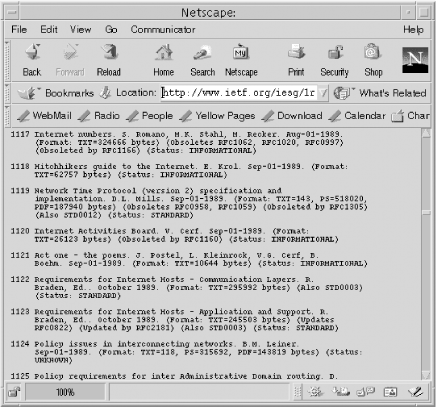
RFCs are available at http://www.ietf.org. Follow the RFC Pages link from that home page. The page that appears allows you to retrieve an RFC by specifying its number. The page also has links to the RFC Index and the RFC Editor Web Pages. The index is useful for general browsing. It helps you map RFC names to numbers, and it tells you when an RFC has been updated or replaced. Figure G-1 shows a network administrator scrolling through the index looking for RFC 1122.
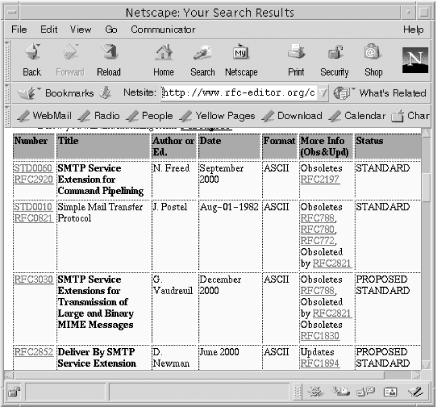
Of even more interest are the RFC Editor Web Pages. Selecting this link takes you to http://www.rfc-editor.org, where you can select RFC Search and Retrieval. The page that is displayed provides access to a hyperlinked RFC index and to a search tool that allows you to look for RFC titles, numbers, authors, or keywords.
Assume you want to find out more about the SMTP service extensions that have been proposed for Extended SMTP. Figure G-2 shows the first page displayed as a result of this query.
The Web provides the most popular and best method for browsing
through RFCs. However, if you know what you want, anonymous FTP can be a
faster way to retrieve a specific document. RFCs are stored at ftp://ftp.ietf.org in the
rfc directory. This stores the RFCs with filenames
in the form rfcnnnn.txt or
rfcnnnn.ps, where nnnn is the
RFC number and txt or ps
indicates whether the RFC is ASCII text or PostScript. To retrieve RFC
1122, FTP to ftp://ftp.ietf.org
and enter get rfc/rfc1122.txt at the ftp> prompt. This is generally a very quick
way to get an RFC if you know what you want.
While anonymous FTP is the fastest way and the Web is the best way to get an RFC, they are not the only ways. You can also obtain RFCs through electronic mail. Electronic mail is available to many users who are denied direct access to Internet services because they are on a nonconnected network or are sitting behind a restrictive firewall. Also, there are times when email provides sufficient service because you don’t need the document quickly.
Retrieve RFCs through email by sending mail to
mailserv@ietf.org. Leave the Subject: line blank.
Request the RFC in the body of the email text, preceding the pathname
of the RFC with the keyword FILE.
In this example, we request RFC 1258.
% mail mailserv@ietf.org
               Subject:
               FILE /rfc/rfc1258.txt
               ^D
The technique works very well. In the time it took to type these paragraphs, the requested RFC was already in my mailbox.