Table of Contents for
Seven Databases in Seven Weeks, 2nd Edition
 Seven Databases in Seven Weeks, 2nd Edition
Published by
Pragmatic Bookshelf, 2018
Seven Databases in Seven Weeks, 2nd Edition
Published by
Pragmatic Bookshelf, 2018
- Title Page
- Seven Databases in Seven Weeks, Second Edition
- Seven Databases in Seven Weeks, Second Edition
- Seven Databases in Seven Weeks, Second Edition
- Seven Databases in Seven Weeks, Second Edition
- Acknowledgments
- Preface
- Why a NoSQL Book
- Why Seven Databases
- What’s in This Book
- What This Book Is Not
- Code Examples and Conventions
- Credits
- Online Resources
- 1. Introduction
- It Starts with a Question
- The Genres
- Onward and Upward
- 2. PostgreSQL
- That’s Post-greS-Q-L
- Day 1: Relations, CRUD, and Joins
- Day 2: Advanced Queries, Code, and Rules
- Day 3: Full Text and Multidimensions
- Wrap-Up
- 3. HBase
- Introducing HBase
- Day 1: CRUD and Table Administration
- Day 2: Working with Big Data
- Day 3: Taking It to the Cloud
- Wrap-Up
- 4. MongoDB
- Hu(mongo)us
- Day 1: CRUD and Nesting
- Day 2: Indexing, Aggregating, Mapreduce
- Day 3: Replica Sets, Sharding, GeoSpatial, and GridFS
- Wrap-Up
- 5. CouchDB
- Relaxing on the Couch
- Day 1: CRUD, Fauxton, and cURL Redux
- Day 2: Creating and Querying Views
- Day 3: Advanced Views, Changes API, and Replicating Data
- Wrap-Up
- 6. Neo4J
- Neo4j Is Whiteboard Friendly
- Day 1: Graphs, Cypher, and CRUD
- Day 2: REST, Indexes, and Algorithms
- Day 3: Distributed High Availability
- Wrap-Up
- 7. DynamoDB
- DynamoDB: The “Big Easy” of NoSQL
- Day 1: Let’s Go Shopping!
- Day 2: Building a Streaming Data Pipeline
- Day 3: Building an “Internet of Things” System Around DynamoDB
- Wrap-Up
- 8. Redis
- Data Structure Server Store
- Day 1: CRUD and Datatypes
- Day 2: Advanced Usage, Distribution
- Day 3: Playing with Other Databases
- Wrap-Up
- 9. Wrapping Up
- Genres Redux
- Making a Choice
- Where Do We Go from Here?
- A1. Database Overview Tables
- A2. The CAP Theorem
- Eventual Consistency
- CAP in the Wild
- The Latency Trade-Off
- Bibliography
- Seven Databases in Seven Weeks, Second Edition
Day 3: Distributed High Availability
Let’s wrap up our Neo4j investigation by learning how to make Neo4j more suitable for mission-critical, production uses. We’ll see how Neo4j keeps data stable via ACID-compliant transactions. Then we’ll install and configure a Neo4j high availability (HA) cluster to improve availability when serving high-read traffic. Then we’re going to look into backup strategies to ensure that our data remains safe.
High Availability
High availability mode is Neo4j’s answer to the question, “Can a graph database scale?” Yes, but with some caveats. A write to one slave is not immediately synchronized with all other slaves, so there is a danger of losing consistency (in the CAP sense) for a brief moment (making it eventually consistent). HA will lose pure ACID-compliant transactions. It’s for this reason that Neo4j HA is touted as a solution largely for increasing capacity for reads.
Just like Mongo, the servers in the cluster will elect a master that holds primary responsibility for managing data distribution in the cluster. Unlike in Mongo, however, slaves in Neo4j accept writes. Slave writes will synchronize with the master node, which will then propagate those changes to the other slaves.
HA Cluster
To use Neo4j HA, we must first set up a cluster. Previously, Neo4j clusters relied on ZooKeeper as an external coordination mechanism, which worked well but required a lot of additional administration, as ZooKeeper would have to be run separately. That has changed in more recent versions. Now, Neo4j clusters are self-managing and self-coordinating. Clusters can choose their own master/slave setup and re-coordinate when servers go offline.
You can see an illustration of this in the following figure, which shows a 4-node Neo4j cluster.
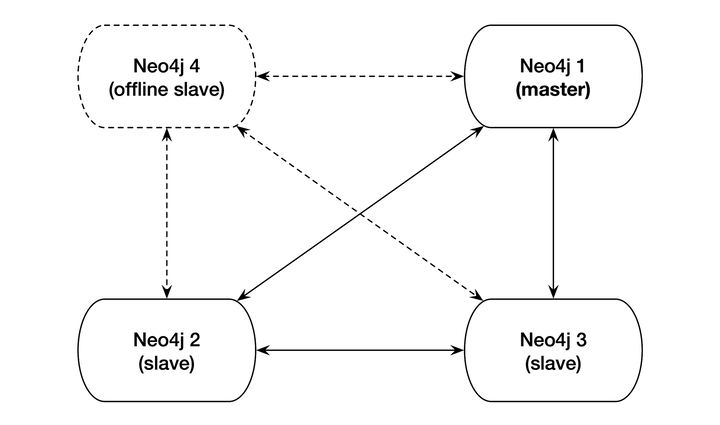
Nodes 1, 2, and 3 are currently online and replicating to one another properly, while node 4 is offline. When node 4 comes back online, it will re-enter as a slave node. If node 1, the current master node, went offline, the other nodes would automatically elect a leader (without the help of an external coordinating service). This is a fairly standard HA setup in the industry today, and the engineers behind Neo4j have done administrators a great service by enabling a ZooKeeper-free HA setup.
Building and Starting the Cluster
To build a cluster, we’re going to run three instances of Neo4j Enterprise version 3.1.4. You can download a copy from the website for your operating system (be sure you select the correct edition)[43] and then unzip it and create two more copies of the directory. Let’s name them neo4j-1.local, neo4j-2.local, and neo4j-3.local.
| | $ tar fx neo4j-enterprise-3.1.4-unix.tar.gz |
| | $ mv neo4j-enterprise-3.1.4 neo4j-1.local |
| | $ cp -R neo4j-1.local neo4j-2.local |
| | $ cp -R neo4j-1.local neo4j-3.local |
Now we have three identical copies of our database. Normally, you would unpack one copy per server and configure the cluster to be aware of the other servers. In order to build a local cluster, we need to make a few small configuration changes and start the nodes one by one. Each node contains a conf/neo4j.conf configuration file. At the top of that file in the folder for node 1, neo4j-1.local, add this:
| | dbms.mode=HA |
| | dbms.memory.pagecache.size=200m |
| | dbms.backup.address=127.0.0.1:6366 |
| | dbms.backup.enabled=true |
| | ha.server_id=1 |
| | ha.initial_hosts=127.0.0.1:5001,127.0.0.1:5002,127.0.0.1:5003 |
| | ha.host.coordination=127.0.0.1:5001 |
| | ha.host.data=127.0.0.1:6363 |
| | dbms.connector.http.enabled=true |
| | dbms.connector.http.listen_address=:7474 |
| | dbms.connector.bolt.enabled=true |
| | dbms.connector.bolt.tls_level=OPTIONAL |
| | dbms.connector.bolt.listen_address=:7687 |
| | dbms.security.auth_enabled=false |
Copy and paste the same thing into the other two nodes’ config files, except increase the following values by 1 for each node (producing three separate values for each—for example, 7474, 7475, and 7476 for dbms.connector.http.listen_address):
- ha.server_id
- ha.host.coordination
- ha.host.data
- dbms.connector.http.listen_address
- dbms.connector.bolt.listen_address
So, ha.server_id should have values of 1, 2, and 3 on the different nodes, respectively, and so on for the other configs. This is to ensure that the nodes aren’t attempting to open up the same ports for the same operations. Now we can start each node one by one (the order doesn’t matter):
| | $ neo4j-1.local/bin/neo4j start |
| | $ neo4j-2.local/bin/neo4j start |
| | $ neo4j-3.local/bin/neo4j start |
You can watch the server output of any of the three running nodes by tailing the log file.
| | $ tail -f neo4j-3.local/logs/neo4j.log |
If the cluster has been set up successfully, you should see something like this:
| | 2017-05-08 03:38:06.901+0000 INFO Started. |
| | 2017-05-08 03:38:07.192+0000 INFO Mounted REST API at: /db/manage |
| | 2017-05-08 03:38:07.902+0000 INFO Remote interface available at https://... |
You should also be able to use three different Neo4j browser consoles at http://localhost:7474, as before, but also on ports 7475 and 7476. Don’t use the browser console for now, though. We’re going to experiment with the cluster via the CLI instead.
Verifying Cluster Status
We now have three different nodes running alongside one another in a cluster, ready to do our bidding. So let’s jump straight in and write some data to make sure that things are being properly replicated across the cluster.
Jump into the Cypher shell (as we did on Day 2) for the first node:
| | $ neo4j-1.local/bin/cypher-shell |
| | Connected to Neo4j 3.1.4 at bolt://localhost:7687 as user neo4j. |
| | Type :help for a list of available commands or :exit to exit the shell. |
| | Note that Cypher queries must end with a semicolon. |
| | neo4j> |
Now let’s write a new data node to our cluster and exit the Cypher shell for node 1...
| | neo4j> CREATE (p:Person {name: "Weird Al Yankovic"}); |
| | neo4j> :exit |
...and then open up the shell for node 2...
| | $ neo4j-2.local/bin/cypher-shell -u neo4j -p pass |
...and finally see which data nodes are stored in the cluster:
| | neo4j> MATCH (n) RETURN n; |
| | (:Person {name: "Weird Al Yankovic"}) |
And there you have it: Our data has been successfully replicated across nodes. You can try the same thing on node 3 if you’d like.
Master Election
In HA Neo4j clusters, master election happens automatically. If the master server goes offline, other servers will notice and elect a leader from among themselves. Starting the previous master server again will add it back to the cluster, but now the old master will remain a slave (until another server goes down).
High availability allows very read-heavy systems to deal with replicating a graph across multiple servers and thus sharing the load. Although the cluster as a whole is only eventually consistent, there are tricks you can apply to reduce the chance of reading stale data in your own applications, such as assigning a session to one server. With the right tools, planning, and a good setup, you can build a graph database large enough to handle billions of nodes and edges and nearly any number of requests you may need. Just add regular backups, and you have the recipe for a solid production system.
Backups
Backups are a necessary aspect of any professional database use. Although backups are effectively built in when using replication in a highly available cluster, periodic backups—nightly, weekly, hourly, and so on—that are stored off-site are always a good idea for disaster recovery. It’s hard to plan for a server room fire or an earthquake shaking a building to rubble.
Neo4j Enterprise offers a tool called neo4j-admin that performs a wide variety of actions, including backups.
The most powerful method when running an HA server is to craft a full backup command to copy the database file from the cluster to a date-stamped file on a mounted drive. Pointing the copy to every server in the cluster will ensure you get the most recent data available. The backup directory created is a fully usable copy. If you need to recover, just replace each installation’s data directory with the backup directory, and you’re ready to go.
You must start with a full backup. Let’s back up our HA cluster to a directory that ends with today’s date (using the *nix date command). The neo4j-admin command can be run from any server and you can choose any server in the cluster when using the --from flag. Here’s an example command:
| | $ neo4j-1.local/bin/neo4j-admin backup \ |
| | --from 127.0.0.1:6366 \ |
| | --name neo4j-`date +%Y.%m.%d`.db \ |
| | --backup-dir /mnt/backups |
Once you have done a full backup, you can choose to do an incremental backup by specifying an existing .db database directory as the target directory. But keep in mind that incremental backups only work on a fully backed-up directory, so ensure the previous command is run on the same day or the directory names won’t match up.
Day 3 Wrap-Up
Today we spent some time keeping Neo4j data stable via ACID-compliant transactions, high availability, and backup tools.
It’s important to note that all of the tools we used today require the Neo4j Enterprise edition, and so use a dual license—GPL/AGPL. If you want to keep your server closed source, you should look into switching to the Community edition or getting an OEM from Neo Technology (the company behind Neo4j). Contact the Neo4j team for more information.
Day 3 Homework
Find
-
Find the Neo4j licensing guide.
-
Answer the question, “What is the maximum number of nodes supported?” (Hint: It’s in Questions & Answers in the website docs.)
Do
-
Replicate Neo4j across three physical servers.
-
Set up a load balancer using a web server such as Apache or Nginx, and connect to the cluster using the REST interface. Execute a Cypher script command.
-
Experiment further with the neo4j-admin tool. Acquire a solid understanding of three subcommands beyond backup.