Table of Contents for
Seven Databases in Seven Weeks, 2nd Edition
 Seven Databases in Seven Weeks, 2nd Edition
Published by
Pragmatic Bookshelf, 2018
Seven Databases in Seven Weeks, 2nd Edition
Published by
Pragmatic Bookshelf, 2018
- Title Page
- Seven Databases in Seven Weeks, Second Edition
- Seven Databases in Seven Weeks, Second Edition
- Seven Databases in Seven Weeks, Second Edition
- Seven Databases in Seven Weeks, Second Edition
- Acknowledgments
- Preface
- Why a NoSQL Book
- Why Seven Databases
- What’s in This Book
- What This Book Is Not
- Code Examples and Conventions
- Credits
- Online Resources
- 1. Introduction
- It Starts with a Question
- The Genres
- Onward and Upward
- 2. PostgreSQL
- That’s Post-greS-Q-L
- Day 1: Relations, CRUD, and Joins
- Day 2: Advanced Queries, Code, and Rules
- Day 3: Full Text and Multidimensions
- Wrap-Up
- 3. HBase
- Introducing HBase
- Day 1: CRUD and Table Administration
- Day 2: Working with Big Data
- Day 3: Taking It to the Cloud
- Wrap-Up
- 4. MongoDB
- Hu(mongo)us
- Day 1: CRUD and Nesting
- Day 2: Indexing, Aggregating, Mapreduce
- Day 3: Replica Sets, Sharding, GeoSpatial, and GridFS
- Wrap-Up
- 5. CouchDB
- Relaxing on the Couch
- Day 1: CRUD, Fauxton, and cURL Redux
- Day 2: Creating and Querying Views
- Day 3: Advanced Views, Changes API, and Replicating Data
- Wrap-Up
- 6. Neo4J
- Neo4j Is Whiteboard Friendly
- Day 1: Graphs, Cypher, and CRUD
- Day 2: REST, Indexes, and Algorithms
- Day 3: Distributed High Availability
- Wrap-Up
- 7. DynamoDB
- DynamoDB: The “Big Easy” of NoSQL
- Day 1: Let’s Go Shopping!
- Day 2: Building a Streaming Data Pipeline
- Day 3: Building an “Internet of Things” System Around DynamoDB
- Wrap-Up
- 8. Redis
- Data Structure Server Store
- Day 1: CRUD and Datatypes
- Day 2: Advanced Usage, Distribution
- Day 3: Playing with Other Databases
- Wrap-Up
- 9. Wrapping Up
- Genres Redux
- Making a Choice
- Where Do We Go from Here?
- A1. Database Overview Tables
- A2. The CAP Theorem
- Eventual Consistency
- CAP in the Wild
- The Latency Trade-Off
- Bibliography
- Seven Databases in Seven Weeks, Second Edition
Day 1: CRUD, Fauxton, and cURL Redux
Today we’re going to kick-start our CouchDB exploration by using CouchDB’s friendly Fauxton web interface to perform basic CRUD operations. After that, we’ll revisit cURL to make REST calls. All libraries and drivers for CouchDB end up sending REST requests under the hood, so it makes sense to start by understanding how they work.
Settling into CouchDB with Fauxton
CouchDB comes with a useful web interface called Fauxton (it was called Futon in pre-2.0 releases). Once you have CouchDB installed and running, open a web browser to http://localhost:5984/_utils/. This will open the landing page shown in the figure that follows.
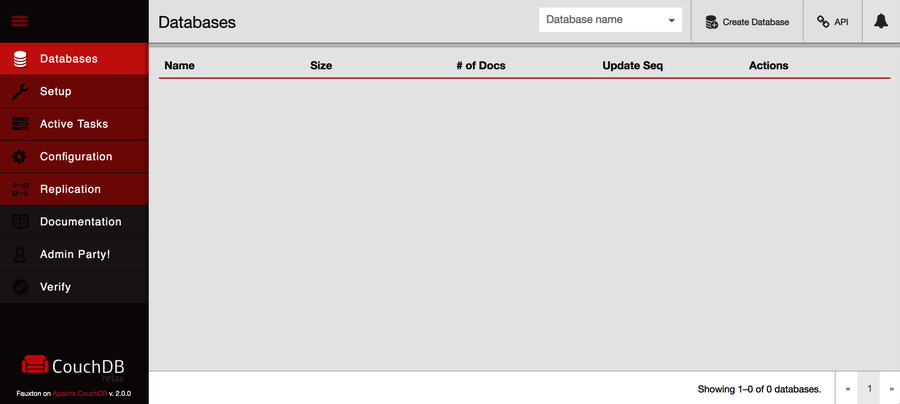
Before we can start working with documents, we need to create a database to house them. We’re going to create a database to store data about musicians along with album and track data from those artists’ discographies. Click the Create Database button. In the pop-up, enter music and click Create. This will redirect you automatically to the database’s page. From here, we can create new documents or open existing ones.
On the music database’s page, click the plus sign next to All Documents and then New Doc. This will take you to a new page, as you can see in the figure that follows.
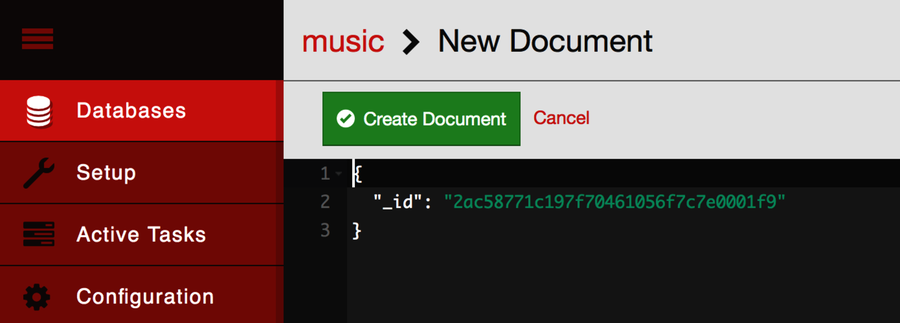
Just as in MongoDB, a document consists of a JSON object containing key-value pairs called fields. All documents in CouchDB have an _id field, which must be unique and can never be changed. You can specify an _id explicitly, but if you don’t, CouchDB will generate one for you. In our case, the default is fine, so click Create Document to finish.
Immediately after saving the document, CouchDB will assign it an additional field called _rev. The _rev field will get a new value every time the document changes. The format for the revision string consists of an integer followed by a dash and then a pseudorandom unique string. The integer at the beginning denotes the numerical revision, in this case 1.
The _id and _rev fields names are reserved in CouchDB. To update or delete an existing document, you must provide both an _id and the matching _rev. If either of these do not match, CouchDB will reject the operation. This is how it prevents conflicts—by ensuring that only the most recent document revisions are modified.
There are no transactions or locking in CouchDB. To modify an existing record, you first read it out, taking note of the _id and _rev. Then you request an update by providing the full document, including the _id and _rev. All operations are first come, first served. By requiring a matching _rev, CouchDB ensures that the document you think you’re modifying hasn’t been altered behind your back while you weren’t looking.
With the document page still open, modify the JSON object, which should have just one _id. Enter a key/value pair with a key of name and a value of The Beatles. Then click the Save Changes button. Your JSON object should look like this:
| | { |
| | "_id": "2ac58771c197f70461056f7c7e00c0f9", |
| | "name": "The Beatles" |
| | } |
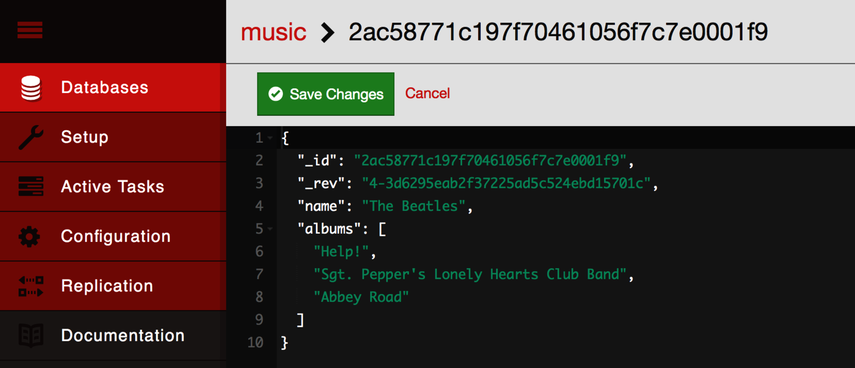
CouchDB is not limited to storing string values. It can handle any JSON structure nested to any depth. Modify the JSON again, setting the value of a new albums key to the following (this is not an exhaustive list of the Beatles’ albums):
| | [ |
| | "Help!", |
| | "Sgt. Pepper's Lonely Hearts Club Band", |
| | "Abbey Road" |
| | ] |
After you click Create Document, it should look like the figure that follows.
There’s more relevant information about an album than just its name, so let’s add some. Modify the albums field and replace the value you just set with this:
| | [{ |
| | "title": "Help!", |
| | "year": 1965 |
| | },{ |
| | "title": "Sgt. Pepper's Lonely Hearts Club Band", |
| | "year": 1967 |
| | },{ |
| | "title": "Abbey Road", |
| | "year": 1969 |
| | }] |
After you save the document, this time you should be able to expand the albums value to expose the nested documents underneath. It should resemble the figure.
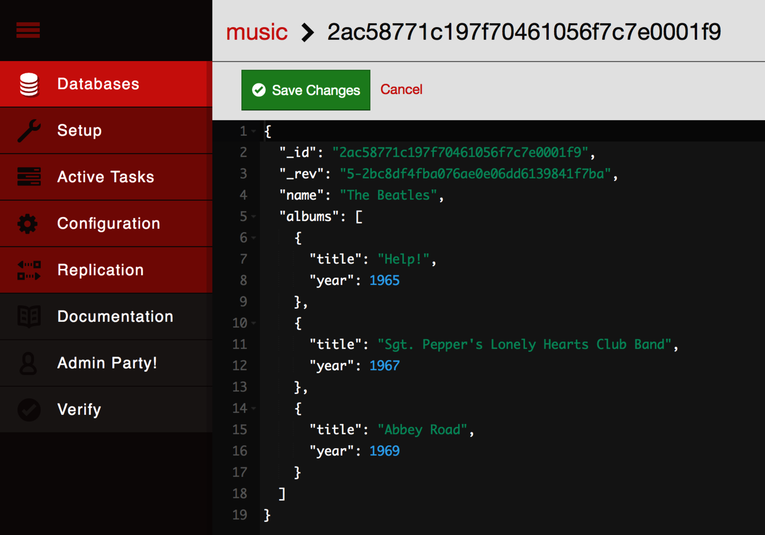
Clicking the Delete Document button would do what you might expect; it would remove the document from the music database. But don’t do it just yet. Instead, let’s drop down to the command line and take a look at how to communicate with CouchDB over REST.
Performing RESTful CRUD Operations with cURL
All communication with CouchDB is REST-based, and this means issuing commands over HTTP. Here we’ll perform some basic CRUD operations before moving on to the topic of views. To start, open a command prompt and run the following (which includes setting the root URL for CouchDB as an environment variable for the sake of convenience):
| | $ export COUCH_ROOT_URL=http://localhost:5984 |
| | $ curl ${COUCH_ROOT_URL} |
| | { |
| | "couchdb": "Welcome", |
| | "version": "2.0.0", |
| | "vendor": { |
| | "name": "The Apache Software Foundation" |
| | } |
| | } |
Issuing GET requests (cURL’s default) retrieves information about the thing indicated in the URL. Accessing the root as you just did merely informs you that CouchDB is up and running and what version is installed. Next, let’s get some information about the music database we created earlier (output formatted here for readability):
| | $ curl "${COUCH_ROOT_URL}/music/" |
| | { |
| | "db_name": "music", |
| | "update_seq": "4-g1AA...aZxxw", |
| | "sizes": { |
| | "file": 24907, |
| | "external": 193, |
| | "active": 968 |
| | }, |
| | "purge_seq": 0, |
| | "other": { |
| | "data_size": 193 |
| | }, |
| | "doc_del_count": 0, |
| | "doc_count": 1, |
| | "disk_size": 24907, |
| | "disk_format_version": 6, |
| | "data_size": 968, |
| | "compact_running": false, |
| | "instance_start_time": "0" |
| | } |
This returns some information about how many documents are in the database, how long the server has been up, how many operations have been performed, disk size, and more.
Reading a Document with GET
To retrieve a specific document, append its _id to the database URL like so:
| | $ curl "${COUCH_ROOT_URL}/music/2ac58771c197f70461056f7c7e0001f9" |
| | { |
| | "_id": "2ac58771c197f70461056f7c7e0001f9", |
| | "_rev": "8-e1b7281f6adcd82910c6473be2d4e2ec", |
| | "name": "The Beatles", |
| | "albums": [ |
| | { |
| | "title": "Help!", |
| | "year": 1965 |
| | }, |
| | { |
| | "title": "Sgt. Pepper's Lonely Hearts Club Band", |
| | "year": 1967 |
| | }, |
| | { |
| | "title": "Abbey Road", |
| | "year": 1969 |
| | } |
| | ] |
| | } |
In CouchDB, issuing GET requests is always safe. CouchDB won’t make any changes to documents as the result of a GET. To make changes, you have to use other HTTP commands such as PUT, POST, and DELETE.
Creating a Document with POST
To create a new document, use POST. Make sure to specify a Content-Type header with the value application/json; otherwise, CouchDB will refuse the request.
| | $ curl -i -XPOST "${COUCH_ROOT_URL}/music/" \ |
| | -H "Content-Type: application/json" \ |
| | -d '{ "name": "Wings" }' |
| | HTTP/1.1 201 Created |
| | Cache-Control: must-revalidate |
| | Content-Length: 95 |
| | Content-Type: application/json |
| | Date: Sun, 30 Apr 2017 23:15:42 GMT |
| | Location: http://localhost:5984/music/2ac58771c197f70461056f7c7e002eda |
| | Server: CouchDB/2.0.0 (Erlang OTP/19) |
| | X-Couch-Request-ID: 92885ae1d3 |
| | X-CouchDB-Body-Time: 0 |
| | |
| | { |
| | "ok": true, |
| | "id": "2ac58771c197f70461056f7c7e002eda", |
| | "rev": "1-2fe1dd1911153eb9df8460747dfe75a0" |
| | } |
The HTTP response code 201 Created tells us that our creation request was successful. The body of the response contains a JSON object with useful information, such as the _id and _rev values.
Updating a Document with PUT
The PUT command is used to update an existing document or create a new one with a specific _id. Just like GET, the URL for a PUT URL consists of the database URL followed by the document’s _id.
| | $ curl -i -XPUT \ |
| | "${COUCH_ROOT_URL}/music/2ac58771c197f70461056f7c7e002eda" \ |
| | -H "Content-Type: application/json" \ |
| | -d '{ |
| | "_id": "74c7a8d2a8548c8b97da748f43000f1b", |
| | "_rev": "1-2fe1dd1911153eb9df8460747dfe75a0", |
| | "name": "Wings", |
| | "albums": ["Wild Life", "Band on the Run", "London Town"] |
| | }' |
| | HTTP/1.1 201 Created |
| | Cache-Control: must-revalidate |
| | Content-Length: 95 |
| | Content-Type: application/json |
| | Date: Sun, 30 Apr 2017 23:25:13 GMT |
| | ETag: "2-17e4ce41cd33d6a38f04a8452d5a860b" |
| | Location: http://localhost:5984/music/2ac58771c197f70461056f7c7e002eda |
| | Server: CouchDB/2.0.0 (Erlang OTP/19) |
| | X-Couch-Request-ID: 6c0bdfffa5 |
| | X-CouchDB-Body-Time: 0 |
| | |
| | { |
| | "ok": true, |
| | "id": "2ac58771c197f70461056f7c7e002eda", |
| | "rev": "2-17e4ce41cd33d6a38f04a8452d5a860b" |
| | } |
Unlike MongoDB, in which you modify documents in place, with CouchDB you always overwrite the entire document to make any change. The Fauxton web interface you saw earlier may have made it look like you could modify a single field in isolation, but behind the scenes it was rerecording the whole document when you hit Save Changes.
As we mentioned earlier, both the _id and _rev fields must exactly match the document being updated, or the operation will fail. To see how, try executing the same PUT operation again.
| | HTTP/1.1 409 Conflict |
| | Cache-Control: must-revalidate |
| | Content-Length: 58 |
| | Content-Type: application/json |
| | Date: Sun, 30 Apr 2017 23:25:52 GMT |
| | Server: CouchDB/2.0.0 (Erlang OTP/19) |
| | X-Couch-Request-ID: 5b626b9060 |
| | X-CouchDB-Body-Time: 0 |
| | |
| | {"error":"conflict","reason":"Document update conflict."} |
You’ll get an HTTP 409 Conflict response with a JSON object describing the problem. This is how CouchDB enforces consistency.
Removing a Document with DELETE
Finally, you can use the DELETE operation to remove a document from the database.
| | $ curl -i -XDELETE \ |
| | "${COUCH_ROOT_URL}/music/2ac58771c197f70461056f7c7e002eda" \ |
| | -H "If-Match: 2-17e4ce41cd33d6a38f04a8452d5a860b" |
| | HTTP/1.1 200 OK |
| | Cache-Control: must-revalidate |
| | Content-Length: 95 |
| | Content-Type: application/json |
| | Date: Sun, 30 Apr 2017 23:26:40 GMT |
| | ETag: "3-42aafb7411c092614ce7c9f4ab79dc8b" |
| | Server: CouchDB/2.0.0 (Erlang OTP/19) |
| | X-Couch-Request-ID: c4dcb91db2 |
| | X-CouchDB-Body-Time: 0 |
| | |
| | { |
| | "ok": true, |
| | "id": "2ac58771c197f70461056f7c7e002eda", |
| | "rev": "3-42aafb7411c092614ce7c9f4ab79dc8b" |
| | } |
The DELETE operation will supply a new revision number, even though the document is gone. It’s worth noting that the document wasn’t really removed from disk, but rather a new empty document was appended, flagging the document as deleted. Just like with an update, CouchDB does not modify documents in place. But for all intents and purposes, it’s deleted.
Day 1 Wrap-Up
Now that you’ve learned how to do basic CRUD operations in Fauxton and cURL, you’re ready to move on to more advanced topics. On Day 2, we’ll dig into creating indexed views, which will provide other avenues for retrieving documents than just specifying them by their _id values.
Day 1 Homework
Find
-
Find the CouchDB HTTP API reference documentation online.
-
We’ve already used GET, POST, PUT, and DELETE. What other HTTP methods are supported?
Do
-
Use cURL to PUT a new document into the music database with a specific _id of your choice.
-
Use cURL to create a new database with a name of your choice, and then delete that database also via cURL.
-
CouchDB supports attachments, which are arbitrary files that you can save with documents (similar to email attachments). Again using cURL, create a new document that contains a text document as an attachment. Lastly, craft and execute a cURL request that will return just that document’s attachment.