Table of Contents for
Reverse Engineering Code with IDA Pro
 Reverse Engineering Code with IDA Pro
Published by
Syngress, 2011
Reverse Engineering Code with IDA Pro
Published by
Syngress, 2011
- Copyright
- Visit us at www.syngress.com
- About IOActive
- Contributing Authors
- 1. Introduction
- 2. Assembly and Reverse Engineering Basics
- 3. Portable Executable and Executable and Linking Formats
- 4. Walkthroughs One and Two
- 5. Debugging
- 6. Anti-Reversing
- 7. Walkthrough Four
- 8. Advanced Walkthrough
- 9. IDA Scripting and Plug-ins

IDA Pro is a tool used by many people in different areas of reverse engineering. The user base includes malware analysists, vulnerability researches, software reversers, hackers, firmware/hardware reversers, developers, software protection enthusiasts, and many more.
IDA Pro’s extensibility is what makes it a great tool. The interactive nature of IDA goes very well with scripting and writing plug-ins. IDA is a tool in the true sense of the word. The user guides IDA to achieve what is needed.
This chapter is about extending IDA Pro with scripts or plug-ins. As we reverse engineer binaries, eventually we start seeing patterns. These patterns can be code patterns or repetitive tasks that are ripe for automation.
IDA can be extended using various methods. IDC is the built in scripting language. IDC is C-like in structure and since it is interpreted, no other tools are needed. More complicated tasks are relegated to plug-ins. Hex-rays provides an SDK to customers allowing for plug-in development. The SDK is written in C++ with support for various compilers. Third party hybrid solutions have also been developed. These hybrid solutions wrap IDC functions as well as some SDK functions. (You can download code and scripts in this chapter from www.syngress.com/solutions).
IDC is IDA Pro’s built in scripting language. It is very similar to C in syntax. Someone familiar with C should be able to pick up IDC quickly. It is interpreted.
There are two standard ways to execute IDC.
IDC Statements can be executed directly from within IDA. SHIFT+F2 brings up a dialog box. Statements entered in the box will be executed. The dialog box is used to enter in small code snippets. Functions are generally not defined in the dialog box, although there is a w
IDC files can be loaded. To load an IDC file go to File | IDC File. A file browse dialog will come up.
The IDC scripting language borrows a great deal of syntax from C. All statements end with a semicolon. The similarity includes many of the same keywords including if, if else, while, do while, continue and break. This section will introduce IDC syntax highlighting differences between IDC and C.
Scripting provides access to the disassembly with much less effort than writing plug-ins. Scripts can be run from files as well as the IDC dialog box. The examples in this section will use the dialog box until we reach functions. The use of even simple scripting will speed up analysis and help automate tasks. In order to run IDC scripts, an idb file must be loaded into IDA.
The first thing taught in most programming books, since K&R C, is the hello world program. Getting data out to the user from a script is very important. This can be actual output or even just for debugging purposes.
Open the IDC command window by pressing SHIFT+F2 or using the menus (File | IDC Command ...) and type:
Message("Hello world\n");The dialog should appear similar to Figure 9.1. Multiple statements can be entered, but for now just the Message statement will suffice. After clicking OK, hello world should appear in the message window.
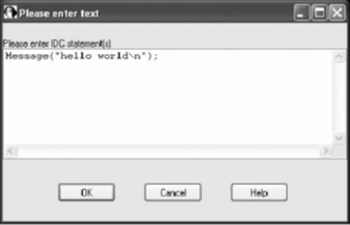
The Message function is similar to the C printf function, also using format strings. The function prototype is:
void Message (string format,...);
Some other variants using Message:
Message("%s\n", "hello world");
Message("%x\n", 0x40100);
Message("%x is the cursor\'s address\n", ScreenEA());
The first example uses the “%s” format string also printing hello world. The second example uses “%x” to print out a hexadecimal value. While the other two examples are somewhat contrived, the third one uses a new IDC function. The ScreenEA function returns the current cursor address. This function is commonly found in scripts.
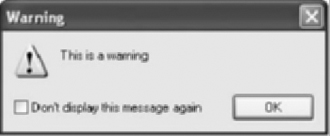
Message is not the only output, but it is the most commonly used. Two other functions are available, Warning and Fatal. Both of these use format strings and have the same function prototype.
Warning is used to alert the user of problems. It will bring up a box similar to Figure 9.2. Fatal is rarely used since it terminates IDA without saving the database.
All variables in IDC are defined using the auto type. The statement below declares a variable called counter.
auto counter;
The auto type can represent | Example |
|---|---|
32bit integer (64 bit in IDA Pro 64) | 0x00401000 |
character string | “hello world” |
floating point number | 5.23 |
Variables have size limits depending on the type of data they contain.
Integers are 32 bit (64 bit for IDA Pro 64).
Character strings can be up to 1023 characters long.
Floating point variables are up to 25 decimal digits.
An auto variable can represent different types of data. As such, there are conversion rules when operating on different types. Generally when scripting, type conversions are not as common as in C. There are functions to manually perform type conversion:
long(expr)
char(expr)
float(expr)
Variables must be declared and assigned in separate statements.
auto currentAddress;
currentAddress=ScreenEA();
Most of the standard C operators (+, −, /, , %, <<, >>, ++, −−) work in IDC. Some operators are unsupported, these include the combination assignment operators (+=) and comma operation (,). Unlike C, added strings will be concatenated.
All variables have local scope. This means they are only available within the function that defined them. For our current purposes, this applies to the IDC command window. Functions are covered later as well as way to allow global variables.
Most of the standard C conditional statements are available. These include if, if else, and the ternary operator “? :”. The switch statement is not available in C. This code snippet shows if else.
auto currAddr;
currAddr = ScreenEA();
if (currAddr % 2)
   Message("%x is odd\n", currAddr);
else
Message("%x is even\n", currAddr);Looping can be done by for, while, and do while. These are similar to C except the comma operator is not allowed. The switch statement is not supported in IDC, but multiple if, else if statements can be used. The code snippet demonstrates a loop and introduces some new IDC functions and concepts.
auto origEA, currEA, funcStart, funcEnd;
origEA = ScreenEA();
funcStart = GetFunctionAttr(origEA, FUNCATTR_START);
funcEnd = GetFunctionAttr(origEA, FUNCATTR_END);
if(funcStart == −1)
    Message("%x is not part of a function\n", origEA);
for(currEA=funcStart; currEA != BADADDR;currEA=NextHead(currEA, funcEnd))
{
    Message("%8x\n", currEA);
}
Note
BADADDR is a constant used in IDC. It represents an error or invalid result from function. In scripts it is used to test results and sometimes initially assigned to variables.
Some IDC functions return −1 on an error. Internally BADADDR is represented by −1.
The code snippet prints out the addresses to every instruction within the current function. It introduces two new IDC functions, GetFunctionAttr and NextHead. The prototypes are:
long GetFunctionAttr(long ea, long attr);
long NextHead(long ea, long maxea);
GetFunctionAttr allows us to query for certain function attributes. The argument ea is any address within the function. The argument attr is the specific attribute we are interested in. In this case we are looking for a function start and end given an address. If the address ea is not within a function then GetFunctionAttr returns −1.
NextHead returns the next instruction or data item. The argument ea is the start address and maxea is the end address. If there are no defined instructions or data in the given address range, then BADADDR is returned. On architectures like the IA-32 containing variable length instructions NextHead must be used to iterate through instructions. On RISC architectures with set length instructions one may be tempted to simply increment instead of using NextHead. This should be avoided as simply incrementing will not check if the item has been defined by IDA.
The code snippet demonstrates the same functionality using a while loop.
auto origEA, currEA, funcStart, funcEnd;
origEA = ScreenEA();
funcStart = GetFunctionAttr(origEA, FUNCATTR_START);
funcEnd = GetFunctionAttr(origEA, FUNCATTR_END);
if (funcStart == −1)
    Message("%x is not part of a function\n", origEA);
currEA = funcStart;
while (currEA != BADADDR)
{
      Message("%8x\n", currEA);
      currEA = NextHead(currEA, funcEnd);
}
Functions are needed once we move on from simple snippets of IDC. Functions are also required within IDC files. All functions in IDC are defined as static. The code below is an example function.
static outputCurrentAddress(myString)
{
    auto currAddress;
    currAddress = ScreenEA();
    Message("%x %s\n", currAddress, myString);
    return currAddress;
}
Function declarations in IDC have a few differences with C. The differences relate to types. Since IDC has only one type, auto, types are not needed in the arguments or return. IDA only accepts functions without types in the declaration. IDC files will be covered in the “Simple Script Examples” section later in this chapter.
Usually functions are only declared in an IDC file. Entering the above function in the IDC Command window produces an error “Syntax error near static”. This is due to how the IDC Command window operates. A solution was first documented by Willem Jan Hengeveld (http://www.xs4all.nl/~itsme/projects/disassemblers/ida.html).
Internally the dialog box contents are stored in a function called _idc. Thus entering in a function declaration is actually attempting to declare a function within another function. The _idc function needs to be closed before a new function is declared. The new function must also leave off its closing brace. In order to declare outputCurrentAddress enter:
}
static outputCurrentAddress(myString)
{
    auto currAddress;
    currAddress = ScreenEA();
    Message("%x %s\n", currAddress, myString);
    return currAddress;
We should not see an error. Although we declare the function it does not execute. If we want to execute something as well, it needs to be part of the _idc function.
    AddHotkey("Alt-f9", "outputCurrentAddress2");
    outputCurrentAddress2();
}
static outputCurrentAddress2()
{
    auto currAddress;
    currAddress = ScreenEA();
    Message("%x\n", currAddress);
    return currAddress;
The preceding code introduces a new IDC function, AddHotKey. This function binds a key combination to an IDC function name. The target function can not have arguments. The hotkey is added and outputCurrentAddress2 is executed. The function outputCurrentAddress2 can be executed via the hotkey or a call from the command window.
Scope is what variables or functions are visible from a certain location in the code. We will use the variable currAddress from the outputCurrentAddress as an example of local scope. The currAddress variable is only visible from within its function. It cannot be accessed from another function.
Function declarations are placed in the global scope. Functions can be called from other functions. This includes calling from the command window. Once a function is defined it remains in the global scope until we either declare another function with the same name or until the IDA session is terminated. Closing an idb file clears out any IDC functions from memory.
Once the outputCurrentAddress is declared we can call it by entering into the command box.
outputCurrentAddress("some string");We can have our own library of IDC functions load with IDA by adding them to ida.idc file. This file is located in the idc directory within the IDA Pro install directory.
Auto variables are only in scope for the function they are defined. We need a way to have persistent data throughout our script. We need global variables. IDC does not provide direct support for global variables. However, global variables can be simulated using arrays.
Arrays are built in to IDC. An array can contain either string data or a long. The following code will create an array and define some items.
auto gArray;
gArray = CreateArray("myGlobals");
The code introduces a new IDC function, CreateArray. The prototype for CreateArray is:
long CreateArray(string name);
The name must be less than 120 characters. The function will either return the array id on success or −1 if the array creation fails. The following code adds some items to the array.
SetArrayLong(gArray, 23, 415);
SetArrayString(gArray, 0, "some string data");
The prototypes for these new functions are:
/*
arguments:
    id       -     array id
    idx      -     index of an element
    value    -     32bit value to store in the array
    str      -     string to store in array element
returns: 1-ok, 0-failed
*/
success SetArrayLong(long id,long idx,long value);
success SetArrayString(long id,long idx,string str);
The index idx can be any 32bit number. There is no need to use sequential indexes as space is only allocated as it is assigned. The previous example assigns the value 415 to index 23 and the string “some string data” to index 0. The global data is now assigned and can be accessed from anywhere else in the script, other scripts, or through the command window.
In order to access the global data, new IDC functions are introduced. The id of the array is needed to access its members. The following code demonstrates the new IDC functions.
auto arrayId, strItem, longItem;

arrayId = GetArrayId("myGlobals");
strItem = GetArrayElement(AR_STR, id, 0);
longItem = GetArrayElement(AR_LONG, id, 23);
Two new IDC functions are introduced, GetArrayId and GetArrayElement. The prototypes for the new functions are:
// get array id by its name
// arguments: name - name of existing array.
// returns:       −1 - no such array
//                     otherwise returns id of the array

long GetArrayId(string name);

/* get value of array element
         arguments: tag     -  tag of array, specifies one of two
                               array types:
#define AR_LONG 'A' // array of longs
#define AR_STR 'S' // array of strings
                        id      - array id
                        idx     - index of an element
        returns:        value of the specified array element.
                        note that this function may return char or long
                        result. Unexistent array elements give zero as
                        a result.
*/
string or long GetArrayElement(long tag,long id,long idx);
The order of GetArrayElement’s arguments is different than the SetArray functions. These functions can be used anywhere after the array has been defined. The above code snippets do not have any error detection for space purposes, but error checks should be added.
Some IDC libraries of commonly used functions have been released. These libraries include global variables among other things and check for errors. One of these, common.idc, is written by lallous http://www.openrce.org/downloads/details/81/Common_Scripts. It includes other useful functions besides global variables. The following snippet is an example of using global variables with the common.idc helper functions.
First we need to initialize the global variables, using InitGlobalVars, mostly likely this will appear in the main function of the script.
if (InitGlobalVars() == 0)
{
    Message("InitGlobalVars() failed\n");
}
Once initialized, we have access to four macro definitions for writing and reading global variables. The following are the macros using the same naming convention as used earlier (index, value, string).
SetGlobalVarLong(index, value)
SetGlobalVarString(index, string)
GetGlobalVarLong(index)
GetGlobalVarString(index)
Setting array elements using the same data as the previous example:
SetGlobalVarLong(23, 415)
SetGlobalVarString(0, "some string data")
Accessing the items is also much cleaner and simpler.
auto strItem, longItem;

strItem = GetGlobalVarString(0)
longItem = GetGlobalVarLong(23)
Global variables are very useful as persistent information is often needed. The library can be added to idc.idc, allowing access from all scripts. Any functions we find useful can be added as well.
So far most of the examples have been using the IDC command window. The command window is great for interactive scripting, but it soon becomes unwieldy. Scripts allow us to run IDC code without having to re-enter it into a dialog window.
What are the differences between code snippets and scripts? There aren’t many differences. All code must reside within functions. Even the command window code was located in the _idc function. The following outlines a script.
#include <idc.idc>

static some_function()
{
}
static main()
{
}
IDC use preprocessor directives like C. The file idc.idc contains IDC function prototypes and constants and it is usually included in all scripts. The file also serves as documentation, it contains the same information as the help file. IDC supports the #define, #ifdef, and other command preprocessor commands.
The main function is executed by the script. If a main function is not included, the other functions will remain in the memory and still be callable.
The script from Figure 9.3 will reset a function back to the default color. A coverage tool will color basic blocks as it traces execution, similar to Figure 9.4. Other times a user will color blocks to highlight certain code. In either case whether between tracing runs or if we are no longer interested in certain, we will need to reset the colors.
Table 9.3. ResetColor IDC Script
#include <idc.idc>
static main(void)
{
     auto origEA, currEA, currColor, funcStart, funcEnd;
     origEA = ScreenEA();
     funcStart = GetFunctionAttr(origEA, FUNCATTR_START);
     funcEnd = GetFunctionAttr(origEA, FUNCATTR_END);

     Message("Welcome to resetColor.idc\n");
     if (funcStart == −1 || funcEnd == −1)
     {
         Message("** Error: not in a function **\n");
         return −1;
     }
     Message("[*] Function: %s\n", GetFunctionName(funcStart) );
     Message("[*] start == 0x%x, end == 0x%x\n", funcStart, funcEnd);
     for (currEA = funcStart; currEA != BADADDR; currEA =
NextHead(currEA, funcEnd) )
     {
            if (SetColor(currEA, CIC_ITEM, DEFCOLOR) == 0)
            {
                 Message("** Error: SetColor failed 0x%x **\n", currEA);
            }
     }
     Refresh();
     Message("resetColor is done\n");
} |
Enter the code from Figure 9.3 into your favorite text editor, preferably a syntax highlighting editor. Save the script with an .idc ending. To run use the menu File | IDC file... . The script will run, returning control to the user. A new window, Recent IDC scripts, will appear Figure 9.5. The left button is edit and the right is execute. This allows for quick edit cycles.
The code in the script is very similar to some of the snippets in the earlier section. The address range of the current function is determined with the GetFuncAttr calls. A loop iterates through the function address range and resets the color using a new IDC functions, SetColor.
While the script is very simple, it is useful for solving an immediate problem. The next section continues this idea while introducing more APIs and concepts.
Scripting languages are very popular because of the immediate results they can provide. The user is often trying to solve simple tasks and not developing a full fledged product.
Scripts can and should be written to automate simple tasks. Complete solutions especially in reverse engineering seem to grow organically. Scripting goes hand and hand with this growth. Sometimes we write scripts for specific disassembly projects, while other times the scripts can be used over and over again.
Scripting as well plug-in writing does not have to remove the user from the equation. In the same sense that IDA is an interactive assembler, scripts should be an interactive tool to help the reverse engineer.
This section is an example of how to use IDC to solve a specific problem. It is not by any means a complete solution, but rather it demonstrates what can be done with very little code and time.
C++ uses indirect calls to call many functions. IDA Pro does not create cross references for these functions.
C++ reversing presents some new challenges to the reverse engineer. These challenges like most in reverse engineering can be solved statically or in runtime. Some recent research in static analysis was published by Igor Skochinsky (http://www.openrce.org/articles/full_view/21) (http://www.openrce.org/articles/full_view/23) as a series of articles on the OpenRCE website. Some code examples in the form of IDC scripts are also provided. A paper has also been published by Paul Vincent Sabanal & Mark Vincent Yason from IBM ISS research (https://www.blackhat.com/presentations/bh-dc-07/Sabanal_Yason/Paper/bh-dc-07-Sabanal_Yason-WP.pdf). The paper discusses an internal tool based on IDAPython.
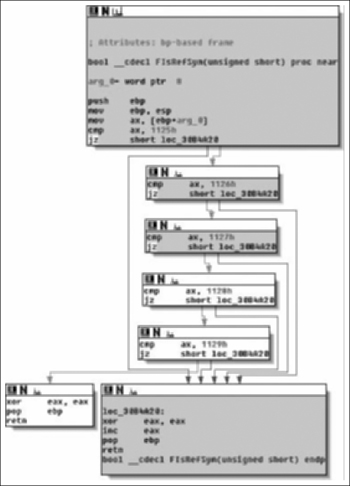
One of the problems with reversing C++ code relates to indirect calls. Code similar to Figure 9.6 is common. A call is made through a register using an offset. It appears that ecx is used without being initialized. Ecx is passed to the function and represents the this pointer. IDA Pro does not know which function is being called and as such does not create a cross reference.
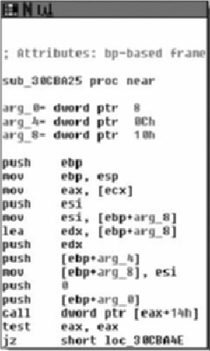
If we follow execution using a debugger, we can identify the target function. Checking the cross references from the target function will reveal a result similar to Figure 9.7.
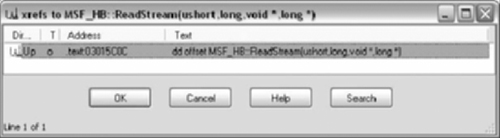
All references are pointers, not function calls. The pointers are part of a VTable. A VTable is an array of pointers to functions for a particular object.
Table 9.8. MSF_HB::‘vftable’
.text:03015BF8 const MSF_HB::'vftable' dd offset MSF_HB::QueryImplementationVersion(void) .text:03015BF8; DATA XREF: MSF_HB::MSF_HB(void)+9 o .text:03015BF8; MSF_HB::~MSF_HB(void)+9 o .text:03015BFC dd offset MSF_HB::QueryImplementationVersion(void) .text:03015C00 dd offset MSF_HB::GetCbPage(void) .text:03015C04 dd offset MSF_HB::GetCbStream(ushort) .text:03015C08 dd offset MSF_HB::GetFreeSn(void) .text:03015C0C dd offset MSF_HB::ReadStream(ushort,long,void *,long *) .text:03015C10 dd offset MSF_HB::ReadStream(ushort,void *,long) .text:03015C14 dd offset MSF_HB::WriteStream(ushort,long,void *,long) .text:03015C18 dd offset MSF_HB::ReplaceStream(ushort,void *,long) .text:03015C1C dd offset MSF_HB::AppendStream(ushort,void *,long) .text:03015C20 dd offset MSF_HB::TruncateStream(ushort,long) .text:03015C24 dd offset MSF_HB::DeleteStream(ushort) .text:03015C28 dd offset MSF_HB::Commit(void) .text:03015C2C dd offset MSF_HB::Close(void) .text:03015C30 dd offset MSF_HB::GetRawBytes(int(*)(void const *,long)) .text:03015C34 dd offset MSF_HB::SnMax(void) .text:03015C38 dd offset TM::PPdbFrom(void) .text:03015C3Cdd offset MSF_HB::CloseStream(ulong) |
When a object method is called, the VTable is accessed and then a call is made using an offset to the appropriate function. The code from Figure 9.6 uses this VTable making a call to the first MSF_HB::ReadStream function.
Tip
Finding VTables for Microsoft binaries is simple if using the Determina PDB plug-in by Alexander Sotirov (http://www.determina.com/security.research/utilities/index.html). The pdb contains symbols including VTable names. Finding all the VTables can be done with a text search using the following string:
::‘vftable’ dd
Note that the character before vftable is a back tick, whereas the character following vftable is a single quote.
In order to find the calling addresses, we could script the debugger and check the stack. Prior to IDA 5.2 IDC functionality regarding the debugger was very limited. The functions did not allow any handling of debugger events, such as a breakpoint. However, there is a workaround using conditional breakpoints.
This script was written long before 5.2 was available and as such does not rely on the new functions. The new functions in 5.2 will be discussed afterwards. Figure 9.9 is the edit breakpoint dialog box. The condition can be any IDC statement including a function call.
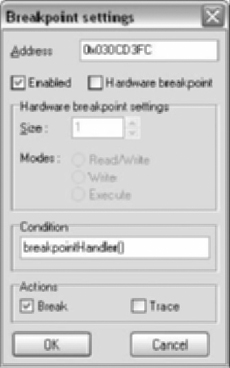
The function will be called when the breakpoint is hit allowing us to run code during the breakpoint. If we don’t want to stop the debugger, the function simply returns 0. The function evaluates to false allowing execution to continue. The following code can be used to log the value of EAX whenever the breakpoint is hit.
static breakpointHandler()
{
     Message("%x bp hit, EAX == 0x%x\n", EIP, EAX);
     return 0; // don't stop on breakpoint
}
To check for the caller, we begin by looking at the stack. During a function call, the return address is pushed onto the stack. We need the address to the call instruction which is one instruction before the return address. After the call in Figure 9.6 the return address points to the test instruction rather than the call. This update to the breakpointHandler function will log the caller.
static breakpointHandler()
{
     auto caller;
     caller = PrevHead(Dword(ESP), (Dword(ESP) - 10));
     Message("%x bp hit, caller == %x\n", EIP, caller);
     return 0; // don't stop on breakpoint
}
A new IDC function is introduced, PrevHead. The prototype is:
long PrevHead (long ea, long minea);
PrevHead searches for the previous defined instruction or data. The ea argument is the start address to begin searching backwards, where minea is the lowest address to include in the search. The search in breakpointHandler looks up to 10 bytes back. Call instructions through registers are generally only 3 bytes, so the search will find the call. The caller has been determined and a cross reference can be added. The updated breakpointHandler adds the cross reference.
static breakpointHandler()
{
     auto caller;
     caller = PrevHead(Dword(ESP), (Dword(ESP) - 10));
     AddCodeXref(caller, EIP, XREF_USER | fl_CN);
     return 0; // don't stop on breakpoint
}
The AddCodeXref adds the cross reference. The prototype is:
//      Flow types (combine with XREF_USER!):
#define fl_CF 16      // Call Far
#define fl_CN 17      // Call Near
#define fl_JF 18      // Jump Far
#define fl_JN 19      // Jump Near
#define fl_F 21       // Ordinary flow
#define XREF_USER 32  // All user-specified xref types
                      // must be combined with this bit
void AddCodeXref(long From,long To,long flowtype);
The Message function is removed since it slows down the breakpoint handling. Examining other calls in the DLL revealed cross references to be Call Near. The breakpointHandler function is complete.
Table 9.10. VTable xref Script
#include <idc.idc>

static breakpointHandler()
{
       auto caller;
       caller = PrevHead(Dword(ESP), (Dword(ESP) - 10));
       AddCodeXref(caller,EIP, XREF_USER | fl_CN);
       return 0; // don't stop on breakpoint
}

static setBPs()
{
        auto currAddr;
        auto vStart;
        auto vEnd;
        auto virFunc;

        Message("setBPs() executed\n");
        vStart = SelStart();
        vEnd = SelEnd();

        Message("start = 0x%x\n", vStart);
        Message("end = 0x%x\n", vEnd);

        if ((vStart == BADADDR) || (vEnd == BADADDR))
        {
             Message("No selection made !!\n");
             return;
        }

        if ((vStart - vEnd) %4 != 0)
        {
        Message("not DWORD aligned\n");
             return;
        }

        for (currAddr = vStart; currAddr < vEnd; currAddr = currAddr + 4)
        {
             virFunc = Dword(currAddr);

             if (GetBptAttr(virFunc, BPTATTR_EA) == −1) // no bpt there yet
             {
                 if (!AddBptEx(virFunc, 0, BPT_SOFT))
                 {
                     Message("AddBptEx() failed 0x%x\n;", virFunc);
                     return;
                 }

                 if (!SetBptCnd(virFunc, "breakpointHandler()"))
                 {
                     Message("SetBptCnd() failed 0x%x\n;", virFunc);
                     return;
                 }
                 Message("BP 0x%x set\n", virFunc);
              }
              else
              {
                 Message("BP already set 0x%x\n", virFunc);
              }
       }
}

static main()
{
    AddHotkey("Alt-f9", "setBPs");
} |
Upon running this script, the functions are loaded into memory and main is executed. Main’s sole purpose is to set a hot key for the setBPs function.
A VTable similar to Figure 9.8 is selected and then the hotkey is pressed. The setBPs function is called by the hotkey. This functions purpose is to set breakpoints on the targets found in the VTable. Only one breakpoint can be added per address, thus the function checks for the presence of a breakpoint initially. If no breakpoint exists a new software breakpoint is added. The breakpoint is then made conditional, with the condition being the breakpointHandler function. In this case we choose to return 0 and not stop at the breakpoint.
The result after using the script and running the debugger is shown in Figure 9.11, which is quite an improvement over the original in Figure 9.7.
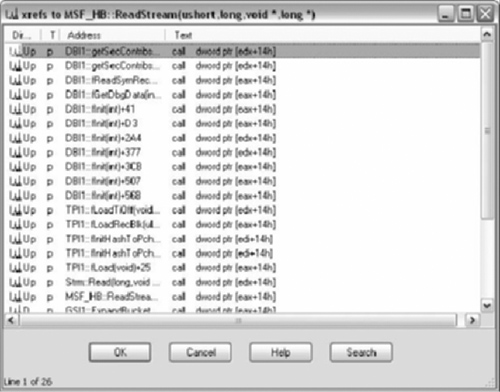
If the breakpoint is set on a commonly called function, performance can be degraded. A global variable can be used as a counter and the breakpoint could be removed if the counter reaches a preset limit. Comments can be added to the calling instruction containing the address of the targets. This would allow the user to double click the address to the target function.
After acquiring the cross reference data, we could analyze it to determine information of the classes they represent. Method visibility in C++ can be public, protected, or private.
Public | The target function has at least one call from a function not found in any VTable. |
Private | The target function is only called from other functions within its own VTable. |
Protected | The target function is only called from functions located in VTables. |
If a function is located in more than one VTable at the same offset, it is likely that an inheritance relationship exists between the classes.
The cross reference information could be combined with static analysis to reconstruct object models. A graphing tool could be used to represent the models, perhaps in UML.
New IDC functions are added to IDA Pro releases, while it is rare for functions to be deprecated. The new functions reflect the new features added to the release.
IDA 5.2 added 53 functions. The most important additions relate to the scripting of the debugger http://www.hex-rays.com/idapro/scriptable.htm. The debugger is now fully scriptable from IDC. We can control every aspect of the debugger. This includes acting on debugger events, attaching to processes, and tracing.
A scriptable debugger opens up many possibilities. Unpacking of binaries for a known packer is commonly scripted using OllyScript for Ollydbg or in Python for Immunity Debugger. Runtime analysis can be fed back into the static analysis.
The debugger from a plug-in context usually requires a callback to handle events. The IDC interface allows for what amounts to a blocking call waiting on events. The function used is GetDebuggerEvent and its prototype is:
long GetDebuggerEvent(long wfne, long timeout);
The timeout can be set to −1, which is interpreted as infinite. There wfne flags are the following:
WFNE_ANY      return the first event
WFNE_SUSP     wait until the process gets suspended
WFNE_SILENT set: be slient, clear:display modal boxes if necessary
WFNE_CONT     continue from the suspended state
Most often we want to wait till for a suspended state caused by a breakpoint. The possible return values are the following:
// debugger event codes
NOTASK          process does not exist
DBG_ERROR       error (e.g. network problems)
DBG_TIMEOUT     timeout
PROCESS_START   New process started
PROCESS_EXIT    Process stopped
THREAD_START    New thread started
THREAD_EXIT     Thread stopped
BREAKPOINT      Breakpoint reached
STEP            One instruction executed
EXCEPTION       Exception
LIBRARY_LOAD    New library loaded
LIBRARY_UNLOAD      Library unloaded
INFORMATION         User-defined information
SYSCALL             Syscall (not used yet)
WINMESSAGE          Window message (not used yet)
PROCESS_ATTACH      Attached to running process
PROCESS_DETACH      Detached from process
This addition to IDC is very welcome as it provides easy scripting use of the debugger. A plug-in that works with the debugger is presented later in this chapter.
This section contains a sampling of IDC functions you are likely to see in other scripts and while writing new scripts. The functions are grouped into similar categories and include a short description of possible usage.
Reading memory is accomplished through three functions. The functions come in variants based on the read size. The functions are Byte, Word, and Dword.
long    Byte (long ea);      // get a byte at ea
long    Word (long ea);      // get a word (2 bytes) at ea
long    Dword (long ea);     // get a double-word (4 bytes) at ea
The functions return a −1 on failure. In order to differentiate between a failure and a value of −1, the macro hasValue should be called. Its prototype is:
#define hasValue(F) ( (F & FF_IVL) != 0) // any defined value?
The macro will return a 0 if the value is not defined.
Writing to memory is accomplished by the Patch family of functions. The functions are used for writing within the static analysis within the IDB as well as virtual memory when under a debugger. In fact the Patch functions are the only way to modify code during execution within the debugger. The debugger only allows modification of registers and sections from the GUI. Modification to code or data segments requires these IDC functions or a plug-in.
The function come in three variant based on the write size. The functions are PatchByte, PatchWord, and PatchDword.
void     PatchByte      (long ea,long value);     // change a byte
void     PatchWord      long ea,long value);      // change a word (2 bytes)
void     PatchDword     (long ea,long value);     // change a dword (4 bytes)
There are different types of cross references, both for data and code.
Code cross references are defined by their flowtypes. The following is a list of code flowtypes:
//      Flow  types (combine with XREF_USER!):
#define fl_CF  16      // Call Far
#define fl_CN  17      // Call Near
#define fl_JF  18      // Jump Far
#define fl_JN  19      // Jump Near
#define fl_F   21      // Ordinary flow
#define XREF_USER 32   // All user-specified xref types
                       // must be combined with this bit
All user created referenced should be combined with XREF_USER. We used fl_CN, call near flowtype in the script. There are also near and far jump flowtypes. The ordinary flowtype is used between consecutive instructions.
IDC functions for adding and deleting code cross references:
void    AddCodeXref(long From,long To,long flowtype);
long    DelCodeXref(long From,long To,int undef);
The undef argument undefines the To address if this is the last reference to it.
There are two sets of IDC functions to iterate through references. The difference is in regards to recognizing ordinary flows as cross references. The first set will return the ordinary flow first.
long   Rfirst    (long From);             // Get first code xref from 'From'
long   Rnext     (long From,long current);// Get next  code xref from
long   RfirstB   (long To);               // Get first code xref to 'To'
long   RnextB    (long To,long current);  // Get next  code xref to 'To'
The functions consist of a first and a next. Both functions are generally used in a loop to iterate through cross references. The following demonstrates these functions:
auto xfAddr, origAddr;
origAddr = ScreenEA();

xfAddr = RfirstB(origAddr);
while (xfAddr != BADADDR)
{
    Message("%x to %x, type == %d\n", xfAddr, origAddr, XrefType());
    xfAddr = RnextB(origAddr, xfAddr);
}
The code iterates through all the cross references for the address the cursor is on. It also introduces a new IDC function XrefType. The prototype is:
long XrefType(void); // returns type of the last xref
                    // obtained by [RD]first/next[B0]
                    // functions. Return values
                    // are fl_... or dr_...
XrefType return the type of the last cross reference accessed. This function also works on data cross references which will be discussed shortly. The second set of code cross reference functions mirrors the first set.
long   Rfirst0 (long From);
long   Rnext0  (long From,long current);
long   RfirstB0(long To);
long   RnextB0  (long To,long current);
These functions do not return ordinary flow cross references.
The following are valid data types:
//      Data reference types (combine with XREF_USER!):
#define dr_O    1                // Offset
#define dr_W    2                // Write
#define dr_R    3                // Read
#define dr_T    4                // Text (names in manual operands)
#define dr_I    5                // Informational

#define XREF_USER 32       // All user-specified xref types
                           // must be combined with this bit
Same as code xrefs, user made data xrefs should be combined with XREF_USER. Data xrefs have only one set of functions associated with them.
long    Dfirst     (long From);    // Get first data xref from 'From'
long    Dnext      (long From,long current);
long    DfirstB    (long To);      // Get first data xref to 'To'
long    DnextB     (long To,long current);
Data representation functions create structures, functions, data, and define code among other things. They are the IDC function equivalent to many manual tasks done during disassembly. The following is a sampling of these functions.
success    MakeArray(long ea,long nitems);
success    MakeByte(long ea);
long       MakeCode(long ea);
success    MakeData(long ea, long flags, long size, long tid);
success MakeDword(long ea);
success MakeFunction(long start,long end);
success MakeStr(long ea,long endea);
success MakeStructEx(long ea,long size, string strname);
Comments are a key to successful reverse engineering. Comments along with proper naming are the notes that bind to the binaries we analyze. There are IDC functions to set and read comments.
// repeatable, 0 = standard, 1 = repeatable
string CommentEx(long ea, long repeatable);
success MakeComm(long ea,string comment);
success MakeRptCmt(long ea,string comment);
long SetBmaskCmt(long enum_id,long bmask,string cmt,long repeatable);
success SetConstCmt(long const_id,string cmt,long repeatable);
success SetEnumCmt(long enum_id,string cmt,long repeatable);
void SetFunctionCmt(long ea, string cmt, long repeatable);
long SetMemberComment(long id,long member_offset,string comment,long repeatable);
long SetStrucComment(long id,string comment,long repeatable);

long GetBmaskCmt(long enum_id,long bmask,long repeatable);
string GetConstCmt(long const_id,long repeatable);
string GetEnumCmt(long enum_id,long repeatable);
string GetFunctionCmt(long ea, long repeatable);
string GetMarkComment(long slot);
string GetStrucComment(long id,long repeatable);
IDA has different types of containers for code and data. Some of the containers include segments, functions and instruction or data heads. Iterating through different containers and areas is very common in scripts.
Some common iterating functions are:
long NextAddr(long ea);
long NextFunction(long ea);
long NextHead(long ea, long maxea);
long NextNotTail(long ea);
long NextSeg(long ea);

long PrevAddr(long ea);
long PrevFunction(long ea)
long PrevHead(long ea, long minea);
long PrevNotTail(long ea);
The following code snippet demonstrates some of the iteration functions.
auto currAddr, func, endSeg,funcName, counter;

currAddr = ScreenEA();
func = SegStart(currAddr);
endSeg = SegEnd(currAddr);

counter = 0;
while (func != BADADDR && func < endSeg)
{
         funcName = GetFunctionName(func);
         if (funcName != "   ")
         {
                 Message("%x: %s\n", func, funcName);
                 counter++;
                 }
                 func = NextFunction(func);
}

Message ("%d functions in segment: %s\n", counter, SegName(currAddr) );
The script iterates through all the functions belonging to the current segment. The script uses the GetFunctionName call to test if an address is in a function. This call returns an empty string if the address is not part of a function. Alternatively, GetFunctionFlags could have been used. The script prints a list of function addresses along with names for all the functions in the segment. The total number of functions is printed upon completion.
Thus far the only I/O used has really been the Message function. There are various input IDC functions for different types of data as well as for making selections.
string    AskStr(string defval,string prompt);
string    AskFile(bool forsave,string mask,string prompt);
long      AskAddr(long defval,string prompt);
long      AskLong(long defval,string prompt);
long      AskSeg(long defval,string prompt);
string    AskIdent(string defval,string prompt);
long      AskYN(long defval,string prompt);
The preceding functions retrieve input from the user. The following code snippet demonstrates the AskYN IDC function.
auto answer;
answer = AskYN(1, "hello");
if (answer == 1)
   Message("YES\n");
else if (answer == 0)
   Message("NO\n");
else
   Message("CANCEL\n");
There are IDC functions for file I/O as well. These file I/O functions are very similar to their C counterparts.
long fopen(string file,string mode);
long fseek(long handle,long offset,long origin);
void fclose(long handle);

long fgetc(long handle);
long fprintf(long handle,string format,...);
long fputc(long byte,long handle);
long ftell(long handle);

long writelong(long handle,long dword,long mostfirst);
long writeshort(long handle,long word,long mostfirst);
long writestr(long handle,string str);

long readlong(long handle,long mostfirst);
long readshort(long handle,long mostfirst);
string readstr(long handle);
IDA Pro can be extended through modules. There are various types of modules that can be developed for IDA. Plug-ins are one of the types of modules that can be used to extend IDA. Sometimes the term plug-in is used incorrectly to cover all extendable modules.
There are different types of modules available in IDA. The module type is dependent on the functionality needed. The categories are:
Plug-in
Loaders
Processor
Debuggers
The SDK has many modules/plug-ins with full source code.
Hex-Rays provides an SDK to registered customers. The SDK is included on the CD when IDA is purchased and is also available on the Hex-Rays website (http://www.hex-rays.com/idapro/idadown.htm). The SDK is not officially supported by Hex-Rays, although the option is available.
The Hex-Rays bulletin board provides help with plug-in issues both by other users as well as Ilfak (http://www.hex-rays.com/forum/).
There is not much information available for plug-in development. An excellent tutorial was written by Steve Micallef entitled “IDA PLUG-IN WRITING IN C/C++” (http://binarypool.com/idapluginwriting/).
Hex-Rays includes various plug-ins with source in the SDK. One of the plug-ins, a universal unpacker, is described in a Hex-Rays article (http://www.hex-rays.com/idapro/unpack_pe/unpacking.pdf).
Ilfak has also provided various plug-ins with full source available at his blog (http://hexblog.com).
OpenRCE is a valuable resource for many thing reverse engineering. A portion of the download site is dedicated to IDA Pro plug-ins (http://www.openrce.org/downloads/browse/IDA_Plugins).
Plug-ins are written in C++ and support a variety of compilers and development environments. Import libraries are provided for the following:
Visual C++ (32 and 64 bit)
Borland C++ Builder (32 and 64 bit)
GCC C++ Compiler
Windows (32 and 64 bit)
Linux (32 and 64 bit)
Mac OSX (32 and 64 bit)
This chapter will focus on 32 bit Windows plug-ins using the Microsoft Visual Studio 2005/2008 compilers.
Note
Instructions for other development environments are located in the root directory of the SDK.
install_cb.txt contains CBuilder setup instructions.
install_mac.txt contains OS X GCC setup instructions.
install_linux.txt contains Linux GCC setup instructions.
Processor modules add support for different CPUs and architectures. Processor modules are located in the procs directory. These modules interpret opcodes and generate the disassembly we see in IDA.
Processor modules use the following file extensions:
w32 windows
w64 windows 64
ilx Linux
ilx64 Linux 64
imc OS X
imc64 OS X 64
Loaders operate similar to operating system loaders. A loader parses executable files, creates segments, and determines what segments are code or data. IDA includes loaders for various executable files including PE (Portable Executables) and ELF (Executable and Linking Format).
Loader modules use the following file extensions:
ldw windows
l64 windows 64
llx Linux
llx64 linux 64
lmc OS X
lmc64 OS X 64
Debugger modules are complete debuggers are interoperate with IDA. These should not be confused with standard plug-ins that work with the built-in debugger modules. Documentation for debugger modules consist of source code located in the SDK under \plugins\debugger.
Standard plug-ins encompass everything else not covered by either the processor or loader modules. They are commonly referred to just as plug-ins. These plug-ins operate on the disassembly. This is the most common type of plug-in and as such will be documented in this chapter.
Standard plug-ins use the following file extensions:
Hex-Rays froze the SDK starting with version 4.9. What does this mean to us? Previously the SDK changed considerably between different versions. Plug-ins needed to be compiled for each SDK as they were not binary compatible. We no longer have to worry about big changes between SDKs, besides the addition of new functionality.
The SDK is on the IDA Pro CD, or is available for download from Hex-Rays (http://www.hex-rays.com/idapro/idadown.htm).
The SDK is a zip file, the latest being idasdk52. I have directory for different SDKs, so I extract the archive to \SDK\idasdk52.
Warning
The SDK may contain a bug that will prevent proper compilation. The bug is in the intel.hpp located in \include. One of the #include listing is wrong. Change
#include “../idaidp.hpp”
To
#include “../module/idaidp.hpp”
The bug is still present in the latest version 5.2.
The SDK contains various directories. The directories contain, include files, import libraries, tools, and source code. The following is an overview of the more important directories:
include | All the header files for the SDK. |
ldr | Source code to several loaders. |
libbor.w32 | Borland for 32 bit Windows plugins. |
libbor.w64 | Borland for 64 bit Windows plugins. |
libgcc.w32 | GCC for 32 bit Windows plugins. |
libgcc.w64 | GCC for 32 bit Windows plugins. |
libgcc32.lnx | GCC for 32 bit Linux plugins. |
libgcc32.mac | GCC for 32 bit OS X plugins. |
libgcc64.lnx | GCC for 64 bit Linux plugins. |
libgcc64.mac | GCC for 64 bit OS X plugins. |
libvc.w32 | Visual Studio for 32 bit Windows plugins. |
Visual Studio for 64 bit Windows plugins. | |
module | Source code to several processor modules. |
plugins | Source code to sample and real plugins. |
Plug-ins are loadable libraries, DLL or otherwise, that IDA Pro loads when needed. The plug-in has to have a certain structure exported. The structure type depends on the plug-in type. This section will cover standard plug-ins as they are the most common type. From now on plug-ins will refer to standard plug-ins. Any specifics relating to loaders or processor modules will be noted.
IDA plug-ins are written in C++ and export a plug-in structure, PLUGIN_t.
plugin_t PLUGIN =
{
  IDP_INTERFACE_VERSION,
  plugin_flags,     // plugin flags
  init,             // initialize
  term,             // terminate. this pointer may be NULL.
  run,              // invoke plugin
  comment,          // plugin comment
  help,             // multiline help about the plugin
  wanted_name,      // the preferred short name of the plugin
  wanted_hotkey     // the preferred hotkey to run the plugin
};
The structure contains constants, function pointers, and character string pointers.
IDP_INTERFACE_VERSION is a constant that will be defined by included SDK files. Previous to the 4.9 SDK freeze, this value would be incremented for every new release. Since 4.9 this value has remained constant.
The plugin_flags define how the plug-in operates with IDA. The different flags are described in loader.hpp. This field is usually set to 0 or set to PLUGIN_UNL when debugging a plug-in.
The following three items, init, term, and run are function pointers.
The init function is the executed when the plug-in is loaded. Its main purpose is to determine if the plug-in is applicable to the current database. Plug-ins can be specific to processors or file formats. Additionally this function could setup the environment for the plug-in once run is executed.
The init function needs to return one of the following:
PLUGIN_SKIP. This notifies IDA to not load the plug-in. A plug-in usually returns this value, when the architecture or file format isn’t appropriate. For example:
if (inf.filetype != f_PE)
   return PLUGIN_SKIP; // not a PE file
PLUGIN_OK. This notifies IDA that the plug-in is appropriate and IDA will load the plug-in upon first use.
PLUGIN_KEEP. This notifies IDA that the plug-in is appropriate and to leave the plug-in in memory.
The term function is executed when the IDA is being terminated. This function can be used to clean up resources used during the plug-ins lifetime. Many plug-ins set this pointer to NULL.
The run function is executed by running the plug-in. This function accepts arguments. The arguments are defined within the plugin.cfg file located in the plugin directory. Many plug-ins use the run function to do all the necessary work. Other plug-ins use the run function to set up callbacks. Debugging functionality in the SDK is handled by callbacks.
Comment is pointer to a short character string description for the plug-in.
Help is also a pointer to a character string. However unlike the Comment string, Help is usually a multiline description of the plug-in.
Wanted_name is the name that is displayed in the plug-in list accessible from (File | Edit | Plugins).
Wanted hotkey sets up a hotkey to run the plug-in. This hotkey can be overridden via plugins.cfg.
Currently the comment and help fields are not used by IDA, but this may change in the future.
This section covers setting up the development environment under Visual Studio 2005 and 2008. Build instructions for other platforms are available in the base directory of the SDK.
Setting up development environments can be tedious. The easiest way to start writing plug-ins is to use the IDA Pro Plug-in Wizard. The wizard is compatible with Visual Studio 2005 and 2008. All appropriate compiler and linker options will be configured by the wizard.
The IDA Pro Plug-in Wizard is available from http://ringzero.net/re. The wizard is compatible with:
Visual Studio 2008
Visual Studio 2005
Visual C++ 2008 Express Edition
Visual C++ 2005 Express Edition
Now that we have setup a development environment, we can move on to writing some plug-ins. We will first build a simple “hello world” plug-in. This will allow us to test our environment and verify that IDA is properly loading and executing our plug-in. The find memcpy plug-in will demonstrate some of the IDA API including instruction decoding and some UI code.
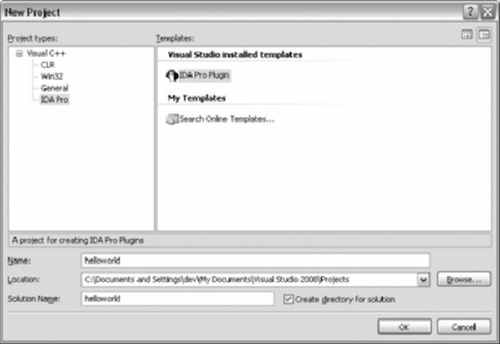
Start Visual Studio and select the IDA Pro Plugin Wizard. Enter the project name and click OK. Figure 9.12 shows the selection within Visual C++ 2008 Express Edition.
The wizard is shown in Figure 9.13. The plug-in type will default to plug-in, which is what we are building. The Name of Author field is optional, but will appear in the header comments if present.
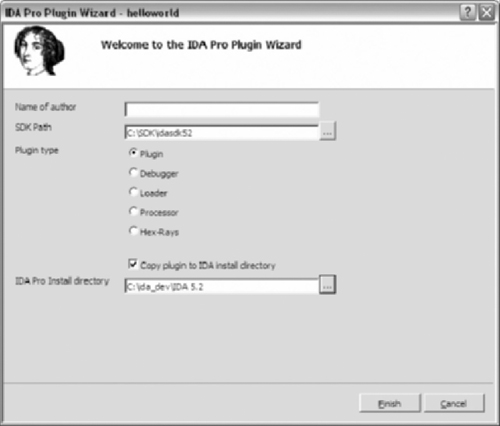
The SDK Path is required to build the plug-in. Use the button to bring up the folder browse dialog. Be sure to select the base on the SDK directory.
The final item is optional but very useful. A post build event is created in the project properties. The event copies the plug-in to the appropriate IDA Pro directory. Use the button to bring up the folder browse dialog. Be sure to select the base on the IDA Pro install directory.
The paths only need to be filled in once as the wizard saves the options.
Click Finish and the wizard will complete preparing the project. The IDA Pro Plug-in wizard will have a sample template. The following code can be copied over the template. The key combination to start a build varies on configuration, but by default it is CRTL+SHIFT+B.
#include <ida.hpp>
#include <idp.hpp>
#include <loader.hpp>

// Determine if the plugin is suitable. Return:
// PLUGIN_SKIP - plugin not suitable, wont be used
// PLUGIN_KEEP       - plugin is suitable. keep in memory
// PLUGIN_OK - plugin is suitable, load when used
int init(void)
{
    return PLUGIN_OK;
}

// plugin termination function. Unhook any notification points.
void term(void)
{
    return;
}

// This function is called when the plugin is executed.
// The arg is configured in the plugin.cfg file.
void run(int arg)
{
    msg("Hello world! my address is %a\n", get_screen_ea() );
    return;
}

char comment[] = "hello world";
char help[] = "hello world";

// Name of plugin in ( Edit | Plugins )
// An entry in plugins.cfg can overide this field.
char wanted_name[] = "hello world";

// Plugin's hotkey
// An entry in plugins.cfg can overide this field.
char wanted_hotkey[] = " ";
// PLUGIN DESCRIPTION BLOCK
plugin_t PLUGIN =
{
IDP_INTERFACE_VERSION,
PLUGIN_UNL,       // plugin flags
init,             // initialize
term,             // terminate. this pointer may be NULL.
run,              // invoke plugin
comment,          // comment about the plugin
help,             // multiline help about the plugin
wanted_name,      // the preferred short name of the plugin
wanted_hotkey     // the preferred hotkey to run the plugin
};
The previous code is the equivalent of a hello world program. It implements the key functions outlined in the plugin_t structure. The plug-in uses a flag, PLUGIN_UNL. This flag is often used for debugging plug-ins. It is defined as:
#define PLUGIN_UNL 0x0008    // Unload the plugin immediately after
                             // calling 'run'.
                             // This flag may be set anytime.
                             // The kernel checks it after each
                             // call to 'run'
                             // The main purpose of this flag is to ease
                             // the debugging of new plugins.
The plug-in will be unload after run is executed. This allows us to make changes, recompile, and copy the plug-in to the plug-in directory. If the flag is not set, IDA needs to be restarted as it retains an open file handle to the plug-in. A workaround will be presented shortly. Note that unloading only occurs after executing run. If the init function returns PLUGIN_KEEP, the plug-in remains in memory and will not be unloaded until the run function is executed. However if the init function returned PLUGIN_OK, plug-in is only loaded upon first use.
Warning
If the init function sets callbacks it must return PLUGIN_KEEP. Otherwise, the memory addresses used may become invalid, as the plug-in may load at a different address.
The plug-in’s run function outputs a message containing “hello world” and the current address. The IDA API call used is get_screen_ea. This function is equivalent to the IDC function used earlier in this chapter, ScreenEA. The IDA API contains equivalents to many IDC functions as well as functionality not available from IDC. The hello world plug-in verifies that we have a working development environment.
With a working development environment we can move on to more useful plug-ins, while introducing some new IDA API calls. This plug-in searches for inline memcpys (See Figure 9.14). Compilers often inline library calls as an optimization. Memcpy is commonly inlined along with string functions such as strlen and strcpy.
Table 9.14. Inline memcpy
; memcpy (edi, esi, eax) .text:00418ECC mov ecx, eax ; copy eax into ecx .text:00418ECE shr ecx, 2 ; shift ecx right by 2 (divide by 4) .text:00418ECE ; ecx = number of dwords to copy .text:00418ED1 rep movsd ; copy dwords from esi to edi .text:00418ED3 mov ecx, eax ; copy eax into ecx .text:00418ED5 and ecx, 3 ; and ecx by 3 .text:00418ED5 ; ecx = number of bytes to copy .text:00418ED5 ; (remaining bytes) .text:00418ED8 rep movsb ; copy bytes from esi to edi |
The assembly in Figure 9.14 uses movsd and movsb instructions to copy data. The movs instructions operate on the edi and esi register. Esi holds the source address, while edi points to the destination. Movsd copies a dword (four bytes) and movsb copies a single byte.
rep is a prefix that repeats the movs instructions. Every time movs instruction executes ecx is decremented. The movs instructions stop once ecx reaches zero. (See Figure 9.15).
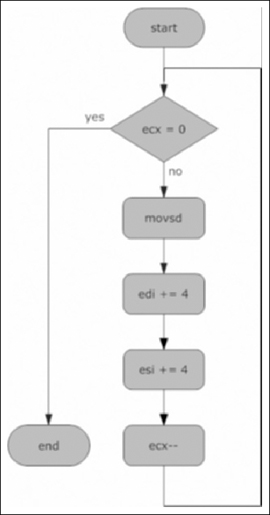
Eax contains the number of bytes to copy. The shr (shift right) instruction divides ecx by four, calculating the number of dwords to copy. The rep movsd instruction copies ecx dwords from esi to edi. After copying the dwords, there can be zero to three bytes left to copy. The and instruction calculates the remaining bytes which rep movsb copies.
The plug-in in Figure 9.16 illustrates a method for finding these types of code constructs.
Table 9.16. Find memcpy Plug-in
/******************************************************************
* Find memcpy() IDA Pro plugin
*
* Copyright (c) 2008 Luis Miras
* Licensed under the BSD License
*
* Requirements: The plugin requires x86 processor.
*
* Description: The plugin searches for rep movsd/rep movsb
*              pairs identidying them as memcpy()
*              Single rep movsd and rep movsb instructions
*              are also recorded
*
* Data structures: a netnode is the main data structure.
*                  movsobj_t represents the either pairs
*                  or single instructions.
*
* netnodes are implemented internally as B-trees.
* IDA uses netnodes extensively for its own storage.
* netnodes are defined in netnode.hpp.
*
* netnodes in the plugin: calls - holds all indirect calls
*                         vtable - holds all vtables
*
* netnodes have various internal data structures.
* The plugin uses 2 types of arrays:
*     altval - a sparce array of 32 bit values, initially set to 0.
*     supval - an array of variable sized objects (MAXSPECSIZE)
*
* The plugin holds base addresses in altval and movsobj_t objects
* in supval
******************************************************************/

#include <ida.hpp>
#include <idp.hpp>
#include <loader.hpp>
#include <allins.hpp>
#include <intel.hpp>

#define NODE_COUNT −1

struct movsObj {
   ea_t movsDW; // addr of rep movsd. BADADDR if none
   ea_t movsBT; // addr of rep movsd. BADADDR if none
};

typedef movsObj movsobj_t;
static const char* header[] = {"Address", "Type", "Movsd/b distance"};
static const int widths[] = { 16, 25, 25};
char window_title[] = "Inline memcpy" ;

/***********************************************************************
* Function: processMemcpy
*
* This function determines the types of memcpy based on the movsobj_t
* and calculates distance between rep movsd and rep movsb
***********************************************************************/
char* processMemcpy(movsobj_t* my_movs, ea_t* movs_distance)
{
      if (my_movs->movsDW == BADADDR)
      {
         *movs_distance = BADADDR;
         return "memcpy movsb only";
      }
      else if (my_movs-> movsBT == BADADDR)
      {
         *movs_distance = BADADDR;
         return "memcpy movsd only";
      }
      else
      {
         *movs_distance = my_movs-> movsBT - my_movs->movsDW;
         return "memcpy()";
      }
}

/*************************************************************************
* Function: description
*
* This is a standard callback in the choose2() SDK call. This function
* fills in all column content for a specific line. Headers names are
* set during the first call to this function, when n == 0.
* arrptr is a char* array to the column content for a line.
*                 arrptr[number of columns]
*
* description creates 3 columns based on the header array
*************************************************************************/
void idaapi description(void *obj,ulong n,char * const *arrptr)
{
      netnode *node = (netnode *)obj;
      movsobj_t my_movs;
      char* outstring = NULL;
      ea_t movs_distance;

      if ( n == 0 ) // sets up headers
      {
         for ( int i=0; i < qnumber(header); i++ )
           qstrncpy(arrptr[i], header[i], MAXSTR);
         return;
      }

      // list empty?
      if (!node->altval(NODE_COUNT) )
         return;

      node->supval(n-1, &my_movs,sizeof(my_movs) );
      outstring = processMemcpy(&my_movs, &movs_distance);
      qsnprintf(arrptr[0], MAXSTR, "%08a", node->altval(n-1) );
      qsnprintf(arrptr[1], MAXSTR, "%s", outstring);

      if (movs_distance != BADADDR)
      {
         qsnprintf(arrptr[2], MAXSTR, "%02x", movs_distance);
      }
      else
      {
        qsnprintf(arrptr[2], MAXSTR, " ");
      }
      return;
}

/*************************************************************************
* Function: enter
*
* This is a standard callback in the choose2() SDK call. This function
* is called when the user pressed Enter or Double-Clicks on a line in
* the chooser list.
*************************************************************************/
void idaapi enter(void * obj,ulong n)
{
      ea_t addr;
      netnode *node = (netnode *)obj;
      addr = node->altval(n-1);
      jumpto(addr);
      return;
}

/*************************************************************************
* Function: destroy
*
* This is a standard callback in the choose2() SDK call. This function
* is called when the chooser list is being destroyed. Resource cleanup
* is common in this function. The netnode deleted here.
*************************************************************************/
void idaapi destroy(void* obj)
{
      netnode *node = (netnode *)obj;
      node->kill();
      return;
}

/*************************************************************************
* Function: size
*
* This is a standard callback in the choose2() SDK call. This function
* returns the number of lines to be used in the chooser list.
*************************************************************************/
ulong idaapi size(void* obj)
{
      ulong mysize;
      netnode *node = (netnode *)obj;
      mysize = node->altval(NODE_COUNT);
      return mysize;
}

/*************************************************************************
* Function: functionSearch
*
* functionSearch looks through functions for rep movsd and rep movsb
* memcpy is defined as a rep movsd followed by rep movsb
* single rep movsd and movsb are also recorded
*
* last_movs is used to track for rep movsd/rep movsb sets
* the netnode's alval and supval arrays are used
* node->alset contains the base address
* node->supset contains a movsobj_t object
*
*
* memcpy() == movsobj_t with {addr, addr}
* mosvd only == movsobj_t with {addr, BADADDR}
* movsb only == movsobj_t with {BADADDR, addr}
*
* NOTE: this function misses rep movw (66 F3 A5) instructions
*************************************************************************/
void functionSearch(func_t* funcAddr, netnode* node)
{
      movsobj_t my_movs;
      int counter = node->altval(NODE_COUNT);
      ea_t last_movs = BADADDR;
      ea_t addr = funcAddr->startEA;

      while (addr != BADADDR)
      {
         flags_t flags = getFlags(addr);
         if (isHead(flags) && isCode(flags) )
         {
            // fill cmd, only looking for 2 byte instructions
            if (ua_ana0(addr) == 2)
            {
               if ( (cmd.auxpref & aux_rep) && (cmd.itype == NN_movs) )
               {
                 if (cmd.Operands[1].dtyp == dt_dword) // rep movsd
                 {
                    if (last_movs != BADADDR)
                    {
                       // two consecutive rep movsd
                       // set the previous one to movsd only
                       my_movs. movsDW = last_movs;
                       my_movs. movsBT = BADADDR;
                       node->altset(counter, last_movs);
                       node->supset(counter++, &my_movs,sizeof(my_movs) );
                    }
                       // found a rep movsd waiting for rep movsb
                       last_movs = cmd.ea;
                    }
                    else if (cmd.Operands[1].dtyp == dt_byte) // rep movsb
                    {
                      if (last_movs == BADADDR)
                      {
                        // rep movsb with no preceding rep movsd
                        my_movs. movsDW = BADADDR;
                        my_movs. movsBT = cmd.ea;
                        node->altset(counter, cmd.ea);
                        node->supset(counter++,&my_movs,sizeof(my_movs) );
                      }
                      else // memcpy()
                      {
                         // complete set rep movsd/rep movsb
                         my_movs. movsDW = last_movs;
                         my_movs. movsBT = cmd.ea;
                         node->altset(counter, last_movs);
                         node->supset(counter++, &my_movs,sizeof(my_movs));
                      }
                      last_movs = BADADDR;
                    }
                    else
                    {
                      msg("%x: rep", addr);
                      msg("ERROR !!!\n");
                    }
                }
            }
         }
         addr = next_head(addr, funcAddr->endEA);
      }

      if (last_movs != BADADDR)
      {
         // a remaining single rep movsd
         my_movs. movsDW = last_movs;
         my_movs. movsBT = BADADDR;
         node->altset(counter, last_movs);
         node->supset(counter++, &my_movs, sizeof(my_movs));
      }
      node->altset(NODE_COUNT, counter);
      return;
}

/*************************************************************************
* Function: collectData
*
* This function iterates through all functions calling functionSearch
/*************************************************************************
void collectData(netnode* node)
{
      for (uint i = 0; i < get_func_qty(); ++i)
      {
         func_t *f = getn_func(i);
         functionSearch(f, node);
      }
      return;
}

/**************************************************************************
Function: init
*
* init is a plugin_t function. It is executed when the plugin is
* initially loaded by IDA
*************************************************************************/
int init(void)
{
      // plugin only works for x86 executables
      if (ph.id != PLFM_386)
          return PLUGIN_SKIP;
      return PLUGIN_OK;
}

/*************************************************************************
* Function: term
*
* term is a plugin_t function. It is executed when the plugin is
* unloading. Typically cleanup code is executed here.
* The window is closed to remove the choose2() callbacks
*************************************************************************/
void term(void)
{
      close_chooser(window_title);
      return;
}

/*************************************************************************
* Function: run
*
* run is a plugin_t function. It is executed when the plugin is run.
* This function collects data and and displays results
*
*     arg - defaults to 0. It can be set by a plugins.cfg entry. In this
*           case the arg is used for debugging/development purposes
* ;plugin displayed name    filename     hotkey         arg
* find_memcpy               findMemcpy   Ctrl-F12       0
* find_memcpy_unload        findMemcpy   Shift-F12      415
*
* Thus Shift-F12 runs the plugin with an option that will unload it.
* This allows (edit/recompile/copy) cycles.
*************************************************************************\
void run(int arg)
{
      char node_name[] = "$ inline memcpy";

      if(arg == 415)
      {
          PLUGIN.flags |= PLUGIN_UNL;
          msg("Unloading plugin ...\n");
          return;
      }

      netnode* node = new netnode;
      if(close_chooser(window_title) )
      {
         //window existed and is now closed
         msg("window existed and is now closed\n");
      }
      if (node->create(node_name) == 0)
      {
         msg("ERROR: creating netnode %\n", node_name);
         return;
      }
      // set netnode count to 0
      node->altset(NODE_COUNT, 0);

      // look for memcpys
      collectData(node);

      // create chooser list box
      choose2(false,      // non-modal window
         −1, −1, −1, −1,  // position is determined by Windows
         node,            // object to show
         qnumber(header), // number of columns
         widths,          // widths of columns
         size,            // function that returns number of lines
         description,     // function that generates a line
         window_title,    // window title
         −1,              // use the default icon for the window
         0,               // position the cursor on the first line
         NULL,            // "kill" callback
         NULL,            // "new" callback
         NULL,            // "update" callback
         NULL,            // "edit" callback
         enter,           // function to call when the user pressed Enter
         destroy,         // function to call when the window is closed
         NULL,            // use default popup menu items
         NULL);           // use the same icon for all line
      return;
}
char comment[]   = "findMemcpy - finds inline memcpy";
char help[]      = "findMemcpy\n"
                   "This plugin looks through all functions\n"
                   "for inline memcpy\n";
char wanted_name[] = "findMemcpy";
char wanted_hotkey[] = " ";

/* defines the plugins interface to IDA */
plugin_t PLUGIN =
{
      IDP_INTERFACE_VERSION,
      0,               // plugin flags
      init,            // initialize
      term,            // terminate. this pointer may be NULL.

      run,             // invoke plugin
      comment,         // comment about the plugin
      help,            // multiline help about the plugin
      wanted_name,     // the preferred short name of the plugin
      wanted_hotkey    // the preferred hotkey to run the plugin
}; |
Compile the plug-in and run the plug-in. No longer are we bound to the message window, findMemcpy opens a chooser list box similar to Figure 9.17. All the functionality of a built in list box is provided. The list can be sorted by any of the columns. Clicking on a line will jump to the memory address in the disassembly view.
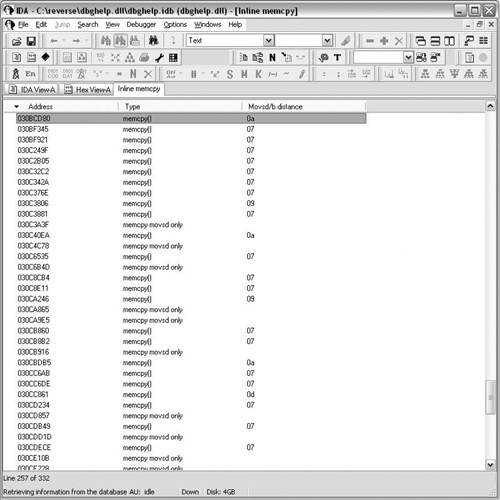
The plug-in introduce some new IDA API functionality, the list box being the most apparent. However the plug-in also introduces one of IDA’s built data types. IDA uses the netnode class to store internal information.
What is a netnode? Netnode is defined in netnode.hpp and is internally implemented as a B-Tree. Netnode are saved with the database and thus can provide permanent storage tied to an idb. This plug-in kills the netnode, since it doesn’t require permanence. Two types within netnode are used in both this plug-in and the indirectCall plug-in presented later in the chapter. The types are altval and supval.
Type | Description |
|---|---|
altvals | This is a sparse array holding 32 bit values. altvals is often used with addresses as keys. The value bound to the key is then used as an index to the supval array. |
supvals | This is an array of variable sized objects (up to MAXSPECSIZE defined as 1024 bytes). |
The plug-in uses the supval array to store movsobj_t objects. Each movsobj_t represents either a memcpy or a partial memcpy. A partial memcpy would be a single rep movsd or rep movsb.
struct movsObj {
   ea_t movsDW;      // addr of rep movsd. BADADDR if none
   ea_t movsBT;      // addr of rep movsd. BADADDR if none
};
typedef movsObj movsobj_t;
If a single or unmatched rep movsd is encountered the missing item’s address is recorded as BADADDR. Altval is used as a standard array and the value is the base address to be displayed. The base address is rep movsd’s address except for a single rep movsb.
Altval holds the array count at index NODE_COUNT (−1). Holding the array count at index −1 is common among other plug-ins as well.
Having covered the data types we can move to the run function. The netnode is created in this function. The use of a ‘$’ prefix to the netnode name is recommended in netnode. hpp. Location names should not be used as IDA names netnodes by location name.
This plug-in uses arguments to the run function. Arguments are defined in the plugins.cfg file located in the plugin directory. Add the following to the end of the plugins.cfg file:
find_memcpy           findMemcpy   Ctrl-F12         0
find_memcpy_unload    findMemcpy   Shift-F12        415
Since the plug-in uses callbacks it cannot unload itself after executing run. The extra option is added in order to unload the plug-in. If the proper argument is received the plug-in flags are modified allowing the plug-in to unload. Unloading allows us to compile and copy over a new version of the plug-in without having to shutdown and restart IDA. The section, Plug-in “Debugging Strategies”, contains more debugging techniques.
if(arg == 415)
{
    PLUGIN.flags |= PLUGIN_UNL;
    msg("Unloading plugin ...\n");
    return;
}The rest of the run calls two functions, collectData and the choose2 API function which creates the list box. The collectData function iterates through all the functions calling functionSearch, but not before introducing two new API calls. The new functions are defined in funcs.hpp.
// Get pointer to function structure by number
//      n - number of function, is in range 0..get_func_qty()−1
// Returns ptr to a function or NULL
idaman func_t *ida_export getn_func(size_t n);

// Get total number of functions in the program
idaman size_t ida_export get_func_qty(void);
The real work is done by functionSearch. The function may look similar to what we saw in IDC. Iterating over areas is very common in scripts and plug-ins. The while loop iterates over all the defined items in the function.
// Get start of next defined item. Return BADADDR if none exist.
// maxea is not included in the search range
idaman ea_t ida_export next_head(ea_t ea, ea_t maxea);
The first if statement defines that we are looking for instructions. The next if statement includes a new API call.
// Analyze the specified address and fill 'cmd'
// This function does not modify the database
// Returns the length of the (possible) instruction or 0

idaman int ida_export ua_ana0(ea_t ea);
The ua_ana0 function part of a family of functions that analyzes instructions defined in ua.hpp. The ua_ana0 is the most minimal as it only analyzes the address without modifying the database. The analysis goes into ‘cmd’, which holds instruction information.
idaman insn_t ida_export_data cmd; // current instruction
The insn_t type is actually a class which holds both generic and processor specific instruction information. Both rep movsd and rep movsb are two byte instruction satisfying the if statement. The following lines use various cmd attributes.
01 if ( (cmd.auxpref & aux_rep) && (cmd.itype == NN_movs) )
02 {
03    if (cmd.Operands[1].dtyp == dt_dword) // rep movsd
04    {
05       // removed for now
06    }
07    else if (cmd.Operands[1].dtyp == dt_byte) // rep movsb
08    {
09      // removed for now
Line 1 looks at both the auxpref and itype attribute for the analyzed instruction. The itype is represents the instruction mnemonic.
ushort itype; // instruction code (see ins.hpp)
The file ins.hpp is not used and instruction nmemonics are located in allins.hpp. The instruction nmemonics are stored in very large enums. The first two characters define the processor. The auxref attribute is a processor dependent field and as such aux_rep is bit flag defined in intel.hpp. Line 1 thus looks for rep movsd or rep movsb.
Note
What about rep movsw? Intel has these wonderful things called prefixes that can change the sizing of instruction that follows it.
   F3 A5     rep movsd
66 F3 A5     rep movsw
   F3 A4     rep movsb
The 0x66 prefix is what separates rep movsd from rep movsw. The plug-in will miss rep movsw instructions.
The if statements in lines 3 and 7 look at the operands of the instruction. The insn_t class contains an array of op_t objects which are the operands.
#define UA_MAXOP 6
    op_t Operands[UA_MAXOP];
The operand class provides more detail about instructions. Using operands you could determine which register an instruction was using, or if the instruction had an immediate as an offset. The attribute the code uses is dtype.
#define dt_byte      0     // 8 bit
#define dt_word      1     // 16 bit
#define dt_dword     2     // 32 bit
The instruction is now sufficiently decoded to determine rep movsd or rep movsb. The rest of the code in funcSearch looks for matched pairs of rep movsd/rep movsb. The variable last_bp is used to track the order. Any unmatched moves are also stored. The plug-in does not perform any code analysis and it is possible that there are jumps connecting unmatched sets. The difference between rep movsd and rep movsb is also calculated in an effort to spot discrepancies.
IDA has API functions for both single and multi-column list boxes. The choose2 function is a wrapper that calls choose with preset options such as creating a modal window. The function works well as is relatively easy to use.
The following is the commented prototype from kernwin.hpp.
inline ulong choose2(
   void *obj,                                      // object to show
   int width,                                      // Max width of lines
   ulong (idaapi*sizer)(void *obj),                // Number of items
   char *(idaapi*getl)(void *obj,                  // Description of
   ulong n,char *buf),                             // n-th item (1..n)
                                                   // 0-th item if header line
   const char *title,                              // menu title (includes ptr to
                                                      help)
   int icon,                                       // number of the default icon to
                                                      display
   ulong deflt=1,                                  // starting item
   chooser_cb_t *del=NULL,                         // cb for "Delete" (may be NULL)
                                                   // supports multi-selection
                                                      scenario too
                                                   // returns: 1-ok, 0-failed
   void (idaapi*ins)(void *obj)=NULL,              // cb for "New" (may be NULL)
   chooser_cb_t *update=NULL,                      // cb for "Update"(may be NULL)
                                                   // update the whole list
                                                   // returns the new location of
                                                      item 'n'
   void (idaapi*edit)(void *obj,ulong n)=NULL,     // cb for "Edit"
                                                   // (may be NULL)
   void (idaapi*enter)(void * obj,ulong n)=NULL,   // cb for non-modal
                                                      "Enter" (may be NULL)
   void (idaapi*destroy)(void *obj)=NULL,          // cb to call when the
                                                   window is closed (may be NULL)
   const char * const *popup_names=NULL,           // Default:
                                                   // insert, delete, edit, refresh
   int (idaapi*get_icon)(void *obj,ulong n)=NULL); // cb for get_icon
                                                   // (may be NULL)
}
The following is the call to choose2 from find memcpy.
       // create chooser list box
       choose2(false,         // non-modal window
       −1, −1, −1, −1,        // position is determined by Windows
       node,                  // object to show
       qnumber(header),       // number of columns
       widths,                // widths of columns
       size,                  // function that returns number of lines
       description,           // function that generates a line
       window_title,          // window title
       −1,                    // use the default icon for the window
       0,                     // position the cursor on the first line
       NULL,                  // "kill" callback
       NULL,                  // "new" callback
       NULL,                  // "update" callback
       NULL,                  // "edit" callback
       enter,                 // function to call when the user pressed Enter
       destroy,               // function to call when the window is closed
       NULL,                  // use default popup menu items
       NULL);                 // use the same icon for all line
The find memcpy plug-in has many of the callbacks set to NULL. However most of the callbacks are not needed. It is not common to add new lines to a list box. The popup menu callback can be useful for operating on list data in ways other than jumping to the disassembly for a single item.
The key callbacks are size, description, enter, and destroy.
The size callback returns the number of lines to display in the list box. There is not much to it unless items are being added or removed from the list. The prototype for find memcpy’s size function is:
ulong idaapi size(void* obj)
The description callback fills in the rows for the list box. It is called for every item in the list. The function is passed the object, line number, and arrptr. The last item is an array of pointers for column data. The description function copies the text data it wishes to display into the array. Description setups the column header when passed 0 for the n argument. The following code from find memcpy copies the headers column headers into arrptr.
static const char* header[] = {"Address", "Type", "Movsd/b distance"};
void idaapi description(void *obj,ulong n,char * const *arrptr)
{
    if ( n == 0 ) // sets up headers
    {
      for ( int i=0; i < qnumber(header); i++ )
        qstrncpy(arrptr[i], header[i], MAXSTR);
      return;
    }
The enter callback is generally used to jump to an address. The function is called when the user presses Enter, or double clicks on a line in the chooser list. The function is passed the object and line number.
void idaapi enter(void * obj, ulong n)
The destroy callback is called when the chooser list is being destroyed. Destroy can perform resource cleanup as is the case in find memcpy.
void idaapi destroy(void* obj)
{
    netnode *node = (netnode *)obj;
    node->kill();
    return;
}The IDC section presented a script to find and create cross references for indirect calls through a VTable. This solution requires knowing where interesting VTables are located. Instead of observing the targets of a VTable, the opposite approach can be taken by seeking out all the callers. Callers would include any indirect jump instruction. However, for the sake of brevity indirect calls will refer to both indirect calls and jumps.
Similar to the find memcpy plug-in, the binary is scanned for interesting instructions, in this case, indirect calls.
Breakpoints are set on all indirect calls.
The plug-in adds a callback to the debugger.
The debugger instruments the binary.
The callback records information. Optionally the callback performs a step into the call target and record the address.
Breakpoints are removed when the process exits.
Data is presented to the user and optionally cross references are added.
Based on the proposed strategy four separate tasks need to be performed. Separating the tasks allows code to be written for parts that can be replaced at a later point. Fully working chooser lists are not needed immediately, during development writing to the message window will suffice.
Collect data
Query user for options
Implement the callback
Present results to the user
The plug-in is presented later in the chapter. However, relevant code and screenshots will be shown in the following sections.
Before starting to collect data, we need data structures to store them in. During the writing of the plug-in the data container changed but netnodes remained the main data structures. The plug-in uses two netnodes and a qvector. Netnodes were introduced in the previous plug-in. Qvector is also an SDK data type and is defined in pro.h. It supports most of the standard vector methods.
Name | DataType | Description | Internal Type |
|---|---|---|---|
calls | Netnode | Contains all found indirect calls | indirect_t |
vtables | Netnode | Contains all found VTables | vtable_t |
bplist | qvector | Index list into calls netnode | ulong |
The netnodes use altval and supval arrays to allow both address lookup as well as iteration of objects. The altval sparse array is accessed by address. The value contained in the atval is an index into the supval array. Altval arrays are initialized to 0. Thus supval indexing begins at 1. The following is some example code taken from the indirectCalls header comments.
// .text:030CC0FB    call   dword ptr [eax+3Ch] ;

indirect_t myObj;

ulong index = calls->altval(0x030CC0FB);

if (index != 0) // indirect call (assume we assigned it earlier)
{
    indirect_t myObj = calls->supval(index, &myObj, sizeof(myObj) );
    msg("%a -> %a\n", myObj.caller, myObj.target);
}
Collection of data is performed by the findIndirectCalls function. The current segment is scanned, not only functions. The function should collect defined indirect calls although not within a proper function. The following code scans for the calls.
switch (cmd.itype)
{
case NN_callfi:
case NN_callni:
case NN_jmpfi:
case NN_jmpni:
  {
     if (get_first_fcref_from(cmd.ea) == BADADDR &&
       get_first_dref_from(cmd.ea) == BADADDR) //no fwd xref
     {
       indirect_t currcall;
       fillIndirectObj(currcall);
       if (cmd.itype & NNJMPxI) // jmp?
     {
           currcall.flags |= JMPSETFLAG;
     }
     node->altset(cmd.ea, counter); // altval keyed by addr
     node->supset(counter++, &currcall, sizeof(currcall) );
The code is similar to the previous plug-in as it analyzes the instruction and checks for certain nmemonics. Cross references checks from the call are performed for both code and data. The data cross reference check is necessary to avoid jump tables. The call to fillIndirectObj prepares the indirect_t object. Some more instruction decoding takes place which is recorded into the object.
If the call is an indirect near call, further processing takes place. The goal is to determine if the call is of the form:
call [reg] or call [reg + offset]
The preceding calls particularly with an offset may contain a VTable address in the register. The register is extracted and stored in the object along with any offset. Note that the information is located within the operand’s type attribute. With the register and offset, the target address can be calculated. In theory all call instructions could be decoded. Finally there is a test checking a flag to determine if a call is a jmp. This is done in order to set the appropriate cross reference type if the call is completed during runtime.
This function concludes the collection of information prior to acquiring options from the user.
Various options are available to the user. AskUsingForm_c API call creates the user interface. (See Figure 9.18)
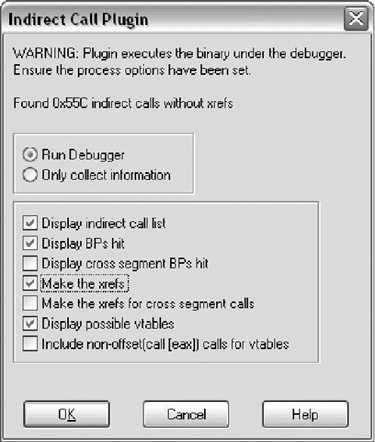
Certain characters control whether a checkbox or radio button appears. There is not much documentation available; however there is some sample code. (http://www.openrce.org/downloads/details/32/User_Interface_Sample_Code)
The options are processed and the if the user chooses to run the debugger a new API call is made to hook notification of the debugger.
if (!hook_to_notification_point(HT_DBG, callback, &gDbgOptions) )
{
   warning("Could not hook to notification point\n");
   register_event(E_HOOKFAIL);
   return;
}
The following is the function retype as well as supported hook types.
HT_IDP,         // Hook to the processor module.
HT_UI,          // Hook to the user interface.
HT_DBG,         // Hook to the debugger.
HT_IDB,         // Hook to the database events.
idaman bool ida_export hook_to_notification_point(
                               hook_type_t hook_type,
                               hook_cb_t *cb,
                               void *user_data);
The first argument is the type of hook. The second argument is the callback function that receives notification. The final argument can be NULL. Passing an object serves two purposes. In order to unhook the same object must be used. The second purpose is passing data to the callback function. In this case the passed user_data is a global.
Finally breakpoints are set and the process is started using the start_process call.
int idaapi start_process(const char *path, const char *args,
                          const char *sdir)
If the arguments are NULL, start_process uses data previously entered under Debugger | Process options. The callback is set and the debugger should be running.
The debugger starts and the callback patiently waits for events. The following is the callback’s prototype.
int idaapi callback(void* user_data,int notification_code,va_list va)
The notification code describes the type of event being received. There are various types of notification from low level ones dealing with library loading to higher level breakpoint notifications. The notifications are documented in the dbg_notification_t enum located in dbg.hpp. The callback has a switch and handles three types of notification.
dbg_bpt is the breakpoint notification. The portion of code that handles dbg_bpt has three possible outcomes.
The breakpoint address is not the calls netnode. This is a user set breakpoint and should be handled as such. The plug-in calls suspend_process and exits the callback.
   suspend_process();
   return 0;
The breakpoint was set by the plug-in however the call instruction is not one of the predecoded types. The caller address is stored is last_bp, since the target won’t be resolved until the step_into. A call is made to request_del_bp and request_step_into. The step_into function cannot be called from a notification handler.
last_bp = from;         // saves the caller address
request_del_bpt(from);  // queue request_del_bpt()
  //
  // From: dbg.hpp request_step_into() AND step into()
  // Type: Asynchronous function - available as Request
  // In Notification handler it is MANDATORY to call
  // Async function in request form
request_step_into(); // queue a request_step_into()
  // request will be run after all notification handlers
run_requests();
break;
The breakpoint was set by the plug-in and the calling instruction is one of the predecoded types. The my_indirect object contains both the register number and offset (could be zero). The register is read using get_reg_val.
The register value is then stored into vtaddr. This is assumed to be a VTable address. In order to recover the target address a VTable lookup needs to be performed. However, reading memory while in a notification handler can provide unreliable results. The database and process may not be in sync. The issue was observed during the development of this plug-in. The invalidate_dbgmem_contents function invalidates and flushes IDA’s cache.
Inside a notification handler calling invalidate_dbgmem_contents is required before reading and writing memory. Another option is invalidate_dbgmem_config which although slower is more thorough. Both are defined in bytes.hpp.
Two more functions are called, addVTable and setTargetXref. Assuming user options permit, the functions will a create cross reference and possibly a VTable.
// copy register_t struct in regval get_reg_val(regname[my_indirect.call_reg], ®val); // vtaddr == VTable base addr vtaddr = (ea_t)regval.ival; // flushes IDA's cache invalidate_dbgmem_contents((ea_t)regval.ival, 0x100 + my_indirect.offset); // read target address from table to = get_long(my_indirect.offset + vtaddr); my_indirect.target = to; // addVTable(my_dbg,vtaddr, &my_indirect); setTargetXref(my_dbg, index, &my_indirect); calls->supset(index, &my_indirect, sizeof(my_indirect) ); del_bpt(from); continue_process(); break;
dbg_step_into is the step_into notification. The notification is caused either by the user or the request_step_into call. If the user caused the notification, suspend_process is called.
The current EIP is the target of the call. The address is copied into the object. setTargetXref adds a cross reference based on user options.
from = last_bp; if (from == BADADDR) { suspend_process(); // user caused step_into return 0; } long index = calls->altval(from); // index into supval get_reg_val("EIP", ®val); // current EIP is the 'to' to = (ea_t)regval.ival; indirect_t my_indirect; calls->supval(index, &my_indirect, sizeof(my_indirect) ); my_indirect.target = to; // Add cross reference based on user options and checks setTargetXref(my_dbg, index, &my_indirect); // save completed indirect_t object calls->supset(index, &my_indirect, sizeof(my_indirect) ); // reset last_bp and continue the debugger last_bp = BADADDR; continue_process(); break;
This notification signals the termination of the debugged process.
unhook_from_notification_point(HT_DBG, callback, user_data);
requestDelBps(calls);
run_requests();
register_event(E_PROCEXIT);

if (options & DISPLAY_INCALLS)
   createIndirectCallWindow(calls);

if (options & DISPLAY_BPS)
   createCompletedBpWindow(calls, my_dbg->bplist);
if (options & DISPLAY_VTABLES)
   createVTableWindow(my_dbg->vtables);
The VTable display includes an estimated VTable size. The size is estimated by iterating through pointers and checking for references. The rest of the presentation functions are similar to the find memcpy plug-in. There are two new function introduced in the description callbacks. They both deal with presenting text. The first is get_nice_colored_name. This function can construct addresses as seen listed in IDA, such as segment:address. Various flags specify the format.
#define GNCN_NOSEG     0x0001    // ignore the segment prefix
                                 //producing the name
#define GNCN_NOCOLOR   0x0002    // generate an uncolored name
#define GNCN_NOLABEL   0x0004    // don't generate labels
#define GNCN_NOFUNC    0x0008    // don't generate funcname+... expressions
#define GNCN_SEG_FUNC  0x0010    // generate both segment and function names
      (default is to omit segment name if a function name is present)
#define GNCN_SEGNUM    0x0020    // segment part is displayed as aa hex number
#define GNCN_REQFUNC   0x0040    // return 0 if the address does not
                                 // belong to a function
#define GNCN_REQNAME   0x0080    // return 0 if the address can only be
                                 // represented as a hex number
// returns: the length of the generated name in bytes
// The resulting name will have color escape characters
// GETN_NOCOLOR was not specified
// (see lines.hpp for color definitions)

idaman ssize_t ida_export get_nice_colored_name(
       ea_t ea,
       char *buf,
       size_t bufsize,
       int flags=0);
The second new function demangles names. By default IDA uses mangled names, although the option can be changed. This following function produced a short demangled name.
inline char *get_short_name(ea_t from, ea_t ea, char *buf, size_t bufsize)
Both of the functions are located in names.hpp. The plug-in was run against jscipt.dll from IE7. Figure 9.19 is the list of all indirect calls.
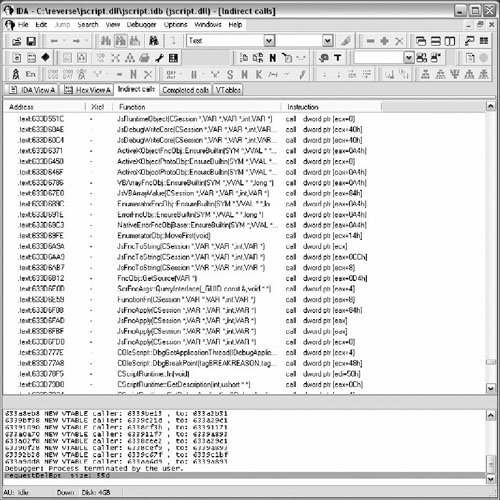
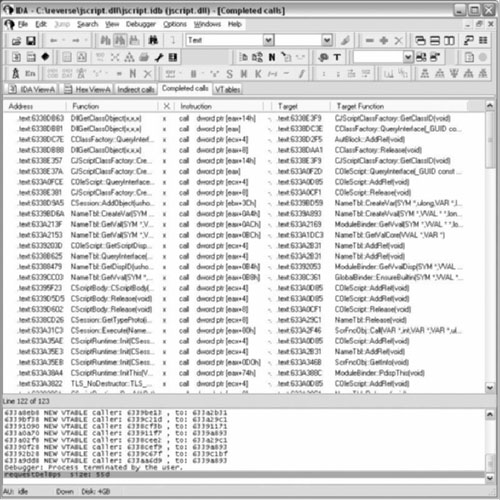
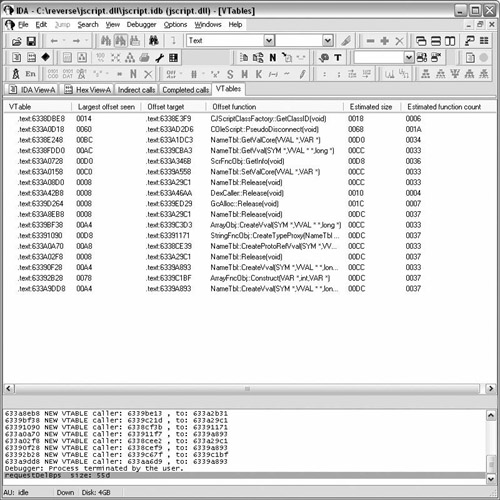
Table 9.22. Indirect Call Plug-in indirectCall.h
/**************************************************************************
* Indirect Call IDA Pro plugin
*
* Copyright (c) 2008 Luis Miras
* Licensed under the BSD License
*
**************************************************************************/
#ifndef  INDIRECTCALLS_H_
#define INDIRECTCALLS_H_

#define NODE_COUNT −1
#define NNJMPxI 0x40
#define CNAMEOPT (GNCN_NOCOLOR | GNCN_NOFUNC | GNCN_NOLABEL)

struct dbgOptions; //fwd declaration
struct indirectCallObj; //fwd declaration
typedef indirectCallObj indirect_t;
typedef qvector<ulong> bphitlist_t;
long vtEstimateSize(ea_t);
void idaapi vtDescription(void *,ulong, char * const *);
void idaapi vtEnter(void * ,ulong);
void idaapi vtDestroy(void*);
void createVTableWindow(netnode* vtables);
void idaapi icDescription(void *,ulong ,char * const *);
void idaapi icEnter(void * ,ulong);
void idaapi icDestroy(void*);
ulong idaapi size(void*);
void createIndirectCallWindow(netnode*);
void idaapi ccDescription(void *,ulong ,char * const *);
void idaapi ccEnter(void* ,ulong);
void idaapi ccDestroy(void*);
ulong idaapi ccSize(void*);
void createCompletedBpWindow(netnode* , bphitlist_t*);
void requestSetBps(netnode*);
void setBps(netnode*);
void requestDelBps(netnode*);
void delBps(netnode*);
void setTargetXref(dbgOptions* , long , indirect_t*);
void addVTable(dbgOptions* , ea_t , indirect_t*);
int idaapi callback(void* , int , va_list);
void fillIndirectObj(indirect_t &);
bool setnodesize(netnode* , long);
long getnodesize(netnode*);
long getobjcount(netnode*);
void findIndirectCalls(segment_t* , netnode*);
void closeListWindows(void);
void register_event(ulong);
void run(int);
int init(void);
void term(void);

struct indirectCallObj
{
  ea_t caller;     // indirect caller address
  ea_t target;     // target address
  ea_t offset;     // valid for call [reg+offset]
                   // defaults to 0
  short call_reg;  // enum REG
  short flags;     // enum callflags_t
};
struct vtableObj
{
  ea_t baseaddr;       // baseaddr reg in call [reg + off]
  ea_t largestOffset;  // largest off seen in call [reg + off]
};
typedef struct vtableObj vtable_t;
typedef qvector<ulong> bphitlist_t;
struct dbgOptions
{
  netnode* calls;
  netnode* vtables;
  bphitlist_t* bplist;
  ulong options;
};
struct completedbp
{
  netnode* calls;
  bphitlist_t* callindex;
};
typedef completedbp completedbp_t;

enum uioptions_t {
  DISPLAY_INCALLS  = 0x0001,
  DISPLAY_BPS      = 0x0002,
  DISPLAY_XS_BPS   = 0x0004,
  MAKE_XREFS       = 0x0008,
  MAKE_XS_XREFS    = 0x0010,
  DISPLAY_VTABLES  = 0x0020,
  INC_NONOFF_CALLS = 0x0040
};

enum callflags_t {
  JMPSETFLAG = 1,
  XRSETFLAG = 2,
  XSEGFLAG = 4
};

char* regname[] = {"EAX","ECX","EDX","EBX","ESP","EBP","ESI","EDI"};
enum REG {eax, ecx, edx, ebx, esp, ebp, esi, edi, none = −1};
enum EVENTS
{
  E_START, E_CANCEL, E_OPTIONS, E_HOOKFAIL, E_PROCFAIL,
  E_DWCALL, E_DWXREFS, E_DWVTABLE, E_PROCEXIT
};

// incomplete calls, choose2() list box
char icTitle[] = "Indirect calls" ;
static const char* icHeader[] = {"Address", "Xref","Function", "Instruction"};
static const int icWidths[] = {16, 4, 36, 20};

// completed calls, choose2() list box
char ccTitle[] = "Completed calls" ;
static const char* ccHeader[] = {"Address", "Function", "Xref", "Instruction",
"Xseg","Target", "Target Function"};
static const int ccWidths[] = { 16, 28, 4, 18, 4, 16, 28};

// vtables, choose2() list box
char vtTitle[] = "VTables";
static const char* vtHeader[] = {"VTable ", "Largest offset seen", "Offset
target", "Offset function", "Estimated size", "Estimated function count"};
static const int vtWidths[] = { 16, 16, 16, 28, 16, 20};

// ui string AskUsingForm_c()
const char preformat[] =
"STARTITEM 0\n"
// Help
"HELP\n"
"This plugin searches for indirect calls. For example:\n"
"\n"
"call    dword ptr [eax+14h]\n"
"jmp     eax\n"
"\n"
" "
"Breakpoints are set on all the calls.\n"
"A breakpoint handler will:\n"
" 1. Determine if one of its breakpoints triggered.\n"
" 2. Delete the breakpoint\n"
" 3. Step into the call\n"
" 4. Record both the caller and callee addresses\n"
"\n"
"ENDHELP\n"

// Title
"Indirect Call Plugin\n"
// Dialog Text
"WARNING: Plugin executes the binary under the debugger.\n"
"Ensure the process options have been set.\n\n"
"Found 0x%a indirect calls without xrefs\n\n"

// Radio Buttons
"<#Runs the debugger#"
"Run Debugger:R>\n"
"<#Collects data on indirect calls#"
"Only collect information:R>>\n"

// Check Boxes
"<# Create indirect call window. #"
"Display indirect call list :C>\n"
"<# Create BP window. #"
"Display BPs hit :C>\n"
"<# Include cross segment BPs in BP window. #"
"Display cross segment BPs hit :C>\n"
"<# Automatically create xrefs btwn caller and target. #"
"Make the xrefs :C>\n"
"<# Automatically create xrefs btwn caller and target in different segments. #"
"Make the xrefs for cross segment calls:C>\n"
"<# Create a vtable window #"
"Display possible vtables :C>\n\n"
"<# May lead to false positives (not recommended) #"
"Include non-offset(call [eax]) calls for vtables :C>>\n\n";

#endif /* INDIRECTCALLS_H_ */ |
Table 9.23. Indirect Call Plugin indirectCall.cpp
/**************************************************************************
* Indirect Call IDA Pro plugin
*
* Copyright (c) 2008 Luis Miras
* Licensed under the BSD License
*
* Requirements: This plugin works alongside the IDA Pro debugger.
* The plugin requires x86 processor. The plugin "should"
* work under the IDA Linux debugger. It has not been
* tested.
*
* Description: The plugin attempt to create cross references for
* indirect calls/jmps. For brevity indirect calls/jmp
* will be refered only as indirect calls. The plugin
* also attempts to identify vtables.
*
* Strategy: The binary's current segment is scanned for indirect
* calls. The binary is instrumented under the debugger.
* A breakpoint handler either calculates the target or
* steps into the target. Depending on user options cross
* references will be made and possible vtables listed.
*
* Data structures: netnode and qvector are used. Both are built in IDA
* types, minimizing 3rd party dependencies. netnodes
* allow for persistent data,they are saved in the IDB
* However, in this plugin the netnodes are kill()'ed
*
* netnodes are implemented internally as B-trees.
* IDA uses netnodes extensively for its own storage.
* netnodes are defined in netnode.hpp.
*
* netnodes in the plugin: calls - holds all indirect calls
* vtable - holds all vtables
*
* netnodes have various internal data structures.
* The plugin uses 2 types of arrays:
* altval - a sparce array of 32 bit values, initially set to 0.
* supval - an array of variable sized objects (MAXSPECSIZE)
*
* Addresses are used as keys into altval array. The value at the key
* is then used as an index into the supval array. The supval array
* holds an object of variable size.
*
* This allows fast lookup using address keys, while being able to
* iterate through all items using supval.
*
* An example:
*
* .text:030CC0FB call dword ptr [eax+3Ch]
*
* indirect_t myObj;
* ulong index = calls->altval(0x030CC0FB);
*
* if (index != 0) // indirect call (assume we assigned it earlier)
* {
* indirect_t myObj = calls->supval(index, &myObj, sizeof(myObj) );
* msg("%a -> %a\n", myObj.caller, myObj.target);
* }
*
* the calls netnode holds indirect_t objects
* the vtables netnode holds vtable_t objects
* bphitlist_t is a qvector that holds indexes into the calls netnode
**************************************************************************/
#include <ida.hpp>
#include <idp.hpp>
#include <dbg.hpp>
#include <loader.hpp>
#include <allins.hpp>
#include <intel.hpp>
#include "indirectCalls.h"
dbgOptions gDbgOptions = {NULL, NULL, NULL, 0};
/**************************************************************************
* Function: vtEstimateSize
* Args: ea_t addr - base address of a VTable
* Return: long - Estimated VTable length
*
* This function attempts to calculate the size of a vtable given its
* base address. It checks xrefs to determine if still in a vtable
*
.text:03010D34 off_3010D34 dd offset sub_308A561
.text:03010D34
.text:03010D38 dd offset sub_3082D8D
.text:03010D3C dd offset sub_3082DA6
.text:03010D40 dd offset sub_3091542
.text:03010D44 dd offset sub_30B9110
.text:03010D48 dd 75667608h, 6174636Eh, 62h ;
; 8 'vfunctab'
.text:03010D54 off_3010D54 dd offset sub_308A561
*
* Sometimes a string is stored at the end of a vtable as in this case.
* vtEstimateSize doesn't understand anything other than dword ptrs
**************************************************************************/
long vtEstimateSize(ea_t addr)
{
flags_t flags;
ea_t curraddr = addr;
ea_t lastaddr = addr;
bool done = false;
curraddr = next_head(lastaddr, BADADDR);
while (!done)
{
if (curraddr - lastaddr != 4) // DWORD size differences
{
done = true;
}
flags = getFlags(curraddr);
if (!done && !isDwrd(flags) )
{
done = true;
}
// a dref_to could suggest the start of a new vtable
if (!done && get_first_dref_to(curraddr) != BADADDR)
done = true;
if (!done)
{
lastaddr = curraddr;
curraddr = next_head(lastaddr, BADADDR);
}
}
return lastaddr - addr + 4;
}
/**************************************************************************
* Function: vtDescription
*
* This is a standard callback in the choose2() SDK call. This function
* fills in all column content for a specific line. Headers names are
* set during the first call to this function, when n == 0.
* arrptr is a char* array to the column content for a line.
* arrptr[number of columns]
*
* vtDescription creates 6 columns based on the vtHeader array
**************************************************************************/
void idaapi vtDescription(void *obj,ulong n,char * const *arrptr)
{
netnode *node = (netnode *)obj;
vtable_t curr_vtable;
ea_t target;
long vtSize;
if ( n == 0 ) // sets up headers
{
for ( int i=0; i < qnumber(vtHeader); i++ )
qstrncpy(arrptr[i], vtHeader[i], MAXSTR);
return;
}
// Empty netnode
if (!getobjcount(node) )
return;
char buffer[MAXSTR];
node->supval(n, &curr_vtable, sizeof(curr_vtable) );
vtSize = vtEstimateSize(curr_vtable.baseaddr);
target = get_long(curr_vtable.largestOffset + curr_vtable.baseaddr);
get_nice_colored_name(curr_vtable.baseaddr,
arrptr[0], MAXSTR, CNAMEOPT);
qsnprintf(arrptr[1], MAXSTR, "%04a", curr_vtable.largestOffset);
get_nice_colored_name(target, arrptr[2], MAXSTR, CNAMEOPT);
get_short_name(BADADDR,target , buffer, MAXSTR); //demangles fname
qsnprintf(arrptr[3], MAXSTR, "%s", buffer);
qsnprintf(arrptr[4], MAXSTR, "%04a", vtSize);
qsnprintf(arrptr[5], MAXSTR, "%04a", vtSize/4);
return;
}
/**************************************************************************
* Function: vtEnter
*
* This is a standard callback in the choose2() SDK call. This function
* is called when the user pressed Enter or Double-Clicks on a line in
* the chooser list.
**************************************************************************/
void idaapi vtEnter(void * obj,ulong n)
{
vtable_t curr_vtable;
netnode *node = (netnode *)obj;
node->supval(n, &curr_vtable, sizeof(curr_vtable) );
jumpto(curr_vtable.baseaddr);
return;
}
/**************************************************************************
* Function: vtDestroy
*
* This is a standard callback in the choose2() SDK call. This function
* is called when the chooser list is being destroyed. Resource cleanup
* is common in this function. In this case any resource
* cleanup is handled by register_event().
**************************************************************************/
void idaapi vtDestroy(void* obj)
{
netnode *node = (netnode *)obj;
msg("\"%s\" window closed\n", vtTitle);
register_event(E_DWVTABLE);
return;
}
/**************************************************************************
* Function: createVTableWindow
*
* A wrapper around choose2() API. 'Generic list chooser (n-column)'
* This sets up the callbacks and necessary options.
* NOTE: 1. Cannot free the "object to show" until chooser closes
* 2. Cannot unload plugin until chooser closes,
* removing callbacks.
**************************************************************************/
void createVTableWindow(netnode* vtables)
{
choose2(false, // non-modal window
−1, −1, −1, −1, // position is determined by Windows
vtables, // object to show
qnumber(vtHeader), // number of columns
vtWidths, // widths of columns
size, // function that returns number of lines
vtDescription, // function that generates a line
vtTitle, // window title
−1, // use the default icon for the window
0, // position the cursor on the first line
NULL, // "kill" callback
NULL, // "new" callback
NULL, // "update" callback
NULL, // "edit" callback
vtEnter, // function to call when the user pressed Enter
vtDestroy, // function to call when the window is closed
NULL, // use default popup menu items
NULL); // use the same icon for all line
}
/**************************************************************************
* Function: icDescription
*
* This is a standard callback in the choose2() SDK call. This function
* fills in all column content for a specific line. Headers names are
* set during the first call to this function, when n == 0.
* arrptr is a char* array to the column content for a line.
* arrptr[number of columns]
*
* vtDescription creates 4 columns based on the icHeader array
**************************************************************************/
void idaapi icDescription(void *obj,ulong n,char * const *arrptr)
{
netnode *node = (netnode *)obj;
indirect_t curr_indirect;
if ( n == 0 ) // sets up headers
{
for ( int i=0; i < qnumber(icHeader); i++ )
qstrncpy(arrptr[i], icHeader[i], MAXSTR);
return;
}
// list empty?
if (!getobjcount(node) )
return;
char buffer[MAXSTR];
node->supval(n, &curr_indirect, sizeof(curr_indirect) );
func_t* currFunc = get_func(curr_indirect.caller);
ua_ana0(curr_indirect.caller);
get_nice_colored_name(curr_indirect.caller,
arrptr[0], MAXSTR, CNAMEOPT); // address
if (curr_indirect.flags & XRSETFLAG)
qstrncpy(arrptr[1], "x", MAXSTR);
else
qstrncpy(arrptr[1], "-", MAXSTR);
get_short_name(BADADDR, currFunc->startEA, buffer, MAXSTR);
qsnprintf(arrptr[2], MAXSTR, "%s", buffer);
generate_disasm_line(cmd.ea, buffer, sizeof(buffer) );
tag_remove(buffer, buffer, sizeof(buffer) );
qsnprintf(arrptr[3], MAXSTR, "%s", buffer);
return;
}
/**************************************************************************
* Function: icEnter
*
* This is a standard callback in the choose2() SDK call. This function
* is called when the user pressed Enter or Double-Clicks on a line in
* the chooser list.
**************************************************************************/
void idaapi icEnter(void * obj,ulong n)
{
indirect_t curr_indirect;
netnode *node = (netnode *)obj;
node->supval(n, &curr_indirect, sizeof(curr_indirect) );
jumpto(curr_indirect.caller);
return;
}
/**************************************************************************
* Function: icDestroy
*
* This is a standard callback in the choose2() SDK call. This function
* is called when the chooser list is being destroyed. Resource cleanup
* is common in this function. In this case any resource cleanup is
* handled by register_event().
**************************************************************************/
void idaapi icDestroy(void* obj)
{
netnode *node = (netnode *)obj;
msg("\"%s\" window closed\n", icTitle);
register_event(E_DWCALL);
return;
}
/**************************************************************************
* Function: size
*
* This is a standard callback in the choose2() SDK call. This function
* returns the number of lines to be used in the chooser list.
**************************************************************************/
ulong idaapi size(void* obj)
{
netnode *node = (netnode *)obj;
return getobjcount(node);
}
/**************************************************************************
* Function: createIndirectCallWindow
*
* A wrapper around choose2() API. 'Generic list chooser (n-column)'
* This sets up the callbacks and necessary options.
* NOTE: 1. Cannot free the "object to show" until chooser closes
* 2. Cannot unload plugin until chooser closes,
* removing callbacks.
**************************************************************************/
void createIndirectCallWindow(netnode* calls)
{
choose2(false, // non-modal window
−1, −1, −1, −1, // position is determined by Windows
calls, // object to show
qnumber(icHeader), // number of columns
icWidths, // widths of columns
size, // function that returns number of lines
icDescription, // function that generates a line
icTitle, // window title
−1, // use the default icon for the window
0, // position the cursor on the first line
NULL, // "kill" callback
NULL, // "new" callback
NULL, // "update" callback
NULL, // "edit" callback
icEnter, // function to call when the user pressed Enter
icDestroy, // function to call when the window is closed
NULL, // use default popup menu items
NULL); // use the same icon for all line
}
/**************************************************************************
* Function: ccDescription
*
* This is a standard callback in the choose2() SDK call. This function
* fills in all column content for a specific line. Headers names are
* set during the first call to this function, when n == 0.
* arg: arrptr is a char* array to the column content for a line.
* arrptr[number of columns]
* arg: completedbp_t* is atruct: netnode* - points to all calls
* bphitlist_t - indexes of hit calls
*
* ccDescription creates 7 columns based on the icHeader array
**************************************************************************/
void idaapi ccDescription(void *obj,ulong n,char * const *arrptr)
{
completedbp_t* cbp = (completedbp_t*)obj;
indirect_t curr_indirect;
if ( n == 0 ) // sets up headers
{
for ( int i=0; i < qnumber(ccHeader); i++ )
qstrncpy(arrptr[i], ccHeader[i], MAXSTR);
return;
}
bphitlist_t& tmp = *(bphitlist_t*)cbp->callindex;
ulong index = tmp[n-1];
if (!tmp.size() ) // only needed if choose2 kill callback used
return; // since it removes members
char buffer[MAXSTR];
cbp->calls->supval(index, &curr_indirect, sizeof(curr_indirect) );
func_t* currFunc = get_func(curr_indirect.caller);
ua_ana0(curr_indirect.caller); //
// seg.addr
get_nice_colored_name(curr_indirect.caller, arrptr[0],
MAXSTR, CNAMEOPT);
get_short_name(BADADDR, currFunc->startEA, buffer, MAXSTR);
qsnprintf(arrptr[1], MAXSTR, "%s", buffer);
if (curr_indirect.flags & XRSETFLAG)
qstrncpy(arrptr[2], "x", MAXSTR); // made a cross reference
else
qstrncpy(arrptr[2], "-", MAXSTR);
// get instruction disasm, remove color info
generate_disasm_line(cmd.ea, buffer, sizeof(buffer) );
tag_remove(buffer, buffer, sizeof(buffer) );
qsnprintf(arrptr[3], MAXSTR, "%s", buffer);
if (curr_indirect.flags & XSEGFLAG)
qstrncpy(arrptr[4], "x", MAXSTR); // cross segment reference
else
qstrncpy(arrptr[4], "-", MAXSTR);
get_nice_colored_name(curr_indirect.target,
arrptr[5], MAXSTR, CNAMEOPT);
currFunc = get_func(curr_indirect.target);
//demangles fname
get_short_name(BADADDR, currFunc->startEA, buffer, MAXSTR);
qsnprintf(arrptr[6], MAXSTR, "%s", buffer);
return;
}
/**************************************************************************
* Function: ccEnter
*
* This is a standard callback in the choose2() SDK call. This function
* is called when the user pressed Enter or Double-Clicks on a line in
* the chooser list.
**************************************************************************/
void idaapi ccEnter(void * obj,ulong n)
{
completedbp_t* cbp = (completedbp_t*)obj;
bphitlist_t &tmp = *(bphitlist_t*)cbp->callindex;
indirect_t curr_indirect;
ulong index = tmp[n-1];
cbp->calls->supval(index, &curr_indirect, sizeof(curr_indirect) );
jumpto(curr_indirect.caller);
return;
}
/**************************************************************************
* Function: ccDestroy
*
* This is a standard callback in the choose2() SDK call. This function
* is called when the chooser list is being destroyed. Resource cleanup
* is common in this function. In this case any resource cleanup is
* handled by register_event().
**************************************************************************/
void idaapi ccDestroy(void* obj)
{
completedbp_t* cbp = (completedbp_t*)obj;
msg("\"%s\" window closed\n", ccTitle);
register_event(E_DWXREFS);
return;
}
/**************************************************************************
* Function: ccSize
*
* This is a standard callback in the choose2() SDK call. This function
* returns the number of lines to be used in the chooser list.
**************************************************************************/
ulong idaapi ccSize(void* obj)
{
completedbp_t* cbp = (completedbp_t*)obj;
return cbp->callindex->size();
}
/**************************************************************************
* Function: createCompletedBpWindow
*
* A wrapper around choose2() API. 'Generic list chooser (n-column)'
* This sets up the callbacks and necessary options.
* NOTE: 1. Cannot free the "object to show" until chooser closes
* 2. Cannot unload plugin until chooser closes,
* removing callbacks.
**************************************************************************/
void createCompletedBpWindow(netnode* calls, bphitlist_t* bplist)
{
completedbp_t* bp = new completedbp_t;
bp->calls = calls;
bp->callindex = bplist;
choose2(false, // non-modal window
−1, −1, −1, −1, // position is determined by Windows
bp, // object to show
qnumber(ccHeader), // number of columns
ccWidths, // widths of columns
ccSize, // function that returns number of lines
ccDescription, // function that generates a line
ccTitle, // window title
−1, // use the default icon for the window
0, // position the cursor on the first line
NULL, // "kill" callback
NULL, // "new" callback
NULL, // "update" callback
NULL, // "edit" callback
ccEnter, // function to call when the user pressed Enter
ccDestroy, // function to call when the window is closed
NULL, // use default popup menu items
NULL); // use the same icon for all line
}
/**************************************************************************
* Function: requestSetBps
*
* requests all our breakpoints be set, then run_requests
**************************************************************************/
void requestSetBps(netnode* node)
{
indirect_t my_indirect;
long no_calls = getnodesize(node);
msg("requestSetBps size: %x\n", no_calls);
for (int i = 1; i < no_calls; ++i)
{
node->supval(i, &my_indirect, sizeof(my_indirect));
request_add_bpt(my_indirect.caller);
}
run_requests();
return;
}
/**************************************************************************
* Function: requestDelBps
*
* requests all our breakpoints be deleted, caller calls run_requests
**************************************************************************/
void requestDelBps(netnode* node)
{
indirect_t my_indirect;
long no_calls = getnodesize(node);
msg("requestDelBps size: %x\n", no_calls);
for (int i = 1; i < no_calls; ++i)
{
node->supval(i, &my_indirect, sizeof(my_indirect));
request_del_bpt(my_indirect.caller);
}
return;
}
/**************************************************************************
* Function: setBps
*
* set all our breakpoints
**************************************************************************/
void setBps(netnode* node)
{
indirect_t my_indirect;
long no_calls = getnodesize(node);
msg("setBps size: %x\n", no_calls);
for (int i = 1; i < no_calls; ++i)
{
node->supval(i, &my_indirect, sizeof(my_indirect));
add_bpt(my_indirect.caller);
}
return;
}
/**************************************************************************
* Function: delBps
*
* delete all our breakpoints
**************************************************************************/
void delBps(netnode* node)
{
indirect_t my_indirect;
long no_calls = getnodesize(node);
msg("delBps size: %x\n", no_calls);
for (int i = 1; i < no_calls; ++i)
{
node->supval(i, &my_indirect, sizeof(my_indirect));
del_bpt(my_indirect.caller);
}
return;
}
/**************************************************************************
* Function: setTargetXref
*
* This function serves two purposes. First decides whether to add the
* call to the completed call/bp list. It also can create the cross
* reference between the caller and the target.
**************************************************************************/
void setTargetXref(dbgOptions* myDbg,long index,indirect_t* myIndirect)
{
bphitlist_t* entry = myDbg->bplist;
ulong options = myDbg->options;
ea_t from = myIndirect->caller;
ea_t to = myIndirect->target;
short &flags = myIndirect->flags;
segment_t* from_seg = getseg(from);
segment_t* to_seg = getseg(to);
if (from_seg == to_seg)
{
if (options & MAKE_XREFS)
{
flags |= XRSETFLAG;
if (flags & JMPSETFLAG)
add_cref(from, to, (cref_t)(fl_JN | XREF_USER));
else
add_cref(from, to, (cref_t)(fl_CN | XREF_USER));
}
entry->push_back(index);
}
else // cross segment
{
if (to_seg != NULL && !(to_seg->is_ephemeral_segm()))
{
flags |= XSEGFLAG;
if (options & MAKE_XS_XREFS)
{
flags |= XRSETFLAG;
if (flags & JMPSETFLAG)
add_cref(from, to, (cref_t)(fl_JF | XREF_USER) );
else
add_cref(from, to, (cref_t)(fl_CF | XREF_USER) );
}
if(options & DISPLAY_XS_BPS)
{
entry->push_back(index);
}
}
}
}
/**************************************************************************
* Function: addVTable
*
* Determines if vtable is considered valid. A new vtable is added to
* the vtable netnode. If the vtable already exists. The offset is
* checked against the largest offset recorded for the vtable.
**************************************************************************/
void addVTable(dbgOptions* myDbg, ea_t vtaddr, indirect_t* myIndirect)
{
ea_t from = myIndirect->caller;
ea_t to = myIndirect->target;
ea_t offset = myIndirect->offset;
segment_t* from_seg = getseg(from);
segment_t* vt_seg = getseg(vtaddr);
netnode* vtables = myDbg->vtables;
ulong options = myDbg->options;
if (offset || (options & INC_NONOFF_CALLS))
{
if (from_seg != vt_seg) // only documenting vtables in from_seg
{
return;
}
if ( (get_first_dref_to(vtaddr) == BADADDR) ||
(get_first_dref_from(vtaddr) == BADADDR))
{
msg("%x to %x , probably jump table, not vtable [%x]\n",
from, to, vtaddr);
}
else // considered a valid vtable
{
ulong tmp = vtables->altval(vtaddr);
if (tmp == 0) // new vtable
{
vtable_t my_vtable;
int vtable_counter = getnodesize(vtables);
my_vtable.baseaddr = vtaddr;
my_vtable.largestOffset = myIndirect->offset;
vtables->altset(vtaddr, vtable_counter);
vtables->supset(vtable_counter++, &my_vtable,
sizeof(my_vtable));
setnodesize(vtables, vtable_counter);
msg("%x NEW VTABLE caller: %x , to: %x\n", vtaddr, from, to);
}
else // vtable already defined
{
vtable_t tmpVtable;
vtables->supval(tmp, &tmpVtable, sizeof(tmpVtable) );
// new offset > old offset
if (myIndirect->offset > tmpVtable.largestOffset)
{
tmpVtable.largestOffset = myIndirect->offset;
vtables->supset(tmp, &tmpVtable, sizeof(tmpVtable) );
}
}
}
}
}
/**************************************************************************
* Function: callback
*
* The debugger calls this function when handling any HT_DBG events.
* The dbgOptions structure is passed to this function allowing the use
* of previously defined data structures and user options.
*
* callback handles 3 types of HT_DBG events
*
* dbg_bpt - All breakpoints are handled here. The bp address
* is checked to be ours. If not the the process is
* suspended. Otherwise:
* The instruction is call [eax] with or without an
* offset OR anything else.
*
* For everything else 'step into' is requested.
* The current bp addresses is saved in last_bp
* for the step_into handler
*
* With the instruction decoded, both the base and
* target can be calculated.
* addVTable() & setTargetXref() process if
* vtables and cross references are made. The
* indirect_t obj is saved with updates.
* continue_process() is called
*
* dbg_step_into - All step_into events are handled here. last_bp
* is checked. For user caused step_into event
* suspend_process() is called.
* setTargetXref() deltemines if cross references
* are made. The indirect_t obj is saved with updates.
* continue_process() is called
*
* dbg_process_exit - This event signifies that the debugger is
* shutting down. Brealpoints are cleared and depending on
* options, up to three chooser list windows are opened.
**************************************************************************/
int idaapi callback(void* user_data,int notification_code,va_list va)
{
dbgOptions* my_dbg = (dbgOptions*)user_data;
netnode* calls = my_dbg->calls;
ulong options = my_dbg->options;
static ea_t last_bp = BADADDR;
ea_t from = BADADDR;
ea_t vtaddr = BADADDR;
ea_t to = BADADDR;
regval_t regval;
switch (notification_code)
{
case dbg_bpt:
{
va_arg(va, tid_t);
from = va_arg(va, ea_t);
long index = calls->altval(from);
if (index == 0)
{
// not one of our breakpoints
msg("%x not mine options:0x%x", from, options);
suspend_process();
return 0;
}
indirect_t my_indirect;
calls->supval(index, &my_indirect, sizeof(my_indirect));
// check for call [reg] or call [reg + offset]
if (my_indirect.call_reg == none)
{
last_bp = from;
request_del_bpt(from);
request_step_into();
run_requests();
break;
}
get_reg_val(regname[my_indirect.call_reg], ®val);
vtaddr = (ea_t)regval.ival;
// flushes possibly stale memory cache
invalidate_dbgmem_contents((ea_t)regval.ival,
0x100 + my_indirect.offset);
to = get_long(my_indirect.offset + vtaddr);
my_indirect.target = to;
addVTable(my_dbg,vtaddr, &my_indirect);
setTargetXref(my_dbg, index, &my_indirect);
// save completed indirect
calls->supset(index, &my_indirect, sizeof(my_indirect));
del_bpt(from);
continue_process();
break;
}
case dbg_step_into:
{
from = last_bp;
if (from == BADADDR)
{
msg("not mine\n");
suspend_process();
return 0;
}
long index = calls->altval(from);
get_reg_val("EIP", ®val);
to = (ea_t)regval.ival;
indirect_t my_indirect;
calls->supval(index, &my_indirect, sizeof(my_indirect));
my_indirect.target = to;
setTargetXref(my_dbg, index, &my_indirect);
// save completed indirect
calls->supset(index, &my_indirect, sizeof(my_indirect));
last_bp = BADADDR;
continue_process();
break;
}
case dbg_process_exit:
{
unhook_from_notification_point(HT_DBG, callback, user_data);
requestDelBps(calls);
run_requests();
register_event(E_PROCEXIT);
if (options & DISPLAY_INCALLS)
{
createIndirectCallWindow(calls);
}
if (options & DISPLAY_BPS)
{
createCompletedBpWindow(calls, my_dbg->bplist);
}
if (options & DISPLAY_VTABLES)
{
createVTableWindow(my_dbg->vtables);
}
break;
}
default:
break;
}
return 0;
}
/**************************************************************************
* Function: getnodesize
*
* returns size (including location 0)
**************************************************************************/
long getnodesize(netnode* node)
{
return node->altval(NODE_COUNT);
}
/**************************************************************************
* Function: getobjcount
*
* returns number of items in the netnode not counting invalid slot 0
* see data structure documentation at top of file
**************************************************************************/
long getobjcount(netnode* node)
{
return node->altval(NODE_COUNT)−1;
}
/**************************************************************************
* Function: setnodesize
*
* store netnode size
**************************************************************************/
bool setnodesize(netnode* node, long size)
{
return node->altset(NODE_COUNT, size);
}
/**************************************************************************
* Function: fillIndirectObj
*
* Determines if instruction is call [reg+offset], call [reg], or other
* Fills in the indirect_t struct.
**************************************************************************/
void fillIndirectObj(indirect_t &currcall)
{
currcall.caller = cmd.ea;
currcall.target = BADADDR;
currcall.call_reg = none;
currcall.offset = 0;
if (cmd.itype == NN_callni)
{
// need a single opcode
ushort no_operands = 0;
while(no_operands < UA_MAXOP &&
cmd.Operands[no_operands].type != o_void)
{
no_operands++;
}
if (no_operands == 1)
{
if (cmd.Operands[0].type == o_phrase)
{
currcall.call_reg = cmd.Operands[0].reg;
}
else if (cmd.Operands[0].type == o_displ)
{
currcall.call_reg = cmd.Operands[0].reg;
currcall.offset = cmd.Operands[0].addr;
}
}
}
else if (cmd.itype & NNJMPxI) // jmp?
{
currcall.flags |= JMPSETFLAG;
}
}
/**************************************************************************
* Function: findIndirectCalls
*
* This function through a segment for indirect calls and jmps
* NN_callfi, NN_callni, NN_jmpfi, NN_jmpni
* then it pkgs it in a inidirect_t struct and stores in the netnode
**************************************************************************/
void findIndirectCalls(segment_t* seg, netnode* node)
{
ea_t addr = seg->startEA;
ulong counter = getnodesize(node);
while ( (addr < seg->endEA) && (addr != BADADDR) )
{
flags_t flags = getFlags(addr);
if (isHead(flags) && isCode(flags) )
{
if (ua_ana0(addr) != 0)
{
switch (cmd.itype)
{
case NN_callfi:
case NN_callni:
case NN_jmpfi:
case NN_jmpni:
{
if (get_first_fcref_from(cmd.ea) == BADADDR &&
get_first_dref_from(cmd.ea) == BADADDR) //no fwd xref
{
indirect_t currcall;
fillIndirectObj(currcall);
node->altset(cmd.ea, counter); // altval keyed by addr
node->supset(counter++, &currcall, sizeof(currcall) );
}
break;
}
default:
break;
}
}
}
addr = next_head(addr, seg->endEA);
}
setnodesize(node, counter);
return;
}
void closeListWindows(void)
{
close_chooser(icTitle);
close_chooser(ccTitle);
close_chooser(vtTitle);
}
/**************************************************************************
* Function: register_event
*
* This function serves as an interface to three semaphores in the form
* of event messages. IDA Pro is single threaded and is non reentrant.
* True concurrency requirements such as mutexes and atomic operations
* are not needed.
*
* The caller reports an event and this function adjusts the semaphores
* and can release resources when needed.
* semaphores are tied to the
* netnode* calls - all indirect calls
* netnode* vtables - all vtables
* bphitlist_t* bplist - bp hits, an index list into
* netnode* call
**************************************************************************/
void register_event(ulong rEvent)
{
static long dbgState = 0;
static long semcall = 0;
static long semxref = 0;
static long semvtable = 0;
switch (rEvent)
{
case E_START:
{
closeListWindows();
if (gDbgOptions.calls)
{
gDbgOptions.calls->kill();
}
if (gDbgOptions.vtables)
{
gDbgOptions.vtables->kill();
}
if (gDbgOptions.bplist)
{
gDbgOptions.bplist->~qvector();
}
semcall = semxref = dbgState = semvtable = 0;
break;
}
case E_CANCEL:
{
semcall = semxref = dbgState = semvtable = 0;
gDbgOptions.calls->kill();
gDbgOptions.vtables->kill();
gDbgOptions.bplist->~qvector();
break;
}
case E_OPTIONS:
{
if((~gDbgOptions.options) >> 15)
{
dbgState++;
semcall++;
semxref++;
semvtable++;
}
if (gDbgOptions.options & DISPLAY_INCALLS)
{
semcall++;
}
if (((gDbgOptions.options & DISPLAY_BPS) >> 1) && dbgState)
{
semcall++;
semxref++;
}
if (((gDbgOptions.options & DISPLAY_VTABLES) >> 5) && dbgState)
{
semvtable++;
}
break;
}
case E_HOOKFAIL:
{
dbgState = semvtable = semxref = 0;
break;
}
case E_PROCFAIL:
{
// note: call window may be open
delBps(gDbgOptions.calls);
semcall–-;
dbgState = semvtable = semxref = 0;
unhook_from_notification_point(HT_DBG, callback, &gDbgOptions);
break;
}
case E_DWCALL:
{
semcall–-;
if (!semcall)
{
gDbgOptions.calls->kill();
}
break;
}
case E_DWXREFS:
{
semxref–-;
semcall–-;
if (!semcall)
{
gDbgOptions.calls->kill();
}
if(!semxref)
{
gDbgOptions.bplist->~qvector();
}
break;
}
case E_DWVTABLE:
{
semvtable–-;
if (!semvtable)
{
gDbgOptions.vtables->kill();
}
break;
}
case E_PROCEXIT:
{
dbgState = 0;
semcall–-;
semvtable–-;
semxref–-;
if(!semxref)
{
gDbgOptions.bplist->~qvector();
}
if (!semcall)
{
gDbgOptions.calls->kill();
}
if (!semvtable)
{
gDbgOptions.vtables->kill();
}
break;
}
default:
{
msg("ERROR UNKNOWN EVENT\n");
msg("%s dbg:%d scall:%d sxref:%d svtable:%d \n",
"ERROR", dbgState, semcall, semxref, semvtable);
break;
}
}
}
/**************************************************************************
* Function: run
*
* run is a plugin_t function. It is executed when the plugin is run.
* This function brings up the UI, collects data and sets the debugger
* callback.
* arg - defaults to 0. It can be set by a plugins.cfg entry. In this
* case the arg is used for debugging/development purposes
* ;plugin displayed name filename hotkey arg
* indirectCalls_dbg indirectCalls Alt-F8 0
* indirectCalls_unload indirectCalls Alt-F9 415
*
* Thus Alt-F9 runs the plugin with an option that will unload it.
* This allows (edit/recompile/copy) cycles.
**************************************************************************/
void run(int arg)
{
char nodename_calls[] = "$ indirect calls";
char nodename_vtables[] = "$ vtables";
ea_t curraddr = get_screen_ea();
segment_t* my_seg = getseg(curraddr); char* format;
short checkbox = DISPLAY_INCALLS | DISPLAY_BPS | DISPLAY_VTABLES;
short radiobutton = 0; int start_status;
register_event(E_START);
if(arg == 415)
{
PLUGIN.flags |= PLUGIN_UNL;
msg("Unloading plugin ...\n");
return;
}
netnode* calls = new netnode;
netnode* vtables = new netnode;
bphitlist_t *hitlist = new bphitlist_t;
if (calls->create(nodename_calls) == 0)
{
calls->kill();
msg("ERROR: creating netnode %s\n", nodename_calls);
return;
}
if (vtables->create(nodename_vtables) == 0)
{
msg("ERROR: creating netnode %s\n", nodename_vtables);
calls->kill();
vtables->kill();
return;
}
calls->altset(NODE_COUNT,1); // position 0 is not used
vtables->altset(NODE_COUNT,1); // position 0 is not used
findIndirectCalls(my_seg, calls); // finds jmps/calls
ulong format_size = sizeof(preformat)+9;
format = (char*)qalloc(format_size);
qsnprintf(format, format_size, preformat, getobjcount(calls));
int ok = AskUsingForm_c(format, &radiobutton, &checkbox); // UI
gDbgOptions.calls = calls;
gDbgOptions.vtables = vtables;
gDbgOptions.bplist = hitlist;
gDbgOptions.options = checkbox;
register_event(E_OPTIONS);
if (!ok)
{
msg("user canceled, exiting, unloading\n");
register_event(E_CANCEL);
PLUGIN.flags |= PLUGIN_UNL;
return;
}
// debugger closing this window, now only open for non debugger
if ( (checkbox & DISPLAY_INCALLS) && (radiobutton == 1))
{
createIndirectCallWindow(calls);
}
if (radiobutton == 1)
return; // only collect data
// the hook is created here. callback() will receive HT_DBG
// events only. gDbgOptions is passed to callback()
// it is global so termination funcs have access
if (!hook_to_notification_point(HT_DBG, callback, &gDbgOptions))
{
warning("Could not hook to notification point\n");
register_event(E_HOOKFAIL);
return;
}
requestSetBps(calls);
start_status = start_process(NULL, NULL, NULL);
if (start_status == 1) // SUCCESS
{
msg("process started ...\n");
return;
}
else if (start_status == −1)
{
warning("Sorry, could not start the process");
}
else
{
msg("Process start canceled by user\n");
}
register_event(E_PROCFAIL);
return;
}
/**************************************************************************
* Function: init
*
* init is a plugin_t function. It is executed when the plugin is
* initially loaded by IDA
**************************************************************************/
int init(void)
{
if (ph.id != PLFM_386) // intel x86
return PLUGIN_SKIP; return PLUGIN_OK;
}
/**************************************************************************
* Function: term
*
* term is a plugin_t function. It is executed when the plugin is
* unloading. Typically cleanup code is executed here.
* The unhook is called as a safety precaution.
* The windows are closed to remove the choose2() callbacks
**************************************************************************/
void term(void)
{
unhook_from_notification_point(HT_DBG, callback, &gDbgOptions);
closeListWindows();
return;
}
char comment[] = "indirectCalls";
char help[] = "This plugin looks\nfor indirect\ncalls\n";
char wanted_name[] = "indirectCalls";
char wanted_hotkey[] = "Alt-F7";
/* defines the plugins interface to IDA */
plugin_t PLUGIN =
{
IDP_INTERFACE_VERSION,
0, // plugin flags
init, // initialize
term, // terminate. this pointer may be NULL.
run, // invoke plugin
comment, // comment about the plugin
help, // multiline help about the plugin
wanted_name, // the preferred short name of the plugin
wanted_hotkey // the preferred hotkey to run the plugin
}; |
This section provides some useful strategies to help writing and debugging plug-ins. The Visual Studio debugger works relatively well and is convenient. The debugger can attach and detach to the IDA Process.
Copy the IDA Pro install directory to a new location, leaving the original directory intact. Choose something short which does not require a lot of typing. For example use:
C:\ida_dev
Go into the plugin directory, in this case C:\ida_dev\plugins, and create a new directory called plugin_backup. Copy the contents of the plugin directory into the plugin_backup directory. Next begin deleting any plug-ins that are not required for the development of the current plug-in. For example if developing a 32 bit plug-in, all the 64 bit plug-ins can be removed. Make sure the keep the debuggers if you are developing a plug-in that uses the debugger.
The removal of the plug-ins serves multiple purposes.
The message window will contain less extraneous debug messages when using the –z debug option, which will be discussed shortly.
Removing the plug-ins also frees potential hotkeys. We may want to set multiple hotkeys to pass different arguments to the plug-in being developed.
Startup time decreases without the initialization of unnecessary plug-ins.
Edit configuration files with testing in mind rather than normal operation. This means removing unnecessary hot key bindings and adding others that may be useful. The following are located in idagui.cfg:
IDA can operate on the unpacked database which speeds up starting and stopping of the process. When developing a plug-in never use an IDB file without making a backup. In order to operate with unpacked databases do the following:
Copy the IDB to a new directory.
Make a batch file in the same directory. This file will execute the development copy of IDA. This also allows setting command line arguments. An example idadev. bat file could contain the following:
C:\ida_dev\idag.exe myidb.idb
Run the batch file. Exit and select Don’t pack database. You will get a warning, but select Yes. The IDB file is no longer in the directory. At this point options can be changed to remove the warnings.
Set the following options in idagui.cfg:
ASK_EXIT_UNPACKED = NO // Ask confirmation if the user // wants to exit the database without // packing it ASK_EXIT = NO // Ask confirmation if the user // wants to exitSet the following options in ida.cfg:
PACK_DATABASE      = 0     // 0 - don't pack at all
                           // 1 - pack database (store)
                           // 2 - pack database (deflate)
The advantages of working with an unpacked database are faster startup and shutdown times.
Note that these options should only be set for the development copy of IDA. The options are not generally recommended.
An alternative strategy is to never save the IDB while developing. The unpacked method will still save the files. If your plug-in crashes the state of the files and database may be unknown. To facilitate operating without saving do the following:
Copy the IDB to a new directory.
Make a batch file in the same directory. This file will execute the development copy of IDA. This also allows setting command line arguments. An example idadev. bat file could contain the following:
C:\ida_dev\idag.exe myidb.idb
Assign a hotkey to “Abort”
"Abort" = "Alt-Z" // Abort IDA, don't save changes
When you execute “Abort” a confirmation dialog will come up. There appears to be no options to prevent it, but pressing Y will exit.
This strategy has its advantages; the primary one is having a known starting IDB every time in the testing cycle. The downside is somewhat slower start up times. The shutdown time is negligible since IDA doesn’t save and pack the database. The amount of delay depends on the size of the IDB.
Plug-ins can be passed arguments. This can be used to control and change the plug-ins behavior. The plugis.cfg file defines hotkeys and arguments to plug-ins.
The IDA API does not allow the unloading of a plug-in. Most non trivial plug-ins will establish callbacks or hooks and remain in memory. This prevents an updated recompiled copy of the plug-in from overwriting the current one. One could exit IDA, but there is a workaround using plug-in arguments. The following is from a plugins.cfg file:
indirectCalls             indirectCalls      Alt-F8      0
indirectCalls_unload      indirectCalls      Alt-F9      415
The corresponding code to handle the argument is:
if(arg == 415)
{
  PLUGIN.flags |= PLUGIN_UNL;
  msg(" Unloading plugin ...\n");
  return;
}
The PLUGIN_UNL flag can be set anytime but IDA checks it upon exit of the run function. The plug-in is called with the argument 415, the PLUGIN_UNL flag is set. The plug-in should ensure that it unhooks from any notification as well as removing any callbacks. The plug-in using the preceding code performs unhooks in the term function.
Arguments can be used for other things besides unloading the plug-in. An argument could be defined to set a global debug flag. Multiple output functions could exist. For example a certain arg could dump results to the message window, while a different arg can create a chooser list box. The argument can be sent from IDC as well, using the RunPlugin function.
RunPlugin("indirectCalls", 415);Scripting is very useful to test concepts or prototype before writing a plug-in. In particular IDAPython can be very useful since it wraps many of the API calls. IDC can be used as well. Although it lacks some of the more advanced APIs, IDC is always available.
During the development and testing of the indirect calls plug-in, IDC scripts were used. The plug-in uses cross reference data for much of its logic. In order to test and verify that both the plug-in and theories were sound, a script was written. The following is the script.
#include <idc.idc>

static decode_xtype(xtype)
{
  if (xtype & XREF_USER)
  {
    Message("XREF_USER");
    xtype = xtype & ~XREF_USER;
  }
  if (xtype == fl_CF)
    Message("fl_CF Call Far");
  else if (xtype == fl_CN)
    Message("fl_CN Call Near");
  else if (xtype == fl_JF)
    Message("fl_JF Jump Far");
  else if (xtype == fl_JN)
    Message("fl_JN Jump Near");
  else if (xtype == fl_F)
    Message("fl_F Ordinary flow");
  else if (xtype == dr_O)
    Message("dr_O Offset");
  else if (xtype == dr_W)
    Message("dr_W Write");
  else if (xtype == dr_R)
    Message("dr_R Read" );
  else if (xtype == dr_T)
    Message("dr_T Text (names in manual operands)");
  else if (xtype == dr_I)
    Message("dr_I Informational");
}
static lookup_from_ref(void)
{
  auto from, current_code, current_data, no_cxrefs, no_dxrefs;
  from = ScreenEA();
  no_cxrefs = 0;
  no_dxrefs = 0;
  Message("%x [from] xrefs\n", from);
  current_code = Rfirst0(from);
  while(current_code != BADADDR)
  {
    no_cxrefs++;
    Message(" %x CODE (0x%x) ",current_code, XrefType());
    decode_xtype(XrefType());
    Message("\n");
    current_code = Rnext0(from, current_code);
}
  current_data = Dfirst(from);
  while(current_data != BADADDR)
  {
    no_cxrefs++;
    Message(" %x DATA (0x%x) ",current_data, XrefType());
    decode_xtype(XrefType());
    Message("\n");
    current_data = Dnext(from, current_data);
  }
    if ((no_cxrefs + no_dxrefs) == 0)
    Message(" NONE\n");
}

static lookup_to_ref(void)
{
  auto to, current_code, current_data, no_cxrefs, no_dxrefs;
  to = ScreenEA();
  no_cxrefs = 0;
  no_dxrefs = 0;
  Message("%x [to] xrefs\n", to);
  current_code = RfirstB0(to);
  while(current_code != BADADDR)
  {
    no_cxrefs++;
    Message(" %x CODE (0x%x) ",current_code, XrefType() );
    decode_xtype(XrefType() );
    Message("\n");
    current_code = RnextB0(to, current_code);
    if (current_code != BADADDR && no_cxrefs > 7)
    {
      Message(" TOO MANY (%d) CODE xrefs ...\n", no_cxrefs);
      current_code = BADADDR;
    }
  }
  current_data = DfirstB(to);
  while(current_data != BADADDR)
  {
    no_dxrefs++;
    Message(" %x DATA (0x%x) ",current_data, XrefType() );
    decode_xtype(XrefType() );
    Message("\n");
    current_data = DnextB(to, current_data);
    if (current_data != BADADDR && no_dxrefs > 7)
    {
      Message(" TOO MANY (%d) DARA xrefs ...\n", no_dxrefs);
      current_data = BADADDR;
    }
  }
  if ((no_cxrefs + no_dxrefs) == 0)
    Message(" NONE\n");
}
static main(void)
{
  AddHotkey("Shift-F7", "lookup_to_ref");
  AddHotkey("Shift-F8", "lookup_from_ref");
}
The script binds hotkeys to the lookup functions. Code and data cross references are listed in the message window. While IDA includes xref.idc, the format was difficult to read quickly. The following is sample output from my_xref.idc, including a listing of the instruction it processed.
.text:030BDF13     call      dword ptr [eax+18h] ; my_xref.idc
30bdf13 [from] xrefs
    30cba25 CODE (0x13) fl_JN Jump Near
30bdf13 [to] xrefs
    NONE
The script is loaded by ida.idc. When a script is included, main does not executed but the functions are available. Thus the hotkeys are bound within ida.idc, as shown in the following bit of code.
#include <my_xrefs.idc>

static main(void) {
//
//     This function is executed when IDA is started.
//
//     Add statements to fine-tune your IDA here.
//
  AddHotkey("Shift-F7", "lookup_to_ref");
  AddHotkey("Shift-F8", "lookup_from_ref");
}
Loaders are responsible for recognizing file formats and creating appropriate segments. Analysis is generally performed by processor modules. Loaders as the name implies only load a binary into IDA.
There are various processor modules with source code in the modules directory of the SDK. There are some publically released loaders. NSDLDR is a loader for Nintendo DS ROM files written by Dennis Elser (http://www.openrce.org/downloads/details/56/NDSLDR). The loader is relatively simple and the code is easy to follow.
Loaders export the loader_t structure which is defined in loader.hpp.
struct loader_t
{
  ulong version;          // api version, should be IDP_INTERFACE_VERSION
  ulong flags;            // loader flags
  accept_file;            // checks the input format. Shows up in the
                          // "load file" dialog box
  load_file;              // loads file into database
  save_file;              // can create output file from database
  move_segm;              // moves segment for relocation or rebasing
  init_loader_options;    // initialize user configurable options
};
Processor modules perform the actual disassembly and analysis of the binary. With over 50 families of processors already supported, most of the major CPUs are covered. However many embedded devices do not have modules yet. Smaller scale devices are built for low cost and such have simpler architectures. These devices can range from standard microcontrollers to rare and limited run chips in audio and video equipment. If there is firmware, someone is going to reverse it.
The SDK has source to many processor modules ranging from the ever popular Atmel AVR chip to the classic z80. Most of the modules use the same file naming convention for each of the main structures allowing for a compare and contrast between modules. The structures used by modules are defined in idp.hpp. The main structures are processor_t, asm_t, and instruct_t.
Perhaps writing modules to decode tiny silicon is not to your liking. Modules can and have been written for virtual machines as well. VMs are becoming more popular everywhere from embedded devices to software protections and crackmes. Whether your interest is writing a module for silicon or imaginary silicon, Rolf Rolles’ article Defeating HyperUnpackMe2 With an IDA Processor Module is a must read, Appendix B in particular. (http://www.openrce.org/articles/full_view/28)
We aren’t limited to just writing IDC scripts or full plug-ins in C++. Third party scripting plug-ins provide an alternative. Often using SWIG they wrap many IDC and SDK functions.
The use of a scripting language like Python and Ruby allow access to large libraries of code. Maybe more importantly they bring their nice built in data types. There are currently two choices for scripting languages. Python brought to us in the form of IDAPython and the second is Ruby as IdaRub.
The first scripting plug-in may have been IDAPerl, but it does not appear to be available for download or supported.
IDAPython (http://d-dome.net/idapython) is written by Gergely Erdélyi. It is a very popular plug-in for IDA. New releases focus on coverage of wrapped functions and adding new SDK functions. The source code is available in a Darg repository.
IDAPython can run under the Windows or Linux. New test releases are reported to work under Mac OS X.
Installation under Windows is fairly straightforward. IDAPython is available compiled against either Python 2.4 or 2.5. Unless you have specific reasons you want 2.4, install Python 2.5 (http://www.python.org/download/).
Download the appropriate version of the plug-in. I generally use test releases as they will have more wrapped functions. Test releases are hosted here http://code.google.com/p/idapython/.
Unzip the package. Installation consists of copying files to the appropriate places. Copy the python directory to IDA Pro’s install directory. Copy python.plw from the plug-in directory to IDA Pro’s plug-in directory. The plug-in is now installed and will be ready to use the next time IDA is started.
A function reference is available for download or online www.d-dome.net/idapython/reference/. It is generated by epydoc directly from the source code.
IDARub (http://www.metasploit.com/users/spoonm/idarub/) as implied by the name uses Ruby as its scripting language. IDARub is written by Spoonm. Ruby too has become popular for security tools, the most known being the Metasploit Framework (www.metasploit.com).
The current version of IdaRub is 0.8 was released on August 1, 2006. Since it compiled against the 4.9 SDK, it will continue working with future versions of IDA. However new functions added to the SDK since 4.9 will not be available.
While IDAPython is more popular and supported, there are features only available in IdaRub. Some of the feautures are:
Remote network access
Console
Sweet demos
Sebastian Porst wrote Rublib (http://www.the-interweb.com/serendipity/index.php?/archives/91-RubLib-0.04.html) which is described as a high level API for IdaRub. The current version is 0.04 and it contains over 160 helper functions.
Can I make a multithreaded plug-in? | |
IDA Pro is very definitely single threaded. All access to the database would have to be serialized. There are some examples of multithreaded plug-ins. IdaRub written by Spoonm creates a hidden window and handler. Source code is available here: http://www.metasploit.com/users/spoonm/idarub. | |
My plug-in outputs information to the message window. The message window seems to only hold 2000 lines, can I increase the size of the buffer? | |
IDA can redirect the messages to a log file, if you set the IDALOG environmental variable.. | |
The list boxes are useful, but can I use the graphing engine for output? | |
The SDK comes with a sample plug-in ugraph which creates a graph view. In the SDK graph.hpp contains the classes relating to graph creation. |