Table of Contents for
Reverse Engineering Code with IDA Pro
 Reverse Engineering Code with IDA Pro
Published by
Syngress, 2011
Reverse Engineering Code with IDA Pro
Published by
Syngress, 2011
- Copyright
- Visit us at www.syngress.com
- About IOActive
- Contributing Authors
- 1. Introduction
- 2. Assembly and Reverse Engineering Basics
- 3. Portable Executable and Executable and Linking Formats
- 4. Walkthroughs One and Two
- 5. Debugging
- 6. Anti-Reversing
- 7. Walkthrough Four
- 8. Advanced Walkthrough
- 9. IDA Scripting and Plug-ins

In this chapter we will introduce two common binary executable formats, Portable Executable (PE) and Executable and Linkable Format (ELF). PE is the binary format used in Windows, while ELF is used by many of the Unices. ELF is a replacement for the older a.out format that did not include standardized support for shared libraries. Furthermore, PE is an offshoot of the COFF format, which was used in an earlier Unix, and the author’s understanding is that this is by and large the result of many of the developers being hired at Microsoft.
At any rate, this chapter serves as an introduction to the physical layout of the files, and details aspects of the files that a reverse engineer would find interesting and/or important. Both of these file formats have open documentation and, in places where readers find this chapter lacking, they are strongly encouraged to read the specifications themselves.
Portable Executable format, more correctly termed the Portable Executable and Common Object File Format (PE-COFF), is a fairly simple format that is easily understood. Here we will cover the absolute basics and try to avoid covering topics that were defined in the previous section (for instance, little attention is given to the .text or code section, or .data section). Instead we’ll focus on getting the reader up to speed on being able to open a file in a hex editor and navigate to the various headers of the file. With the exception of a few important sections, the internal format is not defined, with this left as an exercise for the reader.
In Figure 3.1 you will find a basic diagram dictating the general layout of a typical PE file. At the beginning you will find a DOS stub program, with a header. This is a simple program designed to be run if the application is run in DOS; it is used for backwards compatibility. To the reverse engineer, the only important part of this is that it contains an offset to the PE header. This can be found by simply seeking to the offset 0x3C from the beginning of the file. This offset in turn dictates an offset relative to the beginning of the file where the PE header can be found.
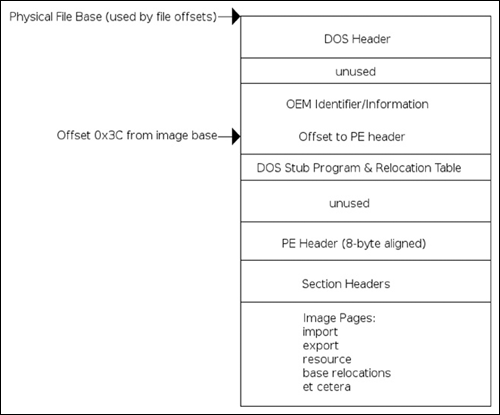
It should be noted that the DOS header itself is only found in image files and not in other files such as objects and so on. One characteristic of the DOS file header is that the first few bytes will contain the “magic” bytes indicating that it is a DOS image, specifically the characters M and Z. This knowledge, combined with other simple heuristics, can help a reverser identify a file as being a PE. Skipping past the DOS header information, as it is essentially useless to us, we find the PE header itself. The PE header begins with another field that identifies it as a PE file, specifically the bytes PE\0\0, where \0 is a binary zero. Immediately following this signature, there is the COFF file header (see Figure 3.2). The first field in the format is the machine type; it is two bytes long and will almost always be either 0x8664 (AMD64), 0x14c (IA32) or less often 0x200 for IA64 Itanium processors. Immediately following this field is one that indicates the number of sections in the file. It is also a two-byte field, and, according to Microsoft documentation, the maximum value this can hold is 96. Skipping along to the next item of interest, we have a file offset to the COFF symbol table. As a reverse engineer, you can almost guarantee that the file you’re inspecting will not have symbols, so you can expect that this field will be zero, indicating that an offset does not exist. However, if an offset does exist, it will be specified here. After this field, there is another four-byte field indicating the number of symbols present. Finally, the last two standard COFF fields are both two bytes, one indicating the size of the optional header (which exists in images only) and a field called characteristics that defines specific attributes of the file.
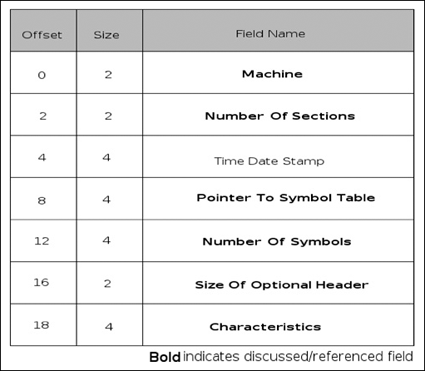
The characteristics specify various attributes of the file, such as whether the file is a dynamically loaded library (DLL) or not, if the file is part of the system, if the file has had its relocation information stripped, if the file uses 32-bit words, and so on. For a full table describing this information, please consult the official Microsoft documentation.
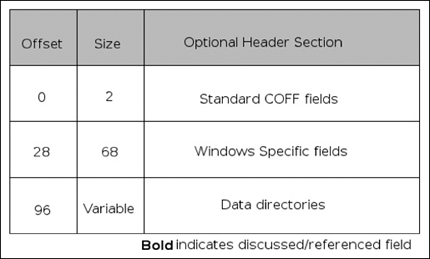
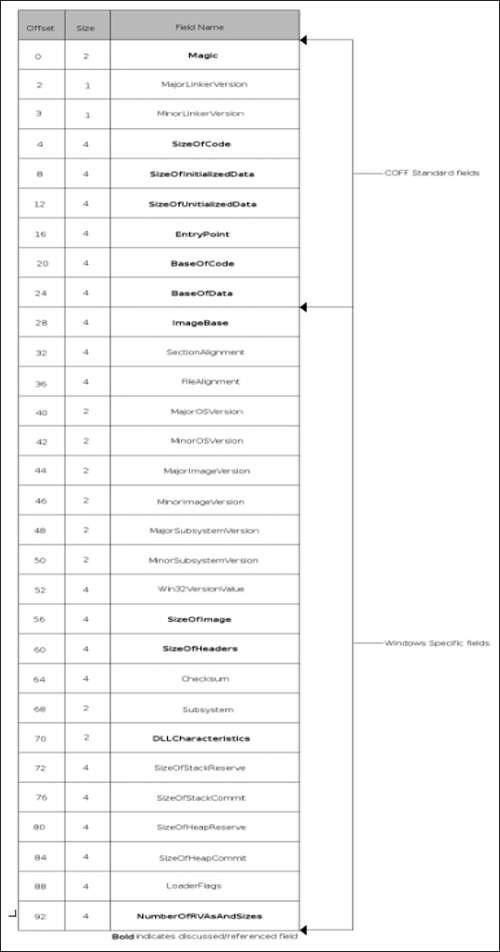
The optional header, if one exists (it does not exist in object files), is broken into three major sections, the first being eight fields that are generic to the COFF format, followed by 21 Windows-specific fields, and finally the data directories. (See Figure 3.3.) In the generic COFF section, the fields that we would find most interesting are the magic, size of code, size of initialized data, size of uninitialized data, entry point and code base address, and data base address fields. The magic field is another signature that can be used to identify PE versions; the valid fields are 0x10B and 0x20B for PE32 and PE32+, respectively. This chapter will cover only the PE32 format, as it is more common, and will leave the PE32+ format as yet another exercise for the reader. The size fields are relatively self-explanatory and indicate the size of the .text/code, .data and .bss sections of the file. Finally, we have the relative virtual address (RVA) of the entry point, or place where the application should start executing. An RVA is just a complicated way of referring to an offset from the virtual address (VA) where the file is loaded, and should be looked at as such. Finally, after all of the above, we have the base virtual addresses of the code and data sections. Next, in the Windows-specific section of the optional header, we find the following fields of interest: image base, size of image, size of headers, DLL characteristics, and finally the number of data-directory entries and their size.
The image base specifies the preferred address of the first byte of the image when loaded. According to Microsoft documentation, it must be a multiple of 64 K. The default varies by operating system and is not really important; it’s merely a preference thing and the loader has the option of overriding what the file thinks is right. Next, there is the size of the image and the size of the headers; the size of the image is the total size of the file including all of the headers as loaded into memory, with the size of the headers specifying the size of the headers, obviously. The DLL characteristics field is obviously used only for DLLs and specifies attributes specific to the DLL. To the reverser, the interesting fields are 0x0040, which specifies that the base address can be assigned dynamically and would allow for things such as address space layout randomization (ASLR), 0x0080 which specifies that code integrity checks are made, 0x0100 which specifies that the image is no-execute (NX) compatible, and finally 0x0400 which indicates that the file does not use structured exception handling (SEH), effectively preventing any SEH handler from pointing into this DLL. Finally, the last element of interest specifies the number of elements in the next subsection of the optional header. See Figure 3.4.
Data directories are a bit of a different beast. They specify some other type of data for the image. For instance, the import table data directory specifies which libraries and functions will be imported by the application for use. The data directory section of the optional header is an array of 16 structures containing double word values, specifying the virtual address and size for a given data directory. The data directories specified are shown in Table 3.1.
Table 3.1. Data Directories
Name | Description |
|---|---|
Export table | Export table specifies functions exported by the file |
Import table | Import table specifies functions imported by the file |
Resource table | Resource table specifies various resources used by the file, such as icons |
Exception table | Exception table specifies registered exception handlers used by the file |
Certificate table | Attribute certificate table |
Base relocation table | Base relocation table specifies all base relocations in the file |
Debug | Used for storing compiler-generated debugging information |
Architecture | Reserved, must be zero |
Global pointer | RVA of the value to be stored in the global pointer register |
Thread local storage (TLS) table | Specifies information used in thread-specific data storage |
Load configuration table | Different uses for different Windows versions, since XP used to register SafeSEH functions |
Bound import | Bound import table |
Import address table (IAT) | Prior to runtime, identical import lookup table, at runtime filled with resolved symbol addresses |
Delay import descriptor | Similar to the import table but delays imports |
CLR runtime header | CLR runtime header |
Reserved | Reserved, must be zero |
At this point, only the export, import and load configuration tables are described in detail. Everything else is left as an exercise for the reader. The export table, as previously indicated, specifies the functions exported by the file. The format of the export table, also known as the .edata section, is shown in Table 3.2.
Table 3.2. Format of the Export Table
Name | Description |
|---|---|
Export directory table | The export directory table describes the entirety of the export information. It contains address information that is used to resolve imports to the exported functions within the image. |
Export address table | Contains the address of exported entry points, data and absolutes |
Name pointer table | Array of RVAs into the export name table |
Ordinal table | Array of 16-bit ordinals into the export address table |
Export name table | Null-terminated variable length string names of exported functions/data/etc. |
It should be noted that not all of these tables are required to be present; if exports are only to be done via ordinal, then only the export directory table and export address table are required. The interesting fields of the export directory table (EDT) are: the name RVA, ordinal base, address table entries, number of name pointers, export address table (EAT) RVA, name pointer RVA, and ordinal table RVA. See Figure 3.5.
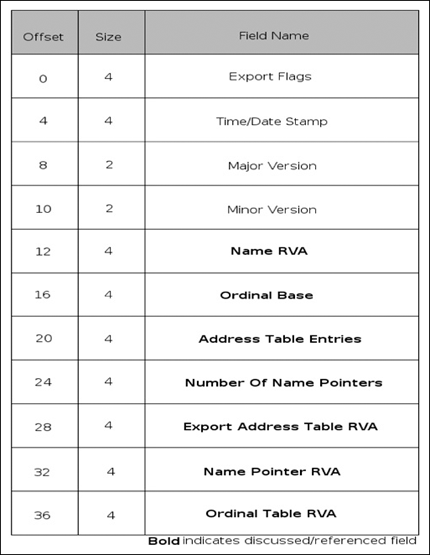
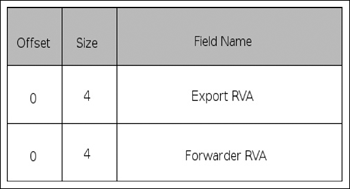
The name RVA is the RVA to the name of the DLL in question. The ordinal base is simply the base index that ordinal indexing starts from; this is typically set to one. The address table entries and number of name pointers fields specify how many entries there are in the address table and name table, respectively. The EAT RVA, name pointer RVA and ordinal table RVA entries are all exactly what they sound like; they indicate the RVA for the rest of the tables in the .edata section. The export address table is a fairly simple structure with only one element that can be represented one of two ways, and is most likely implemented as a union. If the address is not within the export section (which is defined by summing the address and length as provided in the optional header), the field is an actual address in the code or data. Otherwise the field is a forwarder RVA, which names a symbol in another DLL. The export name pointer table is another simple structure; it simply contains an RVA into the export name table for each export, if defined. An export name is only defined if a pointer is contained in this table. The ordinal table is an array of 16-bit indexes biased by the ordinal base into the EAT. The ordinal table and the export name table are essentially mirrors of each other in that an index into one provides an index into the other, providing of course that the name for the export exists. See Figure 3.6.
Finally, the export name table contains the actual string that makes up the public name for the exported symbol; public means that if one exists, an application can import the function/data by name. So, taking all of this into account, a symbol can be resolved by name using the following steps:
Obtain the VA or the export directory table in the optional header.
Use that VA to locate the ordinal base, export directory table and the ordinal table RVAs.
Retrieve the RVA of the name pointer RVA.
Search the export name pointer table to determine if the function is exported by name.
Use the index into the name pointer table as an index into the ordinal table to retrieve the ordinal.
Take the ordinal and subtract it from the ordinal base and use the result as an index into the EAT.
The data at this index is the RVA for the exported function.
The process for obtaining a symbol via ordinal is exactly the same. However, the steps for finding the export by name are removed and the conversion from name pointer index to ordinal index is also removed.
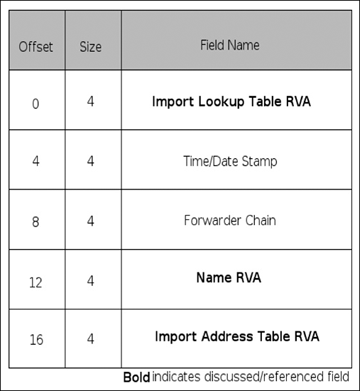
The import table, or .idata section, uses a method similar to the export table, although it’s a little less convoluted. There are three main structures used when importing a symbol: the import directory table (IDT as shown in Figure 3.7), import lookup table (ILT as shown in Figure 3.8), and the hint/name table. The IDT contains a few fields; the ones discussed here are the ILT RVA, the name RVA, and the IAT RVA. All of these are fairly self-explanatory except for the name RVA, which is also simple enough in that it is the RVA of the null-terminated ASCII string of the name of the DLL to be imported. The ILT and IAT are arrays of 32-bit integers (on PE32), with each entry being a bit-field. The high-order bit of an entry indicates whether the import is done by name or by ordinal; if the bit is set it is imported by ordinal. If the import is done by ordinal, bits 0 to 15 represent the ordinal to import. If it’s being imported by name, then bits 0 to 30 represent a 31-bit RVA into the hints/name table for the name of the import. The hints/name table is yet another fairly simple table. The first two bytes of each entry serve as a “hint” to the loader.
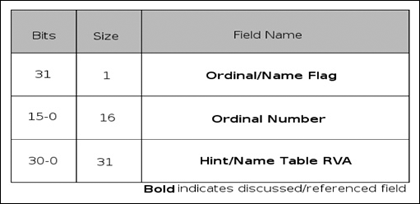
This hint is used as an index into the export name pointer table in the target DLL. If the entry matches, then this is used; otherwise a search for the name is performed. The next element is a variable length null-terminated ASCII string that is the name of the function to import, potentially followed by a trailing null padding byte, in order to have the next entry properly aligned.
Note
An interesting side note is that, while the IAT and ILT are supposed to contain the same data until the symbols are actually bound, the author has found that this was not always the case. In the distant past, while writing a tool to parse the PE format, it was found that some compilers would move the ILT into the .text segment and its contents would actually be different from expected! It was also found that some compilers didn’t make use of the ILT at all and instead only used the IAT. When manually parsing the format, be aware of subtle nuances like this. Both Microsoft and Borland like to take shortcuts when possible.
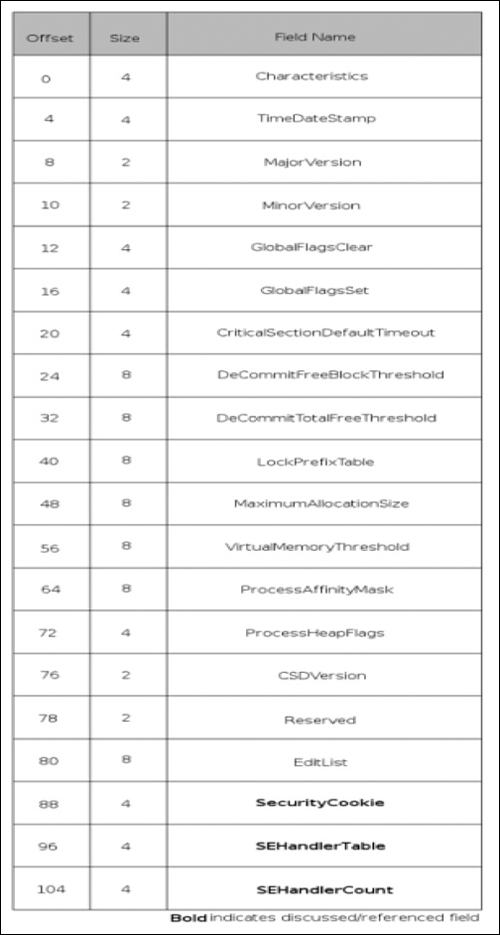
Finally, we move into the Load Configuration structure, as shown in Figure 3.9. This structure was supposedly used in limited cases in Windows NT in a very different manner from how it is used in the post-Windows 2000 world. In Windows XP and later, this section is used by SafeSEH to register valid exception handlers with the system, thus avoiding the issue of an attacker overwriting an SEH entry and causing an exception to be raised and thus having their code executed. If the IMAGE_DLLCHARACTERISTICS_NO_SEH field is not set in the DLL Characteristics field of the optional header, and an exception handler is not in this list when the system is attempting to call it, then the process is aborted. In the Load Configuration structure, there are only three fields we would find interesting: the security cookie, structured exception (SE) handler table, and structured exception handler count. The security cookie is not actually the cookie itself, but rather a pointer to it. This cookie is used in a number of ways, most notoriously when the /GS flags are specified to the Microsoft compiler, which implements stack cookies to prevent stack-based buffer overflows. The SE handler table is a sorted table of RVAs that correspond to valid SEH handlers for that particular image. The SE handler count is a count of the total number of handlers.
The Executable and Linking Format (ELF) was the result of work done at Unix System Laboratories and was eventually published as part of the System V Application Binary Interface (ABI) and then later adopted in Tool Interface Standard. Interestingly enough, the original name for the format was Extensible Linking Format, most likely a result of many prior file formats not supporting the dynamic linking of external libraries. Since its official adoption as the file format of choice for Unix and Unix-like operating systems, it has become the de facto standard across the board in the Unix world, with nearly every vendor either using it as their native format or supporting it through a thin abstraction layer. It is used in everything from Linux, Solaris, IRIX and the BSDs to the Playstation. Therefore, unless the world in which you operate is entirely Windows based, you will encounter ELF files in pretty short order.
In the ELF header (shown in Figure 3.10), there are no entirely strict sizes; everything is defined relative to the native sizes of the processor, and a lot of processors use it. For this reason, this chapter only references IA32. The ELF header and indeed the format are a lot more straightforward and interesting to us as reverse engineers, as you might ascertain from the number of elements in the header that are touched upon in this chapter. The e_ident field identifies the ELF file: it identifies the file as an ELF file, identifies the native word size of the processor, specifies the intended byte-ordering, and finally the version of the ELF header. The field is an array of unsigned characters, 16 in total. The first four bytes are the “magic” field with the values of 0x7F, E, L and F. The next byte specifies the word size or class, with a value of 0 indicating that it is an invalid class, a value of 1 indicating that it is 32-bit, and a value of 2 indicating that it is 64-bit. The next byte specifies the encoding of data within the file, with a possible value of 0, 1 or 2. Zero again signifies an invalid value, 1 indicates that the data is encoded in two’s complement values with the least significant byte occupying the lowest address, and 2 indicating that the encoded values are encoded in two’s complement values with the most significant byte at the lowest address. The next byte in the e_ident field specifies the version of the ELF header and, as we will see shortly, is somewhat redundant. It should be set to 1, indicating that it is using the current version of the ELF specification. Finally, the rest of the bytes in the array are currently unused and reserved. They currently serve as padding and the specification suggests that programs parsing the header ignore any values in the field. Following the e_ident field is the e_type field, which identifies what type of executable the file is. The possible values are 0 indicating that there is no file type, 1 indicating that the file is a relocatable file, 2 indicating that it is an executable file, 3 that it is a shared object file, and 0xFF00 and 0xFFFF are marked as being processor specific.
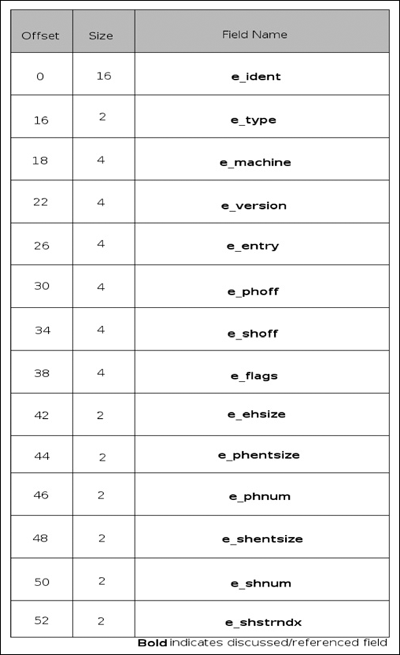
After the e_type field, we have the e_machine field, which indicates the type of processor the file was built for. The only value of substance for us is the value 3, which indicates that it is for an IA32 machine; the other values are for more esoteric architectures, such as SPARC, Motorola, MIPS and IA 8086. e_version has the same values as the version in the e_ident header, with 0 indicating that the version is invalid and 1 indicating that the version is the current version. The e_entry member sounds exactly like what it is—it holds the VA of the entry point of the application if applicable; otherwise the field is set to 0. The e_phoff field yields the file offset in bytes of the file’s program header table. The e_shoff field yields the file offset in bytes of the file’s section header table; both of these fields e_phoff and e_shoff are only present if the file has the table. Otherwise they’re initialized to 0. The e_flags field contains processor-specific flags. However, the IA32 architecture specifies no flags and therefore the field will be (should be) 0. The e_ehsize field holds the size of the ELF header, the e_phentsize and e_shentsize indicate the size in bytes of one entry in the program header table and section header table, respectively. The e_phnum and e_shnum fields indicate the number of entries in the program header table and the section header table. Thus, to calculate the size of the program header table, you would multiply the e_phentsize and the e_phnum fields. Once again, if any of these tables do not exist, the field’s values are initialized to 0. Finally, at the end of the ELF header we have the e_shstrndx field, which holds the index for the section name string table in the section header table, if applicable.
The ELF section header table is an array of section header structures. Each structure is of the format displayed in Figure 3.9 and is again fairly straightforward. That said, in the array there are certain indexes that hold special values; these special indexes are shown in Table 3.3.
SHN_UNDEF marks an undefined, absent or generally meaningless section reference. It is important to note that, although undefined, the section header table (if present) always contains an SHN_UNDEF entry at index zero; thus, if the e_shnum field states that there are ten fields, there are actually nine plus the SHN_UNDEF entry. SHN_LORESERVE specifies the lower bound of reserved index ranges. SHN_LOPROC and SHN_HIPROC specify the range of entries reserved for processor-specific entries. SHN_ABS specifies absolute values for the relevant symbols. This essentially means symbols referenced are not affected by relocation. SHN_COMMON is for common symbols such as unallocated external variables in C, and finally SHN_HIRESERVE specifies the upper bound of reserved index ranges. Every section in an ELF file has exactly one section header describing it; the sections described are contiguous although potentially empty and the sections themselves may not overlap. The elements of a section header are as listed in Figure 3.11.
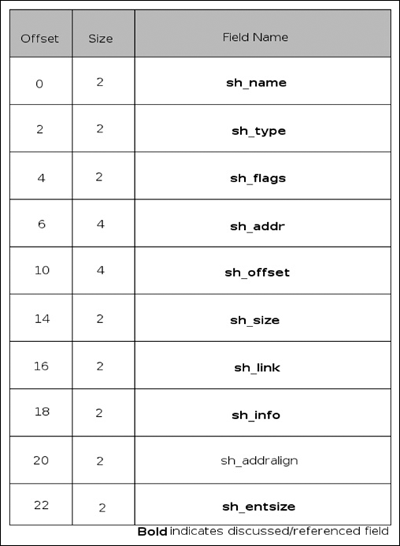
The sh_name element is an index into the section header string table, which specifies the name of the section. The sh_type element determines the type of section contents and semantics; specifically the following types are defined in Table 3.4.
The SHT_NULL value indicates that the section header entry is inactive and does not have an associated section. The SHT_PROGBITS value indicates that the section holds data defined by the program itself and that the format is only known to the program. The SHT_SYMTAB and SHT_DYNSYM sections define symbol tables. An application may have exactly one SHT_SYMTAB section (although likely it will have none). It typically contains a complete table of symbols, whereas the SHT_DYNSYM section defines a minimal set of symbols to be used for dynamic linking. Neither of these sections is gone into in detail since it is unlikely you will be reversing a file that actually has symbols—however, the interested reader is encouraged to read the ELF specification. The SHT_STRTAB is a section that holds a string table; a file can have more than one string table section and these sections are explained in more detail later on in this chapter. SHT_RELA sections contain relocation entries with explicit addends. SHT_HASH sections contain a symbol hash table and at the moment only one section of this type is allowed per object. This section is required by all objects participating in dynamic linking. The SHT_DYNAMIC type is used for dynamic linking. SHT_NOTE indicates that the section holds information that marks the file in some way. This section is not described for brevity’s sake. SHT_NOBITS indicates that the section occupies no space in the file but otherwise resembles an SHT_PROGBITS section; the most well-known SHT_PROGBITS section is the .BSS. SHT_REL holds relocation entries without explicit addends, and the SHT_SHLIB section is reserved but has unspecified semantics. SHT_LOPROC and SHT_HIPROC define a range of sections that are reserved for processor-specific semantics, whereas SHT_LOUSER and SHT_HIUSER are the same except they are reserved for the application.
Following the sh_type field we have the sh_flags field, which defines various 1-bit attributes for the section. The attributes are enumerated in Table 3.5.
The SHF_WRITE flag indicates that the section will be writeable. SHF_ALLOC indicates that the section should actually reside in memory at run-time. SHF_EXECINSTR indicates that the section contains executable instructions. Finally, SHF_MASPROC indicates that the section is reserved for processor-specific uses.
Next we have the sh_addr field; it provides the preferred VA at which the section should start. The sh_offset is similar, except that it provides a file offset from the beginning of the file to the beginning of the section. The sh_size field is the size of the section, unless it is of type SHT_NOBITS, although a SHT_NOBITS section can have a nonzero sh_size; it just does not occupy space in the physical file. The sh_link and sh_info members are related in that both values are subject to interpretation dependent on the section type. In the case of a SHT_DYNAMIC section, the sh_link member indicates the section header table index of the string table used by the section, and has a sh_info field of zero. For SHT_HASH the sh_link member holds the section header table index of the symbol table that applies to the hash table, and again has an sh_info value of zero. For a full list of values, please refer to the ELF specification. Finally, the sh_entsize member applies to certain sections that have fixed-size tables inside of them; for instance, given a section with a symbol table, this entry would indicate the length of the symbol table.
Now that we have some comprehension of the various sections, Table 3.6 denotes sections that are fairly common and standard, with their types, attributes and a brief description. It should be noted that sections whose name has a leading period (such as .bss) are reserved for use by the system.
Table 3.6. Common Sections
Type | Attributes | Description | |
|---|---|---|---|
.bss | SHT_NOBITS | SHF_ALLOC SHF_WRITE | Holds uninitialized data, is initialized with zeros at load time; typically globally scoped |
.comment | SHT_PROGBITS | n/a | Contains version control information |
.data | SHT_PROGBITS | SHF_ALLOC SHF_WRITE | Contains initialized data that contributes to applications memory image, typically globally scoped |
.data1 | SHT_PROGBITS | SHF_ALLOC, SHF_WRITE | Contains initialized data that contributes to applications memory image, typically globally scoped |
.debug | SHT_PROGBITS | n/a | Unspecified contents used for symbolic debugging |
.dynamic | SHT_DYNAMIC | SHF_ALLOC SHF_WRITE (processor specific) | Contains dynamic linking information, whether SHF_WRITE is specified or not is processor specific |
.dynstr | SHT_STRTAB | SHF_ALLOC | Contains strings needed for dynamic linking |
.dynsym | SHT_DYNSYM | SHF_ALLOC | Contains strings needed for dynamic linking |
.fini | SHT_PROGBITS | SHF_ALLOC SHF_EXECINSTR | Contains executable instructions used in application termination, such as destructors |
.got | SHT_PROGBITS | Described in detail later | |
.hash | SHT_HASH | SHF_ALLOC | Contains a symbol hash table |
.init | SHT_PROGBITS | SHF_ALLOC SHF_EXECINSTR | The inverse of .fini, for ex., contains constructors |
.interp | SHT_PROGBITS | SHF_ALLOC | Holds the path name of a program interpreter; if the file contains a loadable segment then the SHF_ALLOC attribute will be set |
.line | SHT_PROGBITS | n/a | Contains line information for debugging |
.note | SHT_NOTE | n/a | Can be used by the implementation to allow stigmatic marking of an executable |
.plt | SHT_PROGBITS | Described in detail later | |
.rel<name> | SHT_REL | SHF_ALLOC | Contains relocation information; if there is a loadable segment then SHF_ALLOC will be set. Traditionally in the place of <name> is the name of the section that the relocations are for, such as .rel.text |
.rela<name> | SHT_RELA | SHF_ALLOC | Contains relocation information; if there is a loadable segment then SHF_ALLOC will be set. Traditionally in the place of <name> is the name of the section that the relocations are for, such as .rela.text |
.rodata | SHT_PROGBITS | SHF_ALLOC | Contains read-only data, such as constant strings |
.rodata1 | SHT_PROGBITS | SHF_ALLOC | Contains read-only data, such as constant strings |
.shstrtab | SHT_STRTAB | n/a | Contains section names |
.strtab | SHT_STRTAB | SHF_ALLOC | Contains strings, typically names associated with symbol table entries. If there is a loadable section then SHF_ALLOC will be specified. |
.symtab | SHT_SYMTAB | SHF_ALLOC | Contains a symbol table (not described in this chapter). If there is a loadable section, then SHF_ALLOC will be specified |
.text | SHT_PROGBITS | SHF_ALLOC SHF_EXECINSTR | The executable instructions that make up the program |
The program header table is an array of program header structures; these structures define segments and generally define how to load the binary to the operating system (OS). The size of the table and the number of entries are specified in the ELF header. Some of the segments are supplementary, whereas others contribute to the process image. Just like everything else in the ELF (sans the ELF header itself) file, there is no specific ordering of the segments nor specific offset to the program header table; this is defined solely by the ELF header. In Figure 3.12 to the right you will find a diagram detailing the ordering and members of an Elf32_Phdr structure. The p_type field indicates what type of segment is being described and by implication tells the system how to interpret its contents. The defined values are shown in Table 3.7.
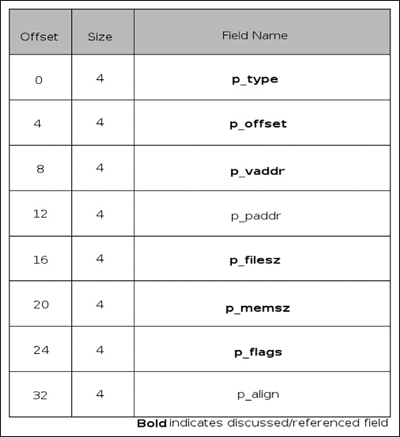
Segments of type PT_NULL are unused; the values of its other members are undefined (and thus should be ignored). The reasoning behind having another NULL type of segment is to allow segments to be defined but ignored by the implementation. Segments of type PT_LOAD are actually loaded into memory preferably at the address p_vaddr. The first p_filesz bytes at p_offset from the file’s memory-mapped base are loaded into memory. If p_memsz is larger than p_filesz then these bytes are also mapped into the segment and zero filled; it is invalid for a p_filesz member to be greater in value than p_memsz. The PT_INTERP segment, if present, must precede any PT_LOAD segments as it indicates the path name of the program interpreter. This segment can occur only once in the file (if the file wishes to be valid). Segments of type PT_DYNAMIC are related to dynamic linking. PT_NOTE is relatively unimportant but allows interacting applications to check conformance (that is, GLIBC version). PT_SHLIB is defined but reserved, and files containing a PT_SHLIB segment do not conform to the ABI. The PT_PHDR segment specifies the size and location of the program header table. This specification applies to both in the physical file and in the memory image. Like the PT_INTERP segment, it can only occur once and if present must occur before any PT_LOAD segments. Finally, PT_LOPROC and PT_HIPROC are reserved ranges for processor-specific functionality.
As one might have guessed from the previous description, the p_offset member specifies the offset of the segment from the beginning of the file. The p_vaddr member specifies the preferred VA of the segment. The p_filesz and p_memsz elements specify the size of the segment in the physical file and in memory, respectively, and finally the p_flags specifies attributes of the segment. The three possible values are PF_R, PF_W and PF_X for read, write and execute, respectively.
Now that we have some basic understanding of segments, it’s possible to talk a bit about the differences between executable images, shared library images, or images that have address space layout randomization (ASLR) applied. Typically, in order to load an executable image, the address for each segment used when building the image must be included. This address is specified in the segment’s p_vaddr member. This is the result of the image having absolute references that would break if the addresses were changed. ASLR images and shared library images typically get around this restriction by using what is known as position independent code (PIC). The general idea behind PIC is that, instead of using absolute references to some piece of data, relative references are used. For instance, whereas in traditional code you may access a variable at address XYZ, in PIC you would reference that by another means—that is, relative to your current position. In the case of an application using a shared library to access commonly used functions, such as is common with the standard C library, a series of intermediaries are used—in the case of ELF, it is the global offset table (GOT or .got), the dynamic segment/section (_DYNAMIC or .dynamic) and the procedure linkage table (PLT or .plt). These three segments are integrally interrelated and make up one of the major reasons for adopting ELF over older standards such as a.out—namely, standards-supported dynamic linking. The .dynamic segment is present in every executable image that takes part in dynamic linking; this segment is referenced by the symbol _DYNAMIC, which is an array of structures as illustrated in Figure 3.13.
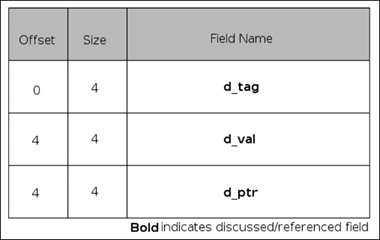
The dynamic structure contains two values, a tag followed by a union. The tag determines how the union will be interpreted. The d_val member contains an integer with various interpretations that are described below, whereas the d_ptr member contains a VA. As you well know, the compile-time VA and the runtime VA might differ and the relocations section does not contain relocations for the _DYNAMIC array. In Table 3.8 you will find several defined d_tag types, and whether they are optional or mandatory. This is not the full list but only what is relevant to us, and the interested reader is again highly encouraged to refer back to the ELF specification for a more detailed and complete explanation.
The DT_NULL element marks the end of the _DYNAMIC array, and thus it is a necessary element. Aside from this element, there is no inherent ordering within the array. The DT_PLTRELSZ element holds the total size of relocation entries associated with the PLT. If a DT_JMPREL element is present, then a corresponding DT_PLTRELSZ entry must also be present. DT_PLTGOT entries hold an address associated with either the GOT or the PLT, both of which are described in further detail below. DT_FINI elements hold the address of a termination function, or a destructor, which potentially would be useful to hackers and therefore is of interest to us and is covered briefly later on. Finally, the DT_JMPREL entry contains a pointer to relocation entries associated only with the PLT. Separating these relocations allows the linker to ignore them during image initialization and use a form of linking known as lazy binding. Quite simply, lazy binding defers the relocation until the actual use of that symbol. For instance, consider the following C program:
#include <stdio.h>
#include <stdlib.h>
int
main(void)
{
       unsigned int cnt;
       for (cnt = 0; cnt < 2; cnt++)
        printf("cnt: %u\n", cnt);
       exit(EXIT_SUCCESS);
}
In this application, we have two (visible) standard library functions called printf( ) and exit( ). In a lazy binding scenario, neither symbol is resolved until the last possible minute. The first time printf( ) is called the symbol is resolved, incurring the overhead of relocation then, instead of at initialization. However, the second time printf( ) is called, the symbol has already been resolved and the overhead is not incurred to resolve printf( ) again. However, that overhead is again incurred to resolve exit( ). The advantage of this, of course, is the increase in speed and efficiency; after all, not every symbol is going to be resolved. Furthermore, it makes dynamic module loading easier to cope with. However, the downside of this comes in the form of attack surface—it makes a buggy program more easily exploited. In recent years, a flag passed to hardened GCC tool-chains called relro does all relocations at program initialization and then disallows writing to the segments at runtime. This means that a potential attacker cannot take advantage of some dubious pointer arithmetic or a buffer overflow and write into these sections and then return execution flow back into these sections. Typical sections to be marked this way are .init/.ctors, .fini/.dtors, the PLT, GOT and .dynamic, although specifics depends upon architecture. This methodology is becoming more and more common, and as a reverse engineer it is likely that as time progresses the chances of your running across lazy binding decreases.
The global offset table, which on IA32 platforms is accessible under the symbol _GLOBAL_OFFSET_TABLE, is an array of addresses. These addresses are absolute references and allow the position-independent code to have relative references. Thus, the PIC code will obtain the address of the GOT and extract absolute references from its relative ones. The symbol _GLOBAL_OFFSET_TABLE need not refer to the beginning of the .got segment, and thus negative and positive indexes are potentially valid. When the image is loaded, the dynamic linker walks through the relocations and looks for entries of a specific type and replaces their entries in the GOT with their absolute addresses, effectively getting around the limitations of the static linker. The first element of the GOT is a special entry that contains the address of the _DYNAMIC structure; this allows the dynamic linker to process the GOT by finding itself in the _DYNAMIC structure without having to depend on any relocations. Furthermore, on IA32 the second and third entries are also reserved to have special values. The GOT redirects position-independent addresses to absolute locations, whereas the PLT does the same but for functions. The PLT determines the function’s absolute address and updates the GOT as necessary. The exact implementation of the PLT varies, depending on whether it was compiled PIC or not. A non-PIC entry looks something like the following:
PLT
.PLT0
       push   address_of_GOT+0x04
       jmp    [address_of_GOT+0x08]
       nop
       nop
       nop
       nop
.PLT1:
       jmp    [name1_in_GOT]
       push   offset
       jmp    [.PLT0+$]
.PLT2:
       jmp    [name2_in_GOT]
       push   offset
       jmp    [.PLT0+$]
       ...
whereas a PIC PLT might look something like this:
PLT
 .PLT0
       push   [ebx+0x04]
       jmp    [ebx+0x08]
       nop
       nop
       nop
       nop
 .PLT1
       jmp    [ebx+name1]
       push   offset
       jmp    [.PLT0+$]
 .PLT2
       jmp    [ebx+name2]
       push   offset
       jmp    [.PLT0+$]
With all this taken into context, in order to resolve dynamic references, the linker and the application work in tandem according to the following steps:
Upon creation of the image, the second and third entries in the GOT are set to their special values as defined below.
If the PLT is PIC, then the address of the GOT must reside in the ebx register. The calling function is responsible for placing the address into this register.
Assume that the application is trying to call name1 which can be found in the label .PLT1.
The first instruction under that label is a jump into the GOT, which initially contains the address of the push and jmp instructions following the jump instruction into the GOT.
The application then pushes the address of the relocation entry, represented in this case by the variable named offset. This offset will specify GOT entry used in the prior jump along with a symbol table index, name1 in this instance.
The application then jumps to .PLT0 and pushes the address of the second element of the GOT onto the stack, giving the dynamic linker a word to reference for identification purposes, and then transfers control to the third GOT entry, which hands control to the dynamic linker.
The dynamic linker unwinds the stack and retrieves the identifying information, finds the absolute address for the symbol and stores it in the related GOT entry, and then hands control to the requested function.
Further calls to this function will skip the push of offset and will jump to .PLT0 as a result of having the GOT entry modified.
So, as you can see, dynamic linking is accomplished by indirection and abstraction. The application doesn’t know beforehand exactly what address it’s calling, and in turn calls into the PLT, which in turn jumps to the GOT; if the address has not already been resolved, control is handed back into the PLT, which pushes the relocation entry and jumps to the first entry in the PLT, which then hands control to the dynamic linker.
Note
As previously mentioned, several advances have been made in the not-so-distant past that require that lazy binding be turned off so that relocations can occur at initialization instead of at runtime. If you think hard enough, now that you know how the GOT/PLT works, you might realize why. If as an attacker I can overwrite a GOT entry, then it’s really only a matter of the application calling that function again before my shellcode obtains control. This technique has been documented in several places; one of the white papers can be found at the following URL: www.milw0rm.com/papers/3.
Similarly, a given image destructor can be attacked by overwriting data in .dtors, which typically contains the addresses of functions in .fini. By overwriting an address there, it becomes potentially possible for the application to have a rogue function called upon program execution. This technique was documented by Juan M. Bello Rivas and his white paper can be found at the following URL: http://synnergy.net/downloads/papers/dtors.txt
In conclusion, we’ve taken you on a brief tour of the PE and ELF file formats, giving you a basic understanding of these formats and hopefully giving you the knowledge needed to perform limited manual analysis of either one. You should be able to determine the imports and exports of a PE (and consequently have a basic understanding for rebuilding the imports section in a packed PE), and have a decent understanding of how dynamic linking occurs in ELF files. In both formats, you should be fairly comfortable with their members and structure and generally have some understanding of how a linker and loader operate on either of the formats. As suggested throughout the chapter, the reader is encouraged to read the original specifications themselves, as this chapter is far from complete and tries to emphasize only elements that the author thought would be most important. Some concepts that you might find particularly interesting or useful may not be covered. The ELF specification can be found at the following URL: www.muppetlabs.com/~breadbox/software/ELF.txt or via your favorite search engine by searching for “ELF specification.” The PE specification can be obtained from Microsoft’s website at www.microsoft.com/whdc/system/platform/firmware/PECOFF.mspx.