Table of Contents for
C in a Nutshell, 2nd Edition
 C in a Nutshell, 2nd Edition
Published by
O'Reilly Media, Inc., 2015
C in a Nutshell, 2nd Edition
Published by
O'Reilly Media, Inc., 2015
- Cover
- nav
- C
- C in a Nutshell, Second Edition
- Preface
- I. Language
- 1. Language Basics
- 2. Types
- 3. Literals
- 4. Type Conversions
- 5. Expressions and Operators
- 6. Statements
- 7. Functions
- 8. Arrays
- 9. Pointers
- 10. Structures, Unions, and Bit-Fields
- 11. Declarations
- 12. Dynamic Memory Management
- 13. Input and Output
- 14. Multithreading
- 15. Preprocessing Directives
- II. Standard Library
- 16. The Standard Headers
- 17. Functions at a Glance
- 18. Standard Library Functions
- III. Basic Tools
- 19. Compiling with GCC
- 20. Using make to Build C Programs
- 21. Debugging C Programs with GDB
- 22. Using an IDE with C
- Index
- About the Authors
- Colophon
Chapter 18. Standard Library Functions
This chapter describes in alphabetical order the functions available in the standard ANSI C libraries. Most of the functions described here were included in the 1989 ANSI standard or in the 1995 “Normative Addendum” and are currently supported by all major compilers. The ISO/IEC 9899:1999 standard (“C99”) introduced several new functions, which are also widely supported by today’s compilers. The same cannot be said of the new, mostly optional features, such as multithreading and bounds-checking functions, introduced by the new ISO/IEC standard 9899:2011. The new functions introduced in that standard are labeled “C11” in this chapter.
Each description includes the function’s purpose and return value, the function prototype, the header file in which the function is declared, and a brief example. For the sake of brevity, the examples do not always show a main() function or the #include directives that indicate the header file with the function’s declaration. When using the functions described in this chapter, remember that you must provide a declaration of each standard function used in your program by including the appropriate header file. Also, any filename may also contain a relative or absolute directory path. For more information about errors and exceptions that can occur in standard function calls, see the sections on the standard headers math.h, fenv.h, and errno.h in Chapter 16.
In C11 implementations that support the “secure” alternative functions—that is, the bounds-checking functions with names ending in _s—the following rule applies: before the include directive that includes the header containing the declaration of the desired function, the macro __STDC_WANT_LIB_EXT1__ must be defined as equal to 1. For more information on using the secure functions, see “Functions with Bounds-Checking”.
C99
Ends program execution without calling atexit() functions or signal handlers.
#include <stdlib.h>_Noreturnvoid_Exit(intstatus);
The _Exit() function
terminates the program normally but without calling any cleanup
functions that you have installed using atexit() or at_quick_exit(), or signal handlers you have
installed using signal().
_Exit() returns a status value to
the operating system in the same way as the exit() function does.
Whether _Exit() flushes the
program’s file buffers or removes its temporary files may vary from
one implementation to another.
Example
intmain(intargc,char*argv[]){if(argc<3){fprintf(stderr,"Missing required arguments.\n");_Exit(-1);}/* ... */}
See Also
abort(), exit(), atexit(), quick_exit(), at_quick_exit(), raise()
Ends program execution immediately.
#include <stdlib.h>_Noreturnvoidabort(void);
The abort() function
terminates execution of a program by raising the SIGABRT signal.
For a “clean” program termination, use the exit() function. The abort() function does not flush the buffers of open
files or call any cleanup functions that you have installed using
atexit() or at_quick_exit(). The abort() function generally prints a
message on the stderr stream such as:
Abnormal program termination
In Unix, aborting a program also produces a core dump.
Example
structrecord{longid;intdata[256];structrecord*next;};/* ... */structrecord*new=(structrecord*)malloc(sizeof(structrecord));if(new==NULL)// Check whether malloc failed!{fprintf(stderr,"%s: out of memory!\n",__func__);abort();}else/* ... */
See Also
_Exit(), exit(), atexit(), quick_exit(), at_quick_exit(), raise()
C11
Handles errors occurring in secure function calls.
#include <stdlib.h>voidabort_handler_s(constchar*restrictmsg,void*restrictptr,errno_terror);
If the function abort_handler_s() is passed as an argument to the function set_constraint_handler_s(), it is installed as a runtime error handler so that abort_handler_s() is called if one of the secure functions (with names ending in _s) violates its runtime constraints. A runtime constraint is violated if the function call contains an invalid pointer argument, or if the bounds of an array are exceeded during the execution of the function.
If such an error occurs, the function abort_handler_s() outputs a message to stderr containing the string passed in the parameter msg (usually the name of the function which incurred the error). Then the abort_handler_s() function terminates the program by calling abort().
Example
charname[15]="NN";set_constraint_handler_s(abort_handler_s);strcpy_s(name,sizeof(name),"Abraham Lincoln");
Because the array name is too small for the
string being copied, this code snippet results in an error message like the following:
Runtime-constraint: Range error
abort -- terminating
See Also
Gives the absolute value of an integer.
#include <stdlib.h>intabs(intn);longlabs(longn);longlongllabs(longlongn);
The abs() functions return
the absolute value of the integer argument
n; if n is
greater than or equal to 0, the return value is equal to
n. If n is
less than 0, the function returns -n.
Example
intamount=-1234;charcurrencysym[2]="$";charsign[2]="-";div_tdollarsandcents={0,0};if(amount>=0)sign[0]='\0';dollarsandcents=div(abs(amount),100);printf("The balance is %s%s%d.%2d\n",sign,currencysym,dollarsandcents.quot,dollarsandcents.rem);
This code produces the following output:
The balance is -$12.34
Calculates the inverse cosine of a number.
#include <math.h>doubleacos(doublex);floatacosf(floatx);(C99)longdoubleacosl(longdoublex);(C99)
acos() implements the
inverse cosine function, commonly called arc cosine. The argument
x must be between −1 and 1, inclusive: −1
≤ x ≤ 1. If x
is outside the function’s domain—that is, greater than 1 or less
than −1—the function incurs a domain error.
The return value is given in radians, and is thus in the range
0 ≤ acos(x) ≤ π.
Example
/* * Calculate the pitch of a roof given * the sloping width from eaves to ridge and * the horizontal width of the floor below it. */#define PI 3.141593#define DEG_PER_RAD (180.0/PI)doublefloor_width=30.0;doubleroof_width=34.6;doubleroof_pitch=acos(floor_width/roof_width)*DEG_PER_RAD;printf("The pitch of the roof is %2.0f degrees.\n",roof_pitch);
This code produces the following output:
The pitch of the roof is 30 degrees.
C99
Calculates the inverse hyperbolic cosine of a number.
#include <math.h>doubleacosh(doublex);floatacoshf(floatx);longdoubleacoshl(longdoublex);
The acosh() functions
return the non-negative number whose hyperbolic cosine is equal to
the argument x. Because the hyperbolic
cosine of any number is greater than or equal to 1, acosh() incurs a domain error if the
argument is less than 1.
Example
doublex,y1,y2;puts("acosh(x) is equal to log( x + sqrt(x*x − 1))\n");puts("Enter some numbers greater than or equal to 1.0""\n(type any letter to quit):");while(scanf("%lf",&x)==1){errno=0;y1=acosh(x);if(errno==EDOM){perror("acosh");break;}y2=log(x+sqrt(x*x−1));printf("x = %f; acosh(x) = %f; log(x + sqrt(x*x-1)) = %f\n",x,y1,y2);}
This code produces the following output:
Enter some numbers greater than or equal to 1.0
(type any letter to quit):
1.5
x = 1.500000;  acosh(x) = 0.962424;  log(x + sqrt(x*x-1)) = 0.962424
0.5
acosh: Numerical argument out of domain
Converts a date-and-time structure to string form.
#include <time.h>char*asctime(structtm*systime);
The single argument of the asctime() function is a pointer to a
structure of type struct tm, in
which a date and time is represented by elements for the year,
month, day, hour, and so on. The structure is described under
mktime() in this chapter. The
asctime() function returns a
pointer to a static string of 26 bytes containing the date and time in a
timestamp format:
"Wed Apr 13 07:23:20 2005\n"
The day of the week and the month are abbreviated with the
first three letters of their English names, with no period. If the
day of the month is a single digit, an additional space fills the
place of its tens digit. If the hour is less than ten, it is
represented with a leading zero. The function strftime() permits more flexible date and time output using a format string.
Example
time_tnow;time(&now);/* Get the time (seconds since 1/1/70) */printf("Date: %.24s GMT\n",asctime(gmtime(&now)));
Typical output:
Date: Sun Aug 28 14:22:05 2005 GMT
See Also
localtime(),
localtime_s(),
gmtime(),
gmtime_s(),
ctime(),
ctime_s(),
difftime(),
mktime(),
strftime(),
time().
The localtime(),
localtime_s(),
gmtime(),
and gmtime_s()
functions are the most common ways of filling in the values in the
tm structure.
The function call ctime(&seconds) is equivalent
to the call asctime(localtime(&seconds)).
C11
Converts a date-and-time structure to string form with bounds-checking.
#include <time.h>errno_tasctime_s(char*s,rsize_tmaxsize,conststructtm*tmPtr);
The function asctime_s(), like asctime(), converts the contents of the structure pointed to by its tmPtr argument into a date-and-time string of 26 bytes in a timestamp format: "Thu Oct 7 09:33:02 2014\n"
Unlike the function asctime(), asctime_s() does not use an internal, static string buffer. Instead it copies the result to the address passed in the argument s, whose length, given by maxsize, must be at least 26 bytes. This makes the function asctime_s() safe for use in multithreading environments.
The function has the following runtime constraints: the pointers s and tmPtr must not be null pointers, and the value of maxsize must be between 26 and RSIZE_MAX. Furthermore, the members of the struct tm object pointed to by tmPtr must contain valid, normalized values. The member tm_year must represent a year between 0 and 9999. The tm structure is described in the section on gmtime() in this chapter.
The function asctime_s() returns 0 if no error occurs. Otherwise, it returns a nonzero error code, and writes the string terminator character '\0' to s[0], if the values of s and maxsize permit.
Example
time_tnow;structtmtimeStruct;chartimeStr[26];time(&now);// Date and time as an integer.localtime_s(&now,&timeStruct);// Convert to a structure.if(asctime_s(timeStr,sizeof(timeStr),&timeStruct)==0)printf("Date and time: %s",timeStr);
Typical output:
Date and time: Thu Jan 29 08:30:09 2015
See Also
asctime(), localtime(),
localtime_s(),
gmtime(),
gmtime_s(),
ctime(),
ctime_s(),
difftime(),
mktime(),
strftime(),
time(). The functions localtime(), localtime_s(), gmtime(), and gmtime_s() can be called to fill in the members of an object of the type struct tm.
Calculates the inverse sine of a number.
#include <math.h>doubleasin(doublex);floatasinf(floatx);(C99)longdoubleasinl(longdoublex);(C99)
asin() implements the
inverse sine function, commonly called arc
sine. The argument x must be
between -1 and 1, inclusive: -1 ≤ x ≤ 1.
If x is outside the function’s
domain—that is, if x is greater than 1 or
less than −1—the function incurs a domain error.
The return value is given in radians, and is thus in the range
-π/2 ≤ asin(x) ≤ π/2.
Example
/* * Calculate the altitude of the sun (its angle upward from the horizon) * given the height of a vertical object and the length of the object's * shadow. */#define PI 3.141593#define DEG_PER_RAD (180.0/PI)floatheight=2.20F;floatlength=1.23F;floataltitude=asinf(height/sqrtf(height*height+length*length));printf("The sun's altitude is %2.0f\xB0.\n",altitude*DEG_PER_RAD);
This code produces the following output:
The sun's altitude is 61°.
C99
Calculates the inverse hyperbolic sine of a number.
#include <math.h>doubleasinh(doublex);floatasinhf(floatx);longdoubleasinhl(longdoublex);
The asinh() functions
return the number whose hyperbolic sine is equal to the argument
x.
Example
puts("x asinh(x) log( x + sqrt(x*x+1))\n""-------------------------------------------------------");for(doublex=-2.0;x<2.1;x+=0.5)printf("%6.2f %15f %20f\n",x,asinh(x),log(x+sqrt(x*x+1)));
This code produces the following output:
   x          asinh(x)        log( x + sqrt(x*x+1))
-------------------------------------------------------
 -2.00       -1.443635            -1.443635
 -1.50       -1.194763            -1.194763
 -1.00       -0.881374            -0.881374
 -0.50       -0.481212            -0.481212
  0.00        0.000000             0.000000
  0.50        0.481212             0.481212
  1.00        0.881374             0.881374
  1.50        1.194763             1.194763
  2.00        1.443635             1.443635
Tests an expression.
#include <assert.h>voidassert(intexpression);
The assert() macro
evaluates a given expression and aborts the program if the result is
0 (that is, false). In this case,
assert() also prints a message on
stderr, indicating the name of
the program, and the source file, line number, and function in which
the failing assert() call
occurs:
program: file:line: function: Assertion 'expression' failed.
If the value of expression is
true (that is, nonzero), assert() does nothing and the program
continues.
Use assert() during
development to guard against logical errors in your program. When
debugging is complete, you can instruct the preprocessor to suppress
all assert() calls by defining
the symbolic constant NDEBUG before you
include assert.h.
Example
intunits_in_stock=10;intunits_shipped=9;/* ... */units_shipped++;units_in_stock--;/* ... */units_in_stock-=units_shipped;assert(units_in_stock>=0);
This code produces the following output:
inventory: inventory.c:110: main: Assertion 'units_in_stock >= 0' failed.
Aborted.
See Also
exit(), _Exit(), quick_exit(), at_quick_exit(), raise(), abort()
C99
Registers a function to be called on program termination by quick_exit().
#include <stdlib.h>intat_quick_exit(void(*func)(void));
The function at_quick_exit() registers the function specified by the argument func following the same rules as the atexit() function. The functions so registered are called only if the program is terminated by quick_exit(), not on normal program termination. If you want a function to be executed in either case, you must register it using both atexit() and at_quick_exit().
The argument func is a pointer to a function with no parameters and the return type void. The function at_quick_exit() can be called several times to register multiple functions. The number of possible calls is at least 32. If the program is ended by a call to quick_exit(), all the functions so registered are called in last-in, first-out order: that is, in the opposite order in which they were registered.
The function at_quick_exit() returns zero to indicate that the specified function was successfully registered.
Example
voidnexit(void){puts("Program terminated normally.");}voidqexit(void){puts("Programm terminated by\"quick_exit()\".");}intmain(void){inta=-1;atexit(nexit);at_quick_exit(qexit);if(a<0)quick_exit(EXIT_FAILURE);return0;}
This example would generate the following console output:
Program terminated by "quick_exit()".
See Also
Calculates the inverse tangent of a number.
#include <math.h>doubleatan(doublex);floatatanf(floatx);(C99)longdoubleatanl(longdoublex);(C99)
atan() implements the
inverse tangent function, commonly called arc tangent.
The return value is given in radians, and is thus in the range
-π/2 ≤ atan(x) ≤
π/2.
Example
#ifdef PIprintf("The symbol PI was already defined.\n");longdoublepi=(longdouble)PI;#elselongdoublepi=4.0L*atanl(1.0L);// Because tan(pi/4) = 1#endifprintf("Assume pi equals %.17Lf.\n",pi);
This code produces the following output:
Assume pi equals 3.14159265358979324.
Calculates the inverse tangent of a quotient.
#include <math.h>doubleatan2(doubley,doublex);floatatan2f(floaty,floatx);(C99)longdoubleatan2l(longdoubley,longdoublex);(C99)
The atan2() function
divides the first argument by the second and returns the arc tangent
of the result, or arctan(y/x).
The return value is given in radians, and is in the range -π ≤
atan2(y,x) ≤ π. The signs of
x and y
determine the quadrant of the result:
x> 0,y> 0:-
0 ≤
atan2(y,x)≤ π/2 x< 0,y> 0:-
π/2 ≤
atan2(y,x)≤ π x< 0,y< 0:-
-π ≤
atan2(y,x)≤ -π/2 x> 0,y< 0:-
-π/2 ≤
atan2(y,x)≤ 0
If both arguments are zero, then the function may incur a domain error.
Example
/* * Calculate an acute angle of a right triangle, given * the adjacent and opposite sides. */#define PI 3.141593#define DEG_PER_RAD (180.0/PI)doubleadjacent=3.0;doubleopposite=4.0;doubleangle=atan2(opposite,adjacent)*DEG_PER_RAD;printf("The acute angles of a 3-4-5 right triangle are %4.2f\xB0""and %4.2f\xB0.\n",angle,90.0-angle);
This code produces the following output:
The acute angles of a 3-4-5 right triangle are 53.13° and 36.87°.
See Also
The arc tangent function for a single argument: atan()
C99
Calculates the inverse hyperbolic tangent of a number.
#include <math.h>doubleatanh(doublex);floatatanhf(floatx);longdoubleatanhl(longdoublex);
The atanh() functions
return the number whose hyperbolic tangent is equal to their
argument x. Because the hyperbolic
tangent of any number is between -1 and +1, atanh() incurs a domain error if the
absolute value of the argument is greater than 1. Furthermore, a
range error may result if the absolute value of the argument is
equal to 1.
Example
doublex[]={-1.0,-0.5,0.0,0.5,0.99,1.0,1.01};puts("x atanh(x)\n""---------------------------------------");for(inti=0;i<sizeof(x)/sizeof(x[0]);++i){errno=0;printf("%+15.2f %+20.10f\n",x[i],atanh(x[i]));if(errno)perror("atanh");}
This code produces the following output:
            x              atanh(x)
  ---------------------------------------
          -1.00                 -inf
atanh: Numerical argument out of domain
          -0.50        -0.5493061443
          +0.00        +0.0000000000
          +0.50        +0.5493061443
          +0.99        +2.6466524124
          +1.00                 +inf
atanh: Numerical argument out of domain
          +1.01                 +nan
atanh: Numerical argument out of domain
Registers a function to be called when the program exits.
#include <stdlib.h>intatexit(void(*func)(void));
The argument of the atexit() function is a pointer to a function that has no parameters and the return type void. If the atexit() call is successful, your program will call the function referenced by this pointer if and when it exits normally; that is, if the program is terminated by a return statement in main() or by a call to exit(). The atexit() call returns 0 to indicate that
the specified function has been registered successfully.
You may call atexit() up to
32 times in a program. If you register more than one function in
this way, they will be called in LIFO order: the last function
registered will be the first one called when your program
exists.
Example
intmain(){voidf1(void),f2(void);printf("Registering the\"at-exit\"functions f1 and f2:");if(atexit(f1)||atexit(f2))printf("failed.\n");elseprintf("done.\n");printf("Exiting now.\n");exit(0);// Equivalent to return 0;}voidf1(void){printf("Running the\"at-exit\"function f1().\n");}voidf2(void){printf("Running the\"at-exit\"function f2().\n");}
This code produces the following output:
Registering the "at-exit" functions f1 and f2: done.
Exiting now.
Running the "at-exit" function f2().
Running the "at-exit" function f1().
See Also
Converts a string to a floating-point number.
#include <stdlib.h>doubleatof(constchar*s);
The atof() function
converts a string of characters representing a numeral into a
floating-point number of type double. The string must be in a customary
floating-point numeral format, including scientific notation (e.g.,
0.0314 or 3.14e-2). The conversion ignores any
leading whitespace (space, tab, and newline) characters. A minus
sign may be prefixed to the mantissa or exponent to make it
negative; a plus sign in either position is permissible.
Any character in the string that cannot be interpreted as part
of a floating-point numeral has the effect of terminating the input
string, and atof() converts only
the partial string to the left of that character. If the string
cannot be interpreted as a numeral at all, atof() returns 0.
Example
charstring[]="-1.02857e+2\260C";// symbol for degrees Celsiusdoublez;z=atof(string);printf("\"%s\"becomes %.2f\n",string,z);
This code produces the following output:
" -1.02857e+2 °C" becomes -102.86
Converts a string to an integer.
#include <stdlib.h>intatoi(constchar*s);longatol(constchar*s);longlongatoll(constchar*s);(C99)
The atoi() function
converts a string of characters representing a numeral into a number
of type int. Similarly, atol() returns a long integer, and in C99, the atoll() function converts a string into an
integer of type long long.
The conversion ignores any leading whitespace characters
(spaces, tabs, newlines). A leading plus sign is permissible; a
minus sign makes the return value negative. Any character that
cannot be interpreted as part of an integer, such as a decimal point
or exponent sign, has the effect of terminating the numeral input
so that atoi() converts only the
partial string to the left of that character. If, under these
conditions, the string still does not appear to represent a numeral,
then atoi() returns 0.
Example
char*s="-135792468.00 Balance on Dec. 31";printf("\"%s\"becomes %ld\n",s,atol(s));
These statements produce the output:
" -135792468.00 Balance on Dec. 31" becomes -135792468
atomic_compare_exchange_strong, atomic_compare_exchange_strong_explicit,
atomic_compare_exchange_weak,
atomic_compare_exchange_weak_explicit
C11
Exchanges the value of an atomic object after a successful comparison.
#include <stdatomic.h>_Boolatomic_compare_exchange_strong(volatileA*object,C*expected,Cdesired);_Boolatomic_compare_exchange_strong_explicit(volatileA*object,C*expected,Cdesired,memory_ordersuccess,memory_orderfailure);_Boolatomic_compare_exchange_weak(volatileA*object,C*expected,Cdesired);_Boolatomic_compare_exchange_weak_explicit(volatileA*object,C*expected,Cdesired,memory_ordersuccess,memory_orderfailure);
In these prototypes, A stands for any atomic type defined in stdatomic.h, and C stands for the corresponding non-atomic type. Each of these functions first compares the value of the atomic object pointed to by the argument object with the value of the object pointed to by expected. If the values are equal, the value of the argument desired is written to the atomic object. If they are not equal, the value of the atomic object is copied to the address specified by expected. The operations are carried out as atomic read-modify-write operations. The return value of all the functions is the result of the initial comparison; that is, true if the compared values are equal, and false if they are not equal.
The explicit versions of the functions apply the memory-ordering requirement specified by success if the compared values are equal, and the memory ordering specified by failure if they are not equal. The argument failure must not be memory_order_release or memory_order_acq_rel, and must not be stricter than the memory-ordering requirement specified by success.
The weak versions of the functions can also fail when the compared values are equal, in which case they behave as if the values were not equal. They must therefore be called inside a loop. When the compare-and-exchange operation is executed in a loop, the weak function versions offer better performance on some computers than the strong versions.
The weak versions permit efficient implementation of the compare-and-exchange operation on a broader range of computers, including those with Advanced RISC Machine (ARM) architecture, which provides “load-locked store-conditional” CPU instructions.
Example
This example illustrates a possible implementation of the *= operator for objects of the type atomic_long. This corresponds to the code sequence indicated in the footnote to Section 6.5.16.2 of the C11 standard.
longmulwith(volatileatomic_long*alPtr,longval){longold=*alPtr,new;do{new=old*val;}while(!atomic_compare_exchange_weak(alPtr,&old,new));returnnew;}
atomic_exchange, atomic_exchange_explicit
C11
Exchange the value of an atomic object.
#include <stdatomic.h>Catomic_exchange(volatileA*object,Cdesired);Catomic_exchange_explicit(volatileA*object,Cdesired,memory_orderorder);
In these prototypes, A stands for any atomic type defined in stdatomic.h, and C stands for the corresponding non-atomic type. These generic functions replace the value of the atomic object referenced by object with the value of the object desired, and return the previous value of the atomic object. The explicit version applies the memory-ordering requirement specified by order. These operations are carried out as atomic read-modify-write operations.
Example
Implements a spin-lock mutex using atomic_exchange().
atomic_boollock=ATOMIC_VAR_INIT(false);// false if not locked;// true if locked.voidfunc(char*msg){staticintcount;// Initial value is 0.while(atomic_exchange(&lock,true))// Spin until we lock.;++count;// Critical section ...printf("%3u. %s\n",count,msg);lock=false;// Release the lock.}#define NUM_THREADS 20intmain(){struct{thrd_tth;charmsg[32];}th_arr[NUM_THREADS];for(inti=0;i<NUM_THREADS;++i){sprintf(th_arr[i].msg,"Thread %2u",i);if(thrd_create(&th_arr[i].th,(thrd_start_t)func,(void*)th_arr[i].msg)!=thrd_success)returnEXIT_FAILURE;}for(inti=0;i<NUM_THREADS;++i)thrd_join(th_arr[i].th,NULL);returnEXIT_SUCCESS;}
Sample output:
  1. Thread  0
  2. Thread 12
  3. Thread  9
  ... (17 more lines)
atomic_fetch_op, atomic_fetch_op_explicit
C11
Replaces the value of an atomic object with the result of an operation.
#include <stdatomic.h>Catomic_fetch_op(volatileA*object,Moperand);Catomic_fetch_op_explicit(volatileA*object,Moperand,memory_orderorder);
The placeholder op in these function names stands for one of five abbreviations, shown in Table 18-1, indicating the operation to be performed.
In these prototypes, A stands for any atomic type defined in stdatomic.h except the type atomic_bool, and C stands for the corresponding non-atomic type. M is the type ptrdiff_t if A is an atomic pointer type; otherwise, M is the same type as C.
| op | Operation |
|---|---|
| add | Addition (+) |
| sub | Subtraction (-) |
| or | Bitwise OR (|) |
| xor | Bitwise exclusive OR (^) |
| and | Bitwise AND (&) |
These generic functions atomically replace the value of the atomic object referenced by object with the result of the operation *object op operand. For example, the function atomic_fetch_add() adds the value of operand to the atomic object. The atomic_fetch_op() functions are thus similar to the corresponding compound assignments, op=, except that the atomic_fetch_op() functions return the previous value of the atomic object, not its new value after the operation.
For atomic signed integer types, the arithmetic operations use two’s-complement representation with silent overflow. None of the operations have undefined results. Operations on pointers can result in invalid addresses, however.
The operations are carried out as atomic read-modify-write operations, with the usual strict memory ordering, memory_order_seq_cst. The explicit version applies the memory-ordering requirement specified by order.
Example
This code implements a semaphore using atomic_fence_sub() and atomic_fence_add().
#define MAX_READERS 5// Number of data-reading threads.// Semaphore counts the number of idle resources (here: readers),// or -1 if locked by writer. Busy readers == MAX_READERS - count.atomic_intcount=ATOMIC_VAR_INIT(MAX_READERS);intdata=0;// Valid data are positive.// 1 millisecond = 1,000,000 nanosecondsconststructtimespecms={.tv_nsec=1000*1000};voidreader(int*idPtr){intid=*idPtr;while(1){// Check semaphore; decrement and read if count > 0.while(atomic_fetch_sub(&count,1)<=0){atomic_fetch_add(&count,1);thrd_yield();}if(data>0)// Read valid data.printf("Reader %d is reading %d\n",id,data);if(data<0)// End marker: stop looping.break;atomic_fetch_add(&count,1);// Release our reader slot.thrd_sleep(&ms,NULL);// Simulate data processing.}}voidwriter(void)// Writes positive values; ends with a negative value.{constintN=20;// Number of data values to write.for(intn=0;n<=N;++n){intd=n<N?10+n:-1;// Prepare data or end marker.// When no readers are busy, lock the semaphore (count = -1):while(atomic_fetch_sub(&count,MAX_READERS+1)!=MAX_READERS)atomic_fetch_add(&count,MAX_READERS+1);printf("Writer is writing %d\n",d),// Critical section.data=d;atomic_fetch_add(&count,MAX_READERS+1);// Release the// semaphores.thrd_sleep(&ms,NULL);// Simulate data production.}}intmain(void){thrd_twth;struct{thrd_tth;intid;}th_arr[MAX_READERS];// Writer thread:if(thrd_create(&wth,(thrd_start_t)writer,NULL)!=thrd_success)returnEXIT_FAILURE;// Reader threads:for(inti=0;i<MAX_READERS;++i){th_arr[i].id=i;if(thrd_create(&th_arr[i].th,(thrd_start_t)reader,&th_arr[i].id)!=thrd_success)returnEXIT_FAILURE;}thrd_join(wth,NULL);for(inti=0;i<MAX_READERS;++i)thrd_join(th_arr[i].th,NULL);returnEXIT_SUCCESS;}
atomic_flag_clear, atomic_flag_clear_explicit
C11
Clears a flag atomically.
#include <stdatomic.h>voidatomic_flag_clear(volatileatomic_flag*obj);voidatomic_flag_clear_explicit(volatileatomic_flag*obj,memory_orderorder);
These functions atomically clear the flag pointed to by obj—that
is, they set the flag to false. The explicit version applies the memory-ordering requirement specified by order. This argument must not be memory_order_acquire or memory_order_acq_rel.
Example
See the example for atomic_flag_test_and_set() in this chapter.
See Also
atomic_flag_test_and_set, atomic_flag_test_and_set_explicit
C11
Sets a flag atomically.
#include <stdatomic.h>_Boolatomic_flag_test_and_set(volatileatomic_flag*obj);_Boolatomic_flag_test_and_set_explicit(volatileatomic_flag*obj,memory_orderorder);
These functions atomically set the flag pointed to by obj to true, and return the flag’s previous value. These operations are carried out as atomic read-modify-write operations. The explicit version applies the memory-ordering requirement specified by order.
Example
A spin-lock using atomic_flag_test_and_set().
atomic_flaglock=ATOMIC_FLAG_INIT;// false if not locked;// true if locked.voidth_func(char*msg){staticintcount;// Initial value is 0while(atomic_flag_test_and_set(&lock))// Spin until we lock.;++count;// Critical section ...printf("%3u. %s\n",count,msg);atomic_flag_clear(&lock);// Release lock.}
See Also
C11
Initializes an atomic object.
#include <stdatomic.h>voidatomic_init(volatileA*obj,Cvalue);
In these prototypes, A stands for any atomic type defined in stdatomic.h, and C stands for the corresponding non-atomic type. This generic function initializes the atomic object referenced by obj to the value of value. The initialization includes all the operations necessary to provide atomic access to the object. The initialization itself is not an atomic operation, however! The function has no return value.
Example
atomic_longcount;atomic_init(&count,0L);
See Also
The macro ATOMIC_VAR_INIT and the function call_once()
C11
Tests whether an atomic object is lock-free.
#include <stdatomic.h>_Boolatomic_is_lock_free(constvolatileA*obj);
The generic function atomic_is_lock_free() indicates whether the atomic object pointed to by obj is lock-free. The function returns a value not equal to 0 (i.e., true) if the atomic object is lock-free, and 0 (false) if it is not.
An atomic object is lock-free if it can be implemented without using a mutex or another locking mechanism—that is, atomic operations are performed on the object simply by means of atomic CPU instructions. If an atomic object is lock-free, that does not imply that other atomic objects of the same type are also lock-free. A different lock-free status may be caused by different alignment of the objects, for example.
Example
_Atomic(int_least64_t)avar64=ATOMIC_VAR_INIT(0);if(atomic_is_lock_free(&avar64)){/* ... avar64 is lock-free; use without a mutex ... */}
See Also
The macros ATOMIC_type_LOCK_FREE in the header stdatomic.h.
atomic_load, atomic_load_explicit
C11
Reads the value of an atomic object.
#include <stdatomic.h>Catomic_load(volatileA*obj);Catomic_load_explicit(volatileA*obj,memory_orderorder);
In these prototypes, A stands for any atomic type defined in stdatomic.h, and C stands for the corresponding non-atomic type. These generic functions return the value of the atomic object referenced by obj. The explicit version applies the memory-ordering requirement specified by order, which must not be memory_order_release or memory_order_acq_rel.
Example
structData{doublex;}data[10];// Shared dataatomic_intai=ATOMIC_VAR_INIT(0);...// In first thread:for(inti=0;i<10;++i)// Operation Adata[i].x=0.5*i;atomic_store_explicit(&ai,10,memory_order_release);...// In second thread:intn=atomic_load_explicit(&ai,memory_order_acquire);if(n>0){for(inti=0;i<n;++i)// Operation Bprintf("%8.2lf",data[i].x);putchar('\n');}elseprintf("\nData not yet available.\n");
C11
Sets a memory fence for synchronization with a signal handler.
#include <stdatomic.h>voidatomic_signal_fence(memory_orderorder);
The function atomic_signal_fence(), like atomic_thread_fence(), creates a memory fence. However, the specified ordering requirements for the synchronization of read and write operations are applied only between a thread and a signal handler executed in that thread.
Example
static_assert(ATOMIC_INT_LOCK_FREE==2,"atomic_int must be lock-free in the signal handler.");atomic_intguide=ATOMIC_VAR_INIT(0),data=ATOMIC_VAR_INIT(0);voidSIGTERM_handler(intsig){
if(atomic_load_explicit(&guide,memory_order_relaxed)==1){atomic_signal_fence(memory_order_acquire);intd=atomic_load_explicit(&data,memory_order_relaxed);assert(d==100);// Condition fulfilled!// ...}_Exit(0);}intmain(void){if(signal(SIGTERM,SIGTERM_handler)==SIG_ERR)perror("signal"),exit(1);// ...atomic_store_explicit(&data,100,memory_order_relaxed);atomic_signal_fence(memory_order_release);atomic_store_explicit(&guide,1,memory_order_relaxed);// ...return0;}
See Also
atomic_store, atomic_store_explicit
C11
Writes a value to an atomic object.
#include <stdatomic.h>voidatomic_store(volatileA*obj,Cdesired);voidatomic_store_explicit(volatileA*obj,Cdesired,memory_orderorder);
In these prototypes, A stands for any atomic type defined in stdatomic.h, and C stands for the corresponding non-atomic type. These generic functions replace the value of the atomic object referenced by obj with the value of desired. The explicit version applies the memory-ordering requirement specified by order, which may be memory_order_relaxed, memory_order_release, or memory_order_seq_cst.
Example
See the example for atomic_load() in this chapter.
C11
Sets a memory fence for synchronization with other threads.
#include <stdatomic.h>voidatomic_thread_fence(memory_orderorder);
The function atomic_thread_fence() creates a memory fence for the synchronization of read and write access to objects that are shared among several threads. A fence specifies memory-ordering requirements but does not perform an atomic operation.
The resulting fence is a release fence if the argument is memory_order_release, and an acquire fence if the argument is memory_order_acquire or memory_order_consume. If the argument is memory_order_acq_rel or memory_order_seq_cst, the fence established is a release-and-acquire fence. The function has no effect when called with the argument memory_order_relaxed.
The basic pattern for synchronization between threads by means of fences is as follows:
- Thread 1
Performs an operation A.
Sets a release fence.
Writes to an atomic variable
M, without any memory-ordering requirements (in other words, with the semantics ofmemory_order_relaxed).
- Thread 2
Reads the atomic variable
Mwithout any memory-ordering requirements.Sets an acquire fence.
Performs an operation B.
If Thread 1 writes to the atomic variable M before Thread 2 reads the value of M, the fences guarantee that operation A is completed before operation B begins.
Example
Here’s a variation on the example for atomic_load() in this chapter, but using an acquire fence.
structData{doublex;}data[10];// Shared data.atomic_intai=ATOMIC_VAR_INIT(0);...// In first thread:for(inti=0;i<10;++i)// Operation A.data[i].x=0.5*i;// atomic_fetch_add_explicit(&ai,10, memory_order_release);// Replacing above line with:atomic_thread_fence(memory_order_release);atomic_fetch_add_explicit(&ai,10,memory_order_relaxed);...// In second thread:intn1=0;// ...intn2=atomic_load_explicit(&ai,memory_order_relaxed);if(n2>n1){atomic_thread_fence(memory_order_acquire);for(inti=n1;i<n2;++i)// Operation B.printf("%8.2lf",data[i].x);// Process the data.putchar('\n');n1=n2;}else// No fence necessary.printf("\nNo new data available.\n");
See Also
Searches an array for a specified key.
#include <stdlib.h>void*bsearch(constvoid*key,constvoid*array,size_tn,size_tsize,int(*compare)(constvoid*,constvoid*));
The bsearch() function uses
the binary search algorithm to find an element that matches
key in a sorted array of
n elements of size
size. (The type size_t is defined in stdlib.h, usually as unsigned int.) The last argument,
compare, gives bsearch() a pointer to a function that it
calls to compare the search key with any array element. This
function must return a value that indicates whether its first
argument, the search key, is less than, equal to, or greater than
its second argument, an array element to test. For a detailed
description of such comparison functions, see qsort() in this
chapter.
You should generally use qsort() before bsearch() because the array must be
sorted before searching. This step is necessary because the binary
search algorithm tests whether the search key is higher or lower
than the middle element in the array, then eliminates half of the
array, tests the middle of the result, eliminates half again, and so
forth. If you define the comparison function for bsearch() with identical types for its two
arguments, then qsort() can use
the same comparison function.
The bsearch() function
returns a pointer to the first array element found that matches the
search key. If several elements in the array match the key, which one of them the return value points to is undetermined. If no matching element is found, bsearch() returns a null pointer.
Example
#include <stdio.h>#include <stdlib.h>typedefstruct{unsignedlongid;intdata;}record;intmain(){//Declare comparison function:intid_cmp(constvoid*s1,constvoid*s2);recordrecordset[]={{3,5},{5,-5},{4,10},{2,2},{1,-17}};recordquerykey;record*found=NULL;intrecordcount=sizeof(recordset)/sizeof(record);printf("Query record number:");scanf("%lu",&querykey.id);printf("\nRecords before sorting:\n\n""%8s %8s %8s\n","Index","ID","Data");for(inti=0;i<recordcount;i++)printf("%8d %8u %8d\n",i,recordset[i].id,recordset[i].data);qsort(recordset,recordcount,sizeof(record),id_cmp);printf("\nRecords after sorting:\n\n""%8s %8s %8s\n","Index","ID","Data");for(inti=0;i<recordcount;i++)printf("%8d %8u %8d\n",i,recordset[i].id,recordset[i].data);found=(record*)bsearch(&querykey,recordset,recordcount,sizeof(record),id_cmp);if(found==NULL)printf("No record with the ID %lu found.\n",querykey.id);elseprintf("The data value in record %lu is %d.\n",querykey.id,found->data);}// End of main().intid_cmp(constvoid*s1,constvoid*s2)/* Compares records by ID, not data content. */{record*p1=(record*)s1;record*p2=(record*)s2;if(p1->id<p2->id)return-1;elseif(p1->id==p2->id)return0;elsereturn1;}
This example produces the following output:
Query record number: 4

Records before sorting:

   Index       ID     Data
       0        3        5
       1        5       -5
       2        4       10
       3        2        2
       4        1      -17

Records after sorting:

   Index       ID     Data
       0        1      -17
       1        2        2
       2        3        5
       3        4       10
       4        5       -5
The data value in record 4 is 10.
See Also
C11
Searches a sorted array for a member that matches a specified key.
#include <stdlib.h>void*bsearch_s(constvoid*key,constvoid*array,rsize_tn,rsize_tsize,int(*compare)(constvoid*k,constvoid*el,void*context),void*context);
The function bsearch_s(), like bsearch(), searches the sorted array array for an element that matches the search key key. The array consists of n elements, and the size of each element is size. The type rsize_t is equivalent with size_t.
The bsearch_s() function tests the following runtime constraints: the values of n and size must not be greater than RSIZE_MAX, and if n is not 0, then key, array, and compare must not be null pointers.
The bsearch_s() function passes the value of the parameter context to the function compare. That makes the use of a comparison function more flexible at runtime. For example, context may be used to determine the sorting order of characters. It is permissible to pass a null pointer to bsearch_s() as the context argument.
The bsearch_s() function calls the comparison function compare to compare the search key key with an array element. The return value of compare must be less than 0 if the search key is smaller than the array element, 0 if they are equal, and greater than 0 if the search key is greater than the array element.
The function bsearch_s() returns the address of an array element that matches the search key. If several elements in the array match the key, it is undetermined which one of them the return value points to. If the array contains no matching element, or if a violation of the runtime constraints occurs, bsearch_s() returns NULL.
Example
typedefstruct{unsignedlongid;constchar*value;}record;intmain(void){// Declaration of the comparison function:intcmp(constvoid*r1,constvoid*r2,void*ct);recorddata[]={{1789,"George"},{1809,"James"},{1797,"John"},{1801,"Thomas"}};size_tdatacount=sizeof(data)/sizeof(data[0]);recordquerykey={.id=1801};record*found=NULL;// Sort the array:qsort_s(data,datacount,sizeof(data[0]),cmp,NULL);// Search the array:found=bsearch_s(&querykey,data,datacount,sizeof(data[0]),cmp,NULL);if(found==NULL)printf("No record with the ID %lu found.\n",querykey.id);elseprintf("The record %lu contains the value %s.\n",querykey.id,found->value);}// End of main().intcmp(constvoid*r1,constvoid*r2,void*ct)// Compares the IDs of the records, not their data values.// The context parameter ct is not used here.{constrecord*p1=(constrecord*)r1;constrecord*p2=(constrecord*)r2;if(p1->id<p2->id)return-1;elseif(p1->id==p2->id)return0;elsereturn1;}
Converts a byte character into a wide character.
#include <stdio.h>#include <wchar.h>wint_tbtowc(intc);
The btowc() function
returns the corresponding wide character for its byte character
argument, if possible. A return value of WEOF indicates that the argument’s value
is EOF, or that the argument does
not represent a valid byte character representation in the initial
shift state of a multibyte stream.
Example
/* Build a table of wide characters for the first 128 byte values */wchar_tlow_table[128];for(inti=0;i<128;i++)low_table[i]=(wchar_t)btowc(i);
C11
Converts a 16-bit Unicode character into a multibyte character.
#include <uchar.h>size_tc16rtomb(char*restrictdst,char16_tc16,mbstate_t*restrictps);
The function c16rtomb() determines the multibyte representation corresponding to the wide character c16 and stores that result, including any necessary shift sequences, in the char array beginning at the address dst. The number of bytes written to the array is at most MB_CUR_MAX. The third argument, ps, points to an object that contains the current shift state, which is taken into account in converting the character. The function c16rtomb() also updates the shift state referenced by ps, so that it represents the appropriate shift state for the next character conversion.
If c16 is a null character, c16rtomb() writes a zero byte to the array, preceded by a shift sequence if necessary to restore the shift state to the initial state. In this case, the state variable referenced by ps is updated to represent the initial shift state.
If the argument dst is a null pointer, the function call is equivalent to
c16rtomb( buf, L'\0', ps)
where buf is an internal buffer.
The function c16rtomb() returns the number of bytes written to the destination array. If c16 is not a valid wide character, c16rtomb() then returns the value (size_t)(-1), and sets the error variable errno to the value of EILSEQ. In that case, the status of the conversion is undetermined.
Example
char16_tc16Str[]=u"Grüße";charmbChar[MB_CUR_MAX];mbstate_tmbstate={0};if(setlocale(LC_ALL,"en_US.UTF-8")==NULL)fputs("Unable to set the locale.\n",stderr);for(inti=0;c16Str[i]!=0;++i){size_tnBytes=c16rtomb(mbChar,c16Str[i],&mbstate);printf("0x%04X %lc Multibyte: [",c16Str[i],c16Str[i]);for(size_tj=0;j<nBytes;++j)printf("0x%02X",(unsignedchar)mbChar[j]);puts("]");}
Examples from the output of this code:
0x0047 G  Multibyte: [ 0x47 ]
0x0072 r  Multibyte: [ 0x72 ]
0x00FC ü  Multibyte: [ 0xC3 0xBC ]
0x00DF ß  Multibyte: [ 0xC3 0x9F ]
0x0065 e  Multibyte: [ 0x65 ]
See Also
mbrtoc16(), c32rtomb(), mbrtoc32(), wctomb(), wcrtomb(), wcstombs(), wcsrtombs()
C11
Converts a 32-bit Unicode character into a multibyte character.
#include <uchar.h>size_tc32rtomb(char*restrictdst,char32_tc32,mbstate_t*restrictps);
The function c32rtomb(), like c16rtomb(), converts a wide character to the appropriate multibyte representation, except that its wide-character parameter has the type char32_t.
Example
See the example for c16rtomb() in this chapter
(note that, for 32-bit characters, you would use the format specifier 0x%08X
in the first printf() statement).
See Also
mbrtoc32(), c16rtomb(), mbrtoc16(), wctomb(), wcrtomb(), wcstombs(), wcsrtombs()
C99
Obtains the absolute value of a complex number.
#include <complex.h>doublecabs(doublecomplexz);floatcabsf(floatcomplexz);longdoublecabsl(longdoublecomplexz);
For a complex number z =
x + y ×
i, where
x and y are
real numbers, cabs(z) is equal to the square root of
x2 +
y2, or
hypot(x,y). The result is a non-negative real
number.
Example
The absolute value of a complex number is its absolute distance from the origin in the complex plane—in other words, a positive real number, as this example demonstrates:
doublecomplexz[4];z[0]=3.0+4.0*I;z[1]=conj(z[0]);z[2]=z[0]*I;z[3]=-(z[0]);for(inti=0;i<4;i++){doublea=creal(z[i]);doubleb=cimag(z[i]);printf("The absolute value of (%4.2f %+4.2f × I) is",a,b);doubleabsolute_z=cabs(z[i]);printf("%4.2f.\n",absolute_z);}
The output of the sample code is as follows:
The absolute value of (3.00 +4.00 × I) is 5.00.
The absolute value of (3.00 -4.00 × I) is 5.00.
The absolute value of (-4.00 +3.00 × I) is 5.00.
The absolute value of (-3.00 -4.00 × I) is 5.00.
C99
Calculates the inverse cosine of a complex number.
#include <complex.h>doublecomplexcacos(doublecomplexz);floatcomplexcacosf(floatcomplexz);longdoublecomplexcacosl(longdoublecomplexz);
The cacos() functions
accept a complex number as their argument and return a complex
number, but otherwise work the same as acos().
Example
doublecomplexv,z;doublea=0.0,b=0.0;puts("Calculate the arc cosine of a complex number, cacos(z)\n");puts("Enter the real and imaginary parts of a complex number:");if(scanf("%lf %lf",&a,&b)==2){z=a+b*I;printf("z = %.2f %+.2f*I.\n",creal(z),cimag(z));v=cacos(z);printf("The cacos(z) function yields %.2f %+.2f*I.\n",creal(v),cimag(v));printf("The inverse function, ccos(cacos(z)), yields %.2f %+.2f*I.\n",creal(ccos(v)),cimag(ccos(v)));}elseprintf("Invalid input.\n");
C99
Calculates the inverse hyperbolic cosine of a complex number.
#include <complex.h>doublecomplexcacosh(doublecomplexz);floatcomplexcacoshf(floatcomplexz);longdoublecomplexcacoshl(longdoublecomplexz);
The cacosh() functions
return the complex number whose hyperbolic cosine is equal to the
argument z. The real part of the return
value is non-negative; the imaginary part is in the interval
[-πi, +πi].
Example
doublecomplexv,z;doublea=0.0,b=0.0;puts("Calculate the inverse hyperbolic cosine of a complex number,""cacosh(z)\n");puts("Enter the real and imaginary parts of a complex number:");if(scanf("%lf %lf",&a,&b)==2){z=a+b*I;printf("z = %.2f %+.2f*I.\n",creal(z),cimag(z));v=cacosh(z);printf("The cacosh(z) function yields %.2f %+.2f*I.\n",creal(v),cimag(v));printf("The inverse function, ccosh(cacosh(z)),""yields %.2f %+.2f*I.\n",creal(ccosh(v)),cimag(ccosh(v)));}elseprintf("Invalid input.\n");
C11
Ensures that a function is called exactly once.
#include <threads.h>voidcall_once(once_flag*flag,void(*func)(void));
The function call_once() guarantees that the function passed to it as the argument func is called only once. That is, only the first call to call_once() causes it to call func. The function call_once() is controlled by a flag of the type once_flag pointed to by the argument flag. Subsequent calls to call_once() with the same flag pointer argument do not result in a call to the function func specified in the second argument.
Example
once_flagflag=ONCE_FLAG_INIT;voiddoOnce(void){puts("Function doOnce().");}intth_func(void*arg){puts((char*)arg);call_once(&flag,doOnce);return0;}intmain(){thrd_tth1,th2,th3;if(thrd_create(&th1,th_func,"Thread 1")!=thrd_success||thrd_create(&th2,th_func,"Thread 2")!=thrd_success||thrd_create(&th3,th_func,"Thread 3")!=thrd_success){fprintf(stderr,"Error creating thread.\n");return0xff;}puts("Hello ...");thrd_join(th1,NULL);thrd_join(th2,NULL);thrd_join(th3,NULL);return0;}
Possible output of this program:
Thread 1
Thread 2
Hello ...
Function doOnce().
Thread 3
See Also
Allocates memory for an array.
#include <stdlib.h>void*calloc(size_tn,size_tsize);
The calloc() function
obtains a block of memory from the operating system that is large
enough to hold an array of n elements of
size size.
If successful, calloc()
returns a void pointer to the
beginning of the memory block obtained. void pointers are converted automatically
to another pointer on assignment, so that you do not need to use an
explicit cast, although you may want do so for the sake of clarity.
If no memory block of the requested size is available, the function
returns a null pointer. Unlike malloc(), calloc() initializes every byte of the
block allocated with the value 0.
Example
size_tn;int*p;printf("\nHow many integers do you want to enter?");scanf("%u",&n);p=(int*)calloc(n,sizeof(int));/* Allocate some memory */if(p==NULL)printf("\nInsufficient memory.");else/* read integers into array elements ... */
C99
Calculates the argument of a complex number.
#include <complex.h>doublecarg(doublecomplexz);floatcargf(floatcomplexz);longdoublecargl(longdoublecomplexz);
The carg() function
determines the argument of a
complex number, or the angle it forms with the origin and the
positive part of the real axis. A complex number is defined in polar
coordinates by its argument and modulus (or radius), which is the same as
the absolute value of the complex number, given by cabs(). The return value of carg() is in radians, and within the range
[-π, π]. For a complex number z =
x + y ×
i, where
x and y are
real numbers, carg(z) is equal to atan2(
y,
x).
Example
/* Convert a complex number from Cartesian to polar coordinates. */doublecomplexz=-4.4+3.3*I;doubleradius=cabs(z);doubleargument=carg(z);doublex=creal(z);doubley=cimag(z);printf("Cartesian (x, y): (%4.1f, %4.1f)\n",x,y);printf("Polar (r, theta): (%4.1f, %4.1f)\n",radius,argument);
This code produces the following output:
Cartesian (x, y): (-4.4,  3.3)
Polar (r, theta): ( 5.5,  2.5)
C99
Calculates the inverse sine of a complex number.
#include <complex.h>doublecomplexcasin(doublecomplexz);floatcomplexcasinf(floatcomplexz);longdoublecomplexcasinl(longdoublecomplexz);
The casin() functions
accept a complex number as their argument and return a complex
number, but otherwise work the same as asin(). The real part of the return value
is in the interval [-π/2, π/2].
Example
puts("Results of the casin() function for integer values:");floatcomplexz=0;for(intn=-3;n<=3;++n){z=casinf(n);printf(" casin(%+d) = %+.2f %+.2f*I\n",n,crealf(z),cimagf(z));}
This code produces the following output:
Results of the casin() function for integer values:
  casin(-3) = -1.57 +1.76*I
  casin(-2) = -1.57 +1.32*I
  casin(-1) = -1.57 -0.00*I
  casin(+0) = +0.00 +0.00*I
  casin(+1) = +1.57 -0.00*I
  casin(+2) = +1.57 +1.32*I
  casin(+3) = +1.57 +1.76*I
C99
Calculates the inverse hyperbolic sine of a number.
#include <complex.h>doublecomplexcasinh(doublecomplexz);floatcomplexcasinhf(floatcomplexz);longdoublecomplexcasinhl(longdoublecomplexz);
The casinh() functions
return the complex number whose hyperbolic sine is equal to their
argument z.
Example
doublecomplexv,w,z;doublea=0.0,b=0.0;puts("Enter the real and imaginary parts of a complex number:");if(scanf("%lf %lf",&a,&b)==2){z=a+b*I;printf("z = %.2f %+.2f*I.\n",creal(z),cimag(z));v=casin(z);w=casinh(z);printf("z is the sine of %.2f %+.2f*I\n",creal(v),cimag(v));printf("and the hyperbolic sine of %.2f %+.2f*I.\n",creal(w),cimag(w));}elseprintf("Invalid input.\n");
C99
Calculates the inverse tangent of a complex number.
#include <complex.h>doublecomplexcatan(doublecomplexz);floatcomplexcatanf(floatcomplexz);longdoublecomplexcatanl(doublelongcomplexz);
The catan() functions
accept a complex number as their argument and return a complex
number, but otherwise work the same as atan().
Example
doublecomplexv,w,z;doublea=0.0,b=0.0;puts("Enter the real and imaginary parts of a complex number:");if(scanf("%lf %lf",&a,&b)==2){z=a+b*I;printf("z = %.2f %+.2f*I.\n",creal(z),cimag(z));v=catan(z);w=catanh(z);printf("z is the tangent of %.2f %+.2f*I\n",creal(v),cimag(v));printf("and the hyperbolic tangent of %.2f %+.2f*I.\n",creal(w),cimag(w));}elseprintf("Invalid input.\n");
This code produces output like the following:
Enter the real and imaginary parts of a complex number:30 30
z = 30.00 +30.00*I.
z is the tangent of 1.55 +0.02*I
and the hyperbolic tangent of 0.02 +1.55*I.
C99
Calculates the inverse hyperbolic tangent of a complex number.
#include <complex.h>doublecomplexcatanh(doublecomplexz);floatcomplexcatanhf(floatcomplexz);longdoublecomplexcatanhl(doublelongcomplexz);
The catanh() functions
return the number whose hyperbolic tangent is equal to their
argument z. The imaginary part of the
return value is in the interval [-π/2 × i, π/2 × i].
Example
See the example for catan() in this
chapter.
C99
Calculates the cube root of a number.
#include <math.h>doublecbrt(doublex);floatcbrtf(floatx);longdoublecbrtl(longdoublex);
The cbrt() functions return
the cube root of their argument x.
Example
#define KM_PER_AU (149597870.691)// An astronomical unit is the mean// distance between Earth and Sun:// about 150 million km.#define DY_PER_YR (365.24)doubledist_au,dist_km,period_dy,period_yr;printf("How long is a solar year on your planet (in Earth days)?\n");scanf("%lf",&period_dy);period_yr=period_dy/DY_PER_YR;dist_au=cbrt(period_yr*period_yr);// by Kepler's Third Lawdist_km=dist_au*KM_PER_AU;printf("Then your planet must be about %.0lf km from the Sun.\n",dist_km);
C99
Calculates the cosine of a complex number.
#include <complex.h>doublecomplexccos(doublecomplexz);floatcomplexccosf(floatcomplexz);longdoublecomplexccosl(longdoublecomplexz);
The ccos() function returns
the cosine of its complex number argument
z, which is equal to
(eiz +
e−iz)/2.
Example
/* Demonstrate the exponential definition * of the complex cosine function. */doublecomplexz=2.2+3.3*I;doublecomplexc,d;c=ccos(z);d=0.5*(cexp(z*I)+cexp(−z*I));printf("The ccos() function returns %.2f %+.2f × I.\n",creal(c),cimag(c));printf("Using the cexp() function, the result is %.2f %+.2f × I.\n",creal(d),cimag(d));
This code produces the following output:
The ccos() function returns -7.99 -10.95 × I.
Using the cexp() function, the result is -7.99 -10.95 × I.
C99
Calculates the hyperbolic cosine of a complex number.
#include <complex.h>doublecomplexccosh(doublecomplexz);floatcomplexccoshf(floatcomplexz);longdoublecomplexccoshl(longdoublecomplexz);
The hyperbolic cosine of a complex number
z is equal to
(exp(z) +
exp(-z)) / 2. The ccosh functions return the hyperbolic
cosine of their complex argument.
Example
doublecomplexv,w,z=1.2−3.4*I;v=ccosh(z);w=0.5*(cexp(z)+cexp(-z));printf("The ccosh() function returns %.2f %+.2f*I.\n",creal(v),cimag(v));printf("Using the cexp() function, the result is %.2f %+.2f*I.\n",creal(w),cimag(w));
This code produces the following output:
The ccosh() function returns -1.75 +0.39*I.
Using the cexp() function, the result is -1.75 +0.39*I.
Rounds a real number up to an integer value.
#include <math.h>doubleceil(doublex);floatceilf(floatx);(C99)longdoubleceill(longdoublex);(C99)
The ceil() function returns
the smallest integer that is greater than or equal to its argument.
However, the function does not have an integer
type; it returns an integer
value, but with a floating-point type.
Example
/* Amount due = unit price * count * VAT, rounded up to the next cent */div_ttotal={0,0};intcount=17;intprice=9999;// 9999 cents is $99.99doublevat_rate=0.055;// Value-added tax of 5.5%total=div((int)ceil((count*price)*(1+vat_rate)),100);printf("Total due: $%d.%2d\n",total.quot,total.rem);
This code produces the following output:
Total due: $1793.33
See Also
floor(), floorf(), and floorl(), round(), roundf(), and roundl(); the C99 rounding functions that
return floating-point types: trunc(), rint(), nearbyint(), nextafter(), nexttoward(); the C99
rounding functions that return integer types: lrint(), lround(), llrint(), llround(); the
fesetround() and
fegetround() functions,
which operate on the C99 floating-point environment
C99
Calculates the natural exponential of a complex number.
#include <complex.h>doublecomplexcexp(doublecomplexz);floatcomplexcexpf(floatcomplexz);longdoublecomplexcexpl(longdoublecomplexz);
The return value of the cexp() function is e raised to the power of the function’s
argument, or ez, where
e is Euler’s number,
2.718281.... Furthermore, in complex mathematics, ezi =
cos(z) +
sin(z) × i for any complex number
z.
Tip
The natural exponential function cexp() is the inverse of the natural
logarithm, clog().
Example
// Demonstrate Euler's theorem in the form// e^(I*z) = cos(z) + I * sin(z)doublecomplexz=2.2+3.3*I;doublecomplexc,d;c=cexp(z*I);d=ccos(z)+csin(z)*I;printf("cexp( z*I ) yields %.2f %+.2f × I.\n",creal(c),cimag(c));printf("ccos( z ) + csin( z ) * I yields %.2f %+.2f × I.\n",creal(d),cimag(d));
This code produces the following output:
cexp( z*I ) yields -0.02 +0.03 × I.
ccos( z ) + csin( z ) * I yields -0.02 +0.03 × I.
C99
Obtains the imaginary part of a complex number.
#include <complex.h>doublecimag(doublecomplexz);floatcimagf(floatcomplexz);longdoublecimagl(longdoublecomplexz);
A complex number is represented as two floating-point numbers,
one quantifying the real part and one quantifying the imaginary
part. The cimag() function
returns the floating-point number that represents the imaginary part
of the complex argument.
Example
doublecomplexz=4.5−6.7*I;printf("The complex variable z is equal to %.2f %+.2f × I.\n",creal(z),cimag(z));
This code produces the following output:
The complex variable z is equal to 4.50 -6.70 × I.
Clears the file error and EOF flags.
#include <stdio.h>voidclearerr(FILE*fp);
The clearerr() function is
useful in handling errors in file I/O routines. It clears the
end-of-file (EOF) and error flags associated with a specified
FILE pointer.
Example
FILE*fp;intc;if((fp=fopen("infile.dat","r"))==NULL)fprintf(stderr,"Couldn't open input file.\n");else{c=fgetc(fp);// fgetc() returns a character on success;if(c==EOF)// EOF means either an error or end-of-file.{if(feof(fp))fprintf(stderr,"End of input file reached.\n");elseif(ferror(fp))fprintf(stderr,"Error on reading from input file.\n");clearerr(fp);// Same function clears both conditions.}else{/* ... */}// Process the character that we read.}
Obtains the CPU time used by the process.
#include <time.h>clock_tclock(void);
If you want to know how much CPU time your program has used,
call the clock() function. The
function’s return type, clock_t,
is defined in time.h as
long. If the function returns -1,
then the CPU time is not available. Note that the value of clock() does not reflect actual elapsed
time, as it doesn’t include any time the system may have spent on
other tasks.
The basic unit of CPU time, called a “tick,” varies from one
system to another. To convert the result of the clock() call into seconds, divide it by
the constant CLOCKS_PER_SEC,
which is also defined in time.h.
Example
#include <stdio.h>#include <time.h>time_tstart,stop;clock_tticks;longcount;intmain(){time(&start);for(count=0;count<=50000000;++count){if(count%1000000!=0)continue;// measure only full millionsticks=clock();printf("Performed %ld million integer divisions;""used %0.2f seconds of CPU time.\n",count/1000000,(double)ticks/CLOCKS_PER_SEC);}time(&stop);printf("Finished in about %.0f seconds.\n",difftime(stop,start));return0;}
This program produces 51 lines of output, ending with something like this:
Performed 50 million integer divisions; used 2.51 seconds of CPU time.
Finished in about 6 seconds.
See Also
C99
Calculates the natural logarithm of a complex number.
#include <complex.h>doublecomplexclog(doublecomplexz);floatcomplexclogf(floatcomplexz);longdoublecomplexclogl(longdoublecomplexz);
The clog() functions calculate the natural logarithm—that is, the logarithm to base e—of their complex argument. The imaginary part of the return value is in the interval [-πi, +πi].
Example
doublecomplexz=clog(-1.0);// z = 0.0 + 3.1415926 * I
C11
Wakes up all threads waiting for a condition variable.
#include <threads.h>intcnd_broadcast(cnd_t*cond);
The function cnd_broadcast() wakes up all the threads waiting for the condition variable referenced by its pointer argument cond. The return value is thrd_success if no error occurs; otherwise, thrd_error. If there is no thread waiting on the condition variable *cond, the function does nothing, and returns thrd_success.
Example
// Wake up three threads waiting for one condition variable using// cnd_signal() and cnd_broadcast().#include <stdio.h>#include <threads.h>#include <stdatomic.h>cnd_tcv;mtx_tmtx;// Mutex for the condition variable cvatomic_boolgo=ATOMIC_VAR_INIT(0);// Initially falseintth_func(void*arg)// Thread function{mtx_lock(&mtx);printf("%s waiting ...\n",(char*)arg);while(!go)if(cnd_wait(&cv,&mtx)!=thrd_success)return-1;printf("%s finished.\n",(char*)arg);mtx_unlock(&mtx);return0;}intmain(void){thrd_tth1,th2,th3;if(cnd_init(&cv)!=thrd_success||mtx_init(&mtx,mtx_plain)!=thrd_success){fputs("Initialization error.\n",stderr);return1;}if(thrd_create(&th1,th_func,"Thread 1")!=thrd_success||thrd_create(&th2,th_func,"Thread 2")!=thrd_success||thrd_create(&th3,th_func,"Thread 3")!=thrd_success){fputs("Thread error.\n",stderr);return2;}structtimespecduration={.tv_sec=1};thrd_sleep(&duration,NULL);// Wait 1 second.go=1;puts("cnd_signal ...");if(cnd_signal(&cv)!=thrd_success){fputs("Signal error.\n",stderr);return3;}thrd_sleep(&duration,NULL);// Wait 1 second.puts("cnd_broadcast ...");if(cnd_broadcast(&cv)!=thrd_success){fputs("Broadcast error.\n",stderr);return4;}thrd_join(th1,NULL);thrd_join(th2,NULL);thrd_join(th3,NULL);cnd_destroy(&cv);mtx_destroy(&mtx);return0;}
Possible output of this program:
Thread 1 waiting ...
Thread 2 waiting ...
Thread 3 waiting ...
cnd_signal ...
Thread 1 finished.
cnd_broadcast ...
Thread 3 finished.
Thread 2 finished.
See Also
C11
Destroys a condition variable.
#include <threads.h>voidcnd_destroy(cnd_t*cond);
The function cnd_destroy() frees all the resources used by the condition variable referenced by its pointer argument cond. There must be no threads waiting for the condition variable when cnd_destroy() is called.
Example
cnd_tcv;// A condition variable.intfunc(){if(cnd_init(&cv)!=thrd_success){fputs("Initialization error.\n",stderr);return-1;}// ... Use the condition variable ...cnd_destroy(&cv);return0;}
See Also
C11
Creates a condition variable.
#include <threads.h>intcnd_init(cnd_t*cond);
The cnd_init() function creates a new condition variable and initializes the variable referenced by its pointer argument cond to a unique identifier value for the new condition variable. If no error occurs, cnd_init() returns thrd_success. If there is not enough memory available to create the condition variable, the function returns thrd_nomem. Other errors produce the return value thrd_error.
Example
See the examples for cnd_destroy() and cnd_broadcast() in this chapter.
See Also
C11
Wakes up one thread waiting for a condition variable.
#include <threads.h>intcnd_signal(cnd_t*cond);
The function cnd_signal() wakes up one of the threads that are waiting for the condition variable referenced by its pointer argument cond. The return value is thrd_success if no error occurs; otherwise, thrd_error. If there is no thread waiting for the condition variable *cond, the function does nothing, and returns thrd_success.
Example
See the example for cnd_broadcast() in this chapter,
and Example 14-4 in Chapter 14.
See Also
C11
Blocks the thread on a condition variable for a limited time.
#include <threads.h>intcnd_timedwait(cnd_t*restrictcond,mtx_t*restrictmtx,conststructtimespec*restrictts);
The calling thread must hold the mutex referenced by the mtx argument. The function cnd_timedwait() releases the mutex and blocks the thread on the condition variable referenced by the pointer argument cond. The function sleeps until another thread wakes it up by calling cnd_signal() or cnd_broadcast() with the same condition variable argument, or until the time specified by the argument ts. Before the cnd_timedwait() function returns, it obtains the mutex again for the calling thread.
Note
The parameter ts specifies a point in Coordinated Universal Time, or UTC (also called Greenwich Mean Time). The current time in UTC can be obtained using the function timespec_get().
The return value is thrd_success if no error occurs, thrd_timedout if the time limit elapsed, or thrd_error if an error occurred.
Example
cnd_tcv;mtx_tmtx;// Mutex for the condition variable cvatomic_boolgo=ATOMIC_VAR_INIT(0);// Initially false.intth_func(void*millisec)// Thread function.{intres=thrd_success;structtimespects;timespec_get(&ts,TIME_UTC);// The current timets.tv_nsec+=*(long*)millisec*1E6;// + millions of ns.mtx_lock(&mtx);puts("Waiting ...");while(!go&&res==thrd_success)res=cnd_timedwait(&cv,&mtx,&ts);switch(res){casethrd_success:puts("Working ... done.");break;casethrd_timedout:puts("Timed out.");break;default:puts("cnd_timedwait: error.");};mtx_unlock(&mtx);returnres;}intmain(void){thrd_tth1,th2;longtm_limit1=100,tm_limit2=500;// In milliseconds.if(cnd_init(&cv)!=thrd_success||mtx_init(&mtx,mtx_plain)!=thrd_success){fputs("Initialization error.\n",stderr);return1;}if(thrd_create(&th1,th_func,&tm_limit1)!=thrd_success||thrd_create(&th2,th_func,&tm_limit2)!=thrd_success){fputs("Thread error.\n",stderr);return2;}structtimespecdura={0};dura.tv_nsec=200*1E6;// 200 million nanoseconds.thrd_sleep(&dura,NULL);// Wait 200 milliseconds.go=1;puts("Sending broadcast ...");cnd_broadcast(&cv);thrd_join(th1,NULL);thrd_join(th2,NULL);cnd_destroy(&cv);mtx_destroy(&mtx);return0;}
Typical output:
Waiting ...
Waiting ...
Timed out.
Sending broadcast ...
Working ... done.
See Also
C11
Blocks the thread on a condition variable.
#include <threads.h>intcnd_wait(cnd_t*cond,mtx_t*mtx);
The calling thread must hold the mutex referenced by the mtx argument. The function cnd_wait() releases the mutex and blocks the thread on the condition variable referenced by the pointer argument cond. The function sleeps until another wakes it up by calling cnd_signal() or cnd_broadcast() with the same condition variable argument. Before the cnd_wait() function returns, it obtains the mutex again for the calling thread.
The return value is thrd_success if no error occurs; otherwise, thrd_error.
Example
See the example for cnd_broadcast() in this chapter.
See Also
C99
Obtains the conjugate of a complex number.
#include <complex.h>doublecomplexconj(doublecomplexz);floatcomplexconjf(floatcomplexz);longdoublecomplexconjl(longdoublecomplexz);
The conj() function returns
the complex conjugate of its complex argument. The conjugate of a
complex number x +
yi, where
x and y are
the real and imaginary parts, is defined as
x −
yi. Accordingly, the
conj() function calculates the
conjugate by changing the sign of the imaginary part.
Example
See the example for cabs() in this
chapter.
C99
Makes the sign of a number match that of another number.
#include <math.h>doublecopysign(doublex,doubley);floatcopysignf(floatx,floaty);longdoublecopysignl(longdoublex,longdoubley);
The copysign() function
returns a value with the magnitude of its first argument and the
sign of its second argument.
Example
/* Test for signed zero values */doublex=copysign(0.0,-1.0);doubley=copysign(0.0,+1.0);printf("x is %+.1f; y is %+.1f.\n",x,y);printf("%+.1f is %sequal to %+.1f.\n",x,(x==y)?"":"not",y);
This code produces the following output:
x is -0.0; y is +0.0.
-0.0 is equal to +0.0.
Calculates the cosine of an angle.
#include <math.h>doublecos(doublex);floatcosf(floatx);(C99)longdoublecosl(longdoublex);(C99)
The cos() function returns
the cosine of its argument, which is an angle measure in radians.
The return value is in the range -1 ≤ cos(x) ≤ 1.
Example
/* * Calculate the sloping width of a roof * given the horizontal width * and the angle from the horizontal. */#define PI 3.141593#define DEG_PER_RAD (180.0/PI)doubleroof_pitch=20.0;// In degreesdoublefloor_width=30.0;// In feet, say.doubleroof_width=1.0/cos(roof_pitch/DEG_PER_RAD)*floor_width;printf("The sloping width of the roof is %4.2f ft.\n",roof_width);
This code produces the following output:
The sloping width of the roof is 31.93 ft.
Calculates the hyperbolic cosine of a number.
#include <math.h>doublecosh(doublex);floatcoshf(floatx);(C99)longdoublecoshl(longdoublex);(C99)
The hyperbolic cosine of any number
x equals
(ex +
e−x)/2 and is always
greater than or equal to 1. If the result of cosh() is too great for the double type, the function incurs a range
error.
Example
doublex,sum=1.0;unsignedmax_n;printf("Cosh(x) is the sum as n goes from 0 to infinity""of x^(2*n) / (2*n)!\n");// That's x raised to the power of 2*n, divided by 2*n factorial.printf("Enter x and a maximum for n (separated by a space):");if(scanf("%lf %u",&x,&max_n)<2){printf("Couldn't read two numbers.\n");return-1;}printf("cosh(%.2f) = %.4f;\n",x,cosh(x));for(unsignedn=1;n<=max_n;n++){unsignedfactor=2*n;// Calculate (2*n)!unsigneddivisor=factor;while(factor>1){factor--;divisor*=factor;}sum+=pow(x,2*n)/divisor;// Accumulate the series}printf("Approximation by series of %u terms = %.4f.\n",max_n+1,sum);
With the numbers 1.72 and 3 as input, the program produces the following output:
cosh(1.72) = 2.8818;
Approximation by series of 4 terms = 2.8798.
C99
Raises a complex number to a complex power.
#include <complex.h>doublecomplexcpow(doublecomplexx,doublecomplexy);floatcomplexcpowf(floatcomplexx,floatcomplexy);longdoublecomplexcpowl(longdoublecomplexx,longdoublecomplexy);
The cpow() function raises
its first complex argument x to the power
of the second argument, y. In other
words, it returns the value of
xy.
The cpow() function has a
branch cut along the negative real axis to yield a unique
result.
Example
doublecomplexz=0.0+2.7*I;doublecomplexw=2.7+0.0*I;doublecomplexc=cpow(w,z);// Raise e to the power of i*2.7printf("%.2f %+.2f × I raised to the power of %.2f %+.2f × I\n""is %.2f %+.2f × I.\n",creal(w),cimag(w),creal(z),cimag(z),creal(c),cimag(c));
This code produces the following output:
2.70 +0.00 × I raised to the power of 0.00 +2.70 × I
is -0.90 +0.44 × I.
C99
Calculates the projection of a complex number on the Riemann sphere.
#include <complex.h>doublecomplexcproj(doublecomplexz);floatcomplexcprojf(floatcomplexz);longdoublecomplexcprojl(longdoublecomplexz);
The Riemann sphere is a surface that represents the entire
complex plane and one point for infinity. The cproj() function yields the representation
of a complex number on the Riemann sphere. The value of cproj(z) is equal to
z, except in cases where the real or
complex part of z is infinite. In all
such cases, the real part of the result is infinity, and the
imaginary part is zero with the sign of the imaginary part of the
argument z.
Example
doublecomplexz=-INFINITY−2.7*I;doublecomplexc=cproj(z);printf("%.2f %+.2f * I is projected to %.2f %+.2f * I.\n",creal(z),cimag(z),creal(c),cimag(c));
This code produces the following output:
-inf -2.70 * I is projected to inf -0.00 * I.
C99
Obtains the real part of a complex number.
#include <complex.h>doublecreal(doublecomplexz);floatcrealf(floatcomplexz);longdoublecreall(longdoublecomplexz);
A complex number is represented as two floating-point numbers,
one quantifying the real part and one quantifying the imaginary
part. The creal() function
returns the floating-point number that represents the real part of
the complex argument.
Example
doublecomplexz=4.5−6.7*I;printf("The complex variable z is equal to %.2f %+.2f × I.\n",creal(z),cimag(z));
This code produces the following output:
The complex variable z is equal to 4.50 -6.70 × I.
C99
Calculates the sine of a complex number.
#include <complex.h>doublecomplexcsin(doublecomplexz);floatcomplexcsinf(floatcomplexz);longdoublecomplexcsinl(longdoublecomplexz);
The csin() function returns
the sine of its complex number argument
z, which is equal to
(eiz −
e−iz)/2 × i.
Example
// Demonstrate the exponential definition of the complex sine function.doublecomplexz=4.3−2.1*I;doublecomplexc,d;c=csin(z);d=(cexp(z*I)−cexp(−z*I))/(2*I);printf("The csin() function returns %.2f %+.2f × I.\n",creal(c),cimag(c));printf("Using the cexp() function, the result is %.2f %+.2f × I.\n",creal(d),cimag(d));
This code produces the following output:
The csin() function returns -3.80 +1.61 × I.
Using the cexp() function, the result is -3.80 +1.61 × I.
C99
Calculates the hyperbolic sine of a complex number.
#include <complex.h>doublecomplexcsinh(doublecomplexz);floatcomplexcsinhf(floatcomplexz);longdoublecomplexcsinhl(longdoublecomplexz);
The hyperbolic sine of a complex number
z is equal to
(exp(z) −
exp(−z)) / 2. The csinh functions return the hyperbolic sine
of their complex argument.
Example
doublecomplexv,w,z=-1.2+3.4*I;v=csinh(z);w=0.5*(cexp(z)−cexp(−z));printf("The csinh() function returns %.2f %+.2f*I.\n",creal(v),cimag(v));printf("Using the cexp() function, the result is %.2f %+.2f*I.\n",creal(w),cimag(w));
This code produces the following output:
The csinh() function returns 1.46 -0.46*I.
Using the cexp() function, the result is 1.46 -0.46*I.
C99
Calculates the square root of a complex number.
#include <complex.h>doublecomplexcsqrt(doublecomplexz);floatcomplexcsqrtf(floatcomplexz);longdoublecomplexcsqrtl(longdoublecomplexz);
The csqrt() function
returns the complex square root of its complex number
argument.
Example
doublecomplexz=1.35−2.46*I;doublecomplexc,d;c=csqrt(z);d=c*c;printf("If the square root of %.2f %+.2f × I equals %.2f %+.2f × I,""\n",creal(z),cimag(z),creal(c),cimag(c));printf("then %.2f %+.2f × I squared should equal %.2f %+.2f × I.\n",creal(c),cimag(c),creal(d),cimag(d));
This code produces the following output:
If the square root of 1.35 -2.46 × I equals 1.44 -0.85 × I,
then 1.44 -0.85 × I squared should equal 1.35 -2.46 × I.
C99
Calculates the tangent of a complex number.
#include <complex.h>doublecomplexctan(doublecomplexz);floatcomplexctanf(floatcomplexz);longdoublecomplexctanl(longdoublecomplexz);
The ctan() function returns
the tangent of its complex number argument
z, which is equal to
sin(z) /
cos(z).
Example
doublecomplexz=−0.53+0.62*I;doublecomplexc,d;c=ctan(z);d=csin(z)/ccos(z);printf("The ctan() function returns %.2f %+.2f × I.\n",creal(c),cimag(c));printf("Using the csin() and ccos() functions yields %.2f %+.2f × I.\n",creal(d),cimag(d));
This code produces the following output:
The ctan() function returns -0.37 +0.67 × I.
Using the csin() and ccos() functions yields -0.37 +0.67 × I.
C99
Calculates the hyperbolic tangent of a complex number.
#include <complex.h>doublecomplexctanh(doublecomplexz);floatcomplexctanhf(floatcomplexz);longdoublecomplexctanhl(longdoublecomplexz);
The hyperbolic tangent of a complex number
z is equal to
sinh(z) /
cosh(z). The ctanh functions return the hyperbolic
tangent of their complex argument.
Example
doublecomplexv,w,z=-0.5+1.23*I;v=ctanh(z);w=csinh(z)/ccosh(z);printf("The ctanh() function returns %.2f %+.2f*I.\n",creal(v),cimag(v));printf("Using the csinh() and ccosh() functions yields %.2f %+.2f*I.\n",creal(w),cimag(w));
This code produces the following output:
The ctanh() function returns -1.53 +0.82*I.
Using the csinh() and ccosh() functions yields -1.53 +0.82*I.
Converts an integer time value into a date-and-time string.
#include <time.h>char*ctime(consttime_t*seconds);
The argument passed to the ctime() function is a pointer to a number
interpreted as a number of seconds elapsed since the epoch (on Unix
systems, January 1, 1970).
The function converts this value into a human-readable character string showing the local date and time, and returns a pointer to that string. The string is exactly 26 bytes long, including the terminating null character, and has the following format:
Thu Apr 28 15:50:56 2005\n
The argument’s type, time_t, is defined in time.h, usually as a long or unsigned
long integer.
The function call ctime(&seconds) is equivalent to asctime(localtime(&seconds)). A common way to obtain the argument
value passed to ctime() is by
calling the time() function,
which returns the current time in seconds.
Example
voidlogerror(interrorcode){time_teventtime;time(&eventtime);fprintf(stderr,"%s: Error number %d occurred.\n",ctime(&eventtime),errorcode);}
This code produces output like the following:
Wed Sep 9 14:58:03 2015 : Error number 23 occurred.
The output contains a line break because the string produced
by ctime() ends in a newline
character.
See Also
asctime(), asctime_s(), difftime(), gmtime(), gmtime_s(), localtime(), localtime_s(), mktime(), strftime(), time()
C11
Converts an integer time value into a date-and-time string.
#include <time.h>errno_tctime_s(char*s,rsize_tmaxsize,consttime_t*timer);
Like the function ctime(), the function ctime_s() converts the integer calendar time addressed by the pointer timer into a string showing the local date and time. The parameter timer is in UTC, or Greenwich Mean Time. The output string is exactly 26 bytes long, including the null terminator character, and has the following timestamp format:
Thu Jan 29 09:30:01 2015
Unlike ctime(), the ctime_s() function does not return a pointer to a static string but instead copies the output string to the address specified by the s argument. This makes the function ctime_s() safe for use in multithreading environments. The length of the buffer at s, specified by maxsize, must be at least 26 bytes. A call to the function ctime_s() is equivalent to the following asctime_s() call:
asctime_s(s,maxsize,localtime_s(timer,&tmStruct))
where tmStruct has the type struct tm.
The function ctime_s() tests the following runtime constraints: the pointer arguments s and timer must not be null pointers, and the value of maxsize must be between 26 and RSIZE_MAX.
The ctime_s() function returns zero if no error occurs. Otherwise, it returns a nonzero error code, and writes the string terminator character '\0' to s[0], if the values of s and maxsize permit.
Example
#define __STDC_WANT_LIB_EXT1__ 1#include <time.h>// ...time_tnow=0;chartimeStr[26];time(&now);// Date and time as an integer.if(ctime_s(timeStr,sizeof(timeStr),&now)==0)printf("Date and time: %s",timeStr);
Typical output for this code is:
Date and time: Sun May 17 14:40:04 2015
See Also
ctime(), asctime(), asctime_s(), localtime(), localtime_s(), gmtime(),
gmtime_s(), difftime(), mktime(), strftime(), time()
Calculates the difference between two arithmetic time values.
#include <time.h>doubledifftime(time_ttime2,time_ttime1);
The difftime() function
returns the difference between two time values,
time2 − time1,
as a number of seconds. While difftime() has the return type double, its arguments have the type
time_t. The time_t type is usually, but not
necessarily, defined as an integer type such as long or unsigned
long.
A common way to obtain the argument values passed to difftime() is by successive calls to the
time() function, which returns
the current time as a single arithmetic value.
Example
See the sample program for clock() in this
chapter.
See Also
asctime(), ctime(), gmtime(), localtime(), mktime(), strftime(), time()
Performs integer division, returning quotient and remainder.
#include <stdlib.h>div_tdiv(intdividend,intdivisor);ldiv_tldiv(longdividend,longdivisor);lldiv_tlldiv(longlongdividend,longlongdivisor);(C99)
The div() functions divide
an integer dividend by an integer
divisor, and return the integer part of
the quotient along with the remainder in a structure of two integer
members named quot and rem. div() obtains the quotient and remainder
in a single machine operation, replacing both the / and %
operations. The header file stdlib.h defines this structure for the
various integer types as follows:
typedefstruct{intquot;intrem;}div_t;typedefstruct{longintquot;longintrem;}ldiv_t;typedefstruct{longlongintquot;longlongintrem;}lldiv_t;
Example
intpeople,apples;div_tshare;for(apples=-3;apples<6;apples+=3){if(apples==0)continue;// Don't bother dividing up nothing.for(people=-2;people<4;people+=2){if(people==0)continue;// Don't try to divide by zero.share=div(apples,people);printf("If there are %+i of us and %+i apples,""we each get %+i with %+i left over.\n",people,apples,share.quot,share.rem);}}
As the output of the preceding code illustrates, any nonzero remainder has the same sign as the dividend:
If there are -2 of us and -3 apples, we each get +1 with -1 left over. If there are +2 of us and -3 apples, we each get -1 with -1 left over. If there are -2 of us and +3 apples, we each get -1 with +1 left over. If there are +2 of us and +3 apples, we each get +1 with +1 left over.
See Also
C99
Calculates the error function of a floating-point number.
#include <math.h>doubleerf(doublex);floaterff(floatx);longdoubleerfl(longdoublex);
The function erf(), called
the error function, is associated with the Gaussian function or
normal distribution. If the measured values of a given random
variable conform to a normal distribution with the standard
deviation σ, then the
probability that a single measurement has an error within ±
a is erf( a /
(σ × √2) ).
The return value of erf(x) is
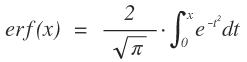
The function erfc() is the
complementary error function, defined as erfc(x) = 1 − erf(x).
Example
/* * Given a normal distribution with mean 0 and standard deviation 1, * calculate the probability that the random variable is within the * range [0, 1.125] */doublesigma=1.0;// The standard deviationdoublebound=1.125;doubleprobability;// probability that mean <= value <= boundprobability=0.5*erf(bound/(sigma*sqrt(2.0)));
See Also
C99
Calculates the complementary error function of a floating-point number.
#include <math.h>doubleerfc(doublex);floaterfcf(floatx);longdoubleerfcl(longdoublex);
The function erfc() is the
complementary error function, defined as erfc(x) = 1 − erf(x).
See Also
Terminates the program normally.
#include <stdlib.h>_Noreturnvoidexit(intstatus);
The exit() function ends
the program and returns a value to the operating environment to
indicate the program’s final status. Control never returns from the
exit() function.
Before terminating the program, exit() calls any functions that have been
registered by the atexit()
function (in LIFO order), closes any open files, and deletes any
files created by the tmpfile()
function. Functions registered by at_quick_exit() are not called.
The header stdlib.h defines
two macros for use as arguments to exit(): EXIT_SUCCESS and EXIT_FAILURE. If the argument is equal to
one of these values, the program returns a corresponding
system-specific value to the operating system to indicate success or
failure. An argument value of 0 is treated the same as EXIT_SUCCESS. For other argument values,
the value returned to the host environment is determined by the
implementation.
Example
FILE*f_in,*f_out;enum{X_OK=0,X_ARGS,X_NOIN,X_NOOUT};if(argc!=3){fprintf(stderr,"Usage: program input-file output-file\n");exit(X_ARGS);}f_in=fopen(argv[1],"r");if(f_in==NULL){fprintf(stderr,"Unable to open input file.\n");exit(X_NOIN);}f_out=fopen(argv[2],"a+");if(f_out==NULL){fprintf(stderr,"Unable to open output file.\n");exit(X_NOOUT);}/* ... read, process, write, close files ... */exit(X_OK);
Calculates the natural exponential of a number.
#include <math.h>doubleexp(doublex);floatexpf(floatx);longdoubleexpl(longdoublex);
The return value of the exp() function is e raised to the power of the function’s
argument, or ex, where
e is Euler’s number,
2.718281.... If the result is beyond the range of the function’s
type, a range error occurs.
Tip
The natural exponential function exp() is the inverse of the natural
logarithm function, log().
Example
/* Amount owed = principal * e^(interest_rate * time) */intprincipal=10000;// Initial debt is ten thousand dollars.intbalance=0;doublerate=0.055;// Interest rate is 5.5% annually.doubletime=1.5;// Period is eighteen months.balance=principal*exp(rate*time);printf("Invest %d dollars at %.1f%% compound interest, and""in %.1f years you'll have %d dollars.\n",principal,rate*100.0,time,balance);
This code produces the following output:
Invest 10000 dollars at 5.5% compound interest, and in 1.5 years you'll have 10859 dollars.
C99
Calculates the base 2 exponential of a number.
#include <math.h>doubleexp2(doublex);floatexp2f(floatx);longdoubleexp2l(longdoublex);
The return value of the exp2() function is 2 raised to the power
of the function’s argument, or 2x. If the
result is beyond the range of the function’s type, a range error
occurs.
Tip
The base 2 exponential function exp2() is the inverse of the base 2
logarithm function, log2().
Example
// The famous grains-of-rice-on-a-chessboard problem.// The sultan loses a chess game. The wager was one grain for square 1// on the chessboard, then double the last number for each successive// square. How much rice in all?intsquares=64;longdoublegramspergrain=0.0025L;// A grain of rice weighs 25 mg.longdoublesum=0.0L;for(inti=0;i<squares;i++)sum+=gramspergrain*exp2l((longdouble)i);printf("The sultan's wager costs him %.3Lf metric tons of rice.\n",sum/1000000.0L);// A million grams per ton.
This code produces the following output:
The sultan's wager costs him 46116860184.274 metric tons of rice.
C99
Calculates the natural exponential of a number, minus one.
#include <math.h>doubleexpm1(doublex);floatexpm1f(floatx);longdoubleexpm1l(longdoublex);
The return value of the expm1() function is one less than
e raised to the power of the
function’s argument, or ex, where
e is Euler’s number,
2.718281.... The expm1() function
is designed to yield a more accurate result than the expression
exp(x)-1, especially when the value of the
argument is close to zero. If the result is beyond the range of the
function’s type, a range error occurs.
Example
/* let y = (−e^(−2x) − 1 ) / (e^(−2x) + 1), for certain values of x */doublew,x,y;if((x>1.0E-12)&&(x<1.0)){w=expm1(-(x+x));y=−w/(w+2.0);}else/* ... handle other values of x ... */
Obtains the absolute value of a number.
#include <math.h>doublefabs(doublex);floatfabsf(floatx);longdoublefabsl(longdoublex);
The fabs() function returns
the absolute value of its floating-point argument
x; if x is
greater than or equal to 0, the return value is equal to
x. If x is
less than 0, the function returns
-x.
Example
floatx=4.0F*atanf(1.0F);longdoubley=4.0L*atanl(1.0L);if(x==y)printf("x and y are exactly equal.\n");elseif(fabs(x−y)<0.0001*fabsl(y))printf("x and y are approximately equal:\n""x is %.8f; y is %.8Lf.\n",x,y);
This code produces the following output:
x and y are approximately equal: x is 3.14159274; y is 3.14159265.
Closes a file or stream.
#include <stdio.h>intfclose(FILE*fp);
The fclose() function
closes the file associated with a given FILE pointer, and releases the memory
occupied by its I/O buffer. If the file was opened for writing,
fclose() flushes the contents of
the file buffer to the file.
The fclose() function
returns 0 on success. If fclose()
fails, it returns the value EOF.
Example
/* Print a file to the console, line by line. */FILE*fp_infile;charlinebuffer[512];if((fp_infile=fopen("input.dat","r"))==NULL){fprintf(stderr,"Couldn't open input file.\n");return-1;}while(fgets(linebuffer,sizeof(linebuffer),fp_infile)!=NULL)fputs(linebuffer,stdout);if(!feof(fp_infile))// This means "if not end of file"fprintf(stderr,"Error reading from input file.\n");if(fclose(fp_infile)!=0){fprintf(stderr,"Error closing input file.\n");return-2;}
C99
Obtains the positive difference between two numbers.
#include <math.h>doublefdim(doublex,doubley);floatfdimf(floatx,floaty);longdoublefdiml(longdoublex,longdoubley);
The fdim() function return
x − y or 0,
whichever is greater. If the implementation has signed zero values,
the zero returned by fdim() is
positive.
Example
/* Make sure an argument is within the domain of asin() */doublesign,argument,result;/* ... */sign=copysign(1.0,argument);// Save the sign ...argument=copysign(argument,1.0);// then use only positive valuesargument=1.0−fdim(1.0,argument);// Trim excess beyond 1.0result=asin(copysign(argument,sign));// Restore sign and// call asin()
See Also
C99
Clears status flags in the floating-point environment.
#include <fenv.h>intfeclearexcept(intexcepts);
The feclearexcept()
function clears the floating-point exceptions specified by its
argument. The value of the argument is the bitwise OR of one or more
of the integer constant macros described under feraiseexcept() in this chapter.
The function returns 0 if successful; a nonzero return value indicates that an error occurred.
Example
doublex,y,result;intexceptions;#pragma STDC FENV_ACCESS ONfeclearexcept(FE_ALL_EXCEPT);result=somefunction(x,y);// This function may raise exceptions!exceptions=fetestexcept(FE_INEXACT|FE_UNDERFLOW);if(exceptions&FE_UNDERFLOW){/* ... handle the underflow ... */}elseif(exceptions&FE_INEXACT){/* ... handle the inexact result ... */}
See Also
C99
Stores a copy of the current floating-point environment.
#include <fenv.h>intfegetenv(fenv_t*envp);
The fegetenv() function
saves the current state of the floating-point environment in the
object referenced by the pointer argument. The function returns 0 if
successful; a nonzero return value indicates that an error
occurred.
The object type that represents the floating-point
environment, fenv_t, is defined
in fenv.h. It contains at least
two kinds of information: floating-point
status flags, which are set to indicate specific
floating-point processing exceptions, and a floating-point control mode, which can be
used to influence the behavior of floating-point arithmetic, such as
the direction of rounding.
Example
The fegetenv() and fesetenv() functions can be used to
provide continuity of the floating-point environment between
different locations in a program:
staticfenv_tfpenv;// Global environment variables.staticjmp_bufenv;/* ... */#pragma STDC FENV_ACCESS ONfegetenv(&fpenv);// Store a copy of the floating-point// environmentif(setjmp(env)==0)// setjmp() returns 0 when actually called{/* ... Proceed normally; floating-point environment unchanged ... */}else// Nonzero return value means longjmp() occurred{fesetenv(&fpenv);// Restore floating-point environment// to known state/* ... */}
C99
Stores the floating-point environment’s exception status flags.
#include <fenv.h>intfegetexceptflag(fexcept_t*flagp,intexcepts);
The fegetexceptflag()
function saves the current state of specified status flags in the
floating-point environment, which indicate specific floating-point
processing exceptions, in the object referenced by the pointer
argument. The object type that represents the floating-point status
flags, fexcept_t, is defined in
fenv.h. Unlike the integer
argument that represents the floating-point exception status flags
in this and other functions that manipulate the floating-point
environment, the object with type fexcept_t cannot be directly modified by
user programs.
The integer argument is a bitwise OR of the values of macros
defined in fenv.h to represent
the floating-point exception flags. The macros are listed under
feraiseexcept() in this chapter.
fegetexceptflag() stores the
state of those flags that correspond to the values that are set in
this mask.
The function returns 0 if successful; a nonzero return value indicates that an error occurred.
Example
/* Temporarily store the state of the FE_INEXACT, FE_UNDERFLOW * and FE_OVERFLOW flags */fexcept_tfpexcepts;#pragma STDC FENV_ACCESS ON/* Save state: */fegetexceptflag(&fpexcepts,FE_INEXACT|FE_UNDERFLOW|FE_OVERFLOW);feclearexcept(FE_INEXACT|FE_UNDERFLOW|FE_OVERFLOW);/* ... Perform calculations that might raise those exceptions ... *//* ... Handle (or ignore) the exceptions our calculations raised ... *//* Restore state as saved: */fesetexceptflag(&fpexcepts,FE_INEXACT|FE_UNDERFLOW|FE_OVERFLOW);
C99
Determines the current rounding direction in the floating-point environment.
#include <fenv.h>intfegetround(void);
The fegetround() function
obtains the current rounding direction. The integer return value is
negative if the rounding direction is undetermined, or equal to one
of the following macros, defined in fenv.h as integer constants, if the
function is successful:
FE_DOWNWARD-
Round down to the next lower integer.
FE_UPWARD-
Round up to the next greater integer.
FE_TONEAREST-
Round up or down toward whichever integer is nearest.
FE_TOWARDZERO-
Round positive values downward and negative values upward.
Example
See the examples for fmod() and fesetround() in this
chapter.
See Also
C99
Saves the current floating-point environment and switches to nonstop mode.
#include <fenv.h>intfeholdexcept(fenv_t*envp);
Like fegetenv(), the
feholdexcept() function saves the
current floating-point environment in the object pointed to by the
pointer argument. However, feholdexcept() also clears the
floating-point status flags and switches the floating-point
environment to a nonstop mode,
meaning that after any floating-point exception, normal execution
continues uninterrupted by signals or traps. The function returns 0
if it succeeds in switching to nonstop floating-point processing;
otherwise, the return value is nonzero.
Example
/* * Compute the hypotenuse of a right triangle, avoiding intermediate * overflow or underflow. * * (This example ignores the case of one argument having * great magnitude and the other small, causing both overflow * and underflow!) */doublehypotenuse(doublesidea,doublesideb){#pragma STDC FENV_ACCESS ONdoublesum,scale,ascaled,bscaled,invscale;fenv_tfpenv;intfpeflags;if(signbit(sidea))sidea=fabs(sidea);if(signbit(sideb))sideb=fabs(sideb);feholdexcept(&fpenv);// Save previous environment,// clear exceptions,// switch to nonstop processing.invscale=1.0;sum=sidea*sidea+sideb*sideb;// First try whether a^2 + b^2// causes any exceptions.fpeflags=fetestexcept(FE_UNDERFLOW|FE_OVERFLOW);// Did it?if(fpeflags&FE_OVERFLOW&&sidea>1.0&&sideb>1.0){/* a^2 + b^2 caused an overflow. Scale the triangle down. */feclearexcept(FE_OVERFLOW);scale=scalbn(1.0,(DBL_MIN_EXP/2));invscale=1.0/scale;ascaled=scale*sidea;bscaled=scale*sideb;sum=ascaled*ascaled+bscaled*bscaled;}elseif(fpeflags&FE_UNDERFLOW&&sidea<1.0&&sideb<1.0){/* a^2 + b^2 caused an underflow. Scale the triangle up. */feclearexcept(FE_UNDERFLOW);scale=scalbn(1.0,(DBL_MAX_EXP/2));invscale=1.0/scale;ascaled=scale*sidea;bscaled=scale*sideb;sum=ascaled*ascaled+bscaled*bscaled;}feupdateenv(&fpenv);// restore the caller's environment, and// raise any new exceptions/* c = (1/scale) * sqrt((a * scale)^2 + (b * scale)^2): */returninvscale*sqrt(sum);}
Tests whether the file position is at the end.
#include <stdio.h>intfeof(FILE*fp);
The feof() macro tests
whether the file position indicator of a given file is at the end of
the file.
The feof() macro’s argument
is a FILE pointer. One attribute
of the file or stream referenced by this pointer is the end-of-file
flag, that indicates whether the program has attempted to read past
the end of the file. The feof()
macro tests the end-of-file flag and returns a nonzero value if the
flag is set. If not, feof()
returns 0.
Example
See the examples for clearerr() and fclose() in this
chapter.
See Also
C99
Raises floating-point exceptions.
#include <fenv.h>intferaiseexcept(intexcepts);
The feraiseexcept()
function raises the floating-point exceptions represented by its
argument. Unlike the fesetexceptflag() function, feraiseexcept() invokes any traps that
have been enabled for the given exceptions.
The argument is a bitwise OR of the values of the following macros, defined in fenv.h to represent the floating-point exception flags:
FE_DIVBYZERO-
This exception occurs when a nonzero, noninfinite number is divided by zero.
FE_INEXACT-
This exception indicates that true result of an operation cannot be represented with the available precision, and has been rounded in the current rounding direction.
FE_INVALID-
This exception flag is set when the program attempts an operation which has no defined result, such as dividing zero by zero or subtracting infinity from infinity. Some systems may also set
FE_INVALIDwhenever an overflow or underflow exception is raised. FE_OVERFLOW-
The result of an operation exceeds the range of representable values.
FE_UNDERFLOW-
The result of an operation is nonzero, but too small in magnitude to be represented.
Each of these macros is defined if and only if the system
supports the corresponding floating-point exception. Furthermore,
the macro FE_ALL_EXCEPT is the
bitwise OR of all of the macros that are supported.
If feraiseexcept() raises
the FE_INEXACT exception in
conjunction with FE_UNDERFLOW or
FE_OVERFLOW, then the underflow
or overflow exception is raised first. Otherwise, multiple
exceptions are raised in an unspecified order.
The function returns 0 if successful; a nonzero return value indicates that an error occurred.
Example
Although user programs rarely need to raise a floating-point exception by artificial means, the following example illustrates how to do so:
intresult,except_set,except_test;#pragma STDC FENV_ACCESS ONfeclearexcept(FE_ALL_EXCEPT);except_set=FE_OVERFLOW;result=feraiseexcept(except_set);if(result!=0){printf("feraisexcept() failed (%d)\n",result);exit(result);}except_test=fetestexcept(except_set);if(except_test!=except_set)printf("Tried to raise flags %X, but only raised flags %X.\n",except_set,except_test);
Tests whether a file access error has occurred.
#include <stdio.h>intferror(FILE*fp);
The ferror() function—often
implemented as a macro—tests whether an error has been registered in
reading or writing a given file.
ferror()’s argument is a
FILE pointer. One attribute of
the file or stream referenced by this pointer is an error flag which
indicates that an error has occurred during a read or write
operation. The ferror() function
or macro tests the error flag and returns a nonzero value if the
flag is set. If not, ferror()
returns 0.
Example
See the examples for clearerr() and fclose() in this
chapter.
See Also
C99
Sets the floating-point environment to a previously saved state.
#include <fenv.h>intfesetenv(constfenv_t*envp);
The fesetenv() function
reinstates the floating-point environment from an object obtained by
a prior call to fegetenv() or
feholdexcept(), or a macro such
as FE_DFL_ENV, which is defined
as a pointer to an object of type fenv_t representing the default
floating-point environment. Although a call to fesetenv() may result in floating-point
exception flags being set, the function does not raise the
corresponding exceptions. The function returns 0 if successful; a
nonzero return value indicates that an error occurred.
Example
See the example for fegetenv() in this
chapter.
C99
Reinstates the floating-point environment’s exception status flags.
#include <fenv.h>intfesetexceptflag(constfexcept_t*flagp,intexcepts);
The fesetexceptflag()
function resets the exception status flags in the floating-point
environment to a state that was saved by a prior call to fegetexceptflag(). The object type that
represents the floating-point status flags, fexcept_t, is defined in fenv.h.
The second argument is a bitwise OR of the values of macros
defined in fenv.h to represent
the floating-point exception flags. The macros are listed under
feraiseexcept() in this chapter.
fesetexceptflag() sets those
flags that correspond to the values that are set in this
mask.
All of the flags specified in the mask argument must be
represented in the status flags object passed to fesetexceptflag() as the first argument.
Thus, in the fegetexceptflag()
call used to save the flags, the second argument must have specified
at least all of the flags to be set by the call to fesetexceptflag().
The function returns 0 if successful (or if the value of the integer argument was zero). A nonzero return value indicates that an error occurred.
Example
See the example for fegetexceptflag() in
this chapter.
C99
Sets the rounding direction in the floating-point environment.
#include <fenv.h>intfesetround(intround);
The fesetround() function
sets the current rounding direction in the program’s floating-point
environment to the direction indicated by its argument. On success,
the function returns 0. If the argument’s value does not correspond
to a rounding direction, the current rounding direction is not
changed.
Recognized values of the argument are given by macros in the following list, defined in fenv.h as integer constants. A given implementation may not define all of these macros if it does not support the corresponding rounding direction, and may also define macro names for other rounding modes that it does support.
FE_DOWNWARD-
Round down to the next lower integer.
FE_UPWARD-
Round up to the next greater integer.
FE_TONEAREST-
Round up or down toward whichever integer is nearest.
FE_TOWARDZERO-
Round positive values downward and negative values upward.
The function returns zero if successful; a nonzero return value indicates that an error occurred.
Example
/* * Save, set, and restore the rounding direction. * Report an error and abort if setting the rounding direction fails. */#pragma STDC FENV_ACCESS ONintprev_rounding_dir;intresult;prev_rounding_dir=fegetround();result=fesetround(FE_TOWARDZERO);/* ... perform a calculation that requires rounding toward 0 ... */fesetround(prev_rounding_dir);#pragma STDC FENV_ACCESS OFF
See also the example for fmod() in this
chapter.
See Also
fegetround(), round(), lround(), llround(), nearbyint(), rint(), lrint(), llrint()
C99
Tests the status flags in the floating-point environment against a bit mask.
#include <fenv.h>intfetestexcept(intexcepts);
The fetestexcept() function
takes as its argument a bitwise OR of the values of macros defined
in fenv.h to represent the
floating-point exception flags. The macros are listed under feraiseexcept() in this chapter.
fetestexcept() returns the
bitwise AND of the values representing the exception flags that were
set in the argument and the exception flags that are currently set
in the floating-point environment.
Example
See the examples for feclearexcept() and
feholdexcept() in this
chapter.
C99
Sets the floating-point environment to a previously saved state, but preserves exceptions.
#include <fenv.h>voidfeupdateenv(constfenv_t*envp);
The feupdateenv() function
internally saves the current floating-point exception status flags
before installing the floating-point environment stored in the
object referenced by its pointer argument. Then the function raises
floating-point exceptions that were set in the saved status
flags.
The argument must be a pointer to an object obtained by a
prior call to fegetenv() or
feholdexcept(), or a macro such
as FE_DFL_ENV, which is defined
as a pointer to an object of type fenv_t representing the default
floating-point environment.
The function returns 0 if successful; a nonzero return value indicates that an error occurred.
Example
See the example for feholdexcept() in this
chapter.
Clears a file buffer.
#include <stdio.h>intfflush(FILE*fp);
The fflush() function
empties the I/O buffer of the open file specified by the FILE pointer argument. If the file was
opened for writing, or if it was opened for reading and writing and the last operation on it was not a read operation, fflush()
writes the contents of the file. If the file is only opened for
reading, the behavior of fflush() is not
specified by the standard. Most implementations simply clear the
input buffer. The function returns 0 if successful, or EOF if an error occurs in writing to the
file.
The argument passed to fflush() may be a
null pointer. In this case, fflush() flushes the
output buffers of all the program’s open streams. The fflush() function does not close the file,
and has no effect at all on unbuffered files (see “Files” for more information on
unbuffered input and output).
Example
In the following example, the program fflush.c writes two lines of text to a
file. If the macro FLUSH is
defined, the program flushes the file output buffer to disk after
each line. If not, only the first output line is explicitly flushed.
Then the program raises a signal to simulate a fatal error so that
we can observe the effect with and without the second fflush() call.
/* fflush.c: Tests the effect of flushing output file buffers. */FILE*fp;#ifdef FLUSHcharfilename[]="twice.txt";#elsecharfilename[]="once.txt";#endif/* FLUSH */fp=fopen(filename,"w");if(fp==NULL)fprintf(stderr,"Failed to open file '%s' to write.\n",filename);fputs("Going once ...\n",fp);fflush(fp);// Flush the output unconditionallyfputs("Going twice ...\n",fp);#ifdef FLUSHfflush(fp);// Now flush only if compiled with '-DFLUSH'#endifraise(SIGKILL);// End the program abruptly.fputs("Gone.\n",fp);// These three lines will never be executed.fclose(fp);exit(0);
When we compile and test the program, the output looks like this:
$cc -DFLUSH -o fflushtwice fflush.c $ ./fflushtwice Killed $ cc -o fflushonce fflush.c $ ./fflushonce Killed $ ls -l -rw-r--r-- 1 tony tony 781 Jul 22 12:36 fflush.c -rwxr-xr-x 1 tony tony 12715 Jul 22 12:38 fflushonce -rwxr-xr-x 1 tony tony 12747 Jul 22 12:37 fflushtwice -rw-r--r-- 1 tony tony 15 Jul 22 12:38 once.txt -rw-r--r-- 1 tony tony 31 Jul 22 12:37 twice.txt
The two cc commands have
created two different executables, named fflushonce and fflushtwice, and each version of the
program has run and killed itself in the process of generating an
output file. The contents of the two output files, once.txt and twice.txt, are different:
$cat twice.txt Going once ... Going twice ... $ cat once.txt Going once ... $
When the fputs() call
returned, the output string was still in the file buffer, waiting
for the operating system to write it to disk. Without the second
fflush() call, the intervening
“kill” signal caused the system to abort the program, closing all
its files, before the disk write occurred.
Reads a character from a file.
#include <stdio.h>intfgetc(FILE*fp);
The fgetc() function reads
the character at the current file position in the specified file,
and increments the file position.
The return value of fgetc()
has the type int. If the file
position is at the end of the file, or if the end-of-file flag was
already set, fgetc() returns
EOF and sets the end-of-file
flag. If you convert the function’s return value to char, you might no longer be able to
distinguish a value of EOF from a
valid character such as '\xFF'.
Example
FILE*fp;intc;charbuffer[1024];inti=0;/* ... Open input file ... */while(i<1023){c=fgetc(fp);// Returns a character on success;if(c==EOF)// EOF means either an error or end-of-file.{if(feof(fp))fprintf(stderr,"End of input.\n");elseif(ferror(fp))fprintf(stderr,"Input error.\n");clearerr(fp);// Clear the file's error or EOF flag.break;}else{buffer[i++]=(char)c;// Use value as char *after* checking// for EOF.}}buffer[i]='\0';// Terminate string.
Obtains the current read/write position in a file.
#include <stdio.h>intfgetpos(FILE*restrictfp,fpos_t*restrictppos);
The fgetpos() function
determines the current value of the file position indicator in an
open file, and places the value in the variable referenced by the
pointer argument ppos. You can use this
value in subsequent calls to fsetpos() to restore the file
position.
If the FILE pointer
argument refers to a multibyte stream, then the fgetpos() function also obtains the
stream’s multibyte parsing state. In this case, the type fpos_t is defined as a structure to hold
both the file position information and the parsing state.
The fgetpos() function
returns 0 if successful. If an error occurs, fgetpos() returns a nonzero return value
and sets the errno variable to
indicate the type of error.
Example
FILE*datafile;fpos_tbookmark;if((datafile=fopen(".testfile","r+"))==NULL){fprintf(stderr,"Unable to open file %s.\n",".testfile");return1;}if(fgetpos(datafile,&bookmark))// Save initial positionperror("Saving file position");else{/* ... Read data, modify data ... */if(fsetpos(datafile,&bookmark))// Back to initial positionperror("Restoring file position");/* ... write data back at the original position in the file ... */}
Reads a string from a file.
#include <stdio.h>char*fgets(char*restrictbuffer,intn,FILE*restrictfp);
The fgets() function reads
a sequence of up to n − 1 characters from
the file referenced by the FILE
pointer argument, and writes it to the buffer indicated by the
char pointer argument, appending
the string terminator character '\0'. If a newline character ('\n') is read, reading stops and the
string written to the buffer is terminated after the newline
character.
The fgets() function
returns the pointer to the string buffer if anything was written to
it, or a null pointer if an error occurred or if the file position
indicator was at the end of the file.
Example
FILE*titlefile;chartitle[256];intcounter=0;if((titlefile=fopen("titles.txt","r"))==NULL)perror("Opening title file");else{while(fgets(title,256,titlefile)!=NULL){title[strlen(title)-1]='\0';// Trim off newline character.printf("%3d:\"%s\"\n",++counter,title);}/* fgets() returned NULL: either EOF or an error occurred. */if(feof(titlefile))printf("Total: %d titles.\n",counter);}
If the working directory contains an appropriate text file, the program produces output like this:
1: "The Amazing Maurice" 2: "La condition humaine" 3: "Die Eroberung der Maschinen" Total: 3 titles.
Reads a wide character from a file.
#include <stdio.h>#include <wchar.h>wint_tfgetwc(FILE*fp);
The fgetwc() function reads
the wide character at the current file position in the specified
file and increments the file position.
The return value of fgetwc() has the type wint_t. If the file position is at the end
of the file, or if the end-of-file flag was already set, fgetwc() returns WEOF and sets the end-of-file flag. If a
wide-character encoding error occurs, fgetwc() sets the errno variable to EILSEQ (“illegal sequence”) and returns
WEOF. Use feof() and ferror() to distinguish errors from
end-of-file conditions.
Example
charfile_in[]="local_in.txt",file_out[]="local_out.txt";FILE*fp_in_wide,*fp_out_wide;wint_twc;if(setlocale(LC_CTYPE,"")==NULL)fwprintf(stderr,L"Sorry, couldn't change to the system's native locale.\n"),exit(1);if((fp_in_wide=fopen(file_in,"r"))==NULL)fprintf(stderr,"Error opening the file %s\n",file_in),exit(2);if((fp_out_wide=fopen(file_out,"w"))==NULL)fprintf(stderr,"Error opening the file %s\n",file_out),exit(3);fwide(fp_in_wide,1);// Not strictly necessary, since firstfwide(fp_out_wide,1);// file access also sets wide or byte mode.while((wc=fgetwc(fp_in_wide))!=WEOF){// ... process each wide character read ...if(fputwc((wchar_t)wc,fp_out_wide)==WEOF)break;}if(ferror(fp_in_wide))fprintf(stderr,"Error reading the file %s\n",file_in);if(ferror(fp_out_wide))fprintf(stderr,"Error writing to the file %s\n",file_out);
See Also
Reads a wide-character string from a file.
#include <stdio.h>#include <wchar.h>wchar_t*fgetws(wchar_t*restrictbuffer,intn,FILE*restrictfp);
The fgetws() function reads
a sequence of up to n – 1 wide characters
from the file referenced by the FILE pointer argument, and writes it to
the wchar_t array addressed by the pointer argument buffer, appending the
string terminator character L'\0'. If a newline character (L'\n') is read, reading stops and the
string written to the buffer is terminated after the newline
character.
The fgetws() function
returns the pointer to the wide-string buffer if anything was
written to it, or a null pointer if an error occurred or if the file
position indicator was at the end of the file.
Example
FILE*fp_in_wide;wchar_tbuffer[4096];wchar_t*line=buffer;if((fp_in_wide=fopen("local.doc","r"))==NULL)perror("Opening input file");fwide(fp_in_wide);line=fgetws(buffer,sizeof(buffer),fp_in_wide);if(line==NULL)perror("Reading from input file");
Rounds a real number down to an integer value.
#include <math.h>doublefloor(doublex);floatfloorf(floatx);(C99)longdoublefloorl(longdoublex);(C99)
The floor() function
returns the greatest integer that is less than or equal to its
argument. However, the function does not have an integer
type; it returns an integer
value, but with a floating-point type.
Example
/* Scale a point by independent x and y factors */structpoint{intx,y;};intwidth_orig=1024,height_orig=768;intwidth_new=800,height_new=600;structpointscale(structpointorig){structpointnew;new.x=(int)floor(orig.x*(double)width_new/(double)width_orig);new.y=(int)floor(orig.y*(double)height_new/(double)height_orig);returnnew;}
See Also
ceil(), round(); the C99
rounding functions that return floating-point types, trunc(), rint(), nearbyint(), nextafter(), and
nexttoward(); the C99
rounding functions that return integer types, lrint(), lround(), llrint(), and llround(); the
fesetround() and
fegetround() functions,
which operate on the C99 floating-point environment
C99
Multiplies two numbers and adds a third number to their product.
#include <math.h>doublefma(doublex,doubley,doublez);floatfmaf(floatx,floaty,floatz);longdoublefmal(longdoublex,longdoubley,longdoublez);
The name of the fma()
function stands for “fused multiply-add.” fma() multiplies its first two
floating-point arguments, and then adds the third argument to the
result. The advantage over the expression (x * y) + z, with two
separate arithmetic operations, is that fma() avoids the error that would be
incurred by intermediate rounding, as well as intermediate overflows
or underflows that might otherwise be caused by the separate
multiplication.
If the implementation defines the macro FP_FAST_FMA in math.h, that indicates that the fma() function is about as fast to execute
as, or faster than, the expression (x * y) + z. This is
typically the case if the fma()
function makes use of a special FMA machine operation. The
corresponding macros FP_FAST_FMAF
and FP_FAST_FMAL provide the same
information about the float and
long double versions.
Example
doublex,y,z;x=nextafter(3.0,4.0);// Smallest possible double value// greater than 3y=1.0/3.0;z=-1.0;printf("x = %.15G\n""y = %.15G\n""z = %.15G\n",x,y,z);#ifdef FP_FAST_FMAprintf("fma( x, y, z) = %.15G\n",fma(x,y,z));#else// i.e., not def FP_FAST_FMAdoubleproduct=x*y;printf("x times y = %.15G\n",product);printf("%.15G + z = %.15G\n",product,product+z);#endif// def FP_FAST_FMA
C99
Determines the greater of two floating-point numbers.
#include <math.h>doublefmax(doublex,doubley);floatfmaxf(floatx,floaty);longdoublefmaxl(longdoublex,longdoubley);
The fmax() functions return
the value of the greater argument.
Example
// Let big equal the second-greatest-possible double value ...constdoublebig=nextafter(DBL_MAX,0.0);// ... and small the second-least possible-double value:constdoublesmall=nextafter(DBL_MIN,0.0);doublea,b,c;/* ... */if(fmin(fmin(a,b),c)<=small)printf("At least one value is too small.\n");if(fmax(fmax(a,b),c)>=big)printf("At least one value is too great.\n");
C99
Determines the lesser of two floating-point numbers.
#include <math.h>doublefmin(doublex,doubley);floatfminf(floatx,floaty);longdoublefminl(longdoublex,longdoubley);
The fmin() functions return
the value of the lesser argument.
Example
See the example for fmax().
Performs the modulo operation.
#include <math.h>doublefmod(doublex,doubley);floatfmodf(floatx,floaty);(C99)longdoublefmodl(longdoublex,longdoubley);(C99)
The fmod() function returns
the remainder of the floating-point division of
x by y, called
“x modulo y.”
The remainder is equal to x minus the
product of y and the largest integer
quotient whose absolute value is not greater than that of
y. This quotient is negative (or 0) if
x and y have
opposite signs, and the return value has the same sign as
x. If the argument
y is zero, fmod() may incur a domain error, or return
0.
Example
doublepeople=-2.25,apples=3.3,eachgets=0.0,someleft=0.0;intsaverounding=fegetround();// Save previous settingfesetround(FE_TOWARDZERO);eachgets=rint(apples/people);someleft=fmod(apples,people);printf("If there are %+.2f of us and %+.2f apples,\n""each of us gets %+.2f, with %+.2f left over.\n",people,apples,eachgets,someleft);fesetround(saverounding);// Restore previous setting
This code produces the following output:
If there are -2.25 of us and +3.30 apples, each of us gets -1.00, with +1.05 left over.
See Also
The C99 functions remainder() and
remquo()
Opens a file.
#include <stdio.h>FILE*fopen(constchar*restrictname,constchar*restrictmode);
The fopen() function opens
the file with the specified name. The second argument is a character
string that specifies the requested access mode. The possible values
of the mode string argument are shown in Table 18-2.
fopen() returns the
FILE pointer for you to use in
subsequent input or output operations on the file, or a null pointer
if the function fails to open the file with the requested access
mode.
| Mode string | Access mode | Notes |
|---|---|---|
"r""r+" | Read Read and write | The file must already exist |
"w""w+" | Write Write and read | If the file does not exist,
fopen() creates it; if it
does exist, fopen()
erases its contents on opening |
"a""a+" | Append Append and read | If the file does not exist,
fopen() creates
it |
When a file is first opened, the file position indicator
points to the first byte in the file. If a file is opened with the
mode string "a" or "a+", then the file position indicator is
automatically placed at the end of the file before each write
operation so that existing data in the file cannot be written
over.
If the mode string includes a plus sign, then the mode allows
both input and output, and you must synchronize the file position
indicator between reading from and writing to the file. Do this by
calling fflush() or a file-positioning function—fseek(),
fsetpos(), or rewind()—after writing and before reading,
and by calling a file-positioning function after reading and before
writing (unless it’s certain that you have read to the end of the
file).
The mode string may also include b as the second or third letter (that is,
"ab+" is the same as
"a+b", for example), which indicates a binary
file, as opposed to a text file. The exact significance of this
distinction depends on the given system.
The C11 standard allows you to create a file exclusively:
this means that the fopen() call fails if the file
already exists. To do so, append an "x" to the file
mode strings that begin with "w", forming, for
example, the mode string "wx" or "w+bx".
Example
FILE*in,*out;intc;if(argc!=3)fprintf(stderr,"Usage: program input-file output-file\n"),exit(1);// If "-" appears in place of input filename, use stdin:in=(strcmp(argv[1],"-")==0)?stdin:fopen(argv[1],"r");if(in==NULL){perror("Opening input file");return-1;}// If "-" appears in place of output filename, use stdout:out=(strcmp(argv[2],"-")==0)?stdout:fopen(argv[2],"a+");if(out==NULL){perror("Opening output file");return-1;}while((c=fgetc(in))!=EOF)if(fputc(c,out)==EOF)break;if(!feof(in))perror("Error while copying");fclose(in),fclose(out);
C11
Opens a file.
#include <stdio.h>errno_tfopen_s(FILE*restrict*restrictstreamPtr,constchar*restrictname,constchar*restrictmode);
The function fopen_s(), like fopen(), opens a file with the specified name and access mode. For the possible values of the mode string argument, see the description of the fopen() function in this chapter. The new FILE pointer is given to the caller, not as the return value but in the variable addressed by the first argument of fopen_s(). The type of the parameter streamPtr is therefore a pointer to a FILE pointer.
If the operating system supports opening files for exclusive write access, fopen_s() does so to prevent simultaneous write operations to the file. The fopen_s() function assigns access privileges to the file so that no other user can open it, provided the operating system supports such access restrictions. To assign a new file the system’s default access privileges, as fopen() does, prefix the letter "u" to the mode string, forming a string such as "uwx" or "ua+", for example.
Before opening the file, the function fopen_s() tests the following runtime constraints: the pointer arguments streamPtr, name, and mode must not be null pointers.
If the file has been opened successfully, fopen_s() returns zero, and writes the new FILE pointer to the variable addressed by streamPtr. If unsuccessful, the function returns a nonzero value and places a null pointer in the variable addressed by streamPtr, provided streamPtr is not a null pointer itself.
Example
#define __STDC_WANT_LIB_EXT1__ 1#include <stdio.h>// ...FILE*fp;errno_terr;charfilename[]="new.txt";// Open a new file for writing and reading:err=fopen_s(&fp,filename,"w+x");if(err!=0){fprintf(stderr,"Unable to create the file\"%s\".\n",filename);exit(err);}// ... The file is open.
See Also
C99
Obtains a classification of a real floating-point number.
#include <math.h>intfpclassify(x);
The fpclassify() macro
determines whether its argument is a normal floating-point number,
or one of several special categories of values, including NaN (not a
number), infinity, subnormal floating-point values, zero, and
possibly other implementation-specific categories.
To determine what category the argument belongs to, compare
the return value of fpclassify()
with the values of the following number classification macros,
defined in math.h:
FP_INFINITEFP_NANFP_NORMALFP_SUBNORMALFP_ZERO
These five macros expand to distinct integer values.
Example
doubleminimum(doublea,doubleb){registerintaclass=fpclassify(a);registerintbclass=fpclassify(b);if(aclass==FP_NAN||bclass==FP_NAN)returnNAN;if(aclass==FP_INFINITE)// -Inf is less than anything;return(signbit(a)?a:b);// +inf is greater than anything.if(bclass==FP_INFINITE)return(signbit(b)?b:a);return(a<b?a:b);}
See Also
Writes formatted output to an open file.
#include <stdio.h>intfprintf(FILE*restrictfp,constchar*restrictformat,...);intfprintf_s(FILE*restrictfp,constchar*restrictformat,...);(C11)
The functions fprintf() and fprintf_s() are
similar to printf() and printf_s() except that they write their output to the stream specified by fp instead of stdout.
Example
FILE*fp_log;time_tsec;fp_log=fopen("example.log","a");if(fp!=NULL){time(&sec);fprintf(fp_log,"%.24s Opened log file.\n",ctime(&sec));}
This code appends a line like the following to the file example.log:
Wed Dec 9 21:10:43 2015 Opened log file.
See Also
printf(), sprintf(), snprintf(), declared
in stdio.h; vprintf(), vfprintf(), vsprintf(), vsnprintf(), declared in stdio.h and stdarg.h; the wide-character functions
wprintf(), fwprintf(), swprintf(), declared
in stdio.h and wchar.h; vwprint(), vfwprint(), and vswprint(), declared in stdio.h, wchar.h, and stdarg.h; the scanf() input
functions. Argument conversion in the printf() family of
functions is described under printf() in this
chapter.
For each of these functions there is also a corresponding “secure” function, if the implementation supports the C11 bounds-checking functions (i.e., if the macro __STDC_LIB_EXT1__ is defined)
Writes a character to a file.
#include <stdio.h>intfputc(intc,FILE*fp);
The fputc() function writes
one character to the current file position of the specified FILE pointer. The return value is the
character written, or EOF if an
error occurred.
Example
#define CYCLES 10000#define DOTS 4printf("Performing %d modulo operations",CYCLES);for(intcount=0;count<CYCLES;++count){if(count%(CYCLES/DOTS)!=0)continue;fputc('.',stdout);// Mark every nth cycle}printf("done.\n");
This code produces the following output:
Performing 10000 modulo operations .... done.
Writes a string to a file.
#include <stdio.h>intfputs(constchar*restrictstring,FILE*restrictfp);
The fputs() function writes
a string to the file specified by the FILE pointer argument. The string is
written without the terminator character ('\0'). If successful, fputs() returns a value greater than or
equal to zero. A return value of EOF indicates that an error
occurred.
Writes a wide character to a file.
#include <wchar.h>wint_tfputwc(wchar_twc,FILE*fp);
The fputwc() function
writes a wide character to the current file position of the
specified FILE pointer. The
return value is the character written, or WEOF if an error occurred. Because the
external file associated with a wide-oriented stream is considered
to be a sequence of multibyte characters, fputwc() implicitly performs a
wide-to-multibyte character conversion. If an encoding error occurs
in the process, fputwc() sets the
errno variable to the value of
EILSEQ (“illegal byte
sequence”).
Example
See the example for fgetwc() in this
chapter.
See Also
Writes a string of wide characters to a file.
#include <wchar.h>intfputws(constwchar_t*restrictws,FILE*restrictfp);
The fputws() function
writes a string of wide characters to the file specified by the
FILE pointer argument. The string
is written without the terminator character (L'\0'). If successful, fputws() returns a value greater than or
equal to zero. A return value of EOF indicates that an error
occurred.
Example
FILE*fpw;charfname_wide[]="widetest.txt";intwidemodeflag=1;intresult;wchar_twidestring[]=L"How many umlauts are there in Fahrvergnügen?\n";if((fpw=fopen(fname_wide,"a"))==NULL){perror("Opening output file");return-1;}// Set file to wide-character orientation:widemodeflag=fwide(fpw,widemodeflag);if(widemodeflag<=0){fprintf(stderr,"Unable to set output file %s to wide characters\n",fname_wide);(void)fclose(fpw);return-1;}// Write wide-character string to the file:result=fputws(widestring,fpw);
See Also
Reads a number of objects from a file.
#include <stdio.h>size_tfread(void*restrictbuffer,size_tsize,size_tn,FILE*restrictfp);
The fread() function reads
up to n data objects of size
size from the specified file, and stores
them in the memory block pointed to by the
buffer argument. You must make sure that
the available size of the memory block in bytes is at least
n times size.
Furthermore, on systems that distinguish between text and binary
file access modes, the file should be opened in binary mode.
The fread() function
returns the number of data objects read. If this number is less than
the requested number, then either the end of the file was reached or
an error occurred.
Example
typedefstruct{charname[64];/* ... more members ... */}item;#define CACHESIZE 32// Size as a number of array elements.FILE*fp;intreadcount=0;itemitemcache[CACHESIZE];// An array of "items".if((fp=fopen("items.dat","r+"))==NULL){perror("Opening data file");return-1;}/* Read up to CACHESIZE "item" records from the file.*/readcount=fread(itemcache,sizeof(item),CACHESIZE,fp);
Releases allocated memory.
#include <stdlib.h>voidfree(void*ptr);
After you have finished using a memory block that you
allocated by calling malloc(),
calloc() or realloc(), the free() function releases it to the system
for recycling. The pointer argument must be the exact address
furnished by the allocating function; otherwise, the behavior is
undefined. If the argument is a null pointer, free() does nothing. In any case, free() has no return value.
Example
char*ptr;/* Obtain a block of 4096 bytes ... */ptr=calloc(4096,sizeof(char));if(ptr==NULL)fprintf(stderr,"Insufficient memory.\n"),abort();else{/* ... use the memory block ... */strncpy(ptr,"Imagine this is a long string.\n",4095);fputs(stdout,ptr);/* ... and release it. */free(ptr);}
Changes the file associated with an existing file pointer.
#include <stdio.h>FILE*freopen(constchar*restrictname,constchar*restrictmode,FILE*restrictfp);
The freopen() function
closes the file associated with the FILE pointer argument and opens the file
with the specified name, associating it with the same FILE pointer as the file just closed. That
FILE pointer is the function’s
return value. If an error occurs, freopen() returns a null pointer, and the
FILE pointer passed to the
function is closed.
The new access mode is specified by the second character
string argument, in the same way described under fopen(). The filename name can be a null pointer. In that case, the stream remains associated with the original file, and only the access mode is changed as specified by mode.
The most common use of freopen() is to redirect the standard I/O
streams stdin, stdout, and stderr.
Example
time_tsec;charfname[]="test.dat";if(freopen(fname,"w",stdout)==NULL)fprintf(stderr,"Unable to redirect stdout.\n");else{time(&sec);printf("%.24s: This file opened as stdout.\n",ctime(&sec));}
C11
Changes the file associated with an existing file pointer.
#include <stdio.h>errno_tfreopen_s(FILE*restrict*restrictfpPtr,constchar*restrictname,constchar*restrictmode,FILE*restrictfp);
The function freopen_s(), like freopen(), closes the file associated with the FILE pointer argument fp and opens the file with the specified name and access mode, associating it with the same FILE pointer as the file just closed. If name is a null pointer, freopen_s() opens the original file again with the specified new access mode.
Unlike freopen(), the freopen_s() function opens the file subject to the rules described in the section on fopen_s() in this chapter. Furthermore, instead of returning the FILE pointer fp, freopen_s() copies it to the variable addressed by its first argument, fpPtr. Before doing anything, freopen_s() tests the following runtime constraints: the pointer arguments fpPtr, mode, and fp must not be null pointers.
If it succeeds in opening the file, freopen_s() returns zero and places the value of fp in the variable addressed by fpPtr. If unsuccessful, the function returns a nonzero value and places a null pointer in the variable addressed by fpPtr, provided fpPtr is not a null pointer itself.
Example
#define __STDC_WANT_LIB_EXT1__ 1#include <stdio.h>// ...charfilename[]="redirect.txt";FILE*fp;// Redirect standard output to the file redirect.txt:errno_terr=freopen_s(&fp,filename,"w",stdout);if(err!=0){fprintf(stderr,"Unable to redirect stdout to %s\n",filename);exit(err);}printf("This text is being written to the file %s.\n",filename);fclose(stdout);
Splits a real number into a mantissa and exponent.
#include <math.h>doublefrexp(doublex,int*exp);floatfrexpf(floatx,int*exp);(C99)longdoublefrexpl(longdoublex,int*exp);(C99)
The frexp() function
expresses a floating-point number x as a
normalized fraction f and an integer
exponent e to base 2. In other words, if the
mantissa f is the return value of
the function call frexp(x,
&e),
then x = f ×
2e and 0.5 ≤ |f|
< 1, where |f| is the absolute value of f.
The normalized fraction is the return value of the frexp() function. The function places the
other part of its “answer,” the exponent, in the location addressed
by the pointer argument. If the floating-point argument x is equal to 0, then the function stores
the value 0 at the exponent location and returns 0.
Example
doublefourthrt(doublex){intexponent,exp_mod_4;doublemantissa=frexp(x,&exponent);exp_mod_4=exponent%4;exponent-=(exp_mod_4);// Get an exponent that's// divisible by four ...for(inti=abs(exp_mod_4);i>0;i--){if(exp_mod_4>0)// ... and compensate in the mantissa.mantissa*=2.0;elsemantissa/=2.0;}returnldexp(sqrt(sqrt(mantissa)),exponent/4);}
See Also
The ldexp() function,
which performs the reverse calculation.
Reads formatted data from an open file.
#include <stdio.h>intfscanf(FILE*restrictfp,constchar*restrictformat,...);intfscanf_s(FILE*restrictfp,constchar*restrictformat,...);(C11)
The functions fscanf() and fscanf_s() are like the functions scanf() and scanf_s(), except that they read from the stream specified by their argument fp instead of stdin.
Like scanf(), the fscanf() functions return the number of data items converted and stored in variables. If an input error occurs or the function reads to the end of the file before any data can be converted, the return value is EOF. The fscanf_s() function also returns EOF if a violation of its runtime constraints occurs.
Example
The example code reads information about a user from a file, which we will suppose contains a line of colon-separated strings like this:
tony:x:1002:31:Tony Crawford,,:/home/tony:/bin/bash
Here is the code:
structpwrecord{// Structure for contents of passwd fields.unsignedintuid;unsignedintgid;charuser[32];charpw[32];charrealname[128];charhome[128];charshell[128];};/* ... */FILE*fp;intresults=0;structpwrecordrecord;structpwrecord*recptr=&record;chargecos[256]="";/* ... Open the password file to read ... */record=(structpwrecord){UINT_MAX,UINT_MAX,"","","","",""};/* 1. Read login name, password, UID and GID. */results=fscanf(fp,"%31[^:]:%31[^:]:%u:%u:",recptr->user,recptr->pw,&recptr->uid,&recptr->gid);
This function call reads the first part of the input string,
tony:x:1002:31:, and copies the
two strings "tony" and "x" and assigns two unsigned int values, 1002 and 31, to the
corresponding structure members. The return value is 4. The
remainder of the code is then as follows:
if(results<4){fprintf(stderr,"Unable to parse line.\n");fscanf(fp,"%*[^\n]\n");// Read and discard rest of line.}/* 2. Read the "gecos" field, which may contain nothing, or just the * real name, or comma-separated sub-fields. */results=fscanf(fp,"%255[^:]:",gecos);if(results<1)strcpy(recptr->realname,"[No real name available]");elsesscanf(gecos,"%127[^,]",recptr->realname);// Truncate at// first comma./* 3. Read two more fields before the end of the line. */results=fscanf(fp,"%127[^:]:%127[^:\n]\n",recptr->home,recptr->shell);if(results<2){fprintf(stderr,"Unable to parse line.\n");fscanf(fp,"%*[^\n]\n");// Read and discard rest of line.}printf("The user account %s with UID %u belongs to %s.\n",recptr->user,recptr->uid,recptr->realname);
For our sample input line, the printf() call produces the following
output:
The user account tony with UID 1002 belongs to Tony Crawford.
If the implementation supports the secure functions, the function fscanf_s() can also be used as an alternative to fscanf(). The first fscanf_s() call in the preceding example would then be as follows:
/* 1. Read login name, password, UID and GID. */results=fscanf_s(fp,"%31[^:]:%31[^:]:%u:%u:",recptr->user,sizeof(recptr->user),recptr->pw,sizeof(recptr->pw),&recptr->uid,&recptr->gid);
See Also
scanf(), sscanf(), vscanf(), vfscanf(), and vsscanf(); wscanf(), fwscanf(), swscanf(), vwscanf(), vfwscanf(), and vswscanf()
For each of these functions, there is also a corresponding “secure” function, if the implementation supports the C11 bounds-checking functions (i.e., if the macro __STDC_LIB_EXT1__ is defined)
Moves the access position in a file.
#include <stdio.h>intfseek(FILE*fp,longoffset,intorigin);
The fseek() function moves
the file position indicator for the file specified by the FILE pointer argument. The new position is
offset bytes from the position selected
by the value of the origin argument,
which may indicate the beginning of the file, the previous position,
or the end of the file. Table 18-3 lists the permitted values for
origin.
| Value of origin | Macro name | Offset is relative to |
|---|---|---|
| 0 | SEEK_SET | The beginning of the file |
| 1 | SEEK_CUR | The current position |
| 2 | SEEK_END | The end of the file |
You can use a negative offset value
to move the file access position backward, but the position
indicator cannot be moved backward past the beginning of the file.
However, it is possible to move the position indicator forward past
the end of the file. If you then perform a write operation at the
new position, the file’s contents between its previous end and the
new data are undefined.
The fseek() function
returns 0 if successful, or -1 if an error occurs.
Example
typedefstruct{longid;doublevalue;}record;FILE*fp;recordcur_rec=(record){0,0.0};intreclength_file=sizeof(record);longseek_id=123L;if((fp=fopen("records","r"))==NULL)perror("Unable to open records file");elsedo{if(1>fread(&cur_rec.id,sizeof(long),1,fp))fprintf(stderr,"Record with ID %ld not found\n",seek_id);else// Skip rest of recordif(fseek(fp,reclength_file−sizeof(long),1))perror("fseek failed");}while(cur_rec.id!=seek_id);
Sets a file position indicator to a previously recorded position.
#include <stdio.h>intfsetpos(FILE*fp,constfpos_t*ppos);
The fsetpos() function sets
the file position indicator for the file specified by the FILE pointer argument. The
ppos argument, a pointer to the value of
the new position, typically points to a value obtained by calling
the fgetpos() function.
The function returns 0 if successful. If an error occurs,
fsetpos() returns a nonzero value
and sets the errno variable to an
appropriate positive value.
The type fpos_t is defined
in stdio.h, and may or may not
be an integer type.
Example
See the example for fgetpos() in this
chapter.
Obtains the current file access position.
#include <stdio.h>longftell(FILE*fp);
The ftell() function
returns the current access position in the file controlled by the
FILE pointer argument. If the
function fails to obtain the file position, it returns the value -1
and sets the errno variable to an
appropriate positive value.
Tip
To save the access position in a multibyte stream, use the
fgetpos() function, which also
saves the stream’s multibyte parsing state.
Example
This example searches in a file, whose name is the second command-line argument, for a string, which the user can specify in the first command-line argument.
#define MAX_LINE 256FILE*fp;longlOffset=0L;charsLine[MAX_LINE]="";char*result=NULL;intlineno=0;/* ... */if((fp=fopen(argv[2],"r"))==NULL){fprintf(stderr,"Unable to open file %s\n",argv[2]);exit(-1);}do{lOffset=ftell(fp);// Bookmark the beginning of// the line we're about to read.if(-1L==lOffset)fprintf(stderr,"Unable to obtain offset in %s\n",argv[2]);elselineno++;if(!fgets(sLine,MAX_LINE,fp))// Read next line from file.break;}while(strstr(sLine,argv[1])==NULL);// Test for argument// in sLine./* Dropped out of loop: Found search keyword or EOF */if(feof(fp)||ferror(fp)){fprintf(stderr,"Unable to find\"%s\"in %s\n",argv[1],argv[2]);rewind(fp);}else{printf("%s (%d): %s\n",argv[2],lineno,sLine);fseek(fp,lOffset,0);// Set file pointer at beginning of// the line containing the keyword}
The following example runs this program on its own source file, searching for a line containing the word “the”. As you can see, the first occurrence of “the” is in line 22. The program finds that line and displays it:
tony@luna:~/ch18$ ./ftell the ftell.c ftell.c (22): lOffset = ftell(fp); // Bookmark the beginning of
Determines whether a stream is byte-character- or wide-character-oriented.
#include <stdio.h>#include <wchar.h>intfwide(FILE*fp,intmode);
The fwide() function either
gets or sets the character type orientation of a file, depending on
the value of the mode argument:
mode> 0-
The
fwide()function attempts to change the file to wide-character orientation. mode< 0-
The function attempts to change the file to byte-character orientation.
mode= 0-
The function does not alter the orientation of the stream.
In all three cases, the return value of fwide() indicates the stream’s orientation
after the function call in the same way:
- Greater than 0
-
After the
fwide()function call, the file has wide-character orientation. - Less than 0
-
The file now has byte-character orientation.
- Equal to 0
-
The file has no orientation.
The normal usage of fwide()
is to call it once immediately after opening a file to set it to
wide-character orientation. Once you have determined the file’s
orientation, fwide() does not
change it on subsequent calls. If you do not call fwide() for a given file, its orientation
is determined by whether the first read or write operation is
byte-oriented or wide-oriented. You can remove a file’s byte or
wide-character orientation by calling freopen(). For more information, see
“Byte-Oriented and Wide-Oriented Streams”.
Example
See the example for fputws() in this
chapter.
See Also
The many functions for working with streams of wide characters, listed in Table 17-2.
Writes formatted output in a wide-character string to a file.
#include <stdio.h>#include <wchar.h>intfwprintf(FILE*restrictfp,constwchar_t*restrictformat,...);intfwprintf_s(FILE*restrictfp,constwchar_t*restrictformat,...);(C11)
The functions fwprintf() and fwprintf_s() are like fprintf() and fprintf_s(), except that their format string argument and their output are strings of wide characters.
Example
wchar_tname_local[]=L"Ka\u0142u\u017Cny";charname_portable[]="Kaluzny";charlocale[]="pl_PL.UTF-8";char*newlocale;newlocale=setlocale(LC_ALL,locale);if(newlocale==NULL)fprintf(stderr,"Sorry, couldn't change the locale to %s.\n""The current locale is %s.\n",locale,setlocale(LC_ALL,NULL));fwprintf(stdout,L"Customer's name: %ls (Single-byte transliteration: %s)\n",name_local,name_portable);
If the specified Polish locale is available, this example produces the output:
Customer's name: Kałużny (Single-byte transliteration: Kaluzny)
See Also
The byte-character output functions in the printf() family; the wide-character output functions fputwc(), fputwc(), putwc(), putwchar(), wprintf(), vfwprintf() and vwprintf(); the wide-character input functions fgetwc(), fgetws(), getwc(), getwchar(), fwscanf(), wscanf(), vfwscanf() and vwscanf()
For each of these functions, there is also a corresponding “secure” function, if the implementation supports the C11 bounds-checking functions (i.e., if the macro __STDC_LIB_EXT1__ is defined)
Reads a formatted data string of wide characters from a file.
#include <stdio.h>#include <wchar.h>intfwscanf(FILE*restrictfp,constwchar_t*restrictformat,...);intfwscanf_s(FILE*restrictfp,constwchar_t*restrictformat,...);(C11)
The functions fwscanf() and fwscanf_s() are like the functions wscanf() and wscanf_s(), except that they read from the stream specified by their argument fp instead of stdin.
Like wscanf(), the fwscanf() functions return the number of data items converted and stored in variables. If an input error occurs or the function reads to the end of the file before any data can be converted, the return value is EOF. The fwscanf_s() function also returns EOF if a violation of its runtime constraints occurs.
Example
See the example for wscanf() in this
chapter.
See Also
wscanf(), swscanf(), wcstod(), wcstol(), wcstoul(), scanf(), fscanf(); the
wide-character output functions fwprintf(), wprintf(), vfwprint(), and vwprint()
For each of these functions, there is also a corresponding “secure” function, if the implementation supports the C11 bounds-checking functions (i.e., if the macro __STDC_LIB_EXT1__ is defined)
Writes a number of objects of a given size to a file.
#include <stdio.h>size_tfwrite(constvoid*restrictbuffer,size_tsize,size_tn,FILE*restrictfp);
The fwrite() function
writes up to n data objects of the
specified size from the buffer addressed by the pointer argument
buffer to the file referenced by the
FILE pointer
fp. Furthermore, on systems that
distinguish between text and binary file access modes, the file
should be opened in binary mode.
The function returns the number of data objects that were
actually written to the file. This value is 0 if either the object
size size or the number of objects
n was 0, and may be less than the
argument n if a write error
occurred.
Example
typedefstruct{charname[64];/* ... more structure members ... */}item;#define CACHESIZE 32// Size as a number of array elements.FILE*fp;intwritecount=0;itemitemcache[CACHESIZE];// An array of "items"./* ... Edit the items in the array ... */if((fp=fopen("items.dat","w"))==NULL){perror("Opening data file");return-1;}/* Write up to CACHESIZE "item" records to the file.*/writecount=fwrite(itemcache,sizeof(item),CACHESIZE,fp);
Reads a character from a file.
#include <stdio.h>intgetc(FILE*fp);
The getc() function is the
same as fgetc(), except that it
may be implemented as a macro and may evaluate its argument more
than once. If the argument is an expression with side effects, use
fgetc() instead.
getc() returns the
character read. A return value of EOF indicates an error or an attempt to
read past the end of the file. In these cases, the function sets the
file’s error or end-of-file flag as appropriate.
Example
FILE*inputs[16];intnextchar,i=0;/* ... open 16 input streams ... */do{nextchar=getc(inputs[i++]);// Warning: getc() is a macro!/* ... process the character ... */}while(i<16);
The do...while statement in this example skips over
some files in the array if getc()
evaluates its argument more than once. Here is a safer version,
without side effects in the argument to getc():
for(i=0;i<16;i++){nextchar=getc(inputs[i]);/* ... process the character ... */}
Reads a character from the standard input stream.
#include <stdio.h>intgetchar(void);
The function call getchar()
is equivalent to getc(stdin).
Like getc(), getchar() may be implemented as a macro.
As it has no arguments, however, unforeseen side effects are
unlikely.
getchar() returns the
character read. A return value of EOF indicates an error or an attempt to
read past the end of the input stream. In these cases, the function
sets the error or end-of-file flag for stdin as appropriate.
Example
charfile_name[256};intanswer;/* ... */fprintf(stderr,"Are you sure you want to replace the file\"%s\"?\n",file_name);answer=tolower(getchar());if(answer!='y')exit(-1);
Obtains the string value of a specified environment variable.
#include <stdlib.h>char*getenv(constchar*name);
The getenv() function
searches the environment variables at runtime for an entry with the
specified name, and returns a pointer to the variable’s value. If
there is no environment variable with the specified name, getenv() returns a null pointer.
Your program must not modify the string addressed by the
pointer returned, and the string at that address may be replaced by
subsequent calls to getenv().
The function getenv() is not guaranteed to be thread-safe.
Furthermore, C itself does not define a function to set or modify environment variables, or any list of variable names that you can expect to exist; these features, if available at all, are system-specific.
Example
#define MAXPATH 1024;charsPath[MAXPATH]="";char*pTmp;if((pTmp=getenv("PATH"))!=NULL)strncpy(sPath,pTmp,MAXPATH−1);// Save a copy for our use.elsefprintf(stderr,"No PATH variable set.\n");
See Also
getenv_s
C11
Obtains the string value and the length of a specified environment variable.
#include <stdlib.h>errno_tgetenv_s(size_t*restrictlen,char*restrictvalue,rsize_tmaxsize,constchar*restrictname););
The function getenv_s(), like getenv(), searches the environment variables at runtime for an entry with the specified name. If the variable exists, getenv_s() performs the following operations:
Writes the length of the environment variable’s value string to the variable addressed by the pointer argument
len, providedlenis not a null pointer-
Copies the value of the environment variable to the
chararray addressed by thevalueargument, provided the length of the environment variable’s value is less thanmaxsize
If the environment variable name is not defined, then zero is written to the variable that len points to, and the string terminator '\0' is written to value[0], provided that len is not a null pointer and maxsize is greater than zero.
The function getenv_s() tests the following runtime constraints: the pointer argument name must not be a null pointer, and maxsize must be less than or equal to RSIZE_MAX. If maxsize is greater than zero, value must not be a null pointer. If a runtime constraint is violated, getenv_s() does not search the list of environment variables but stores the value zero in the object that len points to, provided len is not a null pointer.
The function getenv_s() returns zero if the environment variable name exists and its value string was copied to the address in value. Otherwise, the function returns a nonzero value. The function is not guaranteed to be thread-safe.
Example
#define __STDC_WANT_LIB_EXT1__ 1#include <stdlib.h>// ...charenvStr[512];size_tlen;if(getenv_s(&len,envStr,sizeof(envStr),"PATH")==0)printf("PATH variable (%u characters):\n%s\n",len,envStr);elseif(len>0)printf("The PATH variable (%u characters) is more than""%u bytes long.\n",len,sizeof(envStr));elseprintf("PATH variable not found.\n");
See Also
Reads a line of text from standard input.
#include <stdio.h>char*gets(char*buffer);
The gets() function reads
characters from the standard input stream until it reads a newline
character or reaches the end of the stream. The characters read are
stored as a string in the buffer addressed by the pointer argument.
A string terminator character '\0' is appended after the last character
read (not counting the newline character, which is
discarded).
If successful, the function returns the value of its argument.
If an error occurs, or if the end of the file is reached before any
characters can be read in, gets()
returns a null pointer.
Warning
The gets() function
provides no way to limit the input length, and if the stdin stream happens to deliver a long
input line, gets() will attempt
to store characters past the end of the available buffer.
Such buffer overflows are a potential security risk. Use fgets() instead, which has a parameter
to control the maximum input length.
The C11 standard retires the function gets(), replacing it with the function gets_s(), which has an additional parameter for the size of the input buffer.
Example
charbuffer[1024];/* Replaced gets() with fgets() to avoid potential buffer overflow * OLD: while (gets( buffer ) != NULL ) * NEW: below */while(fgets(buffer,sizeof(buffer),stdin)!=NULL){/* ... process the line; remember that fgets(), unlike gets(), retains the newline character at the end of the string ... */}
C11
Reads a line of text from standard input.
#include <stdio.h>char*gets_s(char*buffer,rsize_tn);
The secure function gets_s() reads characters from the standard input stream (stdin) until it reads a newline character or reaches the end of the stream. The characters read are stored as a string in the buffer addressed by the pointer argument. A string terminator character '\0' is appended after the last character read (not counting the newline character, which is discarded). The second argument specifies the size of the available buffer. Hence the line to be read may contain at most n - 1 characters.
The function has the following runtime constraints: the pointer argument buffer must not be a null pointer, and n must be greater than zero and less than or equal to RSIZE_MAX. Furthermore, the line to be read must not be more than n – 1 characters long. In other words, a newline character or the end of the stream must occur before the nth character read.
If a read error or a violation of the runtime constraints occurs, the function writes a string terminator character to buffer[0], provided buffer is not a null pointer and RSIZE_MAX is greater than zero. In case of such an error, the entire line read is discarded: gets_s() reads and discards all characters until it reads a newline character or reaches the end of the stream, or a read error occurs.
If successful, the gets_s() function returns the value of its pointer argument buffer. If an error occurs, or if the end of the stream is reached before any characters can be read in, gets_s() returns a null pointer.
Warning
An alternative to gets_s() to process lines of any length correctly is the function fgets(), which does not discard any characters read. fgets() also stores newline characters ('\n') that it reads.
Example
#define __STDC_WANT_LIB_EXT1__ 1#include <stdio.h>// ...chartext[100];puts("Enter a line of text:");if(gets_s(text,sizeof(text))==NULL)fputs("Unable to read the text.\n",stderr);elseprintf("Your text:\n%s\n",text);
Reads a wide character from a file.
#include <stdio.h>#include <wchar.h>wint_tgetwc(FILE*fp);
The getwc() function is the
wide-character counterpart to getc(): it may be implemented as a macro,
and may evaluate its argument more than once, causing unforeseen
side effects. Use fgetwc()
instead.
getwc() returns the
character read. A return value of WEOF indicates an error or an attempt to
read past the end of the input stream. In these cases, the function
sets the error or end-of-file flag for stdin as
appropriate.
Example
wint_twc;if(setlocale(LC_CTYPE,"")==NULL){fwprintf(stderr,L"Sorry, couldn't change to the system's native locale.\n");return1;}while((wc=getwc(stdin))!=WEOF){wc=towupper(wc);putwc((wchar_t)wc,stdout);}
Reads a wide character from the standard input stream.
#include <wchar.h>wint_tgetwchar(void);
The getwchar() function is
the wide-character counterpart to getchar(); it is equivalent to getwc( stdin ) and returns the wide
character read. Like getwc(),
getwchar() may be implemented as
a macro, but because it has no arguments, unforeseen side effects
are not likely. A return value of WEOF indicates an error or an attempt to
read past the end of the stream. In these cases, the function sets the
stdin stream’s error or end-of-file flag as appropriate.
Example
wint_twc;if(setlocale(LC_CTYPE,"")==NULL){fwprintf(stderr,L"Sorry, couldn't change to the system's native locale.\n");return1;}while((wc=getwchar())!=WEOF)// or: (wc = getwc( stdin)){wc=towupper(wc);putwchar((wchar_t)wc);// or: putwc( (wchar_t)wc, stdout);}
See Also
fgetwc(); the
byte-character functions getc() and getchar(); the output
functions fputwc() and putwchar()
Converts a time value into a year, month, day, hour, minute, second, etc.
#include <time.h>structtm*gmtime(consttime_t*timer);
The gmtime() function
converts a numeric time value (usually a number of seconds since
January 1, 1970, but not necessarily) into the equivalent date-and-time structure in Coordinated Universal Time (UTC, formerly called
Greenwich Mean Time; hence the function’s name). To obtain similar
values for the local time, use the function localtime().
The function’s argument is not the number of seconds itself but a pointer to that value. The function returns a pointer to a static struct tm object that contains the results. If an error occurs, the function returns a null pointer.
Both in the structure type struct tm and the arithmetic type time_t are defined in the header time.h. The tm structure is defined as follows:
structtm{inttm_sec;/* Seconds since the full minute: 0 to 60 */inttm_min;/* Minutes since the full hour: 0 to 59 */inttm_hour;/* Hours since midnight: 0 to 23 */inttm_mday;/* Day of the month: 1 to 31 */inttm_mon;/* Months since January: 0 to 11 */inttm_year;/* Years since 1900 */inttm_wday;/* Days since Sunday: 0 to 6 */inttm_yday;/* Days since Jan. 1: 0 to 365 */inttm_isdst;/* Flag for daylight saving time:greater than 0 if time is DST;equal to 0 if time is not DST;less than 0 if unknown. */};
The argument most often passed to gmtime() is the current time, obtained as
a number with type time_t by
calling the function time(). The type time_t is usually defined as long, long long, or unsigned long.
Example
The following program prints a string showing the offset of the local time zone from UTC:
time_trawtime;structtmutc_tm,local_tm,*ptr_tm;charbuffer[1024]="";time(&rawtime);// Get current time as an integer.ptr_tm=gmtime(&rawtime);// Convert to UTC in a struct tm.memcpy(&utc_tm,ptr_tm,sizeof(structtm));// Save a local copy.ptr_tm=localtime(&rawtime);// Do the same for local time zone.memcpy(&local_tm,ptr_tm,sizeof(structtm));if(strftime(buffer,sizeof(buffer),"It's %A, %B %d, %Y, %R o'clock, UTC.",&utc_tm))puts(buffer);if(strftime(buffer,sizeof(buffer),"Here it's %A, %B %d, %Y, %R o'clock, UTC %z.",&local_tm))puts(buffer);
This code produces output like the following:
It's Tuesday, March 24, 2015, 22:26 o'clock, UTC. Here it's Wednesday, March 25, 2015, 00:26 o'clock, UTC +0200.
See Also
C11
Converts an integer time value into a year, month, day, hour, minute, second, etc.
#include <time.h>structtm*gmtime_s(consttime_t*restricttimer,structtm*restrictresult);
The function gmtime_s(), like gmtime(), converts a numeric time value (usually a number of seconds since January 1, 1970, but not necessarily) into the equivalent date-and-time structure in Coordinated Universal Time (UTC; also called Greenwich Mean Time). The results are stored in an object of the type struct tm. This structure is described in the section on gmtime() in this chapter.
Unlike gmtime(), gmtime_s() does not use an internal, static struct tm object, but places the results in the struct tm addressed by its second argument. As a result, the gmtime_s() function is thread-safe.
The function first tests its runtime constraints: the pointer arguments timer and result must not be null pointers. If a runtime constraint is violated or if the value of timer cannot be converted into a UTC calendar time, gmtime_s() returns a null pointer. If no error occurs, the return value is the pointer result.
Example
#define __STDC_WANT_LIB_EXT1__ 1#include <time.h>// ...time_tnow;structtmtmStruct;chartimeStr[26];time(&now);// Current time as an integer.if(gmtime_s(&now,&tmStruct)!=NULL// Convert to UTC.&&asctime_s(timeStr,sizeof(timeStr),&tmStruct)==0)printf("The current universal time (UTC): %s\n",timeStr);
Typical output:
The current universal time (UTC): Sun May 17 14:58:09 2015
See Also
C99
Calculates a hypotenuse by the Pythagorean formula.
#include <math.h>doublehypot(doublex,doubley);floathypotf(floatx,floaty);longdoublehypotl(longdoublex,longdoubley);
The hypot() functions
compute the square root of the sum of the squares of their
arguments, while avoiding intermediate overflows. If the result
exceeds the function’s return type, a range error may occur.
Example
doublex,y,h;// Three sides of a triangleprintf("How many kilometers do you want to go westward?");scanf("%lf",&x);printf("And how many southward?");scanf("%lf",&y);errno=0;h=hypot(x,y);if(errno)perror(__FILE__);elseprintf("Then you'll be %4.2lf km from where you started.\n",h);
If the user answers the prompts with 3.33 and 4.44, the program prints this
output:
Then you'll be 5.55 km from where you started.
C11
Does nothing in response to runtime errors in secure functions.
#include <stdlib.h>voidignore_handler_s(constchar*restrictmsg,void*restrictptr,errno_terror);
If the function ignore_handler_s() is passed as an argument to the function set_constraint_handler_s(), it is installed as a runtime error handler so that ignore_handler_s() is called if one of the secure functions (with names ending in _s) violates its runtime constraints.
The function ignore_handler_s() takes no action on such errors, but simply returns control to the secure function in which the error occurred. That function then returns a value to its caller to indicate that an error occurred. Such return values are described in the section on each secure function in this chapter. The secure functions usually indicate errors by returning a null pointer or a nonzero value of the type errno_t.
To install a runtime error handler other than ignore_handler_s(), you can also pass the standard function abort_handler_s() or your own handler function to set_constraint_handler_s().
Example
// Handle runtime constraint violations using only// the return value of secure functions.#define __STDC_WANT_LIB_EXT1__ 1#include <stdlib.h>// ...charmessage[20]="Hello,",name[20];set_constraint_handler_s(ignore_handler_s);printf("Please enter your name:");if(gets_s(name,sizeof(name))==NULL){/* Error: user entered more than 19 characters.*/}elseif(strcat_s(message,sizeof(message),name)!=0){/* Error: message array is too small.*/}elseputs(message);
See Also
C99
Returns the exponent of a floating-point number as an integer.
#include <math.h>intilogb(doublex)intilogbf(floatx)intilogbl(longdoublex)
The ilogb() functions
return the exponent of their floating-point argument as a signed
integer. If the argument is not normalized, ilogb() returns the exponent of its
normalized value.
If the argument is 0, ilogb() returns the value of the macro
FP_ILOGB0 (defined in math.h), and may incur a range error. If
the argument is infinite, the return value is equal to INT_MAX. If the floating-point argument is
NaN (“not a number”), ilogb()
returns the value of the macro FP_ILOGBNAN.
Example
intexponent=0;doublex=-1.509812734e200;while(exponent<INT_MAX){exponent=ilogb(x);printf("The exponent of %g is %d.\n",x,exponent);if(x<0.0&&x*x>1.0)x/=1e34;elsex+=1.1,x*=2.2e34;}
This code produces some 15 output lines, including these samples:
The exponent of -1.50981e+200 is 664. The exponent of -1.50981e+30 is 100. The exponent of -0.000150981 is -13. The exponent of 2.41967e+34 is 114. The exponent of inf is 2147483647.
C99
Gives the absolute value of a number of the longest available integer type.
#include <inttypes.h>intmax_timaxabs(intmax_tn)
The imaxabs() function is
the same as either labs() or
llabs(), depending on how many
bits wide the system’s largest integer type is. Accordingly, the
type intmax_t is the same as
either long or long long.
Example
intmax_tquantity1=9182734;intmax_tquantity2=1438756;printf("The difference between the two quantities is %ji.\n",imaxabs(quantity2−quantity1));
C99
Performs integer division, returning quotient and remainder.
#include <inttypes.h>imaxdiv_timaxdiv(intmax_tdividend,intmax_tdivisor);
The imaxdiv() function is
the same as either ldiv() or
lldiv(), depending on how many
bits wide the system’s largest integer type is. Accordingly, the
structure type of the return value, imaxdiv_t, is the same as either ldiv_t or lldiv_t.
Example
intmax_tpeople=110284,apples=9043291;imaxdiv_tshare;if(people==0)// Avoid dividing by zero.{printf("There's no one here to take the apples.\n");return-1;}elseshare=imaxdiv(apples,people);printf("If there are %ji of us and %ji apples,\n""each of us gets %ji, with %ji left over.\n",people,apples,share.quot,share.rem);
This example prints the following output:
If there are 110284 of us and 9091817 apples, each of us gets 82, with 3 left over.
See Also
The description under div() in this chapter;
the floating-point functions remainder() and
remquo()
Ascertains whether a given character is alphanumeric.
#include <ctype.h>intisalnum(intc);
The function isalnum()
tests whether its character argument is alphanumeric; that is,
whether the character is either a letter of the alphabet or a digit.
In other words, isalnum() is true
for all characters for which either isalpha() or isdigit() is true.
Which characters are considered alphabetic or numeric depends
on the current locale setting for the localization category LC_CTYPE, which you can query or change
using the setlocale()
function. (See the note on character classes and locales in the section on isalpha().)
If the character is alphanumeric, isalnum() returns a nonzero value (that
is, true); if not, the function
returns 0 (false).
Example
See the example for isprint() in this
chapter.
See Also
isalpha(), isblank(), iscntrl(), isdigit(), isgraph(), islower(), isprint(), ispunct(), isspace(), isupper(), isxdigit(); the
corresponding C99 function for wide characters, iswalnum(); setlocale()
Ascertains whether a given character is a letter of the alphabet.
#include <ctype.h>intisalpha(intc);
The function isalpha()
tests whether its character argument is a letter of the alphabet. If
the character is alphabetic, isalpha() returns a nonzero value (that
is, true); if not, the function
returns 0 (false).
Tip
Which characters are considered alphabetic depends on the
current locale setting for the localization category LC_CTYPE, which you can query or change
using the setlocale()
function.
In the C locale, which is
the default locale setting, the alphabetic characters are those
for which isupper() or islower() returns true. These are the 26
lowercase and 26 uppercase letters of the Latin alphabet, which
are the letters in the basic source and execution character sets
(see “Character Sets”).
Accented characters, umlauts, and the like are considered alphabetic only in certain locales. Moreover, other locales may have characters that are alphabetic but neither uppercase nor lowercase, or both uppercase and lowercase.
In all locales, the isalpha() classification is mutually
exclusive with iscntrl(),
isdigit(), ispunct(), and isspace().
Example
See the example for isprint() in this
chapter.
See Also
The corresponding C99 function for wide characters, iswalpha(); isalnum(), isblank(), iscntrl(), isdigit(), isgraph(), islower(), isprint(), ispunct(), isspace(), isupper(), isxdigit(), setlocale()
C99
Ascertains whether a given character is a space or tab character.
#include <ctype.h>intisblank(intc);
The function isblank() is a
recent addition to the C character type functions. It returns a
nonzero value (that is, true) if
its character argument is either a space or a tab character. If not,
the function returns 0 (false).
Example
This program trims trailing blank characters from the user’s input:
#define MAX_STRING 80charraw_name[MAX_STRING];inti;printf("Enter your name, please:");fgets(raw_name,sizeof(raw_name),stdin);/* Trim trailing blanks: */i=(strlen(raw_name)−1);// Index the last character.while(i>=0)// Index must not go{// below first character.if(raw_name[i]=='\n')raw_name[i]='\0';// Chomp off the newline character.elseif(isblank(raw_name[i]))raw_name[i]='\0';// Lop off trailing spaces and tabs.elsebreak;// Real data found; stop truncating.--i;// Count down.}
See also the example for isprint() in this
chapter.
Ascertains whether a given character is a control character.
#include <ctype.h>intiscntrl(intc);
The function iscntrl()
tests whether its character argument is a control character. For the
ASCII character set, these are the character codes from 0 through 31
and 127. The function may yield different results depending on the
current locale setting for the localization category LC_CTYPE, which you can query or change
using the setlocale()
function.
If the argument is a control character, iscntrl() returns a nonzero value (that
is, true); if not, the function
returns 0 (false).
Example
See the example for isprint() in this
chapter.
See Also
The corresponding C99 function for wide characters, iswcntrl(); isalnum(), isalpha(), isblank(), isdigit(), isgraph(), islower(), isprint(), ispunct(), isspace(), isupper(), isxdigit(), setlocale()
Ascertains whether a given character is a decimal digit.
#include <ctype.h>intisdigit(intc);
The function isdigit()
tests whether its character argument is a digit. isdigit() returns a nonzero value (that
is, true) for the 10 characters
between '0' (not to be confused
with the null character, '\0')
and '9' inclusive. Otherwise, the
function returns 0 (false).
Example
See the example for isprint() in this
chapter.
See Also
The corresponding C99 function for wide characters, iswdigit(); isalnum(), isalpha(), isblank(), iscntrl(), isgraph(), islower(), isprint(), ispunct(), isspace(), isupper(), isxdigit(), setlocale()
C99
Tests whether a given floating-point value is a finite number.
#include <math.h>intisfinite(floatx);intisfinite(doublex);intisfinite(longdoublex);
The macro isfinite() yields
a nonzero value (that is, true)
if its argument is not an infinite number and not a NaN. Otherwise,
isfinite() yields 0. The argument
must be a real floating-point type. The rule that floating-point
types are promoted to at least double precision for mathematical
calculations does not apply here; the argument’s properties are
determined based on its representation in its actual semantic
type.
Example
doublevsum(intn,...)// n is the number of arguments in the list{va_listargptr;doublesum=0.0,next=0.0;va_start(argptr,n);while(n--){next=va_arg(argptr,double);sum+=next;if(isfinite(sum)==0)break;// If sum reaches infinity, stop adding.}va_end(argptr);returnsum;}
See Also
Ascertains whether a given character is graphic.
#include <ctype.h>intisgraph(intc);
The function isgraph()
tests whether its character argument is a graphic character; that
is, whether the value represents a printing character other than the
space character. (In other words, the space character is considered
printable but not graphic.) If the character is graphic, isgraph() returns a nonzero value (that
is, true); if not, the function
returns 0 (false).
Whether a given character code represents a graphic character
depends on the current locale setting for the category LC_CTYPE, which you can query or change
using the setlocale()
function.
Example
See the example for isprint() in this
chapter.
See Also
The corresponding C99 function for wide characters, iswgraph(); isalnum(), isalpha(), isblank(), iscntrl(), isdigit(), islower(), isprint(), ispunct(), isspace(), isupper(), isxdigit(), setlocale()
C99
Compares two floating-point values without risking an exception.
#include <math.h>intisgreater(x,y);intisgreaterequal(x,y);
The macro isgreater() tests
whether the argument x is greater than
the argument y, but without risking an
exception. Both operands must have real floating-point types. The
result of isgreater() is the same
as the result of the operation (x) > (y),
but that operation could raise an “invalid operand” exception if
either operand is NaN (“not a number”), in which case neither is
greater than, equal to, or less than the other.
The macro isgreater()
returns a nonzero value (that is, true) if the first argument is greater
than the second; otherwise, it returns 0. The macro isgreaterequal() functions similarly, but
corresponds to the relation (x) >= (y),
returning true if the first
argument is greater than or equal to the second; otherwise, 0.
Example
/* Can a, b, and c be three sides of a triangle? */doublea,b,c,temp;/* First get the longest "side" in a. */if(isgreater(a,b))temp=a;a=b;b=temp;if(isgreater(a,c))temp=a;a=c;c=temp;/* Then see if a is longer than the sum of the other two sides: */if(isgreaterequal(a,b+c))printf("The three numbers %.2lf, %.2lf, and %.2lf""are not sides of a triangle.\n",a,b,c);
See Also
C99
Tests whether a given floating-point value is an infinity.
#include <math.h>intisinf(floatx);intisinf(doublex);intisinf(longdoublex);
The macro isinf() yields a
nonzero value (that is, true) if
its argument is a positive or negative infinity. Otherwise, isinf() yields 0. The argument must be a
real floating-point type. The rule that floating-point types are
promoted to at least double
precision for mathematical calculations does not apply here; the
argument’s properties are determined based on its representation in
its actual semantic type.
Example
This function takes a shortcut if it encounters an infinite addend:
doublevsum(intn,va_listargptr){doublesum=0.0,next=0.0;va_start(argptr,n);for(inti=0;i<n;i++){next=va_arg(argptr,double);if(isinf(next))returnnext;sum+=next;}va_end(argptr);returnsum;}
See Also
isless, islessequal, islessgreater
C99
Compares two floating-point values without risking an exception.
#include <math.h>intisless(x,y);intislessequal(x,y);intislessgreater(x,y);
The macro isless() tests
whether the argument x is less than the
argument y, but without risking an
exception. Both operands must have real floating-point types. The
result of isless() is the same as
the result of the operation (x) < (
y),
but that operation could raise an “invalid operand” exception if
either operand is NaN (“not a number”), in which case neither is
greater than, equal to, or less than the other.
The macro isless() returns
a nonzero value (that is, true)
if the first argument is less than the second; otherwise, it returns
0. The macro islessequal()
functions similarly but corresponds to the relation (x) <= (y),
returning true if the first
argument is less than or equal to the second; otherwise, 0.
The macro
islessgreater() is also similar but corresponds to the expression (x) < (
y) ||
(x)
> ( y), returning true if the first argument is less than or
greater than the second; otherwise, 0.
Example
doubleminimum(doublea,doubleb){if(islessgreater(a,b))return(isless(a,b)?a:b);if(a==b)returna;feraiseexcept(FE_INVALID);returnNAN;}
See Also
Ascertains whether a given character is a lowercase letter.
#include <ctype.h>intislower(intc);
The function islower()
tests whether its character argument is a lowercase letter. Which
characters are letters and which letters are lowercase both depend
on the current locale setting for the category LC_CTYPE, which you can query or change
using the setlocale(). (See the note on character classes and locales in the section on isalpha().)
If the character is a lowercase letter, islower() returns a nonzero value (that
is, true); if not, the function
returns 0 (false).
In the default locale C,
the truth values of isupper() and
islower() are mutually exclusive
for the alphabetic characters. However, other locales may have
alphabetic characters for which both isupper() and islower() return true, or characters that are alphabetic
but neither uppercase nor lowercase.
Example
See the example for isprint() in this
chapter.
See Also
isupper(), tolower(), toupper(); the
corresponding C99 function for wide characters, iswlower(); isalnum(), isalpha(), isblank(), iscntrl(), isdigit(), isgraph(), isprint(), ispunct(), isspace(), isxdigit(), setlocale()
C99
Tests whether a given floating-point value is “not a number.”
#include <math.h>intisnan(floatx);intisnan(doublex);intisnan(longdoublex);
The macro isnan() yields a
nonzero value (that is, true) if
its argument is a NaN, or “not a number” (see “float.h”). Otherwise, isnan() yields 0. The argument must be a
real floating-point type. The rule that floating-point types are
promoted to at least double
precision for mathematical calculations does not apply here; the
argument’s properties are determined based on its representation in
its actual semantic type.
Example
doubledMax(doublea,doubleb){// NaN overrides all comparison:if(isnan(a))returna;if(isnan(b))returnb;// Anything is greater than -inf:if(isinf(a)&&signbit(a))returnb;if(isinf(b)&&signbit(b))returna;return(a>b?a:b);}
See Also
C99
Tests whether a given floating-point value is normalized.
#include <math.h>intisnormal(floatx);intisnormal(doublex);intisnormal(longdoublex);
The macro isnormal() yields
a nonzero value (that is, true)
if its argument’s value is a normalized floating-point number.
Otherwise, isnormal() yields 0.
The argument must be a real floating-point type. The rule that
floating-point types are promoted to at least double precision for mathematical
calculations does not apply here; the argument’s properties are
determined based on its representation in its actual semantic
type.
Example
doublemaximum(doublea,doubleb){if(isnormal(a)&&isnormal(b))// Handle normal case first.return(a>=b)?a:b;elseif(isnan(a)||isnan(b)){/* ... */
See Also
Ascertains whether a given character is printable.
#include <ctype.h>intisprint(intc);
The isprint() function
tests whether its argument is a printing character. If the argument
is a printing character, isprint() returns a nonzero value (that
is, true); if not, the function
returns 0 (false).
“Printing” means only that the character occupies printing
space on the output medium, not that it fills the space with a
glyph. Thus, the space is a printing character (isprint(' ') returns true), even though it does not leave a
mark (isgraph(' ') returns
false).
Which character codes represent printable characters depends
on the current locale setting for the category LC_CTYPE, which you can query or change
using the setlocale() function.
In the default locale C, the
printable characters are the alphanumeric characters, the
punctuation characters, and the space character; the corresponding
character codes are those from 32
through 126.
Example
unsignedintc;printf("\nThe current locale for the 'is ...' functions is '%s'.\n",setlocale(LC_CTYPE,NULL));printf("Here is a table of the 'is ...' values for the characters"" from 0 to 127 in this locale:\n\n");for(c=0;c<128;c++)// Loop iteration for each table row.{if(c%24==0)// Repeat table header every 24 rows.{printf("Code char alnum alpha blank cntrl digit graph lower"" print punct space\n");printf("---------------------------------------------------""------------------\n");}printf("%4u %4c %3c %5c %5c %5c %5c %5c %5c %5c %5c %5c\n",c,// Print numeric character code.(isprint(c)?c:' '),// Print the glyph, or a space// if it's not printable.(isalnum(c)?'X':'-'),// In a column for each category,(isalpha(c)?'X':'-'),// print X for yes or - for no.(isblank(c)?'X':'-'),(iscntrl(c)?'X':'-'),(isdigit(c)?'X':'-'),(isgraph(c)?'X':'-'),(islower(c)?'X':'-'),(isprint(c)?'X':'-'),(ispunct(c)?'X':'-'),(isspace(c)?'X':'-'));}// end of loop for each character value
The following selected lines from the table produced by this program include at least one member and one nonmember of each category:
Code char alnum alpha blank cntrl digit graph lower print punct space --------------------------------------------------------------------- 31 - - - X - - - - - - 32 - - X - - - - X - X 33 ! - - - - - X - X X - 48 0 X - - - X X - X - - 65 A X X - - - X - X - - 122 z X X - - - X X X - -
Ascertains whether a given character is a punctuation mark.
#include <ctype.h>intispunct(intc);
The function ispunct()
tests whether its character argument is a punctuation mark. If the
character is a punctuation mark, ispunct() returns a nonzero value (that
is, true); if not, the function
returns 0 (false).
The punctuation characters are dependent on the current locale
setting for the category LC_CTYPE, which you can query or change
using the setlocale() function.
In the default locale C, the
punctuation characters are all of the graphic characters (those for
which isgraph() is true), except
the alphanumeric characters (those for which isalnum() is true).
Example
See the example for isprint() in this
chapter.
Ascertains whether a given character produces space.
#include <ctype.h>intisspace(intc);
The function isspace()
tests whether its character argument produces whitespace rather than
a glyph when printed—such as a space, tabulator, newline, or the
like. If the argument is a whitespace character, isspace() returns a nonzero value (that
is, true); if not, the function
returns 0 (false).
Which characters fall into the whitespace class depends on the
current locale setting for the category LC_CTYPE, which you can query or change
using the setlocale() function.
In the default locale C, the
isspace() function returns
true for the characters in Table 18-4.
| Character | ASCII name | Decimal value |
|---|---|---|
'\t' | Horizontal tabulator | 9 |
'\n' | Line feed | 10 |
'\v' | Vertical tabulator | 11 |
'\f' | Form feed | 12 |
'\r' | Carriage return | 13 |
' ' | Space | 32 |
Example
charbuffer[1024];char*ptr=buffer;while(fgets(buffer,sizeof(buffer),stdin)!=NULL){ptr=buffer;while(isspace(*ptr))// Skip over leading whitespace.ptr++;printf("The line read: %s\n",ptr);}
See also the example for isprint() in this
chapter.
See Also
The C99 function isblank(), which
returns true for the space and
horizontal tab characters; the corresponding C99 functions for wide
characters, iswspace() and
iswblank(); isalnum(), isalpha(), iscntrl(), isdigit(), isgraph(), islower(), isprint(), ispunct(), isxdigit()
C99
Tests whether two floating-point values can be numerically ordered.
#include <math.h>intisunordered(x,y)
The macro isunordered()
tests whether any ordered relation exists between two floating-point
values, without risking an “invalid operand” exception in case
either of them is NaN (“not a number”). Both operands must have real
floating-point types. Two floating-point values are be said to be
ordered if one is either less than, equal to, or greater than the
other. If either or both of them are NaN, then they are unordered.
isunordered() returns a nonzero
value (that is, true) if there is no
ordered relation between the two arguments.
Example
doublemaximum(doublea,doubleb){if(isinf(a))// +Inf > anything; -Inf < anythingreturn(signbit(a)?b:a);if(isinf(b))return(signbit(b)?a:b);if(isunordered(a,b)){feraiseexcept(FE_INVALID);returnNAN;}return(a>b?a:b);}
See Also
isgreater(), isgreaterequal(), isless(), islessequal(), islessgreater()
Ascertains whether a given character is an uppercase letter.
#include <ctype.h>intisupper(intc);
The function isupper()
tests whether its character argument is a capital letter. If the
character is an uppercase letter, isupper() returns a nonzero value (that
is, true); if not, the function
returns 0 (false).
Which characters are letters and which letters are uppercase
both depend on the current locale setting for the category LC_CTYPE, which you can query or change
using the setlocale() function.(See the note on character classes and locales in the section on isalpha().)
In the default locale C, the
truth values of isupper() and
islower() are mutually exclusive
for the alphabetic characters. However, other locales may have
alphabetic characters for which both isupper() and islower() return true, or characters that are alphabetic but neither uppercase nor lowercase.
Example
See the examples for setlocale() and
isprint() in this
chapter.
See Also
islower(), tolower(), toupper(); the
corresponding C99 function for wide characters, iswupper(); isalnum(), isalpha(), isblank(), iscntrl(), isdigit(), isgraph(), isprint(), ispunct(), isspace(), isxdigit(), setlocale()
Ascertains whether a given wide character is alphanumeric.
#include <wctype.h>intiswalnum(wint_twc);
The iswalnum() function is
the wide-character version of the isalnum() character classification
function. It tests whether its character argument is alphanumeric;
that is, whether the character is either a letter of the alphabet or
a digit. If the character is alphanumeric, iswalnum() returns a nonzero value (that
is, true); if not, the function
returns 0 (false).
Which characters are considered alphabetic or numeric depends
on the current locale setting for the localization category LC_CTYPE, which you can query or change
using the setlocale() function. (See the note on character classes and locales in the section on isalpha().)
In general, iswalnum() is true
for all characters for which either iswalpha() or iswdigit() is true.
Example
wint_twc;inti,dummy;setlocale(LC_CTYPE,"");wprintf(L"\nThe current locale for the 'is ...' functions is '%s'.\n",setlocale(LC_CTYPE,NULL));wprintf(L"These are the alphanumeric wide characters""in this locale:\n\n");for(wc=0,i=0;wc<1024;wc++)if(iswalnum(wc)){if(i%25==0){wprintf(L"... more ...\n");dummy=getchar();// Wait before printing morewprintf(L"Wide character Code\n");wprintf(L"-----------------------\n");}wprintf(L"%5lc %4lu\n",wc,wc);i++;}wprintf(L"-----------------------\n");return0;
Here are samples from the output of this code. Which characters can be displayed correctly on the screen depends on the font used:
The current locale for the 'is ...' functions is 'de_DE.UTF-8'.
These are the alphanumeric wide characters in this locale:
Wide character Code
-----------------------
0 48
1 49
2 50
...
þ 254
ÿ 255
Ā 256
ā 257
Ă 258
ă 259
Ą 260
ą 261
See Also
iswalpha() and
iswdigit(); the
corresponding function for byte characters, isalnum(); iswblank(), iswcntrl(), iswgraph(), iswlower(), iswprint(), iswpunct(), iswspace(), iswupper(), iswxdigit(), setlocale(); the
extensible wide-character classification function iswctype()
Ascertains whether a given wide character is a letter of the alphabet.
#include <wctype.h>intiswalpha(wint_twc);
The iswalpha() function is
the wide-character version of the isalpha() character classification
function. It tests whether its character argument is a letter of the
alphabet. If the character is alphabetic, iswalpha() returns a nonzero value (that
is, true); if not, the function
returns 0 (false).
Tip
Which characters are considered alphabetic depends on the
current locale setting for the localization category LC_CTYPE, which you can query or change
using the setlocale() function.
In all locales, the iswalpha()
classification is mutually exclusive with iswcntrl(), iswdigit(), iswpunct() and iswspace().
Accented characters, umlauts, and the like are considered alphabetic only in certain locales. Moreover, other locales may have wide characters that are alphabetic but neither uppercase nor lowercase, or both uppercase and lowercase.
Example
wint_twc;if(setlocale(LC_CTYPE,"")==NULL){fwprintf(stderr,L"Sorry, couldn't change to the system's native locale.\n");return1;}wprintf(L"The current locale for the 'isw ...' functions is '%s'.\n",setlocale(LC_CTYPE,NULL));wprintf(L"Here is a table of the 'isw ...' values for the characters "L"from 128 to 255 in this locale:\n\n");for(wc=128;wc<255;++wc)// Loop iteration for each table row.{if((wc-128)%24==0)// Repeat table header every 24 rows.{wprintf(L"Code char alnum alpha blank cntrl digit graph lower"L" print punct space\n");wprintf(L"---------------------------------------------------"L"------------------\n");}wprintf(L"%4u %4lc %3c %5c %5c %5c %5c %5c %5c %5c %5c %5c %5c %5c\n",wc,// Print numeric character code.(iswprint(wc)?wc:' '),// Print the glyph, or a space// if it's not printable.(iswalnum(wc)?'X':'-'),// In a column for each(iswalpha(wc)?'X':'-'),// category, print X for(iswblank(wc)?'X':'-'),// yes or - for no.(iswcntrl(wc)?'X':'-'),(iswdigit(wc)?'X':'-'),(iswgraph(wc)?'X':'-'),(iswlower(wc)?'X':'-'),(iswprint(wc)?'X':'-'),(iswpunct(wc)?'X':'-'),(iswspace(wc)?'X':'-'));}// end of loop for each character value
The following selected lines from the table produced by this program illustrate members of various categories:
Code char alnum alpha blank cntrl digit graph lower print punct space --------------------------------------------------------------------- 128 - - - X - - - - - - 162 ¢ - - - - - X - X X - 163 £ - - - - - X - X X - 169 © - - - - - X - X X - 170 ª X X - - - X - X - - 171 « - - - - - X - X X - 180 ´ - - - - - X - X X - 181 μ X X - - - X X X - - 182 ¶ - - - - - X - X X - 185 1 - - - - - X - X X - 186 º X X - - - X - X - - 191 ¿ - - - - - X - X X - 192 À X X - - - X - X - -
See Also
The corresponding function for byte characters, isalpha(); iswalnum(), iswblank(), iswcntrl(), iswdigit(), iswgraph(), iswlower(), iswprint(), iswpunct(), iswspace(), iswupper(), iswxdigit(), setlocale(); the
extensible wide-character classification function iswctype()
C99
Ascertains whether a given wide character is a space or tab character.
#include <wctype.h>intiswblank(wint_twc);
The iswblank() function is
the wide-character version of the isblank() character classification
function. It tests whether its wide-character argument is either a
space or a tab character. In the default locale C, iswblank() returns a nonzero value (that
is, true) only for the argument
values L' ' (space) and L'\t' (horizontal tab); these are called
the standard blank wide characters. In other locales, iswblank() may also be true for other wide
characters for which iswspace()
also returns true.
Example
See the example for iswalpha() in this
chapter.
See Also
The corresponding function for byte characters, isblank(); iswalnum(), iswalpha(), iswcntrl(), iswdigit(), iswgraph(), iswlower(), iswprint(), iswpunct(), iswspace(), iswupper(), iswxdigit(), setlocale(); the
extensible wide-character classification function iswctype()
Ascertains whether a given wide character is a control character.
#include <wctype.h>intiswcntrl(wint_twc);
The iswcntrl() function is
the wide-character version of the iscntrl() character classification
function. It tests whether its wide-character argument is a control
character. If the argument is a control character, iswcntrl() returns a nonzero value (that
is, true); if not, the function
returns 0 (false).
The function may yield different results depending on the
current locale setting for the localization category LC_CTYPE, which you can query or change
using the setlocale()
function.
Example
See the example for iswalpha() in this
chapter.
See Also
The corresponding function for byte characters, iscntrl(); iswalnum(), iswalpha(), iswblank(), iswdigit(), iswgraph(), iswlower(), iswprint(), iswpunct(), iswspace(), iswupper(), iswxdigit(), setlocale(); the
extensible wide-character classification function iswctype()
Ascertains whether a given wide character fits a given description.
#include <wctype.h>intiswctype(wint_twc,wctype_tdescription);
The iswctype() function
tests whether the wide character passed as its first argument falls
in the category indicated by the second argument. The value of the
second argument, with the special-purpose type wctype_t, is obtained by calling the
function wctype() with a string
argument that names a property of characters in the current locale.
In the default locale, C,
characters can have the properties listed in Table 18-5.
| Character property | iswctype() call | Equivalent single function call |
|---|---|---|
"alnum" | iswctype(wc, wctype("alnum")) | iswalnum(wc) |
"alpha" | iswctype(wc, wctype("alpha")) | iswalpha(wc) |
"blank" | iswctype(wc, wctype("blank")) | iswblank(wc) |
"cntrl" | iswctype(wc, wctype("cntrl")) | iswcntrl(wc) |
"digit" | iswctype(wc, wctype("digit")) | iswdigit(wc) |
"graph" | iswctype(wc, wctype("graph")) | iswgraph(wc) |
"lower" | iswctype(wc, wctype("lower")) | iswlower(wc) |
"print" | iswctype(wc, wctype("print")) | iswprint(wc) |
"punct" | iswctype(wc, wctype("punct")) | iswpunct(wc) |
"space" | iswctype(wc, wctype("space")) | iswspace(wc) |
"upper" | iswctype(wc, wctype("upper")) | iswupper(wc) |
"xdigit" | iswctype(wc, wctype("xdigit")) | iswxdigit(wc) |
If the wide-character argument has the property indicated,
iswctype() returns a nonzero
value (that is, true); if not,
the function returns 0 (false).
Thus, the call iswctype(wc, wctype("upper")) is equivalent to
iswupper(wc).
The result of an iswctype()
function call depends on the current locale setting for the
localization category LC_CTYPE,
which you can query or change using the setlocale() function. Furthermore,
additional property strings are defined in other locales. For
example, in a Japanese locale, the call iswctype(wc, wctype("jkanji")) can be used to
distinguish kanji from katakana or hiragana characters. You must not
change the LC_CTYPE setting
between the calls to wctype() and
iswctype().
Example
wint_twc=L'ß';setlocale(LC_CTYPE,"de_DE.UTF-8");if(iswctype(wc,wctype("alpha"))){if(iswctype(wc,wctype("lower")))wprintf(L"The character %lc is lowercase.\n",wc);if(iswctype(wc,wctype("upper")))wprintf(L"The character %lc is uppercase.\n",wc);}
See Also
wctype(), iswalnum(), iswalpha(), iswblank(), iswcntrl(), iswdigit(), iswgraph(), iswlower(), iswprint(), iswpunct(), iswspace(), iswupper(), iswxdigit()
Ascertains whether a given wide character is a decimal digit.
#include <wctype.h>intiswdigit(wint_twc);
The iswdigit() function is
the wide-character version of the isdigit() character classification
function. It tests whether its wide-character argument corresponds
to a digit character.
The digit wide characters are L'0' (not to be confused with the null
character L'\0') through L'9'. The iswdigit() function returns a nonzero
value (that is, true) if the wide
character represents a digit; if not, it returns 0 (false).
Example
See the example for iswalpha() in this
chapter.
See Also
The corresponding function for byte characters, isdigit(); iswalnum(), iswalpha(), iswblank(), iswcntrl(), iswgraph(), iswlower(), iswprint(), iswpunct(), iswspace(), iswupper(), iswxdigit(), setlocale(); the
extensible wide-character classification function iswctype()
Ascertains whether a given wide character is graphic.
#include <wctype.h>intiswgraph(wint_twc);
The iswgraph() function is
the wide-character version of the isgraph() character classification
function. It tests whether its character argument is a graphic
character; that is, whether the value represents a printable
character that is not a whitespace character. In other words,
iswgraph(wc) is true if and only if iswprint(wc) is true and iswspace(wc) is false.
The function call iswgraph(wc) can yield a different value than the
corresponding byte-character function call isgraph(wctob(wc)) if wc is
both a printing character and a whitespace character in the
execution character set. In other words, isgraph(wctob(wc)) can be true while iswgraph(wc) is false, if both iswprint(wc) and iswspace(wc) are true. Or, to put it yet another way,
while the space character (' ')
is the only printable character for which isgraph() returns false, iswgraph() may return false for other printable, whitespace
characters in addition to L'
'.
Example
See the example for iswalpha() in this
chapter.
See Also
The corresponding function for byte characters, isgraph(); iswalnum(), iswalpha(), iswblank(), iswcntrl(), iswdigit(), iswlower(), iswprint(), iswpunct(), iswspace(), iswupper(), iswxdigit(), setlocale(); the
extensible wide-character classification function iswctype()
Ascertains whether a given wide character is a lowercase letter.
#include <wctype.h>intiswlower(wint_twc);
The iswlower() function is
the wide-character version of the islower() character classification
function. It tests whether its character argument is a lowercase
letter. If the character is a lowercase letter, iswlower() returns a nonzero value (that
is, true); if not, the function
returns 0 (false).
Which characters are letters and which letters are lowercase
both depend on the current locale setting for the category LC_CTYPE, which you can query or change
using the setlocale() function. (See the note on character classes and locales in the section on isalpha().)
For some locale-specific characters, both iswupper() and iswlower() may return true, or both may return false even though iswalpha() returns true. However, iswlower() is mutually exclusive with
iswcntrl(), iswdigit(), iswpunct(), and iswspace() in all locales.
Example
See the example for iswalpha() in this
chapter.
See Also
iswupper(), iswalpha(); the
corresponding function for byte characters, islower(); the
extensible wide-character classification function iswctype(); iswalnum(), iswblank(), iswcntrl(), iswdigit(), iswgraph(), iswprint(), iswpunct(), iswspace(), iswxdigit(), setlocale()
Ascertains whether a given wide character is printable.
#include <wctype.h>intiswprint(wint_twc);
The iswprint() function is
the wide-character version of the isprint() character classification
function. It tests whether its argument is a printing character. If
the argument is a printing wide character, iswprint() returns a nonzero value (that
is, true); if not, the function
returns 0 (false).
“Printing” means only that the character occupies printing
space on the output medium, not that it fills the space with a
glyph. In other words, iswprint()
may return true for
locale-specific whitespace characters, as well as for the space
character, L' '.
Which character codes represent printable characters depends
on the current locale setting for the category LC_CTYPE, which you can query or change
using the setlocale()
function.
Example
See the example for iswalpha() in this
chapter.
See Also
iswspace(); the
corresponding function for byte characters, isprint(); iswalnum(), iswalpha(), iswblank(), iswcntrl(), iswdigit(), iswlower(), iswpunct(), iswupper(), iswxdigit(), setlocale(); the
extensible wide-character classification function iswctype()
Ascertains whether a given wide character is a punctuation mark.
#include <wctype.h>intiswpunct(wint_twc);
The iswpunct() function is
the wide-character version of the ispunct() character classification
function. It tests whether its wide-character argument is a
punctuation mark. If the argument represents a punctuation mark,
iswpunct() returns a nonzero
value (that is, true); if not,
the function returns 0 (false).
Which characters represent punctuation marks depends on the
current locale setting for the category LC_CTYPE, which you can query or change
using the setlocale() function.
For all locale-specific punctuation characters, both iswspace() and iswalnum() return false.
If the wide character is not the space character L' ', but is both a printing and a
whitespace character—that is, both iswprint(wc) and iswspace(wc) return true—then the function call iswpunct(wc) may yield a different value than the
corresponding byte-character function call ispunct(wctob(wc)).
Example
See the example for iswalpha() in this
chapter.
See Also
The corresponding function for byte characters, ispunct(); iswalnum(), iswalpha(), iswblank(), iswcntrl(), iswdigit(), iswgraph(), iswlower(), iswprint(), iswspace(), iswupper(), iswxdigit(), setlocale(); the
extensible wide-character classification function iswctype()
Ascertains whether a given wide character produces space.
#include <wctype.h>intiswspace(wint_twc);
The iswspace() function is
the wide-character version of the isspace() character classification
function. It tests whether its wide-character argument produces
whitespace rather than a glyph when printed—that is, a space,
tabulator, newline, or the like. If the argument is a whitespace
wide character, iswspace()
returns a nonzero value (that is, true); if not, the function returns 0
(false).
Which wide characters fall into the whitespace class depends
on the current locale setting for the category LC_CTYPE, which you can query or change
using the setlocale() function.
In all locales, however, if iswspace() is true for a given wide
character, then iswalnum(),
iswgraph(), and iswpunct() are false.
Example
See the example for iswalpha() in this
chapter.
See Also
iswblank(), iswprint(); the
corresponding function for byte characters, isspace(); iswalnum(), iswalpha(), iswcntrl(), iswdigit(), iswgraph(), iswlower(), iswprint(), iswpunct(), iswupper(), iswxdigit(), setlocale(); the
extensible wide-character classification function iswctype()
Ascertains whether a given wide character is an uppercase letter.
#include <wctype.h>intiswupper(wint_twc);
The iswupper() function is
the wide-character version of the isupper() character classification
function. It tests whether its character argument is an uppercase
letter. If the character is an uppercase letter, isupper() returns a nonzero value (that
is, true); if not, the function
returns 0 (false).
Which characters are letters and which letters are uppercase
both depend on the current locale setting for the category LC_CTYPE, which you can query or change
using the setlocale() function. (See the note on character classes and locales in the section on isalpha().)
For some locale-specific characters, both iswupper() and iswlower() may return true, or both may return false even though iswalpha() returns true. However, iswupper() is mutually exclusive with
iswcntrl(), iswdigit(), iswpunct(), and iswspace() in all locales.
Example
See the example for iswalpha() in this
chapter.
See Also
iswlower(), iswalpha(); the
corresponding function for byte characters, isupper(); the
extensible wide-character classification function iswctype(); iswalnum(), iswblank(), iswcntrl(), iswdigit(), iswgraph(), iswprint(), iswpunct(), iswspace(), iswxdigit(), setlocale()
Ascertains whether a given wide character is a hexadecimal digit.
#include <wctype.h>intiswxdigit(wint_twc);
The iswxdigit() function is
the wide-character version of the isxdigit() character classification
function. It tests whether its character argument is a hexadecimal
digit, and returns a nonzero value (that is, true) if the character is one of the
digits between L'0' and L'9' inclusive, or a letter from L'A' through L'F' or from L'a' through L'f' inclusive. If not, the function
returns 0 (false).
Example
See the example for iswalpha() in this
chapter.
See Also
iswdigit(); the
corresponding functions for byte characters, isdigit() and isxdigit(); iswalnum(), iswalpha(), iswblank(), iswcntrl(), iswgraph(), iswlower(), iswprint(), iswpunct(), iswspace(), iswupper(), setlocale(); the
extensible wide-character classification function iswctype()
Ascertains whether a given character is a hexadecimal digit.
#include <ctype.h>intisxdigit(intc);
The function isxdigit()
tests whether its character argument is a hexadecimal digit. The
results depend on the current locale setting for the localization
category LC_CTYPE, which you can
query or change using the setlocale() function. In the C locale, isxdigit() returns a nonzero value (that
is, true) if the character is
between '0' and '9' inclusive, or between 'A' and 'F' inclusive, or between 'a' and 'f' inclusive. If not, the function
returns 0 (false).
Example
See the example for isprint() in this
chapter.
See Also
The corresponding C99 function for wide characters, iswxdigit(); isalnum(), isalpha(), isblank(), iscntrl(), isdigit(), isgraph(), islower(), isprint(), ispunct(), isspace(), isupper(), isxdigit(); the
extensible wide-character classification function iswctype()
Gives the absolute value of a long integer.
#include <stdlib.h>longlabs(longn);
The parameter and the return value of labs() are long integers. Otherwise, labs() works the same as the int function abs().
Example
See the example for abs() in this
chapter.
Multiplies a floating-point number by a power of two.
#include <math.h>doubleldexp(doublemantissa,intexponent);floatldexpf(floatmantissa,intexponent);(C99)longdoubleldexpl(longdoublemantissa,intexponent);(C99)
The ldexp() functions
calculate a floating-point number from separate mantissa and
exponent values. The exponent parameter
is an integer exponent to base 2.
The function returns the value
mantissa ×
2exponent. If the result is not
representable in the function’s type, a range error may
occur.
Example
See the example for frexp() in this
chapter.
See Also
The function frexp(), which performs
the reverse operation, analyzing a floating-point number into a
mantissa and an exponent to base 2.
Performs integer division, returning quotient and remainder.
#include <stdlib.h>ldiv_tldiv(longdividend,longdivisor);
The parameters of ldiv()
are long integers, and its return
value is a structure of type ldiv_t containing two long integers. Otherwise, ldiv() works the same as the int function div().
Example
See the example for div() in this
chapter.
C99
Gives the absolute value of a long
long integer.
#include <stdlib.h>longlongllabs(longlongn);
The parameter and the return value of llabs() are long
long integers. Otherwise, llabs() works the same as the int function abs().
Example
See the example for abs() in this
chapter.
C99
Performs integer division, returning quotient and remainder.
#include <stdlib.h>lldiv_tlldiv(longlongdividend,longlongdivisor);
The parameters of lldiv()
are long long integers, and its
return value is a structure of type lldiv_t containing two long long integers. Otherwise, lldiv() works the same as the int function div().
Example
See the example for div() in this
chapter.
Rounds a floating-point number to a long long integer.
#include <math.h>longlongllrint(doublex);longlongllrintf(floatx);longlongllrintl(longdoublex);
The llrint() functions
round a floating-point number to the next integer value in the
current rounding direction. If the result is outside the range of
long long, a range error may
occur (this is implementation-dependent), and the return value is
unspecified.
Example
See the example for the analogous function lrint().
See Also
rint(), lrint(), round(), lround(), llround(), nearbyint(), fegetround(), fesetround()
Rounds a floating-point number to a long long integer.
#include <math.h>longlongllround(doublex);longlongllroundf(floatx);longlongllroundl(longdoublex);
The llround() functions are
like lround() except that they
return an integer of type long
long. llround() rounds
a floating-point number to the nearest integer value. A value
halfway between two integers is rounded away from zero. If the
result is outside the range of long
long, a range error may occur (this is
implementation-dependent), and the return value is
unspecified.
Example
See the example for lround() in this
chapter.
Obtains the conventions of the current locale.
#include <locale.h>structlconv*localeconv(void);
The localeconv() function
returns a pointer to a structure containing complete information on
the locale-specific conventions for formatting numeric and monetary
information. The values returned reflect the conventions of the
current locale, which you can query or set using the setlocale() function.
The structure that localeconv() fills in has the type
struct lconv, which is defined in
the header file locale.h. The
members of this structure describe how to format monetary as well as
non-monetary numeric values in the locale. In C99, moreover, two
sets of information describing monetary formatting are present: one
describing local usage and one describing international usage, which
calls for standard alphabetic currency symbols and may also use a
different number of decimal places.
The full set of members and their order in the structure may vary from one implementation to another, but they must include at least the members described here:
char *decimal_point;-
The decimal point character, except when referring to money. In the default locale
C, this pointer refers to the value".". char *thousands_sep;-
The digit-grouping character: for example, the comma in
"65,536". In spite of the name, not all locales group digits by thousands; for example, see the next member,grouping. char *grouping;-
This pointer refers not to a text string but to an array of numeric
charvalues with the following meaning: the first element in the array is the number of digits in the rightmost digit group. Each successive element is the number of digits in the next group to the left. The valueCHAR_MAXmeans that the remaining digits are not grouped at all; the value 0 means that the last group size indicated is used for all remaining digits. For example, thechararray{'\3','\0'}indicates that all digits are grouped in threes. char *mon_decimal_point;-
Decimal point character for monetary values.
char *mon_thousands_sep;-
The digit-grouping character for monetary values.
char *mon_grouping;-
Like the
groupingelement, but for monetary values. char *positive_sign;-
The sign used to indicate positive monetary values.
char *negative_sign;-
The sign used to indicate negative monetary values.
char *currency_symbol;-
The currency symbol in the current locale: in the United States, this would be
"$", whereas the abbreviation used in international finance,"USD", would be indicated by another structure member,int_currency_symbol. char frac_digits;-
The number of digits after the decimal point in monetary values, in local usage.
char p_cs_precedes;-
The value 1 means the local
currency_symbolis placed before positive numbers (as in U.S. dollars:"$10.99"); 0 means the symbol comes after the number (as in the Canadian French locale,"fr_CA":"10,99 $"). char n_cs_precedes;-
The value 1 means the local
currency_symbolis placed before negative numbers; 0 means the symbol comes after the number. char p_sep_by_space;-
The value 1 means a space is inserted between
currency_symboland a positive number. char n_sep_by_space;-
The value 1 means a space is inserted between
currency_symboland a negative number. char p_sign_posn;-
See next item.
char n_sign_posn;-
These values indicate the positions of the positive and negative signs, as follows:
- 0
-
The number and
currency_symbolare enclosed together in parentheses. - 1
-
The sign string is placed before the number and
currency_symbol. - 2
-
The sign string is placed after the number and
currency_symbol. - 3
-
The sign string is placed immediately before the
currency_symbol. - 4
-
The sign string is placed immediately after the
currency_symbol.
char *int_curr_symbol;-
This pointer indicates a null-terminated string containing the three-letter international symbol for the local currency (as specified in ISO 4217), and a separator character in the fourth position.
char int_frac_digits;-
The number of digits after the decimal point in monetary values, in international usage.
char int_p_cs_precedes;(C99)-
The value 1 means that
int_curr_symbolis placed before positive numbers; 0 means the symbol comes after the number. char int_n_cs_precedes;(C99)-
The value 1 means
int_curr_symbolis placed before negative numbers; 0 means the symbol comes after the number. char int_p_sep_by_space;(C99)-
The value 1 means a space is inserted between
int_curr_symboland a positive number. char int_n_sep_by_space;(C99)-
The value 1 means a space is inserted between
int_curr_symboland a negative number. char int_p_sign_posn;(C99)-
See next item.
char int_n_sign_posn;(C99)-
These values indicate the positions of the positive and negative signs with respect to
int_curr_symbolin the same way thatp_sign_posnandn_sign_posnindicate the sign positions with respect tocurrency_symbol.
In the default locale, C,
all of the char members have the
value CHAR_MAX, and all of the
char * members point to an empty
string (""), except decimal_point, which points to the string
".".
Example
longlongcents;// Amount in cents or customary fraction of// currency unit.structlconv*locinfo;wchar_tnumber[128]={L'\0'},prefix[32]={L'\0'},suffix[32]={L'\0'};// Use system's current locale.char*localename=setlocale(LC_MONETARY,"");locinfo=localeconv();/* ... */if(cents>=0)// For positive amounts,// use 'p_...' members of lconv structure.{if(locinfo->p_cs_precedes)// If currency symbol before number{// ... prepare prefixmbstowcs(prefix,locinfo->currency_symbol,32);if(locinfo->p_sep_by_space)wcscat(prefix,L"");// ... maybe with a space.}/* ... else etc. ... */
See Also
Converts a time value into a year, month, day, hour, minute, second, and so on.
#include <time.h>structtm*localtime(consttime_t*timer);
The localtime() function
converts a numeric time value (usually a number of seconds since
January 1, 1970, but not necessarily) into the equivalent date-and-time structure for the local time zone. To obtain similar values for
Coordinated Universal Time (UTC, formerly called Greenwich Mean
Time), use the function gmtime().
The function’s argument is not the number of seconds itself
but a pointer to that value. Both the structure type struct tm and the arithmetic type time_t are defined in the header file
time.h. The tm structure is described at gmtime() in this chapter.
The argument most often passed to localtime() is the current time, obtained
as a number with type time_t by
calling the function time(). The
type time_t is usually defined in
time.h as equivalent to
long or unsigned long.
Example
See the example for gmtime() in this
chapter.
See Also
asctime(), difftime(), gmtime(), localtime_s(), mktime(), strftime(), time()
C11
Converts a time value into a year, month, day, hour, minute, second, etc.
#include <time.h>structtm*localtime_s(consttime_t*restricttimer,structtm*restrictresult);
The function localtime_s(), like localtime(), converts a numeric time value into the equivalent date-and-time structure for the local time zone. The results are stored in an object of the type struct tm. This structure is described in the section on gmtime() in this chapter.
Unlike localtime(), localtime_s() does not use an internal, static struct tm object, but places the results in the struct tm object addressed by its second argument. The localtime_s() function is thread-safe.
The function first tests its runtime constraints: the pointer arguments timer and result must not be null pointers. If a runtime constraint is violated or if the value of timer cannot be converted into a local calendar time, localtime_s() returns a null pointer. If no error occurs, the return value is the pointer result.
Example
#define __STDC_WANT_LIB_EXT1__ 1#include <time.h>// ...time_tnow;structtmtimeStruct;chartimeStr[26];time(&now);// Current time as an integer.// Convert to local time as a struct tm:if(localtime_s(&now,&timeStruct)!=NULL){timeStruct.tm_year+=1;// One year later.if(asctime_s(timeStr,sizeof(timeStr),&timeStruct)==0)printf("A year from today: %s",timeStr);}
See Also
Calculates the natural logarithm of a number.
#include <math.h>doublelog(doublex);floatlogf(floatx);(C99)longdoublelogl(longdoublex);(C99)
The log() functions
calculate the natural logarithm of their argument. The natural
logarithm—called “log” for short in English as well as in C—is the
logarithm to base e, where
e is Euler’s number,
2.718281....
The natural log of a number x is
defined only for positive values of x. If
x is negative, a domain error occurs; if
x is zero, a range error may occur (or
not, depending on the implementation).
Example
The following code prints some sample values for base 2, base e, and base 10 logarithms:
doublex[]={1E-100,0.5,2,exp(1),10,1E+100};puts(" x log2(x) log(x) log10(x)\n"" -------------------------------------------------------------");for(inti=0;i<sizeof(x)/sizeof(x[0]);++i){printf("%#10.3G %+17.10G %+17.10G %+17.10G\n",x[i],log2(x[i]),log(x[i]),log10(x[i]));}
This code produces the following output:
x log2(x) log(x) log10(x)
---------------------------------------------------------------
1.00E-100 -332.1928095 -230.2585093 -100
0.500 -1 -0.6931471806 -0.3010299957
2.00 +1 +0.6931471806 +0.3010299957
2.72 +1.442695041 +1 +0.4342944819
10.0 +3.321928095 +2.302585093 +1
1.00E+100 +332.1928095 +230.2585093 +100
Calculates the base-10 logarithm of a number.
#include <math.h>doublelog10(doublex);floatlog10f(floatx);(C99)longdoublelog10l(longdoublex);(C99)
The log10() functions
calculate the common logarithm of their argument. The common
logarithm is the logarithm to base 10. The common logarithm of a
number x is defined only for positive
values of x. If
x is negative, a domain error occurs; if
x is zero, a range error may
occur.
Example
See the example for log() in this
chapter.
C99
Calculates the logarithm of one plus a number.
#include <math.h>doublelog1p(doublex);floatlog1pf(floatx);longdoublelog1pl(longdoublex);
The log1p() functions
calculate the natural logarithm of the sum of 1 plus the argument
x, or loge(1 +
x). The function is designed to yield a
more accurate result than the expression log(x + 1), especially when the value of the
argument is close to zero.
The natural logarithm is defined only for positive numbers. If
x is less than -1, a domain error occurs;
if x is equal to -1, a range error may
occur (or not, depending on the implementation).
Example
// atanh(x) is defined as 0.5 * ( log(x+1) − log(−x+1).// Rounding errors can result in different results// for different methods.puts("x atanh(x) atanh(x) − 0.5*(log1p(x) − log1p(−x))\n""--------------------------------------------------------------");for(doublex=-0.8;x<1.0;x+=0.4){doubley=atanh(x);printf("%6.2f %14f %20E\n",x,y,y−0.5*(log1p(x)−log1p(-x)));}
This code produces the following output:
x atanh(x) atanh(x) − 0.5*(log1p(x) − log1p(−x)) --------------------------------------------------------------- -0.80 -1.098612 -1.376937E-17 -0.40 -0.423649 -1.843144E-18 0.00 0.000000 0.000000E+00 0.40 0.423649 7.589415E-19 0.80 1.098612 -4.640385E-17
C99
Calculates the logarithm to base 2 of a number.
#include <math.h>doublelog2(doublex);floatlog2f(floatx);longdoublelog2l(longdoublex);
The base-2 logarithm of a number x
is defined only for positive values of x.
If x is negative, a domain error occurs;
if x is zero, and depending on the
implementation, a range error may occur.
Example
doublex[]={0,0.7,1.8,1234,INFINITY};for(inti=0;i<sizeof(x)/sizeof(double);i++){errno=0;printf("The base 2 log of %.1f is %.3f.\n",x[i],log2(x[i]));if(errno==EDOM||errno==ERANGE)perror(__FILE__);}
This code produces the following output:
The base 2 log of 0.0 is -inf. log2.c: Numerical result out of range The base 2 log of 0.7 is -0.515. The base 2 log of 1.8 is 0.848. The base 2 log of 1234.0 is 10.269. The base 2 log of inf is inf.
C99
Obtains the exponent of a floating-point number.
#include <math.h>doublelogb(doublex);floatlogbf(floatx);longdoublelogbl(longdoublex);
The logb() functions return
the exponent of their floating-point argument. If the argument is
not normalized, logb() returns
the exponent of its normalized value. If the argument is zero,
logb() may incur a domain error,
depending on the implementation. (In the example shown here, which uses the
GNU C library, no domain error occurs.)
Example
doublex[]={0,0,0.7,1.8,1234,INFINITY};x[1]=nexttoward(0.0,1.0);for(inti=0;i<sizeof(x)/sizeof(double);i++){printf("The exponent in the binary representation of %g is %g.\n",x[i],logb(x[i]));if(errno==EDOM||errno==ERANGE)perror(__FILE__);}
This code produces the following output:
The exponent in the binary representation of 0 is -inf. The exponent in the binary representation of 4.94066e-324 is -1074. The exponent in the binary representation of 0.7 is -1. The exponent in the binary representation of 1.8 is 0. The exponent in the binary representation of 1234 is 10. The exponent in the binary representation of inf is inf.
Jump to a previously defined point in the program.
#include <setjmp.h>voidlongjmp(jmp_bufenvironment,intreturnval);
The longjmp() function
allows the program to jump to a point that was previously defined by
calling the macro setjmp().
Unlike the goto statement, the
longjmp() call does not need to
be within the same function as its destination. The use of setjmp() and longjmp() can make a program harder to
read and maintain, but they are useful as a way to escape from
function calls in case of errors.
The environment argument contains
the processor and stack environment corresponding to the
destination, and must be obtained from a prior setjmp() call. Its type, jmp_buf, is defined in setjmp.h.
The longjmp() function does
not return. Instead, the program continues as if returning from the
setjmp() call except that the
returnval argument passed to longjmp() appears as the return value of
setjmp(). This value allows the
setjmp() caller to determine
whether the initial setjmp() call
has just returned, or whether a longjmp() call has occurred. setjmp() itself returns 0. If setjmp() appears to return any other
value, then that point in the program was reached by calling
longjmp(). If the
returnval argument in the longjmp() call is 0, it is replaced with 1
as the apparent return value after the corresponding setjmp() call. The longjmp() call must not occur after the
function that called setjmp()
returns. Furthermore, if any variables with automatic storage
duration in the function that called setjmp() were modified after the setjmp() call (and were not declared as
volatile), then their values
after the longjmp() call are
indeterminate.
Example
See the example for setjmp().
See Also
C99
Rounds a floating-point number to an integer.
#include <math.h>longlrint(doublex);longlrintf(floatx);longlrintl(longdoublex);
The lrint() functions round
a floating-point number to the next integer value in the current
rounding direction. If the result is outside the range of long, a range error may occur, depending
on the implementation, and the return value is unspecified.
Example
doublet_ambient;// Ambient temperature in Celsius.intt_display;// Display permits integer values.chartempstring[128];intsaverounding=fegetround();/* ... Read t_ambient from some thermometer somewhere ... */fesetround(FE_TONEAREST);// Round toward nearest integer, up or down.t_display=(int)lrint(t_ambient);snprintf(tempstring,128,"Current temperature: %d° C\n",t_display);fesetround(saverounding);// Restore rounding direction.
C99
Rounds a floating-point number to an integer.
#include <math.h>longlround(doublex);longlroundf(floatx);longlroundl(longdoublex);
The lround() functions are
like round() except that they
return an integer of type long.
lround() rounds a floating-point
number to the nearest integer value. A number halfway between two
integers is rounded away from 0. If the result is outside the range
of long, a range error may occur
(depending on the implementation), and the return value is
unspecified.
Example
longcostnow;// Total cost in cents.longrealcost;doublerate;// Annual interest rate.intperiod;// Time to defray cost./* ... obtain the interest rate to use for calculation ... */realcost=lround((double)costnow*exp(rate*(double)period));printf("Financed over %d years, the real cost will be $%ld.%2ld.\n",period,realcost/100,realcost%100);
Allocates a block of memory.
#include <stdlib.h>void*malloc(size_tsize);
The malloc() function
obtains a block of memory for the program to use. The argument
specifies the size of the block requested in bytes. The type
size_t is defined in stdlib.h, usually as unsigned int.
If successful, malloc()
returns a void pointer to the beginning of the memory block
obtained. Void pointers are converted automatically to another
pointer on assignment, so you do not need to use an explicit cast,
although you may want do so for the sake of clarity. Also, in older
C dialects, malloc() returned a
pointer to char, which did
necessitate explicit casts. If no memory block of the requested size
is available, the function returns a null pointer.
Example
structlinelink{char*line;structlinelink*next;};structlinelink*head=NULL,*tail=NULL;charbuffer[2048];FILE*fp_in;/* ... 0pen input file ... */while(NULL!=fgets(buffer,sizeof(buffer),fp_in)){if(head==NULL)/* Chain not yet started; add first link */{head=tail=malloc(sizeof(structlinelink));if(head!=NULL){head->line=malloc(strlen(buffer)+1);if(head->line!=NULL){strcpy(head->line,buffer);head->next=NULL;}else{fprintf(stderr,"Out of memory\n");return-1;}}else{fprintf(stderr,"Out of memory\n");return-1;}}else/* Chain already started; add another link ... */
Determines the length of a multibyte character, or whether the multibyte encoding is stateful.
#include <stdlib.h>intmblen(constchar*s,size_tmaxsize);
The mblen() function
determines the length in bytes of a multibyte character referenced
by its pointer argument. If the argument points to a valid multibyte
character, then mblen() returns a
value greater than zero. If the argument points to a null character
('\0'), then mblen() returns 0. A return value of -1
indicates that the argument does not point to a valid multibyte
character, or that the multibyte character is longer than the
maximum size specified by the second argument. The LC_TYPE category in the current locale
settings determines which byte sequences are valid multibyte
characters.
The second argument specifies a maximum byte length for the
multibyte character, and should not be greater than the value of the
symbolic constant MB_CUR_MAX,
defined in stdlib.h.
If you pass mblen() a null
pointer as the first argument, then the return value indicates
whether the current multibyte encoding is stateful. This behavior is
the same as that of mbtowc(). If
mblen() returns 0, then the
encoding is stateless. If it returns any other value, the encoding
is stateful; that is, the interpretation of a given byte sequence
may depend on the shift state.
Example
size_tmbsrcat(char*restricts1,char*restricts2,mbstate_t*restrictp_s1state,size_tn)/* mbsrcat: multibyte string restartable concatenation. * Appends s2 to s1, respecting final shift state of destination string, * indicated by *p_s1state. String s2 must start in the initial shift * state. * Returns: number of bytes written, or (size_t)-1 on encoding error. * Max. total length (incl. terminating null byte) is <= n; * stores ending state of concatenated string in *s1state. */{intresult;size_ti=strlen(s1);size_tj=0;if(i>=n−(MB_CUR_MAX+1))// Sanity check: room for 1 multibyte// char + string terminator.return0;// Report 0 bytes written.// Shift s1 down to initial state:if(!mbsinit(p_s1state))// If not initial state, then append{// shift sequence to get initial state.if((result=wcrtomb(s1+i,L'\0',p_s1state))==-1){// Encoding error:s1[i]='\0';// Try restoring termination.return(size_t)-1;// Report error to caller.}elsei+=result;}// Copy only whole multibyte characters at a time.// Get length of next char w/o changing state:while((result=mblen(s2+j,MB_CUR_MAX))<=(n−(1+i))){if(result==0)break;if(result==-1){// Encoding error:s1[i]='\0';// Terminate now.return(size_t)-1;// Report error to caller.}// Next character fits; copy it and update state:strncpy(s1+i,s2+j,mbrlen(s2+j,MB_CUR_MAX,p_s1state));i+=result;j+=result;}s1[i]='\0';returnj;}
Determines the length of a multibyte character and saves the parse state.
#include <stdlib.h>size_tmbrlen(constchar*restricts,size_tmaxsize,mbstate_t*restrictstate);
The mbrlen() function, like
mblen(), determines the length in
bytes of a multibyte character referenced by its first argument. Its
additional parameter, a pointer to an mbstate_t object, describes the parse
state (also called the shift state) of a multibyte character
sequence in the given encoding. mbrlen() updates this parse-state object
after analyzing the multibyte character in the string, so that you
can use it in a subsequent function call to interpret the next
character correctly (hence the additional “r” in the function name,
which stands for “restartable”). If the final argument is a null
pointer, mbrlen() uses an
internal, static mbstate_t
object.
The possible return values are as follows:
- Positive values
-
The return value is the length of the multibyte character.
- 0
-
The first multibyte character in the string is a null character. In this case,
mbrlen()sets the parse state object to the initial state. (size_t)(-1)-
The first argument does not point to a valid multibyte character. The
mbrlen()function sets theerrnovariable toEILSEQand leaves thembstate_tobject in an undefined state. (size_t)(-2)-
The first argument does not point to a valid multibyte character within the specified maximum number of bytes. The sequence may be the beginning of a valid but longer multibyte character.
The LC_TYPE category in the
current locale settings determines which byte sequences are valid
multibyte characters.
Example
See the example for mblen() in this
chapter.
C11
Converts a multibyte character to a wide character of the type char16_t.
#include <uchar.h>size_tmbrtoc16(char16_t*restrictpc16,constchar*restricts,size_tn,mbstate_t*restrictstate);
If s is not a null pointer, the function mbrtoc16() reads a maximum of n bytes starting at the address s to determine the next multibyte character. If it reads a valid multibyte character, the function converts it to the corresponding wide character of the type char16_t and stores that value in the object addressed by pc16, provided pc16 is not a null pointer. The function also updates the shift state addressed by state. If more than one char16_t object is required to represent the character, subsequent calls to the function store the subsequent 16-bit character codes without reading more of the multibyte string.
If the wide character produced by the conversion is the null character, the function sets the shift state stored at the address static to the initial shift state.
If s is a null pointer, the values of n and pc16 are ignored and the function call is equivalent to the following:
mbrtoc16(NULL,"",1,ps)
Ordinarily, the mbrtoc16() function is thread-safe. However, if the last argument, state, is a null pointer, mbrtoc16() uses an internal, static mbstate_t object, and in that case, the function is not guaranteed to be thread-safe.
Implementations that define the macro __STDC_UTF_16__ use UTF-16 encoding for characters of the type char16_t. The macro is not defined if a different encoding is used.
The function mbrtoc16() returns one of the following values:
- Positive value [1 ... n]
-
The number of bytes read; i.e., the length of the multibyte character.
- 0
-
The wide character produced is the null character.
(size_t)(–1)-
No valid multibyte character was found. The function
mbrtoc16()sets the error variableerrnoto the value ofEILSEQand leaves thembstate_tobject in an undefined state. (size_t)(–2)-
The first
nbytes did not contain a complete multibyte character, but may be the beginning of a valid multibyte character. (size_t)(–3)-
The function stored the next
char16_tcode of a character without reading additional bytes. (The representation of the character requires more than onechar16_tobject.)
Example
// The function mbsToC16s() uses mbrtoc16() to convert a string of// multibyte characters into a string of 16-bit characters// (typically in UTF-16 encoding).// Return value: the number of char16_t characters produced, or// -1 if an error occurred.intmbsToC16s(constchar*mbStr,char16_t*c16Str,size_tlen){if(mbStr==NULL||c16Str==NULL||len==0)// Sanity checks.return-1;mbstate_tmbstate={0};char16_tc16;intcount=0,i=0,rv=0,nBytes=(int)strlen(mbStr)+1;do{rv=(int)mbrtoc16(&c16,mbStr+i,nBytes-i,&mbstate);switch(rv){case0:c16Str[count]=0;i=nBytes;// End of string.break;case-1:// Encoding error.case-2:count=-1;break;default:if(count<(int)len-1){c16Str[count++]=c16;if(rv>0)i+=rv;// rv != -3}elsecount=-1;}}while(count>0&&i<nBytes);returncount;}
A sample function call:
intmain(void){if(setlocale(LC_ALL,"en_US.utf8")==NULL)fputs("Unable to set the locale.\n",stderr);char*u8Str=u8"Grüße";char16_tc16Str[100];intnChars=0;nChars=mbsToC16s(u8Str,c16Str,100);if(nChars<0)fputs("Error ...",stderr);else{printf("%d UTF-16 characters.\n",nChars);// ...}
See Also
c16rtomb(), mbrtoc32(), c32rtomb(), mbtowc(), mbrtowc(), wcrtomb(), mbrlen()
C11
Converts a multibyte character to a wide character of the type char32_t.
#include <uchar.h>size_tmbrtoc32(char32_t*restrictpc32,constchar*restricts>,size_tn,mbstate_t*restrictstate>);
The function mbrtoc32(), like mbrtoc16(), converts a multibyte character to the corresponding wide character, except that the wide-character output has the type char32_t.
Example
See the example for mbrtoc16() in this chapter.
See Also
c32rtomb(), mbrtoc16(), c16rtomb(), mbtowc(), mbrtowc(), wcrtomb(), mbrlen()
C99
Converts a multibyte character to a wide character, and saves the parse state.
#include <wchar.h>size_tmbrtowc(wchar_t*restrictwidebuffer,constchar*restrictstring,size_tmaxsize,mbstate_t*restrictstate);
The mbrtowc() function,
like mbtowc(), determines the
wide character that corresponds to the multibyte character
referenced by the second pointer argument, and stores the result in
the location referenced by the first pointer argument. Its
additional parameter, a pointer to an mbstate_t object, describes the shift
state of a multibyte character sequence in the given encoding.
mbrtowc() updates this
shift-state object after analyzing the multibyte character in the
string, so you can use it in a subsequent function call to interpret
the next character correctly (hence the additional “r” in the
function name, which stands for “restartable”). If the last argument
is a null pointer, mbrtowc() uses
an internal, static mbstate_t
object.
The third argument is the maximum number of bytes to read for
the multibyte character, and the return value is the number of bytes
that the function actually read to obtain a valid multibyte
character. If the string pointer in the second parameter points to a
null character, mbrtowc() returns
0 and sets the parse state object to the initial state. If the
string pointer does not point to a valid multibyte character,
mbrtowc() returns (size_t)(-1), sets the
errno variable to EILSEQ, and leaves the mbstate_t object in an undefined state. If the first maxsize bytes do not yield a complete multibyte character but could be the beginning of a valid multibyte character, the function returns (size_t)(-2).
Example
size_tmbstoupper(char*s1,char*s2,size_tn)/* Copies the multibyte string from s2 to s1, converting all the characters to uppercase on the way. Because there are no standard functions for case-mapping in multibyte encodings, converts to and from the wide-character encoding (using the current locale setting for the LC_CTYPE category). The source string must begin in the initial shift state. Returns: the number of bytes written; or (size_t)-1 on an encoding error. */{char*inptr=s2,*outptr=s1;wchar_tthiswc[1];size_tinresult,outresult;mbstate_tstates[2],*instate=&states[0],*outstate=&states[1];memset(states,'\0',sizeofstates);do{inresult=mbrtowc(thiswc,inptr,MB_CUR_MAX,instate);switch(inresult){case(size_t)-2:// The (MB_CUR_MAX) bytes at inptr do not make// a complete mb character. Maybe there is a// redundant sequence of shift codes. Treat the// same as an encoding error.*outptr='\0';return(size_t)-1;case(size_t)-1:// Found an invalid mb sequence at inptr:returninresult;// pass the error to the caller.case0:// Got a null character. Make a last null wc.// The default action, with wcrtomb, does this// nicely, so *no break statement* necessary here.default:// Read <result> mb characters to get one wide// character./* Check for length limit before writing anything but a null. Note: Using inresult as an approximation for the output length. The actual output length could conceivably be different due to a different succession of state-shift sequences. */if((outptr−s1)+inresult+MB_CUR_MAX>n){// i.e., if bytes written + bytes to write + termination > n,// then terminate now by simulating a null-character input.thiswc[0]=L'\0';inresult=0;}inptr+=inresult;if((outresult=wcrtomb(outptr,(wchar_t)towupper(thiswc[0]),outstate))==-1){// Encoding error on output:*outptr='\0';// Terminate and return error.returnoutresult;}elseoutptr+=outresult;}}while(inresult);// Drop out after handling '\0'.returnoutptr-s1;}
Determines whether a multibyte parse state variable represents the initial state.
#include <wchar.h>intmbsinit(constmbstate_t*state);
The mbsinit() function
tests whether the multibyte parse state variable represents the
initial state. The type mbstate_t
is defined in wchar.h. An
object of this type holds the parse state of a multibyte string or
stream. If the parse state is the initial state, mbsinit() returns a nonzero value;
otherwise, mbsinit() returns 0.
mbsinit() also returns a nonzero
value if the argument is a null pointer.
Example
See the example for mblen() in this
chapter.
See Also
Converts a multibyte string to a wide-character string.
#include <wchar.h>size_tmbsrtowcs(wchar_t*restrictdest,constchar**restrictsrc,size_tn,mbstate_t*restrictstate);
The function mbsrtowcs() is the “restartable” verion of mbstowcs(). It begins converting the input string, not in the initial shift state, but in the shift state specified by the additional paramter state. Furthermore, before returning, mbsrtowcs() sets the pointer addressed by src to point to the next character to be converted, so that the conversion can be continued by a subsequent function call. If it reaches the end of the string, mbsrtowcs() sets the pointer addressed by src to NULL and lets the object addressed by state specify the initial shift state.
The conversion performed is equivalent to an mbrtowc() call for each multibyte character in the source string, beginning with the shift state specified by *state. If mbsrtowcs() encounters an invalid multibyte character, it returns the value (size_t)(-1) and sets the variable errno to the value EILSEQ (“illegal sequence”). If no error occurs, the function returns the number of wide characters written, not counting the terminating null character if present.
Warning
If the return value is equal to the specified maximum n, the wide-character string is not terminated with a null character!
Example
size_tresult;charmbstring[]="This is originally a multibyte string.\n";constchar*mbsptr=mbstring;wchar_twidestring[256]={L'\0'};mbstate_tstate;memset(&state,'\0',sizeofstate);printf("The current locale is %s.\n",setlocale(LC_CTYPE,""));result=mbsrtowcs(widestring,&mbsptr,256,&state);if(result==(size_t)-1){fputs("Encoding error in multibyte string",stderr);return-1;}else{printf("Converted %u multibyte characters. The result:\n",result);printf("%ls",widestring);}
See Also
mbstowcs(), mbrtowc(); wcsrtombs(), wcrtomb(), wcstombs(), wctomb(), and the corresponding secure functions
C11
Converts a multibyte string to a wide-character string.
#include <wchar.h>errno_tmbsrtowcs_s(size_t*restrictretval,wchar_t*restrictdst,size_tdstmax,constchar**restrictsrc,size_tn,mbstate_t*restrictstate);
The function mbsrtowcs_s() is the “restartable” version of mbstowcs_s(). It begins the conversion not in the initial shift state but in the shift state specified by the parameter state. The parameter src is a pointer to a char pointer. Before it returns, the function stores a pointer to the next byte to be read in *src, and the appropriate shift state in *state, so that subsequent function calls can continue the string conversion with that byte. If the function reaches the end of the input string, it stores a null pointer in the variable addressed by src.
The pointer arguments retval, src, *src, and state must not be null pointers. Except for the differences described here, the function mbsrtowcs_s() is similar to mbsrtowcs(). It returns zero on success, or a nonzero value if an error occurs.
Example
constchar*mbptr="Any multibyte string";wchar_twcstr[10];// A buffer for wide characterssize_tlen;// and its capacity.mbstate_tstate={0};if(mbsrtowcs_s(&len,wcstr,10,&mbptr,9,&state)!=0)printf("The array contains an invalid multibyte character.\n");else{printf("Length: %u; text: %ls\n",len,wcstr);printf("The remaining characters: %s\n",mbptr);}
The output from this code is:
Length: 9; text: Any multi The remaining characters: byte string
See Also
mbsrtowcs(), mbstowcs(), mbstowcs_s(), mbtowc(), mbrtowc(), mbrtoc16(), mbrtoc32(), wcstombs(), wcsrtombs()
Converts a multibyte string to a wide-character string.
#include <stdlib.h>size_tmbstowcs(wchar_t*restrictdest,constchar*restrictsrc,size_tn);
The mbstowcs() function
converts a multibyte string to a wide-character string, and returns
the number of wide characters in the result, not counting the wide-string terminator. The first argument is a pointer to a buffer for
the result; the second argument is a pointer to the string of
multibyte characters to be converted; the third argument is the
maximum number of wide characters to be written to the
buffer.
The conversion performed is equivalent to calling mbtowc() for each multibyte character in
the original string, beginning in the initial shift state.
Tip
The mbstowcs() function
terminates the resulting wide-character string with a null wide character (L'\0') only if it has not yet written the maximum number of wide characters specified by the third argument! If the return value is the same as the specified limit, then the resulting wide string has not been terminated.
If mbstowcs() encounters an
invalid multibyte character, it returns (size_t)(-1).
Example
See the example for localeconv() in this
chapter.
See Also
mbsrtowcs(), mbtowc(), wcstombs(), wcsrtombs(), and the corresponding secure functions
C11
Converts a multibyte string to a wide-character string.
#include <stdlib.h>errno_tmbstowcs_s(size_t*restrictretval,wchar_t*restrictdst,size_tdstmax,constchar*restrictsrc,size_tn);
The function mbstowcs_s() is the “secure” version of the function mbstowcs(). It converts the multibyte string addressed by src to a string of wide characters of the type wchar_t. The conversion begins in the initial shift state, and the function’s operation is equivalent to calling mbrtowc() for each multibyte character in the source string. The number of characters converted, not counting the string-terminating null character, is stored in the variable addressed by retval.
If dst is not a null pointer, then the function only converts the first n multibyte characters (or up to the end of the multibyte string, whichever comes first), and stores the result in the array addressed by dst, up to the maximum length specified by dstmax. In any case, the output string is terminated with L'\0'. Thus, if no terminator character was copied from the source string, and dstmax is at least equal to n+1, dst[n] contains the string terminator L'\0'. The value of any elements of the array dst after the terminator character is undefined.
If dst is a null pointer, the function ignores the argument n and only counts the number of multibyte characters in the string, storing the result in the variable addressed by retval.
The function tests the following runtime constraints: the pointer arguments retval and src must not be null pointers. If dst is a null pointer, the output length argument dstmax must also be zero. If dst is not a null pointer, the values of n and dstmax must not be greater than RSIZE_MAX. Furthermore, dstmax must be greater than the number of wide characters that actually need to be stored—that is, either greater than n or greater than the number of characters in the string, whichever is less.
If a runtime constraint violation occurs and retval is not a null pointer, mbstowcs_s() stores the value -1 in the size_t object addressed by retval, and also writes the string terminator character L'\0' to dst[0], provided dst is not a null pointer and dstmax is greater than zero.
The mbstowcs_s() also places the value -1 in the object addressed by retval to indicate an encoding error if the source string contains a byte sequence that does not represent a valid multibyte character.
The mbstowcs_s() function returns zero on success, or a nonzero value if an error occurs.
Example
charmbstr[]="Any multibyte string";wchar_twcstr[10];// A buffer for wide characterssize_tlen;// and the number of characters.if(mbstowcs_s(&len,wcstr,10,mbstr,9)!=0)printf("The array contains an invalid multibyte character.\n");elseprintf("Length: %u; text: %ls\n",len,wcstr);
Output:
Length: 9; text: Any multi
See Also
mbstowcs(), mbsrtowcs(), mbsrtowcs_s(), mbtowc(), mbrtowc(), mbrtoc16(), mbrtoc32(), wcstombs(), wcsrtombs()
Converts a multibyte character to a wide character.
#include <stdlib.h>intmbtowc(wchar_t*restrictwc,constchar*restricts,size_tmaxsize);
The mbtowc() function
determines the wide character corresponding to the multibyte
character referenced by the second pointer argument, and stores the
result in the location referenced by the first pointer argument. The
third argument is the maximum number of bytes to read for the
multibyte character, and the return value is the number of bytes
that the function actually read to obtain a valid multibyte
character. If the second argument points to a null character,
mbtowc() returns 0. If it does
not point to a valid multibyte character, mbtowc() returns -1.
If you pass mbtowc() a null
pointer as the second argument, s, then
the return value indicates whether the current multibyte encoding is
stateful. This behavior is the same as that of mblen(). If mbtowc() returns 0, then the encoding is
stateless. If it returns any other value, the encoding is stateful;
that is, the interpretation of a given byte sequence may depend on
the shift state.
Example
The following example converts an array of multibyte characters into wide characters one at a time, and prints each one:
inti=0,n=0;wchar_twc;charmbstring[256]="This is originally a multibyte string.\n";printf("The current locale is %s.\n",setlocale(LC_CTYPE,""));while((n=mbtowc(&wc,&mbstring[i],MB_CUR_MAX))!=0){if(n==-1){fputs("Encoding error in multibyte string",stderr);break;}printf("%lc",(wint_t)wc);i+=n;}
Searches a memory block for a given byte value.
#include <string.h>void*memchr(constvoid*buffer,intc,size_tn);
The memchr() function
searches for a byte with the value of c
in a buffer of n bytes beginning at the
address in the pointer argument buffer.
The function’s return value is a pointer to the first occurrence of
the specified character in the buffer, or a null pointer if the
character does not occur within the specified number of bytes. The
type size_t is defined in
string.h (and other header
files), usually as unsigned
int.
Example
char*found,buffer[4096]="";intch=' ';fgets(buffer,sizeof(buffer),stdin);/* Replace any spaces in the string read with underscores: */while((found=memchr(buffer,ch,strlen(buffer)))!=NULL)*found='_';
Compares two memory blocks.
#include <string.h>intmemcmp(constvoid*b1,constvoid*b2,size_tn);
The memcmp() function
compares the contents two memory blocks of
n bytes, beginning at the addresses in
b1 and b2,
until it finds a byte that doesn’t match. The function returns a
value greater than zero if the first mismatched byte (evaluated as
unsigned char) is greater in
b1, or less than zero if the
first mismatched byte is greater in b2, or zero if the two buffers are
identical over n bytes.
Example
longsetone[5]={1,3,5,7,9};longsettwo[5]={0,2,4,6,8};for(inti=0;i<5;i++)settwo[i]+=1;if(memcmp(&setone,&settwo,sizeof(settwo))==0)printf("The two arrays are identical, byte for byte.\n");
Copies the contents of a memory block.
#include <string.h>void*memcpy(void*restrictdest,constvoid*restrictsrc,size_tn);errno_tmemcpy_s(void*restrictdest,size_tdestmax,constvoid*restrict,rsize_tn);(C11)
The memcpy() function
copies n successive bytes beginning at
the address in src to the location
beginning at the address in dest. The
return value is the same as the first argument,
dest. The two pointer values must be at
least n bytes apart, so that the source
and destination blocks do not overlap; otherwise, the function’s
behavior is undefined. For overlapping blocks, use memmove() or memmove_s().
The function memcpy_s(), like memcpy(), copies a block of n successive bytes beginning at the address in src to the location beginning at the address in dest. Unlike memcpy(), memcpy_s() has the additional parameter destmax, which specifies the size of the destination block. The function tests the following runtime constraints: the pointer arguments dest and src must not be null pointers. The values of destmax and n must not be greater than RSIZE_MAX, and n must not be greater than destmax. The two memory blocks addressed by src and dest must not overlap.
If any of the runtime constraints is violated, memcpy_s() fills the destination block with null bytes, provided dest is not a null pointer and destmax is not greater than RSIZE_MAX.
The function memcpy_s() returns zero on success, or a nonzero value if a violation of the runtime constraints occurs.
Example
typedefstructrecord{charname[32];doubledata;structrecord*next,*prev;}Rec_t;Rec_ttemplate={"Another fine product",-0.0,NULL,NULL};Rec_t*tmp_new;if((tmp_new=malloc(sizeof(Rec_t)))!=NULL)memcpy(tmp_new,&template,sizeof(Rec_t));// Equivalent to//memcpy_s( tmp_new, sizeof(Rec_t), &template, sizeof(Rec_t) );// or *tmp_new = template;elsefprintf(stderr,"Out of memory!\n");
See Also
strcpy(),
strncpy(),
memmove(),
wmemcpy(),
wmemmove()
For each of these functions, there is also a corresponding “secure” function, if the implementation supports the C11 bounds-checking functions (i.e., if the macro __STDC_LIB_EXT1__ is defined)
Copies the contents of a memory block.
#include <string.h>void*memmove(void*dest,constvoid*src,size_tintn);errno_tmemmove_s(void*restrictdest,size_tdestmax,constvoid*restrictsrc,rsize_tn);(C11)
The memmove() function
copies n successive bytes beginning at
the address in src to the location
beginning at the address in dest. The
return value is the same as the first argument,
dest. If the source and destination
blocks overlap, copying takes place as if through a temporary
buffer, so that after the function call, each original value from
the src block appears in
dest.
The function memmove_s(), like
memmove(), copies a block of n
bytes beginning at the location addressed by src to the
location beginning at the address in dest.
Unlike memmove(), memmove_s() has the additional parameter destmax, which specifies the size of the destination block. The function tests the following runtime constraints: the pointer arguments dest and src must not be null pointers; the values of destmax and n must not be greater than RSIZE_MAX; and n must not be greater than destmax.
If a runtime constraint is violated, memmove_s() fills the destination block with null bytes, provided dest is not a null pointer and destmax is not greater than RSIZE_MAX.
The function memmove_s() returns zero on success, or a nonzero value if a violation of the runtime constraints occurs.
Example
chara[30]="That's not what I said.";memmove(a+7,a+11,13);// Move 13 bytes, 'w' through '\0'// Or with memmove_s()://memmove_s( a+7, 13, a+11, 13 );puts(a);
These lines produce the following output:
That's what I said.
See Also
Set all bytes of a memory block to a given value.
#include <string.h>void*memset(void*dest,intc,size_tn);errno_tmemset_s(void*dest,rsize_tdestmax,intc,rsize_tn);(C11)
The function memset() stores the value of c (converted to the type unsigned char) in each byte of the memory block of n bytes beginning at the address in dest. The return value is the same as the pointer argument dest.
The function memset_s(), like memset(), sets each byte in a block of n bytes in memory to the value c. Unlike memset(), however, memset_s() has the additional parameter destmax, which specifies the size of the destination block. The function also tests the following runtime constraints: the pointer argument dest must not be a null pointer; the values of destmax and n must not be greater than RSIZE_MAX; and n must not be greater than destmax.
If any of the runtime constraints is violated, memset_s() nonetheless fills the destination block with the value of c (converted to the type unsigned char), provided dest is not a null pointer and destmax is not greater than RSIZE_MAX.
The function memset_s() returns zero on success, or a nonzero value if a violation of the runtime constraints occurs.
Example
charstr[]="Account number: 1234567890";chardigits[]="0123456789";size_tpos=strcspn(str,digits);// Position of the first digit.// puts(memset( str+pos, 'x', 7));// orif(memset_s(str+pos,strlen(str)-pos,'x',7)==0)puts(str)
These statements produce the following output:
Account number: xxxxxxx890
Determines the time represented by a struct tm value.
#include <time.h>time_tmktime(structtm*timeptr);
The mktime() function
calculates the local calendar time represented by the member values
in the object referenced by the pointer argument.
The type struct tm is
defined in time.h as
follows:
structtm{inttm_sec;/* Seconds (0-60; 1 leap second) */inttm_min;/* Minutes (0-59) */inttm_hour;/* Hours (0-23) */inttm_mday;/* Day (1-31) */inttm_mon;/* Month (0-11) */inttm_year;/* Year (difference from 1900) */inttm_wday;/* Day of week (0-6) */inttm_yday;/* Day of year (0-365) */inttm_isdst;/* Daylight saving time (-1, 0, 1) */};
The member tm_isdst is
equal to 0 if daylight saving time is not in effect, or 1 if it is.
A negative value indicates that the information is not available, in
which case mktime() attempts to
calculate whether daylight saving time is applicable at the time
represented by the other members.
The mktime() function
ignores the tm_wday and tm_yday members in determining the time,
but does use tm_isdst. The other
members may contain values outside their normal ranges. Once it has
calculated the time represented, mktime() adjusts the struct tm members so that each one is
within its normal range, and also sets tm_wday and tm_yday accordingly. The return value is
the number of seconds from the epoch (usually midnight on January 1,
1970, UTC) to the time represented in the structure, or -1 to
indicate an error.
Example
time_tseconds;structtmsometime;sometime.tm_sec=10;sometime.tm_min=80;sometime.tm_hour=40;sometime.tm_mday=23;sometime.tm_mon=1;sometime.tm_year=105;sometime.tm_wday=11;sometime.tm_yday=111;sometime.tm_isdst=-1;seconds=mktime(&sometime);if(seconds==-1){printf("mktime() couldn't make sense of its input.\n");return-1;}printf("The return value, %ld, represents %s",(long)seconds,ctime(&seconds));printf("The structure has been adjusted as follows:\n""tm_sec == %d\n""tm_min == %d\n""tm_hour == %d\n""tm_mday == %d\n""tm_mon == %d\n""tm_year == %d\n""tm_wday == %d\n""tm_yday == %d\n""tm_isdst == %d\n",sometime.tm_sec,sometime.tm_min,sometime.tm_hour,sometime.tm_mday,sometime.tm_mon,sometime.tm_year,sometime.tm_wday,sometime.tm_yday,sometime.tm_isdst);printf("The structure now represents %s",asctime(&sometime));}
This program produces the following output:
The return value, 1109262010, represents Thu Feb 24 17:20:10 2005 The structure has been adjusted as follows: tm_sec == 10 tm_min == 20 tm_hour == 17 tm_mday == 24 tm_mon == 1 tm_year == 105 tm_wday == 4 tm_yday == 54 tm_isdst == 0 The structure now represents Thu Feb 24 17:20:10 2005
See Also
Separates a floating-point number into integer and fraction parts.
#include <math.h>doublemodf(doublex,double*intpart);floatmodff(floatx,float*intpart);(C99)longdoublemodfl(longdoublex,longdouble*intpart);(C99)
The modf() functions
analyze a floating-point number into an integer and a fraction whose
magnitude is less than one. The integer part is stored in the
location addressed by the second argument, and the fractional part is
the return value.
Tip
There is no type-generic macro for the modf() functions.
Example
doublex,integer=0.0,fraction=0.0;x=1.23;fraction=modf(x,&integer);printf("%10f = %f + %f\n",x,integer,fraction);x=-1.23;fraction=modf(x,&integer);printf("%10f = %f + %f\n",x,integer,fraction);
The example produces the following output:
1.230000 = 1.000000 + 0.230000 -1.230000 = -1.000000 + -0.230000
See Also
C11
Destroys the specified mutex.
#include <threads.h>voidmtx_destroy(mtx_t*mtx);
The function mtx_destroy() frees all the resources used by the mutex object referenced by its pointer argument mtx. There must not be any threads blocked on the mutex when mtx_destroy() is called.
Example
See the examples for mtx_init() and cnd_broadcast() in this chapter.
See Also
C11
Creates a mutex object.
#include <threads.h>intmtx_init(mtx_t*mtx,intmutextype);
The function mtx_init() creates a mutex with the properties specified by mutextype, where the value of mutextype is one of the following:
mutextype | Properties of the mutex |
|---|---|
mtx_plain | A plain, non-recursive mutex |
mtx_timed | A non-recursive mutex that supports timeouts |
mtx_plain | mtx_recursive | A recursive mutex |
mtx_timed | mtx_recursive | A recursive mutex that supports timeouts |
If it succeeds in creating a new mutex, the function mtx_init() writes the ID of the new mutex in the object addressed by the argument mtx, and returns the value of the macro thrd_success. If an error occurs, mtx_init() returns thrd_error.
Example
mtx_tmtx;// A mutex.intmain(){if(mtx_init(&mtx,mtx_plain)!=thrd_success){fputs("Error initializing the mutex.\n",stderr);return-1;}// Here on success.// ... Threads use the mutex ...// ... Wait for threads to end ...mtx_destroy(&mtx);return0;}
C11
Locks the specified mutex.
#include <threads.h>intmtx_lock(mtx_t*mtx);
The function mtx_lock() blocks the calling thread until it obtains the mutex with the ID addressed by mtx. The calling thread must not already hold the mutex, unless it is a recursive one. The return value is thrd_success if no error occurs, or thrd_error if an error occurred.
Example
See the example for mtx_timedlock() in this chapter.
See Also
C11
Tries for a limited time to lock the specified mutex.
#include <threads.h>intmtx_timedlock(mtx_t*restrictmtx,conststructtimespec*restrictts);
The function mtx_timedlock() blocks the calling thread until it obtains the mutex with the ID addressed by mtx, or until the time specified by ts has elapsed. The mutex must support timeouts and the calling thread must not already hold the mutex, unless it is a recursive one. The parameter ts specifies a point in Coordinated Universal Time, or UTC (also called Greenwich Mean Time). The current time in UTC can be obtained using the function timespec_get().
The return value is thrd_success if no error occurs, thrd_timedout if the time limit elapsed, or thrd_error if an error occurred.
Example
mtx_tmtx;intfunc(void*thrd);// Thread function.intmain(){thrd_tth;if(mtx_init(&mtx,mtx_timed)!=thrd_success){fputs("Initialization error.\n",stderr);return1;}mtx_lock(&mtx);// Lock the mutex.if(thrd_create(&th,func,"Thread A")!=thrd_success){fputs("Thread error.\n",stderr);return2;}thrd_join(th,NULL);mtx_destroy(&mtx);return0;}intfunc(void*thrd){structtimespects;timespec_get(&ts,TIME_UTC);// The current time;ts.tv_sec+=3;// 3 seconds from now.printf("%s waiting ...\n",(char*)thrd);intres=mtx_timedlock(&mtx,&ts);switch(res){casethrd_success:puts("Obtained mutex\n... releasing ...");mtx_unlock(&mtx);break;casethrd_timedout:puts("Timed out.");break;default:puts("mtx_timedlock: error.");};returnres;}
This code produces the following output:
Thread A waiting ... Timed out.
See Also
C11
Tries to lock the specified mutex, but without blocking.
#include <threads.h>intmtx_trylock(mtx_t*mtx);
The function mtx_trylock() tries to acquire the mutex with the ID addressed by mtx but does not block the calling thread if the mutex is busy. The calling thread must not already hold the mutex, unless the mutex supports recursion.
The return value is thrd_success if the function succeeds in locking the mutex, thrd_busy if the mutex could not be acquired, and thrd_error if an error occurred.
Example
#define NUM_THREADS 3mtx_tmtx;structtimespecduration={.tv_nsec=1};// One nanosecond.intfunc(void*thrd_num)// Thread function.{intnum=*(int*)thrd_num;intres,count=1;while((res=mtx_trylock(&mtx))==thrd_busy){++count;thrd_sleep(&duration,NULL);}if(res==thrd_success){printf("Thread %d succeeded after %d attempts.\n",num,count);thrd_sleep(&duration,NULL);mtx_unlock(&mtx);return0;}elsereturn-1;}intmain(void){struct{thrd_tth;intid;}th_arr[NUM_THREADS];if(mtx_init(&mtx,mtx_plain)!=thrd_success)return1;// Create threads:for(inti=0;i<NUM_THREADS;++i){th_arr[i].id=i;if(thrd_create(&th_arr[i].th,func,&th_arr[i].id)!=thrd_success)return-2;}// Wait for threads to finish:for(inti=0;i<NUM_THREADS;++i)thrd_join(th_arr[i].th,NULL);mtx_destroy(&mtx);return0;}
Possible output of this program:
Thread 0 succeeded after 1 attempts. Thread 2 succeeded after 2 attempts. Thread 1 succeeded after 4 attempts.
See Also
C11
Unlocks the specified mutex.
#include <threads.h>intmtx_unlock(mtx_t*mtx);
The function mtx_unlock() unlocks the mutex with the ID addressed by mtx. The calling thread must hold the mutex. The return value is thrd_success if no error occurs; otherwise, thrd_error.
Example
See the example for mtx_trylock() in this chapter.
See Also
C99
Rounds a floating-point number to an integer value.
#include <math.h>doublenearbyint(doublex);floatnearbyintf(floatx);longdoublenearbyintl(longdoublex);
The nearbyint() functions
round the value of the argument to the next integer value in the
current rounding direction. The current rounding direction is an
attribute of the floating-point environment that you can read and
modify using the fegetround() and
fesetround() functions. They are
similar to the rint() functions,
except that the nearbyint()
functions do not raise the FE_INEXACT exception when the result of
the rounding is different from the argument.
Example
if(fesetround(FE_TOWARDZERO)==0)printf("The current rounding mode is\"round toward 0.\"\n");elseprintf("The rounding mode is unchanged.\n");printf("nearbyint(1.9) = %4.1f nearbyint(-1.9) = %4.1f\n",nearbyint(1.9),nearbyint(-1.9));printf("round(1.9) = %4.1f round(-1.9) = %4.1f\n",round(1.9),round(-1.9));
This code produces the following output:
The current rounding mode is "round toward 0." nearbyint(1.9) = 1.0 nearbyint(-1.9) = -1.0 round(1.9) = 2.0 round(-1.9) = -2.0
See Also
rint(), lrint(), llrint(); round(), lround(), llround(); nextafter(), ceil(), floor(), fegetround(), fesetround()
C99
Obtains the next representable value.
#include <math.h>doublenextafter(doublex,doubley);floatnextafterf(floatx,floaty);longdoublenextafterl(longdoublex,longdoubley);
The nextafter() function
returns the next value to the first argument
x, removed from it in the direction
toward the value of y, that is
representable in the function’s type. If the values of the two
arguments are equal, nextafter()
returns the value of the second argument
y.
If the argument x has the magnitude
of the largest finite value that can be represented in the
function’s type, and the result is not a finite, representable
value, then a range error may occur.
Example
doublex=nextafter(0.0,1.0);printf("The smallest positive number""with the type double: %E\n",x);
This code produces output like the following:
The smallest positive number with the type double: 4.940656E-324
See Also
nexttoward(), nearbyint(), rint(), lrint(), llrint(), round(), lround(), llround(), ceil(), floor()
C99
Obtains the next representable value in the direction of a
given long double value.
#include <math.h>doublenexttoward(doublex,longdoubley);floatnexttowardf(floatx,longdoubley);longdoublenexttowardl(longdoublex,longdoubley);
The nexttoward() functions
are similar to nextafter(),
except that the second parameter in all three variants has the type
long double.
Example
floatx=nexttowardf(0.0F,-1E-100L);printf("The greatest negative floating-point number\n""(i.e., the closest to zero) with type float: %E\n",x);
This code produces output like the following:
The greatest negative floating-point number (i.e., the closest to zero) with type float: -1.401298E-45
See Also
nextafter(), nearbyint(), rint(), lrint(), llrint(), round(), lround(), llround(), ceil(), floor()
Print an error message corresponding to the value of
errno.
#include <stdio.h>voidperror(constchar*string);
The perror() function
prints a message to the standard error stream. The output includes
first the string referenced by the pointer argument, if any; then a
colon and a space, then the error message that corresponds to the
current value of the errno
variable, ending with a newline character.
Example
#define MSGLEN_MAX 256FILE*fp;charmsgbuf[MSGLEN_MAX]="";if((fp=fopen("nonexistentfile","r"))==NULL){snprintf(msgbuf,MSGLEN_MAX,"%s, function %s, file %s, line %d",argv[0],__func__,__FILE__,__LINE__);perror(msgbuf);returnerrno;}
Assuming that there is no file available named nonexistentfile, this code results in
output like the following on stderr:
./perror, function main, file perror.c, line 18: No such file or directory
See Also
Raises a number to a power.
#include <math.h>doublepow(doublex,doubley);floatpowf(floatx,floaty);(C99)longdoublepowl(longdoublex,longdoubley);(C99)
The pow() function
calculates x to the power of
y. In other words, the return value is
xy. The
arguments are subject to the following rules:
-
If
xis negative,ymust have an integer value. -
If
xis zero, thenymust not be negative. (00 = 1.0, but for all other positive values ofy, 0y = 0.0.)
If the arguments violate these conditions, pow() may return NaN (“not a number”) or
infinity, and may indicate a domain error. If an overflow or
underflow occurs, pow() returns
positive or negative HUGE_VAL and
may indicate a range error.
Example
See the example for cosh() in this
chapter.
Writes formatted output to the standard output stream.
#include <stdio.h>intprintf(constchar*restrictformat,...);
The printf() function
converts various kinds of data into string representations for
output, and substitutes them for placeholders in the string
referenced by the mandatory pointer argument,
format. The resulting output string is
then written to the standard output stream. The return value of
printf() is the number of
characters printed, or EOF to
indicate that an error occurred.
The placeholders in the string argument are called conversion specifications because they also specify how each replacement data item is to be converted, according to a protocol described shortly.
The optional arguments, represented by the ellipsis in the function prototype, are the data items to be converted for insertion in the output string. The arguments are in the same order as the conversion specifications in the format string.
Conversion specification syntax
For a general overview of data output with printf(), see “Formatted Output”. This section describes
the syntax of conversion specifications in the printf() format string in detail. The
conversion specifications have the following syntax:
%[flags][fieldwidth][.precision][lengthmodifier]specifier
The flags consist of one or more of
the characters +, ' ' (space), -, 0,
or #. Their meanings are as follows:
+-
Add a plus sign before positive numbers.
' '-
Add a space before positive numbers (not applicable in conjunction with
+). --
Align the output with the left end of the field.
0-
Pad the field with leading zeros to the left of the numeric output (not applicable in conjunction with
-). Ignored for integer types ifprecisionis specified. #-
Use alternative conversion rules for the following conversion specifiers:
A,a,E,e,F,f,G,g-
Format floating-point numbers with a decimal point, even if no digits follow.
G,g-
Do not truncate trailing zeros.
X,x,o-
Format nonzero hexadecimal integers with the
0Xor0xprefix; format octal integers with the0prefix.
The optional field width is a
positive integer that specifies the minimum
number of characters that the given data item occupies in the output
string. If the flags include a minus sign, then the converted
argument value is aligned left in the field; otherwise, it is
aligned right. The remaining field width is padded with spaces (or
zeros, if the flags include 0).
If the converted data item is longer than the specified
field width, it is inserted in the output
string in its entirety.
If an asterisk (*) appears
in place of the field width, then the
argument to be converted for output must be preceded by an
additional argument with the type int, which indicates the field width for
the converted output.
For the conversion specifiers f, F,
e, E, a,
and A,
precision specifies the number of decimal
places to present. For the conversion specifier g, precision
indicates the number of significant digits. The result is rounded.
The default value for precision is
6.
For integers—that is, the conversion specifiers u, d,
i, x, and o—precision
specifies a minimum number of digits to present. The converted value
is padded with leading zeros if necessary. The default value for
precision in this case is 1. If you
convert a zero integer value with zero precision, the result is no
characters.
For the conversion specifier s, indicating a string argument,
precision specifies the maximum length of
the string to be inserted in the output.
If an asterisk (*) appears
in place of a precision value, then the
argument to be converted for output must be preceded by an
additional argument with the type int, which indicates the precision for the
converted output. If asterisks appear both for field
width and for precision,
then the argument to be converted must be preceded by two additional
int arguments, the first for
field width and the second for
precision.
The length modifier qualifies the
conversion specifier to indicate the corresponding argument’s type
more specifically. Each length modifier value is applicable only to
certain conversion specifier values. If they are mismatched, the
function’s behavior is undefined. The permissible
length modifier values and their meaning
for the appropriate conversion specifiers are listed in Table 18-7.
| Modifier | With conversion specifier | Corresponding argument’s type |
|---|---|---|
hh | d, i, o, u, x, or X | signed char or unsigned char |
hh | n | signed char * |
h | d, i, o, u, x, or X | short int or unsigned short int |
h | n | short int * |
l (ell) | d, i, o, u, x, or X | long int or unsigned long int |
l (ell) | c | wint_t |
l (ell) | n | long int * |
l (ell) | s | wchar_t * |
l (ell) | a, A, e, E, f, F, g, or G | (The modifier is permitted, but has no effect) |
ll (two ells) | d, i, o, u, x, or X | long long or unsigned long long |
ll (two ells) | n | long long * |
j | d, i, o, u, x, or X | intmax_t or uintmax_t |
j | n | intmax_t * |
z | d, i, o, u, x, or X | size_t or the corresponding signed integer type |
z | n | size_t * or a pointer to the corresponding signed integer type |
t | d, i, o, u, x, or X | ptrdiff_t or the corresponding unsigned integer type |
t | n | ptrdiff_t * or a pointer to the corresponding unsigned integer type |
L | a, A, e, E, f, F, g, or G | long double |
The conversion specifier indicates
the type of the argument and how it is to be converted. The
corresponding function argument must have a compatible type;
otherwise, the behavior of printf() is undefined. The conversion
specifier values are listed in Table 18-8.
| Conversion specifier | Argument type | Output notation |
|---|---|---|
d, i | int | Decimal |
u | unsigned int | Decimal |
o | unsigned int | Octal |
x, X | unsigned int | Hexadecimal |
f, F | float or double | Floating decimal point |
e, E | float or double | Exponential notation |
g, G | float or double | Floating decimal point or exponential notation, whichever is shorter |
a, A | float or double | Hexadecimal exponential notation |
c | char or int | Single character |
s | char * | The string addressed by the pointer argument |
n | int * | No output; instead, printf() stores the number of
characters in the output string so far in the variable
addressed by the argument |
p | Any pointer type | The pointer value, in hexadecimal notation |
% | None | A percent sign (%) |
The exact meaning of the a
and A conversion specifiers,
introduced in C99, is somewhat complicated. They convert a
floating-point argument into an exponential notation in which the
significant digits are hexadecimal, preceded by the 0x (or 0X) prefix, and with one digit to the left
of the decimal point character. The exponential multiplier,
separated from the significant digits by a p (or P), is represented as a decimal exponent
to base FLT_RADIX. The symbolic
constant FLT_RADIX, defined in
float.h, indicates the base of
the floating-point environment’s exponent representation; this is
usually 2, for binary exponent representation. Here is an example
using the a conversion
specifier:
doublepi=3.1415926;doublebignumber=8*8*8*pi*pi*pi;printf("512 times pi cubed equals %.2e, or %.2a.\n",bignumber,bignumber);
This printf() call produces
the following output:
512 times pi cubed equals 1.59e+04, or 0x1.f0p+13.
The first representation shown here, produced by the e conversion specifier, reads “one point
five nine times ten to the fourth power,” and the second, produced
by a, as “hexadecimal one point F
zero times two to the (decimal) thirteenth power.”
For floating-point arguments, and for the x or X
conversion specifiers, the case of the conversion specifier
determines the case of any letters in the resulting output: the
x (or X) in the hexadecimal prefix; the
hexadecimal digits greater than 9; the e (or E) in exponential notation; infinity (or INFINITY) and nan (or NAN); and p (or P) in hexadecimal exponential
notation.
In Chapter 2, we
described the types with specific characteristics defined in
stdint.h, such as intmax_t for the given implementation’s
largest integer type, int_fast32_t for its fastest integer type
of at least 32 bits, and the like (see Table 2-5). The header file
stdint.h also defines macros
for the corresponding conversion specifiers for use in the printf() functions. These conversion
specifier macros are listed in Table 18-9.
| Type | Meaning | printf() conversion specifiers |
|---|---|---|
intN_tuintN_t | An integer type whose width is
exactly N bits | PRIdN,
PRIiNPRIoN,
PRIuN,
PRIxN,
PRIXN |
int_leastN_tuint_leastN_t | An integer type whose width is at
least N bits | PRIdLEASTN,
PRIiLEASTNPRIoLEASTN,
PRIuLEASTN,PRIxLEASTN,
PRIXLEASTN |
int_fastN_tuint_fastN_t | The fastest type to process whose
width is at least N
bits | PRIdFASTN,
PRIiFASTNPRIoFASTN,
PRIuFASTN,PRIxFASTN,
PRIXFASTN |
intmax_tuintmax_t | The widest integer type implemented | PRIdMAX, PRIiMAXPRIoMAX, PRIuMAX, PRIxMAX, PRIXMAX |
intptr_tuintptr_t | An integer type wide enough to store the value of a pointer | PRIdPTR, PRIiPTRPRIoPTR, PRIuPTR, PRIxPTR, PRIXPTR |
The macros in Table 18-9 expand to string literals. Therefore, when you use one
in a printf() format string, you
must close the quotation marks surrounding the format string on
either side of the macro. Here is an example:
int_fast16_tcounter=1001;while(--counter)printf("Only %"PRIiFAST16" nights to go.\n",counter);
The preprocessor expands the macro and concatenates the resulting string literal with the adjacent ones on either side of it.
Example
The following example illustrates the use of the %n conversion specification to count the
characters in the output string:
voidprint_line(doublex){intn1,n2;printf("x = %5.2f exp(x) = %n%10.5f%n\n",x,&n1,exp(x),&n2);assert(n2-n1<=10);// Did printf() stretch the field width?}intmain(){print_line(11.22);return0;}
The code produces the following output:
x = 11.22 exp(x) = 74607.77476 printf_ex: printf_ex.c:20: print_line: Assertion `n2-n1 <= 10' failed. Aborted
See Also
The other functions in the “printf() family,”
fprintf(), sprintf(), and
snprintf(); the
printf() functions for
wide characters (declared in wchar.h): wprintf(), fwprintf(), and
swprintf(); the
printf() functions
that use the type va_list for the
variable arguments (declared in stdarg.h): vprintf(), vfprintf(), vsprintf(), and vsnprintf(); the printf() functions for
wide characters that use the type va_list for the variable arguments,
vwprint(), vfwprint(), and vswprint(); the formatted input functions
scanf(), sscanf(), and fscanf()
For each of these functions there is also a corresponding “secure” function, if the implementation supports the C11 bounds-checking functions (i.e., if the macro __STDC_LIB_EXT1__ is defined)
C11
Writes formatted data to the standard output stream.
#include <stdio.h>intprintf_s(constchar*restrictformat>,...);
The secure function printf_s(), introduced in C11, is available if the macro __STDC_LIB_EXT1__ is defined. It differs from printf() only in its runtime constraints: the format string must not contain the conversion specifier %n, and the format argument and all arguments corresponding to %s specifiers must not be null pointers.
Like printf(), printf_s() returns the number of characters written, or a negative value if an error occurred, such as a violation of the runtime constraints.
Example
#define __STDC_WANT_LIB_EXT1__ 1#include <stdio.h>char*res=NULL;// ...printf_s("Result: %s\n",res);// The current constraint handler// will be called if res == NULL.
Writes a character to a file.
#include <stdio.h>intputc(intc,FILE*fp);
The macro putc() is similar
to the function fputc(). It
writes one character to the current file position of the specified
FILE pointer. The return value is
the character written, or EOF if
an error occurred.
Because putc() is a macro,
it may evaluate its argument more than once. Make sure the argument
is not an expression with side effects—or else use fputc().
Example
This is a simple search-and-replace filter to eliminate backtick characters in text files:
intc;FILE*fp;if((fp=fopen("textfile","r+"))==NULL){fprintf(stderr,"Couldn't open input file.\n");exit(-1);}while((c=getc(fp))!=EOF)// Read a character until EOF{if(c=='`')// If it's a backtick ...{fseek(fp,-1,SEEK_CUR);// back up to the place it was read from,putc('\'',fp);// and replace it with a single-quotefflush(fp);// character.}}fclose(fp);
Writes a character to standard output.
#include <stdio.h>intputchar(intc);
The macro putchar() is
similar to putc(), but rather
than writing a character to a specified file, it writes to stdout, and hence has no FILE pointer argument.
Example
The following example code reads the beginning of a file
repetitively, and reports its progress on stdout.
longcount;constlongCYCLES=5000;FILE*fp=fopen("infile.txt","r");charreadback[1024];for(count=0;count<=CYCLES;++count){/* Start output with '\r' to reuse same screen line. */printf("\rPerformed %li file reads.",count);rewind(fp);fgets(readback,1024,fp);/* Scroll a new screen line every hundred cycles. */if(count%100!=0)continue;putchar('\n');}puts("Done.");
Writes a text line to standard output.
#include <stdio.h>intputs(constchar*string);
The puts() function writes
the string referenced by its pointer argument to the standard output
stream, followed by a newline character ('\n'). The return value is non-negative,
or EOF if an error occurs.
Writes a wide character to a file.
#include <stdio.h>#include <wchar.h>wint_tputwc(wchar_tc,FILE*fp);
The function or macro putwc() is similar to the function
fputwc(). It writes one character
to the current file position of the specified FILE pointer. The return value is the
character written, or WEOF if an
error occurred.
Because putwc() may be
implemented as a macro, it might evaluate its argument more than
once. Make sure the argument is not an expression with side
effects—or else use fputwc().
See Also
Writes a wide character to standard output.
#include <wchar.h>wint_tputwchar(wchar_tc);
The macro putwchar() is
similar to putwc(), but writes a
wide character to stdout, and has
no FILE pointer argument.
Example
See the example for getwchar() in this
chapter.
See Also
Sorts an array using the quick-sort algorithm.
#include <stdlib.h>voidqsort(void*array,size_tn,size_tsize,int(*compare)(constvoid*,constvoid*));
The qsort() function sorts
the array referenced by its first argument according to a
user-definable sorting criterion using the quick-sort algorithm. You
determine the sorting criterion by defining a callback function that
compares two array elements in some way and indicates which is
greater. The qsort() function
calls this function by the pointer passed in the last argument to
qsort() each time it needs to
compare two elements of the array.
The comparison function takes as its arguments two pointers to
elements of the array being sorted. The corresponding parameters are
declared as void pointers so
that qsort() can be used with any
type of array element. The comparison must return a negative value
if its first argument is “less than” the second, a positive value if
the first argument is “greater than” the second, or zero if they are
“equal.” It is up to you to define the criteria that constitute
these relations for the given type of array element. The qsort() function sorts the array in
ascending order. The same comparison function can be used by the
bsearch() function.
Example
intstrptrcmp(constvoid*sp1,constvoid*sp2);intmain(){char*words[]={"Then","he","shouted","What","I","didn't","hear","what","you","said"};intn=sizeof(words)/sizeof(char*);qsort(words,n,sizeof(char*),strptrcmp);for(intj=0;j<n;j++)puts(words[j]);}intstrptrcmp(constvoid*sp1,constvoid*sp2)// Compare two strings by reference.{// qsort() passes a pointer to the pointer:// dereference it to pass a char * to strcmp.constchar*s1=*(char**)sp1;constchar*s2=*(char**)sp2;returnstrcmp(s1,s2);}
This program sorts the words in the array in alphabetical
order. As the output shows, any capital letter is less than any
lowercase letter, and "he" is
less than "hear":
I Then What didn't he hear said shouted what you
See also the example for bsearch() in this
chapter, as well as Example 4-1.
See Also
C11
Sorts an array.
#include <stdlib.h>errno_tqsort_s(constvoid*array,rsize_tn,rsize_tsize,int(*compare)(constvoid*el1,constvoid*el2,void*context),void*context);
The function qsort_s(), like qsort(), sorts the array addressed by its pointer argument array. The array consists of n elements, and the size of each element is size. The qsort_s() function calls the function specified by the compare() argument to compare pairs of array elements.
Unlike qsort(), the function has an additional parameter, context. The qsort_s() function merely passes the context argument, which may be a null pointer, to the comparison function compare with each call. The function qsort_s() also tests the following runtime constraints: the values of n and size must not be greater than RSIZE_MAX, and if n is not zero, then the pointer arguments key, array, and compare must not be null pointers.
The qsort_s() function compares pairs of array elements by passing pointers to the elements to the comparison function specified by the compare argument. That function must return a value that is less than, equal to, or greater than zero to indicate whether the first array element is less than, equal to, or greater than the second.
If a violation of the runtime constraints occurs, qsort_s() returns a nonzero value. Otherwise, qsort_s() returns zero and leaves the array sorted in ascending order. If two array members compare equal, their order in the sorted array is undetermined.
Example
See the example for bsearch_s() in this chapter.
See Also
C99
Ends program execution.
#include <stdlib.h>_Noreturnvoidquick_exit(intstatus);
The function quick_exit() first calls any functions that have been registered by calls to at_quick_exit(), in the reverse order of registration. However, quick_exit() does not run any cleanup functions registered by atexit(), nor signal handlers registered by the function signal(). Then quick_exit() ends the program by calling _Exit(status).
Example
See the example for at_quick_exit().
See Also
Raises a signal.
#include <signal.h>intraise(intsig);
The raise() function sends
the signal identified by sig to the
program. If the program has installed a handler for the given signal
by means of a call to the signal() function, then that handler
routine runs when the signal is raised, and raise() does not return until the handler
function has returned. If the signal handler doesn’t end the
program, the return value of raise() is 0 if it succeeds in raising the
signal; otherwise, it is a nonzero value.
Tip
Macros for values of the argument
sig are defined in the standard header
signal.h, and are described
under signal() in this
chapter.
Example
See the example for signal() in this
chapter.
See Also
Obtains a random integer value.
#include <stdlib.h>intrand(void);
The rand() function returns
a pseudo-random number between 0 and RAND_MAX. The symbolic constant RAND_MAX is defined in stdlib.h, and is equal to at least 32,767
(or 215 -1).
To initialize the pseudo-random number generator, call the
srand() function with a new seed
value before the first call to rand(). This step ensures that rand() provides a different sequence of
random numbers each time the program runs. If you call rand() without having called srand(), the result is the same as if you
had called srand() with the
argument value 1.
Example
printf("Think of a number between one and twenty.\n""Press Enter when you're ready.");getchar();srand((unsigned)time(NULL));for(inti=0;i<3;i++)// We get three guesses.{printf("Is it %u? (y or n)",1+rand()%20);if(tolower(getchar())=='y'){printf("Ha! I knew it!\n");exit(0);}getchar();// Discard newline character.}printf("I give up.\n");
See Also
Resizes an allocated memory block.
#include <stdlib.h>void*realloc(void*ptr,size_tn);
The realloc() function
replaces a memory block dynamically allocated by malloc(), calloc(), or realloc() with a new one of size
n, and copies the contents of the
previous block to the new block, to the extent that the two blocks’
sizes permit. If the new block is larger, the values of the
remaining bytes are undetermined. The pointer argument passed to
realloc() is the address of the
block previously allocated, and the function’s return value is the
address of the new block. The new block may or may not begin at the
same address as the old block. realloc() returns a null pointer if the
new block could not be allocated as requested; in this case, it does
not release the old block, and your program can continue using
it.
If the first argument is a null pointer, realloc() allocates a new memory block,
behaving similarly to malloc().
Otherwise, if the pointer argument does not point to a memory block
allocated by malloc(), calloc(), or realloc(), or if it points to such a block
that has since been released by a call to free() or realloc(), then the behavior is
undefined.
Example
typedefstruct{intlen;floatarray[];}DynArray_t;DynArray_t*daPtr=malloc(sizeof(DynArray_t)+10*sizeof(float));if(daPtr==NULL)return-1;daPtr->len=10;for(inti=0;i<daPtr->len;++i)daPtr->array[i]=1.0F/(i+1);/* daPtr->array[10] = 0.1F // Invalid array index! */DynArray_t*daResizePtr=realloc(daPtr,sizeof(DynArray_t)+11*sizeof(float));if(daResizePtr!=NULL){daPtr=daResizePtr;daPtr->len=11;daPtr->array[10]=0.1F/12;// OK now.}else/* We'll just have to get along with the array of 10 floats. */
C99
Calculates the remainder of a floating-point division.
#include <math.h>doubleremainder(doublex,doubley);floatremainderf(floatx,floaty);longdoubleremainderl(longdoublex,longdoubley);
The remainder() functions
return the remainder r of
x / y, such
that r =
x − ny, where
n is the nearest integer to the
exact value of x /
y (regardless of the current rounding
direction). If the exact quotient is exactly halfway between two
integers, then the quotient n
is the nearest even integer. By this definition, the remainder can
be positive or negative. If the remainder is zero, then remainder() returns zero with the same sign
as the argument x.
Example
doubleapples,people,share,left;printf("\nHow many people?");scanf("%lf",&people);printf("\nHow many apples?");scanf("%lf",&apples);left=remainder(apples,people);// left may be negative!share=(apples−left)/people;printf("If there are %.1lf of us and %.1lf apples,""each of us gets %.1lf of %s, with %.1lf left over.\n",people,apples,share,(share<1)?"one":"them",left);
Unlinks a file.
#include <stdio.h>intremove(constchar*filename);
The remove() function
deletes the file (or directory) referred to by its string argument.
To be exact, it “unlinks” the file, or deletes its filename from the
filesystem, so that the file’s contents may still exist if the file
was linked to more than one name.
The remove() function may
or may not be able to unlink a file while it is open, depending on
the given implementation. The function returns 0 on success. If
remove() fails to unlink the
file, it returns a nonzero value.
Example
charfname_tmp[L_tmpnam]="";FILE*fp;intresult;tmpnam(fname_tmp);fp=fopen(fname_tmp,"w+");/* ... write something in the file, edit it ... */fclose(fp);result=rename(fname_tmp,"finished.txt");if(result)// Delete previous "finished.txt" and try again.{remove("finished.txt");result=rename(fname_tmp,"finished.txt");if(result)// Give up and log the error.fprintf(stderr,"Error %d on trying to rename output file\n",errno);}
C99
Calculates the integer quotient and the remainder of a floating-point division.
#include <math.h>doubleremquo(doublex,doubley,int*quo);floatremquof(floatx,floaty,int*quo);longdoubleremquol(longdoublex,longdoubley,int*quo);
The remquo() functions are
similar to the remainder()
functions, except that they also store part of the integer quotient
of the division in the object referenced by the pointer argument.
The entire quotient may not fit in the int object referenced by the pointer, and
the ISO C standard requires only that the quotient as stored has the
same sign as the actual quotient
x/y, and that
its absolute value matches the actual quotient in at least the
lowest three bits, or modulo 8.
Example
doubleapples=0.0,people=0.0,left=0.0,share=0.0;intquotient=0;printf("\nHow many people?");scanf("%lf",&people);printf("\nHow many apples?");scanf("%lf",&apples);share=nearbyint(apples/people);left=remquo(apples,people,"ient);printf("If there are %.2lf of us and %.2lf apples,""each of us gets %.2lf apple%s, with %.2lf left over.\n",people,apples,share,(share==1)?"":"s",left);printf("remquo() stored %d as the quotient""of the division (modulo 8).\n",quotient);printf("Test: share modulo 8 − quotient = %d\n",(int)share%8−quotient);
See Also
Renames or moves a file.
#include <stdio.h>intrename(constchar*oldname,constchar*newname);
The rename() function
changes the name of the file specified by
oldname to the string referenced by
newname. The pointer argument
oldname must refer to the name of an
existing file.
The function returns 0 on success. If rename() fails to rename the file, it
returns a nonzero value.
Example
See the example for remove() in this
chapter.
Resets a file’s access position to the beginning of the file.
#include <stdio.h>voidrewind(FILE*fp);
The rewind() function sets
the access position of the file associated with the FILE pointer fp
to the beginning of the file, and clears the EOF and error
flags.
Example
This example prints the contents of a file twice, converting each character to lowercase the first time through, and to uppercase the second time:
FILE*fp;intc;if((fp=fopen(argv[1],"r"))==NULL)fprintf(stderr,"Failed to open file %s\n",argv[1]);else{puts("Contents of the file in lowercase:");while((c=fgetc(fp))!=EOF)putchar(tolower(c));rewind(fp);puts("Same again in uppercase:");while((c=fgetc(fp))!=EOF)putchar(toupper(c));fclose(fp);}
See Also
C99
Rounds a floating-point number to an integer value.
#include <math.h>doublerint(doublex);floatrintf(floatx);longdoublerintl(longdoublex);
The rint() functions round
a floating-point number to the next integer value in the current
rounding direction. The current rounding direction is an attribute
of the floating-point environment that you can read and modify using
the fegetround() and fesetround() functions. The rint() functions are similar to the
nearbyint() functions, except
that the rint() functions may
raise the FE_INEXACT exception
(depending on the implementation) when the result of the rounding is
different from the argument.
Example
structround_modes{intid;char*str;}arrModes[]={#ifdef FE_TONEAREST{FE_TONEAREST,"FE_TONEAREST: round to nearest representable value"},#endif#ifdef FE_DOWNWARD{FE_DOWNWARD,"FE_DOWNWARD: round toward -Inf"},#endif#ifdef FE_UPWARD{FE_UPWARD,"FE_UPWARD: round toward +Inf"},#endif#ifdef FE_TOWARDZERO{FE_TOWARDZERO,"FE_TOWARDZERO: round toward 0"}#endif};intnModes=sizeof(arrModes)/sizeof(*arrModes);#pragma STDC FENV_ACCESS ONfor(inti=0;i<nModes;++i){if(fesetround(arrModes[i].id)!=0)break;printf("Rounding mode: %s\n",arrModes[i].str);printf("rint(1.4) = %4.1f rint(1.5) = %4.1f\n",rint(1.4),rint(1.5));printf("rint(-1.4) = %4.1f rint(-1.5) = %4.1f\n",rint(-1.4),rint(-1.5));}
If the implementation supports all four rounding modes, this code produces the following output:
Rounding mode: FE_TONEAREST: round to nearest representable value rint(1.4) = 1.0 rint(1.5) = 2.0 rint(-1.4) = -1.0 rint(-1.5) = -2.0 Rounding mode: FE_DOWNWARD: round toward -Inf rint(1.4) = 1.0 rint(1.5) = 1.0 rint(-1.4) = -2.0 rint(-1.5) = -2.0 Rounding mode: FE_UPWARD: round toward +Inf rint(1.4) = 2.0 rint(1.5) = 2.0 rint(-1.4) = -1.0 rint(-1.5) = -1.0 Rounding mode: FE_TOWARDZERO: round toward 0 rint(1.4) = 1.0 rint(1.5) = 1.0 rint(-1.4) = -1.0 rint(-1.5) = -1.0
See Also
lrint(), llrint(); nearbyint(), nexttoward(), nextafter(); round(), lround(), llround(), ceil(), floor(), fegetround(), fesetround()
C99
Rounds a floating-point number to an integer value.
#include <math.h>doubleround(doublex);floatroundf(floatx);longdoubleroundl(longdoublex);
The round() functions round
a floating-point number to the nearest integer value, regardless of
the current rounding direction setting in the floating-point
environment. If the argument is exactly halfway between two
integers, round() rounds it away
from 0. The return value is the rounded integer value.
Example
See the example for nearbyint() in this
chapter.
See Also
lround(), llround(), rint(), lrint(), llrint(), nearbyint(), nexttoward(), nextafter(); ceil(), trunc()
C99
Multiplies a floating-point number by a power of the floating-point radix.
#include <math.h>doublescalbn(doublex,intn);floatscalbnf(floatx,intn);longdoublescalbnl(longdoublex,intn);doublescalbln(doublex,longintn);floatscalblnf(floatx,longintn);longdoublescalblnl(longdoublex,longintn);
The scalbn() and scalbln() functions multiply a
floating-point number x by an integer
power of FLT_RADIX, providing a
more efficient calculation than the arithmetic operators. The
symbolic constant FLT_RADIX,
defined in float.h, indicates
the base of the floating-point environment’s exponent
representation; this is usually 2, for binary exponent
representation. In this case, the return value of the scalbn() and scalbln() functions is
x × 2n.
Example
See the example for feholdexcept() in this
chapter.
Reads formatted data from standard input.
#include <stdio.h>intscanf(constchar*restrictformat,...);
The scanf() function reads
a sequence of characters from the standard input stream and parses
it for the data items specified by the format string. The function
then stores the data in the locations addressed by the subsequent
pointer arguments.
The ellipsis (...) in the function prototype indicates that
scanf() takes a variable number
of optional arguments. All parameters after those explicitly
declared can be considered to be of the type void *, which means that you can pass any
type of object pointer to scanf()
in that position. Each of these pointer arguments must point to a
variable whose type agrees with the corresponding conversion
specification in the format string. If there are more such arguments
than conversion specifiers, the excess arguments are ignored. However, if there are not enough arguments to store the data converted, the function’s behavior is undefined.
Conversion specification syntax
For a general overview of data conversion with scanf(), see “Formatted Input”. This section describes
the syntax of conversion specifications in the scanf() format string in detail. The
conversion specifications have the following syntax:
%[*][field width][length modifier]specifier
Before processing each conversion specification in the format
string, scanf() skips over any
whitespace characters in the input stream (except with the
conversion specifiers c and
[], which we will describe in a
moment). For each conversion specification, scanf() reads one or more characters from
the input stream. As soon as scanf() reads a character that cannot be
interpreted under the current conversion specification, reading is
interrupted, as if the first character after the data to be
converted had not been read. Then scanf() converts the characters that
belong to the field, and assigns the result to the variable
addressed by the corresponding pointer argument.
If a conversion specification contains an asterisk after the
percent sign (%*...), then the
result of the conversion is not assigned to a variable but simply
discarded.
The optional field width is a
positive integer that specifies the maximum
number of characters to read and convert for the given conversion
specification.
The length modifier qualifies the
conversion specifier to indicate the corresponding argument’s type
more specifically. Each length modifier value is applicable only to
certain conversion specifier values. If they are mismatched, the
function’s behavior is undefined. The permissible
length modifier values and their meaning
for the appropriate conversion specifiers are listed in Table 18-10.
| Modifier | With conversion specifier | Corresponding argument’s type |
|---|---|---|
hh | d, i, o, u, x, X, or n | signed char * or unsigned char * |
h | d, i, o, u, x, X, or n | short int * or unsigned short int * |
l (ell) | d, i, o, u, x, X, or n | long int * or unsigned long int * |
l (ell) | c, s, or [...] | wchar_t *; conversion as by mbrtowc() |
l (ell) | a, A, e, E, f, F, g, or G | double * |
ll (two ells) | d, i, o, u, x, X, or n | long long * or unsigned long long * |
j | d, i, o, u, x, X, or n | intmax_t * or uintmax_t * |
z | d, i, o, u, x, X, or n | size_t * or a pointer to the corresponding signed integer type |
t | d, i, o, u, x, X, or n | ptrdiff_t * or a pointer to the corresponding unsigned integer type |
L | a, A, e, E, f, F, g, or G | long double * |
The conversion specifier indicates
the type of the argument and how the input characters are to be
interpreted. The corresponding function argument must have a
compatible type; otherwise, the behavior of scanf() is undefined. The conversion
specifier values are listed in Table 18-11.
| Conversion specifier | Argument type | Input notation |
|---|---|---|
d | signed int * | Decimal with optional sign |
i | signed int * | Decimal, octal, or hexadecimal, with optional sign |
u | unsigned int * | Decimal with optional sign |
o | unsigned int * | Octal with optional sign |
x | unsigned int * | Hexadecimal with optional sign and/or 0x (or 0X) prefix |
a, e, f, or g | float * | Floating-point |
c | char * or int * | One character, or several if a field width greater than one is specified |
s | char * | Consecutive non-whitespace characters |
[scanset] | char * | Consecutive characters from the specified set |
n | int * | No input read; instead, scanf() stores the number of characters read from input so far in the variable addressed by the argument |
p | void * | The system’s notation for a pointer value; converts inversely as printf() |
% | None | A single percent sign (%); no value stored |
For a description of the character sequences that are interpreted as floating-point numbers, including decimal and hexadecimal exponential notation, see “Floating-Point Constants”.
If you use the conversion specifier c without a field width, it matches one
character. If you specify a field width, as in the conversion
specification %7c, then scanf() reads the specified number of
characters, including whitespace characters, and assigns them to
successive elements of an array of char addressed by the corresponding
pointer argument, but does not append a
terminating null character. It is up to you to make sure that the
argument points to the first element of an array of sufficient size
to accommodate the number of characters indicated by the field
width.
If you use the conversion specifier c together with the length modifier
l, then scanf() reads one or more bytes (according
to the specified field width, if any), converting them as it goes
from multibyte characters to wide characters in the same way as
successive calls to the mbrtowc()
function would, starting with an mbstate_t object corresponding to the
initial parsing state. If you specify a field width, scanf() reads the specified number of
bytes, and assigns the corresponding wide characters to successive
elements of an array of wchar_t
addressed by the corresponding pointer argument, but does
not append a terminating null wide character
((L'\0')). It is up to you to make
sure that the argument points to the first element of an array of
sufficient size to accommodate the number of wide characters
stored.
The conversion specifier s
is similar to c, with these
exceptions:
-
scanf()with ansspecifier stops reading at the first whitespace character, or when it has read the number of bytes indicated by the field length, if specified. -
scanf()with ansspecifier appends a null character (or wide character, if thelmodifier is present) to the sequence of characters (or wide characters) stored. The pointer argument must point to the first element of an array that is large enough to accommodate the characters read plus the null character.
The conversion specifier [...]
is similar to s, with the
following exceptions: rather than matching any sequence of
non-whitespace characters, it matches any sequence of the characters
in the set that appear between the square brackets, called the
scanset. (The scanset may or
may not include whitespace characters.) If the first character after
the opening bracket is a caret (^), then it is not a member of the
scanset but inverts the meaning of the set of characters that
follows; the conversion specifier matches any sequence of the
characters that do not appear in the list that
follows the caret.
If the first character after the opening bracket (or after the
opening bracket and an initial caret) of a [...]
specifier is a right bracket (]),
then that right bracket is interpreted as a member of the character
list that defines the scanset, not as the closing delimiter. If the
characters between the brackets (or between the initial caret and
the closing bracket) include a hyphen (-) that is neither in the first nor the
last position, then it is left up to the given implementation to
define whether scanf() interprets
the hyphen in a special way—for example, as indicating a range of
characters. For example, the conversion specifier %[0-9] may match any sequence of digits,
or any sequence of the characters 0, -,
and 9—or the implementation may
define the hyphen in some other way.
The scanf() function stops
reading the input stream in whichever of the following events occurs
first:
-
The entire format string has been processed.
-
A
matching failure: the first non-whitespace character in an input field did not match the conversion specification, or a character in the input did not match the corresponding position in the format string. -
An
input failure: no input could be read from the input stream, or an encoding error occurred.
Any non-whitespace character in the format string that is not
part of a conversion specification is processed by reading a
character from the input stream, and testing for a literal match. If
the characters do not match, scanf() returns, leaving the input stream
as if the mismatched character had not been read. A whitespace character in the format string matches any sequence of whitespace characters in the input stream, including an empty string.
The scanf() function
returns the number of data items assigned to variables, not counting
assignments due to %n conversion
specifications. If an input failure occurs before any input item can
be converted, scanf() returns
EOF.
Example
doublex,y;charoperation[16]="";scanf("%15s%lf%*[^0123456789]%lf",operation,&x,&y);
The format string in this scanf() call contains four conversion
specifications. Let us assume that a user enters the following
sequence of characters when this call occurs:
Divide 1.5e3 by 52.25\n
For the first conversion specification, %15s, scanf() reads each character up to the
first space, and hence stores the string "Divide", terminated by a null character,
in the array operation. After the
space, the sequence 1.5e3 matches
the conversion specification %lf,
and scanf() assigns the value
1500.0 to the double variable
x. After the next space, each of
the characters 'b', 'y', and '
' (the space) is in the very large scanset of the
conversion specification %*[^01234567890]; the first character that
does not match is the digit character '5'. Because the conversion specification
contains the asterisk, scanf()
discards the characters read, then reads to the next whitespace
character, '\n', for the
conversion specification %lf, and
assigns the value 52.25 to the variable y.
For another example, see fscanf() in this
chapter (fscanf() reads a
specified file rather than stdin,
but is otherwise similar to scanf()).
See Also
fscanf(), sscanf(), wscanf(), fwscanf(), swscanf(), vscanf(), vfscanf(), vsscanf(), vwscanf(), vfwscanf(), vswscanf()
For each of these functions, there is also a corresponding “secure” function, if the implementation supports the C11 bounds-checking functions (i.e., if the macro __STDC_LIB_EXT1__ is defined)
Reads formatted data from the standard input stream.
#include <stdio.h>intscanf_s(constchar*restrictformat,...);
The secure function scanf_s(), introduced in C11, is available if the macro __STDC_LIB_EXT1__ is defined. Like scanf(), it reads formatted data from standard input. Unlike scanf(), however, it takes two arguments for each of the conversion specifiers %c, %s, and %[]: in addition to an array pointer, you must provide the length of the given array in an argument with the type rsize_t. The input at runtime must fit in the array, including a string terminator character. For the conversion specifier %c, a length of 1 is sufficient, because scanf_s() reads only one character for %c and does not append a string terminator character.
The function scanf_s() tests the following runtime constraints: the pointer argument format and the pointer arguments for format elements must not be null pointers. Implementations may optionally test for additional conditions, such as the correctness of the format elements.
The scanf_s() function returns the number of data items converted and stored in variables. If an input error occurs before any data can be converted, or if a runtime constraint violation occurs, the function returns EOF.
Example
#define __STDC_WANT_LIB_EXT1__ 1#include <stdio.h>// ...chararticle[64]="";intquantity=0;printf("Enter article name and quantity:");if(scanf_s("%s %d",article,sizeof(article),&quantity)<2)fputs("Invalid entry.\n",stderr);else{/* Process input. */
C11
Installs a call-back function to handle violations of runtime constraints.
#include <stdlib.h>constraint_handler_tset_constraint_handler_s(constraint_handler_thandler);
The function set_constraint_handler_s() installs
the function specified by its argument as an error handler for violations of the secure
functions’ runtime constraints. After a successful
set_constraint_handler_s() call, the handler function
installed is called when any of the secure standard library functions (those with names
ending in _s) detects a violation of its runtime
constraints.
The function pointer argument handler must have the type
constraint_handler_t, which is defined in
stdlib.h as follows:
typedefvoid(*constraint_handler_t)(constchar*restrictmsg,void*restrictptr,errno_terror);
When the installed handler function is called, it receives the following arguments:
A string describing the error.
A null pointer or a pointer to an object defined by the given implementation.
The return value of the function in which the error occurred, if the function’s return type is
error_t, or an undetermined positive value if the function’s type is different.
There is a default error handler that is called on runtime constraint violations if
no handler has been installed by a set_constraint_handler_s()
call. That default handler may be the standard function abort_handler_s()
or ignore_handler_s(), or another implementation-specific
handler function. The default handler is also reinstalled if you call the function
set_constraint_handler_s() with a null pointer as its
argument. The set_constraint_handler_s() function returns a pointer to the previously registered handler.
Example
// Use a custom handler:voidmyConstraintHandler(constchar*msg,void*ptr,errno_terror){printf("A runtime constraint violation""occurred:\n%s;",msg);printf("error code: %d\n",error);fflush(stdout);exit(error);}voidfunc(constchar*str){constraint_handler_tprevHandler=set_constraint_handler_s(myConstraintHandler);printf_s("The argument: %s\n",str);// Error if str// is a null pointer.intlen=strlen(str);charstr2[len];strcpy_s(str2,len,str);// Error: str2 is one byte too short.// . . .set_constraint_handler_s(prevHandler);}
For example, the function call func("Hi!"); produces the following output:
The argument: Hi! A runtime constraint violation occurred: Range error; error code: 34
See Also
Sets up I/O buffering for an open file.
#include <stdio.h>voidsetbuf(FILE*restrictfp,char*restrictbuffer);
The setbuf() function is
similar to setvbuf(), except that
it has no return value, and no parameters to specify a buffering
mode or a buffer size. The size of the buffer established by
setbuf() is given by the value of
the macro BUFSIZ. If the
buffer argument is not a null pointer,
the setbuf() call initiates fully
buffered input and output for the specified file so that the buffer
is filled completely before data appears from the source or at the
destination; this behavior corresponds to the buffering mode
specified by the macro _IOFBF as
the mode argument to setvbuf(). If the
buffer argument is a null pointer,
setbuf() disables all I/O
buffering for the file, so that data is written and read
directly.
You may call the setbuf()
function only after the file has been successfully opened, and
before any file I/O operations have taken place.
Example
FILE*fp=tmpfile();unsignedchar*iobuffer=malloc(BUFSIZ);if(iobuffer!=NULL){setbuf(fp,iobuffer);// Make sure temporary file is buffered.}/* ... now write and read the temporary file as needed ... */
Saves the calling environment as a long jump destination.
#include <setjmp.h>intsetjmp(jmp_bufenv);
The setjmp() macro saves
the current environment at the time of the call in a buffer
specified by its argument. The environment includes the stack, and
with it all variables that have automatic storage duration. Like the
setjmp() macro itself, the
argument’s type, jmp_buf, is
defined in the header file setjmp.h.
A later call to the longjmp() function restores the saved
environment. As a result, the longjmp() function does not return but
instead causes execution to continue as if control had returned from
the setjmp(). However, while the
original setjmp() call always
returns 0, the apparent return value after longjmp() is never equal to zero.
Because the execution environment saved may not include other
partial expressions, the return value of setjmp() must not be used except in simple
conditional expressions, or in comparison to an integer constant
value. Furthermore, if any variables with automatic storage duration
in the function that called setjmp() were modified after the setjmp() call (and were not declared as
volatile), then their values
after the longjmp() call are
indeterminate.
Example
This example shows the complete contents of two source files
to illustrate how setjmp() and
longjmp() allow you to escape
from a function call.
#include <stdlib.h>#include <stdio.h>#include <setjmp.h>#include <errno.h>doublecalculate1(doublex);// Functions defineddoublecalculate2(doublex);// in calculate.c.jmp_bufjmp_dest;// Destination for longjmp()intmain(){doublex=0,y1,y2;intn=0;puts("--- Demonstrating non-local jumps ---\n");switch(setjmp(jmp_dest))// Jump to here for error handling{case0:// The original setjmp() callbreak;caseEDOM:// Arrived via longjmp() call with EDOMputs("Domain error. ""Negative numbers are not permitted.");break;caseERANGE:// Arrived via longjmp() call with ERANGEputs("Range error. ""The number you entered is too big.");break;default:// We should never arrive here.puts("Unknown error.");exit(EXIT_FAILURE);}printf("Enter a number: ");do{if((n=scanf("%lf",&x))<0)// Read in a number.exit(EXIT_FAILURE);// Read end of file.while(getchar()!='\n')// Clear the input buffer.;if(n==0)printf("Invalid entry. Try again: ");}while(n==0);y1=calculate1(x);y2=calculate2(x);printf("\nResult of Calculation 1: %G\n",y1);printf("Result of Calculation 2: %G\n",y2);return0;}// calculate.c: Perform some calculations.// Functions: calculate1(), calculate2().#include <math.h>#include <setjmp.h>#include <errno.h>externjmp_bufjmp_dest;// Destination for longjmp()doublecalculate1(doublex){if(x<0)longjmp(jmp_dest,EDOM);// Domain errorelsereturnsqrt(x);}doublecalculate2(doublex){doubley=exp(x);if(y==HUGE_VAL)longjmp(jmp_dest,ERANGE);// Range errorelsereturny;}
See Also
Gets or sets locale information.
#include <locale.h>char*setlocale(intcategory,constchar*locale_name);
The setlocale() function
allows you to adapt the program to the local conditions of a given
regional and cultural environment—called a locale—such as clocks and calendars,
decimal point and currency symbol characters, and other conventions.
The setlocale() function returns
a pointer to a string that identifies the new locale, or the current
locale if you pass the function a null pointer as its second
argument.
The locale conventions are classed in categories. You can set the individual
categories of the program’s locale individually. The header file
locale.h defines the following
macros to identify each category in the first argument to setlocale():
LC_ALL-
Includes all the other categories.
LC_COLLATE-
Affects the functions
strcoll(),strxfrm(),wcscoll(), andwcsxfrm(). LC_CTYPE-
Affects the character-handling functions (such as
isalpha(),tolower(), etc.), and the multibyte and wide-character functions. LC_MONETARY-
Affects the monetary format information provided by the
localeconv()function. LC_NUMERIC-
Affects the nonmonetary numeral format information provided by the
localeconv()function, and the decimal point used by theprintf()andscanf()functions, and by string conversion functions such asstrtod(). LC_TIME-
Affects the time-and-date string format produced by the
strftime()andwcsftime()functions.
The second argument to setlocale(),
locale_name, is a pointer to a string
that indicates the desired locale. The permissible
locale_name strings are system-dependent,
except for two standard values, which are the default locale,
"C", and the empty string,
"". All locale categories are set
to the default locale "C" on
program start-up; the "C" locale
corresponds to the minimum environment for compiling C programs. If
you use the empty string as the locale name, setlocale() sets the specified category to
the system’s native locale. If setlocale() is unable to set the desired
locale, it returns a null pointer.
If you pass setlocale() a
null pointer as the locale_name argument,
it returns the name of the current locale. You can use this string
as the locale_name argument to restore
that locale later.
Example
#define MAX_STRING 80charname[MAX_STRING];charlocale[MAX_STRING];char*newlocale;inti;printf("Who are you?");fgets(name,sizeof(name),stdin);printf("What is your locale?");fgets(locale,sizeof(locale),stdin);name[strlen(name)−1]='\0';// Chomp off the newlines.locale[strlen(locale)−1]='\0';newlocale=setlocale(LC_CTYPE,locale);if(newlocale==NULL)printf("Sorry, couldn't change the locale to %s.\n""The current locale is %s.",locale,setlocale(LC_CTYPE,NULL));elseprintf("The new locale is %s.",newlocale);name[0]=toupper(name[0]);// Force the first letter to uppercase.i=1;if(isupper(name[i]))// Is the second letter also uppercase?{while(name[i]!='\0')// If so, force all the rest to lowercase.{name[i]=tolower(name[i]);++i;}}printf("Hello there, %s!\n",name);
This program produces output like the following, if the first
setlocale() call is
successful:
Who are you? sÖrEn What is your locale? de_DE The new locale is de_DE. Hello there, Sören!
In the locale "de_DE", the
isupper() function recognized the
second letter of sÖrEn as
uppercase, and so the Ö and
E were changed to
lowercase.
If the first setlocale()
call fails, the output may look like this:
Who are you? FRÉDÉRIQUE What is your locale? fr_CA Sorry, couldn't change the locale to fr_CA. The current locale is C. Hello there, FrÉdÉrique!
In the locale "C", the
isupper() function recognized the
R as uppercase, but the tolower() function was unable to convert
the accented uppercase É.
See Also
The character classification functions, whose names begin with
is and isw; the character conversion functions,
whose names begin with to and
tow; the numeral string
conversion functions, whose names begin with strto and wcsto; the locale-sensitive string
functions strcoll(), strxfrm(), wcscoll(), and
wcsxfrm(); strftime() and
wcsftime()
Sets up I/O buffering for an open file.
#include <stdio.h>intsetvbuf(FILE*restrictfp,char*restrictbuffer,intmode,size_tsize);
The setvbuf() function
specifies the buffering conditions for input and/or output using the
stream associated with the FILE
pointer fp. You may call the setvbuf() function only after the file has
been successfully opened, and before any file I/O operations have
taken place.
The mode parameter determines the
type of buffering requested. Symbolic constants for the permissible
values are defined in stdio.h
as follows:
_IOFBF-
Fully buffered: On read and write operations, the buffer is filled completely before data appears from the source or at the destination.
_IOLBF-
Line buffered: On read and write operations, characters are placed in the buffer until one of them is a newline character, or until the buffer is full. Then the contents of the buffer are written to the stream. The buffer is also written to the stream whenever the program requests, from an unbuffered stream or a line-buffered stream, input which requires characters to be read from the execution environment.
_IONBF-
Not buffered: Data is read from or written to the file directly. The
bufferandsizeparameters are ignored.
You can provide a buffer for the file by passing its address
and size in the arguments buffer and
size. The setvbuf() function is not required to use
the buffer you provide, however. If
buffer is a null pointer, setvbuf() dynamically allocates a buffer
of the specified size. Otherwise, you must make sure that the buffer
remains available until you close the file. The function returns 0
on success; any other value indicates failure or an invalid
mode argument.
Example
#define MAX_LINE 4096FILE*fp_linewise=fopen("output.txt","a+");unsignedchar*iobuffer=malloc(MAX_LINE);if(iobuffer!=NULL){// Buffer output up to each '\n'.if(setvbuf(fp_linewise,iobuffer,_IOLBF,MAX_LINE))fprintf(stderr,"setvbuf() failed;""unable to set line-buffering.\n"),exit(-2);}elsefprintf(stderr,"malloc() failed; no point in calling setvbuf().\n"),exit(-1);
Installs a signal handler.
#include <signal.h>void(*signal(intsig,void(*handler)(int)))(int);
The signal() function
specifies a function to be executed when the program receives a
given signal. The parameter handler is a
pointer to a function that takes one argument of type int and has no return value. This pointer
may be the address of a function defined in your program, or one of
two macros defined in the header file signal.h.
The handler argument works in the
following ways (assuming that the call to signal() is successful):
-
If the
handlerargument is a function pointer, thensignal()installs this function as the routine to be called the next time the program receives the signal designated by the integer parametersig. -
If the
handlerargument is equal to the macroSIG_DFL, then the next time the program receives the specified signal, the default signal handler routine is called. The default handler’s action for most signals is to terminate the program. -
If the
handlerargument is equal to the macroSIG_IGN, then the specified signal will be ignored.
If the handler argument points to a
function in the program, then that function is generally installed
as a handler for only one occurrence of the signal, as if the
program called signal() with the
argument SIG_DFL before calling
the handler. To make a handler persistent, you can have your handler
function reinstall itself by calling signal() again. Alternatively, the C
standard allows implementations to mask the signal
sig while the handler is running, rather
than uninstalling the handler before calling it: BSD Unix does this,
for example. Refer to the documentation for your system.
The return value of signal() is also a function pointer: it
has the same type as the handler
parameter. If the signal()
function succeeds in installing the new handler, it returns a
pointer to the previous handler (which may be SIG_IGN or SIG_DEF, if the program has not installed
any other handler for the given signal). If unsuccessful, signal() returns the value of SIG_ERR and sets the errno variable to an appropriate
value.
Signals are sent through the operating system by other
programs, or are raised by system interrupts, or by the program
itself using the raise()
function. According to the C standard, the following signals are
defined in all implementations. The macros listed here represent the
permissible values of the signal() function’s integer argument
sig, as well as the argument value passed
to the signal handler installed when the signal occurs:
SIGFPE-
Floating-point exception: The program attempted an illegal arithmetic operation, such as division by zero, or caused an error such as an overflow.
SIGILL-
Illegal instruction: The program flow contained an invalid machine code.
SIGSEGV-
Segmentation violation: The program tried to perform an illegal memory access operation.
SIGABRT-
Abort: End the program abruptly. (See also
abort()in this chapter.) SIGINT-
Interrupt: The program has been interrupted interactively, by the user pressing Ctrl+C or by some similar event.
SIGTERM-
Termination: The program is being ordered to exit.
Specific systems may also define other signal types, as well
as macros for other special values of
handler. Furthermore, many systems do not
allow programs to install signal handlers for, or to ignore, certain
signals. For example, Unix systems do not allow programs to handle
or ignore a SIGKILL or SIGSTOP signal. The first three signals in
the previous list—SIGFPE,
SIGILL, and SIGSEGV—are non-recoverable. In other words, if you
use signal() to install a handler
for one of these signals, your handler function should never return.
If it does, the program’s behavior is undefined. For other signal
types, when a signal handler returns, the program resumes execution
wherever it was when the signal occurred.
Signal handler functions are also subject to other
constraints, as the state of the system and the program is undefined
at the time of their execution. They must not access objects with
static storage class, except objects declared with the type sig_atomic_t and the qualifier volatile. Signal handlers must also avoid
calling any other functions except abort(), _Exit(), or signal(), and may call signal() only to set a handler for the
signal type that caused the present function call. Otherwise the
program’s behavior is undefined. These restrictions do not apply to
handlers invoked through calls to abort() or raise(), however. Handlers invoked through
abort() or raise() must not call raise(). Certain systems specify other
functions besides abort(),
_Exit(), and signal() that a signal handler may call
safely. In particular, the POSIX standards define such “safe
functions,” as well as functions for finer control of signal
handling.
Example
#include <stdio.h>#include <stdlib.h>#include <stdint.h>// Defines SIG_ATOMIC_MAX#include <signal.h>voidsigint_handler(intsig);volatilesig_atomic_ti;// A counter accessed by main and the// handler.intmain(){if(signal(SIGINT,sigint_handler)==SIG_ERR){perror("Failed to install SIGINT handler");exit(3);}while(1){puts("Press Ctrl+C to interrupt me.");for(i=0;i<SIG_ATOMIC_MAX;i++)if(i%100000==0){printf("\r%d",i/100000);fflush(stdout);}raise(SIGINT);// Simulate a Ctrl+C in case the user didn't// type it.}return0;}voidsigint_handler(intsig){intc=0;if(sig!=SIGINT)exit(1);signal(SIGINT,SIG_IGN);// Ignore a second Ctrl+Cputs("\nThis is the function sigint_handler().""\nDo you want to exit the program now? [y/n]");while((c=tolower(getchar()))!='y'&&c!='n'&&c!=EOF);if(c!='n')exit(0);elsei=0;// Reset timersignal(SIGINT,sigint_handler);// Reinstall this handler./* No return value; just fall off the end of the function. */}
C99
Ascertains whether a floating-point number is negative.
#include <math.h>intsignbit(x);
The argument of the signbit() macro can have any real
floating-point type—float,
double, or long double—and can have any numeric or
other value, including INFINITY,
NaN, or 0. The macro ascertains
whether the argument’s value is negative (whether its sign bit is
set, to put it more precisely), and returns a nonzero value, or
true, if it is. Otherwise,
signbit() returns 0.
Example
doublex[]={-0.0,187.234,sqrt(-1.0),1.0/-0.0};for(inti=0;i<(sizeof(x)/sizeof(double));i++)printf("x[%d] equals %lF, and is%s negative.\n",i,x[i],signbit(x[i])?"":"not");
The behavior of this example depends on whether the compiler supports negative zero values in floating-point constants, and whether the undefined arithmetic operations in the array initialization cause fatal exceptions. Compiled with GCC 4.9.2 and the GNU C library, this code produces the following output:
x[0] equals -0.000000, and is negative. x[1] equals 187.234000, and is not negative. x[2] equals NAN, and is negative. x[3] equals -INF, and is negative.
See also the example for isunordered() in this
chapter.
See Also
Calculates the sine of an angle.
#include <math.h>doublesin(doublex);floatsinf(floatx);(C99)longdoublesinl(longdoublex);(C99)
The sin() function
calculates the sine of the angle represented by its argument
x as a number of radians. The return
value is in the range -1 ≤
sin(x) ≤ 1.
Example
#define DEG_PER_RAD ( 180.0/PI )constdoublePI=4.0*atan(1.0);doublea[4];printf("\nEnter an acute angle measure, in degrees:");if(scanf("%lf",a)<1||(a[0]<=0||a[0]>=90))printf("\nThat's not an acute angle.\n"),exit(1);else{a[1]=a[0]+90;a[2]=180−a[0];a[3]=225+a[0];for(inti=0;i<4;i++)printf("The sine of %4.2lf degrees is %6.4lf.\n",a[i],sin(a[i]/DEG_PER_RAD));}
Calculates the hyperbolic sine of a number.
#include <math.h>doublesinh(doublex>);floatsinhf(floatx);(C99)longdoublesinhl(longdoublex);(C99)
The sinh() function returns
the hyperbolic sine of its argument x. If
the result of sinh() is too great
for the double type, a range
error occurs.
Example
// A chain hanging from two points forms a curve called a catenary.// A catenary is a segment of the graph of the function// cosh(k*x)/k, for some constant k.// The length along the catenary over a certain span, bounded by the// two vertical lines at x=a and x=b, is equal to// sinh(k*b)/k − sinh(k*a)/k.doublex,k;puts("Catenary f(x) = cosh(k*x)/k\n""Length along the catenary from a to b:""sinh(k*b)/k − sinh(k*a)/k)\n");puts("f(-1.0) f(0.0) f(1.0) f(2.0) Length(-1.0 to 2.0)\n""-------------------------------------------------------------------");for(k=0.5;k<5;k*=2){printf("k = %.1f:",k);for(x=-1.0;x<2.1;x+=1.0)printf("%8.2f",cosh(k*x)/k);printf("%12.2f\n",(sinh(2*k)−sinh(−1*k))/k);}
This code produces the following output:
Catenary f(x) = cosh(k*x)/k
Length along the catenary from a to b: sinh(k*b)/k − sinh(k*a)/k)
f(-1.0) f(0.0) f(1.0) f(2.0) Length(-1.0 to 2.0)
---------------------------------------------------------------------
k = 0.5: 2.26 2.00 2.26 3.09 3.39
k = 1.0: 1.54 1.00 1.54 3.76 4.80
k = 2.0: 1.88 0.50 1.88 13.65 15.46
k = 4.0: 6.83 0.25 6.83 372.62 379.44
Stores formatted output in a string buffer.
#include <stdio.h>intsnprintf(char*restrictdest,size_tn,constchar*restrictformat,...);intsnprintf_s(char*restrictdest,rsize_tn,constchar*restrictformat,...);(C11)
The snprintf() function is
similar to printf() but writes
its output as a string in the buffer referenced by the first pointer
argument, dest, rather than to stdout. Furthermore, the second argument,
n, specifies the maximum number of
characters that snprintf() may
write to the buffer, including the terminating null character. If
n is too small to accommodate the
complete output string, then snprintf() writes only the first
n – 1 characters of the output, followed
by a null character, and discards the rest. The return value is the
number of characters (not counting the terminating null character)
that would have been written if n had
been large enough. Consequently, the output string has been written completely if and only if the function returns a non-negative value less than n. To obtain the length of the output string without
storing it, you can set n equal to
zero; in this case, sprintf()
writes nothing to dest, which may be a
null pointer.
The secure function snprintf_s() is equivalent to snprintf() except for the following runtime constraints: the pointer arguments dest, format, and any arguments corresponding to %s conversion specifiers must not be null pointers; the number n must be greater than zero, but not greater than RSIZE_MAX; and the format string must not contain the conversion specifier %n. If a runtime constraint is violated, snprintf_s() writes the string terminator character '\0' to dest[0], provided dest is not a null pointer and n is greater than zero and less than RSIZE_MAX.
The return value of snprintf_s() is like that of snprintf(), if the runtime constraints are fulfilled. If a violation occurs, snprintf_s() returns a negative value.
Tip
If the output overlaps with any argument that snprintf() or snprintf_s() copies data from, the
behavior is undefined.
Example
charbuffer[80];doublex=1234.5,y=678.9,z=-753.1,a=x*y+z;intoutput_len=0;output_len=snprintf(buffer,80,"For the input values %lf, %lf,""and %lf,\nthe result was %lf.\n",x,y,z,a);puts(buffer);if(output_len>=80)fprintf(stderr,"Output string truncated! Lost %d characters.\n",output_len−79);
This code produces the following output:
For the input values 1234.500000, 678.900000, and -753.100000, the result was 8 Output string truncated! Lost 14 characters.
The first two lines are printed by puts() and the third by fprintf().
See Also
printf(), fprintf(), sprintf(), vprintf(), vfprintf(), vsprintf(), vsnprintf(); the wide-character functions wprintf(), fwprintf(), swprintf(), vwprint(), vfwprint(), vswprint(); the corresponding secure functions, if the implementation supports the C11 bounds-checking functions (i.e., if the macro __STDC_LIB_EXT1__ is defined)
Argument conversion in the printf() family of functions is described in detail under printf() in this chapter.
C11
Stores formatted output in a wide-character string buffer.
#include <wchar.h>intsnwprintf(wchar_t*restrictdest,size_tn,constwchar_t*restrictformat,...);
The function snwprintf_s() is equivalent to snprintf_s() except that its format string and output string are wide-character strings of the type wchar_t.
Example
See the example for swprintf() in this chapter.
See Also
Stores formatted output in a string buffer.
#include <stdio.h>intsprintf(char*restrictdest,constchar*restrictformat,...);intsprintf_s(char*restrictdest,rsize_tn,constchar*restrictformat,...);(C11)
The sprintf() function is
similar to snprintf(), except
that it has no parameter to limit the number of characters written
to the destination buffer. As a result, using it means risking
buffer overflows, especially because the length of the output
depends on the current locale as well as input variables. Use
snprintf() instead.
The secure function sprintf_s() is equivalent to snprintf_s(), except that the buffer dest must be large enough to store the complete result string. If the number of characters required by the result string is greater than the argument n, a violation of the runtime constraints occurs.
A successful sprintf_s() call returns the number of characters written (not counting the terminating null character). The function returns a negative value if a conversion error occurs, and zero if another violation of the runtime constraints occurs.
Example
doublex=1234.5,y=678.9,z=-753.1,a=x*y+z;charbuffer[80];intoutput_len=0;output_len=sprintf(buffer,"For the input values %lf, %lf, and %lf,""\nthe result was %lf.\n",x,y,z,a);puts(buffer);if(output_len>=80)fprintf(stderr,"Output string overflowed by %d characters.\n""The variables x, y, z and a may have been corrupted:\n""x now contains %lf, y %lf, z %lf, and a %lf.\n",output_len-79,x,y,z,a);
This code produces the following output:
For the input values 1234.500000, 678.900000, and -753.100000, the result was 837348.950000. Output string overflowed by 14 characters. The variables x, y, z and a may have been corrupted: x now contains 1234.500000, y 678.900000, z -736.004971, and a 0.000000.
See Also
printf(), fprintf(), snprintf(), declared
in stdio.h; vprintf(), vfprintf(), vsprintf(), vsnprintf(), declared in stdarg.h; the wide-character functions
wprintf(), fwprintf(), swprintf(), declared
in stdio.h and wchar.h; and vwprint(), vfwprint(), and vswprint(), declared in stdarg.h; the scanf() input
functions. Argument conversion in the printf() family of
functions is described in detail under printf() in this
chapter.
Calculates the square root of a floating-point number.
#include <math.h>doublesqrt(doublex);floatsqrtf(floatx);(C99)longdoublesqrtl(longdoublex);(C99)
The sqrt() functions return
the square root of the argument x. If the
argument is less than zero, a domain error occurs.
Example
doublex[]={0.5,0.0,-0.0,-0.5};for(inti=0;i<(sizeof(x)/sizeof(double));i++){printf("The square root of %.2F equals %.4F\n",x[i],sqrt(x[i]));if(errno)perror(__FILE__);}
This code produces the following output:
The square root of 0.50 equals 0.7071 The square root of 0.00 equals 0.0000 The square root of -0.00 equals -0.0000 The square root of -0.50 equals NAN sqrt.c: Numerical argument out of domain
sqrt() is also used in the
examples shown at erf(), feholdexcept(), frexp(), and signbit() in this chapter.
Initializes the random number generator.
#include <stdlib.h>voidsrand(unsignedn);
The srand() function
initializes the random number generator using its argument
n as the “seed.” For each value of the
seed passed to srand(),
subsequent calls to rand() yield
the same sequence of “random” numbers. For this reason, a common
technique to avoid repetition is to seed srand() with the current time. If you call
rand() without having called
srand(), the result is the same
as if you had called srand() with
the argument value 1.
Example
See the example for rand() in this
chapter.
See Also
Reads formatted data from a string.
#include <stdio.h>intsscanf(constchar*restrictsrc,constchar*restrictformat,...);intsscanf_s(constchar*restrictsrc,constchar*restrictformat,...);(C11)
The functions sscanf() and sscanf_s() are similar to the functions scanf() and scanf_s(), except that they read from the string specified by their argument src instead of stdin.
Like scanf(), the sscanf() functions return the number of data items converted and stored in variables. If an input error occurs or the function reads to the end of the string before any data can be converted, the return value is EOF. The sscanf_s() function also returns EOF if a violation of its runtime constraints occurs.
See Also
scanf(), fscanf(), vscanf(), vsscanf(), vfscanf(), wscanf(), fwscanf(), swscanf(), vwscanf(), vfwscanf(), vswscanf(); the corresponding secure functions, if the implementation supports the C11 bounds-checking functions (i.e., if the macro __STDC_LIB_EXT1__ is defined)
Argument conversion in the scanf() family of functions is described in detail under scanf() in this chapter.
Appends one string to another.
#include <string.h>char*strcat(char*restricts1,constchar*restricts2);errno_tstrcat_s(char*restricts1,rsize_ts1max,constchar*restricts2);(C11)
The strcat() function
copies the string addressed by the second pointer argument,
s2, to the location following the string
addressed by the first pointer, s1. The
first character of s2 is copied over the
terminating null character of the string addressed by
s1. It is up to you, the programmer, to make sure that the char array addressed by the argument s1 is big enough to store the concatenated string. The source and destination arrays must not overlap. The function strcat() returns the value of its
first argument s1, which points to the concatenated string.
Like strcat(), the secure function strcat_s() appends the second string, s2, to the end of the first string, s1, but it avoids the danger of a buffer overflow. It has the additional parameter s1max to specify the size of the destination array, and tests the following runtime constraints:
The pointers
s1ands2must not be null pointers, and the value ofs1maxmust be greater than zero and less than or equal toRSIZE_MAX.The sum of the string lengths of
s1ands2must be less thans1max.The source and destination arrays must not overlap.
If a violation of the runtime constraints occurs, strcat_s() writes the string terminator character to s1[0], provided s1 is not a null pointer and s1max is greater than zero but not greater than RSIZE_MAX.
strcat_s() returns zero, or a nonzero value if a violation of the runtime constraints occurs.
Example
typedefstruct{charlastname[32];charfirstname[32];_Boolismale;}Name;chardisplayname[80];Name*newName=calloc(1,sizeof(Name));/* ... check for calloc failure; read in the name parts ... */strcpy(displayname,(newName->ismale?"Mr.":"Ms."));//strcat( displayname, newName->firstname );//strcat( displayname, " " );//strcat( displayname, newName->lastname );// Better to use strcat_s() in case the fields in the Name// structure are ever enlarged:strcat_s(displayname,sizeof(displayname),newName->firstname);strcat_s(displayname,sizeof(displayname),"");strcat_s(displayname,sizeof(displayname),newName->lastname);puts(displayname);
See Also
Search for a given character in a string.
#include <string.h>char*strchr(constchar*s,intc);
The strchr() function
returns a pointer to the first occurrence of the character value
c in the string addressed by
s. If there is no such character in the
string, strchr() returns a null
pointer. If c is a null character
('\0'), then the return value
points to the terminator character of the string addressed by
s.
Example
typedefstruct{charstreet[32];charcity[32];charstateprovince[32];charzip[16];}Address;charprintaddr[128]="720 S. Michigan Ave.\nChicago, IL 60605\n";intsublength;Address*newAddr=calloc(1,sizeof(Address));if(newAddr!=NULL){sublength=strchr(printaddr,'\n')−printaddr;strncpy(newAddr->street,printaddr,(sublength<31?sublength:31));/* ... */}
Compares two strings.
#include <string.h>intstrcmp(constchar*s1,constchar*s2);
The strcmp() function
compares the strings addressed by its two pointer arguments, and
returns a value indicating the result as follows:
- Zero
-
The two strings are equal.
- Greater than zero
-
The string addressed by
s1is greater than the string addressed bys2. - Less than zero
-
The string addressed by
s1is less than the string addressed bys2.
The strcmp() function
compares the strings, one character at a time. As soon as it finds
unmatched characters in corresponding positions in the two strings,
the string containing the greater unsigned character value at that
position is the greater string.
Example
intresult=0;charword1[256],word2[256],*greaterlessequal;while(result<2){puts("Type two words, please.");result=scanf("%s%s",word1,word2);}result=strcmp(word1,word2);if(result<0)greaterlessequal="less than";elseif(result>0)greaterlessequal="greater than";elsegreaterlessequal="the same as";printf("The word\"%s\"is %s the word\"%s\".\n",word1,greaterlessequal,word2);
See also the example for qsort() in this
chapter.
Compares two strings by locale-specific sorting criteria.
#include <string.h>intstrcoll(constchar*s1,constchar*s2);
Like strcmp(), the strcoll() function performs a
character-by-character comparison of the two strings,
s1 and s2.
However, where strcmp() just
compares unsigned character values, strcoll() can apply a locale-specific set
of rules in comparing strings. The value of the locale information
category LC_COLLATE determines
the applicable rule set, and can be changed by the setlocale() function.
The return value of strcoll() indicates the result of the
comparison as follows:
- Zero
-
The two strings are equal.
- Greater than zero
-
The string addressed by
s1is greater than the string addressed bys2. - Less than zero
-
The string addressed by
s1is less than the string addressed bys2.
Example
char*samples[]={"curso","churro"};setlocale(LC_COLLATE,"es_US.UTF-8");intresult=strcoll(samples[0],samples[1]);if(result==0)printf("The strings\"%s\"and\"%s\"are alphabetically""equivalent.\n",samples[0],samples[1]);elseif(result<0)printf("The string\"%s\"comes before\"%s\"alphabetically.\n",samples[0],samples[1]);elseif(result>0)printf("The string\"%s\"comes after\"%s\"alphabetically.\n",samples[0],samples[1]);
Because the letter ch
comes after the letter c in the
Spanish alphabet, the preceding code prints this line in the
es_US locale:
The string "curso" comes before "churro" alphabetically.
See Also
Copies a string to another location.
#include <string.h>char*strcpy(char*restrictdest,constchar*restrictsrc);errno_tstrcpy_s(char*restrictdest,rsize_tdestmax,constchar*restrictsrc);
The strcpy() function
copies the string addressed by src to the
char array addressed by
dest. It is up to you, the programmer, to make sure that the char array addressed by the argument dest is big enough to store the string, including its terminating null character. The source and destination arrays must not overlap. The function strcpy() returns the pointer dest.
Like strcpy(), the secure function strcpy_s() copies the string src to the character array addressed by dest, but it avoids the danger of a buffer overflow. It has the additional parameter destmax to specify the size of the destination array, and tests the following runtime constraints:
The pointers
destandsrcmust not be null pointers, and the value ofdestmaxmust be greater than zero and less than or equal toRSIZE_MAX.The string length of
srcmust be less thandestmax.The source and destination arrays must not overlap.
If a violation of the runtime constraints occurs, strcat_s() writes the string terminator character to dest[0], provided dest is not a null pointer and destmax is greater than zero but not greater than RSIZE_MAX.
strcpy_s() returns zero if no violation of the runtime constraints occurs—that is, if it succeeds in copying the string src, including the string terminator character. A nonzero return value indicates an error. The contents of the char array dest after the string terminator character are undetermined.
Example
structguest{charname[64];intage;_Boolmale,smoking,discount;}this;intresult;printf("Last name:");result=scanf("%[^\n]",this.name);if(result<1)strcpy(this.name,"[not available]");// or//strcpy_s( this.name, sizeof(this.name), "[not available]" );printf("Name: %s\n",this.name);
Searches for any element of one string in another.
#include <string.h>intstrcspn(constchar*s1,constchar*s2);
The strcspn() function
returns the number of characters at the beginning of the string
addressed by s1 that do not match any of
the characters in the string addressed by
s2. In other words, strcspn() returns the index of the first
character in s1 that matches any
character in s2. If the two strings have
no characters in common, then the return value is the length of the
string addressed by s1.
Example
char*path="/usr/local/bin:/usr/bin:/bin:/usr/bin/X11:/usr/games";intseparator;char*basename="aprogram";charfullname[1024]="";separator=strcspn(path,":");// Obtain the index of the first// colon.strncpy(fullname,path,separator);fullname[separator]='\0';// Terminate the copied string// fragment.strncat(fullname,"/",sizeof(fullname)−strlen(fullname)−1);strncat(fullname,basename,sizeof(fullname)−strlen(fullname)−1);puts(fullname);
The last statement prints the following string:
/usr/local/bin/aprogram
Obtains a string that describes a given error.
#include <string.h>char*strerror(interrornumber);
The strerror() function
returns a pointer to an error message string that corresponds to the
specified error number. The argument value is usually that of the
errno variable but can be any
integer value. The string pointed to by the return value of strerror() may change on successive
strerror() calls.
The function strerror(), unlike strerror_s(), is not necessarily thread-safe.
Example
FILE*fp;charmsgbuf[1024]={'\0'};/* Open input file: */if((fp=fopen("nonexistent","r"))==NULL){intretval=errno;snprintf(msgbuf,sizeof(msgbuf),"%s: file %s, function %s, line %d: error %d,\n%s.\n",argv[0],__FILE__,__func__,__LINE__,retval,strerror(retval));fputs(msgbuf,stderr);returnretval;}
This error-handling block prints the following message:
./strerror: file strerror.c, function main, line 17: error 2, No such file or directory.
See Also
C11
Obtains a string that describes a given error, or the length of such a string.
#include <string.h>errno_tstrerror_s(char*s,rsize_tmaxsize,errno_terrnum);size_tstrerrorlen_s(errno_terrnum);
The function strerror_s() copies the locale-specific error message string that corresponds to the specified error number errnum to the char array addressed by s. If the array length specified by maxsize is too small to accommodate the whole string, the error message is truncated to fit. In this case, the message ends with three dots, provided maxsize is greater than three. The error number is usually the value of the error variable errno, but can be any int value desired.
The function strerror_s() tests the following runtime constraints: the pointer s must not be a null pointer, and the value of maxsize must be greater than zero and less than or equal to RSIZE_MAX. If the runtime constraints are not fulfilled, the function returns immediately.
Unlike strerror(), the strerror_s() function is thread-safe. It returns zero if the complete error message string was copied, and a nonzero value otherwise.
The function strerrorlen_s() returns the length of the complete error message that corresponds to the error number errnum (not counting the string terminator character) .
Example
#define __STDC_WANT_LIB_EXT1__ 1#include <string.h>// ...doublex=-1.0,y=0;// ...errno=0;y=sqrt(x);if(errno==EDOM){charmsg[30]="";strerror_s(msg,sizeof(msg),errno);fprintf(stderr,"sqrt: %s\n",msg);}
Possible output of the preceding statements is:
sqrt: Mathematics argument out o...
See Also
Generates a formatted time-and-date string.
#include <time.h>size_tstrftime(char*restricts,size_tn,constchar*restrictformat,conststructtm*restricttimeptr);
The strftime() function
converts date-and-time information from a struct tm object addressed by the last
pointer argument into a character string, following a format
specified by the string addressed by the pointer argument
format. The strftime() function stores the resulting
string in the buffer addressed by the first pointer argument,
without exceeding the buffer length specified by the second
argument, n. The locations that strftime() reads from and writes to using
its restricted pointer parameters must not overlap.
Typically, the struct tm
object is obtained by calling localtime() or gmtime(). For a description of this
structure type, see mktime() in this
chapter.
The generation of the output string is governed by the format
string. In this way, strftime()
is similar to the functions in the printf() family. The format string
consists of ordinary characters, which are copied to the output
buffer unchanged, and conversion specifications, which direct
strftime() to convert a data item
from the struct tm object and
include it in the output string.
Conversion specification syntax
The conversion specifications have the following syntax:
%[modifier]specifier
The modifier, if present, instructs strftime() to use an alternative,
locale-specific conversion for the specified data item, and is
either E, for locale-specific
calendars and clocks, or O, for
locale-specific numeric symbols. The E modifier can be prefixed to the
specifiers c, C, x,
X, y, and Y. The O modifier can be prefixed to the
specifiers d, e, H,
I, m, M,
S, u, U,
V, w, W,
and Y. All of the conversion
specifiers are listed, with the struct
tm members they refer to, in Table 18-12. The
replacement value for the conversion specifiers depend on the
LC_TIME category of the current
locale, which can be changed by the setlocale() function.
| Conversion specifier | Structure member(s) | Output notation |
|---|---|---|
a | tm_wday | The name of the day of the week, abbreviated |
A | tm_wday | The name of the day of the week, in full |
b or h | tm_mon | The name of the month, abbreviated |
B | tm_mon | The name of the month, in full |
c | (all) | The date and time |
C | tm_year | The year, divided by 100, as a
decimal integer (00 to
99) |
d | tm_mday | The day of the month, in decimal,
with a leading zero on values less than 10 (01 to 31) |
D | tm_mon, tm_mday,tm_year | Shorthand for %m/%d/%y |
F | tm_mon, tm_mday, tm_year | Shorthand for %Y-%m-%d |
g | tm_year, tm_wday, tm_yday | The last two digits of the year in
the ISO 8601 week-based calendar (00 to 99)a |
G | tm_year, tm_wday, tm_yday | The four-digit year in the ISO 8601 week-based calendar |
H | tm_hour | The hour of the 24-hour clock as a
two-digit decimal number (00 to 23) |
I | tm_hour | The hour of the 12-hour clock as a
two-digit decimal number (01 to 12) |
j | tm_yday | The day of the year as a
three-digit decimal number (001 to 366) |
m | tm_mon | The month as a two-digit decimal
number (01 to 12) |
M | tm_min | The minutes after the hour as a
two-digit decimal number (00 to 59) |
n | (none) | A newline character ('\n') |
p | tm_hour | The AM or PM indication used with a 12-hour clock |
r | tm_hour, tm_min, tm_sec | The time of day on the 12-hour clock |
R | tm_hour, tm_min | Shorthand for %H:%M |
S | tm_sec | The seconds after the minute as a
two-digit decimal number (00 to 60) |
t | (none) | A tab character ('\t') |
T | tm_hour, tm_min, tm_sec | Shorthand for %H:%M:%S |
u | tm_wday | The day of the week as a one-digit
decimal number (1 to
7, where 1 is Monday) |
U | tm_year, tm_wday, tm_yday | The week of the year as a
two-digit decimal number (00 to 53), where week 1 begins on the
first Sunday in January |
V | tm_year, tm_wday, tm_yday | The week of the year in the ISO
8601 week-based calendar, as a two-digit decimal number
(01 to 53), where week 1 begins on the
last Monday that falls on or before January 4 |
w | tm_wday | The day of the week as a one-digit
decimal number (0 to
6, where 0 is Sunday) |
W | tm_year, tm_wday, tm_yday | The week of the year as a
two-digit decimal number (00 to 53), where week 1 begins on the
first Monday in January |
x | (all) | The date |
X | (all) | The time |
y | tm_year | The last two digits of the year,
as a decimal number (00
to 99) |
Y | tm_year | The year as a decimal number
(example: 2005) |
z | tm_isdst | The offset from Greenwich Mean
Time if available; otherwise nothing (example: +0200 for two hours and no minutes
east of GMT) |
Z | tm_isdst | The name or abbreviation of the time zone if available; otherwise nothing |
% | (none) | A percent sign (%) |
a In this calendar, the week begins on Monday, and the first week of the year is the week that contains January 4. Up to the first three days of January may belong to week 53 of the old year, or up to the last three days of December may belong to week one of the new year. | ||
The strftime() function
returns the length of the string written to the output buffer, not
counting the terminating null character. If the output is longer
than the argument n allows, strftime() returns 0, and the contents of
the output buffer are undetermined.
Example
time_tnow;structtm*localnow;charhdr_date[999]="";time(&now);localnow=localtime(&now);if(strftime(hdr_date,78,"Date: %a, %d %b %Y %T %z",localnow))puts(hdr_date);elsereturn-1;
This code prints a date field in RFC 2822 style, such as this one:
Date: Thu, 10 Mar 2005 13:44:18 +0100
See Also
asctime(), ctime(), mktime(), localtime(), gmtime(), wcsftime(), snprintf(), setlocale()
Obtains the length of a string.
#include <string.h>size_tstrlen(constchar*s);
The strlen() function
calculates the length of the string addressed by its argument
s. The length of a string is the number
of characters in it, not counting the terminating null character
('\0').
Example
charline[1024]="This string could easily be hundreds of characters long.";char*readptr=line;intcolumns=80;// While the text is longer than a row:while(strlen(readptr)>columns){// print a row with a backslash at the end:printf("%.*s\\",columns-1,readptr);readptr+=columns-1;}// Then print the rest with a newline at the end:printf("%s\n",readptr);
See Also
Appends a number of characters from one string to another.
#include <string.h>char*strncat(char*restricts1,constchar*restricts2,size_tn);errno_tstrncat_s(char*restricts1,rsize_ts1max,constchar*restricts2,rsize_tn);
The strncat() function copies up to n characters of the string addressed by its second argument, s2, to the end of the string addressed by its first argument, s1. The first character copied from s2 replaces the string terminator character of s1. The function copies fewer than n characters if it first encounters a terminating null character in the string s2. In any case, strncat() appends a null character to the concatenated string. The string addressed by s1 is thus lengthened by at most n characters.
It is up to you, the programmer, to make sure that the char array addressed by the argument s1 is big enough to store the concatenated string. The source and destination arrays must not overlap. The function strcat() returns the pointer s.
Like strncat(), the secure function strncat_s() appends up to n characters of the second string, s2, to the end of the first string, s1, but it avoids the danger of a buffer overflow. It has the additional parameter s1max to specify the size of the destination array, and tests the following runtime constraints:
The pointers
s1ands2must not be null pointers. The values ofs1maxandnmust not be greater thanRSIZE_MAX, ands1maxmust be greater than zero.The length of the concatenated string must be less than
s1max. In other words, eitherstrlen(s1)+norstrlen(s1)+ strlen(s2)must be less thans1max.The source and destination arrays must not overlap.
If a violation of the runtime constraints occurs, strcat_s() writes the string terminator character to s1[0], provided s1 is not a null pointer and s1max is greater than zero, but not greater than RSIZE_MAX.
strcat_s() returns zero on success, or a nonzero value if a violation of the runtime constraints occurs.
Example
#define __STDC_WANT_LIB_EXT1__ 1// For the secure functions.#include <string.h>#include <stdlib.h>// ...charstr1[]="hello",// 7 bytesstr2[10]="hello",// 7 + 3 bytesstr3[10]="hello";// 7 + 3 bytes//strncat( str1, "Jimi", 1); // Severe error: buffer overflow!//strncat( str2, "Jimi", 3); // OK: "hello Jim"//strncat( str3, "Jim", 100); // OK.// Or, using strncat_s(), with the variables defined above:intret1,ret2,ret3;set_constraint_handler_s(ignore_handler_s);ret1=strncat_s(str1,sizeof(str1),"Jimi",1);// ret1 != 0 and// str1[0] == '\0'ret2=strncat_s(str2,sizeof(str2),"Jimi",3);// OK: ret2 == 0ret3=strncat_s(str3,sizeof(str3),"Jim",100);// OK: ret3 == 0
See Also
Compares the first n characters of two strings.
#include <string.h>intstrncmp(constchar*s1,constchar*s2,size_tn);
The strncmp() function
compares at most the first n characters
in the two strings addressed by its pointer arguments. Characters
that follow a null character are ignored. strncmp() returns a value indicating the
result as follows:
- Zero
-
The two strings, or arrays of
ncharacters, are equal. - Greater than zero
-
The string or array of
ncharacters addressed bys1is greater than that addressed bys2. - Less than zero
-
The string or array of
ncharacters addressed bys1is less than that addressed bys2.
Example
char*weekdays[]={"Sunday","Monday","Tuesday","Wednesday","Thursday","Friday","Saturday"};chardate[]="Thu, 10 Mar 2005 13:44:18 +0100";intdow;for(dow=0;dow<7;dow++)if(strncmp(date,weekdays[dow],3)==0)break;
Copies the first n characters of a string to another location.
#include <string.h>char*strncpy(char*restrictdest,constchar*restrictsrc,size_tn);errno_tstrncpy_s(char*restrictdest,rsize_tdestmax,constchar*restrictsrc,rsize_tn);
The strncpy() function
copies at most n characters from the
string addressed by src to the char array addressed by
dest, which must be large enough to
accommodate n characters. The strncpy() function returns the value of
its first argument, dest. The locations
that strncpy() reads from and
writes to using its restricted pointer parameters must not
overlap.
If strncpy() reads a null character from src before it has copied n characters, it writes null characters to dest until it has written a total of n characters.
Tip
If the first n characters of src do not contain a null character, the function does not terminate the copied string fragment with a null character!
The secure function strncpy_s() also copies up to n characters from the source string src to the char array addressed by dest, but it always appends a null character. If strncpy_s() reads a null character from the source string before copying n characters, then the number of characters it copies is less than n. Otherwise, it writes a terminating null character to dest[n]. The contents of the char array dest after the string terminator character are undetermined.
The function strncpy_s() has the additional parameter destmax to specify the size of the destination array, and tests the following runtime constraints:
The pointers
destandsrcmust not be null pointers. The values ofdestmaxandnmust not be greater thanRSIZE_MAX, anddestmaxmust be greater than zero.Either
nor the string length ofsrc(or both) must be less thandestmax.The source and destination arrays must not overlap.
If a violation of the runtime constraints occurs, strncpy_s() writes the string terminator character to dest[0], provided dest is not a null pointer and destmax is greater than zero, but not greater than RSIZE_MAX.
The strncpy_s() function returns zero, or a nonzero value if a violation of the runtime constraints occurs.
Example
For strncpy(), see the examples for strcspn() and strpbrk() in this chapter.
The example here shows three strncpy_s() calls:
#define __STDC_WANT_LIB_EXT1__ 1#include <string.h>// ...chardest[5],src[]="okay";intr;r=strncpy_s(dest,2,src,2);// r != 0, dest[0] == '\0'r=strncpy_s(dest,3,src,2);// r == 0, dest == "ok"r=strncpy_s(dest,5,src,10);// r == 0, dest == "okay"
C11
Obtains the length of a string.
#include <string.h>size_tstrnlen_s(constchar*s,size_tmaxsize);
If the pointer s is a null pointer, the function strnlen_s() returns zero. Otherwise, strnlen_s() returns the length of the string addressed by the pointer s; that is, the number of characters that precede the terminating null character ('\0'). The function only examines at most the first maxsize characters in the string, however. If there is no null character within the first maxsize characters, strnlen_s() returns the value of maxsize.
Example
#define __STDC_WANT_LIB_EXT1__ 1#include <string.h>// ...charstr[]="hello";size_tlen=strnlen_s(str,1000);// len = 5if(strnlen_s(str,4)==4){/* str is more than 4 characters long. */}
See Also
Finds the first character in a string that matches any character in another string.
#include <string.h>char*strpbrk(constchar*s1,constchar*s2);
The strpbrk() function
returns a pointer to the first character in the string addressed by
s1 that matches any character contained
in the string addressed by s2, or a null
pointer if the two strings have no characters in common.
Example
char*story="He shouted:\"What? I can't hear you!\"\n";charseparators[]="\t\n.:?!\"";char*start=story,*end=NULL;charwords[16][16];// An array of char arrays to collect words in.inti=0;while(i<16&&(end=strpbrk(start,separators))!=NULL){if(end!=start)// If the separator wasn't the first character,{// then save a word in an array.strncpy(words[i],start,end-start);words[i][end-start]='\0';// And terminate it.i++;}start=end+1;// Next strpbrk call starts with}// the character after this separator.puts(story);for(intj=0;j<i;j++)puts(words[j]);
This program prints each of the words it has collected on a new line:
He shouted What I can't hear you
Searches for the rightmost occurrence of a given character in a string.
#include <string.h>char*strrchr(constchar*s,intc);
The strrchr() function
returns a pointer to the last occurrence of the
character value c in the string addressed
by s. If there is no such character in
the string, strrchr() returns a
null pointer. If c is a null character
('\0'), then the return value
points to the terminator character of the string addressed by
s.
Example
char*mybasename=strrchr(argv[0],'/');// Find end of path.if(mybasename!=NULL)mybasename++;// Point to the first character after the slash.elsemybasename=argv[0];printf("This program was invoked as %s.\n",mybasename);
Searches a string for a character that is not in a given set.
#include <string.h>intstrspn(constchar*s1,constchar*s2);
The strspn() function
returns the index of the first character in the string addressed by
s1 that does not match any character in
the string addressed by s2, or in other
words, the length of the string segment addressed by
s1 that contains only characters that are
present in the string addressed by s2. If
all characters in s1 are also contained
in s2, then strspn() returns the index of
s1’s string terminator character, which
is the same as strlen(s1).
Example
charwordin[256];doubleval;puts("Enter a floating-point number, please:");scanf("%s",wordin);intindex=strspn(wordin,"+-0123456789eE.");if(index<strlen(wordin))printf("Sorry, but the character %c is not permitted.\n",wordin[index]);else{sscanf(wordin,"%lg",&val);printf("You entered the value %g\n",val);}
Searches a string for a replica of another string.
#include <string.h>char*strstr(constchar*s1,constchar*s2);
The strstr() function
searches the string s1 for the first
occurrence of the string s2 (not counting
s2’s terminating null character). The
return value is a pointer to the first character in the first
occurrence in s1 of the sequence
contained in s2, or a null pointer if
there is no such occurrence. If s2 points
to an empty string, then strstr()
returns the value of its first argument,
s1.
Example
FILE*fpTx,*fpRx,*fpLog;charrxbuffer[1024],*found;/* ... */fgets(rxbuffer,1024,fpRx);found=strstr(rxbuffer,"assword:");if(found!=NULL){fputs("Got password prompt. Sending password",fpLog);fputs("topsecret",fpTx);}
Converts a string into a floating-point number.
#include <stdlib.h>doublestrtod(constchar*restricts,char**restrictendptr);floatstrtof(constchar*restricts,char**restrictendptr);(C99)longdoublestrtold(constchar*restricts,char**restrictendptr);(C99)
The strtod() function
attempts to interpret the string addressed by its first pointer
argument, s, as a floating-point numeric
value, and returns the result with the type double. strtof() and strold() are similar, but return float and long
double, respectively. Leading whitespace characters are
ignored, and the converted string ends with the last character that
can be interpreted as part of a floating-point numeral. The second
parameter, endptr, is a pointer to a
pointer. If its argument value is not a null pointer, then the
function stores a pointer to the first character that is not part of
the numeral converted in the location addressed by the
endptr argument. (The locations that the
function reads from and writes to using its restricted pointer
parameters must not overlap.) If no conversion is possible, the
function returns 0.
If the resulting value exceeds the range of the function’s
type, then the return value is positive or negative HUGE_VAL (or HUGE_VALF or HUGE_VALL, for the float and long
double variants). On an overflow, the errno variable is set to the value of
ERANGE (“range error”). If the
conversion produces an underflow, the magnitude of the return value
is at most the smallest value greater than zero that is
representable in the function’s return type, and the function may
set the errno variable to the
value of ERANGE (“range
error”).
The character sequences that can be interpreted as
floating-point numerals depend on the current locale. In all
locales, they include those described in “Floating-Point Constants”, and
the sequences "infinity" and
"nan", without regard to upper-
or lowercase.
Example
charin[1024],*this=in,*next=in;doubleval;puts("Enter some floating-point numbers, please:");scanf("%[^\n]",in);puts("Here are the values you entered:");while(1){val=strtod(this,&next);if(next==this)// Means no conversion was possible.break;printf("\t%g\n",val);this=next;// Try again with the rest of the input string.}puts("Done.");
C99
Converts a string into an integer value with type intmax_t.
#include <inttypes.h>intmax_tstrtoimax(constchar*restricts,char**restrictendptr,intbase);
The strtoimax() function is
similar to strtol() except that
it converts a string to an integer value of type intmax_t. If the conversion fails,
strtoimax() returns 0. If the
result of the conversion exceeds the range of the type intmax_t, then strtoimax() returns the value of INTMAX_MAX or INTMAX_MIN, and sets the errno variable to the value of ERANGE (“range error”).
Example
See the example for the analogous function strtol() in this chapter.
See Also
strtoumax(), wcstoimax(), and
wcstoumax(); strtol() and strtoul(); strtod(), strtof(), and strtold(); wcstol() and wcstoul()
Divides a string into tokens.
#include <string.h>char*strtok(char*restricts1,constchar*restricts2);
The strtok() function
isolates tokens in the string addressed by
s1 that are delimited by any of the
characters contained in the string addressed by
s2. The tokens are identified one at a
time by successive calls to strtok(). On calls after the first, the
s1 argument is a null pointer.
On the first call, strtok()
searches in s1 for the first character
that does not match any character in s2,
behavior that is similar to the strspn() function. The first such
character found is considered to be the beginning of a token. Then
strtok() searches further for the
first character that does match any of the
characters in s2—or the null character
that terminates the string, whichever comes first—similarly to the
strcspn() function. This is
considered to be the delimiter that ends the token. strtok() then replaces this ending
delimiter with '\0', and returns
a pointer to the beginning of the token (or a null pointer if no
token was found), while saving an internal, static pointer to the
next character after the ending delimiter for use in subsequent
strtok() calls.
On each subsequent call with a null pointer as the
s1 argument, strtok() behaves similarly, but starts the
search at the character that follows the previous delimiter. You can
specify a different set of delimiters in the
s2 argument on each call. The locations
that strtok() reads from using
s2 and writes to using
s1 on any given call must not
overlap. Unlike strtok_s(), the function strtok() is not thread-safe.
Example
char*command,*arg1,*arg2,*comment;charline[]="mul eax,[ebp+4] ; Multiply by y\n";command=strtok(line,"\t");// First word, between spaces or tabs.arg1=strtok(NULL,",");// From there to the comma is arg1.// (Trim off any spaces later.)arg2=strtok(NULL,";\n");// From there to a semicolon or line end.comment=strtok(NULL,"\n\r\v\f");// From there to end of line or// page.printf("Command: %s\n""1st argument: %s\n""2nd argument: %s\n""Comment: %s\n\n",command,arg1,arg2,comment);
This sample produces the following output:
Command: mul 1st argument: eax 2nd argument: [ebp+4] Comment: Multiply by y
See Also
C11
Divides a string into tokens.
#include <string.h>char*strtok_s(char*restricts1,rsize_t*restricts1max,constchar*restricts2,char**restrictptr);
Like strtok(), the strtok_s() function divides the string addressed by s1 into a sequence of tokens delimited by any of the characters contained in the string addressed by s2. The tokens are identified one at a time by successive calls to strtok_s(). On calls after the first, the s1 argument is a null pointer. The string s2 can contain different delimiter characters on each call.
Unlike strtok(), the function strtok_s() is thread-safe because it does not save its state between two calls internally. Instead, the state is saved in objects addressed by the two additional parameters, s1max and ptr. On the first call, the object addressed by s1max must contain the length of the char array addressed by s1. On each subsequent call, the strtok_s() function updates the objects addressed by s1max and ptr so that the pointer addressed by ptr refers to the new starting position in the string, and the variable addressed by s1max contains the remaining string length.
The function strtok_s() tests the following runtime constraints: the pointers s1max, s2, and ptr must not be null pointers. If s1 is a null pointer, then ptr must not point to a null pointer. The source string must contain the end of a token within the number of characters specified by the value addressed by s1max, counting from the current starting position.
The strtok_s() function writes the terminator character '\0' to the first byte after the token found, and returns a pointer to the beginning of the token, or a null pointer if no token was found or a violation of the runtime constraints occurred.
Example
#define __STDC_WANT_LIB_EXT1__ 1#include <string.h>// ...charstr[]="Lennon, John: 10/9/1940";char*ptr;size_tsize=sizeof(str);char*firstname,*lastname,*birthday;lastname=strtok_s(str,&size,",",&ptr);if(lastname!=NULL)firstname=strtok_s(NULL,&size,":",&ptr);if(firstname!=NULL)birthday=strtok_s(NULL,&size,"",&ptr);if(birthday!=NULL)printf("%s %s was born on %s.\n",firstname,lastname,birthday);
This example would generate the following output:
John Lennon was born on 10/9/1940.
Converts a string into a long (or long
long) integer value.
#include <stdlib.h>longstrtol(constchar*restricts,char**restrictendptr,intbase);longlongstrtoll(constchar*restricts,char**restrictendptr,intbase);(C99)
The strtol() function
attempts to interpret the string addressed by its first pointer
argument, s, as an integer numeric value,
and returns the result with the type long. strtoll() is similar but returns long long. The character string is
interpreted as a numeral to the base specified by the third
argument, base, which must be 0 or an
integer between 2 and 36. If base is 36,
then the letters from a to
z (and likewise those from
A to Z) are used as digits with values from 10
to 35. If base is between 10 and 35, then
only those letters up to the digit value of
base – 1 are permissible. In other
locales besides the default locale, C, other character sequences may also be
interpretable as numerals.
If base is 0, then the numeral
string is interpreted as octal if it begins, after an optional plus
or minus sign, with the character 0, hexadecimal if it begins with 0x or 0X, or decimal if it begins with a digit
from 1 to 9. Leading whitespace characters are
ignored, and the converted string ends with the last character than
can be interpreted as part of the numeral.
The second parameter, endptr, is a
pointer to a pointer. If its argument value is not a null pointer,
then the function stores a pointer to the first character that is
not part of the numeral converted in the location addressed by the
endptr argument. (The locations that the
function reads from and writes to using its restricted pointer
parameters must not overlap.) If no conversion is possible, the
function returns 0.
If the resulting value exceeds the range of the function’s
type, then the return value is LONG_MAX or LONG_MIN, depending on the sign (or
LLONG_MAX or LLONG_MIN, for strtoll()), and the errno variable is set to the value of
ERANGE (“range error”).
Example
chardate[]="10/3/2005, 13:44:18 +0100",*more=date;longday,mo,yr,hr,min,sec,tzone;day=strtol(more,&more,10);mo=strtol(more+1,&more,10);yr=strtol(more+1,&more,10);/* ... */
See Also
strtoul(); strtod(), strtof(), and strtold(); wcstol() and wcstoul(); strtoimax(), strtoumax(), wcstoimax(), and
wcstoumax()
Converts a string into an unsigned
long (or unsigned long
long) integer value.
#include <stdlib.h>unsignedlongstrtoul(constchar*restricts,char**restrictendptr,intbase);unsignedlonglongstrtoull(constchar*restricts,char**restrictendptr,intbase);(C99)
The strtoul() function
attempts to interpret the string addressed by its first pointer
argument, s, as an integer numeric value,
and returns the result with the type unsigned long. Otherwise, the strtoul() function works in the same way
as strtol(). strtoull() is similar but returns
unsigned long long.
If the resulting value is outside the range of the function’s
type, then the return value is ULONG_MAX (or ULLONG_MAX, for strtoull()), and the errno variable is set to the value of
ERANGE (“range error”).
Example
This for loop uses stroul() to convert an IPv4 address from a
dotted-decimal string to a 32-bit integer value:
chardotted[]="172.16.2.10",*ptr=dotted,*nextdot=NULL;unsignedlongdest=0;for(inti=0;i<4;i++){dest<<=8;dest+=strtoul(ptr,&nextdot,10);ptr=nextdot+1;}
See Also
strtol(), strtod(), strtof(), and strtold(); wcstol() and wcstoul(); strtoimax(), strtoumax(), wcstoimax(), and
wcstoumax()
C99
Converts a string into an integer value with type uintmax_t.
#include <inttypes.h>uintmax_tstrtoumax(constchar*restricts,char**restrictendptr,intbase);
The strtoumax() function is
similar to strtoul() except that
it converts a string to an integer value of type uintmax_t. If the conversion fails,
strtoumax() returns 0. If the
result of the conversion is outside the range of the type uintmax_t, then strtoumax() returns UINTMAX_MAX, and sets the errno variable to the value of ERANGE (“range error”).
Example
See the example for the analogous function strtoul() in this chapter.
See Also
strtoimax(), wcstoimax(), and
wcstoumax(); strtol() and strtoul(); strtod(), strtof(), and strtold(); wcstol() and wcstoul()
Transforms a string for easier locale-specific comparison.
#include <string.h>size_tstrxfrm(char*restrictdest,constchar*restrictsrc,size_tn);
The strxfrm() function
transforms the string addressed by src,
and copies the result to the char
array addressed by dest. The third
argument, n, specifies a maximum number
of characters (including the terminating null character) that the
function may write to dest. The locations
that strxfrm() reads from and
writes to using its restricted pointer parameters must not
overlap.
The transformation performed depends on the value of the
locale category LC_COLLATE, which
you can query or set using the setlocale() function. Furthermore, the
strxfrm() transformation is
related to the strcoll() function
in the following way: if you use strcmp() to compare two strings produced
by strxfrm() calls, the result is
the same as if you use strcoll()
to compare the original strings passed to strxfrm(). Using strxfrm() and strcmp() may be more efficient than
strcoll() if you need to use the
same string in many comparisons.
The strxfrm() function
returns the length of the transformed version of the string, not
counting the terminating null character. If this length is greater
than or equal to n, then the contents of
the array at dest are indeterminate. The
value of n may also be 0, in which case
dest may be a null pointer.
Example
typedefstructstringpair{char*original;char*xformed;}Stringpair_t;Stringpair_tstringpairs[8]={{"Chávez",NULL},{"Carron",NULL},{"Canoso",NULL},{"Cañoso",NULL},{"Carteño",NULL},{"Cortillo",NULL},{"Cortiluz S.A.",NULL},{"Corriando",NULL}};charxformbuffer[1024];// Space to catch each strxfrm() result.intstringpaircmp(constvoid*p1,constvoid*p2);// Defined externally.setlocale(LC_COLLATE,"");// Use the host system's locale setting.for(inti=0;i<8;i++){stringpairs[i].xformed=malloc(strxfrm(xformbuffer,stringpairs[i].original,1024)+1);if(stringpairs[i].xformed!=NULL)strcpy(stringpairs[i].xformed,xformbuffer);}qsort(stringpairs,8,sizeof(Stringpair_t),stringpaircmp);
The qsort() function
invoked in the last line of this example would pass the transformed
strings to a comparison function named stringpaircmp(). That function would
compare the transformed strings using strcmp(), rather than comparing the
originals using strcoll().
See Also
Stores formatted output in a wide-character string buffer.
#include <wchar.h>intswprintf(wchar_t*restrictdest,size_tn,constwchar_t*restrictformat,...);intswprintf_s(wchar_t*restrictdest,rsize_tn,constwchar_t*restrictformat,...);
The function swprintf() is similar to the function wprintf(), except that the string generated is not written to stdout but to the array of wide characters addressed by the pointer dest. The function writes no more than n wide characters, including the string terminator character.
The return value of swprintf() is the number of wide characters written (not counting the terminating null character, so that it is always less than n). If a conversion error occurs or the destination array dest is too small to store the entire string generated, the return value is negative.
The secure function swprintf_s() is equivalent to swprintf() except for the following runtime constraints: the pointers dest and format and arguments corresponding to %s conversion specifiers must not be null pointers. Furthermore, the format string must not contain the conversion specifier %n. The number n must be greater than zero but not greater than RSIZE_MAX. The destination array dest must be large enough to store the entire string generated.
If a runtime constraint is violated, swprintf_s() writes the string terminator character L'\0' to dest[0], provided dest is not a null pointer, and n is greater than zero and less than RSIZE_MAX.
The return value of swprintf_s() is negative if a conversion error occurs or the destination array dest is too small. If a different runtime constraint violation occurs, the function returns zero.
Tip
Unlike swprintf_s(), the snwprintf_s() function truncates the output string if it is longer than the destination array. In this case, the function writes the first n – 1 characters of the output string, and then the terminating null character.
Example
constwchar_t*dollar_as_wstr(longamount)// Converts a number of cents into a wide string// showing dollars and cents.// For example, converts -123456 into the wide string L"-$1234.56"{staticwchar_tbuffer[16];wchar_tsign[2]=L"";if(amount<0L)amount=-amount,sign[0]='-';ldiv_tdollars_cents=ldiv(amount,100);swprintf(buffer,sizeof(buffer),L"%ls$%ld.%2ld",sign,dollars_cents.quot,dollars_cents.rem);returnbuffer;}
See Also
wprintf() and fwprintf(), declared
in stdio.h and wchar.h; vwprint(), vfwprint(), and vswprint(), declared in stdarg.h; printf(), fprintf(), sprintf(), snprintf(), declared
in stdio.h; vprintf(), vfprintf(), vsprintf(), vsnprintf(), declared in stdarg.h; the wscanf() input
functions; the corresponding secure functions, if the implementation supports the C11 bounds-checking functions (i.e., if the macro __STDC_LIB_EXT1__ is defined)
Argument conversion in the printf() family of
functions is described in detail under printf() in this
chapter.
Reads in formatted data from a wide-character string.
#include <wchar.h>intswscanf(constwchar_t*restrictwcs,constwchar_t*restrictformat,...);intswscanf_s(constwchar_t*restrictwcs,constwchar_t*restrictformat,...);
The functions swscanf() and swscanf_s() are similar to the functions wscanf() and wscanf_s(), except that they read from the string specified by their argument src instead of stdin.
Like wscanf(), the swscanf() functions return the number of data items converted and stored in variables. If an input error occurs or the function reads to the end of the string before any data can be converted, the return value is EOF. The swscanf_s() function also returns EOF if a violation of its runtime constraints occurs. These constraints are described in the section on scanf_s() in this chapter.
Example
doubleprice=0.0;wchar_twstr[]=L"Current price: $199.90";swscanf(wstr,L"%*[^$]$%lf",&price);// Read price from string.price*=0.8;// Apply 20% discount.printf("New price: $%.2lf\n",price);
This code produces the following output:
New price: $159.92
See Also
wscanf(), fwscanf(); wcstod(), wcstol(), and wcstoul(); scanf(), fscanf(); fwprintf(), wprintf(), vfwprint(), and vwprint(); the corresponding secure functions, if the implementation supports the C11 bounds-checking functions (i.e., if the macro __STDC_LIB_EXT1__ is defined); the example for wcsspn() in this
chapter
Executes a shell command.
#include <stdlib.h>intsystem(constchar*s);
The system() function
passes a command line addressed by the pointer argument
s to an operating system shell. If
s is a null pointer, the function returns
true (a nonzero value) if a
command processor is available to handle shell commands, and 0 or
false if not.
How the system executes a command, and what value the system() function returns, is left up to
the given implementation. The command may terminate the program that
calls system() or have
unspecified effects on its further behavior.
Example
if(system(NULL))system("echo\"Shell: $SHELL; process ID: $$\"");elseprintf("No command processor available.\n");
This example is not portable, but on certain systems it can produce output like this:
Shell: /usr/local/bin/bash; process ID: 21349
See Also
Calculates the tangent of an angle.
#include <math.h>doubletan(doublex);floattanf(floatx);(C99)longdoubletanl(longdoublex);(C99)
The tan() function
calculates the tangent of the angle represented by its argument
x as a number of radians.
Example
constdoublepi=4.0L*atan(1.0);// Because tan(pi/4) = 1doubleshadow_length=85.5,angle=36.2;// Sun's elevation from the horizon, in// degreesdoubleheight=shadow_length*tan(angle*pi/180);printf("The tower is %.2f meters high.\n",height);
This code produces the following output:
The tower is 62.58 meters high.
Calculates the hyperbolic tangent of a number.
#include <math.h>doubletanh(doublex);floattanhf(floatx);(C99)longdoubletanhl(longdoublex);(C99)
The tanh() function returns
the hyperbolic tangent of its argument x,
which is defined as sinh(x)/cosh(x).
Example
doublex=-0.5,y1,y2;y1=tanh(x);y2=exp(2*x);y2=(y2-1)/(y2+1);printf("The tanh() function returns %.15f.\n",y1);printf("Using the function exp() yields %.15f.\n",y2);
This code produces the following output:
The tanh() function returns -0.462117157260010. Using the function exp() yields -0.462117157260010.
C11
Starts a new thread.
#include <threads.h>intthrd_create(thrd_t*thr,thrd_start_tfunc,void*arg);
The function thrd_create() starts a new thread which executes the function call func(arg). If the new thread is successfully started, the function thrd_create() writes the ID of the new thread to the object addressed by the argument thr. The new thread starts running when the thrd_create() call ends.
thrd_create() returns the value of thrd_success if the new thread has been started, or the value of thrd_nomem if there was insufficient memory available to start a new thread, or the value of thrd_error if a different error occurred.
The type thrd_start_t is defined as int(*)(void*). Thus, the thread function func must take one void-pointer argument and have the return type int. Ending the thread function with a return statement is equivalent to ending it by calling thrd_exit(return_value). The program can obtain its return value by calling the function thrd_join() after thrd_create().
Example
intth_func(void*arg)// The thread function.{puts("Hello from th_func ...");++*(int*)arg;return0;}intmain(){thrd_tth;intn=1;if(thrd_create(&th,th_func,&n)!=thrd_success){fprintf(stderr,"Error creating thread.\n");return-1;}puts("Main thread here ...");thrd_join(th,NULL);printf("The value of n is %d\n",n);// n == 2return0;}
C11
Obtains the ID of the current thread.
#include <threads.h>thrd_tthrd_current(void);
The function thrd_current() returns the ID of the thread in which it is called.
Example
See the example for thrd_equal() in this chapter.
See Also
C11
Detaches the specified thread.
#include <threads.h>intthrd_detach(thrd_tthr);
The function thrd_detach() informs the operating system that all the resources used by the specified thread can be released as soon as the thread ends. Once a thread has been detached, the program cannot call thrd_join() to wait for it to end. The program can call either thrd_join() or thrd_detach() no more than once for each thread created. After that, the object addressed by thr can be reused for another thread.
The function thrd_detach() returns the value of thrd_success, or thrd_error if an error occurs.
Example
voidindependent_thread(void){puts("Working independently in the background ...");// . . .thrd_exit(0);}intcreate_independent_thread(void){thrd_tth;if(thrd_create(&th,(thrd_start_t)independent_thread,"")!=thrd_success)return-1;if(thrd_detach(th)!=thrd_success)return-1;puts("Started independent thread.");return0;}
See Also
C11
Tests whether two thread IDs are equal.
#include <threads.h>intthrd_equal(thrd_tthr1,thrd_tthr2);
The function thrd_equal() tests whether the thread ID objects thr1 and thr2 identify the same thread. The function returns zero if thr1 and thr2 refer to different threads, or a nonzero value if they refer to the same thread.
Example
thrd_tmainThrd;intfunc(void){if(thrd_equal(thrd_current(),mainThrd)){puts("Main thread here ...");return0;}else{puts("Other thread here ...");return1;}}intmain(){thrd_tth;mainThrd=thrd_current();if(thrd_create(&th,(thrd_start_t)func,NULL)!=thrd_success){fprintf(stderr,"Error creating thread.\n");return-1;}func();thrd_join(th,NULL);return0;}
See Also
C11
Ends the thread.
#include <threads.h>_Noreturnvoidthrd_exit(intres);
The function thrd_exit() first calls the appropriate destructor for each thread-specific storage block that the thread uses, provided a destructor was specified in the tss_create() call. Then thrd_exit() ends the calling thread with the result code res. Ending a thread with the statement return res; is equivalent to the function call thrd_exit(res);.
Exiting the last remaining thread causes the program to exit normally—that is, as if ended by the function call exit(EXIT_SUCCESS). That means in particular that the program calls any functions that were registered using atexit().
Example
See the example for thrd_detach() in this chapter.
See Also
C11
Wait for a thread to finish.
#include <threads.h>intthrd_join(thrd_tthr,int*res);
The function thrd_join() blocks the calling
thread until the thread specified by the thr argument ends.
Then thrd_join() writes the result code of the finished
thread to the int variable addressed by the pointer
argument res, provided res is not a
null pointer. The program must not have already called either of the functions
thrd_join() and thrd_detach()
with the given thread ID thr.
The function thrd_join() returns the value of thrd_success, or thrd_error if an error occurs.
Example
See the example for thrd_create() in this chapter.
See Also
C11
Suspends the calling thread for a certain time.
#include <threads.h>intthrd_sleep(conststructtimespec*duration,structtimespec*remaining);
The function thrd_sleep() blocks the calling thread for the specified duration. The function can return earlier if it receives a signal that is not being ignored. In that case, the function saves the remaining countdown time in the object addressed by remaining, provided remaining is not a null pointer. The pointers duration and remaining may point to the same object.
The function thrd_sleep() returns zero if the full duration has elapsed, or –1 if it was interrupted by a signal. Other negative return values indicate errors.
The timespec structure has at least the following two members:
time_ttv_sec;// seconds >= 0longtv_nsec;// 0 <= nanoseconds <= 999,999,999
The order of the members in the structure is not specified.
Example
Block the calling thread for a half second (500 million nanoseconds):
structtimespecd={.tv_nsec=500*1E6};while(thrd_sleep(&d,&d)==-1)// Sleep 500 ms.;
See Also
C11
Suspends the calling thread for a certain time.
#include <threads.h>voidthrd_yield(void);
The function thrd_yield() advises the operating system’s scheduler to interrupt the calling thread and give CPU time to another thread.
Example
See the example on atomic_fence_op() in this chapter.
See Also
Obtains the current calendar time.
#include <time.h>time_ttime(time_t*timeptr);
The time() function returns
the current calendar time as a single arithmetic value. The return
type, time_t, is defined in
time.h, generally as long or unsigned
long. If the argument is not a null pointer, the return
value is also assigned to the location it references.
Many operating systems specify that the type time_t represents an integer number of
seconds, and that the time()
function returns the number of seconds passed since a specified
epoch, such as midnight on January 1, 1970, Greenwich Mean Time.
However, according to the C standard, neither of these conditions is
required. The type time_t is an
arithmetic type whose range and precision are defined by the
implementation, as is the encoding of the time() function’s return value.
Example
time_tsec;time(&sec);printf("This line executed at %.24s.\n",ctime(&sec));
This code produces output like the following:
This line executed at Thu Jan 29 08:30:17 2015.
See also the examples for asctime(), ctime(), fprintf(), freopen(), gmtime(), rand(), and strftime() in this
chapter.
See Also
timespec_get(), asctime(), ctime(), gmtime(), localtime(), strftime()
C11
Obtains the current calendar time.
#include <time.h>inttimespec_get(structtimespec*ts,intbase);
The function timespec_get() sets the timespec object addressed by the argument ts to reflect the current calendar time in accordance with the time base specified by the argument base. The timespec structure has at least two members for storing seconds and nanoseconds:
time_ttv_sec;// seconds >= 0longtv_nsec;// 0 <= nanoseconds <= 999,999,999
The order of the members in the structure is not defined. The positive constant TIME_UTC is always a permissible value of the argument base, and indicates universal time (also called Greenwich Mean Time). (Implementations may define other time-base constants.) For UTC, timespec_get() stores the calendar time as follows:
ts->tv_secThe number of seconds elapsed since an implementation-dependent epoch (usually January 1, 1970, at 00:00:00 UTC).
ts->tv_nsecThe number of nanoseconds elapsed in addition to the whole seconds, rounded to reflect the resolution of the system clock.
On success, the function timespec_get() returns the positive value base. The return value zero indicates an error.
Example
structtimespects;if(timespec_get(&ts,TIME_UTC)!=0)printf("The exact local time:\n""%.24s and %09lu nanoseconds\n",ctime(&ts.tv_sec),ts.tv_nsec);
Typical output:
The exact local time: Sun Apr 12 11:40:43 2015 and 030395137 nanoseconds
See Also
time(), ctime(), gmtime(), localtime(), mktime(), strftime()
Opens a temporary file with a unique name.
#include <stdio.h>FILE*tmpfile(void);errno_ttmpfile_s(FILE*restrict*restrictstreamPtr);(C11)
The tmpfile() function
opens a temporary file for reading and writing, and returns the
corresponding FILE pointer. The
file is guaranteed to have a distinct name and FILE
pointer from all other files, and is
automatically deleted when closed, whether by fclose()
or by normal program termination.
The file is opened with the mode string "wb+"
(see fopen()
in this chapter
for a description of mode strings).
If tmpfile() is unable to
open a temporary file, it returns a null pointer. Whether temporary
files are deleted after an abnormal program termination depends on
the given implementation. The number of temporary files a program may create is
at least equal to the value of the macro TMP_MAX.
This macro is defined in stdio.h and is
greater than or equal to 25 (see tmpnam()
in this chapter).
Like tmpfile(), the secure function tmpfile_s() opens a temporary file for reading and writing with
the access mode "wb+”. The caller receives the
corresponding FILE pointer not as the function’s return
value but in the object addressed by the parameter streamPtr.
In other words, the argument is a pointer to a pointer.
A runtime constraint of tmpfile_s() is that
streamPtr must not be a null pointer.
The access mode corresponds to the mode string "wb+”
as interpreted by the function fopen_s(): the file is
opened for exclusive access, if the operating system supports that feature. The number of
temporary files a program may create is at least equal to the value of the macro TMP_MAX_S, which is at least 25 (see tmpnam_s() in this chapter).
If the file has been opened successfully, tmpfile_s()
returns zero and places the new FILE pointer in the
variable referenced by streamPtr. If unsuccessful, the function
returns a nonzero value and places a null pointer in the variable referenced by
streamPtr, provided streamPtr is not
a null pointer itself.
Example
FILE*fpTmp,*fpRx;intc;/* ... open Rx stream ... */// if (( fpTmp =tmpfile() ) == NULL )// orif(tmpfile_s(&fpTmp)!=0)fputs("Unable to open a temporary file.",stderr);else{while((c=fgetc(fpRx))!=EOF)if(fputc(c,fpTmp)==EOF)break;}fclose(fpRx);/* ... process the data captured in fpTmp ... */
See Also
Generates a unique filename.
#include <stdio.h>char*tmpnam(char*s);errno_ttmpnam_s(char*s,rsize_tmaxsize);(C11)
The tmpnam() function
generates a unique filename suitable for using for temporary files,
and returns a pointer to the name string. If the pointer argument
s is not a null pointer, then tmpnam() places the name string in a
buffer addressed by s. The size of the
buffer is assumed to be at least equal to the macro L_tmpnam. If s
is a null pointer, then the return value points to the filename in
tmpnam()’s internal, static
buffer, where it may be modified by subsequent tmpnam() calls.
The tmpnam() function
generates a different name each time it is called, and can generate
at least TMP_MAX distinct names
(some of which may be used by tmpfile()). The macros L_tmpnam and TMP_MAX are defined in stdio.h. TMP_MAX is greater than or equal to 25.
The tmpnam() function returns a
null pointer on failure.
Like tmpnam(), the secure function tmpnam_s() generates a unique name suitable for use as the name
of a temporary file. The function is governed by the values of the macros L_tmpnam_s and TMP_MAX_S.
TMP_MAX_S, like TMP_MAX,
is at least equal to 25. The function tmpnam_s() also
has the additional parameter maxsize to specify the size of the
char array addressed by s.
The function has the following runtime constraints: the parameter s
must not be a null pointer, and maxsize must be greater than
the length of the name generated but not greater than RSIZE_MAX.
The tmpnam_s() function returns zero if it was able to generate and store a suitable string. If not, the function writes the string terminator character to s[0], provided s is not a null pointer and maxsize is greater than zero but not greater than RSIZE_MAX, and returns a nonzero value.
Tip
If you use a name supplied by tmpnam() to create a file, that does not
mean the file is a temporary file in the sense of tmpfile(); it will not be automatically
deleted on closing.
Example
// char fname[L_tmpnam];// orcharfname[L_tmpnam_s];FILE*fpOut;// if(tmpnam( fname) == NULL)// orif(tmpnam_s(fname,sizeof(fname))!=0){fputs("Error generating a temporary file name.",stderr);return-1;}fpOut=fopen(fname,"w+");/* ... write and edit something in the file ... */fclose(fpOut);printf("The results have been saved in %s.\n",fname);
See Also
Converts an uppercase alphabetic character to lowercase.
#include <ctype.h>inttolower(intc);
The tolower() function
returns the lowercase letter corresponding to the character value of
its argument c. If
c is not an uppercase letter, or if there
is no lowercase letter that corresponds to it, its value is
returned unchanged.
Tip
Which characters are considered uppercase, and which of
those have a corresponding lowercase character, depends on the
current locale setting for the localization category LC_CTYPE, which you can query or change
using the setlocale() function.
The uppercase characters are those for which isupper() returns true; the lowercase
characters are those for which islower() returns true.
Accented characters, umlauts, and the like are considered alphabetic only in certain locales. Moreover, other locales may have characters that are alphabetic but are neither uppercase nor lowercase, or both uppercase and lowercase.
Example
See the examples for getchar() and setlocale() in this
chapter.
See Also
islower(), toupper(), isupper(), towupper(), towlower(), towctrans()
Converts a lowercase alphabetic character to uppercase.
#include <ctype.h>inttoupper(intc);
The toupper() function
returns the uppercase letter corresponding to the character value of
its argument c. If
c is not an lowercase letter, or if there
is no uppercase letter that corresponds to it, its value is
returned unchanged.
Example
See the example for setlocale() in this
chapter.
See Also
isupper(), tolower(), islower(), towupper(), towlower(), towctrans()
Performs a locale-specific conversion on a wide character.
#include <wctype.h>wint_ttowctrans(wint_twc,wctrans_tdesc);
The towctrans() function
returns a wide character that corresponds to the wide-character
value of its first argument, wc,
according to a locale-specific mapping described by the second
argument, desc. Values of
desc are obtained by calling the wctrans() function. The behavior of both
wctrans() and towctrans() depends on the locale
setting of the category LC_CTYPE,
which must not change between the two function calls.
Example
wint_tbefore=L'\0',after=L'\0';wctrans_tmapping;mapping=wctrans("toupper");while((before=getwchar())!=WEOF){after=towctrans(before,mapping);putwchar(after);if(after==L'Q')break;}
See Also
Converts an uppercase wide character to lowercase.
#include <wctype.h>wint_ttowlower(wint_twc);
The towlower() function is
like tolower() in all respects
except that it operates on wide characters. An uppercase wide
character is one for which iswupper() returns true in the current locale; a lowercase
wide character is one for which iswlower() returns true.
Example
See the example using the analogous function towupper() under
mbrtowc() in this
chapter.
See Also
iswlower(), iswupper(), tolower(), toupper(), towupper(), towctrans()
Converts a lowercase wide character to uppercase.
#include <wctype.h>wint_ttowupper(wint_twc);
The towupper() function is
like toupper() in all respects
except that it operates on wide characters. An uppercase wide
character is one for which iswupper() returns true in the current locale; a lowercase
wide character is one for which iswlower() returns true.
Example
See the example for mbrtowc() in this
chapter.
See Also
iswlower(), iswupper(), tolower(), toupper(), towlower(), towctrans()
C99
Rounds a floating-point number toward 0 to an integer value.
#include <math.h>doubletrunc(doublex);floattruncf(floatx);longdoubletruncl(longdoublex);
The trunc() functions round
the value of their argument, x, to the
nearest integer value whose magnitude is not greater than that of
x—in other words, toward 0.
Example
printf("trunc(-1.7) = %.2f trunc(1.4) = %.2f trunc(1.5) = %.2f\n",trunc(-1.7),trunc(1.4),trunc(1.5));printf("round(-1.7) = %.2f round(1.4) = %.2f round(1.5) = %.2f\n",round(-1.7),round(1.4),round(1.5));
This code produces the following output:
trunc(-1.7) = -1.00 trunc(1.4) = 1.00 trunc(1.5) = 1.00 round(-1.7) = -2.00 round(1.4) = 1.00 round(1.5) = 2.00
C11
Creates a key for thread-specific storage.
#include <threads.h>inttss_create(tss_t*key,tss_dtor_tdtor);
The function tss_create() creates a new key for a pointer to access thread-specific storage (TSS) and sets the object addressed by the argument key to a value that uniquely identifies a TSS pointer. Each thread has its own instance of the pointer associated with that key. The pointer is initially null; each thread that needs thread-specific storage must call the function tss_set() to make the pointer address its thread-specific storage block.
The second parameter, dtor, is a pointer to a destructor function. It may be a null pointer. The type tss_dtor_t is defined as void(*)(void*). If dtor is not a null pointer, the destructor is called automatically with the TSS pointer as its argument when the thread terminates.
The tss_create() function returns the value of thrd_success if it succeeds in creating a TSS pointer. Otherwise, it returns thrd_error and leaves the object addressed by key with an undefined value.
Example
The following example illustrates the use of tss_create() and tss_delete(). See also the example for tss_set() and the more complete code example in “Using Thread-Specific Storage”.
tss_tkey;// Global key for a TSS pointervoiddestructor(void*data);// Destructor functionintmain(){// Create the TSS key:if(tss_create(&key,destructor)!=thrd_success)return-1;// Create threads and wait for them to finish.// . . .tss_delete(key);// Free all resources of the TSS pointer.return0;}
See Also
C11
Deletes a key for thread-specific storage.
#include <threads.h>voidtss_delete(tss_t*key);
The function tss_delete() is the counterpart to tss_create() and frees all the resources used by the TSS key that its parameter key addresses.
Example
See the example for tss_create() in this chapter.
See Also
C11
Obtains a pointer to the thread-specific storage associated with a given key.
#include <threads.h>void*tss_get(tss_t*key);
The function tss_get() returns a pointer to the calling thread’s instance of the thread-specific storage block identified by the parameter key. The function returns NULL if the pointer could not be set or an error occurred.
Example
See the example for tss_set() in this chapter.
See Also
C11
Sets a pointer to the thread-specific storage associated with a given key.
#include <threads.h>inttss_set(tss_t*key,void*ptr);
The tss_set() function sets the TSS pointer designated by key to the memory block addressed by val.
The function tss_set() returns the value thrd_success if it succeeds in setting the TSS pointer, or thrd_error if an error occurs.
Example
The following example illustrates the use of tss_set() and tss_get(). See also the example for tss_create() and the more complete code example in “Using Thread-Specific Storage”.
tss_tkey;// Global key for a TSS pointer// tss_create(&key, ...) has been called.// Process some data of some type Data_t:intprocess_data(void)// Use thread-specific storage.{Data_t*ptr=(Data_t*)tss_get(key);// Pointer to TSS// Process data ...return0;}intthread_func(void*arg){size_tsize=size_data(arg);// A helper function to find the// required storage size.// Set thread-specific storage:if(tss_set(key,malloc(size))!=thrd_success)return-1;// Store and process data ...returnprocess_data();// return calls the destructor, if}// the tss_create() call set one.
See Also
Pushes a character back onto a file buffer to be read next.
#include <stdio.h>intungetc(intc,FILE*fp);
The ungetc() function
reverses the effect of a getc()
call; it pushes the character c back onto
the file buffer associated with the FILE pointer
fp, so that c
becomes the first character to be read in a subsequent read
operation. (However, if the program successfully calls fseek(), fsetpos(), or rewind() before reading from the file
again, then the pushed-back character is lost.) The ungetc() function does not change the file
on disk.
You can push at least one character onto the file buffer with
unget(). Multiple calls in
succession are possible, but are not guaranteed to succeed without
intervening read operations. If successive unget() calls succeed, the characters
pushed will be read in last-in, first-out order.
If successful, the ungetc()
function returns the character pushed back onto the file buffer, and
clears the file’s EOF flag. On failure, ungetc() returns EOF. You cannot push an EOF value onto a file buffer.
The file associated with fp must be
open for reading in either text or binary mode. If the file is in
text mode, then ungetc() leaves
the file access position indicator in an unspecified state until all
pushed-back characters have been read again. If the file is in
binary mode, ungetc() reduces the
file position indicator by one. In either case, once all pushed-back
characters have been read again, the file position indicator is the
same as before the first ungetc()
call.
Example
charfile[]="input.dat";FILE*fp;intc;charnumstr[64];if((fp=fopen(file,"r"))==NULL)fprintf(stderr,"Can't read the file %s\n",file),exit(1);while((c=getc(fp))!=EOF){if(isdigit(c))// Collect a sequence of digits.{inti=0;do{numstr[i++]=(char)c;c=getc(fp);}while(isdigit(c)&&i+1<sizeof(numstr));numstr[i]='\0';// Terminate the numeral string./* ... process the numeral string ... */if(ungetc(c,fp)==EOF)// Put back the first non-digit.break;continue;}/* ... process any non-digit characters ... */}if(!feof(fp))fprintf(stderr,"Error processing the file %s\n",file);return0;
Pushes a wide character back onto a file buffer to be read next.
#include <stdio.h>#include <wchar.h>wint_tungetwc(wint_twc,FILE*fp);
The ungetwc() function is
the wide-character version of ungetc(), and works analogously, returning
WEOF on failure or the wide
character pushed back onto the file buffer if successful.
Example
See the example for the corresponding byte-character function,
ungetc().
Manage variable-argument lists.
#include <stdarg.h>voidva_start(va_listargptr,last_fixed_arg);typeva_arg(va_listargptr,type);voidva_copy(va_listdest,va_listsrc);(C99)voidva_end(va_listargptr);
The macros va_arg(),
va_start(), and va_end() allow you to define C functions
with variable numbers of arguments. Such functions use these macros
to access the optional arguments, which are managed as anonymous
objects in a list referenced by a pointer object of type va_list.
The prototype syntax for a function that takes a variable number of arguments is as follows:
fn_typefn_name([arg_type_1fixed_arg_1,[arg_type_2fixed_arg_2,[etc.]]]last_arg_typelast_fixed_arg,...);
The ellipsis (...) after
last_fixed_arg in this syntax is a
literal ellipsis, which must appear in the function prototype to
represent the optional arguments. A function with optional arguments
must also take at least one mandatory argument. The ellipsis
representing the optional arguments must be the last item in the
parameter list, after the last mandatory parameter. The following
example shows the prototype of the function vop(), which takes two mandatory
arguments—one with the type pointer to const char and one with the type int—and a variable number of optional
arguments:
doublevop(constchar*op,intargcount,...);
In a function definition, the macros va_start(), va_arg(), va_copy(), and va_end() allow you to access the optional
arguments.
va_start
The macro va_start()
initializes a va_list object so
that it can be used in a va_arg()
call to access the first optional argument in the variable-arguments
list. The va_start() macro takes
as its arguments the va_list
object argptr, and the identifier of the
last mandatory parameter, represented in this description by
last_fixed_arg. Because va_start() makes certain assumptions about
the alignment of the parameters in memory,
last_fixed_arg must not be declared with
the register storage class
specifier, and must not have a function or array type, nor an
integer type that is narrower than int.
Once you have called va_start(), you can access the optional
arguments in the list one by one through successive va_arg() calls. You must not call va_start() again for the same va_list object until you have passed it to
the va_end() macro.
va_arg
To obtain each optional argument, call the va_arg() macro. The va_arg() macro takes as its arguments the
va_list object
argptr, and the type of the argument
being read. Each such call to va_arg() returns one argument from the
optional arguments list, and adjusts
argptr so that the next call returns the
next argument.
If there is no argument left to be read when you call va_arg(), the behavior is undefined. The
behavior is likewise undefined if the type indicated in the va_arg() call does not match the actual
argument’s type, with two exceptions: a signed integer type may
match an unsigned integer type, if the value of the argument is
representable in both types; and a pointer to void can match a pointer to char, signed
char, or unsigned
char.
Tip
The type argument to va_arg() must be in such a notation that
appending an asterisk to it yields the type of a pointer to
type. For example, the
type argument may be char *, but not char [8], because char ** means “pointer to a pointer to
char”; but char [8]* does not mean “pointer to an
array of 8 char elements.”
(That type’s name would be written char
(*)[8].)
va_copy
The macro va_copy() copies
the state of the argument list referenced by the va_list object
src to the object
dest. If you have already called va_arg() for the same va_list object, then the copy produced by
va_copy() is set to access the
same argument as the original at the time it was copied. Otherwise,
the copy is initialized to access the first argument in the list.
You must call va_end() both for
the copy and for the original after use.
va_end
To facilitate a clean return, a function that takes a variable
number of arguments must call the macro va_end() after it has finished
reading its optional arguments. The va_end() macro may render
argptr unusable until it is
reinitialized by calling va_start().
Example
#include <stdarg.h>#include <stdio.h>#include <string.h>#include <math.h>doublevproduct(intn,va_listargptr);doublevsum(intn,va_listargptr);doublevop(constchar*op,intargcount,...);// main() calls vop() to perform calculations. vop()'s arguments are:// (1) the name of the operation ("sum", "product",// "sum minus the product");// (2) the number of operands;// (3 through n) the operands themselves.// Iterates through operations twice: once with three operands, once// with six.intmain(){doubled1,d2,d3,d4,d5,d6;puts("Enter six floating-point numbers, please:");scanf("%lf%lf%lf%lf%lf%lf",&d1,&d2,&d3,&d4,&d5,&d6);char*operation[]={"sum","product","product minus the sum",NULL};printf("\nUsing the three numbers %lf, %lf, and %lf.\n",d1,d2,d3);for(inti=0;operation[i]!=NULL;i++){printf("The %s of these %d numbers is %lf\n",operation[i],3,vop(operation[i],3,d1,d2,d3));}printf("\nUsing six numbers:""\n\t%lf\t%lf\t%lf\n\t%lf\t%lf\t%lf\n",d1,d2,d3,d4,d5,d6);for(inti=0;operation[i]!=NULL;i++){printf("The %s of these %d numbers is %lf\n",operation[i],6,vop(operation[i],6,d1,d2,d3,d4,d5,d6));}}doublevop(constchar*op,intargcount,...){va_listargptr;doubleresult;va_start(argptr,argcount);if(strcmp(op,"sum")==0)result=vsum(argcount,argptr);elseif(strcmp(op,"product")==0)result=vproduct(argcount,argptr);elseif(strcmp(op,"product minus the sum")==0){va_listduplicate_argptr;// Clone the va_list in its present// state.va_copy(duplicate_argptr,argptr);result=vproduct(argcount,argptr)-vsum(argcount,duplicate_argptr);va_end(duplicate_argptr);// Clean up the clone.}elseresult=NAN;va_end(argptr);// Clean up the original.returnresult;}doublevproduct(intn,va_listargptr){doubleproduct=1.0;for(inti=0;i<n;i++)product*=va_arg(argptr,double);returnproduct;}doublevsum(intn,va_listargptr){doublesum=0.0;for(inti=0;i<n;i++)sum+=va_arg(argptr,double);returnsum;}
In this example, the helper functions vproduct() and vsum() take as their second argument a
va_list object that has already
been initialized, and also leave the cleaning up to the caller. In
this respect, they are similar to the vprintf() and vscanf() function families.
See also the example for vfscanf() in this chapter.
See Also
vfprintf(), vprintf(), vsnprintf(), and vsprintf(); vfscanf(), vscanf(), and vsscanf(); vfwprint(), vswprint(), and vwprint(); vfwscanf(), vswscanf(), and vwscanf()
Writes formatted output using a variable argument list object.
#include <stdio.h>#include <stdarg.h>intvfprintf(FILE*restrictfp,constchar*restrictformat,va_listargptr);intvprintf(constchar*restrictformat,va_listargptr);intvsprintf(char*restrictbuffer,constchar*restrictformat,va_listargptr);intvsnprintf(char*restrictbuffer,size_tn,constchar*restrictformat,va_listargptr);(C99)
The functions vfprintf(),
vprintf(), vsprintf(), and vsnprintf() work in the same way as
fprintf(), printf(), sprintf(), and snprintf(), respectively, except that
their last argument, argptr, is a
variable-argument list object with type va_list. The program must initialize this
object by calling the va_start()
macro before calling the vfprintf(), vprintf(), vsprintf(), or vsnprintf() function, and must call the
va_end() macro after the function
returns. Because these functions use the va_arg() macro internally to advance
argptr through the argument list, its
value is indeterminate after the vfprintf(), vprintf(), vsprintf(), or vsnprintf() function call has
returned.
Tip
The va_start(), va_arg(), and va_end() macros and the type va_list are declared in the header file
stdarg.h.
Like the fprintf() and
printf() functions, vfprintf() and vprintf() return the number of characters
written to the output stream. The function vsprintf() returns the number of
characters written to the string buffer, not counting the terminator
character; and vsnprintf()
returns the number of characters that would have been written to the
string buffer if the parameter n had been
sufficiently large, again not counting the terminator
character.
Example
// write_log appends a line to the log file associated with the// FILE pointer fp_log.// The format string and optional arguments are the same as for printf().voidwrite_log(constchar*function_name,unsignedintline_num,constchar*format_str,...){if(fp_log==NULL)return;time_ttimestamp=time(NULL);va_listargptr;// Set argptr to the first optional argument:va_start(argptr,format_str);// First print the timestamp, function name, and line number:fprintf(fp_log,"%.8s %s (line %u):",ctime(×tamp)+11,function_name,line_num);// Then print the rest of the message:vfprintf(fp_log,format_str,argptr);va_end(argptr);}voidmyFunc(intparam){write_log(__func__,__LINE__,"param = %d\n",param);/* ... */}
Calling myFunc() in this
example with the argument value 777 results in the following log
file entry:
13:32:44 myFunc (line 62): param = 777
See Also
va_start(), va_arg(), va_copy() and va_end(); fprintf(), printf(), sprintf(), and
snprintf(); vfwprint(), vwprint(), and vswprint(); the corresponding secure functions, if the implementation supports the C11 bounds-checking functions (i.e., if the macro __STDC_LIB_EXT1__ is defined)
vfprintf_s, vprintf_s, vsnprintf_s, vsprintf_s
C11
Writes formatted output using a variable argument list object.
#include <stdio.h>#include <stdarg.h>intvfprintf_s(FILE*restrictfp,constchar*restrictformat,va_listargptr);intvprintf_s(constchar*restrictformat,va_listargptr);intvsprintf_s(char*restrictbuffer,constchar*restrictformat,va_listargptr);intvsnprintf_s(char*restrictbuffer,rsize_tn,constchar*restrictformat,va_listargptr);
The secure functions, introduced in C11, are available if the macro __STDC_LIB_EXT1__ is defined. They differ from the corresponding functions vfprintf(), vprintf(), vsprintf(), and vsnprintf() only in their runtime constraints: the format string must not contain the conversion specifier %n, and any pointer arguments, including all arguments corresponding to %s specifiers, must not be null pointers. In the vsnprintf_s() function, the value of n must be greater than zero but not greater than RSIZE_MAX.
The functions’ return values and error handling, in particular with regard to violations of the runtime constraints, are the same as those of the functions fprintf_s(), printf_s(), sprintf_s(), and snprintf_s().
Example
See the example for vfprintf() in this chapter.
See Also
va_start(), va_arg(), va_copy() and va_end(); vfprintf(), vprintf(), vsprintf() and vsnprintf(); fprintf_s(), printf_s(), sprintf_s() and snprintf_s(); the corresponding wide-character functions vfwprintf_s(), vwprintf_s(), and vswprintf_s()
Reads formatted data using a variable argument list.
#include <stdio.h>#include <stdarg.h>intvfscanf(FILE*restrictfp,constchar*restrictformat,va_listargptr);intvscanf(constchar*restrictformat,va_listargptr);intvsscanf(constchar*restrictsrc,constchar*restrictformat,va_listargptr);
The functions vfscanf(),
vscanf(), and vsscanf() work in the same way as fscanf(), scanf(), and sscanf(), respectively, except that their
final argument, argptr, is a
variable-argument list object with type va_list. The program must initialize this
object by calling the va_start
macro before calling the vfscanf(), vscanf(), or vsscanf() function, and must call the
va_end() macro after the function
returns. Because these functions use the va_arg() macro internally to advance the
pointer through the argument list, its value is indeterminate after
the vfscanf(), vscanf(), or vsscanf() function call has
returned.
Tip
The va_start(), va_arg(), and va_end() macros and the type va_list are declared in the header file
stdarg.h.
Like the fscanf(), scanf(), and sscanf() functions, vfscanf(), vscanf(), and vsscanf() return the number of input items
that have been assigned to variables referenced by elements of the
argument list.
Example
typedefstruct{charlastname[20];charfirstname[20];intdob_month;intdob_day;intdob_year;}person;personemployee;intread_person(char*lname,char*fname,...)// As variable arguments (...) use NULL// or three int pointers (month, day, year).{va_listargs;intcount;puts("Enter the last name and first name (Example: Smith, Sally)");count=scanf("%[^,], %[^\n]",lname,fname);// Read the name.va_start(args,fname);// Initialize args to start with the argument// that follows fname in the function call.if(count==2&&va_arg(args,int*)!=NULL){va_end(args);va_start(args,fname);// Initialize args again.printf("Enter the date of birth. (Example: 9/21/1962)\n");count+=vscanf("%d/%d/%d",args);// Read date of birth.}#ifdef DEBUGfprintf(stderr,"Read %d fields.\n",count);#endif// def DEBUGva_end(args);returncount;}intmain(){person*pEmployee=&employee;intresult;result=read_person(pEmployee->lastname,pEmployee->firstname,&pEmployee->dob_month,&pEmployee->dob_day,&pEmployee->dob_year);#ifdef DEBUGfprintf(stderr,"Fields read: %s, %s; born %d-%d-%d\n",pEmployee->lastname,pEmployee->firstname,pEmployee->dob_month,pEmployee->dob_day,pEmployee->dob_year);#endif// def DEBUG}
See Also
va_start(), va_arg(), va_copy() and va_end(); fscanf(), scanf(), and sscanf(); vfwscanf(), vwscanf(), and vswscanf(); the corresponding secure functions, if the implementation supports the C11 bounds-checking functions (i.e., if the macro __STDC_LIB_EXT1__ is defined)
vfscanf_s, vscanf_s, vsscanf_s
C11
Reads formatted input using a variable argument list object.
#include <stdio.h>#include <stdarg.h>intvfscanf_s(FILE*restrictfp,constchar*restrictformat,va_listargptr);intvscanf_s(constchar*restrictformat,va_listargptr);intvsscanf_s(constchar*restrictsrc,constchar*restrictformat,va_listargptr);
These secure functions work in the same way as fscanf_s(), scanf_s(), and sscanf_s(), except that their last argument, argptr, is a variable-argument list object with the type va_list. The program must initialize this object by calling the va_start() macro before calling the vfscanf_s(), vscanf_s(), or vsscanf_s() function, and must call the va_end() macro after the function returns.
The functions test the following runtime constraints: all pointers, including the indirectly provided pointers for format elements, must not be null pointers. The functions return the number of data items converted and stored in variables. If an input error occurs before any data can be converted, or if a runtime constraint violation occurs, the functions return EOF.
Example
See the example for vfscanf() in this chapter.
See Also
va_start() and va_end(); vfscanf(), vscanf(), and vsscanf(); fscanf_s(), scanf_s(), and sscanf_s(); vfwscanf_s(), vwscanf_s(), and vswscanf_s()
Prints formatted wide-character output using a variable argument list object.
#include <stdarg.h>#include <wchar.h>intvswprintf(wchar_t*restricts,size_tn,constwchar_t*restrictformat,va_listargptr);intvwprintf(constwchar_t*restrictformat,va_listargptr);#include <stdio.h>// In addition to <stdarg.h> and <wchar.h>intvfwprintf(FILE*fp,constwchar_t*restrictformat,va_listargptr);
The functions vfwprintf(),
vswprintf(), and vwprintf() are like fwprintf(), swprintf(), and wprintf(), respectively, except that their
last argument, argptr, is a
variable-argument list object with type va_list. The program must initialize this
object by calling the va_start()
macro before calling the vfwprintf(), vswprintf(), or vwprintf() function, and must call the
va_end() macro after the function
returns. Because these functions use the va_arg() macro internally to advance the
pointer through the argument list, its value is indeterminate after
the vfwprintf(), vswprintf(), or vwprintf() function call has
returned.
The vfwprintf() and
vwprintf() functions return the
number of wide characters written to the output stream, or a
negative value if an error occurred. The vswprintf() function returns the number of
wide characters written to the output buffer, not counting the
terminating null wide character, or a negative value if an encoding
error occurred or if the complete output string would have contained
more than n wide characters.
Example
See the example for the corresponding byte-character function
vfprintf() in this
chapter.
See Also
va_start() and va_end(); wprintf(), fwprintf(), and swprintf(); vfwscanf(), vswscanf(), and vwscanf(); the corresponding secure functions, if the implementation supports the C11 bounds-checking functions (i.e., if the macro __STDC_LIB_EXT1__ is defined)
vfwprintf_s, vswprintf_s, vsnwprintf_s, vwprintf_s
C11
Writes formatted wide-string output using a variable-arguments list object.
#include <stdarg.h>#include <wchar.h>intvswprintf_s(wchar_t*restricts,rsize_tn,constwchar_t*restrictformat,va_listargptr);intvsnwprintf_s(wchar_t*restricts,rsize_tn,constwchar_t*restrictformat,va_listargptr);intvwprintf_s(constwchar_t*restrictformat,va_listargptr);#include <stdio.h>// In addition to <stdarg.h> and <wchar.h>intvfwprintf_s(FILE*restrictfp,constwchar_t*restrictformat,va_listargptr);
These secure functions work in the same way as fwprintf_s(), swprintf_s(), snwprintf_s(), and wprintf_s, except that their last argument, argptr, is a variable-argument list object with the type va_list. The program must initialize this object by calling the va_start() macro before calling one of the variadic output functions, and must call the va_end() macro after the function returns.
Tip
The function vsnwprintf_s() truncates its output string if the destination array s is too small. If the destination array is too small for the output of vswprintf_s(), however, a runtime constraint violation occurs.
Example
See the example for vfprintf() in this chapter.
See Also
va_start() and va_end(); fwprintf_s(), wprintf_s(), swprintf_s(), and snwprintf_s(); the corresponding byte-character functions vfprintf_s(), vprintf_s(), vsprintf_s(), and vsnprintf_s()
Reads formatted wide-character input using a variable argument list object.
#include <stdarg.h>#include <wchar.h>intvswscanf(constwchar_t*restricts,constwchar_t*restrictformat,va_listargptr);intvwscanf(constwchar_t*restrictformat,va_listargptr);#include <stdio.h>// In addition to <stdarg.h> and <wchar.h>intvfwscanf(FILE*restrictfp,constwchar_t*restrictformat,va_listargptr);
The functions vfwscanf(),
vswscanf(), and vwscanf() are like fwscanf(), swscanf(), and wscanf(), respectively, except that their
final argument, argptr, is a
variable-argument list object with type va_list. The program must initialize this
object by calling the va_start()
macro before calling the vfwscanf(), vswscanf(), or vwscanf() function, and must call the
va_end() macro after the function
returns. Because these functions use the va_arg() macro internally to advance the
pointer through the argument list, its value is indeterminate after
the vfwprintf(), vswprintf(), or vwprintf() function call has
returned.
The vfwscanf(), vswscanf(), and vwscanf() functions return the number of
input items assigned to variables, which may be 0; or EOF if an input failure occurs before any
conversion takes place.
Example
See the example for the corresponding byte-character function
vfscanf() in this chapter.
See Also
va_start(), va_arg(), va_copy(), and va_end(); fwscanf(), swscanf(), and
wscanf(); vfwprint(), vswprint(), and vwprint(); the corresponding secure functions
vfwscanf_s, vswscanf_s, vwscanf_s
C11
Reads formatted wide-character input using a variable-argument list object.
#include <stdarg.h>#include <wchar.h>intvswscanf_s(constwchar_t*restricts,constwchar_t*restrictformat,va_listargptr);intvwscanf_s(constwchar_t*restrictformat,va_listargptr);#include <stdio.h>// In addition to <stdarg.h> and <wchar.h>intvfwscanf_s(FILE*restrictfp,constwchar_t*restrictformat,va_listargptr);
These secure functions work in the same way as fwscanf_s(), wscanf_s(), and swscanf_s(), except that their last argument, argptr, is a variable-argument list object with the type va_list. The program must initialize this object by calling the va_start() macro before calling the vfscanf_s(), vscanf_s(), or vsscanf_s() function, and must call the va_end() macro after the function returns.
The functions test the following runtime constraints: all pointers, including the indirectly provided pointers for format elements, must not be null pointers. The functions return the number of data items converted and stored in variables. If an input error occurs before any data can be converted, or if a runtime constraint violation occurs, the function returns EOF.
Example
See the example for vfscanf() in this chapter.
See Also
va_start() and va_end(); fwscanf_s(), swscanf_s(), and wscanf_s(); vfwprint(), vwprint(), vswprint(), vsnwprintf()_s; the corresponding byte-character functions vfscanf_s(), vscanf_s(), and vsscanf_s()
Converts a wide character to a multibyte character.
#include <wchar.h>size_twcrtomb(charrestrict*dest,wchar_twc,mbstate_t*restrictstate);
The wcrtomb() function is
the restartable version of wctomb(). The third argument is a pointer
to a variable with type mbstate_t, which holds the current parse
state of a multibyte string being formed in the buffer that the
first argument by successive function calls. Each call to wcrtomb() converts a wide character into a
multibyte character, and stores the result in the buffer pointed to
by its first argument. The return value indicates the number of
bytes written to the output buffer. The maximum number of bytes that
wcrtomb() writes to the buffer is
the value of MB_CUR_MAX. wcrtomb() also updates the state variable
referenced by the third argument to represent the new parse state of
the string written. The locations that wcrtomb() reads from and writes to using
its restricted pointer parameters must not overlap.
If the wide character is the null character (L'\0'), then wcrtomb() writes to the buffer a shift
sequence, if necessary, to restore the multibyte string to the
initial parse state, and then writes a null character. The state
variable is updated to represent the initial state. If the second
argument is not a valid wide character, wcrtomb() returns -1, sets the errno variable to EILSEQ, and leaves the parse state
variable in an undefined state. If the first argument is a null
pointer, then wcrtomb() only sets
the state variable to represent the initial state. The return value
is then the number of bytes that would have been written to the
output buffer.
Example
See the example for mbrtowc() in this
chapter.
See Also
wctomb(), mbrtowc(), wctob(), and btowc(); wcsrtombs(), wcstombs(), and
mbstowcs(); the corresponding secure functions.
C11
Converts a wide character into a multibyte character.
#include <wchar.h>errno_twcrtomb_s(size_t*restrictretval,char*restrictdest,rsize_tdestmax,wchar_twc,mbstate_t*restrictps);
The function wcrtomb_s() is the restartable version of wctomb_s(). Instead of storing the parse state of its multibyte output string internally, it stores it between successive calls in a variable with the type mbstate_t addressed by its last argument, ps.
If dest is not a null pointer, wcrtomb_s() stores the multibyte character corresponding to the wide character wc in the char array addressed by dest, and puts the length of the multibyte output in the variable addressed by retval. The length is always less than or equal to the value of MB_CUR_MAX. The function also updates the parse state variable addressed by ps.
If dest is a null pointer, wcrtomb_s(), unlike wctomb_s(), does not determine whether the multibyte character encoding is state-dependent, but only sets the state variable addressed by ps to the initial shift state.
The function has the following runtime constraints: the pointers retval and ps must not be null pointers. If dest is not a null pointer, the size of the char array specified by destmax must not be less than the length of the multibyte character to be written, and must not be greater than RSIZE_MAX. If dest is a null pointer, the length argument destmax must be zero.
If a violation of the runtime constraints occurs, wcrtomb_s() writes the string terminator character to dest[0], provided dest is not a null pointer and destmax is greater than zero, but not greater than RSIZE_MAX.
The wcrtomb_s() function returns zero if no error occurs. If a violation of the runtime constraints occurs, or if the value of wc does not correspond to any valid multibyte character, the function returns a nonzero value and sets the variable addressed by retval to the value of (size_t)(-1), provided retval is not a null pointer.
Example
wchar_twc=L'\u00b1';//'±'charmbStr[MB_CUR_MAX];size_tnBytes=0;mbstate_tstate={0};if(wcrtomb_s(&nBytes,mbStr,sizeof(mbStr),wc,&state)!=0){/* Handle the error ... */}printf("Character: '%lc'; multibyte code:",wc);// '±'for(unsignedi=0;i<nBytes;++i)printf("%#04x",(unsignedchar)mbStr[i]);// 0xc2 0xb1
See Also
wctomb_s(), wcrtomb(), wctomb() wctob(); wcstombs(), wcstombs_s(), wcsrtombs(), wcsrtombs_s();
Appends one wide string to another.
#include <wchar.h>wchar_t*wcscat(wchar_t*restricts1,constwchar_t*restricts2);errno_twcscat_s(wchar_t*restricts1,rsize_ts1max,constwchar_t*restricts2);
The wcscat() function
copies the wide-character string addressed by the second pointer
argument, s2, to the location following
the string addressed by the first pointer,
s1. The first wide character of
s2 is copied over the terminating null
wide character of the string addressed by
s1. The function returns the value of its
first argument, which points to the concatenated string. It is up to you, the programmer, to make sure that the array of wchar_t addressed by the argument s1 is big enough to store the concatenated string. The source and destination arrays must not overlap. The function wcscat() returns the pointer s1.
Like wcscat(), the secure function wcscat_s() appends the second wide string, s2, to the end of the first wide string, s1, but it avoids the danger of a buffer overflow. It has the additional parameter s1max to specify the size of the destination array—as a number of wide characters—and tests the following runtime constraints:
The pointers
s1ands2must not be null pointers, and the values1maxmust be greater than zero and less than or equal toRSIZE_MAX.The sum of the string lengths of
s1ands2must be less thans1max.The source and destination arrays must not overlap.
If a violation of the runtime constraints occurs, wcscat_s() writes the string terminator character to s1[0], provided s1 is not a null pointer and s1max is greater than zero but not greater than RSIZE_MAX.
The wcscat_s() function returns zero on success, or a nonzero value if a violation of the runtime constraints occurs.
Example
typedefstruct{wchar_tlastname[32];wchar_tfirstname[32];_Boolismale;}Name;Name*newName=calloc(1,sizeof(Name));/* ... check for calloc failure; read in the name parts ... */// Then display the new namewchar_tdisplayname[80];wcscpy(displayname,(newName->ismale?L"Mr.":L"Ms."));wcscat(displayname,newName->firstname);wcscat(displayname,L"");wcscat(displayname,newName->lastname);wcscat(displayname,L"\n");// Better to use wcscat_s() in case the fields in the Name// structure are ever enlarged://wcscat_s( displayname, sizeof(displayname), newName->firstname );//wcscat_s( displayname, sizeof(displayname), L" " );//wcscat_s( displayname, sizeof(displayname), newName->lastname );//wcscat_s( displayname, sizeof(displayname), L"\n" );fputws(displayname,stdout);
See Also
wcsncat(), wcsncat_s(), strcat(), strcat_s(), strncat(), strncat_s()
Searches for a given character in a string.
#include <wchar.h>wchar_t*wcschr(constwchar_t*s,wchar_tc);
The wcschr() function
returns a pointer to the first occurrence of the wide-character
value c in the wide string addressed by
s. If there is no such character in the
string, wcschr() returns a null
pointer. If c is a null wide character
(L'\0'), then the return value
points to the terminator character of the wide string addressed by
s.
Example
typedefstruct{wchar_tstreet[32];wchar_tcity[32];wchar_tstateprovince[32];wchar_tzip[16];}Address;wchar_tprintaddr[128]=L"720 S. Michigan Ave.\nChicago, IL 60605\n";intsublength;Address*newAddr=calloc(1,sizeof(Address));if(newAddr!=NULL){sublength=wcschr(printaddr,L'\n')−printaddr;wcsncpy(newAddr->street,printaddr,(sublength<31?sublength:31));/* ... */}
Compares two wide strings.
#include <wchar.h>intwcscmp(constwchar_t*s1,constwchar_t*s2);
The wcscmp() function
compares the wide strings addressed by its two pointer arguments,
and returns a value indicating the result as follows:
- Zero
-
The two strings are equal.
- Greater than zero
-
The string addressed by
s1is greater than the string addressed bys2. - Less than zero
-
The string addressed by
s1is less than the string addressed bys2.
The wcscmp() function
compares the strings one wide character at a time. As soon as it
finds unmatched characters in corresponding positions in the two
strings, the string containing the greater wide-character value at
that position is the greater string.
Example
intresult=0;wchar_tword1[255],word2[256],*greaterlessequal;while(result<2){fputws(L"Type two words, please:",stdout);result=wscanf(L"%255ls%255ls",word1,word2);if(result==EOF)returnEOF;}result=wcscmp(word1,word2);if(result<0)greaterlessequal=L"less than";elseif(result>0)greaterlessequal=L"greater than";elsegreaterlessequal=L"the same as";wprintf(L"The word\"%ls\"is %ls the word\"%ls\".\n",word1,greaterlessequal,word2);
Collates two wide strings.
#include <wchar.h>intwcscoll(constwchar_t*s1,constwchar_t*s2);
Like wcscmp(), the wcscoll() function performs a
wide-character-by-wide-character comparison of the two strings,
s1 and s2.
However, where wcscmp() just
compares unsigned character values, wcscoll() can apply a locale-specific set
of rules in comparing strings. The value of the locale information
category LC_COLLATE determines
the applicable rule set, and can be changed by the setlocale() function. The return value of
wcscoll() indicates the relation
between the two wide strings as follows. If the return value
is:
- Zero
-
The two strings are equal.
- Greater than zero
-
The string addressed by
s1is greater than that addressed bys2. - Less than zero
-
The string addressed by
s1is less than that addressed bys2.
Example
wchar_t*samples[]={L"anejo",L"añeja",};setlocale(LC_COLLATE,"es_US.UTF-8");intresult=wcscoll(samples[0],samples[1]);wprintf(L"In the locale %s,",setlocale(LC_COLLATE,NULL));if(result==0)wprintf(L"the wide strings\"%ls\"and\"%ls\"are alphabetically""equivalent.\n",samples[0],samples[1]);elseif(result<0)wprintf(L"the wide string\"%ls\"precedes\"%ls\"""alphabetically.\n",samples[0],samples[1]);elseif(result>0)wprintf(L"the wide string\"%ls\"comes after\"%ls\"""alphabetically.\n",samples[0],samples[1]);
Copies a wide string to another location.
#include <wchar.h>wchar_t*wcscpy(wchar_t*restrictdest,constwchar_t*restrictsrc);errno_twcscpy_s(wchar_t*restrictdest,rsize_tdestmax,constwchar_t*restrictsrc);
The functions wcscpy() and wcscpy_s() copy the wide-character string addressed by src to the array of wchar_t addressed by dest. These functions are equivalent to strcpy() and strcpy_s() except that they copy wide characters instead of byte characters.
Example
structrecord{wchar_tname[64];intage;_Boolmale,smoking,discount;}this;intresults;wprintf(L"Last name:");results=wscanf(L"%63l[^\n]",this.name);if(results<1)wcscpy(this.name,L"[Name not available]");// or://wcscpy_s( this.name, sizeof(this.name)/sizeof(wchar_t),// L"[Name not available]" );wprintf(L"%ls\n",this.name);
See Also
wcsncpy(), wcsncpy_s(), strcpy(), strcpy_s(), strncpy(), strncpy_s()
Searches for any element of one wide string in another.
#include <wchar.h>size_twcscspn(constwchar_t*s1,constwchar_t*s2);
The wcscspn() function
returns the number of wide characters at the beginning of the string
addressed by s1 that do not match any of
the wide characters in the string addressed by
s2. In other words, wcscspn() returns the index of the first
wide character in s1 that matches any
wide character in s2. If the two strings
have no wide characters in common, then the return value is the
length of the string addressed by
s1.
Example
wchar_t*path=L"/usr/local/bin:/usr/bin:/bin:/usr/bin/X11:/usr/games";intseparator;wchar_t*basename=L"aprogram";wchar_tfullname[1024]=L"";separator=wcscspn(path,L":");wcsncpy(fullname,path,separator);fullname[separator]='\0';wcsncat(fullname,L"/",sizeof(fullname)−wcslen(fullname)−1);wcsncat(fullname,basename,sizeof(fullname)−wcslen(fullname)−1);fputws(fullname,stdout);
Generates a formatted wide string of date-and-time information.
#include <time.h>#include <wchar.h>size_twcsftime(wchar_t*restricts,size_tn,constwchar_t*restrictformat,conststructtm*restricttimeptr);
The wcsftime() function is
similar to strftime() except
that its format string argument and the output string it generates
are wide-character strings. Accordingly, the length
n and the function’s return value
indicate numbers of wide characters, not byte characters. The
locations that wcsftime() reads
from and writes to using its restricted pointer parameters must not
overlap.
Example
#define MAX_HDR 1024time_tnow;structtm*localnow;wchar_thdr_date[MAX_HDR]=L"";time(&now);localnow=localtime(&now);if(wcsftime(hdr_date,MAX_HDR,L"Date: %a, %d %b %Y %T %z",localnow))fputws(hdr_date,stdout);elsereturn-1;
See Also
Obtains the length of a wide-character string.
#include <wchar.h>size_twcslen(constwchar_t*s);
The wcslen() function
calculates the length of the string addressed by its argument
s. The length of a wide string is the
number of wide characters in it, not counting the terminating null
character (L'\0').
Example
wchar_tline[1024]=L"This string could easily be 400 or 500 characters long."L"This string could easily be 400 or 500 characters long."L"\n";wchar_t*readptr=line;intcolumns=80;while(wcslen(readptr)>columns)// While remaining text is too long,{// print a chunk with a finalwprintf(L"%.*ls\\\n",columns-1,readptr);// backslash and newline.readptr+=columns-1;}wprintf(L"%ls\n",readptr);// Print the rest, ending with a newline.
See Also
wcsnlen_s(), strlen(), strnlen_s(); the example
for mbtowc()
Appends a number of wide characters from one string to another.
#include <wchar.h>wchar_t*wcsncat(wchar_t*restricts1,constwchar_t*restricts2,size_tn);errno_twcsncat_s(wchar_t*restricts1,rsize_ts1max,constwchar_t*restricts2,rsize_tn);
The functions wcsncat() and wcsncat_s() copy up to n characters of the string addressed by their second argument, s2, to the end of the string addressed by their first argument s1. The first wide character copied from s2 replaces the string terminator character of s1. The functions copy less than n characters if they encounter a terminating null character before the nth character in the source string s2. In all cases, both functions append a null character to the concatenated string.
The functions wcsncat() and wcsncat_s() are similar to the functions strncat() and strncat_s() except that they copy wide characters instead of byte characters.
Compares the first n wide
characters of two strings.
#include <wchar.h>intwcsncmp(constwchar_t*s1,constwchar_t*s2,size_tn);
The wcsncmp() function
compares at most the first n wide
characters in the two strings addressed by its pointer arguments.
Characters that follow a null wide character are ignored. wcsncmp() returns a value indicating the
result as follows:
- Zero
-
The two wide strings, or arrays of
nwide characters, are equal. - Greater than zero
-
The string or array of
nwide characters addressed bys1is greater than that addressed bys2. - Less than zero
-
The string or array of
nwide characters addressed bys1is less than that addressed bys2.
Example
wchar_t*months[]={L"January",L"February",L"March",L"April",L"May",L"June",L"July",L"August",L"September",L"October",L"November",L"December"};wchar_tdate[]=L"Thu, 10 Mar 2005 13:44:18 +0100";intmo=0;while((mo<12)&&(wcsncmp(date+8,months[mo],3)!=0))mo++;
Copies the first n wide characters
of a string to another location.
#include <wchar.h>wchar_t*wcsncpy(constwchar_t*restrictdest,constwchar_t*restrictsrc,size_tn);errno_twcsncpy_s(wchar_t*restrictdest,rsize_tdestmax,constwchar_t*restrictsrc,rsize_tn);
The functions wcsncpy() and wcsncpy_s() copy up to n wide characters from the string addressed by src to the array of wchar_t addressed by dest. These functions are equivalent to strncpy() and strncpy_s() except that they copy wide characters instead of byte characters.
Warning
If there is no null wide character in the first n wide characters of src, then the wcsncpy() function does not append a terminating null character to the copied string!
If wcsncpy() reads a null
wide character from src before it has
copied n wide characters, then the
function writes null wide characters to
dest until it has written a total of
n wide characters.
C11
Obtains the length of a wide string.
#include <wchar.h>size_twcsnlen_s(constwchar_t*s,size_tmaxsize);
If the pointer s is a null pointer, the function wcsnlen_s() returns zero. Otherwise, wcsnlen_s() returns the length of the wide string addressed by the pointer s; that is, the number of wide characters that precede the terminating null character (L'\0'). The function only examines at most the first maxsize wide characters in the string, however. If there is no null wide character within the first maxsize wide characters, wcsnlen_s() returns the value of maxsize.
Example
#define __STDC_WANT_LIB_EXT1__ 1#include <wchar.h>// ...wchar_tws[]=L"hello";size_tlen=wcsnlen_s(ws,100);// len = 5if(wcsnlen_s(ws,4)==4){/* The string contains more than 4 wide characters. */}
See Also
Finds the first wide character in a string that matches any wide character in another string.
#include <wchar.h>wchar_t*wcspbrk(constwchar_t*s1,constwchar_t*s2);
The wcspbrk() function
returns a pointer to the first wide character in the string
addressed by s1 that matches any wide
character contained in the string addressed by
s2. If the two strings have no wide
characters in common, then wcspbrk() returns a null pointer.
Example
wchar_t*story=L"He shouted:\"What? I can't hear you!\"\n";wchar_tseparators[]=L"\t\n.:?!\"";wchar_t*start=story,*end=NULL;wchar_twords[16][16];inti=0;while(i<16&&(end=wcspbrk(start,separators))!=NULL){if(end!=start)// If the separator wasn't the first{// character in the substring,wcsncpy(words[i],start,end−start);// then save a word.words[i][end−start]=L'\0';// And terminate it.i++;}start=end+1;// Next wcspbrk call starts with the}// character after this separator.fputws(story,stdout);for(intj=0;j<i;j++){fputws(words[j],stdout);fputwc(L'\n',stdout);}
Searches for the rightmost occurrence of a given wide character in a string.
#include <wchar.h>wchar_t*wcsrchr(constwchar_t*s,wchar_twc);
The wcsrchr() function
returns a pointer to the last occurrence of the
wide-character value wc in the string
addressed by s. If there is no such wide
character in the string, wcsrchr() returns a null pointer. If
wc is a null wide character (L'\0'), then the return value points to
the terminator of the string addressed by
s.
Example
intmain(intargc,char**argv){wchar_twmyname[256];size_tresult=mbstowcs(wmyname,argv[0],256);if(result==-1)return-1;wchar_t*mybasename=wcsrchr(wmyname,L'/');// End of pathif(mybasename!=NULL)mybasename++;elsemybasename=wmyname;wprintf(L"This program was invoked as %ls.\n",mybasename);}
Converts a wide-character string into a multibyte string and saves the parse state.
#include <wchar.h>size_twcsrtombs(char*restrictdest,constwchar_t**restrictsrc,size_tn,mbstate_t*restrictstate);
The wcsrtombs() function
converts one or more wide characters from the array indirectly
addressed by src into a string of
multibyte characters, beginning in the parse state indicated by the
state argument, and stores the results in
the array of char addressed by
dest. (dest
may also be a null pointer, in which case wcsrtombs() does not actually store any
output characters, and does not modify the pointer in the location
addressed by src. The function therefore
merely returns the number of bytes that a multibyte representation
of the wide-character string would occupy.)
The third argument,
n, specifies the maximum number of
characters that can be written to the output buffer. The conversion
performed on each wide character is the same as that which would be
performed by the wcrtomb()
function, updating the mbstate_t
object addressed by state.
Conversion ends on the first of three possible events:
- When a terminating null character has been written to the output buffer
-
In this case,
wcsrtombs()stores a null pointer in the location addressed bysrc, and returns the number of bytes in the multibyte sequence resulting from the conversion. The object addressed bystaterepresents the initial parse state, and the terminating null character stored in the output buffer is preceeded by any shift sequence required to reach the initial parse state. - When writing another multibyte character would exceed the
maximum length of
nbytes -
In the location addressed by
src,wcsrtombs()stores a pointer to the location that follows the last wide character read, and the object addressed bystaterepresents the current parse state of the incomplete output string so that subsequent function calls can continue the string conversion. The function returns the number of bytes in the multibyte sequence resulting from the conversion. - When a wide character read cannot be converted into a valid multibyte character
-
In this case,
wcsrtombs()sets theerrnovariable to the value ofEILSEQ(“illegal sequence”) and returns(size_t)(-1). The state of the object addressed bystateis unspecified.
Example
inti=0,n=0;size_tresult;wchar_twc;charmbstring[256]={'\0'};wchar_twidestring[]=L"This is originally a string of wide characters.";constwchar_t*wcsptr=widestring;mbstate_tstate;printf("The current locale is %s.\n",setlocale(LC_CTYPE,""));memset(&state,'\0',sizeofstate);result=wcsrtombs(mbstring,&wcsptr,256,&state);printf("The return value: %d\n",(int)result);if(result>0&&wcsptr==NULL)printf("The multibyte string:\"%s\"\n",mbstring);
See Also
wcstombs(),
wcrtomb(),
wctomb(),
mbsrtowcs(),
mbstowcs(),
mbrtowc(),
mbtowc();
the corresponding secure functions, and the example for wcsrtombs_s()
C11
Converts a wide string to a multibyte string.
#include <wchar.h>errno_twcsrtombs_s(size_t*restrictretval,char*restrictdest,rsize_tdestmax,constwchar_t**restrictsrc,rsize_tn,mbstate_t*restrictstate);
The function wcsrtombs_s() is the “restartable”
version of wcstombs_s(). It begins the conversion, not
in the initial shift state, but in the shift state specified by the parameter
state. The parameter src is a
pointer to a wchar_t pointer that addresses the next
wide character to be converted. Before it returns, the function stores a pointer to the
next wide character to be read in the object addressed by src,
and stores the parse state of the multibyte output string in the object addressed by
state, so that subsequent function calls can continue the
string conversion. If the function finds that the end of the input string has been reached,
it puts a null pointer in the object addressed by src and sets
the object addressed by state to the initial shift state.
The pointers retval, src, *src, and state must not be null pointers. Except for the differences described here, the function wcsrtombs_s() is similar to wcstombs_s(). It returns zero on success, or a nonzero value if an error occurs.
Example
#define __STDC_WANT_LIB_EXT1__ 1#include <wchar.h>// ...wchar_twidestr[]=L"A wide-character string ...";constwchar_t*wcptr=widestr;// A pointer to a wide character.charmbstr[100]="";// For the multibyte string.size_tmblen=0;mbstate_tmbstate={0};// Conversion state.if(wcsrtombs_s(&mblen,mbstr,sizeof(mbstr),&wcptr,3,&mbstate)==0){printf("Multibyte length: %zu; character codes: [",mblen);for(size_ti=0;i<mblen;++i)printf("%X",(unsignedchar)mbstr[i]);puts("]");if(wcptr!=NULL)printf("Wide characters remaining:\"%ls\"\n",wcptr);}
This example produces the following output:
Multibyte length: 3; character codes: [ 41 20 77 ] Wide characters remaining: "ide character string ..."
See Also
wcstombs_s(), wcstombs(), wcsrtombs(), mbstowcs(), mbstowcs_s(), mbsrtowcs(), mbsrtowcs_s()
Searches a wide string for a wide character that is not in a given set.
#include <wchar.h>size_twcsspn(constwchar_t*s1,constwchar_t*s2);
The wcsspn() function
returns the index of the first wide character in the string
addressed by s1 that does not match any
wide character in the string addressed by
s2. In other words, the return value is
the length of the wide-string segment addressed by
s1 that contains only wide characters
which are present in the wide string addressed by
s2. If all of the wide characters in
s1 are also contained in
s2, then wcsspn() returns the index of
s1’s string terminator character, which
is the same as wcslen(s1).
Example
wchar_twordin[256];doubleval;fputws(L"Enter a floating-point number, please:",stdout);wscanf(L"%ls",wordin);intindex=wcsspn(wordin,L"+-0123456789eE.");if(index<wcslen(wordin))wprintf(L"Sorry, but the character %lc is not permitted.\n",wordin[index]);else{swscanf(wordin,L"%lg",&val);wprintf(L"You entered the value %g\n",val);}
Searches a wide string for a replica of another wide string.
#include <wchar.h>wchar_t*wcsstr(constwchar_t*s1,constwchar_t*s2);
The wcsstr() function
searches the wide string addressed by s1
for the sequence of wide characters contained in
s2, not counting the terminating null
wide character. The return value is a pointer to the first wide
character in the first occurrence in s1
of the sequence contained in s2, or a
null pointer if there is no such occurrence. If
s2 points to an empty wide string, then
wcsstr() returns the value of its
first argument, s1.
Example
This simple program prints each line in a file that contains a given keyword:
#define MAX_LINE 1024intmain(intargc,char**argv){FILE*fpIn=NULL;wchar_tkeyword[MAX_LINE]={L'\0'};wchar_tline[MAX_LINE]={L'\0'};if(argc!=3){wprintf(L"Syntax: %s <keyword> <filename>\n",argv[0]);return-1;}if((fpIn=fopen(argv[2],"r"))==NULL)return-2;elsefwide(fpIn,1);if(mbstowcs(keyword,argv[1],MAX_LINE)==-1)return-3;intcount=0;while(fgetws(line,MAX_LINE,fpIn)!=NULL)if(wcsstr(line,keyword)!=NULL){++count;fputws(line,stdout);}if(!feof(fpIn))return-4;elsereturncount;}
Converts a wide string into a floating-point number.
#include <wchar.h>doublewcstod(constwchar_t*restrictwcs,wchar_t**restrictendptr);floatwcstof(constwchar_t*restrictwcs,wchar_t**restrictendptr);(C99)longdoublewcstold(constwchar_t*restrictwcs,wchar_t**restrictendptr);(C99)
The wcstod() function
attempts to interpret the wide string addressed by its first pointer
argument, wcs, as a floating-point
numeric value, and returns the result with the type double. wcstof() and wcsold() are similar but return float and long
double, respectively. Leading whitespace wide characters
are ignored, and the converted string ends with the last wide
character that can be interpreted as part of a floating-point
numeral. The second parameter, endptr, is
a pointer to a pointer. If its argument value is not a null pointer,
then the function stores a pointer to the first wide character that
is not part of the numeral converted in the location addressed by
the endptr argument. (The locations that
the function reads from and writes to using its restricted pointer
parameters must not overlap.) If no conversion is possible, the
function returns 0.
If the resulting value exceeds the range of the function’s
type, then the return value is positive or negative HUGE_VAL (or HUGE_VALF or HUGE_VALL, for the float and long
double variants). On an overflow, the errno variable is set to the value of
ERANGE (“range error”). If the
conversion produces an underflow, the magnitude of the return value
is at most the smallest value greater than 0 that is representable
in the function’s return type, and the function may set the errno variable to the value of ERANGE (“range error”).
The wide-character sequences that can be interpreted as
floating-point numerals depend on the current locale. In all
locales, they include those described in “Floating-Point Constants”, and the sequence
L"infinity", without regard to
uppercase or lowercase, or any sequence of letters, digits, and
underscores that begins with L"nan" without regard to case.
Example
wchar_tin[1024],*this=in,*next=in;doubleval;fputws(L"Enter some floating-point numbers, please:\n",stdout);wscanf(L"%l[^\n]",in);fputws(L"Here are the values you entered:\n",stdout);while(1){val=wcstod(this,&next);if(next==this)// Means no conversion possible.break;this=next;wprintf(L"\t%g\n",val);}fputws(L"Done.\n",stdout);
C99
Converts a wide string into an integer value with type
intmax_t.
#include <stddef.h>#include <inttypes.h>intmax_twcstoimax(constwchar_t*restrictwcs,wchar_t**restrictendptr,intbase);
The wcstoimax() function is
similar to wcstol() except that
it converts a wide string to an integer value of type intmax_t. If the conversion fails,
wcstoimax() returns 0. If the
result of the conversion exceeds the range of the type intmax_t, then the wcstoimax() returns INTMAX_MAX or INTMAX_MIN, and sets the errno variable to the value of ERANGE (“range error”).
Example
See the example for the analogous function wcstoumax() in this
chapter.
See Also
wcstoumax(), wcstol(), and wcstoul(); wcstod(), wcstof(), and wcstold(); strtoimax() and
strtoumax()
Divides a wide string into tokens.
#include <wchar.h>wchar_t*wcstok(wchar_t*restricts1,constwchar_t*restricts2,wchar_t**restrictptr);
The wcstok() function
isolates tokens in the wide string addressed by
s1 that are delimited by any of the wide
characters contained in the string addressed by
s2. The tokens are identified one at a
time by successive calls to wcstok(). On calls
after the first, the
s1 argument is a null pointer. The third
argument is a pointer to a wchar_t pointer;
wcstok() stores caller-specific
information at the location addressed by this pointer for use on
successive calls in the same sequence.
On the first call, wcstok()
searches in s1 for the first character
that does not match any character in s2,
similarly to the wcsspn()
function. The first such wide character found is considered to be
the beginning of a token. Then wcstok()
searches further for the first
wide character that does match any of the wide
characters in s2 or the null wide
character that terminates the string—whichever comes
first, similarly to the wcscspn()
function. The first such wide character found is considered to be
the delimiter that ends the token. wcstok()
then replaces this ending
delimiter with L'\0', which modifies the string
s1. The function returns
a pointer to the beginning of the token (or a null pointer if no
token was found), after storing a value in the location addressed by
the ptr argument for use in subsequent
wcstok() calls.
On each subsequent call with a null pointer as the
s1 argument and the same value as before
for the ptr argument, wcstok() behaves similarly but starts the
search at the wide character that follows the previous delimiter.
You can specify a different set of delimiters in the
s2 argument on each call. The locations
that wcstok() reads from and
writes to using its restricted pointer arguments must not overlap on
any given call.
Example
wchar_t*mnemonic,*arg1,*arg2,*comment,*ptr;wchar_tline[]=L" mul eax,[ebp+4] ; Multiply by y\n";// First word between spaces or tabsmnemonic=wcstok(line,L"\t",&ptr);arg1=wcstok(NULL,L",",&ptr);// From there to the comma is arg1.// Trim off any spaces later.arg2=wcstok(NULL,L";\n",&ptr);// From there to the semicolon is// arg2.// To line or page end is comment:comment=wcstok(NULL,L"\n\r\v\f",&ptr);wprintf(L"Mnemonic: %ls\n"L"1st argument: %ls\n"L"2nd argument: %ls\n"L"Comment: %ls\n\n",mnemonic,arg1,arg2,comment);
This code produces the following output:
Mnemonic: mul 1st argument: eax 2nd argument: [ebp+4] Comment: Multiply by y
See Also
wcstok_s(),
strtok(),
strtok_s(),
wcsspn(),
wcscspn(),
wcsstr(), and
wcspbrk()
C11
Divides a wide string into tokens.
#include <string.h>wchar_t*wcstok_s(wchar_t*restricts1,rsize_t*restricts1max,constwchar_t*restricts2,wchar_t**restrictptr);
Like wcstok(), the secure function
wcstok_s() divides the string addressed by s1 into a
sequence of tokens delimited by any of the characters contained in the
string addressed by s2. The tokens are identified one at a time by successive calls
to wcstok_s(). On calls after the first,
the s1 argument is a null pointer.
The function returns a null pointer if no further token is present in the
remaining string. The function modifies the string s1 by substituting a
null wide character (L'\0') for the first
delimiter character that follows the token found.
Unlike wcstok(), the secure function
wcstok_s() has an additional parameter,
s1max. On the first function call, the
s1max argument must point to a variable that contains the
length of the wchar_t array s1.
On each subsequent call, the wcstok_s() function updates
the objects addressed by s1max and ptr
so that ptr refers to the new starting position in the string,
and the variable addressed by s1max contains the remaining
string length.
The function wcstok_s() also tests the following
runtime constraints: the pointers s1max,
s2, and ptr must not be null
pointers. If s1 is a null pointer, then
ptr must not point to a null pointer. The string segment of
*s1max characters from the
current starting position must contain the end of a token. If a violation of the runtime
constraints occurs, the pointer addressed by ptr
is not modified and the function returns a null pointer.
Example
See the examples for the functions wcstok()
and strtok_s() in this chapter.
Converts a wide string into a long (or long
long) integer value.
#include <wchar.h>longintwcstol(constwchar_t*restrictwcs,wchar_t**restrictendptr,intbase);longlongintwcstoll(constwchar_t*restrictwcs,wchar_t**restrictendptr,intbase);(C99)
The wcstol() function
attempts to interpret the wide string addressed by its first pointer
argument, wcs, as an integer numeric
value, and returns the result with the type long. wcstoll() is similar, but returns long long. These functions are the
wide-string equivalents of strtol() and strtoll(), and they work in the same way,
except that they operate on strings of wchar_t rather than char. See the description under strtol() in this chapter.
Example
wchar_tdate[]=L"10/3/2005, 13:44:18 +0100",*more=date;longday,mo,yr,hr,min,sec,tzone;day=wcstol(more,&more,10);// &more is the address of amo=wcstol(more+1,&more,10);// pointeryr=wcstol(more+1,&more,10);hr=wcstol(more+1,&more,10);min=wcstol(more+1,&more,10);sec=wcstol(more+1,&more,10);tzone=wcstol(more+1,&more,10);wprintf(L"It's now %02ld:%02ld o'clock on %02ld-%02ld-%02ld.\n",hr,min,mo,day,yr%100);
This code produces the following output:
It's now 13:44 o'clock on 03-10-05.
See Also
wcstoul(), wcstoull(), wcstod(), wcstof(), and wcstold(); strtol(), strtoll(), strtoul(), and strtoull()
Converts a wide-character string into a multibyte string.
#include <stdlib.h>size_twcstombs(char*restrictdest,constwchar_t*restrictsrc,size_tn);
The wcstombs() function
converts one or more wide characters from the array addressed by
src into a string of multibyte
characters, beginning in the initial parse state, and stores the
results in the array of char
addressed by dest. The third argument,
n, specifies the maximum number of
characters that can be written to the output buffer; conversion ends
either when a terminating null character has been written to the
output buffer, or when writing another multibyte character would
exceed the buffer size of n bytes. The
wcstombs() function returns the
number of bytes written, not including the terminating null
character if any, or (size_t)(-1) if an encoding error occurs. The conversion
performed on each wide character is the same as that which would be
performed by the wctomb()
function.
Tip
The wcstombs() function
terminates the resulting multibyte string with a null character
('\0') only if it has not yet
written the maximum number of characters specified by the third
argument! If the return value is the same as the specified limit,
then the resulting string has not been terminated.
Example
wchar_tfmt_amount[128]={L'\0'};wchar_tprefix[32]=L"-";wchar_tsuffix[32]=L"€";wchar_tnumber[128]=L"123.456,78";charoutput_amount[256];wcscpy(fmt_amount,prefix);wcscat(fmt_amount,number);wcscat(fmt_amount,suffix);if(-1!=wcstombs(output_amount,fmt_amount,256))printf("Full amount: %s\n",output_amount);
See Also
wcsrtombs(), mbstowcs(), and
wcrtomb(); wctomb(), mbtowc(), and mbrtowc(); the corresponding secure functions
C11
Converts a wide string to a multibyte string.
#include <stdlib.h>errno_twcstombs_s(size_t*restrictretval,char*restrictdest,rsize_tdestmax,constwchar_t*restrictsrc,rsize_tn);
The function wcstombs_s() is the “secure” version of the function wcstombs(). It converts the wide string addressed by src to a multibyte string. The conversion begins in the initial shift state, and the function’s operation is equivalent to calling wcrtomb() for each wide character in the source string.
If dest is a null pointer, wcstombs_s() only writes the number of bytes in the multibyte string that would otherwise result, not counting the terminating null character, to the variable addressed by retval.
If dest is not a null pointer, the multibyte characters are copied to the char array with the length destmax addressed by dest. The argument n specifies the maximum number of bytes that the function may write to the destination. If the length of the complete multibyte string is less than destmax and less than or equal to n, then the function writes the whole string. Otherwise, destmax must be greater than n, and the conversion ends when writing the next multibyte character would make the number of output bytes exceed n. In any case, the null character '\0' is appended after the last multibyte character, and the number of bytes written (not counting the null character) is stored in the variable addressed by retval.
The function wcstombs_s() tests the following runtime constraints: The pointers retval and src must not be null pointers. If dest is a null pointer, the output length argument destmax must be zero. If dest is not a null pointer, the values of n and destmax must not be greater than RSIZE_MAX. Furthermore, destmax must be greater than the number of bytes that actually need to be stored—that is, either greater than n or greater than the number of bytes in the multibyte string, as the case may be.
If a runtime constraint violation occurs and retval is not a null pointer, wcstombs_s() stores the value (size_t)(-1) in the object addressed by retval. Furthermore, the function writes the string terminator character '\0' to dest[0], provided dest is not a null pointer and destmax is greater than zero and less than RSIZE_MAX.
The wcstombs_s() function also writes the value of (size_t)(-1) to the object addressed by retval if an encoding error occurs. The wcstombs_s() function returns zero on success, or a nonzero value if an error occurs.
Example
#define __STDC_WANT_LIB_EXT1__ 1#include <stdlib.h>// ...wchar_twidestr[]=L"A wide-character string ...";charmbstr[100]="";// For the multibyte string.size_tmblen=0;printf("The current locale is %s.\n",setlocale(LC_CTYPE,""));if(wcstombs_s(&mblen,mbstr,sizeof(mbstr),widestr,5)==0){printf("Multibyte length: %u; text:\"%s\"\n",mblen,mbstr);// ...}
This example produces the following output:
Multibyte length: 5; text: "A wid"
See Also
wcstombs(), wcsrtombs(), wctomb(), wcrtomb(), mbstowcs(), mbsrtowcs(), mbtowc(), mbrtowc(); the corresponding secure functions
Converts a wide string into an unsigned long (or unsigned long long) integer value.
#include <wchar.h>unsignedlongintwcstoul(constwchar_t*restrictwcs,wchar_t**restrictendptr,intbase);unsignedlonglongintwcstoull(constwchar_t*restrictwcs,wchar_t**restrictendptr,intbase);(C99)
The wcstoul() function
attempts to interpret the wide string addressed by its first pointer
argument, wcs, as an integer numeric
value, and returns the result with the type unsigned long. wcstoull() is similar, but returns
unsigned long long. These
functions are the wide-string equivalents of strtoul() and strtoull(), and they work in the same way
except that they operate on strings of wchar_t rather than char. See the description for strtol() in this chapter.
If the resulting value is outside the range of the function’s
type, then the return value is ULONG_MAX, depending on the sign (or
ULLONG_MAX, for wcstoull()), and the errno variable is set to the value of
ERANGE (“range error”).
Example
See the example for the analogous function wcstol() in this chapter.
C99
Converts a wide string into an integer value with type
uintmax_t.
#include <stddef.h>#include <inttypes.h>uintmax_twcstoumax(constwchar_t*restrictwcs,wchar_t**restrictendptr,intbase);
The wcstoumax() function is
similar to wcstoul() except that
it converts a wide string to an integer value of type uintmax_t. If the conversion fails,
wcstoumax() returns 0. If the
result of the conversion exceeds the range of the type uintmax_t, then the wcstoumax() returns UINTMAX_MAX and sets the errno variable to the value of ERANGE (“range error”).
Example
typedefstruct{uintmax_tpackets,bytes;wchar_tpolicy[16];wchar_tprotocol[6];/* ... */}stats_t;stats_tiface_in;wchar_twcsstat[]=L"25183 1633438 ACCEPT tcp -- eth2 * 0.0.0.0/0 tcp dpts:80";wchar_t*wcsptr=wcsstat;iface_in.packets=wcstoumax(wcsptr,&wcsptr,10);iface_in.bytes=wcstoumax(++wcsptr,&wcsptr,10);/* ... */wprintf(L"Packets: %"PRIuMAX"; bytes: %"PRIuMAX"; policy: ...\n",iface_in.packets,iface_in.bytes);
This code produces the following output:
Packets: 25183; bytes: 1633438; policy: ...
See Also
wcstoimax(), wcstol(), and wcstoul(); wcstod(), wcstof(), and wcstold(); strtoimax() and
strtoumax()
Transforms a wide string for easier locale-specific comparison.
#include <wchar.h>size_twcsxfrm(wchar_t*restrictdest,constwchar_t*restrictsrc,size_tn);
The wcsxfrm() function
transforms the wide string addressed by
src, and copies the result to the
wchar_t array addressed by
dest. The third argument,
n, specifies a maximum number of wide
characters (including the terminating null wide character) that the
function may write to dest. The locations
that wcsxfrm() reads from and
writes to using its restricted pointer parameters must not
overlap.
The transformation performed depends on the value of the
locale category LC_COLLATE, which
you can query or set using the setlocale() function. Furthermore, the
wcsxfrm() transformation is
related to the wcscoll() function
in the following way: if you use wcscmp() to compare two strings produced
by wcsxfrm() calls, the result is
the same as if you use wcscoll()
to compare the original strings passed to wcsxfrm(). Using wcsxfrm() and wcscmp() may be more efficient than
wcscoll() if you need to use the
same string in many comparisons.
The wcsxfrm() function
returns the length of the transformed version of the string, not
counting the terminating null character. If this length is greater
than or equal to n, then the contents of
the array at dest are indeterminate. The
value of n may also be 0, in which case
dest may be a null pointer.
Example
typedefstructstringpair{wchar_t*original;wchar_t*xformed;}Stringpair_t;intstringpaircmp(constvoid*p1,constvoid*p2);intmain(){wchar_t*originals[]={L"Chávez",L"Carron",L"Canoso",L"Cañoso",L"Carteño",L"Corriando",L"Carilo",L"Carillón",};wchar_txformbuffer[1024];/* Make an array of structures out of the strings and their xformations */constintelementcount=sizeof(originals)/sizeof(wchar_t*);Stringpair_tstringpairs[elementcount];setlocale(LC_ALL,"es_US.UTF-8");// Set the locale to US Spanishwprintf(L"Sorting order in the locale %s:\n",setlocale(LC_COLLATE,NULL));for(inti=0;i<elementcount;i++){stringpairs[i].original=originals[i];stringpairs[i].xformed=malloc(wcsxfrm(xformbuffer,originals[i],1024));if(stringpairs[i].xformed!=NULL)wcscpy(stringpairs[i].xformed,xformbuffer);}qsort(stringpairs,elementcount,sizeof(Stringpair_t),stringpaircmp);for(inti=0;i<elementcount;i++){fputws(stringpairs[i].original,stdout);fputwc(L'\n',stdout);}}// end of main()/* A comparison function for use by qsort. Uses wcscmp() rather * that wcscoll(), assuming strings are paired with their wcsxfrm() * results in a Stringpair_t structure. */intstringpaircmp(constvoid*p1,constvoid*p2){constStringpair_t*sp1=(Stringpair_t*)p1;constStringpair_t*sp2=(Stringpair_t*)p2;returnwcscmp(sp1->xformed,sp2->xformed);}
This code produces the following output:
Sorting order in the locale es_US.UTF-8: Canoso Cañoso Carilo Carillón Carron Carteño Corriando Chávez
See Also
Obtains the single-byte equivalent of a wide character, if any.
#include <stdio.h>#include <wchar.h>intwctob(wint_twc);
The wctob() function
returns the single-byte member of the extended character set, if
there is one, that corresponds to its wide-character argument,
wc.
To be more exact, wctob()
determines whether there is a character in the extended character
set that corresponds to the wide-character value
wc, and whose multibyte character
representation is expressed in a single byte in the initial shift
state of the locale’s multibyte encoding. If this is the case, then
wctob() returns that character,
converted from unsigned char to
int. If not, wctob() returns EOF.
Example
FILE*fp_inwide;wchar_twc;intbc;/* ... open the files ... */fwide(fp_inwide,1);while((wc=fgetwc(fp_inwide))!=WEOF)if((bc=wctob(wc))!=EOF)fputc(c,stdout);else// If no byte-character equivalent,fputc('?',stdout);// print a question mark instead.
See Also
wctomb(), wcrtomb(), wcstombs(), and
wcsrtombs(); btowc(), mbtowc(), mbrtowc(), mbstowcs(), and
mbsrtowcs()
Converts a wide character to a multibyte character, or determines whether the multibyte encoding is stateful.
#include <stdlib.h>intwctomb(char*s,wchar_twc);
The wctomb() function
determines the multibyte representation that corresponds to the wide-character value wc, and stores it, including
any necessary shift sequences, in the char array addressed by the pointer
argument s. The size of this array is
assumed to be at least MB_CUR_MAX
to accommodate the multibyte character representation. If
wc is a null wide character (L'\0'), wctomb() stores a null character, preceded
by any necessary shift sequences to restore the initial shift state,
in the char array addressed by
s. The function returns the number of
bytes in the multibyte sequence written, or -1 if the value of
wc does not correspond to any valid
multibyte character.
If you pass wctomb() a null
pointer as the first argument, then the return value indicates
whether the current multibyte encoding is stateful. This behavior is
the same as that of mblen(). If
wctomb() returns 0, then the
encoding is stateless. If it returns any other value, the encoding
is stateful; that is, the interpretation of a given byte sequence
may depend on the shift state.
Example
charmbbuffer[MB_LEN_MAX]={'\0'};wchar_twcs[]=L"Wir stehen auf den Füßen von Riesen";intn=0,i=0;printf("The current locale is %s.\n",setlocale(LC_CTYPE,""));printf("The locale's multibyte encoding is %s.\n",(wctomb(NULL,L'\0')?"stateful":"stateless"));do{n+=wctomb(mbbuffer,wcs[i]);}while(wcs[i++]!=L'\0');printf("The wide string\"%ls\"\nis %u wide characters long.\n""Its multibyte representation requires a buffer of %u bytes.\n",wcs,wcslen(wcs),n);
This code produces output like this:
The current locale is en_US.UTF-8. The locale's multibyte encoding is stateless. The wide string "Wir stehen auf den Füßen von Riesen" is 35 wide characters long. Its multibyte representation requires a buffer of 38 bytes.
See Also
wctob(), wcrtomb(), wcstombs(), and
wcsrtombs(); btowc(), mbtowc(), mbrtowc(), mbstowcs(), and
mbsrtowcs(); the corresponding secure functions
C11
Converts a wide character to a multibyte character, or determines whether the multibyte encoding is stateful.
#include <stdlib.h>errno_twctomb_s(int*restrictstatus,char*restricts,rsize_tsmax,wchar_twc);
Like wctomb(), the secure function wctomb_s() determines the multibyte representation that corresponds to the wide-character value wc, and stores it—including any necessary shift sequences—in the char array addressed by the pointer argument s. The length of the multibyte character—that is, the number of bytes written to represent it—is always less than or equal to the value of MB_CUR_MAX. The two functions differ in the following respects:
The function
wctomb_s()provides information about the statefulness of the multibyte encoding, not as the return value but in theintvariable addressed by the pointer argumentstatus:If
sis not a null pointer,wctomb_s()stores in the object addressed bystatusthe length of the multibyte character, or-1if the value ofwcdoes not correspond to a valid multibyte character.If
sis a null pointer,wctomb_s()stores in the object addressed bystatusthe value zero if the multibyte character encoding is not stateful, and a nonzero value if it is stateful.The function
wctomb_s()tests the following runtime constraints: ifsis not a null pointer, then the value ofsmax, specifying the size of thechararray addressed bys, must not be less than the length of the multibyte character to be written, and must not be greater thanRSIZE_MAX. Ifsis a null pointer, then the length argumentsmaxmust be zero.The variable addressed by
statusis not modified if a violation of the runtime constraints occurs.
The wctomb_s() function returns zero if no error occurs. If a violation of the runtime constraints occurs, or if the value of wc does not correspond to any valid multibyte character, the function returns a nonzero value.
Example
#define __STDC_WANT_LIB_EXT1__ 1// For wctomb_s()#include <stdlib.h>// ...intmain(){setlocale(LC_ALL,"en_US.utf8");wchar_twc=L'\u03B1';// Greek lowercase alpha αcharmbStr[MB_CUR_MAX];intnBytes=0;// if( (nBytes =wctomb( mbStr, wc )) < 0)// is equivalent toif(wctomb_s(&nBytes,mbStr,sizeof(mbStr),wc)!=0){/* error: */return-1;}printf("Wide-character code: %#06x; character: '%lc';""multibyte code:",wc,wc);for(inti=0;i<nBytes;++i)printf("%#04x",(unsignedchar)mbStr[i]);putchar('\n');return0;}
This example generates the following output:
Wide-character code: 0x03b1; character: 'α'; multibyte code: 0xce 0xb1
See Also
Provides a transformation argument for towctrans().
#include <wctype.h>wctrans_twctrans(constchar*property);
The wctrans() function
obtains a value of type wctrans_t
that you can use as an argument to the towctrans() function, and that represents
a wide-character mapping in the current locale. The permissible
values of the string argument property
depend on the current locale setting for the LC_CTYPE category, but "tolower" and "toupper" are permissible values in all
locales. If the string addressed by
property does not identify a valid
mapping, wctrans() returns
0.
Example
See the example for towctrans() in this
chapter.
See Also
Provides a property argument for iswctype().
#include <wctype.h>wctype_twctype(constchar*property);
The wctype() function
constructs a value with type wctype_t that describes a class of wide
characters identified by the string argument
property.
If property identifies a valid
class of wide characters according to the LC_CTYPE category of the current locale,
the wctype() function returns a
nonzero value that is valid as the second argument to the iswctype() function; otherwise, it returns
0.
Tip
The strings listed in the description of the iswctype() function are valid in all
locales as property arguments to the
wctype() function.
Example
wctype_twct_kanji,wct_kata,wct_hira/* , ... */;setlocale(LC_CTYPE,"ja_JP.UTF-8");if((wct_kata=wctype("jkata"))==0){wprintf(L"The locale doesn't support the wide-character type""string\"jkata\".\n");return-1;}/* ... */wc=fgetwc(stdin);if(iswctype(wc,wct_kata))// Mainly 0xFF66 − 0xFF9F.wprintf(L"%lc is a katakana character.\n",wc);
See Also
Searches a memory block for a given wide-character value.
#include <wchar.h>wchar_t*wmemchr(constwchar_t*buffer,wchar_twc,size_tn);
The wmemchr() function
searches for a wide character with the value of
wc in a buffer of
n wide characters beginning at the
address in the pointer argument buffer.
The function returns a pointer to the first occurrence of the
specified wide character in the buffer, or a null pointer if the
wide character does not occur within the specified number of wide
characters.
Example
See the example for wmemcpy() in this
chapter.
Compares two blocks of wide characters.
#include <wchar.h>intwmemcmp(constwchar_t*restrictb1,constwchar_t*restrictb2,size_tn);
The wmemcmp() function
compares the contents of two memory blocks of
n wide characters, beginning at the
addresses in b1 and
b2, until it finds a pair of wide
characters that don’t match. The function returns a value greater
than 0 if the mismatched wide character is greater in b1, or less than 0 if the first mismatched
wide character is greater in b2,
or 0 if the two buffers are identical over
n wide characters.
Example
#define BUFFERSIZE 4096wchar_tfirst[BUFFERSIZE]={L'\0'};wchar_tsecond[BUFFERSIZE]={L'\0'};/* ... read some data into the two buffers ... */if(wmemcmp(first,second,BUFFERSIZE)==0)printf("The two buffers contain the same wide-character text.\n");
Copies the contents of a block of wide characters.
#include <wchar.h>wchar_t*wmemcpy(wchar_t*restrictdest,constwchar_t*restrictsrc,size_tn);errno_twmemcpy_s(wchar_t*restrictdest,rsize_tdestmax,constwchar_t*restrictsrc,rsize_tn);
The wmemcpy() function
copies n successive wide characters
beginning at the address in src to the
location beginning at the address in
dest. The return value is the same as the
first argument, dest. The two pointer
values must be at least n wide characters
apart so that the source and destination blocks do not overlap;
otherwise, the function’s behavior is undefined. For overlapping
blocks, use wmemmove().
Like wmemcpy(), the function wmemcpy_s() copies a block of n wide characters. Unlike wmemcpy(), however, wmemcpy_s() has the additional parameter destmax, which specifies the size of the destination block as a number of wide characters. The secure version also tests the following runtime constraints: the pointers dest and src must not be null pointers. The values of destmax and n must not be greater than RSIZE_MAX, and n must not be greater than destmax. The two memory blocks addressed by src and dest must not overlap.
If any of the runtime constraints is violated, wmemcpy_s() fills the destination block with null wide characters, provided dest is not a null pointer and destmax is not greater than RSIZE_MAX.
The function wmemcpy_s() returns zero on success, or a nonzero value if a violation of the runtime constraints occurs.
Example
#define BUFFERSIZE 2048// Size as a number of wchar_t elements.wchar_tinputbuffer[BUFFERSIZE]={L'\0'},*writeptr=inputbuffer;structblock{wchar_t*text;structblock*next;structblock*prev;}firstblock={NULL},// The first block is the list head.*tmp=NULL;structblock*newblock(structblock*lastblock);// Creates a linked-list member.wchar_t*storetext(structblock*listhead,wchar_t*buffer,size_tbufsize);// Copies input buffer to a new linked-list member.intmain(){while(fgetws(writeptr,BUFFERSIZE−(writeptr−inputbuffer),stdin)!=NULL){// Set writeptr to end of the input string:writeptr=wmemchr(inputbuffer,L'\0',sizeof(inputbuffer)/sizeof(wchar_t));if(BUFFERSIZE−(writeptr−inputbuffer)<80)// If block full, or nearly so:{// copy buffer to a data block.writeptr=storetext(&firstblock,inputbuffer,BUFFERSIZE);if(writeptr==NULL)// Out of memory!abort();}}// Here if fgetws() returns NULL.writeptr=storetext(&firstblock,inputbuffer,BUFFERSIZE);if(writeptr==NULL)// Out of memory!abort();}// ----------------------------wchar_t*storetext(structblock*listhead,wchar_t*buffer,size_tbufsize)// Copies input buffer to a new chained-list member;// returns pointer to input buffer, or NULL on failure.{structblock*tmp=listhead;// create new block on end of list ...while(tmp->next!=NULL)tmp=tmp->next;if((tmp=newblock(tmp))!=NULL)wmemcpy(tmp->text,buffer,bufsize);// ... and copy the text.// Or://wmemcpy_s( tmp->text, BUFFERSIZE, buffer, bufsize );else// Out of memory!returnNULL;#ifdef DEBUGfwprintf(stderr,L"\nStored a block with this text:\n%ls\n",tmp->text);#endifreturnbuffer;// Return pointer to buffer, now ready for reuse.}// ----------------------------structblock*newblock(structblock*lastblock)// Allocates a new block and appends it to the chained list;// returns pointer to new block, or NULL on failure.{if((lastblock->next=malloc(sizeof(structblock)))!=NULL&&(lastblock->next->text=malloc(BUFFERSIZE*sizeof(wchar_t)))!=NULL){lastblock->next->prev=lastblock;lastblock->next->next=NULL;returnlastblock->next;}else// Out of memory!returnNULL;}
Copies the contents of a block of wide characters.
#include <wchar.h>wchar_t*wmemmove(wchar_t*dest,constwchar_t*src,size_tn);errno_twmemmove_s(wchar_t*dest,rsize_tdestmax,constwchar_t*src,rsize_tn);
The wmemmove() function
copies n successive wide characters
beginning at the address in src to the
location beginning at the address in
dest. The return value is the same as the
first argument, dest. If the source and
destination blocks overlap, copying takes place as if through a
temporary buffer; after the function call, each original value from
the src block appears in
dest.
Like wmemmove(), the function wmemmove_s() copies a block of n wide characters. Unlike wmemmove(), however, wmemmove_s() has the additional parameter destmax, which specifies the size of the destination block as a number of wide characters. The function tests the following runtime constraints: the pointers dest and src must not be null pointers. The values of destmax and n must not be greater than RSIZE_MAX, and n must not be greater than destmax.
If any of the runtime constraints is violated, wmemmove_s() fills the destination block with null wide characters, provided dest is not a null pointer and destmax is not greater than RSIZE_MAX.
The function wmemmove_s() returns zero on success, or a nonzero value if a violation of the runtime constraints occurs.
Example
#define LINESIZE 2048// Sizes as numbers of wchar_t elements.FILE*fp_input,*fp_tmp;w_charinputblock[LINESIZE*128],*writeptr;/* ... Input some lines to the input block ... *//* Dump most of the block to a temporary file: */fp_tmp=tmpfile();fwrite(inputblock,sizeof(wchar_t),LINESIZE*127,fp_tmp);/* ... push the rest of the block to the front ... */wmemmove(inputblock,inputblock+LINESIZE*127,LINESIZE);// or//wmemmove_s( inputblock, sizeof(inputblock)/sizeof(wchar_t),// inputblock + LINESIZE*127, LINESIZE );/* ... and continue input: */writeptr-=LINESIZE*127;/* ... */
Sets all wide characters in a memory block to a given value.
#include <wchar.h>wchar_t*wmemset(wchar_t*buffer,wchar_tc,size_tn);
The wmemset() function sets
each wide character in a block of n wide
characters to the value c, beginning at
the address in dest. The return value is
the same as the pointer argument
dest.
Example
#define BLOCKSIZE 2048// Size as a number of wchar_t elements.wchar_t*inputblock;if((inputblock=malloc(BLOCKSIZE*sizeof(wchar_t)))!=NULL)wmemset(inputblock,L'~',BLOCKSIZE);/* ... */
Prints formatted wide-character string output.
#include <wchar.h>intwprintf(constwchar_t*restrictformat,...);intwprintf_s(constwchar_t*restrictformat,...);(C11)
The functions wprintf() and wprintf_s() are equivalent to the printf() and printf_s() functions except that the format string is a wide-character string and the functions write wide characters to stdout.
Example
See the examples for iswalnum() and
wscanf() in this
chapter.
See Also
swprintf() and
fwprintf(), declared
in stdio.h and wchar.h; vwprint(), vfwprint(), and vswprint(), declared in stdarg.h; printf(), fprintf(), sprintf(), and
snprintf(), declared
in stdio.h; vprintf(), vfprintf(), vsprintf(), and vsnprintf(), declared in stdarg.h; the wscanf() input
functions. Argument conversion in the printf() family of
functions is described in detail under printf() in this
chapter.
For each of these functions, there is also a corresponding “secure” function, if the implementation supports the C11 bounds-checking functions (i.e., if the macro __STDC_LIB_EXT1__ is defined)
Reads in formatted wide-character data from standard input.
#include <stdio.h>#include <wchar.h>intwscanf(constwchar_t*restrictformat,...);intwscanf_s(constwchar_t*restrictformat,...);(C11)
The functions wscanf() and wscanf_s() are similar to scanf() and scanf_s(), except that the format string and the input stream consist of wide characters. The conversion specifications are the same as for the function scanf(), except those described in
Table 18-13.
| Conversion specification | Argument type | Remarks |
|---|---|---|
%c | char * | Conversion as by wcrtomb() |
%lc | wchar_t * | No conversion, no string terminator |
%s | char * | Conversion as by wcrtomb() |
%ls | wchar_t * | No conversion |
Example
wchar_tperms[12];wchar_tname[256];unsignedintownerid,groupid,links;unsignedlongsize;intcount;count=wscanf(L"%11l[rwxsStTld+]%u%u%u%lu%*10s%*5s%256ls",perms,&links,&ownerid,&groupid,&size,name);wprintf(L"The file %ls has a length of %lu bytes.\n",name,size);
Assume that this code is executed with the following input
(produced by the Unix command ls -ln
--time-style=long-iso):
-rw-r--r-- 1 1001 1001 15 2005-03-01 17:23 überlänge.txt
The wscanf() function call
in the example copies the string "-rw-r--r--" to the array perms, and assigns the integer values 1 to
the links variable, 1,001 to
ownerid and groupid, and 15 to size. Then it reads and discards the date-and-time information, and copies the rest of the input string, up to
a maximum length of 256 wide characters, to the name array. The resulting output
is:
The file überlänge.txt has a length of 15 bytes.
See Also
fwscanf(), swscanf(); wcstod(), wcstol(), wcstoul(); scanf(), fscanf(), sscanf(); the
wide-character output functions fwprintf(), wprintf(), vfwprint(), and vwprint()
For each of these functions there is also a corresponding “secure” function, if the implementation supports the C11 bounds-checking functions (i.e., if the macro __STDC_LIB_EXT1__ is defined)