Table of Contents for
C in a Nutshell, 2nd Edition
 C in a Nutshell, 2nd Edition
Published by
O'Reilly Media, Inc., 2015
C in a Nutshell, 2nd Edition
Published by
O'Reilly Media, Inc., 2015
- Cover
- nav
- C
- C in a Nutshell, Second Edition
- Preface
- I. Language
- 1. Language Basics
- 2. Types
- 3. Literals
- 4. Type Conversions
- 5. Expressions and Operators
- 6. Statements
- 7. Functions
- 8. Arrays
- 9. Pointers
- 10. Structures, Unions, and Bit-Fields
- 11. Declarations
- 12. Dynamic Memory Management
- 13. Input and Output
- 14. Multithreading
- 15. Preprocessing Directives
- II. Standard Library
- 16. The Standard Headers
- 17. Functions at a Glance
- 18. Standard Library Functions
- III. Basic Tools
- 19. Compiling with GCC
- 20. Using make to Build C Programs
- 21. Debugging C Programs with GDB
- 22. Using an IDE with C
- Index
- About the Authors
- Colophon
Chapter 5. Expressions and Operators
An expression consists of a sequence of constants, identifiers, and operators that the program evaluates by performing the operations indicated. The expression’s purpose in the program may be to obtain the resulting value, or to produce side effects of the evaluation, or both (see “Side Effects and Sequence Points”).
A single constant, string literal, or the identifier of an object or function is in itself an expression. Such a simple expression, or a more complex expression enclosed in parentheses, is called a primary expression. The C11 standard adds another kind of primary expression, the generic selection, which is described in the next section.
Every expression has a type. An expression’s type is the type of the value that results when the expression is evaluated. If the expression yields no value, it has the type void. Some simple examples of expressions are listed in Table 5-1 (assume that a has been declared as a variable of type int, and z as a variable of type float _Complex).
| Expression | Type |
|---|---|
|
|
|
|
|
|
|
|
|
|
|
|
|
|
|
|
As you can see from the last example in Table 5-1, compound expressions are formed by using an operator with expressions as its operands. The operands can themselves be primary or compound expressions. For example, you can use a function call as a factor in a multiplication. Likewise, the arguments in a function call can be expressions involving several operators, as in this example:
2.0*sin(3.14159*fAngleDegrees/180.0)
How Expressions Are Evaluated
Before we consider specific operators in detail, this section explains a few fundamental principles that will help you understand how C expressions are evaluated. The precedence and associativity of operators are obviously important in parsing compound expressions, but generic selections, lvalues, and sequence points are no less essential to understanding how a C program works.
Generic Selections (C11)
A generic selection is a primary expression that selects an expression from a list depending on the type of another expression. The selection takes place during compiling. This mechanism allows C developers to write type-generic macros like those provided for mathematical functions by the header tgmath.h, introduced in the C99 version of the standard. For example, tgmath.h provides six different square root functions, three for the real types float, double, and long double and three for the corresponding complex types. In a program that includes the header tgmath.h, the type-generic macro sqrt(x) can be used to automatically call whichever function fits the type of x.
A generic selection begins with the new keyword _Generic, followed by parentheses that enclose the controlling expression and a list of generic associations:
_Generic( expression, generic association 1
                   [, generic association 2, ...] )
A generic association has the form
type name : expression
or
default : expression
The default association is optional and must not occur more than once in the list. The type names must designate distinct, mutually incompatible types. Incomplete types and types for variable-length arrays are not permitted.
The controlling expression expression is not evaluated, but its type is compared with the type names in the list of associations. If the controlling expression’s type is compatible with one of the type names, then the compiler selects the expression associated with it in the list. If there is no compatible type name in the list, the expression from the default association is selected. If the list contains neither a compatible type nor a default association, the compiler issues an error message.
The type and value of a generic selection are those of the resulting expression, and only the resulting expression is evaluated at runtime. Here is a simple example:
_Generic(1.0,int:"int",double:"double",default:"neither int nor double")
The result of this selection is the string literal "double", because 1.0 has the type double. Generic selections are used primarily to define type-generic macros, as in the following example:
#define typeOf(x) _Generic((x), int: "int", double: "double", \default: "neither int nor double")
After this definition, the macro call typeOf('A') yields "int", because a character constant in C has the type int. However, the value of typeOf(var) is the string "neither
int nor double" if var has the type unsigned int or const double, as these types are not compatible with either of the two listed in the generic selection, int and double.
Another, more useful example of a type-generic macro written with a generic selection is shown in Chapter 15.
Lvalues
An lvalue is an expression that designates an object. The simplest example is the name of a variable. The initial “L” in the term originally meant “left”: because an lvalue designates an object, it can appear on the left side of an assignment operator, as in leftexpression = rightexpression.1 Other expressions—those that represent a value without designating an object—are called, by analogy, rvalues. An rvalue is an expression that can appear on the right side of an assignment operator, but not the left. Examples include constants and arithmetic expressions.
An lvalue can always be resolved to the corresponding object’s address, unless the object is a bit-field or a variable declared with the register storage class (see “Storage Class Specifiers”). The operators that yield an lvalue include the subscript operator [] and the indirection operator *, as the examples in Table 5-2 illustrate (assume that array has been declared as an array and ptr as a pointer variable).
| Expression | Lvalue? |
|---|---|
|
Yes; an array element is an object with a location |
|
No; the location of the object is not an object with a location |
|
Yes; the pointer variable is an object with a location |
|
Yes; what the pointer points to is also an object with a location |
|
No; the addition yields a new address value, but not an object |
|
No; the addition yields a new arithmetic value, but not an object |
An object may be declared as constant. If this is the case, you can’t use it on the left side of an assignment, even though it is an lvalue, as the following example illustrates:
inta=1;constintb=2,*ptr=&a;b=20;// Error: b is declared as const int.*ptr=10;// Error: ptr is declared as a pointer to const int.
In this example, the expressions a, b, ptr, and *ptr are all lvalues. However, b and *ptr are constant lvalues. Because ptr is declared as a pointer to const int, you cannot use it to modify the object it points to. For a full discussion of declarations, see Chapter 11.
The left operand of an assignment, as well as any operand of the increment and decrement operators, ++ and --, must be not only an lvalue but also a modifiable lvalue. A modifiable lvalue is an lvalue that is not declared as a const-qualified type (see “Type Qualifiers”), and that does not have an array type. If a modifiable lvalue designates an object with a structure or union type, none of its elements must be declared, directly or indirectly, as having a const-qualified type.
Side Effects and Sequence Points
In addition to yielding a value, the evaluation of an expression can result in other changes in the execution environment, called side effects. Examples of such changes include modifications of a variable’s value, or of input or output streams.
During the execution of a program, there are determinate points at which all the side effects of a given expression have been completed, and no effects of the next expression have yet occurred. Such points in the program are called sequence points. Between two consecutive sequence points, partial expressions may be evaluated in any order. As a programmer, you must therefore remember not to modify any object more than once between two consecutive sequence points. Here is an example:
inti=1;// OK.i=i++;// Wrong: two modifications of i; behavior is undefined.
Because the assignment and increment operations in the last statement may take place in either order, the resulting value of i is undefined. Similarly, in the expression f()+g(), where f() and g() are two functions, C does not specify which function call is performed first. It is up to you, the programmer, to make sure that the results of such an expression are not dependent on the order of evaluation. Here’s another example:
inti=0,array[]={0,10,20};// ...array[i]=array[++i];// Wrong: behavior undefined.array[i]=array[i+1];++i;// OK: modifications separated by a// sequence point.
The most important sequence points occur at the following positions:
-
After all the arguments in a function call have been evaluated, and before control passes to the statements in the function.
-
At the end of an expression which is not part of a larger expression. Such full expressions include the expression in an expression statement (see “Expression Statements”), each of the three controlling expressions in a
forstatement, the condition of aniforwhilestatement, the expression in areturnstatement, and initializers. -
After the evaluation of the first operand of each of the following operators:
&&-
Logical AND
||-
Logical OR
?:-
The conditional operator
,-
The comma operator
Thus, the expression ++i < 100 ? f(i++) : (i = 0) is permissible, as there is a sequence point between the first modification of i and whichever of the other two modifications is performed.
Operator Precedence and Associativity
An expression may contain several operators. In this case, the precedence of the operators determines which part of the expression is treated as the operand of each operator. For example, in keeping with the customary rules of arithmetic, the operators *, /, and % have higher precedence in an expression than the operators + and -. For example, the following expression:
a−b*c
is equivalent to a − (b * c). If you intend the operands to be grouped differently, you must use parentheses:
(a−b)*c
If two operators in an expression have the same precedence, then their associativity determines whether they are grouped with operands in order from left to right, or from right to left. For example, arithmetic operators are associated with operands from left to right, and assignment operators from right to left, as shown in Table 5-3. Table 5-4 lists the precedence and associativity of all the C operators, in order of precedence.
| Expression | Associativity | Effective grouping |
|---|---|---|
|
Left to right |
|
|
Right to left |
|
| Precedence | Operators | Associativity |
|---|---|---|
1. |
Postfix operators: |
Left to right |
2. |
Unary operators: |
Right to left |
3. |
The cast operator: ( |
Right to left |
4. |
Multiplicative operators: |
Left to right |
5. |
Additive operators: |
Left to right |
6. |
Shift operators: |
Left to right |
7. |
Relational operators: |
Left to right |
8. |
Equality operators: |
Left to right |
9. |
Bitwise AND: |
Left to right |
10. |
Bitwise exclusive OR: |
Left to right |
11. |
Bitwise OR: | |
Left to right |
12. |
Logical AND: |
Left to right |
13. |
Logical OR: |
Left to right |
14. |
The conditional operator: |
Right to left |
15. |
Assignment operators: |
Right to left |
16. |
The comma operator: |
Left to right |
The last of the highest-precedence operators in Table 5-4, (type name){list}, was added in C99. It is described in “Compound literals”.
A few of the operator tokens appear twice in the table. To start with, the increment and decrement operators, ++ and --, have a higher precedence when used as postfix operators (as in the expression x++) than the same tokens when used as prefix operators (as in ++x).
Furthermore, the tokens +,-, *, and & represent both unary operators —that is, operators that work on a single operand—and binary operators, or operators that connect two operands. For example, * with one operand is the indirection operator, and with two operands, it is the multiplication sign. In each of these cases, the unary operator has higher precedence than the binary operator. For example, the expression *ptr1 * *ptr2 is equivalent to (*ptr1) * (*ptr2).
Operators in Detail
This section describes in detail the individual operators, and indicates what kinds of operands are permissible. The descriptions are arranged according to the customary usage of the operators, beginning with the usual arithmetic and assignment operators.
Arithmetic Operators
Table 5-5 lists the arithmetic operators.
| Operator | Meaning | Example | Result |
|---|---|---|---|
|
Multiplication |
|
The product of |
|
Division |
|
The quotient of |
|
The modulo operation |
|
The remainder of |
|
Addition |
|
The sum of |
|
Subtraction |
|
The difference of |
|
Positive sign |
|
The value of |
|
Negative sign |
|
The arithmetic negation of |
The operands of the arithmetic operators are subject to the following rules:
-
Only the
%operator requires integer operands. -
The operands of all other operators may have any arithmetic type.
Furthermore, addition and subtraction operations may also be performed on pointers in the following cases:
-
In an addition, one addend can be an object pointer while the other has an integer type.
-
In a subtraction, either both operands can be pointers to objects of the same type (without regard to type qualifiers), or the minuend (the left operand) can be an object pointer, while the subtrahend (the right operand) has an integer type.
Standard arithmetic
The operands are subject to the usual arithmetic conversions (see “Conversion of Arithmetic Types”). The result of division with two integer operands is also an integer! To obtain the remainder of an integer division, use the modulo operation (the % operator). Implicit type conversion takes place in the evaluation of the following expressions, as shown in Table 5-6 (assume n is declared by short n = -5;).
| Expression | Implicit type conversion | The expression’s type | The expression’s value |
|---|---|---|---|
|
Integer promotion |
|
5 |
|
Integer promotion: the value of |
|
10 |
|
Integer promotion |
|
-1 |
|
Integer promotion |
|
3 |
|
The value of |
|
-1.6 |
|
Error: the modulo operation ( |
If both operands in a multiplication or a division have the same sign, the result is positive; otherwise, it is negative. However, the result of a modulo operation always has the same sign as the left operand. For this reason, the expression 8%n in Table 5-6 yields the value 3. If a program attempts to divide by zero, its behavior is undefined.
Pointer arithmetic
You can use the binary operators + and - to perform arithmetic operations on pointers. For example, you can modify a pointer to refer to another object a certain number of object sizes away from the object originally referenced. Such pointer arithmetic is generally useful only to refer to the elements of an array.
Adding an integer to or subtracting an integer from a pointer yields a pointer value with the same type as the pointer operand. The compiler automatically multiplies the integer by the size of the object referred to by the pointer type, as Example 5-1 illustrates.
Example 5-1. Pointer arithmetic
doubledArr[5]={0.0,1.1,2.2,3.3,4.4},// Initialize an array and*dPtr=dArr;// a pointer to its first// element.inti=0;// An index variable.dPtr=dPtr+1;// Advance dPtr to the second element.dPtr=2+dPtr;// Addends can be in either order.// dPtr now points to dArr[3].printf("%.1f\n",*dPtr);// Print the element referenced by dPtr.printf("%.1f\n",*(dPtr-1));// Print the element before that, without// modifying the pointer dPtr.i=dPtr−dArr;// Result: the index of the// array element that dPtr points to.
Figure 5-1 illustrates the effects of the two assignment expressions using the pointer dPtr.
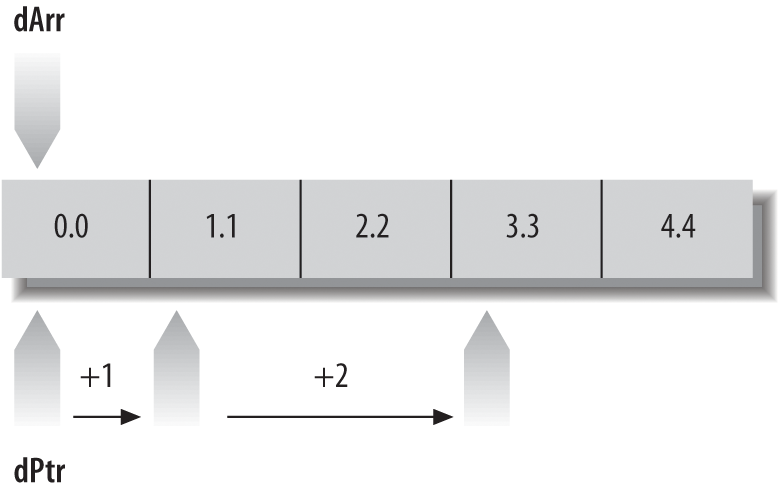
Figure 5-1. Using a pointer to move through the elements in an array
The statement dPtr = dPtr + 1; adds the size of one array element to the pointer, so that dPtr points to the next array element, dArr[1]. Because dPtr is declared as a pointer to double, its value is increased by sizeof(double).
The statement dPtr = dPtr + 1; in Example 5-1 has the same effect as any of the following statements (see “Assignment Operators” and “Increment and Decrement Operators”):
dPtr+=1;++dPtr;dPtr++;
Subtracting one pointer from another yields an integer value with the type ptrdiff_t. The value is the number of objects that fit between the two pointer values. In the last statement in Example 5-1, the expression dPtr − dArr yields the value 3. This is also the index of the element that dPtr points to, because dArr represents the address of the first array element (with the index 0). The type ptrdiff_t is defined in the header file stddef.h, usually as int.
For more information on pointer arithmetic, see Chapter 9.
Assignment Operators
In an assignment operation, the left operand must be a modifiable lvalue; in other words, it must be an expression that designates an object whose value can be changed. In a simple assignment (that is, one performed using the operator =), the assignment operation stores the value of the right operand in this object.
There are also compound assignments, which combine an arithmetic or a bitwise operation in the same step with the assignment. Table 5-7 lists all the assignment operators.
| Operator | Meaning | Example | Result |
|---|---|---|---|
|
Simple assignment |
|
Assign |
|
Compound assignment |
|
For each binary arithmetic or binary bitwise operator |
Simple assignment
The operands of a simple assignment must fulfill one of the following conditions:
-
Both operands have arithmetic types.
-
The left operand has the type
_Booland the right operand is a pointer. -
Both operands have the same structure or union type.
-
Both operands are pointers to the same type, or the left operand is a pointer to a qualified version of the common type—that is, the type pointed to by the left operand is declared with one or more additional type qualifiers (see Chapter 11).
-
One operand is an object pointer and the other is a pointer to
void(here again, the type pointed to by the left operand may have additional type qualifiers). -
The left operand is a pointer and the right is a null pointer constant.
If the two operands have different types, the value of the right operand is converted to the type of the left operand (see “The Results of Arithmetic Type Conversions” and “Implicit Pointer Conversions”).
The modification of the left operand is a side effect of an assignment expression. The value of the entire assignment expression is the same as the value assigned to the left operand, and the assignment expression has the type of the left operand. However, unlike its left operand, the assignment expression itself is not an lvalue. If you use the value of an assignment expression in a larger expression, pay careful attention to implicit type conversions. Avoid errors such as that illustrated in the following example. This code is supposed to read characters from the standard input stream until the end-of-file is reached or an error occurs:
#include <stdio.h>charc=0;/* ... */while((c=getchar())!=EOF){/* ... Process the character stored in c ... */}
In the controlling expression of the while statement in this example, getchar() returns a value with type int, which is implicitly converted to char for assignment to c. Then the value of the entire assignment expression c = getchar(), which is the same char value, is promoted to int for comparison with the constant EOF, which is usually defined as -1 in the header file stdio.h. However, if the type char is equivalent to unsigned char, then the conversion to int always yields a non-negative value. In this case, the loop condition is always true.
As Table 5-4 shows, assignment operators have a low precedence, and are grouped with their operators from right to left. As a result, no parentheses are needed around the expression to the right of the assignment operator, and multiple assignments can be combined in one expression, as in this example:
doublex=0.5,y1,y2;// Declarationsy1=y2=10.0*x;// Equivalent to y1 = (y2 = (10.0 * x));
This expression assigns the result of the multiplication to y1 and to y2.
Compound assignments
A compound assignment is performed by any of the following operators:
 *=  /= %= += -=  (arithmetic operation and assignment)
<<= >>= &= ^= |=  (bitwise operation and assignment)
In evaluating a compound assignment expression, the program combines the two operands with the specified operation and assigns the result to the left operand. Here are two examples:
longvar=1234L;var*=3;// Triple the value of var.var<<=2;// Shift the bit pattern in var two bit-positions// to the left (i.e., multiply the value by four).
The only difference between a compound assignment x op= y and the corresponding expression x = x op (y) is that in the compound assignment, the left operand x is evaluated only once. In the following example, the left operand of the compound assignment operator is an expression with a side effect, so that the two expressions are not equivalent:
x[++i]*=2;// Increment i once, then double the indexed// array element.x[++i]=x[++i]*(2);// Oops: you probably didn't want to// increment i twice.
In the equivalent form x = x op (y), the parentheses around the right operand y are significant, as the following example illustrates:
doublevar1=2.5,var2=0.5;var1/=var2+1;// Equivalent to var1 = var1 / (var2 + 1);
Without the parentheses, the expression var1 = var1 / var2 + 1 would yield a different result, because simple division, unlike the compound assignment, has higher precedence than addition.
The operands of a compound assignment can have any types that are permissible for the operands of the corresponding binary operator. The only additional restriction is that when you add a pointer to an integer, the pointer must be the left operand, as the result of the addition is a pointer. For example:
short*sPtr;/* ... */sPtr+=2;// Equivalent to sPtr = sPtr + 2;// or sPtr = 2 + sPtr;
Increment and Decrement Operators
Each of the tokens ++ and -- represents both a postfix and a prefix operator. Table 5-8 describes both forms of both operators.
| Operator | Meaning | Side effect | Value of the expression |
|---|---|---|---|
Postfix: |
Increment |
Increases the value of |
The value of |
Prefix: |
The value of |
||
Postfix: |
Decrement |
Decreases the value of |
The value of |
Prefix: |
The value of |
These operators require a modifiable lvalue as their operand. More specifically, the operand must have a real arithmetic type (not a complex type), or an object pointer type. The expressions ++x and --x are equivalent to (x += 1) and (x -= 1).
The following examples demonstrate the use of the increment operators, along with the subscript operator [] and the indirection operator *:
chara[10]="Jim";inti=0;printf("%c\n",a[i++]);// Output: Jprintf("%c\n",a[++i]);// Output: m
The character argument in the first printf() call is the character J from the array element a[0]. After the call, i has the value 1. Thus, in the next statement, the expression ++i yields the value 2, so that a[++i] is the character m.
The operator ++ can also be applied to the array element itself:
i=0;printf("%c\n",a[i]++);// Output: Jprintf("%c\n",++a[i]);// Output: L
According to the operator precedences and associativity in Table 5-4, the expressions a[i]++ and ++a[i] are equivalent to (a[i])++ and ++(a[i]). Thus, each of these expressions increases the value of the array element a[0] by one, while leaving the index variable i unchanged. After the statements in this example, the value of i is still 0, and the character array contains the string "Lim", as the first element has been incremented twice.
The operators ++ and-- are often used in expressions with pointers that are dereferenced by the * operator. For example, the following while loop copies a string from the array a to a second char array, a2:
chara2[10],*p1=a,*p2=a2;// Copy string to a2:while((*p2++=*p1++)!='\0');
Because the postfix operator ++ has precedence over the indirection operator * (see Table 5-4), the expression *p1++ is equivalent to *(p1++). In other words, the value of the expression *p1++ is the array element referenced by p1, and as a side effect, the value of p1 is one greater after the expression has been evaluated. When the end of the string is reached, the assignment *p2++ = *p1++ copies the terminator character '\0', and the loop ends, because the assignment expression yields the value '\0'.
By contrast, the expression (*p1)++ or ++(*p1) would increment the element referenced by p1, leaving the pointer’s value unchanged. However, the parentheses in the expression ++(*p1) are unnecessary: this expression is equivalent to ++*p1 because the unary operators are associated with operands from right to left (see Table 5-4). For the same reason, the expression *++p1 is equivalent to *(++p1), and its value is the array element that p1 points to after p1 has been incremented.
Comparative Operators
The comparative operators , also called the relational operators and the equality operators, compare two operands and yield a value of type int. The value is 1 if the specified relation holds, and 0 if it does not. C defines the comparative operators listed in Table 5-9.
| Operator | Meaning | Example | Result (1 = true, 0 = false) |
|---|---|---|---|
|
Less than |
|
1 if |
|
Less than or equal to |
|
1 if |
|
Greater than |
|
1 if |
|
Greater than or equal to |
|
1 if |
|
Equal to |
|
1 if |
|
Not equal to |
|
1 if |
For all comparative operators, the operands must meet one of the following conditions:
-
Both operands have real arithmetic types.
-
Both operands are pointers to objects of the same type, which may be declared with different type qualifiers.
With the equality operators, == and !=, operands that meet any of the following conditions are also permitted:
-
The two operands have any arithmetic types, including complex types.
-
Both operands are pointers to functions of the same type.
-
One operand is an object pointer, while the other is a pointer to
void. The two may be declared with different type qualifiers (the operand that is not a pointer tovoidis implicitly converted to the typevoid*for the comparison). -
One operand is a pointer and the other is a null pointer constant. The null pointer constant is converted to the other operand’s type for the comparison.
The operands of all comparison operators are subject to the usual arithmetic conversions (see “Conversion of Arithmetic Types”). Two complex numbers are considered equal if their real parts are equal and their imaginary parts are equal.
When you compare two object pointers, the result depends on the relative positions of the objects in memory. Elements of an array are objects with fixed relative positions: a pointer that references an element with a greater index is greater than any pointer that references an element with a lesser index. A pointer can also contain the address of the first memory location after the last element of an array. In this case, that pointer’s value is greater than that of any pointer to an element of the array.
The function in Example 5-2 illustrates some expressions with pointers as operands.
Example 5-2. Operations with pointers
/* The function average() calculates the arithmetic mean of the* numbers passed to it in an array.* Arguments: An array of float, and its length.* Return value: The arithmetic mean of the array elements,* with type double.*/doubleaverage(constfloat*array,intlength){doublesum=0.0;constfloat*end=array+length;// Points one past the last element.if(length<=0)// The average of no elements is zero.return0.0;// Accumulate the sumfor(constfloat*p=array;p<end;++p)// by walking a pointersum+=*p;// through the array.returnsum/length;// The average of the element values.}
Two pointers are equal if they point to the same location in memory, or if they are both null pointers. In particular, pointers to members of the same union are always equal because all members of a union begin at the same address. The rule for members of the same structure, however, is that a pointer to member2 is larger than a pointer to member1 if and only if member2 is declared after member1 in the structure type’s definition.
The comparative operators have lower precedence than the arithmetic operators but higher precedence than the logical operators. As a result, the following two expressions are equivalent:
a<b&&b<c+1(a<b)&&(b<(c+1))
Furthermore, the equality operators, == and !=, have lower precedence than the other comparative operators. Thus, the following two expressions are also equivalent:
a<b!=b<c(a<b)!=(b<c)
This expression is true (that is, it yields the value 1) if and only if one of the two operand expressions, (a < b) and (b < c), is true and the other false.
Logical Operators
You can connect expressions using logical operators to form compound conditions, such as those often used in jump and loop statements to control the program flow. C uses the symbols described in Table 5-10 for the boolean operations AND, OR, and NOT.
| Operator | Meaning | Example | Result (1 = true, 0 = false) |
|---|---|---|---|
|
logical AND |
|
1 if each of the operands |
|
logical OR |
|
0 if each of |
|
logical NOT |
|
1 if |
Like comparative expressions, logical expressions have the type int. The result has the value 1 if the logical expression is true, and the value 0 if it is false.
The operands may have any scalar type desired—in other words, any arithmetic or pointer type. Any operand with a value of 0 is interpreted as false; any value other than 0 is treated as true. Most often, the operands are comparative expressions, as in the following example. Assuming the variable deviation has the type double, all three of the expressions that follow are equivalent:
(deviation<-0.2)||(deviation>0.2)deviation<-0.2||deviation>0.2!(deviation>=-0.2&&deviation<=0.2)
Each of these logical expressions yields the value 1, or true, whenever the value of the variable deviation is outside the interval [-0.2, 0.2]. The parentheses in the first expression are unnecessary because comparative operators have a higher precedence than the logical operators && and ||. However, the unary operator ! has a higher precedence. Furthermore, as Table 5-4 shows, the operator && has a higher precedence than ||. As a result, parentheses are necessary in the following expression:
(deviation<-0.2||deviation>0.2)&&status==1
Without the parentheses, that expression would be equivalent to this:
deviation<-0.2||(deviation>0.2&&status==1)
These expressions yield different results if, for example, deviation is less than -0.2 and status is not equal to 1.
The operators && and || have an important peculiarity: their operands are evaluated in order from left to right, and if the value of the left operand is sufficient to determine the result of the operation, then the right operand is not evaluated at all. There is a sequence point after the evaluation of the left operand. The operator && evaluates the right operand only if the left operand yields a nonzero value; the operator|| evaluates the right operand only if the left operand yields 0. The following example shows how programs can use these conditional-evaluation characteristics of the && and || operators:
doublex;_Boolget_x(double*x),check_x(double);// Function prototype// declarations./* ... */while(get_x(&x)&&check_x(x))// Read and test a number.{/* ... Process x ... */}
In the controlling expression of the while loop, the function get_x(&x) is called first to read a floating-point number into the variable x. Assuming that get_x() returns a true value on success, the check_x() function is called only if there is a new value in x to be tested. If check_x() also returns true, then the loop body is executed to process x.
Bitwise Operators
For more compact data, C programs can store information in individual bits or groups of bits. File access permissions are a common example. The bitwise operators allow you to manipulate individual bits in a byte or in a larger data unit: you can clear, set, or invert any bit or group of bits. You can also shift the bit pattern of an integer to the left or right.
The bit pattern of an integer type consists of bit positions numbered from right to left, beginning with position 0 for the least significant bit. For example, consider the char value '*', which in ASCII encoding is equal to 42, or binary 101010:
Bit pattern |
0 |
0 |
1 |
0 |
1 |
0 |
1 |
0 |
Bit positions |
7 |
6 |
5 |
4 |
3 |
2 |
1 |
0 |
In this example, the value 101010 is shown in the context of an 8-bit byte; hence the two leading zeros.
Boolean bitwise operators
The operators listed in Table 5-11 perform Boolean operations on each bit position of their operands. The binary operators connect the bit in each position in one operand with the bit in the same position in the other operand. A bit that is set, or 1, is interpreted as true, and a bit that is cleared, or 0, is considered false.
In addition to the operators for boolean AND, OR, and NOT, there is also a bitwise exclusive-OR operator. These are all described in Table 5-11.
| Operator | Meaning | Example | Result, for each bit position (1 = set, 0 = cleared) |
|---|---|---|---|
|
Bitwise AND |
|
1, if 1 in both |
0, if 0 in |
|||
|
Bitwise OR |
|
1, if 1 in |
|
Bitwise exclusive OR |
|
1, if 1 either in |
|
Bitwise NOT (one’s complement) |
|
1, if 0 in |
The operands of the bitwise operators must have integer types, and are subject to the usual arithmetic conversions. The resulting common type of the operands is the type of the result. Table 5-12 illustrates the effects of these operators.
| Expression (or declaration) | Bit pattern |
|---|---|
|
|
|
|
|
|
|
|
|
|
|
|
You can clear certain bits in an integer variable a by performing a bitwise AND with an integer in which only the bits to be cleared contain zeros, and assigning the result to the variable a. The bits that were set in the second operand—called a bit mask—have the same value in the result as they had in the first operand. For example, an AND with the bit mask 0xFF clears all bits except the lowest eight:
a&=0xFF;// Equivalent notation: a = a & 0xFF;
As this example illustrates, the compound assignment operator &= also performs the & operation. The compound assignments with the other binary bitwise operators work similarly.
The bitwise operators are also useful in making bit masks to use in further bit operations. For example, in the bit pattern of 0x20, only bit 5 is set. The expression ~0x20 therefore yields a bit mask in which all bits are set except bit 5:
a&=~0x20;// Clear bit 5 in a.
The bit mask ~0x20 is preferable to 0xFFFFFFDF because it is more portable: it gives the desired result regardless of the machine’s word size. (It also makes the statement more readable for humans.)
You can also use the operators | (OR) and ^ (exclusive OR) to set and clear certain bits. Here is an example of each one:
intmask=0xC;a|=mask;// Set bits 2 and 3 in a.a^=mask;// Invert bits 2 and 3 in a.
A second inversion using the same bit mask reverses the first inversion. In other words, b^mask^mask yields the original value of b. This behavior can be used to swap the values of two integers without using a third, temporary variable:
a^=b;// Equivalent to a = a ^ b;b^=a;// Assign b the original value of a.a^=b;// Assign a the original value of b.
The first two expressions in this example are equivalent to b = b^(a^b) or b = (a^b)^b. The result is like b = a, with the side effect that a is also modified, and now equals a^b. At this point, the third expression has the effect of (using the original values of a and b) a = (a^b)^a, or a = b.
Shift operators
The shift operators transpose the bit pattern of the left operand by the number of bit positions indicated by the right operand. They are listed in Table 5-13.
| Operator | Meaning | Example | Result |
|---|---|---|---|
|
Shift left |
|
Each bit value in |
|
Shift right |
|
Each bit value in |
The operands of the shift operators must be integers. Before the actual bit-shift, the integer promotions are performed on both operands. The value of the right operand must not be negative, and must be less than the width of the left operand after integer promotion. If it does not meet these conditions, the program’s behavior is undefined.
The result has the type of the left operand after integer promotion. The shift expressions in the following example have the type unsigned long.
unsignedlongn=0xB,// Bit pattern: 0 ... 0 0 0 1 0 1 1result=0;result=n<<2;// 0 ... 0 1 0 1 1 0 0result=n>>2;// 0 ... 0 0 0 0 0 1 0
In a left shift, the bit positions that are vacated on the right are always cleared. Bit values shifted beyond the leftmost bit position are lost. A left shift through y bit positions is equivalent to multiplying the left operand by 2y: if the left operand x has an unsigned type, then the expression x << y yields the value of x × 2y. Thus, in the previous example, the expression n << 2 yields the value of n × 4, or 44.
On a right shift, the vacated bit positions on the left are cleared if the left operand has an unsigned type, or if it has a signed type and a non-negative value. In this case, the expression x >> y yields the same value as the integer division x/2y. If the left operand has a negative value, then the fill value depends on the compiler: it may be either zero or the value of the sign bit.
The shift operators are useful in generating certain bit masks. For example, the expression 1 << 8 yields a word with only bit 8 set, and the expression ~(3<<4) produces a bit pattern in which all bits are set except bits 4 and 5. The function setBit() in Example 5-3 uses the bit operations to manipulate a bit mask.
Example 5-3. Using a shift operation to manipulate a bit mask
// Function setBit()// Sets the bit at position p in the mask m.// Uses CHAR_BIT, defined in limits.h, for the number of bits in a byte.// Return value: The new mask with the bit set, or the original mask// if p is not a valid bit position.unsignedintsetBit(unsignedintmask,unsignedintp){if(p>=CHAR_BIT*sizeof(int))returnmask;elsereturnmask|(1<<p);}
The shift operators have lower precedence than the arithmetic operators but higher precedence than the comparative operators and the other bitwise operators. The parentheses in the expression mask | (1 << p) in Example 5-3 are thus actually unnecessary, but they make the code more readable.
Memory Addressing Operators
The five operators listed in Table 5-14 are used in addressing array elements and members of structures, and in using pointers to access objects and functions.
| Operator | Meaning | Example | Result |
|---|---|---|---|
|
Address of |
|
Pointer to |
|
Indirection operator |
|
The object or function that |
|
Subscripting |
|
The element with the index |
|
Structure or union member designator |
|
The member named |
|
Structure or union member designator by reference |
|
The member named |
The & and * operators
The address operator & yields the address of its operand. If the operand x has the type T, then the expression &x has the type “pointer to T.”
The operand of the address operator must have an addressable location in memory. In other words, the operand must designate either a function or an object (i.e., an lvalue) that is not a bit-field, and has not been declared with the storage class register (see “Storage Class Specifiers”).
You need to obtain the addresses of objects and functions when you want to initialize pointers to them:
floatx,*ptr;ptr=&x;// OK: Make ptr point to x.ptr=&(x+1);// Error: (x+1) is not an lvalue.
Conversely, when you have a pointer and want to access the object it references, use the indirection operator *, which is sometimes called the dereferencing operator (see “Using Pointers to Read and Modify Objects” for more information). Its operand must have a pointer type. If ptr is a pointer, then *ptr designates the object or function that ptr points to. If ptr is an object pointer, then *ptr is an lvalue, and you can use it as the left operand of an assignment operator:
floatx,*ptr=&x;*ptr=1.7;// Assign the value 1.7 to the variable x++(*ptr);// and add 1 to it.
In the final statement of this example, the value of ptr remains unchanged. The value of x is now 2.7.
The behavior of the indirection operator * is undefined if the value of the pointer operand is not the address of an object or a function.
Like the other unary operators, the operators & and * have the second highest precedence. They are grouped with operands from right to left. The parentheses in the expression ++(*ptr) are thus superfluous.
The operators & and * are complementary: if x is an expression that designates an object or a function, then the expression *&x is equivalent to x. Conversely, in an expression of the form &*ptr, the operators cancel each other out so that the type and value of the expression are equivalent to ptr. However, &*ptr is never an lvalue, even if ptr is.
Elements of arrays
The subscript operator [] allows you to access individual elements of an array. It takes two operands. In the simplest case, one operand is an array name and the other operand designates an integer. In the following example, assume that myarray is the name of an array, and i is a variable with an integer type. The expression myarray[i] then designates element number i in the array, where the first element is element number zero (see Chapter 8).
The left operand of [] need not be an array name. One operand must be an expression whose type is “pointer to an object type”—an array name is a special case of such an expression—while the other operand must have an integer type. An expression of the form x[y] is always equivalent to (*((x)+(y))) (see also “Pointer arithmetic” earlier in this chapter). Example 5-4 uses the subscript operator in initializing a dynamically generated array.
Example 5-4. Initializing an array
#include <stdlib.h>#define ARRAY_SIZE 100/* ... */double*pArray=NULL;inti=0;pArray=malloc(ARRAY_SIZE*sizeof(double));// Generate the arrayif(pArray!=NULL){for(i=0;i<ARRAY_SIZE;++i)// and initialize it.pArray[i]=(double)rand()/RAND_MAX;/* ... */}
In Example 5-4, the expression pArray[i] in the loop body is equivalent to *(pArray+i). The notation i[pArray] is also correct, and yields the same array element.
Members of structures and unions
The binary operators . and ->, most often called the dot operator and the arrow operator, allow you to select a member of a structure or a union.
As Example 5-5 illustrates, the left operand of the dot operator . must have a structure or union type, and the right operand must be the name of a member of that type.
Example 5-5. The dot operator
structArticle{longnumber;// The part number of an articlecharname[32];// The article's namelongprice;// The unit price in cents/* ... */};structArticlesw={102030L,"Heroes",5995L};sw.price=4995L;// Change the price to 49.95
The result of the dot operator has the value and type of the selected member. If the left operand is an lvalue, then the operation also yields an lvalue. If the left operand has a qualified type (such as one declared with const), then the result is likewise qualified.
The left operand of the dot operator is not always an lvalue, as the following example shows:
structArticlegetArticle();// Function prototypeprintf("name: %s\n",getArticle().name);
The function getArticle() returns an object of type struct Article. As a result, getArticle().name is a valid expression, but not an lvalue, as the return value of a function is not an lvalue.
The operator -> also selects a member of a structure or union, but its left operand must be a pointer to a structure or union type. The right operand is the name of a member of the structure or union. Example 5-6 illustrates the use of the -> operator, again using the Article structure defined in Example 5-5.
Example 5-6. The arrow operator
structArticle*pArticle=&sw,// A pointer to struct Article.const*pcArticle=&sw;// A "read-only pointer" to struct// Article.++(pArticle->number);// Increment the part number.if(pcArticle->number==102031L)// Correct usage: read-only access.pcArticle->price+=50;// Error: can't use a// const-qualified pointer// to modify the object.
The result of the arrow operator is always an lvalue. It has the type of the selected member, as well as any type qualifications of the pointer operand. In Example 5-6, pcArticle is a pointer to const struct Article. As a result, the expression pcArticle->price is constant.
Any expression that contains the arrow operator can be rewritten using the dot operator by dereferencing the pointer separately: an expression of the form p->m is equivalent to (*p).m. Conversely, the expression x.m is equivalent to (&x)->m, as long as x is an lvalue.
The operators . and ->, like [], have the highest precedence, and are grouped from left to right. Thus, the expression ++p->m, for example, is equivalent to ++(p->m), and the expression p->m++ is equivalent to (p->m)++. However, the parentheses in the expression (*p).m are necessary, as the dereferencing operator * has a lower precedence. The expression *p.m would be equivalent to *(p.m), and thus makes sense only if the member m is also a pointer.
To conclude this section, we can combine the subscript, dot, and arrow operators to work with an array whose elements are structures:
structArticlearrArticle[10];// An array with ten elements// of type struct Article.arrArticle[2].price=990L;// Set the price of the// array element arrArticle[2].arrArticle->number=10100L;// Set the part number in the// array element arrArticle[0].
An array name, such as arrArticle in the example, is a constant pointer to the first array element. Hence arrArticle->number designates the member number in the first array element. To put it in more general terms: for any index i, the following three expressions are equivalent:
arrArticle[i].number(arrArticle+i)->number(*(arrArticle+i)).number
All of them designate the member number in the array element with the index i.
Other Operators
There are seven other operators in C that do not fall into any of the categories described in this chapter. Table 5-15 lists these operators in order of precedence.
| Operator | Meaning | Example | Result |
|---|---|---|---|
() |
Function call | log(x) |
Passes control to the specified function, with the specified arguments |
(type name) {list} |
Compound literal | (int [5]){ 1, 2 } |
Defines an unnamed object that has the specified type and the values listed |
sizeof |
Storage size of an object or type, in bytes | sizeof x |
The number of bytes occupied in memory by x |
_Alignof |
Alignment of an object type, in bytes | _Alignof(int) |
The minimum distance between the locations of two such objects in memory |
(type name) |
Explicit type conversion, or “cast” | (short) x |
The value of x converted to the type specified |
?: |
Conditional evaluation | x ? y : z |
The value of y, if x is true (i.e., nonzero); otherwise, the value of z |
, |
Sequential evaluation | x,y |
Evaluates first x, then y; the result of the expression is the value of y |
Function calls
A function call is an expression of the form fn_ptr(argument_list ), where the operand fn_ptr is an expression with the type “pointer to a function.” If the operand designates a function (as a function name does, for example), then it is automatically converted into a pointer to the function. A function call expression has the value and type of the function’s return value. If the function has no return value, the function call has the type void.
Before you can call a function, you must make sure that it has been declared in the same translation unit. Usually a source file includes a header file containing the function declaration, as in this example:
#include <math.h>// Contains the prototype// double pow( double, double );doublex=0.7,y=0.0;/* ... */y=pow(x+1,3.0);// Type: double
The parentheses enclose the comma-separated list of arguments passed to the function, which can also be an empty list. If the function declaration is in prototype form (as is usually the case), the compiler ensures that each argument is converted to the type of the corresponding parameter, as for an assignment. If this conversion fails, the compiler issues an error message:
pow(x,3);// The integer constant 3 is converted to type double.pow(x);// Error: incorrect number of arguments.
The order in which the program evaluates the individual expressions that designate the function and its arguments is not defined. As a result, the behavior of a printf statement such as the following is undefined:
inti=0;printf("%d %d\n",i,++i);// Behavior undefined
However, there is a sequence point after all of these expressions have been evaluated and before control passes to the function.
Like the other postfix operators, a function call has the highest precedence, and is grouped with operands from left to right. For example, suppose that fn_table is an array of pointers to functions that take no arguments and return a structure that contains a member named price. In this case, the following expression is a valid function call:
fn_table[i++]().price
The expression calls the function referenced by the pointer stored in fn_table[i]. The return value is a structure, and the dot operator selects the member price in that structure. The complete expression has the value of the member price in the return value of the function fn_table[i](), and the side effect that i is incremented once.
Chapter 7 describes function calls in more detail, including recursive functions and functions that take a variable number of arguments.
Compound literals
Compound literals are an extension introduced in the C99 standard. This extension allows you to define literals with any object type desired. A compound literal consists of an object type in parentheses, followed by an initialization list in braces:
(type name ){ list of initializers }
The value of the expression is an unnamed object that has the specified type and the values listed. If you place a compound literal outside of all function blocks, then the initializers must be constant expressions, and the object has static storage duration. Otherwise, it has automatic storage duration, determined by the containing block.
Typical compound literals generate objects with array or structure types. Here are a few examples to illustrate their use:
float*fPtr=(float[]){-0.5,0.0,+0.5};
This declaration defines a pointer to a nameless array of three float elements:
#include "database.h"// Contains prototypes and type definitions,// including the structure Pair:// struct Pair { long key; char value[32]; };insertPair(&db,&(structPair){1000L,"New York JFK Airport"});
This statement passes the address of a literal of type struct Pair to the function insertPair(). You can also store the address in a local variable first:
structPairp1={1000L,"New York JFK Airport"};insertPair(&db,&p1);
To define a constant compound literal, use the type qualifier const:
(constchar[]){"A constant string."}
If the previous expression appears outside of all functions, it defines a static array of char, like the following simple string literal:
"A constant string."In fact, the compiler may store string literals and constant compound literals with the same type and contents at the same location in memory.
Despite their similar appearance, compound literals are not the same as cast expressions. The result of a cast expression has a scalar type or the type void, and is not an lvalue.
The sizeof operator
The sizeof operator yields the size of its operand in bytes. Programs need to know the size of objects mainly in order to reserve memory for them dynamically, or to store binary data in files.
The operand of the sizeof operator can be either an object type in parentheses or an expression that has an object type and is not a bit-field. The result has the type size_t, which is defined in stddef.h and other standard header files as an unsigned integer type.
For example, if i is an int variable and iPtr is a pointer to int, then each of the following expressions yields the size of int—on a 32-bit system, the value would be 4:
sizeof(int)sizeofisizeof(i)sizeof*iPtrsizeof(*iPtr)
Note the difference to the following expressions, each of which yields the size of a pointer to int:
sizeof(int*)sizeof&isizeof(&i)sizeofiPtrsizeof(iPtr)
Like *, &, and the other unary operators, sizeof has the second highest precedence, and is grouped from right to left. For this reason, no parentheses are necessary in the expression sizeof *iPtr.
For an operand with the type char, unsigned char, or signed char, the sizeof operator yields the value 1, because these types have the size of a byte. If the operand has a structure type, the result is the total size that the object occupies in memory, including any gaps that may occur due to the alignment of the structure members. In other words, the size of a structure is sometimes greater than the sum of its individual members’ sizes. For example, if variables of the type short are aligned on even byte addresses, the following structure has the size sizeof(short) + 2:
structgap{charversion;shortvalue;};
In the following example, the standard function memset() sets every byte in the structure to zero, including any gaps between members:
#include <string.h>/* ... */structgapg;memset(&g,0,sizeofg);
If the operand of sizeof is an expression, it is not actually evaluated. The compiler determines the size of the operand by its type, and replaces the sizeof expression with the resulting constant. Variable-length arrays, introduced in the C99 standard, are an exception (see Chapter 8). Their size is determined at runtime, as Example 5-7 illustrates.
Example 5-7. Sizing variable-length arrays
voidfunc(floata[],intn){floatb[2*n];// A variable-length array of float./* ... the value of n may change now ... */intm=sizeof(b)/sizeof(*b);// Yields the number of elements/* ... */// in the array b.}
Regardless of the current value of the variable n, the expression sizeof(b) yields the value of 2 × n0 × sizeof(float), where n0 is the value that n had at the beginning of the function block. The expression sizeof(*b) is equivalent to sizeof(b[0]), and in this case has the value of sizeof(float).
Tip
The parameter a in the function func() in Example 5-7 is a pointer, not an array. The expression sizeof(a) within the function would therefore yield the size of a pointer. See “Array and Function Designators”.
The _Alignof operator
The alignment of a type describes how objects of that type can be positioned in memory (see “The Alignment of Objects in Memory”). Alignment is expressed as an integer value. The operand of _Alignof is the name of a type in parentheses, and the resulting expression yields the type’s alignment, as in the following example:
_Alignof(char*)// The alignment of a char pointer
Because the alignment of types is determined by the compiler, _Alignof expressions, like sizeof expressions, are integer constants with the type size_t. If your program includes the header file stdalign.h, you can also use the synonym alignof in place of the keyword _Alignof. The _Alignof operator can only be applied to complete object types, not to function types or incomplete object types. If the operand is an array type, _Alignof yields the alignment of the array elements’ type.
The conditional operator
The conditional operator is sometimes called the ternary or trinary operator, because it is the only one that has three operands:
condition?expression1:expression2
The operation first evaluates the condition. Then, depending on the result, it evaluates one or the other of the two alternative expressions.
There is a sequence point after the condition has been evaluated. If the result is not equal to 0 (in other words, if the condition is true), then only the second operand, expression 1, is evaluated, and the entire operation yields the value of expression 1. On the other hand, if condition does yield 0 (i.e., false), then only the third operand, expression 2, is evaluated, and the entire operation yields the value of expression 2. In this way, the conditional operator represents a conditional jump in the program flow, and is therefore an alternative to some if-else statements.
A common example is the following function, which finds the maximum of two numbers:
inlineintiMax(inta,intb){returna>=b?a:b;}
The function iMax() can be rewritten using an if-else statement:
inlineintiMax(inta,intb){if(a>=b)returna;elsereturnb;}
The conditional operator has a very low precedence: only the assignment operators and the comma operator are lower. Thus, the following statement requires no parentheses:
distance=x<y?y−x:x−y;
The first operand of the conditional operator, condition, must have a scalar type—that is, an arithmetic type or a pointer type. The second and third operands, expression 1 and expression 2, must fulfill one of the following cases:
-
Both of the alternative expressions have arithmetic types, in which case the result of the complete operation has the type that results from performing the usual arithmetic conversions on these operands.
-
Both of the alternative operands have the same structure or union type, or the type
void. The result of the operation also has this type. -
Both of the alternative operands are pointers, and one of the following is true:
-
Both pointers have the same type. The result of the operation then has this type as well.
-
One operand is a null pointer constant. The result then has the type of the other operand.
-
One operand is an object pointer and the other is a pointer to
void. The result then has the typevoid *.
-
The two pointers may point to differently qualified types. In this case, the result is a pointer to a type that has all of the type qualifiers of the two alternative operands. For example, suppose that the following pointers have been defined:
constint*cintPtr;// Declare pointersvolatileint*vintPtr;void*voidPtr;
The expressions in the following table then have the type indicated, regardless of the truth value of the variable flag:
| Expression | Type |
|---|---|
|
|
|
|
|
|
The comma operator
The comma operator is a binary operator:
expression 1 , expression 2
The comma operator ensures sequential processing: first the left operand is evaluated, then the right operand. The result of the complete expression has the type and value of the right operand. The left operand is only evaluated for its side effects; its value is discarded. There is a sequence point after the evaluation of the left operand. For example:
x=2.7,sqrt(2*x)
In this expression, the assignment takes place first, before the sqrt() function is called. The value of the complete expression is the function’s return value.
The comma operator has the lowest precedence of all operators. For this reason, the assignment x = 2.7 in the previous example does not need to be placed in parentheses. However, parentheses are necessary if you want to use the result of the comma operation in another assignment:
y=(x=2.7,sqrt(2*x));
This statement assigns the square root of 5.4 to y.
A comma in a list of initializers or function arguments is a list separator, not a comma operator. In such contexts, however, you can still use a comma operator by enclosing an expression in parentheses:
y=sqrt((x=2.7,2*x));
This statement is equivalent to the one in the previous example. The comma operator allows you to group several expressions into one. This ability makes it useful for initializing or incrementing multiple variables in the head of a for loop, as in the following example:
inti;floatfArray[10],val;for(i=0,val=0.25;i<10;++i,val*=2.0)fArray[i]=val;
Constant Expressions
The compiler recognizes constant expressions in source code and replaces them with their values. The resulting constant value must be representable in the expression’s type. You may use a constant expression wherever a simple constant is permitted.
Operators in constant expressions are subject to the same rules as in other expressions. Because constant expressions are evaluated at translation time, though, they cannot contain function calls or operations that modify variables, such as assignments.
Integer Constant Expressions
An integer constant expression is a constant expression with any integer type. These are the expressions you use to define the following items:
-
The size of an array
-
The value of an enumeration constant
-
The size of a bit-field
-
The alignment of an object in a definition using
_Alignas(C11) -
The value of a
caseconstant in aswitchstatement
For example, you may define an array as follows:
#define BLOCK_SIZE 512charbuffer[4*BLOCK_SIZE];
The following kinds of operands are permissible in an integer constant expression:
-
Integer, character, and enumeration constants
-
sizeofexpressions and_Alignofexpressions
However, the operand of sizeof in a constant expression must not be a variable-length array. You can also use floating-point constants if you cast them as an integer type.
Other Constant Expressions
You can also use constant expressions to initialize static and external objects. In these cases, the constant expressions can have any arithmetic or pointer type desired. You may use floating-point constants as operands in an arithmetic constant expression.
A constant with a pointer type, called an address constant, is usually a null pointer, an array or function name, or a value obtained by applying the address operator & to an object with static storage duration. However, you can also construct an address constant by casting an integer constant as a pointer type, or by pointer arithmetic. For example:
#define ARRAY_SIZE 200staticfloatfArray[ARRAY_SIZE];staticfloat*fPtr=fArray+ARRAY_SIZE−1;// Pointer to the last// array element
In composing an address constant, you can also use other operators, such as . and ->, as long as you do not actually dereference a pointer to access the value of an object. For example, the following declarations are permissible outside any function:
structPerson{charpin[32];charname[64];/* ... */};structPersonboss;constchar*cPtr=&boss.name[0];// or: ... = boss.name;
1 The C standard acknowledges this etymology, but proposes that the L in lvalue be thought of as meaning “locator,” because an lvalue always designates a location in memory. The standard steers clear of the term rvalue, preferring the phrase “not an lvalue.”