Dice games and card games are time-honored time wasters, but you probably want to make other kinds of games, too. No book can possibly cover all the different game styles, and how to code them, but by learning dice and cards so thoroughly, you have learned everything you need to generate the mechanics for any genre.
In this chapter, you learn to apply the principles of game design from earlier chapters to a roguelike game.
What’s Roguelike?
The exact definition of roguelike is the topic of much debate within gamer culture, but generally it’s characterized as an exploration game, often set in a top-down dungeon or tomb in a fantasy setting. It emphasizes tactics, with combat being the central mechanic. There’s no story, and randomly generated levels and monster encounters are usually revealed little by little as the player progresses through the map. Furthermore, death is permanent, a frustrating tradition mitigated by the fact that there’s no win condition, and the next game will be completely different anyway.
The classic roguelike is Nethack, a very old game that uses ASCII characters to represent the hero, monsters, items, and the map itself (see Figure 12-1). More recent examples include Pokemon Mystery Dungeon, Pixel Dungeon, Diablo, Darkest Dungeon, and Runestone Keeper.
Figure 12-1
An old-school roguelike
The roguelike genre is useful because it demonstrates how to translate the same mechanics from dice and card games into a character-driven video game. This chapter emphasizes how to translate what you have learned so far into a game that, on the surface, bears no resemblance to the example games you have created up to this point. There are fewer explanations of the Lua syntax than examples of how all the code you already know is capable of being used in ways that are new to you.
It Looks Good on Paper
As with Battlejack, the smartest thing you can do before writing any code at all is to interpret the game you want to make into a tangible system you can test. As it happens, dynamically generated dungeons for tabletop games have existed for years in the form of random tables. If you’ve never seen or used a random table, it’s worth looking at any Dungeons & Dragons (D&) Dungeon Master Guide as a study of game design. In the context of randomness, Dungeon Master Guides provide tables of various attributes for items that a player might find in an imaginary dungeon while playing this popular tabletop RPG. If a player finds an item, the Dungeon Master may roll dice and then refer to the table to mutually discover, along with the adventurer, what exactly it was that they found. For instance, a die roll of 11 on Table 98 means that the player has found a pair of Bracers of Defense, while a roll of 16 means the player has found Gauntlets of Ogre Power.
The same principle can be applied to the layout of the dungeon itself. For a paper-based example, visit. The system is simple: roll a 12-sided die (d12) for the subjective size of a room, then a d12 again for the general shape of the room, and then a d4 to discover the number of exits that exist in the room.
It’s easy to translate this into a digital Lua-based system, and it is easily extended to include all aspects of the game world; the number of monsters in a room, the amount of treasure, the presence of discarded weapons or shields or other gear, and so on.
Most elements of this game can be abstracted out of main.lua into their own tables. Start with the most basic element of a dungeon crawl: the rooms.
Assets
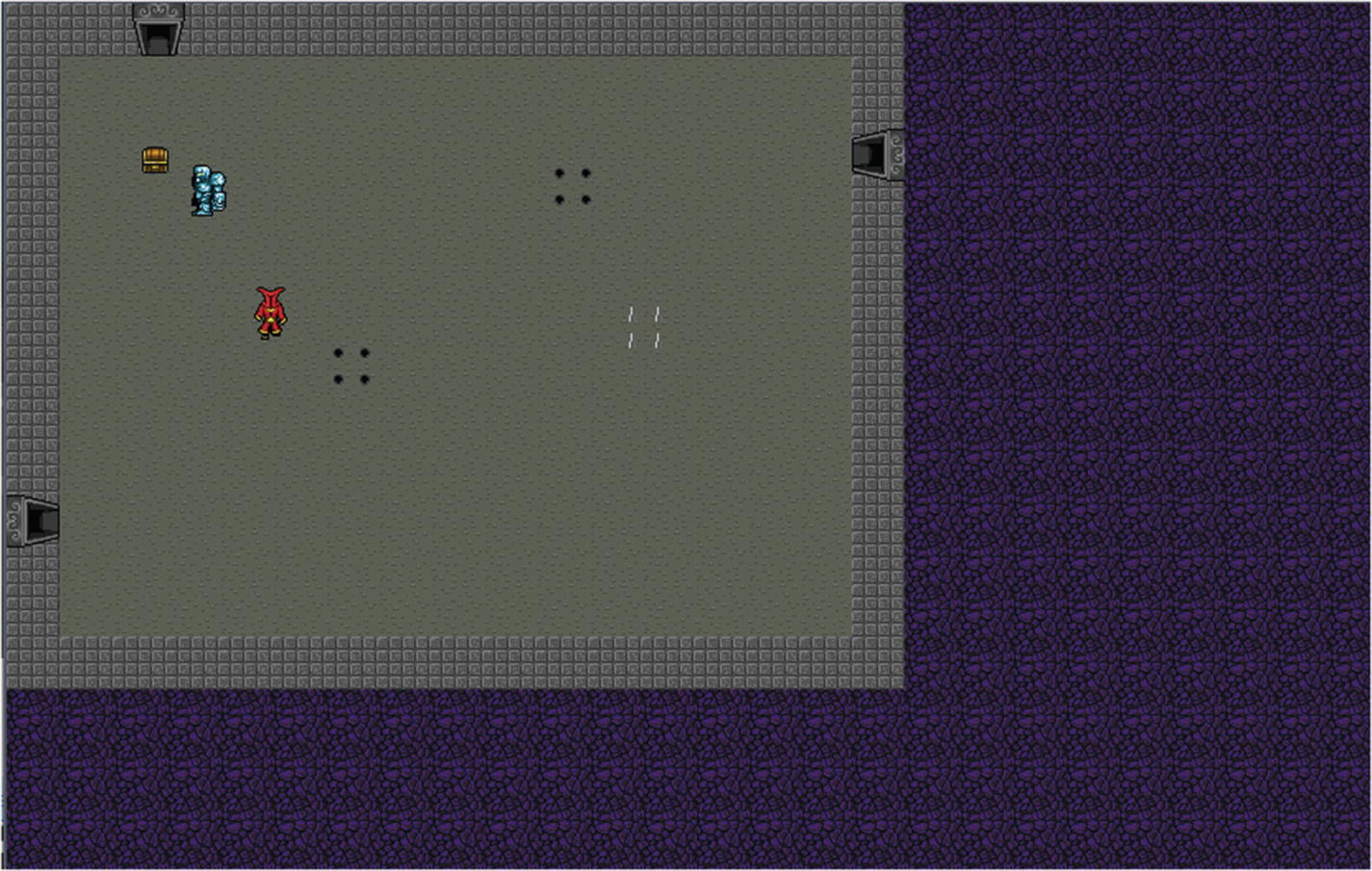
If you’re going to build dungeons, you need raw material. Either create or download a few basic elements as tiles, like you did for the tabletop texture of Battlejack. The perspective must be top-down (“bird’s-eye). For this game, you need the following.
Dungeon floor
Dungeon walls
Hero
Two types of monsters
Two types of traps
Treasure
A fireball or similar projectile
The source code for this example game includes the Underworld tile set by Poikilos and Redshrike on OpenGameArt.org, a 32×32–pixel tile set laid out in spritesheets. You can use this set or you can make your own, but this example assumes that your sprites are in spritesheets rather than individual image files, because spritesheets are very common and you should know how to use them.
Once you have your assets in your project’s img directory, open a new file called main.lua and set up the basics framework for your code.
sheet = love.graphics.newImage("img" .. d .. "underworld_load-atlas-32x32.png")
skull = love.graphics.newImage("img" .. d .. "underworld_load-sprites-flameskull-32x32.png")
end
As you can tell from the requires list, you will create a custom library for each major element of your dungeon. This code also creates a table to store similar elements together, defines the tile size as specified by the spritesheet artist, and starts a random seed.
In the love.load function, two new variables are created. The sheet variable contains the main spritesheet, and skull contains the object that will serve as a projectile weapon (yes, the hero of this game throws magical flaming skulls at monsters).
So far, this is the same process you used to create the table texture in Battlejack.
Treasure
The simplest library in this game is the treasure chest library, called chest.lua. This game uses the simplified mechanic of combining health points and wealth points, meaning that the more treasure the player finds, the longer the player lives.
Chest = { }
function Chest.init(w,h)
local self = setmetatable({}, Chest)
self.x = math.random(t*2,(w*t)-(t*2))
self.y = math.random(t*2,(h*t)-(t*2))
self.xp = math.random(10,100)
self.full = true --set to false when player gets treasure
Images are each defined with the newQuad function. Each one extracts some portion of the sheet image. The syntax specifies the X and Y position of the image you want to “cut out” from the spritesheet. Since the spritesheet is laid out in columns and rows, all you have to do is count, starting at 0, and then multiply the result by the tile size. Since this is programming, you’re better off letting the computer do the multiplication for you, so the X and Y positions are defined with small equations, such as 6*t and 2*t.
The size of each image is always the same, so t,t is used to set the width and height of the sprite. Finally, sheet:getDimensions()is called to set the source and size of the image that the quad is using as its source.
Traps
Next, create a trap class in a file called trap.lua and add the following code to it.
This library generates a trap object located somewhere within a room of a given size (specified by the w and h arguments). There are two different traps, each with two states: there’s a crack in the floor that opens into a pit, and pinholes from which spikes spring. For ease of selection, the image for the first type of trap is stored in self.state[1] and the second in self.state[3]. This way, the virtual die only has to choose between two numbers, which can be directly applied to which image is used for its un-sprung state.
Monsters
Create a file called monster.lua and open it in Geany. Monsters are similar to traps. They are placed randomly within the room (defined by w and h arguments), as is their type. Unlike traps, they have natural armor, which determines how many bolts the hero must hit it with to kill it.
Monster = { }
function Monster.init(w,h)
local self = setmetatable({}, Monster)
self.x = math.random(t*3,(w*t)-(t*2))
self.y = math.random(t*3,(h*t)-(t*2))
self.face = {}
self.dmg = 1
-- armour strength
if math.random(1,20)%2 == 0 then -- fungus
self.ac = math.random(5,10)
self.name = "fungus"
self.face[1] = love.graphics.newQuad(0*t,0*t,t,t,sheet:getDimensions()) --fungus up
self.face[2] = love.graphics.newQuad(1*t,0*t,t,t,sheet:getDimensions()) --fungus up
self.face[3] = love.graphics.newQuad(2*t,0*t,t,t,sheet:getDimensions()) --fungus up
self.face[4] = love.graphics.newQuad(0*t,2*t,t,t,sheet:getDimensions()) --fungus down
self.face[5] = love.graphics.newQuad(1*t,2*t,t,t,sheet:getDimensions()) --fungus down
self.face[6] = love.graphics.newQuad(2*t,2*t,t,t,sheet:getDimensions()) --fungus down
Setting images for the monsters is similar to setting images for traps, except that there are many more states for each monster. On this spritesheet, there are at least three images of each monster walking east, and at least three more of each monster walking west. This is significant, because in the animation cycles for the monster, the grouping of images for each monster matters: starting at self.face[1] has the monster facing one way, and starting at self.face[3] has the monster face the opposite direction.
Hero
Create a file called hero.lua and open it in Geany. The code for the hero is as simple as the treasure or trap libraries, although it may look more complex at first.
This code is lazy, in a good way. There are a total of 12 states for the hero’s image: a three-frame walk cycle for each cardinal direction. Instead of typing out all 12 quad definitions, a for loop is used for each direction. Additionally, a variable called self.face is set to make it easy to find out which direction the hero is facing. This is an important variable to determine whether the hero is passing by a doorway or actually passing through a door, and also for determining which way a magic missile (or a flaming skull, as the case may be) is fired.
The self.speed variable defines how quickly the hero moves each turn. The self.xp variable grants the hero 10 points of XP. Other variables, such as self.x and self.y, are created as placeholders, since they will be overwritten almost immediately, when the hero is placed in the room.
Bolt
Create a file called bolt.lua and open it in Geany.
This library creates a table for the bolt’s images from the spritesheetskull. It sets an initial origin point of self.x and self.y, both of which are defined by the x and y arguments when the bolt is created. Since the bolt is meant to originate from the hero’s magical hands, the origin point will always be the same as the hero’s current position.
Floor Tiles
The last library you need isn’t really a library or class in any traditional sense. It is kept separate from main.lua, because in theory it’s easy to swap out with something different. The floor.lua file defines all of the images used to draw the dungeon itself. Everything from floor tiles, wall tiles, doors, dead space, and anything else you want to use when drawing a room.
In your project directory, create a new file called room.lua. Design an init function that creates a room of a random size, with a random number of traps, treasure, and monsters in side of it.
Room = { }
function Room.init(w,h)
local self = setmetatable({}, Room)
-- room dimensions
self.w = math.random( 4,24 );
self.h = math.random( 4,14 );
-- how much treasure
-- how many monsters
-- how many traps
if self.w < 7 or self.h < 7 then
self.treasure = math.random(0,1)
self.monster = math.random(0,1)
self.trap = math.random(0,1)
else
self.treasure = math.random(0,2)
self.monster = math.random(0,2)
self.trap = math.random(0,2)
end
self.phlogiston = floor[4] --texture for space outside dungeon
return self
end
All decisions about the room and its contents are made with the digital equivalent of rolling a die. The room size is based on the assumption that this game works on a tiled setup, so the room width, for instance, will never be less than 4 tiles nor larger than 24 tiles.
This library isn’t finished yet, because it lacks doors. Doors are significant enough, however, to deserve their own class. However, the existence of a door in any given wall is determined by the room itself, so add some code to decide which wall has a door.
self.phlogiston = floor[4] --for context
-- number of doors
self.north = bool(math.random(1,20)%2) --row
self.east = bool(math.random(1,20)%2) --col
self.south = bool(math.random(1,20)%2) --row
self.west = bool(math.random(1,20)%2) --col
return self --for context
end --for context
This code plays a little with probability. Instead of having the computer decide between 0 and 1 for whether or not a door is in a wall, it “rolls” a 20-sided die (d20) and then divides the result by 2, returning the modulo (the “remainder”). The result is the same: either a 0 or a 1, but the probability is a little better distributed.
To transform the 0 and 1 result to a Lua-friendly Boolean value, a custom function is used. The bool function returns falseunless a value is 1.
Add the following function to room.lua.
return self --for context
end --for context
function bool(value)
return ( value == 1 and true or false )
end
Finally, it’s important to know which door the hero stepped through in the previous room so that the hero can be drawn at the opposite door in the next room. Create a hot table in main.lua to track this information.
local permadeath = 0 -- is player dead yet
hot = {}
hot['x'] = nil
hot['y'] = nil
hot['name'] = nil
math.randomseed(os.time()) --for context
This reveals a problem with randomness, though. Normally, if a hero goes through a door in the east wall, then the hero should emerge in the next room from the west wall. But if the next room has been randomly generated, there may not be a door on the west wall. To fix this, open the room.lua file and create an override for the randomness of door existence. If a door is marked hot, then force a door to exist on its opposite wall.
-- if a door is marked hot then
-- there must be a door in the next room
if string.sub(hot['name'], 1, 1) == 'n' then
self.south = true
self.north = true
elseif string.sub(hot['name'], 1, 1) == 's' then
self.north = true
self.south = true
elseif string.sub(hot['name'], 1, 1) == 'e' then
self.east = true
self.west = true
else
self.east = true
self.west = true
end
self.phlogiston = floor[4] --for context
Doors
Your room library decides whether or not a door exists in a given wall, but it doesn’t determine a door’s physical position. Create a door.lua file and add the following code to it.
Door = { }
function Door.init(face,w,h)
local self = setmetatable({}, Door)
self.face = face
if self.face == "n" then
self.x = (math.random(t,w*t)-t)
self.y = t
elseif self.face == "e" then
self.x = (w*t+(t/2))-t
self.y = (math.random(t,h*t)-t)
elseif self.face == "s" then
self.x = (math.random(t,w*t)-t)
self.y = (h*t)-t
else
self.x = (0+(t/2))+t
self.y = (math.random(t,h*t)-t)
end
self.go = true
return self
end
The location of each door is determined from a random range from tile 1 (not 0, since a door in a corner would be inaccessible) to the maximum length of a wall (minus 1 tile, to avoid a door in the corner). The door is marked active with the self.go variable, and a field called self.face is created to track which direction the door is facing.
Rogue Code
The code for main.lua is only about 400 lines of code. Most of it is code similar to what you have already done for the previous games in this book, but there are a few new tricks specific to character-driven games for you to learn.
Open main.lua and finish up the love.load function. Create a floor variable containing all tiles from the dungeon, create a font variable and set the drawing color to white, and create a music variable for background ambiance. Finally, create the hero using your hero.lua library, and then call a nonexistent love.first function to place the hero in the first room of a nonexistent dungeon.
floor = Floor.init() -- images for room tiles
font = love.graphics.setNewFont("font/pixlashed-15.otf",fsize)
love.graphics.setColor(1,1,1) -- values 0 to 1
hero = Hero.init()
music = love.audio.newSource("snd" .. d .. "happybattle.ogg", "stream")
music:setLooping(true)
love.audio.play(music)
love.first()
end --for context
The love.first function is arbitrarily named. You can call it anything, such as love.start or love.begin. The point is, you need some function to serve as the starting point for a new dungeon. The first entrance into the dungeon is unique from entering any other room in the dungeon because there is no “hot” door; that is, the hero hasn’t left one room to enter another, so the game must generate a random starting position for the player.
function love.first()
if hot['name'] == nil then
hot['name'] = card[math.random(1,4)]
end
room = Room.init() --create the room
love.door() --create the doors
if hot['x'] == nil then
print("You enter a dark dungeon.")
-- set where hero is entering
if hot['name'] == "n" then
hot['x'] = doors['n'].x
hot['y'] = doors['n'].y
elseif hot['name'] == "e" then
hot['x'] = doors['e'].x
hot['y'] = doors['e'].y
elseif hot['name'] == "w" then
hot['x'] = doors['w'].x
hot['y'] = doors['w'].y
else
hot['x'] = doors['s'].x
hot['y'] = doors['s'].y
end
hero.x = hot['x'] --place hero at hot door
hero.y = hot['y'] --place hero at hot door
hist[#hist+1] = room --add room to history stack
end
love.treasure() --place treasure
love.monster() --place monsters
love.trap() --place traps
end
You can probably understand this code, even though you’ve never done anything like this for your other games. The global hot table is analyzed. If the hot['name'] field is found to be nil, then a value is randomly generated from the contents of the card (as in cardinal directions) table. A corresponding X and Y value is assigned to hot table, the hero is placed at whatever door has been designated as the hot door, and then functions are called to place treasure, monsters, and traps.
In previous games, you mostly used automatic indexing with your tables. That is, when you created a table, the key you used to get a value from it was always a number. For example, open a terminal and launch an interactive Lua session.
$ lua
> hand = {}
> hand[#hand+1] = "red,wizard,1"
> hand[#hand+1] = "red,fighter,7"
> hand[#hand+1] = "red,goddess,9"
Given such a table, you can reference values with numbers as the key.
> print(hand[1])
red,wizard,1
> print(hand[3])
red,goddess,9
A different convention is used for this dungeon game, though. For some tables, custom keys are defined, allowing you to reference data with strings. Try this:
> card = {}
> card['color'] = "red"
> card['type'] = "fighter"
> card['value'] = 7
> print(card['type'])
fighter
Obviously each convention is useful for different reasons. Since the doors table contains other tables (each one called door), you can access information inside each table using the standard dot notation, as in doors['n'].x or doors['e'].y. It’s a lot of data to manage, and it can get overwhelming to try to keep track of which table contains data and which table contains more tables, and what data those tables contain. When in doubt, iterate through a table and print the values. If you see more tables, then you know that you either need to iterate through another level of tables, or else call table fields directly. There are more examples of both later in this game, so look at them with this in mind.
Doors, for instance, are the means by which a player progresses through the game. You could just arbitrarily throw them into a table, but to make it easy to identify each door object, you can give each one created a custom key. Add this function to your code:
function love.door()
if room.north then
door = Door.init("n",room.w,room.h)
doors['n'] = door
end
if room.east then
door = Door.init("e",room.w,room.h)
doors['e'] = door
end
if room.south then
door = Door.init("s",room.w,room.h)
doors['s'] = door
end
if room.west then
door = Door.init("w",room.w,room.h)
doors['w'] = door
end
end
This function looks at the room table to discover whether a door at a certain position is meant to exist. If it is, then a door is generated with your door.lua class, and placed into the doors table with a key identifying its position as n, e, s, or w.
Monsters and treasures and traps are less important than doors, because it doesn’t matter where they are in the room. Create some functions to reference the room table, find out how many of the objects (treasure chest, monster, or trap) are meant to be in the room, and then generate that number of objects.
function love.treasure()
for i=0,room.treasure,1 do
local j = Chest.init(room.w,room.h)
chests[#chests+1] = j
end
end
function love.monster()
for i=0,room.monster,1 do
local j = Monster.init(room.w,room.h)
monsters[#monsters+1] = j
end
end
function love.trap()
for i=0,room.trap,1 do
local j = Trap.init(room.w,room.h)
traps[#traps+1] = j
end
end
The next job is similar to what you have already done so far, except that it covers entrances into all other rooms that are not the first room. In other words, the love.first function will only ever be called once per game: the first room generated. After that, the love.entrance function generates new rooms, monsters, and so on.
function love.blast(tgt)
local count = #tgt
for i=0, count do tgt[i]=nil end
end
function love.entrance()
love.blast(chests)
love.blast(bolts)
love.blast(monsters)
love.blast(traps)
progress = 0
room = Room.init()
love.treasure()
love.monster()
love.trap()
love.door()
--[[ ACTIVE DOOR ]]--
if hot['name'] == 'n' then
hero.x = doors['s'].x
hero.y = doors['s'].y
elseif hot['name'] == 's' then
hero.x = doors['n'].x
hero.y = doors['n'].y
elseif hot['name'] == 'e' then
hero.x = doors['w'].x
hero.y = doors['w'].y
else
hero.x = doors['e'].x
hero.y = doors['e'].y
end
hist[#hist+1] = room --add room to history stack
end
You might remember the blast function from Battlejack. It clears out the old data from tables. It’s used here because rooms are disposable; once a player leaves a room, they can never return to it. This is a design decision made exclusively to keep the code simple (and it’s why there is a hist table tracking each room as they are created, but never actually used for any mechanic).
Draw Function
The draw function is, of course, the place where all the graphics really happen. You already know the basics of this function, so read the code once for comprehension, and then add it to your main.lua file.
First, create a background to fill the game window in places where there is not a dungeon.
function love.background(room)
for c=0, WIDE, 1 do -- for each column of the window
for r=0, HIGH, 1 do -- for each row of the window
love.graphics.draw(sheet,room.phlogiston,t*c,t*r)
end
end
end
Placing doors on walls is a dangerous prospect, because if they are inaccessible then the room looks poorly coded. To protect yourself from accidentally having doors in corners, create a trim function that forcefully forbids any value greater than or equal to the length of a wall or less than 1 tile.
function trim(room,n)
if n >= room.w*t then
n=n-t
elseif n < t then
n=n+t+t
end
return n
end
And then draw the room by filling in any outer edge with a wall tile, and any area that is not the outer edge with a floor tile. If a door is meant to exist on the wall, draw a door.
function love.draw()
--[[ WORLD ]]--
love.graphics.setColor(1,1,1)
love.background(room)
for c=0, room.w, 1 do -- for each column in room
for r=0, room.h, 1 do -- for each row in room
if c == 0 then -- west wall
love.graphics.draw(sheet,floor[2],t*c,t*r)
if room.west then love.graphics.draw(sheet,floor[3],doors['w'].x-t,trim(room,doors['w'].y),math.rad(-90),1,1,t/2,t/2) end
elseif c == room.w then -- east wall
love.graphics.draw(sheet,floor[2],t*c,t*r)
if room.east then love.graphics.draw(sheet,floor[3],doors['e'].x+t,trim(room,doors['e'].y),math.rad(90),1,1,t/2,t/2) end
else -- middle ground
love.graphics.draw(sheet,floor[1],t*c,t*r)
end -- if i
if r == 0 then -- north wall
love.graphics.draw(sheet,floor[2],t*c,t*r)
if room.north then love.graphics.draw(sheet,floor[3],trim(room,doors['n'].x),doors['n'].y-t) end
end -- if j
if r == room.h then -- south wall
love.graphics.draw(sheet,floor[2],t*c,t*r)
if room.south then love.graphics.draw(sheet,floor[3],trim(room,doors['s'].x),doors['s'].y+t,0,1,-1,0,t) end
end -- if j
end --for j
end --for i
The rest of the love.draw function is pretty routine. Draw the traps, treasures, monsters, update the player about their score or death, draw any bolts that have been fired, and then draw the player.
love.graphics.printf("You have experienced PERMADEATH.",hero.x,hero.y,WIDE,'left')
end
--[[ BOLTS ]]--
for k,v in pairs(bolts) do
love.graphics.draw(skull,v.img,v.x,v.y)
end
--[[ CHARACTER ]]--
love.graphics.draw(sheet,hero.img,hero.x,hero.y)
end --draw
Keypressed
Permadungeon is a turn-based game, meaning that the hero moves and then the monsters move. For that reason, player movement happens on each key press, and monster movement happens on each key release.
For movement to happen, the player and monster sprites must be updated to proceed to their next animation frame. Since there are only 3 or 4 animation frames, depending on the object being animated, you need frame counters that can be cycled constantly as the game progresses. Create these at the top of the main.lua file along with your other local variables.
bolts = {} --for context
local frame = 1 --turn-based frame
local aframe = 1 --animated frame
local fsize = t+4 --for context
Another counter is the progress variable. This is a convenience counter that ensures a player is a few steps from the door through which they entered before the game starts looking for doorway collisions; otherwise, the player might accidentally step back through a door as soon as they enter a room. The progress counter is reset each time a room is created.
Here is the player movement block of the love.keypressed function.
function love.keypressed(key)
frame = frame+1
progress = progress+1
if frame >= 3 then
frame = 1
end
if hero.x < (room.w*t)-t and
key == "right" or key == "d" then
hero.x = hero.x+hero.speed
hero.img = hero.ani[frame]
hero.face = "e"
elseif hero.x > t and
key == "left" or key == "a" then
hero.x = hero.x-hero.speed
hero.img = hero.ani[3+frame]
hero.face = "w"
elseif hero.y > t and
key == "up" or key == "w" then
hero.y = hero.y-hero.speed
hero.img = hero.ani[9+frame]
hero.face = "n"
elseif hero.y < (room.h*t)-t and
key == "down" or key == "a" then
hero.y = hero.y+hero.speed
hero.img = hero.ani[6+frame]
hero.face = "s"
end
The next block of code checks for collisions. For that to happen, steal a simplified version of the collide function from Battlejack.
function collide(x1,y1,x2,y2)
return x1 < x2+t and
x2 < x1+t and
y1 < y2+t and
y2 < y1+t
end
When a collision is detected, things happen. Sometimes, damage is dealt or XP is rewarded. Trap images change to show that the trap has been sprung, and treasure chest images change to the opened state. Combat is kept simple; if the player collides with a monster, the hero takes damage.
--[[ TREASURE ]]--
for k,v in pairs(chests) do
if collide(hero.x,hero.y,v['x'],v['y']) and v.full then
hero.xp = hero.xp+v.xp --take gold
v.img = v.state[2] --close
v.full = false --mark empty
end
end
--[[ TRAPS ]]--
for k,v in pairs(traps) do
if collide(hero.x,hero.y,v['x'],v['y']) and v.live then
hero.xp = hero.xp-v.dmg --take damage
v.img = v.state[v.sel+2] --change image
v.dmg = 1 --disarm
v.live = false --mark not live
end
end
--[[ start BATTLE ]]--
for k,v in pairs(monsters) do
if collide(hero.x,hero.y,v['x'],v['y']) and v.alive then
hero.xp = hero.xp-v.dmg --take damage
v.battle = true
end
end
Door detection is more complex. It only starts when the hero is at least 2 key presses into the room, which prevents accidentally going back through the same door the player entered through. Similarly, you don’t want a player to accidentally fall through a door just by crossing its threshold, so you must reference hero.face to verify that the hero is intentionally walking through the door (because the hero and the door are both facing the same way). When a player does willfully pass through a door, you must record what wall the door was on so that the player can emerge from the opposite wall in the next room.
if progress > 2 then
for k,v in pairs(doors) do
if collide(hero.x,hero.y,v.x,v.y) and v.go then
if hero.face == v.face then
hot['x'] = v.x
hot['y'] = v.y
hot['name'] = tostring(k)
love.entrance()
end -- if
end -- if
end --for
progress = 0
end --if progress
end
Monster Movement
In the love.keyreleased function, two important things happen: the monsters move, and any bolts that the hero fires are generated. Placing the fire power trigger in the keyreleased function rather than the keypressed function is a good way to reinforce that your player can’t just hold down a button and spray bolts out at their enemy. While LÖVE distinguishes between a key press and a key repeat, not all game engines do, so it’s good practice to put fire power where you really mean for it to happen.
Creating a bolt is the same as creating a trap or a treasure or monster, except that it only happens when a specific key is released.
function love.keyreleased(key)
if key == "f" or key == "u" then
local j = Bolt.init(hero.x,hero.y)
bolts[#bolts+1] = j
hero.xp = hero.xp-math.random(0,6)
end
Monster movement is similar to player movement, except that their movement is automated. To keep things simple, the monsters move the length or depth of a room, reversing direction if they get within one or two tiles of a wall. To mix things up a little, some of the monsters move with a variable speed.
--[[ MONSTERS ]]--
for k,v in pairs(monsters) do
if v.name == "fungus" then
if v.y < t*2 then
v.go = 0
elseif v.y > (room.h*t)-(t*2) then
v.go = 1
end
v.img = v.face[v.go+frame]
if v.go == 0 then
v.y = v.y+math.random(0,1)*t
else
v.y = v.y-math.random(0,1)*t
end
elseif v.name == "golem" then -- ice golems
if v.x > (room.w*t)-(t*1) then ---(t*1) then
v.go = 1
elseif v.x < t*2 then
v.go = 0
end
v.img = v.face[v.go+frame]
if v.go == 0 then
v.x = v.x+t --math.random(0,1)*t
else
v.x = v.x-t --math.random(0,1)*t
end
end
end
At the end of the function, check the permadeath variable. If it is greater than 0, then the hero has died. As a quick hack around an abrupt stop, this function increments the permadeath counter and then ends the game once the counter is greater than 2.
if permadeath > 0 then
permadeath = permadeath+1
end
if permadeath > 2 then
os.exit()
end
end --function
Bolts and Updates
The final function to write for the game is the love.update function. This is a standard LÖVE function. You’ve used it before to check for win conditions and to update particle effects. In this game, the update function is needed for out-of-turn motion, specifically for the bolts fired by the hero. While it might be a valid mechanical choice to make weapon fire move within the structure of game turns, it’s more common that fire power moves in real time.
Since the bolt animation happens to have four states on its spritesheet rather than three, a dedicated frame counter that goes all the way up to four is used. Bolt movement is basically the same as hero and monster movement, except that when it reaches the limits of a room, it is removed from the bolts table. If it hits a monster, it deals damage to the monster and is removed from the table.
Lastly, the function checks the status of the hero.xp variable. If it’s less than one, then permadeath is activated. This variable, of course, signals the end of the game.
function love.update(dt)
aframe = aframe+1
if aframe >= 4 then
aframe = 1
end
for k,v in pairs(bolts) do
v.img = v.ani[aframe]
if v.face == "e" then
v.x = v.x+v.speed
elseif v.face == "w" then
v.x = v.x-v.speed
elseif v.face == "n" then
v.y = v.y-v.speed
elseif v.face == "s" then
v.y = v.y+v.speed
end
-- still in room?
if v.x > (room.w*t)-(t*2) then
table.remove(bolts,k)
elseif v.x < t then
table.remove(bolts,k)
elseif v.y > (room.h*t)-(t*2) then
table.remove(bolts,k)
elseif v.y < t then
table.remove(bolts,k)
end
--hit or miss
for i,j in pairs(monsters) do
if collide(v.x,v.y,j['x'],j['y']) and j.alive then
j.xp = j.xp-math.random(0,6)
table.remove(bolts,k)
if j.xp < 1 then
table.remove(monsters,i)
end
end
end
end
if hero.xp < 1 then
permadeath = 1
end
end
That’s all the code there is for a basic dungeon crawler. Launch it, fix any bugs you find, and make your own improvements.
Homework
To keep the code samples concise, there are many deficiencies in the Permadungeon game. Here are some improvements you could make to the game using the principles you have learned from this and previous exercises.
The monsters are very passive in this game and they move in predictable patterns. Alter the code for the monsters so that after some number of the hero’s steps, the monsters move toward the hero until they swarm and kill the hero.
The combat system in this game consists only of monsters with collision attacks and a hero with a fire bolt. It could be more challenging if some monsters had ranged attacks, as well.
A more ambitious change would be to equip the hero with two weapon slots, one for melee attacks and one for ranged attacks. The player should have the freedom to switch weapons at the expense of one turn.
It’s difficult to tell when combat is happening. Invent a system that displays hit values and health points on the hero and the monster when combat occurs.
Make some treasure chests into traps.
When a monster dies, make it drop loot or healing potions instead of just disappearing.