What is the simplest way to accept credit and debit cards online?
Entering this phrase in Google will return over two million search results. Those are a lot of results to narrow down. However, no matter how many results there are, one thing remains the same: it all depends on an organization’s estimated volume of transactions and comfort and experience level with e-commerce terms such as merchant account, payment gateway, and others. Unfortunately, many are not familiar with these terms nor have the time or resources to understand or adequately implement them. As a result, they cannot accept online payments through their websites and miss out on the opportunity to grow their businesses locally and globally along with potential sales. With all the online payment options available, one option remains a top favorite: PayPal.
PayPal Overview
With all the emerging technology in mobile banking and mobile commerce, many entrepreneurs, small- to medium-sized businesses, and consumers continue to use PayPal to receive and send money online. Brick and mortar stores such as Dollar General offer PayPal to customers as a payment option at checkout.
What is so special about PayPal? It is available to both consumers and businesses. PayPal allows consumers to create a free account and then add a credit card or checking account to their account that can be used when making purchases or sending or receiving money online by logging into their account on any device or through the PayPal app. With the increased number of data breaches of consumer information, this is one step that many consumers take to protect their credit card information. Although nothing is 100 percent secure, it is a small step in the right direction. In other words, doing something is better than doing nothing. PayPal and other payment gateways such as Stripe must adhere to a set of security standards to protect consumers’ payment information. These standards are implemented by the Payment Card Industry Data Security Standards (PCI DSS) known as PCI Compliance. Even using PayPal, businesses still need to know and understand what it means to be PCI Compliant. To become more familiar with PCI compliance, visit www.pcicomplianceguide.org .
32 percent of millennials use PayPal.
25 percent of millennials prefer PayPal for paying for and receiving money. Among that group, 42 percent prefer using PayPal on their smartphones.
Founded in December 1998 as Confinity and acquired by eBay in 2002, PayPal has become one of the online payment method leaders. How big of an industry leader are they? According to a 2014 Techworld.com article, as many as four billion payments were processed through PayPal’s e-commerce system.3 Why is this? PayPal has brand recognition among consumers, which also establishes credibility for those businesses who offer PayPal as a payment method. It is also a trusted e-commerce brand that most business and consumers have used to sell or purchase items online, send money, or send electronic invoices for products or services. Whether as a buyer or seller, PayPal provides convenience to send and receive money online and from any mobile device as well as from the app. Chapter 7 will discuss more about PayPal’s and other payment gateway’s roles in a business-to-consumer (B2C) or business-to-business (B2B) transaction when creating an online store.
Compared to some of its competitors, PayPal offers an all-in-one solution with no setup fee, monthly fee (depending on plan), or termination fee along with credit card processing fees for businesses based on total sales volume. With PayPal, micropayments (transactions of $10 or less) are charged higher percentages (varies between U.S. and International) plus a fixed fee. No merchant account or payment gateway is needed. PayPal handles everything. However, there are charges for other online merchant services such as chargebacks, refunds, and others that are listed on PayPal’s website. Entrepreneurs and small businesses can benefit from PayPal’s services and quickly accept credit cards as opposed to securing an Internet merchant account through a banking institution, which can be time consuming and expensive. However, PayPal is not the only payment gateway that can be used, but it is trusted by many consumers.
What is an Internet merchant account? First, let’s define a merchant account. A merchant account is a bank account where money is first deposited when a consumer makes an online purchase before being deposited into a business’s bank account. An Internet merchant account is “a merchant account specifically designed to hold the proceeds from the online payment processing of credit cards.”4 In a brick and mortar business, a merchant account would be needed for each accepted credit card type. This is not the case for online stores. One notable difference between a merchant and Internet merchant account is the fees. Fees are typically higher with Internet merchant accounts due to the perceived risk involved with dealing with businesses that process small sales volumes. If PayPal is not used, a payment gateway would be required to authenticate and authorize or decline the online credit card transactions, which can be expensive. To compare online payment gateway prices, visit www.formstack.com/payment-gateway-comparison .
When most entrepreneurs or brick and mortar small businesses want to sell products or services online from their website, they typically start with PayPal because it is inexpensive, quick, and easy to add PayPal’s “Buy Now” buttons to their website. Adding PayPal’s “Buy Now” buttons on a website works well to sell a few items when inventory is limited or when consumers are only interested in purchasing one item during a visit. However, as more inventory items are added or changed, “Buy Now” buttons might need to be replaced with a more scalable solution such as a shopping cart. A virtual shopping cart is like a physical grocery cart in which customers fill their cart with multiple items before heading to checkout. PayPal does offer a shopping cart solution where “Buy Now” buttons would be replaced with “Add To Cart” buttons.
Googling the phrase “e-commerce solutions” returns over eight million results, which again makes it difficult to quickly narrow down and select the right one for a business’s needs. Popular e-commerce solutions such as Shopify with over 600,000 business shops make it simple to sell products online and on social media sites such as Facebook. Another option is Facebook Shops. Facebook Shops allows businesses to set up online stores to sell products and services to potential Facebook customers. With all these and other options available, it is important to realize that there is no perfect e-commerce solution. The solution that you choose should focus on a positive return on investment (ROI) ), low total cost of ownership, easy setup and use, and scalability as your business and needs grow. Since there are so many options available, why choose WooCommerce?
What Is WooCommerce?
Although many might not be as familiar with WooCommerce as some of the other popular e-commerce solutions such as PayPal or Shopify, it is still just as popular. WooCommerce is an open source e-commerce platform used with WordPress self-hosted websites to create online stores (Figure 4-1). It is a comprehensive, do-it-yourself e-commerce solution that is installed as a WordPress plugin. Once installed, it is available from within the WordPress Dashboard, which makes it straightforward to manage and update. It uses the simple but professional looking Storefront theme to create an online store’s appearance and layout. Recall from Chapter 3 that themes are the outward appearance of a website that visitors see. The Storefront theme is the default WooCommerce online store theme. However, it can be customized through its Storefront Extensions Bundle that at the time of this writing costs $69. Likewise, WooCommerce Storefront Child themes are available for purchase from the WooCommerce website.
According to Builtwith.com, there were over two million WooCommerce websites online, and most of those are business related at the time of this writing.5 Other business categories that use WooCommerce include shopping, entertainment, health, technology, social, and education. Compared to its Shopify competitor which has 0.2 percent of the e-commerce platform market share, WooCommerce accounts for 0.6 percent with most of the businesses residing in the United States and the United Kingdom. At the time of this writing, WooCommerce has been downloaded over 43 million times and continues to increase daily.6
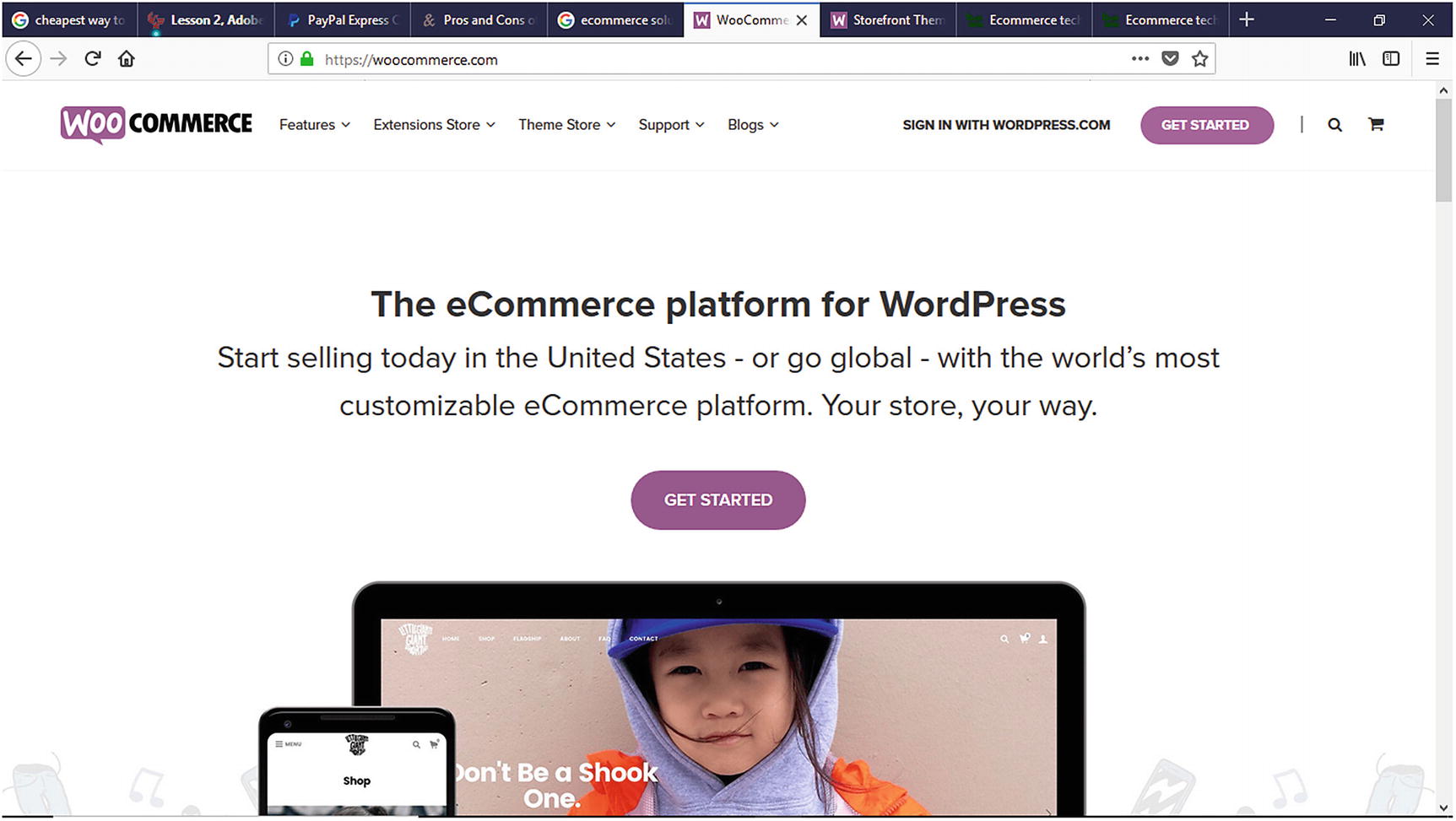
WooCommerce website homepage
Weber
Singer
Ripley’s Believe It or Not
Mikasa Sports USA
Printing New York
Native
Alder Creek
Ghost Bed
World Vision
Fusion Jerky
Miss Jones Baking Company
WooCommerce Features
Entrepreneurs and organizations have many choices to choose from when it comes to e-commerce solutions, but what makes WooCommerce different? What features does it offer to potential store owners considering using it over its competitors?
Once downloaded and installed, WooCommerce provides online store owners with many core features for free that can be used to quickly and efficiently set up and launch their initial online store. What are some of these features? Let’s look at some of these.
Built on WordPress
As previously mentioned, WooCommerce is built on the WordPress content management system. For those experienced with WordPress, they can capitalize on their experience while reducing their WooCommerce learning curve. What about WordPress novices? Since WordPress’s dashboard is intuitive to use and numerous online resources are available, they can find help to get up to speed quickly.
No Upfront or Monthly Cost
Since the WooCommerce plugin is open source software, it requires no setup cost or monthly usage charge. However, WooCommerce themes and extensions involve a cost. With most startups and small businesses having limited budgets and resources, WooCommerce can be a good e-commerce choice
30-Day Money Back Guarantee
Choosing an e-commerce solution for businesses big or small is a big decision. Once an e-commerce solution is chosen and implemented, it is natural to experience buyer’s remorse at some point. On its website, WooCommerce offers a 30-day money back guarantee and refund policy that can be submitted through their website.
Safe and Secured Payments for Customers
Cyber security is a hot topic these days along with identity theft and data breaches. When consumers shop in brick and mortar or click and mortar stores, they worry about whether their credit card and personal information is being properly secured and protected. With so many data breaches being frequently reported in the news, consumers are concerned and cautious when making credit card purchases. WooCommerce provides security features to help businesses secure and protect consumers’ credit card information.
Sell Physical or Digital Products
Not sure whether to sell physical or digital products? No problem! WooCommerce allows store owners to easily sell anything physical or digital within the same store. They can even sell a combination of both. Store owners can even create and sell online classes using the Sensei extension.
Multiple Payment Gateways
Amazon Payments
Stripe
Authorize.net
PayFast
FirstData
PayPal Express
WooCommerce also makes accepting BACS (Bankers Automated Clearing Service) and cash on delivery payments. It also allows international transactions, which allows store owners to take their online business globally.
Unlimited Inventory
Starting out, store owners might have a limited number of items to sell but increase them over time. Store owners do not have to worry about reaching a product limit within WooCommerce. There is no limit to the number of items that can be sold. Store owners are only limited by their available inventory.
Global Support
WooCommerce documentation
Online help desk
Video
Idea Board/Forum
Blog tutorials
Developer blog
Extend WooCommerce with Extensions
Email marketing
Shipping management
Subscription management
Store management
Enhancements
Product Add-ons
Discounts and coupons
And more
Storefront product sharing
Storefront product pagination
Storefront reviews
Storefront pricing tables
And more
iOS Mobile Device Store Management
Would it not be nice to manage an online store from a mobile device? Since most entrepreneurs and business owners are multitaskers and always have their smartphones or mobile devices nearby, they can manage their online stores at their fingertips. With the iOS WooCommerce app, store owners have the freedom and flexibility to manage their stores from any iOS mobile device such as an iPhone or iPad anytime and from anywhere. Store owners can view sales reports, add products, and other store management tasks without the hassle of being in front of a laptop or computer or taking along a laptop. Talk about having a mobile store in your pocket (or purse).
E-commerce on Any Page
Entrepreneurs and small business owners can sell anything from any page of their website. How? Since WooCommerce is built upon WordPress, it takes advantage of WordPress’s shortcodes. What is a shortcode? WordPress.com defines a shortcode as “a WordPress-specific code that lets you do nifty things with very little effort. Shortcodes can embed files or create objects that would normally require lots of complicated, ugly code in just one line.”8 WooCommerce provides the flexibility to not only create an e-commerce website but also sell anything via shortcodes on a blog post. How cool is that?
Meetups
Social media platforms such as Facebook, Periscope, and Instagram make virtual meetups convenient and effortless to attend, but occasionally it is also good to attend in-person meetups. These meetups help entrepreneurs expand their network and develop potential business relationships with like-minded people. WooCommerce hosts in-person meetups worldwide for WooCommerce enthusiasts to network, collaborate, and discover new features and functions for their online stores. These meetups can be located using meetup.com or the meetup.com app or the WooCommerce website. Interested enthusiasts can even sign up to host their own WooCommerce meetups in their area. What better way to learn more about WooCommerce than to teach others how to use it? All the information concerning how to host a meetup is available on woocommerce.com.
Other WooCommerce Products
Storefront – the default WooCommerce theme
Sensei – WordPress learning management system plugin for creating online coursework
Sensei Extension - WordPress plugins to enhance the Sensei classroom
Other Plugins – WordPress plugins that can help create a better experience for users as well as store owners
For those businesses looking for an e-commerce solution, WooCommerce is an excellent choice with many benefits and features to quickly set up an online store.
Installing WooCommerce
Before installing WooCommerce, adding inventory, and launching a store to the Web, certain steps should be followed. For starters, securing a domain name for an online store is crucial for several reasons. First, potential customers will use this to locate an online store. Even if they do not know a company’s website address, they can still use search engines such as Google to find it. When choosing a domain name, keep it short and easy for potential customers to remember. It might be tempting to create a long, descriptive URL, but if no one can remember it or how to spell it, it is useless. Having a memorable domain name also ties into a company’s brand.
Once a domain name has been chosen, where should it be registered? Some people prefer to register their domain separately and use companies such as www.namecheap.com , www.godaddy.com , www.networksolutions.com , and others to do it. Most web hosting companies will also register a new domain name or transfer an existing domain name during the web hosting sign-up process. If you are uncertain about who to select for web hosting, it is recommended to consider using managed WordPress hosting. Managed WordPress hosting is hosting that handles all aspects of running and maintaining WordPress. Unlike shared hosting, it can be more expensive, but it provides faster performance because it is optimized for WordPress websites. A few popular managed WordPress hosts include WPEngine.com, Siteground.com, Bluehost.com, and FlyWheel.9 Many managed hosts offer WooCommerce and WooCommerce plans. Likewise, www.woocommerce.com also recommends hosting solutions under the We Recommend Section at the bottom of their homepage.
Once web hosting is obtained, it is now time to install WooCommerce. WooCommerce can be installed by either FTP or directly through a web host’s cPanel. Let’s look at installing WooCommerce via FTP.
Installing WooCommerce via FTP
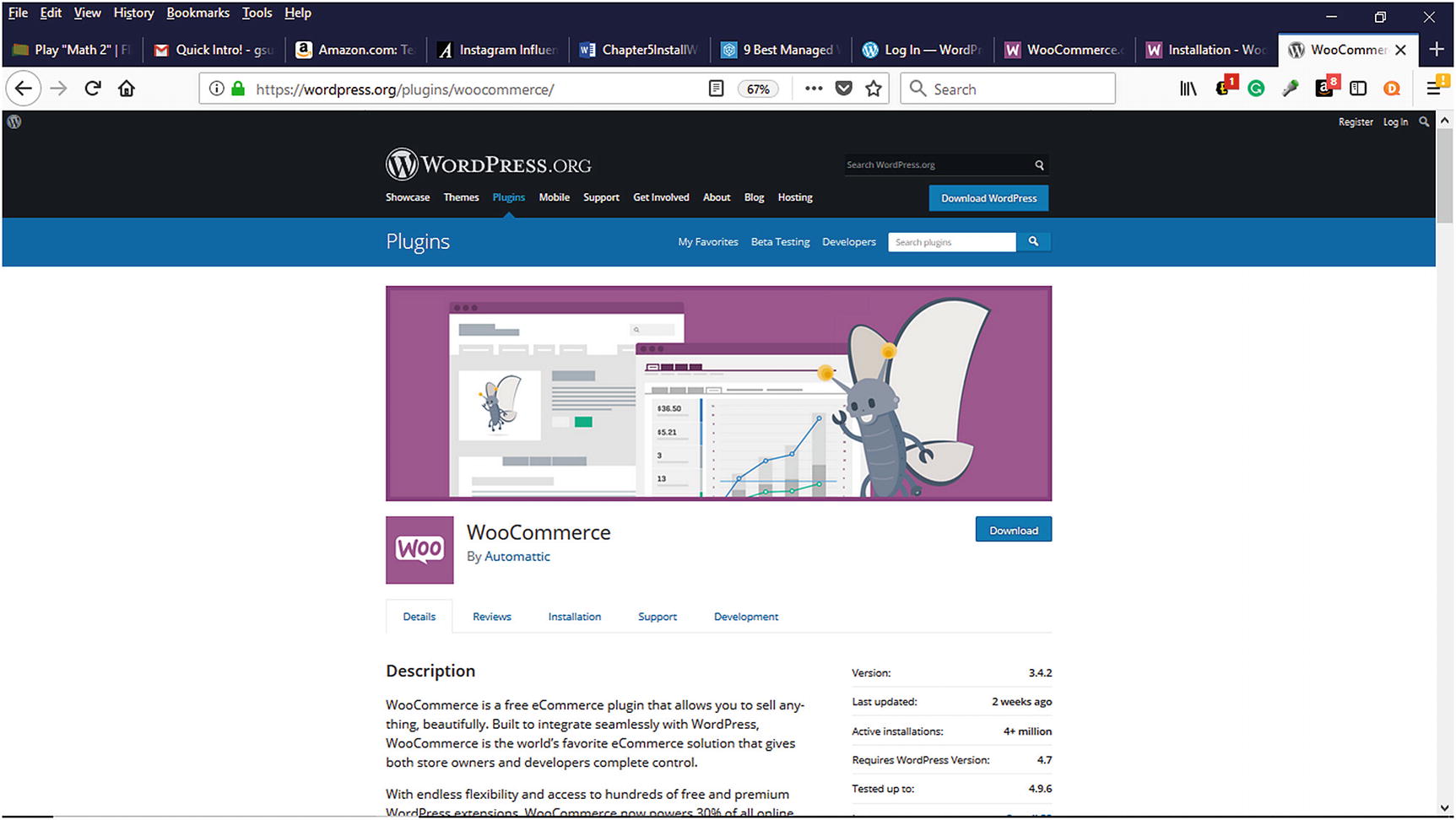
WooCommerce plugin available for download from Wordpress.org
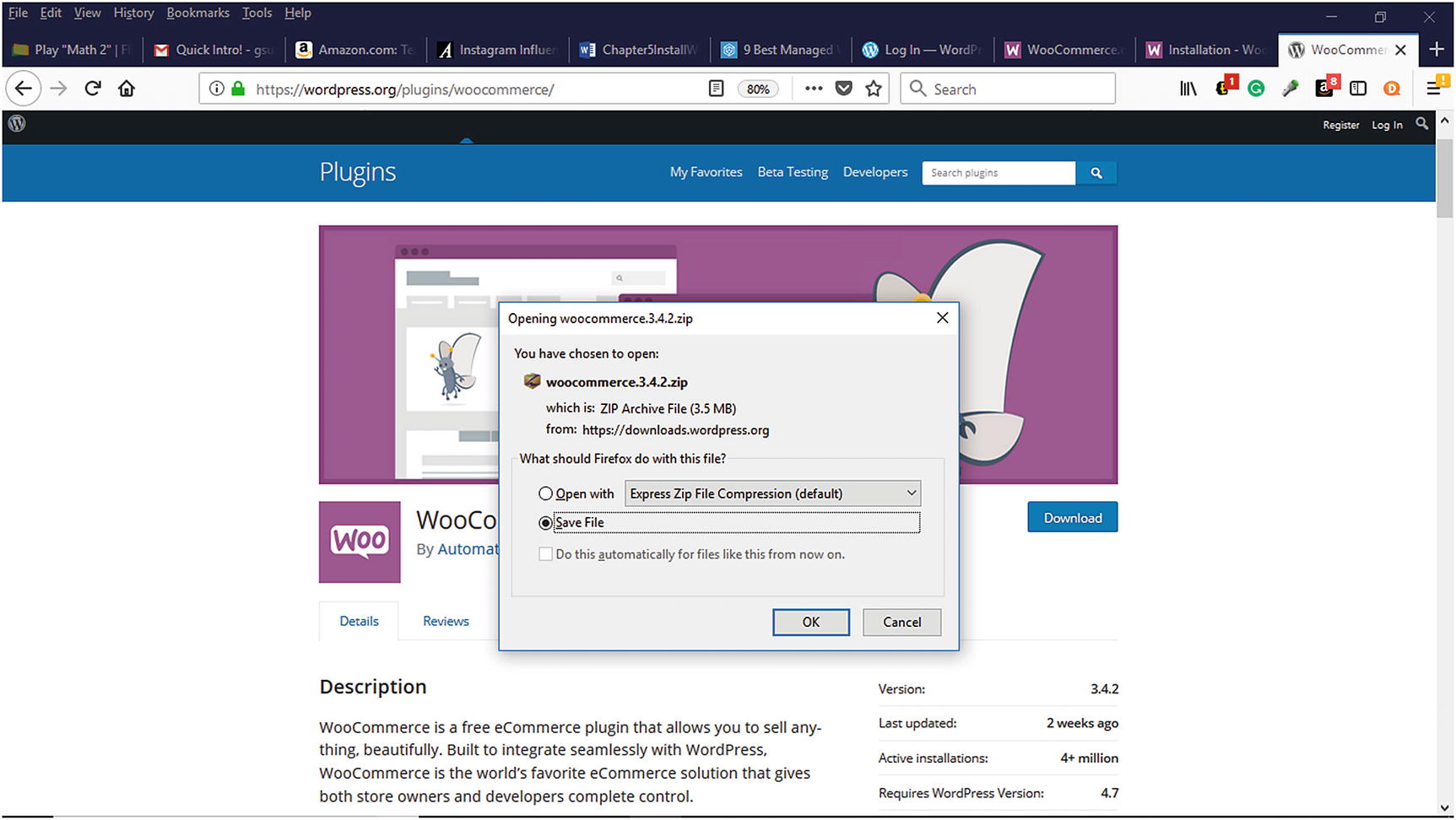
Saving WooCommerce plugin to a computer
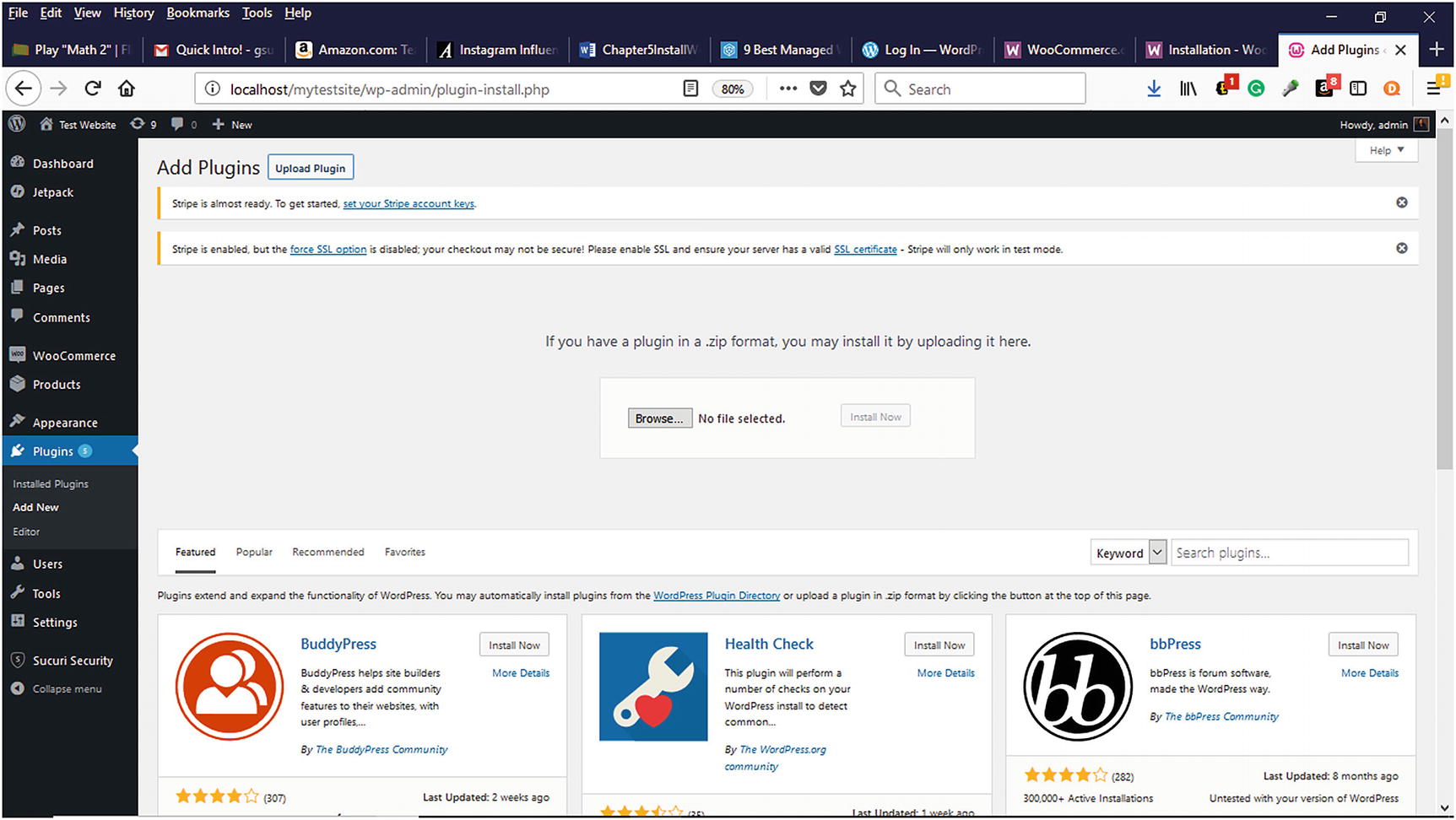
Uploading a zipped plugin in the WordPress Dashboard

WordPress directory structure on a web host web server
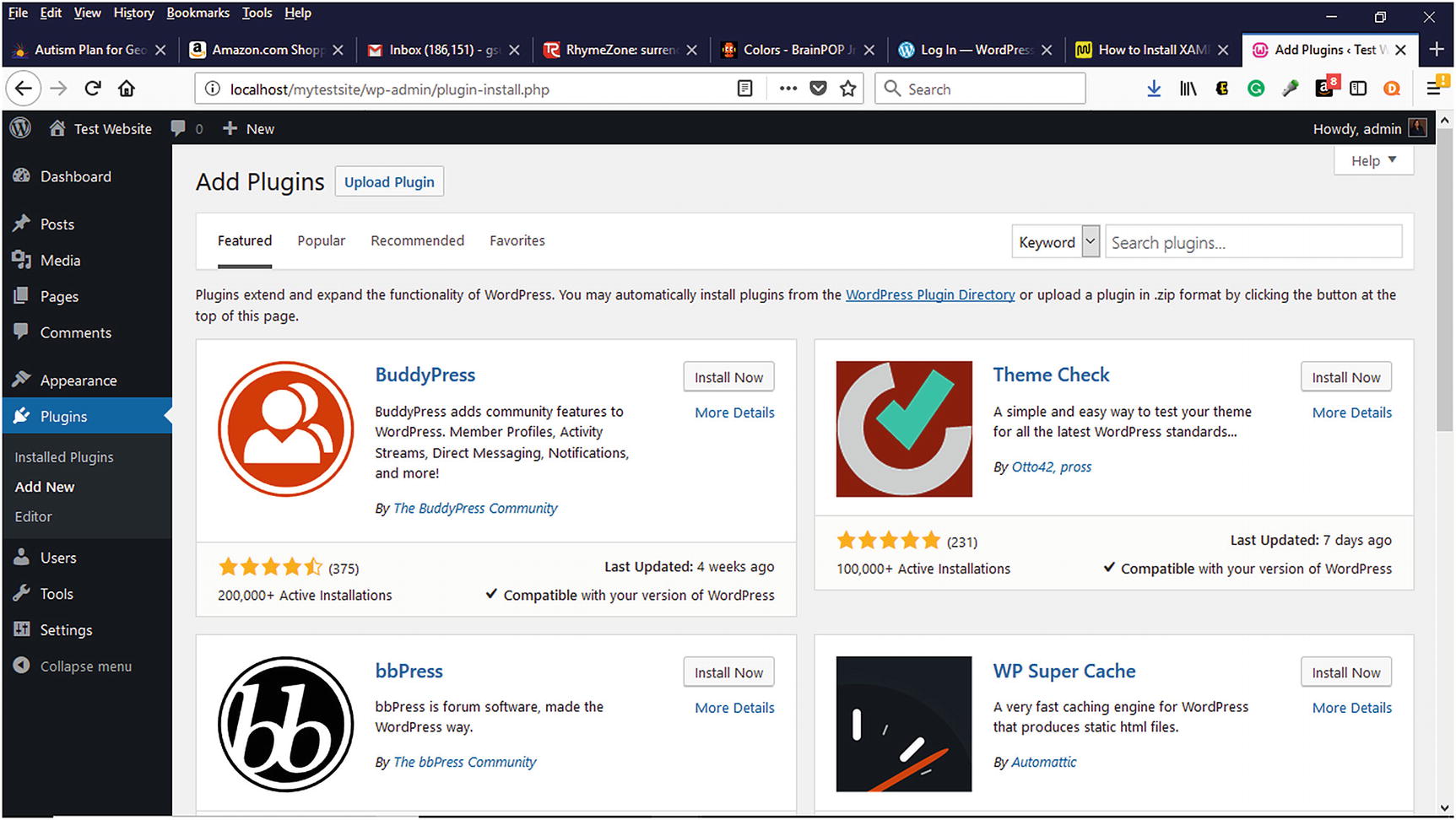
Adding the WooCommerce plugin from WordPress Dashboard
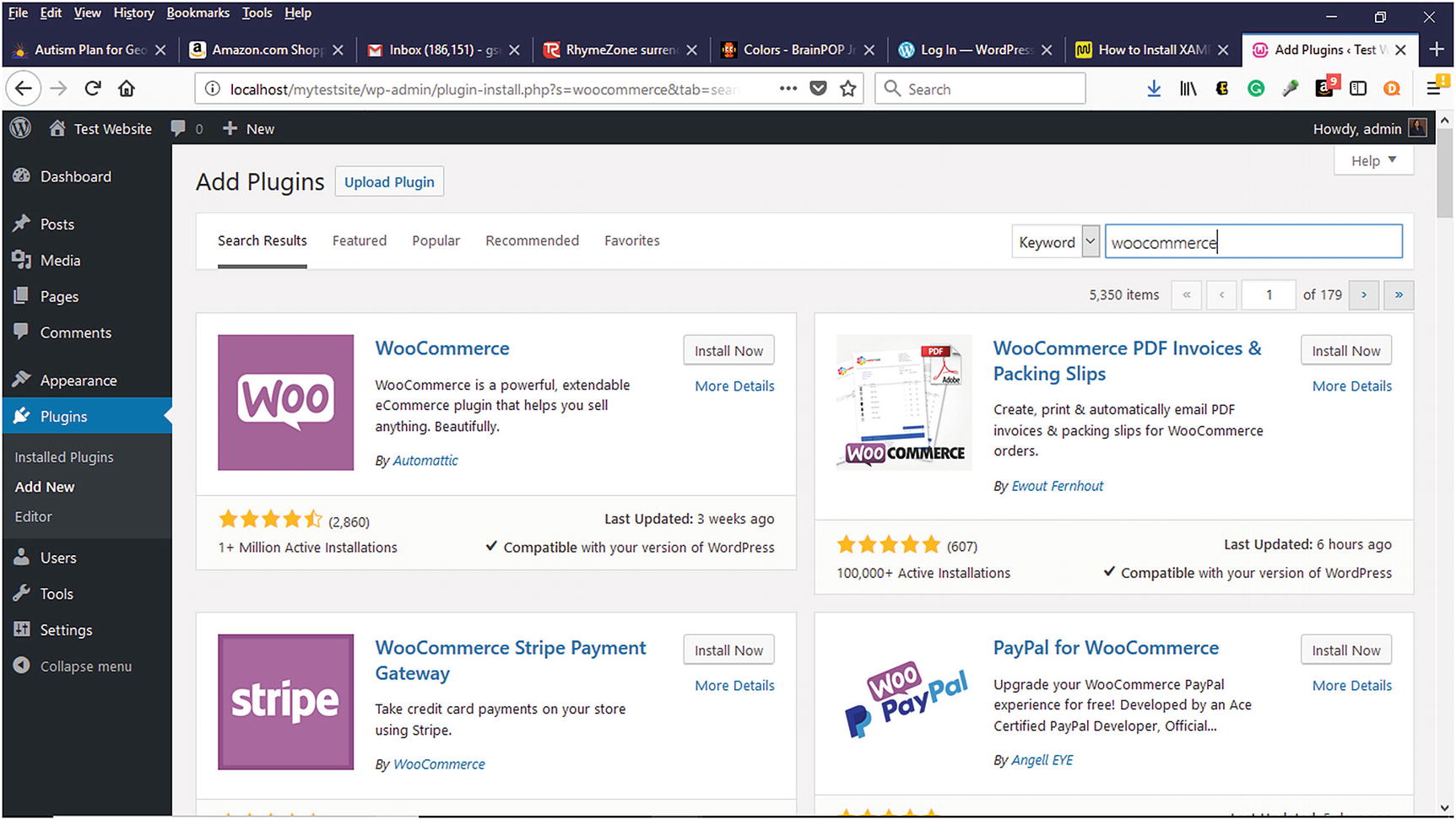
Adding WooCommerce plugin via the Plugins menu in the WordPress Dashboard
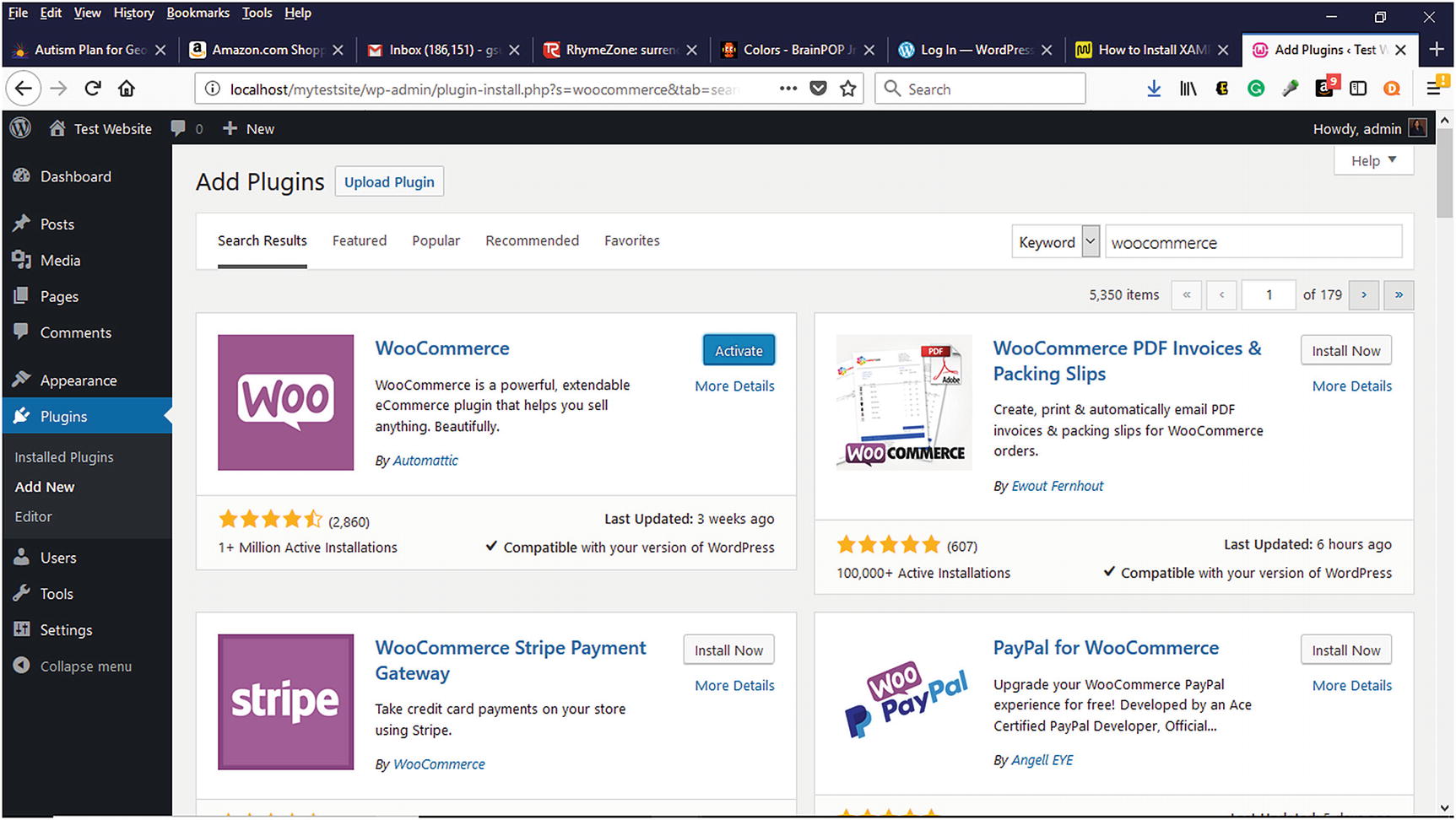
Activating WooCommerce after installing it in the WordPress Dashboard
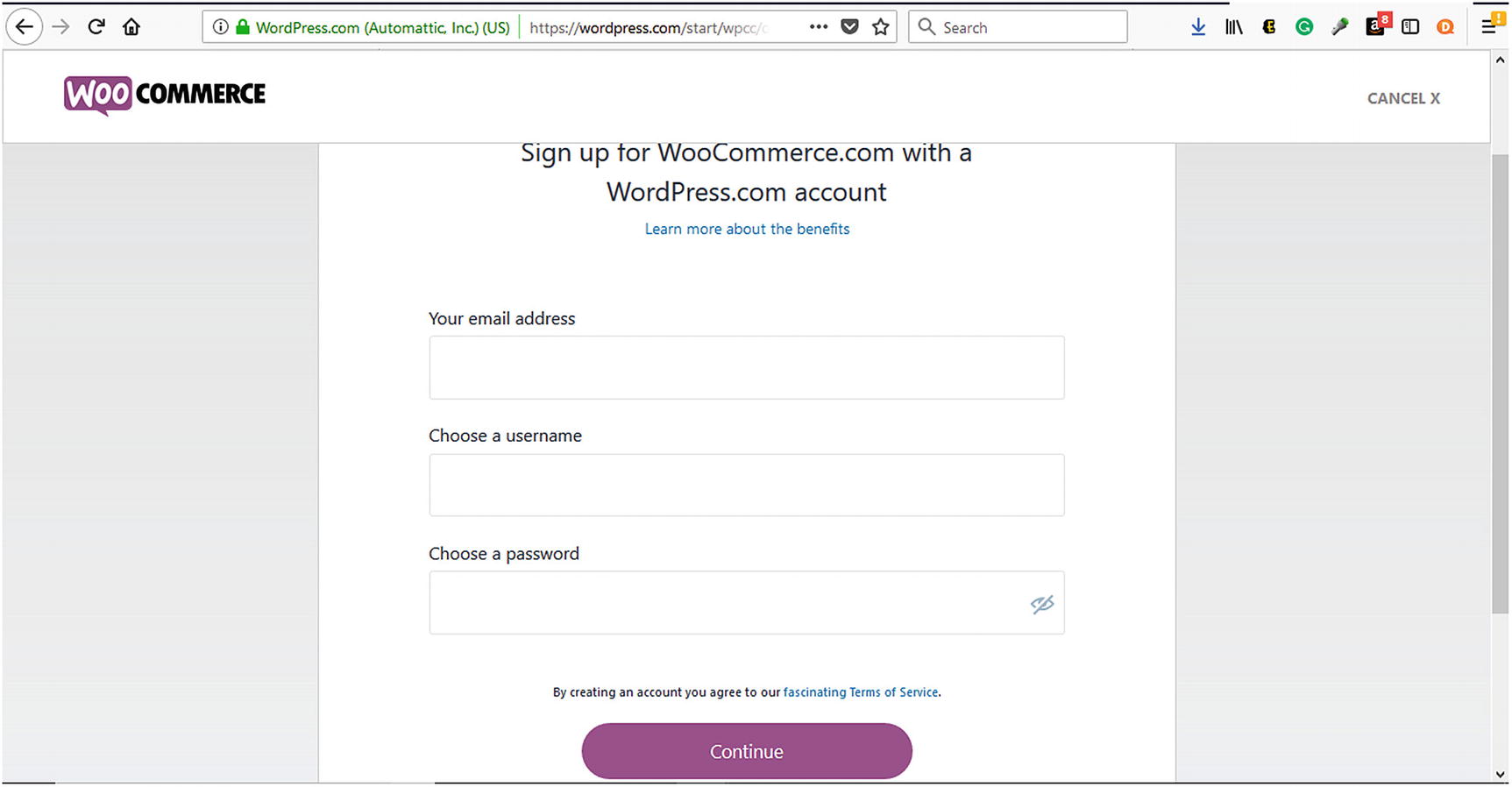
Signing up for a WooCommerce account
Summary
WooCommerce offers many features that can help small- and medium-sized businesses create a scalable online store for physical or digital products. With its intuitive installation via FTP or within the WordPress Dashboard, WooCommerce can be quickly installed. In the next chapter, WooCommerce’s configuration settings for creating an online store will be explored.