Table of Contents for
Mastering Regular Expressions, 3rd Edition
 Mastering Regular Expressions, 3rd Edition
Published by
O'Reilly Media, Inc., 2006
Mastering Regular Expressions, 3rd Edition
Published by
O'Reilly Media, Inc., 2006
- Cover Page
- Programming
- Mastering Regular Expressions
- Title Page
- Copyright Page
- Dedication
- Table of Contents
- Preface
- 1: Introduction to Regular Expressions
- 2: Extended Introductory Examples
- 3: Overview of Regular Expression Features and Flavors
- 4: The Mechanics of Expression Processing
- 5: Practical Regex Techniques
- 6: Crafting an Efficient Expression
- 7: Perl
- Perl Efficiency Issues
- 8: Java
- 9: .NET
- 10: PHP
- Index
- Index
- About the Author
- Colophon
- Footnotes
5
Practical Regex Techniques
Now that we’ve covered the basic mechanics of writing regular expressions, I’d like to put that understanding to work in handling situations more complex than those in earlier chapters. Every regex strikes a balance between matching what you want, but not matching what you don’t want. We’ve already seen plenty of examples where greediness can be your friend if used skillfully, and how it can lead to pitfalls if you’re not careful, and we’ll see plenty more in this chapter.
For an NFA engine, another part of the balance, discussed primarily in the next chapter, is efficiency. A poorly designed regex—even one that would otherwise be considered correct—can cripple an engine.
This chapter is comprised mostly of examples, as I lead you through my thought processes in solving a number of problems. I encourage you to read through them even if a particular example seems to offer nothing toward your immediate needs.
For instance, even if you don’t work with HTML, I encourage you to absorb the examples that deal with HTML. This is because writing a good regular expression is more than a skill—it’s an art. One doesn’t teach or learn this art with lists or rules, but rather, through experience, so I’ve written these examples to illustrate for you some of the insight that experience has given me over the years.
You’ll still need your own experience to internalize that insight, but spending time with the examples in this chapter is a good first step.
Regex Balancing Act
Writing a good regex involves striking a balance among several concerns:
- Matching what you want, but only what you want
- Keeping the regex manageable and understandable
- For an NFA, being efficient (creating a regex that leads the engine quickly to a match or a non-match, as the case may be)
These concerns are often context-dependent. If I’m working on the command line and just want to grep something quickly, I probably don’t care if I match a bit more than I need, and I won’t usually be too concerned to craft just the right regex for it. I’ll allow myself to be sloppy in the interest of time, since I can quickly peruse the output for what I want. However, when I’m working on an important program, it’s worth the time and effort to get it right: a complex regular expression is OK if that’s what it takes. There is a balance among all these issues.
Efficiency is context-dependent, even in a program. For example, with an NFA, something long like ⌈^ - (display | geometry | cemap | ... |quick24|random|raw)$⌋ to check command-line arguments is inefficient because of all that alternation, but since it is only checking command-line arguments (something done perhaps a few times at the start of the program) it wouldn’t matter if it took 100 times longer than needed. It’s just not an important place to worry much about efficiency. Were it used to check each line of a potentially large file, the inefficiency would penalize you for the duration of the program.
A Few Short Examples
Continuing with Continuation Lines
With the continuation-line example from the previous chapter ( 178), we found that
 ⌈ ^ \w+= .* (\\\n.*)*⌋ applied with a Traditional NFA doesn’t properly match both lines of:
SRC=array.c builtin.c eval.c field.c gawkmisc.c io.c main.c \
missing.c msg.c node.c re.c version.c
The problem is that the first ⌈. *⌋ matches past the backslash, pulling it out from under the  that we want it to be matched by. Well, here’s the first lesson of the chapter: if we don’t want to match past the backslash, we should say that in the regex. We can do this by changing each dot to
 ⌈[^\n\\]⌋. (Notice how I’ve made sure to include \n in the negated class? You’ll remember that one of the assumptions of the original regex was that dot didn’t match a newline, and we don’t want its replacement to match a newline either 119.)

This now works, properly matching continuation lines, but in solving one problem, we have perhaps introduced another: we’ve now disallowed backslashes other than those at the end of lines. This is a problem if the data to which it will be applied could possibly have other backslashes. We’ll assume it could, so we need to accommodate the regex to handle them.
So far, our approaches have been along the lines of “match the line, then try to match a continuation line if there.” Let’s change that approach to one that I find often works in general: concentrate on what is really allowed to match at any particular point. As we match the line, we want either normal (non-backslash, non-newline) characters, or a backslash-anything combination. If we use ⌈\\.⌋ for the backslash-anything combination, and apply it in a dot-matches-all mode, it also can match the backslash-newline combination.
So, the expression becomes ⌈^\w+= ([^\n\\] | \\ . )*⌋ in a dot-matches-all mode. Due to the leading ⌈^⌋, an enhanced line anchor match mode ( 112) may be useful as well, depending on how this expression is used.
But, we’re not quite done with this example yet—we’ll pick it up again in the next chapter where we work on its efficiency ( 270).
Matching an IP Address
As another example that we’ll take much further, let’s match an IP (Internet Protocol) address: four numbers separated by periods, such as 1.2.3.4. Often, the numbers are padded to three digits, as in 001.002.003.004. If you want to check a string for one of these, you could use ⌈[0-9] *\. [0-9] *\. [0-9] *\. [0-9]*⌋, but that’s so vague that it even matches ‘ ’. Look at the regex: it doesn’t even require any numbers — its only requirements are three periods (with nothing but digits, if anything, between).
To fix this regex, we first change the star to a plus, since we know that each number must have at least one digit. To ensure that the entire string is only the IP address, we wrap the regex with ⌈^ ...$⌋. This gives us:
⌈^ [0-9]+\. [0-9]+\. [0-9]+\. [0-9]+$⌋
Using ⌈\d⌋ instead of ⌈[0-9]⌋, it becomes ⌈^\d+\.\d+\.\d+\.\d+$⌋, which you may find to be more easily readable,† but it still matches things that aren’t IP addresses, like ‘1234.5678.9101112.131415’. (IP addresses have each number in the range of 0-255.) As a start, you can enforce that each number be three digits long, with ⌈^\d\d\d\ . \d\d\d\ . \d\d\d\ . \d\d\d$⌋. but now we are too specific. We still need to allow one- and two-digit numbers (as in 1.234.5.67). If the flavor supports {min,max}, you can use ⌈^\d{1,3}\.\d{1,3}\.\d{1,3}\.\d{1,3}$⌋. If not, you can always use ⌈\d\d?\d?⌋ or ⌈\d(\d\d?)?⌋ for each part. These allow one to three digits, each in a slightly different way.
Depending on your needs, you might be happy with some of the various degrees of vagueness in the expressions so far. If you really want to be strict, you have to worry that ⌈\d{1,3}⌋ can match 999, which is above 255, and thus an invalid component of an IP address.
Several approaches would ensure that only numbers from 0 to 255 appear. One silly approach is ⌈0|1|2|3| ... 253|254|255⌋. Actually, this doesn’t allow the zero-padding that is allowed, so you really need ⌈0|00|000|1|01|001|...⌋, whose length becomes even more ridiculous. For a DFA engine, it is ridiculous only in that it’s so long and verbose — it still matches just as fast as any regex describing the same text. For an NFA, however, all the alternation kills efficiency.
A realistic approach concentrates on which digits are allowed in a number, and where. If a number is only one or two digits long, there is no worry as to whether the value is within range, so ⌈\d|\d\d⌋ takes care of it. There’s also no worry about the value for a three-digit number beginning with a 0 or 1, since such a number is in the range 000-199 and is perfectly valid. This lets us add ⌈[01]\d\d⌋, leaving us with ⌈\d|\d\d|[01]\d\d⌋. You might recognize this as being similar to the time example in Chapter 1 ( 28), and date example of the previous chapter ( 177).
Continuing with our regular expression, a three-digit number beginning with a 2 is allowed if the number is 255 or less, so a second digit less than 5 means the number is valid. If the second digit is 5, the third must be less than 6. This can all be expressed as ⌈2[0-4]\d|25[0-5]⌋.
This may seem confusing at first, but the approach should make sense upon reflection. The result is ⌈\d|\d\d|[01]\d\d|2[0-4]\d|25[0-5]⌋. Actually, we can combine the first three alternatives to yield  . Doing so is more efficient for an NFA, since any alternative that fails results in a backtrack. Note that using
 ⌈\d\d?⌋ in the first alternative, rather than ⌈\d?\d⌋, allows an NFA to fail just a bit more quickly when there is no digit at all. I’ll leave the analysis to you—walking through a simple test case with both should illustrate the difference. We could do other things to make this part of the expression more efficient, but I’ll leave that for the next chapter.
Now that we have a subexpression to match a single number from 0 through 255, we can wrap it in parentheses and insert it in place of each ⌈\d{1,3}⌋ in the earlier regex. This gives us (broken across lines to fit the width of the page):
⌈ ^([01]?\d\d?|2[0-4]\d|25[0-5])\.([01]?\d\d?|2[0-4]\d|25[0-5])\.
([01]?\d\d?|2[0-4]\d|25[0-5])\.([01]?\d\d?|2[0-4]\d|25[0-5])$⌋
Quite a mouthful! Was it worth the trouble? You have to decide for yourself based upon your own needs. It matches only syntactically correct IP addresses, but it can still match semantically incorrect ones, such as 0.0.0.0 (invalid because all the digits are zero). With lookahead ( 133), you can disallow that specific case by putting ⌈(?!0+\.0+\.0+\.0+$)⌋ after ⌈^⌋, but at some point, you have to decide when being too specific causes the cost/benefit ratio to suffer from diminishing returns. Sometimes it’s better to take some of the work out of the regex. For example, if you go back to ⌈^\d{1,3}\.\d{1,3}\.\d{1,3}\.\d{1,3}$⌋ and wrap each component in parentheses to stuff the numbers into the program’s version of $1, $2, $3, and $4, you can then validate them by other programming constructs.
Know your context
It’s important to realize that the two anchors, ⌈^⌋ and ⌈$⌋, are required to make this regex work. Without them, it can match  , or for a Traditional NFA, even
  .
.
In that second case, the expression does not even fully match the final 223 that should have been allowed. Well, it is allowed, but there’s nothing (such as a separating period, or the trailing anchor) to force that match. The final group’s first alternative, ⌈[01]?\d\d?⌋, matched the first two digits, and without the trailing ⌈$⌋, that’s the end of the regex. As with the date-matching problem in the previous chapter ( 176), we can arrange the order of the alternatives to achieve the desired result. In this case, we would put the alternatives matching three digits first, so any proper three-digit number is matched in full before the two-digit-okay alternative is given a chance. (DFAs and POSIX NFAs don’t require the reordering, of course, since they choose the longest match, regardless.)
Rearranged or not, that first mistaken match is still a problem. “Ah!” you might think, “I can use word boundary anchors to solve this problem.” Unfortunately, that’s probably not enough, since such a regex could still match  To disallow embedded matches, you must ensure that the surrounding context has at least no alphanumerics or periods. If you have lookaround, you can wrap the regex in
 ⌈(?<! [\w.]) ... (?! [\w.])⌋ to disallow matches that follow just after (or end just before) where ⌈[\w.]⌋ can match. If you don’t have lookaround, simply wrapping it in ⌈(^|•) ... (•|$)⌋ might be satisfactory for some situations.
Working with Filenames
Working with file and path names, like /usr/local/bin/perl on Unix, or perhaps something like \Program Files\Yahoo!\Messenger on Windows, can provide many good regular-expression examples. Since “using” is more interesting than “reading,” I’ll sprinkle in a few examples coded in Perl, PHP (preg routines), Java, and VB.NET. If you’re not interested in these particular languages, feel free to skip the code snippets—it’s the regex concepts used in them that are important.
Removing the leading path from a filename
As a first example, let’s remove the leading path from a filename, turning /usr/local/bin/gcc, for instance, into gcc. Stating problems in a way that makes solutions amenable is half of the battle. In this case, we want to remove anything up to (and including) the final slash (backslash for Windows pathnames). If there is no slash, it’s fine as is, and nothing needs to be done. I’ve said a number of times that ⌈. *⌋ is often overused, but its greediness is desired here. With ⌈^. * /⌋, the ⌈. *⌋ consumes the whole line, but then backs off (that is, backtracks) to the last slash to achieve the match.
Here’s code to do it in our four test languages, ensuring that a filename in the variable f has no leading path. First, for Unix filenames:
Language |
Code Snippet |
Perl |
|
PHP |
|
|
|
VB.NET |
|




The regular expression (or string to be interpreted as a regular expression) is underlined, and regex components are bold.
For comparison, here are versions for Windows filenames, which use a backward slash rather than a forward slash, making the regex ⌈^.*\\⌋. The need to double the backward slash in the regex to match a single backward-slash character in the target is a regular-expression issue, but as the middle two examples show, some languages require additional string-related backslashes as well:
Language |
Code Snippet |
Perl |
|
PHP |
|
|
|
VB.NET |
|




It’s interesting to compare each language’s difference between the examples, particularly the quadruple backslashes needed in Java ( 101).
Please keep in mind this key point: always consider what will happen when there is no match. In this case, no match means no slash in the string, so no substitution and the string is left unchanged. That’s just what we want, in this case.
For efficiency’s sake, it’s important to remember how an NFA-based regex engine goes about its work. Let’s consider what happens if we omit the leading caret (something that’s easy to forget) and match against a string that doesn’t happen to have a slash. As always, the regex engine starts the search at the beginning of the string. The ⌈.*⌋ races to the end of the string, but must back off to find a match for the slash or backslash. It eventually backs off everything that ⌈. *⌋ had gobbled up, yet there’s still no match. So, the regex engine decides that there is no possible match when starting from the beginning of the string, but it’s not done yet!
The transmission kicks in and retries the whole regex from the second character position. In fact, it needs (in theory) to go through the whole scan-and-backtrack routine for each possible starting position in the string. Filenames tend to be short, so it’s probably not such a big deal in this case, but the principle applies to many situations. Were the string long, there’s a potential for a lot of backtracking. (A DFA has no such problem, of course.)
In practice, a reasonably optimized transmission realizes that almost any regex starting with ⌈.*⌋ that fails at the beginning of the string can never match when started from anywhere else, so it can shift gears and attempt the regex only the one time, at the start of the string ( 246). Still, it’s smarter to write that into our regex in the first place, as we originally did.
Accessing the filename from a path
Another approach is to bypass the path and simply match the trailing filename part without the path. The final filename is everything at the end that’s not a slash: ⌈[^/]*$⌋. This time, the anchor is not just an optimization; we really do need dollar at the end. We can now do something like this, shown with Perl:
$WholePath =~ m{([^/]*)$}; # Check variable $WholePath with regex.
$FileName = $1; # Note text matched
You’ll notice that I don’t check to see whether the regex actually matches, because I know it matches every time. The only requirement of that expression is that the string has an end to match dollar, and even an empty string has an end. Thus, when I use $1 to reference the text matched within the parenthetical subexpression, I’m assured it will have some value (although that value will be empty when the filename ends with a slash).
Another comment on efficiency: with an NFA, ⌈[^ / ] * $⌋ is very inefficient. Carefully run through how the NFA engine attempts the match and you see that it can involve a lot of backtracking. Even the short sample '/usr/local/bin/perl' backtracks over 40 times before finally matching. Consider the attempt that starts at  . Once
 ⌈[^/]*⌋ matches through to the second 1 and fails on the slash, the ⌈$⌋ is tried (and fails) for each 1, a, c, o, 1 saved state. If that’s not enough, most of it is repeated with the attempt that starts at  , and then again
  , and so on.
It shouldn’t concern us too much with this particular example, as filenames tend to be short. (And 40 backtracks is nothing — 40 million is when they really matter!) Again, it’s important to be aware of the issues so the general lessons here can be applied to your specific needs.
This is a good time to point out that even in a book about regular expressions, regular expressions aren’t always The Best Answer. For example, most programming languages provide non-regex routines for dealing with filenames. But, for the sake of discussion, I’ll forge ahead.
Both leading path and filename
The next logical step is to pick apart a full path into both its leading path and filename component. There are many ways to do this, depending on what we want. Initially, you might want to use ⌈^(.*)/(.*)$⌋ to fill $1 and $2 with the requisite parts. It looks like a nicely balanced regular expression, but knowing how greediness works, we are guaranteed that the first ⌈.*⌋ does what we want, never leaving anything with a slash for $2. The only reason the first ⌈.*⌋ leaves anything at all is due to the backtracking done in trying to match the slash that follows. This leaves only that “backtracked” part for the later ⌈.*⌋. Thus, $1 is the full leading path and $2 the trailing filename.
One thing to note: we are relying on the initial ⌈(.*)/⌋ to ensure that the second ⌈(.*)⌋ does not capture any slash. We understand greediness, so this is OK. Still I like to be specific when I can, so I’d rather use ⌈[^/]*⌋ for the filename part. That gives us ⌈^(.*)/([^/]*)$⌋. Since it shows exactly what we want, it acts as documentation as well.
One big problem is that this regex requires at least one slash in the string, so if we try it on something like file.txt, there’s no match, and thus no information. This can be a feature if we deal with it properly:
if ( $WholePath =~ m!^(.*)/([^/]*)$! ) {
# Have a match -- $1 and $2 are valid
$LeadingPath = $1;
$FileName = $2;
} else {
# No match, there's no '/' in the filename
$LeadingPath = "."; # so "file.txt" looks like ". / file.txt" ("." is the current directory)
$FileName = $WholePath;
}
Matching Balanced Sets of Parentheses
Matching balanced sets of parentheses, brackets, and the like presents a special difficulty. Wanting to match balanced parentheses is quite common when parsing many kinds of configuration files, programs, and such. Imagine, for example, that you want to do some processing on all of a function’s arguments when parsing a language like C. Function arguments are wrapped in parentheses following the function name, and may themselves contain parentheses resulting from nested function calls or math grouping. At first, ignoring that they may be nested, you might be tempted to use  , but it won’t work.
In hallowed C tradition, I use foo as the example function name. The marked part of the expression is ostensibly meant to match the function’s arguments. With examples such as foo  and
and  , it works as expected. Unfortunately, it also matches
  , which is not as we want. This calls for something a bit “smarter” than
 ⌈[^)]*⌋.
To match the parenthesized expression part, you might consider the following regular expressions, among others:
1. |
|
literal parentheses with anything in between |
2. |
|
from an opening parenthesis to the next closing parenthesis |
3. |
|
from an opening parenthesis to the next closing parenthesis, but no other opening parentheses allowed in between |
Figure 5-1 illustrates where these match against a sample line of code.
Figure 5-1: Match locations of our sample regexes
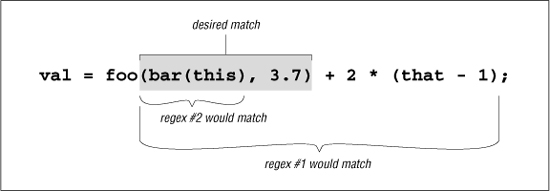
We see that regex #1 matches too much,† and regex #2 matches too little. Regex #3 doesn’t even match successfully. In isolation, #3 would match ‘(this)’, but because it must come immediately after the foo, it fails. So, none of these work.
The real problem is that on the vast majority of systems, you simply can’t match arbitrarily nested constructs with regular expressions. For a long time, this was universally true, but now Perl, .NET, and PCRE/PHP all offer constructs that make it possible. (See pages 328, 436, and 475, respectively.) But, even without these special constructs, you can still build a regex to match things nested to a certain depth, but not to an arbitrary level of nesting. Just one level of nesting requires
⌈\([^()]*(\([^()]*\)[^()]*)*\)⌋
so the thought of having to worry about further levels of nesting is frightening. But, here’s a little Perl snippet that, given a $depth, creates a regex to match up to that many levels of parentheses beyond the first. It uses Perl’s “string x count” operator, which replicates string by count times:
$regex = '\(' . ' (? : [^ () ] | \ (' x $depth . '[^()]*' . '\))*' x $depth . '\)';
I’ll leave the analysis for your free time.
Watching Out for Unwanted Matches
It’s easy to forget what happens if the text is not formed just as you expect. Let’s say you are writing a filter to convert a text file to HTML, and you want to replace a line of hyphens by <HR>, which represent a horizontal rule (a line across the page). If you used a s/-*/<HR>/ search-and-replace command, it would replace the sequences you wanted, but only when they’re at the beginning of the line. Surprised? In fact, s/-*/<HR>/ adds <HR> to the beginning of every line, whether they begin with a sequence of hyphens or not!
Remember, anything that isn’t required is always considered successful. The first time ⌈-*⌋ is attempted at the start of the string, it matches any hyphens that might be there. However, if there aren’t any, it is still happy to successfully match nothing. That’s what star is all about.
Let’s look at a similar example I once saw in a book by a respected author, in which he describes a regular expression to match a number, either integer or floating-point. As his expression is constructed, such a number has an optional leading minus sign, any number of digits, an optional decimal point, and any number of digits that follow. His regex is ⌈-?[0-9]*\.?[0-9]*⌋.
Indeed, this matches such examples as 1, -272.37, 129238843., .191919, and even something like -.0. This is all good, and as expected.
However, how do you think it matches in a string like 'this•has•no•number', 'nothing•here', or even an empty string? Look at the regex closely—everything is optional. If a number is there, and if it is at the beginning of the string, it is matched, but nothing is required. This regex can match all three non-number examples, matching the nothingness at the beginning of the string each time. In fact, it even matches nothingness at the beginning of an example like 'num•l23', since that nothingness matches earlier than the number would.
So, it’s important to say what you really mean. A floating-point number must have at least one digit in it, or it’s not a number(!). To construct our regex, let’s first assume there is at least one digit before the decimal point. (We’ll remove this requirement later.) If so, we need to use plus for those digits: ⌈-?[0-9]+⌋.
Writing the subexpression to match an optional decimal point (and subsequent digits) hinges on the realization that any numbers after the decimal point are contingent upon there being a decimal point in the first place. If we use something naïve like ⌈\.?[0-9]*⌋, the ⌈[0-9]*⌋ gets a chance to match regardless of the decimal point’s presence.
The solution is, again, to say what we mean. A decimal point (and subsequent digits, if any) is optional: ⌈(\. [0-9]*)?⌋. Here, the question mark no longer quantifies (that is, governs or controls) only the decimal point, but instead the entire combination of the decimal point plus any following digits. Within that combination, the decimal point is required; if it is not there, ⌈[0-9]*⌋ is not even reached.
Putting this all together, we have ⌈-?[0-9]+(\.[0-9]*)?⌋. This still doesn’t allow something like '.007', since our regex requires at least one digit before the decimal point. If we change that part to allow zero digits, we have to change the other so it doesn’t, since we can’t allow all digits to be optional (the problem we are trying to correct in the first place).
The solution is to add an alternative that allows for the uncovered situation:  . This now also allows just a decimal point followed by (this time not optional) digits. Details, details. Did you notice that I allowed for the optional leading minus in the second alternative as well? That’s easy to forget. Of course, you could instead bring the
 ⌈-?⌋ out of the alternation, as in ⌈-?([0-9]+(\.[0-9]*)?|\.[0-9]+)⌋.
Although this is an improvement on the original, it’s still more than happy to match at ‘ ’. Knowing the context in which a regex is intended to be used is an important part of striking the balance between matching what you want, and not matching what you don’t want. Our regex for floating-point numbers requires that it be constrained somehow by being part of a larger regex, such as being wrapped by
 ⌈^ ... $⌋, or perhaps ⌈num\s*=\s* ... $⌋.
Matching Delimited Text
Matching a double-quoted string and matching an IP address are just two examples of a whole class of matching problem that often arises: the desire to match text delimited (or perhaps separated) by some other text. Other examples include:
- Matching a C comment, which is surrounded by
'/*'and'*/'. - Matching an HTML tag, which is text wrapped by
< ... >, such as<CODE>. - Extracting items between HTML tags, such as the
'super exciting'of the HTML ‘a<I>super exciting</I> offer!’ - Matching a line in a .mailrc file. This file gives email aliases, where each line is in the form of
aliasshorthand full-addresssuch as
'alias jeff jfriedl@regex.info'. (Here, the delimiters are the whitespace between each item, as well as the ends of the line.) - Matching a quoted string, but allowing it to contain quotes if they are escaped, as in
'a passport needs a
of the holder.' - Parsing CSV (comma-separated values) files.
In general, the requirements for such tasks can be phrased along the lines of:
- Match the opening delimiter.
- Match the main text
(which is really “match anything that is not the closing delimiter”).
- Match the closing delimiter.
As I mentioned earlier, satisfying these requirements can become complicated when the closing delimiter has more than one character, or when it may appear within the main text.
Allowing escaped quotes in double-quoted strings
Let’s look at the 2\"x3\" example, where the closing delimiter is a quote, yet can appear within the main part if escaped. It’s easy enough to match the opening and closing quotes; the trick is to match the main text without overshooting the closing quote.
Thinking carefully about which items are allowed in the main text, we know that if a character is not a double quote, that is, if it matches ⌈[^" ]⌋, it’s certainly OK. However, if it is a double quote, it is OK if preceded by a backslash. Translating that literally, using lookbehind ( 133) for the “if preceded” part, it becomes ⌈"([^"] | (?<=\\) ")*"⌋, which indeed properly matches our 2\"x3\" example.
This is a perfect example to show how unintended matches can sneak into a seemingly proper regex, because as much as it seems to be correct, it doesn’t always work. We want it to match the marked part of this silly example:

but it actually matches:

This is because the final quote of the first string indeed has a backslash before it. That backslash is itself escaped, so it doesn’t escape the quote that follows (which means the quote that follows does end the string). Our lookbehind doesn’t recognize that the preceding backslash has been itself escaped, and considering that there may be any number of preceding ‘\\’ sequences, it’s a can of worms to try to solve this with lookbehind. The real problem is that a backslash that escapes a quote is not being recognized as an escaping backslash when we first process it, so let’s try a different approach that tackles it from that angle.
Concentrating again at what kinds of things we want to match between the opening and closing delimiter, we know that something escaped is OK (⌈\\.⌋), as well as anything else other than the closing quote (⌈[^ "]⌋). This yields ⌈"(\\. | [^ "])*"⌋. Wonderful, we’ve solved the problem! Unfortunately, not yet. Unwanted matches can still creep in, such as with this example for which we expect no match because the closing quote has been forgotten:

Why does it match? Recall the lessons from “Greediness and Laziness Always Favor a Match” ( 167). Even though our regex initially matches past that last quote, as we want, it still backtracks after it finds that there is no ending quote, to:

From that point, the ⌈[^ "]⌋ matches the backslash, leaving us at what the regex can consider an ending quote.
An important lesson to take from this example is:
When backtracking can cause undesired matches in relation to alternation, it’s likely a sign that any success is just a happenstance due to the ordering of the alternatives.
In fact, had our original regex had its alternatives reversed, it would match incorrectly in every string containing an escaped double quote. The problem is that one alternative can match something that is supposed to be handled by the other.
So, how can we fix it? Well, just as in the continuation-lines example on page 186, we must make sure that there’s no other way for that backslash to be matched, which means changing ⌈[^ "]⌋, to ⌈[^\\ "]⌋, . This recognizes that both a double quote and a backslash are “special” in this context, and must be handled accordingly. The result is ⌈" (\\ . | [^ \\ " ])*"⌋, which works just fine. (Although this regex now works, it can still be improved so that it is much more efficient for NFA engines; we’ll see this example quite a bit in the next chapter 222.)
This example shows a particularly important moral:
Always consider the “odd” cases in which you don’t want a regex to match, such as with “bad” data.
Our fix is the right one, but it’s interesting to note that if you have possessive quantifiers ( 142) or atomic grouping ( 139), this regex can be written as ⌈" (\\ . | [^ "])*+ "⌋ and ⌈" (?>(\\ . |[^"])*)"⌋ respectively. They don’t really fix the problem so much as hide it, disallowing the engine from backtracking back to where the problem could show itself. Either way, they get the job done well.
Understanding how possessive quantifiers and atomic grouping help in this situation is extremely valuable, but I would still go ahead and make the previous fix anyway, as it is more descriptive to the reader. Actually, in this case, I would want to use possessive quantifiers or atomic grouping as well—not to solve the previous problem, but for efficiency, so that a failure fails more quickly.
Knowing Your Data and Making Assumptions
This is an opportune time to highlight a general point about constructing and using regular expressions that I’ve briefly mentioned a few times. It is important to be aware of the assumptions made about the kind of data with which, and situations in which, a regular expression will be used. Even something as simple as ⌈a⌋ assumes that the target data is in the same character encoding ( 105) as the author intends. This is pretty much common sense, which is why I haven’t been too picky about saying these things.
However, many assumptions that might seem obvious to one person are not necessarily obvious to another. For example, the solution in the previous section assumes that escaped newlines shouldn’t be matched, or that it will be applied in a dot-matches-all mode ( 111). If we really want to ensure that dot can match a newline, we should write that by using ⌈(?s: . )⌋, if supported by the flavor.
Another assumption made in the previous section is the type of data to which the regex will be applied, as it makes no provisions for any other uses of double quotes in the data. If you apply it to source code from almost any programming language, for example, you’ll find that it breaks because there can be double quotes within comments.
There is nothing wrong with making assumptions about your data, or how you intend a regex to be used. The problems, if any, usually lie in overly optimistic assumptions and in misunderstandings between the author’s intentions and how the regex is eventually used. Documenting the assumptions can help.
Stripping Leading and Trailing Whitespace
Removing leading and trailing whitespace from a line is not a challenging problem, but it’s one that seems to come up often. By far the best all-around solution is the simple use of two substitutions:
s/^\s+//;
s/\s+$//;
As a measure of efficiency, these use ⌈+⌋ instead of ⌈*⌋, since there’s no benefit to doing the substitution unless there is actually whitespace to remove.
For some reason, it seems to be popular to try to find a way to do it all in one expression, so I’ll offer a few methods for comparison. I don’t recommend them, but it’s educational to understand why they work, and why they’re not desirable.
s/\s*(.*?)\s*$/$1/s
This used to be given as a great example of lazy quantifiers, but not any more, because people now realize that it’s so much slower than the simple approach. (In Perl, it’s about 5× slower). The lack of speed is due to the need to check ⌈\s*$⌋ before each application of the lazy-quantified dot. That requires a lot of backtracking.
s/^\s*((?:.*\S)?)\s*$/$1/s
This one looks more complex than the previous example, but its matching is more straightforward, and is only twice as slow as the simple approach. After the initial ⌈^\s*⌋ has bypassed any leading whitespace, the ⌈.*⌋ in the middle matches all the way to the end of the text. The ⌈\S⌋ that follows forces it to backtrack to the last non-whitespace in the text, thereby leaving the trailing whitespace matched by the final ⌈\s*$⌋, outside of the capturing parentheses.
The question mark is needed so that this expression works properly on a line that has only whitespace. Without it, it would fail to match, leaving the white-space-filled line unchanged.
s/^\s+|\s+$//g
This is a commonly thought-up solution that, while not incorrect (none of these are incorrect), it has top-level alternation that removes many optimizations (covered in the next chapter) that might otherwise be possible.
The /g modifier is required to allow each alternative to match, to remove both leading and trailing whitespace. It seems a waste to use /g when we know we intend at most two matches, and each with a different subexpression. This is about 4× slower than the simple approach.
I’ve mentioned the relative speeds as I tested them, but in practice, the actual relative speeds are dependent upon the tool and the data. For example, if the target text is very, very long, but has relatively little whitespace on either end, the middle approach can be somewhat faster than the simple approach. Still, in my programs, I use the language’s equivalent of
s/^\s+//;
s/\s+$//;
because it’s almost always fastest, and is certainly the easiest to understand.
HTML-Related Examples
In Chapter 2, we saw an extended example that converted raw text to HTML ( 67), including regular expressions to pluck out email addresses and http URLs from the text. In this section, we’ll do a few other HTML-related tasks.
Matching an HTML Tag
It’s common to see ⌈<[^>] +>⌋ used to match an HTML tag. It usually works fine, such as in this snippet of Perl that strips tags:
$html =~ s/<[^>]+>//g;
However, it matches improperly if the tag has ‘>’ within it, as with this perfectly valid HTML: <input name=dir value=">">. Although it’s not common or recommended, HTML allows a raw ‘<’ and ‘>’ to appear within a quoted tag attribute. Our simple ⌈<[^>]+>⌋ doesn’t allow for that, so, we must make it smarter.
Allowed within the '< ... >' are quoted sequences, and “other stuff” characters that may appear unquoted. This includes everything except ‘>’ and quotes. HTML allows both single- and double-quoted strings. It doesn’t allow embedded quotes to be escaped, which allows us to use simple regexes ⌈" [^ "] * "⌋ and ⌈'[^ '] * '⌋ to match them.
Putting these together with the “other stuff” regex ⌈[^' " >]⌋, we get:
⌈<(" [^ "]* "|' [^ ']*' | [^ ' "])*>⌋
That may be a bit confusing, so how about the same thing shown with comments in a free-spacing mode:
< # Opening "<"
( # Any amount of . . .
"[^"]*" # double-quoted string,
| # or . . .
'[^']*' # single-quoted string,
| # or . . .
[^'">] # "other stuff"
)* #
> # Closing ">"
The overall approach is quite elegant, as it treats each quoted part as a unit, and clearly indicates what is allowed at any point in the match. Nothing can be matched by more than one part of the regex, so there’s no ambiguity, and hence no worry about unintended matches “sneaking in,” as with some earlier examples.
Notice that ⌈*⌋ rather than ⌈+⌋ is used within the quotes of the first two alternatives? A quoted string may be empty (e.g., 'alt=""'), so ⌈*⌋ is used within each pair of quotes to reflect that. But don’t use ⌈+⌋ or ⌈*⌋ in the third alternative, as the ⌈[^ ' " >]⌋ is already directly subject to a quantifier via the wrapping ⌈( ... ) *⌋. Adding another quantifier, yielding an effective ([^ ' " >]+) *⌋, could cause a very rude surprise that I don’t expect you to understand at this point; it’s discussed in great detail in the next chapter ( 226).
One thought about efficiency when used with an NFA engine: since we don’t use the text captured by the parentheses, we can change them to non-capturing parentheses ( 137). And since there is indeed no ambiguity among the alternatives, if it turns out that the final ⌈>⌋ can’t match when it’s tried, there’s no benefit going back and trying the remaining alternatives. Where one of the alternatives matched before, no other alternative can match now from the same spot. So, it’s OK to throw away any saved states, and doing so affords a faster failure when no match can be had. This can be done by using ⌈(?> ... )⌋ atomic grouping instead of the non-capturing parentheses (or a possessive star to quantify whichever parentheses are used).
Matching an HTML Link
Let’s say that now we want to match sets of URL and link text from a document, such as pulling the marked items from:

Because the contents of an <A> tag can be fairly complex, I would approach this task in two parts. The first is to pluck out the “guts” of the <A> tag, along with the link text, and then pluck the URL itself from those <A> guts.
A simplistic approach to the first part is a case-insensitive, dot-matches-all application of ⌈<a\b ([^ >]+) > (. *?)</a>⌋, which features the lazy star quantifier. This puts the <A> guts into $1 and the link text into $2. Of course, as earlier, instead of ⌈[^ >]+⌋ I should use what we developed in the previous section. Having said that, I’ll continue with this simpler version, for the sake of keeping that part of the regex shorter and cleaner for the discussion.
Once we have the <A> guts in a string, we can inspect them with a separate regex. In them, the URL is the value for the href=value attribute. HTML allows spaces on either side of the equal sign, and the value can be quoted or not, as described in the previous section. A solution is shown as part of this Perl snippet to report on links in the variable $Html:
# Note: the regex in the while(...) is overly simplistic — see text for discussion
while ($Html =~ m{<a\b([^>]*)>(.*?)</a>}ig)
{
my $Guts = $1; # Save results from the match above, to their own . . .
my $Link = $2; # ... named variables, for clarity below.
if ($Guts =~ m{
\b HREF # "href" attribute
\s* = \s* # "=" may have whitespace on either side
(?: # Value is . . .
"([^"]*)" # double-quoted string,
| # or . . .
'([^']*)' # single-quoted string,
| # or . . .
([^'">\s]*) # "other stuff"
) #
}xi)
{
my $Url = $*; # Gives the highest-numbered actually-filled $1, $2, etc.
print "$Url with link text: $Link\n";
}
}
Some notes about this:
- This time, I added parentheses to each value-matching alternative, to capture the exact value matched.
- Because I’m using some of the parentheses to capture, I’ve used non-capturing parentheses where I don’t need to capture, both for clarity and efficiency.
- This time, the “other stuff” component excludes whitespace in addition to quotes and ‘>’, as whitespace separates “attribute=value” pairs.
- This time, I do use
⌈+⌋in the “other stuff” alternative, as it’s needed to capture the wholehrefvalue. Does this cause the same “rude surprise” as if we used⌈+⌋in the “other stuff” alternative on page 200? No, because there’s no outer quantifier that directly influences the class being repeated. Again, this is covered in detail in the next chapter.
Depending on the text, the actual URL may end up in $1, $2, or $3. The others will be empty or undefined. Perl happens to support a special variable $+ which is the value of the highest-numbered $1, $2, etc. that actually captured text. In this case, that’s exactly what we want as our URL.
Using $+ is convenient in Perl, but other languages offer other ways to isolate the captured URL. Normal programming constructs can always be used to inspect the captured groups, using the one that has a value. If supported, named capturing ( 138) is perfect for this, as shown in the VB.NET example on page 204. (It’s good that .NET offers named capture, because its $+ is broken 424.)
Examining an HTTP URL
Now that we’ve got a URL, let’s see if it’s an HTTP URL, and if so, pluck it apart into its hostname and path components. Since we know we have something intended to be a URL, our task is made much simpler than if we had to identify a URL from among random text. That much more difficult task is investigated a bit later in this chapter.
So, given a URL, we merely need to be able to recognize the parts. The hostname is everything after ⌈^http://⌋ but before the next slash (if there is another slash), and the path is everything else: ⌈^http://([^/]+)(/. * )?$⌋
Actually, a URL may have an optional port number between the hostname and the path, with a leading colon: ⌈^http://([^/: ]+) (:(\d+))?(/.*)?$⌋
Here’s a Perl snippet to report about a URL:
if ($url =~ m{^http://([^/:]*)(:(\d*))?(/.*)?$}i)
{
my $host = $1;
my $port = $3 || 80; # Use $3 if it exists; otherwise default to 80.
my $path = $4 || "/"; # Use $4 if it exists; otherwise default to "/".
print "Host: $host\n";
print "Port: $port\n";
print "Path: $path\n";
} else {
print "Not an HTTP URL\n";
}
Validating a Hostname
In the previous example, we used ⌈[^/: ] +⌋ to match a hostname. Yet, in Chapter 2 ( 76), we used the more complex ⌈[-a-z]+(\.[-a-z]+) *\.(com|edu | ... | info)⌋. Why the difference in complexity for finding ostensibly the same thing?
Well, even though both are used to “match a hostname,” they’re used quite differently. It’s one thing to pluck out something from a known quantity (e.g., from something you know to be a URL), but it’s quite another to accurately and unambiguously pluck out that same type of something from among random text.
Specifically, in the previous example, we made the assumption that what comes after the ‘http://’ is a hostname, so the use of ⌈[^ /: ] +⌋ merely to fetch it is reasonable. But in the Chapter 2 example, we use a regex to find a hostname in random text, so it must be much more specific.
Now, for a third angle on matching a hostname, we can consider validating host-names with regular expressions. In this case, we want to check whether a string is a well-formed, syntactically correct hostname. Officially, a hostname is made up of dot-separated parts, where each part can have ASCII letters, digits, and hyphens, but a part can’t begin or end with a hyphen. Thus, one part can be matched with a case-insensitive application of [a-z0-9] | [a-z0-9] [-a-z0-9]*[a-z0-9]⌋. The final suffix part (’com’, ‘edu’, ‘uk’, etc.) has a limited set of possibilities, mentioned in passing in the Chapter 2 example. Using that here, we’re left with the following regex to match a syntactically valid hostname:
This Program reports on links within the HTML in the variable Html:
Imports System.Text.RegularExpressions
·
·
·
' Set up the regular expressions we'll use in the loop
Dim A_Regex as Regex = New Regex( -
"<a\b(?<guts>[^>]*)>(?<Link>.*?)</a>", -
RegexOptions.IgnoreCase)
Dim GutsRegex as Regex = New Regex( _
"\b HREF (?# 'href' attribute )" & -
"\s* = \s* (?# '=' with optional whitespace )" & -
"(?: (?# Value is ... )" & -
" ""(?<url>[^""]*)"" (?# double-quoted string, )" & -
" | (?# or ... )" & -
" '(?<url>[^']*)' (?# single-quoted string, )" & -
" | (?# or ... )" & -
" (?<url>[^'"">\s]*) (?# 'other stuff' )" & -
") (?# )", -
RegexOptions.IgnoreCase OR RegexOptions.IgnorePatternWhitespace)
' Now check the 'Html' Variable ...
Dim CheckA as Match = A_Regex.Match(Html)
' For each match within ...
While CheckA.Success
' We matched an <a> tag, so now check for the URL.
Dim UrlCheck as Match = _
GutsRegex.Match(CheckA.Groups("guts").Value)
If UrlCheck.Success
' We've got a match, so have a URL/link pair
Console.WriteLine("Url " & UrlCheck.Groups("url").Value & -
" WITH LINK " & CheckA.Groups("Link").Value)
End If
CheckA = CheckA.NextMatch
End While
A few things to notice:
- VB.NET programs using regular expressions require that first
Importsline to tell the compiler what object libraries to use. - I’ve used
⌈(?# ... )⌋style comments because it’s inconvenient to get a newline into a VB.NET string, and normal ‘#’ comments carry on until the next newline or the end of the string (which means that the first one would make the entire rest of the regex a comment). To use normal⌈# ...⌋comments, add&chr(l0)at the end of each line ( 420). - Each double quote in the regex requires ‘
""’ in the literal string ( 103). - Named capturing is used in both expressions, allowing the more descriptive
Groups("url")instead ofGroups(1),Groups(2), etc.
^
(?i) # apply this regex in a case-insensitive manner.
# One or more dot-separated parts ...
(?: [a-z0-9]\. | [a-z0-9][-a-z0-9]*[a-z0-9]\. )+
# Followed by the final suffix part ...
(?: com|edu|gov|int|mil|net|org|biz|info|name|museum|coop|aero|[a-z][a-z] )
$
Something matching this regex isn’t necessarily valid quite yet, as there’s a length limitation: individual parts may be no longer than 63 characters. That means that the ⌈[-a-z0-9]*⌋ in there should be ⌈[-a-z0-9]{0,61}⌋.
There’s one final change, just to be official. Officially, a name consisting of only one of the suffixes (e.g., 'com', 'edu', etc.) is also syntactically valid. Current practice seems to be that these “names” don’t actually have a computer answer to them, but that doesn’t always seem to be the case for the two-letter country suffixes. For example, Anguilla’s top-level domain 'ai' has a web server: http://ai/ shows a page. A few others like this that I’ve seen include cc, co, dk, mm, ph, tj, tv, and tw.
So, if you wish to allow for these special cases, change the central ⌈(?: ... )+⌋ to ⌈(?: ... )*⌋. These changes leave us with:
^
(?i) # apply this regex in a case-insensitive manner.
# Zero or more dot-separated parts ...
(?: [a-z0-9]\. ; [a-z0-9][-a-z0-9]{0,61}[a-z0-9]\. )*
# Followed by the final suffix part ...
(?: com|edu|gov|int|mil|net|org|biz|info|name|museum|coop|aero|[a-z][a-z] )
$
This now works fine to validate a string containing a hostname. Since this is the most specific of the three hostname-related regexes we’ve developed, you might think that if you remove the anchors, it could be better than the regex we came up with earlier for plucking out hostnames from random text. That’s not the case. This regex matches any two-letter word, which is why the less-specific regex from Chapter 2 is better in practice. But, it still might not be good enough for some purposes, as the next section shows.
Plucking Out a URL in the Real World
Working for Yahoo! Finance for many years, I wrote programs to process incoming financial news and data feeds. News articles were usually provided in raw text, and my programs converted them to HTML for a pleasing presentation. (If you’ve read financial news at http://finance.yahoo.com in the last 10 years, you’ve had a chance to see how I did.)
It was often a daunting task due to the random “formatting” (or lack thereof) of the data we received, and because it’s much more difficult to recognize things like hostnames and URLs in raw text than it is to validate them once you’ve got them. The previous section alluded to this; in this section, I’ll show you the code I actually used at Yahoo! to solve the issues we faced.
The code looks for several types of URLs to pluck from the text—mailto, http, https, and ftp URLs. If we find ‘http: //’ in the text, it’s clear that’s the start of a URL, so we can use something simple like ⌈http://[-\w] + (\.\w[-\w]*)+⌋ to match up through the hostname part. We’re using the knowledge of the text (raw English text provided as ASCII) to realize that it’s probably OK to use ⌈-\w⌋ instead of ⌈[-a-z0-9]⌋. ⌈\w⌋ also matches an underscore, and in some systems also matches the whole of Unicode letters, but we know that neither of these really matter to us in this particular situation.
However, often, a URL is given without the http:// or mailto: prefix, such as:
... visit us at www.oreilly.com or mail to orders@oreilly.com.
In this case, we need to be much more careful. What I used at Yahoo! is quite similar to the regex from the previous section, but it differs in a few ways:
(?i: [a-z0-9] (?:[-a-z0-9]+[a-z0-9])? \. )+ # sub domains
# Now ending .com, etc. For these, we require lowercase
(?-i: com\b
| edu\b
| biz\b
| org\b
| gov\b
| in(?:t|fo)\b # .int or .info
| mil\b
| net\b
| name\b
| museum\b
| coop\b
| aero\b
| [a-z][a-z]\b # two-letter country codes
)
In this regex, ⌈(?i: ... )⌋ and ⌈(?-i: ... )⌋ are used to explicitly enable and disable case-insensitivity for specific parts of the regex ( 135). We want to match a URL like 'www.OReilly.com', but not a stock symbol like 'NT.TO' (the stock symbol for Nortel Networks on the Toronto Stock Exchange — remember, we’re processing financial news and data, which has a lot of stock symbols). Officially, the ending part of a URL (e.g., '.com') may be upper case, but we simply won’t recognize those. That’s the balance we’ve struck among matching what we want (pretty much every URL we’re likely to see), not matching what we don’t want (stock symbols), and simplicity. I suppose we could move the ⌈(?-i: ... )⌋ to wrap only the country codes part, but in practice, we just don’t get uppercased URLs, so we’ve left this as it is.
Here’s a framework for finding URLs in raw text, into which we can insert the subexpression to match a hostname:
\b
# Match the leading part (proto://hostname, or just hostname)
(
# ftp://, http://, or https:// leading part
(ftp;https?)://[-\w]+(\.\w[-\w]*)+
|
# or, try to find a hostname with our more specific sub-expression
full-hostname-regex
)
# Allow an optional port number
( : \d+ )?
# The rest of the URL is optional, and begins with / . . .
(
/ path-part
)?
I haven’t talked yet about the path part of the regex, which comes after the hostname (e.g., the underlined part of  . The path part turns out to be the most difficult text to match properly, as it requires some guessing to do a good job. As discussed in Chapter 2, what often comes after a URL in the text is also allowed as part of a URL. For example, with
Read his comments at http://www.oreilly.com/ask_tim/index.html. He ...
we can look and realize that the period after 'index.html' is English punctuation and should not be considered part of the URL, yet the period within 'index.html' is part of the URL.
Although it’s easy for us humans to differentiate between the two, it’s quite difficult for a program, so we’ve got to come up with some heuristics that get the job done as best we can. The approach taken with the Chapter 2 example is to use negative lookbehind to ensure that a URL can’t end with sentence-ending punctuation characters. What I used at Yahoo! Finance was originally written before negative lookbehind was available, and so is more complex than the Chapter 2 approach, but in the end it has the same effect. It’s shown in the listing on the next page.
Regex to pluck a URL from financial news
\b
# Match the leading part (proto://hostname, or just hostname)
(
# ftp://, http://, or https:// leading part
(ftp;https?)://[-\w]+(\.\w[-\w]+)+
|
# or, try to find a hostname with our more specific sub-expression
(?i: [a-z0-9] (?:[-a-z0-9]+ [a-z0-9])? \. )+ # sub domains
# Now ending .com, etc. For these, require lowercase
(?-i: com\b
| edu\b
| biz\b
| gov\b
| in(?:t|fo)\b # .int or .info
| mil\b
| net\b
| org\b
| [a-z][a-z]\b # two-letter country codes
)
)
# Allow an optional port number
( : \d+ )?
# The rest of the URL is optional, and begins with / ...
(
/
# The rest are heuristics for what seems to work well
[^.!,?;"'<>()\[\]{}\s\x7F-\xFF]*
(?:
[.!,?]+ [^.!,?;"'<>()\[\]{}\s\x7F-\xFF]+
)+
)?
The approach taken for the path part is different in a number of respects, and the comparison with the Chapter 2 example on page 75 should be interesting. In particular, the Java version of this regex in the sidebar below provides some insight as to how it was built.
In practice, I doubt I’d actually write out a full monster like this, but instead I’d build up a “library” of regular expressions and use them as needed. A simple example of this is shown with the use of $HostnameRegex on page 76, and also in the sidebar below.
Extended Examples
The next few examples illustrate some important techniques about regular expressions. The discussions are longer, and show more of the thought processes and mistaken paths that eventually lead to a working conclusion.
Keeping in Sync with Your Data
Let’s look at a lengthy example that might seem a bit contrived, but which illustrates some excellent points on why it’s important to keep in sync with what you’re trying to match (and provides some methods to do so).
Let’s say that your data is a series of five-digit US postal codes (ZIP codes) that are run together, and that you need to retrieve all that begin with, say, 44. Here is a sample line of data, with the codes we want to retrieve in bold:
03824531449411615213441829503544272752010217443235
As a starting point, consider that ⌈\d\d\d\d\d⌋ can be used repeatedly to match all the ZIP codes. In Perl, this is as simple as @zips = m/\d\d\d\d\d/g; to create a list with one ZIP code per element. (To keep these examples less cluttered, they assume the text to be matched is in Perl’s default target variable $_ 79.) With other languages, it’s usually a simple matter to call the regex “find” method in a loop. I’d like to concentrate on the regular expression rather than that mechanics particular to each language, so will continue to use Perl to show the examples.
Back to ⌈\d\d\d\d\d⌋. Here’s a point whose importance will soon become apparent: the regex never fails until the entire list has been parsed—there are absolutely no bump-and-retries by the transmission. (I’m assuming we’ll have only proper data, an assumption that is very situation specific.)
So, it should be apparent that changing ⌈\d\d\d\d\d⌋ to ⌈44\d\d\d⌋ in an attempt to find only ZIP codes starting with 44 is silly—once a match attempt fails, the transmission bumps along one character, thus putting the match for the ⌈44 ... ⌋ out of sync with the start of each ZIP code. Using ⌈44\d\d\d⌋ incorrectly finds a match at '... 5314494116 ...'.
You could, of course, put a caret or ⌈\A⌋ at the head of the regex, but they allow a target ZIP code to match only if it’s the first in the string. We need to keep the regex engine in sync manually by writing our regex to pass over undesired ZIP codes as needed. The key here is that it must pass over full ZIP codes, not single characters as with the automatic bump-along.
Keeping the match in sync with expectations
The following are a few ways to pass over undesired ZIP codes. Inserting them before what we want (⌈(44\d\d\d)⌋) achieves the desired effect. Non-capturing ⌈(?: ...)⌋ parentheses are used to match undesired ZIP codes, effectively allowing us to pass them over on the way toward matching a desired ZIP code within the $1 capturing parentheses:
⌈(?: [^4]\d\d\d\d| \d[^4]\d\d\d)* ...]⌋
This brute-force method actively skips ZIP codes that start with something other than 44. (Well, it’s probably better to use ⌈[1235-9]⌋ instead of ⌈[^4]⌋, but as I said earlier, I am assuming properly formatted data.) By the way, we can’t use ⌈(?: [^4] [^4] \d\d\d)*⌋, as it does not match (and thus does not pass over) undesired ZIP codes like 43210.
⌈(?: (?!44)\d\d\d\d\d)* ...⌋
This method skips ZIP codes that do not start with 44. This might sound virtually identical to the previous one, but when rendered into a regular expression looks quite different. Compare the two descriptions and related expressions. In this case, a desired ZIP code (beginning with 44) causes the negative-lookahead ⌈(?! 44)⌋ to fail, thus causing the skipping to stop.
This method uses a lazy quantifier to skip ZIP codes only when needed. We use it before a subexpression matching what we do want, so that if that subexpression fails, this one matches a ZIP. It’s the laziness of ⌈(...) *?y⌋ that allows this to happen. Because of the lazy quantifier, ⌈(?:\d\d\d\d\d)⌋ is not even attempted until whatever follows has failed. The star assures that it is repeatedly attempted until whatever follows finally does match, thus effectively skipping only what we want to skip.
Combining this last method with ⌈(44\d\d\d)⌋ gives us

and picks out the desired '44xxx' codes, actively skipping undesired ones that intervene. (In this "@array = m/.../g" situation, Perl fills the array with what’s matched by capturing parentheses during each match attempt 311.) This regex can work repeatedly on the string because we know each match always leaves the “current match position” at the start of the next ZIP code, thereby priming the next match to start at the beginning of a ZIP code as the regex expects.
Maintaining sync after a non-match as well
Have we really ensured that the regex is always applied only at the start of a ZIP code? No! We have manually skipped intervening undesired ZIP codes, but once there are no more desired ones, the regex finally fails. As always, the bump-along-and-retry happens, thereby starting the match from a position within a ZIP code—something our approach relies on never happening.
Let’s look at our sample data again:

Here, the matched codes are bold (the third of which is undesired), the codes we actively skipped are underlined, and characters skipped via bump-along-and-retry are marked. After the match of 44272, no more target codes are able to be matched, so the subsequent attempt fails. Does the whole match attempt end? Of course not. The transmission bumps along to apply the regex at the next character, putting us out of sync with the real ZIP codes. After the fourth such bump-along, the regex skips 10217 as it matches 44323, reporting it falsely as a desired code.
Any of our three expressions work smoothly so long as they are applied at the start of a ZIP code, but the transmission’s bump-along defeats them. This can be solved by ensuring that the transmission doesn’t bump along, or that a bump-along doesn’t cause problems.
One way to ensure that the transmission doesn’t bump along, at least for the first two methods, is to make ⌈(44\d\d\d)⌋ greedily optional by appending ⌈?⌋. This plays off the knowledge that the prepended ⌈(?:(?!44)\d\d\d\d\d)* ... ⌋ or ⌈(?:[^4]\d\d\d\d|\d[^4]\d\d\d)* ...⌋ finish only when at a desired code, or when there are no more codes (which is why it can’t be used for the third, non-greedy method.) Thus, ⌈(44\d\d\d)?⌋ matches the desired ZIP code if it’s there, but doesn’t force a backtrack if it’s not.
There are some problems with this solution. One is that because we can now have a regex match even when we don’t have a target ZIP code, the handling code must be a bit more complex. However, to its benefit, it is fast, since it doesn’t involve much backtracking, nor any bump-alongs by the transmission.
Maintaining sync with \G
A more general approach is to simply prepend ⌈\G⌋ ( 130) to any of the three methods’ expressions. Because we crafted each to explicitly end on a ZIP code boundary, we’re assured that any subsequent match that has had no intervening bump-along begins on that same ZIP boundary. And if there has been a bump-along, the leading ⌈\G⌋ fails immediately, because with most flavors, it’s successful only when there’s been no intervening bump-along. (This is not true for Ruby and other flavors whose ⌈\G⌋ means “start of the current match” instead of “end of the previous match” 131.)
So, using the second expression, we end up with

without the need for any special after-match checking.
This example in perspective
I’ll be the first to admit that this example is contrived, but nevertheless, it shows a number of valuable lessons about how to keep a regex in sync with the data. Still, were I really to need to do this in real life, I would probably not try to solve it completely with regular expressions. I would simply use ⌈\d\d\d\d\d⌋ to grab each ZIP code, then discard it if it doesn’t begin with '44'. In Perl, this looks like:
@zips = ( ); # Ensure the array is empty
while (m/(\d\d\d\d\d)/g) {
$zip = $1;
if (substr($zip, 0, 2) eq "44") {
push @zips, $zip;
}
}
Also, see the sidebar on page 132 for a particularly interesting use of ⌈\G⌋, although one available at the time of this writing only in Perl.
Parsing CSV Files
Parsing a CSV (Comma Separated Values) file can be a bit tricky, as it seems every program producing a CSV file has its own CSV format. We’ll first look at how to parse the kind of CSV file that Microsoft Excel generates, and then look at some other format permutations.† Luckily, the Microsoft format is one of the simplest. The values, separated by commas, are either “raw” (just sitting there between the commas), or within double quotes (and within the double quotes, a double quote itself is represented by a pair of double quotes in a row).
Here’s an example:
Ten Thousand,10000, 2710 ,, "10,000", "It's ""10 Grand"", baby",10K
This row represents seven fields:
Ten•Thousand
10000
•2710•
an empty field
10,000
It's•"10•Grand", •baby
10K
So, to parse out the fields from a line, we need an expression to cover each of two field types. The non-quoted ones are easy—they contain anything except commas and quotes, so they are matched by ⌈[^ ", ]+⌋.
A double-quoted field can contain commas, spaces, and in fact anything except a double quote. It can also contain the two quotes in a row that represent one quote in the final value. So, a double-quoted field is matched by any number of ⌈[^ "] | ""⌋ between ⌈" ... "⌋, which gives us ⌈"(?: [^ "] | "")*"⌋. (Actually, for efficiency, I can use atomic grouping, ⌈(?> ...)⌋ instead of ⌈(?: ... )⌋, but I’ll leave that discussion until the next chapter; 259.)
Putting this all together results in ⌈[^",] + |"(?: [^ "]|"")* "⌋ to match a single field. That might be getting a bit hard to read, so I’ll rewrite it in a free-spacing mode ( 111):
# Either some non-quote/non-comma text ...
[^",]+
# ... or ...
|
# ... a double-quoted field (inside, paired double quotes are allowed)
" # field's opening quote
(?: [^"] ; "" ) *
" # field's closing quote
Now, to use this in practice, we can apply it repeatedly to a string containing a CSV row, but if we want to actually do anything productive with the results of the match, we should know which alternative matched. If it’s the double-quoted field, we need to remove the outer quotes and replace internal paired double quotes with one double quote to yield the original data.
I can think of two approaches to this. One is to just look at the text matched and see whether the first character is a double quote. If so, we know that we must strip the first and last characters (the double quotes) and replace any internal ‘“”’ by ‘”’. That’s simple enough, but it’s even simpler if we are clever with capturing parentheses. If we put capturing parentheses around each of the subexpressions that match actual field data, we can inspect them after the match to see which group has a value:
# Either some non-quote/non-comma text ...
( [^",]+ )
# ... or ...
|
# ... a double-quoted field (inside, paired double quotes are allowed)
" # field's opening quote
( (?: [^"] ; "" )* )
" # field's closing quote
Now, if we see that the first group captured, we can just use the value as is. If the second group captured, we merely need to replace any ‘“”’ with ‘”’ and we can use the value.
I’ll show the example now in Perl, and a bit later (after we flush out some bugs) in Java and VB.NET (it’s also shown in PHP in Chapter 10 480). Here’s the snippet in Perl, assuming our line is in $line and has already had any newline removed from the end (we don’t want the newline to be part of the last field!):
while ($line =~ m{
# Either some non-quote/non-comma text . . .
( [ ^", ]+ )
# ... or ...
|
# ... a double-quoted field ("" allowed inside)
" # field's opening quote
( (?: [^"] | "" )* )
" # field's closing quote
}gx)
{
if (defined $1) {
$field = $1;
} else {
$field = $2;
$field =~ s/""/"/g;
}
print "[$field]"; # print the field, for debugging
Can work with $field now . . .
}
Applying this against our test data, the output is:
[Ten•Thousand][10000][•2710•][10,000][It's• "10•Grand", •baby][10K]
This looks mostly good, but unfortunately doesn’t give us anything for that empty fourth field. If the program’s “work with $field” is to save the field value to an array, once we’re all done, we’d want access to the fifth element of the array to yield the fifth field ("10,000"). That won’t work if we don’t fill an element of the array with an empty value for each empty field.
The first idea that might come to mind for matching an empty field is to change ⌈[^ ", ]+⌋ to ⌈[^ ", ]*⌋. Well, that may seem obvious, but does it really work?
Let’s test it. Here’s the output:
[Ten•Thousand][][10000][][•2710•][][][][10,000][][][It's•"10•Grand",...
Oops, we somehow got a bunch of extra fields! Well, in retrospect, we shouldn’t be surprised. By using ⌈( ... )*⌋ to match a field, we don’t actually require anything to match. That works to our advantage when we have an empty field, but consider after having matched the first field, the next application of the regex starts at ‘ ’. If nothing in the regex can match that raw comma (as is the case), yet an empty match is considered successful, the empty match will indeed be successful at that point. In fact, it could be successful an infinite number of times at that point if the regex engine doesn’t realize, as modern ones do, that it’s in such a situation and force a bump-along so that two zero-width matches don’t happen in a row ( 131). That’s why there’s one empty match between each valid match, and one more empty match before each quoted field (and although not shown, there’s an empty match at the end).
Distrusting the bump-along
The problem here stems from us having relied on the transmission’s bump-along to get us past the separating commas. To solve it, we need to take that control into our own hands. Two approaches come to mind:
- We could try to match the commas ourselves. If we take this approach, we must be sure to match a comma as part of matching a regular field, using it to “pace ourselves” through the string.
- We could check to be sure that each match start is consistent with locations that we know can start a field. A field starts either at the beginning of the line, or after a comma.
Perhaps even better, we can combine the two. Starting with the first approach (matching the commas ourselves), we can simply require a comma before each field except the first. Alternatively, we can require a comma after each field except the last. We can do this by prepending ⌈^ | ,⌋ or appending ⌈$ | ,⌋ to our regex, with appropriate parentheses to control the scope.
Let’s try prepending ⌈^|⌋, which gives us:
(?:^|,)
(?:
# Either some non-quote/non-comma text....
( [^",]* )
# ... or ...
|
# ... a double-quoted field (inside, paired double quotes are allowed)
" # field's opening quote
( (?: [^"] | "" )* )
" # field's closing quote
)
This really sounds like it should work, but plugging it into our test program, the result is disappointing:
[Ten•Thousand][10000][•2710•][][][000][][•baby][10K]
Remember, we’re expecting:
[Ten•Thousand][10000][•2710•][][10,000][It's•"10•Grand",•baby][10K]
Why didn’t this one work? It seems that the double-quoted fields didn’t come out right, so the problem must be with the part that matches a double-quoted field, right? No, the problem is before that. Perhaps the moral from page 176 can help: when more than one alternative can potentially match from the same point, care must be taken when selecting the order of the alternatives. Since the first alternative, ⌈[^ ",]*⌋, requires nothing to be successful, the second alternative never gets a chance to match unless forced by something that must match later in the regex. Our regex doesn’t have anything after these alternatives, so as it’s written, the second alternative is never even reached. Doh!
Wow, you’ve really got to keep your wits about you. OK, let’s swap the alternatives and try again:
(?:^|,)
(?: # Now, match either a double-quoted field (inside, paired double quotes are allowed) . . .
" # (double-quoted field's opening quote)
( (?: [^"] | "" )* )
" # (double-quoted field's closing quote)
|
# ...or, some non-quote/non-comma text . . .
( [^",]+ )
)
Now, it works! Well, at least for our test data. Could it fail with other data? This section is named “Distrusting the bump-along,” and while nothing takes the place of some thought backed up with good testing, we can use ⌈\G⌋ to ensure that each match begins exactly at the point that the previous match ended. We believe that should be true already because of how we’ve constructed and apply our regex. If we start out the regex with ⌈\G⌋, we disallow any match after the engine’s transmission is forced to bump along. We hope it will never matter, but doing so may make an error more apparent. Had we done this with our previously-failing regex that had given us
[Ten•Thousand][10000][•2710•][][][000][][•baby][10K]
we would have gotten
[Ten•Thousand][10000][•2710•][][]
instead. This perhaps would have made the error more apparent, had we missed it the first time.
Here’s the CSV example with Sun’s java.util.regex. This is designed to be clear and simple—a more efficient version is given in Chapter 8 ( 401).
import java.util.regex.+ ;
*
*
*
String regex = // Puts a doublequoted field into group(1), an unquoted field into group(2)
"\\G(?:^;,) \n"+
"(?: \n"+
" # Either a double-quoted field ... \n"+
" \" # field's opening quote \n"+
" ( (?: [ ^ \ " ] ++ | \"\" )*+ ) \n"+
" \" # field's closing quote \n"+
" |# ... or ... \n"+
" # some non-quote/non-comma text ... \n"+
" ( [ ^\" , ]+ ) \n"+
" ) \n";
// Create a matcher, using the regex above, with dummy text for the time being.
Matcher mMain = Pattern.compile(regex, Pattern.COMMENTS).matcher("");
// Create a matcher for ⌈""⌋, with dummy text for the time being
Matcher mQuote = Pattern.compile("\"\"").matcher("");
*
*
*
// Above is the preparation; the code below is executed on a per-line basis
mMain.reset(line); // Use this line of CSV text in the processing below
while (mMain.find())
{
String field;
if (mMain.start(2) >= 0)
field = mMain.group(2); // The field is unquoted, so we can use it as is
else
// The field is quoted, so we must replace paired doublequotes with one double quote
field = mQuote.reset(mMain.group(1)).replaceAll("\"");
// We can now work with field ...
System.out.println("Field [" + field + "]");
}
Another approach
The beginning of this section noted two approaches to ensuring we stay properly aligned with the fields. The other is to be sure that a match begins only where a field is allowed. On the surface, this is similar to prepending ⌈^ | ,⌋, except using lookbehind as with ⌈(?<=^ |,)⌋.
Unfortunately, as the section in Chapter 3 explains ( 133), even if lookbehind is supported, variable-length lookbehind sometimes isn’t, so this approach may not work. If the variable length is the issue, we could replace ⌈(?<=^l,)⌋ with ⌈(?:^ |(?<=,))⌋, but this seems overly complex considering that we already have the first approach working. Also, it reverts to relying on the transmission’s bump-along to bypass the commas, so if we’ve made a mistake elsewhere, it could allow a match to begin at a location like ‘ ’. All in all, it just seems safer to use the first approach.
However, we can use a twist on this approach—requiring a match to end before a comma (or before the end of the line). Adding ⌈(?=$ |, )⌋ to the end of our regex adds yet another assurance that it won’t match where we don’t want it to. In practice, would I do add this? Well, frankly, I feel pretty comfortable with what we came up with before, so I’d probably not add it in this exact situation, but it’s a good technique to have on hand when you need it.
One change for the sake of efficiency
Although I don’t concentrate on efficiency until the next chapter, I’d like to make one efficiency-related change now, for systems that support atomic grouping ( 139). If supported, I’d change the part that matches the values of double-quoted fields from ⌈(?: [^ "] | "")*⌋ to ⌈(?> [^ "]+|"")*⌋. The VB.NET example in the sidebar on the facing page shows this.
If possessive quantifiers ( 142) are supported, as they are with Sun’s Java regex package, they can be used instead. The sidebar with the Java CSV code shows this.
The reasoning behind these changes is discussed in the next chapter, and eventually we end up with a particularly efficient version, shown on page 271.
Other CSVformats
Microsoft’s CSV format is popular because it’s Microsoft’s CSV format, but it’s not necessarily what other programs use. Here are some twists I’ve seen:
- Using another character, such as ‘;’ or a tab, as the separator (which makes one wonder why the format is still called “comma-separated values”).
- Allowing spaces after the separators, but not counting them as part of the value.
- Using backslashes to escape quotes (e.g., using
'\"'rather than ‘“”’ to include a quote within the value). This usually means that a backslash is allowed (and ignored) before any character.
These changes are easily accommodated. Do the first by replacing each comma in the regex with the desired separator; the second by adding ⌈\s*⌋ after the first separator, e.g., starting out with ⌈(?: ^ | ,\s*)⌋.
For the third, we can use what we developed earlier ( 198), replacing ⌈[^ "] + | ""⌋ with ⌈[^\\"]+ | \\.⌋. Of course, we’d also have to change the subsequent s/" "/"/g to the more general s/\\(.) /$1/g, or our target language’s equivalent.