Table of Contents for
Mastering Regular Expressions, 3rd Edition
 Mastering Regular Expressions, 3rd Edition
Published by
O'Reilly Media, Inc., 2006
Mastering Regular Expressions, 3rd Edition
Published by
O'Reilly Media, Inc., 2006
- Cover Page
- Programming
- Mastering Regular Expressions
- Title Page
- Copyright Page
- Dedication
- Table of Contents
- Preface
- 1: Introduction to Regular Expressions
- 2: Extended Introductory Examples
- 3: Overview of Regular Expression Features and Flavors
- 4: The Mechanics of Expression Processing
- 5: Practical Regex Techniques
- 6: Crafting an Efficient Expression
- 7: Perl
- Perl Efficiency Issues
- 8: Java
- 9: .NET
- 10: PHP
- Index
- Index
- About the Author
- Colophon
- Footnotes
3
Overview of Regular Expression Features and Flavors
Now that you have a feel for regular expressions and a few diverse tools that use them, you might think we’re ready to dive into using them wherever they’re found. But even a simple comparison among the egrep versions of the first chapter and the Perl and Java in the previous chapter shows that regular expressions and the way they’re used can vary wildly from tool to tool.
When looking at regular expressions in the context of their host language or tool, there are three broad issues to consider:
• What metacharacters are supported, and their meaning. Often called the regex “flavor.”
• How regular expressions “interface” with the language or tool, such as how to specify regular-expression operations, what operations are allowed, and what text they operate on.
• How the regular-expression engine actually goes about applying a regular expression to some text. The method that the language or tool designer uses to implement the regular-expression engine has a strong influence on the results one might expect from any given regular expression.
Regular Expressions and Cars
The considerations just listed parallel the way one might think while shopping for a car. With regular expressions, the metacharacters are the first thing you notice, just as with a car it’s the body shape, shine, and nifty features like a CD player and leather seats. These are the types of things you’ll find splashed across the pages of a glossy brochure, and a list of metacharacters like the one on page 32 is the regular-expression equivalent. It’s important information, but only part of the story.
How regular expressions interface with their host program is also important. The interface is partly cosmetic, as in the syntax of how to actually provide a regular expression to the program. Other parts of the interface are more functional, defining what operations are supported, and how convenient they are to use. In our car comparison, this would be how the car “interfaces” with us and our lives. Some issues might be cosmetic, such as what side of the car you put gas in, or whether the windows are powered. Others might be a bit more important, such as if it has an automatic or manual transmission. Still others deal with functionality: can you fit the thing in your garage? Can you transport a king-size mattress? Skis? Five adults? (And how easy is it for those five adults to get in and out of the car—easier with four doors than with two.) Many of these issues are also mentioned in the glossy brochure, although you might have to read the small print in the back to get all the details.
The final concern is about the engine, and how it goes about its work to turn the wheels. Here is where the analogy ends, because with cars, people tend to understand at least the minimum required about an engine to use it well: if it’s a gasoline engine, they won’t put diesel fuel into it. And if it has a manual transmission, they won’t forget to use the clutch. But, in the regular-expression world, even the most minute details about how the regex engine goes about its work, and how that influences how expressions should be crafted and used, are usually absent from the documentation. However, these details are so important to the practical use of regular expressions that the entire next chapter is devoted to them.
In This Chapter
As the title might suggest, this chapter provides an overview of regular expression features and flavors. It looks at the types of metacharacters commonly available, and some of the ways regular expressions interface with the tools they’re part of. These are the first two points mentioned at the chapter’s opening. The third point —how a regex engine goes about its work, and what that means to us in a practical sense—is covered in the next few chapters.
One thing I should say about this chapter is that it does not try to provide a reference for any particular tool’s regex features, nor does it teach how to use regexes in any of the various tools and languages mentioned as examples. Rather, it attempts to provide a global perspective on regular expressions and the tools that implement them. If you lived in a cave using only one particular tool, you could live your life without caring about how other tools (or other versions of the same tool) might act differently. Since that’s not the case, knowing something about your utility’s computational pedigree adds interesting and valuable insight.
A Casual Stroll Across the Regex Landscape
I’d like to start with the story about the evolution of some regular expression flavors and their associated programs. So, grab a hot cup (or frosty mug) of your favorite brewed beverage and relax as we look at the sometimes wacky history behind the regular expressions we have today. The idea is to add color to our regex understanding, and to develop a feeling as to why “the way things are” are the way things are. There are some footnotes for those that are interested, but for the most part, this should be read as a light story for enjoyment.
The Origins of Regular Expressions
The seeds of regular expressions were planted in the early 1940s by two neuro-physiologists, Warren McCulloch and Walter Pitts, who developed models of how they believed the nervous system worked at the neuron level.† Regular expressions became a reality several years later when mathematician Stephen Kleene formally described these models in an algebra he called regular sets. He devised a simple notation to express these regular sets, and called them regular expressions.
Through the 1950s and 1960s, regular expressions enjoyed a rich study in theoretical mathematics circles. Robert Constable has written a good summary‡ for the mathematically inclined.
Although there is evidence of earlier work, the first published computational use of regular expressions I have actually been able to find is Ken Thompson’s 1968 article Regular Expression Search Algorithm§ in which he describes a regular-expression compiler that produced IBM 7094 object code. This led to his work on qed, an editor that formed the basis for the Unix editor ed.
ed’s regular expressions were not as advanced as those in qed, but they were the first to gain widespread use in non-technical fields. ed had a command to display lines of the edited file that matched a given regular expression. The command, “g/Regular Expression/p”, was read  This particular function was so useful that it was made into its own utility, grep (after which egrep—extended grep—was later modeled).
Grep’s metacharacters
The regular expressions supported by grep and other early tools were quite limited when compared to egrep’s. The metacharacter * was supported, but + and ? were not (the latter’s absence being a particularly strong drawback). grep’s capturing metacharacters were \(...\), with unescaped parentheses representing literal text.† grep supported line anchors, but in a limited way. If ^ appeared at the beginning of the regex, it was a metacharacter matching the beginning of the line. Otherwise, it wasn’t a metacharacter at all and just matched a literal circumflex (also called a “caret”). Similarly, $ was the end-of-line metacharacter only at the end of the regex. The upshot was that you couldn’t do something like ⌈end$ | ^start⌋. But that’s OK, since alternation wasn’t supported either!
The way metacharacters interact is also important. For example, perhaps grep’s largest shortcoming was that star could not be applied to a parenthesized expression, but only to a literal character, a character class, or dot. So, in grep, parentheses were useful only for capturing matched text, and not for general grouping. In fact, some early versions of grep didn’t even allow nested parentheses.
Grep evolves
Although many systems have grep today, you’ll note that I’ve been using past tense. The past tense refers to the flavor of the old versions, now upwards of 30 years old. Over time, as technology advances, older programs are sometimes retrofitted with additional features, and grep has been no exception.
Along the way, AT&T Bell Labs added some new features, such as incorporating the \{min, max\) notation from the program lex. They also fixed the -y option, which in early versions was supposed to allow case-insensitive matches but worked only sporadically. Around the same time, people at Berkeley added start-and end-of-word metacharacters and renamed -y to -i. Unfortunately, you still couldn’t apply star or the other quantifiers to a parenthesized expression.
Egrep evolves
By this time, Alfred Aho (also at AT&T Bell Labs) had written egrep, which provided most of the richer set of metacharacters described in Chapter 1. More importantly, he implemented them in a completely different (and generally better) way. Not only were ⌈+⌋ and ⌈?⌋ added, but they could be applied to parenthesized expressions, greatly increasing egrep expressive power.
Alternation was added as well, and the line anchors were upgraded to “first-class” status so that you could use them almost anywhere in your regex. However, egrep had problems as well—sometimes it would find a match but not display the result, and it didn’t have some useful features that are now popular. Nevertheless, it was a vastly more useful tool.
Other species evolve
At the same time, other programs such as awk, lex, and sed, were growing and changing at their own pace. Often, developers who liked a feature from one program tried to add it to another. Sometimes, the result wasn’t pretty. For example, if support for plus was added to grep, + by itself couldn’t be used because grep had a long history of a raw ‘+’ not being a metacharacter, and suddenly making it one would have surprised users. Since ‘\+’ was probably not something a grep user would have otherwise normally typed, it could safely be subsumed as the “one or more” metacharacter.
Sometimes new bugs were introduced as features were added. Other times, added features were later removed. There was little to no documentation for the many subtle points that round out a tool’s flavor, so new tools either made up their own style, or attempted to mimic “what seemed to work” with other tools.
Multiply that by the passage of time and numerous programmers, and the result is general confusion (particularly when you try to deal with everything at once).†
POSIX—An attempt at standardization
POSIX, short for Portable Operating System Interface, is a wide-ranging standard put forth in 1986 to ensure portability across operating systems. Several parts of this standard deal with regular expressions and the traditional tools that use them, so it’s of some interest to us. None of the flavors covered in this book, however, strictly adhere to all the relevant parts. In an effort to reorganize the mess that regular expressions had become, POSIX distills the various common flavors into just two classes of regex flavor, Basic Regular Expressions (BREs), and Extended Regular Expressions (EREs). POSIX programs then support one flavor or the other. Table 3-1 on the next page summarizes the metacharacters in the two flavors.
One important feature of the POSIX standard is the notion of a locale, a collection of settings that describe language and cultural conventions for such things as the display of dates, times, and monetary values, the interpretation of characters in the active encoding, and so on. Locales aim to allow programs to be internationalized. They are not a regex-specific concept, although they can affect regular-expression use. For example, when working with a locale that describes the Latin-1 encoding (also called “ISO-8859-1”), à and À (characters with ordinal values 224 and 160, respectively) are considered “letters,” and any application of a regex that ignores capitalization would know to treat them as identical.
Table 3-1: Overview of POSIX Regex Flavors
Regex feature |
BERs |
EREs |
dot, |
|
|
“any number” quantifier |
* |
* |
|
|
+ ? |
range quantifier |
|
{min, max} |
grouping |
\(...\) |
(...) |
can apply quantifiers to parentheses |
|
|
backreferences |
|
|
alternation |
|
|

Another example is \w, commonly provided as a shorthand for a “word-constituent character” (ostensibly, the same as [a-zA-Z0-9_] in many flavors). This feature is not required by POSIX, but it is allowed. If supported, \w would know to allow all letters and digits defined in the locale, not just those in ASCII.
Note, however, that the need for this aspect of locales is mostly alleviated when working with tools that support Unicode. Unicode is discussed further beginning on page 106.
Henry Spencer’s regex package
Also first appearing in 1986, and perhaps of more importance, was the release by Henry Spencer of a regex package, written in C, which could be freely incorporated by others into their own programs — a first at the time. Every program that used Henry’s package — and there were many — provided the same consistent regex flavor unless the program’s author went to the explicit trouble to change it.
Perl evolves
At about the same time, Larry Wall started developing a tool that would later become the language Perl. He had already greatly enhanced distributed software development with his patch program, but Perl was destined to have a truly monumental impact.
Larry released Perl Version 1 in December 1987. Perl was an immediate hit because it blended so many useful features of other languages, and combined them with the explicit goal of being, in a day-to-day practical sense, useful.
One immediately notable feature was a set of regular expression operators in the tradition of the specialty tools sed and awk—a first for a general scripting language. For the regular expression engine, Larry borrowed code from an earlier project, his news reader rn (which based its regular expression code on that in James Gosling’s Emacs).† The regex flavor was considered powerful by the day’s standards, but was not nearly as full-featured as it is today. Its major drawbacks were that it supported at most nine sets of parentheses, and at most nine alternatives with ⌈|⌋, and worst of all, ⌈|⌋ was not allowed within parentheses. It did not support case-insensitive matching, nor allow \w within a class (it didn’t support \s or \d anywhere). It didn’t support the {min, max} range quantifier.
Perl 2 was released in June 1988. Larry had replaced the regex code entirely, this time using a greatly enhanced version of the Henry Spencer package mentioned in the previous section. You could still have at most nine sets of parentheses, but now you could use ⌈|⌋ inside them. Support for \d and \s was added, and support for \w was changed to include an underscore, since then it would match what characters were allowed in a Perl variable name. Furthermore, these metacharacters were now allowed inside classes. (Their opposites, \D, \W, and \S, were also newly supported, but weren’t allowed within a class, and in any case sometimes didn’t work correctly.) Importantly, the /i modifier was added, so you could now do case-insensitive matching.
Perl 3 came out more than a year later, in October 1989. It added the /e modifier, which greatly increased the power of the replacement operator, and fixed some backreference-related bugs from the previous version. It added the ⌈{min, max}⌋ range quantifiers, although unfortunately, they didn’t always work quite right. Worse still, with Version 3, the regular expression engine couldn’t always work with 8-bit data, yielding unpredictable results with non-ASCII input.
Perl 4 was released a year and a half later, in March 1991, and over the next two years, it was improved until its last update in February 1993. By this time, the bugs were fixed and restrictions expanded (you could use \D and such within character classes, and a regular expression could have virtually unlimited sets of parentheses). Work also went into optimizing how the regex engine went about its task, but the real breakthrough wouldn’t happen until 1994.
Perl 5 was officially released in October 1994. Overall, Perl had undergone a massive overhaul, and the result was a vastly superior language in every respect. On the regular-expression side, it had more internal optimizations, and a few metacharacters were added (including \G, which increased the power of iterative matches  130), non-capturing parentheses (45), lazy quantifiers ( 141), look-ahead (60), and the
 /x modifier† (72).
More important than just for their raw functionality, these “outside the box” modifications made it clear that regular expressions could really be a powerful programming language unto themselves, and were still ripe for further development.
The newly-added non-capturing parentheses and lookahead constructs required a way to be expressed. None of the grouping pairs—(...), [...], <...>, or {...} — were available to be used for these new features, so Larry came up with the various ‘(?’ notations we use today. He chose this unsightly sequence because it previously would have been an illegal combination in a Perl regex, so he was free to give it meaning. One important consideration Larry had the foresight to recognize was that there would likely be additional functionality in the future, so by restricting what was allowed after the ‘(?’ sequences, he was able to reserve them for future enhancements.
Subsequent versions of Perl grew more robust, with fewer bugs, more internal optimizations, and new features. I like to believe that the first edition of this book played some small part in this, for as I researched and tested regex-related features, I would send my results to Larry and the Perl Porters group, which helped give some direction as to where improvements might be made.
New regex features added over the years include limited lookbehind (60), “atomic” grouping (139), and Unicode support. Regular expressions were brought to a new level by the addition of conditional constructs ( 140), allowing you to make if-then-else decisions right there within the regular expression. And if that wasn’t enough, there are now constructs that allow you to intermingle Perl code within a regular expression, which takes things full circle (327). The version of Perl covered in this book is 5.8.8.
A partial consolidation of flavors
The advances seen in Perl 5 were perfectly timed for the World Wide Web revolution. Perl was built for text processing, and the building of web pages is just that, so Perl quickly became the language for web development. Perl became vastly more popular, and with it, its powerful regular expression flavor did as well.
Developers of other languages were not blind to this power, and eventually regular expression packages that were “Perl compatible” to one extent or another were created. Among these were packages for Tcl, Python, Microsoft’s .NET suite of languages, Ruby, PHP, C/C++, and many packages for Java.
Another form of consolidation began in 1997 (coincidentally, the year the first edition of this book was published) when Philip Hazel developed PCRE, his library for Perl Compatible Regular Expressions, a high-quality regular-expression engine that faithfully mimics the syntax and semantics of Perl regular expressions. Other developers could then integrate PCRE into their own tools and languages, thereby easily providing a rich and expressive (and well-known) regex functionality to their users. PCRE is now used in popular software such as PHP, Apache Version 2, Exim, Postfix, and Nmap.†
Versions as of this book
Table 3-2 shows a few of the version numbers for programs and libraries that I talk about in the book. Older versions may well have fewer features and more bugs, while newer versions may have additional features and bug fixes (and new bugs of their own).
Table 3-2: Versions of Some Tools Mentioned in This Book
GNU awk 3.1 |
|
Procmail 3.22 |
GNU egrep/grep 2.5.1 |
.NET Framework 2.0 |
Python 2.3.5 |
GNU Emacs 21.3.1 |
PCRE 6.6 |
Ruby 1.8.4 |
flex 2.5.31 |
Perl 5.8.8 |
GNU sed 4.0.7 |
MySQL 5.1 |
PHP (preg routines) 5.1.4 / 4.4.3 |
Tcl 8.4 |
At a Glance
A chart showing just a few aspects of some common tools gives a good clue to how different things still are. Table 3-3 provides a very superficial look at a few aspects of the regex flavors of a few tools.
A chart like Table 3-3 is often found in other books to show the differences among tools. But, this chart is only the tip of the iceberg — for every feature shown, there are a dozen important issues that are overlooked.
Foremost is that programs change over time. For example, Tcl didn’t used to support backreferences and word boundaries, but now does. It first supported word boundaries with the ungainly-looking [:<:] and [:>:], and still does, although such use is deprecated in favor of its more-recently supported \m, \M, and \y (start of word boundary, end of word boundary, or either).
Along the same lines, programs such as grep and egrep, which aren’t from a single provider but rather can be provided by anyone who wants to create them, can have whatever flavor the individual author of the program wishes. Human nature being what is, each tends to have its own features and peculiarities. (The GNU versions of many common tools, for example, are often more powerful and robust than other versions.)
Table 3-3: A (Very) Superficial Look at the Flavor of a Few Common Tools
Feature |
Modern grep |
Modern egrep |
GNU Emacs |
Tcl |
Perl |
.NET |
Sun’s Java package |
|
|
|
|
|
|
|
|
|
|
|
|
|
|
|
|
grouping |
|
|
|
|
|
|
|
|
|
|
|
|
|
|
|
word boundary |
|
|
|
|
|
|
|
|
|
|
|
|
|
|
|
backreferences |
|
|
|
|
|
|
|
|
|
|
|
|
|
|
|
Perhaps as important as the easily visible features are the many subtle (and some not-so-subtle) differences among flavors. Looking at the table, one might think that regular expressions are exactly the same in Perl, .NET, and Java, which is certainly not true. Just a few of the questions one might ask when looking at something like Table 3-3 are:
• Are star and friends allowed to quantify something wrapped in parentheses?
• Does dot match a newline? Do negated character classes match it? Do either match the NUL character?
• Are the line anchors really line anchors (i.e., do they recognize newlines that might be embedded within the target string)? Are they first-class metacharacters, or are they valid only in certain parts of the regex?
• Are escapes recognized in character classes? What else is or isn’t allowed within character classes?
• Are parentheses allowed to be nested? If so, how deeply (and how many parentheses are even allowed in the first place)?
• If backreferences are allowed, when a case-insensitive match is requested, do backreferences match appropriately? Do backreferences “behave” reasonably in fringe situations?
• Are octal escapes such as \123 allowed? If so, how do they reconcile the syntactic conflict with backreferences? What about hexadecimal escapes? Is it really the regex engine that supports octal and hexadecimal escapes, or is it some other part of the utility?
• Does \w match only alphanumerics, or additional characters as well? (Among the programs shown supporting \w in Table 3-3, there are several different interpretations). Does \w agree with the various word-boundary metacharacters on what does and doesn’t constitute a “word character”? Do they respect the locale, or understand Unicode?
Many issues must be kept in mind, even with a tidy little summary like Table 3-3 as a superficial guide. If you realize that there’s a lot of dirty laundry behind that nice façade, it’s not too difficult to keep your wits about you and deal with it.
As mentioned at the start of the chapter, much of this is just superficial syntax, but many issues go deeper. For example, once you understand that something such as ⌈(Jul|July)⌋ in egrep needs to be written as ⌈\(Jul\July)⌋ for GNU Emacs, you might think that everything is the same from there, but that’s not always the case. The differences in the semantics of how a match is attempted (or, at least, how it appears to be attempted) is an extremely important issue that is often overlooked, yet it explains why these two apparently identical examples would actually end up matching differently: one always matches ‘Jul’, even when applied to ‘July’. Those very same semantics also explain why the opposite, ⌈(July|Jul)⌋ and ⌈\(July\|Jul\)⌋, do match the same text. Again, the entire next chapter is devoted to understanding this.
Of course, what a tool can do with a regular expression is often more important than the flavor of its regular expressions. For example, even if Perl’s expressions were less powerful than egrep’s, Perl’s flexible use of regexes provides for more raw usefulness. We’ll look at a lot of individual features in this chapter, and in depth at a few languages in later chapters.
Care and Handling of Regular Expressions
The second concern outlined at the start of the chapter is the syntactic packaging that tells an application “Hey, here’s a regex, and this is what I want you to do with it.” egrep is a simple example because the regular expression is expected as an argument on the command line. Any extra syntactic sugar, such as the single quotes I used throughout the first chapter, are needed only to satisfy the command shell, not egrep. Complex systems, such as regular expressions in programming languages, require more complex packaging to inform the system exactly what the regex is and how it should be used.
The next step, then, is to look at what you can do with the results of a match. Again, egrep is simple in that it pretty much always does the same thing (displays lines that contain a match), but as the previous chapter began to show, the real power is in doing much more interesting things. The two basic actions behind those interesting things are match (to check if a regex matches in a string, and to perhaps pluck information from the string), and search and replace, to modify a string based upon a match. There are many variations of these actions, and many variations on how individual languages let you perform them.
In general, a programming language can take one of three approaches to regular expressions: integrated, procedural, and object-oriented. With the first, regular expression operators are built directly into the language, as with Perl. In the other two, regular expressions are not part of the low-level syntax of the language. Rather, normal strings are passed as arguments to normal functions, which then interpret the strings as regular expressions. Depending on the function, one or more regex-related actions are then performed. One derivative or another of this style is use by most (non-Perl) languages, including Java, the .NET languages, Tcl, Python, PHP, Emacs lisp, and Ruby.
Integrated Handling
We’ve already seen a bit of Perl’s integrated approach, such as this example from page 55:

Here, for clarity, variable names I’ve chosen are in italic, while the regex-related items are bold, and the regular expression itself is underlined. We know that Perl applies the regular expression ⌈^Subject: • (.*)⌋ to the text held in $line, and if a match is found, executes the block of code that follows. In that block, the variable $1 represents the text matched within the regular expression’s parentheses, and this gets assigned to the variable $subject.
Another example of an integrated approach is when regular expressions are part of a configuration file, such as for procmail (a Unix mail-processing utility.) In the configuration file, regular expressions are used to route mail messages to the sections that actually process them. It’s even simpler than with Perl, since the operands (the mail messages) are implicit.
What goes on behind the scenes is quite a bit more complex than these examples show. An integrated approach simplifies things to the programmer because it hides in the background some of the mechanics of preparing the regular expression, setting up the match, applying the regular expression, and deriving results from that application. Hiding these steps makes the normal case very easy to work with, but as we’ll see later, it can make some cases less efficient or clumsier to work with.
But, before getting into those details, let’s uncover the hidden steps by looking at the other methods.
Procedural and Object-Oriented Handling
Procedural and object-oriented handling are fairly similar. In either case, regex functionality is provided not by built-in regular-expression operators, but by normal functions (procedural) or constructors and methods (object-oriented). In this case, there are no true regular-expression operands, but rather normal string arguments that the functions, constructors, or methods choose to interpret as regular expressions.
The next sections show examples in Java, VB.NET, PHP, and Python.
Regex handling in Java
Let’s look at the equivalent of the “Subject” example in Java, using Sun’s java.util.regex package. (Java is covered in depth in Chapter 8.)

Variable names I’ve chosen are again in italic, the regex-related items are bold, and the regular expression itself is underlined. Well, to be precise, what’s underlined is a normal string literal to be interpreted as a regular expression.
This example shows an object-oriented approach with regex functionality supplied by two classes in Sun’s java.util.regex package: Pattern and Matcher. The actions performed are:
 Inspect the regular expression and compile it into an internal form that matches in a case-insensitive manner, yielding a “
Pattern” object.
 Associate it with some text to be inspected, yielding a “
Matcher” object.
 Actually apply the regex to see if there is a match in the previously-associated text, and let us know the result.
 If there is a match, make available the text matched within the first set of capturing parentheses.
Actions similar to these are required, explicitly or implicitly, by any program wishing to use regular expressions. Perl hides most of these details, and this Java implementation usually exposes them.
A procedural example. Java does, however, provide a few procedural-approach “convenience functions” that hide much of the work. Instead of you having to first create a regex object and then use that object’s methods to apply it, these static functions create a temporary object for you, throwing it away once done.
Here’s an example showing the Pattern.matches (...) function:
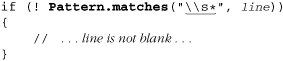
This function wraps an implicit ⌈^...$⌋ around the regex, and returns a Boolean indicating whether it can match the input string. It’s common for a package to provide both procedural and object-oriented interfaces, just as Sun did here. The differences between them often involve convenience (a procedural interface can be easier to work with for simple tasks, but more cumbersome for complex tasks), functionality (procedural interfaces generally have less functionality and options than their object-oriented counterparts), and efficiency (in any given situation, one is likely to be more efficient than the other — a subject covered in detail in Chapter 6).
Sun has occasionally integrated regular expressions into other parts of the language. For example, the previous example can be written using the string class’s matches method:
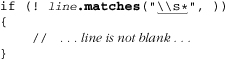
Again, this is not as efficient as a properly-applied object-oriented approach, and so is not appropriate for use in a time-critical loop, but it’s quite convenient for “casual” use.
Regex handling in VB and other .NET languages
Although all regex engines perform essentially the same basic tasks, they differ in how those tasks and services are exposed to the programmer, even among implementations sharing the same approach. Here’s the “Subject” example in VB.NET (.NET is covered in detail in Chapter 9):

Overall, this is generally similar to the Java example, except that .NET combines steps and , and requires an extra Value in . Why the differences? One is not inherently better or worse — each was just chosen by the developers who thought it was the best approach at the time. (More on this in a bit.)
.NET also provides a few procedural-approach functions. Here’s one to check for a blank line:
If Not Regex.IsMatch(Line, "^\s*$") Then
' ... line is not blank ...
End If
Unlike Sun’s Pattern.matches function, which adds an implicit ⌈^...$⌋ around the regex, Microsoft chose to offer this more general function. It’s just a simple wrapper around the core objects, but it involves less typing and variable corralling for the programmer, at only a small efficiency expense.
Regex handling in PHP
Here’s the ⌈Subject⌋ example with PHP’s preg suite of regex functions, which take a strictly procedural approach. (PHP is covered in detail in Chapter 10.)

Regex handling in Python
As a final example, let’s look at the ⌈Subject⌋ example in Python, which uses an object-oriented approach:
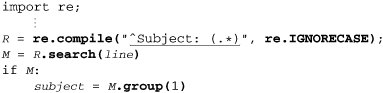
Again, this looks very similar to what we’ve seen before.
Why do approaches differ?
Why does one language do it one way, and another language another? There may be language-specific reasons, but it mostly depends on the whim and skills of the engineers that develop each package. There are, for example, many different regex packages for Java, each written by someone who wanted the functionality that Sun didn’t originally provide. Each has its own strengths and weaknesses, but it’s interesting to note that they all provide their functionality in quite different ways from each other, and from what Sun eventually decided to implement themselves.
Another clear example of the differences is PHP, which includes three wholly unrelated regex engines, each utilized by its own suite of functions. At different times, PHP developers, dissatisfied with the original functionality, updated the PHP core by adding a new package and a corresponding suite of interface functions. (The “preg” suite is generally considered superior overall, and is what this book covers.)
A Search-and-Replace Example
The “Subject” example is simple, so the various approaches really don’t have an opportunity to show how different they really are. In this section, we’ll look at a somewhat more complex example, further highlighting the different designs.
In the previous chapter ( 73), we saw this Perl search and replace to “linkize” an email address:
$text =~ s{
\b
# Capture the address to $1 ...
(
\w[-.\w]* # username
@
[-\w]+(\.[-\w]+)*\.(com|edu|info) # hostname
)
\b
}{<a href="mailto:$1">$1</a>}gix;
Perl’s search-and-replace operator works on a string “in place,” meaning that the variable being searched is modified when a replacement is done. Most other languages do replacements on a copy of the text being searched. This is quite convenient if you don’t want to modify the original, but you must assign the result back to the same variable if you want an in-place update. Some examples follow.
Search and replace in Java
Here’s the search-and-replace example with Sun’s java.util.regex package:
import java.util.regex.*; // Make regex classes easily available
.
.
.
Pattern r = Pattern.compile(
"\\b \n"+
"# Capture the address to $1 ... \n"+
"( \n"+
" \\w[-.\\w]* # username \n"+
" @ \n"+
" [-\\w]+(\\.[-\\w]+)*\\.(com|edu|info) # hostname \n"+
") \n"+
"\\b \n",
Pattern.CASE_INSENSITIVE|Pattern.COMMENTS);
Matcher m = r.matcher(text);
text = m.replaceAll("<a href=\"mailto:$1\">$1</a>");
Note that each ‘\’ wanted in a string’s value requires ‘\\’ in the string literal, so if you’re providing regular expressions via string literals as we are here, ⌈\w⌋ requires ‘\\w’. For debugging, System.out.println(r.pattern()) can be useful to display the regular expression as the regex function actually received it. One reason that I include newlines in the regex is so that it displays nicely when printed this way. Another reason is that each ‘#’ introduces a comment that goes until the next newline; so, at least some of the newlines are required to restrain the comments.
Perl uses notations like /g, /i, and /x to signify special conditions (these are the modifiers for replace all, case-insensitivity, and free formatting modes 135), but java.util.regex uses either different functions (replaceAll versus replace) or flag arguments passed to the function (e.g., Pattern.CASE_INSENSITIVE and Pattern.COMMENTS).
Search and replace in VB.NET
The general approach in VB.NET is similar:
Dim R As Regex = New Regex _
("\b " & _
"(?# Capture the address to $1 ... ) " & _
"( " & _
" \w[-.\w]* (?# username) " & _
" @ " & _
" [-\w]+(\.[-\w]+)*\.(com|edu|info) (?# hostname) " & _
") " & _
"\b ", _
RegexOptions.IgnoreCase Or RegexOptions.IgnorePatternWhitespace)
text = R.Replace(text, "<a href=""mailto:${1}" ">${1}</a>")
Due to the inflexibility of VB.NET string literals (they can’t span lines, and it’s difficult to get newline characters into them), longer regular expressions are not as convenient to work with as in some other languages. On the other hand, because ‘\’ is not a string metacharacter in VB.NET, the expression can be less visually cluttered. A double quote is a metacharacter in VB.NET string literals: to get one double quote into the string’s value, you need two double quotes in the string literal.
Search and replace in PHP
Here’s the search-and-replace example in PHP:
$text = preg_replace('{
\b
# Capture the address to $1 ...
(
\w[-.\w]* # username
@
[-\w]+(\.[-\w]+)*\.(com|edu|info) # hostname
)
\b
}ix' ,
'<a href="mailto:$1">$1</a>', # replacement string
$text);
As in Java and VB.NET, the result of the search-and-replace action must be assigned back into $text, but otherwise this looks quite similar to the Perl example.
Search and Replace in Other Languages
Let’s quickly look at a few examples from other traditional tools and languages.
Awk
Awk uses an integrated approach, /regex/, to perform a match on the current input line, and uses “var ~ ...” to perform a match on other data. You can see where Perl got its notation for matching. (Perl’s substitution operator, however, is modeled after sed’s.) The early versions of awk didn’t support a regex substitution, but modern versions have the sub(...) operator:
sub(/mizpel/, "misspell")
This applies the regex ⌈mizpel⌋ to the current line, replacing the first match with misspell. Note how this compares to Perl’s (and sed’s) s/mizpel/misspell/.
To replace all matches within the line, awk does not use any kind of /g modifier, but a different operator altogether: gsub(/mizpel/, "misspell").
Tcl
Tcl takes a procedural approach that might look confusing if you’re not familiar with Tcl’s quoting conventions. To correct our misspellings with Tcl, we might use:

This checks the string in the variable var, and replaces the first match of ⌈mizpel⌋ with misspell, putting the now possibly-changed version of the original string into the variable newvar (which is not written with a dollar sign in this case). Tcl expects the regular expression first, the target string to look at second, the replacement string third, and the name of the target variable fourth. Tcl also allows optional flags to its regsub, such as -all to replace all occurrences of the match instead of just the first:

Also, the -nocase option causes the regex engine to ignore the difference between uppercase and lowercase characters (just like egrep’s -i flag, or Perl’s /i modifier).
GNU Emacs
The powerful text editor GNU Emacs (just “Emacs” from here on) supports elisp (Emacs lisp) as a built-in programming language. It provides a procedural regex interface with numerous functions providing various services. One of the main ones is re-search-forward, which accepts a normal string as an argument and interprets it as a regular expression. It then searches the text starting from the “current position,” stopping at the first match, or aborting if no match is found.
(re-search-forward is what’s executed when one invokes a “regexp search” while using the editor.)
As Table 3-3 (92) shows, Emacs’ flavor of regular expressions is heavily laden with backslashes. For example, ⌈\<\([a-z]+\)\([\n•\t]\|<[^>]+>\)+\i\>⌋ is an expression for finding doubled words, similar to the problem in the first chapter. We couldn’t use this regex directly, however, because the Emacs regex engine doesn’t understand \t and \n. Emacs double-quoted strings, however, do, and convert them to the tab and newline values we desire before the regex engine ever sees them. This is a notable benefit of using normal strings to provide regular expressions. One drawback, particularly with elisps regex flavor’s propensity for backslashes, is that regular expressions can end up looking like a row of scattered toothpicks. Here’s a small function for finding the next doubled word:

Combine that with (define-key global-map "\C-x\C-d" 'FindNextDbl) and you can use the “Control-x Control-d" sequence to quickly search for doubled words.
Care and Handling: Summary
As you can see, there’s a wide range of functionalities and mechanics for achieving them. If you are new to these languages, it might be quite confusing at this point. But, never fear! When trying to learn any one particular tool, it is a simple matter to learn its mechanisms.
Strings, Character Encodings, and Modes
Before getting into the various type of metacharacters generally available, there are a number of global issues to understand: regular expressions as strings, character encodings, and match modes.
These are simple concepts, in theory, and in practice, some indeed are. With most, though, the small details, subtleties, and inconsistencies among the various implementations sometimes makes it hard to pin down exactly how they work in practice. The next sections cover some of the common and sometimes complex issues you’ll face.
Strings as Regular Expressions
The concept is simple: in most languages except Perl, awk, and sed, the regex engine accepts regular expressions as normal strings — strings that are often provided as string literals like "^From: (.*) “. What confuses many, especially early on, is the need to deal with the language’s own string-literal metacharacters when composing a string to be used as a regular expression.
Each language’s string literals have their own set of metacharacters, and some languages even have more than one type of string literal, so there’s no one rule that works everywhere, but the concepts are all the same. Many languages’ string literals recognize escape sequences like \t, \\, and \x2A, which are interpreted while the string’s value is being composed. The most common regex-related aspect of this is that each backslash in a regex requires two backslashes in the corresponding string literal. For example, "\\n" is required to get the regex ⌈\n⌋.
If you forget the extra backslash for the string literal and use "\n", with many languages you’d then get ⌈ ⌋, which just happens to do exactly the same thing as ⌈
\n⌋. Well, actually, if the regex is in an /x type of free-spacing mode, ⌈⌋ becomes empty, while ⌈\n⌋ remains a regex to match a newline. So, you can get bitten if you forget. Table 3-4 below shows a few examples involving \t and \x2A (2A is the ASCII code for ‘*’.) The second pair of examples in the table show the unintended results when the string-literal metacharacters aren’t taken into account.
Table 3-4: A Few String-Literal Examples
String literal |
|
|
|
|
String value |
|
|
|
|
As regex |
|
⌈ |
⌈ |
⌈ |
Matches |
tab or star |
tab or star |
any number tabs |
tab followed by star |
In |
tab or star |
tab or star |
error |
tab followed by star |
 *]'
*]'Every language’s string literals are different, but some are quite different in that ‘\’ is not a metacharacter. For example. VB.NET’s string literals have only one metacharacter, a double quote. The next sections look at the details of several common languages’ string literals. Whatever the individual string-literal rules, the question on your mind when using them should be “what will the regular expression engine see after the language’s string processing is done?”
Strings in Java
Java string literals are like those presented in the introduction, in that they are delimited by double quotes, and backslash is a metacharacter. Common combinations such as '\t' (tab), '\n' (newline), ‘\\’ (literal backslash), etc. are supported. Using a backslash in a sequence not explicitly supported by literal strings results in an error.
Strings in VB.NET
String literals in VB.NET are also delimited by double quotes, but otherwise are quite different from Java’s. VB.NET strings recognize only one metasequence: a pair of double quotes in the string literal add one double quote into the string’s value. For example, "he said ""hi""\." results in ⌈he said "hi"\.⌋
Strings in C#
Although all the languages of Microsoft’s .NET Framework share the same regular expression engine internally, each has its own rules about the strings used to create the regular-expression arguments. We just saw Visual Basic’s simple string literals. In contrast, Microsoft’s C# language has two types of string literals.
C# supports the common double-quoted string similar to the kind discussed in this section’s introduction, except that “” rather than \” adds a double quote into the string’s value. However, C# also supports “verbatim strings,” which look like @”···“. Verbatim strings recognize no backslash sequences, but instead, just one special sequence: a pair of double quotes inserts one double quote into the target value. This means that you can use "\\t\\x2A" or @"\t\x2A" to create the ⌈\t\x2A⌋ example. Because of this simpler interface, one would tend to use these @“···” verbatim strings for most regular expressions.
Strings in PHP
PHP also offers two types of strings, yet both differ from either of C#’s types. With PHP’s double-quoted strings, you get the common backslash sequences like '\n', but you also get variable interpolation as we’ve seen with Perl ( 77), and also the special sequence {...} which inserts into the string the result of executing the code between the braces.
These extra features of PHP double-quoted strings mean that you’ll tend to insert extra backslashes into regular expressions, but there’s one additional feature that helps mitigate that need. With Java and C# string literals, a backslash sequence that isn’t explicitly recognized as special within strings results in an error, but with PHP double-quoted strings, such sequences are simply passed through to the string’s value. PHP strings recognize \t, so you still need "\\t" to get ! \t", but if you use "\w", you’ll get ⌈\w⌋ because \w is not among the sequences that PHP double-quoted strings recognize. This extra feature, while handy at times, does add yet another level of complexity to PHP double-quoted strings, so PHP also offers its simpler single-quoted strings.
PHP single-quoted strings offer uncluttered strings on the order of VB.NET’s strings, or C#’s @”...” strings, but in a slightly different way. Within a PHP single-quoted string, the sequence \’ includes one single quote in the target value, and \\ includes a backslash. Any other character (including any other backslash) is not considered special, and is copied to the target value verbatim. This means that ‘\t\x2A' creates ⌈\t\x2A⌋. Because of this simplicity, single-quoted strings are the most convenient for PHP regular expressions.
PHP single-quoted strings are discussed further in Chapter 10 ( 445).
Strings in Python
Python offers a number of string-literal types. You can use either single quotes or double quotes to create strings, but unlike PHP, there is no difference between the two. Python also offers “triple-quoted” strings of the form ‘ ’ ‘...’ ‘ ’ and ““”...”””, which are different in that they may contain unescaped newlines. All four types offer the common backslash sequences such as \n, but have the same twist that PHP has in that unrecognized sequences are left in the string verbatim. Contrast this with Java and C# strings, for which unrecognized sequences cause an error.
Like PHP and C#, Python offers a more literal type of string, its “raw string.” Similar to C#’s @”...” notation, Python uses an 'r' before the opening quote of any of the four quote types. For example, r"\t\x2A" yields ⌈\t\x2A⌋. Unlike the other languages, though, with Python’s raw strings, all backslashes are kept in the string, including those that escape a double quote (so that the double quote can be included within the string): r"he said \"hi\"\." results in ⌈he said \"hi\"\.⌋. This isn’t really a problem when using strings for regular expressions, since Python’s regex flavor treats ⌈\”⌋ as ⌈"⌋, but if you like, you can bypass the issue by using one of the other types of raw quoting: r'he said "hi"\.’
Strings in Tcl
Tcl is different from anything else in that it doesn’t really have string literals at all. Rather, command lines are broken into “words,” which Tcl commands can then consider as strings, variable names, regular expressions, or anything else as appropriate to the command. While a line is being parsed into words, common backslash sequences like \n are recognized and converted, and backslashes in unknown combinations are simply dropped. You can put double quotes around the word if you like, but they aren’t required unless the word has whitespace in it.
Tcl also has a raw literal type of quoting similar to Python’s raw strings, but Tcl uses braces, {...}, instead of r'---'. Within the braces, everything except a back-slash-newline combination is kept as-is, so you can use {\t\x2A} to get ⌈\t\x2A⌋.
Within the braces, you can have additional sets of braces so long as they nest. Those that don’t nest must be escaped with a backslash, although the backslash does remain in the string’s value.
Regex literals in Perl
In the Perl examples we’ve seen so far in this book, regular expressions have been provided as literals (“regular-expression literals”). As it turns out, you can also provide them as strings. For example:
$str =~ m/(\w+)/;
can also be written as:
$regex = '(\w+)';
$str =~ $regex;
or perhaps:
$regex = "(\\w+)";
$str =~ $regex;
(Note that using a string can be much less efficient 242, 348.)
When a regex is provided as a literal, Perl provides extra features that the regular-expression engine itself does not, including:
• The interpolation of variables (incorporating the contents of a variable as part of the regular expression).
• Support for a literal-text mode via ⌈\Q...\E⌋ ( 113).
• Optional support for a \N{name} construct, which allows you to specify characters via their official Unicode names. For example, you can match ‘¡Hola!’ with ⌈\N{INVERTED EXCLAMATION MARK}Hola!⌋.
In Perl, a regex literal is parsed like a very special kind of string. In fact, these features are also available with Perl double-quoted strings. The point to be aware of is that these features are not provided by the regular-expression engine. Since the vast majority of regular expressions used within Perl are as regex literals, most think that ⌈\Q...\E⌋ is part of Perl’s regex language, but if you ever use regular expressions read from a configuration file (or from the command line, etc.), it’s important to know exactly what features are provided by which aspect of the language.
More details are available in Chapter 7, starting on page 288.
Character-Encoding Issues
A character encoding is merely an explicit agreement on how bytes with various values should be interpreted. A byte with the decimal value 110 is interpreted as the character 'n' with the ASCII encoding, but as ‘>’ with EBCDIC. Why? Because that’s what someone decided — there’s nothing intrinsic about those values and characters that makes one encoding better than the other. The byte is the same; only the interpretation changes.
ASCII defines characters for only half the values that a byte can hold. The ISO-8859-1 encoding (commonly called “Latin-1”) fills in the blank spots with accented characters and special symbols, making an encoding usable by a larger set of languages. With this encoding, a byte with a decimal value of 234 is to be interpreted as ê, instead of being undefined as it is with ASCII.
The important question for us is: when we intend for a certain set of bytes to be considered in the light of a particular encoding, does the program actually do so? For example, if we have four bytes with the values 234, 116, 101, and 115 that we intend to be considered as Latin-1 (representing the French word “êtes”), we’d like the regex ⌈^"\w+$⌋ or ⌈^\b⌋ to match. This happens if the program’s \w and \b know to treat those bytes as Latin-1 characters, and probably doesn’t happen otherwise.
Richness of encoding-related support
There are many encodings. When you’re concerned with a particular one, important questions you should ask include:
• Does the program understand this encoding?
• How does it know to treat this data as being of that encoding?
• How rich is the regex support for this encoding?
The richness of an encoding’s support has several important issues, including:
• Are characters that are encoded with multiple bytes recognized as such? Do expressions like dot and [^x] match single characters, or single bytes?
• Do \w, \d, \s, \b, etc., properly understand all the characters in the encoding? For example, even if ê is known to be a letter, do \w and \b treat it as such?
• Does the program try to extend the interpretation of class ranges? Is ê matched by [a-z]?
• Does case-insensitive matching work properly with all the characters? For example, are ê and Ê treated as being equal?
Sometimes things are not as simple as they might seem. For example, the \b of Sun’s java.util.regex package properly understands all the word-related characters of Unicode, but its \w does not (it understands only basic ASCII). We’ll see more examples of this later in the chapter.
Unicode
There seems to be a lot of misunderstanding about just what “Unicode” is. At the most basic level, Unicode is a character set or a conceptual encoding— a logical mapping between a number and a character. For example, the Korean character  is mapped to the number 49,333. The number, called a code point, is normally shown in hexadecimal, with “U
+” prepended. 49,333 in hex is C0B5, so is referred to as U+C0B5. Included as part of the Unicode concept is a set of attributes for many characters, such as “3 is a digit” and “É is an uppercase letter whose lowercase equivalent is é.”
At this level, nothing is yet said about just how these numbers are actually encoded as data on a computer. There are a variety of ways to do so, including the UCS-2 encoding (all characters encoded with two bytes), the UCS-4 encoding (all characters encoded with four bytes), UTF-16 (most characters encoded with two bytes, but some with four), and the UTF-8 encoding (characters encoded with one to six bytes). Exactly which (if any) of these encodings a particular program uses internally is usually not a concern to the user of the program. The user’s concern is usually limited to how to convert external data (such as data read from a file) from a known encoding (ASCII, Latin-1, UTF-8, etc.) to whatever the program uses. Programs that work with Unicode usually supply various encoding and decoding routines for doing the conversion.
Regular expressions for programs that work with Unicode often support a \unum metasequence that can be used to match a specific Unicode character ( 117). The number is usually given as a four-digit hexadecimal number, so \uC0B5 matches . It’s important to realize that \uC0B5 is saying “match the Unicode character U+C0B5,” and says nothing about what actual bytes are to be compared, which is dependent on the particular encoding used internally to represent Unicode code points. If the program happens to use UTF-8 internally, that character happens to be represented with three bytes. But you, as someone using the Unicode-enabled program, don’t normally need to care. (Sometimes you do, as with PHP’s preg suite and its u pattern modifier; 447).
There are a few related issues that you may need to be aware of...
Characters versus combining-character sequences
What a person considers a “character” doesn’t always agree with what Unicode or a Unicode-enabled program (or regex engine) considers to be a character. For example, most would consider à to be a single character, but in Unicode, it can be composed of two code points, U+0061 (a) combined with the grave accent U+0300(’). Unicode offers a number of combining characters that are intended to follow (and be combined with) a base character. This makes things a bit more complex for the regular-expression engine — for example, should dot match just one code point, or the entire U+0061 plus U+0300 combination?
In practice, it seems that many programs treat “character” and “code point” as synonymous, which means that dot matches each code point individually, whether it is base character or one of the combining characters. Thus, à (U+0061 plus U+0300) is matched by ⌈^..$⌋, and not by ⌈^.$⌋.
Perl and PCRE (and by extension, PHP’s preg suite) support the \X metasequence, which fulfills what many might expect from dot (“match one character”) in that it matches a base character followed by any number of combining characters. See more on page 120.
It’s important to keep combining characters in mind when using a Unicode-enabled editor to input Unicode characters directly into regular-expressions. If an accented character, say Å, ends up in a regular expression as ‘A’ plus ‘°,’ it likely can’t match a string containing the single code point version of Å (single code point versions are discussed in the next section). Also, it appears as two distinct characters to the regular-expression engine itself, so specifying ⌈[...Å...]⌋ adds the two characters to the class, just as the explicit ⌈[...A °...]⌋ does.
In a similar vein, if a two-code-point character like Å is followed by a quantifier, the quantifier actually applies only to the second code point, just as with an explicit ⌈A ° +⌋.
Multiple code points for the same character
In theory, Unicode is supposed to be a one-to-one mapping between code points and characters, but there are many situations where one character can have multiple representations. The previous section notes that à is U+0061 followed by U+0300. It is, however, also encoded separately as the single code point U+00E0. Why is it encoded twice? To maintain easier conversion between Unicode and Latin-1. If you have Latin-1 text that you convert to Unicode, à will likely be converted to U+00E0. But, it could well be converted to a U+0061, U+0300 combination. Often, there’s nothing you can do to automatically allow for these different ways of expressing characters, but Sun’s java.util.regex package provides a special match option, CANON_EQ, which causes characters that are “canonically equivalent” to match the same, even if their representations in Unicode differ ( 368).
Somewhat related is that different characters can look virtually the same, which could account for some confusion at times among those creating the text you’re tasked to check. For example, the Roman letter I (U+0049) could be confused with I, the Greek letter Iota (U+0399). Add dialytika to that to get Ï or Ï, and it can be encoded four different ways (U+00CF; U+03AA; U+0049 U+0308; U+0399 U+0308). This means that you might have to manually allow for these four possibilities when constructing a regular expression to match Ï. There are many examples like this.
Also plentiful are single characters that appear to be more than one character. For example, Unicode defines a character called "SQUARE HZ" (U+3390), which appears as Hz. This looks very similar to the two normal characters Hz (U+0048 U+007A).
Although the use of special characters like Hz is minimal now, their adoption over the coming years will increase the complexity of programs that scan text, so those working with Unicode would do well to keep these issues in the back of their mind. Along those lines, one might already expect, for example, the need to allow for both normal spaces (U+0020) and no-break spaces (U+00A0), and perhaps also any of the dozen or so other types of spaces that Unicode defines.
Unicode 3.1+ and code points beyond U+FFFF
With the release of Unicode Version 3.1 in mid 2001, characters with code points beyond U+FFFF were added. (Previous versions of Unicode had built in a way to allow for characters at those code points, but until Version 3.1, none were actually defined.) For example, there is a character for musical symbol C Clef defined at U+1D121. Older programs built to handle only code points U+FFFF and below won’t be able to handle this. Most programs’ \unum indeed allow only a four-digit hexadecimal number.
Programs that can handle characters at these new code points generally offer the \x{num} sequence, where num can be any number of digits. (This is offered instead of, or in addition to, the four-digit \unum notation.) You can then use \x{1D121} to match the C Clef character.
Unicode line terminator
Unicode defines a number of characters (and one sequence of two characters) that are to be considered lineterminators, shown in Table 3-5.
Table 3-5: Unicode Line Terminators
Characters |
Description |
|
LF |
U |
ASCII Line Feed |
VT |
U |
ASCII Vertical Tab |
FF |
U |
ASCII Form Feed |
CR |
U |
ASCII Carriage Return |
CR/LF |
U |
ASCII Carriage Return / Line Feed sequence |
NEL |
U |
Unicode NEXT LINE |
LS |
U |
Unicode LINE SEPARATOR |
PS |
U |
Unicode PARAGRAPH SEPARATOR |
When fully supported, line terminators influence how lines are read from a file (including, in scripting languages, the file the program is being read from). With regular expressions, they can influence both what dot matches ( 111), and where⌈^⌋, ⌈$⌋, and ⌈\Z⌋ match ( 112).
Regex Modes and Match Modes
Most regex engines support a number of different modes for how a regular expression is interpreted or applied. We’ve seen an example of each with Perl’s /x modifier (regex mode that allows free whitespace and comments 72) and /i modifier (match mode for case-insensitive matching 47).
Modes can generally be applied globally to the whole regex, or in many modern flavors, partially, to specific subexpressions of the regex. The global application is achieved through modifiers or options, such as Perl’s /i, PHP’s i pattern modifier (446), or java.util.regex’s Pattern.CASE_INSENSITIVE flag (99). If supported, the partial application of a mode is achieved with a regex construct that looks like ⌈(?i)⌋ to turn on case-insensitive matching, or ⌈(?-i)⌋ to turn it off. Some flavors also support ⌈(?i:...)⌋ and ⌈(?-i:...)⌋, which turn on and off case-insensitive matching for the subexpression enclosed.
How these modes are invoked within a regex is discussed later in this chapter (135). In this section, we’ll merely review some of the modes commonly available in most systems.
Case-insensitive match mode
The almost ubiquitous case-insensitive match mode ignores letter case during matching, so that ⌈b⌋ matches both 'b' and 'B'. This feature relies upon proper character encoding support, so all the cautions mentioned earlier apply.
Historically, case-insensitive matching support has been surprisingly fraught with bugs, but most have been fixed over the years. Still, Ruby’s case-insensitive matching doesn’t apply to octal and hex escapes.
There are special Unicode-related issues with case-insensitive matching (which Unicode calls “loose matching”). For starters, not all alphabets have the concept of upper and lower case, and some have an additional title case used only at the start of a word. Sometimes there’s not a straight one-to-one mapping between upper and lower case. A common example is that a Greek Sigma, Σ, has two lowercase versions, ς and σ; all three should mutually match in case-insensitive mode. Of the systems I’ve tested, only Perl and Java’s java.util.regex handle this correctly.
Another issue is that sometimes a single character maps to a sequence of multiple characters. One well known example is that the uppercase version of β is the two-character combination “SS”. Only Perl handles this properly.
There are also Unicode-manufactured problems. One example is that while there’s a single character  (U
(U+01F0), it has no single-character uppercase version. Rather, requires a combining sequence ( 107), U+004A and U+030C. Yet, and should match in a case-insensitive mode. There are even examples like this that involve one-to-three mappings. Luckily, most of these do not involve commonly used characters.
Free-spacing and comments regex mode
In this mode, whitespace outside of character classes is mostly ignored. White-space within a character class still counts (except in java.util.regex), and comments are allowed between # and a newline. We’ve already seen examples of this for Perl ( 72), Java ( 98), and VB.NET ( 99).
Except for java.util.regex, it’s not quite true that all whitespace outside of classes is ignored, but that it’s turned into a do-nothing metacharacter. The distinction is important with something like ⌈\l2•3⌋, which in this mode is taken as ⌈\l2⌋ followed by ⌈3⌋, and not ⌈\123⌋, as some might expect.
Of course, just what is and isn’t “whitespace” is subject to the character encoding in effect, and its fullness of support. Most programs recognize only ASCII whitespace.
Dot-matches-all match mode (a.k.a., “single-line mode”)
Usually, dot does not match a newline. The original Unix regex tools worked on a line-by-line basis, so the thought of matching a newline wasn’t an issue until the advent of sed and lex. By that time, ⌈.*⌋ had become a common idiom to match “the rest of the line,” so the new languages disallowed it from crossing line boundaries in order to keep it familiar.† Thus, tools that could work with multiple lines (such as a text editor) generally disallow dot from matching a newline.
For modern programming languages, a mode in which dot matches a newline can be as useful as one where dot doesn’t. Which of these is most convenient for a particular situation depends on, well, the situation. Many programs now offer ways for the mode to be selected on a per-regex basis.
There are a few exceptions to the common standard. Unicode-enabled systems, such as Sun’s Java regex package, may expand what dot normally does not match to include any of the single-character Unicode line terminators ( 109). Tcl’s normal state is that its dot matches everything, but in its special “newline-sensitive” and “partial newline-sensitive” matching modes, both dot and a negated character class are prohibited from matching a newline.
An unfortunate name. When first introduced by Perl with its /s modifier, this mode was called “single-line mode.” This unfortunate name continues to cause no end of confusion because it has nothing whatsoever to do with ⌈^⌋ and ⌈$⌋, which are influenced by the “multiline mode” discussed in the next section. “Single-line mode” merely means that dot has no restrictions and can match any character.
Enhanced line-anchor match mode (a.k.a., “multiline mode”)
An enhanced line-anchor match mode influences where the line anchors, ⌈^⌋ and ⌈$⌋, match. The anchor ⌈^⌋ normally does not match at embedded newlines, but rather only at the start of the string that the regex is being applied to. However, in enhanced mode, it can also match after an embedded newline, effectively having ⌈^⌋ treat the string as multiple logical lines if the string contains newlines in the middle. We saw this in action in the previous chapter ( 69) while developing a Perl program to converting text to HTML. The entire text document was within a single string, so we could use the search-and-replace s/^$/<p>/mg to convert “...tags. It’s ...” to “...tags. <p> It’s . . .” The substitution replaces empty “lines” with paragraph tags.
It’s much the same for ⌈$⌋, although the basic rules about when ⌈$⌋ can normally match can be a bit more complex to begin with ( 129). However, as far as this section is concerned, enhanced mode simply includes locations before an embedded newline as one of the places that ⌈$⌋ can match.
Programs that offer this mode often offer ⌈\A⌋ and ⌈\Z⌋, which normally behave the same as ⌈^⌋ and ⌈$⌋ except they are not modified by this mode. This means that ⌈\A⌋ and ⌈\Z⌋ never match at embedded newlines. Some implementations also allow ⌈$⌋ and ⌈\Z⌋ to match before a string-ending newline. Such implementations often offer ⌈\z⌋, which disregards all newlines and matches only at the very end of the string. See page 129 for details.
As with dot, there are exceptions to the common standard. A text editor like GNU Emacs normally lets the line anchors match at embedded newlines, since that makes the most sense for an editor. On the other hand, lex has its ⌈$⌋ match only before a newline (while its ⌈^⌋ maintains the common meaning.)
Unicode-enabled systems, such as Sun’s java.util.regex, may allow the line anchors in this mode to match at any line terminator (109). Ruby’s line anchors normally do match at any embedded newline, and Python’s ⌈\Z⌋ behaves like its ⌈\z⌋, rather than its normal ⌈$⌋.
Traditionally, this mode has been called “multiline mode.” Although it is unrelated to “single-line mode,” the names confusingly imply a relation. One simply modifies how dot matches, while the other modifies how ⌈^⌋ and ⌈$⌋ match. Another problem is that they approach newlines from different views. The first changes the concept of how dot treats a newline from “special” to “not special,” while the other does the opposite and changes the concept of how ⌈^⌋ and ⌈$⌋ treat newlines from “not special” to “special.”†
Literal-text regex mode
A “literal text” mode is one that doesn’t recognize most or all regex metacharacters. For example, a literal-text mode version of ⌈[a-z]*⌋ matches the string '[a-z]*'. A fully literal search is the same as a simple string search (“find this string” as opposed to “find a match for this regex”), and programs that offer regex support also tend to offer separate support for simple string searches. A regex literal-text mode becomes more interesting when it can be applied to just part of a regular expression. For example, PCRE (and hence PHP) regexes and Perl regex literals offer the special sequence \Q···\E, the contents of which have all metacharacters ignored (except the \E itself, of course).
Common Metacharacters and Features
The remainder of this chapter — the next 30 pages or so — offers an overview of common regex metacharacters and concepts, as outlined on the next page. Not every issue is discussed, and no one tool includes everything presented here.
In one respect, this section is just a summary of much of what you’ve seen in the first two chapters, but in light of the wider, more complex world presented at the beginning of this chapter. During your first pass through, a light glance should allow you to continue on to the next chapters. You can come back here to pick up details as you need them.
Some tools add a lot of new and rich functionality and some gratuitously change common notations to suit their whim or special needs. Although I’ll sometimes comment about specific utilities, I won’t address too many tool-specific concerns here. Rather, in this section I’ll just try to cover some common metacharacters and their uses, and some concerns to be aware of. I encourage you to follow along with the manual of your favorite utility.
Constructs Covered in This Section
Character Representations
Character Shorthands: |
|
Octal Escapes: \num |
|
Hex/Unicode Escapes: |
|
Control Characters: |
Character Classes and Class-Like Constructs
Normal classes: |
|
Almost any character: dot |
|
Exactly one byte: \C |
|
Unicode Combining Character Sequence: |
|
Class shorthands: |
|
Unicode properties, blocks, and categories: |
|
Class set operations: |
|
POSIX bracket-expression “character class”: |
|
POSIX bracket-expression “collating sequences”: |
|
POSIX bracket-expression “character equivalents”: |
|
Emacs syntax classes |
Anchors and Other “Zero-Width Assertions”
Start of line/string: |
|
End of line/string: |
|
Start of match (or end of previous match): |
|
Word boundaries: |
|
Lookahead |
Comments and Mode Modifiers
Mode modifier: |
|
Mode-modified span: |
|
Comments: |
|
Literal-text span: |
Grouping, Capturing, Conditionals, and Control
Capturing/groupingparentheses: |
|
Grouping-onlyparentheses: |
|
Named capture: |
|
Atomic grouping: |
|
Alternation: ...|...|... |
|
Conditional: |
|
Greedy quantifiers: |
|
Lazy quantifiers: |
|
Possessive quantifiers: |
Character Representations
This group of metacharacters provides visually pleasing ways to match specific characters that are otherwise difficult to represent.
Character shorthands
Many utilities provide metacharacters to represent certain control characters that are sometimes machine-dependent, and which would otherwise be difficult to input or to visualize:
|
Alert (e.g., to sound the bell when “printed”) Usually maps to the ASCII |
|
Backspace Usually maps to the ASCII |
|
Escape character Usually maps to the ASCII |
|
Form feed Usually maps to the ASCII |
|
Newline On most platforms (including Unix and |
|
Carriage return Usually maps to the ASCII |
|
Normal horizontal tab Maps to the ASCII |
|
Vertical tab Usually maps to the ASCII |
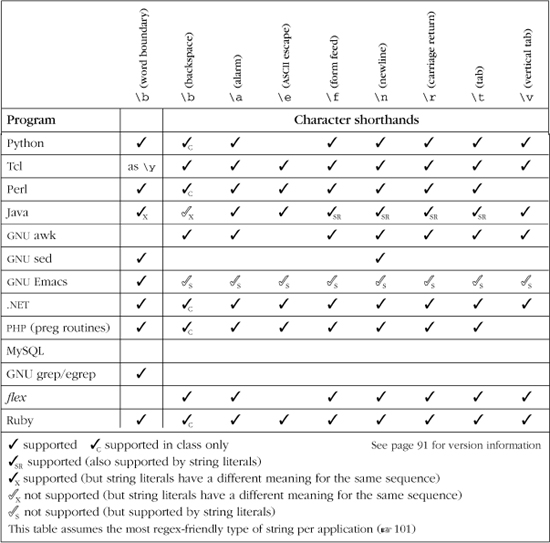
Table 3-6 lists a few common tools and some of the character shorthands they provide. As discussed earlier, some languages also provide many of the same shorthands for the string literals they support. Be sure to review that section ( 101) for some of the associated pitfalls.
These are machine dependent?
As noted in the list, \n and \r are operating-system dependent in many tools,† so, it’s best to choose carefully when you use them. When you need, for example, “a newline” for whatever system your script will happen to run on, use \n. When you need a character with a specific value, such as when writing code for a defined protocol like HTTP, use \012 or whatever the standard calls for. (\012 is an octal escape for the ASCII linefeed character.) If you wish to match DOS line-ending characters, use ⌈\015\012⌋. To match either DOS or Unix line-ending characters, use ⌈\015?\012⌋. (These actually match the line-ending characters — to match at the start or end of a line, use a line anchor 129).
Table 3-6: A Few Utilities and Some of the Shorthand Metacharacters They Provide
Octal escape— \num
Implementations supporting octal (base 8) escapes generally allow two- and three- digit octal escapes to be used to indicate a byte or character with a particular value. For example, ⌈\015\012⌋ matches an ASCII CR/LF sequence. Octal escapes can be convenient for inserting hard-to-type characters into an expression. In Perl, for instance, you can use ⌈\e⌋ for the ASCII escape character, but you can’t in awk.
Since awk does support octal escapes, you can use the ASCII code for the escape character directly: ⌈\033⌋.
Table 3-7 on the next page shows the octal escapes some tools support.
Some implementations, as a special case, allow ⌈\0⌋ to match a NUL byte. Some allow all one-digit octal escapes, but usually don’t if backreferences such as ⌈\1⌋ are supported. When there’s a conflict, backreferences generally take precedence over octal escapes. Some allow four-digit octal escapes, usually to support a requirement that any octal escape begin with a zero (such as with java.util.regex).
You might wonder what happens with out-of-range values like \565 (8-bit octal values range from \000 until only \377). It seems that half the implementations leave it as a larger-than-byte value (which may match a Unicode character if Unicode is supported), while the other half strip it to a byte. In general, it’s best to limit octal escapes to \377 and below.
Hex and Unicode escapes: \xnum, \x{num}, \unum, \Unum,...
Similar to octal escapes, many utilities allow a hexadecimal (base 16) value to be entered using \x, \u, or sometimes \U. If allowed with \x, for example, ⌈\x0D\x0A⌋ matches the CR/LF sequence. Table 3-7 shows the hex escapes that some tools support.
Besides the question of which escape is used, you must also know how many digits they recognize, and if braces may be (or must be) used around the digits. These are also indicated in Table 3-7.
Control characters: \cchar
Many flavors offer the ⌈\cchar⌋ sequence to match control characters with encoding values less than 32 (some allow a wider range). For example, ⌈\cH⌋ matches a Control-H, which represents a backspace in ASCII, while ⌈\cJ⌋ matches an ASCII linefeed (which is often also matched by ⌈\n⌋, but sometimes by ⌈\r⌋, depending on the platform 115).
Details aren’t uniform among systems that offer this construct. You’ll always be safe using uppercase English letters as in the examples. With most implementations, you can use lowercase letters as well, but Sun’s Java regex package, for example, does not support them. And what exactly happens with non-alphabetics is very flavor-dependent, so I recommend using only uppercase letters with \c.
Related Note: GNU Emacs supports this functionality, but with the rather ungainly metasequence ⌈?\^char⌋ (e.g., ⌈?\^H⌋ to match an ASCII backspace).
Table 3-7: A Few Utilities and the Octal and Hex Regex Escapes Their Regexes Support
|
Back-references |
Octal escapes |
Hex escapes |
Python |
|
|
|
Tcl |
|
|
|
Perl |
|
|
|
Java |
|
|
|
GNU awk |
|
|
|
GNU sed |
|
|
|
GNU Emacs |
|
|
|
.NET |
|
|
|
PHP (preg suite) |
|
|
|
MySQL |
|
|
|
GNU egrep |
|
|
|
GNU grep |
|
|
|
flex |
|
|
|
Ruby |
|
|
|
|
|||
|
|||
|
|||
|
|||
|
|||
|
|||
|
|||
|
|||
|
|||
|
|||
|
|||
|
|||
|
|||
Character Classes and Class-Like Constructs
Modern flavors provide a number of ways to specify a set of characters allowed at a particular point in the regex, but the simple character class is ubiquitous.
Normal classes: [a-z] and [^a-z]
The basic concept of a character class has already been well covered, but let me emphasize again that the metacharacter rules change depending on whether you’re in a character class or not. For example, ⌈*⌋ is never a metacharacter within a class, while ⌈—⌋ usually is. Some metasequences, such as ⌈\b⌋, sometimes have a different meaning within a class than outside of one ( 116).
With most systems, the order that characters are listed in a class makes no difference, and using ranges instead of listing characters is irrelevant to the execution speed (e.g., [0-9] should be no different from [9081726354]). However, some implementations don’t completely optimize classes (Sun’s Java regex package comes to mind), so it’s usually best to use ranges, which tend to be faster, wherever possible.
A character class is always a positive assertion. In other words, it must always match a character to be successful. A negated class must still match a character, but one not listed. It might be convenient to consider a negated character class to be a “class to match characters not listed.” (Be sure to see the warning about dot and negated character classes, in the next section.) It used to be true that something like ⌈[^LMNOP]⌋ was the same as ⌈[\x00-KQ-\xFF]⌋. In strictly eight-bit systems, it still is, but in a system such as Unicode where character ordinals go beyond 255 (\xFF), a negated class like ⌈[^LMNOP]⌋ suddenly includes all the tens of thousands of characters in the encoding—all except L, M, N, O, and P.
Be sure to understand the underlying character set when using ranges. For example, ⌈[a-Z]⌋ is likely an error, and in any case certainly isn’t “alphabetics.” One specification for alphabetics is ⌈[a-zA-z]⌋, at least for the ASCII encoding. (See \p{L} in “Unicode properties” 121.) Of course, when dealing with binary data, ranges like ‘\x80-\xFF’ within a class make perfect sense.
Almost any character: dot
In some tools, dot is a shorthand for a character class that can match any character, while in most others, it is a shorthand to match any character except a newline. It’s a subtle difference that is important when working with tools that allow target text to contain multiple logical lines (or to span logical lines, such as in a text editor). Concerns about dot include:
• In some Unicode-enabled systems, such as Sun’s Java regex package, dot normally does not match a Unicode line terminator ( 109).
• A match mode ( 111) can change the meaning of what dot matches.
• The POSIX standard dictates that dot not match a NUL (a character with the value zero), although all the major scripting languages allow NULLs in their text (and dot matches them).
Dot versus a negated character class
When working with tools that allow multiline text to be searched, take care to note that dot usually does not match a newline, while a negated class like ⌈[^"]⌋ usually does. This could yield surprises when changing from something such as ⌈".*"⌋ to ⌈"[^"]*"⌋. The matching qualities of dot can often be changed by a match mode—see “Dot-matches-all match mode” on page 111.
Exactly one byte
Perl and PCRE (and hence PHP) support \C, which matches one byte, even if that byte is one of several that might encode a single character (on the other hand, everything else works on a per-character basis). This is dangerous—its misuse can cause internal errors, so it shouldn’t be used unless you really know what you’re doing. I can’t think of a good use for it, so I won’t mention it further.
Unicode combining character sequence: \X
Perl and PHP support \X as a shorthand for ⌈\P{M}\p{M}*⌋, which is like an extended ⌈.⌋ (dot). It matches a base character (anything not \p{M}), possibly followed by any number of combining characters (anything that is \p{M}).
As discussed earlier ( 107), Unicode uses a system of base and combining characters which, in combination, create what look like single, accented characters like à (‘a’ U+0061 combined with the grave accent ‘`’ U+0300). You can use more than one combining character if that’s what you need to create the final result. For example, if for some reason you need  , that would be ‘c’ followed by a combining cedilla
  and a combining breve
  (U
(U+0063 followed by U+0327 and U+0306).
If you wanted to match either “francais” or “français,” it wouldn’t be safe to just use ⌈fran.ais⌋ or ⌈fran[cç]ais⌋, as those assume that the ‘ç’ is rendered with the single Unicode code point U+00C7, rather than ‘c’ followed by the cedilla (U+0063 followed by U+0327). You could perhaps use ⌈fran(c ¸ ? | ç)ais⌋ if you needed to be very specific, but in this case, ⌈fran\Xais⌋ is a good substitute for ⌈fran.ais⌋.
Besides the fact that \X matches trailing combining characters, there are two differences between it and dot. One is that \X always matches a newline and other Unicode line terminators ( 109), while dot is subject to dot-matches-all match-mode (111), and perhaps other match modes depending on the tool. Another difference is that a dot-matches-all dot is guaranteed to match all characters at all times, while ⌈\X⌋ doesn’t match a leading combining character.
Class shorthands: \w, \d, \s, \W, \D, \S
Support for the following shorthands is common:
|
Digit Generally the same as ⌈ |
|
Non-digit Generally the same as ⌈ |
|
Part-of-word character Often the same as ⌈ |
Non-word character Generally the same as ⌈ |
|
|
Whitespace character On ASCII-only systems, this is often the same as ⌈ |
|
Non-whitespace character Generally the same as ⌈ |
As described on page 87, a POSIX locale could influence the meaning of these shorthands (in particular, \w). Unicode-enabled programs likely have \w match a much wider scope of characters, such as \p{L} (discussed in the next section) plus an underscore.
Unicode properties, scripts, and blocks: \p{Prop}, \P{Prop}
On its surface, Unicode is a mapping (106), but the Unicode Standard offers much more. It also defines qualities about each character, such as “this character is a lowercase letter,” “this character is meant to be written right-to-left,” “this character is a mark that’s meant to be combined with another character,” etc.
Regular-expression support for these qualities varies, but many Unicode-enabled programs support matching via at least some of them with ⌈\p{quality}⌋ (matches characters that have the quality) and ⌈\P{quality}⌋ (matches characters without it). A basic example is ⌈p{L}⌋, where ‘L’ is the quality meaning “letter” (as opposed to number, punctuation, accents, etc.). ‘L’ is an example of a general property (also called a category). We’ll soon see other “qualities” that can be tested by ⌈\p{···}⌋ and ⌈\P{···}⌋, but the most commonly supported are the general properties.
The general properties are shown in Table 3-8. Each character (each code point actually, which includes those that have no characters defined) can be matched by just one general property. The general property names are one character (‘L’ for Letter, ‘S’ for symbol, etc.), but some systems support a more descriptive synonym (‘Letter’, ‘Symbol’, etc.) as well. Perl, for example, supports these.
With some systems, single-letter property names may be referenced without the curly braces (e.g., using \pL instead of \p{L}). Some systems may require (or simply allow) ‘In’ or ‘Is’ to prefix the letter (e.g., \p{IsL} ). As we look at additional qualities, we’ll see examples of where an Is/In prefix is required.†
As shown in Table 3-9, each one-letter general Unicode property can be further subdivided into a set of two-letter sub-properties, such as “letter” being divided into “lowercase letter,” “uppercase letter,” “titlecase letter,” “modifier letter,” “other letter.” Each code point is assigned exactly one of the subdivided properties.
Table 3-8: Basic Unicode Properties
Class |
Synonym and description |
|
|
|
|
|
|
|
|
|
|
|
|
|
|
Additionally, some implementations support a special composite sub-property, \p{L&}, which is a shorthand for all “cased” letters, and is the same as ⌈[\p{Lu}\p{Ll}\p{Lt}]⌋.
Also shown in Table 3-9 are the full-length synonyms (e.g., “Lowercase_Letter” instead of “Ll”) supported by some implementations. The standard suggests that a variety of forms be accepted (such as ‘LowercaseLetter’, ‘LOWERCASE_LETTER’, ‘Lowercase•Letter’, ‘lowercase-letter’, etc.), but I recommend, for consistency, always using the form shown in Table 3-9.
Scripts. Some systems have support for matching via a script (writing system) name with ⌈\p{···}⌋. For example, if supported, \p{Hebrew} matches characters that are specifically part of the Hebrew writing system. (A script does not include common characters that might be used by other writing systems as well, such as spaces and punctuation.)
Some scripts are language-based (such as Gujarati, Thai, Cherokee, ...). Some span multiple languages (e.g., Latin, Cyrillic), while some languages are composed of multiple scripts, such as Japanese, which uses characters from the Hiragana, Katakana, Han (“Chinese Characters”), and Latin scripts. See your system’s documentation for the full list.
A script does not include all characters used by the particular writing system, but rather, all characters used only (or predominantly) by that writing system. Common characters such as spacing and punctuation are not included within any script, but rather are included as part of the catch-all pseudo-script IsCommon, matched by ⌈\p{lsCommon}⌋. A second pseudo-script, Inherited, is composed of certain combining characters that inherit the script from the base character that they follow.
Table 3-9: Basic Unicode Sub-Properties
Property |
Synonym and description |
|
|
|
|
|
|
|
A composite shorthand matching all |
|
|
|
|
|
|
|
|
|
|
|
|
|
|
|
|
|
|
|
|
|
|
|
|
|
|
|
|
|
|
|
|
|
|
|
|
|
|
|
|
|
|
|
|
|
|
|
|
|
|
|
|
 , ...
, ... , and
, and  , ...
, ... ,
,  , ...
, ...Blocks. Similar (but inferior) to scripts, blocks refer to ranges of code points on the Unicode character map. For example, the Tibetan block refers to the 256 code points from U+0F00 through U+0FFF. Characters in this block are matched with \p{InTibetan} in Perl and java.util.regex, and with \p{IsTibetan} in .NET. (More on this in a bit.)
There are many blocks, including blocks for most systems of writing (Hebrew, Tamil, Basic_Latin, Hangul_Jamo, Cyrillic, Katakana, ...), and for special character types (Currency, Arrows, Box_Drawing, Dingbats, ...).
Tibetan is one of the better examples of a block, since all characters in the block that are defined relate to the Tibetan language, and there are no Tibetan-specific characters outside the block. Block qualities, however, are inferior to script qualities for a number of reasons:
• Blocks can contain unassigned code points. For example, about 25 percent of the code points in the Tibetan block have no characters assigned to them.
• Not all characters that would seem related to a block are actually part of that block. For example, the Currency block does not contain the universal currency symbol ‘¤’, nor such notable currency symbols as $, ¢, £, €, and ¥. (Luckily, in this case, you can use the currency property, \p{Sc}, in its place.)
• Blocks often have unrelated characters in them. For example, ¥ (Yen symbol) is found in the Latin_1_Supplement block.
• What might be considered one script may be included within multiple blocks. For example, characters used in Greek can be found in both the Greek and Greek_Extended blocks.
Support for block qualities is more common than for script qualities. There is ample room for getting the two confused because there is a lot of overlap in the naming (for example, Unicode provides for both a Tibetan script and a Tibetan block).
Furthermore, as Table 3-10 on the facing page shows, the nomenclature has not yet been standardized. With Perl and java.util.regex, the Tibetan block is ⌈\p{InTibetan}⌋, but in the .NET Framework, it’s \p{IsTibetan} (which, to add to the confusion, Perl allows as an alternate representation for the Tibetan script).
Other properties/qualities. Not everything talked about so far is universally supported. Table 3-10 gives a few details about what’s been covered so far.
Additionally, Unicode defines many other qualities that might be accessible via the ⌈\p{···}⌋ construct, including ones related to how a character is written (left-to-right, right-to-left, etc.), vowel sounds associated with characters, and more. Some implementations even allow you to create your own properties on the fly. See your program’s documentation for details on what’s supported.
Table 3-10: Property/Script/Block Features
|
Feature |
Perl |
Java |
.NET |
PHP/PCRE |
|
Basic Properties like |
|
|
|
|
|
Basic Properties shorthand like |
|
|
|
|
|
Basic Properties longhand like |
|
|
|
|
|
Basic Properties full like |
|
|
|
|
|
Composite |
|
|
|
|
|
Script like |
|
|
|
|
|
Script longhand like |
|
|
|
|
|
Block like |
if no script |
|
|
|
|
Block longhand like |
|
|
|
|
|
Block longhand like |
|
|
|
|
|
Negated |
|
|
|
|
|
Negated |
|
|
|
|
|
|
|
as |
|
|
|
|
|
as |
as |
as |
|
|
|
as |
as |
as |
Lines checkmarked at left are recommended for new implementations. |
(See page 91 for version information) |
||||
Simple class subtraction: [[a-z]-[aeiou]]
.NET offers a simple class “subtraction” nomenclature, which allows you to remove from what a class can match those characters matchable by another class. For example, the characters matched by ⌈[ [a-z] - [aeiou] ]⌋ are those matched by ⌈[a-z]⌋ minus those matched by [aeiou], i.e. that are non-vowel lower-case ASCII.
As another example, ⌈[\p{P} - [\p{Ps}\p{Pe}] ]⌋ is a class that matches characters in \p{P} except those matchable by ⌈[\p{Ps}\p{Pe}]⌋, which is to say that it matches all punctuation except opening and closing punctuation such as  and
and (.
Full class set operations: [[a-z] && [^aeiou]]
Sun’s Java regex package supports a full range of set operations (union, subtraction, intersection) within character classes. The syntax is different from the simple class subtraction mentioned in the previous section (and, in particular, Java’s set subtraction looks particularly odd—the non-vowel example shown in the previous section would be rendered in Java as [[a-z]&&[^aeiou]]). Before looking at subtraction in detail, let’s look at the two basic class set operations, OR and AND.
OR allows you to add characters to the class by including what looks like an embedded class within the class: [abcxyz] can also be written as [[abc] [xyz]], [abc[xyz]], or [[abc]xyz], among others. OR combines sets, creating a new set that is the sum of the argument sets. Conceptually, it’s similar to the “bitwise or” operator that many languages have via a ‘|’ or ‘or’ operator. In character classes, OR is mostly a notational convenience, although the ability to include negated classes can be useful in some situations.
AND does a conceptual “bitwise AND” of two sets, keeping only those characters found in both sets. It is achieved by inserting the special class metasequence && between two sets of characters. For example, [\p{InThai}&&\P{Cn}] matches all assigned code points in the Thai block. It does this by taking the intersection between (i.e., keeping only characters in both) \p{InThai} and \P{Cn}. Remember, \P{···} with a capital ‘P,’ matches everything not part of the quality, so \P{Cn} matches everything not unassigned, which in other words, means is assigned. (Had Sun supported the Assigned quality, I could have used \p{Assigned} instead of \P{Cn} in this example.)
Be careful not to confuse OR and AND. How intuitive these names feel depends on your point of view. For example, [[this] [that]] in normally read “accept characters that match [this] or [that],” yet it is equally true if read “the list of characters to allow is [this] and [that].” Two points of view for the same thing.
AND is less confusing in that [\p{InThai}&&\P{Cn}] is normally read as “match only characters matchable by \p{InThai} and \P{Cn},” although it is sometimes read as “the list of allowed characters is the intersection of \p{InThai} and \P{Cn}.”
These differing points of view can make talking about this confusing: what I call OR and AND, some might choose to call AND and INTERSECTION.
Class subtraction with set operators.
It’s useful to realize that \P{Cn} is the same as [^\p{Cn}], which allows the “assigned characters in the Thai block” example, [\p{InThai}&&\P{Cn}], to be rewritten as [\p{lnThai}&&[^\p{Cn}]]. Such a change is not particularly helpful except that it helps to illustrate a general pattern: realizing that “assigned characters in the Thai block” can be rephrased as the somewhat unruly “characters in the Thai block, minus unassigned characters,” we then see that  means
means " minus
minus  ."
."
This brings us back to the ⌈[[a-z] && [^aeiou]]⌋ example from the start of the section, and shows how to do class subtraction. The pattern is that ⌈[this&& [^that] ]⌋ means “ [this] minus [that].” I find that the double negatives of && and [^ ...] tend to make my head swim, so I just remember the ⌈[ ... && [^ ... ] ]⌋ pattern.
Mimicking class set operations with lookaround.
If your program doesn’t support class set operations, but does support lookaround ( 133), you can mimic the set operations. With lookahead,  can be rewritten as
  .† Although not as efficient as well-implemented class set operations, using lookaround can be quite flexible. This example can be written four different ways (substituting
 IsThai for InThai in .NET 125):
(?!\p{Cn})\p{InThai}
(?=\P{Cn})\p{InThai}
\p{InThai}(?<!\p{Cn})
\p{InThai}(?<=\P{Cn})
POSIX bracket-expression “character class”: [[:alpha:]]
What we normally call a character class, the POSIX standard calls a bracket expression. POSIX uses the term “character class” for a special feature used within a bracket expression‡ that we might consider to be the precursor to Unicode’s character properties.
A POSIX character class is one of several special metasequences for use within a POSIX bracket expression. An example is [: lower: ], which represents any lowercase letter within the current locale ( 87). For English text, [: lower: ] is comparable to a-z. Since this entire sequence is valid only within a bracket expression, the full class comparable to ⌈[a-z]⌋ is ⌈[ [: lower: ] ]⌋. Yes, it’s that ugly. But, it has the advantage over ⌈[a-z]⌋ of including other characters, such as Ö, ñ, and the like if the locale actually indicates that they are “lowercase letters.”
The exact list of POSIX character classes is locale dependent, but the following are usually supported:
|
alphabetic characters and numeric character |
|
alphabetic characters |
|
space and tab |
|
control characters |
|
digits |
|
|
|
lowercase alphabetics |
|
like |
|
punctuation characters |
|
all whitespace characters ( |
|
uppercase alphabetics |
|
digits allowed in a hexadecimal number (i.e., |
Systems that support Unicode properties ( 121) may or may not extend that Unicode support to these POSIX constructs. The Unicode property constructs are more powerful, so those should generally be used if available.
POSIX bracket-expression “collating sequences”: [[.span-ll.]]
A locale can have collating sequences to describe how certain characters or sets of characters should be ordered. For example, in Spanish, the two characters ll (as in tortilla) traditionally sort as if they were one logical character between l and m, and the German β is a character that falls between s and t, but sorts as if it were the two characters ss. These rules might be manifested in collating sequences named, for example, span-ll and eszet.
A collating sequence that maps multiple physical characters to a single logical character, such as the span-ll example, is considered “one character” to a fully compliant POSIX regex engine. This means that ⌈[^abc]⌋ matches a ‘ll’ sequence.
A collating sequence element is included within a bracket expression using a [. … .] notation: ⌈torti [ [· span-ll·]]a⌋ matches tortilla. A collating sequence allows you to match against those characters that are made up of combinations of other characters. It also creates a situation where a bracket expression can match more than one physical character.
POSIX bracket-expression “character equivalents”: [[=n=]]
Some locales define character equivalents to indicate that certain characters should be considered identical for sorting and such. For example, a locale might define an equivalence class ‘n’ as containing n and ñ, or perhaps one named ‘a’ as containing a, à, and á. Using a notation similar to [:…:], but with ‘=’ instead of a colon, you can reference these equivalence classes within a bracket expression: ⌈[[=n=] [=a=]]⌋ matches any of the characters just mentioned.
If a character equivalence with a single-letter name is used but not defined in the locale, it defaults to the collating sequence of the same name. Locales normally include normal characters as collating sequences — [.a. ], [ .b. ], [ .c. ], and so on—so in the absence of special equivalents, ⌈[ [=n=] [=a=] ]⌋ defaults to ⌈[na]⌋.
Emacs syntax classes
GNU Emacs doesn’t support the traditional ⌈\w⌋, ⌈\S⌋, etc.; rather, it uses special sequences to reference “syntax classes”:
|
matches characters in the Emacs syntax class as described by char |
|
matches characters not in the Emacs syntax class |
⌈\sw⌋ matches a “word constituent” character, and ⌈\s-⌋ matches a “whitespace character.” These would be written as ⌈\w⌋ and ⌈\s⌋ in many other systems.
Emacs is special because the choice of which characters fall into these classes can be modified on the fly, so, for example, the concept of which characters are word constituents can be changed depending upon the kind of text being edited.
Anchors and Other “Zero-Width Assertions”
Anchors and other “zero-width assertions” don’t match actual text, but rather positions in the text.
Start of line/string: ^, \A
Caret ⌈^⌋ matches at the beginning of the text being searched, and, if in an enhanced line-anchor match mode ( 112), after any newline. In some systems, an enhanced-mode ⌈^⌋ can match after Unicode line terminators, as well ( 109).
When supported, ⌈\A⌋ always matches only at the start of the text being searched, regardless of any match mode.
End of line/string: $, \Z, \z
As Table 3-11 on the next page shows, the concept of “end of line” can be a bit more complex than its start-of-line counterpart. ⌈$⌋ has a variety of meanings among different tools, but the most common meaning is that it matches at the end of the target string, and before a string-ending newline, as well. The latter is common, to allow an expression like ⌈S$⌋ (ostensibly, to match “a line ending with s”) to match  , a line ending with
 s that’s capped with an ending newline.
Two other common meanings for ⌈$⌋ are to match only at the end of the target text, and to match before any newline. In some Unicode systems, the special meaning of newline in these rules are replaced by Unicode line terminators ( 109). (Java, for example, offers particularly complex semantics for ⌈$⌋ with respect to Unicode line terminators 370.)
A match mode ( 112) can change the meaning of ⌈$⌋ to match before any embedded newline (or Unicode line terminator as well).
When supported, ⌈\Z⌋ usually matches what the “unmoded” ⌈$⌋ matches, which often means to match at the end of the string, or before a string-ending newline. To complement these, ⌈\z⌋ matches only at the end of the string, period, without regard to any newline. See Table 3-11 for a few exceptions.
Table 3-11: Line Anchors for Some Scripting Languages
Concern |
Java |
Perl |
PHP |
Python |
Ruby |
Tcl |
.NET |
Normally. . . |
|
|
|
|
|
|
|
^ matches at start of string |
|
|
|
|
|
|
|
^ matches after any newline |
|
|
|
|
|
|
|
$ matches at end of string |
|
|
|
|
|
|
|
$ matches before string-ending newline |
|
|
|
|
|
|
|
$ matches before any newline |
|
|
|
|
|
|
|
Has enhanced line-anchor mode ( |
|
|
|
|
|
|
|
In enhanced line-anchor mode . . . |
|
|
|
|
|
|
|
^ matches at start of string |
|
|
|
|
N/A |
|
|
^ matches after any newline |
|
|
|
|
N/A |
|
|
|
|
|
|
|
N/A |
|
|
|
|
|
|
|
N/A |
|
|
|
|
|
|
|
• 4 |
|
|
|
|
|
|
• 3 |
• 5 |
|
|
|
|
|
|
N/A |
N/A |
|
|
Notes: 1. Sun’s Java regex package supports Unicode’s line terminator ( |
|||||||
2. Ruby’s |
|||||||
3. Python’s |
|||||||
4. Ruby’s |
|||||||
5. |
|||||||
(See page 91 for version information.) |
|||||||
Start of match (or end of previous match): \G
⌈\G⌋ was first introduced by Perl to be useful when doing iterative matching with /g ( 51), and ostensibly matches the location where the previous match left off. On the first iteration, ⌈\G⌋ matches only at the beginning of the string, just like ⌈\A⌋.
If a match is not successful, the location at which ⌈\G⌋ matches is reset back to the beginning of the string. Thus, when a regex is applied repeatedly, as with Perl’s ⌈s/.../.../g⌋ or other language’s “match all” function, the failure that causes the “match all” to fail also resets the location for ⌈\G⌋ for the next time a match of some sort is applied.
Perl’s ⌈\G⌋ has three unique aspects that I find quite interesting and useful:
- The location associated with ⌈
\G⌋ is an attribute of each target string, not of the regexes that are setting that location. This means that multiple regexes can match against a string, in turn, each using ⌈\G⌋ to ensure that they pick up exactly where one of the others left off. - Perl’s regex operators have an option (Perl’s
/cmodifier 315) that indicates a failing match should not reset the ⌈\G⌋ location, but rather to leave it where it was. This works well with the first point to allow tests with a variety of expressions to be performed at one point in the target string, advancing only when there’s a match. - That location associated with ⌈
\G⌋ can be inspected and modified by non-regex constructs (Perl’sposfunction313). One might want to explicitly set the location to “prime” a match to start at a particular location, and match only at that location. Also, if the language supports this point, the functionality of the previous point can be mimicked with this feature, if it’s not already supported directly.
See the sidebar on the next page for an example of these features in action. Despite these convenient features, Perl’s ⌈\G⌋ does have a problem in that it works reliably only when it’s the first thing in the regex. Luckily, that’s where it’s most-naturally used.
End of previous match, or start of the current match?
One detail that differs among implementations is whether ⌈\G⌋ actually matches the “start of the current match” or “end of the previous match.” In the vast majority of cases, the two meanings are the same, so it’s a non-issue most of the time. Uncommonly, they can differ. There is a realistic example of how this might arise on page 215, but the issue is easiest to understand with a contrived example: consider applying ⌈x?⌋ to ‘abcde’. The regex can match successfully at ‘ ’, but doesn’t actually match any text. In a global search-and-replace situation, where the regex is applied repeatedly, picking up each time from where it left off, unless the transmission does something special, the “where it left off” will always be the same as where it started. To avoid an infinite loop, the transmission forcefully bumps along to the next character ( 148) when it recognizes this situation. You can see this by applying
 s/x?/!/g to ‘abcde’, yielding ‘!a!b!c!d!e!’.
One side effect of the transmission having to step in this way is that the “end of the previous match” then differs from “the start of the current match.” When this happens, the question becomes: which of the two locations does ⌈\G⌋ match? In Perl, actually applying s/\Gx?/!/g to ‘abcde’ yields just ‘!abcde’, so in Perl, ⌈\G⌋ really does match only the end of the previous match. If the transmission does the artificial bump-along, Perl’s \G is guaranteed to fail.
On the other hand, applying the same search and replace with some other tools yields the original ‘!a!b!c!d!e!’, showing that their \G matches successfully at the start of each current match, as decided after the artificial bump-along.
You can’t always rely on the documentation that comes with a tool to tell you which is which, as both Microsoft’s .NET and Sun’s Java documentation were incorrect until I contacted them about it (they’ve since been fixed). The status now is that PHP and Ruby have ⌈\G⌋ match at the start of the current match, while Perl, java.util.regex, and the .NET languages have it match at the end of the previous match.
Here’s the outline of a snippet that performs simple validation on the HTML in the variable $html, ensuring that it contains constructs from among only a very limited subset of HTML (simple <IMG> and <A> tags are allowed, as well as simple entities like >). I used this method at Yahoo!, for example, to validate that a user’s HTML submission met certain guidelines.
This code relies heavily on the behavior of Perl’s m/.../gc match operator, which applies the regular expression to the target string once, picking up from where the last successful match left off, but not resetting that position if it fails ( 315).
Using this feature, the various expressions used below all “tag team” to work their way through the string. It’s similar in theory to having one big alternation with all the expressions, but this approach allows program code to be executed with each match, and to include or exclude expressions on the fly.
my $need_close_anchor = 0; # True if we've seen <A>, but not its closing </A>.
while (not $html =~ m/\G\z/gc) # While we haven't worked our way to the end . . .
{
if ($html =~ m/\G(\w+)/gc) {
. . . have a word or number in $1 -- can now check for profanity, for example . . .
} elsif ($html =~ m/\G[^<>&\w]+/gc) {
# Other non-HTML stuff -- simply allow it.
} elsif ($html =~ m/\G<img\s+([^>]+)>/gci) {
. . . have an image tag -- can check that it's appropriate . . .
*
*
*
} elsif (not $need_close_anchor and $html =~ m/\G<A\s+([^>]+)>/gci) {
. . . have a link anchor — can validate it . . .
*
*
*
$need_close_anchor = 1; # Note that we now need </A>
} elsif ($need_close_anchor and $html =~ m{\G</A>}gci){
$need_close_anchor = 0; # Got what we needed; don't allow again
} elsif ($html =~ m/\G&(#\d+|\w+);/gc){
# Allow entities like > and {
} else {
# Nothing matched at this point, so it must be an error. Note the location, and grab a dozen or so
# characters from the HTML so that we can issue an informative error message.
my $location = pos($html); # Note where the unexpected HTML starts.
my ($badstuff) = $html =~ m/\G(.{1,12})/s;
die "Unexpected HTML at position $location: $badstuff\n";
}
}
# Make sure there's no dangling <A>
if ($need_close_anchor) {
die "Missing final </A>"
}
Word boundaries: \b, \B, \<, \>, ...
Like line anchors, word-boundary anchors match a location in the string. There are two distinct approaches. One provides separate metasequences for start- and end-of-word boundaries (often \< and \>), while the other provides ones catch-all word boundary metasequence (often \b). Either generally provides a not-word-boundary metasequence as well (often \B). Table 3-12 shows a few examples. Tools that don’t provide separate start-and end-of-word anchors, but do support lookaround, can mimic word-boundary anchors with the lookaround. In the table, I’ve filled in the otherwise empty spots that way, wherever practical.
A word boundary is generally defined as a location where there is a “word character” on one side, and not on the other. Each tool has its own idea of what constitutes a “word character,” as far as word boundaries go. It would make sense if the word boundaries agree with \w, but that’s not always the case. With PHP and java.util.regex, for example, \w applies only to ASCII characters and not the full breadth of Unicode, so in the table I’ve used lookaround with the Unicode letter property \pL (which is a shorthand for ⌈\p{L}⌋ 121).
Whatever the word boundaries consider to be “word characters,” word boundary tests are always a simple test of adjoining characters. No regex engine actually does linguistic analysis to decide about words: all consider “NE14AD8” to be a word, but not “M.I.T.”
Lookahead (?=...), (?!...); Lookbehind, (?<=...), (?<!...)
Lookahead and lookbehind constructs (collectively, lookaround) are discussed with an extended example in the previous chapter’s “Adding Commas to a Number with Lookaround” ( 59). One important issue not discussed there relates to what kind of expression can appear within either of the lookbehind constructs. Most implementations have restrictions about the length of text matchable within lookbehind (but not within lookahead, which is unrestricted).
The most restrictive rule exists in Perl and Python, where the lookbehind can match only fixed-length strings. For example, (?<!\w) and (?<!this|that) are allowed, but (?<!books?) and (?<!^\w+:) are not, as they can match a variable amount of text. In some cases, such as with (?<!books?), you can accomplish the same thing by rewriting the expression, as with ⌈(?<!book)(?<!books)⌋, although that’s certainly not easy to read at first glance.
Table 3-12: A Few Utilities and Their Word Boundary Metacharacters
Program |
Start-of-word ... End-of-word |
Word boundary |
Not word-boundary |
GNU awk |
|
|
|
GNU egrep |
|
|
|
GNU Emacs |
|
|
|
Java |
|
|
|
MySQL |
|
|
|
.NET |
|
|
|
Perl |
|
|
|
PHP |
|
|
|
Python |
|
|
|
Ruby |
|
|
|
GNU sed |
|
|
|
Tcl |
|
|
|
Items marked with |
|||
(See page 91 for version infomation.) |
|||

The next level of support allows alternatives of different lengths within the look-behind, so (?<!books?) can be written as (?<!book|books). PCRE (and as such the preg suite in PHP) allows this.
The next level allows for regular expressions that match a variable amount of text, but only if it’s of a finite length. This allows (?<!books?) directly, but still disallows (?<!^\w+:) since the \w+ is open-ended. Sun’s Java regex package supports this level.
When it comes down to it, these first three levels of support are really equivalent, since they can all be expressed, although perhaps somewhat clumsily, with the most restrictive fixed-length matching level of support. The intermediate levels are just “syntactic sugar” to allow you to express the same thing in a more pleasing way. The fourth level, however, allows the subexpression within lookbehind to match any amount of text, including the (?<!^\w+:) example. This level, supported by Microsoft’s .NET languages, is truly superior to the others, but does carry a potentially huge efficiency penalty if used unwisely. (When faced with look-behind that can match any amount of text, the engine is forced to check the look-behind subexpression from the start of the string, which may mean a lot of wasted effort when requested from near the end of a long string.)
Comments and Mode Modifiers
With many flavors, the regex modes and match modes described earlier ( 110) can be modified within the regex (on the fly, so to speak) by the following constructs.
Mode modifier: (?modifier), such as (?i) or (?-i)
Many flavors now allow some of the regex and match modes ( 110) to be set within the regular expression itself. A common example is the special notation ⌈(?i)⌋, which turns on case-insensitive matching, and ⌈(?-i)⌋, which turns it off. For example, ⌈<B>(?i)very(?-i)</B>⌋ has the ⌈very⌋ part match with case insensitivity, while still keeping the tag names case-sensitive. This matches ‘<B>VERY</B>’ and ‘<B>Very</B>’, for example, but not ‘<b>Very</b>’.
This example works with most systems that support ⌈(?i)⌋, including Perl, PHP, java.util.regex, Ruby,† and the .NET languages. It doesn’t work with Python or Tcl, neither of which support ⌈(?-i)⌋.
With most implementations except Python, the effects of ⌈(?i)⌋ within any type of parentheses are limited by the parentheses (that is, turn off at the closing parentheses). So, the ⌈(?-i)⌋ can be eliminated by wrapping the case-insensitive part in parentheses and putting ⌈(?i)⌋ as the first thing inside: ⌈<B>(?:(?i)very)</B>⌋.
The mode-modifier constructs support more than just ‘i’. With most systems, you can use at least those shown in Table 3-13. Some systems have additional letters for additional functions. PHP, in particular, offers quite a few extra ( 446), as does Tcl (see its documentation).
Table 3-13: Common Mode Modifiers
Letter |
Mode |
i |
case-insensitivity match mode ( |
x |
free-spacing and comments regex mode ( |
s |
dot-matches-all match mode ( |
m |
enhanced line-anchor match mode ( |
Mode-modified span: (?modifier: ...), such as (?i: ...)
The example from the previous section can be made even simpler for systems that support a mode-modified span. Using a syntax like ⌈(?i:…)⌋, a mode-modified span turns on the mode only for what’s matched within the parentheses. Using this, the ⌈<B>(?:(?i)very)</B>⌋ example is simplified to ⌈<B>(?i):very)</B>⌋.
When supported, this form generally works for all mode-modifier letters the system supports. Tcl and Python are two examples that support the ⌈(?i)⌋ form, but not the mode-modified span ⌈(?i: : ...)⌋ form.
Comments: (?#···) and #···
Some flavors support comments via ⌈(?#...)⌋. In practice, this is rarely used, in favor of the free-spacing and comments regex mode ( 111). However, this type of comment is particularly useful in languages for which it’s difficult to get a newline into a string literal, such as VB.NET ( 99, 420).
Literal-text span: \Q···\E
First introduced with Perl, the special sequence \Q···\E turns off all regex metacharacters between them, except for \E itself. (If the \E is omitted, they are turned off until the end of the regex.) It allows what would otherwise be taken as normal metacharacters to be treated as literal text. This is especially useful when including the contents of a variable while building a regular expression.
For example, to respond to a web search, you might accept what the user types as $query, and search for it with m/$query/i. As it is, this would certainly have unexpected results if $query were to contain, say, 'C:\WINDOWS\', which results in a run-time error because the search term contains something that isn’t a valid regular expression (the trailing lone backslash).
⌈\Q…\E⌋ avoids the problem. With the Perl code m/\Q$query\E/i, a $query of 'C:\WINDOWS\' becomes ⌈C\:\\WINDOWS\\⌋, resulting in a search that finds the original 'C:\WINDOWS\' as the user expects.
This feature is less useful in systems with procedural and object-oriented handling ( 95), as they accept normal strings. While building the string to be used as a regular expression, it’s fairly easy to call a function to make the value from the variable “safe” for use in a regular expression. In VB, for example, one would use the Regex.Escape method ( 432); PHP has the preg_quote function ( 470); Java has a quote method ( 395).
The only regex engines that I know of that support ⌈\Q···\E⌋ are java.util.regex and PCRE (and hence also PHP’s preg suite). Considering that I just mentioned that this was introduced with Perl (and I gave an example in Perl), you might wonder why I don’t include Perl in the list. Perl supports \Q---\E within regex literals (regular expressions appearing directly in the program), but not within the contents of variables that might be interpolated into them. See Chapter 7 ( 290) for details.
The java.util.regex support for ⌈\Q…\E⌋ within a character class, prior to Java 1.6.0, is buggy and shouldn’t be relied upon.
Grouping, Capturing, Conditionals, and Control
Capturing/Grouping Parentheses: (…) and \1, \2,...
Common, unadorned parentheses generally perform two functions, grouping and capturing. Common parentheses are almost always of the form ⌈(...)⌋, but a few flavors use ⌈\(---\)⌋. These include GNU Emacs, sed, vi, and grep.
Capturing parentheses are numbered by counting their opening parentheses from the left, as shown in figures on pages 41, 43, and 57. If backreferences are available, the text matched via an enclosed subexpression can itself be matched later in the same regular expression with ⌈\1⌋, ⌈\2⌋, etc.
One of the most common uses of parentheses is to pluck data from a string. The text matched by a parenthesized subexpression (also called “the text matched by the parentheses”) is made available after the match in different ways by different programs, such as Perl’s $1, $2, etc. (A common mistake is to try to use the ⌈\1⌋ syntax outside the regular expression; something allowed only with sed and vi.) Table 3-14 on the next page shows how a number of programs make the captured text available after a match. It shows how to access the text matched by the whole expression, and the text matched within a set of capturing parentheses.
Grouping-only parentheses: (?: ...)
Grouping-only parentheses ⌈(?: …)⌋ don’t capture, but, as the name implies, group regex components for alternation and the application of quantifiers. They are not counted as part of $1, $2, etc. After a match of ⌈(1|one) (?:and|or) (2|two)⌋, for example, $1 contains '1' or 'one', while $2 contains '2' or 'two'. Grouping-only parentheses are also called non-capturing parentheses.
Non-capturing parentheses are useful for a number of reasons. They can help make the use of a complex regex clearer in that the reader doesn’t need to wonder if what’s matched by what they group is accessed elsewhere by $1 or the like. Also, they can be more efficient. If the regex engine doesn’t need to keep track of the text matched for capturing purposes, it can work faster and use less memory. (Efficiency is covered in detail in Chapter 6.)
Non-capturing parentheses are useful when building up a regex from parts. Recall the example from page 76 in which the variable $HostnameRegex holds a regex to match a hostname. Imagine using that to pluck out the whitespace around a hostname, as in the Perl snippet m/ (\s*) $HostnameRegex(\s*) /. After this, you might expect $1 and $2 to hold the leading and trailing whitespace, but the trailing whitespace is actually in $4 because $HostnameRegex contains two sets of capturing parentheses:
$HostnameRegex = qr/[-a-z0-9]+(\.[-a-z0-9]+)*\.(com|edu|info)/i;
Table 3-14: A Few Utilities and Their Access to Captured Text
Program |
|
Entire match |
First set of parentheses |
GNU egrep |
|
N/A |
N/A |
GNU Emacs |
|
|
|
GNU awk |
|
|
|
MySQL |
|
N/A |
N/A |
Perl |
$& |
$1 |
|
PHP |
|
|
|
Python |
MatchObj. |
MatchObj. |
|
Ruby |
|
|
|
GNU sed |
|
& (in replacement string only) |
|
Java |
MatcherObj. |
MatcherObj. |
|
Tcl |
|
set to user-selected variables via |
|
VB.NET |
MatchObj. |
MatchObj. |
|
C# |
|
MatchObj. |
MatchObj. |
vi |
|
& |
|
(See page 91 for version information.) |
|||
Were those sets of parentheses non-capturing instead, $HostnameRegex could be used without generating this surprise. Another way to avoid the surprise, although not available in Perl, is to use named capture, discussed next.
Named capture: (?<Name>...)
Python, PHP’s preg engine, and .NET languages support captures to named locations. Python and PHP use the syntax ⌈i(?P<name>---)j,⌋ while the .NET languages use ⌈(?<name>---),⌋ a syntax that I prefer. Here’s an example for .NET:
⌈\b(?<Area>\d\d\d\)-(?<Exch>\d\d\d)-(?<Num>\d\d\d\d)\b⌋
and for Python/PHP:
⌈\b(?P<Area>\d\d\d\)-(?P<Exch>\d\d\d) - (?P<Num>\d\d\d\d) \b⌋
This “fills the names” Area, Exch, and Num with the components of a US phone number. The program can then refer to each matched substring through its name, for example, RegexObj.Groups("Area") in VB.NET and most other .NET languages, RegexObj.Groups["Area"] in C#, RegexObj.group("Area") in Python, and $matches[ "Area" ] in PHP. The result is clearer code.
Within the regular expression itself, the captured text is available via ⌈\k<Area>⌋ with .NET, and ⌈(?P=Area)⌋ in Python and PHP.
With Python and .NET (but not with PHP), you can use the same name more than once within the same expression. For example, to match the area code part of a US phone number, which look like ‘ (###)’ or ‘###-’, you might use (shown in .NET syntax): ⌈...(?:\( (?<Area>\d\d\d)\) | (?<Area>\d\d\d) - ) …⌋. When either set matches, the three-digit code is saved to the name Area.
Atomic grouping: (?> ...)
Atomic grouping, ⌈(?> …)⌋, will be very easy to explain once the important details of how the regex engine carries out its work is understood ( 169). Here, I’ll just say that once the parenthesized subexpression matches, what it matches is fixed (becomes atomic, unchangeable) for the rest of the match, unless it turns out that the whole set of atomic parentheses needs to be abandoned and subsequently revisited. A simple example helps to illustrate this indivisible, “atomic” nature of text matched by these parentheses.
The string '¡Hola!' is matched by ⌈¡ . * !⌋, but is not matched if ⌈. *⌋ is wrapped with atomic grouping, ⌈¡ (?>.*) !⌋ In either case, ⌈. *⌋ first internally matches as much as it can  , but the inability of the subsequent⌈
!⌋ to match wants to force the ⌈. *⌋ to give up some of what it had matched (the final ‘!’). That can’t happen in the second case because ⌈.*⌋ is inside atomic grouping, which never “gives up” anything once the matching leaves them.
Although this example doesn’t hint at it, atomic grouping has important uses. In particular, it can help make matching more efficient ( 171), and can be used to finely control what can and can’t be matched ( 269).
Alternation: ... | ... | ...
Alternation allows several subexpressions to be tested at a given point. Each subexpression is called an alternative. The ⌈|⌋ symbol is called various things, but or and bar seem popular. Some flavors use ⌈\|⌋ instead.
Alternation has very low precedence, so ⌈this and|or that⌋ matches the same as ⌈(this and) | (or that)⌋, and not ⌈this (and|or) that⌋, even though visually, the and | or looks like a unit.
Most flavors allow an empty alternative, as in  . The empty subexpression can always match, so this example is comparable to ⌈
(this | that)?⌋.†
The POSIX standard disallows an empty alternative, as does lex and most versions of awk. I think it’s useful for its notational convenience or clarity. As Larry Wall told me once, “It’s like having a zero in your numbering system.”
Conditional: (? if then | else )
This construct allows you to express an if/then/else within a regex. The if part is a special kind of conditional expression discussed in a moment. Both the then and else parts are normal regex subexpressions. If the if part tests true, the then expression is attempted. Otherwise, the else part is attempted. (The else part may be omitted, and if so, the ‘|’ before it may be omitted as well.)
The kinds of if tests available are flavor-dependent, but most implementations allow at least special references to capturing subexpressions and lookaround.
Using a special reference to capturing parentheses as the test.
If the if part is a number in parentheses, it evaluates to “true” if that numbered set of capturing parentheses has participated in the match to this point. Here’s an example that matches an <IMG> HTML tag, either alone, or surrounded by <A>...</A> link tags. It’s shown in a free-spacing mode with comments, and the conditional construct (which in this example has no else part) is bold:
|
|
|
# Match <IMG> tag. |
(?(1)\S*</A>) |
# Match a closing </A>, if we’d matched an <A> before. |
The (1) in ⌈(?(1) …)⌋ tests whether the first set of capturing parentheses participated in the match. “Participating in the match” is very different from “actually matched some text,” as a simple example illustrates...
Consider these two approaches to matching a word optionally wrapped in “<...>”: ⌈(<)? \w+ (?(1)>) works, but ⌈(<?) \w+ (?(1)>)⌋ does not. The only difference between them is the location of the first question mark. In the first (correct) approach, the question mark governs the capturing parentheses, so the parentheses (and all they contain) are optional. In the flawed second approach, the capturing parentheses are not optional — only the ⌈<⌋ matched within them is, so they “participate in the match” regardless of a ‘<’ being matched or not. This means that the if part of ⌈(?(1) ...)⌋ always tests “true.”
If named capture ( 138) is supported, you can generally use the name in parentheses instead of the number.
Using lookaround as the test.
A full lookaround construct, such as ⌈(?=...)⌋ and ⌈(?<=...)⌋, can be used as the if test. If the lookaround matches, it evaluates to “true,” and so the then part is attempted. Otherwise, the else part is attempted. A somewhat contrived example that illustrates this is  , which attempts ⌈\
d+⌋ at positions just after ⌈NUM:⌋, but attempts ⌈\w+⌋ at other positions. The lookbehind conditional is underlined.
Other tests for the conditional.
Perl adds an interesting twist to this conditional construct by allowing arbitrary Perl code to be executed as the test. The return value of the code is the test’s value, indicating whether the then or else part should be attempted. This is covered in Chapter 7, on page 327.
Greedy quantifiers: *, +, ?, {num,num}
The quantifiers (star, plus, question mark, and intervals — metacharacters that affect the quantity of what they govern) have already been discussed extensively. However, note that in some tools, ⌈\ +⌋ and ⌈\ ?⌋ are used instead of ⌈+⌋ and ⌈?⌋. Also, with some older tools, quantifiers can’t be applied to a backreference or to a set of parentheses.
Intervals— {min,max} or \ {min,max \}
Intervals can be considered a “counting quantifier” because you specify exactly the minimum number of matches you wish to require, and the maximum number of matches you wish to allow. If only a single number is given (such as in ⌈[a-z] {3}⌋ or ⌈[a-z]\{3\},⌋ depending upon the flavor), it matches exactly that many of the item. This example is the same as ⌈[a-z] [a-z] [a-z]⌋ (although one may be more or less efficient than the other 251).
One caution: don’t think you can use something like ⌈X{0,0}⌋ to mean “there must not be an X here.” ⌈X{0,0}⌋ is a meaningless expression because it means “no requirement to match ⌈X⌋, and, in fact, don’t even bother trying to match any. Period.” It’s the same as if the whole ⌈X{0,0}⌋ wasn’t there at all — if there is an ⌈X⌋ present, it could still be matched by something later in the expression, so your intended purpose is defeated.† Use negative lookahead for a true “must not be here” construct.
Lazy quantifiers: *?, + ?, ??, {num , num}?
Some tools offer the rather ungainly looking *?, +?, ??, and {min,max}?. These are the lazy versions of the quantifiers. (They are also called minimal matching, non-greedy, and ungreedy.) Quantifiers are normally “greedy,” and try to match as much as possible. Conversely, these non-greedy versions match as little as possible, just the bare minimum needed to satisfy the match. The difference has farreaching implications, covered in detail in the next chapter ( 159).
Possessive quantifiers: *+, ++, ?+, {num,num} +
Currently supported only by java.util.regex and PCRE (and hence PHP), but likely to gain popularity, possessive quantifiers are like normally greedy quantifiers, but once they match something, they never “give it up.” Like the atomic grouping to which they’re related, understanding possessive quantifiers is much easier once the underlying match process is understood (which is the subject of the next chapter).
In one sense, possessive quantifiers are just syntactic sugar, as they can be mimicked with atomic grouping. Something like ⌈ .++⌋ has exactly the same result as ⌈(?> . + )⌋, although a smart implementation can optimize possessive quantifiers more than atomic grouping ( 250).
Guide to the Advanced Chapters
Now that we’re familiar with metacharacters, flavors, syntactic packaging, and the like, it’s time to start getting into the nitty-gritty details of the third concern raised at the start of this chapter, the specifics of how a tool’s regex engine goes about applying a regex to some text. In Chapter 4, The Mechanics of Expression Processing, we see how the implementation of the match engine influences whether a match is achieved, which text is matched, and how much time the whole thing takes. We’ll look at all the details. As a byproduct of this knowledge, you’ll find it much easier to craft complex expressions with confidence. Chapter 5, Practical Regex Techniques helps to solidify that knowledge with extended examples.
That brings us to Chapter 6, Crafting an Efficient Expression. Once you know the basics about how an engine works, you can learn techniques to take full advantage of that knowledge. Chapter 6 looks at regex pitfalls that often lead to unwelcome surprises, and turns the tables to put them to use for us.
Chapters 4, 5, and 6 are the central core of this book. The first three chapters merely lead up to them, and the tool-specific chapters that follow rely on them. The core chapters are not “light reading,” but I’ve taken care to stay away from math, algebra, and all that stuff that’s just mumbo-jumbo to most of us. As with any large amount of new information, it will likely take time to sink in and internalize.