Table of Contents for
Postfix: The Definitive Guide
 Postfix: The Definitive Guide
Published by
O'Reilly Media, Inc., 2003
Postfix: The Definitive Guide
Published by
O'Reilly Media, Inc., 2003
- Postfix: The Definitive Guide
- Cover
- Postfix: The Definitive Guide
- Foreword
- Preface
- Audience
- Organization
- Conventions Used in This Book
- Comments and Questions
- Acknowledgments
- 1. Introduction
- 1.1. Postfix Origins and Philosophy
- 1.2. Email and the Internet
- 1.3. The Role of Postfix
- 1.4. Postfix Security
- 1.5. Additional Information and How to Obtain Postfix
- 2. Prerequisites
- 2.1. Unix Topics
- 2.2. Email Topics
- 3. Postfix Architecture
- 3.1. Postfix Components
- 3.2. How Messages Enter the Postfix System
- 3.3. The Postfix Queue
- 3.4. Mail Delivery
- 3.5. Tracing a Message Through Postfix
- 4. General Configuration and Administration
- 4.1. Starting Postfix the First Time
- 4.2. Configuration Files
- 4.3. Important Configuration Considerations
- 4.4. Administration
- 4.5. master.cf
- 4.6. Receiving Limits
- 4.7. Rewriting Addresses
- 4.8. chroot
- 4.9. Documentation
- 5. Queue Management
- 5.1. How qmgr Works
- 5.2. Queue Tools
- 6. Email and DNS
- 6.1. DNS Overview
- 6.2. Email Routing
- 6.3. Postfix and DNS
- 6.4. Common Problems
- 7. Local Delivery and POP/IMAP
- 7.1. Postfix Delivery Transports
- 7.2. Message Store Formats
- 7.3. Local Delivery
- 7.4. POP and IMAP
- 7.5. Local Mail Transfer Protocol
- 8. Hosting Multiple Domains
- 8.1. Shared Domains with System Accounts
- 8.2. Separate Domains with System Accounts
- 8.3. Separate Domains with Virtual Accounts
- 8.4. Separate Message Store
- 8.5. Delivery to Commands
- 9. Mail Relaying
- 9.1. Backup MX
- 9.2. Transport Maps
- 9.3. Inbound Mail Gateway
- 9.4. Outbound Mail Relay
- 9.5. UUCP, Fax, and Other Deliveries
- 10. Mailing Lists
- 10.1. Simple Mailing Lists
- 10.2. Mailing-List Managers
- 11. Blocking Unsolicited Bulk Email
- 11.1. The Nature of Spam
- 11.2. The Problem of Spam
- 11.3. Open Relays
- 11.4. Spam Detection
- 11.5. Anti-Spam Actions
- 11.6. Postfix Configuration
- 11.7. Client-Detection Rules
- 11.8. Strict Syntax Parameters
- 11.9. Content-Checking
- 11.10. Customized Restriction Classes
- 11.11. Postfix Anti-Spam Example
- 12. SASL Authentication
- 12.1. SASL Overview
- 12.2. Postfix and SASL
- 12.3. Configuring Postfix for SASL
- 12.4. Testing Your Authentication Configuration
- 12.5. SMTP Client Authentication
- 13. Transport Layer Security
- 13.1. Postfix and TLS
- 13.2. TLS Certificates
- 14. Content Filtering
- 14.1. Command-Based Filtering
- 14.2. Daemon-Based Filtering
- 14.3. Other Considerations
- 15. External Databases
- 15.1. MySQL
- 15.2. LDAP
- A. Configuration Parameters
- A.1. Postfix Parameter Reference
- 2bounce_notice_recipient
- access_map_reject_code
- alias_maps
- allow_mail_to_files
- allow_percent_hack
- alternate_config_directories
- append_at_myorigin
- authorized_verp_clients
- berkeley_db_read_buffer_size
- biff
- body_checks_size_limit
- bounce_service_name
- canonical_maps
- command_directory
- command_time_limit
- content_filter
- daemon_timeout
- debug_peer_list
- default_destination_concurrency_limit
- default_extra_recipient_limit
- default_process_limit
- default_recipient_limit
- default_verp_delimiters
- defer_service_name
- delay_notice_recipient
- deliver_lock_attempts
- disable_dns_lookups
- disable_mime_output_conversion
- disable_vrfy_command
- double_bounce_sender
- empty_address_recipient
- error_service_name
- export_environment
- fallback_relay
- fast_flush_domains
- fast_flush_refresh_time
- fork_attempts
- forward_expansion_filter
- hash_queue_depth
- header_address_token_limit
- header_size_limit
- home_mailbox
- ignore_mx_lookup_error
- in_flow_delay
- initial_destination_concurrency
- ipc_idle
- line_length_limit
- lmtp_connect_timeout
- lmtp_data_init_timeout
- lmtp_lhlo_timeout
- lmtp_quit_timeout
- lmtp_rset_timeout
- lmtp_tcp_port
- local_destination_concurrency_limit
- local_recipient_maps
- luser_relay
- mail_owner
- mail_spool_directory
- mailbox_command
- mailbox_delivery_lock
- mailbox_transport
- manpage_directory
- masquerade_domains
- max_idle
- maximal_backoff_time
- message_size_limit
- mime_header_checks
- minimal_backoff_time
- mydomain
- mynetworks
- myorigin
- newaliases_path
- notify_classes
- parent_domain_matches_subdomains
- pickup_service_name
- process_id_directory
- proxy_interfaces
- qmgr_clog_warn_time
- qmgr_message_active_limit
- qmgr_message_recipient_minimum
- qmqpd_error_delay
- queue_directory
- queue_run_delay
- rbl_reply_maps
- recipient_canonical_maps
- reject_code
- relay_domains_reject_code
- relay_transport
- relocated_maps
- resolve_dequoted_address
- sample_directory
- sendmail_path
- setgid_group
- showq_service_name
- smtp_bind_address
- smtp_data_done_timeout
- smtp_data_xfer_timeout
- smtp_destination_recipient_limit
- smtp_helo_timeout
- smtp_mail_timeout
- smtp_pix_workaround_delay_time
- smtp_quit_timeout
- smtp_rcpt_timeout
- smtp_skip_5xx_greeting
- smtpd_banner
- smtpd_data_restrictions
- smtpd_error_sleep_time
- smtpd_expansion_filter
- smtpd_helo_required
- smtpd_history_flush_threshold
- smtpd_noop_commands
- smtpd_recipient_limit
- smtpd_restriction_classes
- smtpd_soft_error_limit
- soft_bounce
- strict_7bit_headers
- strict_8bitmime_body
- strict_rfc821_envelopes
- swap_bangpath
- syslog_name
- transport_retry_time
- undisclosed_recipients_header
- unknown_client_reject_code
- unknown_local_recipient_reject_code
- unknown_virtual_alias_reject_code
- verp_delimiter_filter
- virtual_alias_maps
- virtual_mailbox_base
- virtual_mailbox_limit
- virtual_mailbox_maps
- virtual_transport
- B. Postfix Commands
- C. Compiling and Installing Postfix
- C.1. Obtaining Postfix
- C.2. Postfix Compiling Primer
- C.3. Building Postfix
- C.4. Installation
- C.5. Compiling Add-on Packages
- C.6. Common Problems
- C.7. Wrapping Things Up
- D. Frequently Asked Questions
- Index
- About the Author
- Colophon
- Copyright
MySQL
MySQL is an open source relational database system that uses Structured Query Language (SQL) for querying and managing its data. You don’t have to know SQL to use Postfix with MySQL, but it will help to understand how they interact. Normally, you would use MySQL because you already have a database of information about each user such as a full name, account name, phone numbers, etc. You have to make sure your database includes the information you need to accomplish a particular task with Postfix. A common use is to map an email alias to the local account name. For this to work there must be one database column containing email aliases and another with local account names. Postfix can query your database with the recipient address of an email message as the key to look up the value of the local account for delivery. Any of the Postfix lookup table parameters can work with MySQL queries. You just have to figure out which columns contain the information you need.
MySQL Configuration
MySQL maps are specified like any other map in Postfix. You specify the map type and the file containing the mappings. In the case of MySQL, however, the file you specify is not the lookup map itself, but rather a file that contains configuration information that specifies how to get the desired value from your database:
alias_maps = mysql:/etc/postfix/mysql-aliases.cf
The file mysql-aliases.cf contains configuration information that specifies how to get the information from MySQL. The parameters for this file are explained below.
MySQL parameters
MySQL parameters provide the information necessary for
Postfix to connect to your database server and construct an SQL
statement to look up the data it needs. These parameters are placed
in a MySQL map configuration file that functions like a Postfix
configuration file with blanks and comments ignored. Comments are
marked by a # as the first
character of a line. You can have as many MySQL configuration files
as needed in place of normal Postfix lookup files. All of the MySQL
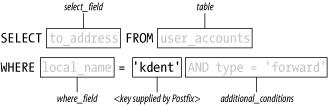
parameters presented here are required except for additional_conditions.
Figure 15-1 shows an SQL statement that Postfix creates using the parameters described.
-
hosts List of hostnames or IP addresses where a MySQL server is running. You can also indicate a Unix domain socket by preceding a path to a socket with
unix:. You should list more than one host or socket only if you have multiple redundant database servers. Each host is tried in the order listed until a successful query can be made. For example:hosts = unix:/tmp/mysql.sock, db.example.com, 192.168.150.15
-
user Account name to use when logging into the MySQL server.
-
password Password to use when logging into the MySQL server.
-
dbname The name of the database to use for the query.
-
table The name of the table to use for the query.
-
select_field The name of the column that contains the lookup value.
-
where_field The name of the column that contains the key value.
-
additional_conditions Additional comparisons for the WHERE clause of the SQL statement built by Postfix. You must understand SQL to use this attribute. Set this parameter as if you are continuing the SQL statement. For example:
additional_conditions = and mail_type = 'local'
MySQL Example
Let’s go through an example illustrating a MySQL and
Postfix configuration. The http://example.com site uses a MySQL database to
manage all of the users on its network. There is a database that
contains a variety of information about users on the network,
including names, phone numbers, etc. Among the tables in the database
is one called email_address, which
contains the pertinent information for configuring Postfix. The
database structure looks like the following:
+-----------------+-------------+------+-----+---------+-------+
| Field           | Type        | Null | Key | Default | Extra |
+-----------------+-------------+------+-----+---------+-------+
| localpart       | varchar(15) |      | PRI |         |       |
| type            | varchar(15) | YES  |     | NULL    |       |
| to_address      | varchar(65) | YES  |     | NULL    |       |
| password        | varchar(65) | YES  |     | NULL    |       |
| last_changed_by | varchar(15) | YES  |     | NULL    |       |
+-----------------+-------------+------+-----+---------+-------+
This table contains all of the email addresses that Postfix
should accept mail for with the localpart column providing the local part of
the addresses. Some of the users maintain their primary email accounts
on other systems, so their http://example.com addresses are aliases that forward
messages to their primary email addresses elsewhere. The type column indicates whether an address is
delivered locally or forwarded to another address. The value forward indicates that this address is an
alias. If an address is forwarded, the to_address column contains the address to
forward messages to.
Table 15-1 contains the access information needed to configure Postfix in this scenario. You should collect the same information about your own database before starting to configure Postfix.
Access information: | Values |
Host | mysql.example.com |
Database name: | user_accounts |
Database table: | email_address |
Database user: | kdent |
Database password: | Rumpelstiltskin |
In addition to the general database information in Table 15-1, you will have to
determine the columns you need for the particular Postfix maps you are
replacing with your MySQL table. Example 15-1 shows a sample
record from the database with the relevant columns for this
configuration. In this example, you’ll be configuring the Postfix
parameters local_recipient_maps and
alias_maps.
+------------+----------+-------------------+
| localpart  | type     | to_address        |
+------------+----------+-------------------+
| kdent      | forward  | kyle.dent@ora.com |
+------------+----------+-------------------+
Configuring local_recipient_maps
The local_recipient_maps
parameter points to lists of local users that should
receive email at this system. By default it points to the user
accounts and aliases on the system, so that mail sent to a
nonexistent user is rejected by the SMTP server. This lookup map is
a bit different from others in that it doesn’t require a return
value to map to. It matters only that the recipient is in the lookup
table or not. In this example, the MySQL database contains the list
of all email accounts that should receive mail on the system. You
can point the local_recipient_maps parameter to a MySQL
configuration that extracts the list of email users. You’ll use a
file called mysql-local.cf for
the query configuration. First, set local_recipient_maps to point to the query
configuration file, indicating that the lookup type is mysql:
local_recipient_maps = mysql:/etc/postfix/mysql-local.cf
The file mysql-local.cf
contains parameters for each of the items listed in
Table 15-1, plus the
select_field and where_field
for this specific query:
#
# mysql-local.cf - local recipients for mail server.
#
hosts = mysql.example.com
user = kdent
password = Rumpelstiltskin

dbname = user_accounts
table = email_address

select_field = localpart
where_field = localpart
The select_field and
where_field both point to the
localpart column. The select_field in this case is not
particularly important since you don’t need a value back from the
map. You don’t need the additional_conditions parameter because you want every record that appears
in the table. After reloading, Postfix uses the MySQL configuration
to determine local users and reject mail for recipients not listed
in the MySQL table.
You can easily check your MySQL configuration file with the postmap command:
$ postmap -q 'kdent' mysql:/etc/postfix/mysql-local.cf
kdent
The -q option tells
postmap to query the map using
the specified key. If your query has any problems, postmap reports them to your
terminal.
Configuring alias_maps
Some users do not receive their mail on this system, but
rather have it forwarded to another account. By pointing alias_maps to another MySQL configuration, you can obtain the
list of users that have aliases and determine what the forwarding
address is. You’ll use a file called mysql-alias.cf for this query
configuration. First, set the alias_maps parameter to point to the query
configuration file:
alias_maps = mysql:/etc/postfix/mysql-alias.cf
The mysql-alias.cf file contains the following parameters:
#
# mysql-alias.cf - forwarding aliases
#
hosts = mysql.example.com
user = kdent
password = Rumpelstiltskin

dbname = user_accounts
table = email_address

select_field = to_address
where_field = localpart

additional_conditions = and type = 'forward'
In this case, you set the select_field to to_address
since that’s the value needed by alias_maps to forward messages. You also
specified additional_conditions
because you want only the addresses that have
aliases. After reloading Postfix, it uses this MySQL configuration
to determine addresses with aliases and where messages should be
forwarded.
Configuring virtual domains
MySQL databases are often used by sites that host many virtual domains. This last MySQL example walks through configuring virtual mailbox domains. Be sure to read Chapter 8 for information about virtual hosting in general, as this section discusses only the MySQL configuration.
In this example, you’ll use a table called email_address from a database called
customer. The table contains a
record for every virtual address at all the domains the system
accepts mail for. It includes the following fields that are of
interest:
domainThe virtual domain name for this record.
mail_addressThe public email address that messages can be sent to. Messages are delivered to the local virtual mail store.
mailboxContains the filename for delivery into the local mail store. The name should be relative to the path set in
virtual_mailbox_base. You can append the name with a slash for maildir-style delivery.
Example 15-2 shows a sample record from the database with the relevant columns.
+------------+---------------+---------------+
| domain     | mail_address  | mailbox       |
+------------+---------------+---------------+
| ora.com    | kdent@ora.com | ora.com/kdent |
+------------+---------------+---------------+
In this example, all virtual deliveries occur under the same
user and group, vmail:vmail. If
you require different user and group privileges for the different
users or domains, you should have additional columns for uid and gid in your table and then create mysql maps for them as well.
You are using a static uid
and gid for deliveries and your
message store is simply a directory on the local filesystem:
virtual_mailbox_base = /usr/local/vmail
virtual_uid_maps = static:1003
virtual_gid_maps = static:1003
The list of virtual domains and mailbox maps comes from two MySQL configuration files:
virtual_mailbox_domains = mysql:/etc/postfix/virtual_domains.cf
virtual_mailbox_maps = mysql:/etc/postfix/virtual_mailboxes.cf
The virtual_mailboxes.cf configuration maps email addresses to the mail store file where messages should be delivered:
hosts = mysql.example.com
user = kdent
password = Rumpelstiltskin

dbname = customer
table = email_address
select_field = mailbox
where_field = mail_address