Table of Contents for
Postfix: The Definitive Guide
 Postfix: The Definitive Guide
Published by
O'Reilly Media, Inc., 2003
Postfix: The Definitive Guide
Published by
O'Reilly Media, Inc., 2003
- Postfix: The Definitive Guide
- Cover
- Postfix: The Definitive Guide
- Foreword
- Preface
- Audience
- Organization
- Conventions Used in This Book
- Comments and Questions
- Acknowledgments
- 1. Introduction
- 1.1. Postfix Origins and Philosophy
- 1.2. Email and the Internet
- 1.3. The Role of Postfix
- 1.4. Postfix Security
- 1.5. Additional Information and How to Obtain Postfix
- 2. Prerequisites
- 2.1. Unix Topics
- 2.2. Email Topics
- 3. Postfix Architecture
- 3.1. Postfix Components
- 3.2. How Messages Enter the Postfix System
- 3.3. The Postfix Queue
- 3.4. Mail Delivery
- 3.5. Tracing a Message Through Postfix
- 4. General Configuration and Administration
- 4.1. Starting Postfix the First Time
- 4.2. Configuration Files
- 4.3. Important Configuration Considerations
- 4.4. Administration
- 4.5. master.cf
- 4.6. Receiving Limits
- 4.7. Rewriting Addresses
- 4.8. chroot
- 4.9. Documentation
- 5. Queue Management
- 5.1. How qmgr Works
- 5.2. Queue Tools
- 6. Email and DNS
- 6.1. DNS Overview
- 6.2. Email Routing
- 6.3. Postfix and DNS
- 6.4. Common Problems
- 7. Local Delivery and POP/IMAP
- 7.1. Postfix Delivery Transports
- 7.2. Message Store Formats
- 7.3. Local Delivery
- 7.4. POP and IMAP
- 7.5. Local Mail Transfer Protocol
- 8. Hosting Multiple Domains
- 8.1. Shared Domains with System Accounts
- 8.2. Separate Domains with System Accounts
- 8.3. Separate Domains with Virtual Accounts
- 8.4. Separate Message Store
- 8.5. Delivery to Commands
- 9. Mail Relaying
- 9.1. Backup MX
- 9.2. Transport Maps
- 9.3. Inbound Mail Gateway
- 9.4. Outbound Mail Relay
- 9.5. UUCP, Fax, and Other Deliveries
- 10. Mailing Lists
- 10.1. Simple Mailing Lists
- 10.2. Mailing-List Managers
- 11. Blocking Unsolicited Bulk Email
- 11.1. The Nature of Spam
- 11.2. The Problem of Spam
- 11.3. Open Relays
- 11.4. Spam Detection
- 11.5. Anti-Spam Actions
- 11.6. Postfix Configuration
- 11.7. Client-Detection Rules
- 11.8. Strict Syntax Parameters
- 11.9. Content-Checking
- 11.10. Customized Restriction Classes
- 11.11. Postfix Anti-Spam Example
- 12. SASL Authentication
- 12.1. SASL Overview
- 12.2. Postfix and SASL
- 12.3. Configuring Postfix for SASL
- 12.4. Testing Your Authentication Configuration
- 12.5. SMTP Client Authentication
- 13. Transport Layer Security
- 13.1. Postfix and TLS
- 13.2. TLS Certificates
- 14. Content Filtering
- 14.1. Command-Based Filtering
- 14.2. Daemon-Based Filtering
- 14.3. Other Considerations
- 15. External Databases
- 15.1. MySQL
- 15.2. LDAP
- A. Configuration Parameters
- A.1. Postfix Parameter Reference
- 2bounce_notice_recipient
- access_map_reject_code
- alias_maps
- allow_mail_to_files
- allow_percent_hack
- alternate_config_directories
- append_at_myorigin
- authorized_verp_clients
- berkeley_db_read_buffer_size
- biff
- body_checks_size_limit
- bounce_service_name
- canonical_maps
- command_directory
- command_time_limit
- content_filter
- daemon_timeout
- debug_peer_list
- default_destination_concurrency_limit
- default_extra_recipient_limit
- default_process_limit
- default_recipient_limit
- default_verp_delimiters
- defer_service_name
- delay_notice_recipient
- deliver_lock_attempts
- disable_dns_lookups
- disable_mime_output_conversion
- disable_vrfy_command
- double_bounce_sender
- empty_address_recipient
- error_service_name
- export_environment
- fallback_relay
- fast_flush_domains
- fast_flush_refresh_time
- fork_attempts
- forward_expansion_filter
- hash_queue_depth
- header_address_token_limit
- header_size_limit
- home_mailbox
- ignore_mx_lookup_error
- in_flow_delay
- initial_destination_concurrency
- ipc_idle
- line_length_limit
- lmtp_connect_timeout
- lmtp_data_init_timeout
- lmtp_lhlo_timeout
- lmtp_quit_timeout
- lmtp_rset_timeout
- lmtp_tcp_port
- local_destination_concurrency_limit
- local_recipient_maps
- luser_relay
- mail_owner
- mail_spool_directory
- mailbox_command
- mailbox_delivery_lock
- mailbox_transport
- manpage_directory
- masquerade_domains
- max_idle
- maximal_backoff_time
- message_size_limit
- mime_header_checks
- minimal_backoff_time
- mydomain
- mynetworks
- myorigin
- newaliases_path
- notify_classes
- parent_domain_matches_subdomains
- pickup_service_name
- process_id_directory
- proxy_interfaces
- qmgr_clog_warn_time
- qmgr_message_active_limit
- qmgr_message_recipient_minimum
- qmqpd_error_delay
- queue_directory
- queue_run_delay
- rbl_reply_maps
- recipient_canonical_maps
- reject_code
- relay_domains_reject_code
- relay_transport
- relocated_maps
- resolve_dequoted_address
- sample_directory
- sendmail_path
- setgid_group
- showq_service_name
- smtp_bind_address
- smtp_data_done_timeout
- smtp_data_xfer_timeout
- smtp_destination_recipient_limit
- smtp_helo_timeout
- smtp_mail_timeout
- smtp_pix_workaround_delay_time
- smtp_quit_timeout
- smtp_rcpt_timeout
- smtp_skip_5xx_greeting
- smtpd_banner
- smtpd_data_restrictions
- smtpd_error_sleep_time
- smtpd_expansion_filter
- smtpd_helo_required
- smtpd_history_flush_threshold
- smtpd_noop_commands
- smtpd_recipient_limit
- smtpd_restriction_classes
- smtpd_soft_error_limit
- soft_bounce
- strict_7bit_headers
- strict_8bitmime_body
- strict_rfc821_envelopes
- swap_bangpath
- syslog_name
- transport_retry_time
- undisclosed_recipients_header
- unknown_client_reject_code
- unknown_local_recipient_reject_code
- unknown_virtual_alias_reject_code
- verp_delimiter_filter
- virtual_alias_maps
- virtual_mailbox_base
- virtual_mailbox_limit
- virtual_mailbox_maps
- virtual_transport
- B. Postfix Commands
- C. Compiling and Installing Postfix
- C.1. Obtaining Postfix
- C.2. Postfix Compiling Primer
- C.3. Building Postfix
- C.4. Installation
- C.5. Compiling Add-on Packages
- C.6. Common Problems
- C.7. Wrapping Things Up
- D. Frequently Asked Questions
- Index
- About the Author
- Colophon
- Copyright
Local Mail Transfer Protocol
Some POP/IMAP servers use nonstandard message stores. Since it would be unreasonable to expect MTAs such as Postfix to understand many different proprietary formats, the Local Mail Transfer Protocol (LMTP) provides a way to pass email messages from one local mail service to another without depending on a common message store. LMTP is based on, and is a simplified version of, SMTP. With LMTP, the server can either accept an email message immediately or it cannot accept it at all. There is no attempt by the LMTP server to queue or redeliver a message that cannot be delivered immediately.
When an MTA makes a delivery to an SMTP server, where the message is destined for multiple recipients, and one or more recipients cannot accept the message for some reason, the SMTP server takes the responsibility of queuing the message to deliver it later, and reports an overall successful delivery to the MTA. LMTP servers do not queue messages, so they must return an individual status reply for every recipient of a particular email message. For those recipients that could not be delivered, the MTA, and not the LMTP server, takes the responsibility of queuing the message and attempting redelivery.
LMTP conversations can occur between mail subsystems on the same machine or on different machines on a local area network. It is not recommended for wide area networks, since the protocol depends on a quick response to indicate whether the message was delivered. With SMTP there is a recognized synchronization problem between sending and receiving mail systems that sometimes causes duplicate messages to be delivered. It is believed that LMTP over wide area networks would make the problem worse.
Tip
Apart from delivery to nonstandard message stores, a real benefit of the LMTP protocol is that it allows for a highly scalable and reliable mail system. One or more Postfix servers can receive mail from the public Internet and make deliveries to multiple LMTP backend systems. As the load increases, it is a simple matter to add more boxes to the front- or backend systems.
The most common implementation of LMTP delivery is the Cyrus IMAP server from Carnegie Mellon University. It is available from the Project Cyrus web page at http://asg.web.cmu.edu/cyrus/. Cyrus IMAP uses its own message store, as shown in Figure 7-2. This section looks at how Postfix can use the LMTP protocol to hand off messages to Cyrus IMAP. For more information about configuring Cyrus IMAP, see Managing IMAP by Dianna Mullet and Kevin Mullet (O’Reilly).
Postfix and Cyrus IMAP
Cyrus IMAP is intended to run on servers that provide POP/IMAP access only, where users do not need a shell account. If you are creating a mail server for existing users on a system, you will probably want to use another simpler POP/IMAP solution, such as Qualcomm’s Qpopper (POP access only) or the University of Washington’s IMAP Toolkit, which doesn’t require any special configuration to work with Postfix. This section deals with configuration issues for getting Postfix to work together with Cyrus IMAP.
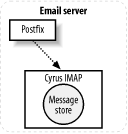
Cyrus IMAP can listen for LMTP deliveries using either Unix-domain sockets or TCP sockets. You must know which method you are using so that you can configure Postfix appropriately. If you want to use Unix-domain sockets, both Postfix and the Cyrus IMAP server must be on the same machine. If you use TCP sockets, the Cyrus IMAP server could be on the same system or any other system on your network. LMTP delivery is configured in your main.cf file or in a transport map.
For Postfix to accept messages to be delivered locally to Cyrus
IMAP, the destination domain name of the email address must be listed
in the mydestination parameter.
(You may also want to configure Cyrus deliveries via the virtual transport. See Chapter 8.) Then you must configure
Postfix to pass messages to Cyrus IMAP. Use the mailbox_transport, local_transport, or fallback_transport parameter to tell Postfix
how much local processing to do before handing off messages to Cyrus.
If you are using local_transport or
fallback_transport, make sure that
Postfix knows about all of the Cyrus users, by including the usernames
in a lookup table listed with the local_recipient_maps parameter.
-
mailbox_transport The mail message is given to the local delivery agent first. The local delivery agent checks for and expands any aliases or entries in .forward files. After expansion of the original address, the message is delegated to the Postfix LMTP client, which delivers it to the LMTP server.
-
local_transport When you specify that the local transport should be LMTP, Postfix transfers the message directly to the Postfix LMTP client. The normal local delivery agent does not process the message at all, so there is no expansion of aliases or .forward files.
-
fallback_transport When the fallback transport is LMTP, Postfix gives the message to its local delivery agent first. The normal aliases and .forward files are expanded, and if the recipient has a normal account on the system, delivery is made to the appropriate mail store on the system. If no such account exists, delivery is delegated to the Postfix LMTP client for delivery to the LMTP server. If you have actual accounts on the system that should receive email messages in the conventional message store, and the rest of your email users do not have system accounts but do receive mail through the Cyrus IMAP server, you should configure the
fallback_transportto use LMTP delivery.
Specify your chosen transport type using the following format:
xxx_transport =service:socket_type[:/path/to/socket]
For LMTP delivery, service
must be lmtp, which refers to the
lmtp service in the /etc/postfix/master.cf file. The socket_type is either unix or
inet for Unix domain, or TCP sockets, respectively. The
default is inet, which means that
if your LMTP server uses an inet
socket, you can simply specify the service as:
local_transport = lmtp
A typical LMTP transport configuration in /etc/postfix/main.cf using local_transport and a Unix domain socket looks like the
following:
local_transport = lmtp:unix:/var/imap/socket/lmtp
A Postfix and Cyrus IMAP Example
To build Cyrus IMAP, you need the Cyrus SASL library, which is used to authenticate users for the IMAP server.[1] You must first build and install the Cyrus SASL library, and then you can build the Cyrus IMAP server. The Cyrus software requires at least Version 3 of Berkeley DB. If you were using a version of Berkeley DB prior to Version 3, you may need to update your entire system. Having different versions of Berkeley DB intermixed on your system will likely lead to problems that can be difficult to track down. If you have to upgrade your libraries, consider rebuilding other packages that use Berkeley DB (such as Perl and Postfix), so that everything on your system uses the same version of the library.
Follow the instructions in the Cyrus SASL and IMAP distributions to compile and install them correctly on your system. There might be binary distributions available for your platform. Check your normal software sources to see if you can save yourself the trouble of building the Cyrus software.
For this example, assume that you have a Postfix server
receiving mail for the domain example.com. All of
the email accounts are set up within the Cyrus IMAP server running on
the same system, so there are very few actual login accounts on the
system. However, you want mail destined for the root account or postmaster alias to be sent
to the correct person, which means that you need to expand local
aliases before handing off messages to the Cyrus IMAP server. To
achieve this, set the mailbox_transport parameter to point to the
lmtp delivery agent, which will be
configured to deliver mail to the Cyrus IMAP server:
Complete the installation and configuration of Cyrus IMAP on your system. Check the Cyrus configuration file (normally /etc/cyrus.conf) to make sure that it is configured to use Unix-domain sockets, and note the location of the socket file. You should see an entry that resembles the following:
SERVICES {
  # add or remove based on preferences
  imap          cmd="imapd" listen="imap" prefork=0
  pop3          cmd="pop3d" listen="pop3" prefork=0
  # LMTP is required for delivery
  lmtpunix      cmd="lmtpd" listen="/var/imap/socket/lmtp" prefork=0
}
The
lmtpunixentry shows the correct path to the socket file.Follow the documentation that came with your package to add users to your Cyrus IMAP server.
Check the /etc/postfix/master.cf to make sure that the
lmtpservice is set up correctly. The line should look like the following:lmtp unix - - n - - lmtp
If you have a default Postfix installation, the
lmtpline will already be in the file, as shown in the example. The fifth column indicates whether the LMTP delivery agent should run within a chrooted environment. In this example, the Postfix LMTP delivery agent must read the socket file created by the Cyrus IMAP server, so leave this column with the valuen.[2]Check the main.cf file to make sure that the domain you are receiving mail for is listed in the
mydestinationparameter. It might be listed explicitly:mydestination = $myhostname, localhost.$mydomain, $mydomain, example.com
or it might come from the
$mydomainvariable:mydomain = example.com mydestination = $myhostname, localhost.$mydomain, $mydomain
Specify that the
mailbox_transportparameter should use thelmtpservice from the master.cf file, and point to the Cyrus IMAP socket file whose path you determined from the Cyrus configuration file (see item 1):mailbox_transport = lmtp:unix:/var/imap/socket/lmtp
#
postfix reload
[1] It is the same library that is used to add authentication support for Postfix. See Chapter 12 for more information on adding SMTP authentication support to Postfix.
[2] It is possible to set up your system in such a way that allows the LMTP delivery agent to read the socket file even from within the Postfix chroot environment, but it is probably not necessary.