Table of Contents for
Postfix: The Definitive Guide
 Postfix: The Definitive Guide
Published by
O'Reilly Media, Inc., 2003
Postfix: The Definitive Guide
Published by
O'Reilly Media, Inc., 2003
- Postfix: The Definitive Guide
- Cover
- Postfix: The Definitive Guide
- Foreword
- Preface
- Audience
- Organization
- Conventions Used in This Book
- Comments and Questions
- Acknowledgments
- 1. Introduction
- 1.1. Postfix Origins and Philosophy
- 1.2. Email and the Internet
- 1.3. The Role of Postfix
- 1.4. Postfix Security
- 1.5. Additional Information and How to Obtain Postfix
- 2. Prerequisites
- 2.1. Unix Topics
- 2.2. Email Topics
- 3. Postfix Architecture
- 3.1. Postfix Components
- 3.2. How Messages Enter the Postfix System
- 3.3. The Postfix Queue
- 3.4. Mail Delivery
- 3.5. Tracing a Message Through Postfix
- 4. General Configuration and Administration
- 4.1. Starting Postfix the First Time
- 4.2. Configuration Files
- 4.3. Important Configuration Considerations
- 4.4. Administration
- 4.5. master.cf
- 4.6. Receiving Limits
- 4.7. Rewriting Addresses
- 4.8. chroot
- 4.9. Documentation
- 5. Queue Management
- 5.1. How qmgr Works
- 5.2. Queue Tools
- 6. Email and DNS
- 6.1. DNS Overview
- 6.2. Email Routing
- 6.3. Postfix and DNS
- 6.4. Common Problems
- 7. Local Delivery and POP/IMAP
- 7.1. Postfix Delivery Transports
- 7.2. Message Store Formats
- 7.3. Local Delivery
- 7.4. POP and IMAP
- 7.5. Local Mail Transfer Protocol
- 8. Hosting Multiple Domains
- 8.1. Shared Domains with System Accounts
- 8.2. Separate Domains with System Accounts
- 8.3. Separate Domains with Virtual Accounts
- 8.4. Separate Message Store
- 8.5. Delivery to Commands
- 9. Mail Relaying
- 9.1. Backup MX
- 9.2. Transport Maps
- 9.3. Inbound Mail Gateway
- 9.4. Outbound Mail Relay
- 9.5. UUCP, Fax, and Other Deliveries
- 10. Mailing Lists
- 10.1. Simple Mailing Lists
- 10.2. Mailing-List Managers
- 11. Blocking Unsolicited Bulk Email
- 11.1. The Nature of Spam
- 11.2. The Problem of Spam
- 11.3. Open Relays
- 11.4. Spam Detection
- 11.5. Anti-Spam Actions
- 11.6. Postfix Configuration
- 11.7. Client-Detection Rules
- 11.8. Strict Syntax Parameters
- 11.9. Content-Checking
- 11.10. Customized Restriction Classes
- 11.11. Postfix Anti-Spam Example
- 12. SASL Authentication
- 12.1. SASL Overview
- 12.2. Postfix and SASL
- 12.3. Configuring Postfix for SASL
- 12.4. Testing Your Authentication Configuration
- 12.5. SMTP Client Authentication
- 13. Transport Layer Security
- 13.1. Postfix and TLS
- 13.2. TLS Certificates
- 14. Content Filtering
- 14.1. Command-Based Filtering
- 14.2. Daemon-Based Filtering
- 14.3. Other Considerations
- 15. External Databases
- 15.1. MySQL
- 15.2. LDAP
- A. Configuration Parameters
- A.1. Postfix Parameter Reference
- 2bounce_notice_recipient
- access_map_reject_code
- alias_maps
- allow_mail_to_files
- allow_percent_hack
- alternate_config_directories
- append_at_myorigin
- authorized_verp_clients
- berkeley_db_read_buffer_size
- biff
- body_checks_size_limit
- bounce_service_name
- canonical_maps
- command_directory
- command_time_limit
- content_filter
- daemon_timeout
- debug_peer_list
- default_destination_concurrency_limit
- default_extra_recipient_limit
- default_process_limit
- default_recipient_limit
- default_verp_delimiters
- defer_service_name
- delay_notice_recipient
- deliver_lock_attempts
- disable_dns_lookups
- disable_mime_output_conversion
- disable_vrfy_command
- double_bounce_sender
- empty_address_recipient
- error_service_name
- export_environment
- fallback_relay
- fast_flush_domains
- fast_flush_refresh_time
- fork_attempts
- forward_expansion_filter
- hash_queue_depth
- header_address_token_limit
- header_size_limit
- home_mailbox
- ignore_mx_lookup_error
- in_flow_delay
- initial_destination_concurrency
- ipc_idle
- line_length_limit
- lmtp_connect_timeout
- lmtp_data_init_timeout
- lmtp_lhlo_timeout
- lmtp_quit_timeout
- lmtp_rset_timeout
- lmtp_tcp_port
- local_destination_concurrency_limit
- local_recipient_maps
- luser_relay
- mail_owner
- mail_spool_directory
- mailbox_command
- mailbox_delivery_lock
- mailbox_transport
- manpage_directory
- masquerade_domains
- max_idle
- maximal_backoff_time
- message_size_limit
- mime_header_checks
- minimal_backoff_time
- mydomain
- mynetworks
- myorigin
- newaliases_path
- notify_classes
- parent_domain_matches_subdomains
- pickup_service_name
- process_id_directory
- proxy_interfaces
- qmgr_clog_warn_time
- qmgr_message_active_limit
- qmgr_message_recipient_minimum
- qmqpd_error_delay
- queue_directory
- queue_run_delay
- rbl_reply_maps
- recipient_canonical_maps
- reject_code
- relay_domains_reject_code
- relay_transport
- relocated_maps
- resolve_dequoted_address
- sample_directory
- sendmail_path
- setgid_group
- showq_service_name
- smtp_bind_address
- smtp_data_done_timeout
- smtp_data_xfer_timeout
- smtp_destination_recipient_limit
- smtp_helo_timeout
- smtp_mail_timeout
- smtp_pix_workaround_delay_time
- smtp_quit_timeout
- smtp_rcpt_timeout
- smtp_skip_5xx_greeting
- smtpd_banner
- smtpd_data_restrictions
- smtpd_error_sleep_time
- smtpd_expansion_filter
- smtpd_helo_required
- smtpd_history_flush_threshold
- smtpd_noop_commands
- smtpd_recipient_limit
- smtpd_restriction_classes
- smtpd_soft_error_limit
- soft_bounce
- strict_7bit_headers
- strict_8bitmime_body
- strict_rfc821_envelopes
- swap_bangpath
- syslog_name
- transport_retry_time
- undisclosed_recipients_header
- unknown_client_reject_code
- unknown_local_recipient_reject_code
- unknown_virtual_alias_reject_code
- verp_delimiter_filter
- virtual_alias_maps
- virtual_mailbox_base
- virtual_mailbox_limit
- virtual_mailbox_maps
- virtual_transport
- B. Postfix Commands
- C. Compiling and Installing Postfix
- C.1. Obtaining Postfix
- C.2. Postfix Compiling Primer
- C.3. Building Postfix
- C.4. Installation
- C.5. Compiling Add-on Packages
- C.6. Common Problems
- C.7. Wrapping Things Up
- D. Frequently Asked Questions
- Index
- About the Author
- Colophon
- Copyright
Backup MX
In DNS, MX records refer to mail exchangers (see Chapter 6). MX records contain both host and priority (or preference) information for sending mail to a domain. A backup MX server is one that receives mail for a particular domain, but is not the preferred server to receive the mail. If the preferred server or servers are down, the backup MX server receives the mail and queues it until one of the more preferred servers comes back online. Figure 9-1 illustrates delivery to a backup host when the primary host is not available. The backup queues messages until the primary is back online, whereupon the backup can deliver messages to it.
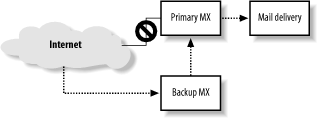
When your system is configured in DNS as a backup MX host, you
don’t have to configure any special transport from your system to the
primary system. Postfix uses the DNS records to determine how to route
mail to the primary MX host. The only configuration required in Postfix
is to indicate that it should receive mail for the domain by adding the
domain name to the relay_domains
parameter. When a sending MTA discovers that the primary
mail system for a domain is down, it tries the next preferred one until
it finds one that accepts delivery. If your system is a backup MX host,
and the destination domain is listed in your relay_domains parameter, Postfix accepts the
mail and queues it. Postfix periodically scans its queue and checks for
a more preferred system to see if any are able to accept the message.
Once a higher priority mail exchanger is back online, Postfix can
deliver the message to it.
Postfix continues trying to deliver queued messages for the amount
of time specified in the maximal_queue_lifetime parameter, which determines how long deferred messages
stay in the queue before they are bounced back to the sender. The
default value is five days. If you provide secondary mail service for
primary servers that you know will be down longer than the default, you
can extend the time.
Relay Recipients
It is highly recommended that you maintain a list of valid recipients for domains you provide backup MX services to. You should develop a regular process for obtaining an updated user list from your primary MX servers. If your system does not know all of the available mailboxes on the primary mail server, it must accept all messages. It’s only when your backup MX server tries to deliver them to the primary server that it discovers that a message cannot be delivered. At that point, your server must bounce the message back to the original sender.
Since spammers often send messages to made-up addresses, if your
server does not know all the valid email addresses on the primary
server, your server will unnecessarily accept a lot of mail that must
be bounced. The bounce problem is exacerbated by the spammer tactic of
forging sender addresses by using the real email addresses of innocent
bystanders. The forged addresses receive all of the error notices for
messages they never sent (see Chapter
11). The relay_recipient_maps parameter specifies lookup tables that should contain
all of the addresses for domains listed in your relay_domains parameter:
relay_recipient_maps = hash:/etc/postfix/relay_recipients
The relay_recipients file should contain entries with the recipient address on the lefthand side. The righthand side is not used by Postfix, but you must specify a value:
#
# relay_recipients
#
user1@example.com         any_value
user2@example.com         any_value
user3@example.com         any_value
If your system is on the same network as the primary, and the user accounts are stored in some kind of database, you may be able to perform real-time lookups using MySQL or LDAP (see Chapter 15).
A potential problem is that once you set relay_recipient_maps, you must include email
addresses for all domains you provide backup service to. If not,
Postfix will reject messages that don’t appear in the lookup table. If
you don’t know the valid addresses for some domains, you can specify a
wildcard entry for that domain:
#
# relay_recipients
#
user1@example.com       any_value
user2@example.com       any_value
user3@example.com       any_value
@oreillynet.com         any_value
The final entry is a wildcard entry that allows messages for any address at the domain. Obviously, it’s better to obtain the list of valid addresses for the reasons mentioned earlier.
Fast Flushing
Networks that receive mail for many sites, such as ISP networks, typically have some customers whose systems aren’t always connected to the network. When the customer network is offline, the ISP queues its messages. When the site comes online, it can request immediate delivery of all its queued mail with the ETRN SMTP command:
220 mail.ora.com ESMTP PostfixEHLO mail.example.com250-auger.seaglass.com 250-PIPELINING 250-SIZE 10240000 250-VRFY 250-ETRN 250-STARTTLS 250 8BITMIMEETRN example.com250 Queuing started
If there are a lot of messages queued when a domain is ready to accept mail, searching every queue file would be time-consuming. Postfix provides a capability called fast flush to speed up queue processing for a particular domain. Fast flush is handled by the flush daemon, which maintains lists of messages that are queued for specific domains so that Postfix knows which messages to deliver when it receives an ETRN command.
By default, all of the sites listed in relay_domains are eligible for the fast
flush service. You can include domains in addition to your relay
domains by adding them to the fast_flush_domains parameter. Add a domain name as follows:
fast_flush_domains = $relay_domains, example.com
In this case http://example.com is a domain not already listed in
relay_domains.
You can manually notify Postfix that a fast flush domain is ready to accept messages by issuing the postqueue -s command (or its equivalent, sendmail -qR) with the site name:
$ postqueue -s example.com