Table of Contents for
Postfix: The Definitive Guide
 Postfix: The Definitive Guide
Published by
O'Reilly Media, Inc., 2003
Postfix: The Definitive Guide
Published by
O'Reilly Media, Inc., 2003
- Postfix: The Definitive Guide
- Cover
- Postfix: The Definitive Guide
- Foreword
- Preface
- Audience
- Organization
- Conventions Used in This Book
- Comments and Questions
- Acknowledgments
- 1. Introduction
- 1.1. Postfix Origins and Philosophy
- 1.2. Email and the Internet
- 1.3. The Role of Postfix
- 1.4. Postfix Security
- 1.5. Additional Information and How to Obtain Postfix
- 2. Prerequisites
- 2.1. Unix Topics
- 2.2. Email Topics
- 3. Postfix Architecture
- 3.1. Postfix Components
- 3.2. How Messages Enter the Postfix System
- 3.3. The Postfix Queue
- 3.4. Mail Delivery
- 3.5. Tracing a Message Through Postfix
- 4. General Configuration and Administration
- 4.1. Starting Postfix the First Time
- 4.2. Configuration Files
- 4.3. Important Configuration Considerations
- 4.4. Administration
- 4.5. master.cf
- 4.6. Receiving Limits
- 4.7. Rewriting Addresses
- 4.8. chroot
- 4.9. Documentation
- 5. Queue Management
- 5.1. How qmgr Works
- 5.2. Queue Tools
- 6. Email and DNS
- 6.1. DNS Overview
- 6.2. Email Routing
- 6.3. Postfix and DNS
- 6.4. Common Problems
- 7. Local Delivery and POP/IMAP
- 7.1. Postfix Delivery Transports
- 7.2. Message Store Formats
- 7.3. Local Delivery
- 7.4. POP and IMAP
- 7.5. Local Mail Transfer Protocol
- 8. Hosting Multiple Domains
- 8.1. Shared Domains with System Accounts
- 8.2. Separate Domains with System Accounts
- 8.3. Separate Domains with Virtual Accounts
- 8.4. Separate Message Store
- 8.5. Delivery to Commands
- 9. Mail Relaying
- 9.1. Backup MX
- 9.2. Transport Maps
- 9.3. Inbound Mail Gateway
- 9.4. Outbound Mail Relay
- 9.5. UUCP, Fax, and Other Deliveries
- 10. Mailing Lists
- 10.1. Simple Mailing Lists
- 10.2. Mailing-List Managers
- 11. Blocking Unsolicited Bulk Email
- 11.1. The Nature of Spam
- 11.2. The Problem of Spam
- 11.3. Open Relays
- 11.4. Spam Detection
- 11.5. Anti-Spam Actions
- 11.6. Postfix Configuration
- 11.7. Client-Detection Rules
- 11.8. Strict Syntax Parameters
- 11.9. Content-Checking
- 11.10. Customized Restriction Classes
- 11.11. Postfix Anti-Spam Example
- 12. SASL Authentication
- 12.1. SASL Overview
- 12.2. Postfix and SASL
- 12.3. Configuring Postfix for SASL
- 12.4. Testing Your Authentication Configuration
- 12.5. SMTP Client Authentication
- 13. Transport Layer Security
- 13.1. Postfix and TLS
- 13.2. TLS Certificates
- 14. Content Filtering
- 14.1. Command-Based Filtering
- 14.2. Daemon-Based Filtering
- 14.3. Other Considerations
- 15. External Databases
- 15.1. MySQL
- 15.2. LDAP
- A. Configuration Parameters
- A.1. Postfix Parameter Reference
- 2bounce_notice_recipient
- access_map_reject_code
- alias_maps
- allow_mail_to_files
- allow_percent_hack
- alternate_config_directories
- append_at_myorigin
- authorized_verp_clients
- berkeley_db_read_buffer_size
- biff
- body_checks_size_limit
- bounce_service_name
- canonical_maps
- command_directory
- command_time_limit
- content_filter
- daemon_timeout
- debug_peer_list
- default_destination_concurrency_limit
- default_extra_recipient_limit
- default_process_limit
- default_recipient_limit
- default_verp_delimiters
- defer_service_name
- delay_notice_recipient
- deliver_lock_attempts
- disable_dns_lookups
- disable_mime_output_conversion
- disable_vrfy_command
- double_bounce_sender
- empty_address_recipient
- error_service_name
- export_environment
- fallback_relay
- fast_flush_domains
- fast_flush_refresh_time
- fork_attempts
- forward_expansion_filter
- hash_queue_depth
- header_address_token_limit
- header_size_limit
- home_mailbox
- ignore_mx_lookup_error
- in_flow_delay
- initial_destination_concurrency
- ipc_idle
- line_length_limit
- lmtp_connect_timeout
- lmtp_data_init_timeout
- lmtp_lhlo_timeout
- lmtp_quit_timeout
- lmtp_rset_timeout
- lmtp_tcp_port
- local_destination_concurrency_limit
- local_recipient_maps
- luser_relay
- mail_owner
- mail_spool_directory
- mailbox_command
- mailbox_delivery_lock
- mailbox_transport
- manpage_directory
- masquerade_domains
- max_idle
- maximal_backoff_time
- message_size_limit
- mime_header_checks
- minimal_backoff_time
- mydomain
- mynetworks
- myorigin
- newaliases_path
- notify_classes
- parent_domain_matches_subdomains
- pickup_service_name
- process_id_directory
- proxy_interfaces
- qmgr_clog_warn_time
- qmgr_message_active_limit
- qmgr_message_recipient_minimum
- qmqpd_error_delay
- queue_directory
- queue_run_delay
- rbl_reply_maps
- recipient_canonical_maps
- reject_code
- relay_domains_reject_code
- relay_transport
- relocated_maps
- resolve_dequoted_address
- sample_directory
- sendmail_path
- setgid_group
- showq_service_name
- smtp_bind_address
- smtp_data_done_timeout
- smtp_data_xfer_timeout
- smtp_destination_recipient_limit
- smtp_helo_timeout
- smtp_mail_timeout
- smtp_pix_workaround_delay_time
- smtp_quit_timeout
- smtp_rcpt_timeout
- smtp_skip_5xx_greeting
- smtpd_banner
- smtpd_data_restrictions
- smtpd_error_sleep_time
- smtpd_expansion_filter
- smtpd_helo_required
- smtpd_history_flush_threshold
- smtpd_noop_commands
- smtpd_recipient_limit
- smtpd_restriction_classes
- smtpd_soft_error_limit
- soft_bounce
- strict_7bit_headers
- strict_8bitmime_body
- strict_rfc821_envelopes
- swap_bangpath
- syslog_name
- transport_retry_time
- undisclosed_recipients_header
- unknown_client_reject_code
- unknown_local_recipient_reject_code
- unknown_virtual_alias_reject_code
- verp_delimiter_filter
- virtual_alias_maps
- virtual_mailbox_base
- virtual_mailbox_limit
- virtual_mailbox_maps
- virtual_transport
- B. Postfix Commands
- C. Compiling and Installing Postfix
- C.1. Obtaining Postfix
- C.2. Postfix Compiling Primer
- C.3. Building Postfix
- C.4. Installation
- C.5. Compiling Add-on Packages
- C.6. Common Problems
- C.7. Wrapping Things Up
- D. Frequently Asked Questions
- Index
- About the Author
- Colophon
- Copyright
Queue Tools
Postfix provides command-line tools for displaying and managing the messages in your queue. The primary commands are postsuper and postqueue. You can perform the following tasks on messages in the queue:
Listing messages
Deleting messages
Holding messages
Requeuing messages
Displaying messages
Flushing messages
Each of the tasks, and the commands to accomplish them, are explained in the sections that follow.
Listing the Queue
The queue display contains an entry for each message that shows the message ID, size, arrival time, sender, and recipient addresses. Deferred messages also include the reason they could not be delivered. Messages in the active queue are marked with an asterisk after the Queue ID. Messages in the hold queue are marked with an exclamation point. Deferred messages have no mark.
You can list all the messages in your queue with the postqueue -p command. Postfix also provides the mailq command for compatibility with Sendmail. The Postfix replacement for mailq produces the same output as postqueue -p.
A typical queue entry looks like the following:
$ postqueue -p
-Queue ID- --Size-- ----Arrival Time---- -Sender/Recipient-------
DBA3F1A9        553 Mon May  5 14:42:15  kdent@example.com
        (connect to mail.ora.com[192.168.155.63]: Connection refused)
                                         kdent@ora.com
Since this entry is not marked with either an asterisk or an exclamation point, it is in the deferred queue.
Deleting Messages
The postsuper command
allows you to remove messages from the queue. To remove the message in
the sample entry displayed above, execute postsuper with the -d
option:
# postsuper -d DBA3F1A9
postsuper: DBA3F1A9: removed
postsuper: Deleted: 1 message
If you have a lot of messages to remove, you can clear out your
entire queue with the ALL
argument:
# postsuper -d ALL
postsuper: Deleted: 23 messages
The ALL argument must be
capitalized. Be very careful when using the command, since it will
delete all queued messages without asking any questions.
Rather than deleting all of the queued messages or just one at a time, frequently you want to delete messages with a specific email address. Example 5-1 is a Perl script that provides a convenient way to specify an email address to delete particular messages from the queue.
#!/usr/bin/perl -w
#
# pfdel - deletes message containing specified address from
# Postfix queue. Matches either sender or recipient address.
#
# Usage: pfdel <email_address>
#

use strict;

# Change these paths if necessary.
my $LISTQ = "/usr/sbin/postqueue -p";
my $POSTSUPER = "/usr/sbin/postsuper";

my $email_addr = "";
my $qid = "";
my $euid = $>;

if ( @ARGV !=  1 ) {
        die "Usage: pfdel <email_address>\n";
} else {
        $email_addr = $ARGV[0];
}

if ( $euid != 0 ) {
        die "You must be root to delete queue files.\n";
}


open(QUEUE, "$LISTQ |") ||
  die "Can't get pipe to $LISTQ: $!\n";

my $entry = <QUEUE>;    # skip single header line
$/ = "";                # Rest of queue entries print on
                        # multiple lines.
while ( $entry = <QUEUE> ) {
        if ( $entry =~ / $email_addr$/m ) {
                ($qid) = split(/\s+/, $entry, 2);
                $qid =~ s/[\*\!]//;
                next unless ($qid);

                #
                # Execute postsuper -d with the queue id.
                # postsuper provides feedback when it deletes
                # messages. Let its output go through.
                #
                if ( system($POSTSUPER, "-d", $qid) != 0 ) {
                        # If postsuper has a problem, bail.
                        die "Error executing $POSTSUPER: error " .
                           "code " .  ($?/256) . "\n";
                }
        }
}
close(QUEUE);

if (! $qid ) {
        die "No messages with the address <$email_addr> " .
          "found in queue.\n";
}

exit 0;
Holding Messages
The hold queue is available for messages you would like
to keep in your queue indefinitely. Figure 5-2 shows the hold queue and how you can move messages into the hold
queue where they will not be delivered until you specifically remove
them or move them back for normal queue processing. To place the
example message into the hold queue, use the postsuper command with the -h
option:
# postsuper -h DBA3F1A9The queue entry now contains an exclamation point to show that the message is on hold:
-Queue ID- --Size-- ----Arrival Time---- -Sender/Recipient-------
DBA3F1A9  !     553 Mon May  5 14:42:15  kdent@example.com
        (connect to mail.ora.com[192.168.155.63]: Connection refused)
                                         kdent@ora.com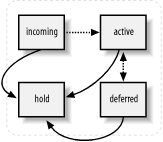
To move the message back into the normal queue for
regular processing, execute the command with a capital -H option instead:
# postsuper -H DBA3F1A9After the message is moved back, the queue manager marks it for redelivery according to its normal scheduling, or you can flush the message to have it sent out immediately (see Section 5.2.6).
Requeuing Messages
If you have messages that were deferred because of a
configuration problem that has been corrected, you may have to requeue
the messages to have them delivered successfully. If the
misconfiguration caused Postfix to store incorrect information about
the next hop or transport method, or to rewrite the address
incorrectly, requeuing causes Postfix to update the incorrect
information based on your new configuration. The postsuper command uses the -r
option to requeue messages. You can specify a queue ID for a single
message, or the word ALL in capital
letters to requeue everything:
# postsuper -r ALLRequeued messages get a new queue ID and an additional Received: header.
Displaying Messages
The postcat command displays the contents of a queue file:
# postcat -q DBA3F1A9Earlier versions of postcat
did not support the -q option but
required the full path to the queue file. Since a message can be in
any of the queue compartments (maildrop, incoming, active, deferred,
hold), and each of these has multiple subdirectories, the path to a
particular queue file is not immediately apparent. If you are using an
earlier version of postcat, which
doesn’t support the -q option, you
can create a shell script like the one in Example 5-2 as a convenient way to
view a queue file by specifying only the queue ID. The script accepts one queue ID as an
argument, checks all of the queue directories to locate the queue
file, and executes postcat with the
full path as its argument. The contents are then displayed. This
simple script displays only one queue file at a time.
#!/bin/sh

PATH=/usr/bin:/usr/sbin
QS="deferred active incoming maildrop hold"
QPATH=`postconf -h queue_directory`

if [ $# -ne 1 ]; then
        echo "Usage: pfcat <queue id>"
        exit 1
fi

if [ `whoami` != "root" ]; then
        echo "You must be root to view queue files."
        exit 1
fi

if [ ! -d $QPATH ]; then
        echo "Cannot locate queue directory $QPATH."
        exit 1
fi

for q in $QS
do
        FILE=`find $QPATH/$q -type f -name $1`
        if [ -n "$FILE" ]; then
                postcat $FILE
                exit 0
        fi
done

if [ -z $FILE ]; then
        echo "No such queue file $1"
        exit 1
fi
Flushing Messages
Flushing the queue causes Postfix to attempt to deliver messages in the queue immediately. You can flush queue messages with the postqueue -f command. However, unless you have a reason to expect successful deliveries, it’s best to leave redelivery attempts to the Postfix queue manager. Repeated attempts to flush the queue can have a severe performance impact on your mail server.
You can flush messages destined for a particular site with the
-s option. The site must be eligible for fast
flush in order for this to work. To be eligible, the site
must be listed in the fast_flush_domains parameter. By default, fast_flush_domains includes all of the hosts
listed in relay_domains , but you can add additional sites if you want to flush
them before the normally scheduled redelivery attempt.
fast_flush_domains = $relay_domains example.com
If you know that a previously unavailable, eligible site is
ready to accept mail, execute postqueue with the -s option and name the site:
# postqueue -s example.comSee Chapter 9 for more information about fast flush and the SMTP command ETRN.