Table of Contents for
Postfix: The Definitive Guide
 Postfix: The Definitive Guide
Published by
O'Reilly Media, Inc., 2003
Postfix: The Definitive Guide
Published by
O'Reilly Media, Inc., 2003
- Postfix: The Definitive Guide
- Cover
- Postfix: The Definitive Guide
- Foreword
- Preface
- Audience
- Organization
- Conventions Used in This Book
- Comments and Questions
- Acknowledgments
- 1. Introduction
- 1.1. Postfix Origins and Philosophy
- 1.2. Email and the Internet
- 1.3. The Role of Postfix
- 1.4. Postfix Security
- 1.5. Additional Information and How to Obtain Postfix
- 2. Prerequisites
- 2.1. Unix Topics
- 2.2. Email Topics
- 3. Postfix Architecture
- 3.1. Postfix Components
- 3.2. How Messages Enter the Postfix System
- 3.3. The Postfix Queue
- 3.4. Mail Delivery
- 3.5. Tracing a Message Through Postfix
- 4. General Configuration and Administration
- 4.1. Starting Postfix the First Time
- 4.2. Configuration Files
- 4.3. Important Configuration Considerations
- 4.4. Administration
- 4.5. master.cf
- 4.6. Receiving Limits
- 4.7. Rewriting Addresses
- 4.8. chroot
- 4.9. Documentation
- 5. Queue Management
- 5.1. How qmgr Works
- 5.2. Queue Tools
- 6. Email and DNS
- 6.1. DNS Overview
- 6.2. Email Routing
- 6.3. Postfix and DNS
- 6.4. Common Problems
- 7. Local Delivery and POP/IMAP
- 7.1. Postfix Delivery Transports
- 7.2. Message Store Formats
- 7.3. Local Delivery
- 7.4. POP and IMAP
- 7.5. Local Mail Transfer Protocol
- 8. Hosting Multiple Domains
- 8.1. Shared Domains with System Accounts
- 8.2. Separate Domains with System Accounts
- 8.3. Separate Domains with Virtual Accounts
- 8.4. Separate Message Store
- 8.5. Delivery to Commands
- 9. Mail Relaying
- 9.1. Backup MX
- 9.2. Transport Maps
- 9.3. Inbound Mail Gateway
- 9.4. Outbound Mail Relay
- 9.5. UUCP, Fax, and Other Deliveries
- 10. Mailing Lists
- 10.1. Simple Mailing Lists
- 10.2. Mailing-List Managers
- 11. Blocking Unsolicited Bulk Email
- 11.1. The Nature of Spam
- 11.2. The Problem of Spam
- 11.3. Open Relays
- 11.4. Spam Detection
- 11.5. Anti-Spam Actions
- 11.6. Postfix Configuration
- 11.7. Client-Detection Rules
- 11.8. Strict Syntax Parameters
- 11.9. Content-Checking
- 11.10. Customized Restriction Classes
- 11.11. Postfix Anti-Spam Example
- 12. SASL Authentication
- 12.1. SASL Overview
- 12.2. Postfix and SASL
- 12.3. Configuring Postfix for SASL
- 12.4. Testing Your Authentication Configuration
- 12.5. SMTP Client Authentication
- 13. Transport Layer Security
- 13.1. Postfix and TLS
- 13.2. TLS Certificates
- 14. Content Filtering
- 14.1. Command-Based Filtering
- 14.2. Daemon-Based Filtering
- 14.3. Other Considerations
- 15. External Databases
- 15.1. MySQL
- 15.2. LDAP
- A. Configuration Parameters
- A.1. Postfix Parameter Reference
- 2bounce_notice_recipient
- access_map_reject_code
- alias_maps
- allow_mail_to_files
- allow_percent_hack
- alternate_config_directories
- append_at_myorigin
- authorized_verp_clients
- berkeley_db_read_buffer_size
- biff
- body_checks_size_limit
- bounce_service_name
- canonical_maps
- command_directory
- command_time_limit
- content_filter
- daemon_timeout
- debug_peer_list
- default_destination_concurrency_limit
- default_extra_recipient_limit
- default_process_limit
- default_recipient_limit
- default_verp_delimiters
- defer_service_name
- delay_notice_recipient
- deliver_lock_attempts
- disable_dns_lookups
- disable_mime_output_conversion
- disable_vrfy_command
- double_bounce_sender
- empty_address_recipient
- error_service_name
- export_environment
- fallback_relay
- fast_flush_domains
- fast_flush_refresh_time
- fork_attempts
- forward_expansion_filter
- hash_queue_depth
- header_address_token_limit
- header_size_limit
- home_mailbox
- ignore_mx_lookup_error
- in_flow_delay
- initial_destination_concurrency
- ipc_idle
- line_length_limit
- lmtp_connect_timeout
- lmtp_data_init_timeout
- lmtp_lhlo_timeout
- lmtp_quit_timeout
- lmtp_rset_timeout
- lmtp_tcp_port
- local_destination_concurrency_limit
- local_recipient_maps
- luser_relay
- mail_owner
- mail_spool_directory
- mailbox_command
- mailbox_delivery_lock
- mailbox_transport
- manpage_directory
- masquerade_domains
- max_idle
- maximal_backoff_time
- message_size_limit
- mime_header_checks
- minimal_backoff_time
- mydomain
- mynetworks
- myorigin
- newaliases_path
- notify_classes
- parent_domain_matches_subdomains
- pickup_service_name
- process_id_directory
- proxy_interfaces
- qmgr_clog_warn_time
- qmgr_message_active_limit
- qmgr_message_recipient_minimum
- qmqpd_error_delay
- queue_directory
- queue_run_delay
- rbl_reply_maps
- recipient_canonical_maps
- reject_code
- relay_domains_reject_code
- relay_transport
- relocated_maps
- resolve_dequoted_address
- sample_directory
- sendmail_path
- setgid_group
- showq_service_name
- smtp_bind_address
- smtp_data_done_timeout
- smtp_data_xfer_timeout
- smtp_destination_recipient_limit
- smtp_helo_timeout
- smtp_mail_timeout
- smtp_pix_workaround_delay_time
- smtp_quit_timeout
- smtp_rcpt_timeout
- smtp_skip_5xx_greeting
- smtpd_banner
- smtpd_data_restrictions
- smtpd_error_sleep_time
- smtpd_expansion_filter
- smtpd_helo_required
- smtpd_history_flush_threshold
- smtpd_noop_commands
- smtpd_recipient_limit
- smtpd_restriction_classes
- smtpd_soft_error_limit
- soft_bounce
- strict_7bit_headers
- strict_8bitmime_body
- strict_rfc821_envelopes
- swap_bangpath
- syslog_name
- transport_retry_time
- undisclosed_recipients_header
- unknown_client_reject_code
- unknown_local_recipient_reject_code
- unknown_virtual_alias_reject_code
- verp_delimiter_filter
- virtual_alias_maps
- virtual_mailbox_base
- virtual_mailbox_limit
- virtual_mailbox_maps
- virtual_transport
- B. Postfix Commands
- C. Compiling and Installing Postfix
- C.1. Obtaining Postfix
- C.2. Postfix Compiling Primer
- C.3. Building Postfix
- C.4. Installation
- C.5. Compiling Add-on Packages
- C.6. Common Problems
- C.7. Wrapping Things Up
- D. Frequently Asked Questions
- Index
- About the Author
- Colophon
- Copyright
Client-Detection Rules
Postfix provides the following rules that are assigned restrictions based on client information:
Each one corresponds to a step of the SMTP transaction. At each step, the client provides a
piece of information. Using the client-supplied information, Postfix
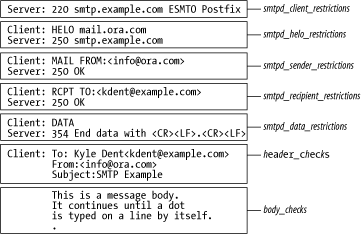
considers one or more restrictions that you assign to each rule. Figure 11-1 shows an SMTP
conversation along with the client rule applied at each step. The
header_checks and body_checks are discussed later in the
chapter.
Let’s review the SMTP conversation to see where each of the parameters fits in.
The SMTP Conversation (Briefly)
The SMTP conversation in Figure 11-1 should be familiar to you from Chapter 2. Example 11-1 shows the log entries for the transaction. First, an SMTP client connects to Postfix over a socket. Because of the way sockets function, Postfix learns the IP address of the client when it establishes the connection. You don’t see the client IP address in the figure, but it is logged by Postfix. You can accept or reject a message based on the client hostname or IP address, thus blocking specific hostnames or IP and network addresses.
1. postfix/smtpd[866062]: connect from mail.ora.com[10.143.23.45]
2. postfix/smtpd[866062]: D694B20DD5B: client=[10.143.23.45]
3. postfix/cleanup[864868]: D694B20DD5B: \
  message-id=<20030106185403.D694B20DD5B@smtp.example.com>
4. postfix/qmgr[861396]: D694B20DD5B: from=<info@ora.com>, \
  size=486, nrcpt=1 (queue active)
5. postfix/local[864857]: D694B20DD5B: to=<kdent@smtp.example.com>, \
  relay=local, delay=98, status=sent (mailbox)
6. postfix/smtpd[866062]: disconnect from mail.ora.com[10.143.23.45]
Once connected, the client sends a HELO command with an identifying hostname. The hostname
provided can be used to accept or reject a message using smtpd_helo_restrictions .
In the next step, the client issues a MAIL FROM command to indicate the sender’s email address,
followed by a RCPT TO command to indicate the recipient’s email
address.
If everything is acceptable up to the point of the DATA command, the
client is permitted to send the contents of the message, which consist
of message headers followed by the message body. Postfix provides
another opportunity to reject the message based on its contents (see
Section 11.9 later in
this chapter). If the final header and body checks are acceptable, the message is
delivered.
Postfix indicates to the client that it has rejected a message by sending reply codes. Standard reply codes are described in Chapter 2. In this chapter, we consider codes in the 4xx and 5xx range. More information appears in a sidebar later in this chapter.
Listing Restrictions
When you assign restrictions to Postfix UBE rules, it is not necessary to use all of the rules. You can define restrictions for the ones you need and leave out the others. The default setting if no rules are set in main.cf looks like the following:
smtpd_client_restrictions =
smtpd_helo_restrictions =
smtpd_sender_restrictions =
smtpd_recipient_restrictions =
     permit_mynetworks, reject_unauth_destination
This prevents your system from being an open relay by allowing any computer on your network to relay while rejecting all others unless they are sending messages destined for one of your users.
There are many restrictions available. Table 11-1 lists each one
along with the client information it operates on. One important
concept that confuses many people at first is that any of these
restrictions can be used in any rule. While it may seem logical that
check_helo_access should be
assigned to smtpd_helo_restrictions, it could equally be
assigned to smptd_sender_restrictions or any of the
others. This gives you a lot of flexibility in ordering your
restrictions when deciding what to accept and what to block.
Restrictions | Client-supplied information |
check_client_access
| Client IP address or hostname |
reject_rbl_client | |
reject_rhsbl_client | |
reject_unknown_client | |
check_helo_access
| |
permit_naked_ip_address | |
reject_invalid_hostname | |
reject_non_fqdn_hostname | |
reject_unknown_hostname | |
check_sender_access
| |
reject_non_fqdn_sender | |
reject_rhsbl_sender | |
reject_unknown_sender_domain | |
check_recipient_access
| |
permit_auth_destination | |
permit_mx_backup | |
reject_non_fqdn_recipient | |
reject_unauth_destination | |
reject_unknown_recipient_domain | |
reject_unauth_pipelining | |
You’ll notice from Table
11-1 that some rules take an argument of the form
maptype:mapname.
The mapname refers to a normal Postfix
lookup table whose lefthand key is matched against the piece of client
information, and the righthand value is the action to perform. Access
maps are discussed in Restriction Definitions following.
How restrictions work
Each of the nonaccess map restrictions
evaluates to or returns one of three possible
values that determine what action Postfix takes with the message: OK, REJECT, and DUNNO. (Access maps can also
return the same values, but they allow additional actions as well.)
The restrictions are evaluated in the order you list them. During
processing, if a rule returns an explicit REJECT, the message is
immediately rejected. If a rule returns an explicit OK, the
processing stops for that
parameter but continues on to the next until all of the
assigned rules have been evaluated or Postfix encounters a
rejection. It’s important to note that a rule might explicitly
accept a message, but it can still be rejected by another rule’s
restrictions. If the set of rules comes to no definite conclusion
(all DUNNOs), the default action is to accept the message. Any
single parameter can reject a message, but all of them must accept
it in order for it not to be rejected. There are generic
restrictions such as permit
and reject that
return explicit OK or REJECT values without considering any of the
client information.
When a rule evaluates to REJECT, by default Postfix
does not actually reject the message until after the client has sent
the RCPT TO command. Even though it may know at the HELO command that it’s going to reject
this client, it waits until after it receives the RCPT TO command before returning the
reject code. The reason for this default is that some SMTP clients
do not check that they have been rejected during the transaction and
continue trying to deliver the message. In such a case, you end up
with connections that last longer than they should and several
warning messages in your log file. Another advantage to the default
is that you get more complete information in your log. If you want
to change the default to have a rejection take effect as soon as
possible, set the parameter smtpd_delay_reject in main.cf:
smtpd_delay_reject = no
You might want to do this in a controlled environment where you know all of the connecting SMTP clients are well-behaved; otherwise, the default makes sense for most situations.
Testing new restrictions
A useful parameter for testing new restrictions is
soft_bounce :
soft_bounce = yes
When it is set, hard reject responses (5xx) are
converted to soft reject responses (4xx). When you add a new
restriction that you’re not sure about, you might want to turn
soft_bounce on and then watch
your logs for what’s rejected so that you can fine-tune your
settings by the time another delivery attempt is made.
Another useful option for testing restrictions is the warn_if_reject qualifier. Simply precede any restriction with it to
have that restriction log a warning instead of rejecting a message.
If you’re not sure what effect a new restriction will have in your
environment, you can try it out with warn_if_reject, and then implement it
completely only if it works as you expect:
smtpd_recipient_restrictions =
        permit_mynetworks
        reject_unauth_destination
        warn_if_reject reject_invalid_hostname
        reject_unknown_recipient_domain
        reject_non_fqdn_recipient
In this example, if a client uses an invalid HELO hostname when delivering a message,
Postfix logs a warning but still delivers the message (assuming it’s
not blocked for other reasons).
A simple example
Before moving on to the restriction definitions, let’s consider a simple example:
smtpd_recipient_restrictions =
     permit_mynetworks
     reject_unauth_destination
     reject_invalid_hostname
     reject_unknown_sender_domain
This example expands on the default configuration with two
additional restrictions. When a client connects, if it’s from your
own network, permit_mynetworks
returns OK, so it is allowed to send mail. The other
restrictions are not checked. If the client is from outside your
network, permit_mynetworks does
not return OK and does not return REJECT, so it returns DUNNO.
Postfix then checks reject_unauth_destination .
If the message is not addressed to somebody at one of your
destination domains, it returns REJECT; otherwise, it returns DUNNO.
Assuming it returns DUNNO, Postfix then checks reject_invalid_hostname , which says to return REJECT if the hostname supplied
with the HELO command is not
valid. Otherwise, it returns DUNNO. Finally, Postfix checks reject_unknown_sender_domain , which returns REJECT if the domain name of the
address supplied with the MAIL
FROM command does not have a valid DNS entry. If none of
the restrictions has rejected the message, Postfix accepts it for
delivery.
Restriction Definitions
There are six types of restrictions introduced below. Each of the restrictions are defined in the sections that follow.
- Access maps for client checking
Restrictions of the form
check_*_accesspoint to lookup tables that might list IP addresses, hostnames, or email addresses (depending on the parameter) that should be accepted or rejected by Postfix.- Other client checks
Other client restrictions compare the client information to general configuration information instead of access tables. An example is
permit_mynetworks, which you saw earlier.- Strict syntax checking
Some restrictions tell Postfix to enforce SMTP standards very strictly. Since spammers often misconfigure or use poorly implemented software, you can stop a lot of spam by making sure that connecting clients follow the rules.
- DNS checking
DNS-checking rules ensure that DNS information is correct. Spammers often work from networks that do not configure DNS correctly. Unfortunately, rules of this type are appropriate only for a very aggressive anti-spam stance because of the number of legitimate sites that also do not configure their DNS correctly.
- Real-time blacklist checking
Real-time blacklists are services listing suspected spamming clients. Postfix can check with real-time blacklist services and reject clients based on their listing.
- Generic
Generic rules explicitly reject or accept a message. They usually specify your default stance if a message isn’t explicitly accepted or rejected elsewhere. Since these rules will always accept or reject a message, they should come last in your list of rules.
Access maps
Restrictions in the client-checking category all point to access map files. Access maps are simply a type of Postfix lookup table (see Chapter 4 for more information about lookup tables). In the lookup table, you specify the client information as a key and the action to take (accept or reject) as the value:
check_client_accessmaptype:mapnameThe
check_client_accessrestriction points to an access table containing entries with IP addresses, network addresses, hostnames, and parent domains to match against the client IP address. (Postfix performs a reverse lookup on the IP address to obtain a hostname to compare host and parent domain name information.) Each entry includes an action to take when the IP address matches a key.check_helo_accessmaptype:mapnameThe
check_helo_accessrestriction points to an access table containing hostnames and parent domains to match against the host information supplied with theHELOcommand. Each entry includes an action to take when the supplied host information matches a key.check_recipient_accessmaptype:mapnameThe
check_recipient_accessrestriction points to an access table containing entries with email addresses, domains, and local parts to match against the address specified with theRCPT TOcommand. Each entry includes an action to take when the supplied address matches a key.check_sender_accessmaptype:mapnameThe
check_sender_accessrestriction points to an access table containing entries with email addresses, domains, and local parts to match against the address specified with theMAIL FROMcommand. Each entry includes an action to take when the supplied address matches a key.
The restrictions check_sender_access and check_recipient_access both check a
supplied email address. For them, the key in your index file
can be an email address (user@example.com) to
match a specific address, a domain name (http://example.com) to match the domain name
portion or subdomains of the address, or the local part of an email
address (user@) to match all addresses using
the specified local part.
The rules check_client_access and check_helo_access compare the key to a
supplied hostname or IP address. The index file pattern can be
a hostname, an IP address (192.168.143.23), or a network address
specified by the initial octets of the address (10 or 10.12 or 10.12.154).
Actions can be indicated as follows:
- OK
Accept the item. Processing for the current rule stops. Postfix moves on to the next restriction rule.
- REJECT
Reject the item. You can optionally specify a short string of text to be used in the reply and with logging for this message; otherwise, Postfix uses the general reply code and text configured for the restriction. The parameter
access_map_reject_codecontains the default reply code for thecheck_*_accessrules andmaps_rbl_reject_codecontains the default reply code forreject_maps_rbl. If you don’t specify a value, they both default to554.- DUNNO
Stop checking entries for the lookup table. Postfix moves on to the next restriction for the current rule.
- FILTER
Redirect the message to a content filter. You must specify a transport and next hop as you would in a transport table.
- HOLD
Place the message in the hold queue. You can optionally specify a short string of text to be logged; otherwise, Postfix logs a generic message.
- DISCARD
Report a successful delivery to the client, but drop the message. You can optionally specify a short string of text to be logged; otherwise, Postfix logs a generic message. Don’t use this action unless you have carefully considered the ramifications. Silently dropping messages runs counter to the expected behavior of email systems. When dealing with spam, dropping messages might be the best course of action, but discarding any legitimate mail can affect the overall perceived reliability of Internet email.
- 4xx
message text Reject the message. The response sent to the client is the numerical code you specify. A response in the 4xx range tells the client there is a temporary problem; queue the message and try delivery later. (See sidebar.)
- 5xx
message text Reject the message. The response sent to the client is the numerical code you specify. A response in the 5xx range tells the client there is a permanent problem; send a bounce notification to the original sender. (See sidebar.)
You can also set up regular expression tables for access maps. In most cases, it probably doesn’t make sense to use a regular expression table for your access lists. Postfix already breaks up email addresses, domains, and IP addresses into the individual pieces to make its comparisons, so you really don’t gain much through regular expressions here. On the other hand, regular expression tables work very well for header and body checks, which are discussed later in this chapter.
Let’s expand the configuration example with some access maps:
smtpd_client_restrictions =
check_client_access hash:/etc/postfix/client_access
smtpd_sender_restrictions =
check_sender_access hash:/etc/postfix/sender_access
smtpd_recipient_restrictions =
permit_mynetworks
reject_unauth_destination
reject_invalid_hostname
reject_unknown_senderWe’ve now added restrictions to consult the lookup tables client_access and sender_access.
The client_access file can have entries like the following:
10.157 REJECT 192.168.76.23 REJECT currentmail.com REJECT
and the sender_access file can have entries like the following:
hardsell@example.com REJECT marketing@ REJECT specials.digital-letter.com REJECT
Other client-checking restrictions
The following client restrictions make their decisions by comparing client-supplied information to the local Postfix configuration. The default rules fall under this category.
-
permit_auth_destination Permits a request if the resolved destination address matches a hostname or subdomain where the Postfix system is the final destination for the message or a relay for the final destination. Final destinations are listed in
mydestination,inet_interfaces,virtual_alias_maps, orvirtual_mailbox_maps, and relays are listed inrelay_domains. Furthermore, the address must not contain any sender-specified routing (e.g., user@example.com@example.net). Ifpermit_auth_destinationdoes not find a match, it returns DUNNO rather than REJECT. Postfix continues to check all subsequent restriction rules.-
permit_mynetworks Allows a request if the client IP address matches any of the addresses listed in the
mynetworksparameter. You normally use this restriction to exclude local clients from other UBE restrictions and to allow them to relay through your SMTP server.-
reject_unauth_destination Rejects a request if the Postfix system is not the final resolved destination email address or a relay for the final destination. Final destinations are listed in
mydestination,inet_interfaces,virtual_alias_maps, orvirtual_mailbox_maps, and relays are listed inrelay_domains. Addresses must not contain any sender-specified routing (e.g., user@example.com@example.net). Therelay_domains_reject_codeparameter specifies the response code for rejected requests. The default is 554.
Strict syntax restrictions
Restrictions in the strict syntax category check for misconfigured clients and reject mail when they don’t comply with the standards. These rules can detect a lot of spam, but they might also reject legitimate clients. You should study the nature of your spam and real messages to see which rules will benefit you most without rejecting real messages. You can use access maps with OK actions to whitelist known senders that would otherwise be rejected.
reject_invalid_hostnameRejects a request if the hostname supplied with the
HELOcommand is not a valid hostname. Theinvalid_hostname_reject_codeparameter specifies the response code for rejected requests. The default is 501. Most legitimate senders use valid hostnames.reject_non_fqdn_hostnameRejects a request if the hostname supplied with the
HELOcommand is not in the fully qualified form, as required by the RFC. Thenon_fqdn_reject_codeparameter specifies the response code for rejected requests. The default is 504.reject_non_fqdn_recipientRejects a request if the address supplied with the
RCPT TOcommand is not in the fully qualified form, as required by the RFC. Thenon_fqdn_reject_codeparameter specifies the response code for rejected requests. The default is 504. Most legitimate senders use fully qualified domain names.reject_non_fqdn_senderRejects a request if the address supplied with the
MAIL
          FROM
command is not in the fully qualified form, as required by the RFC. Thenon_fqdn_reject_codeparameter specifies the response code for rejected requests. The default is 504.reject_unauth_pipeliningPipelining is a technique supported by Postfix to speed up bulk mail deliveries by sending multiple SMTP commands at once. The protocol requires that clients first check that the server supports pipelining. Some clients incorrectly begin pipelining before they confirm that Postfix actually supports it. The rule
reject_unauth_pipeliningimmediately rejects such requests. There is no more processing, and the message is rejected.
DNS restrictions
The DNS checking rules make sure that clients and email envelope addresses are sent from domains that have valid DNS information. It would be a great improvement to email in general if postmasters could always require valid DNS information because it would be harder for spammers to hide. Unfortunately, there are too many legitimate domains that do not configure their DNS correctly for such strictness to be practical. You should study the nature of your spam and real messages to see which will benefit you most without rejecting false-positives. You can use access maps with OK actions to whitelist known senders that would otherwise be rejected.
-
reject_unknown_client Rejects a request if the client IP address has no DNS PTR record or if a follow-up lookup on the hostname listed in the PTR record does not match the connecting IP address. The
unknown_client_reject_codeparameter specifies the response code for rejected requests. The default is 450. If you change the default, the reply code you specify is returned except when there is a temporary DNS error. In this case, your change is overridden and Postfix returns 450. This rule tends to find many false-positives for spam because it seems to be very common to have PTR records misconfigured or not configured at all.-
reject_unknown_hostname Rejects a request if the hostname supplied with the
HELOcommand doesn’t have either a DNS A or MX record. Theunknown_hostname_reject_codeparameter specifies the response code for rejected requests. The default is 450. If you change the default, the reply code you specify is returned except when there is a temporary DNS error. In this case, your change is overridden and Postfix returns 450. Many clients do not use a fully qualified hostname and would be rejected by this restriction.-
reject_unknown_recipient_domain Rejects a request if the domain name of the address supplied with the
RCPT TOcommand doesn’t have either a DNS A or an MX record. Theunknown_address_reject_codeparameter specifies the response code for rejected requests. The default is 450. If you change the default, the reply code you specify is returned except when there is a temporary DNS error. In this case, your change is overridden and Postfix returns 450.-
reject_unknown_sender_domain Rejects a request if the domain name of the address supplied with the
MAIL FROMcommand has neither an A nor an MX record in DNS. Theunknown_address_reject_codeparameter specifies the response code for rejected requests. The default is 450. If you change the default, the reply code you specify is returned except when there is a temporary DNS error. In this case, your change is overridden and Postfix returns 450.
Since the MAIL FROM
address is the address that bounce notifications must
be sent to, it makes sense to require a known domain name. It is
highly recommended that you include this rule in your
restrictions.
Real-time blacklists
Restrictions for real-time blacklists cause Postfix to perform DNS lookups using client information with domains you specify to determine if a client is listed with one of the DNSBL services:
reject_rbl_client domain
              name
Rejects a request if a DNS lookup of a hostname composed of the octets of the client IP address in reverse in the specified domain lists an A record.
reject_rhsbl_client domain
              name
Rejects a request if the client hostname has an A record under the specified domain.
reject_rhsbl_sender domain
              name
Rejects a request if the domain of the sender address has an A record under the specified domain.
Tracing a Restriction List
With what we know so far, let’s trace what happens with
some simple HELO restrictions.
Consider that smtpd_helo_restrictions is assigned the following rules:
smtpd_helo_restrictions =
    check_helo_access hash:/etc/postfix/helo_access
    reject_invalid_hostname
and helo_access contains the following entries:
greatdeals.example.com     REJECT
oreillynet.com             OK
Let’s follow four different scenarios when clients connect with
different HELO commands:
HELOexamplePostfix first encounters the
check_helo_accessrule pointing to the helo_access lookup table. In checking the lookup table, it does not find the specified hostname example, so it moves on to thereject_invalid_hostnamerule. Since example is not a complete hostname as required by the standard, Postfix rejects the message.HELOgreatdeals.example.comPostfix first encounters the
check_helo_accessrule pointing to the helo_access lookup table. In checking the lookup table, it finds an entry for greatdeals.example.com with an action of REJECT. Postfix, therefore, rejects the message.HELOoreillynet.comPostfix first encounters the
check_helo_accessrule pointing to the helo_access lookup table. In checking the lookup table, it finds an entry for http://oreillynet.com with an action of OK. Postfix stops processing for thesmtpd_helo_restrictionsparameter without considering any of the other restrictions and moves on tosmtpd_sender_restrictionsif specified.HELOmail.ora.comPostfix first encounters the
check_helo_accessrule pointing to the helo_access lookup table. In checking the lookup table, it does not find the specified host mail.ora.com, so it moves on to thereject_invalid_hostnamerule. Since mail.ora.com conforms to the format required by the standard, Postfix continues to thesmtpd_sender_restrictionsif specified.